
Channel
October 2007, Issue No.47
What's inside ...● Recent HARNET Upgrade Improves Overall Internet Service Quality ● More Email Quota and Enhancements on WebMail
● myPortal Upgrade: A Brand New User Interface
● Communication Spotlights - 802.11 Wi-Fi Population in HKUST ● Launch of the Web Hosting Service
● Network Security Protection on Campus ● Lifelong Email Address @ HKUST Family ● Lecture Theater Enhancement
● Why my PC still gets infected?
● HKUST Notebook/Desktop Ownership Program 2007 ● Barn PC upgrade
The Hong Kong University of Science & Technology. All Rights Reserved. Suggestions are welcome at [email protected]
Channel
Channel - October 2007, Issue No. 47
Network Systems Team
Recent HARNET Upgrade Improves Overall Internet Service Quality
In a way, Internet access is like telephone dial tone -- one picks up a phone and expects to hear a dial tone each and every time. Being responsible for the management of the University's Internet access, ITSC has always tried to strive for a 7x24 Internet service availability as well as proactive capacity planning. As such, since February this year, the following improvement work has been made:
More Internet Bandwidth Provision To Cope With Growing Demand
Capacity-wise, two bandwidth upgrades have been performed in preparation for this semester:
● the HARNET link shared among 8 tertiary institutions has its international Internet bandwidth upgraded from 480M to 560M (bit/s) in August ● the private Internet link for HKUST has been upgraded from 60M to 80M in early August.
Enhanced Internet Resiliency
Much effort has been spent further to increase the service availability of Internet:
● The HARNET network topology has been changed from a carrier-managed Metro-Ethernet network to an optical-ring based network.
Optical fiber bandwidth has been rented from PCCW, and in two separate fiber rings connecting all HARNET institutions. This removed the Metro-Ethernet equipment situated in the middle, while the two fiber rings act as backup to each other, hence providing higher network resiliency. Additional bandwidth between institutions can now be built or torn down on an as-need basis. This optical network is further backed up with a scaled-down Metro-Ethernet network linking all institutions.
There are now a total of three physical links connecting UST to the outside world, each carrying different traffic types and each serving as an automatic backup path to the others.
● The HARNET data center equipment has been migrated from rented ISP rack space to rack space in HKU and CUHK computer centers. With this physical
interruption during future move towards another ISP.
● The link to HKIX has been increased from single 1G link to dual 1G mutual-backup links
● Within UST, network switches along the Internet access path have been upgraded to models with higher switching capacity and better management
functionalities
It is good to see that all the above upgrade exercises have brought us to yet another level of higher availability and manageability.
The Hong Kong University of Science & Technology. All Rights Reserved. Suggestions are welcome at [email protected] Last Modified :
Channel
Channel - October 2007, Issue No. 47 WWW & Server Technology
More Email Quota and Enhancements on WebMail
ITSC is pleased to announce that the default email quota for our HKUST iMail users have been doubled up starting from the 2007/08 academic year in view of the increasing demand for email storage.
The hardware of the email servers together with the storage unit have been upgraded during the summer in order to improve its performance, reliability and cater for the coming storage growth. Besides, there are a few enhancements on the HKUST WebMail Service:
● Better handling of Chinese messages in Unicode format.
● Address book can now be imported/exported in CSV (comma-separated values) format. ● Email messages can now be exported in EML format (.eml filename extension used by email
clients like Thunderbird, etc).
Details about our Email Service can be found at: http://www.ust.hk/itsc/email/
The Hong Kong University of Science & Technology. All Rights Reserved. Suggestions are welcome at [email protected]
Channel
Channel - October 2007, Issue No. 47 WWW & Server Technology
myPortal Upgrade: A Brand New User Interface
To improve the usability, stability and performance of the HKUST Portal, both hardware and software of myPortal have been upgraded recently. HKUST myPortal is developed based on uPortal by JASIG, which is a web portal technology specially designed for universities. It supports users to organize and aggregate useful pointers to Internet resources in their own favorite ways. Users can subscribe to a number of predefined services (also known as channels) available in myPortal, such as
● myWebCT - access to all of your WebCT courses ● Classifieds - read and post classified advertisements ● Library Gateway - access to library system
● People Search - find / modify contact information of HKUST members
● Teaching Portfolio and Cabinet - a CELT service for faculty, instructors and teaching support staff ● etc, etc.
A popular new "theme" has been incorporated in the new myPortal along with this upgrade and you will find a brand new user interface for easy navigation and customization. Besides the attractive new theme and unified layout, there are new applications like "Today" channel showing today's weather, number of unread emails and personal events in your calendar, etc.
Unlike the previous portal version which requires users to subscribe for any newly deployed channels manually, new channels can now be included in user's profile automatically. While you can access to your customized information like the Bookmarks channel, the new portal serves as a one-stop location for accessing information from various information providers in HKUST.
A sample screen of the new myPortal
To access "myPortal", please visit the web page at: http://my.ust.hk/
The Hong Kong University of Science & Technology. All Rights Reserved. Suggestions are welcome at [email protected] Last Modified :
Channel
Channel - October 2007, Issue No. 47
Network Systems Team
Communication Spotlights - 802.11 Wi-Fi Population in HKUST
Since year 1999, ITSC has started the deployment of wireless network in HKUST. Due to the ease of use and convenience of wireless network for Internet connectivity, the HKUST wireless population has maintained a steady growth over the past 8 years.
Figures 1(a) and 1(b) show the usage of the most common on-campus Wi-Fi services - secure MobileNet (sMobileNet) and the less secure equivalent (MobileNet) in September 2007.
Figure 1(a) sMobileNet / MobileNet population in September 2007 - User count
Figure 1(b) sMobileNet / MobileNet population in September 2007 - Logon count
As shown in Figure 1(a), there are 630 wireless users on average per day. If we only consider weekdays, then the average usage is boosted up to over 800 wireless users per day. Figure 1(b) shows that on average over 3,700 logons happened each day, which infers a large wireless population in HKUST.
Let us delve into the sMobileNet / MobileNet population. In September 2007, there were altogether 3,823 sMobileNet / MobileNet users, which can be classified into 3 categories as shown in Table 1.
Staff Postgraduate Undergraduate
User count 362 (9.5%) 1,106 (28.9%) 2,355 (61.6%)
Table 1 Distribution of sMobileNet / MobileNet users in September 2007
As there are about 9,000 students and 2,000 staff in HKUST, the figures suggest that over one-third of students and one-sixth of staff were using wireless services in September 2007. This indicates that wireless network is becoming more vital to the daily life of our faculty and students.
Figure 2 shows the popular hotspot locations for sMobileNet / MobileNet sessions in September 2007.
Figure 2 Popular HKUST hotspots in September 2007
The pie chart shows that library and classroom access points are the most popular HKUST hotspots in September 2007, which indicates that the students are more common to use wireless network for academic purposes during study or lectures.
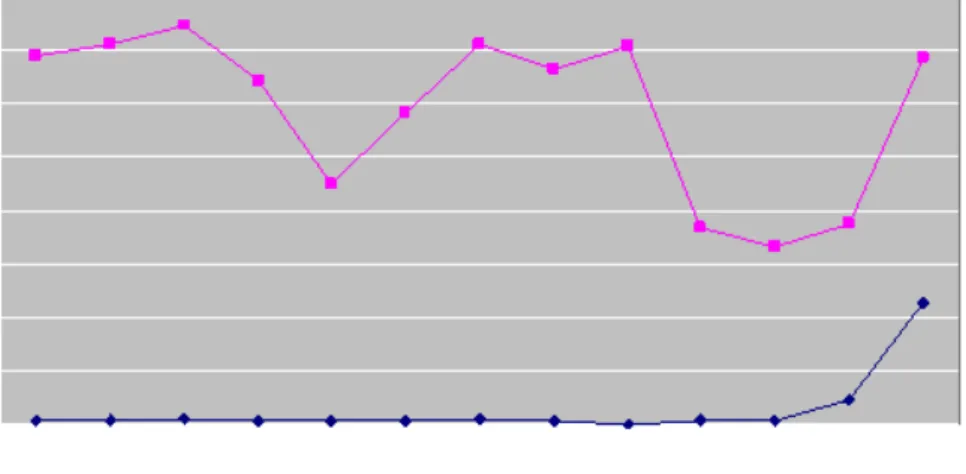
In the new semester, ITSC has promoted the use of secure MobileNet (sMobileNet) with the plan to phase out the less secure MobileNet service. Figure 3 shows the changes on usage pattern of sMobileNet and MobileNet in this semester.
Figure 3 Growing sMobileNet population in the new semester
According to the figure, the population of sMobileNet has increased by more than 20-folds while the population of MobileNet remains constant. This suggests that HKUST staff and students are more aware of the wireless security and are eager to use sMobileNet. Besides, our recent improvement efforts to simplify the sMobileNet configurations procedures have induced more users to use this service.
Apart from these, about 600 persons in the sMobileNet / MobileNet population have made use of both services in September 2007. We expect this user group was using MobileNet before and has decided to switch to sMobileNet due to its convenience and extra security.
Last but not least, ITSC has launched a number of wireless services in this semester in addition to the current sMobileNet and MobileNet services (Table 2):
Wi-Fi service Description
eduroam HKUST staff or students can gain free wireless connectivity when they are visiting other eduroam member
institutions. These include major tertiary institutions in Hong Kong and overseas.
Universities via PCCW
HKUST staff or students can make use of the PCCW hotspots all over Hong Kong for free wireless
communications. Typical PCCW hotspots include coffee shops, convenience stores, telephone kiosks, shopping malls and public transports.
Alumni HKUST alumni can gain free Internet access when they are visiting public areas of HKUST.
Table 2 New Wi-Fi services for "anytime, anywhere" connectivity
For details on the new Wi-Fi services, please visit Wireless Services - 802.11 Wi-Fi for details.
All the new Wi-Fi services are secured by 802.1x authentication and Wi-Fi Protected Access (WPA). The configurations and logon processes are simple and straight-forward to minimize the user effort.
Since the launch of these wireless services in late August, we have observed nearly 10,000 logons to these wireless services (see figure 4). We expect the usage of these wireless services will be higher once they are getting more popular.
Figure 4 No. of logons to the new Wi-Fi services in September 2007
In future, ITSC will keep on improving the wireless network infrastructure for better quality and security. ITSC will also consider extending the wireless network coverage, including both on-campus areas and off-campus locations.
The Hong Kong University of Science & Technology. All Rights Reserved. Suggestions are welcome at [email protected]
Channel
Channel - October 2007, Issue No. 47
WWW & Server Technology
Launch of the Web Hosting Service
A new web hosting service, HKUST iHost Service, is available starting from the 2007/08 academic year. It aims to provide a secure web hosting service for our users who have the needs to setup a departmental web site, publish information for conferences, seminars or projects related to their teaching and research activities.
With HKUST iHost service, there is no need for our users to setup their own web servers or manage those tasks originally for trained system administrators. Users can focus on their web application development and leave all the system maintenance efforts such as setting up a firewall, applying critical system patches, system backup etc to ITSC professionals. We believe that a protected and secured web server is an important key to the success of your mission critical web applications. Protected and Secured
SAFE
FeaturesS
ecurity● Dedicated subnet with firewall protection ● Hardened Operating System
● Up-to-date system patches
● Limited ports for secure network protocol (SSH, Secure FTP) ● Physically protected with access control
A
vailability● SAN (Storage Area Network) infrastructure ● UPS (Uninterruptible Power Supply) system ● System alarm monitoring
● Regular system backup
F
unctionality● Support PHP scripting language ● Support Java Servlet/JSP ● Support CGI execution ● MySQL database support
E
fficiency● Domain name within the ust.hk namespace (e.g. itsc.ust.hk) ● No hardware procurement
● Maintenance free
Details about the HKUST iHost Service can be found at:
http://www.ust.hk/itsc/webguide/webhost/
The Hong Kong University of Science & Technology. All Rights Reserved. Suggestions are welcome at [email protected]
Channel
Channel - October 2007, Issue No. 47 Network Systems Team
Network Security Protection on Campus
Back in November 2006, ITSC had started to deploy Network Intrusion Prevention System (NIPS) and Network-Based Antivirus (NAV) security devices on campus. These new devices serve the function of scanning for possible virus infection over the network, and try to eliminate security threats or attacks from the Internet as far as possible.
What Functions Does Our NIPS Solution Serve?
The NIPS security device is an active network appliance which acts as a security guard at our Internet gateway. It will keep on examining Internet traffic to spot if there are any noticeable malicious traffic leading to possible network threats or attacks, and if detected, it will proceed right away to do mitigation or harmful traffic filtering automatically once they are discovered. Such security appliance will periodically receive timely updates from the vendor's website so as to update its knowledge base. This will enable it to be capable of identifying the latest threats like spyware, Voice over IP (VoIP) vulnerabilities, botnets, malware, worms, trojans and P2P related attacks.
The NIPS can defend against the so-called Zero-Day Attacks through its protocol anomaly detection mechanism where it does not depend on signatures database update. Such kind of built-in intelligence, or heuristics, is able to protect our campus from zero-day attacks, which basically refers to attacks that occur before most vendors have a patch available to deal with a security risk exposure. This kind of Internet protection capability is really regarded as important and
indispensable in nowadays secure Internet setting.
What Level of Protection Our NAV Solution Delivers?
By using the latest content processing technology, NAV can perform real-time network detection of over 3,000 types of known viruses that are transmitted in the form of Web, E-mail or FTP traffic. If viruses are detected, related traffic will be blocked automatically in order to prevent further virus infection or propagation through the network. At present, we are making use of such NAV technology to mainly protect our student hall network (ResNet) which is serving over 4,000 networked computers.
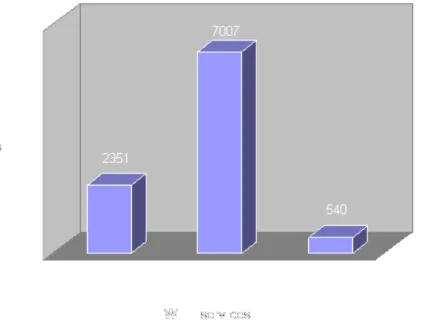
After implementing the NAV solution for almost one year, it is observed that on average around 1,900 computers are
protected from possible virus infection on a monthly basis, and a monthly total of 126,000 virus infection attempts have been successfully blocked (see Fig. 1 below).
Shown below (Fig. 2) is another graph which gives the general trend with regard to type of virus activity and their respective proportion for the period from November 2006 to June 2007.
The above graph depicts the number of hit count for each of the major virus categories. As observed, Adware and Trojan are the two most active virus categories that create possible threats to desktop computers on campus. Lower level of virus
activity was logged in January 2007 as that was the period of winter break with expected lower Internet bandwidth usage. However, high virus activity was logged in March and April 2007, and as analyzed, it was mainly attributed to the
proliferation of the "Adware.Boran" and "Everda!tr" viruses during that period. Here is a table that briefly describes the meaning of those common virus categories:
Category Description
Adware
Refer to any software which displays advertisements, whether or not the user has consented. It can intercept or take control over the user's interaction with the computer without the user's permission or knowledge.
Trojan Malicious software that can enable an attacker to control an infected
computer.
Exploit Malicious software that uses exploits of software vulnerabilities as its
infection mechanism.
Virus Malicious software that can copy itself and infect a computer without
user's permission or knowledge.
Mass Mailer Malicious software that spread using electronic mail.
Phishing Phishing is a technique used to gain personal information by using
forged E-Mail messages and Web pages.
NIPS Works in Concert with NAV as Complementary Security Solution
In the case of zero-day attacks, a virus or other exploit takes advantage of a newly discovered hole or vulnerability in a program or operating system before the software developer has released a patch available. This type of attack can spread around the globe in short time but it can be protected by NIPS. However, the NAV protection would fail to eliminate this type of attack due to the time lag between virus outbreak and availability of new signatures update.
In March 2007, Microsoft warned that an unpatched vulnerability in Internet Explorer (IE) browser could allow an attacker to gain control of a computer when processing malicious animated cursor files. Under such circumstances the NIPS has successfully mitigated the Internet attacks targeting against this exploitable vulnerabilities well before official patches are available.
The Road Ahead
In upcoming, ITSC will continue to explore the possibility of extending the NAV protection to include instant messaging (IM) applications like AOL IM, ICQ, MSN Messenger and Yahoo IM. We think this is becoming more and more essential as IM applications have emerged as one prevalent way for spreading viruses over network.
Further, ITSC will consider extending the NAV solution to other campus network besides the current student hall network so as to provide real-time network-based antivirus protection.
The Hong Kong University of Science & Technology. All Rights Reserved. Suggestions are welcome at [email protected]
Channel
Channel - October 2007, Issue No. 47 WWW & Server Technology
Lifelong Email Address @ HKUST Family
HKUST Lifelong Email Forwarding Address is a service provided for students (both undergraduate and postgraduate) who wish to own a lifelong email address, even after the completion of their
courses in HKUST, for presenting to outside correspondents. The Lifelong Email Forwarding Address is particularly useful for students to communicate with external parties for the purposes of:
● job seeking,
● email communications with friends / peers, ● mailing list subscription,
● journal publishing, ● etc.
It is provided as a supplement to the official HKUST email address, i.e. <account name>@stu.ust.hk for UG or <account name>@ust.hk for PG, but will not expire after graduation. Students don't have to worry about losing contact with external parties after graduation. The official HKUST email address will still be used for internal communications while studying in HKUST.
The naming scheme for this Lifelong Email Forwarding Address is: xxxxx.<surname>@family.ust.hk
where "xxxxx" has a maximum of 20 characters and can be anything that reasonably identifies a student to others.
For more information, please refer to our web page at: http://www.ust.hk/itsc/email/lifelong/
The Hong Kong University of Science & Technology. All Rights Reserved. Suggestions are welcome at [email protected]
Channel
Channel - October 2007, Issue No. 47 Mr. David Shiu
Lecture Theater Enhancement
In this summer (Year 2007), ITSC has implemented a number of improvements to the Audio & Visual environment in lecture theater K and J (LT-K & LT-J).
Video Conference/Remote Lecture Ready
First of all, the AV infrastructure in LT-K has been enhanced to support Remote Lecture. This enhancement allows us carry out lectures or seminars in LT-K with a remote site (e.g. another Campus or Universities Lecture Hall) simultaneously, allowing remote audience to attend and participate (e.g. raise questions) in the event.
The enhancement includes two network video cameras, capturing the presentation of the speaker in LT-K. Another network camera targeting the audience can capture the queries and response of the local audience. We have also enhanced the audio & video infrastructure, allowing all material
presenting on the video projector (including PC display, DVD, VCR, Visualizer, etc) to be made ready for sending to the remote lecture venue.
At the same time, the audience at the remote side can send video & audio signals of their venue back to LT-K. This would allow the remote audience to participate in raising queries or Q/A sections.
Plasma display for instructor
In conventional Lecture Theaters and Classrooms environment, the teaching staff will normally be facing his/her class (the audience) during the class. The video projector projects the instructor
selected video source (e.g. PC, Visualizer, DVD or VCR) to the projection screen which is on the front wall of the venue. Typically, this video screen is behind the teaching staff when he/she faces the class. In case the teaching staff wants to check/confirm what is being shown on the projector, he/she will need to turn around to check the screen, which is very inconvenient and this also disturbs the flow of the class.
To help with this situation, we are testing the aid of added a Plasma TV at the back of LT-K, showing simultaneously what is being projected on the video screen. Instructors in LT-K can now easily
confirm and check what is being shown on the projector to his/her students without turning around to check the screen.
New AV Control System Interface
At the same time, the AV Control System in LT-J and LT-K has been redesigned and simplified. The new designed panel is much simpler and intuitive to use. Apart from being able to directly controlling all A/V equipments, the Panel design includes a small video windows which shows the user what is being projected on the screen, giving the user a choice to cross check what is being shown on the projector, without the need of turning their head to check the projection screen.
The Hong Kong University of Science & Technology. All Rights Reserved. Suggestions are welcome at [email protected]
Channel
Channel - October 2007, Issue No. 47 WWW & Server Technology
Why my PC still gets infected?
I've my Windows fully patched. I have firewall blocked everything. I've three Anti-Virus/Anti-Spyware tools installed and I update their signatures every other minute. My IT department says I do all these 3 steps and my PC will be safe. So, my PC is safe now, isn't it?
To answer this question, I ask myself the following questions:
● It is a few days from Christmas. I receive an email from one of my best friend aboard with an
e-Card attachment. Would I open it?
● The ITS department sends me an email. It says a trojan is fast spreading and ask me to install
the attached security update. Would I install it?
● I get an email from my colleague with subject line "unbelievable". The email has a pdf file. pdf
file won't hurt, right? Would I click open it?
● When I browse to one of my trusted hobby sites and it says my Flash Player is outdated and
shows me a link to update it. Would I click on it?
● I receive a promotional email from my bank. The email has my credit card number on it (with
the last 4 digits hidden). It contains a link to the bank's website. I'm asked to logon the website to enter a lucky draw. The link looks fine. I click on it and am brought to a website that looks familiar. I'm cautious enough to verify the SSL padlock of my browser is on. Would I logon the system?
I will definitely say no when I read the questions off Channel. But would I really act the same when I'm in holiday mode? What if I have tons of work waiting to do and my boss is chasing after me? What if I'm close to solve a tough question that could make me the next Nobel Laureate? I'm not that sure. Back to my first question. My PC is safe if it works without me. Without sufficient security awareness, I am the weakest link in the system. My PC could still get infected even if I installed every security tools I can find.
So, if you don't want to be the next victim, think a moment before you click!
The Hong Kong University of Science & Technology. All Rights Reserved. Suggestions are welcome at [email protected]
Channel
Channel - October 2007, Issue No. 47
Network Systems Team
HKUST Notebook/Desktop Ownership Program 2007
Same as previous years, this year's program is worked out based on the feedback of the May online survey, and with the support from the Students' Union and Purchasing Office. Two rounds of roadshow and order taking were arranged, one around mid-August and another one in early September. This year for the first round we had observed there are increasingly more abuses of the program for profit-making purpose, and as such, after consulting the University management, we had subsequently revised the program scheme in the second round to address the issue.
It turns out that the new scheme is pretty effective in basically eliminating such kind of profit-making abuses. Even though the revised scheme may bring about some inconvenience to our users, it is good to see that in general our users are pretty understanding, which we really appreciate it a lot. Again this year the overall response is still overwhelming, and many of our users have benefited from this annual special offer. To some extent the relative notebook sales quantity for the respective two rounds already manifests this: 58.8% (1st Round) vs. 41.2% (2nd Round).
Based on the sales statistics up to Sep 7, the ThinkPad T61/T61p, X61/X61s and R61 series are the more popular notebook models: T61 (42.5%), X61 (16.1%), X61s (10.1%), R61 (9.6%) and T61p (8.9%). In other words, around 51.4% of the overall orders are for a ThinkPad T61/T61p model, while around 26.2% for a ThinkPad X61/X61s model.
Order-taking Counters
Note that under the revised scheme, all second round notebook customers are in general required to bring along their purchased notebook computer to HKUST for ownership verification during Dec 4-8, 2008 (Tue-Sat) or Jan 8-12, 2008 (Tue-Sat). The upfront deposit payment will then be fully refunded by PCCW to the customer upon successful verification. Detailed arrangement will be announced at http:// www.ust.hk/itsc/cop by Nov 30, 2007.
Please also note that this one-time limited program offer is valid till 31 October 2007 and while stock lasts. For further enquiries and order placement, please contact PCCW's service hotline at 2888 9998. Details of our program is available at the program website:
http://www.lenovohk.hk/ust
The Hong Kong University of Science & Technology. All Rights Reserved. Suggestions are welcome at [email protected]
Channel
Channel - October 2007, Issue No. 47 Miss. Theresa Lo
Computer Barn PC upgrade
Over the summer holidays, the Tang Shiu Kin Computational Lab (Barn B) has undergo a PC upgrade exercise. The one hundred units of Pentium 4-2.4Ghz have been replaced by Core 2 Duo E6600 2.4Ghz PCs with 2Ghz of memory and 160G harddisk. The 15" LCD monitors have been replaced with 19" LCD monitors to enable better display resolution and easing the eye strain to the students. As not all software applications are "Vista ready", these PCs continue to operate on WinXP SP2. Nevertheless, with the more powerful hardware configuration, students wanting to experience the new Microsoft Visa operating system, could now get a taste of it under VMware on these PCs.
The Hong Kong University of Science & Technology. All Rights Reserved. Suggestions are welcome at [email protected]

![[102-2] WNFA lab4 - A Tiny Wireless Sensor Network 2014/5/12 Chih-Hsien Ou](data:image/gif;base64,R0lGODlhAQABAIAAAP///wAAACH5BAEAAAAALAAAAAABAAEAAAICRAEAOw==)