
整合網站結構圖與知識概念圖的群體知識視覺化系統
50
0
0
全文
(2) 整合網站結構圖與知識概念圖的群體知識視覺化系統 學生:林宜立. 指導教授:李德財博士. 國立交通大學資訊工程學系碩士班. 摘要. 網站的建立方式通常可分為兩種,傳統的建構方式,通常會先有網站藍圖 (sitemap),網站開發人員再依此藍圖來架構整個網站並增加網站內容。另一種方式 就像一般知識入口網站的架構過程,先分析各別專業需求,再依照其實體理論模 型(ontology) 設定內容型別,之後便由使用者各自建立內容並互相分享,其網站內 容不斷增加,但後續發展並非按照完整的網站藍圖(sitemap)逐步進行。值得注意的 是,知識入口網站的內容,一方面以個別網頁的形式呈現,另方面則又同時具有 特定的知識概念與意義。康乃爾大學(Cornell University) Joseph D. Novak 教授曾對 知識結構提出知識概念圖(concept map)的模型,其所支持的建構式理論,經實證為 正確性極高的知識模型。我們相信,如能自動產生知識入口網站的網站結構圖, 亦將能有效反映整個網站中的專業知識概念。 在本文中,我們針對一個已發展的演算法問題協力解題環境的知識網站 (OpenCPS),開發一套知識入口網站(knowledge portal)的結構圖產生器(sitemap generator),這項研究結合知識管理(knowledge management)的技術與知識概念圖 (concept map)的構想,以視覺化的方法觀察此演算法問題解題環境網站上群體知識 (group knowledge)的組織狀態。我們的實作結果顯示出,這項視覺化的管理及檢示 i.
(3) 技術可以很有效地呈現群體知識,以作為數位教學的題材或是專業使用者修正與 增加內容的依據。. ii.
(4) A Visualization Tool for the Sitemap of a Knowledge Portal and the Concept Map of Group Knowledge Student: Yi-Li Lin. Advisor: Dr. Der-Tsai Lee. Department of Computer Science and Information Engineering National Chiao Tung University. Abstract. Contents of a website can be constructed by two means. Conventional websites usually have a sitemap initially. Using this map as a blueprint, the website designers develop the web pages of the content and add links to the content of a website, such as the homepage of National Chiao Tung University. On the other hand, knowledge portal websites do not have sitemaps to outline the contents in advance. A knowledge portal site allows its members to create and share their own knowledge objects. The website therefore grows itself unlimitedly and unexpectedly just like a coral. Interestingly, the knowledge objects of a knowledge portal are not only represented in web pages but also associated with conceptual elements defined within a given ontology. In this regard, we attempt to develop a visualization tool to display the sitemap of knowledge portal and. iii.
(5) observe the concept map of group knowledge. We chose a locally developed knowledge portal, i.e. the Open Computational Problem Solving (OpenCPS) Knowledge Portal, as the practice platform of our visualization tool. Using this visualization tool, users are allowed to monitor the sitemap after the contents are built, and can thereby examine the formation of group knowledge. In this thesis, we demonstrate that the group knowledge of this knowledge portal not only can serve as an aggregation of content for learning purposes, but also can get enhanced from users’ feedback.. iv.
(6) 致謝. 本論文的完成,首先必須感謝我的指導教授. 李德財博士兩年來的悉心教. 導,並提供良好的研究環境;並於論文撰寫過程中給予細心的指導及寶貴的意見, 讓我可以在畢業前將論文投至國際會議上發表,深表感激。同時也非常感謝我的 論文口試委員,何建明教授及荊宇泰教授,他們給予了我許多寶貴的建議。 接下來要特別感謝實驗室的學長魏志達博士,他給予了我這個題目最初的靈 感及想法,並且接受我隨時隨地的詢問及討論,在論文的修改上也給予了我很大 的協助,在此深表感激。另外,也非常感謝實驗室的其他各位學長及同窗伙伴對 我的幫忙,和我分享這兩年的辛苦與快樂。 最後,感謝我的家人長久以來對我的支持與照顧,提供我一個舒適安穩的求 學環境,讓我可以順利地一路走來,我永遠銘記在心。. 僅以本論文獻給所有關心過我的人,感謝您們的支持。. v.
(7) Table of Contents. 摘要....................................................................................................................................i Abstract...........................................................................................................................iii 致謝...................................................................................................................................v Table of Contents............................................................................................................vi List of Figures:...............................................................................................................vii List of Tables: ...............................................................................................................viii Chapter 1 Introduction...................................................................................................1 1.1 Motivation..........................................................................................................1 1.2 Approach............................................................................................................2 1.3 Organization of this Thesis...............................................................................3 Chapter 2 Related Work.................................................................................................4 2.1 Knowledge management for Computational Problem Solving.....................4 2.1.1 OpenCPS Ontology ................................................................................5 2.1.2 Knowledge Management Architecture of the OpenCPS ..................10 2.2 Concept map .................................................................................................... 11 2.3 Mind map.........................................................................................................14 Chapter 3 Development of the Sitemap Generator....................................................16 3.1 System Requirement – The OpenCPS...........................................................17 3.2 Site-And-Concept (SAC) Map Generator.....................................................19 3.2.1 Backend Search Engine .......................................................................21 3.2.2 SAC Map Monitor ...............................................................................22 Chapter 4 Group Knowledge Visualization via the SAC Map..................................29 4.1 Basic operation:...............................................................................................30 4.2 Learner-mode operation: ...............................................................................31 4.3 Expert-mode operation:..................................................................................33 Chapter5. Conclusion and Future Work.....................................................................36 References:………...…………………………………………………………………..38. vi.
(8) List of Figures:. Figure 1: A conceptual map of the OpenCPS. ..............................................................6 Figure 2: Ontology of the OpenCPS..............................................................................6 Figure 3: Knowledge management architecture of OpenCPS.[11]...........................10 Figure 4: Concept map on higher education. [10]......................................................13 Figure 5: Example of a mind map. ..............................................................................15 Figure 6: A snapshot of the OpenCPS website. ..........................................................17 Figure 7: A computational problem object created by portal user...........................18 Figure 8: A snapshot of the SAC map generator. .......................................................20 Figure 9: Manage indexes in OpenCPS. .....................................................................22 Figure 10: A snapshot of the SAC Map Monitor. .......................................................23 Figure 11: A set of right click function (c) for a selected node on the drawing panel (d)....................................................................................................................................25 Figure 12: Mindmap of a target Computational Problem. .......................................26 Figure 13: A snapshot of the “ADD RELATION” function. .....................................27 Figure 14: A search result shown in SAC map. ..........................................................31 Figure 15: Using the right-click “kNN” function. ......................................................32 Figure 16: A result after “kNN” function draws a SAC Map ...................................33 Figure 17: A snapshot of expert-mode operation .......................................................34 Figure 18: Complete map of current problem objects...............................................35. vii.
(9) List of Tables:. Table 1: Primary properties for a computational problem .........................................7 Table 2: Primary properties for an algorithmic solution ............................................8 Table 3: Primary properties for an implementation....................................................9. viii.
(10) Chapter 1 Introduction. Knowledge management has been an attractive research topic for over three decades. The study of knowledge management receives increasing attention recently, due to the exponential growth of knowledge and the mature technologies of the World Wide Web (WWW). Web technology brings about a kind of website known as “knowledge portal”, which supports various kinds of content types and presents the knowledge objects as webpages. Knowledge portals may also be equipped with further capabilities, such as data sharing, software warehousing, access control, and workflow management. Many companies and research organizations have begun to create development platforms for building knowledge portals, for example, Microsoft Sharepoint [14], the Problem-Knowledge Couplers (PKC) [20], and the Zope application server [24].. 1.1 Motivation. In comparison with conventional websites, knowledge portals have two features: (1) the contents are contributed by all the portal members, rather than by the web design community alone. Accordingly, the contents of a knowledge portal can be regarded as group knowledge, which aggregates all the intelligent assets from the user base. (2) Except for an axiom ontology given by the portal designer, no detailed sitemaps or blueprints are prepared to outline the contents in advance. As time goes on, the contents of the knowledge portal keep on growing in an unpredictable manner. Regrettably, there.
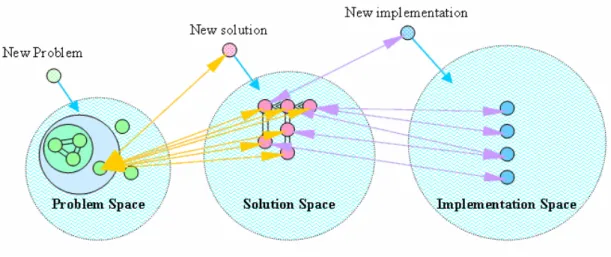
(11) are few automation tools that support sitemap visualization after these contents are created. This situation implies that users cannot but spend a long time to look up the knowledge objects and relations. We believe the quality of a knowledge portal can be improved if it can incorporate a visualization tool to monitor the sitemap after the contents are built. This sitemap will allow the members to examine the current status of knowledge structure by visualization. Therefore, the group knowledge of this knowledge portal not only can serve as an aggregation of content for learning purposes, but also can get enhanced from users’ feedback. In this thesis, we attempt to present a visualization tool based on a locally developed knowledge portal, i.e. the Open Computational Problem Solving (OpenCPS) Knowledge Portal, to generate this sitemap of a knowledge portal by adopting the notion of a concept map. That is, the arcs connecting related knowledge objects are labeled with relations and the inner properties of knowledge objects can also be unfolded. Hereafter, this map is referred to as the Site-And-Concept (SAC) map, mainly used for group knowledge visualization on a knowledge portal.. 1.2 Approach. We propose this visualization tool based on the OpenCPS knowledge portal in two phases. First, we develop a backend search engine to retrieve inner attributes and relation information of given knowledge objects. After that, we also create a front-end SAC map monitor using Java language. This front-end monitor retrieves search results 2.
(12) from an application programming interface (API) of the backend search engine and then draws up the sitemap by adopting the notion of a concept map. This visualization tool, i.e. the SAC map generator, is a combination of both the search engine and the SAC map monitor.. 1.3 Organization of this Thesis. The rest of this thesis is organized as follows: Chapter 2 illustrates some related technologies and results, i.e., the OpenCPS website [19], concept map, and mind map. Then in Chapters 3, and 4, we will explain how to develop this SAC map generator, and demonstrate the group knowledge visualization via the SAC map generator in the OpenCPS knowledge portal. Finally, we make a brief conclusion and present some ideas as future work in Chapter 5. Our result was also published in International Conference of Knowledge Management (IKNOW ’05) [23] .. 3.
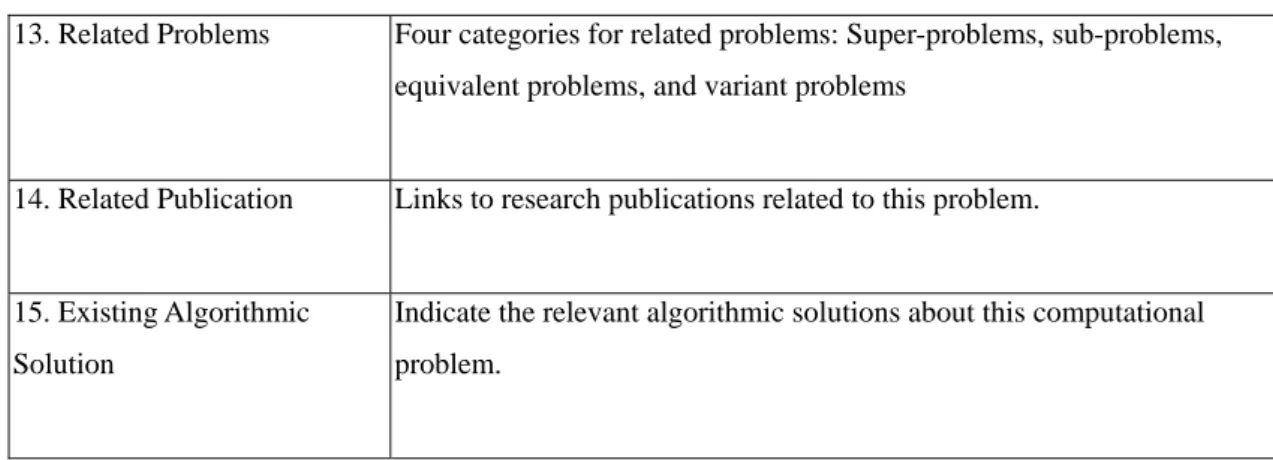
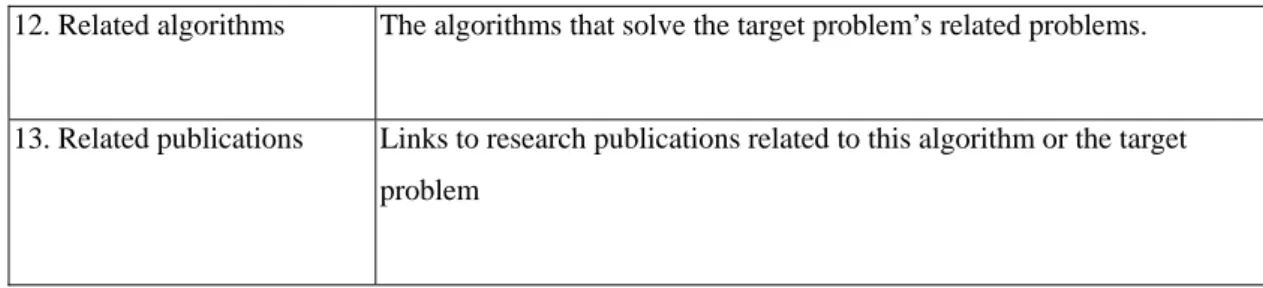
(13) Chapter 2 Related Work. The World Wide Web (WWW) is a large repository of information including many resources such as documents, multimedia, datasets and so on. People who connect to the Internet can access many resources. Due to a large amount of knowledge distributed and grown rapidly on the WWW, knowledge management systems are needed to help users retrieve the concerned information and knowledge. Knowledge management initiatives were flourishing during the mid-1990. The study of knowledge management gets increasing attention recently, due to the exponential growth of knowledge and the mature technologies on the WWW. Web technologies give rise to a kind of website known as “knowledge portal”, which supports various kinds of content types and presents the knowledge objects as webpages. Open Computational Problem Solving (OpenCPS) Knowledge Portal [19] is such a website, which was implemented within problem-centered collaborative knowledge management architecture.. 2.1 Knowledge management for Computational Problem Solving. In solving computational problems, we first need to know and determine if a problem is a new one. Is the problem well-solved? Do similar or related problems exist? How can one be sure that a result is new? How does it compare with previous results? Who are the experts in this area, and is collaboration possible? The OpenCPS website. 4.
(14) was developed, as an aim, to answer these questions promptly.. 2.1.1 OpenCPS Ontology. The OpenCPS Knowledge Portal developed by Lee et al. [9] uses three conceptual spaces - problem, solution, and implementation to create formal knowledge objects that define the frontiers of CPS research domains. The problem space objects consist of uniquely identifiable computational problems, solution space objects consist of algorithmic solutions, and implementation space objects consist of actual code for the solutions. An abstraction of conceptual map of the OpenCPS is shown in Figure1. Equivalent problems are grouped together, and sub-problems, super-problems, and variant problems are indicated (A problem is considered a sub-problem of the other problem when the solution for the latter can be transformed into a solution for the former.). There may exist different solutions to the same target problem with different time complexities, and different implementations for the respective solutions. Figure 2 illustrates the ontology of the OpenCPS. The knowledge objects in these spaces are associated with proper attributes. For example, an algorithmic solution possesses attributes such as solution name, target problem, description, pseudo code, complexity, existing implementations, and related publications. Shown in Table 1, Table 2, and Table 3 are the fundamental properties of a computational problem, an algorithmic solution, and an implementation in more detail.. 5.
(15) Figure 1: A conceptual map of the OpenCPS. The OpenCPS is such a website, which was implemented with problem-centered collaborative knowledge management architecture. The OpenCPS uses three spaces - problem, solution, and implementation space - to deal with the relationships between knowledge objects in each space. [11]. Figure 2: Ontology of the OpenCPS.. 6.
(16) Table 1: Primary properties for a computational problem. Fundamental properties for a computational problem 1. Problem Name. Name of the computational problem. 2. Description. Informal description of this computational problem. 3. Creator. Who created this computational problem. 4. Create Date. When this problem was created. 5. Problem Category. Categories for this computational problem. 6. Problem Keywords. Keywords about this computational problem. 6. Input variable. Each consists of three fields: variable name, data type, and description.. 7. Output variable. Each consists of three fields: variable name, data type, and description.. 8. Objective. Objective of this computational problem.. 9. Subject to. The constraint of this computational problem.. 10. Measure. An indication of the quality or efficiency of an algorithmic solution that solves the computational problem.. 11. Problem Complexity. Theoretical identification of complexity class or a provable lower bound with Ω notation for this computational problem.. 12. Problem Status. Status about this computational problem, including ill-defined, well-defined but open, and well-defined but closed.. Membership properties associating problem space with research materials. 7.
(17) 13. Related Problems. Four categories for related problems: Super-problems, sub-problems, equivalent problems, and variant problems. 14. Related Publication. Links to research publications related to this problem.. 15. Existing Algorithmic. Indicate the relevant algorithmic solutions about this computational. Solution. problem.. Table 2: Primary properties for an algorithmic solution. Fundamental properties for an algorithmic solution 1. Algorithm Name. Name of the developed algorithm. 2. Problem Name. Name of the target problem. 3. Author Name. Authors who contributed this algorithm. 4. Create Date. Date when this algorithm was submitted. 5. Solution Description. Description of this computational algorithm. 6. Problem Solving Strategy Strategy adopted to design this algorithm. 8. Pseudo Code. Pseudo code of this algorithm. 9. Solution Complexity. Time complexity of this algorithm. 10. Keywords. Keywords for this algorithm.. 11. Existing Implementation Existing implementation of pseudo code. Membership properties associating solution space with research materials. 8.
(18) 12. Related algorithms. The algorithms that solve the target problem’s related problems.. 13. Related publications. Links to research publications related to this algorithm or the target problem. Table 3: Primary properties for an implementation. Fundamental properties for an implementation 1. Implementation Name. Name of the developed implementation. 2. Solution Name. Name of the target algorithmic solution. 3. Author Name. Authors who contributed this implementation. 4. Create Date. Date when this implementation was submitted. 5. Implementation Description Description of this implementation. 6. Keywords. Keywords for this implementation. 8. Execution Environment. Description of the execution environment about implementation. 9. Online Execution. The resource link(s) for online execution of this implementation. 9.
(19) 2.1.2 Knowledge Management Architecture of the OpenCPS. Figure 3: Knowledge management architecture of OpenCPS.[11]. The OpenCPS website was composed of four parts. Figure 3 is the knowledge management architecture of the OpenCPS. The following is a more detailed description.. (1) People: those who create and use knowledge objects in this knowledge website. There are four member roles in the OpenCPS, including administrator, knowledge author, knowledge reviewer, and technology designer, each possessing different access rights. A member can play multi-roles at the same time.. (2) Knowledge objects: Three knowledge object types defined in the OpenCPS are computational problems, algorithmic solutions, and implementations. Each of them indicates different type of knowledge contents. 10.
(20) (3) Technical infrastructure: To save costs on constructing, maintaining and improving technological interface for designers, the OpenCPS website was built upon Plone/Zope open source products [20][22], which supports Python language [21] to develop plug-in packages. Designers can easily maintain and extend the basic set of site building tools.. (4) Knowledge Management Process: According to Hneiderman’s four core concepts [9] in human interaction and creativity, the OpenCPS adopted the four-phase framework – collect, relate, create, and donate in its knowledge management process. Like general content management systems, all knowledge objects and other content objects built in the OpenCPS can be either public or private with a built-in access control mechanism. The OpenCPS researchers can collect those public knowledge objects related to their research topic and they not only can donate personal knowledge but also can gain knowledge from others. Thus the group knowledge of the OpenCPS knowledge portal not only can serve as an aggregation of content for learning purposes, but also can get enhanced from users’ feedback.. 2.2 Concept map. Based upon David Ausubel's theories about the psychology of learning in the 1960s [5], Joseph D. Novak of Cornell University invented concept maps for organizing and representing knowledge [2][6][14][16][17][24]. Concept maps are defined as a knowledge representation tool in the form of a graph comprised of boxes (vertices/nodes), and the relationships between them are explicated by means of lines 11.
(21) (edges/arcs) connecting their respective boxes. Words or phrases that denote concepts are put into the boxes, and the relationships between different concepts are specified on each line. Lines can be undirected, uni-directed, or bi-directed. McAleese have provided a number of definitions of concept maps [13] [26]. A concept map defined as “a directed acyclic n-dimensional graph consisting of a set of m Concept Labels {C1… Cm} and a non-empty set of n Relationships or Arcs {R1… Rn}. The representation of these sets is in the form of a diagram. Restated, concept maps are artifacts for organizing and representing knowledge. A concept map is a graphical display in which nodes have associated with a type, name, and content, and they are linked by arcs representing a certain relationship between them. Each type of node is associated with visual attributes, such as shape and color scheme, and the arcs may be undirectional, uni-directional or bi-directional. Links between nodes may also be labeled and typed. Concept maps are a freestyle graph, no matter whether they are hand drawn or computer generated. According to Jonassen et al. [10], concept maps are an illustration of “structured knowledge, “or of how concepts within a particular domain are related. Figure 4 provides an example of a small concept map. Different shades and shapes help to make the concept clearer, while directed lines indicate a relationship between concepts.. 12.
(22) Figure 4: Concept map on higher education. [15]. The advantages of using concept map include the following.. . Easy to use to represent knowledge.. . Spatial representations of content.. . Enhance comprehension and retention of ideas.. . Demonstrate the interconnectedness of ideas from different subjects and different courses.. . Meaningful learning for education.. . Improved problem-solving performance in learners.. Concept maps have been broadly used for a wide range of purposes: they can be. 13.
(23) used and adapted in education process, in business, policy studies and the philosophy of science. In education, the use of concept maps has been promoted to analyze the students’ learning process. They can also be used to structure argument forms and expressed relationships between concepts in graph. Because of their graphical nature, concept maps provide a new method for organizing and browsing through information, and may be an effective navigational tool for a knowledge portal to elicit useful knowledge from domain experts.. More and more research issues on learning theory were dedicated to adopting concept maps as a knowledge representation tool for instruction, learning, and evaluation. Graphs that are comprised of concepts on the nodes and the relationships among the concepts on the arcs can be used to help designer in developing a website as navigational tools, or to help learners in finding an appropriate learning path. Besides, concept maps are also helpful tools in brainstorming process.. 2.3 Mind map. Mind map was originated by Tony Buzan in Great Britain [1]. He describes the process of creating mind maps as follows: “a center word of concept, around the central word you draw 5 to 10 main ideas related to that concept. You then take each of those child words and again draw 5 to 10 main ideas that relate to each of them. Shown below in Figure 5 is an example of a mind map. A mind map or mindmap is a multi-colored and image centered radial diagram that. 14.
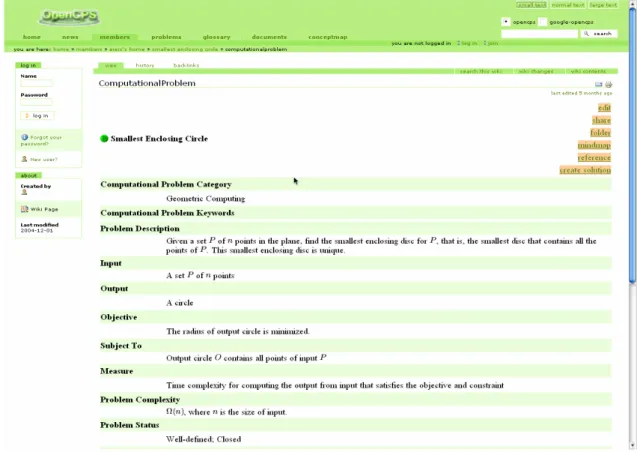
(24) represents semantic or other connections between portions of learned material. Mindmap can be contrasted with the similar idea of concept map. The latter allows any kind of connections between the concepts and has labeled links to enhance communication and learning, whereas mindmap tends to utilize simplified radial hierarchies and tree structure.. Figure 5: Example of a mind map. A mindmap is a multi-colored and image centered radial diagram.[7]. Both concept and mind maps help us to focus on the divergent process and provide structure to the inherently organic nature of the learning process. People can relate new concepts to existing concepts and ideas. Such kind of a structure promotes better comprehension and is essential to problem solving and procedural knowledge acquisition.. 15.
(25) Chapter 3 Development of the Sitemap Generator. A successful knowledge portal depends on the ability to elucidate the experts’ knowledge of a domain, to represent knowledge in a form that supports effective examination by others, and to make that knowledge accessible when needed [3]. Contents are contributed by portal members. This characteristic of a knowledge portal gives rise to one question: how can this knowledge portal represent knowledge objects with informative relationships efficiently, when the contents grow in an unpredictable way? Concept maps provide a promising way to display the group knowledge. As described in Chapter 2, a concept map has been widely applied to learning, planning, and collaboration to provide a visual knowledge representation [2][8]. In previous works, researchers have also used concept maps to extract experts’ knowledge [1][3], share cognitive space for group learning [11], and develop a website in a given conceptual framework [7]. However, there are few efforts dedicated to presenting the sitemap or concept map corresponding to a knowledge portal. In this thesis, we attempt to develop a visualized Site-And-Concept (SAC) map generator for knowledge portals and use the OpenCPS website as a practice platform. In this chapter, we elucidate how we design the SAC map generator. The SAC map generator is potentially useful in other domains, for we can extend its backend search engine to suit any particular environment.. 16.
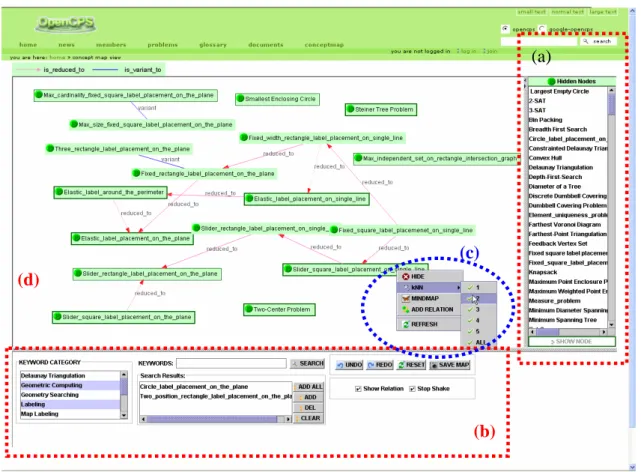
(26) 3.1 System Requirement – The OpenCPS. Algorithmic research is an established knowledge engineering process that has allowed researchers to identify new or significant problems, to better understand existing approaches and experimental results, and to obtain new, effective and efficient solutions. The OpenCPS [9][18] is a knowledge portal for Computational Problem Solving, which aims to provide a knowledge sharing environment for algorithmic research. The OpenCPS provides a problem-centered collaborative knowledge management environment for researchers to manage knowledge associated with computational problem solving. Researchers contribute to this knowledge base by proposing new problems and novel solutions. Figure 6 is the screenshot of the OpenCPS website.. Figure 6: A snapshot of the OpenCPS website.. The OpenCPS website is built upon Plone/Zope open source products [20][22], 17.
(27) which supports Python language [21] to develop plug-in packages. Plone (http://www.plone.org) is a content management system (CMS), built atop the Zope (http://www.zope.org) web application server, and Zope's Content Management Framework (CMF), a powerful framework for building CMS. Plone offers several useful features, including membership management, workflow, internationalization (i18n), UI “skins”, standards compliance, and a host of security features to restrict users' editing privileges to allow them to do their jobs without inadvertently interfering with the work of others. Plone is also easy to extend using “products”, a Zope metaphor for creating site extensions that can easily be plugged into other Plone sites.. Figure 7: A computational problem object created by portal user. At right side are some basic functions provided by this knowledge object, including edit, share, folder, mindmap, reference, and create solution. The OpenCPS members can create their own knowledge objects within a given 18.
(28) ontology, including computational problem objects, algorithmic solution objects, implementation objects, and problem relation objects. Each type of knowledge object is associated with respective properties. See in Table 1. The OpenCPS further supports Latex format for inline expression. Figure 7 is an example of computational problem objects, i.e. the “Smallest Enclosing Circle” problem. Portal users can share their own contents. All knowledge objects in the OpenCPS are by default visible by other visitors. Asynchronous collaborative editing capability is also provided by using the well-established access control mechanism. Users may assign local roles to a target folder and thereby give certain members rights to access, modify, and even delete objects included in the folder. This access control mechanism enables users to edit contents collaboratively and work together.. 3.2 Site-And-Concept (SAC) Map Generator. We propose a visualization tool to generate the sitemap of a knowledge portal by adopting the notion of a concept map. That is, the arcs connecting related knowledge objects are labeled with relations and the inner properties of knowledge objects can also be unfolded. Hereafter, this map is referred to as the Site-And-Concept (SAC) map, mainly used for group knowledge visualization on a knowledge portal. We chose Open Computational Problem Solving (OpenCPS) (http://www.opencps.org) [18], a locally developed knowledge portal described above, as the platform for current experiments. Based on Plone/Zope’s easy plug-in property, we have developed a backend search engine to retrieve inner attributes and relation information of given knowledge objects. 19.
(29) After that, we also create a front-end SAC map monitor using Java language. This front-end monitor retrieves search results from an application programming interface (API) of the backend search engine and then draws up the sitemap. The SAC map generator is a combination of both the search engine and the SAC map monitor. Figure 8 is a snapshot of our system, where four modules are shown, i.e., (a) a full list of knowledge objects, (b) an advanced search panel, (c) a set of right-click functions, and (d) the drawing panel.. (a). (c) (d). (b). Figure 8: A snapshot of the SAC map generator. Four modules and two showcases are shown. System modules are (a) a full list, (b) an advanced search panel, (c) a set of right-click functions, and (d) the drawing panel.. 20.
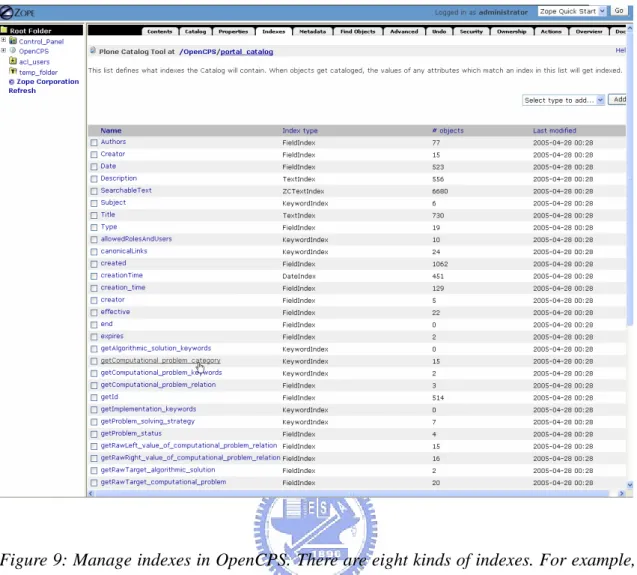
(30) 3.2.1 Backend Search Engine. The backend search engine is to support the advanced search panel in SAC Map Generator (Fig. 8(b)). OpenCPS users can select their target problems by using the search panel efficiently. The search results will appear in a multi-select list for users to add into the drawing panel. In this subsection, we explain the details about search engine development.. As described above, the OpenCPS website is built upon Zope [22] open source product due to its easy plug-in property and useful features. The knowledge objects are stored and automatically indexed in Zope's object database (ZODB).. ZODB supports. quick search for CPS type objects by a built-in search engine, the Zcatalog. The Application Programming Interface (API) checks the Zcatalog to get the searching results efficiently. Zcatalog uses multiple indexes to different information about these objects. In our system, we have indexed the id field, computational problem category field and computational keyword field for computational problem objects. Figure 9 shows partial indexes recorded in ZCatalog in the OpenCPS.. 21.
(31) Figure 9: Manage indexes in OpenCPS. There are eight kinds of indexes. For example, we use KeywordIndex to apply to computational problem category field.. 3.2.2 SAC Map Monitor. The front-end SAC Map Monitor is an applet-based system to display concept maps on the OpenCPS. Java applet facilitates insertion of concept maps into web documents. The front-end SAC map monitor consists of four parts, namely (1) a full list of knowledge objects, (2) an advanced search panel, (3) a set of right-click function, and (4) the drawing panel. In this subsection, we describe more details.. 22.
(32) (a) (b). Figure 10: A snapshot of the SAC Map Monitor. Module (a) is a full list holding all the current problems objects, and module (b) shows an advanced search panel.. (1) A full list of knowledge objects: A full list holds all the current problems objects as shown in module (a) of Figure 10. It’s a multi-select list. When the SAC Map Generator is initially launched (by clicking the <conceptmap> tab), it shows all the current problem objects in this full list. Users may select one or more target items and show them as nodes on the drawing panel by double clicking or clicking the <show nodes> button. (2) An advanced search panel: Module (b) of Figure 10 is an advanced search panel, which provides an alternative 23.
(33) method for selecting target problems more efficiently. This search panel supports searching by keywords and predefined keyword categories. When users submit the keywords of interest, the SAC map generator will call a script to search the ZCatalog object and return the results. Different from the search box on the top of the homepage, the SAC map generator only shows the computational problem object herein.. The items in keyword category were defined by CPS users taking a role in managership, i.e., the administrators or reviewers. As an expert in computational geometric domain, a reviewer has rights to define category items in advance for general users to select. Those items in keyword category were set up when SAC map generator was initialized by retrieving them from backend search engine.. The searching process also sorts the search result and displays them in another multi-select list for users to add into the drawing panel. We provide four operational buttons and two checkboxes for users to do with the search results. The operational buttons are “ADD ALL”, “ADD”, “DEL”, and “CLEAR”. The “ADD ALL” function adds all items of the search result into the drawing panel. The “ADD” function adds the selected items into the panel. The “DEL” function deletes the target items from the result list. Finally, the “CLEAR” function clears up the result list.. Additionally, users may use a checkbox to show or hide the relation labels on the drawing panel. They can also enable another checkbox to filter out unpublished items so that only the published items can be shown in the drawing panel when the map was constructed.. 24.
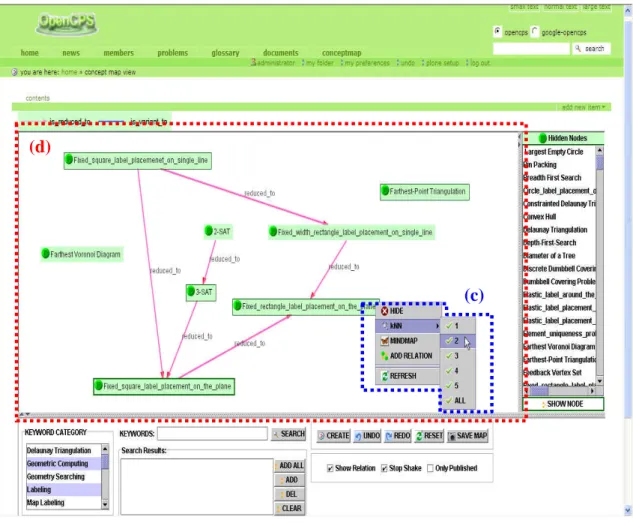
(34) (3) A set of right click functions For the nodes selected into the drawing panel, they are attached with additional right-click functions. As shown below in Figure 11, five functions are popped up, i.e., “HIDE”, “kNN”, “MINDMAP”, “ADD RELATION”, and “REFRESH”.. (d). (c). Figure 11: A set of right click functions (c) for a selected node on the drawing panel (d).. The “HIDE” function returns the target node to the full list; this is used when the user does not need the target node shown on the panel for a while. The “kNN” function brings all the k nearest neighbors of the target node into the drawing panel. The “MINDMAP” function zooms into this target problem and creates a new window to print another map referred to as “mindmap”. As Figure 12 shows, this map is drawn by 25.
(35) the “Freemind” freeware [6]. The central node is the problem object of interest and is linked to outer related objects on the left and inner properties on the right.. Figure 12: Mindmap of a target Computational Problem. The central node is the concerned problem linked with inner properties on the right and outer related objects on the left. The “ADD RELATION” function opens a new window to create a Computational Problem Relation object if an expert user decides to add a relation between two problem nodes on SAC Map monitor. Figure 13 is a snapshot of this function.. 26.
(36) Figure 13: A snapshot of the “ADD RELATION” function. When users click the “ADD RELATION” function, the SAC Map Generator will create a new form for user to add a relation object.. (4) The drawing panel (Site-And-Concept Map) Module (d) of Figure 11 is the drawing panel that shows the Site-And-Concept Map. As a sitemap, it provides a global view of connection topology among the web contents. All the nodes and links on this map are also clickable for access to the respective webpages. As a concept map, it links the knowledge objects and labels their relation, such as “reduced-to”, “equivalent”, “variant” and so on.. 27.
(37) For each knowledge object, the backend search engine keeps a record of its properties and the adjacency list of related objects. Therefore, the links and labels can be refreshed quickly when a node is newly added into or removed from the map. The nodes can be manually dragged to anywhere on this map, as long as we feel the layout is clear to present the topology of knowledge connection.. For users’ convenience, we also attach quick two launch buttons on the drawing panel, namely the “CREATE” and “SAVE MAP” buttons. Users can create a new computational problem object by clicking the “CREATE” button as well as switching back to create a webpage on the OpenCPS. The “CREATE” function is especially convenient when users find there is lack of some knowledge objects and attempt to add them on the shown map. As for the “SAVE MAP” button, it helps users to save their map into an image file. This image can be used elsewhere in aftertimes.. 28.
(38) Chapter 4 Group Knowledge Visualization via the SAC Map. For computational problem solving, several efforts have been focused on formalizing and indexing computational problems. The NP optimization problem compendium [4] is a noteworthy electronic book full of useful information on this particular class of problems. The U.S. National Institute of Standards and Technology has also established a “Dictionary of Algorithms and Data Structures” [15] that formally defines over 1,000 computational problems. However, both projects lack adequate knowledge structures to display well-organized concept maps.. The OpenCPS knowledge portal has a promising knowledge structure (Figure. 1) to arrange member-contributed contents. It also applies a rigid workflow control [9], i.e., knowledge objects must be accepted by a reviewer before they can be disseminated. These knowledge management measures are likely to ensure the correctness of group knowledge. On the other hand, the SAC map generator we proposed is an efficient artifact to make the group knowledge useful for education and expandable from the user’s feedback.. In this chapter, we demonstrate the functionality of SAC map generator, which is focused on some “map labeling” topics. The typical operations of the SAC map generator can be categorized into three classes, i.e. the basic, learn-mode, and expert-mode operations.. 29.
(39) 4.1 Basic operation:. When the SAC map generator is initialized (by clicking the <conceptmap> tab), a full list on the right side holds whole problem objects in the OpenCPS, and the drawing panel is empty. Users may select one or more target items, double click them or click a button to show them as nodes on the drawing panel. Each node might be created by different users in the OpenCPS. Therefore, the SAC map monitor represents group knowledge in a visualized formation.. Double clicking on a target node will be redirected to this computational problem’s web page for a detailed description. Otherwise, users can select the “MINDMAP” item of the right-click menu to show the target problem in a map formation drawn by “Freemind” [6] software.. Users may also click the keyword category list or type keywords in the search box to target their favorite topics or search the target objects respectively. These operations make it convenient to choose the concerned problems from the full list. For example, a student may type “map labeling” and “packing problem” as keywords, add the selected items from the result list and thus draw a SAC map as shown in Figure 14.. Finally, users may drag the selected node to a proper location in the drawing panel. Using the right click function, such like “HIDE”, “MINDMAP”, to observe the behavior between those knowledge objects.. 30.
(40) Figure 14: A search result shown in SAC map. A user types “map labeling” as keyword to search and thus draws a SAC map.. 4.2 Learner-mode operation:. For an aggressive learner, to show the knowledge objects associated with given keywords is not enough. For example, the 3-SAT and 2-SAT problems cannot be found when we search for keyword “map labeling” or use “Keyword Category” function, but these two problems are important for a student to get a thorough understanding of how difficult map labeling problems are, because they can be polynomially reduced to the “Fixed square label placement on the plane” problem. Users can use the right-click “kNN” function which helps display k nearest neighbors of this target object, as Figure 31.
(41) 15 shows. Figure 16 shows the result after “kNN” function is executed.. Figure 15: Using the right-click “kNN” function. An aggressive user uses the right-click “kNN” function which helps display k nearest neighbors of the “Fixed square label placement on the plane” problem.. 32.
(42) Figure 16: A result after “kNN” function draws a SAC Map.. 4.3 Expert-mode operation:. Expert users are usually interested in verifying the completeness of other members’ knowledge. The SAC Map Generator is suitable for the experts to make contributions. If they are very certain that one problem object is related to another and this relation cannot be found by the k-NN function, they can use the keyword search again. The search result will imply that they either create such a new problem, or add a “relation object” for the target problems. For example, an expert user firmly believes that the “Max cardinality fixed square label placement on the plane” problem is a variant of the “Max independent set on rectangle intersection graph” problem, and a follow-up search also reveals that the latter problem object is an isolated node as shown in Figure 17.. 33.
(43) Accordingly, this expert user could then create such a “relation object” by a right-click “ADD RELATION” function which pops up a new relation object form in the OpenCPS. By doing so, the knowledge structure becomes more complete.. Figure 17: A snapshot of expert-mode operation.. The SAC map generator is currently a monitor to visualize the formation of group knowledge, so we do not provide any function to generate relation objects automatically. Nevertheless, we will create a new function in the near future to check “transitive closure”, i.e., if problem A is a variant of problem B, and problem B is a variant of problem C, then problem A is considered a variant of problem C. We will furthermore create a checkbox to enable or disable this new function.. 34.
(44) Figure 18: Complete map of current problem objects. We do not apply any filtering and layout process so that this picture may simulate the image of human cognition without concept map supports.. The OpenCPS portal members have contributed more than 200 problem objects to the website for the present. Figure 18 is the complete map of these knowledge concepts, where we do not apply any filtering or layout processes. This picture simulates the image of human cognition without concept map supports. This shows a rather messy situation. We can hardly make out any of the concept relations, much less to examine or learn from this knowledge portal. In comparison with the above showcases, we believe that the SAC map generator can properly enhance the performance of a knowledge portal.. 35.
(45) Chapter5. Conclusion and Future Work. In previous works, researchers have used concept maps to extract expert knowledge [1][3], share cognitive space for group learning [11], and develop a website in a given conceptual framework [7]. However, there are few efforts dedicated to presenting the sitemap or concept map corresponding to a knowledge portal.. The contents of a knowledge portal are contributed by all the members, and thus become group knowledge. As current knowledge portals are in the form of a website, we develop a site-and-concept (SAC) map generator to visualize the formation of group knowledge for OpenCPS knowledge portal. The SAC map generator supports both the learner- and expert-modes to allow them to interact with the knowledge portal more efficiently. Users not only can learn from but also can contribute to the group knowledge through the SAC map.. The SAC map generator for OpenCPS knowledge portal is comparatively easy to develop, because the computational problem solving environment is characterized by (1) all the knowledge objects are attributed into specific spaces; and (2) the relations are constructed based on rigorous mathematical proofs. The SAC map generator can be of practical value in general because its front-end is developed using Java language. Meanwhile, the backend search engine can be extended to include information retrieval and data mining techniques for particular application environments.. The SAC map generator for OpenCPS knowledge portal is currently a monitor to. 36.
(46) visualize the formation of group knowledge. In the near future, we may provide more functions such like “UNDO”, “REDO” operations to help users use the SAC map generator more efficiently. Additionally, we may further to extend our backend search engine to retrieval the reference type objects in the OpenCPS and to display the relationships between the problem objects and reference type objects with our front-end monitor.. 37.
(47) References: [1] Buzan, T., “The Mind Map Book”, Penguin, New York, 1991. [2] Stefano Basso, “Teaching by Doing with Concept Maps: Integrating Plone and CMAPTools”, Proceedings of the First International Conference on Concept Mapping, Pamplona, Spain, 2004. [3] Chiung-Hui Chiu, et al., “Interaction Processes in Network Supported Collaborative Concept Mapping”, ACM SIGCSE Bulletin, Volume 31, Issue 4, June 1999. [4] Coffey, J., et al., “A concept map-based knowledge modeling approach to expert knowledge sharing”, Proceedings of IASTED International Conference on Information and Knowledge Sharing(IKS’02) , pp 212-217, VI, USA, November 2002. [5] Crescenzi, P. and Kann, V., “A compendium of NP optimization problems”, Technical report SI/RR-95/02, Dipartimento di Scienze dell'Informazione, Università di Roma “La Sapienza”, 1995 [6] Dürsteler, J. C., “Conceptual Maps”, The Digital Magazine of Infovis.net, num 141, 2004, http://www.infovis.net/printMag.php?num=141&lang=2 [7] Freemind – free mind mapping software, http://freemind.sourceforge.net/wiki/index.php/Main_Page [8] Gaines, B. R., and Shaw, M. L. G., “WebMap: Concept Mapping on the Web”, Proceedings of WWW4: Fourth International World Wide Web Conference, Boston, December 1995, http://ksi.cpsc.ucalgary.ca/articles/WWW/WWW4WM. 38.
(48) [9] Hneiderman, B., “Creating Creativity: User Interfaces for Supporting Innovation”, ACM Transactions on Computer-Human Interaction”, 7, 1, pp114-138, 2000. [10] Jonassen, David H., et al., “Concept mapping as cognitive learning and assessment tools”, Journal of Interactive Learning Research, 8 (3/4), pp289-308, 1997. [11] Lee, D. T., Lee, G. C., and Huang, Y. W., “Knowledge Management for Computational Problem Solving”, JUCS (Journal for Universal Computer Science), 9, 6, 563-570, 2003, http://www.opencps.org [12] Lee, C. S., “Shared cognitive space: an enabling tool for conceptual frameworks”, Proceedings of International Conference on Computers in Education, 3-6, 813-817, Auckland, New Zealand, December 2002. [13] McAleese Ray, “The Knowledge Arena as an Extension to the Concept Map: Reflection in Action”, Interactive Learning Environment 6, x, pp 1-22, 1998. [14] Microsoft Sharepoint Products and Technologies, http://www.microsoft.com/sharepoint/. [15] Milam, J. H., Santo, S. A. and Heaton, L. A., “Concept Maps for Web-Based Application”, ERIC Technical Report (Educational Resources Information Center), 2001, http://highered.org/docs/milam-conceptmaps.PDF [16] NIST (National Institute of Standards and Technology): Dictionary of Algorithms and Data Structures, http://www.nist.gov/dads/. [17] Novak, J. D., “The Theory Underlying Concept Maps and To Construct Them”, 2000, http://cmap.coginst.uwf.edu/info/printer.html. 39.
(49) [18] Novak, J. D. and Gowin, D. B., “Learning How to Learn”, Ithaca/NY, Cornell University Press, 1984. [19] OpenCPS, Open Computational Problem Solving Web Site, http://www.opencps.org [20] PKC Corporation Home (Problem-Knowledge Couplers), http://www.pkc.com/. [21] Plone, A user friendly and powerful open source Content Management System, http://www.plone.org [22] Python Programming Language, http://www.python.org [23] Lin, Y.L., et al., “A Visualization Tool for the Sitemap of a Knowledge Portal and the Concept Map of Group Knowledge”, International Conference on Knowledge Management (I-Know ‘05), Graz, Austria, June 2005 [24] Zope.org, http://www.zope.org/. [25] 蘇培綺, 「概念圖建構方法之研究」 ,國立交通大學,碩士論文,民國 93 年。 [26] 巫啟台, 「文件之關連資訊粹取及其概念圖自動建構」,國立成功大學,碩 士論文,民國 91 年。 [27] 高宜敏,「合作競爭式的網路分享建構學習環境」 ,國立交通大學,碩士論 文,民國 90 年。. 40.
(50) YI-LI LIN (林宜立). CONTACT [email protected] http://www.csie.nctu.edu.tw/~yllin. EDUCATION NATIONAL CHIAO TUNG UNIVERITY, Hsinchu, Taiwan, 2003-2005 Master in Department of Computer Science and Information Engineering NATIONAL TAIWAN UNIVERITY, Taipei, Taiwan, 1995-1999 B.S in Department of Business Administration ~ major in Industrial Management. EXPERIENCE Research Assistant Institute of Information Science, Academia Sinica, Taipei, Taiwan, 2003-2005 Take major part in project “ShareTone Project”. PUBLICATION Yi-Li Lin, Jyh-Da Wei, Gen-Cher Lee and D.T. Lee, “A Visualization Tool for the Sitemap of a Knowledge Portal and the Concept Map of Group Knowledge”, International Conference on Knowledge Management (I-Know ‘05), Graz, Austria, June 2005. 41.
(51)
數據
![Figure 4: Concept map on higher education. [15]](https://thumb-ap.123doks.com/thumbv2/9libinfo/8502793.185347/22.892.173.786.112.757/figure-concept-map-higher-education.webp)
+7
![Figure 5: Example of a mind map. A mindmap is a multi-colored and image centered radial diagram.[7]](https://thumb-ap.123doks.com/thumbv2/9libinfo/8502793.185347/24.892.202.769.363.676/figure-example-mindmap-multi-colored-centered-radial-diagram.webp)

相關文件
Al atoms are larger than N atoms because as you trace the path between N and Al on the periodic table, you move down a column (atomic size increases) and then to the left across
substance) is matter that has distinct properties and a composition that does not vary from sample
Wang, Solving pseudomonotone variational inequalities and pseudocon- vex optimization problems using the projection neural network, IEEE Transactions on Neural Networks 17
Then, we tested the influence of θ for the rate of convergence of Algorithm 4.1, by using this algorithm with α = 15 and four different θ to solve a test ex- ample generated as
Particularly, combining the numerical results of the two papers, we may obtain such a conclusion that the merit function method based on ϕ p has a better a global convergence and
Then, it is easy to see that there are 9 problems for which the iterative numbers of the algorithm using ψ α,θ,p in the case of θ = 1 and p = 3 are less than the one of the
Define instead the imaginary.. potential, magnetic field, lattice…) Dirac-BdG Hamiltonian:. with small, and matrix
These are quite light states with masses in the 10 GeV to 20 GeV range and they have very small Yukawa couplings (implying that higgs to higgs pair chain decays are probable)..
