CHAPTER 10 VOLUME
VISUALIZATION
OUTLINE
• 3D (volumetric) scalar fields
• Slice plane and isosurfaces techniques are limited in showing only a subset of the entire scalar volume
• Volume rendering or Volume visualization:
• Attempt to produce images of an entire 3D scalar volume
• A separate class of visualization techniques for
volumetric scalar fields
OUTLINE
10.1 Examining the need for volume visualization techniques
10.2 Fundamentals
10.3 Image-order techniques 10.4 Object-order techniques
10.5 Volume rendering vs. geometric rendering
10.6 Conclusion
10.1
MOTIVATION
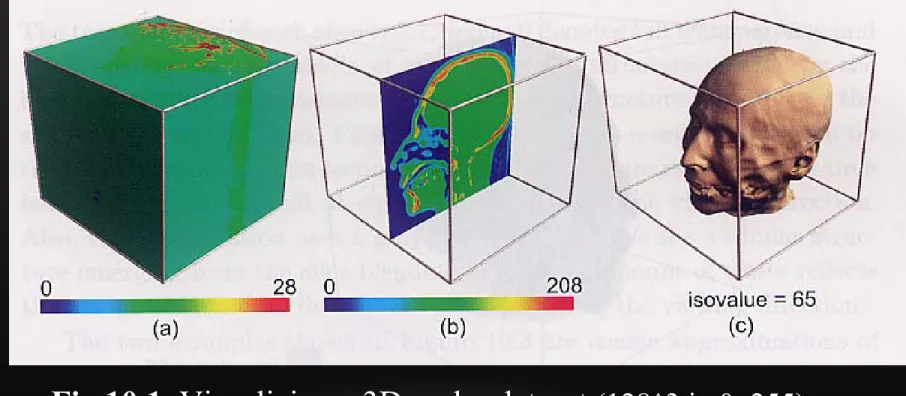
Fig 10.1 Visualizing a 3D scalar dataset
(128^3 in 0~255):(a) Surface plot; (b) Slice plane; (c) Isosurface (Skin).
The methods reduce data dimensionality from 3D to 2D
the dataset boundary Do not reveal inner part
the same y-coordinate Only show 2D
the scalar value 65
Ignores all volume points
10.1 MOTIVATION
Fig10.2 Visualization consisting of two isosurfaces:
the skin (isovalue = 65) and bone (isovalue = 127)
10.1 MOTIVATION
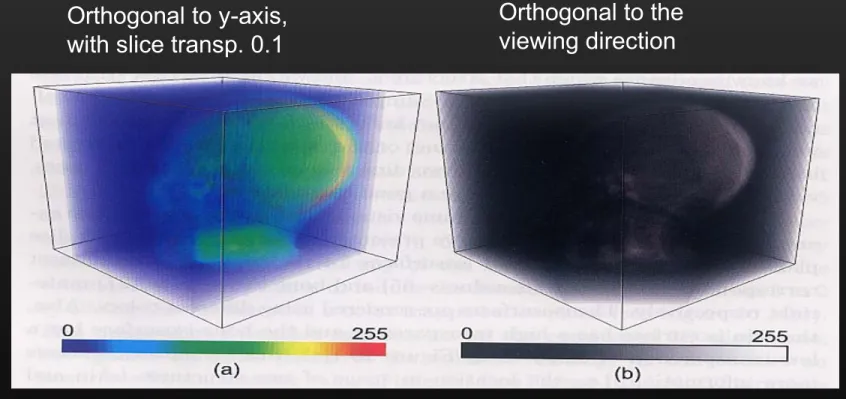
Fig 10.3. Visualization of scalar volume using (a) volume-aligned slices;
(b) view direction-aligned slices
10 color-mapped slices Orthogonal to y-axis, with slice transp. 0.1
10 color-mapped slices Orthogonal to the viewing direction
VOLUME RENDERING
• Goal: visualize three-dimensional functions
• Measurements (medical imaging)
• Numerical simulation output
• Analytic functions
10.2 VOLUME VISUALIZATION BASICS
• The basic idea behind volume rendering
• Creating a 2D image that reflects, at every pixel, the scalar data within a given 3D dataset
• Main issue: the choice of the function
• Mapping an entire set of scalar values, for the voxels along the viewing ray, to a single pixel in the resultant 2D image
DATA
REPRESENTATION
3D volume data are represented by a finite number of cross sectional slices (a stack of images)
N x 2D arraies = 3D array
DATA REPRESENTATION (2)
What is a Voxel? – Two definitions
A voxel is a cubic cell, which has a single value covering the entire cubic region
A voxel is a data point
at a corner of the cubic cell;
The value of a point inside the cell is determined by interpolation
10.2 VOLUME VISUALIZATION BASICS
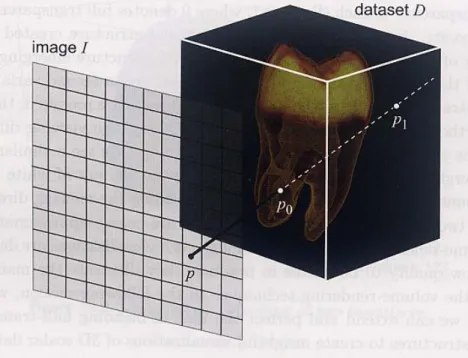
Fig 10.4 Conceptual principle of volume visualization
The value of the image pixel p
( ) ( ( )), t [0,1]
I p F s t
F : Ray function
10.2 VOLUME VISUALIZATION BASICS
10.2.1 CLASSIFICATION
• Transfer function (f )
-- mapping of scalar values or value range to colors & opacities (f : R -> [0,1]^4 )
• Classification
---
The process of designing and
applying transfer functions to
visually separate different types of materials based on their scalar
values
• Create a good classification
• Choosing the right Transfer function & Ray function
CLASSIFICATION
• Map from numerical values to visual attributes
• Color
• Transparency
• Transfer functions
• Color function: c(s)
• Opacity function: a(s)
21.05 27.05
24.03 20.05
VARIOUS RAY FUNCTIONS:
10.2.2 MAXIMUM INTENSITY PROJECTION FUNCTION
• Maximum Intensity (scalar value) Projection (MIP)
(Maximum scalar value)
• M
aximum Opacity along the ray
-- Useful if we want to emphasize in the rendering on the presence of a given material
• The maximum of the intensities (colors) of all pixels computed along the viewing ray
[0, ]
( ) (max ( ))
t T
I p f s t
[0, ]
( ) ( ) ( ) = max
m A m A( ( ))
t T
I p f s f s f s t
10.2 VOLUME VISUALIZATION BASICS 10.2.2 MAXIMUM INTENSITY
PROJECTION FUNCTION
• MIP is useful to extract high-intensity structure from volumetric data
-- e.g.: extract vascular structure from medical MRI datasets
• Disadvantage: failing to convey depth
information
VARIOUS RAY FUNCTIONS
10.2.2 MAXIMUM INTENSITY PROJECTION FUNCTION (MIP)
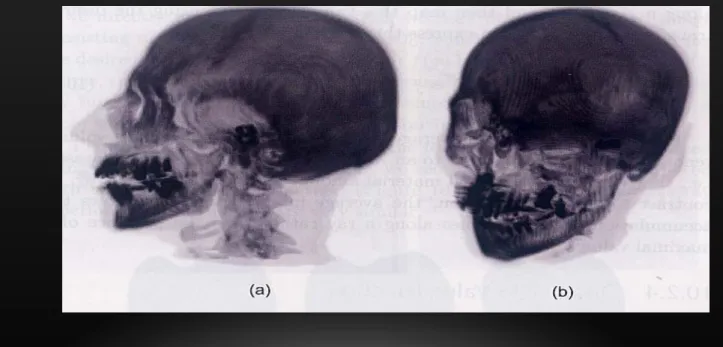
Fig 10.5 Maximum intensity projection rendering
Gray value proportional to the scalar value, white (the lowest scalar value) Black (the highest value)
The left image is easier to interpret than the right one, since it is taken from an angle where the lack of depth information is not so disturbing
VARIOUS RAY FUNCTIONS
10.2.3 AVERAGE INTENSITY FUNCTION
• A second simple ray function : the average intensity
• Shows the accumulation of scalar values along a ray rather than the presence of a maximal value.
• Produces volume rendering analogous to an X-ray image of the considered dataset.
0
( )
( ) ( )
T
t
s t dt I p f
T
VARIOUS RAY FUNCTIONS
10.2.4 DISTANCE TO VALUE FUNCTION
• The 3rd ray function: distance to value
• Useful in revealing the minimal depth
• Within the volumetric dataset, the nearest one with its scalar value >
• Focusing on the position (depth) where a certain scalar value is met
[0, ], ( )
( ) ( min )
t T s t
I p f t
VARIOUS RAY FUNCTIONS
10.2.5 ISOSURFACE FUNCTION
Ray functions can also be used to construct familiar isosurface structure
• Ray function
• In practice, the isosurface ray function becomes useful when combined with volumetric shading
0
( ) [0, ], ( ) ( ) otherwise
f t T s t
I p I
10.2 VOLUME VISUALIZATION BASICS
10.2.5 ISOSURFACE FUNCTION
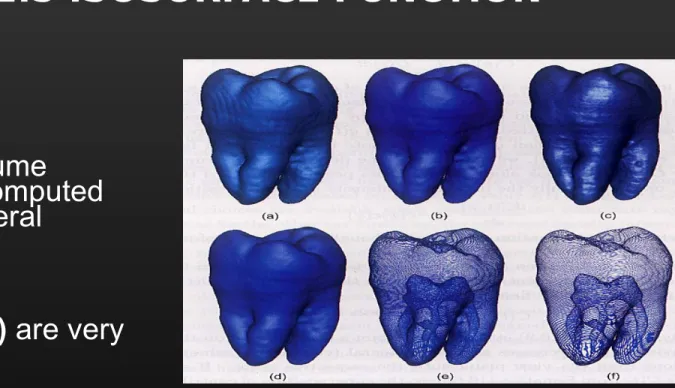
Fig 10.6 Different isosurface techniques: (a) Marching cubes. (b) Isosurface ray function, software ray casting. (c) Graphics hardware ray casting.
(d-f) Composition with box opacity function, different integration step sizes.
Tooth volume
dataset computed using several
methods
(a) and (b) are very similar
10.2 VOLUME VISUALIZATION BASICS
10.2.6 COMPOSITING FUNCTION (RAY FUNCTION)
• Previous ray functions can be seen as particular cases of a more general ray function called the compositing function
• The color C(p): composition of the
contributions of the colors c(t) of all voxels q(t) along the ray r(p) corresponding to the pixel p
• Integral of the contributions of all points along the viewing ray:
( )
T0( ) C p
tC t dt
dC t x dx ( , ) ( ) ( ) x c x
OPTICAL MODEL
• Ray tracing is one method used to construct the final image
x(t) : ray, parameterized by t
s(x(t)) : Scalar value
c(s(x(t)): Color; emitted light a(s(x(t)): Absorption coefficient
RAY INTEGRATION
• Calculate how much light can enter the eye for each ray
C = c(s(x(t)) e dt
- a(s(x(t’)))dt’0 D
0 t
C
0D
DISCRETE RAY INTEGRATION
C
0D
C = C (1- A )
i i 0n
0 i-1
C’ = C + (1-A ) C’
i i i+1Back to front blending: step from n-1 to 0
10.2 VOLUME VISUALIZATION BASICS
10.2.6 COMPOSITING FUNCTION
• The pixel color:
• The above formula states that a point’s
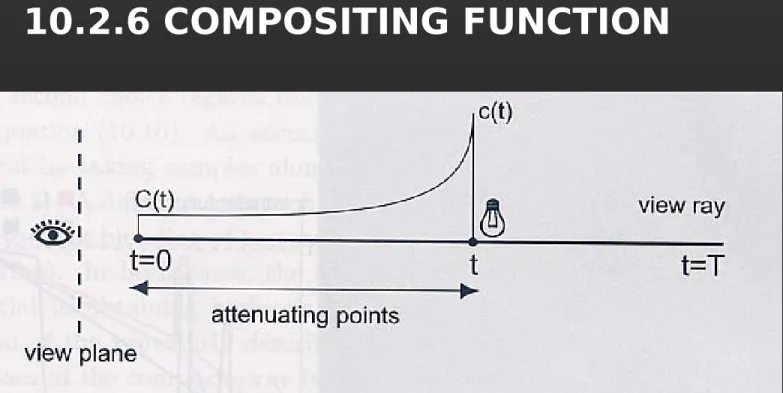
contribution on the view plane exponentially decreases with the integral of the attenuations from the view plane until the respective point.
• Integral illumination model
• Neglects several effects such as scattering or shadows
• Capable of producing high-quality images of volumetric datasets
0 ( )
( ) ( )
t x dx
C t c t e
0 ( )
( )
0( )
T t x dx
C p
tc t e
dt
10.2 VOLUME VISUALIZATION BASICS
10.2.6 COMPOSITING FUNCTION
Fig 10.7. Volumetric illumination model: color c(t) emitted at position t along a view ray gets attenuated by the values Tao(x) of the points x situated between t and the
view plane to yield the contribution C(t) of c(t) to the view plane.
10.2 VOLUME VISUALIZATION BASICS
10.2.6 COMPOSITING FUNCTION
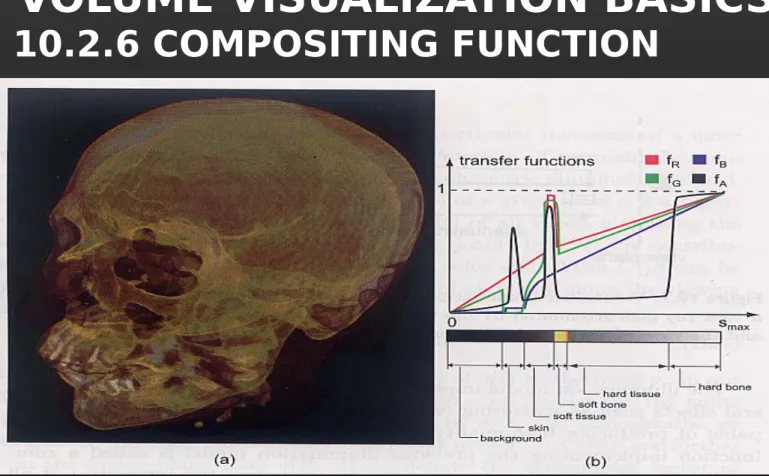
Fig 10.8. (a) Volume rendering of head dataset. (b) The transfer function used emphasizes soft tissue, soft bone, and hard bone.
Using high-opacity values for their corresponding density ranges
10.2 VOLUME VISUALIZATION BASICS
10.2.6 COMPOSITING FUNCTION
• The design of appropriate color and opacity transfer functions
• The transfer and opacity functions are used to visually
separate different tissues , and also have smooth variations across the transition area rather than abrupt, step-like jumps
10.2 VOLUME VISUALIZATION BASICS
10.2.6 COMPOSITING FUNCTION
Fig10.9. (a) Volume rendering of flow field velocity magnitude and (b) Corresponding transfer functions.
Volume rendering can also be applied to other datasets than scanned datasets containing material density values
10.2 VOLUME VISUALIZATION BASICS
10.2.6 COMPOSITING FUNCTION
• Volume rendering of any scalar fields are possible, the results can sometimes be harder to interpret
• CT and MRI datasets show structures that often are easier to interpret than arbitrary volumetric scalar fields
• Some volume datasets exhibit no natural
boundaries between regions with different
scalar values
10.2 VOLUME VISUALIZATION BASICS
10.2.7 VOLUMETRIC SHADING
• Shading is an important additional cue
that can significantly increase the quality of volume rendering
• illumination function (Phong lighting algorithm)
• C = ambient + diffuse + specular
= constant + Ip Kd (N.L) + Ip Ks (N.H)^n
( )
amb diff( ) max( L n( ),0)
spec( ) max( r v,0)
I t c c t t c t
SURFACE NORMAL USING
GRADIENT VECTOR OF THE SCALAR FIELD
( ) ( ) ( )
( ) s t s t s t
s t x y z
=> Expression is not correct !!!
10.2 VOLUME VISUALIZATION BASICS
10.2.7 VOLUMETRIC SHADING
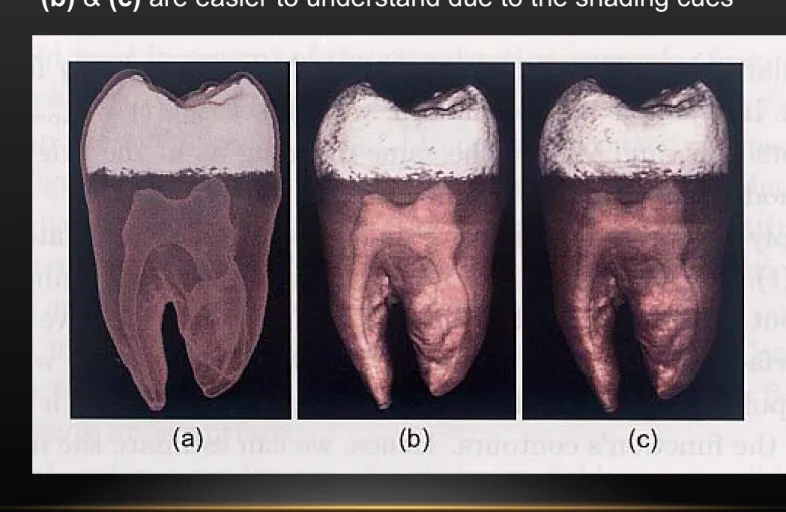
Fig 10.10. Volumetric lighting. (a) No lighting. (b) Diffuse lighting.
(c) Specular lighting.
(b) & (c) are easier to understand due to the shading cues
10.2 VOLUME VISUALIZATION BASICS 10.2.7 VOLUMETRIC SHADING
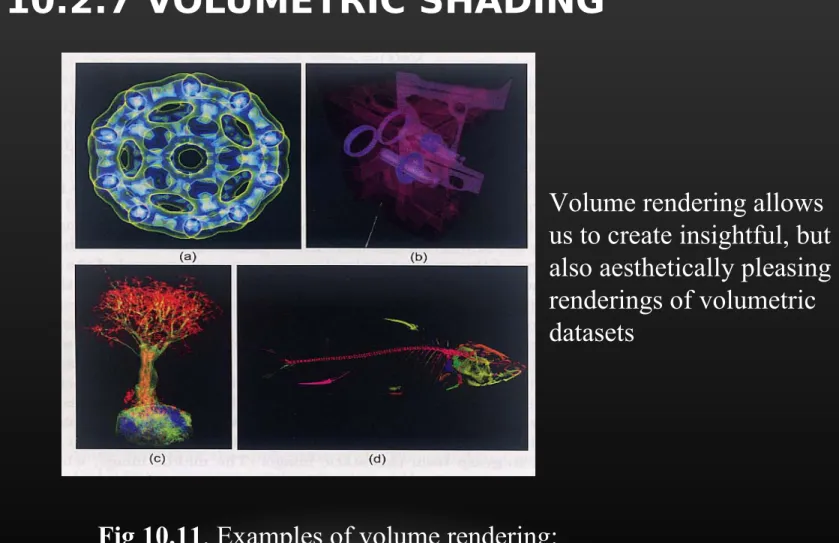
Fig 10.11. Examples of volume rendering:
(a) Electron density. (b) Engine block. (c) Bonsai tree. (d) Carp fish.
Volume rendering allows us to create insightful, but also aesthetically pleasing renderings of volumetric datasets
10.3 IMAGE ORDER TECHNIQUES
• Volumetric ray casting
• The most straightforward way to implement Eq.
(10.10)
• Evaluate the rendering integral by taking samples along the viewing rays
• Pseudocode
10.2 VOLUME VISUALIZATION BASICS
10.2.6 COMPOSITING FUNCTION
• The pixel color:
• The above formula states that a point’s
contribution on the view plane exponentially decreases with the integral of the attenuations from the view plane until the respective point.
• Integral illumination model
• Neglects several effects such as scattering or shadows
• Capable of producing high-quality images of volumetric datasets
0 ( )
( ) ( )
t x dx
C t c t e
0 ( )
( )
0( )
T t x dx
C p
tc t e
dt
10.3 IMAGE ORDER TECHNIQUES
• Computation strategies
* Integral illumination model
* Approximate the exponential term of the inner sum using Taylor expansion. In simple format
0 ( )
( )
0( )
T t x dx
C p
tc t e
dt
1
0 0
( )
N i(
i(1
j) )
i j
C p c
10.3 IMAGE ORDER TECHNIQUES
• Evaluate the above formula in back-to-front order
• Evaluate the composite ray function
Computation:
C
out= C
in+ C(x)*(1- α
in) α
out= α
in+ α(x) *(1- α
in)
1 1 1
0 0 0 1 0 1 2
,
(1 )
( ) (1 ) (1 )(1 ) .
N N
N N N N
C c
C c c
C p C c c c
(1 )
1i i i i
C c C
Compositing method
c1
c2 c3
Or you can use ‘Front-to-Back’
Compositing formula
Front-to-Back compositing:
use ‘over’ operator
C = background ‘over’ C1 C = C ‘over’ C2
C = C ‘over’ C3
…
Cout = Cin + C(x)*(1-
in out = in + (x) *(1- in)
10.3 IMAGE ORDER TECHNIQUES
10.3.1 SAMPLING AND INTERPOLATION ISSUES
• The quality of a volume-rendered image depends on the accuracy of evaluating the discretized
integral Eq. (10.13), two main issues:
* The choice of the step size
• The interpolation of color c and opacity along the ray
• Smaller step size gives better results, but increases the computation time
• A better strategy is to correlate the step size with the data variation
* Since the sample point i along a ray will not
coincide with voxel center, interpolation must be performed to evaluate and
• Better solution: trilinear interpolation
c
i
i10.3 IMAGE ORDER TECHNIQUES
10.3.2 CLASSIFICATION AND INTERPOLATION ORDER
• Two choices with respect to the order of classification
• Pre-classification: first classify, then interpolate
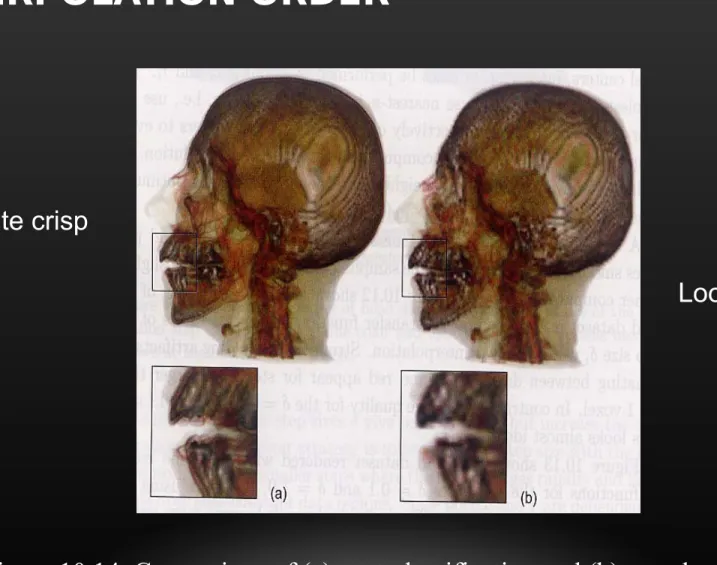
• Generally produces coarser-looking images
• Color interpolation can sometimes produce wrong results
• Post-classification; first interpolate, then classify
• Produces smoother images that only contain valid colors from the corresponding colormap
• Scalar interpolate
• Disadvantage: may yield values that correspond to nonexistent materials at points where the sampled dataset exhibits inherent discontinuities
• The results of the two methods look very similar for
• Smoothly varying datasets and transfer function
10.3 IMAGE ORDER TECHNIQUES
10.3.2 CLASSIFICATION AND INTERPOLATION ORDER
Figure 10.14. Comparison of (a) post-classification and (b) pre-classification techniques. The insets show a zoomed-in detail region from the large image.
Looks quite crisp
Looks more blurred
10.4 OBJECT ORDER TECHNIQUES
• A second class of volume rendering : object-order techniques
• Traverse each object voxel once
• Evaluate its contribution to the image pixel where ray intersects that voxel
• Image-order vs. object-order
(visit every pixel once vs. multiple times)
10.4 OBJECT ORDER TECHNIQUES
• One most popular method is volume rendering using textures (possibly accelerated by graphics hardware)
• Two subclass:
• 2D texture supported: slice the 3D volume with a set of planes orthogonal to the volume axis, parallel to the viewing direction
-- Simple to implement; but image quality influenced by the viewing angle
• 3D texture supported: loaded with the color and opacity transfer functions applied on the entire dataset
-- The result is functionally the same as 2D, but of a higher quality
TEX. MAPPING FOR VOLUME RENDERING
Consider ray casting …
x
z y
(top view)
TEXTURE BASED VOLUME RENDERING
x z
y
• Render every xz slice in the volume as a texture-mapped polygon
• The proxy polygon will sample the volume data
• Per-fragment RGBA (color and opacity) as classification results
• The polygons are blended from back to front
Use pProxy geometry for sampling