Exploiting Neigborhood Similarity for Virtual Machine
Migration over Wide-Area Network
Hsu-Fang Lai, Yu-Sung Wu*, and Yu-Jui Cheng Department of Computer Science National Chiao Tung University, Taiwan
[email protected], [email protected], [email protected] Abstract—Conventional virtual machine (VM) migration
focuses on transferring a VM’s memory and CPU states across host machines. The VM’s disk image has to remain accessible to both the source and destination host machines through shared storage during the migration. As a result, conventional virtual machine migration is limited to host machines on the same local area network (LAN) since sharing storage across wide-area network (WAN) is inefficient. As datacenters are being constructed around the globe, we envision the need for VM migration across datacenter boundaries. We thus propose a system aiming to achieve efficient VM migration over wide area network. The system exploits similarity in the storage data of neighboring VMs by first indexing the VM storage images and then using the index to locate storage data blocks from neighboring VMs, as opposed to pulling all data from the remote source VM across WAN. The experiment result shows that the system can achieve an average 66% reduction in the amount of data transmission and an average 59% reduction in the total migration time.
Keywords—Live migration, Storage de-duplication, Wide-area network, Virtualization, Datacenter
I. INTRODUCTION
Virtualization has been widely adopted in recent datacenter constructions to allow for multiple virtual machines (VMs) running on a single host machine and achieve cost-effective resource utilization. Virtualization also enables dynamic resource allocation through the migration of virtual machines among host machines. For instance, VMs with heavy workload can be spread onto different host machines for load shedding. Conversely, VMs with light workload can be aggregated together onto a few host machines so the other host machines can be powered off for energy saving. VM migration also provides new possibilities for fault tolerance in the sense that VMs can be migrated away from a failing host machine.
Conventional virtual machine migration transfers the memory and CPU states of a VM from a source host machine to a destination host machine. The VM’s disk storage has to be placed on a shared storage server, which is attached to both of the host machines. As the shared storage cannot be efficiently implemented across wide-area-network (WAN), conventional virtual machine migration is primarily used within local-area network (LAN) environment.
The widespread construction of datacenters around the globe has provided a new opportunity for further improving resource utilization and fault tolerance in cloud computing through VM migration. For instance, different geographic
regions have different times for peak workloads. We can thus improve resource utilization through load balancing across datacenters in different geographic regions. And, for the purpose of fault tolerance, the ability of VM migration across geographic regions can improve resilience against geographic region related failures. For instance, if a region is expecting a hurricane, we can migrate the VMs away from the region to a datacenter that is not on the path of the hurricane.
However, it is not feasible to apply existing VM migration mechanisms in a wide-area network environment. A shared storage across WAN would be rather inefficient due to the limited bandwidth and the long transmission latency of WAN. Without a shared storage, VM migration in the WAN environment will have to copy the VM storage image over to the destination sever in addition to copying the CPU and the memory states of the VM. A challenge is that in most cases, the size of a VM storage image is too large to be efficiently transmitted across the WAN. For instance, A small instance of Amazon EC2 VM is equipped with a 160GB storage image[1]. It will take considerable amount of time to migrate just one single VM across the WAN, and the approach is certainly not scalable for migrating a large number of VMs around the same time.
In this work, we propose a novel approach for VM migration in WAN environment. The approach is based on the insight that a large-scale datacenter is a de facto warehouse of data. It is likely that some of data in a VM storage to be migrated may be present in the destination datacenter. There are many reasons to this phenomenon beyond pure coincidence. For example, most VMs use stock system software such as standard Linux distributions or Windows. The application software running on the VMs also possess typical compositions. Some may be running a database server, some may be running a web server, and etc. Aside from the software, the application data are likely to have similarity as well. For instance, some of the data may be collected from a common source, or an earlier version of the VM might have had been migrated to the datacenter. Based on the insight, the proposed approach employs an indexing mechanism to identify data similarity in the VM storage images kept on a storage server. During migration, the portions of VM storage data that are found in the index will be pulled locally from the neighboring VM instead of being pulled from the source VM across WAN. The approach reduces a significant amount of network data transmission and makes it feasible to migrate a VM across WAN. A prototype system is built on a Linux host based on 2013 7th International Conference on Software Security and Reliability
Xen hypervisor[2]. The prototype uses an iSCSI-based[3] storage server.
The rest of the work is organized as follows. Section II gives a brief introduction of conventional virtual machine migration and a survey of related work. Section IV describes the proposed approach for VM migration in WAN environment. Section V describes the prototype implementation. Section VI presents the experiment results. Section VII concludes this work with discussion on potential future work.
II. BACKGROUND
The concept of migration can be traced back to cluster computing systems, where processes on a busy server can be moved to a less busy server for load balancing [4]. However, migrating a process between servers is complicated by the inter-dependencies between the process and the underlying OS kernel states. In general, the migration is non-transparent to the upper layer application, and, as a result, process migration only finds limited use in real-world systems.
Platform virtualization (i.e. the use of virtual machines) enables the migration of a full system stack encapsulated in a virtual machine (VM) between host machines. This is commonly referred to as a virtual machine migration[5]. Conventional VM migration is designed to operate in LAN environment, where a shared disk storage is assumed to be attached to both host machines involved in a migration. There is no need to migrate the storage data, so a VM migration typically begins with copying the CPU and the memory states of a VM running on a source host machine to a new VM on a destination host machine. At a suitable time point, the source VM will be suspended, and the new VM will take over the execution and start running. The time point for the execution transfer differentiates two approaches to VM migration: pre-copy vs. post-copy.
Under the pre-copy approach, the execution transfer is initiated after a large portion of the VM states have been copied to the destination host machine. The original VM will keep running on the source host machine during the copying of VM states, so some of the states that had been copied can become dirty (updated by the running VM) and will have to be copied again. If the generation of dirty states is too frequent, there will be a lot of re-copying. When this occurs, the original VM will be suspended to prevent the generation of dirty states. The migration process will then complete the transfer of VM states, and start the new VM. The time period during which neither VM is running is referred as the
migration downtime.
Under the post-copy approach, the transfer of execution takes place right after the CPU states (and a minimum amount of memory states) are transferred to the destination host machine. The new VM on the host machine will begin execution with incomplete memory states. The memory states will be copied on demand from the original VM, which had been suspended at the moment of the execution transfer.
Both approaches have their pros and cons. post-copy tends to have a shorter migration downtime than pre-copy as the downtime corresponds to the copy of the CPU and a minimum amount of the memory states of the original MV.
On the other hand, pre-copy has the advantage that the migration process can be cancelled and rolled back at any moment before the transfer of execution. Cancellation of migration process is much more difficult with post-copy, as neither the original VM nor the new VM is guaranteed to have consistent states at time of a cancellation. Under
post-copy approach, the new VM may run slowly until the full
states have been completely copied from the source. Most hypervisors adopt pre-copy as their default mechanism for VM migration [5-7].
Storage migration moves the storage image of a VM from the source storage server to the destination storage server. It also consists of two stages similar to conventional VM migration with a shared storage, which are the copying of storage states and the switch of active storage target (i.e. the transfer of execution). Similarly, depending on the time point of the switch of storage target with respect to the copying of storage states, there is also a distinction of
pre-copy vs. post-pre-copy storage migration mechanisms.
The discussion on VM migration above is centered on moving a VM from one host machine to another host machine. Conventional VM migration assumes a shared storage is attached to both host machines and moves only the CPU and memory states of a VM. Moving the storage states of a VM across wide-area-network is very time consuming and not used in practice. Another issue we have not addressed is that when migrating a production VM, the VM may have active network connections. In order to keep the connections from being disrupted by the migration, the network routes used by the VM will have to dynamically reprogrammed. Solutions such as mobile IP [8] and network virtualization techniques [9] can be used to deal with this.
III. RELATED WORK
Conventional VM migration involves the transfer of VM CPU and memory states. Techniques such as compression [10] and de-duplication [11] have been used to exploit data similarity in the memory states of a VM to reduce network data transmission and migration time. There has also the attempt [12] that prioritizes the transfer of cold memory pages to further reduce the migration downtime.
For VM storage migration, the barrier imposed by storage area network was addressed in the system [13] by K. Haselhorst et al., where DRBD [14] was used to synchronize the destination storage with the source storage. The xNBD system [15] by T. Hirofuchi et al. supports post-copy storage migration by extending the Linux network block device (NBD). VMware also supports storage migration with their vMotion [16] technology. While the above storage migration systems can be used in WAN environment, the high amount of network data transmission as required for migrating the storage data is still not addressed. The system [17] by Akoush et al. delays the transmission of hot sectors and achieved a considerable bandwidth reduction. The system [18] by Travostino et al. involves the use of fiber-optic network to speed up the transmission of VM storage and memory states. The CloudNet [19] applies de-duplication and compression on single VM’s storage image (and memory) to reduce the amount of data transmission during WAN migration.
Our work is distinct from existing VM storage migration systems in that we are the first to exploit data redundancy across multiple VM storage images. The proposed approach is complementary to existing techniques that are centered on the de-duplication, compression, and adaptive transmission of data within a single VM storage image.
IV. EXPLOITING NEIGOBORHOOD SIMILARITY FOR
VIRTUAL MACHINE MIGRATION OVER WIDE-AREA
NETWORK
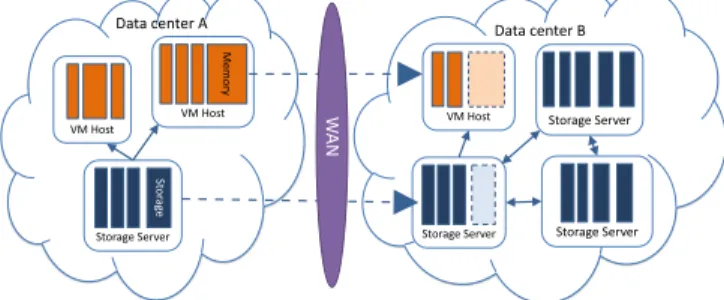
We propose a system to support efficient VM migration in WAN environment. A high-level overview of the system architecture is shown in Fig. 1. Our system transfers the CPU and memory states of a VM directly to the destination host machine. We adopt the pre-copy approach, so the VM will kept running on the source host machine till a significant amount of memory pages have been copied over to the destination. The running VM may modify some of the memory pages that had been copied in a previous round. These pages will be marked as dirty and will need to be copied again. If the dirty page generation rate is too high, the VM will have to be paused to prevent the generation of dirty pages. Remaining dirty memory pages will be copied to the destination host machine in a last round. Finally, the VM will resume execution on the destination host machine.
Migrating a VM over WAN requires not only moving the memory states of the VM but also moving its disk storage states. The size of a VM storage image is typically in the range of a few hundred gigabytes, which makes migrating the storage over wide-area network a very expensive process. However, we noticed that in a large-scale datacenter, it is very likely to find VMs with software setup similar to the VM being migrated. For instance, VMs running web-based services typically employ one of the popular web stacks (e.g. J2EE, .NET, or LAMP), and most VMs will use well-established server operating systems (e.g. Linux, BSD, Windows, Solaris, etc.). Besides, data kept on the VMs may also possess some degree of similarity. For instance, the data may originally come from the same sources (e.g. music files from the same albums). It is also possible that an old version of the VM being migrated pre-exists in the destination datacenter, possibly due to a previous migration. If we can identify the common data among neighboring VMs in a datacenter and use the data to help reconstruct the storage of the VM being migrated, we may significantly reduce the amount of data transmission across the bandwidth-limited wide-area network and make it feasible to use VM migration in WAN environment.
Fig. 1. Overview of migration over WAN
We built an index mechanism to index the data in the VM storage images (Sec. IV.A). The migration process will leverage the index to identify neighboring VMs at the destination datacenter from which common data are available. We support the pre-copy approach of VM migration by adding the bitmap mechanism on the storage server for tracking dirty blocks (Sec. IV.C). For the switch of active storage targets, as part of the VM execution transfer, we use an indirection layer implemented by the combination of a virtual block device and the block device remapping mechanism (Sec. V.B).
A. Indexing Virtual Machine Disk Storage States
Disk storage sizes are relatively large compared to memory sizes. It is quite typical for a VM storage to have at least a few hundred gigabytes of data on it. A straightforward approach for VM storage migration is to transfer all the storage blocks over to the destination. The approach would probably work well on the LAN but will definitely not work on the WAN. On the bandwidth-limited WAN, the migration will take a very long time to finish, and the huge amount of data transmission will likely incur some hefty network usage fees.
To improve the efficiency of VM storage migration, we exploit data similarities among VM disk storages by building an index of the storage blocks of neighboring VMs. The
index is a hash table that stores the hash values (fingerprints)
of storage blocks. Each entry in the index points to a block
index. A block index records the fingerprint (fp) and the signature (sig) of the corresponding storage block. The signature is a small piece of data sampled from the storage
block. In our implementation, a storage block has a size of 512 bytes, and the signature is a sample of the 9th through the 16th bytes of the storage block. The signature is used for resolving hash value (fingerprint) collisions. A block
reference (br) that can be used to locate the corresponding
storage block on the storage server is also kept in the block
index. Through the index and the block indexes, we can
quickly check if the storage blocks of the VM being migrated exist in neighboring VMs at the destination. We can then transfer the storage blocks from neighboring VMs instead from the source across the WAN.
Fig. 2 gives an example of the index for a disk storage of five blocks. When we index a disk storage, we first allocate a block reference array with length equal to the number of blocks in the disk storage. The block reference array stores the link to the block reference for each of the storage blocks. Storage blocks with identical data content will be linked to the same block reference. In Fig. 2, we can see that block 1, 2, and 5 have identical data, as they are all linked to the same block reference.
Given the hash value (fingerprint) of a storage block, we can check the index at the destination. If a block index is matched, we can follow the block reference to retrieve the block data from a neighboring VM at the destination and avoid the costly transmission of the block data across the WAN. VM Host Storage Server VM Host Storage Server VM Host Storage Server Data center A Data center B
Storage Server Me m ory St orag e W AN
Fig. 2. Example of index data structures
Table 1. Source storage server migration process flow
1 // Block interval (I, N) := the blocks start from the Ith block and end at the (I+N-1)th block
2 // Bit interval (I, N) := the bits start from the Ith bit and end at the (I+N-1)th bit 3 // D := the block device that is to be migrated
4 // D[I] := the Ith block of D
5 // D.block_nr := the number of blocks of D 6 // D.bitmap := the bitmap of D
7 // D.bitmap[I] := the Ith bit of the bitmap of D 8 // D.br := the block references of D
9 // D.br[I] := the block reference of the Ith block of D 10 // D.br[I].index := the block index of the block reference D.br[I] 11 // BI := block index
12 // BI.fingerprint := the fingerprint of the block index 13 // BI.signature := the signature of the block index 14 // ZBI := the block index of zero block 15
16 // Clear bitmap of block device D 17 For (I = 0; I < D.block_nr; I++) { 18 D.bitmap[I] = 0
19 } 20 PHASE1:
21 For (I = 0; I < D.block_nr; I++) { 22 If (D.br[I] != NULL) { 23 If (D.br[I].index != ZBI) { 24 FP = D.br[I].index.fingerprint 25 SIG = D.br[I].index.signature
26 Send INDEX_TYPE = BLOCK to destination storage server 27 Send index information (I, FP, SIG) to destination storage server 28 } Else {
29 N = 0 30 Do {
31 I++ 32 N++
33 } While (D.br[I].index == ZBI)
34 Send INDEX_TYPE = ZERO to destination storage server 35 Send block interval (I, N) to destination storage server 36 }
37 } 38 }
39 // End of PHASE1
40 Send INDEX_TYPE = ZERO to destination storage server 41 Send block interval (0, 0) to destination storage server 42 PHASE2:
43 For each received block interval (I, N) from destination storage server { 44 If (N != 0) {
45 For (J = I; J < I+N; J++) { 46 D.bitmap[J] = 1 47 }
48 } Else {
49 Break // block interval with length zero means the request is over 50 }
51 } 52 PHASE3: 53 I = 0
54 While (number of dirty blocks on D > dirty threshold and I < iterate threshold) { 55 For each dirty bit interval (I, N) in D.bitmap {
56 For (J = I; J < I+N; J++) {
57 Send OPCODE = TRANSFER_DATA to destination storage server 58 Send (I, D[I]) to destination storage server
59 D.bitmap[J] = 0 60 }
61 } 62 I++ 63 }
64 Send pause VM message to VM host machine 65 Send switch target message to VM host machine 66 PHASE4:
67 For each dirty bit interval (I, N) in D.bitmap { 68 For (J = I; J < I+N; J++) {
69 Send OPCODE = TRANSFER_DATA to destination storage server 70 Send block information (I, D[I]) to destination storage server 71 }
72 }
73 Send OPCODE = COMPLETE to destination storage server 74 Send resume VM message to VM host machine
Table 2. Destination storage server migration process flow
1 // Block interval (I, N) := the blocks start from the Ith block and end at the (I+N-1)th block
2 // Bit interval (I, N) := the bits start from the Ith bit and end at the (I+N-1)th bit 3 // D' := the new block device that would be synchronized with the migrated block device
4 // D'[I] := the Ith block of D'
5 // D'.block_nr := the number of blocks of D' 6 // D'.bitmap := the bitmap of D'
7 // D'.bitmap[I] := the Ith bit of the bitmap of D' 8
9 Create new block device D’ 10 For (I = 0; I < D'.block_nr; I++) { 11 D'[I] = 0; D’.bitmap[I] = 0; 12 }
13 PHASE1: 14 Do {
15 Receive INDEX_TYPE from source storage server 16 Switch (INDEX_TYPE) {
17 Case BLOCK:
18 Receive index information (I, FP, SIG) from source storage server 19 Find block index BI by FP on local index
20 If (BI != NULL) {
21 Retrieve block data BD through the block reference of BI 22 If (SIG match the signature part of BD) {
23 D'[I] = BD 24 }
25 } 26 Break 27 Case ZERO:
28 Receive block interval (I, N) from source storage server
29 If (N == 0) { // block interval with length zero means the index transfer is over 30 COMPLETE = True 31 } 32 For (J = I; J < I+N; J++) { 33 D'.bitmap[J] = 1 34 } 1 2 3 4 5 Index 1fed4b5b 14e1d758 14e1d760 Block index fp: 1fed4b5b sig: 00000000 br Block index fp: 14e1d758 sig: 12345678 br Block index fp: 14e1d760 sig: ABCDEF90 br Block reference dev_nr: 0 block_nr: 2 bi NULL Block reference dev_nr: 0 block_nr: 1 bi NULL Block reference dev_nr: 0 block_nr: 4 bi NULL
Block reference array of device 0
dev_nr: device number block_nr: block reference bi: block index fp: fingerprint
35 Break 36 }
37 } While (COMPLETE == False) 38 PHASE2:
39 For each clean bit interval (I, N) in D'.bitmap {
40 Send block data request of block interval (I, N) to source storage server 41 }
42 // End of PHASE2
43 Send block data request of block interval (0, 0) to source storage server 44 PHASE3 and PHASE4:
45 Receive OPCODE from source storage server 46 While (OPCODE != COMPLETE) {
47 Receive block information (I, BD) from source storage server 48 D’[I] = BD
49 Receive OPCODE from source storage server 50 }
B. Virtual Machine Storage Migration over WAN
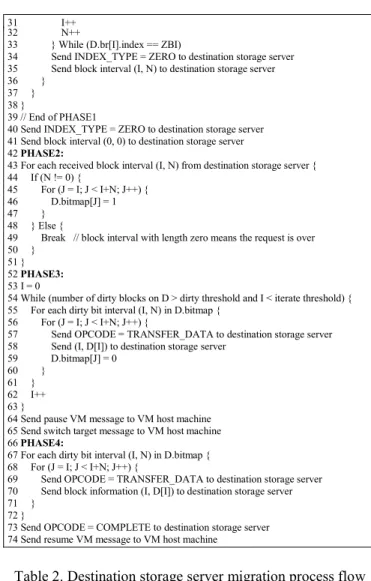
The migration system leverages the indexing mechanism to exploit neighborhood similarity to reduce the amount of network data transmission in VM storage migration. Table 1 and Table 2 present the pseudo-code of the storage migration process involved by the source storage server and the destination storage server respectively. We adopt the pre-copy approach in the storage migration process and employ a bitmap mechanism at the source storage server to track the dirty blocks. Prior to a migration, the bitmaps will be reset with zeros (line 17~19 in Table 1 and line 10~12 in Table 2). On the destination storage server, an empty storage image of the same size as the source storage image will be created and initialized with zeros (line 9~12 in Table 2).
The core migration process consists of four phases. In
PHASE1, the source storage server transmits the index
information (the fingerprints and signatures) of the storage blocks to be migrated to the destination storage server (line 22~38 in Table 1). The destination storage server receives the index information and will search in its index to look for a storage block matching the index information (line 17~26 in Table 2). The migration process will skip those disk blocks whose contents are all zeroes (i.e. the zero blocks) in the index transfer phase (line 28~36 in Table 1 and line 27~35 in Table 2). The bitmap at the destination storage server will be used to track which blocks have been located through the index. If a bit in the bitmap on the destination storage server has the value 0, it means that the corresponding block cannot be found in the index. In this case, the block data will have to be transferred directly from the source storage server in PHASE2.
In PHASE2, the destination storage server will send requests to the source storage server to retrieve the remaining blocks (line 39~41 in Table 2). The remaining blocks are those which could not be located through the index and retrieved locally from a neighboring VM at the destination in
PHASE1. Based on the requests, the source storage server
will set the corresponding bits in the bitmap for the remaining blocks to 1. The transmission of the blocks will be carried out in PHASE3 (line 43~51 in Table 1) of the migration process.
In PHASE3, the source storage server will transmit the blocks requested by the destination storage server from
PHASE2. The source storage server will also transmit the
dirty blocks to the destination storage server (Not the VM is still running, and transmitted storage blocks can get modified and become dirty). The running VM may still keep generating dirty blocks during the transmission, so the
migration process will repeat the transmission of dirty blocks (line 53~63 in Table 1) until one of the following two conditions is met: when the number of dirty blocks is below a
given threshold or when the number of the retransmission iteration has reached an upper limit. With either condition
met, the storage migration process will move into PHASE4. In PHASE4, we must first ensure that no more dirty blocks will be generated by the running VM. So, in fact we will have to suspend the VM and switch the storage target to the destination storage for the VM (line 64~65 in Table 1). After that, we will carry out the final round of dirty block transmission. Finally, the VM storage image at the destination storage server will have identical content as the original VM storage image at the source storage server. The virtual machine will then be resumed after the source storage server send a RESMUE message to the VM host machine (line 74 in Table 1). The whole storage migration process is now complete.
C. Live Migration and VM State Consistency
As VM migration is a time consuming process, it is desirable to allow the VM to keep running during the migration process and also minimize the downtime during the execution transfer. The migration model is often referred to as live migration.
The proposed storage migration system supports live migration and has to allow the running VM to keep writing new data to the storage being migrated. Importantly, the migration system will have to ensure that the destination storage will be consistent with the source storage for the VM at the time of its execution transfer. We use the bitmap to track dirty blocks in the source storage to detect and correct data inconsistencies. Each storage block has a corresponding dirty bit, and when the bit is set to 1, it means that the block has been modified since it being copied to the destination storage server. The block has to be copied again to the destination for consistency.
At the time of execution transfer, the storage of the VM will have to be switched to the destination storage server. For live migration, we are not allowed to un-mount an active storage from the VM and then re-mount it. As a result, we created a virtual block device layer to hide the switch of storage servers. More details about the implementation of the virtual block device layer are given in Section V.B.
V. IMPLEMENTATION
The prototype system is implemented on x86_64 Fedora Linux 16 and Xen hypervisor 4.1.2. The prototype can be easily ported to other Linux virtualization platforms such as KVM as well. The storage server exports storage targets via the iSCSI protocol[3]. The VM host machine runs an iSCSI initiator to connect to exported iSCSI targets.
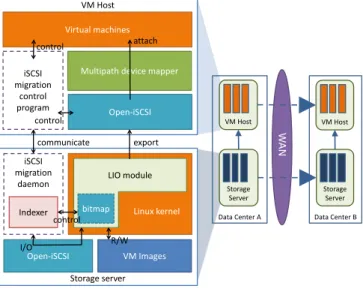
Fig. 3 shows the architecture of the prototype system. The components encircled by dotted lines are newly developed components while the other components are adapted from existing software packages. The iSCSI server function is natively supported by Linux since kernel 3.1 through the LIO module [20]. We use Open-iSCSI [3] as the iSCSI initiator for the VM host machines. We developed the migration daemon that runs on the storage server. The
migration daemon manages the storage server through the LIO and ConfigFS [21]. At the beginning of a storage migration, the migration daemon on the destination storage server will create a new iSCSI target for the storage image to be migrated. When a migration is completed, the migration daemon on the source storage server will delete the iSCSI target of the source storage image.
The migration daemon includes the indexer sub-module for indexing the VM storage images (Sec. IV.A). To maintain the data consistency of a storage image, the indexer’s access to the storage image is also carried through the Open-iSCSI initiator, which connects locally to the storage image.
Fig. 3. System Architecture
A. iSCSI target dirty block bitmap
During live migration of a VM, the VM may keep writing to the storage. It is likely that a migrated storage block gets overwritten again in the migration process. The overwritten block is referred to as a dirty block, which should be retransmitted to the destination. We use a bitmap to track the dirty blocks in a storage image being migrated. The bitmap is implemented in the LIO kernel module.
Fig. 4 shows how LIO module handles SCSI read/write commands. The SCSI commands are sent via iSCSI protocol and are received by the iSCSI portal of the LIO module. The iSCSI portal translates the SCSI commands to a se_task structure and appends it to the command queue of the corresponding block device. A worker thread will continue to fetch tasks from the queue using the do_task function and carry out the tasks. Of interest to the tracking of dirty blocks are the write tasks. A write task will be carried out through the do_writev() function, where we have made modifications to set the corresponding dirty bits in the bitmap for each storage block that get overwritten by the running VM during the migration. Since the migration daemon runs in user space, we export a handle to the bitmap (/proc/target) at the user space using the proc filesystem [22, 23]. The migration daemon can then access the content of the bitmap through memory mapping [24] and also manipulate the bitmap (e.g. clearing the bitmap, setting or resetting bits in the bitmap) through ioctl [25, 26] on the bitmap handle.
B. Switching iSCSI targets for Live Migration
As part of the execution transfer, we need to detach the VM from the source storage server and attach it to the destination storage sever. With live migration, the VM will keep running throughout the migration process, and the switching of storage servers (i.e. the iSCSI targets) will have to be hidden from the VM. We implement a virtual block device to isolate the VM from the SCSI block devices exported by the iSCSI targets. The virtual block device is implemented through the LVM2 device mapper [27, 28]. We then use multipath [29] to connect both the source and destination SCSI block devices to the virtual device as shown in Fig. 5. The multipath module allows the switch from the source SCSI block device to the destination SCSI block device. During the switching, the multipath module will queue up the pending accesses to the detached source block device and apply them to the destination block device after the destination block device is attached. From the perspective of the running VM, its storage is always the virtual device mapper block device.
Fig. 4. LIO module
Fig. 5. Switching iSCSI targets
VI. EXPERIMENT RESULTS
As the proposed WAN migration system relies on exploiting similarity in the VM storage images, we first conduct an experiment in Sec. VI.A to observe the similarity in real-world VM storage images. A similarity level based on the percentage of common storage blocks is defined for a pair of VM storage images. The similarity level will be affected by the indexing block size, so in Sec. VI.B, we observe how different block sizes affect the similarity levels. The CPU usage and memory usage of the system is evaluated in Sec. VI.C. The effectiveness on the reduction of network traffic and migration time reduction is evaluated in Sec. VI.D. In Sec. VI.E, we evaluate the migration downtime with three representative benchmark programs. The hardware of the storage servers are standard x86 server machines, each of which is equipped with two Intel Xeon E5520 processors, 16GB RAM and 1TB hard disk.
Storage server Linux kernel iSCSI migration daemon Open-iSCSI LIO module bitmap Indexer VM Host Virtual machines Open-iSCSI iSCSI migration control program
Multipath device mapper
export attach control control communicate control I/O VM Images R/W Data Center A Storage Server VM Host VM Host Storage Server Data Center B WA N
A. Similarity analysis of VM storage images
If the VM storage images possess a high level of similarity (i.e. having a lot of data in common), the indexing mechanism should be very effective on reducing the amount of network data transmission during WAN migration. In this experiment, we first look at the real-world VM storage images and observe the similarity levels between each pair of the storage images. The composition of the storage images include systems such as CentOS, Fedora and Ubuntu, which are popularly used in real-world VM deployments. We allocated a 32GB storage for each VM and installed the standard LAMP stack [30] on each of the systems. The partition layout follows the default settings of each distribution. We also installed development tools and libraries on the VMs. In addition, we also include the storage images of two production systems Sense and Better in the composition. Both Sense and Better have been in operation for about three years. Sense is a web server running Apache 2.2 on CentOS 5.8. Better is an online judge system for undergraduate programming courses running Fedora Core 14. Overall, we have a total of 10 VM system storages. The experiment looks at the pairwise similarity of the storage images. For each pair, we first use the indexing mechanism to build up the index with one of the images (the base image), and then we will check the other image (the target image) against the index and count the number of storage blocks in the target image that can be located in the index (i.e. the base image also possess the same storage blocks). The similarity between a base image and a target image is then defined as the percentage of (number of target image storage blocks that can be located in the index) / (total number of storage blocks in the target image) * 100 %. For this experiment, each storage block has the size of 512 bytes.
Table 3. VM storage image similarity
Table 3 presents the result on the similarity experiment. Assuming we were to migrate a target image from a source storage server to a destination server, where its corresponding base image is present, each similarity value in the table would indicate the percentage of storage data that would not need to be transmitted across the WAN from the source server to the destination server. We noticed that VM images based on CentOS have the lowest average similarity values between each other when compared with VMs based other distributions. This is because CentOS has a longer release cycle and each new version of CentOS tends to have more significant changes over the previous versions, while other types of systems tend to have a relatively shorter release cycles. For instance, we can see in the table that the similarity values between different versions of Fedora systems or different versions of Ubuntu systems are all above
15 percent. The similarity values between a Fedora base image and an Ubuntu target image are all above 10 percent.
B. Indexing block size and storage image similarity
The indexing mechanism views each storage as a collection of storage blocks and creates an index of the storage blocks (Sec. IV.A). The size of a storage block, as used by the indexing mechanism, is a configurable parameter, which would affect the index size and the effectiveness of the indexing mechanism on locating common storage blocks. A small storage block size will result in creating a huge number of block indexes. On the other hand, a big storage block size will make it harder to locate blocks with identical data contents.
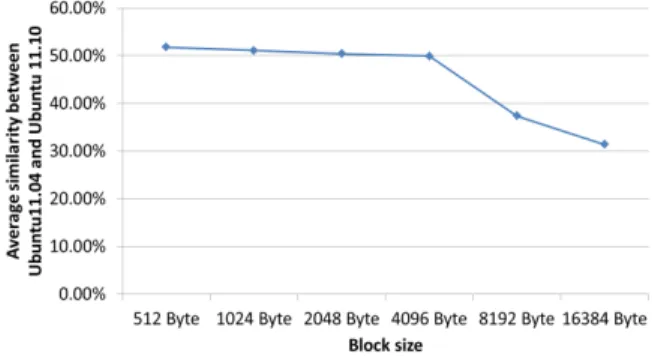
In this experiment, we vary the block size from 512 bytes to 16384 bytes. For each chosen block size, we calculate the storage image similarity between the Ubuntu 11.04 system (used as the base image) and the Ubuntu 11.10 system (used as the target image). The result is plotted in Fig. 6.
From Fig. 6, we can see that the storage image similarity does decrease as the block size increases. A large block size makes it more difficult for two blocks to have identical data and will cause the storage image similarity to drop. We noticed that there is a significant drop between block size 4096 bytes and block size 8192 bytes. This is because the native block size used by the file systems on the storage images is 4096 bytes. When the indexing block size goes beyond 4096 bytes, the indexing block will start to cover data that may not be logically grouped and will cause the similarity to drop.
C. Indexing overhead
It takes time for the indexing mechanism to build the index for a storage, and it also takes memory space to keep the index. In this experiment, we index the 8 system storage images from Sec. VI.A consecutively without clearing up the index (i.e. at the end of the indexing process, the index will include the block indices of all the storage images). We measure the time and the memory consumed when indexing each of the 8 system images.
Fig. 7 shows the time for building the index for each of the storage images. Fig. 8 shows the memory size of the index as each of the 8 system images is added to the index. The average time for indexing a storage is about 140 seconds. The memory usage grows linearly with respect to the addition of storage images to the index. This is expected as
Base\Target CentOS5.8 CentOS6.3 Fedora15 Fedora16 Fedora17 Ubuntu11.04Ubuntu11.10Ubuntu12.04 Sense Better Average
CentOS5.8 n/a 5.36% 3.61% 3.40% 3.10% 3.85% 4.12% 3.96% 9.51% 0.39% 4.14% CentOS6.3 7.26% n/a 11.57% 8.58% 7.24% 7.18% 7.42% 7.35% 1.90% 1.21% 6.63% Fedora15 6.68% 15.70% n/a 34.34% 20.63% 13.25% 14.01% 11.39% 1.71% 2.04% 13.31% Fedora16 6.25% 12.00% 35.33% n/a 28.25% 11.23% 14.05% 14.95% 1.60% 1.65% 13.92% Fedora17 5.79% 10.89% 24.27% 33.72% n/a 9.08% 11.75% 15.27% 1.46% 1.38% 12.62% Ubuntu11.04 2.65% 4.53% 6.79% 5.64% 4.35% n/a 63.39% 21.09% 0.73% 1.13% 12.26% Ubuntu11.10 2.09% 3.28% 4.97% 4.83% 3.91% 40.23% n/a 23.04% 0.62% 1.02% 9.33% Ubuntu12.04 1.79% 3.05% 3.90% 4.86% 5.35% 15.72% 22.70% n/a 0.54% 0.80% 6.52% Sense 41.75% 6.26% 4.66% 4.40% 3.71% 3.95% 4.26% 3.86% n/a 1.22% 8.23% Better 5.79% 14.20% 24.16% 19.08% 13.43% 13.65% 15.97% 11.33% 2.15% n/a 13.31%
the similarity between any two system storage images are on average 10%~20% according to Table 3, so an average 80~90% of new data will have to be added to the index for each system image. In practice, if the size of the index is a concern, one can limit the size of the index at the expense of sacrificing similarity and a potentially longer migration time.
Fig. 7. Indexing time for VM storage images
Fig. 8. Index size with respect to the addition of storage images
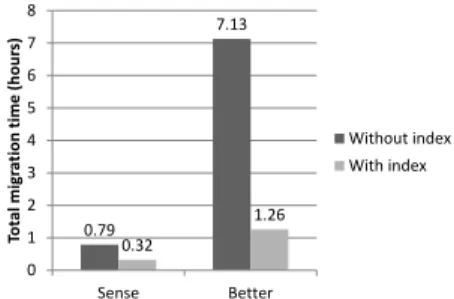
Fig. 9. Migration time with and without index
Fig. 10. Amount of data sent by the source storage server
D. Migration time and amount of data transmission
In this experiment, we look at the migration time and the amount of data transmission. The results are compared against a baseline system, which transmits all the storage blocks directly from the source server to the destination server. We use the two production systems Sense and Better for the experiment. We setup two iSCSI storage servers and use a 100Mbps network to emulate the WAN. The index is populated with two freshly installed systems, which run the same operating systems as Sense and Better. The freshly installed systems have neither the application programs (i.e. the web server and the online judge system) nor the application data as Sense and Better. We migrate the two system systems respectively over the emulated WAN and measure the migration time and the amount of network data transmission.
Fig. 9 shows the result on the migration time, and Fig. 10 shows the amount of data sent by the source storage server. Our system reduces about 59% of the migration time for Sense and about 82% of the migration time for Better. In terms of network data sent by the source storage server, our system reduces about 66% of data transmission for Sense and about 86% of data transmission for Better. The percentage of reduction is roughly the same for the migration time and for the network data transmission. This indicates that most of the migration time is due to data transmission during migration.
Fig. 11. Migration time when migrating over WAN
We also conduct an experiment in real-world WAN environment. We migrate Sense from the NCTU campus network to a remote site, which is connected through 50Mbps ADSL to the Internet. The network route consisted of 14 hops and had an end-to-end latency of 13.7ms. Fig. 11 shows the result of the experiment. Our system reduced about 69% of the migration time and took only about half an hour to complete the migration. From the experiment, we can clearly see that our system is practical for supporting VM migration in WAN environment.
E. Downtime evaluation
The WAN migration system employs the pre-copy approach for VM migration and supports live migration. However, the VM would still need to be paused briefly during the transfer of execution. Remaining dirty memory pages and dirty storage blocks will all have to be transferred
115 120 125 130 135 140 145 150 155 Tim es (se c) 0 1000 2000 3000 4000 5000 6000 7000 8000 9000 10000 M emo ry u sa ge (M B) 0.79 7.13 0.32 1.26 0 1 2 3 4 5 6 7 8 Sense Better To ta l mi gr ati on ti me (h ou rs ) Without index With index 0 50000 100000 150000 200000 250000 300000 350000 Sense Better Amo un t o f d at a se nt b y so ur ce st or ag e s er ve r ( M Bs ) Without index With index 99.73 30.42 0 20 40 60 80 100 120
Sense (over WAN)
To ta l mi gr ati on ti me (mi nu te s) Without index With index
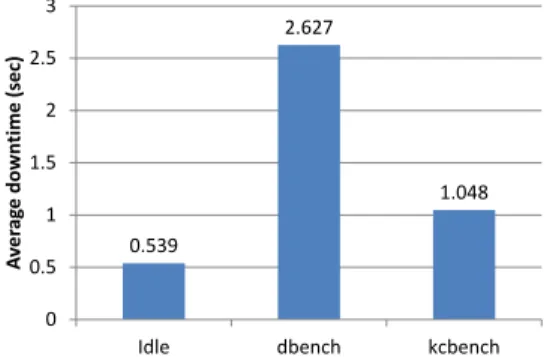
to the destination host machine and storage server. The applications running on the VM will become temporarily unavailable. The time period is referred to as the migration downtime. This downtime can vary depending on the loading of the VM (i.e. a heavily-loaded VM is likely to create more dirty pages / blocks) and also depending on the bandwidth of the network. In this experiment, we evaluate the downtime of the WAN migration system by running I/O intensive benchmarks including dbench [31] and kcbench [32] on the VM to be migrated.
Fig. 12. Comparison of migration time and network transmission with and without indexing mechanism
Fig. 12 shows the result from the experiment. The average downtime for migrating an idle VM is about 539 milliseconds. It’s short enough for most services to operate continuously without interruption. The downtime increases when there is workload on the VM. For instance, the downtime with dbench running on the VM is 2.627 seconds and the downtime with kcbench running on the VM is 1.048 seconds. Overall, the average downtime is less than 3 seconds even under heavy I/O workload. This is good enough for non-realtime applications to be migrated without much impact on the user experience. Overall, our system performs well with respect to the downtime evaluation.
VII. CONCLUSION AND FUTURE WORK
Conventional virtual machine migration is limited to LAN environment, because both the sharing and the migration of VM storage across wide-area network (WAN) are expensive due to the amount of data in the VM storage and the limited bandwidth of WAN. On the other hand, the adoption of cloud computing has caused active construction of datacenters around the globe. Being able to carry out VM migration across datacenter boundaries and across WAN environment would open up new possibilities for more powerful resource utilization and fault tolerance in cloud computing.
We propose a system to facilitate VM storage migration in WAN environment, thereby enabling VM migration across datacenter boundaries. The key technique is to exploit data similarity in the storage images of neighboring VMs on a storage server. The system builds an index of the VM storage images on each storage server and uses the index to assist the reconstruction of the storage image of the VM to be migrated. The technique reduces the amount of data transmission involved in VM migration significantly and brings the overall WAN migration time down to an level that
is acceptable for practical use. The system adopts the pre-copy approach and supports live migration.
The evaluation of the prototype system confirms that neighboring VMs do present considerable amount of duplicate data. Through the proposed system, the migration time of a production VM across real-world WAN environment was shown to be reduced by 70%. With respect to live migration, the system was able to keep the downtime below 3 secs for all the benchmarks used in the evaluation.
The evaluation also identified some deficiencies of the prototype system. One deficiency is the memory usage by the indexing mechanism is still a little bit too high. The indexing mechanism maintains an index data entry for each 512 bytes storage block. While we can reduce the number of index data entries by using a large block size, it will cause the similarity of storage blocks to drop (Sec. VI.B). For future work, we can leverage upper-layer filesystem information to address the issue. The other deficiency of the current prototype is that the downtime may not be short enough for live migration of real-time applications. For future work, we are considering to integrate post-copy mechanism [15] to reduce the downtime.
ACKNOWLEDGMENT
The work was supported in part by Taiwan Information Security Center and National Science Council under grant 101-2221-E-009-076.
REFERENCES
[1] Amazon.com. Amazon EC2 Instance Types. Available: http://aws.amazon.com/ec2/instance-types/
[2] Xen.org. Xen Hypervisor. Available: http://www.xen.org/ [3] Open-iSCSI project: Open-iSCSI – RFC3720 architecture and
implementation. Available: http://www.open-iscsi.org/ [4] D. S. Milojičić, F. Douglis, Y. Paindaveine, R. Wheeler, and
S. Zhou, "Process migration," ACM Computing Survey, vol. 32, pp. 241-299, 2000/09// 2000.
[5] C. Clark, K. Fraser, S. Hand, J. G. Hansen, E. Jul, C. Limpach, et al., "Live migration of virtual machines," 2005, pp. 273-286.
[6] Migration - KVM. Available:
http://www.linux-kvm.org/page/Migration
[7] VMware-VMotion-DS-EN.pdf. Available:
http://www.vmware.com/files/pdf/VMware-VMotion-DS-EN.pdf
[8] Q. Li, J. Huai, J. Li, T. Wo, and M. Wen, "HyperMIP: Hypervisor Controlled Mobile IP for Virtual Machine Live Migration across Networks," in 11th IEEE High Assurance Systems Engineering Symposium, 2008. HASE 2008, 2008, pp. 80-88.
[9] M. Tsugawa, P. Riteau, A. Matsunaga, and J. Fortes, "User-level virtual networking mechanisms to support virtual machine migration over multiple clouds," in 2010 IEEE GLOBECOM Workshops (GC Wkshps), 2010, pp. 568-572. [10] H. Jin, L. Deng, S. Wu, X. Shi, and X. Pan, "Live virtual
machine migration with adaptive, memory compression," 2009, pp. 1-10.
[11] X. Zhang, Z. Huo, J. Ma, and D. Meng, "Exploiting Data Deduplication to Accelerate Live Virtual Machine Migration," in 2010 IEEE International Conference on Cluster Computing (CLUSTER), 2010, pp. 88-96.
[12] F. F. Moghaddam and M. Cheriet, "Decreasing live virtual machine migration down-time using a memory page selection 0.539 2.627 1.048 0 0.5 1 1.5 2 2.5 3
Idle dbench kcbench
Av er ag e do w nt im e ( se c)
based on memory change," in International Conference on Networking, Sensing and Control, 2010, pp. 355-359.
[13] K. Haselhorst, M. Schmidt, R. Schwarzkopf, N. Fallenbeck, and B. Freisleben, "Efficient Storage Synchronization for Live Migration in Cloud Infrastructures," 2011, pp. 511-518. [14] DRBD.Org. (2012/12/31). DRBD: Software Development for
High Availability Clusters. Available: http://www.drbd.org/ [15] T. Hirofuchi, H. Ogawa, H. Nakada, S. Itoh, and S. Sekiguchi,
"A Live Storage Migration Mechanism over WAN for Relocatable Virtual Machine Services on Clouds," 2009, pp. 460-465.
[16] VMware-Storage-VMotion-DS-EN.pdf. Available:
http://www.vmware.com/files/pdf/VMware-Storage-VMotion-DS-EN.pdf
[17] S. Akoush, R. Sohan, B. Roman, A. Rice, and A. Hopper, "Activity Based Sector Synchronisation: Efficient Transfer of Disk-State for WAN Live Migration," in 2011 IEEE 19th International Symposium on Modeling, Analysis Simulation of Computer and Telecommunication Systems (MASCOTS), 2011, pp. 22-31.
[18] F. Travostino, P. Daspit, L. Gommans, C. Jog, C. d. Laat, J. Mambretti, et al., "Seamless live migration of virtual machines over the MAN/WAN," Future Gener. Comput. Syst., vol. 22, pp. 901-907, 2006.
[19] T. Wood, K. Ramakrishnan, P. Shenoy, and J. Van der Merwe, "CloudNet: dynamic pooling of cloud resources by live WAN migration of virtual machines," in ACM International Conference on Virtual Execution Environments (VEE), 2011, pp. 121-132.
[20] Linux Unified Target - Main Page. Available: http://linux-iscsi.org/wiki/Main_Page
[21] Linux Kernel Documentation :: filesystems : configfs. Available:
http://www.mjmwired.net/kernel/Documentation/filesystems/ configfs/
[22] proc(5): process info pseudo-file system - Linux man page. Available: http://linux.die.net/man/5/proc
[23] procfs - Wikipedia, the free encyclopedia. Available: http://en.wikipedia.org/wiki/Procfs
[24] mmap(2) - Linux manual page. Available:
http://www.kernel.org/doc/man-pages/online/pages/man2/mmap.2.html
[25] ioctl - Wikipedia, the free encyclopedia. Available: http://en.wikipedia.org/wiki/Ioctl
[26] ioctl(2) - Linux manual page. Available:
http://www.kernel.org/doc/man-pages/online/pages/man2/ioctl.2.html
[27] Device-mapper Resource Page. Available: http://sources.redhat.com/dm/
[28] LVM2 Resource Page. Available: http://sourceware.org/lvm2/ [29] multipath-tools:Home. Available:
http://christophe.varoqui.free.fr/
[30] LAMP (software bundle) - Wikipedia, the free encyclopedia. Available:
http://en.wikipedia.org/wiki/LAMP_(software_bundle) [31] DBENCH. Available: http://dbench.samba.org/
[32] kcbench(1): Kernel compile benchmark - Linux man page.