國 立 交 通 大 學
資訊科學與工程研究所
碩 士 論 文
支 援 大 型 軟 體 測 試 之 符 號 環 境 系 統
Symbolic Environment Support for Testing Large Software
Applications
研 究 生:黃韋翔
指導教授:黃世昆 教授
支援大型軟體測試之符號環境系統
Symbolic Environment Support for Testing Large Software
Applications
研 究 生:黃韋翔 Student:Wei-Shiang Huang
指導教授:黃世昆 Advisor:Shih-Kung Huang
國 立 交 通 大 學
資 訊 科 學 與 工 程 研 究 所
碩 士 論 文
A ThesisSubmitted to Institute of Computer Science and Engineering College of Computer Science
National Chiao Tung University in partial Fulfillment of the Requirements
for the Degree of Master
in
Computer Science
July 2012
Hsinchu, Taiwan, Republic of China
支 援 大 型 軟 體 測 試 之 符 號 環 境 系 統
學生:黃韋翔 指導教授:黃世昆 老師
國 立 交 通 大 學 資 訊 科 學 與 工 程 學 研 究 所 碩 士 班
摘要
在軟體開發的過程中,因為程式開發者的疏忽,往往會造成程式中含有潛在 的軟體漏洞。透過自動化的軟體動態檢測技術,我們可以從中找出存在的軟體問 題。如要大規模、快速、且方便的對軟體檢測,就要建立一個軟體資料庫,將有 問題的軟體建立為樣本,以便於後續的軟體研究、分析、與測試之用。 在此篇論文中,提出透過建立虛擬機器映像檔的方式,建立軟體失控樣本資 料庫(Crash Database)。預先在映像檔中安裝相關的作業系統以及軟體,當使用 者需要時,則可快速建立一個馬上可供使用的環境,改善使用者在進行軟體測試 時,還需花時間手動安裝的缺點。 為了方便軟體樣本資料庫的管理,我們也提出一個網頁管理介面,透過此介 面,管理者可以在此介面中新增、查詢、刪除後端虛擬機器映像檔的資料。此外, 也提供系統狀態監控機制,能在儲存資料庫的設備出現問題時,即時透過電子郵 件或簡訊告知管理者。 對於使用者來說,瀏覽這個介面即可了解目前資料庫中可供測試的軟體版本。 為了方便使用者在使用時能夠快速建立測試環境,網頁中也提供即時建立虛擬機 器映像檔之功能。當使用者點選該功能後,後端程式即會自動建立對應的軟體映 像檔;使用者透過下載自動化的腳本程式,來自動掛載透過網路分享的映像檔, 進行實驗。結合遠端管理機制,使用者藉由我們所開發的遠端管理軟體,能透過 在外部下指令,操作虛擬機器中的環境,達到更多樣性的運作方式。Symbolic Environment Support for Testing Large Software Applications
Student:Wei-Shiang Huang Advisors:Dr. Shih-Kun Huang
Department of Computer Science and Engineering
National Chiao Tung University
ABSTRACT
With the development of software, the quality issues have become a major concern. The truth is that programmers still do not take this problem into consideration, so that software is still with a lot of vulnerabilities or bugs. In this thesis, we try to build a repository with potentially vulnerable software called crash database. The purpose of this database is to collect software with vulnerabilities or bugs, and these collections can be used for further analyze. This database provides an integrated environment that contains an entire operating system, software and remote control framework, so that users do not have to build the environment manually and they can easily perform experiments.
In addition, we develop a web management and monitoring interface; this interface allows users to choose the proper software images and clone a new testing environment quickly. For administrators, they can use this system to add, remove, and control software images; meanwhile, it has the monitoring mechanism that we can know the status of every crash database server. The system therefore improves the traditional software analysis environment.
誌謝
碩士論文的完成,代表人生中一個階段的結束,正式揮別了十多年來的學生 生涯,邁向了另一個新的挑戰。感謝多年來在背後不斷給予支持與陪伴的家人, 而爸爸和媽媽這些年來含辛茹苦的付出,更讓我能無後顧之憂地完成我的學業。 特別謝謝我的指導教授黃世昆老師,在他的殷勤的指導與提點之下,使我能 夠順利完成我的論文,老師平常對於學生的關心和照顧,也令我們點滴在心頭。 另外,謝謝田筱榮老師、孔崇旭老師和宋定懿老師不辭辛勞地前來協助口試,對 於論文中的不足給予了指導和建議,讓我感到收益良多,使論文可以更臻於完善 而嚴謹。而陳登吉老師在我初到交大這個新環境時,給了我許多幫助以及人生上 的建議,謝謝您。 在這兩年多的研究所生活中,實驗室的同儕俊維、翰霖、基傑、偉明和奕任 總是不吝於給予協助,在遇到瓶頸或挫折時,適時的給了我許多意見。而學長們 博彥、孟緯、世欣、銘祥,也在我初接觸這個領域時,給了許多指導與討論。還 有劉歡、正宇、鍾翔、俊彥與博謙,我會想念與大家一同度過的這段美好時光, 希望將來還有機會一同出遊與聚餐,謝謝你們。 接著還要感謝大學時期給予我啟蒙的潘仁義老師以及中正大學計算機中心 的張永榴先生和 CNA 校園網路策進會的夥伴們,在那段日子裡,學習到了許多, 奠定下了我對於電腦網路以及資訊安全方面的基礎,謝謝你們。 也特別謝謝幾位知心的好友吳安妮、洪皓軒以及陳蔚青,在我感到灰心和難 過時,給了我許多的安慰與鼓勵。 最後,得之於人者太多,出之於己者太少,謝謝一路上走來許多人的幫忙與 提攜,謹以此篇論文,獻給那些曾經幫助過我的人。Contents
摘要 ... i ABSTRACT ... ii 誌謝 ... iii Contents ... iv List of Figures ... viList of Tables ... viii
1. Introduction ... 1
1.1. Background ... 1
1.1.1. Common Vulnerabilities ... 1
1.1.2. Program Testing Mechanism ... 3
1.1.3. Other Tools ... 7
1.2. Motivation ... 10
1.3. Objective ... 11
2. Related Work ... 12
3. Methods ... 14
3.1. Guest OS Remote Control ... 15
3.1.1. Remote Control ... 15
3.1.2. Symbolic Methods ... 17
3.2. Crash Database ... 19
3.2.1. Design of Crash Database ... 19
3.2.3. Automated Experiment ... 25
4. Implementation ... 26
4.1. Guest OS Remote Control ... 26
4.1.1. Procedure of Customized Function ... 26
4.1.2. Customized Op-Code ... 27
4.1.3. S2E Plugin ... 28
4.1.4. Remote Control framework ... 29
4.2. Crash Database ... 31
4.2.1. Fast Deployment & Low Usage of Disk Space ... 31
4.2.2. Support Large Scale Testing & Load Balance ... 33
4.3. Web Based Management & Monitor System ... 35
4.3.1. Image Management ... 35
4.3.2. Service Monitor ... 37
4.3.3. Automated Experiment ... 38
5. Result and Evaluation... 40
5.1. Images in Crash Database ... 40
5.2. Boot Time ... 42
5.3. Web Management ... 43
6. Conclusion ... 45
List of Figures
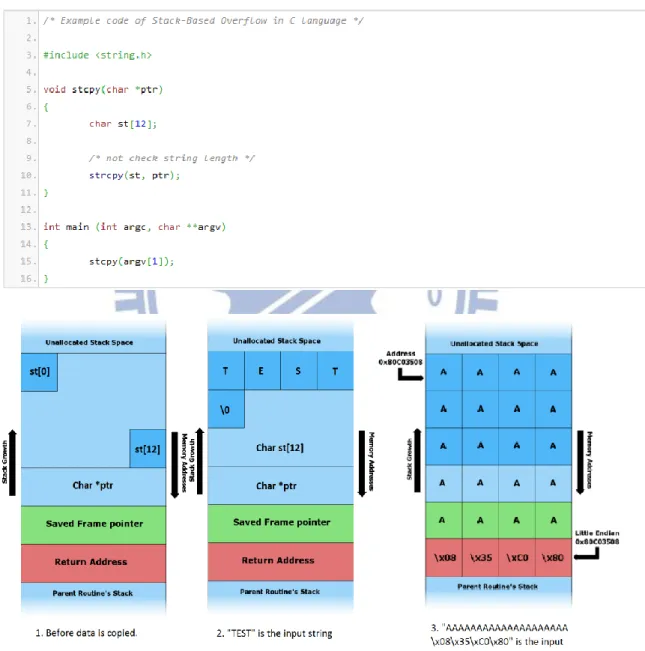
Figure 1: Example code and diagram of stack overflow ... 2
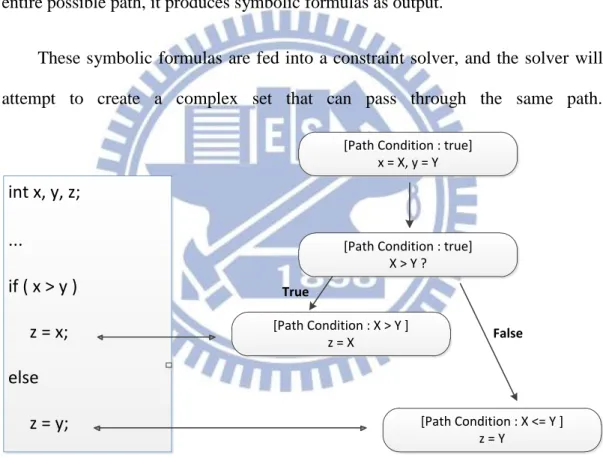
Figure 2: The symbolic execution tree ... 4
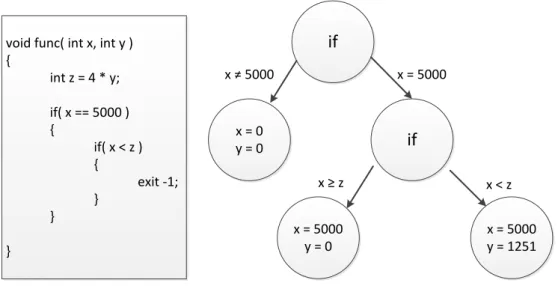
Figure 3: Example code and concolic execution tree ... 6
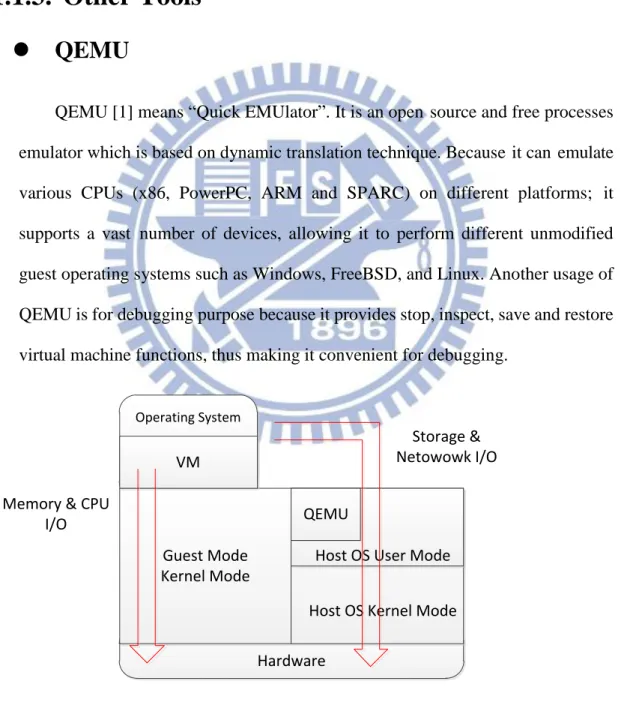
Figure 4: Virtualization of QEMU ... 7
Figure 5: Notification function of Nagios... 8
Figure 6: Process of Full CRAX system ... 10
Figure 7: The conceptual model of our method ... 14
Figure 8: The execution process of customized Op-code in Program ... 16
Figure 9: Flow chart of remote control ... 16
Figure 10: External Symbolic method ... 17
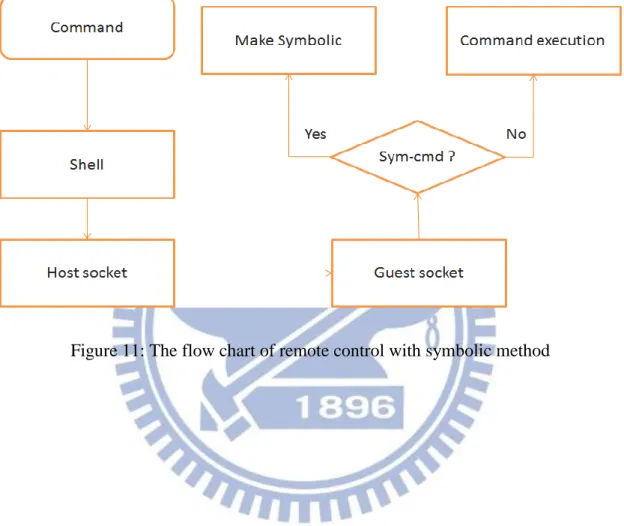
Figure 11: The flow chart of remote control with symbolic method ... 18
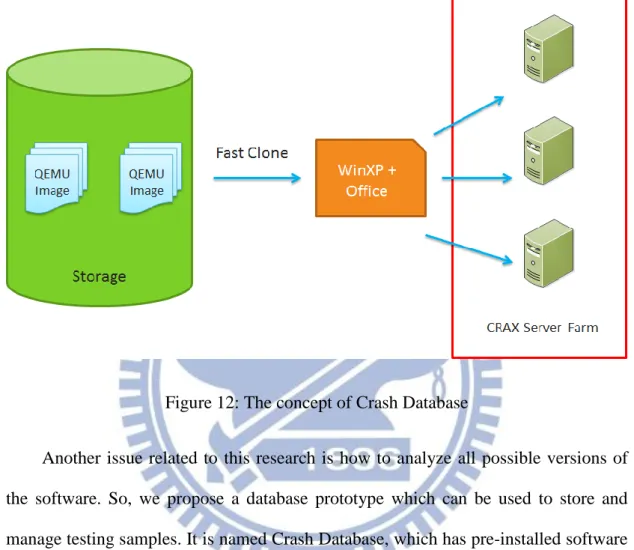
Figure 12: The concept of Crash Database... 19
Figure 13: Copy-On-Write transactions ... 20
Figure 14: The image cloud diagram ... 21
Figure 15: Model of image management system ... 23
Figure 16: Administrator operates diagram ... 24
Figure 17: Process of image creation and scripts generation ... 25
Figure 18: Core components of customized function ... 26
Figure 19: Custom instruction format ... 27
Figure 20: Sample code of customized Op-Code ... 27
Figure 22: Remote control framework ... 29
Figure 23: The concept of Pool and ZFS File system ... 31
Figure 24: ZFS Fast Clone Process ... 32
Figure 25: Software snapshot in one QEMU image ... 33
Figure 26: The structure of server load balance ... 34
Figure 27: Image management web site... 35
Figure 28: Whole procedure of automated experiment ... 38
Figure 29: Pseudo code of automated experiment script ... 39
Figure 30: Image list ... 43
List of Tables
Table 1: Comparison of related platform ... 13
Table 2: List of software that has installed in Crash Database ... 41
Table 3: Boot time of Linux image ... 42
1. Introduction
During the process of development, programmers may ignore the risk of software defect. The software may have many known bugs in the previous version or unknown bugs in the latest version.
With a view to analyzing and examining software bugs, it needs a friendly testing environment with variety of software collections.
Although there are several web databases which provide a lot of software exploits or vulnerabilities, they do not hold the original software version. This makes it hard to acquire old software for inspection or analysis. Hence, for the establishment of a platform for software testing, the acquisition of software and the development of an ease of use system are notable works.
Therefore, in this work, we will create a software database which contains separate versions of software along with vulnerabilities or exploits. On the other hand, we will construct a remote symbolic execution testing environment which for convenient uses.
1.1. Background
1.1.1. Common Vulnerabilities
Stack-based Overflow
Stack is an area of a computer that contains a limited size of memory, and it is typically used to keep local variables, function parameters, and return addresses.
However, because of the fixed amount of stack, the input buffer may overwrite a local variable or the return address in the stack frame if a vulnerable program does not manipulate the inputs properly.
This act may cause the unexpected behavior of a program, or even crash the program.
Figure 1: Example code and diagram of stack overflow
stack. If the length of the input string is smaller than 12 characters, this code runs without problem. Nevertheless, if the length of the input string is over 11 characters, those remaining strings will overwrite a memory buffer that does not belong to the stack. This will result in the corruption of the stack frame.
Heap-based Overflow
A heap overflow is a buffer overflow that occurs in the heap portion of memory. This usually means the buffer was allocated by dynamic memory allocation like POSIX malloc() API.
Attackers can overwrite the internal memory structures such as linked-list pointers. It may cause the program to crash, or bring the program into an infinite loop. Also, the vulnerability usually can be used to execute malicious code, which is not programmer’s expectation.
Uncontrolled Format String
Uncontrolled format string is a kind of software vulnerability due to the programmer’s negligence. They do not specify the format argument in the function such as POSIX printf(). So the input becomes user-controlled and allows a malicious user to injectarbitrary format string into the code. This may cause the program to crash or execute arbitrary code.
1.1.2. Program Testing Mechanism
Symbolic Execution
execution, which uses particular samples as inputs and will be restricted to explore specific paths by initial values, symbolic execution will try to explore all the paths of the program by a set of symbols.
In symbolic execution, program variables are replaced with symbolic values and these symbols may designate any values at the beginning. As the program runs, symbolic values are brought into the program; thus they will be calculated, assigned and affected by control flow like a normal program execution. After it explores the entire possible path, it produces symbolic formulas as output.
These symbolic formulas are fed into a constraint solver, and the solver will attempt to create a complex set that can pass through the same path.
int x, y, z; … if ( x > y ) z = x; else z = y;
[Path Condition : true] x = X, y = Y
[Path Condition : true] X > Y ? [Path Condition : X > Y ] z = X [Path Condition : X <= Y ] z = Y True False
Figure 2: The symbolic execution tree
For instance, in Figure 2 the path condition is initially true. If the program runs into if( x > y ) branch, the path condition will be X < Y. If the program runs into else branch, the path condition will be X > Y.
Concolic Testing
Symbolic execution has its advantage in code coverage testing. However, for large software, it is time consuming, and often impossible to traverse all the paths because of the path explosion problem.
Concolic testing [8] is a hybrid testing technique of random testing and symbolic execution; it avoids the drawbacks of random testing and symbolic execution. The main idea of concolic testing is to use the concrete values, generated from random testing and symbolic execution. The symbolic execution will take advantage of concrete input to obtain better code coverage. First, concolic testing uses concrete values as input to execute a program on a certain path, and collects symbolic constraints for symbolic execution when encountering conditional branch. When a path terminates, the constraint solver computes these constraints of each branch point and generates new test case that is used to explore the feasible paths repeatedly.
Figure 3 is a classic example code which is used to describe the execution of concolic testing. The first is to try an arbitrary value for x and y, for example, x = y =
2. In the concolic execution, z will be set to 4y and not satisfy the branch condition
since z ≠ 5000. The symbolic execution keeps the same path, but view x and y as symbolic variables. Then z is set to 4y and gets an inequality x ≠ 5000. This inequality is called a path condition and all the executions which follow the same path must satisfy this path condition.
void func( int x, int y ) { int z = 4 * y; if( x == 5000 ) { if( x < z ) { exit -1; } } } if x = 0 y = 0 if x = 5000 y = 0 x = 5000 y = 1251 x ≠ 5000 x = 5000 x ≥ z x < z
Figure 3: Example code and concolic execution tree
Before starting a new execution path, we would use the last path condition encountered, x ≠ 5000, and negate it, with x = 5000. Then a constraint solver will try to find the values for input variables x and y for the next run. For example, a valid testing set might be x = 5000 and y = 0.
This input allows the program to enter the inner branch if(x < z), but this would not be satisfiable since 5000 is large than z. The path conditions are x =
5000 and x ≥ z. We negate it and get x < z. The constraint solver is invoked to find
values satisfying x = 5000, x < z, and z = 4y. For instance, a solution is x = 50000 and y = 2501. This input will reach the final path.
Fuzz Testing
Fuzz testing [11][12] is a straightforward technique that can be used to evaluate code quality. In fuzz testing, it uses random, unexpected or invalid data to attack a computer program, and then wait to see if it results in crashes.
The process of fuzz testing is to prepare a valid file format for testing program, then mutating some part of the file with a random data. This fuzzed file will be fed into the program and check if it will cause failures.
It is an efficient way to test a program, and we use this technique to generate crashes which are viewed as concrete values on concolic testing.
1.1.3. Other Tools
QEMU
QEMU [1] means “Quick EMUlator”. It is an open source and free processes emulator which is based on dynamic translation technique. Because it can emulate various CPUs (x86, PowerPC, ARM and SPARC) on different platforms; it supports a vast number of devices, allowing it to perform different unmodified guest operating systems such as Windows, FreeBSD, and Linux. Another usage of QEMU is for debugging purpose because it provides stop, inspect, save and restore virtual machine functions, thus making it convenient for debugging.
Guest Mode Kernel Mode
VM
QEMU
Operating System
Host OS User Mode Host OS Kernel Mode Hardware
Storage & Netowowk I/O Memory & CPU
I/O
Nagios
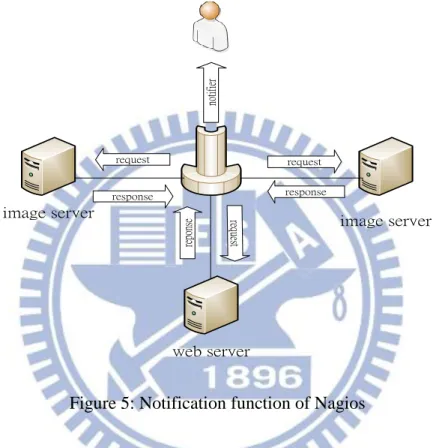
Nagios [14] is a computer system monitoring tool which watches equipment, network, and service status of the system in time. If something goes wrong, Nagios will alert the manager immediately.
request request req ue st response response re po ns e
image server image server
web server
no
tif
ie
r
Figure 5: Notification function of Nagios
Furthermore, Nagios provides the functions that help diagnose and repair problems before they affect users or damage the system.
S
2E
S2E [2] is a software analysis platform, and it allows running the whole operating system in a testing environment. It uses dynamic binary translation, selective symbolic execution and relaxed execution consistency models to find the execution paths. So we can analyze not only the user-mode but also the kernel-mode binary.
ZFS
ZFS [3][4] stands “Zettabyte File System”, and it is developed by Sun Microsystems. It supports a variety of features such as data integrity, high storage capacities, integration of file system and volume management, snapshots, copy-on-write clones and soft-RAID technique.
These features make it easier to manage a storage system easier; the copy-on-write clone makes it fast to clone new image and destroy it after using, and snapshot provides the flexibility of data recovery.
Sikuli
Sikuli [15] is software that can simulate the behavior of the mouse and keyword on graphical user interfaces (GUI) environment by images or screenshots.
There are some key components including Sikuli Script, Sikuli IDE and a visual scripting API for Jython. Sikuli can control anything on the screen automatically without calling system’s API.
1.2. Motivation
The original idea is “how to analyze multiple vulnerabilities in the same time”. When we want to confirm or evaluate software bugs, we must find the correct version of the software first. It may be easy to find the current one. If someone wants to get an earlier or the oldest version, it will be a time-consuming job. Besides, much software depends on the OS (Operation System) version, assuming that you want to check them; you will take a lot of effort on environment setup.
We also need to take into consideration of the usage of storage and the testing environment disposing. Accordingly, a mechanism that reduces space usage and shortens the building process is another critical issue.
In addition, we need to make a user-friendly interface for managing the status of every virtual machine and provide them with a convenient way to examine their software.
1.3. Objective
It is known that there are existing bugs in software, so that we strive to achieve the goal of building a software testing framework. Fortunately, we have CRAX, a software testing platform, but there are still some insufficient functions. Hence, we will develop a crash database and guest OS remote management which will integrate into the CRAX framework.
Crash Database
This target is to create an VM image database which contains a large number of software and relevant OS; this database will become the source of testing targets of CRAX, fuzzer and wargames.
However, for administrative management, it will have a friendly Virtual Machine management and monitor interface.
Guest OS Remote Management
We will analyze multiple systems simultaneously, so it is necessary to have an interactive interface that can be used to control the analysis environment and implement symbolic environment such as sym-file, sym-socket, sym-stdin, sym-age and sin-env from the host to guest OS.
2. Related Work
In this thesis, it focuses on the establishment of Crash Database and remote control framework system. In the following sections, we will introduce some related research about virtual machine management and database concerning vulnerability and software bugs.
Exploit Database (http://www.exploit-db.com/) is an online website that supports various archives of exploits and vulnerabilities of the software. It mainly provides exploit code, files for vulnerable program. Nevertheless its disadvantage is that it does not provide vulnerable software. So it may be difficult to find the old version of software if someone wants to test it.
Common Vulnerabilities and Exposures (CVE) (htp://cve.mitre.org/) is more like a dictionary than a database, and its source comes from a variety of security companies or organizations. Furthermore, it uses a unified format and identifier for every security problem. Everyone can follow the standard to release security notes. CVE provides a reference for publicly known information, security vulnerabilities and exposures. The Open Source Vulnerability Database (OSVDB)
(http://www.osvdb.org/) is an open source database supported by and for the community. According to the characteristic of vulnerabilities, they classify them into different categories.
National Vulnerability Database (NVD) (http://nvd.nist.gov/) is the U.S. government repository of standards based vulnerability management data represented using the Security Content Automation Protocol (SCAP).
This data enables automation of vulnerability management, security measurement, and compliance. NVD includes databases of security checklists, security related software flaws, misconfigurations, product names, and impact metrics
Metasploit (http://www.metasploit.com/) is a security project which aim at security vulnerabilities and penetration testing. It collects a lot of software bugs, exploits and vulnerabilities. Furthermore, it also provides automatic testing program.
Testbed@TWISC (http://testbed.ncku.edu.tw) is a network security testing platform, and it integrates Emulab system to provide an independent, controllable, and close environment for experiment.
Name Software database Pre-install software Provide Exploit A testing environment Management system Exploit Database ✔ ✔ CVE ✔ OSVDB ✔ NVD ✔ Metasploit ✔ ✔ Testbed@TWISC ✔ ✔ Crash Database ✔ ✔ ✔ ✔ ✔
3. Methods
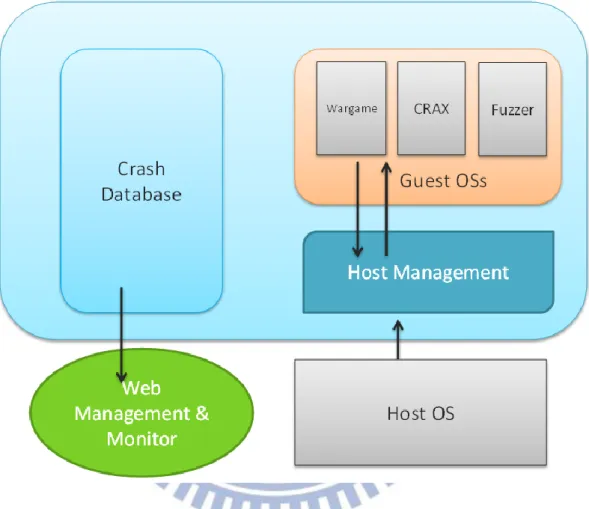
Figure 7 is the model of our method; it mainly divides into two parts, Guest OS Remote Control and the Design of Crash Database.
Figure 7: The conceptual model of our method
From the model, we know that Guest OSs run on a machine emulator called QEMU, and we will implement an interface as a communication bridge between Guest OS and Host OS.
On the left side of this model, we can see there is a database named Crash Database. As the name implies, it contains much software with its crash file in the database. In addition, a database management system is indispensable, so we will develop a web management system and a monitoring mechanism to log system’s
status.In the following sections, we will describe the ideas of every component in details.
3.1. Guest OS Remote Control
3.1.1. Remote Control
In QEMU environment, it does not provide a native API for remote control, so it is not possible to control guest OS directly from the host. If you want to command the Guest, you need to open a console and operate there. In other words, it may cost a lot of time on manual methods and is not convenient for experiments. In order to improve this drawback, we propose an easy function which permits you to command from the outside of the guest OS.
In this research, we try to combine these functions into a framework. At first, we think that we can modify QEMU’s code to implement the targets, but it will take a lot of efforts. Besides, this method makes it hard to port into other platforms. As a result, an alternative way is implemented in this work.
We know that S2E allows you to use customized Op-Code, which is a specific machine code defined by S2E in its own version of QEMU. In other words, it is
possible to write inline assembly in our program. Then S2E’s QEMU will interpret this code automatically. For this reason, we can develop a program, which is used to transfer files or some information.
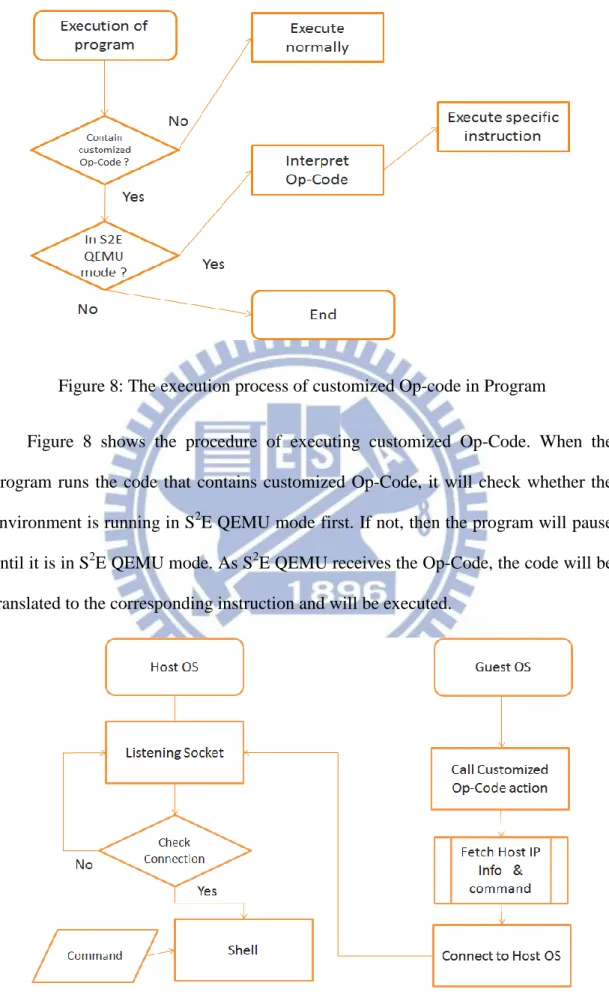
Figure 8: The execution process of customized Op-code in Program
Figure 8 shows the procedure of executing customized Op-Code. When the program runs the code that contains customized Op-Code, it will check whether the environment is running in S2E QEMU mode first. If not, then the program will pause until it is in S2E QEMU mode. As S2E QEMU receives the Op-Code, the code will be translated to the corresponding instruction and will be executed.
Figure 9 is the flowchart of remote control. The program has two parts. Host OS will create a listening socket on a specific port, and Guest OS will use another socket to connect to Host OS. In the beginning, the Customized Op-Code function is trying to get Host OS’s IP info, and the IP address will be used to connect to Host OS. If the connection is successful, then the Host OS side would bounce a shell for remote control.
3.1.2. Symbolic Methods
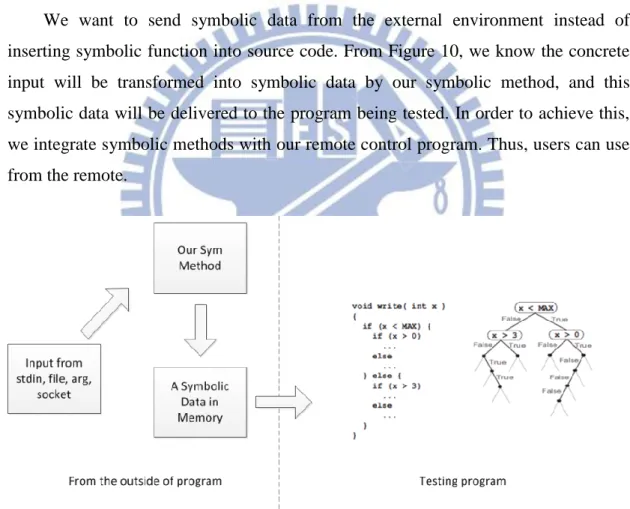
We want to send symbolic data from the external environment instead of inserting symbolic function into source code. From Figure 10, we know the concrete input will be transformed into symbolic data by our symbolic method, and this symbolic data will be delivered to the program being tested. In order to achieve this, we integrate symbolic methods with our remote control program. Thus, users can use from the remote.
The following will explain the process of remote control with symbolic methods. When receiving command from Host OS, parser function will examine the command first. If it belongs to symbolic-commands, the program will create a new process to execute symbolic-functions which translate input into symbolic data.
3.2. Crash Database
3.2.1. Design of Crash Database
Figure 12: The concept of Crash Database
Another issue related to this research is how to analyze all possible versions of the software. So, we propose a database prototype which can be used to store and manage testing samples. It is named Crash Database, which has pre-installed software package. Users can find their target in this database and create a new environment for testing use in time.
Because this database contains a significant of software images, there are many conditions that need to be taken into account. We introduce some necessities in the following:
Fast image clone
In this model, we will pre-build many software testing environments in QEMU image. When users need an environment for a test, wargame or fuzzed test, we will create a new one in VM. Traditionally, if we want to create new environments, we must use the copy command to make copies of the original image. This duplicating process is a time-consuming job; it may take minutes or even hours. So how to solve this bottleneck is the chief issue we need to take into account. We use Copy-on-write (COW) technique in this system. The primary advantage of this technique is that if no caller ever makes any modifications, no private copy needs to be created. So it significantly reduces the wasting time, which makes the copy process can be finished in seconds.
Support multiple computing server & Load balance
Because there are a large number of computing nodes, which may use different images at the same time, the model is supposed to allow
Figure 14: The image cloud diagram
We choose Network File System (NFS) [9] as the backbone. NFS is a distributed file system protocol, and it allows users on distinct computers to access remote file over the network. By using this technique, the system has the capacity to support multiple computing servers. As users need a testing environment, we will clone a new image and set a shared flag on that directory. Thus, this directory can be accessed or wrote by the remote computing node.
This mechanism has a disadvantage; if too many computing nodes access the same image server, it results in a bottleneck on network bandwidth.
The solution of this difficulty is by using distributed image servers. Those images are deployed in many servers in advance, and the round-robin technique is used for load balance. Round-robin is like its name. It maintains a list of available resources, which can be chosen for a task. While a computing node wants to access a remote image, it will be assigned an image server by round-robin, and mounting the image directory by NFS. Then, the image is ready to use.
Low disk space usage
The design of crash database is used to store the entire operating system and different software images, so each entry may occupy a lot of space. The usage of disk space is a serious problem and must be taken into consideration.
If every software and operating system is installed in independent QEMU image, it will have many QEMU images and use a lot of disk space. QEMU provides a function, which is called snapshot; it can record the state of a system at a particular point in time. The best of all, snapshot refers to an actual copy of the original state, so it costs a little size of disk space. It brings up us an idea to store compatible software in the same operating system image. In this method, a variety of software can be installed in one image and reduce waste of disk space.
3.2.2. Image Management & Monitor
Figure 15: Model of image management system
Various software images are stored in crash database; a mechanism to administer this system is needed. A comprehensive management platform that enables us to manage images easily and efficiently is indispensable.
This management platform is developed with web based technologies, and it provides an intuitive GUI that an administrator can know the information of every image clearly. Furthermore, the platform permits users to create and destroy a new testing environment from the web page. Just click a button, and all the manual works are done by the automatic script.
Besides, it also has a monitoring agent; this makes administrator easily to know the status of every server and service. When an unexpected affair happened, it notified administrators by E-mail or SMS.
Figure 16: Administrator operates diagram
Figure 15 is the layered model of this management platform; each layer serves its upper layer and is served by its lower layer.
First layer is Presentation Layer, and it is a web GUI page. Users can connect to this i2nterface by various web browsers, and manage QEMU images.
The second layer is Façade Layer, and it is the layer that combines all the function objects into a single interface. It simplifies the complicated process of calling independent object.
The Control Layer is the implementation of every function object, and it is composed of three components. Mon stands for Service Monitor system. File represents the function of control image. And ORM is a MySQL database, which is used to record the information of every image and some management data.
3.2.3. Automated Experiment
In order to reduce manual work, an automated experiment function is necessary. The goal of automated experiment is that it can start QEMU image and do symbolic experiment automatically. We can say that automated experiment is an enhancement of remote control program.
The basic idea is using shell scripts. First, a code template is prepared in advance; the remote control program and some shell scripts are packed into this template. And script’s arguments and execution command are getting from a backend database.
Figure 17: Process of image creation and scripts generation
When users create a new testing environment, a script file will be generated dynamically at the same time. The script file contains instructions to mount image properly, and the execution command, which will be sent to the guest OS by remote control program. So user just needs to download this script and execute on Host OS; other works are automatically done by the script.
4. Implementation
In the previous chapter, we introduce the related methods and ideas which are used in this thesis. In this chapter, we mainly focuses on the detail of implementation.
The architecture of this framework can be divided into different parts, so we will expound them dependently.
First part is Guest OS Remote Control; it relates to the communication bridge between Host OS and Guest OS in QEMU.
The second part relates to techniques used in Crash Database that enable us to create a database satisfying the demand desired.
The third focuses on the web management, monitor system of QEMU image and the scripts, which are used to execute experiment automatically.
4.1. Guest OS Remote Control
Figure 18 is the execution process of GET Program with customize Op-Code. It is composed of three components. GET program use the Op-code to invoke specific functions, which define in a header file. And implementations of these specific functions are defined in a plugin of QEMU.
When GET program executes, the corresponding actions will take place on the Host OS. The details of every component will be explained in the following sections.
4.1.2. Customized Op-Code
In S2E’s plugin, it provides customized Op-Code which extends the x86 instruction set. However, we can implement any customized Op-Code to control the execution behavior from the guest OS. Figure 19 is the format of Customized OP-code.
Figure 20: Sample code of customized Op-Code Figure 19: Custom instruction format
Figure 20 is the function that we define in the header file. This function represents the action of a file open, and a file name sent from the guest OS to host OS as a function parameter.
Line 5 to 7 defines a unique Op-Code for this instruction; the 3rd and 4th byte
0x00 0xEE is a unique identifier of this plugin. Furthermore, the 5th byte 0x00 is the operand which is used to identify the open action in this plugin.
4.1.3. S
2E Plugin
Figure 21: The execution process of S2E Plugin
This HostFiles plugin [2] declares the actual actions of customized Op-Code; we use this plugin to accomplish the purpose desired. When the program inside guest OS
plugin will be triggered and interpreted the Op-Code. If the Op-Code is defined, it reads some CPU registers to get the information of the file and address of guest’s file buffer. After these actions are finished, the plugin starts to write the file directly into buffer address. And the guest side can receive the file from the buffer.
4.1.4. Remote Control framework
The remote control framework is the combination of customized functions, socket program and symbolic methods.
Socket is the core component of our remote control framework, and it is used to deliver command from host OS to guest OS. Our remote control framework has two sides; one is in the Host OS Side (called server side) and another is installed in Guest OS (called client side).
In our implementation, server side is designed like a remote command shell, and it is listening on the Host OS that waiting the connections from clients. Moreover, it is allowed to give any kind of system command, and these inputs will be purged first, and then be sent to the client side.
The client side is a more complicated structure; it includes plugin function, basic socket I/O, command parser and symbolic methods.
Figure 22 shows the running process of remote control framework; the GET data function will fetch necessary information from the Host OS, and the client uses this information to connect to server. While the socket connection is accomplished, users can command the Guest OS. If the client receives a command which is a system command, then it will be passed into a command parser and execute, or it will receive by symbolic methods function and do symbolic execution.
4.2. Crash Database
4.2.1. Fast Deployment & Low Usage of Disk Space
Figure 23: The concept of Pool and ZFS File system
In order to support crash database, we build a server as image storage. FreeBSD 9 is the first choice of server environment because it supports Z file system (ZFS). The implement of our fast deployment is based on ZFS; it has the ability for fast deployment.
The design of crash database is used to store a large number of data, so the risk of data damage is not acceptable; we take redundant array of independent disks (RAID) technology in our model.
From figure 23, there is an image storage pool with RAID. And the pool has three types of file system. One is called Windows image file system, which used to store windows related software QEMU image, and another is Linux image file system, which is used to store Unix-Like QEMU image. However, there is still a file system called testing image file system; it is a space that we use to keep temporary QEMU images, which are a testing environment for a wargame, fuzzed test and CRAX.
In the file system, we use the policy that a single image is an independent file system. That means it has several file systems on the pool. The reason of putting single image in a file system is that ZFS’s basic snapshot unit is a file system. By this method, we can use ZFS snapshot function to keep the status of every single image. And when the image is needed, we clone a new one to a temporary file system right now. And those temporary file systems are destroyed after the experiment finished.
Figure 24: ZFS Fast Clone Process
Up to now, we have solved the problem of fast VM image deployment, and another issue we need to face is how to reduce the space of the software image. It is
known that QEMU support the similar function called snapshot. By this technique, we can decrease the usage of disk space. First, we set up a new OS in blank image, and installing software one by one in the image by snapshot way. Nevertheless, there has a problem with QEMU snapshot if it has too many snapshots in one image, the boot time of that image will become extremely slow. So after the estimate, we found it goes well that one image has 3 to 5 snapshots.
Figure 25: Software snapshot in one QEMU image
4.2.2. Support Large Scale Testing & Load Balance
In the future, this system may be used by a large scale of computing nodes; one node’s hardware may not have the capacity to support the whole computing nodes. So these concerns need to be taken into the prototype of crash database on the planning phase.
In order to solve this problem, we use a distributed architecture. In other words, the servers are divided into computing and image nodes.
The only work of image node is to maintain and provide images for other computing nodes. And all images are shared to every computing node by Network File System (NFS). That makes it easier to maintain the consistency of every single image.
This architecture may face a problem, the bottleneck of every single server’s network throughput. Our solution is that we can pre-build some image servers, and taking advantage of ZFS. It provides a command called zfs send which is used to save and restore ZFS data. In the implementation, we can use this command to transmit data through the network to another server; it makes it easier for image server deployment. In addition, if we want to add more image servers, this command can reduce the administration efforts.
Figure 26: The structure of server load balance
While users require a testing environment, we randomly assign an image server to create a testing image and share to them. This also can distribute the system load of every image server and achieve the goal of load balance.
4.3. Web Based Management & Monitor System
4.3.1. Image Management
It is a concept of VDCM. After building up a crash database, we need to manage these images. A powerful image management system is the front end of the crash database.
The management system in this thesis is composed of PHP and MySQL database; PHP is used to perform our dynamic web page, and MySQL to store the relation between snapshot and image.
Figure 27: Image management web site
In order to reach the requirement of crash database, there are several attributes are used to record necessary information of every entry. And in the list, an entry represents a single software version.
In the following, we will explain the purpose of every attribute. CVE-ID
Common Vulnerabilities and Exposures (CVE) is an authoritative database of software bugs. If the software is listed in CVE, this column will be marked with its unique ID. So that users can find details of this vulnerability by this ID. Software Version
In crash database, there are various versions of a single software. Moreover, each one may have different software bugs. So it is necessary to label this information.
Crash Type
In our research team, we define many types of software bugs. And each type should use distinct symbolic methods to make symbolic. This message is used to tell users the crash type of this software.
Platform
Much software can run on various OS platforms. Thus, a label to indicate the OS version and type is necessary
Image Location & Snapshot Name
Because there are three to five software snapshots in a single image, these two columns will record the location of each image and the snapshot name of that software. The main purpose of this is used to execute experiments automatically.
Program Name & Testfile Name
They are used by automated experiments. They will be fed into remote control program as a parameter, and execute corresponding symbolic execution.
For convenience, the web management site also provides a search interface, so that users can easier find their requirement by specific keyword.
4.3.2. Service Monitor
With the growth of the scale, there are more and more image servers. If some machines go wrong, it is hard to find the problems in time.
Thus, we promote a service monitor system that can be used to monitor image server’s status. We use open source software called Nagios; it allows us to write customized script to fit our needs.
In this system, we use it to check whether the website is still alive. In addition, it also monitors the usage of memory, disk space and the load of OS. If any unusual condition happens, it will inform administrator to deal with the problem.
4.3.3. Automated Experiment
An automated experiment combines web site, remote control program and some shell script. We implement an image creation mechanism in web site. If users find a suitable testing image, they can click a button called “create instance”.
Figure 28: Whole procedure of automated experiment
Next, we will explain what’s going on after clicking the button. First, the system will generate a unique ID as serial number to identify every temporary image. Then it calls a script named image create. Image create is a shell script, and is responsible to communicate with file system; ZFS will use location information to find the correct image and the unique ID as file system’s name to create a temporary testing environment. After creating image successfully, a script named generate will be executed; it will use our predefined template and the mount point of temporary image to create a download link. Users can download the link and execute on their machine. Then it will automatically mount the image and call up QEMU to do an experiment.
5. Result and Evaluation
5.1. Images in Crash Database
In this thesis, the target is to build a crash database that supports a testing environment for users. So we promote a prototype of crash database, and use this structure to keep software in our system.
Thus, we try to find a variety of software versions with vulnerabilities from the internet, and classify them and install into QEMU image one by one.
Tables 2 shows the result of our efforts; we mainly focus on the software that can be exploited. And according to their input source, we organize them into environment, stdin, arg, file and socket.
Program Exploit Type Input Source Advisory ID Platform
A2ps Stack Overflow Env. EDB-ID-816 Linux
Aspell Stack Overflow Stdin CVE2004-0548 Linux
FreeRadius Stack Overflow Env. Linux
GhostScript Stack Overflow Arg. CVE-2010-2055 Linux
Glftpd Stack Overflow Arg. OSVDB-ID-16373 Linux
Program Exploit Type Input Source Advisory ID Platform
Htpasswd Stack Overflow Arg. OSVDB-ID-10068 Linux
Iwconfig Stack Overflow Arg. CVE-2003-0947 Linux
nCompess Stack Overflow Arg. CVE-2001-1413 Linux
OrzHttpd Format String Socket OSVDB-ID-60944 Linux
PSUtils Stack Overflow Arg. EDB-ID-890 Linux
Rsync Stack Overflow Env. CVE-2004-2093 Linux
SharUtils Format String Arg. OSVDB-ID-10255 Linux
Socat Format String Arg. CVE-2004-1484 Linux
Squrrel Mail Stack Overflow Arg. CVE-2004-0524 Linux
Tipxd Format String Arg. OSVDB-ID-123346 Linux
Office 2007 Buffer Overflow File Windows
Safari 5.1 CVE-2011-0222 Windows
Office 2010 Stack Overflow File CVE-2010-3333 Windows
Adobe Reader X CVE-2011-0611 Windows
Table 2: List of software that has installed in Crash Database
Up to now, there are nearly 40 programs in our crash database. In that way, users can test these easily.
5.2. Boot Time
In our model, images are shared by the network, so it is vital to compare the load time between local disk and remote disk.
So we test the boot of both Linux and windows image, and our testing network is 100Mbps Ethernet. We found that local disk is still a little faster than images shared by NFS.
If the capacity of a single computer and the consuming time of clone image are taken into consideration, the increased time of this network model is still acceptable.
Location
1
stTime
2
ndTime
3
rdTime
Average
Time
Local
1:01.20s
1:01.20s
0:58.55s
1:00.31s
NFS
1:01.06s
1:02.44s
1:02.52s
1:02.00s
Table 3: Boot time of Linux image
Location
1
stTime
2
ndTime
3
rdTime
Average
Time
Local
0:57.30s
0:50.86s
0:51.52s
53.22s
NFS
1:00.40s
1:01.95s
1:00.85
61.08s
5.3. Web Management
In this thesis, we use website to manage our images. So in the following, we will show some pictures of this management page.
Figure 30: Image list
Figure 30 is the image list; users can add new software information on this page, and click the “Create Instance” button. Then it will generate a new environment for testing.
Figure 31: Page of temporary image
Figure 31 is the page of temporary image; when a new testing environment is created, the VM Lists will increase an entry to present what images are created in the system now. And these images will be cleaned periodically.
6. Conclusion
We promote a crash database model in this thesis and use a web interface to implement this system. It has the advantage that does not need to install management software additionally. If you have browsers, you can connect to the management system.
Moreover, in order to solve the bottleneck of a single server model, a concept called image cloud is brought up here. This architecture can share image to a lot of computing nodes by different image servers, and the fast clone mechanism make it faster to create a new testing environment.
For controlling the Guest OS, we also add the remote control function in this system. Users can give command to guest OS directly from this bridge, significantly reducing the inconvenience of manual operation.
Finally, there still is much room to improve remote control function, for example, to support symbolic GUI and higher level of symbolic server.
7. Reference
[1] Bellard, F. QEMU, a fast and portable dynamic translator. 2005. USENIX. [2] V. Chipounov, V. Georgescu, C. Zam r, and G. Candea. Selective symbolic
execution. In HotDep, 2009.
[3] Rodeh, O. and A. Teperman. zFS-a scalable distributed file system using object
disks. 2003. IEEE.
[4] Dawidek, P.J., Porting the ZFS file system to the FreeBSD operating system. Proc. of AsiaBSDCon, 2007: p. 97-103.
[5] King, J.C., Symbolic execution and program testing. Communications of the ACM, 1976. 19(7): p. 385-394.
[6] Anand, S., C. Păsăreanu, and W. Visser, JPF–SE: A symbolic execution
extension to java pathfinder. Tools and Algorithms for the Construction and
Analysis of Systems, 2007: p. 134-138.
[7] Ciortea, L., et al., Cloud9: A software testing service. ACM SIGOPS Operating Systems Review, 2010. 43(4): p. 5-10.
[8] Sen, K. Concolic testing. 2007. ACM.
[9] Shepler, S., et al., Network file system (NFS) version 4 protocol. Network, 2003. [10] Lattner, C. and V. Adve. LLVM: A compilation framework for lifelong program
analysis & transformation. 2004. IEEE.
[11] Miller, B., Fuzz testing of application reliability, 2007, Madison.
[12] Neystadt, J., „Automated Penetration Testing with White-Box Fuzzing “. MSDN Library, 2008.
[13] Cadar, C., D. Dunbar, and D. Engler. KLEE: Unassisted and automatic
generation of high-coverage tests for complex systems programs. 2008. USENIX
Association.
[14] Galstad, E., Nagios Version 3. x Documentation. Nagios Group [viitattu 20.2. 2009]. Saatavissa: http://nagios. sourceforge. net/docs/nagios-3. pdf, 2008. [15] Yeh, T., T.H. Chang, and R.C. Miller. Sikuli: using GUI screenshots for search
and automation. 2009. ACM.
[16] Cha, A.R.S.K., T. Avgerinos, and D. Brumley. Unleashing mayhem on binary