
使用無線感測網路對行動裝置功能實施抑制行為之研究
43
0
0
全文
(2) 使用無線感測網路對行動裝置功能實施抑制行為之研究 Research on Functionalities Inhibition of Mobile Devices by Wireless Sensor Networks. 研 究 生:周志明. Student:Alton Chou. 指導教授:曾煜棋. Advisor:Yu-Chee Tseng. 國 立 交 通 大 學. 電機資訊學院 資訊學程 碩 士 論 文. A Thesis Submitted to Degree Program of Electrical Engineering and Computer Science College of Electrical Engineering and Computer Science National Chiao Tung University in Partial Fulfillment of the Requirements for the Degree of Master of Science in Computer Science June 2006. Hsinchu, Taiwan, Republic of China. 中華民國九十五年六月. -2-.
(3) 國立交通大學 使用無線感測網路對行動裝置功能實施抑制行為之研究. 指導教授:曾煜棋. 學生:周志明. 國立交通大學電機資訊學院 資訊學程﹙研究所﹚碩士班. 中文提要 無 線 感 測 網 路 (Wireless Sensor Networks) 技 術 常 用 於 環 境 變數的分析與收集,例如溫度、壓力、亮度等等。這些量測的 資料可根據事先定義的規則,採取適當的行為。而且這些 Sensor 感 測 元 件 有 體 積 小 、 耗 電 少 、 及 可 方 便 攜 帶 的 優 點 , 可 長時間使用。 多 功 能 的 行 動 裝 置 (如 手 機 、 數 位 相 機 ) 帶 給 人 類 許 多 便 利 性 , 卻 也 帶 來 侵 犯 隱 私 ,洩 密 等 疑 慮 , 例 如 : 在 公 共 洗 手 間 或 更衣室進行偷拍、私下錄音等嚴重侵犯他人隱私的案件不斷產 生,其不僅侵犯人權,且造成社會的不安和混亂。另外,商業 機 密 資 料 (如 智 慧 財 產 權 )若 遭 商 業 間 諜 利 用 行 動 裝 置 惡 意 擷 取,將大幅減損高科技廠商之競爭力。. -i-.
(4) 本研究提出發送抑制功能的命令給無線行動裝置,以關掉 某 項 功 能 。 這 抑 制 功 能 的 指 令 可 由 XML (Extensible Markup Language) 訊 息 透 過 無 線 感 測 網 路 送 出 , 亦 可 是 一 個 特 定 抑 制 的 圖 形 或 影 像 、 或 特 定 波 長 (850~1550 奈 米 )的 不 可 見 光 訊 號 。. 舉例來說,進入禁止拍照的區域如公共洗手間、更衣室、 工廠、軍事重地等等。感測元件發送抑制照相功能的指令給行 動 裝 置 如 手 機 P D A, 行 動 裝 置 接 受 到 指 令 , 會 自 動 關 掉 手 機 照 相 功 能。再 者,如 果 進 入 吵 雜 的 環 境, 感 測 元 件 發 送 調 大 音 量 的 指 令,適 時 反 應 現 在 環 境 的 變 化,反 之 亦 然。如 果 進 入 戲 院 、 音樂廳、會議室,則手機轉為靜音或震動模式。一旦離開禁止 區域,則解除抑制功能指令。. - ii -.
(5) Research on Functionalities Inhibition of Mobile Devices by Wireless Sensor Networks Student : Alton Chou. Advisors:Dr. Yu-Chee Tseng. Degree Program of Electrical Engineering Computer Science National Chiao Tung University ABSTRACT. Wireless sensor networks are normally used to collect and analyze environment variables like temperature, pressure, luminosity, and so on. The collected data can be used to trigger some actions according some pre-defined strategies. These sensor nodes have the advantages of small size, low power consumption, and portability features. Mobile devices (such as handsets and digital cameras) bring us convenience, but they also cause privacy concerns. For instance, to carry on in secret photographs surreptitiously or sound recordings in public toilet or the changing room. It is serious to encroach upon other people’s privacy in private.. Moreover, if the commercial secret restricted data picked up by commercial. spies using mobile devices, it will largely damage the business profit and decrease of competitive ability. In the research, we propose to use sensor networks to broadcast inhibition commands to mobile devices so as to inhibit some functionalities of these mobile devices. The inhibition commands can be conveyed via Extensible Makeup Language (XML) messages and transmitted by wireless sensor networks. It can also be a particular recognizable image or figure or some invisible light within some specific wavelength (850~1550 nm). For example, when a user enters a public region (such as a public toilet / dressing room / - iii -.
(6) factory/ military classified place/ hospital), the sensor network can send photography forbidding messages to his/her mobile devices. After parsing these messages, the mobile devices automatically disable these requested functionalities. As another example, in a noisy area, the sensor networks inform mobile devices to adjust their sound volume. On the contrary, when entering a theater, museum, hospital or meeting room, the sensor networks request mobile devices to turn off sound mode. When the user leaves the inhibition region, the mobile devices will enable these disabled functionalities.. - iv -.
(7) ACKNOWLEDGEMENTS Many thanks to the following people:. I gratefully thank our informants for their participation, and for sharing with us a great deal of information about mobile lives. My special thanks are due to my director, professor Yu-Chee Tseng, his long-term guidance of this research and reading the draft and making a number of helpful suggestions. Also I gratefully acknowledge helpful discussions with LenWu Yeh on several points in this thesis. Finally, I would like to express my gratitude to my families and HSCC classmates for your support and encouragement.. To all of you, I give my heartfelt thanks and appreciation.. -v-.
(8) CONTENTS 中文提要…………………………………………………………………………. i. ABSTRACT………………………………………………………………………. iii. ACKNOWLEDGEMENTS………………………………………………………. v. CONTENTS………………………………………………………………………. vi. TABLES…………………………………………………………………………… viii FIGURES…………………………………………………………………………. viii. 1. Introduction……………………………………………………………………. 1. 1.1 Motivations…………………………………………………………………. 1. 1.2 Objectives…………………………………………………………………. 2. 1.3 Outline of Thesis……………………………………………………………. 3. 2. Literature Reviews………………………………………………………………. 3. 2.1Background Knowledge…………………………………………………… 2.1.1 XML( Extensible Makeup Language) ………………………………………. 3 4. 2.1.2 Wireless Technology(Bluetooth, IEEE 802.11) ……………………. 2.2 Design and Development Template……………………………………… 2.2.1 Windows Mobile Platform…………………………………………………. 5 8 8. 2.2.2 Set Up Development Environment for Windows Mobile ……………. 10. 2.3 Related inhibition Research………………………………………………. 10. 2.3.1 other inhibition solution…………………………………………………. 10. 3. System Methodology and Prototype………………………………………… 3.1 System Introduction………………………………………………………. 11 11. 3.2 System Architecture………………………………………………………. 12. 3.3System Process Flow………………………………………………………. 13. 4.System Implementation and Discussion…………………………………………. 15. 4.1 Windows Device Management Architecture………………………………. 15. 4.2 Message Delivery Method………………………………………………. 16. 4.3 Security Policy……………………………………………………………. 17. - vi -.
(9) 4.4 Bootstrapping Windows Mobile-Based Devices……………………………. 19. 4.5 Procedure for inhibition function in Smartphone…………………………. 22. 4.6 Implement Limitation………………………………………………………. 30. 5. Conclusion………………………………………………………………………. 30. 5.1 Research Summary…………………………………………………………. 30. 5.2 Direction in the future………………………………………………………. 31. Reference. 31. - vii -.
(10) TABLES Table 1 - Bluetooth Company Table………………………………………………. 5. Table 2 - Supported Channel Configurations……………………………………. 6. FIGURES Figure 1 - IEEE 802.11 standards mapped to the OSI reference model.…………. 7. Figure 2 - A Distribution System Coverage via an Extended Service Set………. 8. Figure 3 - An Overview diagram of Mobile Inhibition System……………………. 12. Figure 4 - An Architecture of Mobile Device System……………………………. 13. Figure 5 - A system process flow of Mobile Inhibition System……………………. 14. Figure 6 - Configuration Manager operation of smartphone………………………. 16. Figure 7 - The Security Policy and Operation……………………………………. 18. Figure 8 –Bluetooth Function Enable…………………………………………… Figure 9 - Bluetooth Connection Setting…………………………………………. 23 24. Figure 10 - Mobile Device Connect Desktop PC…………………………………. 24. Figure 11 - Smart XML 1.0( RAPI utility ) ………………………………………. 25. Figure 12 – Windows CE Registry Editor…………………………………………. 26. - viii -.
(11) 1. Introduction Mobile devices are widely used, and equipped with various recording functionalities in the nowadays. For instance, certain mobile phones have basic functions like telephone conversation, but also have the abilities to take a photograph, the photography, access the internet, send and receive email or short messages, check stock prices and sports match score, as well as operate as a personal digital assistant (PDA) and/or a MP3 player. As a result of the miniaturized design current, mobile devices become that are easy to carry and promote the ratio of popularization largely. Especially the mobile phone has achieved nearly everyone has a mobile phone situation. According to professional communication research institution: Telecom Trends International estimated in 2003, the number of global mobile commerce users is 9,490 ten thousand, this numeral will grow to 16.7 hundred million in 2008. The commercial market scales promotes from 68.8 hundred million US dollars in 2003 to 5543.7 hundred million US dollars in 2008. The above is true for other mobile devices. We see more and more mobile devices that are equipped with recording capability (audio or video).. 1.1. Motivations While mobile devices change the communication aspect between people in recently several. years. We real-time share what we do, what we see with our friends via powerful mobile devices. It makes the life interesting and has funs; but they also bring the concern of intruding privacy. For example, in a public toilet or in a dressing room, audio/video recording is an intruder of privacy. In some hospital or on the airplane, the usage of mobile devices is restricted [1]. It maybe harms human life or flight safety seriously. Such criminal behaviors violate human right, and sometimes brings the disorder of society. -1-.
(12) As another example, in a semiconductor FAB, photography and/or video are generally prohibited for business secret concerns. It is, however, difficult to prohibit photography when a mobile phone with recording capability that is carried by a visitor. Moreover, based on human right protection, the factory owner does not have the right to search the stuff carried by guests or visitors. If the guests or visitors deliberately hide or conceal what they carry, it comes into being the leak of security maintenance. In market condition, there are inhibition machine [2] to interfere cell phone communication with a strong electromagnetic wave. By submitting an interference wave, the cell phone in specific area cannot send /receive communication signals. But it is illegal for mobile phone communication management now. Therefore, technology continuously develop, the passive data security maintenance or privacy protection is not enough, the positive function inhibition of mobile devices is much necessary to develop and solve the above problems.. 1.2. Objective This thesis aims to propose a new design template for automatically functionalities inhibition. of mobile devices. Using wireless sensor networks to inhibit recording capability / sound mode / photography of portable devices could be a smart and cost efficient way to achieve this goal. This can be achieved as long as the mobile devices can recognize the inhibition message/signals from the wireless sensor networks. But the template don’t guarantee that there is no concern of intruding privacy anymore, because people can also find and use the software method to break the automatically functionalities inhibition method. It depends on protection of government’s policies and enhancement of social morality, and then the inhibition method can work successfully. First of all, the wireless sensor networks transmit an inhibition message to the mobile devices; mobile devices control modules parse the message. According to the parsed inhibition actions, the. -2-.
(13) mobile devices proceed to inhibit the forbidding function. Besides, the mobile devices can periodically inquire if any inhibition messages, if there is no the banned messages, that means the mobile devices are far away the banned region. The mobile devices eliminate the inhibition then roll back the original function and reply normal state.. 1.3 Outline of Thesis This thesis consists of five chapters. Chapter One introduces the research background, motivation, objectives, and outline of this thesis. Chapter Two reviews several relevant studies of XML (Extensible Markup Language), wireless technology (Bluetooth, Infra Red, IEEE 802.11), and windows mobile development platform. Chapter Three proposes our research system methodology and design plan, prototype architecture, and process flow. Chapter Four describes system implementation and limitation for smartphone. Chapter Five concludes this study with a brief summary and direction for further mobile devices design.. 2. Literature Reviews 2.1 Background Knowledge There are some significant questions to be answered like “how the mobile devices recognize the inhibition messages?” or “ What is the format of the inhibition message?”. In the chapter, we. define the features of inhibition messages, feasibility, flexibility, readability, and standardization. We use XML readable format to compose an inhibition messages for the common text-based language in the world. Wireless technology is also important parts of message transmission. The following introduce the basic wireless architecture and theory.. -3-.
(14) 2.1.1 XML (Extensible Markup Language) As HTML, XML is a text-based markup language. But unlike html, xml tags tell us what the data means, rather than how to display it. When we need to define the field names for a data structure, we are free to use any xml tags that make sense for a given application. Naturally, though, for multiple applications to use the same xml data, they have to agree on the tag names they intend to use.. The following explain XML format:. <Message> <To> yourAddress.com</to> <From>myAddress.com</from> <Subject> XML is Really Cool</subject> <Text> How many ways is XML cool? Let me count the ways… </text> </message> The data between the beginning tag and its matching end tag defines an element of the XML data. One tag gives xml its ability to represent hierarchical data structures. In xml, white space is essentially irrelevant. An XML file can also contain processing instructions that give commands or information to an application that is processing the XML data. Processing instructions have the following format <? Target instructions ?>. Where the target is the name of the application that is expected to do the processing, and instructions is a string of characters that embodies the information or commands for the application to process. We can think of this standard as the “serial access” protocol for XML. This is the fast-to-execute mechanism we would use to read and write xml data in a server, for example. This is also called an event-driven protocol, because the technique is to register our handler with a parser, after which the parser invokes our callback methods whenever it sees a new xml tag (or encounters an error, or wants to tell us anything else). If the mobile device built in XML parser, it -4-.
(15) parses the inhibition XML messages sent from remote server in wireless sensor networks.. 2.1.2 Wireless Technology (Bluetooth, IEEE 802.11) The sensor networks have multiple choices of transmission media like Bluetooth, IEEE 802.11 Infrared. Bluetooth [3] was designed to allow low bandwidth wireless connections to become so simple to use that they seamlessly integrate into our daily life. A simple example of a Bluetooth application is updating the phone book of the mobile phone. Today, we would have to either manually enter the names and phone numbers of all our contacts or use a cable or Infrared link between phone and desktop PC and start an application to synchronize the contact information. With Bluetooth, this could all happen automatically and without any user involvement as soon as the phone comes within range of the PC! Of course, we can easily see this expanding to include our calendar, to do list, memos, email, etc. This is just one of many exciting applications for this new technology! The Bluetooth specification is an open specification that is governed by the Bluetooth Special Interest Group (SIG). The Bluetooth SIG is lead by its five founding companies and four new member companies who were added in late 1999. These nine companies form the Promoter Group of the Bluetooth SIG. Table 1. Bluetooth Company Table Founding Companies. New Members. Ericsson. 3Com Corporation. IBM Corporation. Lucent Technologies. Intel Corporation. Microsoft Corporation. Nokia. Motorola Inc.. Toshiba Corporation. -5-.
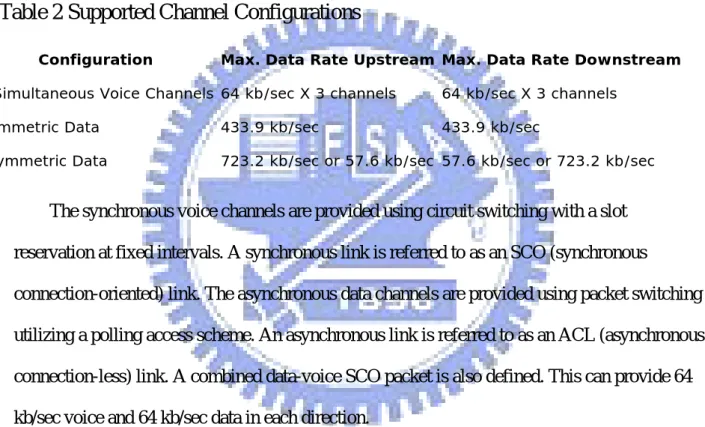
(16) More than 1200 additional companies are members of the Bluetooth SIG. The magnitude of industry involvement should ensure that Bluetooth becomes a widely adopted technology. Bluetooth communication occurs in the unlicensed ISM band at 2.4GHz. The transceiver utilizes frequency hopping to reduce interference and fading. A typical Bluetooth device has a range of about 10 meters. The communication channel can support both data (asynchronous) and voice (synchronous) communications with a total bandwidth of 1 Mb/sec. The supported channel configurations are as follows:. Table 2 Supported Channel Configurations Configuration. Max. Data Rate Upstream Max. Data Rate Downstream. 3 Simultaneous Voice Channels 64 kb/sec X 3 channels. 64 kb/sec X 3 channels. Symmetric Data. 433.9 kb/sec. 433.9 kb/sec. Asymmetric Data. 723.2 kb/sec or 57.6 kb/sec 57.6 kb/sec or 723.2 kb/sec. The synchronous voice channels are provided using circuit switching with a slot reservation at fixed intervals. A synchronous link is referred to as an SCO (synchronous connection-oriented) link. The asynchronous data channels are provided using packet switching utilizing a polling access scheme. An asynchronous link is referred to as an ACL (asynchronous connection-less) link. A combined data-voice SCO packet is also defined. This can provide 64 kb/sec voice and 64 kb/sec data in each direction.. The other wireless media is IEEE 802.11. In 1997 the IEEE adopted IEEE Std. 802.11-1997, the first wireless LAN (WLAN) standard. This standard [4] defines the media access control (MAC) and physical (PHY) layers for a LAN with wireless connectivity. It addresses local area networking where the connected devices communicate over the air to other devices that are within close proximity to each other.. -6-.
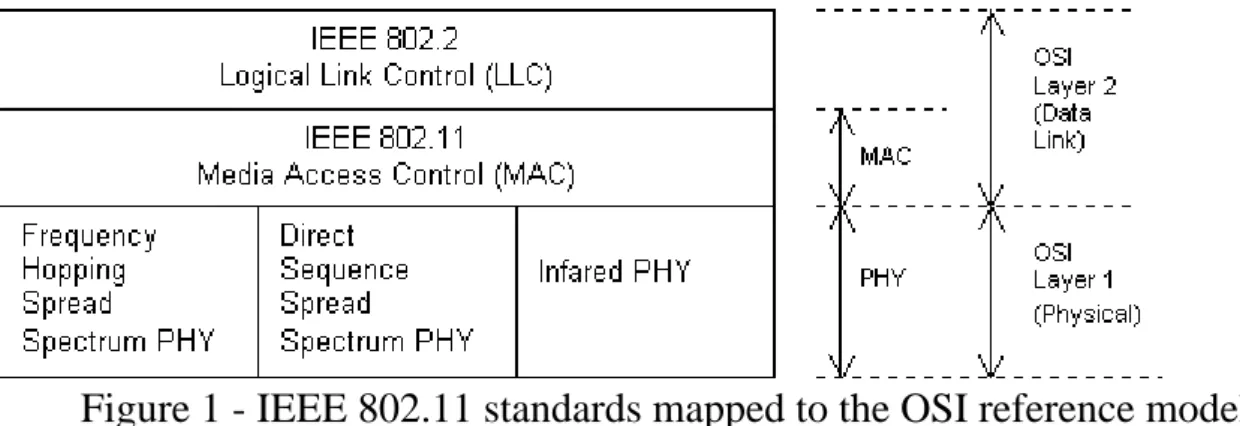
(17) Figure 1 - IEEE 802.11 standards mapped to the OSI reference model The access point may also provide connection to a distribution system. Extending coverage via an Extended Service Set (ESS) 802.11 extends the range of mobility to an arbitrary range through the Extended Service Set (ESS). An extended service set is a set of infrastructure BSS, where the access points communicate amongst themselves to forward traffic from one BSS to another to facilitate movement of stations between BSS. The access point performs this communication through the distribution system. The distribution system is the backbone of the wireless LAN and may be constructed of either a wired LAN or wireless network. Typically the distribution system is a thin layer in each access point that determines the destination for traffic received from a BSS. The distribution system determines if traffic should be relayed back to a destination in the same BSS, forwarded on the distribution system to another access point, or sent into the wired network to a destination not in the extended service set. Communications received by an access point from the distribution system are transmitted to the BSS to be received by the destination mobile station. Network equipment outside of the extended service set views the ESS and all of its mobile stations as a single MAC-layer network where all stations are physically stationary. Thus, the ESS hides the mobility of the mobile stations from everything outside the ESS. This level of indirection provided by IEEE 802.11 architecture allows existing network protocols that have no concept of mobility to operate correctly with a wireless LAN where there is mobility.. -7-.
(18) Figure 2 – A Distribution System Coverage via an Extended Service Set The 802.11 standard defines services for providing functions among stations. Station services are implemented within all stations on an 802.11 WLAN (including access points). The main thrust behind station services is to provide security and data delivery services for the WLAN.. 2.2. Design and Development Template The above two wireless technology provide the distribution system concept and architecture.. Operation system is the soul of software applications and hardware components. It operators mobile devices display, process, input/output, control. Microsoft develops Windows mobile platform for mobile device to support its small-size design, function simplification, and power-saving mode.. 2.2.1 Windows Mobile Platform Windows Mobile software powers advanced, easy-to-use devices that allow we to send and receive e-mail, browse the Internet, and work on mobile versions of familiar Office software. And with hundreds of applications available to extend the platform, how, when, and where we -8-.
(19) work is entirely up to us. For example, Windows Mobile 5.0 smartphone and Windows Mobile 5.0 Pocket PC are the main platforms of Windows Mobile. Windows Mobile 5.0, along with Visual Studio 2005 and SQL Server 2005 Mobile Edition make it even quicker and easier to build native and managed Windows Mobile applications, solutions, and services: Visual Studio 2005 offers the most productive Windows Mobile development environment by integrating the best device development features from Visual Studio .NET 2003 and eMbedded Visual C++. Windows Mobile 5.0 continues to offer a consistent set of APIs between devices and further unifies the Pocket PC and smartphone platforms by offering: Visual Studio 2005 makes it easier to build and test Windows Mobile 5.0 applications by introducing: 1. New Device Emulator: The new device emulator is based on the ARM instruction set and includes plenty of useful features that finally make it possible to build and test an application without ever needing to use a physical device. 2. New UI and Data Designers: New user interface and data designers in Visual Studio 2005 make enterprise developers more productive when they build applications. Windows Media 10 Mobile enables developers to integrate Windows Media player functionality directly into their applications including library manipulation and media playback functions. Developers can integrate camera, picture, and video functionality into their applications through the Windows Mobile 5.0 Camera APIs available across all camera-enabled Windows Mobile 5.0-based devices. Windows Mobile 5.0 enables applications that intelligently respond to state changes on the device, such as loss of connectivity or new incoming messages, through the State and Notification API. Windows Mobile 5.0 also enables rich location-aware applications through the GPS location API. Windows Mobile 5.0 continues to provide the most versatile development platform with key device features available to any developers through free SDKs.. -9-.
(20) 2.2.2 Set Up Development Environment for Windows Mobile To get started developing for Windows Mobile 5.0, follow these four steps: 1.install ActiveSync to allow for connectivity between Visual Studio 2005 and Windows Mobile based devices. 2. Install the Windows Mobile 5.0 SDKs [5] for Pocket PC and smartphone, which enable development for Windows Mobile-based devices in Visual Studio 2005. 3. Install the Microsoft® eMbedded Visual C++ 4.0 [6] tool to deliver a complete desktop development environment. for. creating. applications. and. system. components. for. Windows®. CE .NET-powered devices. 4. Install localized Emulator Images for Windows Mobile 5.0-based smartphone and choose from 24 emulator images for Windows Mobile 5.0-based smartphone that have been localized for various geographies. The Virtual Machine Network Driver allows the Device emulator's OS (or even the Virtual PC OS, as the case may be) to emulate its own network connection. Because the physical network interface on the host machine is now "virtualized," we have a way to get two IP Addresses - one for the host PC, and one for the operating system that is running within the Device Emulator (or Virtual PC).. 2.3. Related Inhibition Research. 2.3.1 Other Inhibition Solution We always suffer from other people noise when they talk each other in cell phones. There are inhibition device to interfere cell phone communication with a strong electromagnetic wave. By submitting an interference wave, the cell phone in specific area cannot send /receive communication signals. There is a detector machine to check if any tiny camera hidden in a hotel room or motel. The machine can detect camera signals and reveal where the camera hide. It also protects privacy of people and reduces the rate of criminal case.. - 10 -.
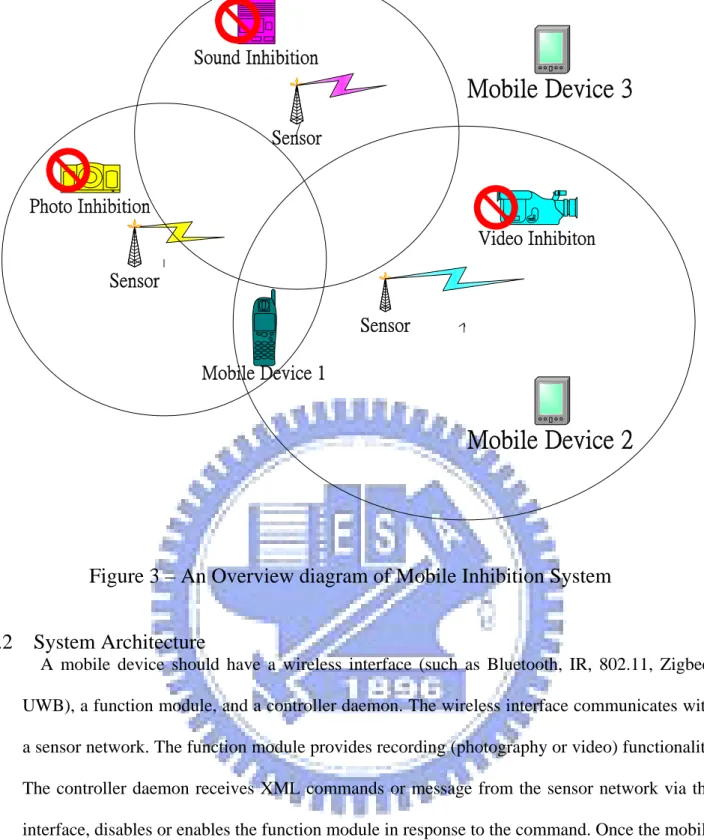
(21) 3. System Methodology and Prototype 3.1 System Introduction We build a functionalities inhibition prototype of mobile devices. The following figure display an overview of an embodiment of a system implementing functionality inhibition for a mobile phone. There are 3 sensor networks including video inhibition, photography inhibition and sound inhibition. They all periodic broadcast inhibition message via wireless medium. In the Figure 3, Mobile Device 1 enters the sensor network between video inhibition area and photography inhibition area, it receives the both inhibition messages, and it disables the video and photography function. Mobile Device 2 enters the sensor network in video inhibition area, it receives the video inhibition messages, and it disables the video function. Mobile Device 3 left the inhibition area; it will release the inhibition function.. - 11 -.
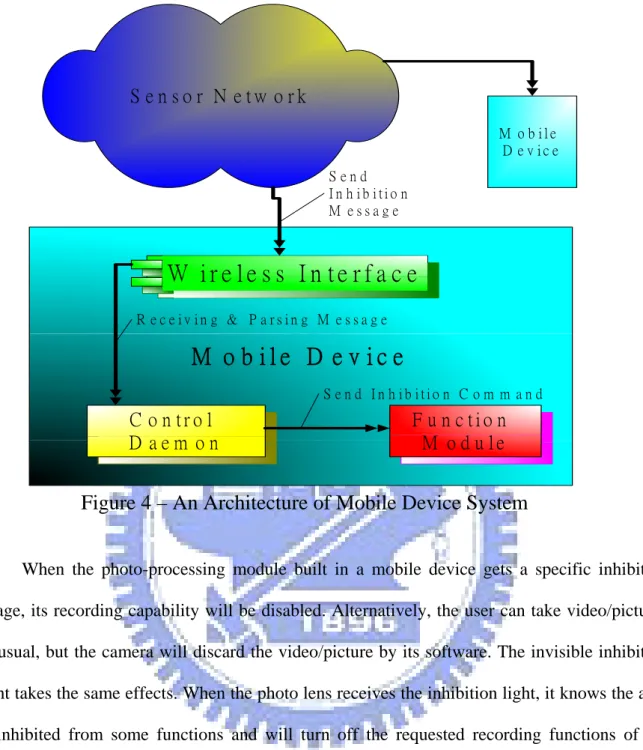
(22) Sound Inhibition. Mobile Device 3 Sensor. Photo Inhibition Video Inhibiton Sensor Sensor Mobile Device 1. Mobile Device 2. Figure 3 – An Overview diagram of Mobile Inhibition System 3.2 System Architecture A mobile device should have a wireless interface (such as Bluetooth, IR, 802.11, Zigbee, UWB), a function module, and a controller daemon. The wireless interface communicates with a sensor network. The function module provides recording (photography or video) functionality. The controller daemon receives XML commands or message from the sensor network via the interface, disables or enables the function module in response to the command. Once the mobile device is in the range of sensor network, the mobile device will receive the inhibition command the sensor node sent via the wireless interface, wherein the inhibition command, when executed by the mobile controller daemon, causes prohibited function thereof to be disabled according to the functionality settings. The controller daemon re-enables the inhibition function when it is out of the range of the sensor network.. - 12 -.
(23) S e n s o r N e tw o rk M o b ile D e v ic e Send In h ib itio n M essage. W ire le s s In te rfa c e R e c e iv in g & P a rs in g M e s s a g e. M o b ile D e v ic e S e n d In h ib itio n C o m m a n d. C o n tro l D aem on. F u n c tio n M o d u le. Figure 4 – An Architecture of Mobile Device System When the photo-processing module built in a mobile device gets a specific inhibition image, its recording capability will be disabled. Alternatively, the user can take video/pictures as usual, but the camera will discard the video/picture by its software. The invisible inhibition light takes the same effects. When the photo lens receives the inhibition light, it knows the area is inhibited from some functions and will turn off the requested recording functions of the mobile device.. 3.3 System Process Flow. - 13 -.
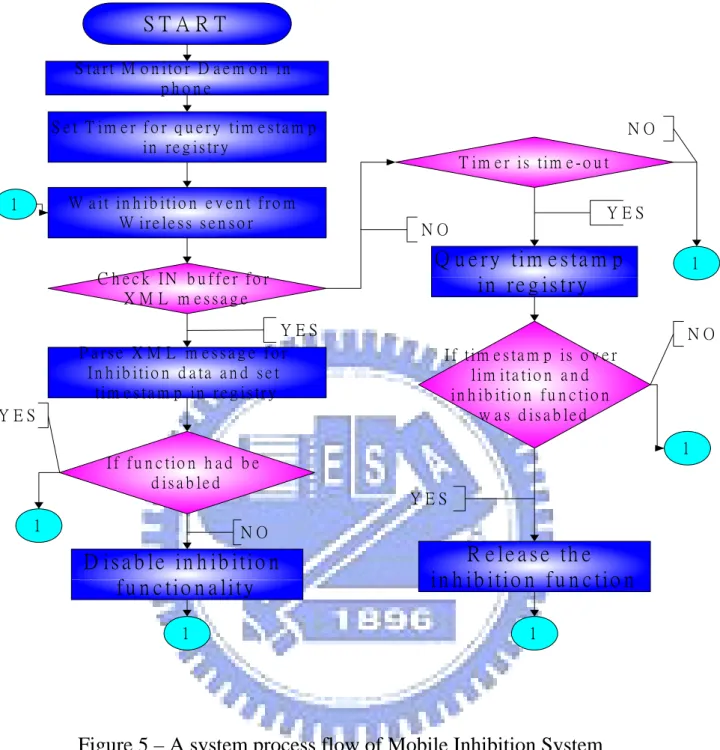
(24) START S t a r t M o n i to r D a e m o n i n phone S e t T i m e r f o r q u e r y t im e s t a m p in r e g is tr y. NO T i m e r i s t im e - o u t. W a i t in h ib i ti o n e v e n t f r o m W ire le s s s e n s o r. 1. YES NO. Q u e r y ti m e s t a m p in re g is try. C h e c k IN b u ffe r fo r X M L m essag e YES P a rse X M L m e ssa g e fo r I n h ib i ti o n d a ta a n d s e t ti m e s t a m p in r e g is tr y. NO I f t i m e s ta m p i s o v e r l im it a t io n a n d i n h i b it i o n f u n c t i o n w a s d is a b le d. YES. 1. I f f u n c t io n h a d b e d isa b le d 1. 1. YES. NO. D i s a b l e in h ib i ti o n fu n c tio n a lity. R e le a s e th e i n h i b it i o n f u n c t i o n. 1. 1. Figure 5 – A system process flow of Mobile Inhibition System The above is a flowchart of an embodiment for a method functionality inhibition for a mobile phone. The monitor daemon listens to inhibition event messages in a mobile phone. It sets a timer for checking XML message timestamp periodically, then checks if any XML messages in receiving buffers. If the daemon receives XML inhibition messages and starts to parse the XML messages from wireless to figure out the specific inhibition message, then sets timestamp in registry.. If the function already was disabled, then ignores the inhibition event. Otherwise, the. daemon disables the inhibition function .If the daemon timer is time-out, it checks timestamp to - 14 -.
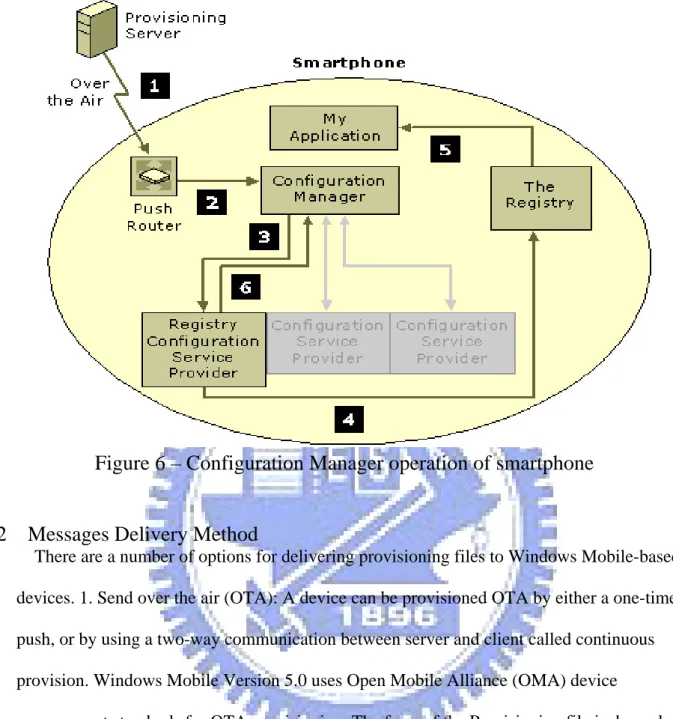
(25) determine whether the mobile phone is away the sensor network, if the result is yes and release the inhibition function, if it is no, means it continue to be inhibited functions by sensor networks.. 4.. System Implementation and Discussion. We choose smartphone with Windows Mobile as system implementation model for its complete functionality. Smartphone supports Bluetooth, Infrared, WIFI, and USB transmitted medium. It also has built-in fully Windows Mobile for smartphone [7] operation system. To use the Windows Mobile for smartphone as research platform to implement inhibition system, it is important that realize the operation of mobile device management and communication interface of smartphone. The following introduce how to communicate with smartphone kernel and inhibit specific functions of mobile device in XML command format.. 4.1 Windows Device Management Architecture We can manage a device by provisioning [8] it. Provisioning a device involves creating a provisioning XML file that contains configuration information, and then sending the file to the device, Configuration Manager and Configuration Service Providers built in mobile devices configure the device based on the contents of the provisioning XML file. Configuration Service Providers execute configuration requests by changing or querying the values of settings. The Configuration Manager sends configuration requests to the Configuration Service Providers in XML format.. - 15 -.
(26) Figure 6 – Configuration Manager operation of smartphone 4.2. Messages Delivery Method There are a number of options for delivering provisioning files to Windows Mobile-based devices. 1. Send over the air (OTA): A device can be provisioned OTA by either a one-time push, or by using a two-way communication between server and client called continuous provision. Windows Mobile Version 5.0 uses Open Mobile Alliance (OMA) device management standards for OTA provisioning. The form of the Provisioning file is dependent upon the two protocols: OMA Client Provisioning --- A one-way Wireless Application Protocol ( WAP ) push. The other is OMA Device Management ( DM ) --- Continuous provisioning. A provisioning XML file in a CAB provisioning Format (.cpf) file can also be pulled by the device over HTTP or Internet Explorer Mobile. 2. Download in a CAB provisioning Format (.cpf) file. 3. Send through Remote API (RAPI): Provisioning XML can be downloaded from the desktop, using the RAPI in ActiveSync to push the file to a device.4. Send through DMProcessConfigXML API: OEMs and application developers can provision a device by - 16 -.
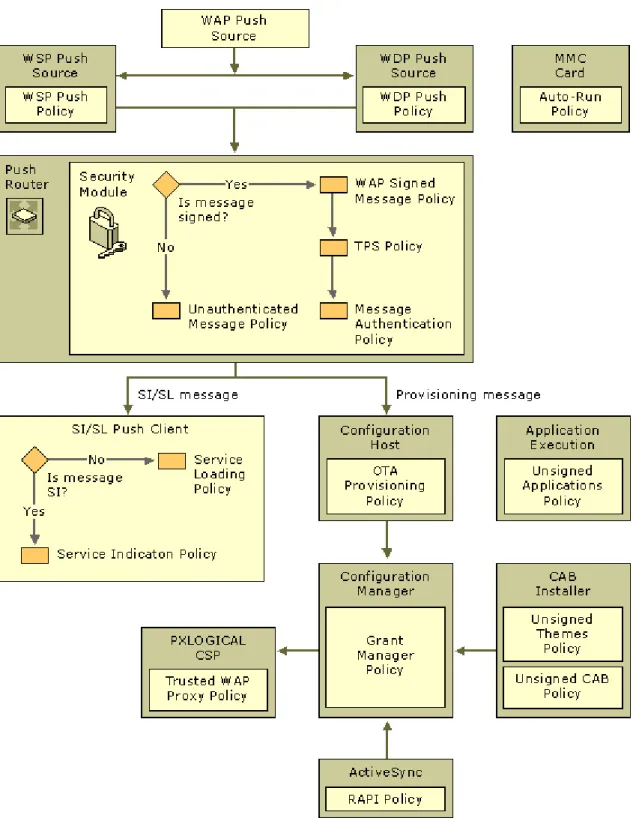
(27) using the DMProcessConfigXML function. 5. Provision during manufacture: the OEM can burn the file in flash memory and configure the device such that the file is loaded during the cold or warm boot procedure. In the research, we take Remote API delivery method to implement the inhibition system and simulate the possible conditions, because OMA Client Provisioning and OMA Device Management ( DM ) need to set up complicated communication channel between DM server and mobile devices. Downloading a CAB file is inconvenient to package up the XML file. The others are belonging to OEM manufacture for provisioning.. 4.3 Security Policy Security policies are used for configuring security settings that are then enforced with the help of security roles and certificates. They provide the flexibility to control the level of security on the device. The policies are defined globally and enforced locally in their respective components. The security policy [10] is set during boot by executing a configuration file called provxml. provxml. This provisioning file is in ROM and it contains the default setting specified by the OEM. The security policies are loaded onto Microsoft Windows Mobile-based devices in a security policy-provisioning document, which is an XML file that is assigned the correct security role to apply the security settings to the device. These security policies are enforced at critical points across the architecture of the device. Often, these policies will interact with Configuration Manager and the metabase security settings. When the security policy document is delivered to the device, it is validated and verified by the Push Router, administered by Configuration Manager, and then applied by the Security Policy Configuration Service Provider.. - 17 -.
(28) Figure 7 - The Security Policy and Operation For example, Grant Manager Policy, its Policy ID is 4119, the setting grants the system administrative privileges held by SECROLE_MANAGER to other security roles, without modifying metabase role assignments. The configuration manager enforces the Grant Manager policy. Default value is OPERATOS_TPS for Windows Mobile-based Smartphone. The required role to modify this policy is SECROLE_MANAGER. We need to realize RAPI - 18 -.
(29) Policy to configure mobile devices via RAPI. RAPI Policy, its Policy ID is 4097, the setting restricts the access of remote applications that are using Remote API (RAPI) to implement ActiveSync operations on Windows Mobile-based devices. Default value is 2 for Windows Mobile-based Pocket PC and Smartphone. The following list shows the possible values: ”0” indicates that the ActiveSync service is shut down. RAPI calls are rejected. ”1” indicates full access to ActiveSync is provided. RAPI calls are allowed to process without restrictions. “2” indicates that access to ActiveSync is restricted to the SECROLE_USER_AUTH( User Authenticated ) role. RAPI calls are checked against this role mask before they are granted.. 4.4. Bootstrapping Windows Mobile-Based Devices Bootstrapping is initially configuring a device so that it can be continuously provisioned by a trusted agent. Bootstrapping a Windows Mobile-Based device usually involves configuring the device with the following information: Trusted Provisioning Server (TPS), Trusted Push Proxy Gateway, WAP connectivity, GPRS connectivity, and Changes to the default security model. In the front section, Security Policy settings define levels of security and whether Windows Mobile-based devices are configurable. The bootstrap process provides configuration data to Windows Mobile-based devices. It is important that the server that is initiating the bootstrap process is authenticated over-the-air (OTA). To provide more secure provisioning, Windows Mobile-based devices rely on one of the following: • A PIN-based mechanism • A custom signed .cab file • A secure channel between an OMA DM server and the client device.. - 19 -.
(30) The security roles of the DM server account are the same as the bootstrap message unless using role parameters explicitly sets them. The security roles for the DM server are assigned as follows: • If the DM server is bootstrapped at manufacture, the server is assigned all roles implicitly. •. When bootstrapping a DM server account over the air (OTA) or through Remote API. (RAPI), the DM server roles are set to the Role parameter of the server account. For an OTA Wireless Application Protocol (WAP) push bootstrap that is initiated by a mobile operator, the message is signed with a user PIN and a network PIN known only by the mobile operator and the device. For example, the network PIN for Global System for Mobile Communications (GSM) is the International Mobile Subscriber Identity (IMSI) number from the device's Subscriber identity Module (SIM) card. When a business uses a .cab file for bootstrapping a corporate device over the air, the .cab file is signed with a private key from the corporate certificate. The corporate certificate is sent over the air to the device by the mobile operator and is processed by the CertificateStore Configuration Service Provider. The mobile operator must use the format supported by the CertificateStore Configuration Service Provider. The certificate itself is a base-64 encoded certificate. The Role element specifies that this certificate have a Manager role. We enable Remote API (RAPI) bootstrapping of mobile devices in the simulate platform. The Remote API Security policy is set to RESTRICTED by default. Under this policy the device will only receive RAPI messages that are assigned the MANAGER role (SECROLE_ MANAGER). By default the Authenticated User role does not have MANAGER privileges. With this default setting, we cannot make all of the configuration changes required to bootstrap the device. For example, we cannot change security settings.. - 20 -.
(31) To enable bootstrapping by using RAPI we must first give MANAGER privileges to the Authenticated User role. After bootstrapping the device we must then remove those privileges to ensure that subsequent RAPI messages will not have unrestricted access to the device. This enables the device to accept RAPI messages that require MANAGER privileges. If needed, the OEM can provision the device with this setting after manufacture. The following example shows how to change the GRANT MANAGER policy to add SECROLE_ MANAGER. The OEM would include this in the provisioning XML file that uses the Security Policy Configuration Service Provider.. <wap-provisioningdoc> <characteristic type="SecurityPolicy"> <parm name="4119" value="8"> </characteristic> <!-- other settings --> </wap-provisioningdoc> 1. After we receive the device, we must do the following: •. Use the desktop configuration tool (rapiconfig.exe) to bootstrap the device over. •. At the end of our bootstrap message change the Grant Manager policy to remove. SECROLE_ MANAGER. This ensures that subsequent RAPI messages will not have MANAGER privileges. The following XML example shows how to change the Grant MANAGER policy to remove SECROLE_ MANAGER after the device has been bootstrapped. •. <wap-provisioningdoc>. •. <characteristic type="SecurityPolicy">. •. <parm name="4119" value="128">. - 21 -.
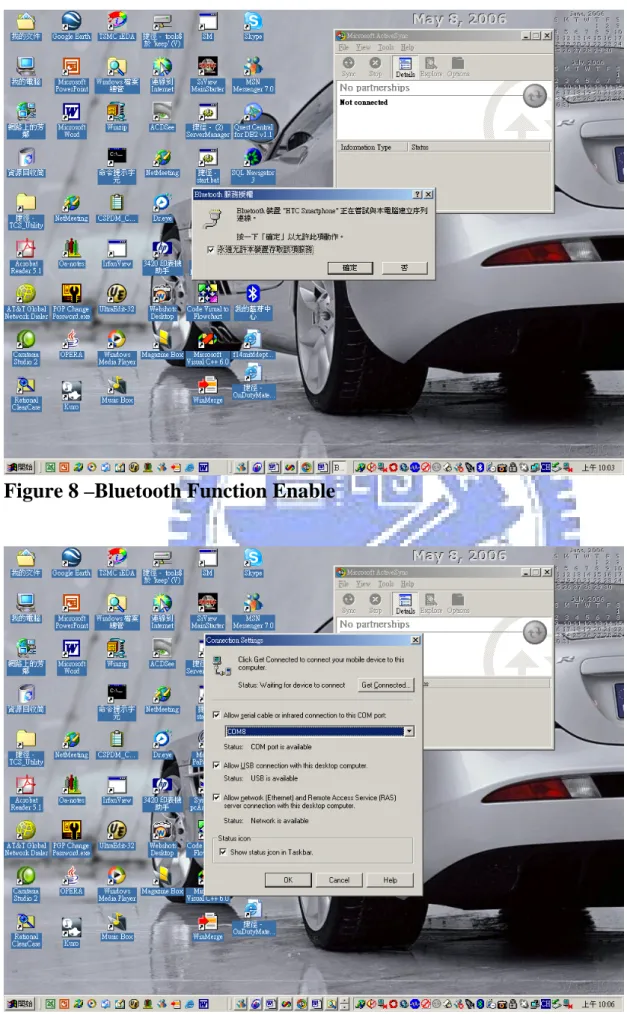
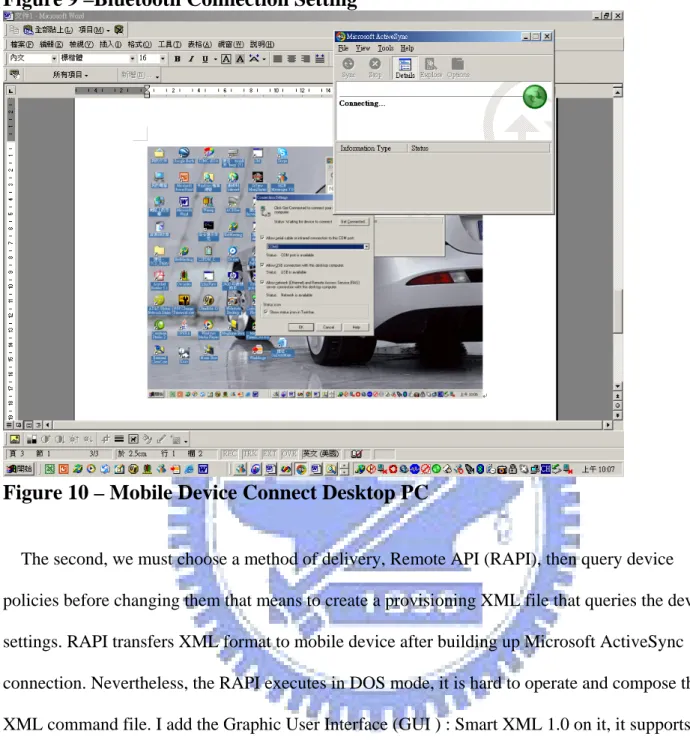
(32) •. </characteristic>. •. <!-- other settings --> </wap-provisioningdoc> After bootstrapping the device, Provisioning XML file will change configuration settings. with MANAGER role. The mobile devices settings that we can access are determined by roles. We get a role when we try to access Configuration Manager. The following table shows the roles for each device type.. 4.5 Procedure for inhibiting function in Smartphone First of all, we use Bluetooth technology as the connection method and enable the desktop PC Bluetooth function. Browsing the mobile device and building up the connection with ActiveSync. ActiveSync provides support for synchronizing data between a Windows-based desktop computer and Microsoft Windows CE .NET-based portable devices. ActiveSync [12] supplies the following features for the Windows CE-based device: Backing up and restoring device data, Installing and removing programs. It also supports the following interactions between the desktop computer and the Windows CE-based device: Data synchronization, File conversion between the desktop computer and device formats, Importing and exporting database tables, and preparing the desktop for remote connections.. - 22 -.
(33) Figure 8 –Bluetooth Function Enable. - 23 -.
(34) Figure 9 –Bluetooth Connection Setting. Figure 10 – Mobile Device Connect Desktop PC The second, we must choose a method of delivery, Remote API (RAPI), then query device policies before changing them that means to create a provisioning XML file that queries the device settings. RAPI transfers XML format to mobile device after building up Microsoft ActiveSync connection. Nevertheless, the RAPI executes in DOS mode, it is hard to operate and compose the XML command file. I add the Graphic User Interface (GUI ) : Smart XML 1.0 on it, it supports to compose the XML file and send and receive messages between sensor network and mobile devices. The Smart XML 1.0 GUI also displays sent XML contents and replied messages from smartphone.. - 24 -.
(35) Figure 11 – Smart XML 1.0(RAPI utility) The third, the simulate platform uses the following development utility: Windows CE Registry Editor to query mobile device registry settings. We use registry editor to show the registry key and value of Windows mobile. The registry [11] key and value were recorded the significant parameters and flags of functions or modules. So we can change smartphone behaviors or functions by modifying registry key and value.. - 25 -.
(36) Figure 12 – Windows CE Registry Editor Summarize the above descriptions, sensor network connect smartphone via Bluetooth, then open Microsoft ActiveSync and Smart XML 1.0 to query and bootstrap the security registry. We prepare registry XML file for inhibition and send it to mobile devices. The mobile device manager of smartphone will receive the XML and trigger registry CSP to change specific registry. For example, we send the camera inhibition registry message. The smartphone will automatically disable camera function. In the research, we also program to modify [13] the registry via embedded VC++ instead of XML file. There are two samples for camera inhibition: CamInhibition and CamDaemon. CamInhibition program [14] can change camera registry to turn off photography function of smartphone. CamDaemon program responds to monitor inhibition periods by timestamp. If the CamDaemon check if timestamp is out of date, that means there is no inhibition messages. It will release the inhibition registry and turn on photography function of smartphone. - 26 -.
(37) The following list the registry path and value of Font Size, Sound, Security, and Camera, Operation mode.. Font Size <wap-provisioningdoc> <characteristic type="Registry"> <characteristic type="HKCU\ControlPanel\Accessibility"> <parm name="FontSize" value="1"/> </characteristic> </characteristic> </wap-provisioningdoc>. Security : enable for RAPI <wap-provisioningdoc> <characteristic type="SecurityPolicy"> <parm name="4097" value="1"/> </characteristic> </wap-provisioningdoc>. Camera :turn on <wap-provisioningdoc> <characteristic type="Registry"> <characteristic type="HKCU\Software\IA Style\IA Capture for Smartphone (Smartphone)\2.55\Strings"> <parm name="Video Prefix" value="VIDEO"/> <parm name="Image Prefix" value="IMAGE"/> - 27 -.
(38) </characteristic> </characteristic> </wap-provisioningdoc>. Camera: turn off <wap-provisioningdoc> <characteristic type="Registry"> <characteristic type="HKCU\Software\IA Style\IA Capture for Smartphone(Smartphone)\2.55\Strings"> <parm name="Video Prefix" value="*none*"/> <parm name="Image Prefix" value="*none*"/> </characteristic> </characteristic> </wap-provisioningdoc>. Sound: turn on <wap-provisioningdoc> <characteristic type="Registry"> <characteristic type="HKCU\ControlPanel\Sounds\RingTone0"> <parm name="Sound" value="\Storage\Application Data\Sounds\Surface.wma"/> </characteristic> </characteristic> </wap-provisioningdoc>. Sound: turn off <wap-provisioningdoc> - 28 -.
(39) <characteristic type="Registry"> <characteristic type="HKCU\ControlPanel\Sounds\RingTone0"> <parm name="Sound" value="*none*"/> </characteristic> </characteristic> </wap-provisioningdoc>. Operation Mode: change normal <wap-provisioningdoc> <characteristic type="Registry"> <characteristic type="HKCU\ControlPanel\Profiles"> <parm name="ActiveProfile" value="Normal"/> </characteristic> </characteristic> </wap-provisioningdoc>. Operation Mode: change silent <wap-provisioningdoc> <characteristic type="Registry"> <characteristic type="HKCU\ControlPanel\Profiles"> <parm name="ActiveProfile" value="Silent"/> </characteristic> </characteristic> </wap-provisioningdoc>. - 29 -.
(40) 4.6 Implementation Limitation Mobile devices always belong to an embedded system that is various type of computer system or computing device that performs a dedicated function and/or is designed for use with a specific embedded software application. Embedded systems may use a combination of ‘Read-only’ as well as with ‘Read-Write’ based operation system. But it is not usable as a commercially viable substitute for general-purpose computers or devices. It normally guarantees a certain capability within a specified storage size and time constraint as well as with application programs. It has very-likely structure of a normal operating system however mainly differentiated by some factors such as type of pre-installed device, functional limits, and taking designed job only. So smartphone have several class of security management. We were not allowed to access the registry until we got the proper security role. Moreover, some of specific registry changed isn’t effective, it need to reboot the smartphone to reload the application.. 5. Conclusion 5.1. Research Summary Technology continuously develop, Mobile life brings us convenient. It gradually became to hardly separate from human activities. The passive data security maintenance or privacy protection are not sufficient, we need to develop the positive function inhibition of mobile devices. This thesis aims to propose a new design prototype for actively security protection. Using a wireless sensor network to inhibit recording capability of portable devices could be a smart and cost efficient way. In the research, this can be achieved as long as the mobile device can. - 30 -.
(41) recognize the inhibition message/signals from the wireless sensor networks. The wireless sensor networks transmit an inhibition message to the mobile devices; mobile devices control modules will parse the message. According to the parsed inhibition actions, the mobile devices proceed to inhibit the forbidding function. Besides, the mobile devices can periodically inquire if any inhibition messages, if there is no the banned messages, the mobile device eliminates the inhibition to cause the original function and reply normal state.. 5.2 Direction in the future Nowadays, Mobile device hardware and software was designed for more functionality and operational capability. For example, taking photography with more million pixels and high quality dots per inch (dpi), or producing a great and clear sound. In the future, Mobile business must become the big part of human life. We need to more focus on humanity and develop smarter mobile device in the world.. Reference [1] Cellphones could disrupt airplane systems, Posted by Thomas Ricker, Carnegie Mellon University say, http://www.engadget.com/2006/03/01/cellphones-could-disrupt-airplane-systems-study/ [2] www.Dajiyuan.com, http://www.epochtimes.com/b5/5/2/22/n822700.htm, mobile phone interference in New York [3]. David Blankenbeckler, “An Introduction to Bluetooth”,. <. http://www.wirelessdevnet.com/channels/bluetooth/features/bluetooth.html >, Wireless Developer Network. [4] Intelligraphics ,”Introduction to IEEE 802.11” <http://www.intelligraphics.com/articles/80211_article.html> [5] Microsoft Download Center, “SDK for Window Mobile 2003-based Smartphones”, - 31 -.
(42) http://www.microsoft.com/downloads/details.aspx?FamilyId=A6C4F799-EC5C-427C-807C-4 C0F96765A81&displaylang=en, Leveraging the Microsoft® .NET Compact Framework [6] Microsoft Download Center, ”eMbedded Visual C++ 4.0”, http://www.microsoft.com/downloads/details.aspx?familyid=1DACDB3D-50D1-41B2-A107-F A75AE960856&displaylang=en, Delivers a complete desktop development environment for creating applications and system components for Windows ® CE .NET-powered devices. [7] Mattscholey, ”Cool things to do with your smartphone”, MODACO Smartphone, http://www.modaco.com/index.php?showtopic=94657&hl=smartphone+camera, from Manchester, UK, June 22, 2003 [8] “Device Management Architecture”, http://msdn.microsoft.com/library/default.asp?url=/library/en-us/mobilesdk5/html/wce51conde vicemanagementarchitecture.asp, Windows Mobile Version 5.0 SDK, MSDN Home [9] Stuart.Preston, “Enable RAPI and user provided certificates”, I-mate SP5 Smartphone, http://blogs.conchango.com/stuartpreston/archive/2005/11/10/2376.aspx, November 10, 2005 [10] “Security Policies”, http://msdn.microsoft.com/library/default.asp?url=/library/en-us/mobilesdk5/html/wce51conSe curityPolicies.asp, Windows Mobile Version 5.0 SDK, February 1,2006 [11]”Registry Functions”, http://msdn.microsoft.com/library/default.asp?url=/library/en-us/wcedata5/html/wce50grfregistr yfunctions339.asp, Platform Builder for Microsoft Windows CE 5.0, September 14, 2005 [12]Vicky_vigia, Microsoft ActiveSync, ”Getting Download Failed Message”, MSDN Forums/Smart Device Development/Device Emulator General, 26 Jan 2006 UTC [13] “Windows Mobile Programming”, http://msdn.microsoft.com/library/default.asp?url=/library/en-us/devguidesp/html/sp_conwinm obile_programming.asp, SDK Documentation for Windows Mobile-Based Smartphones, April - 32 -.
(43) 22, 2005 [14] Moo_Ski_Doo, “Want to get Started Smartphone programming”, http://www.modaco.com/index.php?showtopic=103221&hl=smartphone+camera, from Nottingham, UK, Feb 28, 2004. - 33 -.
(44)
數據
+7
相關文件
It also follows the general direction set out in the Personal, Social and Humanities Education Key Learning Area Curriculum Guide (Primary 1 – Secondary 3) (CDC, 2002) and extends
It also follows the general direction set out in the Personal, Social and Humanities Education Key Learning Area Curriculum Guide (Primary 1 – Secondary 3) (CDC, 2002) and extends
* School Survey 2017.. 1) Separate examination papers for the compulsory part of the two strands, with common questions set in Papers 1A & 1B for the common topics in
An adaptation layer is used to support specific primitives as required by a particular signaling application. The standard SS7 applications (e.g., ISUP) do not realize that
專案執 行團隊
Microphone and 600 ohm line conduits shall be mechanically and electrically connected to receptacle boxes and electrically grounded to the audio system ground point.. Lines in
• 抑制控制能力:Bear/Dragon task or Simon Says; Hand Tapping or Hand Game; Day-Night Stroop; Animal. Stroop; Shape School –
Digital PCR works by partitioning a sample into many individual real-time PCR reactions, some portion of these reactions contain the target molecules(positive) while others do
