Whiteboard Talk—A Java Whiteboard
Client/Server System
Ching-Hua Chien*
Abstract
The purpose of this project is to develop a stand-alone JAVA-based Whiteboard Client/Server application. WhiteboardTalk is based on the idea and framework of BSD UNIX talk with graphical input and output capabilities. WhiteboardTalk allows users to talk with their remote peers without the limitations imposed by keyboards or their lack of vocabulary by providing graphical input and output capabilities. The application was written in Java. Because of the nature of platform independence of the JAVA language, this implementation is applicable to a wide variety of computing platforms, ranging from interactive mainframes down to hand held personal digital assistants (PDA). This project consists of four key parts: a talk client, a talk daemon, a graphical user interface, and a talk protocol module. Every step in the design stresses modularity. With the rapid changes taking place in the Internet, the possibility of allowing the new tool to support additional protocols over time must be taken into account. In particular, protocols already exist that allow real-time voice, and real-time video interaction. The talk client and server will allow future additions of these protocols.
Key words: JAVA, Whiteboard, Client/Server
Introduction
Objective
The purpose of this project is to develop a stand-alone JAVA based Whiteboard Client/Server application, which is based on the idea and framework of BSD UNIX talk with graphical input and output capabilities.
WhiteboardTalk is based on the infrastructure of BSD talk
Talk is a utility application level protocol. It allows any two users on the Internet to carry on an interactive real-time text dialog. U. C. Berkeley introduced the talk protocol in the 1970s as a standard service for BSD UNIX. The talk software consists of two parts: a talk client, and a talk server (also called a talk daemon). The talk client always initiates the dialog, and an established dialog is carried on between two “clients” acting in a peer-to-peer relationship. The talk daemon (called talkd on UNIX systems) acts only to notify a user that a talk session is being requested, and to tell the user how to respond to a request in order to establish a session.
imposed by keyboards or their lack of vocabulary by providing graphical input and output capabilities.
WhiteboardTalk is platform independent
Java has become a very popular language for supporting distributed applications on the World Wide Web (WWW). Java is suitable for developing applications on the WWW because of its portability and reliability.
Being a compiled and an interpreted language, Java is designed to be a machine-independent programming language that is both safe enough to traverse networks and powerful enough to replace native executable code. The J-code, which is the intermediate code compiled from Java source code, is executed by a Java run-time interpreter. Even though Java is not as fast as a compiled language like C, C++, or Pascal, because of its nature as an interpreted language, it is fast enough in many circumstances for interactive and network-based applications. This is because these applications are idle most of the time waiting for incoming data from the networks.
The application will use the Java programming language as the tool. Because of the nature of platform independence of the JAVA language, this implementation will be applicable to a wide variety of computing platforms, ranging from interactive mainframes down to hand held personal digital assistants (PDA).
future additions of these protocols. It is also desirable for the implementation to be as modular as possible so that various components, in particular the user interface, can be adapted to a variety of platforms without requiring modifications to the underlying core talk facility.
Related Work
Freestyle (Cooper, 1991) is one of the pioneers of Collaborative Graphics Drawing. Users can annotate images by using an electronic drawing pad and then e-mail them to other users. Since the edited results are sent by e-mail Freestyle does not support concurrent editing capability, and this is a real drawback to the system. TeamWorkStation (TWS) (Ishii & Miyake, 1991) provides concurrent drawing capability for joint users but suffers from several problems. The first difficulty is that the result of a collaboration cannot be shared directly. Second, the quality of the graphics is not good enough. Third, it is difficult to identify the owner of each object when the number of users is over three. Cost is another concern of the TWS system, as it requires expensive equipment like screens, telephones, and cameras. GroupPaint (Liang etc., 1994), derived from the Microsoft Windows Paintbrush program, is another collaborative graphics tool. The drawings of the GroupPaint system are manipulated in the form of bitmap. GroupPaint consists of three parts: a groupware server, an application server and a client. The contributions of each group member can be seen by other members but cannot be modified by unauthorized users. The results produced by different users can be combined by overlaying the images. The quality of GroupPaint is better than TWS's, even though its cost is lower. The owner of an object is also more easily identified under the multi-user environment.
handwriting as text. This tool uses "lined paper" to differenticate between object inputs. Strokes are treated as handwriting if they cross two lines while graphics are those strokes which cross more than two lines. aha! InkWriter supports text paragraphs and lists of handwriting or characters. Graphics are treated as separate paragraphs.
Liveboard (Elrod etc., 1992) is a simple multipage pen-based image editor. It simulates a whiteboard by allowing freehand drawing and erasing. The basic function of the board is to support free and unselfconscious interaction between people and to allow unhindered expression of ideas.
Tivoli (Pedersen, McCall, Moran, & Halasz, 1993) simulates whiteboard functionality and is designed to support informal workgroup meetings. It is written in C++ and targeted to run on the Xerox Liveboard, a large screen, pen-based interactive display. Tivoli aims to provide its users with the simplicity, facile use, and easily understood functionality of conventional whiteboards, while at the same time taking advantage of the computational power of Liveboard (Elrod etc., 1992) to support and augment its users’ informal meeting practices.
conventional --teachers lecture and students listen.
Microsoft Windows NetMeeting is a freeware application which provides text chats, audio and video capabilities, applications and file sharing. The Whiteboard application is one of NetMeeting's many functions. Users can draw simultaneously on Whiteboard and everyone can see the contents of the drawing at the same time. In a net meeting, if a person executes the whiteboard component, it will appear on everyone's screen. Version 3 of NetMeeting also provides remote desktop sharing and improved application sharing efficiency and functionality. The Whiteboard inside NetMeeting 3 is based on the T-126 standard and this has made it easier to integrate with other products. However, the interface of NetMeeting 3 is difficult to use in some cases. For example, it cannot be resized easily to fit a screen and users are not allowed to customize the interface of NetMeeting. Its interface is also inconsistent with Office 2000 (Robert, 2001).
Classroom 2000 or NetMeeting, this project intends to focus on providing users with a simple and easy to use tool. The users may also be able to integrate some existing telephone tools such as DialPad when they use WhiteboardTalk.
The Implementation of WhiteboardTalk
The data structures
p u b l i c c l a s s M e s s a g e i mp l e me n t s S e r i a l i z a b l e { i n t i d = 0 ; i n t ma i n R e c e i v e r P o r t = 0 ; i n t t a l k Re c e i v er P o r t= 0 ; i n t C a l l ee M a i n R e c e iv e r P o r t =0 ; i n t C a l l ee T a l k R e c e iv e r P o r t = 0 ; S t r in g n am e = n u l l ; S t r in g c al l e e N a me = n u l l ; I n e t A d d r e s s ad d r es s= n u l l ; I n e t A d d r e s s ad d r es s2 = n u l l ; M e s s ag eL i s t t h eG r o u p L i s t = n e w M e s s a g e L i s t( ) ; / / - - - p u b l i c b o o l ea n eq u a l s( Me s s ag e th e Me s s ag e ) { i f ( n a me . e q u a l s ( th e Me s s ag e . n a me ) ) { r e tu r n t r u e ; } e l s e r e t u r n f a l s e ; } / / - - - p u b l i c b o o l e a n e q u a l s ( S tr i n g th e S tr in g ) { i f ( n a me . e q u a l s ( th e S tr i n g ) ) { r e tu r n t r u e ; } e l s e r e t u r n f a l s e ; } / / - - - p u b l i c S t r in g to S tr i n g ( ) { r e t u r n n am e ; } / / - - - } / / e n d o f Me s s a g e c l a s s
Figure 1. The data structure of a Message class object
/ * T h e p u r p o s e o f t h e o b j e c t o f th i s c l a s s i s t o s e r v e a s me d i a b et w e en c l i e n ts i d = 0 : d r a w th e l in e i d =1 : ag r e e co n n e c t io n i d = 3 : c l e a r w h i t e b o a r d p r e _ x , p r e _ y a r e th e p r e v io u s d r a w p o i n t p o s it i o n x , y a r e c u r r e n t d r a w in g p o i n t p o s i t i o n S t r in g c al l e e N a me , in t c a l l e e T a lk R e c e iv i n g P o r t an d I n e t A d d r e s s c a l l e eA d d r es s ar e r e s e r v ed f o r t h e u s e o f n o t i f y i n g r e mo t e c a l l e r a b o u t th i s c a l l e e ' s a d d r e s s an d p o r t n u mb e r * / i mp o r t j av a. n e t . * ; i mp o r t j av a. i o . * ; p u b l i c c l as s C t o C_ M e s sa g e i mp l e me n t s S e r i a l iz a b l e { i n t i d = 0 ; i n t p r e _ x = 0 ; i n t p r e _ y= 0 ; i n t x =0 , in t y = 0 ; S t r in g c al l e e N a me = n u l l ; i n t c a l l e eT a l k R e c e iv i n g P o r t =0 ; I n e t A d d r e s s c a l l e eA d d r es s =n u l l ;}
}
//method to return the number of nodes in the array p u b l i c i n t n o d e s ( ) { r e tu r n n o d e Co u n t ; } p u b l i c b o o l ea n s e a r ch B yN a me ( M e s s a g e s c r ap ) { N o d e p r ev io u s =h ea d ; / / f o r e v e r y n o d e i n th e l in k ed l i s t f o r ( N o d e c u r r e n t= h e a d ; c u r r e n t ! = n u l l ; c u r r e n t = c u r r e n t . l i n k ) { / / n o d e to b e d e le t e d i s a t th e h ea d o f t h e l i s t i f ( c u r r en t . d a tu m . n a me . eq u a l s ( s cr ap . c al l e e N a me ) ) { s c r ap . C a l l e eM a i n R e c e i v e r P o r t = c u r re n t . d a t u m. ma i n R e c e i v e r P o r t ; sc r ap . ad d r es s2 = cu r r en t . d a t u m. a d d r e ss ; r e t u r n tr u e ; } / / e n d o f i f } / / e n d o f f o r r e tu r n f a l s e ; } / / e n d o f me t h o d s e a r c h B yN a me / / - - - } / / e n d o f c l a s s me s s a g e
Figure 3. The data structure of a MessageList class object
The Internet protocol and GUI interfaces
There is no need for a local network to establish its own WhiteboardTalk server, as the user needs only the client portion of the software. The creation of connections is the responsibility of the server. Once the connection is created, the server simply steps aside and is then available to help other users create their connections. The idea of this protocol comes from the original BSD talk. This method enhances the scalability of the server since the number of clients it can serve is theoretically unlimited.
User registration.
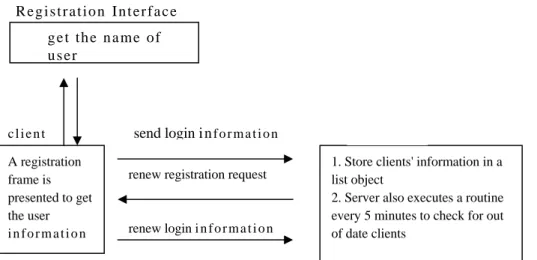
When the user starts the Whiteboardapplication, a registration frame will be presented immediately to ask the user to register. The user information provided will be kept on the server's logon list. The server uses a routine that checks the users' logon information. Users whose logon information is older than 5 minutes will be warned to renew their status and a flag will be placed in their files. A warning message will then be sent to the user's client core thread. The client core thread will automatically renew the user's logon information without explicitly informing the user. A user is considered as not logged on if there is a flag in his file when someone tries to call him. The flag will be removed when the server receives the renew message from the user.
Unlike telephone numbers that are fixed to the user and the user has no way of stopping unwelcome interruptions, there is no relationship between the user's IP address and the name he/she registers. The user can register using a different name every time he/she starts the WhiteboardTalk application. For the purpose of the connection, the user has to obtain a remote users' register name either by email or other communication means. This is to protect users from unwelcome callers. By changing the register name, the unwelcome caller would have no way of calling the user.
that would prevent users from registering the same name, but one will be added to the functions of the server in later versions of the WhiteboardTalk (Figure 4). R e g i s t r a t io n I n t er f a c e g e t th e n a me o f u s er c l i e n t A registration frame is presented to get the user i n f o r m a t i o n send login i nf o r m a t i o n
1. Store clients' information in a list object
2. Server also executes a routine every 5 minutes to check for out of date clients
renew registration request
renew login i n f o r m a t i o n
Figure 4. User registration
Initial connection request.
When the client application istarget is online.
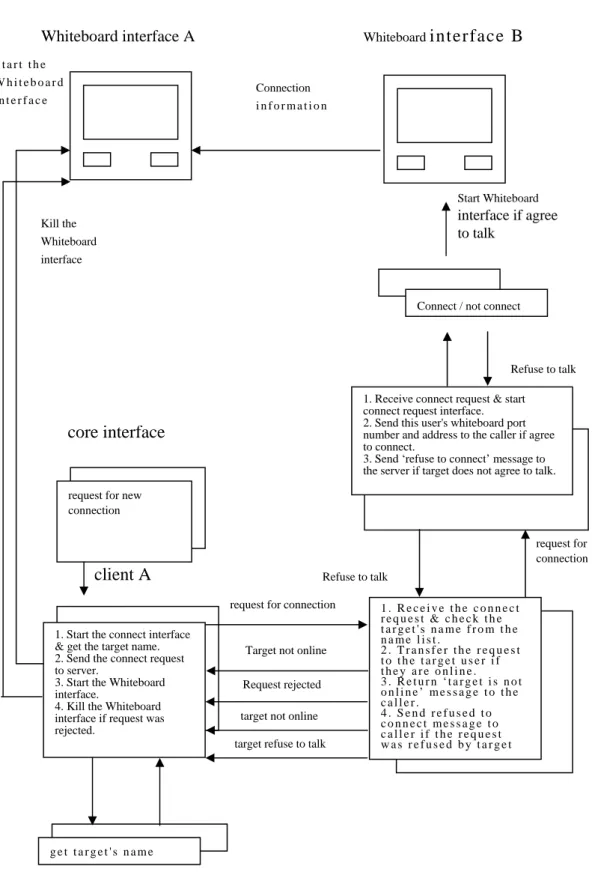
When the target client application receives the connection request message, it will present a 'connection request' interface to the target user. The target user can choose to either accept or refuse the request. If the target user indicates that he does not want to talk with the remote caller by clicking on the refuse button, the target client core thread will send a ‘refused message’ back to the server. The server then notifies the caller that the request was refused. The caller client then closes the whiteboard interface it started earlier.
When the target user decides to accept the call, its client core thread will launch one whiteboard interface thread and also send its address and the number of the whiteboard receiving port directly to the caller's whiteboard receiving port. The caller's whiteboard thread then deposits the target's whiteboard identification information received into its groupList object. The connection between two sides is then created. A client can have multiple whiteboard threads running at the same time. In other words, a user can talk simultaneously with many different remote users. The number of connections which a client can have depends on the capability of the machine. Once the target client has agreed to talk, the information regarding the target user's whiteboard receiving port number and Internet address is sent directly to the caller's whiteboard receiving port, reducing the load on the server (Figure 5).
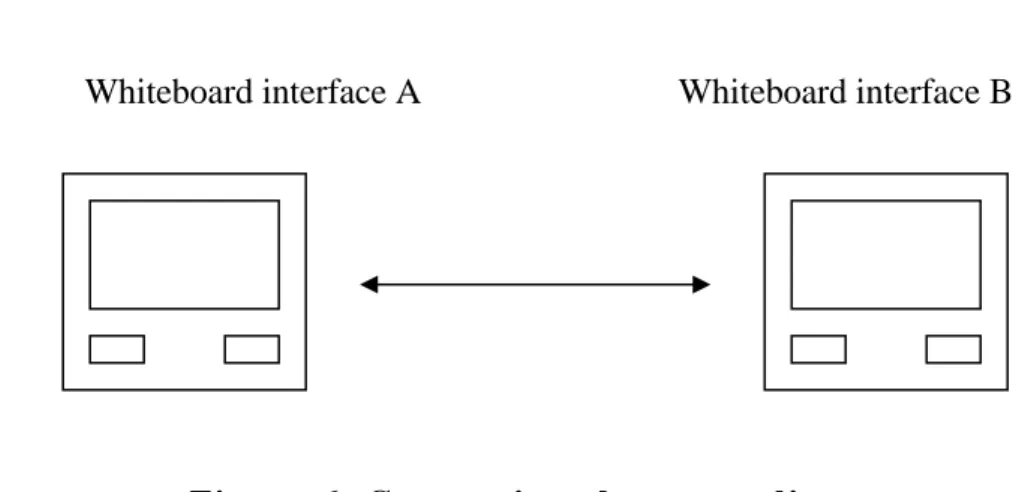
Connections between clients.
Beside the Internet protocol,The major components of the whiteboard interface are the command buttons and a DrawPad object, which is a subclass of the Canvas class from the Java AWT package. The Canvas class is a component with no special functionality that is mainly used for creating custom graphic components. Each line on the DrawPad consists of many small segments. Each segment is the result of connecting the previous pixel position and the current position of the mouse. Since the WhiteboardTalk uses the UDP protocol to handle the connection between clients, there is no guarantee that packages will not be lost or fall out of order in the transmission process. By supplying the previous mouse position and the current position in each Datagram package, the damage caused by losing packages or receiving them out of order can be minimized. In other words, the loss of a single segment in a line will not affect the existence of the line. In the initial prototype of WhiteboardTalk, only single-color lines are provided on the DrawPad object.
Two buttons are provided in the initial prototype, the clear button and the group invitation button. The clear button provides a means for users to clear the DrawPad object. When one of the participants clicks the clear button, all participants' DrawPads will be cleared. This function will be elaborated in later versions of WhiteboardTalk.
Whiteboard interface B Whiteboard interface A
core interface
request for new connection
client A
C t
g e t t a r g e t ' s n a m e 1. Start the connect interface & get the target name. 2. Send the connect request to server.
3. Start the Whiteboard interface.
4. Kill the Whiteboard interface if request was rejected. 1 . R e c e i v e t h e c o n n e c t r e q u e s t & c h e c k t h e t a r g e t ' s n a m e f r o m t h e n a m e l i s t . 2 . T r a n s f e r t h e r e q u e s t t o t h e t a r g e t u s e r i f t h e y a r e o n l i n e . 3 . R e t u r n ‘ t a r g e t i s n o t o n l i n e ’ m e s s a g e t o t h e c a l l e r . 4 . S e n d r e f u s e d t o c o n n e c t m e s s a g e t o c a l l e r i f t h e r e q u e s t w a s r e f u s e d b y t a r g e t s e r Target not online
Request rejected
1. Receive connect request & start connect request interface. 2. Send this user's whiteboard port number and address to the caller if agree to connect.
3. Send ‘refuse to connect’ message to the server if target does not agree to talk.
Connect / not connect
Refuse to talk Connection i n f o r m a t i o n S t a r t t h e W h i t e b o a r d i n t e r f a c e Kill the Whiteboard interface Start Whiteboard interface if agree to talk Refuse to talk request for connection request for connection
target not online target refuse to talk
Whiteboard interface A Whiteboard interface B
Figure 6. Connections between clients
} / / e n d o f mo u s eD o w n p u b l i c v o i d u p d a t e ( G r a p h i c s g ) { p a in t ( g ) ; } / / e n d o f u p d a t e p u b l i c v o i d p a i n t( G r ap h i c s g ) { i f ( d r aw I mg = =n u l l) { d r a w I mg = c r e a te I m a g e( s i z e ( ) . w id t h , s i z e ( ) . h e i g h t ) ; d r aw G r =d r a w I m g . g e t G r ap h i c s( ) ; } g . d r a w I ma g e ( d r a w I mg , 0 , 0 , n u l l ) ; } / / p a i n t p u b l i c v o i d c l e a r ( ) { d r a w I m g . g e t G r ap h i c s ( ) . c l e a r R e c t ( 0 , 0 , s iz e ( ) . w i d th , s i z e( ) . h e i g h t ) ; r ep a in t ( ) ; } / / e n d o f c l e a r } / / e n d o f D r a w P ad c l a s s
Figure 7. The data structure for the DrawPad class object
Group meetings.
All group meetings start from the basicother before they decide to invite an extra member. Of course, it is also possible that WhiteboardTalk can provide a method to solve the problems mentioned above, reducing users' involvements. However, the complexity due to using this application will increase and users may need more training in using this application. The requirement of more training before the user can use this software violates the objective of this project to create an easy-to-use graphical communication tool. Leaving the negotiation of the creation of a group meeting to users has a similar effect to that seen in a telephone system. The telephone system does not provide a means to help users recognize whom they are talking to, assuming no caller ID issued. However, users of the telephone system do not have a problem in recognizing whom they are talking to because they can ask 'who is calling?' Users of WhiteboardTalk can negotiate graphically with each other on the Whiteboard just as they do on the telephone and thus achieve the same effect without increasing the complexity of the protocol.
To launch a group invitation, a user has to click on the group invitation button, which is located on the Whiteboard interface. The reason for setting the group invitation button on the whiteboard interface is because a client can have multiple whiteboard threads running at the same time. Each whiteboard thread handles its own meeting. Placing the group invitation function as one of the functions of the whiteboard interface can help users avoid confusion.
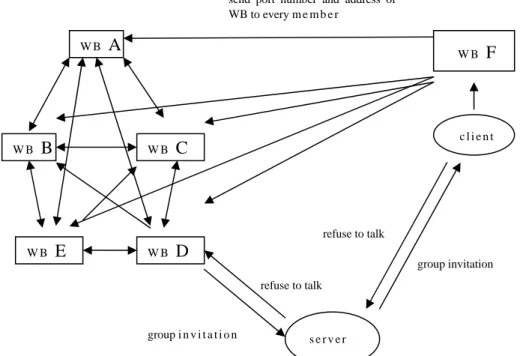
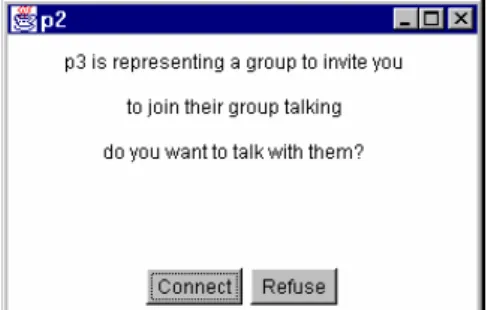
receiving port numbers and addresses of all existing group members. When the server receives the group invitation message, it checks its logon list. If the target user is not logged on, it simply returns the 'target user is not online' message back to the caller. If the target user is online, the server resends the message to the target user. When the target user receives the group invitation message, the target client core thread will launch a group invitation frame to ask the target user whether he/she wants to participate. If the target user refuses, the client application will send a 'refuse to talk' message through the server to the caller.
send port number and address of WB to every m e m b e r W B E W B F W B A W B B group invitation refuse to talk refuse to talk group i n v i t a t i o n s e r v e r W B D c l i e n t W B C
Figure 8. Setting up a Group meeting
group members receive the message sent by the new member, they add the newcomer's information into their groupList object. The invitation process then finishes (Figure 8).
How the WhiteboardTalk Application Works
On Server site
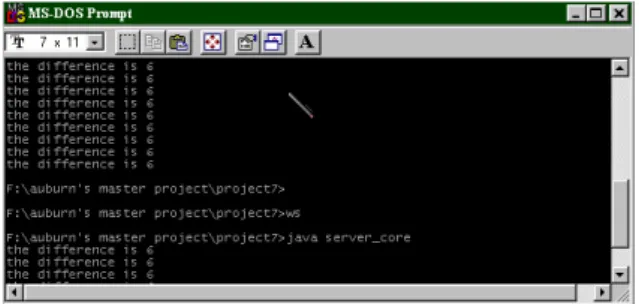
Keying in the ‘ws’ command, as in Figure 9, in the application directory would launch the server_core program. A server message flow window then pops up and will stay when the server is on. The server message flow window (Figure 10) allows the server administrator to monitor the incoming messages.
Figure 9. Command needed to start a WhiteboardTalk server program
Figure 10. Server message flow window
On the Client site
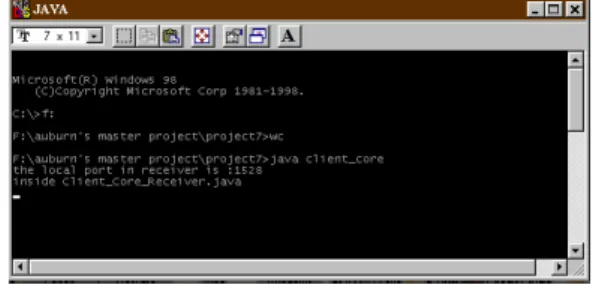
core program will then start a registration window as shown in Figures 12 and 13 to ask the new user to register his name with the WhiteboardTalk server. The user name registered can be any name as long as there is no-one with the same name already registered. The registered name will be held for the user when he is online. When the user logs off, the name he registered with will be erased from the server. The user can register a different name when he logs on next time. After the user completes the registration process, the client core program will start a core window as shown in Figure 14. The core window will be on the user’s screen throughout the time when he is online.
Figure 11. Launching the client core program.
Figure 12. The WhiteboardTalk registration window.
Figure 14. The WhiteboardTalk core window.
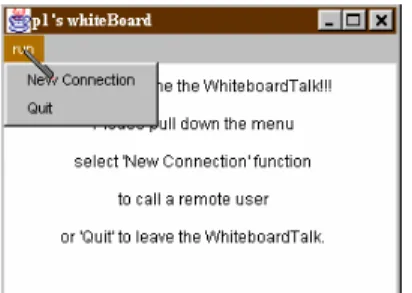
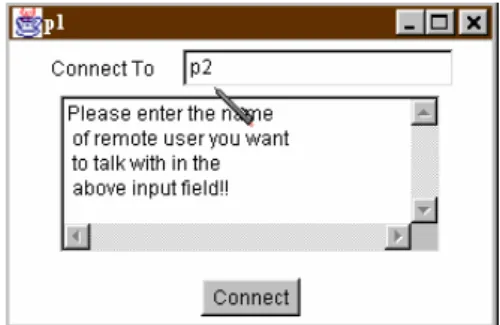
Step 2: From the client core window, the user can pull down the menu from the run selection and choose either New Connection or the Quit option as shown in Figure 15. When the Quit option is selected, the WhiteboardTalk program will terminate. All interfaces generated by it will also be closed. If the user chooses the New Connection option, a Connect window will pop up to ask the user the name of the remote user whom he would like to invite to communicate with(Figure 16).
Figure 15. The run selection menu.
directly, without going through the WhiteboardTalk server. After the remote user accepts the invitation, Whiteboard interfaces pop up for both of them to talk. If the invitation is rejected, the "refuse" message will be sent to the original caller through the WhiteboardTalk server. Doing it this way avoids the remote client being able to detect the user’s address. In the case that the target client is not online, the WhiteboardTalk server simply sends a ‘target not online’ message back to the caller.
Figure 16. The Connection window.
Figure 17. Entering the request.
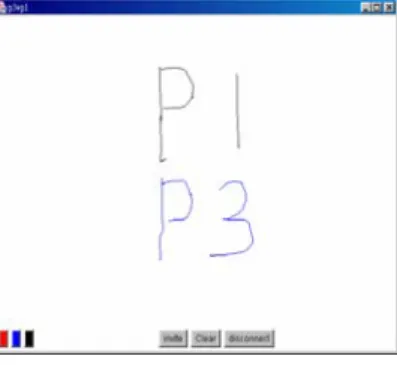
Step 4: After the connection has been created, users are able to talk to each other by drawing on their Whiteboard interfaces (Figure 19). It is worth noting that the settings on the Whiteboard interface are defined by the local user. For example, the color chosen by one user in the meeting will not affect the color settings on a remote user’s Whiteboard interface. The remote user still uses their own original color settings in drawings. Each user can only change the color of the drawings presented on his own. As shown in Figure 19, we can see that user p3 uses black for this drawing while p1 uses red color for drawing. The color used by the remote user is not affected when the local user changes his color setting. The mark ‘p1+p3’ on the top of the frame shows that two users, p1 and p3, are participating in the group discussion. This feature, which lists the names of the participants on the top of the Whiteboard, is especially useful in identifying who is participating in the meeting. This is especially useful for situations when the local user has more than one online meeting running at once.
Figure 19. Exchanging messages via WhiteboardTalk, as seen by user P1.
him into the discussion.
Figure 21. The group invitation screen.
Figure 22. The group invitation calling card presents on user p2's
screen.
Figure 23. Adding new user p2 to the group.
Figure 24. Whiteboard display seen by p1 before p2 joining the
Figure 25. Whiteboard display seen by p3 before p2 joining the group.
Figure 26. Whiteboard display seen by p1 and p3 after p2 joining
the group.
Figure 27. Whiteboard display seen by p2 at the same time as the
previous Figure.
Step 6: To leave the group meeting, a user only has to click on the disconnect button as shown in Figure 28. The Whiteboard session in which the user decides to leave can be terminated while other Whiteboard processes belong to this user are still running. A message will be sent to the other participants in the group meeting. A notification card (Figure 29) will be shown on all participants’ screens to let them know that a specific user has left. Other participants can also identify which member has left by checking on the member names of those remaining in the meeting on the top of the Whiteboard, as shown in Figures 30 and 31.
Figure 29. Notifying the group that a member has left.
Figure 30. The Whiteboard screen seen by p1, showing p3 has left the meeting.
Figure 31. The Whiteboard screen seen by p2, showing p3 has left
Discussion and Conclusion
The accomplishment of the first stage development
Both client and server components were established and tested. Basic Internet protocols were developed and tested. Although some concerns arose, the basic functionality works. Some modifications need to be done to ensure the execution is reliable. A series of simple graphic interfaces was built. There is still room for improvement, especially in the area of user-friendliness.
Problems found in the development of the first
prototype
The biggest challenge for the first prototype was the unexpected result caused by the delayed responses from the machines. As the following diagram shows, when we intended to draw a line from A through B to C, instead of giving us a line segments
B
A
Cplays a significant role in the quality of the drawing on the whiteboard interface. The higher speed the CPU is, the smoother the line is.
Further elaborations on the following stages
Since the UDP protocol does not guarantee the arrival of data packets would be in order or that they would not be lost, it is necessary to create a mechanism to secure the arrivals of the data packets. Besides these data packets, which deliver drawing information on the whiteboard, the arrivals of all message data packets have to be secured. We also have to make sure these data packets arrive in order. The nature of a line on a whiteboard would not change too much when some segments are lost. However, message data packages used in hand-shaking processes between client and server or between clients are more important. Their loss or out of order arrival might cause real damage to the connection process. For example, the loss of the message data packet used to register a new user on the server's logon list will make the new user invisible to other users, since the WhiteboardTalk server does not have the information it needs to include them. However, there are overheads if a mechanism is added to the system and the execution of the application may slow down, especially when there is a huge number of users participating in the WhiteboardTalk. This is a research topic for future development of the WhiteboardTalk tool.
Conclusions
countries might need graphic communication tools since he/she might not be able to access an appropriate input tool locally. In long distance education through the Internet, graphical communication tools can allow users to express a fraction or an algebra equation much more easily. Similar to ‘talk’ in the UNIX system, the application developed by this project is close to being a real time system. In other words, the user’s drawing can be seen immediately on remote users’ Whiteboards, assuming the network works smoothly enough. This project focuses on what customers really need and will not provide extra functionalities that potential users will never or hardly ever use. Useless options may increase the complexity at the expense of usability.
This application intends to make the output easy to use and tries to reduce the learning time needed for a new user as much as possible. In order to reach this goal, the developer decided that the appearance of the application should not be too complicated. The idea was borrowed from the existing telephone system. The telephone system, which already has decade’s worth of development experience, has proven to be one of the greatest inventions of human civilization. It is the telephone system’s first priority to transmit sound signals as clearly as possible. Not too many features have been added into the users’ basic telephone system, although users may apt for extra functionalities which would incur additional costs. The telephone system does not need to provide a function enabling the receiver to identify who is calling (caller id is not a standard facility). It simply leaves the user to ask who is calling and this works very well. Applying this idea, the WhiteboardTalk application will focus on its main feature, graphical data communication, and intends to limit the number of functions provided.
software step by step with only two options at nearly every step. There are four kinds of interfaces in the WhiteboardTalk application. On each interface, users are asked questions with very limited responses, like "connect" or "reject". Even in the Whiteboard interface which is used as the main interface for graphical communication, a total of only five options are provided to users: the invite button, the quit button and three color selection buttons. The purpose of narrowing down the number of selections on each interface is to make the system easy to use for even very young children. The confusion caused by putting too many functions on many electronic devices is what the WhiteboardTalk application intends to avoid.
By adopting the nature of Object Oriented Language, the software of the application is modular. Every component of this application is presented as a class module. This arrangement makes any future correction or extensions easier, since the effect of rewriting code will be limited to a local module and will make the effort for debugging easier.
Further development
changed as it has become a medium acting for the transmission and presentation of data.
For a long time, many education researchers have known of the importance of human interaction in education. Much development, which applies Artificial Intelligence techniques to enable computers to act as classroom teachers, faces many difficulties because of the increased computational complexity. Using computers and networks as tools to help students learn is attracting a considerable amount of attention. The Classroom 2000 project developed by Georgia Tech [1] is an example.
References
Abowd, G. D.(1999). Classroom 2000: An Experiment with the Instrumentation of a Living Educational Environment. IBM Systems
Journal, 38(4), 508-530.
aha! InkWriter Handbook (1993). Mountain View, CA: aha! software
corporation.
Cooper, D., Francik, E., Levine, S. & Rudman, S. E.(1991). Putting Innovation to Work: Adoption Strategies For Multimedia Communication Systems. Comm. ACM, 34(12), 53-63.
Elrod, S., Bruce, R., Goldberg, D., Halasz, F., Janssen, W., Lee, D., McCall, K., Pedersen, E., Pier, K., Tang, J. & Welch, B. (1992). Liveboard: A large in-teractive display supporting group meetings, presentations and remote collaboration. Proceedings of CHI ’92
Conference on Human Factors in Computing Systems, Monterey, CA,
1992.
Ishii, H. & Miyake, N. (1991). Toward an Open Shared Workspace: Computer and Video Fusion Approach of TeamWorkStation. Comm.
ACM, 34(12), 37- 49.
Liang,, T., Lai, H., Chen, N., Wei, H. & Chen, M. (1994). When Client/Server Isn't Enough: Coordinating Multiple Distributed Tasks.
Computer, IEEE, 27(5), 73-79.
Pedersen, E. R., McCall, K., Moran, T. P., & Halasz, F. G. (1993). Tivoli: An electronic whiteboard for informal workgroup meetings.
Proceedings of Inter-CHI’93, 391-398. New York: ACM.
Robert, S. (2001). First look at NM3!,