AUTOMATIC GENERATION OF TALKING CARTOON FACES FROM IMAGE SEQUENCES
Yen-Lin Chen (陳彥霖) and Wen-Hsiang Tsai (蔡文祥)
Department of Computer and Information Science, National Chiao Tung University, Hsinchu, Taiwan, R.O.C.
Tel: 886-3-5712121 Ext. 56650 E-mail: {gis91529, whtsai}@cis.nctu.edu.tw
ABSTRACT
A system for automatic generation of talking cartoon faces by facial image analysis, moving-lip synthesis, facial feature tracking, and voice synchronization techniques is proposed. A method for creating a personal cartoon face automatically is proposed first to extract facial features from a given neutral facial image. The method consists of the hierarchical bi-level thresholding and knowledge-based facial feature detection. A face model of 72 facial feature points is proposed then for personal cartoon face drawing and animation by a speech file and a script file.
Nine basic mouth shapes for Mandarin speaking are proposed to synthesize the moving lips. Cartoon faces can also be animated by the use of sequential facial images through automatic tracking of facial features.
Finally, an editable and opened vector-based XML language of W3C (World Wide Web Consortium) standard-SVG (Scalable Vector Graphics) is used for rendering cartoon faces and synchronizing their animations with speech. Good experimental results show the feasibility of the proposed methods.
1. INTRODUCTION
Creating a personal virtual face on computers is still inconvenient in today’s world. We are more frequently using personal computers to interact with friends or give commands to computers. Being able to create virtual faces on computers and use them in daily communication makes people feel comfortable and friendly to one another. In the past studies, cartoon faces were made by computer graphics techniques [4-6].
There are more advantages to use cartoon faces than to use photorealistic ones. First, there is more freedom in designing stylish cartoon faces. Second, expressions can be modified and exaggerated by relocating predefined feature points. And last but not least, cartoon faces are more interesting but may be created with less data.
However, a ten-minute animated cartoon needs at least 14400 frames. This leads to the need of computer facial animation for cartoon faces [7, 8, 9, 12]. It aims at
modeling a virtual face to freely show facial expressions.
Some methods were proposed to animate a virtual face from input facial image sequences with attached markers on faces [14, 15]. However, this approach is inappropriate for general uses. If one wants to track facial features from sequential images without any marker, he/she needs to use some image processing techniques [2, 3, 10, 11, 13]. The goal of this study is to design an automatic system for generating animated cartoon faces with moving lips uttering synchronized Mandarin speeches [1].
To demonstrate the feasibility of low-cost virtual face creation, we use web-cameras to capture human faces with frontal lights and white background in this study. After detecting facial feature regions, facial feature points are extracted and related parameters computed. Then cartoon faces are created automatically by modifying the parameters. To animate personal cartoon faces more realistically, some basic emotions are specified. Moreover, lip movements are synthesized from speeches, and expressions synthesized from a video sequence of the user’s face without adopting the above-mentioned technique of attaching markers on faces.
The remainder of this thesis is organized as follows.
In Section 2, a more detailed overview of the proposed method is described to introduce the following sections.
In Section 3, a method of extracting facial feature regions is described. And then, a method of extracting facial feature points is described in Section 4. Up to Section 4, personal cartoon faces were created. The methods we adopt for rendering a cartoon face from single facial image and from sequential facial images for synchronizing it with a speech file are described in Sections 5 and 6, respectively. A final integration process using an application program SVG (Scalable Vector Graphics) and some experimental results are given in Section 7. Finally, conclusions and some suggestions for future works are included in Section 8.
2. OVERVIEW OF PROPOSED METHOD FOR TALKING CARTOON FACE GENERATION
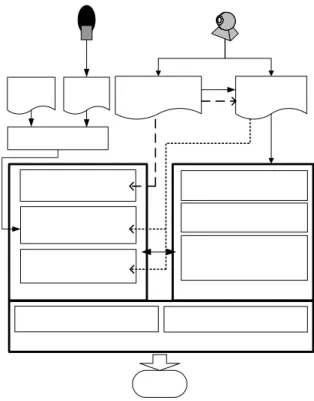
The proposed system for talking cartoon face generation includes three major parts: a cartoon face creator, an animation editor, and a cartoon generator, as shown in Fig. 1.
Fig. 1 Proposed system organization and animation generation stages.
The cartoon face creator is used to create a personal cartoon face from a neutral facial image, which includes a large frontal neutral face [12]. Three main steps are performed by the creator. The first is extraction of facial feature regions. The second is extraction of facial feature points in the facial feature regions for cartoon face drawing. Some facial feature points are assigned to be control points for easier deformation of cartoon faces.
The last step is definition of some basic facial expression parameters for the use of animation.
The animation editor is used to deal with the animation of neutral cartoon faces. A timeline was used as a basic structure for animation. The most important part of animation is dealing with key frames. By knowing when and how a facial expression shows, facial feature points and related parameters are defined in corresponding key frames. After applying an interpolation technique to compute the remaining frames between key frames, cartoon faces can be animated.
The cartoon generator is used to render the style of cartoon faces from the view of the spatial domain and synchronize the speech file with the animation from the
view of the temporal domain using an application program SVG.
2.1. Talking Cartoon Face Generation from Single Images
If a user wants to generate a talking cartoon face from single images, he/she must take first a neutral facial image as input to the cartoon face creator. After extracting facial feature regions and facial feature points, control points are assigned to define basic facial expression parameters. A neutral cartoon face is created finally. Since there is only one input image, we can just animate the cartoon face from it by synthesizing moving lips and creating facial expressions with emotions. To synthesize moving lips, an additional speech analyzer is used to extract timing information of syllables from a speech file and a script file. A syllabus may be composed of several basic mouth shapes. By assigning key frames with corresponding mouth shapes, cartoon faces can be animated. Also, the user can freely specify emotions. Finally, the cartoon generator outputs a file of an animated talking cartoon face.
2.2. Talking Cartoon Face Generation from Image Sequences
Alternatively, if a user wants to generate a talking cartoon face from a given image sequence, he/she must take a video clip of the user’s talking face as input. The video clip is then separated into a sequence of facial images and a speech file. The cartoon face creator then is used to select the first frame as a neutral facial image to create a neutral cartoon face. The animation editor is employed next to track the demanded facial features from the remaining frames to animate the cartoon face.
Every frame of the given video sequence will be regarded as a key frame. Finally, the cartoon generator combines the speech file and the animated cartoon face to yield as output a file of an animated talking cartoon face.
3. EXTRACTION OF FACIAL FEATURE REGIONS
The use of facial feature regions gives us the information about the positions and ranges of facial features.
3.1. Extraction of Background, Hair, and Face Regions
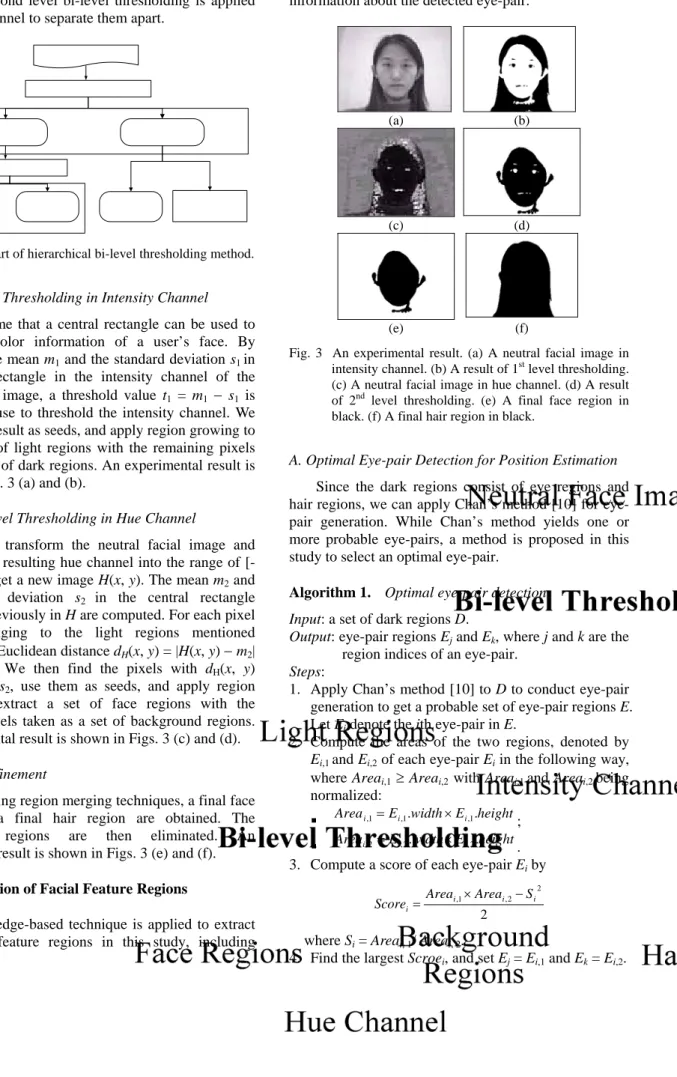
A hierarchical bi-level thresholding method is proposed in this study to extract the background regions, hair regions, and face regions in a given face image.
The first level bi-level thresholding of the proposed hierarchical method is used to separate dark regions (including eye regions and hair regions) and light
regions (including background regions and face regions) in the intensity channel of the input image. Since the light regions consist of face regions and background regions, a second level bi-level thresholding is applied in the hue channel to separate them apart.
Fig. 2 Flowchart of hierarchical bi-level thresholding method.
A. First-Level Thresholding in Intensity Channel We assume that a central rectangle can be used to collect the color information of a user’s face. By computing the mean m1 and the standard deviation s1 in the central rectangle in the intensity channel of the neutral facial image, a threshold value t1 = m1 − s1 is obtained for use to threshold the intensity channel. We then use the result as seeds, and apply region growing to extract a set of light regions with the remaining pixels taken as a set of dark regions. An experimental result is shown in Figs. 3 (a) and (b).
B. Second-Level Thresholding in Hue Channel
We then transform the neutral facial image and normalize the resulting hue channel into the range of [- 127, 128] to get a new image H(x, y). The mean m2 and the standard deviation s2 in the central rectangle mentioned previously in H are computed. For each pixel (x, y) belonging to the light regions mentioned previously, a Euclidean distance dH(x, y) = |H(x, y) − m2| is computed. We then find the pixels with dH(x, y) smaller than s2, use them as seeds, and apply region growing to extract a set of face regions with the remaining pixels taken as a set of background regions.
An experimental result is shown in Figs. 3 (c) and (d).
C. Region Refinement
By applying region merging techniques, a final face region and a final hair region are obtained. The background regions are then eliminated. An experimental result is shown in Figs. 3 (e) and (f).
3.2. Extraction of Facial Feature Regions
A knowledge-based technique is applied to extract other facial feature regions in this study, including
eyebrow regions, eye regions, a nose region, and a mouth region. It is based on a concept to estimate the positions and ranges of facial feature regions by the information about the detected eye-pair.
(a) (b)
(c) (d)
(e) (f) Fig. 3 An experimental result. (a) A neutral facial image in
intensity channel. (b) A result of 1st level thresholding.
(c) A neutral facial image in hue channel. (d) A result of 2nd level thresholding. (e) A final face region in black. (f) A final hair region in black.
A. Optimal Eye-pair Detection for Position Estimation Since the dark regions consist of eye regions and hair regions, we can apply Chan’s method [10] for eye- pair generation. While Chan’s method yields one or more probable eye-pairs, a method is proposed in this study to select an optimal eye-pair.
Algorithm 1. Optimal eye-pair detection.
Input: a set of dark regions D.
Output: eye-pair regions Ej and Ek, where j and k are the region indices of an eye-pair.
Steps:
1. Apply Chan’s method [10] to D to conduct eye-pair generation to get a probable set of eye-pair regions E.
Let Ei denote the ith eye-pair in E.
2. Compute the areas of the two regions, denoted by Ei,1 and Ei,2 of each eye-pair Ei in the following way, where Areai,1 ≥ Areai,2 with Areai,1 and Areai,2 being normalized:
height E width E
Areai,1= i,1. × i,1.
;
Areai,2=Ei,2.width×Ei,2.height. 3. Compute a score of each eye-pair Ei by
2
2 2 , 1
, i i
i i
S Area
Score Area × −
= where Si = Areai, 1/ Areai, 2.
4. Find the largest Scroei, and set Ej = Ei,1 and Ek = Ei,2.
For each region of the eye-pair, a circle with the maximum number of points in it is detected to be an eyeball. After computing a Euclidean distance d between two eyeballs, a 2d×2d square region is constructed to cover the main facial features [10]. An experimental result is shown in Figs. 4 (a), (b), and (c).
B. Knowledge-based Facial Feature Extraction
The information of edge points is used to detect facial feature regions. A method is proposed to generate a useable binary edge image, as described in the following algorithm.
Algorithm 2. Edge detection by local thresholding.
Input: a grey-level image I of the neutral facial image Output: eye-pair regions Ej and Ek, where j and k are the
region indices of an eye-pair.
Steps:
1. Detect the edges of I by applying the Sobel operator to get an edge image S.
2. Mirror map the right half side of S in the 2d×2d rectangle range to the other side according to the positions of the two eyeballs.
3. Draw three horizontal division lines, DivEE
(eyebrows to eyes), DivEN (eyes to nose), and DivNM
(nose to mouth) with pre-selected positions, and so divide S into four parts.
4. Threshold locally each part of S by apply Tsai’s moment-preserving thresholding method [2] to get a binary edge image Bedge.
The main idea of the proposed knowledge-based facial feature extraction method is to speculate an initial search region of each facial feature to extract a final region in Bedge by a region growing method. The extracted 2d×2d square range is used here to speculate the initial position and range of each facial feature region. The details are omitted here. An experimental result is shown in Figs. 4(d) and (f).
3.3. Detection of Cheek Boundaries and Ear Regions
After extracting the above mentioned facial feature regions, some features are yet to be detected, like the ear regions. For this, the cheek boundaries need to be detected first. To this end, a vertical projection method is applied to the set of face regions. After mirror- mapping the right-side projection information to the left side, we find a position near the 2d×2d square range with a local minimum projection value as the desired cheek boundaries. After detecting the position of the cheek boundaries, we then divide the left and right parts of the set of face regions into ear regions and cheek
regions. An experimental result is shown in Figs. 4 (e) and (f).
(a) (b)
(c) (d)
(e) (f) Fig. 4 A result of facial feature region extraction. (a) Probable
eye-pairs. (b) An optimal pair of eyeballs with a distance d between them. (c) A 2d×2d square region.
(d) Edge image Bedge with speculated positions and ranges of facial features. (e) Projection information of face regions. (f) Final extraction results of facial feature regions and cheek boundaries.
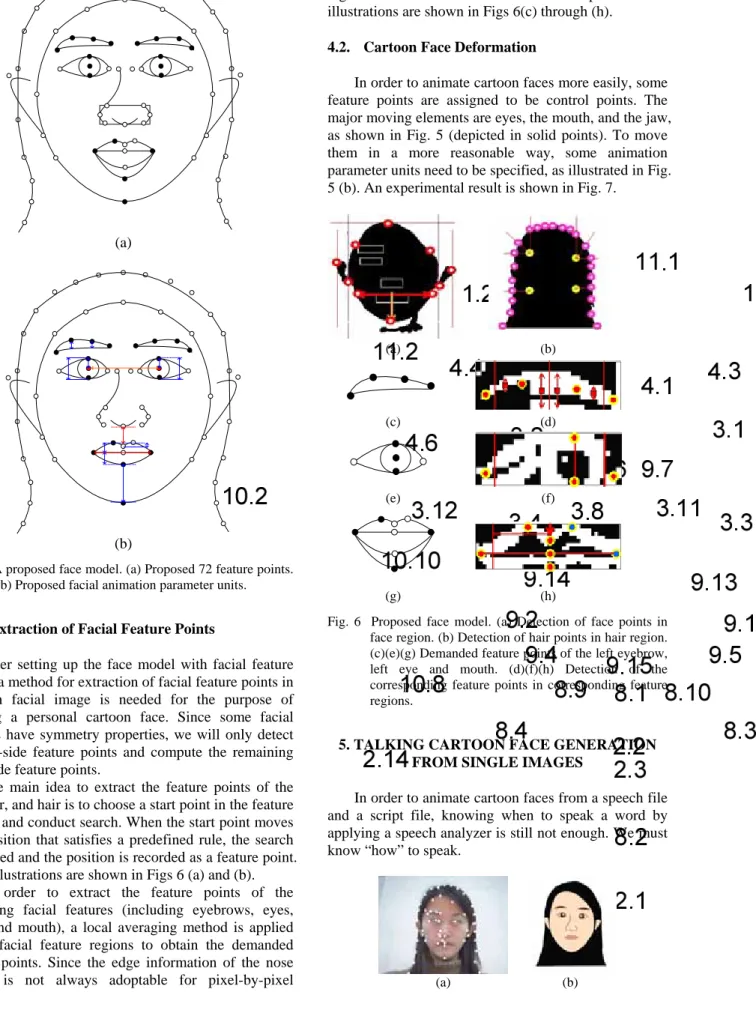
4. EXTRACTION OF FACIAL FEATURE POINTS The use of facial feature points helps us to draw and to deform a neutral cartoon face. A model with facial feature points is designed according to the MPEG-4 standard and two curve drawing algorithms (including a line drawing algorithm and a cubic Bezier curve drawing algorithm) are used in this study. We apply the line drawing algorithm to draw the hair and eyebrows, and the cubic Bezier curve algorithm to draw the remaining facial features. A face model with 72 facial feature points is proposed in this study, as illustrated in Fig. 5 (a).
(a)
(b)
Fig. 5 A proposed face model. (a) Proposed 72 feature points.
(b) Proposed facial animation parameter units.
4.1. Extraction of Facial Feature Points
After setting up the face model with facial feature points, a method for extraction of facial feature points in a given facial image is needed for the purpose of creating a personal cartoon face. Since some facial features have symmetry properties, we will only detect the left-side feature points and compute the remaining right-side feature points.
The main idea to extract the feature points of the face, ear, and hair is to choose a start point in the feature regions and conduct search. When the start point moves to a position that satisfies a predefined rule, the search is stopped and the position is recorded as a feature point.
Some illustrations are shown in Figs 6 (a) and (b).
In order to extract the feature points of the remaining facial features (including eyebrows, eyes, nose, and mouth), a local averaging method is applied in the facial feature regions to obtain the demanded feature points. Since the edge information of the nose region is not always adoptable for pixel-by-pixel
detection here, the given size information of the nose region is used to obtain the desired feature points. Some illustrations are shown in Figs 6(c) through (h).
4.2. Cartoon Face Deformation
In order to animate cartoon faces more easily, some feature points are assigned to be control points. The major moving elements are eyes, the mouth, and the jaw, as shown in Fig. 5 (depicted in solid points). To move them in a more reasonable way, some animation parameter units need to be specified, as illustrated in Fig.
5 (b). An experimental result is shown in Fig. 7.
(a) (b)
(c) (d)
(e) (f)
(g) (h) Fig. 6 Proposed face model. (a) Detection of face points in
face region. (b) Detection of hair points in hair region.
(c)(e)(g) Demanded feature points of the left eyebrow, left eye and mouth. (d)(f)(h) Detection of the corresponding feature points in corresponding feature regions.
5. TALKING CARTOON FACE GENERATION FROM SINGLE IMAGES
In order to animate cartoon faces from a speech file and a script file, knowing when to speak a word by applying a speech analyzer is still not enough. We must know “how” to speak.
(a) (b)
(c) (d) Fig. 7 An example of experimental results. (a) A result of
detection of facial feature points. (b) A result of automatic generation of neutral cartoon face rendered by SVG. (c) A result of a cartoon face with relocating some facial points. (d) A result of a cartoon face with relocating some control points of eyes and mouth.
5.1. Definition of Basic Mouth Shapes
There exist many languages in our world. In order to read an unknown word, people always transcript it into some basic phonetic symbols. Taking the Taiwan Tongyoung Romanization as an example, we know that the Mandarin phonetics are composed of some basic English alphabets, and that each English alphabet has its own mouth shapes. A concept worth notice here is that a Mandarin syllable which consists of phonemes is a combination of some basic mouth shapes.
In Yeh [16], the 21 kinds of well-known initial mouth shapes were reduced to 7 according to the manners of articulation. In the case of cartoon faces, especially when the concern is about the mouth shapes only, the 7 classes of initials are reduced further to 3 in this study, as illustrated in Table 1.
Table. 1 Three basic mouth shapes of Mandarin initials.
Mouth Shape
Symbols Members of the classes
m ㄅ、ㄆ、ㄇ
f ㄈ
h’ ㄉ 、 ㄊ 、 ㄋ 、 ㄌ 、 ㄍ 、 ㄎ 、ㄏ、ㄐ、
ㄑ、ㄒ、ㄗ、ㄘ、ㄙ、ㄖ、ㄗ、ㄘ、ㄙ
Similarity, the Mandarin final mouth shapes can be reduced to a set of combinations with 7 basic mouth shapes based on the Taiwan Tongyoung Romanization, as shown in Table 2.
Table. 2 Seven basic mouth shapes of Mandarin finals.
Mouth Shape Symbols
Members of classes
Combinations of Mouth Shapes
Members of classes
a ㄚ au ㄠ
e ㄝ ou ㄡ
i ㄧ en ㄢ
o ㄛ an ㄤ
u ㄨ、ㄩ ei ㄟ
n ㄥ ai ㄞ
h ㄣ、ㄦ、ㄜ
It is noticed that two “h’s” exist in both of the classes of Mandarin initials and Mandarin finals. Both h’ and h represent the same open mouth shape; however, h’ is eliminated in this study if there is a symbol (including a, i, u, e, o) behind it. For example, the syllable “ㄍㄨ” is translated into “h’u”, where there is an u right behind h’, and the final transcription of “ㄍ ㄨ” will be corrected automatically to be “u.”
5.2. Basic Mouth Shapes
An experiment was carried out to define the basic mouth shapes for uses in cartoon faces, where the width of the mouth shape of “n” is dependent on the former mouth shape. Additionally, we define the mouth shape using the concept of control points, which is mentioned previously.
Table. 3 Nine basic mouth shapes for Mandarin speaking.
m f h/h’
a i u
e o n
5.3. Talking Cartoon Faces Generation by Synthesizing Moving Lips
After extracting the information of the time interval of each syllable from a speech file and a script file by a speech analyzer, the animation editor will extract basic mouth shapes from each syllable and assign related
parameters to proper key frames. Moreover, the user can freely specify desired emotions to the cartoon face by relocating some feature points. Finally, by applying an interpolation technique between frames and then synchronizing with the speech file, a talking cartoon face by synthesizing moving lips is created.
6. TALKING CARTOON FACE GENERATION FROM IMAGE SEQUENCES
Another way to generate a talking cartoon face is to take a video clip of a user’s speaking face as input, and then transform it into a talking cartoon face. After the proposed system gets an image sequence and a speech file, the cartoon face generator will automatically choose the first frame as a neutral cartoon face of the user.
Some threshold values and parameters are reserved for subsequent uses. The animation editor then uses the reserved values to process each of the sequential images, and applies a tracking procedure to detect desired facial feature regions. The proposed method for tracking the desired facial features (including eye regions and mouth regions) is illustrated in Fig. 8.
Fig. 8 A flowchart of the tracking procedure for the eyeball regions and mouth regions in image sequences.
The basic idea of the tracking procedure is to use the tracked regions in the last frame to extract desired regions in the current frame. Besides, if no eye-pair is detected, the old pair of eye regions is used to substitute new ones.
7. CARTOON GENERATOR AND EXPERIMENTAL RESULTS
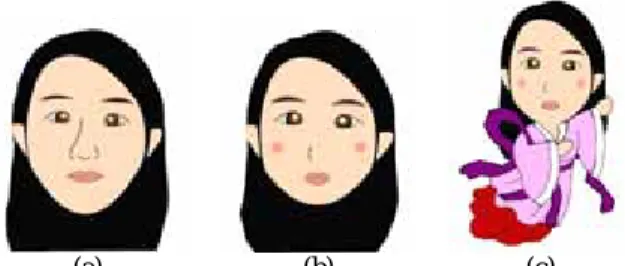
In the proposed system, the generated talking cartoon faces are rendered by an application language SVG, which is useful for describing two-dimensional vector and mixed vector/raster graphics in XML.
Furthermore, it supports the two previously-mentioned curve drawing methods used in the proposed system.
The cartoon generator will write the desired code into an SVG file. We can then view the SVG drawing directly by an IE browser. The cartoon generator handles the synchronization with the speech file and can
modify the cartoon faces by specifying the shapes and styles of the SVG drawings. Some experimental results are shown in Figs. 9.
(a) (b) (c) Fig. 9 A result of different types of cartoon faces. (a) Normal
type. (b) Cute type. (c) With clothes.
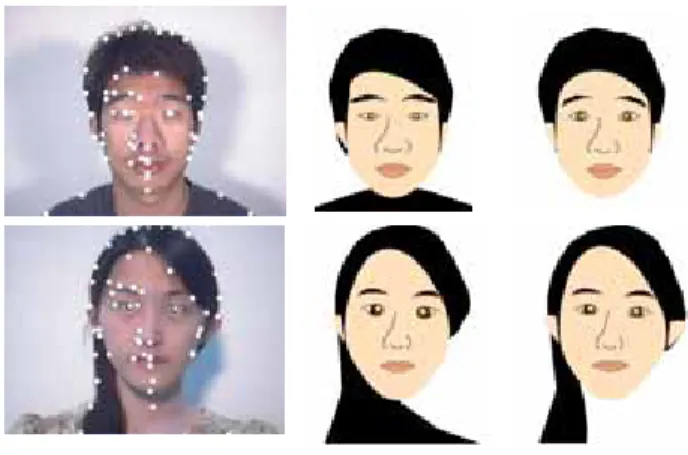
In the following, we demonstrate more experimental results. In this study, a neutral cartoon face can be automatic generated by processing an input neutral facial image. Facial feature points were extracted by employing the pair of eye regions. In the proposed system, twenty neutral facial images of five people were used for learning and twenty for testing.
The accuracy of eye-pair detection is 90%. The errors occurred because of the variations of lighting or/and the shapes between eyes and eyebrows. In such cases, acceptable cartoon faces were created from the originally generated ones by relocating ten facial feature points in average. Some experimental results are shown in Fig. 10.
Besides, talking cartoon faces can be generated from single images or from sequential images. In our experiments of the latter case, some errors may occur due to large movements of heads and mouths. An example of the former case using a single facial image as input to generate a talking cartoon face is shown in Fig. 11. The way to animate the cartoon face was to synthesize moving lips from a given speech of two Mandarin words “ 您 好 ”. The experimental result is shown in Fig. 12.
Another experiment was to use a video clip with a user’s speaking face as input to generate an animation of a talking cartoon face. The video sequence is shown in Fig. 13. The user said two Mandarin characters “夕 陽.” The experimental result is shown in Fig. 14.
An average computing time for extraction of facial feature points of each neutral facial image for cartoon face drawing is about 0.23 second. And the computing time for tracking is about 0.175 second per image in the environment of using a PC with 1.3GHz CPU rate, 769 MB memory, and the operating system of Windows XP.
(a) (b) (c) Fig. 10 Some experimental results. (a) Results of detection of
facial feature points. (b) Results of automatic generation of neutral cartoon faces rendered by SVG.
(c) Results of a cartoon face with relocating some facial points.
Fig. 11 The neutral facial image used in an experiment.
(a) (b) (c) (d)
(e) (f) (g) (h)
(i) (j) (k) (l)
(m) (n) (o) (p) Fig. 12 A resulting sequence of the talking cartoon face for
“您好” with a random generated eye-blinking for the input of Fig.11.
8. CONCLUSIONS AND SUGGESTIONS FOR FUTURE WORKS
In this study, a system for automatic generation of talking cartoon faces has been implemented. We have presented a way to automatically create a personal cartoon face from a given neutral facial image, and then animate it by moving-lip synthesis and facial feature tracking.
By the cartoon face creator, facial feature regions and facial feature points can be extracted automatically by the use of a hierarchical bi-level thresholding method and a knowledge-based image analysis technique proposed in this study. A face model of 72 facial feature points has been proposed for cartoon face drawing.
Dragging theses feature points can directly deform the cartoon face.
Next, using the animation editor, animation information can be extracted from a speech and a script.
A moving-lip synthesis technique for cartoon face animation is proposed by translating each syllabus into a combination of one to four basic mouth shapes.
Cartoon faces can also be animated by the use of sequential facial images through automatic tracking of the facial features.
In the component of the cartoon generator, an XML language SVG is used for rendering and synchronizing the cartoon face with speech.
Fig. 13 The neutral facial image used for another experiment.
(a) (b) (c)
(d) (e) (f)
(g) (h) (i)
(j) (k) (l) Fig. 14 Another experimental results of talking cartoon face
generation from image sequences, where the speaker in the video clip is speaking “夕陽.”
Finally, we mention some interesting topics for future research. In order to demonstrate low-cost processing, the facial feature detection method need be improved to fit more application environments. Besides, detections of glasses, wrinkles, and hair styles of given facial images should be considered. It is also desired to accomplish the goal of real-time animation using on- line face videos. Moreover, a way to learn a cartoonist’s cartoon style would make the cartoon face more attractive for more people.
9. REFERENCES
[1] Y. C. Lin and W. H. Tsai, “A Study on Virtual Talking Head Animation by 2D Image Analysis and Voice Synchronization Techniques,” M. S. Thesis, Department of Computer and Information Science, National Chiao Tung University, Hsinchu, Taiwan, Republic of China, June 2002.
[2] W. H. Tsai, “Moment-preserving thresholding: a new approach,” Computer Vision, Graphics, and Image Processing, 1985, vol. 29, pp. 377-393.
[3] Y. S. Chen, C. H. Su, J. H. Chen, C. S. Chen, Y. P. Hung, C. S. Fuh, “Video-Based Eye Tracking for Autostereoscopic Displays,” Optical Engineering, Dec. 2001, vol. 40, no. 12, pp.
2726-2734.
[4] Z. Ruttkay , H. Noot, “Animated CharToon faces,”
Proceedings of the 1st international symposium on Non- photorealistic animation and rendering, Annecy, France, June 05-07, 2000, pp.91-100.
[5] G. J. Edwards, A. Lanitis, C. J. Taylor, T. F. Cootes, “Face recognition using statistical models,” Image Processing for Security Applications, IEE Colloquium on Image Processing for Security Applications, UK, Mar. 10, 1997, pp. 2/1-2/6.
[6] Rein-Lien Hsu, A. K. Jain, “Generating discriminating cartoon faces using interacting snakes,” IEEE Transactions on
Pattern Analysis and Machine Intelligent, 2003, vol. 25, pp.
1388 -1398.
[7] P. Litwinowicz and L. Williams. “Animating images with drawings,” SIGGRAPH94 Conference Proceeding, Addision Wesley, Auguest 1996, pp. 225-236.
[8] H. Chen, N. N. Zheng, L. Liang, Y. Li, Y. Q. Xu, H. Y.
Shum, “PicToon: a personalized image-based cartoon system,” Proceedings of the tenth ACM international conference on Multimedia, France, 2002, pp.171-178.
[9] Y. Li, F. Yu, Y. Q. Xu, E. Chang, H. Y. Shum, “Speech Driven Cartoon Animation with Emotions,” Proceedings of the ninth ACM international conference on Multimedia, 2001, pp. 365 – 371.
[10] S. C. Y. Chan , P. H. Lewis, “A Pre-filter Enabling Fast Frontal Face Detection,” Proceedings of the Third International Conference on Visual Information and Information Systems, June 02-04, 1999, pp.777-784.
[11] I. Grinias, Y. Mavrikakis, G. Tziritas, “Region Growing Colour Image Segmentation Applied to Face Detection,”
Intern. Workshop on Very Low Bitrate Video Coding, 2001.
[12] J. Ostermann, “Animation of Synthetic Faces in MPEG- 4,” Proceedings of the Computer Animation, June 08-10, 1998, p.49.
[13] T. Goto, M. Escher, C. Zanardi, N. Magnenat-Thalmann,
“MPEG-4 based animation with face feature tracking,” Proc.
Erographics Workshop on Computer Animation and Simulation'99, Milano, Italy, September. 7-8 1999, Springer, Wien New York, pp.89-98.
[14] D. Burford, E. Blake, “Real-time facial animation for avatars in collaborative virtual environments,” Proceedings of South African Telecommunications Networks and Applications Conference '99, 1999, pp. 178-183.
[15] Guenter, C. Grimm, D. Wolf, H. Malvar, F. Pighin,
“Making faces,” Computer Graphics Proceedings SIGGRAPH’98, 1998, pp. 55-66.
[16] T. M. Yeh, Drills and Exercises in Mandarin Pronunciation, National Taiwan Normal University, ROC, May 1982.