Appendix A: FIFOs
A first- in, first-out (FIFO) file is a pipe that has a name in the filesystem. Any process can open or close the FIFO; the processes on either end of the pipe need not be related to each other. FIFOs are also called named pipes.
1. Creating a FIFO on tty
You can make a FIFO using the mkfifo command. Specify the path to the FIFO on the command line. For example, create a FIFO in /tmp/fifo by invoking this:
% mkfifo /tmp/myDSP_500
% ls – l /tmp/fifo
prw-rw-rw- 1 user1 users 0 May 16 17:42 /tmp/myDSP_500
The first character of the output from ls is p, indicating that this file is actually a FIFO (named pipe).
2. Accessing a FIFO on tty
In one window, read from the FIFO by invoking the following:
% cat < /tmp/myDSP_500
In a second window, write to the FIFO by invoking this:
% cat > /tmp/myDSP_500
Then type in some lines of text. Each time you press Enter, the line of text is sent through the FIFO and appears in the first window. Close the FIFO by pressing Ctrl+D
% rm /tmp/myDSP_500
3. Creating a FIFO in Program
Create a FIFO programmatically using the mkfifo function. The first argument is the path at which to create the FIFO; the second parameter specifies the pipe’s owner, group, and world permissions. Because a pipe must have a reader and a writer, the permissions must include both read and write permissions.
#include <sys/types.h>
#include <sys/stat.h>
int mkfifo (const char *pathname, mode_t mode);
If the pipe cannot be created (for instance, if a file with that name already exists), mkfifo returns –1. The normal, successful return value from mkfifo is 0. Include
<sys/types.h> and <sys/stat.h> if you call mkfifo.
4. Accessing a FIFO in Program
Access a FIFO just like an ordinary file. To communicate through a FIFO, one program must open it for writing, and another program must open it for reading. Either low- level I/O function (open, write, read, close, and so on ) or C library I/O functions
(fopen, fprintf, fscanf, fclose, and so on) may be used.
For example, to write a buffer of data to a FIFO using low-level I/O routines, you could use this code:
int fd = open (fifo_path, O_WRONLY);
write(fd, data, data_length);
close(fd);
To read a string from the FIFO using C library I/O functions, you could use this code:
FILE* fifo = fopen (fifo_path, “r”);
fscanf(fifo, “%s”,buffer);
fclose(fifo);
A FIFO can have multiple readers or multiple writers. Bytes from each writer are written atomically up to a maximum size of PIPE_BUF(4KB on Linux). Chunks from simultaneous writers can be interleaved. Similar rules apply to simultaneous reads.
Appendix B: Basic Socket Operations
A socket is a bi-directional communication device that can be used to communicate with another process on the same machine or with a process running on other machines.
Our daemons communicate each other through a TCP connection.
Like most other Linux resources, sockets are implemented through the file abstraction. They are created through the socket() system call, which returns a file descriptor. Once the socket has been properly initialized, that file descriptor may be used for read() and write() requests, like any other file descriptor. When a process is finished with a socket, it should be close()ed to free the resources associated with
it. These are the system calls involving sockets:
l socket – Creates a socket l closes – Destroys a socket
l connect – Creates a connection between two sockets l bind – Labels a server socket with an address
l listen – Configures a socket to accept conditions
l accept – Accepts a connection and creates a new socket for the connection
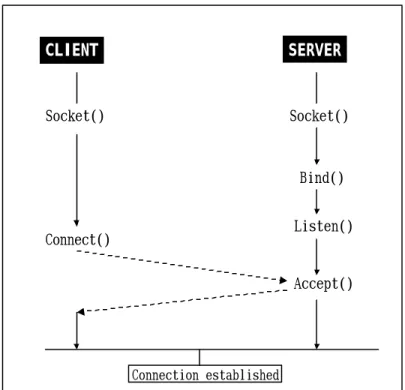
Now, we use these system calls to show that they used to establish socket connections and the order in which they occur. See Figure 8.
CLIENT SERVER
Socket() Socket()
Bind()
Listen()
Accept()
Connection established Connect()
Figure 7: Establishing Socket Connections
1. Creating a Socket
New sockets are created by the socket() system call, which returns a file descriptor for the uninitialized socket. The socket is tied to a particular protocol when it is created, but it is not connected to anything. As it is not connected, it cannot yet be read from or written to.
#include <sys/socket.h>
int socket(int domain, int type, int protocol);
Like open(), socket() returns a value less then 0 on error and a file descriptor, which is greater than or equal to 0, on success.
The three parameter specify the protocol to use. The first parameter specifies the protocol family that should be used and is usually one of the values specified in
Table 2.
Table 2 Protocol and Address Families
Address Protocol Protocol Description
AF_UNIX AF_INET AF_AX25 AF_IPX
AF_APPLETALK AF_NETROM
PF_UNIX PF_INET PF_AX25 PF_IPX
PF_APPLETALK PF_NETROM
Unix domain TCP/IP(version 4)
AX.25, used by amateur radio Novell IPX
AppleTalk DDS
NetROM, used by amateur radio
The next parameter, type, is SOCK_STREAM or SOCK_DGRAM. SOCK_STREAM specifies a protocol from the specified family that provides a streaming connection, whereas
SOCK_DGRAM specifies a datagram protocol from the same family.
The final parameter specifies which protocol is to be used, subject to the constraints specified by the first two parameters. Usually, this parameter is 0, letting the kernel use the default protocol of the specified type and family. For the PF_INET protocol family, TCP is the default stream protocol and UDP is the default datagram protocol.
2. Establishing Connections
After creating a stream socket, it needs to be connected to something before it is of much use. Establishing socket connections is an inherently asymmetric task; each side of the connection does it differently.
One side gets its socket ready to be connected to something and then waits for someone to connect to it. This is usually done by server applications that are started and continuously run, waiting for other processes to connect to them.
Client processes instead create a socket, tell the system which address they want to connect it to, and then try to establish the connection. Once the server(which has been waiting for a client) accepts the connection attempt, the socket may be used for bidirectional communication.
3. Binding an Address to a Socket
Both server and client processes need to tell the system which address to use for the socket. Attaching an address to the local side of a socket is called binding the socket and is done through the bind() system call.
#include <sys/socket.h>
int bind(int sock, struct sockaddr *my_addr, int addrlen);
The first parameter is the socket being bound, and the other parameters specify the address to use for the local endpoint.
4. Waiting for Connections
After creating a socket, server processes bind() the socket to the address they are listening to. After the socket is bound to an address, the process tells the system it is
willing to let other processes establish connections to that socket (at the specified address) by calling listen(). Once a socket is bound to an address, the kernel is able to handle processes attempts to connect to that address. However, the connection is not immediately established. The listen()ing process must first accept the connection attempt through the accept() system call. New connection attempts that have connections until the connections has been accept()ed.
Here are the prototypes of listen() and accept():
#include <sys/socket.h>
int listen(int sock, int backlog);
int accept(int sock, struct sockaddr * addr, int * addrlen);
Both of these functions expect the socket’s file descriptor as the first parameter.
listen()’s other parameter, backlog, specifies how many connections may be pending on the socket before further connection attempts are refused. Network connections are not established until the server has accept()ed the connection;
until the accept(), the incoming connection is considered pending. Applications have historically set the maximum backlog to 5, though a larger value may sometimes be necessary. listen() returns 0 on success and non-0 on failure.
The accept() call changes a pending connection to an established connection. The established connection is given a new file descripto, which accept() returns. The new file descriptor inherits its attributes from the socket that was listen()ed to.
The addr and addrlen parameters point to data that the kernel fills in with the
address of the remote (client) end of the connection. Initially, addrlen should point to an integer containing the size of the buffer addr points to. accept() returns a file descriptor, or less-than-0 if an error occurs, just like open().
5. Connecting to a Server
Like servers, clients may bind() the local address to the socket immediately after creating it. Usually, the client does not care what the local address is and skips this step, allowing the kernel to assign it any convienent local address.
After the bind() step , the client connect()s to a server.
#include <sys/socket.h>
int connect(int sock, struct sockaddr * servaddr, int addrlen);
The process passes to connect() the socket that is being connected, followed by the address to which the socket should be connected.
Appendix C: Linux Module and Device Driver
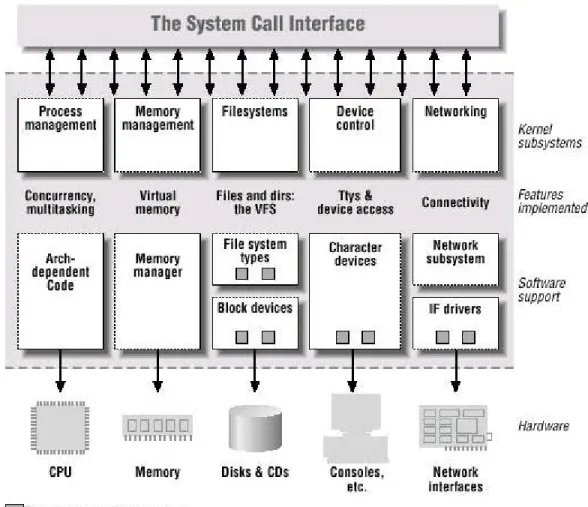
In a Unix system, several concurrent processes attend to different tasks. Though the distinction between the different kernel tasks isn’t always clearly marked, the kernel’s role can be split, as shown in Figure 8:
Figure 8: A split view of the kernel
Each piece of code that can be added to the kernel at runtime is called a module. The Linux kernel offers support for quite a few different types of modules, including, but not limited to, device drivers. Figure 5 identifies different classes of modules in charge of specific tasks – a module is said to belong to a specific class according to the functionality it offers.
1. Loadable Modules
The minimum module interface is to have two functions that the kernel can call when the module is loaded via init_module() and unloaded via cleanup_module().
Whereas an application performs a single task from beginning to end, a module registers itself in order to serve future requests, and its “main” function terminates immediately. In other words, the task of the function init_module (the module’s entry point) is to prepare for later invocation of the module’s functions; it’s as though the module were saying, “Here I am, and this is what I can do.” The second entry point of a module, cleanup_module, gets invoked just before the module is unloaded. It shoud tell the kernel, “I’m not there anymore; don’t ask me to do anything else.” The ability to unload a module is one of the features of modularization, because it helps cut down development time. A typical module program skeleton looks like:
#include <linux/kernel.h>
#include <linux/module.h>
…
int init_module() {
/* code to init the module */
}
…
void cleanup_module() {
/* code to close the module */
}
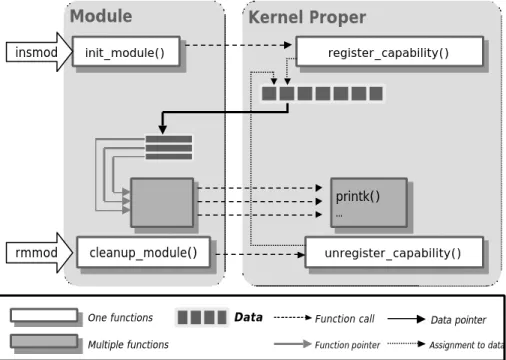
Figure 9 shows how function calls and function pointers are used in a module to add new functionality to a running kernel.
Module Kernel Proper
init_module() init_module()
unregister_capability() unregister_capability()
register_capability() register_capability()
cleanup_module() cleanup_module()
printk()
… printk()
…
Multiple functions
One functions Data
insmod
rmmod
Function call Function pointer
Data pointer Assignment to data
Figure 9: Linking a module to the kernel
2. Devices
All devices installed in a machine can be accessed through a file interface under the directory /dev/ . These files under the directory /dev/, that we also call them device files, are used to represent most of the I/O devices supported by Linux. Besides its name, each device file has three main attributes: type , major number and minor number. The three attributes are the following:
lType
The Unix way of looking at devices distinguishes between three device types. Each module usually implements one of these types, and thus is classifiable as a char module, a block module, or a network module. We only introduce char and block types.
u Character devices
A character (char) device is one that can be accessed as a stream of bytes (like a file). Such a driver usually implements at least the open, close, read, and write system calls. The text console (/dev/console) and the serial ports (/dev/ttyS0
and friends) are examples of char devices, as they are well represented by the stream abstraction. Char devices are accessed by means of filesystem nodes, such as /dev/tty1 and /dev/lp0. The only relevant difference between a char device and a regular file is that you can always move back and forth in the regular file, whereas most char devices are just data channels, which you can only access sequentially. There exist, nonetheless, char devices that look like data areas, and you can move back and forth in them; for instance, this usually applies to frame grabbers, where the applications can access the whole acquired image using mmap or lseek. The audio device (/dev/dsp) is also example of char devices.
u Block devices
Like char devices, block devices are accessed by filesystem nodes in the /dev directory. A block device is something that can host a filesystem, such as a disk.
In most Unix systems, a block device can be accessed only as multiples of a block, where a block is usually one kilobyte of data or another power of 2.
Linux allows the application to read and write a block device like a char device— it permits the transfer of any number of bytes at a time. As a result, block and char devices differ only in the way data is managed internally by the kernel, and thus in the kernel/driver software interface. Like a char device, each block device is accessed through a filesystem node and the difference between them is transparent to the user. A block driver offers the kernel the same interface as a char driver, as well as an additional block-oriented interface that is invisible to the user or applications opening the /dev entry points.
lMajor number
A number ranging from 1 to 255 that identifies the device type. Usually, all device files having the same major number and the same type share the same set of file operations, since they are handled by the same device driver.The major number identifies the driver associated with the device. For example, /dev/null and /dev/zero
are both managed by driver 1, whereas virtual consoles and serial terminals are managed by driver 4; similarly, both vcs1 and vcsa1 devices are managed by driver 7.
The kernel uses the major number at open time to dispatch execution to the appropriate driver.
lMinor number
Minor numbers are typically used to distinguish subdevices, but they can also be used to convey other information. For example, consider a floppy disk controller that can read and write data from floppies in several formats, and can also manage two floppy drives. When a special file associated with the floppy driver is opened, the minor number associated with the file, and available to the open( ) routine as one of its arguments, is used to identify to the floppy driver both which drive to access, and what format to assume for the I/O operation. In this particular case, the least significant bit of the minor number could be used to identify the drive, and the remaining bits used to indicate the format.
A number that identifies a specific device among a group of devices that share the same major number. The minor number is used only by the driver specified by the major number; other parts of the kernel don’t use it, and merely pass it along to the driver. It is common for a driver to control several devices (as shown in the listing);
the minor number provides a way for the driver to differentiate among them.
3. Writing a Character Device Driver
When we want to write a character device driver, we have to understand something.
Because of the various operations, a driver can perform on the devices it manages. The kernel uses the file_operations structure to access the driver’s functions. And a module runs in the kernel space, and applications run in user space. So, we discuss file operations , user space and kernel space in the following:
lUser Space and Kernel Space
A module runs in the so-called kerne l space, whereas applications run in user space.
The role of the operating system, in practice, is to provide programs with a consistent view of the computer’s hardware. In addition, the operating system must account for independent operation of programs and protection against unauthorized access to resources. This nontrivial task is only possible if the CPU enforces protection of system software from the applications.
Every modern processor is able to enforce this behavior. The chosen approach is to implement different operating modalities (or levels) in the CPU itself. The levels have different roles, and some operations are disallowed at the lower levels; program code
can switch from one level to another only through a limited number of gates. Unix systems are designed to take advantage of this hardware feature, using two such levels.
All current processors have at least two protection levels, and some, like the x86 family, have more levels; when several levels exist, the highest and lowest levels are used. Under Unix, the kernel executes in the highest level (also called supervisor mode), where everything is allowed, whereas applications execute in the lowest level (the so-called user mode), where the processor regulates direct access to hardware and unauthorized access to memory.
We usually refer to the execution modes as kernel space and user space. These terms encompass not only the different privilege levels inherent in the two modes, but also the fact that each mode has its own memory mapping – its own address space – as well.
lFile Operations
An open device is identified internally by a file structure, and the kernel uses the file_operations structure to access the driver’s functions. The structure, defined in
<linux/fs.h>, is an array of function pointers. Each file is associated with its own set of functions (by including a field called f_op that points to a file_operations structure).
The operations are mostly in charge of implementing the system calls and are thus
named open, read, and so on. We can consider the file to be an “object” and the functions operating on it to be its “methods,” using object-oriented programming terminology to denote actions declared by an object to act on itself.
The following list shows some operations appear in struct file_operations for 2.4 series of kernels , in the order in which they appear. The return value of each operation is 0 for success or a negative error code to signal an error, unless otherwise noted.
( struct file_operations is declared in linux/include/linux/fs.h ):
struct file_operations { struct module *owner;
loff_t (*llseek) (struct file *, loff_t, int);
ssize_t (*read) (struct file *, char *, size_t, loff_t *);
ssize_t (*write) (struct file *, const char *, size_t, loff_t *);
int (*readdir) (struct file *, void *, filldir_t);
unsigned int (*poll) (struct file *, struct poll_table_struct *);
int (*ioctl) (struct inode *, struct file *, unsigned int, unsigned long);
int (*mmap) (struct file *, struct vm_area_struct *);
int (*open) (struct inode *, struct file *);
int (*flush) (struct file *);
int (*release) (struct inode *, struct file *);
int (*fsync) (struct file *, struct dentry *, int datasync);
int (*fasync) (int, struct file *, int);
int (*lock) (struct file *, int, struct file_lock *);
ssize_t (*readv) (struct file *, const struct iovec *, unsigned long, loff_t *);
ssize_t (*writev) (struct file *, const struct iovec *, unsigned long, loff_t *);
ssize_t (*sendpage) (struct file *, struct page *, int, size_t, loff_t *, int);
unsigned long (*get_unmapped_area)(struct file *, unsigned long, unsigned long, unsigned long, unsigned long);
};
We describe some method of file operations, open, release, read, write and ioctl.
u The open Method
int (*open) (struct inode *, struct file *);
The open method is provided for a driver to do any initialization in preparation for later operations. In addition, open usually increments the usage count for the device so that the module won’t be unloaded before the file is closed. In most drivers, open
should perform the following tasks:
l Increment the usage count
l Check for device-specific errors (such as device-not-ready or similar hardware
problems)
l Initialize the device, if it is being opened for the first time l Identify the minor number and update the f_op pointer.
l Allocate and fill any data structure to be put in filp->private_data
Though this is always the first operation performed on the device file, the driver is not required to declare a corresponding method. If this entry is NULL, opening the device always succeeds, but your driver isn’t notified.
u The release Method
int (*release) (struct inode *, struct file *);
The role of the release method is the reverse of open. Sometimes you’ll find that the method implementation is called device_close instead of device_release. Either way,
the device method should perform the following tasks:
l Deallocate anything the open allocated in filp->private_data l Shut down the device on last close
l Decrement the usage count
This operation is invoked when the file structure is being released. Like open, release can be missing.
u The read Method
ssize_t (*read) (struct file *, char *, size_t, loff_t *);
The return value for read is interpreted by the calling application program as
follows:
l If the value equals the count argument passed to the read system call, the
requested number of bytes has been transferred. This is the optimal case.
l If the value is positive, but smaller than count, only part of the data has been
transferred. This may happen for a number of reasons, depending on the device.
Most often, the application program will retry the read. For instance, if you read using the fread function, the library function reissues the system call till
completion of the requested data transfer.
l If the value is 0, end-of-file was reached.
l A negative value means there was an error. The value specifies what the error
was, according to <linux/errno.h>. These errors look like –EINTR (interrupted system call) or –EFAULT (bad address).
Used to retrieve data from the device. A null pointer in this position causes the read system call to fail with –EINVAL (“Invalid argument”). A non- negative return value represents the number of bytes successfully read (the return value is a “signed size”
type, usually the native integer type for the target platform).
u The write Method
ssize_t (*write) (struct file *, const char *, size_t, loff_t *);
Write, like read, can transfer less data than was requested, according to the
following rules for the return value:
l If the value equals count, the requested number of bytes has been transferred.
l If the value is positive, but smaller than count, only part of the data has been
transferred. The program will most likely retry writing the rest of the data.
l If the value is 0, nothing was written. This result is not an error, and there is no
reason to return an error code. Once again, the standard library retries the call
to write.
l A negative value means an error occurered; like for read, valid error values are
those defined in <linux/errno.h>
Sends data to the device. If missing, -EINVAL is returned to the program calling the write system call. The return value, if non-negative, represents the number of bytes successfully written.
u The ioctl Method
int (*ioctl) (struct inode *, struct file *, unsigned int, unsigned long);
Ioctl is a system call that acts on a file descriptor; it receives a number that identifies a command to be performed and another argument, usually a pointer.
The ioctl system call offers a way to issue device-specific commands (like formatting a track of a floppy disk, which is neither reading nor writing). Additionally, a few ioctl commands are recognized by the kernel without referring to the fops table.
If the device doesn’t offer an ioctl entry point, the system call returns an error for any
request that isn’t predefined (-ENOTTY, “No such ioctl for device”). If the device method returns a non-negative value, the same value is passed back to the calling program to indicate successful completion.
Appendix D: Open Sound System
Open Sound System (OSS) is the first attempt in unifying the digital audio architecture for UNIX. OSS is a set of device drivers that provide a uniform API across all the major UNIX architectures. It supports Sound Blaster or Windows Sound System compatible sound cards which can be plugged into any UNIX workstation supporting the ISA or PCI bus architecture. OSS also supports workstations with on-board digital audio hardware.
Traditionally, each UNIX vendor has provided their own API for processing digital audio. This meant that applications written to a particular UNIX audio API had to be re-written or ported, with possible loss of functionality, to another version of UNIX.
Applications written to the OSS API, need to be designed once and then simply re-compiled on any supported UNIX architecture. OSS is source code compatible across all the platforms.
Most UNIX workstations, thus far, have only provided support for digital audio sampling and playback (business audio). OSS brings the world of MIDI and electronic music to the workstation environment. With the advent of streaming audio, speech recognition/generation, computer telephony, Java and other multimedia technologies, applications on UNIX can now provide the same audio capabilities as those found on Windows NT, OS/2, Windows 95 and the Macintosh operating systems. OSS also
provides synchronized audio capabilities required for desktop video and animation
playback.
l Sound devices supported by Open Sound System
http://www.opensound.com/osshw.html l Applications for Open Sound System
http://www.opensound.com/ossapps.html
we describe some of applications that we have used.
Alsaplayer - This is a new PCM player which is heavily multithreaded. It is plugin based and supports MP2, MP3, WAV, CDDA and socket based input types already. It supports output to OSS. Features include speed/pitch control (positive and negative), multiple active scopes, playlist support and real-time effects.
MAPLAY (MPEG Page) - MAPLAY is another MPEG Audio player with source for Unix platforms with support for OSS.
mpg123 It is a fast, free and portable MPEG audio player for Unix. It supports MPEG 1.0/2.0 layers 1, 2 and 3 (those famous "mp3" files), and it has been tested on a wide variety of platforms, including Linux, FreeBSD, NetBSD, i SunOS, Solaris, IRIX, HP-UX and others. For full CD quality playback i (44 kHz, 16 bit, stereo) a Pentium, SPARCstation10, DEC Alpha or similar i CPU is required. Mono and/or reduced quality playback (22 kHz or 11 kHz) i is even possible on 486 CPUs.
Appendix E: Export System Call
Because modules are designed and implemented independently of the kernel, they cannot access kernel data structures and functions in the normal fashion. Instead, they can only access those that have been exported explicity. The file kernel/ksyms.c contains a list of the kernel symbols that are exported. If you want to access a non-exported function you will need to modify ksyms.c and export it yourself.
In RedHat 9.0,
For example, the function wake_up_process() is not exported. To make this function available to linux modules do, around line 377 of ksyms.c add:
EXPORT_SYMBOL(wake_up_process);
You will then need to recompile your kernel and reboot in order to use your newly exported function in a module.
Appendix F: Signals in Linux/i386
# Signal Name Default Action Comment POSIX
1 SIGHUP Abort Hangup of controlling terminal or process Yes
2 SIGINT Abort Interrupt from keyboard Yes
3 SIGQUIT Dump Quit from keyboard Yes
4 SIGILL Dump Illegal instruction Yes
5 SIGTRAP Dump Breakpoint for debugging No
6 SIGABRT Dump Abnormal termination Yes
6 SIGIOT Dump Equivalent to SIGABRT No
7 SIGBUS Abort Bus error No
8 SIGFPE Dump Floating point exception Yes
9 SIGKILL Abort Forced process termination Yes
10 SIGUSR1 Abort Available to processes Yes
11 SIGSEGV Dump Invalid memory reference Yes
12 SIGUSR2 Abort Available to processes Yes
13 SIGPIPE Abort Write to pipe with no readers Yes
14 SIGALRM Abort Real timer clock Yes
15 SIGTERM Abort Process termination Yes
16 SIGSTKFLT Abort Coprocessor stack error No
17 SIGCHLD Ignore Child process stopped or terminated Yes 18 SIGCONT Continue Resume execution, if stopped Yes
19 SIGSTOP Stop Stop process execution Yes
20 SIGTSTP Stop Stop process issued from tty Yes
21 SIGTTIN Stop Background process requires input Yes 22 SIGTTOU Stop Background process requires output Yes
23 SIGURG Ignore Urgent condition on socket No
24 SIGXCPU Abort CPU time limit exceeded No
25 SIGXFSZ Abort File size limit exceeded No
26 SIGVTALRM Abort Virtual timer clock No
27 SIGPROF Abort Profile timer clock No
28 SIGWINCH Ignore Window resizing No
29 SIGIO Abort I/O now possible No
29 SIGPOLL Abort Equivalent to SIGIO No
30 SIGPWR Abort Power supply failure No
31 SIGUNUSED Abort Not used No
Appendix G: A list of ioctl calls
The ioctl function manipulates the underlying device parameters of special files. In partic ular, may be controlled with ioctl requests. The argument d must be an open file descriptor.
An ioctl request has encoded in it whether the argument is an in parameter or out parameter, and the size of the argument argp in bytes. Macros and defines used in specifying an ioctl request are located in the file <sys/ioctl.h>.
An argument type of const struct foo * means the argument is input to the kernel.
struct foo * means the kernel outputs the argument. If the kernel uses the argument for both input and output, this is marked with // I-0.
Some ioctls take more arguments or return more values than a single structure.
These are marked // MORE and are documented further in a separate section.
<include/linux/soundcard.h>
0x40285107 SNDCTL FM LOAD INSTR const struct sbi_instrument * 0x40045108 SNDCTL_SEQ_TESTMIDI const int *
0x40045109 SNDCTL_SEQ_RESETSAMPLES const int * 0x8004510A SNDCTL_SEQ_NRSYNTHS int *
0x8004510B SNDCTL_SEQ_NRMIDIS int *
0xC074510C SNDCTL_MIDI_INFO struct midi_info * // I-O 0x4004510D SNDCTL_SEQ_THRESHOLD const int *
0xC004510E SNDCTL_SYNTH_MEMAVL int * // I-O 0x4004510F SNDCTL_FM_4OP_ENABLE const int *
0xCFB85110 SNDCTL_PMGR_ACCESS struct patmgr_info * // I-O 0x00005111 SNDCTL_SEQ_PANIC void
0x40085112 SNDCTL_SEQ_OUTOFBAND const struct seq_event_rec *
0xC0045401 SNDCTL_TMR_TIMEBASE int * // I-O 0x00005402 SNDCTL_TMR_START void
0x00005403 SNDCTL_TMR_STOP void 0x00005404 SNDCTL_TMR_CONTINUE void
0xC0045405 SNDCTL_TMR_TEMPO int * // I-O 0xC0045406 SNDCTL_TMR_SOURCE int * // I-O 0x40045407 SNDCTL_TMR_METRONOME const int * 0x40045408 SNDCTL_TMR_SELECT int * // I-O
0xCFB85001 SNDCTL_PMGR_IFACE struct patmgr_info * // I-O 0xC0046D00 SNDCTL_MIDI_PRETIME int * // I-O
0xC0046D01 SNDCTL_MIDI_MPUMODE const int *
0xC0216D02 SNDCTL_MIDI_MPUCMD struct mpu_command_rec * // I-O 0x00005000 SNDCTL_DSP_RESET void
0x00005001 SNDCTL_DSP_SYNC void
0xC0045002 SNDCTL_DSP_SPEED int * // I-O 0xC0045003 SNDCTL_DSP_STEREO int * // I-O 0xC0045004 SNDCTL_DSP_GETBLKSIZE int * // I-O 0xC0045006 SOUND_PCM_WRITE CHANNELS int * // I-O 0xC0045007 SOUND_PCM_WRITE FILTER int * // I-O 0x00005008 SNDCTL_DSP_POST void
0xC0045009 SNDCTL_DSP_SUBDIVIDE int * // I-O 0xC004500A SNDCTL_DSP_SETFRAGMENT int * // I-O 0x8004500B SNDCTL_DSP_GETFMTS int *
0xC0045005 SNDCTL_DSP_SETFMT int * // I-O
0x800C500C SNDCTL_DSP_GETOSPACE struct audio-buf-info * 0x800C500D SNDCTL_DSP_GETISPACE struct audio-buf-info * 0x0000500E SNDCTL_DSP_NONBLOCK void
0x80045002 SOUND_PCM_READ RATE int * 0x80045006 SOUND_PCM_READ CHANNELS int * 0x80045005 SOUND_PCM_READ BITS int * 0x80045007 SOUND_PCM_READ FILTER int *
0x4FA44308 SNDCTL_COPR_SENDMSG const struct copr_msg * 0x8FA44309 SNDCTL_COPR_RCVMSG struct copr_msg *
0x80044D00 SOUND_MIXER_READ_VOLUME int * 0x80044D01 SOUND_MIXER_READ_BASS int * 0x80044D02 SOUND_MIXER_READ_TREBLE int * 0x80044D03 SOUND_MIXER_READ_SYNTH int *
0x80044D04 SOUND_MIXER_READ_PCM int * 0x80044D05 SOUND_MIXER_READ_SPEAKER int * 0x80044D06 SOUND_MIXER_READ_LINE int * 0x80044D07 SOUND_MIXER_READ_MIC int * 0x80044D08 SOUND_MIXER_READ_CD int * 0x80044D09 SOUND_MIXER_READ_IMIX int * 0x80044D0A SOUND_MIXER_READ_ALTPCM int * 0x80044D0B SOUND_MIXER_READ_RECLEV int * 0x80044D0C SOUND_MIXER_READ_IGAIN int * 0x80044D0D SOUND_MIXER_READ_OGAIN int * 0x80044D0E SOUND_MIXER_READ_LINE1 int * 0x80044D0F SOUND_MIXER_READ_LINE2 int * 0x80044D10 SOUND_MIXER_READ_LINE3 int * 0x80044D1C SOUND_MIXER_READ_MUTE int * 0x80044D1D SOUND_MIXER_READ_ENHANCE int * 0x80044D1E SOUND_MIXER_READ_LOUD int * 0x80044DFF SOUND_MIXER_READ_RECSRC int * 0x80044DFE SOUND_MIXER_READ_DEVMASK int * 0x80044DFD SOUND_MIXER_READ_RECMASK int * 0x80044DFB SOUND_MIXER_READ_STEREODEVS int * 0x80044DFC SOUND_MIXER_READ_CAPS int *
0xC0044D00 SOUND_MIXER_WRITE_VOLUME int * // I-O 0xC0044D01 SOUND_MIXER_WRITE_BASS int * // I-O 0xC0044D02 SOUND_MIXER_WRITE_TREBLE int * // I-O 0xC0044D03 SOUND_MIXER_WRITE_SYNTH int * // I-O 0xC0044D04 SOUND_MIXER_WRITE_PCM int * // I-O 0xC0044D05 SOUND_MIXER_WRITE_SPEAKER int * // I-O 0xC0044D06 SOUND_MIXER_WRITE_LINE int * // I-O 0xC0044D07 SOUND_MIXER_WRITE_MIC int * // I-O 0xC0044D08 SOUND_MIXER_WRITE_CD int * // I-O 0xC0044D09 SOUND_MIXER_WRITE_IMIX int * // I-O 0xC0044D0A SOUND_MIXER_WRITE_ALTPCM int * // I-O 0xC0044D0B SOUND_MIXER_WRITE_RECLEV int * // I-O 0xC0044D0C SOUND_MIXER_WRITE_IGAIN int * // I-O 0xC0044D0D SOUND_MIXER_WRITE_OGAIN int * // I-O 0xC0044D0E SOUND_MIXER_WRITE_LINE1 int * // I-O 0xC0044D0F SOUND_MIXER_WRITE_LINE2 int * // I-O
0xC0044D10 SOUND_MIXER_WRITE_LINE3 int * // I-O 0xC0044D1C SOUND_MIXER_WRITE_MUTE int * // I-O 0xC0044D1D SOUND_MIXER_WRITE_ENHANCE int * // I-O 0xC0044D1E SOUND_MIXER_WRITE_LOUD int * // I-O 0xC0044DFF SOUND_MIXER_WRITE_RECSRC int * // I-O