Cluster Architecture with Diskless Slave Nodes in the
Computer Classroom
Chao-Tung Yang, Yi-Cheng Hu, and Ping-I Chen High-Performance Computing Laboratory
Department of Computer Science and Information Engineering Tunghai University, Taichung City, 40704 Taiwan, R.O.C.
[email protected] [email protected] [email protected]
Abstract. The objective of this thesis is to design and implement a
high-performance computing environment by clustering idle desktops with diskless slave nodes on campuses. Those PC Clusters can be easily switched from “general operation” to “high-performance computing” and vice versa. It is demonstrated by simulation results of the matrix multiply with LAM/MPI and PVM. The bioinformatic program, FASTA, is executed smoothly in the Cluster architecture as well. In addition, the system and network monitoring software, ntop and ganglia, are installed in the PC Clusters for the system performance tuning in the future.
Keywords: Classroom, Diskless, System monitoring, PC Clusters.
1 Introduction
At present, many personal computers have been set up on campuses so as to serve teaching and research. Those well equipped computers are out of service and locked during the night and holidays for the sake of the property security. It is somehow a waste.
“Shake one can filled with stones, there will be some space coming out for some other stones. Shake it again, there will be another space coming out for other smaller stones, or sands, or water. In other words, try to maximize the utilization rate of everything as possible as you can.” Thus an efficient algorithm is proposed in this thesis to partition the desktops of the computer classroom into clusters to perform high-performance computing. The cluster architecture will provide a good way to utilize those computers efficiently during their idle period.
Since the Linux platform is preferred in the high-performance computing architecture, the mechanism of diskless is applied in each desktop in the computer classroom to convert automatically the original operating system, Microsoft Windows, into Linux while necessary without influencing the computing performance. That is to say, the machine can be booted either with Windows XP in its
local hard disk or with Linux in the remote server via the network. We will go through the detail of the Linux way rather than the Windows XP way here.
First of all, a remote sever need to be get ready embedding some particular service such as DHCP, tftpboot, NFS, and NIS, etc. to boot the machine via the network. So that each client PC can obtained all necessary information to boot in PXE protocol and check itself the status while it is on. Afterward those client PCs who are turned on normally will start cluster corresponding service to complete the switching over process.
We have run into 3 interesting problems in deploying the cluster environment, 1. We spent lots of time on battling with some unexpected error in converting the
operating systems since Microsoft is full of “surprise “.
2. Since those desktops to be clustered were located in a public area, the initial state of every desktop varied from PC to PC, such as abnormally shut-down, or some application program still running, etc. Thus converting the operating system automatically under such circumstances is a real a challenge.
3. The network overhead was another issue while booting the machine via the network.
2 Background Review
2.1 DRBL
DRBL stands for Diskless Remote Boot with Linux. This solution is solely designed and implemented by people in National Center of High-performance Computing, Taiwan.
DRBL uses PXE/ETHERBOOT, NFS, and NIS to provide services to client machines. Once the server is ready to be a DRBL server, then the client machines can boot via PXE/ETHERBOOT (diskless). “ DRBL” does NOT touch the hard drive of the clients, so other Operating Systems (for example, M$ Windows) installed on your client machines will not be affected. This may be important in a phased deployment of GNU/Linux, where users still want to have the option of booting to Windows and running Office. DRBL allows you to be flexible in your deployment of GNU/Linux. [1]
2.2 SLIM
SLIM stands for Single Linux Image Management. It holds the Linux OS image to be shared by all PCs via network booting. This solution is solely designed and implemented by people in Department of Computer Science, The University of Hong Kong.
The SLIM server holds pre-installed Linux system image for sharing across the network. The system image is exported as read only by the NFS to all client PC to build their local root file system during booting up. One SLIM server may serve as
many as OS images made by different Linux distributions. It also provides TFTP service to allow client PC to download network boot loader. It also holds OS boot images which are Linux kernel and initrd for network boot loader to download. [2]
3 Performance Evaluation on Diskless PC Cluster Systems
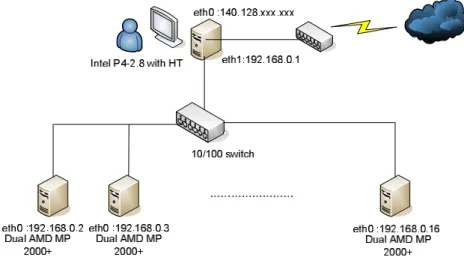
First, we set up two kinds of diskless PC Cluster systems in order to evaluate which system’s performance is better for us to use it in the computer classroom. Figure 1 shows our system architecture of our system. The Cluster consists of sixteen PC-based symmetric multiprocessors (SMP) connected by one 24-port 100Mbps Ethernet switches with Fast Ethernet interface. It’s system architecture is shown in Figure 1. There are one server node and fifteen computing nodes. The server node has one Intel Pentium 4 2.8GHz (with hyper-threading) processor and 512MBytes of shared local memory. The other fifteen nodes are AMD MP 2000+ SMP machines with 1GBytes of shared local memory. Each individual processor is rated at 1.6GHz.
Fig. 1. Performance evaluation system architecture
Because we can not set up the DRBL system exactly on Fedora Core 2. So, we use Fedora Core 1 to set up the DRBL system. The hardware specification and the operating system used in our diskless clusters are shown as Table 1.
Table 1. Equipments and software on each machine
Machines Equipments
Diskless server Nodes
CPU Intel P4-2.8G with HT AMD Dual MP2000+
OS SLIM: Fedora Core 2; DRBL: Fedora Core 1
Kernel SLIM: 2.6.5; DRBL: 2.4.22
RAM 512MB 1G
SWITCH PCI FX-32n 10/100
Network Interface Card 2 1
3.1 Performance evaluation using PVM
In our experiment, we use PVM and LAM/MPI to run matrix multiplication
program and bioinformatics software in order to evaluate the system performance. The matrix multiplication problem sizes were 256×256, 512×512, 1024×1024, and 2048×2048 in our experiments and were running by different CPU numbers. Figure 2 shows our matrix multiplication experiment results about different diskless system and node numbers using PVM. [3]
Matrix multiplication using PVM
0 50 100 150 200 250 300 350 mm4 mm8 mm16 mm4 mm8 mm16 SLIM DRBL
Sys tem and number of CPUs
T im e s ( s e c .) 256 512 1024 2048
Fig. 2. Matrix multiplication performance evaluation using PVM with 4, 8, and 16 CPUs
Then, we use LAM/MPI to run the bioinformatics software. The bioinformatics software which we used is FASTA. It compares a protein sequence to another protein sequence or to a protein database or a DNA sequence to another DNA sequence or a DNA library. Figure 3shows the experimental result on different diskless systems and number of CPUs by FASTA which is using the yeast.nt database. The database size is about 3.55 MB. We can find that there have no too much difference between SLIM and DRBL. The whole execution time is getting less and less when the CPU number is increasing. But there is an exception about DRBL’s 32 CPUs performance test. The performance of DRBL which only use 16 and 24 CPUs are better than 32 CPUs. Maybe this is because it uses too much communication time. [4]
mp34compfa with test .fas and y eas t.nt 0 1 2 3 4 5 6 7 8 9 10 8 16 24 32 8 16 24 32 SLIM DRBL
Sy st em and number of CPUs
T im e ( s e c .)
Fig. 3. System performance about different number of CPUs by using mp34compfa to compare
test.fas with yeast.nt
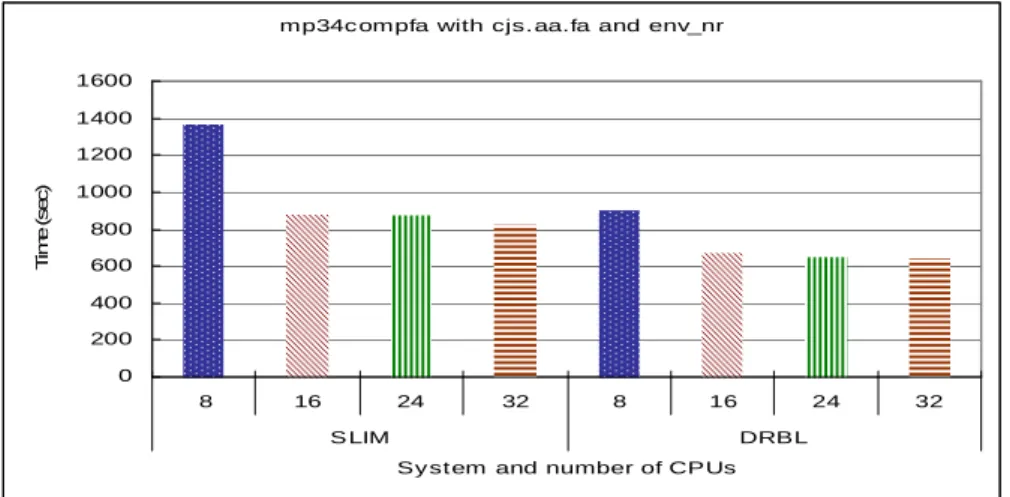
Next, we use a bigger database to test the performance about both SLIM and DRBL diskless system. Figure 4 shows the experimental result on different diskless systems and number of CPUs by FASTA which is using the env_nr database. The database size is about 119 MB. We can find that there have a three minutes difference between SLIM and DRBL when the CPU number are 16, 24, and 32 excepting 8CPUs. The whole execution time is getting less and less when the CPU number is increasing. The performance result of DRBL also better than SLIM.
mp34c ompfa with cjs. aa.fa and env_nr
0 200 400 600 800 1000 1200 1400 1600 8 16 24 32 8 16 24 32 S LIM DRBL
Sy st em and number of CPUs
T im e ( s e c )
Fig. 4. System performance about different number of CPUs by using mp34compfa to compare
cjs.aa.fa with env_nr.
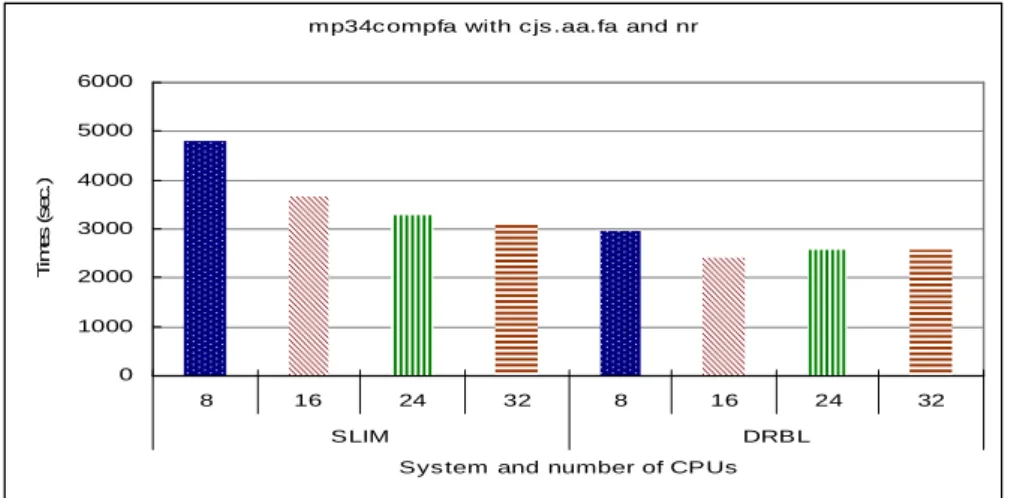
Finally, we use a biggest database to test the diskless system. Figure 5 shows the experimental result on different diskless systems and number of CPUs by FASTA
which is using the env database. The database size is about 501 MB. We can find that there is a great difference between SLIM and DRBL, especially then the CPU number is small. The performance of DRBL is better than SLIM.
mp34c ompfa with c js .aa.fa and nr
0 1000 2000 3000 4000 5000 6000 8 16 24 32 8 16 24 32 SLIM DRBL
Sys tem and number of CPUs
T im e s ( s e c .)
Fig. 5. System performance about different number of CPUs by using mp34compfa to compare
cjs.aa.fa with nr.
After the performance evaluation test of diskless PC Cluster systems. We can find out that the performance of DRBL is better than SLIM. So, we choose DRBL to set up in the Computer Classroom. Another reason is that the PCs in the computer classroom only have 256 MB memory so that there will be some problem when using SLIM as our Cluster system. Sometimes, the boot-up process would fail or could not start some daemon. So, we add more memory and then the whole process returned to normal. It is because we fully installed the Linux system, so that the Linux image is too large for a PC which has only 256MB memory to handle the boot-up process and start the daemon.
4 Using Diskless System In The Computer Classroom
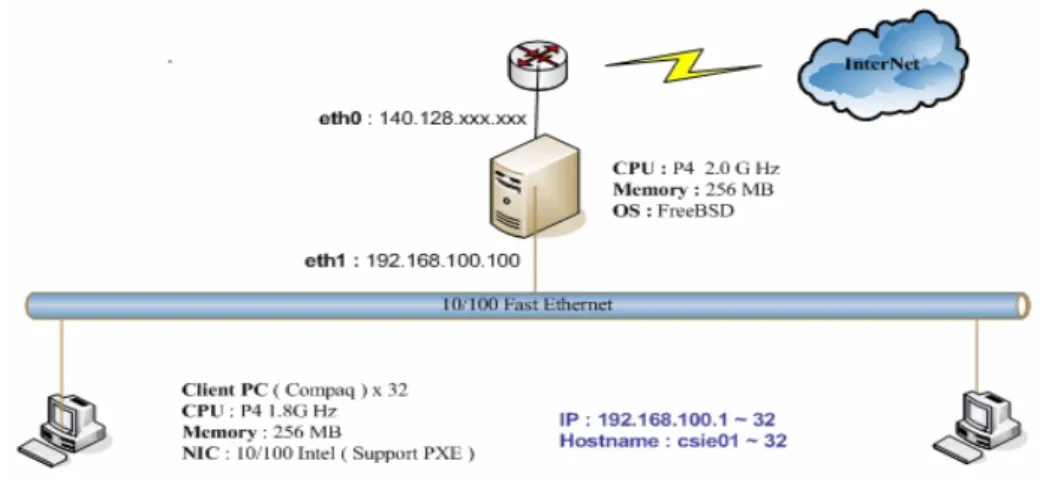
The original architecture of the computer classroom is showed as Figure 6. The server with a P4 2.0 G Hz CPU; 256 MB memory; 10 GB Hard Disk ; the FreeBSD system; and two Fast Ethernet Cards provides DHCP and NAT services for Internet access. All other 32 desktops are equipped with a P4 1.8 G Hz CPU; 256 MB memory; 20 GB Hard Disk; the Windows XP system; and one Fast Ethernet card. The network framework is composed by two 24-port 100Mbps switches.
Fig. 6. The non-cluster architecture.
The loading of the server is aggravated to provide more service in the cluster architecture. The network traffic is heavier as well due to all clients must be booted through the network. Some adjustments in the specification of the server and the network are made accordingly, as Figure 7 shows. The server with a P4 2.8 G Hz CPU; 1024 MB memory ; 40 GB Hard Disk ; the Linux system; and 3 Fast Ethernet Cards serve not only DHCP and NAT but also tftpboot; NFS and NIS. There is no change in the desktop specification. However the BIOS setup needs to be altered. 1. 1. The first priority in “Boot Device” is changed to “LAN” and the second one is
“Local Hard Disk “.
2. The “Wake-on-LAN “ function is enabled.
In addition, the network with two 24-port switches is partitioned into two independent sections in order to reduce the collision of the package as well as increase the efficiency of the network.
Fig. 7. The Cluster architecture.
As a matter of fact, to upgrade the relevant device to Gigabit ethernet is recommended to increase the quality of the Clusters. We can’t do that in this project due to the budget limitation. The hardware specification and the operating system used in our diskless Clusters are shown as Table 2.
Table 2. Equipments and software on each machine
Machines Equipments Original Server 1 Server Diskless server 1 Server Nodes 32 Client
CPU Intel P4-2.0G Intel P4-2.8G Intel P4-1.8G
OS FreeBSD Fedora Core 1
Kernel N/A 2.4.22
Disk 1 1 1 ( for Windows )
RAM 256 MB 1024 MB 256 MB
SWITCH D-Link 10/100 24-Port Switch x 2
Network Interface Card
2 3 1 ( Support PXE )
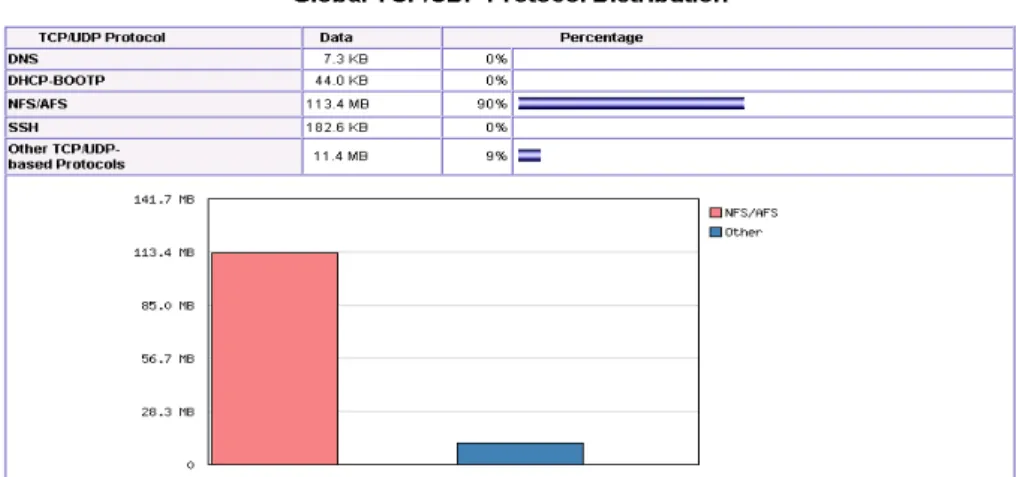
In this clustered experiment, it takes 260 seconds to boot all machines in Linux and enable clustered service. The transmission amount on the network obtained by ntop is probably 125 MB. Regarding to the protocol distribution rate for on the network, as Figure 8 shows, we can find out that nearly 90% of all activities on the network are transmitted in NFS and the rest of activities are transmitted in other protocol such as DHCP, TFTPBOOT etc. [5]
Fig. 8. The Global TCP/UDP Protocol Distribution generated by NTOP
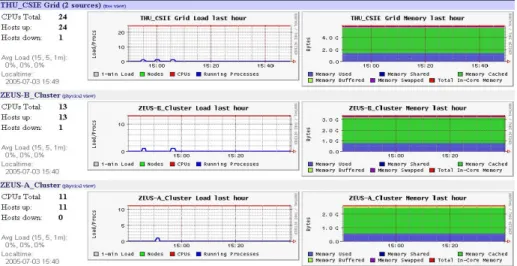
From management’s view, the state of each Computation Node in Clusters is monitored by “Ganglia “, an existing Open Source. We can gather the relevant information of CPU; Memory; Network Load for each Computation Nodes in every network section, as Figure 9 shows. [6]
Fig. 9. The state of each Computation Node in Clusters generated by ganglia
Since the frequency to switch over in two different operating systems is high in the Cluster architecture, the switching procedure is critical to secure the system capability and performance. Say, there are always one or two desktops having troubles in booting with Linux during the experiment and those errors are unanticipated. Thus certain corresponding action plans, as Figure 10, are necessary.
4 Experimental Results
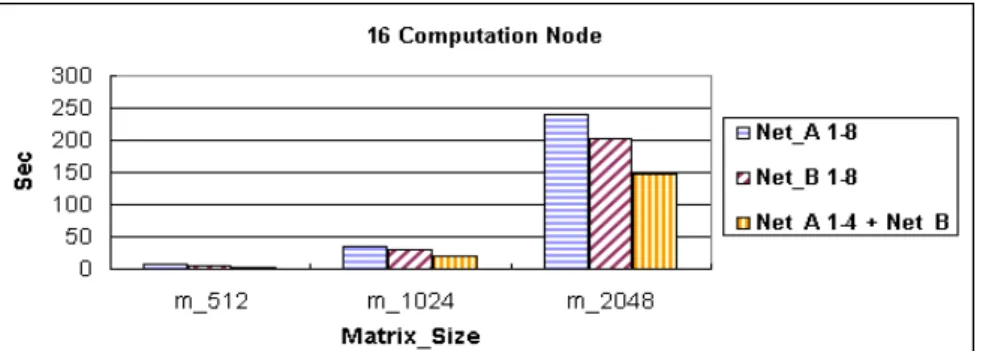
16 of 32 desktops are put into this experiment. The network is divided into two sections, Net _ A and Net _ B, and each section contain 8 desktops. Each multiple of the matrix of 512; 1024; 2048 is performed LAM/MPI Parallel Computing respectively in 2; 4; 8; 16 Computation Nodes to demonstrate that the PC Clusters architecture with diskless slave nodes is workable as well as their performance is stated. As Figure 11 shows, when the number of Computation Nodes decreases, the collision on the network will decline. That is to say, the system performance will be optimized on the some network section if the number of clusters is less. The system performance will decline while dispersing the job on different nodes in different network sections results in the capability of the server is shared by routing at the same time. However, in case of the number of Computation Nodes increases to 8 or above, it is recommended to disperse the job on different nodes in different network sections to optimize the system performance.
Fig. 11. The performance analysis of LAM/MPI Parallel Computing in the diskless
Cluster architecture
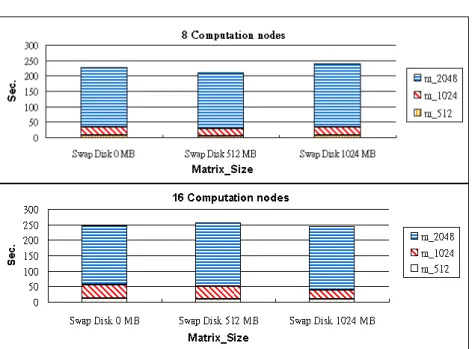
Since the swap space can be regarded as an important temporary storage to Linux system, some space of the local disk is allotted to each of the Computing Nodes as the swap space. Then each multiple of the matrix of 512; 1024; 2048 is performed LAM/MPI Parallel Computing respectively in 2; 4; 8; 16 Computation Nodes with different swap space ( 0 MB ; 512 MB ; 1024 MB ) to demonstrate that the PC Clusters architecture with diskless slave nodes is workable as well as their performance is stated. As Figure 12 shows, it makes no difference to the system performance in LAM/MPI Parallel Computing no matter what size of the swap space is in the local disk in the Linux pc Cluster architecture. It makes no difference to the system performance either with or without the local disk as the swap space.
Fig. 12. The performance analysis of LAM/MPI Parallel Computing in the diskless Cluster
architecture with different Swap Space
The bioinformatic software FASTA is also executed to demonstrate that the PC Clusters architecture with diskless slave nodes is workable in real life. As Figure 13 shows, we execute FASTA program in LAM/MPI parallel computing to make the Myosin heavy chain similarity analysis according to the existing biological gene database nr (the database size is approximately 1.2 GB). This experiment is performed respectively in 2; 4; 8; 16 Computation Nodes categorized by loading time and scanning time. The execution time is the sum of the two period of time. When the number of Computation Nodes increases, the execution time reduces. Sometimes they don’t reduce proportionally while the data transmitting amount is large (the transmitting amount is 2.3 GB~ 2.5 GB). It is believed that the system performance can be improved by promoting the network transmit capability since the data transmitting on the network occupies most of the scanning time
Fig. 13. The performance analysis of FASTA in the diskless cluster architecture with different
number of Computation Node
5 Conclusions
In this experiment, it is demonstrated by simulation results that the pc cluster architecture with diskless nodes can be implemented in a general PC environment such as a computer classroom. Furthermore, an automatically switching technology between these two different architectures can be reached by adding some shell script. However the initial state of every desktop varied from PC to PC since those desktops to be clustered were located in a public area. Certain corresponding action plans are necessary to well control the Windows system remotely such as enabling telnet service, Windows cron job service and adding an auto-shutdown freeware. Besides that, the related network configuration is critical to secure the system performance and capability in the diskless pc Cluster architecture. Since the original computer classroom is designed for teaching, there will not be special plan for the network infrastructure. So the network performance is usually a bottle neck in such a project. It is supposed to be improved in the future while the equipments are getting cheaper.
Our objective is to build a cluster-based architecture with diskless nodes which not only maximizes the utilization of idle resources but also enhances and glorifies the Cluster application.
Reference:
[1] DRBL, http://drbl.sourceforge.net/, [2] SLIM, http://slim.csis.hku.hk/,
[3] PVM – Parallel Virtual Machine, http://www.epm.ornl.gov/pvm/, [4] LAM/MPI Parallel Computing, http://www.lam-mpi.org, [5] ntop, http://www.ntop.org/ntop.html,
[6] ganglia, http://ganglia.sourceforge.net/,
[7] R. Buyya, High Performance Cluster Computing: System and Architectures, Vol. 1, Prentice Hall PTR, NJ, 1999.
[8] R. Buyya, High Performance Cluster Computing: Programming and Applications, Vol. 2, Prentice Hall PTR, NJ, 1999.
[9] T. L. Sterling, J. Salmon, D. J. Backer, and D. F. Savarese, How to Build a Beowulf: A Guide to the Implementation and Application of PC Clusters, 2nd Printing, MIT Press, Cambridge, Massachusetts, USA, 1999.
[10] Gregory R. Watson, Matthew J. Sottile, Ronald G. Minnich, Sung-Eun Choi, Erik A. Hendriks, “ Pink: A 1024-node Single-System Image Linux Cluster, “Proceedings of the Seventh International Conference on High Performance Computing and Grid in Asia Pa cific Region (HPCAsia' 04)
[11] B. Wilkinson and M. Allen, Parallel Programming: Techniques and Applications Using Networked Workstations and Parallel Computers, Prentice Hall PTR, NJ, 1999. [12] M. Wolfe, High-Performance Compilers for Parallel Computing, Addison-Wesley
Publishing, NY, 1996.
[13] C T. Yang, S. S. Tseng, M. C. Hsiao, and S. H. Kao, “ A Portable parallelizing compiler with loop partitioning,” Proc. of the NSC ROC(A), Vol. 23, No. 6, pp. 751-765, 1999.