國
立
交
通
大
學
資訊科學與工程研究所
碩
士
論
文
支援非原始型態符號輸入之擬真測試系統
Non-primitive Type Symbolic Input for Concolic Testing
研 究 生:林彥廷
指導教授:黃世昆 教授
ii
支援非原始型態符號輸入之擬真測試系統
Non-primitive Type Symbolic Input for Concolic Testing
研 究 生:林彥廷 Student:Yan-Ting Lin
指導教授:黃世昆 Advisor:Shih-Kun Huang
國 立 交 通 大 學
資 訊 科 學 與 工 程 研 究 所
碩 士 論 文
A ThesisSubmitted to Department of Computer and Engineering College of Computer Science
National Chiao Tung University in partial Fulfillment of the Requirements
for the Degree of Master
in
Computer and Information Science
June 2009
Hsinchu, Taiwan, Republic of China
支援非原始型態符號輸入
支援非原始型態符號輸入
支援非原始型態符號輸入
支援非原始型態符號輸入
之擬真測試系統
之擬真測試系統
之擬真測試系統
之擬真測試系統
學生:林彥廷 指導教授:
黃世昆 教授
國立交通大學資訊科學與工程研究所碩士班
摘要
摘要
摘要
摘要
在眾多的自動化軟體檢測方法中,擬真測試是一項新穎的技術。藉由結合較為傳 統的實體測試與符號測試,擬真測試可以系統化地達到較高的程式碼檢測率。有 一些之前的研究已試著依照這個想法實作出測試系統。雖然這個想法在較小型的 測試程式上可以運作的非常完善,但當它擴展到實際上使用的程式仍舊遇到了一 些無法避免的困難。像是程式與執行環境互動的處理就是其中一項難題。在論文 中,我們試著處理程式中與檔案存取相關的部分。這部分的支援對增進擬真測試 系統的能力和測試的精確度都將會有所助益。
iv
Non-primitive type Symbolic Input
for Concolic Testing
Student:Yan-Ting Lin Advisor:Dr. Shih-Kun Huang
Department of Computer Science and Engineering National Chiao Tung University
Abstract
Abstract
Abstract
Abstract
Concolic testing is a novel technique in automatic software testing. It systematically achieves higher coverage by combining concrete and symbolic execution. Some previous works have implemented testing tools based on the excellent idea. But it still meets some difficult on real code testing. The interaction with the running environment is one of them. In this paper, we try to deal with the file operations in the source code. With the support of file handling, we can enhance the ability of testing tools and improve the testing precision.
誌
誌
誌
誌 謝
謝
謝
謝
這篇論文能夠完成,首先要感謝我的家人。雖然在求學的過程中,總是會和 家人的意見與期望有不合的時候,但他們最後還是選擇尊重並支持我的決定。 接下來要感謝指導教授,黃世昆老師,他總是很和善地帶領我們走在這未知 的研究道路上,中途遇到困難也會給我們一些建議及鼓勵。 感謝口試委員,馮老師及孔老師,能夠點出論文中有所不足及疏漏之處,讓 我在著重主題之時,還能不忘顧及全面及完整性。 感謝實驗室中最資深的昌憲學長,總是不厭其煩地與我討論系統中細微的地 方,並與我互相激盪,尋找研究靈感。感謝實驗室中這幾年來相陪的夥伴,立文、 友祥、琨翰、文健、士瑜、佑鈞、世欣,我從大家身上學到了許多東西,也帶走 了很多難得的回憶,大家的互相打氣與鼓勵也成了我完成論文的動力。vi
Table of Contents
摘要... iii Abstract ... iv 誌謝... v Table of Contents ... viList of Figures ... viii
List of Tables ... ix 1. Introduction ... 1 1.1. Motivation ... 1 1.2. Objective ... 1 1.3. Background ... 2 1.3.1. Concolic Testing ... 2 1.3.2. ALERT ... 2 2. Related Work ... 4 3. Methods... 6 3.1. Basic of file IO ... 6 3.2. The overview ... 7 4. Implementation ... 9
4.1. The architecture of ALERT ... 9
4.2. The architecture of ALERT with file operation support ... 10
4.3. The main concepts ... 11
4.3.1. The intuitive idea ... 11
4.3.2. List & Pick ... 13
4.3.3. Index limitation ... 16
4.4. Function implementation detail ... 17
4.4.1. fopen ... 18
4.4.2. fgets ... 18
4.4.3. fseek ... 20
4.4.4. fscanf ... 21
4.4.5. The file input related functions ... 22
5. Results and Evaluation ... 25
5.1. The results ... 25
5.1.1. Example 1 ... 25
5.1.2. Example 2 ... 27
5.2. The evaluations ... 29
5.2.1. Comparison with CREST ... 29
5.2.2. Comparison with the original intuitive method ... 31
5.2.4. Case 2 ... 33
5.2.5. Case 3 ... 34
6. Conclusions ... 36
viii
List of Figures
Figure 1: The process of file access ... 6
Figure 2: The overview of our method ... 8
Figure 3: The architecture of ALERT ... 9
Figure 4: The architecture of ALERT with file handling ... 10
Figure 5: A case with a single fgets() ... 11
Figure 6: The execution path of the intuitive idea ... 12
Figure 7: The ideal execution path ... 13
Figure 8: The source code to show List & Pick ... 13
Figure 9: An example that shows limited index strategy ... 17
Figure 10: The wargame source code ... 26
Figure 11: The actually generated file in the wargame ... 26
Figure 12: Two implementations of the same problem ... 28
Figure 13: The inputs which can cause integer overflow ... 29
Figure 14: Unit test on CREST ... 30
Figure 15: The actual generated file ... 31
Figure 16: The source code of case 1 in evaluation ... 31
Figure 17: The result of case1 in evaluation ... 32
Figure 18: The source of case 2 in evaluation ... 33
Figure 19: The result of case 2 in evaluation ... 33
Figure 20: The result of case 1 on larger file size ... 34
List of Tables
Table 1: The comparison of concolic tools ... 5 Table 2: The file input functions ... 23
1
1. Introduction
Software testing is an important and necessary procedure to assure software quality during software development. But the process to do the testing is tedious and labor-consuming so that the automatic testing has been studied many years ago[1-4]. In the recent years, a novel testing technique called concolic testing was proposed[5, 6]. It does software testing by combining concrete and symbolic execution[7-9]. This method is quite systematic and shows feasibility on real program unit. Some previous works have already implemented the testing tool according to this approach. They mainly focus on the unit testing because of the complexity of implementation. But in order to process real unit testing, it is necessary to isolate the program unit component from its running environment. This is expensive and hard to complete. In addition after isolating the unit from the environment, some possible vulnerability will not be revealed. This will cause false negative and the program corrected may still be dangerous.
1.1. Motivation
Our original concolic implementation only focuses on the unit testing. When trying to test a unit, we need to extract the interested unit and trim the code to isolate it with the external environment, and then the test can be progressed[10]. Because of the annoying process and the possibly lost external information, we try to deal with the program external interfaces. Then we can ease the testing procedure and find out some external vulnerability.
1.2. Objective
problem by build a dummy environment. Once the external environment is appropriately modeled, the tested target will get data from the outside. The data will walk through the code, collect path information and trigger the related bug.
1.3. Background
1.3.1. Concolic Testing
Concolic testing is a testing approach by combining concrete and symbolic testing[5, 6, 11-13]. It uses the concrete value to be the actual value of program variable and simultaneously use the symbolic name to connect the relationship between these variables. As the program runs, it can walk to any place the concrete value can reach and collect the walking path constraints, including the branch and assignment information, etc. At a specific time, the related constraints collected are fed to the SMT solver[14-17], and the counterexample technique is used to find the value fit to the next path.
To offer the original tested code the ability to collect path information, it is necessary to insert some extra function call to the original one. The action to translate the code to another one is called instrument. Then once the program flows through the specific branch, the inserted function will be called to record path information.
1.3.2. ALERT
ALERT is a concolic testing tools for C our laboratory previously implemented. It is inspired by CUTE and uses a mixed execution model of CUTE and EXE. It use depth first search to progress testing. The given test input data will only walk through the related path. When the tested unit runs to the end, the ALERT driver will try to negate the last unsolved branch constraint and use the new constraints context to generate the next run input data. This procedure will last till a specific iteration
3 number is met.
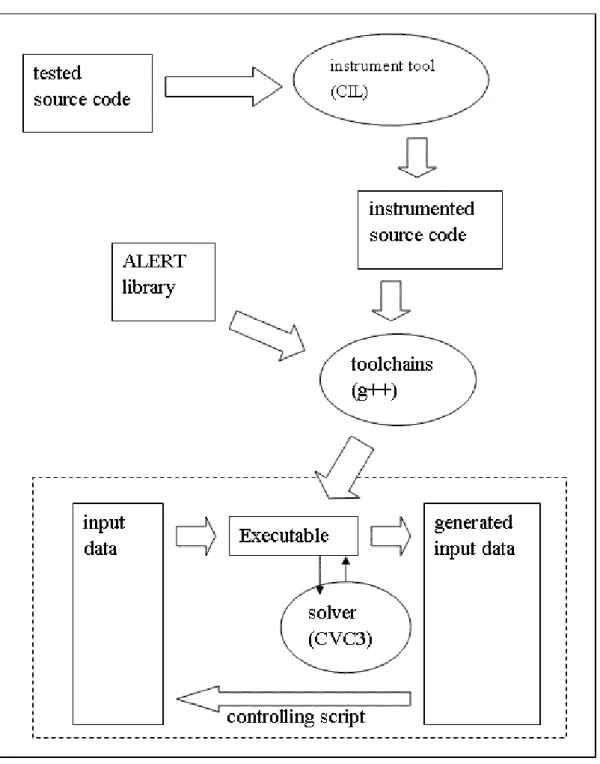
ALERT uses CIL as instrument tool[18]. CIL first simplifies the tested source code to a simple but equivalent form. And then ALERT uses it to insert corresponding function call according to the matched pattern. After getting the instrumented source code, ALERT will compile it and use it to do self-testing.
2. Related Work
Some previous works have studied on concolic testing. DART is the first work to propose the idea to combine concrete run and symbolic analysis[6]. It mainly handles the integer type, and it automatically extracts the unit from source code to test. CUTE which is splintered from DART, can correctly handle some pointer access cases[11]. But it did not consider the situation where the index of array is symbolic. EXE is a follow-up work of EGT, which can deal with more complex pointer access than CUTE[12]. CUTE and EXE are similar on the functionality. They differ at the execution and memory model. ALERT use the way EXE models memory and adopts the execution model of CUTE. All works above interact with the running environment concretely, and they do not generate input data for file input.
Catchconv is a symbolic execution and run-time integer conversion testing tool[19]. It is a module of Valgrind[20], which is an instrumentation framework for building dynamic analysis tools. Valgrind translates the executable binary to its IR called VEX, and Catchconv uses Valgrind’s API to instrument VEX dynamically. Catchconv only focus on testing integer conversion error.
KLEE is a symbolic virtual machine built on top of the LLVM compiler infrastructure[21, 22]. The tested sources are compiled to the LLVM virtual instruction, and then KLEE instruments the virtual instruction for testing. KLEE redirects the interactions with running environment to its inner models that understand the semantics of the actions.
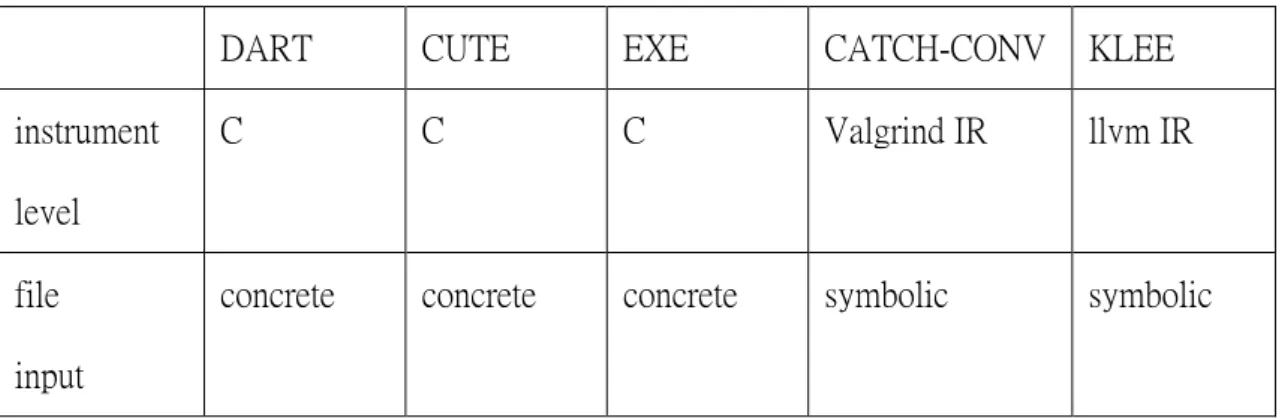
Catchconv and KLEE instrument the lower-level intermediate representations. The sizes of the generated constraints are huger, and the lower-level semantics are harder to be understood and debugged. We list briefly the comparison of the testing tools above in table 1.
5
Table 1: The comparison of concolic tools
DART CUTE EXE CATCH-CONV KLEE
instrument level
C C C Valgrind IR llvm IR
file input
3. Methods
In this section, we will describe our method to deal with the file operations used in the tested source. The basic of file operation in the UNIX environment will be briefly presented, and then an overview of our method will be displayed.
3.1. Basic of file IO
To the OS kernel, all opened files are referred to by the file descriptors, which are the non-negative integer. When a new file is created, a new file descriptor is return to the process. The file descriptor can be used to identify the file programmers want to access. By convention, each process will have 3 file descriptors exist when it starts. The file descriptor 0 is associated with standard input, 1 is associated with standard output and 2 is associated with standard error.
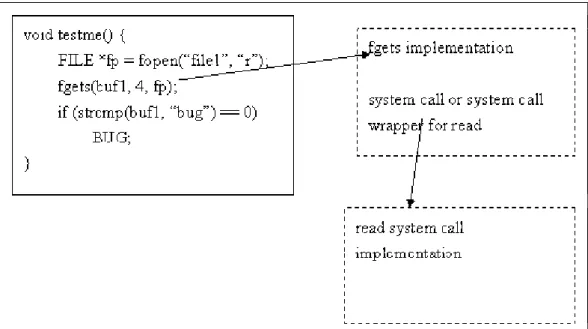
The standard library provides a high level interface called file stream to access file. It handles such details as buffer allocation and optimized operation to avoid the inefficient and inconvenient way to use file descriptor directly. Figure 1 summarizes the process of file access.
7
3.2. The overview
When programmers need to do file operations, the most frequently used two methods are accessing through stream-level library function and accessing through low-level library function (system call wrapper). The stream-level function is more flexible and usually more convenient, so we only consider stream-level function now. The low-level function can be implemented in the similar way.
When writing a C program to access file with stream-level library function, programmers need to get a file stream first, and then they can access the content via the specified file stream. Other than the file explicitly opened, there always are three implicit file descriptor, which are stdin, stdout, stderr. We do not care about operations on stdout and stderr, because these two streams are for message output and they will not affect the behavior of the program itself.
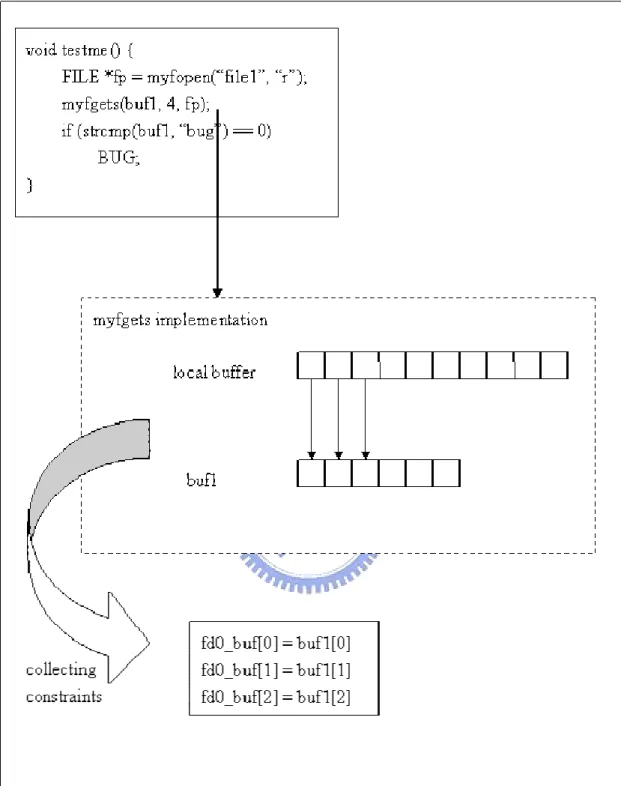
All that we need to do is to intercept the file access action, and then to redirect them the buffer we can control. Next we associate the buffer with the storages used in the program. The way to associate them depends on the operation. At the end we will have the information about these file operations and we can use it to generate the content of file the next run will use.
We now have some choices on how to intercept the function call. The best choice should be the one to intercept the call on system call. But this method suffers some physical difficulties, including how to insert instrument code to the system call, how to separate the call in the tested target from the normal call in our system, etc. So we decide to instrument the tested source to change the called function name. Next the instrumented code is compiled and linked to our library. The generated executable program will use our function implementation when it calls the file operation. Figure 2 shows the procedure.
9
4. Implementation
4.1. The architecture of ALERT
Figure 3: The architecture of ALERT
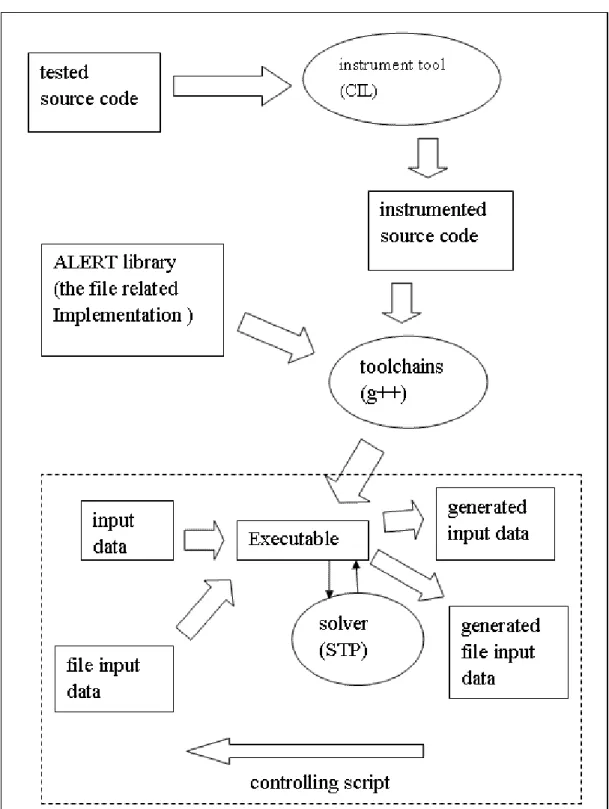
As figure 3 shows, the tested source is modified by instrument tool. Next we compile the instrumented code with ALERT library, and we can get an executable
binary. Then the executable binary can collect path information and interact with solver to generate the next run inputs. Tester can use a controlling script to control the execution of the binary. This is the original testing procedure.
4.2. The architecture of ALERT with file operation support
11
As figure 4 shows, the architecture is mainly the same with the original one. We implement our method as a part of ALERT library. The main difference on the architecture is that the input data come from two separated sources. We also use more efficient solver called STP[17], which is designed to focus on the bit-vector type constraints and performs well on more complex constraints.
4.3. The main concepts
4.3.1. The intuitive idea
The intuitive idea to collect the constraint informations involved in our function implementations is just to instrument the source codes of the functions together with the tested source target. This is surely the simplest method but there is an annoying shortcoming. That is that if the if-conditions within the function source are instrumented and the associated variable is symbolic, the related condition point constraints will be collected and be negated during the testing procedure. This will generate the input data which can walk through the branch at the other side in the library source implementation. This will cause their confusion in logic when the testers try to evaluate the execution path of the target. Let’s see a simple example.
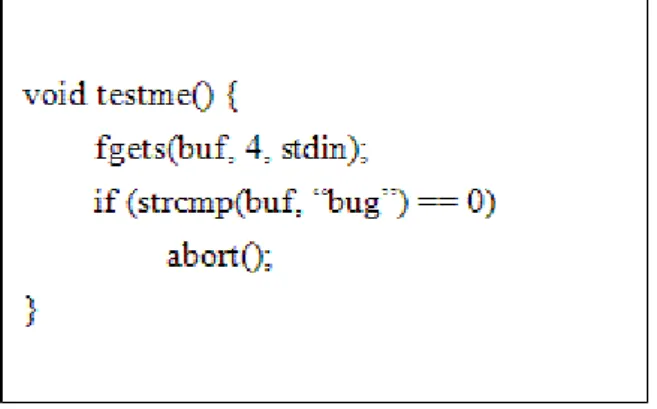
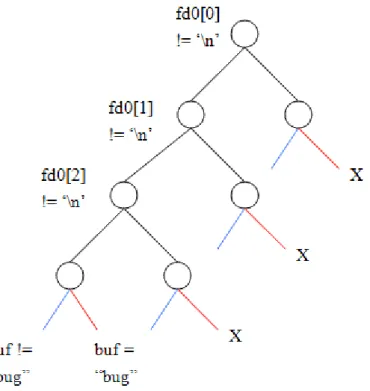
In figure 5, there is only one if-condition, so testers may expect that it will run less than two iterations to cover all paths. If the fgets() source is instrumented together with the tested source, however, concolic testing will try to expand all paths when it meets condition point in the fgets(). This will not only mislead testers but also generate the test input in conceptually the same path. Figure 6 shows the execution paths of this case. The mark ‘X’ means it is not a valid path. There are total 5 valid paths in this case, and 4 paths will go to the same side at strcmp() condition.
13
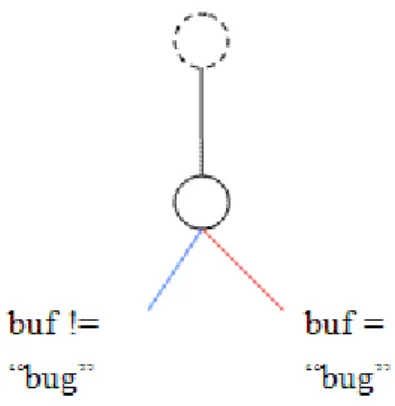
Figure 7: The ideal execution path
In figure 7, we show the ideal execution path in this case. To achieve the ideal goal, we proposed a method called “list & pick”.
4.3.2. List & Pick
We first list all possible constraints ALERT can generate when it runs different path in the function, and then “or” them together. When a testing iteration is over, the solver can pick one from these listed constraint sets and generate the proper input data. These “or”ed constraints should form mutual exclusive sets so that solver can work correctly.
The “list & pick” method offers the concept correctness, but a more serious problem occurs when we implement it. That is where the next operation should start from? Let’s see the next example.
In figure 8, we list a simple case, which contains two fgets() call. After we use “OR” to create the first fgets() corresponding constraints composed of three sets representing different lengths, we could get the simplified constraints blow. (Some constraints about value limitation is not listed here, and we will describe them in detail later.).
Then at the second fgets(), how do we decide which byte is the one which the file index points? To solve this problem, we introduce an idea called “symbolic index”. When the function involves with variant length, the file index will become undecided. So we always mark the next file index symbolic and record extra length information with the variant constraints. With the example above, we should get the results below.
Each “OR”-clause of the block is composed of two constraints. The former one is the constraint about length, and the rear one after “AND” is the constraint about index. In the first “OR”-clause, for example, the ‘0’ in the index constraint says that the current concrete file index value is 0 when the first fgets() is called. The ‘1’ in the constraint says that the former length constraint has length 1.
Next when program flow comes to the second fgets(), we again need to generate all possible constraints. Because the file index is symbolic now, each file index is possible. So we should generate constraints from the first possible index to the last
(buf1[0] = fd0[0]) AND (fd0_index_1 = 0+1)
OR ((buf1[0] = fd0[0]) AND (buf1[1] = fd0[1]) AND (fd0_index_1 = 0+2)) OR ((buf1[0] = fd0[0]) AND (buf1[1] = fd0[1]) AND (buf1[2] = fd0[2]) AND (fd0_index_1 = 0+3))
(buf1[0] = fd0[0])
OR ((buf1[0] = fd0[0]) AND (buf1[1] = fd0[1]))
15
possible one, and “OR” these constraints about each index together. We list the result here.
Each block of the result represents a specific index constraint. Like constraints generated due to concrete index, the constraints generated due to symbolic index is composed of the ”OR”-clauses. The differences are the current index name used in each clause and the first element of file buffer to read. At the end of each block the corresponding index constraint is appended to ensure the constraint is right.
Now we still can’t locate actual file index position, but we can generate all possibilities and solve the problem with the power of solver.
Once the file index becomes symbolic, however, all the next file operation will generate constraints about all possible indexes. This will generate a huge constraint set. We list the approximate size of constraints to be (file size)* [ (size limit )^2 /2 * (byte constraint factor) ]. In this formula, file size is the specified file size. Size limit is a bound to the possible numbers of bytes accessed, such as the size parameter of
((buf2[0] = fd0[0]) AND (fd0_index_2 = fd0_index_1+1) OR ((buf2[0] = fd0[0]) AND (buf2[1] = fd0[1]) AND (fd0_index_2 = fd0_index_1+2))
OR ((buf2[0] = fd0[0]) AND (buf2[1] = fd0[1]) AND (buf2[2] = fd0[2]) AND (fd0_index_2 = fd0_index_1+3)) ) AND (fd0_index_1 = 0)
OR
((buf2[0] = fd0[1]) AND (fd0_index_2 = fd0_index_1+1) OR ((buf2[0] = fd0[1]) AND (buf2[1] = fd0[2]) AND (fd0_index_2 = fd0_index_1+2))
OR ((buf2[0] = fd0[1]) AND (buf2[1] = fd0[2]) AND (buf2[2] = fd0[3]) AND (fd0_index_2 = fd0_index_1+3)) ) AND (fd0_index_1 = 1)
fgets() and the width field in the format string of fscanf(). When we create constraints about content accesses in each length, we need extra constraints to limit the content of bytes accessed. We call the ratio of the total constraints size to the basic constraints “byte constraint factor”.
4.3.3. Index limitation
The generated set of constraints is a great challenge to the power of the solver. To ease the complexity of constraints, we can limit possible index value by observing the movement of file index during file access. (1) We can know that file index is always moving forward during a single function call, except for fseek(), which can set file index to anywhere. With this observation, we will record the index value when file index is marked from concrete to symbolic. Then when we generate the constraints about variant index, we will go from the recorded symbolic index value, rather than 0, the lowest file index. The value of the index always keeps the same when the function involves contents with variant length, but is updated when the function read concrete content. We can always use this property on the successive file function call. But when we intercept the call to fseek(), we should change this value to 0 to avoid incorrectness. (2) The possible value of file index is affected by the previous file access operations. So we do not need to list constraints about all possible file indexes. We just need to list constraints about the indexes in the limited range.
This strategy can greatly ease the complexity at some special case and just add a little overhead to the original system. We make some modifications to the example above to show when the strategy can be used.
17
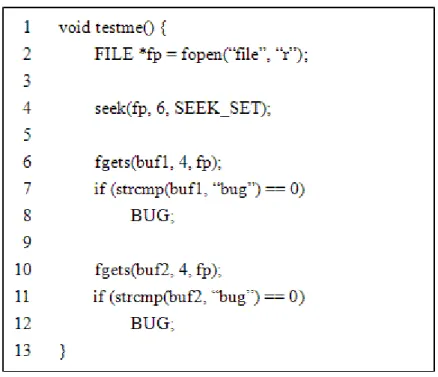
Figure 9: An example that shows limited index strategy
As we mention previously, the second fgets() should need to generate all the constraints with index value from 0 to 19 (the default file size is 20). But in this example, the fseek() at line 4 sets the file index to the 6-th byte in the file. The file index after the first fgets() call will be never less than 6. In addition, the number of bytes the first fgets() accesses will be limited from 1 to 3. So at the second fgets(), we only need to generate constraints with index value from 7 to 9. This greatly improves the performance in this case.
4.4. Function implementation detail
After mentioning all special properties, we will describe the functions we implemented in detail. All the implementation of library functions can be split into two parts, the functionality part and the part to generate related constraints. We will focus on the nontrivial part of each function implementation. These functions we will describe include fopen(), fgets(), fseek(), fscanf(). Finally we will list all the file related function and describe how to implement these function with our technique.
4.4.1. fopen
Programmers can use fopen() to create a new file stream, and this stream can be used in the following operations. The argument “path” is the file name to be opened, and the name is mapped to the returned stream, which is actually connected to a low-level file descriptor. We do not involve with the low-level file descriptor now. We create an exclusive buffer for the corresponding stream, and we leave its size to be tester specified. It will has default size 20 byte, but if tester need larger size, he can enlarge it by argument “-n size”.
4.4.2. fgets
Programmers can use fgets() to read a single line from a file. fgets() accepts a “size” argument which is used to limit the number of character it read. It is very similar with another function “gets”, and their only difference is the “size” parameter. Because of the lack of “size”, the “gets” was the most common source of buffer overflow. In the same way, if programmers use improper size in fgets(), the buffer overflow will also happen.
To write the part to generate constraints, we must know the behavior of fgets(). The man page says that fgets() reads in at most one less than “size” characters from “stream” and stores them into the buffer pointed to by “s”. Reading stops after an EOF or a newline. If a newline is read, it is stored into the buffer. A '\0' is stored after the last character in the buffer.
char *fgets(char *s, int size, FILE *stream); FILE *fopen(const char *path, const char *mode);
19
The behavior of fgets() could be affected by the actual file size, so we need to calculate the numbers of character could actually be read. After comparing this value with size-1, we can get a value “maxCanGet” to limit the numbers of character read.
The read string can be partitioned into two categories according to its length. The first is that the string length is less than “maxCanGet”. This situation happen because fgets() read EOF or a newline. We will get a string end with a newline following with a null character (null char is appended automatically by fgets()).
The second one is that the string length is just “maxCanGet”. This happens because the numbers of character read reaches the size limit. So we just need to limit the last character of the string to be the appended null character.
Let’s see an example.
In this example, the given size limit is 4, so the maximum number of character can be read is 3 and a trailing ‘\0’ will be appended. We list all the possible resulted string below.
The length of the string is 0. ( This happens when “maxCanGet” is 0).
The length of the string is 1.
The length of the string is 2.
The length of the string is 3. !\n \n \0
\n \0 \0
The “any” in the final case represents any character. If the character is a newline, it means fgets() stops because the character read is a newline. If the one is not a newline, it mans fgets() stops because size limit or EOF is met after the character is read.
In addition to these limit constraints, basic assignment constraints are necessary, so that we can associate the destination local buffer with the stream exclusive buffer. But because we do not know how many bytes will be written during this access, we need to mark the “maxCanGet” bytes in the local buffer symbolic. If the destination local buffer is not actually written, those unwritten characters will be associated with the previous constraints in the same character so that they can be correctly solved.
4.4.3. fseek
Programmers can use fseek() to set file position indicator for the stream pointed by “stream”. The new position is obtained by adding “offset” byte to the position specified by “whence”, which has three valid values SEEK_SET, SEEK_CUR, and SEEK_END. Because the file size is fixed in our model, some functionality of fseek() will be limited.
According to the combination of “offset”, “whence” and current file index, we can decide whether the new file index is marked symbolic or not. We need to update the recorded symbolic index value to be 0 when the new index is marked symbolic.
int fseek(FILE *stream, long offset, int whence); !\n !\n any \0
21
4.4.4. fscanf
fscanf() should be the famous input function in the C library. Programmers can use “format” to specify the input data type which programmers desire to store. The implementation of fscanf() is more complex relatively. We parse the format string and record the information of each const string and conversion specification in an array.
In the part to generated constraints, we deal with the recorded item sequentially. If the item is a conversion specification, we first generate constraints of successive white space in different length. After generating the variant length white space constraints, the file index is always symbolic. And then we handle the conversion specification, we create constraints about converting number string to a corresponding number in different length. The number constraint is looked like the block below.
(The actual content is different based on the base of conversion specification.). Next we extract the proper byte from the number constraint based on the length modifier, and make a connection between the extracted bytes and the corresponding parameter.
If the item is const string, we handle two cases depend on the position of the const string. When the string is placed before some conversion specification, the string must be fully matched so that fscanf() can progress that conversion specification. On the other hand, when the string is not placed before any conversion specification in a single format string, the string can be matched with any prefixed string in different length. Let’s see a simple example
int fscanf(FILE *stream, const char *format, ...);
The const string “id:” and “,cost:” is need to be fully matched, while “dollars” can be matched with “!d”, “d!o”, “do!l”, “dol!l”, etc.(the ‘!’ before letter means “not”) The functionality of fscanf() is also troublesome because of involving with variant arguments. Our original idea is just passing the format string and variant argument list to the vsscanf() function. This does work on the functionality, but we can not get the number of contents it read. Without this information, file index will not be updated, and the next operation will get wrong result. To solve this problem, we partition the format string based on conversion specification so that we can deal with the corresponding argument separately. And then we append a special conversion specification “%n” to the partitioned format string, and offer an extra variable to record the number of bytes read. After successively handle the partitioned string with vsscanf(), the extra variable will record the number of bytes read. Finally we sum all the numbers, and update the file index.
4.4.5. The file input related functions
In table 2, we categorized the related functions according to their functionality and the functions we implemented are marked in bold. We will briefly describe how the other functions can be implemented. Implementing the category about byte access is easier, because they do not involve with variant lengths. The file index is the only one point to be noticed.
In string access category, gets() is a general form of fgets(). Because of the lacking of size limit, the file index can be anywhere at the next access. We need to generate constraints about all possible indexes.
Scanf(), which reads content from stdin, is just a special form of fscanf(). When “id: %d,cost: %d dollars”
23
we handle conversion specification, we need the corresponding parameter name to associate it with the number. Vscanf() and vfscanf() do not have the corresponding parameter name. They use a va_list type variable to pass the necessary information. So if we want to implement the two functions, we need to handle the variant argument function in the C library first.
Block access function is similar to the low-level function. They try to read contents with the specified size. The actual size read will be affected by the file size.
Fopen() and freopen() involve with the file name to handle, so we need to record the file names so that we can associate them to their original exclusive buffers when we open the same file many times.
The file position function is easy to implement when the symbolic index idea is introduced. We just need to connect the file index to the return value in ftell(). The other functions are special forms of fseek().
Table 2: The file input functions category function prototype
byte access
int fgetc(FILE *stream); int getc(FILE *stream); int getchar(void);
int ungetc(int c, FILE *stream); string
access
char *fgets(char *s, int size, FILE *stream); char *gets(char *s);
format
string & variant
int scanf(const char *format, ...);
int fscanf(FILE *stream, const char *format, ...); int vscanf(const char *format, va_list ap);
argument int vfscanf(FILE *stream, const char *format, va_list ap); block
access
size_t fread(void *ptr, size_t size, size_t nmemb, FILE *stream);
stream
open & stream close
FILE *fopen(const char *path, const char *mode);
FILE *freopen(const char *path, const char *mode, FILE *stream);
int fclose(FILE *fp); file
position
int fseek(FILE *stream, long offset, int whence); long ftell(FILE *stream);
void rewind(FILE *stream);
int fgetpos(FILE *stream, fpos_t *pos); int fsetpos(FILE *stream, fpos_t *pos);
25
5. Results and Evaluation
5.1. The results
In the section, we use two examples to demonstrate the functionality of our implementation.
5.1.1. Example 1
This example is a wargame program which contains a vulnerability of buffer overflow. The players can use this vulnerability to skip all security checks and finally enter the forbidden area. Here is the source code with vulnerability.
Figure 10: The wargame source code
The vulnerability occurs in fgets() at line 15. The size parameter of fgets() is too big, so that it is possible to write beyond “buf’ and to modify the variable “i” and “auth”. When the program flows through security check at line 24 and line 30, the cracked variable “i” and “auth” will take effect, so the player can guide the program flow to the forbidden area.
We use ALERT with our file operation support to do testing on the source. ALERT will try to walk through each execution path. When the process is done, we can collect corresponding input at each path. Next we feed the inputs to the wargame program, and can succeed to reach the target. We list some exploits in figure 11.
27
In figure 11, the file content is displayed in hexadecimal code. The ninth byte will overwrite variable “auth”, and the twelve byte will overwrite variable “i”. We can see these files are valid exploits for this wargame.
5.1.2. Example 2
The second example is a simple application of concolic testing. The property of concolic testing can separate the program input domain to several mutual exclusive sets, and the input in these sets will walk on the different execution paths. We can use the property to judge whether different implementations have the same functionality.
Here is a homework assignment to write a program to judge that the given three integers whether can compose a triangle. We try to implement two versions to the question, one considers integer overflow and another one does not. Figure 12 shows the two implementation sources.
Figure 12: Two implementations of the same problem
We call the version which takes care of overflow version B, and call the other version A. Version A is just implemented by using the principle that the sum of any two edges is larger than the other edge. But in C language, the storage size of the specified type is fixed in memory. So if the sum of the two numbers is larger than the number that the corresponding size can express, the integer overflow will occur. Version B handles the integer overflow, and therefore it will not suffer the same
29 problem.
First we do concolic testing on version B. After the testing procedure is done, we feed all test input to the two original implementations and compare the return values at each input. We list the input which version A can not handle correctly in figure 13.
Figure 13: The inputs which can cause integer overflow
5.2. The evaluations
5.2.1. Comparison with CREST
We compare our implementation with the CREST, which is an open-source version of CUTE. When testers use CREST, they needs to specify his interested targets with the function CREST_char(), CREST_int(), etc. Then CREST will generate symbolic inputs for them. Because the supported input type in CREST is limited to be integer, the only way we can use is to make the whole character array symbolic. We use an example to describe it.
Figure 14: Unit test on CREST
In Figure 14, the left side is the tested source. Before testers use CREST to test it, they need to translate it to the code at right side. The original fgets() call is translated to be loops of CREST_char() call.
Because the tested targets are specified by testers, the actual file will not be generated. Testers need to do it by themselves it. They need to feed the file back to the original program. Some programs reveal now. The translation from string to character array will lose the association in the string, so the content of array can not be directly outputted to the file. In addition the function about file position is hard to be handled in CREST.
We run the same example on ALERT with file handling, and list the file content with hexadecimal code in figure 15.
31
Figure 15: The actual generated file
In this case, we specify the file size to be 20 byte. The generated file can be used to go through all execution paths.
5.2.2. Comparison with the original intuitive method
We compare the “list & pick” with the intuitive idea which is to instrument our implementation source together with tested source. We use three cases to show their difference in the execution time.
5.2.3. Case 1
Figure 16: The source code of case 1 in evaluation
In figure 16, we call two fgets() which both have size limit 6. And we change the actual file size we want to generate. We get the following result.
0 0.5 1 1.5 2 2.5 3 3.5 10 70 130 190 250 310 370 430 490 550 610 670 730 790 850 910 970
file size (bytes)
ti m e (s ec o nd s)
the intuitive idea list & pick limited index
Figure 17: The result of case1 in evaluation
The intuitive idea runs 64 iterations during the testing procedure. The other two methods use only 4 iterations. When file size is small, the time on solving is insignificant, and the time is mainly affected by the time of iterations. Because list &
pick needs to list constraints about every index, it suffers performance penalty as file
size grows up. The time on solving of the other two methods almost keeps the same when file size increases. The main difference comes from the times of iterations.
33
5.2.4. Case 2
Figure 18: The source of case 2 in evaluation
0 2 4 6 8 10 12 14 10 70 130 190 250 310 370 430 490 550 610 670 730 790 850 910 970
file size (bytes)
ti m e (s ec o nd s)
the intuitive idea list & pick limited index
Figure 19: The result of case 2 in evaluation
In case 2, the only difference from case 1 is the fgets() size limit. We enlarge it to be 10. The intuitive idea uses 104 iterations when the specified file size is 10 bytes,
and it uses 256 iterations on all other file size. The other two methods run 4 iterations again. The shape of the graph is almost the same with the one of case 1. The main difference is the increase on execution time, which is due to the increased size limit parameter.
We can compare the three methods here. The intuitive method is affected by the times of iterations. The list & pick is mainly affected by the file size. When file size grows up, the time will significantly increase. With the limited index, list & pick can limit the possible index, so the time will dramatically decrease. But when the called times of the function which involve variant length increase, the improvement that limited index provides will diminish.
5.2.5. Case 3
We run case 1 source code with larger file size to evaluate the performance on real case. In figure 20, we can see the execution time of the three methods. List &
pick with limited index has outstanding performance in this case, so we use this
method to run on much larger file size.
0 10 20 30 40 50 60 70 80 90 500 1500 2500 3500 4500 5500 6500 7500 8500 9500 1050 0 1150 0 1250 0 1350 0 1450 0
file size (bytes)
ti m e (s ec o n d s)
the intuitive idea list & pick limited index
35 0 50 100 150 200 250 300 2000 0 1000 00 1800 00 2600 00 3400 00 4200 00 5000 00 5800 00 6600 00 7400 00 8200 00 9000 00 9800 00 1060 000 1140 000 1220 000 1300 000 1380 000 1460 000 1540 000 1620 000 1700 000
file size (bytes)
ti m e (s ec o n d s) time on solving total execution time
Figure 21: The result of case1 on much larger file size
In figure 21, we show the total execution time and the time on solving, and we can see both times significantly increase. The time used on solving increases unexpectedly. The statistic of the solver shows the clause sizes of constraints always keep the same as we expected. So the increased time is due to the larger memory used. In this case, when file size comes to 1700000 bytes, the reported memory used is up to 431MB. This will be a main obstacle to overcome when we want to handle the real case.
6. Conclusions
The concolic testing is a simple and powerful method for software testing. But when it comes to the real case, it meets some limitations, like the power of instrumentor, the handling of library function call, the number of constraints. In this paper, we proposed some ideas to handle frequently used file access functions. We compare these ideas with the most intuitive one to show the feasibility of our ideas.
With this support, we can expect it to achieve higher path coverage, and detect the lurking vulnerabilities.
37
7. References
[1] G. J. Myers, The Art of Software Testing. Wiley, 2004,
[2] D. L. Bird and C. U. Munoz, "Automatic generation of random self-checking test cases," IBM Syst J, vol. 22, pp. 229-245, 1983.
[3] J. C. King, "Symbolic execution and program testing," Communications of the
ACM, 1976.
[4] J. Edvardsson, "A survey on automatic test data generation," in Proceedings of the
2nd Conference on Computer Science and Engineering, 1999, pp. 21–28.
[5] C. Cadar and D. Engler, "Execution generated test cases: How to make systems code crash itself," in In Proceedings of the 12th International SPIN Workshop on
Model Checking Software, 2005,
[6] P. Godefroid, N. Klarlund and K. Sen, "DART: Directed automated random testing," in Proceedings of the ACM SIGPLAN 2005 Conference on Programming
Language Design and Implementation, 2005,
[7] D. Beyer, A. J. Chlipala and R. Majumdar, "Generating tests from
counterexamples," in Proceedings of the 26th International Conference on Software
Engineering, 2004, pp. 326-335.
[8] C. Csallner and Y. Smaragdakis, "Check'n'crash: Combining static checking and testing," in Proceedings of the 27th International Conference on Software
Engineering, 2005, pp. 422-431.
[9] T. Xie, D. Marinov, W. Schulte and D. Notkin, "Symstra: A framework for
generating object-oriented unit tests using symbolic execution," in Proceedings of the
11th International Conference on Tools and Algorithms for the Construction and Analysis of Systems, 2005, pp. 365-381.
[10] J. Whaley, M. C. Martin and M. S. Lam, "Automatic extraction of object-oriented component interfaces," in Proceedings of the 2002 ACM SIGSOFT International
Symposium on Software Testing and Analysis, 2002, pp. 218-228.
[11] K. Sen, D. Marinov and G. Agha, "CUTE: A concolic unit testing engine for C," in Proceedings of the 10th European Software Engineering Conference Held Jointly
with 13th ACM SIGSOFT International Symposium on Foundations of Software Engineering, 2005,
[12] C. Cadar, V. Ganesh, P. M. Pawlowski, D. L. Dill and D. R. Engler, "EXE: automatically generating inputs of death," TISSEC, 2008.
[13] N. Tillmann and J. de Halleux, "Pex--white box test generation for. NET," in
Proceedings of the 2nd International Conference on Tests and Proofs, 2008, pp.
[14] C. W. Barrett and C. Tinelli, "CVC3," in Proceedings of the 19 Th International
Conference on Computer Aided Verification, 2007, pp. 298-302.
[15] C. W. Barrett, L. De Moura and A. Stump, "SMT-COMP: Satisfiability modulo theories competition," in Proceedings of the 17th International Conference on
Computer Aided Verification, 2005, pp. 20–23.
[16] C. W. Barrett, D. L. Dill and J. R. Levitt, "A decision procedure for bit-vector arithmetic," in Proceedings of the 35th Annual Conference on Design Automation, 1998, pp. 522-527.
[17] V. Ganesh and D. L. Dill, "A decision procedure for bit-vectors and arrays," in
Proceedings of the 19th International Conference on Computer Aided Verification,
2007,
[18] G. C. Necula, S. McPeak, S. P. Rahul and W. Weimer, "CIL: Intermediate
language and tools for analysis and transformation of C programs," in Proceedings of
the 11th International Conference on Compiler Construction, 2002, pp. 213-228.
[19] D. A. Molnar and D. Wagner, "Catchconv: Symbolic execution and run-time type inference for integer conversion errors," 2007.
[20] Valgrind. http://valgrind.org/
[21] C. Cadar, D. Dunbar and D. R. Engler, "KLEE: Unassisted and automatic generation of high-coverage tests for complex systems programs," in Proceedings of
the 8th USENIX Symposium on Operating Systems Design and Implementation, 2008,