國立交通大學
資訊科學與工程研究所
碩 士 論 文
藉由選擇性符號操作執行之
Android APPs 隨性測試
Fuzz Testing on Android APPs by
Selective Symbolic Execution
研 究 生 : 許基傑
指導教授 : 黃世昆 教授
藉由選擇性符號操作執行之
Android APPs 隨性測試
Fuzz Testing on Android APPs by
Selective Symbolic Execution
研 究 生 : 許基傑
Student : Kee-Kiat Khor
指導教授 : 黃世昆
Advisor : Shih-Kun Huang
國 立 交 通 大 學
資 訊 科 學 與 工 程 研 究 所
碩 士 論 文
A Thesis
Submitted to Department of Computer and Engineering
College of Computer Science
National Chiao Tung University
in Partial Fulfillment of the Requirements
for the Degree of
Master
in
Computer and Information Science
July 2012
Hsinchu, Taiwan, Republic of China
中華民國一百零一年七月
藉由選擇性符號操作執行之
Android Apps 隨性測試
學生: 許基傑
指導教授: 黃世昆教授
國立交通大學資訊科學與工程研究所碩士班
摘要
智慧型手機、平板電腦等行動裝置已日益成為個人的必備工具,軟
體市集的商業模式也蓬勃發展,並成為智慧型裝置的應用軟體主要來
源。然而這些智慧型裝置往往包含著大量個人化的資訊,同時也能進
行發送簡訊等付費行為,因此執行於其上的應用軟體的品質與可靠性
也逐漸成為備受關注的議題。但是一般使用者並沒有能力判斷市集上
的軟體品質,而官方市集以及第三方市集也都無法保證架上的軟體是
否不含缺陷問題。在此論文中,我們描述如何建立一個 Android APP
測試環境,採用符號執行 (Symbolic execution) 技術,可以自動化對市
集中的應用程式進行品質檢測,透過探測程式的可能執行路徑,以發
掘出未被執行之潛在品質缺陷或隱含可能有威脅疑慮之執行路徑。我
們實作改良原有之軟體品質測試與脅迫平台:CRAX,進行 Andorid
APP 之測試,稱為 CRAXdroid,已成功實驗於實際應用之 Android 程
式,證明此方法可行性高。
關鍵詞:符號運算、擬真運算、市集軟體、體軟測試、軟體品質、程
式安全
Fuzz Testing on Android APPs by Selective
Symbolic Execution
Student : Kee-Kiat Khor
Advisor : Dr. Shih-Kun Huang
Institute of Computer Science and Engineering
National Chiao Tung University
Abstract
Mobile devices such as smart phone and tablet PC are becoming common
personal devices. The business model of software market is also thriving
and turning into a major source of software on those devices. However,
such intelligent devices often contain lots of private information, and also
can be used to conduct operations involving payment, like sending SMS. As
a result, the quality of software on mobile devices becomes a critical issue.
But ordinary users do not have the ability to check whether software on the
shelf contains defective behavior or potential vulnerabilities, and neither the
official APP market nor third party markets can ensure their software have no
privacy risk. In this thesis, we proposed to build a platform for android APP
testing, based on symbolic execution technique. By exploring all possible
paths, we can find potential software vulnerabilities. We revised our software
quality assurance and exploit generation platform, called CRAX, to apply
in the Android APPs. It is called the CRAXdroid subsystem. We perform
several experiments on Android market applications to prove the feasibility
of our method.
Keywords:Symbolic Execution, Concolic Exacution, Market App Software,
Software Testing, Software Quality, Secure Programming
誌謝
光陰飛逝,不多不少地經過兩年的時間,終於完成了研究及論文撰寫,也
為我學生生涯告一段落。在這一路上,首先感謝父母及妹妹,能讓我自由
的選擇嚮往的的學術領域,也默默的支持我在遠方唸書及工作的決定。
在做研究的路上,感謝指導教授黃世昆老師。謝謝黃老師這兩年的督促
及與指導,讓我在學習過程中獲益良多,同時也提供很好的研究環境及工
作機會。
感謝泰興、肇鈞、銘祥、世欣、博彥、孟緯學長們,能跟你們一起合作
及學習讓我成長了不少。還有要感謝實驗室裡的翰霖、俊維、偉明、韋
翔、奕任,能跟你們一起度過實驗室生活,乏味的日子也變得有趣起來
了。雖然沒有太多的時間跟學弟妹相處,但也很謝謝你們的幫忙一起做研
究,感謝正宇、伯謙、俊諺、鐘翔、劉歡。至於室友們,很開心能一起重
訓一起吃宵夜,短暫相處的幾個月裡都過的很充實、很健康。謝謝小潘和
茂哥,在我壓力大的時候,能跟你們傾談一起玩桌遊就很開心了。
最後十分感謝口試當天的口委老師,孔崇旭老師、田筱榮及宋定懿老師
能在百忙之中出席指導與建議,讓這篇論文更能盡善盡美。
Contents
摘要 i Abstract ii 誌謝 iii Contents iv List of Codes viList of Figures vii
List of Tables viii
1 Introduction 1 1.1 Motivation . . . 1 1.2 Objective . . . 2 1.3 Overview . . . 3 2 Background 4 2.1 Android . . . 4 2.1.1 Android Market . . . 5
2.1.2 Android APP and Dalvik VM . . . 5
2.1.3 Android Security and Privacy . . . 6
2.1.3.1 Security . . . 6 2.1.3.2 Privacy . . . 7 2.2 Software Testing . . . 7 2.2.1 White-box Testing . . . 7 2.2.1.1 Code Coverage . . . 8 2.2.2 Black-box Testing . . . 8 2.2.3 Fuzz Testing . . . 8 2.2.4 Symbolic Execution . . . 9 2.3 Vulnerability Analysis . . . 9 2.3.1 Static Analysis . . . 9 2.3.2 Dynamic Analysis . . . 10 3 Related Work 11 3.1 EMMA . . . 11 3.2 TaintDroid . . . 11 3.3 AppInspector . . . 12 3.4 Leakalizer . . . 13
4 Methods 14 4.1 Symbolic Components . . . 14 4.2 UI Fuzzer . . . 15 4.3 Path Explorer. . . 15 4.4 Exception Handler . . . 16 5 Implementation 17 5.1 Symbolic Environment . . . 17 5.1.1 The architecture of S2E . . . 17 5.1.2 ARM Android on S2E . . . 18 5.1.3 x86 Android on S2E . . . 19
5.1.4 The architecture of CRAXdroid . . . 20
5.2 Symbolic Components . . . 20 5.2.1 Platform Layer . . . 20 5.2.2 System Layer . . . 21 5.3 Symbolic Interfaces . . . 22 5.3.1 JNI . . . 22 5.3.2 File I/O . . . 22 5.4 Exception Repository . . . 23 5.4.1 Crash Detection . . . 23 6 Experimental Results 24 6.1 Experimental Environment . . . 24
6.2 Evaluation for White-box testing . . . 24
6.3 Evaluation for Black-box testing . . . 27
7 Conclusions and Further Work 30 7.1 Conclusion . . . 30
7.2 Future Work . . . 30
Reference 33
Appendix 37
List of Codes
1 org_apache_harmony_luni_platfform_OSFileSystem.cpp (partial code) . 23
2 Java code within white-box testing mode . . . 25
3 Line 8-10 of the Code 4. . . 26
4 Results of white-box testing mode with symbolic execution (partial) . . . . 27
5 Java code used to deploy as App . . . 27
6 Outputs of black-box testing with symbolic execution (partial) . . . 29
7 Native function through JNI. . . 37
8 Outputs of white-box instrument and symbolic execution (full version) . . 38
List of Figures
1 Android Software Stacks . . . 5
2 Apps deploy flow.. . . 6
3 Snapshot of static analyzer highlight the problems.[32] . . . 9
4 Snapshot of problem details provided by static analyzer.[32] . . . 9
5 Snapshot of highlighted executable source code(green color). . . 11
6 Diagram of sensitive data was tainted by TaintDroid. . . . 12
7 Details of comparison between AppInspector and CRAXDroid. . . . 13
8 Comparison of related work. . . 13
9 The architecture of S2E. . . . 18
10 The architecture of ARM Android on top of S2E and the screenshot of the Android emulator that emulates virtual smartphone devices to run Android software stack on x86 S2E QEMU. . . . 19
11 The architecture of x86 Android on top of S2E and the screenshot of the x86 Android run as native operating system. . . 19
12 The architecture of CRAXdroid. . . 20
13 The implementation of symbolic value propagate through white-box and black-box mode. . . 21
14 The implementation of file hooking and redirect to symbolic file. . . 22
15 The implementation of redirect file descriptor to symbolic memory. . . 23
16 Message shows that crash has detected. . . 26
List of Tables
1 Evaluation for white-box testing . . . 26
Chapter 1
Introduction
Smartphones and tablets are becoming increasingly ubiquitous in recent years. Typical usages like photographing and reading e-mails can be done by these devices in our daily life. It may carry personal private information on smartphones, while users still do not assure, whether their sensitive data could be leaked by using market software applications. The privacy threats are getting more serious, while user’s sensitive data are exposable and could be tracked. These threats are originated from the applications downloaded from Android Market or other third-party providers.
If market administrators could actively eliminate the malicious application being pub-lish to Android Market, the threats will be significant reduced. However, application in binary package is not easy to analyze without source code, and it is a time consuming task. In this thesis, CRAXdroid based on symbolic execution are able to leverage path coverage feature to automatically explore the potential unexecuted malicious code.
1.1 Motivation
We observed that application(“Apps”) platform could not provide sufficient quality assur-ance with the Apps provision. Terms of service and developer distribution agreement[1,2] of Google Play show that they do not promise about their services and customer infor-mation. Moreover, Google Play currently applies either limited manual validation or no validation at all.[3] Various studies and survey have shown that malware was not caught by Google Bouncer and was still available on Android Market.[4, 5,6]
Manual analysis of these Apps is a time-consuming and difficult task without source code. Besides, analysis and validation process requires not only the low-level knowledge of operating system and Android framework, but also have to manually analyze the security and privacy violation issues of the Apps. In software testing field, some research and techniques aim to improve the security of mobile Apps through permission-based filter-ing[4,7, 8] and privacy leak filtering[9, 10]. However, some conditions of privacy leakage may not be triggered and detected as malicious activities because of the hardness to find behaviors during program execution.
In this thesis, we propose an automated quality assurance platform that analyzes Apps through symbolic execution and generates reports for Market administrators to enhance the quality of service.
1.2 Objective
The purpose of this work is to perform Quality Assurance(QA) and Vulnerability As-sessment(VA) on the Android Apps. We have targeted at two different roles for using
CRAXdroid platform, that is, Market administrator and App developer.
• Quality Assurance
– “Quality assurance is hunting for bugs in the software, and it aims to reduce
the defects.”[11] Testing does not cover all the quality assurance issues, but it is a part of quality assurance process. Various of testing methods(Section
2.2), testing frameworks(i.e., Android testing framework[12]) and tools(i.e., JU-nit[13], Monkey[14]) are available for the developer to debug their application within developing process. We introduced an alternative testing platform for the developer, which leverages different testing techniques for bugs finding. In addition, crash is a common defects in the software. CRAXdroid can detect App crash and feedback the information to the developer.
– “Testing and trying to break into someone else’s software or system.”[11] Apps are not only sources of bugs, but Android platform could also be the source of bugs. Beside the App-level bugs, we dig deeper go through platform-level and system-level to figure out the problems.
We present the design and implementation of CRAXdroid. CRAXdroid makes testing easier for the developers and integrates seamlessly with development activities.
CRAX-droid is a practical platform that help users by adding extra protections, and assists
Market administrator to reduce potential vulnerable Apps with low cost.
1.3 Overview
The structure of this thesis is shown as follows. Chapter 2 describes the background of Android platform and software testing techniques. Chapter 3 describes and compares the related work. Chapter 4 and 5 explain our method and implementation. Chapter 6 shows the experimental results. Finally, Chapter 7 concludes our thesis with future work.
Chapter 2
Background
Smartphone is widely used in daily life, to access the information and rich content over Internet such as reading news on web browsers, E-mailing, social networking, and photo sharing. This functionality of the smartphone are backended by the operating system, which supports different hardware on the devices and provides multi-threading capability to execute the application.
Android was chosen in this study because (1) Google releases the Android source code as open source (2) it is a popular platform with a huge amount of users and developer community and (3) it provides an open application market leading itself for experimenta-tion in the laboratory. Android was described in the first secexperimenta-tion and in the subsequent sections we describes software testing techniques and method of vulnerability analysis.
2.1 Android
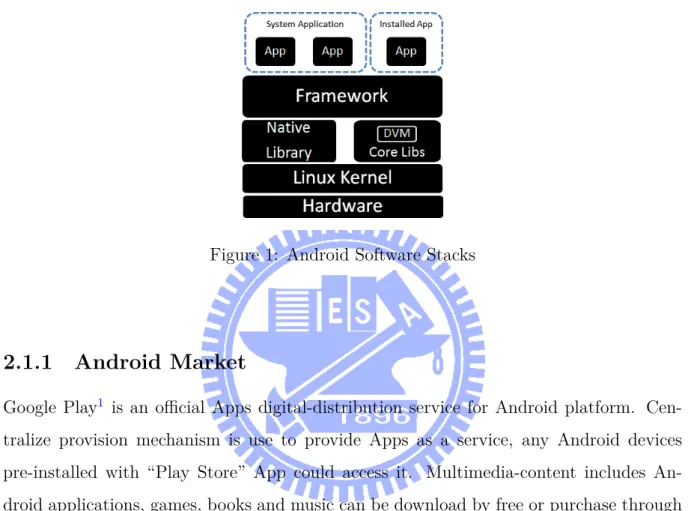
Android is an open source project, free of charge, and Linux-based mobile devices platform led by Google and Open Handset Alliance(OHA). Figure1 shows that Android software stack includes Linux operating system, middleware and build-in applications. Most of the phone functionality implemented as an application running on top of customized mid-dleware, which includes Android runtime, native libraries, and application framework. Application framework programmed in Java language, event driven and component based to support extendable third-party application installation.
At the bottom of Android, hardware layer designed for the ARM architecture and continues to be the primary development platform of the OHA with hundreds of companies contributing to the Android on ARM codebase[15]. It is flexible to integrate with various of vendor, such as HTC, Samsung and others.
Figure 1: Android Software Stacks
2.1.1 Android Market
Google Play1 is an official Apps digital-distribution service for Android platform.
Cen-tralize provision mechanism is use to provide Apps as a service, any Android devices pre-installed with “Play Store” App could access it. Multimedia-content includes An-droid applications, games, books and music can be download by free or purchase through Internet access.
2.1.2 Android APP and Dalvik VM
Figure 2 shows that Android application(“Apps”) is common written in Java language. Once App is ready to deploy, Java sources code will be compile to Java bytecode, e.g. *.class file. Multiple *.class file are also converting into single Dalvik Executable byte-code(DEX) file with 3rd party libraries, e.g. classes.dex. Finally, Android package file, e.g. *.apk file is a packaging file format consist DEX bytecode which ready to deploy Apps in Android platforms and Market(Section2.1.1).
Figure 2: Apps deploy flow.
Dalvik Virtual Machine (Dalvik VM)[16] is implemented by C language as the process virtual machine and Dalvik bytecode parser. Android software stack is able to execute multiple App simultaneously, each App executed within its own unique Dalvik interpreter instance and UNIX privilege.
2.1.3 Android Security and Privacy
We have several terms definitions[17] for the following discussion:
• Jailbroken: An apple iPhone or iPad that has had its apple iOS operating system covertly “unlocked” to gain full root access, removing all apple imposed limitations on applications, and essentially exposing all of an application’s features. This idea also could apply on Android devices, as known as “rooted” with full root access. • Malware: A general term used by computer professionals to mean a variety of
forms of hostile, intrusive, annoying software or program code.
• Spyware: A type of malware that collects information and makes it available, usually secretly sent to a third party. The presence of spyware is typically hide from the user and can be difficult to detect.
• Sandbox: A security mechanism for separating running programs.
2.1.3.1 Security
Android software stack is based on Linux kernel. In other words, it inherits the same weakness from desktop Linux operating system. However, kernel porting is an essential task for the vendor to support the hardware components on their devices. Thus, this would be another possible to punch a hole on Android platform to provide vulnerable
entries.
Beside, on top of kernel layer, Android has their own security architecture[18] asso-ciated with the permission framework[19]. Each Android Apps should be executed in “sandbox” mode. which have specify permission and privilege-separated environment. Some studies [7, 8] show that privilege escalation attacks is able to break out “sand-box” mode and bypass the restrictions. In the meantime, we found some Apps such like z4root[20], Superuser[21] is used to “rooted” the Android devices.
Furthermore, in our previous work AndWar[22], we successfully evaluated privilege escalation attacks was not only happen at application-level, but system-level also affected such as pre-installed Webkit browser, i.e. 1119, 1759, CVE-2010-1807. We realize that what is the worst scenario if Malware and Spyware used the same technic to attack user.
2.1.3.2 Privacy
Privacy is “the ability to determine for ourselves when, how and to what extent informa-tion about us is communicated to others” [23,24]. Sensitive data is the basic material for ‘information about us’, includes geographic location, contacts, unique identifiers number, photo, etc.
2.2 Software Testing
2.2.1 White-box Testing
“White-box testing is a method of testing software that tests internal structures.”[25] A prerequisite for white-box testing is to having access to the source code, before the internal structure inspections, code reviews, and code auditing. Various types of static analysis(Section2.3.1) methods are commonly used as inspections and reviews in software development.
2.2.1.1 Code Coverage
When a function or statement need to examine and ensures that has been tested, code cov-erage tools can be used to evaluate the completeness of the executions. Unit test method or test suite may co-operate in the examination process, to increase higher coverage rate.
2.2.2 Black-box Testing
The opposite to White-box testing, that is black-box testing. Instead of internal structure inspections, black-box testing method tests the functionality of an applications without source code.
2.2.3 Fuzz Testing
Fuzz testing is one of the common technique of software testing, which can be defined as “A highly automated testing technique that covers numerous boundary cases using invalid data (from files, network protocols, API calls, and other targets) as application input to better ensure the absence of exploitable vulnerabilities.”[11] Fuzz testing often threats the application under test as a black box, especially useful in analyzing closed-source, off-the-shelf software and proprietary systems, because in most cases it does not require any access to the source code.
Fuzzer is a kind of tools in fuzz testing, that will generate data or events to repeatedly feet the application with random input. The fuzz input domain of the conditional branch statement “if (x==10)” has only one in 232 chances being exercised if x is a randomly
chosen 32-bit input value. This intuitively explains why random testing usually provides low code coverage.[26] Fuzzer is fast because programs concretely executed, but the cov-erage is probably low because the inputs are generated randomly.
Fuzzing is likely to spend much time to wildly explore the execution paths. Conse-quently, fuzz testing is inefficient for covering all execution paths of the program, but is good at getting some input automatically to crash applications.
2.2.4 Symbolic Execution
Symbolic execution was first introduced around the 1975s[27] and it is a popular software testing technique in recent. The main idea of symbolic execution is to replace the concrete value to symbolic expressions that can assume any value. Its objective is to systematically explore as many paths in a program as possible. Various studies show that symbolic execution has been applied on applications in desktop domain[28] and Web servers[29] for program analysis and bug exploration.
2.3 Vulnerability Analysis
2.3.1 Static Analysis
“Static analysis is off-line analysis that is done to the source code without any require-ment to run the code.”[11] Static analysis is mainly syntax checking of the code and manually reviewing by developer to find bugs. Some of the integrated development en-vironment(IDE e.g., Eclipse) have supported with static analysis plugins, developer can benefit from it to develop and debug in the same time within their development progress. Those plugins (e.g., Findbugs[30], PMD[31]) usually perform real time analysis on the code to find common defects, violation of policies, etc.[32]
Figure 3: Snapshot of static analyzer highlight the problems.[32]
2.3.2 Dynamic Analysis
In contrast to static analysis, “Dynamic analysis is a runtime method that is performed while the software is executing.” [11] Dynamic analysis is more accurate than static anal-ysis, but its analysis overhead is expensive.
Chapter 3
Related Work
3.1 EMMA
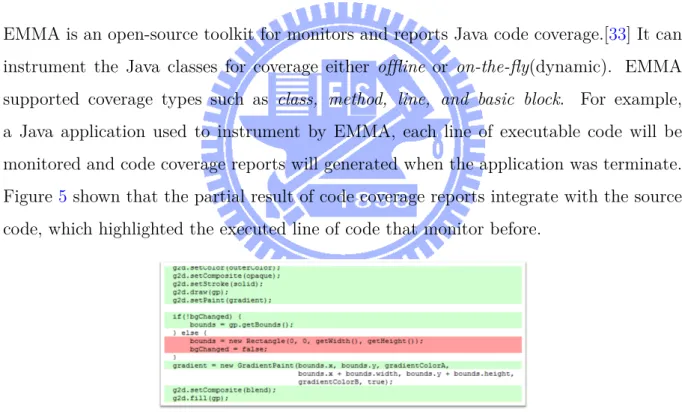
EMMA is an open-source toolkit for monitors and reports Java code coverage.[33] It can instrument the Java classes for coverage either offline or on-the-fly(dynamic). EMMA supported coverage types such as class, method, line, and basic block. For example, a Java application used to instrument by EMMA, each line of executable code will be monitored and code coverage reports will generated when the application was terminate. Figure5 shown that the partial result of code coverage reports integrate with the source code, which highlighted the executed line of code that monitor before.
Figure 5: Snapshot of highlighted executable source code(green color).
3.2 TaintDroid
TaintDroid[9] is a privacy-aware system which tracks the flow of privacy-sensitive data through third-party applications. TaintDroid primary goals are to detect when sensitive
data leaves the system via untrusted applications. Once sensitive data was left via net-work on user’s phone, an real-time alert messages will notify users about data leaks.
TaintDroid uses dynamic taint tracking, an approach to label privacy-sensitive data
and the label propagates through program variables, files, and interprocess messages. Figure 6 shown that a diagram of sensitive data was tainted by TaintDroid, and a real-time notification message was shown for user.
Figure 6: Diagram of sensitive data was tainted by TaintDroid.
In order to achieve monitoring the behavior of App, unmodified Android on user’s phone has to replaced by TaintDroid.
3.3 AppInspector
AppInspection[3] is an automated security validation system. It is a successor project of the TaintDroid(Section 3.2) reseearch group. AppInspection is not realized and public available yet, but the ideas are aim to improve the security of mobile applications by de-tecting malicious or abnormal behavior. To achieve identifies Apps that exhibit malicious behavior, tracking Apps’s behavior have two parts, such as security violation and privacy violations. AppInspection has proposed symbolic execution (Section 2.2.4) in their sys-tem, and used to explore diverse paths of a specific third-party App.
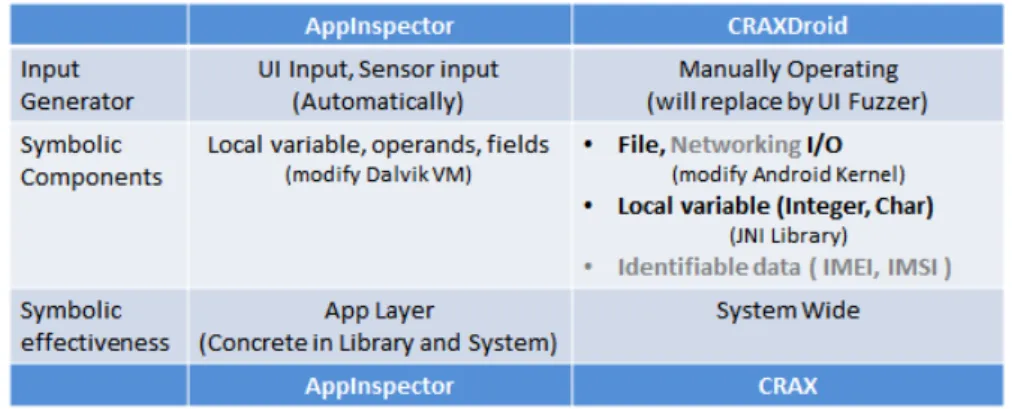
Figure 7: Details of comparison between AppInspector and CRAXDroid.
3.4 Leakalizer
Leakalizer[24] is a system that aims for data leak detection in smartphone applications. It is a successor project of the S2E platform. S2E is a system wide symbolic execution(Section
2.2.4) platform on x86 architecture. Leakalizer is not realized yet, they proposed a proof-of-concept by modify S2E-ARM to integrate with Android emulator. S2E-ARM is another
branch of S2E which is inherit the original functionality and porting to ARM architecture.
3.5 Comparison of related work
Chapter 4
Methods
Our method is mainly based on symbolic execution environment to achieve automatically vulnerability assessment and quality assurance. Symbolic components is a sets of entry point used to propagate symbolic values. UI fuzzer uses fuzzing technique(Section 2.2.3) to generate user interface events, and it try to trigger symbolic execution when symbolic components was accessed. When symbolic execution was propagate through symbolic components, path explorer used to trace the execution within traverse each condition path when the condition was satisfied. During path traverse, some implicit path will be executed cause an unpredictable crash and exception, exception handler used to record those condition and execution states for the report and diagnose purpose. We describes all the details in this chapter.
4.1 Symbolic Components
The core concept for symbolic components is able to be a generic output interface that provides symbolic values. By using symbolic value to construct a component, modules, services, or libraries etc., it become a sets of entry point to propagate symbolic values into the application. For example, an App request to access a file on internal storage, when the file system was already become symbolic component, this activity will trigger to perform symbolic execution.
However, not every files on the file system should become a symbolic component, this is meaningless act to leverage symbolic execution without objective. Moreover, other
sys-tem and services are also need to access the same file syssys-tem. If symbolic execution was performed on every files, this is an extra overhead on our testing environment.
How to trade-off between performance overhead and meaningful testing, we proposes two method to strive for both advantages.
• Selective symbolic execution
– In order to reduce performance overhead, we setup a Boolean flag in testing
environment to decide when the symbolic execution should be enable to per-form.
• Filtering the information that we interested
– Not all the information that are useful, so we can ignore it by filtering. For
example, Apps are usually access file on external storage(“/sdcard”), then we focus on this directory and skip other like system directory(“/system”).
4.2 UI Fuzzer
Fuzzer that used to generate random input is called Monkey[14], as know as Application Exerciser which is kind of testing tools come with Android SDK that used to generate user’s event, e.g. clicks, touches, gestures and repeatedly feed the application. Fuzzer can be configured to automatically generate user’s event to fuzz the application, instead of manually operating by human. Those events are used to simulate user’s behavior to exerciser the usages logic of the application. In the same time, some of those events may trigger an activity to access the symbolic components.
4.3 Path Explorer
Path explorer is the most important part in our testing environment. Exploration of execution paths can be done by using static(Section 2.3.1) and dynamic(Section 2.3.2) approaches. Symbolic execution is one of the dynamic approaches. Its more accurate than existing tools, no false negatives and false positives are the major superior in our
work.
We expect path explorer to explore as many paths as possible during the testing flows, includes explicit paths and implicit paths. In the same time, we trace the program state, execution path and branch condition for diagnoses purpose.
4.4 Exception Handler
Exception is an uncontrollable situation which can not handle by programs. For exam-ple, crash is an unpredictable programs termination usually happen in real world. This main reason for situation caused by the programmers that they do not assigned the error handler in source code. Other reasons such as buffer overflow, memory corruption may effected by some input or read and write memory very frequently. In the other hand, an invalid input may also affect the control flow lead to the exception happening.
The explicit flows will always to be executed, since the if condition was only satisfied by the “conditional true” expression in the control flow. Exception in explicit flows will easily discover by executing the program, but not suitable for implicit flows because its not always to be executed.
As mention in Section4.3, during the progress of path exploration, explicit flows and implicit flows would covered and executed by symbolic exploration engine. In this part, we focused on an external exception handler to intercept the crash signal without inspect the application’s source code.
Chapter 5
Implementation
In this chapter, we explain the details about our method was implemented on top of S2E[34], which is a system wide symbolic execution platform. Our symbolic environment
on S2E that assist symbolic propagation through symbolic components over black-box and
white-box mode. To gain faster testing life cycle, we reduced testing time by porting our environment to x86 Android[35]. Moreover, we have modified Android kernel to intercept system call and collecting exception signal for further diagnosis.
5.1 Symbolic Environment
5.1.1 The architecture of S
2E
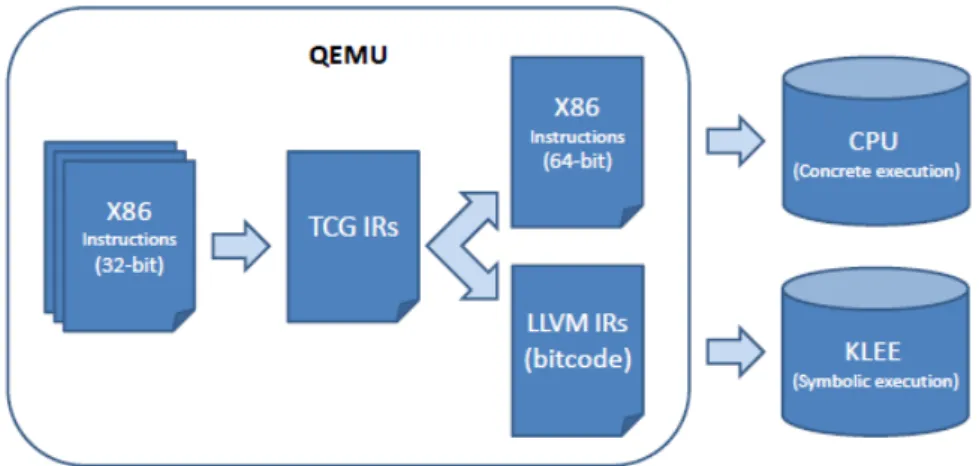
S2E platform has an ability to perform symbolic execution on the whole operation system
rather than applications. This platform come with the combination of QEMU[36] and KLEE[37]. KLEE is a symbolic execution engine build on top of the LLVM compiler infrastructure. It implement symbolic execution by interpreting LLVM bitcode. QEMU is a process emulator that relies on dynamic binary translation to translate instructions between two different CPU architecture. Whenever any programs test inside QEMU emulator accessed symbolic data, S2E platform switch to LLVM back-end to translate
instructions into LLVM bitcode and feed KLEE engine to perform symbolic execution over the whole system. The architecture of S2E is shown in Figure 9
Figure 9: The architecture of S2E.
5.1.2 ARM Android on S
2E
The official Android is formerly designed for ARM architecture and processor. ARM-based processors provider greater power efficiency with higher performance and lower power consumption.[38] Most of the smartphone vendors are embedded ARM-based CPU to gain performance and long lasting battery life.
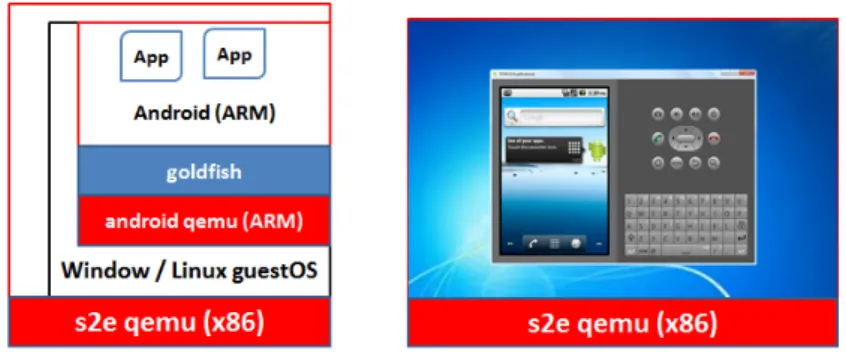
In the development phase, developer allow to test and debug their application in em-ulator that emulates Android environment by Android QEMU come with Android Soft-ware Development Kits(SDK). The emulator is not targeted for specify ARM System-On-Chip(SoC), instead Android QEMU used to create a virtual ARM SoC called Goldfish[39] to replace the functionality of real hardware and periphery devices. Figure10shown that the emulator(as known as Android QEMU) run as virtual machines in a process on the guest operating system. At the first step, Android QEMU uses dynamic binary transla-tion(DBT) to translate ARM instructions into x86 instructions to emulate a smartphone environment. For the second step, S2E emulate whole system environment and prepare
to performs symbolic execution. We do not recommend to experiment on this approach, since S2E QEMU takes more than 5 minutes to boot Windows 7 as the guest operating
system, and we still not successful yet to boot Android on Android QEMU. Emulator that executed in another emulator is complicated and it slow down the testing life cycle.
Leakalizer in Section 3.4 proposed their prototype by porting S2E to ARM. They
Figure 10: The architecture of ARM Android on top of S2E and the screenshot of the
Android emulator that emulates virtual smartphone devices to run Android software stack on x86 S2E QEMU.
5.1.3 x86 Android on S
2E
x86 Android[35] is another unofficial branch of Android, which enabling Android software stack executed on x86 CPU. Besides ARM-based smartphones, x86 Android also porting to some netbooks PC such like Asus Eeepc to run Android as a native operating system. Since x86 Android aim for non-smartphone devices, some phone functionality and
Gold-fish is not necessary to virtualize and implement, i.e. telephone communication, camera,
sensors and others. Although lack of some basic phone functionality, Internet access and App usages still work well in x86 Android.
Figure 11 shown that x86 Android run as native operating system on S2E without
emulate Goldfish. CRAXdroid based this approach to construct an environment for black-box and white-black-box testing mode.
Figure 11: The architecture of x86 Android on top of S2E and the screenshot of the x86
5.1.4 The architecture of CRAXdroid
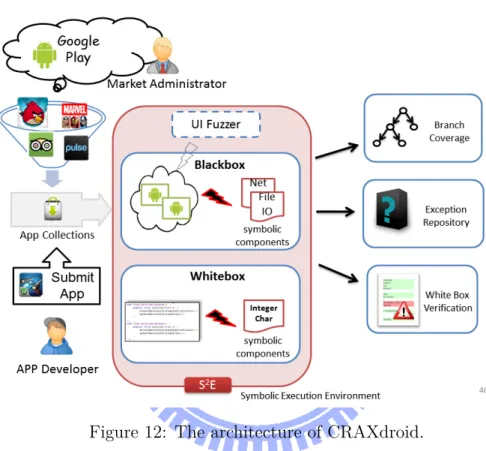
The overall architecture of our CRAXdroid testing environment is based on x86 Android on top of S2E platform shown at Figure 12. In this figure, testing is divided into two
parts which is black-box and white-box mode. Furthermore, three outcome provides by CRAXdroid such as branch coverage details, exception information, and white-box verification.
Figure 12: The architecture of CRAXdroid.
5.2 Symbolic Components
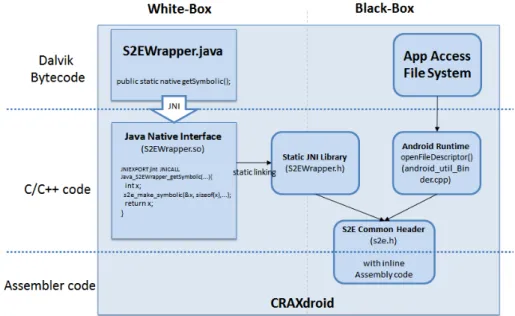
Figure13 shown that CRAXdroid establishes communication between Android and S2E
at three abstraction levels, Java code, C/C++ code, and assembly code. The left side shows that white-box testing is relied on platform layer, while black-box testing at the right side is relied on system layer. We discuss the details in following sub section.
5.2.1 Platform Layer
We defined platform layer which is middleware of Android, i.e. Android runtime, Android API. Android runtime is an essential core libraries that used to support the environment
Figure 13: The implementation of symbolic value propagate through white-box and black-box mode.
for Apps to run smoothly on Android. To archive Apps testing purpose, various of testing units can be inject into the Android runtime. In this layer, we bridge the connection to lower layer(i.e. System-layer) and carry out the symbolic value to construct the testing units(e.g, Char, Int).
For example, Char and Int are the common types used in programming language. Developer is able to leverage the symbolic execution technique by using this types of variable in their source code. The symbolic value can assigned to variable by the native function in Appendix7, which connected to symbolic interfaces.
5.2.2 System Layer
We defined system layer which is OS level, i.e. Linux kernel, Java Native Interface(JNI). In contrast with the platform-layer, system-layer do not need to modify the variable or operands within the Apps source code. Instead, CRAXDroid passively provide the symbolic units “outside the box” as the external components for Apps environment. While the Apps testing in black-box mode, App may require to access the external components such as file I/O, and network I/O. Once the Apps was accessed the external components, symbolic execution will be perform.
5.3 Symbolic Interfaces
S2E platform has provides the x86 inline instructions (i.e., op-codes in s2e.h) to operate
the symbolic execution in QEMU. In order to perform symbolic execution in our testing environment, CRAXDroid have to construct the fundamental instruments for Android testing environment to bridge the connection within S2E. Those instruments was designed
for read-only, since the symbolic value have to propagate from outside to inside, we follow the rule of using S2E platform.
5.3.1 JNI
The Java Native Interface(JNI) is a programming interface that enables Java programmers to integrate native code (i.e., C, C++, and assembly) into Java their applications.
5.3.2 File I/O
File Input and Output are the most common interface for storing the contents in file format, such as photos, songs, PDF documents etc. File I/O interface simply provides
read and write operation to the file content is essentially needed for Android API.
Figure14 shown that the ideas how CRAXDroid hook the file I/O entry points. The
read operation in harmony_io_openImpl() function was intercepted by replace the file
descriptor to symbolic file descriptor. Listing1shows the details of interception between original file descriptor and symbolic memory.
Code 1: org_apache_harmony_luni_platfform_OSFileSystem.cpp (partial code)
441 j i n t f d = open(& path [ 0 ] , f l a g s , mode ) ; 442 /* i n t e r c e p t s t a r t */ 443 i n t s 2 e = open ( . . . , f l a g s , mode ) ; 444 char *m = mmap ( . . . ) ; 445 s2e_make_symbolic (m, 1 , b u f f e r ) ; 446 /* i n t e r c e p t end */ 447 f d = s 2 e ;
Figure 15: The implementation of redirect file descriptor to symbolic memory.
5.4 Exception Repository
5.4.1 Crash Detection
As mention at Section 2.1.2, each Android Apps executed in its own process virtual ma-chine, which is own instance of Dalvik VM. The process VM design has many benefits compared to a single system VM instance that serves all processes in the system.[40] For example, when a single process crash it does not affect other process.
In order to monitor crash happen, we hook the controller that manage life cycle of the Dalvik VM. Once the exception signal was received by controller to terminal the Dalvik VM, we could know that App was crash and terminal in abnormal state.
Chapter 6
Experimental Results
In order to test our method, two experiments we have finished to prove that white-box and black-box testing mode is feasible.
6.1 Experimental Environment
All experiments performed in a virtual machine including 4 vCPU and 4GB vRAM on a 2.7Ghz i7 CPU with 12GB RAM physical machine, Ubuntu 10.10 64-bit desktop edition for the host OS. A VirtualBox 4.1.16 virtual machine within host OS used to in-stall our Android testing environment which is supported networking and allow to upload the experimental Apps into testing environment. S2E QEMU used to boot the installed
Android testing environment to enable perform symbolic execution. Our testing environ-ment is based on x86 Andorid(Froyo-2.2.2, Linux kernel 2.6.38, eeepc version) and S2E
1.1 version.
6.2 Evaluation for White-box testing
In the first part of experiments, we evaluate a test case to prove the feasibility of white-box testing method within CRAXdroid. Besides, this method provide App developers an alternative environment to test and debug their App by inject the symbolic components in their code.
In this code, an integer variable x which is assigned symbolic value by native function
getSymbolicInt(supported from JNI library in Section 5.3.1). Following by a if condition statement, variable x is able to decide the condition and execute the next statements depend on its value.
In case of line 2 do not exist, variable x contain an integer value of 101, condition statement at line 4 will be satisfied and line 5 will be executed next, this if condition statement was successfully come to the end with a single path of branch condition.
Since variable x was assigned a symbolic value at line 2, symbolic execution engine will treat the variable x as an abstract symbol (“λ”). When line 4 was executed, λ == 101 will trigger a serial of symbolic execution in symbolic execution engine to solving the solution for λ to fulfill every possible condition in the statements.
Code 2: Java code within white-box testing mode
1 int x = 1 0 1 ;
2 x = getSymbolicInt ( ” s ” ) ; 3
4 i f ( x == 101) {
5 k i l l S t a t e ( 1 , ” i f branch ’ x == 1 0 1 ’ . example : ”+ getExampleValue ( x ) ) ; 6 } else i f ( x >= 50) {
7 i f ( x == 75 ){
8 printWarning ( ”x==75, CRASH! ” ) ; 9 throw new Bad ( ) ;
10 } 11
12 k i l l S t a t e ( 3 , ” e l s e i f branch ’ x >= 5 0 ’ . example : ”+ getExampleValue ( x ) ) ; 13 } else {
14 k i l l S t a t e ( 4 , ” e l s e branch ’ x != 1 0 1 ’ . example : ”+ getExampleValue ( x ) ) ; 15 }
As the results, Listing 4 shows the partial results of symbolic execution during tra-verse all the possible condition statement as we expected. We notice line 4,18,24 are corresponding to line 14,12,5 Listing2in order, this result had proven symbolic execution within the white-box testing mode is feasible.
genera-tor.
• Exception handler: An exception we prepared at line 9 “throw new Bad()” used to crash the App, and we expect the exception handler is able to capture exception while performing symbolic execution. Figure 16shown that a warning message from our testing environment when App crash(Figure 17) was happened.
• Test case generator: By using native function getExampleValue(supported from JNI library in Section5.3.1), symbolic executor will able to return an example value of λ in the current state. This is useful information for developer used to debugging what the value will leading the condition statement to execute current path. For example, Line 18 in Listing 4 “elseif branch ‘x >= 50’ . example : 1073741824” shown that λ has resolved in the equation λ >= 50 by the constraint solver, and return an example value 1073741824 for λ which is satisfied the equation λ >= 50.
Code 3: Line 8-10 of the Code 4.
8 x==75, CRASH! 9 s2e_pathid : 2
10 uncaught ex cep ti o n [ 1 ] threadId : 1
Figure 16: Message shows that crash has de-tected.
Figure 17: A snapshot of GUI that our App was crashed.
The time spent during the first experiment is shown at the following Table 2.
Table 1: Evaluation for white-box testing
Line of Crash / Total execution Total symbolic Average time Test Case
Code States time(sec.)* time(sec.) per state(sec.) symbolic int - 1 / 4 168 3 1 * time counted from booting Android testing environment to symbolic execution was
Code 4: Results of white-box testing mode with symbolic execution (partial)
1 . . .
2 166 [ State 1 ] K i l l i n g s t a t e 1
3 166 [ State 1 ] Terminating s t a t e 1 with message ’ State was terminated by opcode 4 message : ” e l s e branch ’ x < 5 0 . example : 0”
5 s t a t u s : 4 ’
6 166 [ State 1 ] Switching from s t a t e 1 to s t a t e 2 7 . . .
8 166 [ State 2 ] Message from guest (0 x816a068 ) : x==75, CRASH! 9 167 [ State 2 ] Message from guest (0 xbfc85e3a ) : s2e_pathid : 2
10 167 [ State 2 ] Message from guest (0 xbfc85e3a ) : @@@ uncaught e xc e pt io n [ 1 ] threadId : 1 11 167 [ State 2 ] K i l l i n g s t a t e 2
12 167 [ State 2 ] Terminating s t a t e 2 with message ’ State was terminated by opcode 13 message : ” k i l l s t a t e !
14 167 [ State 2 ] Switching from s t a t e 2 to s t a t e 3 15
16 167 [ State 3 ] K i l l i n g s t a t e 3
17 167 [ State 3 ] Terminating s t a t e 3 with message ’ State was terminated by opcode 18 message : ” e l s e i f branch ’ x >= 50 ’ . example : 1073741824”
19 s t a t u s : 3 ’
20 167 [ State 3 ] Switching from s t a t e 3 to s t a t e 0 21
22 168 [ State 0 ] K i l l i n g s t a t e 0
23 168 [ State 0 ] Terminating s t a t e 0 with message ’ State was terminated by opcode 24 message : ” i f branch ’ x == 101 ’ . example : 101”
25 s t a t u s : 1 ’ 26
27 A l l s t a t e s were terminated
6.3 Evaluation for Black-box testing
In the second part of experiments, we evaluate Apps from developer, Android Mar-ket(Section 2.1.1) and pre-installed App with black-box testing method within
CRAX-droid. We have to change our testing strategy and switch to another symbolic
compo-nents(Section4.1), since those Apps are needed to test without source code.
Listing5shows the Java code we used to deploy as our testing App. This sample App demonstrate to access a file on the device, the contents of the file become a condition for the if statement at line 6.
Code 5: Java code used to deploy as App
1 FileInputStream f s = new FileInputStream ( ”/ sdcard / t e s t . t x t ” ) ; 2 3 /*** Byte 1 ***/ 4 c=f s . read ( ) ; 5 6 i f ( c >100){ 7 printWarning ( ”Char [ 0 ] : >100\n” ) ; 8 i f ( c==101){ 9 printWarning ( ”\tChar [ 0 ] : == 101\n” ) ; 10 k i l l S t a t e ( 10 1 , Symbolic Execution at ==101 ” ) ; 11 } e l s e { 12 printWarning ( ”\tChar [ 0 ] : != 100\n” ) ; 13 k i l l S t a t e ( 10 2 , ” Symbolic Execution at !=101 ” ) ; 14 } 15 } e l s e { 16 printWarning ( ”Char [ 0 ] : <100\n” ) ; 17 i f ( c==0){ 18 printWarning ( ”\tChar [ 0 ] : == 0\n” ) ; 19 k i l l S t a t e ( 0 , ” Symbolic Execution at ==0 ” ) ; 20 } e l s e { 21 printWarning ( ”\tChar [ 0 ] : != 0\n” ) ; 22 k i l l S t a t e ( 1 , ” Symbolic Execution at !=0 ” ) ; 23 } 24 }
The testing output messages at Listing 6 was similar to white-box testing, but the different is those Apps in this experiment are test in black-box mode which sources code are avoidable.
Table 2: Evaluation for black-box testing
Line of Crash/ Total execution Total symbolic Average time File Test Case
Code States time(sec.)* time(sec.) per file(sec.) accessed. S2EWrapper (symbolic file) - - / 4 192 5 5 1 File Manager (pre-installed) - 1 / 14 205 18 6 3 * time counted from booting Android testing environment to symbolic execution was
Code 6: Outputs of black-box testing with symbolic execution (partial)
1 . . .
2 190 [ State 0 ] Message from guest (0 x824de18 ) : Char [ 0 ] : >100 3 . . .
4 191 [ State 0 ] Switching from s t a t e 0 to s t a t e 3 5
6 191 [ State 3 ] Message from guest (0 x824de30 ) : Char [ 0 ] : != 100 7 192 [ State 3 ] K i l l i n g s t a t e 3
8 192 [ State 3 ] Terminating s t a t e 3 with message ’ State was terminated by opcode 9 message : ” Symbolic Execution at !=101 ”
10 s t a t u s : 102 ’
11 192 [ State 3 ] Switching from s t a t e 3 to s t a t e 0 12
13 192 [ State 0 ] Message from guest (0 x824de30 ) : Char [ 0 ] : == 101 14 192 [ State 0 ] K i l l i n g s t a t e 0
15 192 [ State 0 ] Terminating s t a t e 0 with message ’ State was terminated by opcode 16 message : ” Symbolic Execution at ==101 ”
17 s t a t u s : 101 ’ 18 . . .
Chapter 7
Conclusions and Further Work
7.1 Conclusion
In this thesis, we have implemented the CRAXdroid - an App validation platform. We aim at quality assurance and vulnerability assessment to enhance the quality of service for Android Market. Our App validation process is kind of “certification services” using automated software testing as a service(TaaS[41]), which can publicly provide measured reliability and safety for Android Apps. By reducing the defect density during Apps de-velopment process, developers are able to eliminate bugs to maintain quality assurance. Market administrators also have the responsibility to clean up malicious Apps through vulnerability assessment.
We implemented white-box and black-box testing in tailored environment on top of S2E, on sample Apps. Our experiment results reveal that it is feasible to test with Apps
on the Market by symbolic execution without source code.
7.2 Future Work
Our CRAXdroid are still with limitations, due to issues not resolved. We discuss future work in the following.
• More symbolic components
– Our implementation tries to bridge the gap between symbolic components and
symbolic interfaces. In order to increase the coverage ratio, developing the low-level symbolic interface is essential to support more symbolic components.
As has mentioned, more entry points to trigger symbolic execution will intro-duce more overhead. We do not consider yet to make symbolic variables for all the local variable, operands and fields within the App, instead we seek for an objective by asking a question “Are those components are of our interests for quality assurance purpose?”. For example, we may symbolize the unique device identified number(UID, e.g. IMSI, IMEI) to detect the suspicious App which leaks UIDs and causes the privacy violations. Moreover, symbolic network IO is a possible aid to analyze symbolic values transferred through network by Apps.
• Data Leak Prevention (DLP)
– When user’s privacy(Section 2.1.3.1) was leaked to the third-party organiza-tion, it will cause the privacy violation. Since the “privacy” information is store as program data, dynamic taint analysis like TaintDroid(Section3.2) try to monitor the data flow, as known as Data Leak Detection.
We cover dynamic taint analysis in CRAXdroid, by replacing the privacy data with the symbolic values. While the symbolic value was propagated through all the execution paths, we can treat the propagation flow as data flow. When the symbolic values go through network interfaces, leaking behaviors is highly suspicious.
• UI Fuzzer
– To leverage fully automate testing flow, UI fuzzer is required to simulate
man-ual operation by human. However, the coverage rate for UI fuzzing flow was probably low, since fuzzing do not have control flow or “step-by-step” mecha-nism.
In addition, we may consider to use symbolic value to fuzz as an input at UI widgets, e.g textbox, Spinners(drop down list), and Pickers(date selector). • x86/ARM JNI
– x86 Android was chosen as our testing environment. Our environment is fast,
and it is able be deployed in large scale or in the cloud environment. Unfor-tunately, part of Apps are using native ARM libraries for their JNI. Due to hardware limitation, instructions within ARM libraries were unable to execute on x86 CPU. This type of Apps cannot be tested in white-box nor black-box mode in CRAXdroid. We look forward to seeking a reliable solution for this challenge.
Reference
[1] Google terms of service. http://www.google.com/intl/en/policies/terms/.
[2] Android developer distribution agreement.
http://www.android.com/us/developer-distribution-agreement.html.
[3] P. Gilbert, B.G. Chun, L.P. Cox, and J. Jung. Vision: automated security validation of mobile apps at app markets. In Acm, editor, Proceedings of the second international
workshop on Mobile cloud computing and services, pages 21–26, 2011.
[4] Y. Zhou, Z. Wang, W. Zhou, and X. Jiang. Hey, you, get off of my market: Detecting malicious apps in official and alternative android markets. In Proceedings of the 19th
Annual Network and Distributed System Security Symposium, 2012.
[5] A.-D. Schmidt, H.-G. Schmidt, L. Batyuk, J.H. Clausen, S.A. Camtepe, S. Albayrak, and C. Yildizli. Smartphone malware evolution revisited: Android next target? In
Proceedings of the 4th IEEE International Conference on Malicious and Unwanted Software (Malware 2009), pages 1–7. Ieee, 2009.
[6] Aubrey-Derrick Schmidt and Sahin Albayrak. Malicious software for smartphones. technical report tub-dai 02/08-01. Technical report, 2008.
[7] S. Bugiel, L. Davi, A. Dmitrienko, T. Fischer, A.R. Sadeghi, and B. Shastry. Towards taming privilege-escalation attacks on android. In Proc. of the 19th Network and
Distributed System Security Symposium (NDSS 2012), San Diego, CA, 2012.
[8] L. Davi, A. Dmitrienko, A.R. Sadeghi, and M. Winandy. Privilege escalation attacks on android. Information Security, pages 346–360, 2011.
[9] W. Enck, P. Gilbert, B.G. Chun, L.P. Cox, J. Jung, P. McDaniel, and A.N. Sheth. Taintdroid: An information-flow tracking system for realtime privacy monitoring
on smartphones. In USENIX Association, editor, Proceedings of the 9th USENIX
conference on Operating systems design and implementation, pages 1–6, 2010.
[10] C. Gibler, J. Crussell, J. Erickson, and H. Chen. Androidleaks: Automatically de-tecting potential privacy leaks in android applications on a large scale. Trust and
Trustworthy Computing, pages 291–307, 2012.
[11] A. Takanen, J. DeMott, and C. Miller. Fuzzing for software security testing and
quality assurance. Artech House, 2008.
[12] Android testing framework. http://developer.android.com/tools/testing/testingandroid.html.
[13] Android instrumentation framework – junit. http://developer.android.com/tools/testing/testingandroid.html#J U nit. [14] Ui/application exerciser monkey. http://developer.android.com/tools/help/monkey.html.
[15] Solution center for android – arm. http://www.arm.com/community/software-enablement/google/solution-center-android/.
[16] D. Bornstein. Dalvik vm internals. In Google I/O Developer Conference, volume 23, pages 17–30, 2008.
[17] Inc. Juniper Networks. Malicious mobile threats report 2010/2011. Technical report. [18] http://developer.android.com/guide/topics/security/permissions.html. [19] http://developer.android.com/reference/android/Manifest.permission.html. [20] z4root. http://forum.xda-developers.com/showthread.php?t=833953. [21] Superuser. http://forum.xda-developers.com/showthread.php?t=682828, https://play.google.com/store/apps/details?id=com.noshufou.android.su. [22] Android wargame. http://140.113.87.234/.
[23] W. Uzgalis and E. Zalta. The stanford encyclopedia of philosophy. The Stanford
Encyclopedia of Philosophy, 2008.
[24] Andreas Kirchner. Data leak detection in smartphone application. 2011. [25] White-box testing – wikipedia. http://en.wikipedia.org/wiki/White-boxtesting.
[26] P. Godefroid. Random testing for security: blackbox vs. whitebox fuzzing. In
Proceedings of the 2nd international workshop on Random testing: co-located with the 22nd IEEE/ACM International Conference on Automated Software Engineering (ASE 2007), Rt â07, page 1, New York, NY, USA, 2007. Acm.
[27] J.C. King. Symbolic execution and program testing. Communications of the ACM, 19(7):385–394, 1976.
[28] Po-Yen Huang. Automated exploit generation for control-flow hijacking attacks. 2011.
[29] Wai-Meng Leong. Automaticweb testing and attack generation. 2012. [30] Findbugs. http://findbugs.sourceforge.net/.
[31] Pmd. http://pmd.sourceforge.net/pmd-5.0.0/.
[32] Eclipse – static analysis. http://wiki.eclipse.org/CDT/designs/StaticAnalysis. [33] Emma: a free java code coverage tool. http://emma.sourceforge.net/.
[34] V. Chipounov, V. Kuznetsov, and G. Candea. S2e: a platform for in-vivo multi-path analysis of software systems. SIGPLAN Not., 46(3):265–278, 2011.
[35] Android-x86 project. http://www.android-x86.org/.
[36] F. Bellard. Qemu, a fast and portable dynamic translator. In Proceedings of the
annual conference on USENIX Annual Technical Conference, Atec â05, page 41,
Berkeley, CA, USA, 2005. USENIX Association.
[37] C. Cadar, D. Dunbar, and D. Engler. Klee: Unassisted and automatic generation of high-coverage tests for complex systems programs. In USENIX Association, ed-itor, Proceedings of the 8th USENIX conference on Operating systems design and
implementation, pages 209–224, 2008.
[38] Cortex-a9 processor. http://www.arm.com/products/processors/cortex-a/cortex-a9.php.
[40] Vishal Kanaujia. Virtual machines for abstraction: The dalvik vm.
http://www.linuxforu.com/2011/06/virtual-machines-for-abstraction-dalvik-vm/.
[41] G. Candea, S. Bucur, and C. Zamfir. Automated software testing as a service. In Proceedings of the 1st ACM symposium on Cloud computing, SoCC â10, pages 155–160, New York, NY, USA, 2010. Acm.
Appendix A
Simple codes and raw output results
Code 7: Native function through JNI.
1 public class S2EWrapper
2 {
3 public static native int getVersion ( ) ;
4 public static native void printMessage ( S t r i n g message ) ;
5 public static native void printWarning ( S t r i n g warning ) ;
6 public static native void enableForking ( ) ;
7 public static native void d i s a b l e F o r k i n g ( ) ;
8 public static native void k i l l S t a t e ( int s t a t u s , S t r i n g message ) ;
9
10 public static native int getSymbolicInt ( S t r i n g name ) ;
11 public static native char getSymbolicChar ( S t r i n g name ) ;
12 public static native S t r i n g getTime ( ) ;
13
14 public static native int getExampleValue ( int symbvar ) ;
15 public static native int c o n c r e t i z e ( int var ) ;
16 public static native void assertThat ( boolean condit ion , S t r i n g f a i l M e s s a g e ) ;
17
18 //Load th e l i b r a r y from JNI
19 static {
20 System . loadLibrary ( ”S2EWrapper” ) ; 21 }
22 23 }
Code 8: Outputs of white-box instrument and symbolic execution (full version)
165 [ State 0 ] I n s e r t i n g symbolic data at 0 xbfc85a7c o f s i z e 0x4 with name ’ s ’ 165 [ State 0 ] Forking s t a t e 0 at pc = 0x82408758 i n t o s t a t e s :
s t a t e 0 with c o n d i t i o n (Eq (w32 101) (ReadLSB w32 0 v0_s_0 ) )
s t a t e 1 with c o n d i t i o n ( Not (Eq (w32 101) (ReadLSB w32 0 v0_s_0 ) ) )
165 [ State 0 ] Switching from s t a t e 0 to s t a t e 1
165 [ State 1 ] Forking s t a t e 1 at pc = 0x82408798 i n t o s t a t e s : s t a t e 1 with c o n d i t i o n ( S l t (ReadLSB w32 0 v0_s_0) (w32 5 0 ) )
s t a t e 2 with c o n d i t i o n ( Not ( S l t (ReadLSB w32 0 v0_s_0) (w32 5 0 ) ) )
166 [ State 1 ] K i l l i n g s t a t e 1
166 [ State 1 ] Terminating s t a t e 1 with message ’ State was terminated by opcode message : ” e l s e branch ’ x < 50 ’ . example : 0”
s t a t u s : 4 ’
166 [ State 1 ] Switching from s t a t e 1 to s t a t e 2
166 [ State 2 ] Forking s t a t e 2 at pc = 0x82408758 i n t o s t a t e s : s t a t e 2 with c o n d i t i o n (Eq (w32 75)
(ReadLSB w32 0 v0_s_0 ) )
s t a t e 3 with c o n d i t i o n ( Not (Eq (w32 75) (ReadLSB w32 0 v0_s_0 ) ) )
166 [ State 2 ] Message from guest (0 x816a068 ) : x==75, CRASH! 167 [ State 2 ] Message from guest (0 xbfc85e3a ) : s2e_pathid : 2
167 [ State 2 ] Message from guest (0 xbfc85e3a ) : @@@ uncaught e xc e pt io n [ 1 ] threadId : 1 167 [ State 2 ] K i l l i n g s t a t e 2
167 [ State 2 ] Terminating s t a t e 2 with message ’ State was terminated by opcode message : ” k i l l s t a t e !
167 [ State 2 ] Switching from s t a t e 2 to s t a t e 3 167 [ State 3 ] K i l l i n g s t a t e 3
167 [ State 3 ] Terminating s t a t e 3 with message ’ State was terminated by opcode message : ” e l s e i f branch ’ x >= 5 0 ’ . example : 1073741824 ”
s t a t u s : 3 ’
167 [ State 3 ] Switching from s t a t e 3 to s t a t e 0 168 [ State 0 ] K i l l i n g s t a t e 0
168 [ State 0 ] Terminating s t a t e 0 with message ’ State was terminated by opcode message : ” i f branch ’ x == 1 0 1 ’ . example : 101 ”
s t a t u s : 1 ’
Code 9: Outputs of black-box instrument and symbolic execution (full version)
187 [ State 0 ] Forking s t a t e 0 at pc = 0x82408858 i n t o s t a t e s : s t a t e 0 with c o n d i t i o n ( S l t (w32 100)
(And w32 ( SExt w32 (Read w8 0 v2_txtbuf [ a ] _2) ) (w32 2 5 5 ) ) )
s t a t e 1 with c o n d i t i o n ( Not ( S l t (w32 100)
(And w32 ( SExt w32 (Read w8 0 v2_txtbuf [ a ] _2) ) (w32 2 5 5 ) ) ) )
187 [ State 0 ] Switching from s t a t e 0 to s t a t e 1
187 [ State 1 ] Message from guest (0 x824de18 ) : Char [ 0 ] : <100 187 [ State 1 ] Forking s t a t e 1 at pc = 0x824088d0 i n t o s t a t e s :
s t a t e 1 with c o n d i t i o n (Eq (w32 0)
(And w32 ( SExt w32 (Read w8 0 v2_txtbuf [ a ] _2) ) (w32 2 5 5 ) ) )
s t a t e 2 with c o n d i t i o n ( Not (Eq (w32 0)
(And w32 ( SExt w32 (Read w8 0 v2_txtbuf [ a ] _2) ) (w32 2 5 5 ) ) ) )
188 [ State 1 ] Switching from s t a t e 1 to s t a t e 2
189 [ State 2 ] Message from guest (0 x824de30 ) : Char [ 0 ] : != 0 189 [ State 2 ] K i l l i n g s t a t e 2
189 [ State 2 ] Terminating s t a t e 2 with message ’ State was terminated by opcode message : ” Symbolic Execution at !=0 ”
s t a t u s : 1 ’
189 [ State 2 ] Switching from s t a t e 2 to s t a t e 1 190 [ State 1 ] K i l l i n g s t a t e 1
190 [ State 1 ] Terminating s t a t e 1 with message ’ State was terminated by opcode message : ” Symbolic Execution at ==0 ”
s t a t u s : 0 ’
190 [ State 1 ] Switching from s t a t e 1 to s t a t e 0
190 [ State 0 ] Message from guest (0 x824de18 ) : Char [ 0 ] : >100 190 [ State 0 ] Forking s t a t e 0 at pc = 0x82408758 i n t o s t a t e s :
s t a t e 0 with c o n d i t i o n (Eq (w32 101)
(And w32 ( SExt w32 (Read w8 0 v2_txtbuf [ a ] _2) ) (w32 2 5 5 ) ) )
s t a t e 3 with c o n d i t i o n ( Not (Eq (w32 101)
(And w32 ( SExt w32 (Read w8 0 v2_txtbuf [ a ] _2) ) (w32 2 5 5 ) ) ) )
191 [ State 0 ] Switching from s t a t e 0 to s t a t e 3
191 [ State 3 ] Message from guest (0 x824de30 ) : Char [ 0 ] : != 100 192 [ State 3 ] K i l l i n g s t a t e 3
192 [ State 3 ] Terminating s t a t e 3 with message ’ State was terminated by opcode message : ” Symbolic Execution at !=101 ”
192 [ State 3 ] Switching from s t a t e 3 to s t a t e 0
192 [ State 0 ] Message from guest (0 x824de30 ) : Char [ 0 ] : == 101 192 [ State 0 ] K i l l i n g s t a t e 0
192 [ State 0 ] Terminating s t a t e 0 with message ’ State was terminated by opcode message : ” Symbolic Execution at ==101 ”
s t a t u s : 101 ’ A l l s t a t e s were terminated

![Figure 4: Snapshot of problem details provided by static analyzer.[32]](https://thumb-ap.123doks.com/thumbv2/9libinfo/8710173.199933/19.892.188.749.938.1046/figure-snapshot-problem-details-provided-static-analyzer.webp)