國
立
交
通
大
學
資訊科學與工程研究所
碩
士
論
文
非同步雙向圓環面連結網路
Asynchronous Interconnection Network using Torus Topology
研 究 生:蔡嘉承
指導教授:陳昌居 教授
非同步雙向圓環面網路連結
Asynchronous Bi-direction Interconnection Network Implementation
using Torus Topology
研 究 生:蔡嘉承 Student:Chia-Cheng Tsai
指導教授:陳昌居 Advisor:Chang-Jiu Chen
國 立 交 通 大 學
資 訊 科 學 與 工 程 研 究 所
碩 士 論 文
A ThesisSubmitted to Institute of Computer Science and Engineering College of Computer Science
National Chiao Tung University in partial Fulfillment of the Requirements
for the Degree of Master
in
Computer Science
June 2009
Hsinchu, Taiwan, Republic of China
i
非同步雙向圓環面連結網路實作
學生:蔡嘉承 指導教授:陳昌居教授
國立交通大學
資訊科學與工程研究所
摘要
NOC 在近年來是一門十分熱門的科目。而如何有效率的連結不同頻率的處理器是一 項十分困難的工作。所幸,使用非同步電路設計以及托拉斯連結網路可以很方便快速的 解決以上的問題。在非同步電路中,元件的同步化是使用訊號交換而不是時脈,所以兩 個不同時脈的原件可以很容易的彼此溝通。而拖拉斯連結網路利用額外的資料連線加速 資料的傳遞。在資料傳送方面,我們使用包裹傳送的方式,透過改良的演算法,使得整 個網路連結系統不會有死結以及資料先後次序的問題發生。經過軟體模擬,資料經過一 個路由器只需要大約 40000ps,且在大量資料同時傳輸時也不會有死結產生。ii
Asynchronous Bi-direction Interconnection Network
Implementation using Torus Topology
Student: Chia-Cheng Tsai Advisor: Prof. Chang-Jiu Chen
Department of Computer Science and Information Engineering
National Chiao Tung University
Abstract
NOC is a popular topic in recent year, and how to efficiency to connect processors with
different frequency are very hard. But, if we use asynchronous circuits design and torus
system, the problems can be solved easily. In asynchronous circuits, it uses handshaking to
replace the clock to synchronous every sub-circuits, and the torus system uses extra data paths
to reduce the transfer time. We use packet-switching and the new algorithms to avoid the
deadlock and make sure the packet sequence. By simulation, the packets spend about 40000ps
to pass through one router, and there would not cause deadlock happen when the system is
iii
Acknowledgement
能夠順利完成這份論文,首先要感謝我的指導教授-陳昌居老師。在老師兩年的指 導之下,讓我獲益良多,也啟發我對研究的興趣。接著要感謝實驗室的博士班學長-鄭 緯民學長、張元騰學長以及蔡宏岳學長給予我的論文許多寶貴的意見以及實驗器材操作 上許多的指點,讓我少走許多冤枉路,省下許多時間。再來要感謝實驗室夥伴們以及大 學和碩士班時期的同學們給予的加油與鼓勵,有你們的支持,才讓我有動力完成論文。 最後要感謝家人的支持,讓我在研讀碩士之路沒有後顧之憂。感謝大家!iv
CONTENTS
摘要………..i Abstract…………..………...ii Acknowledgement………....iii CONTENTS………...iv List of Figures………...vi List of Tables………viii Chapter 1 Introduction………...1Chapter 2 Related Works……….3
2.1 Asynchronous Circuit Design………3
2.1.1 Advantages………...3 2.1.2 Handshaking protocol……….……….5 2.2 Interconnection Networks………...9 2.2.1 Shared Bus……….………9 2.2.2 Net………11 2.2.3 Mesh………12 2.2.4 Torus system………13 2.2.5 Comparison………14 2.3 Data Transfer………...18 2.3.1 Wormhole………18 2.3.2 Packet-switching………...19 2.3.3 Deadlock……….20 2.3.4 Starvation………20 2.3.5 Comparison………20 2.4 C-element………..21
v Chapter 3 Design………...23 3.1 Data Flow………..……….24 3.2 System………...26 3.3 Routing Algorithm………..………...31
3.3.1
Algorithm 1: Arrival………...313.3.2
Algorithm 2: Direct-decision………...333.3.3
Algorithm 3: Head-Building………...34 3.4 Packet Sequence………...37 3.5 Router………...373.5.1
Packet Formats………...373.5.2
Head-Builder………...393.5.3
Arbitrator_One………...403.5.4
Arbitrator_Two………...453.5.5
FIFO………...48 Chapter 4 Simulation………...52 4.1 Time Simulation………...52 4.2 Area Simulation………...56 4.3 Comparison………...57Chapter 5 Conclusion and Future Works………59
vi
Lists of Figures
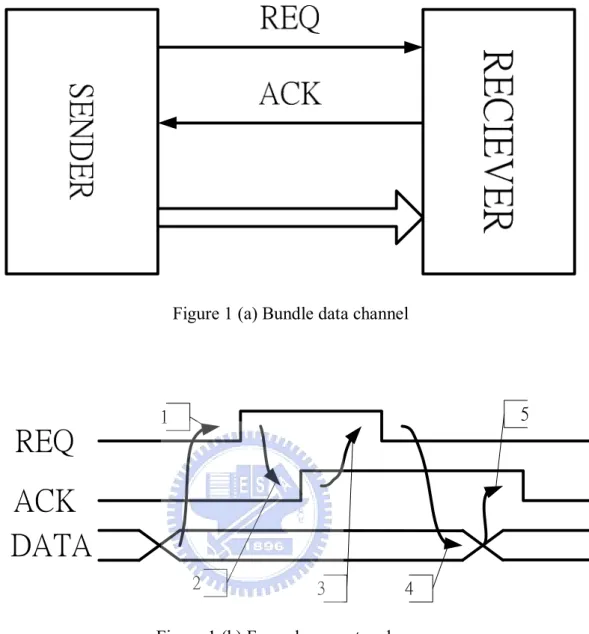
Figure 1 (a) Bundle data channel………6
Figure 1 (b) Four-phase protocol………..………6
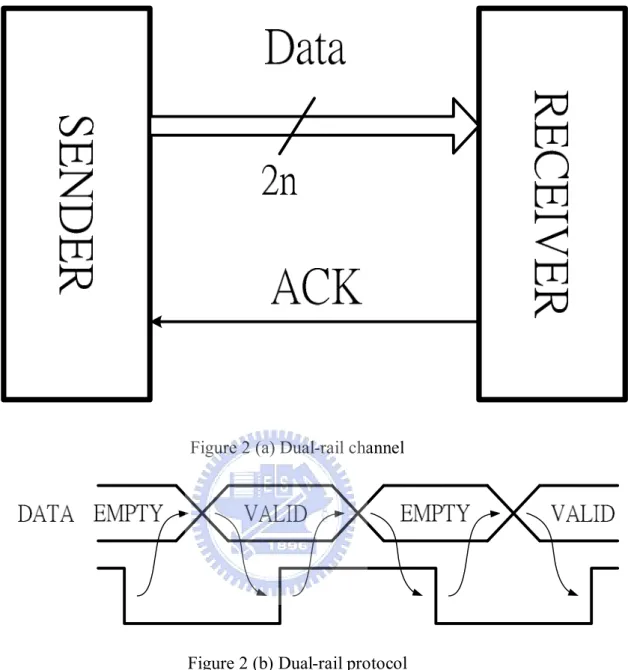
Figure 2 (a) Dual-rail………...8
Figure 2 (b) Dual-rail protocol………8
Figure 3 Transfer diagram………...……9
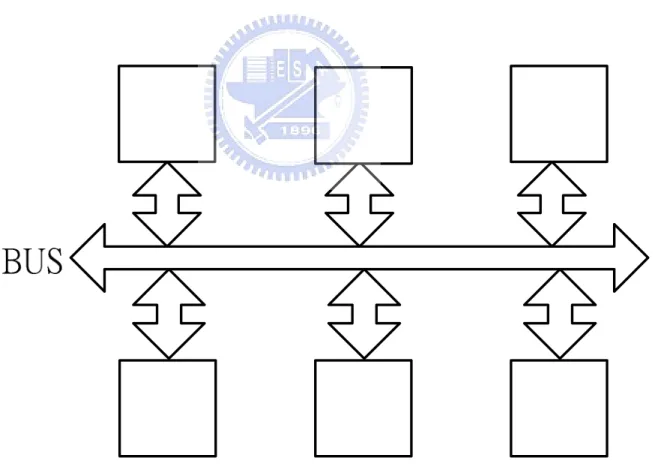
Figure 4 Sharing Bus……….10
Figure 5 The Net system……….11
Figure 6 The Mesh system………..……13
Figure 7 The torus system………14
Figure 8 The data paths of Mesh system………...16
Figure 9 The data paths of uni-direction torus system………16
Figure 10 The data paths of Bi-direction torus system…..………16
Figure 11 (a) C-element……...……….22
Figure 11 (b) C-element with RESET……….22
Figure 12 Data Flow (1)………24
Figure 13 Data Flow (2)…...……….25
Figure 14 Router’s Architecture………26
Figure 15 The torus system………...………28
Figure 16 Transfer order 1………30
Figure 17 Transfer order 2………30
Figure 18 Algorithm 1: Arrival……….………31
Figure 19 Algorithm 2: Direct-decision………33
Figure 20 Algorithm 3: Head-building………..………34
vii
Figure 22 (a) Data format………..………38
Figure 22 (b) Data format……….………38
Figure 23 (a) HEAD………..………38
Figure 23 (b) HEAD……….………38
Figure 24 Head-builder……….………39
Figure 25 The detail design of Head-builder………40
Figure 26 Arbitrator_One………...…...………41
Figure 27 MUX_ONE ………..………42
Figure 28 REGISTER and COMPARE_1………43
Figure 29 DEMUX………44
Figure 30 Arbitrator_Two………...…………..………45
Figure 31 MUX in detail………46
Figure 32 COMPARE_2………...………47
Figure 33 DEMUX_2………48
Figure 34 FIFO………..………49
Figure 35 REGISTER in detail……….………50
Figure 36 Multi-inputs C-element……….………51
Figure 37 To the FIFO………...………53
Figure 38 To the Processor………53
Figure 39 FIFO………..………54
Figure 40 From FIFO………54
viii
Lists of Tables
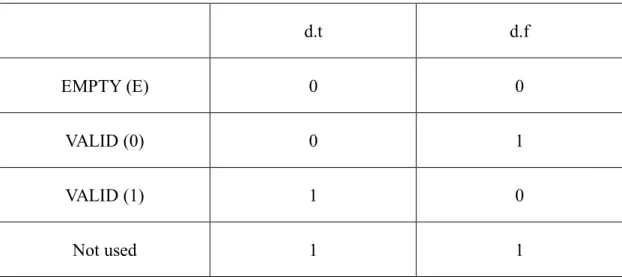
Table 1 Encoding method………...………7
Table 2 The number of data paths (16 routers)………..………...………15
Table 3 Critical and average of data paths………17
Table 4 The size of packets………...………20
Table 5 C-element truth table………21
Table 6 Direction Results………..………35
Table 7 COMPARE signals………...………...………47
Table 8 Time Simulation of bi-direction torus system……….…56
Table 9 Time Simulation of uni-direction torus system………...56
Table 10 Area Simulation of bi-direction torus system………....57
1
Chapter 1 Introduction
NOC (Network on Chip) becomes a famous topic in recent year [6]. How to connect
processors with different frequencies on the chip is a very important and hard issue. Focus on
this issue, we design a new kind of interconnection network using bi-direction torus system
and asynchronous circuits design to solve the connecting problem [7].
Asynchronous circuits design is one of the popular design ways in circuits design.
Asynchronous circuits design is different with synchronous circuits design, it is an emerging
design. The asynchronous circuits do not have a clock, they use handshaking protocols to
replace a global clock to synchronous the sub-circuits’ communications. Based on this
difference place, asynchronous circuits design has its own styles of designs to realize the
circuits, and those designs bring lots of advantages for the asynchronous circuits, such as
decreasing the power costs, the circuits are modularity …etc [1]. So our designs are all based
on asynchronous circuits design [2].
The other important topic is the interconnection networks. There are many ways to
realize the interconnection networks and the torus system is one of them. The torus system
has been used in interconnection network for a long time [2] and there are many researches
about the torus system [2, 5, 6]. The researches point out that the torus system has many
2
bi-direction torus system to realize the interconnection network.
Our designs unify the benefits of asynchronous circuits design and the torus system. The
torus system in our design is bi-direction connected and uses packet-switching to transfer data.
There are sixteen routers and sixty-four data paths between the routers in our torus system.
We use Verilog HDL to build all the modules of the system. The modules are synthesized and
simulated with TSMC 130nm library. The simulator is ModelSim 6.0. The area of one router
3
Chapter 2 Related Works
This chapter will discuss with the advantages of asynchronous circuits design, describe
the ways of communications in the asynchronous circuits, introduce several kinds of
interconnection network and explain the special element in the asynchronous circuits:
C-element.
2.1 Asynchronous Circuits Design
Asynchronous circuits design is one of the popular circuit designs. Comparing with
the synchronous circuits, there are many different points to the traditional circuit designs
and the asynchronous circuits have lots of advantages and special designs.
2.1.1 Advantages
The asynchronous circuits do not use a global clock like the synchronous
circuits but use handshaking to realize circuit synchronous and communication.
Because of without the global clock, the asynchronous circuits have many
advantages:
Lower power requirement: the asynchronous circuits do not need to
4
asynchronous circuit are clock-driven, whereas they are demand-driven
in an asynchronous circuit. This means that the sub-circuits in an
asynchronous circuit are only active when and where needed. Therefore,
the power of building clock tree in a synchronous circuit consumes up to
36% to 40% [3, 4].
Average case performance: The elasticity of the asynchronous pipeline
has led to the result that the asynchronous pipeline can achieve its
processing in the average case rather than the worst case for each stage.
When an asynchronous circuit finishes its work, it can send the data out
immediately. The asynchronous circuits do not need to spend extra time
to wait other circuits; therefore, the asynchronous circuits do not wait for
the slowest circuits.
For example, the stage of the synchronous circuits should choose the
time of the worst case to be the clock cycle time to avoid functions are
not finished. So the synchronous circuits are worst case performance. But
the stages of the asynchronous circuits are independence, each stage has
its finish time and does not influence on other stages.
Modularity: The asynchronous circuits use handshaking to communicate
5
frequencies; they only need to know the inputs, outputs and the way of
the handshaking. So the modules using the asynchronous circuits design
can easily apply to any places.
2.1.2 Handshaking Protocols
Handshaking protocols in asynchronous circuit design have two common
methods: one is bundle data protocol (Figure 1 (a)) and the other one is dual-rail
protocol (Figure 2 (a)).
Bundle data protocol has REQ and ACK signals to control all of the transfer
steps, and the most common way is four-phase bundle data protocol (Figure 2 (b)).
Initially, REQ and ACK signals are all 0. When DATA in the SENDER is ready,
REQ signal is pulled up to 1 (1), and then the RECIEVER captures REQ signal and
receives DATA. After receiving DATA, the RECIEVER pulls up ACK signal to 1
(2). At the time the SENDER receives ACK signal, it pulls down REQ signal to 0 (3)
and stops sending DATA, Finally, the RECIEVER pulls down ACK signal to 0 (4)
6
Figure 1 (a) Bundle data channel
REQ
ACK
DATA
1 2 3 4 5Figure 1 (b) Four-phase protocol
The other way of handshaking is dual-rail protocol. The special place of
dual-rail protocol is the system does not have REQ signal, and uses 2-bits to encode
1-bit data. The encoding method is shown in Table 1. It uses 00 to shows that there
is no data (EMPTY), uses 01 to encode the data of 0 and 10 to encode the data of 1
(VALID). If the system uses dual-rail protocol to transfer n-bits data, there will be
7 d.t d.f EMPTY (E) 0 0 VALID (0) 0 1 VALID (1) 1 0 Not used 1 1
Table 1 Encoding method
Because of the system does not have REQ signal, the RECEIVER needs extra
circuits to detect DATA signals are arrival. This special design in dual-rail protocol
is called completion detection.
Figure 2 (b) shows the steps if data transfer using dual-rail protocol. Initially,
DATA is EMPTY, and the ACK signal is 0. When DATA is VALID and the
RECIEVER detects that the DATA is ready, the RECIEVER captures DATA and
pulls up ACK signal to 1. And then the SENDER stops sending DATA, so DATA
becomes to EMPTY. Finally, the RECIEVER pulls down ACK signal to 0 and the
8
Figure 2 (a) Dual-rail channel
Figure 2 (b) Dual-rail protocol
VALID will be separated appears. Dual-rail protocol uses EMPTY to separate
each VALID. After the SENDER sends data, the situation will return to EMPTY and
wait for another data. This situation calls return to zero. So the sequence of data is
9
Figure 3 Transfer diagram
Using Dual-rail protocol has another benefit: delay insensitive. This is because
dual-rail protocol encodes the data and has completion detection. The completion
detection lets the circuits without a delay matching, so the circuits are delay
insensitive.
2.2 Interconnection Networks
There are several kinds of interconnection networks, such as sharing bus, net, mesh,
torus system …etc. This paragraph will discuss these ways and compare with them.
2.2.1 Shared Bus
Shared bus system is the most common way in interconnection networks. All
of the other ways of interconnection networks are the improvement of shared bus
system.
10
Every router on the bus can capture every data, so the routers need to distinguish the
data on the bus. When the router wants to send data, it needs to check the bus is idle,
because the bus only can transfer one data at the same time.
Advantages of the shared bus system:
It is easy to design the system.
The cost is lowest.
Disadvantages of the shared bus system:
The performance is low.
11
2.2.2 Net
Every router in the net system connects to any other routers (Figure 5). The
routers have many inputs and outputs ports. Net system contains maximum data
paths and the most complicated connection.
The performance is the best.
Disadvantages of the net system:
The cost is the highest.
The system is hard to expand.
12
2.2.3 Mesh
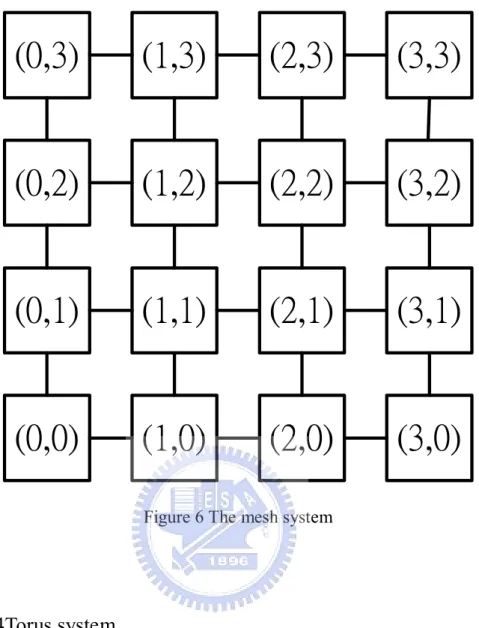
Mesh system can be seen as a two-dimension matrix (Figure 6). Each router in
the mesh system connects to the routers around. The routers in the mesh system can
be separate with three kinds: one is at the corner {(0,0), (3,0), (0,3), (3,3)}, another
one is in the border {(1,0), (2,0), (0,1), (0,2), (1,3), (2,3), (3,1), (3,2)} and the other
one is in the center {(1,1), (2,1), (1,2), (2,2)}. The routers at different places have
different connection ports. Because of the difference, the mesh system needs a
special algorithm to realize transferring data in the system.
Advantage of the mesh system:
The system arranges in order.
The cost is lower than the net system.
Disadvantages of the mesh system:
The critical path is longest.
13
(0,3)
(1,3)
(2,3)
(3,3)
(0,2)
(1,2)
(2,2)
(3,2)
(0,1)
(1,1)
(2,1)
(3,1)
(0,0)
(1,0)
(2,0)
(3,0)
Figure 6 The mesh system
2.2.4 Torus system
The torus system can be seen as an improvement system of the mesh system.
The torus system adds some data paths and modifies the router’s architecture. The
routers on the border connect to the router on the other side of the border. So the
data have a shorter transfer path. The torus system has two different types:
uni-direction torus system (Figure 7 (a)) and bi-direction torus system (Figure 7 (b)).
If the router in the uni-direction torus system, it cannot send data to the router which
14 problem.
Advantages of the torus system:
The torus system is easy to design. Each router is the same.
The torus system has a smaller average data path.
(a) (b)
Figure 7 The torus system
2.2.5 Comparison
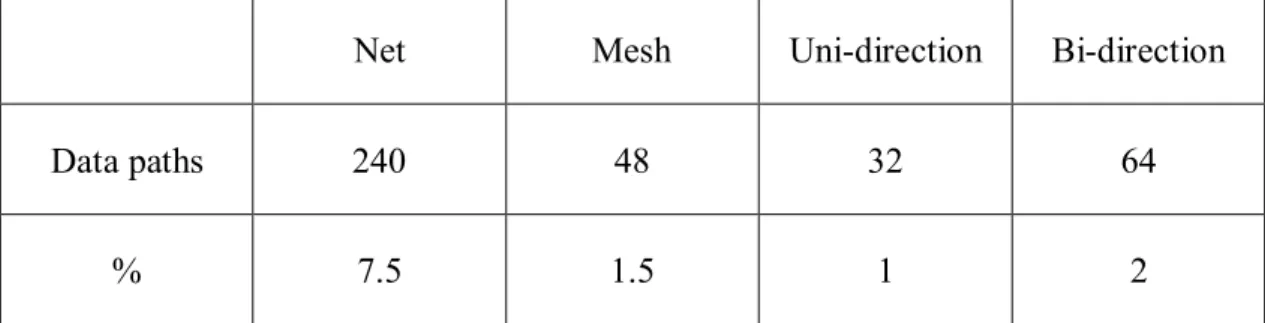
First, we compare with the numbers of the data paths between the
interconnection networks described previously. Suppose that all of the systems have
sixteen routers, and the results are in Table2. The net system has the maximum data
15
bi-direction torus system has sixty-four data paths, and the uni-direction torus
system has the minimum data paths: thirty-two. We can find that the bi-direction
torus system is in among.
Net Mesh Uni-direction Bi-direction
Data paths 240 48 32 64
% 7.5 1.5 1 2
Table 2 The number of data path (16 routers)
The other important issues are the critical data path and the average data paths
in all of the systems. The net system has the smallest critical and average data path:
two, because the routers connect to each other.
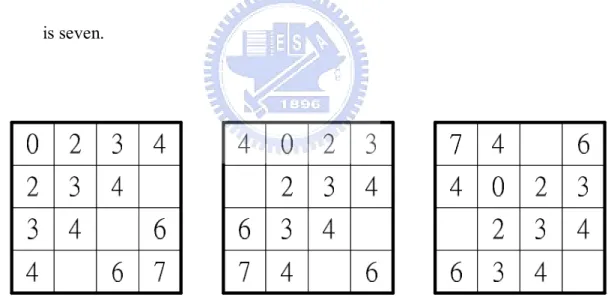
The mesh system can be separated into three parts. The critical data path of the
routers at the corner is seven; the critical data path of the routers on the border is six
16
(a) (b) (c)
Figure 8 The data paths of the mesh system
The situations of routers in the uni-direction torus system are shown in Figure
9. All situations of the routers in the system are the same, and the critical data path
is seven.
Figure 9 The data paths of the uni-direction torus system
The situations of the routers in the bi-direction torus system are shown if
Figure 10. Because of the data paths in the system are bi-direction, the critical path
17
Figure 10 The data paths of the bi-direction torus system
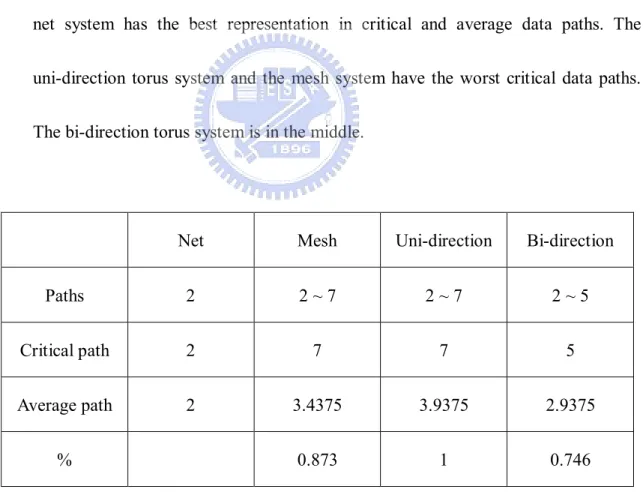
Table 3 shows the comparisons between those interconnection networks. The
net system has the best representation in critical and average data paths. The
uni-direction torus system and the mesh system have the worst critical data paths.
The bi-direction torus system is in the middle.
Net Mesh Uni-direction Bi-direction
Paths 2 2 ~ 7 2 ~ 7 2 ~ 5
Critical path 2 7 7 5
Average path 2 3.4375 3.9375 2.9375
% 0.873 1 0.746
18
2.3 Data Transfer
The popular ways of data transfer in the interconnection networks are wormhole and
packet-switching. Both of them have their advantages and characteristics.
2.3.1 Wormhole
The transformation way of wormhole is to create a channel to transfer data. In
this way, it needs a leading packet that goes first to tell the router where to go.
Behind the leading packet are data packets. The size of the data packets is not fixed.
At last is ending packet and it tells router that the transformation is finished and the
channel can be canceled. Using wormhole to transfer data, the paths are occupied by
one packet sequence at one time, so the rate of router’s exploitation is low.
Furthermore, the wormhole system needs a global controller to check the paths to
avoid the data crash.
For example, if there is a transformation that needs to use Router (0,3),
ROUTER(1,3). The global controller stores the information and let other
transformations do not use them.
2.3.2 Packet-switching
19
packet-switching system are independence and do not influence on other data. Each
packet has its own head to determine the transfer migration. The packets do not
occupy the data paths, so in data-switching system, it allows many packets
transferred at the same time.
For example, if there is a packet that needs to go through Router (0,3),
ROUTER(1,3). The packet use one router at one time and then release the
domination of the router after using.
2.3.3 Deadlock
Deadlock is the most important issue in the transformation system because
deadlock will crash the system. Unfortunately, deadlock would happen in wormhole
system, so the wormhole system needs extra designs such as global controller and
virtual channels [19] to avoid deadlock. But it would not happen in
packet-switching system because the packet-switching system does not occupy data
paths at transformation. Describe in detail, in the packet-switching system, the
packet does not hole the data paths and waits for other data paths and the packets
would not be in the situation of circular waiting. With these two reasons, the
20
2.3.4 Starvation
Starvation is another problem that should be solved. Each outer in our system
has many input and output ports. If one of the packets in the system cannot be sure
to obtain the right of transfer, starvation may happen. To solve this problem, we use
round robin to transfer packets in the system. With round robin, each packets can be
sure that it will be sent.
2.3.5 Comparison
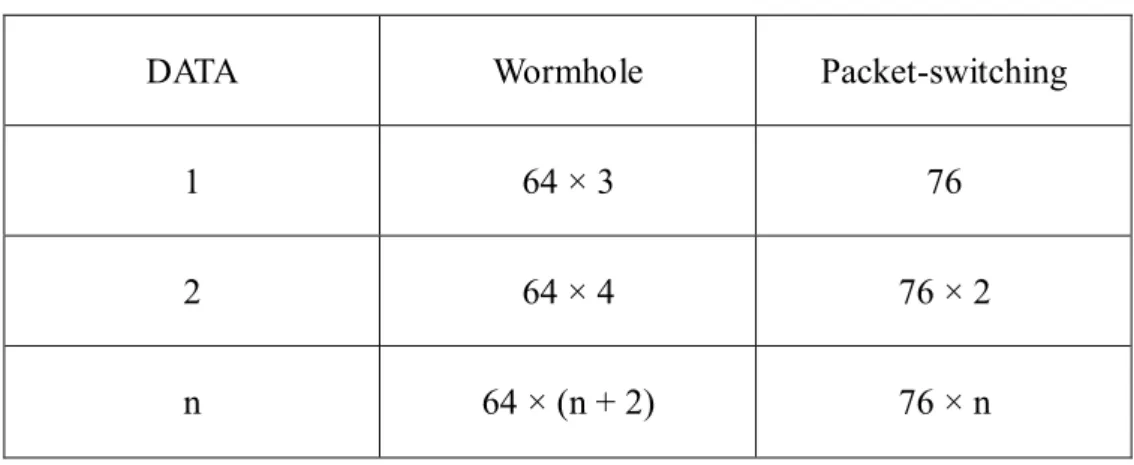
If the system is dual-rail system, the size of data is 32-bits and the head is
6-bits. So the packets in the wormhole system are all 64-bits and the packets in the
packet-switching system are 76-bits. Table 4 shows the sizes of the packets that both
of the systems use.
DATA Wormhole Packet-switching
1 64 × 3 76
2 64 × 4 76 × 2
n 64 × (n + 2) 76 × n
Table 4 The size of packets
21
need to send 192-bits and spend three times to finish the job. But if users use
packet-switching system, they only send 76-bits.
2.4 C-element
C-element is a very important element in the asynchronous circuits. It is usually
used to control the ACK signals and REQ signals. The behavior of C-element is shown
in Table 5. When the inputs are all 0, the output is 0, too. If one of the inputs changes its
status, the output would not change. Until both of the inputs changes to 1, the output
changes to 1. Figure 11 (a) shows the gate level design of C-element. It uses three AND
gate and one OR gate. The output C will connect to the inputs and become one of the
inputs. Figure 11 (b) shows C-element with RESET signal.
a b c
0 0 0
0 1 No change
1 0 No change
1 1 1
22
&
&
&
+
a
b
c
Figure 11 (a) C-element
23
Chapter 3 Design
In chapter 2, we have already compared the advantages and disadvantages of the
asynchronous circuits. In addition, we also describe the benefits of the interconnection
network using the torus system. But there are still some points that can be improved. Chang
propose “Self-timed Torus Interconnection Network with Cut-through Routing Mechanism”
in 2009 [5]. However, because if its circuit routing nature, the network has lots of limitation.
In addition, with its 1-of-5 encoding scheme, it makes it difficult to implement in the real
circuits. Thus, we design a new interconnection network using dual-rail encoding and
packet-switching in the torus system called Asynchronous Bi-direction Interconnection
Network using Torus Topology. This design unifies these two kinds of techniques’ merits, the
asynchronous circuits and the torus system.
This chapter describes with the data flow first, and then it talks about the overall system.
According to these two preconditions, a new algorithm for the routing system and two data
formats to meet the requirements are necessary. The algorithm is the most important part of
our designs, our designs all base on the algorithm. This chapter will describe the router’s
24
3.1 Data Flow
The data flows have two parts: one is used in router and the other is used in
head-building. The first part is shown in Figure 12. This flow shows the data how to
transfer in the router. The router receives the packets from other routers around and
decides that the packet should be kept and sent to the processor or continued transferring
and sent to other routers.
Receive packet from other routers
Arrivial?
Send the packet to the processor
Send the packet to FIFO
FIFO buffer
Send packets out to other routers priority: 1. Y up 2. Y down 3. X left 4. X right
2
1
3
4
5
YES
NO
25
At first, a packet is sent to the router (1). If there are more than one packet arrive at
the same time, the router will receive the packet from up-side first. The priority from
high to low of the four was is up-side, down-side, left-side and right side. Then the router
should determine that the packet is arrival to the destination or not (2). If the packet is
arrival to the destination, the router sends the packet to the processor and the packet has
finished its routing, or else the router sends the packet to the FIFO (3). The packet in the
FIFO waits for the router (4) sending it out to continue routing until the packet arrives to
its destination (5).
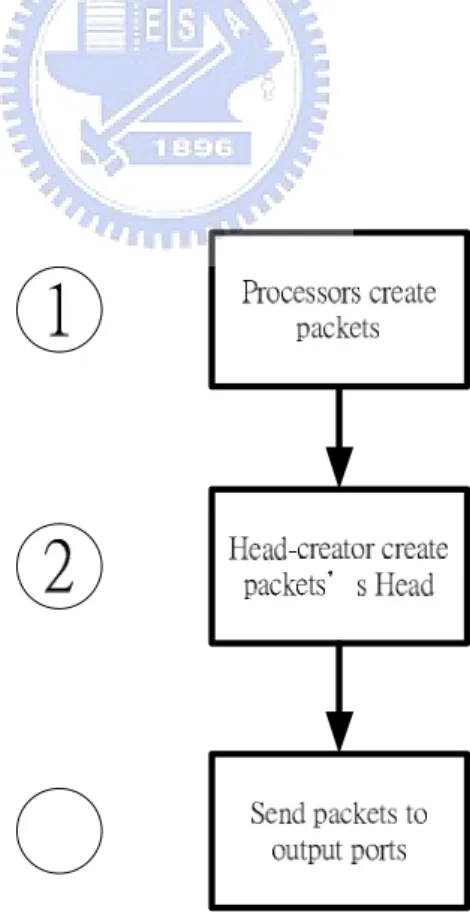
The other data flow shows the data that is created from processors and how to build
its head (Figure 13).
26
Data are created by the processor (1). The only one thing the processor knows is
that the data should be sent to which one of the processor in the system, but the processor
does not know how to transfer the data. So the data are sent to the Head-builder to build
a head and the Head-builder wraps the head in the packet (2). According to the head,
routers can send the packet to the right port and start its routing (3).
3.2 System
The router consists of three major constructions: Arbitrator_One, Arbitrator_Two
and FIFO (Figure 14).
Figure 14 Router’s Architecture
27
packets, Arbitrator_Two is used for sending the packets out and FIFO can be seen as
buffers. Each of the routers has five input ports which can receive the packets from the
neighbor routers and the processor, and they also have five output ports to send the
packets out to the routers around or the processor. FIFO is used to be buffered the input
and the output speed difference. Normally, the input speed is faster than the output speed;
FIFO can let the router receiving the packets continuously, but not stops and waits for the
output.
The routers also need to distinguish the packets between arrival or not. If the packet
is arrival, it will stop routing, or else the packet will continue its travel. This work is
done in Arbitrator_One.
The torus system has two ways to orientate the routers in the system. One is
node-coding [8, 9] and this ways uses a sequence of 0 and 1 to encode each router, like
Johnson code. The routers in the system have their own code. The system which is using
node-coding is hard to expand, because the code should be re-defined when the system
adds new routers. The other way is setting the system like a two-dimension matrix. It
uses X-Y coordinates to orientate each router.
The network system in our design is a bi-direction torus system (Figure 15). We
define the system as a X-Y coordinates. Each row and each column has four routers, so
28
Figure 15 The torus system
Each router in the system has its own identity (ID). The ID is a pair of X-Y
coordinates (X, Y), for example: (0,0), (1,2), (3,2). Thus the router at the low-left is
defined ROUTER(0,0) and the router at the up-right is defined ROUTER(2,2). The
X-coordinates is increasing toward right migration, ex: the right side of ROUTER(0,0) is
29
is on the up side of ROUTER(0,0). Therefore we can easily define the overall system and
use the system.
The routers connect to their neighbor routers and the routers are form beginning to
end connected. The router connects to its neighbor routers means that the router the
router connects to the routers at the up-side, down-side, left-side and right-side. For
example, ROUTER(1,1) connects to ROUTER(0,1), ROUTER(1,0), ROUTER(1,1) and
ROUTER(1,2). The routers connect from beginning to end means that the router on the
border connects to the router on the other side of the border. For example, ROUTER(0,0)
can send a packet to ROUTER(3,0) directly. According to the design, the torus system in
our design has sixty-four connection paths.
Each packet in our torus system has one and only one routing path. The routing path
is decides when the data sent to the router at the first time. So the packet’s routing would
accord with the instruction migration and the packet would not lose its way and be
missed.
Example 1: If ROUTER(2,2) wants to send a packet to ROUTER(0,0), the packet
will go through ROUTER(3,2), ROUTER(0,2), ROUTER(0,1) and ROUTER(0,0) in
30
Figure 16 Transfer orders 1
Example 2: If ROUTER(3,3) wants to send a packet to ROUTER(0,0), the packet
will go through ROUTER(0,3) and ROUTER(0,0) in order (Figure 17).
31
Data transferred in our torus system is using packet-switching. Every packets has its
own head and every packets is the respective independence in the system.
3.3 Routing Algorithms
Routing algorithm can be separated into three parts. The first part handles the
packets which just arrived to the router and the algorithm works in Arbitrator_One. The
second part deals with the packets that are sent out the routers. The third part is used to
build the header for the packets which are sent b the processors, and the algorithm works
in Arbitrator_Two.
3.3.1 Algorithm 1: Arrival
Figure 18 Algorithm 1: Arrival
Algorithm 1 is used to make sure the packet is arrival. This is the most
32
Compare (X_coordinates, X_local) uses OR of XOR to check that is the packet
already at the right column and the result will be stored in Temp_X. If the packet is
at the right column the value of Temp_X is 0, or else the value is 1. Compare
(Y_coordinates, Y_local) uses the same way to check is the packet at the right row
and it stores the result in Temp_Y. According to the values of Temp_X and Temp_Y,
Arbitrator_one can easily know the packet is arrival or not and make right decision
that send the packet to the right place (the processor or the FIFO).
Example 1: Local is (2,2) and the input packet is (2,0). Compare
(X_coordinates, X_local) is compare (2,2), the numbers are the same, so Temp_X
will be 0. Compare (Y_coordinates, Y_local) is compare (2,0), the numbers are not
equal, so Temp_Y is 1. According to Temp_X and Temp_Y, the packet will be sent
to FIFO.
Example 2: Local is (1,1) and the input packet is (1,1). Compare
(X_coordinates, X_local) is compare (1,1), the numbers are the same, so Temp_X
will be 0. Compare (Y_coordinates, Y_local) is compare (1,1), the numbers are the
same, so Temp_Y is 1. According to Temp_X and Temp_Y, the packet will be sent
33
3.3.2 Algorithm 2: Direct-decision
Figure 19 Algorithm 2: Direct-decision
Algorithm 2 is used to determine the packet should be sent to which one of the
output ports. It influence on the packets’ routing paths (Figure19).
Compare (X_coordinates, X_local) uses OR of XOR to check that is the packet
already at the right column and the result will be stored in Temp_X. If the packet is
at the right column the value of Temp_X is 0, or else the value is 1. Compare
(Y_coordinates, Y_local) uses the same way to check is the packet at the right row
and it stores the result in Temp_Y. This part is the same with the front discussion.
But in this algorithm, DECISION also needs X_direct and direct to make right
decision. X_direct and Y_direct store the packet’s travel direction. X_direct and
Y_direct are made by Algorithm 3.
34
Compare (X_coordinates, X_local) is compare (1,2), the numbers are not equal, so
Temp_X is 1. Compare (Y_coordinates, Y_local) is compare (1,2), the numbers are
not equal, so Temp_Y is 1. Because of the value of Temp_X is 1 and the value of
X_direct is 01, DECISION will be 00.
Example 2: Local is (1,1), the packet is (1,0), X_direct is 01 and Y_direct is 10.
Compare (X_coordinates, X_local) is compare (1,1), the numbers are equal, so
Temp_X is 0. Compare (Y_coordinates, Y_local) is compare (1,0), the numbers are
not equal, so Temp_Y is 1. Because of the value of Temp_Y is 1 and the value of
Y_direct is 10, DECISION will be 11.
3.3.3 Algorithm 3: Head-Building
Figure 20 Algorithm 3: Head-Building
35
head-builder and the head-builder is in Arbitrator_two. This algorithm can
determine the packet’s transfer directions (Figure 20).
The routers transfer the packets in compliance with X_direct and Y_direct.
X_coordinates – X_local can let the router knows that the destination is on the right
side or the left side. If the value of X is 1, 2 or -3, it means the destination is on the
right side and the packet will be quite quick by the right side transmission. If the
value of X is -1, -2 or 3, the packet will be quite quick by the left side transmission.
This rule can use in Y. if the value of Y is 1, 2 or -3, the packet should be sent to the
upper-side router and the value of Y is -1, -2 or 3, the packet should be sent to the
under-side router. So the value of X_direct is 01 means the packet goes to right, 10
means goes to left. The value of Y_direct is 01 means the packet goes to up, 10
means goes to down (Figure 21, Table 6).
X-direct Y-direct
0, -1, -2, 3 10 10
1, 2, -3 01 01
36
Figure 21 Signal of transfer direction
Example 1: Local is (1,1) and the packet is (2,2). X_coordinates – X_local is
1 – 2, so the value of X is -1. Looking up the table, the value of X_direct is 10.
Y_coordinates – Y_local is 1 – 2, so the value of Y is -1. Looking up the table, the
value of Y_direct is 10. According to the X_direct and Y_direct, this packet will go
to up-left.
Example 2: Local is (2,2) and the packet is (0,1). X_coordinates – X_local is 2
- 0, so the value of X is 2. Looking up the table, the value of X_direct is 01.
Y_coordinates – Y_local is 2 – 1, so the value of Y is 1. Looking up the table, the
value of Y_direct is 01. According to the X_direct and Y_direct, this packet will go
37
3.4 Packet Sequence
According to the algorithm, each packet has only one routing path, and if the
packets are sent to the same location, the paths are the same, too. So the packets in the
system do not have the packet sequence problem. It means that the packet which is sent
to the destination earlier, it will arrive to the destination earlier than other packets.
3.5 Router
This paragraph describes that how we design the router. First, we design two kind of
packet formats and then we design the overall router.
3.5.1 Packet Formats
The packets in the design have two kinds of formats: one is the processor send
to the router (Figure 22 (a)) and the other one is routers send to each other (Figure
22 (b)).
Each of the formats has two parts: a length of 8-bits or 12-bits head and a
length of 64-bits data. Both of them are using dual-rail encoding, so the real size of
transfer data is 32-bits. The first format which is used in PROCESSOR to ROUTER
has an 8-bits long head and the head only contains destination coordinates(X-Y)
where the packet should be sent to (Figure 23 (a)). The other format is used in
38
destination coordinates but also sending directions (Figure 23 (b)). The sending
directions tell the router that the packet should be sent to which way and the
sending directions are built by the Head-creator. It will be described in the next
paragraph (Head-creator).
(a) Data Format
Figure 22 (b) Data Format
(a) HEAD
39
3.5.2
Head-BuilderHead-builder (Figure 24) has two input ports: location and packet_in and one
output port: packet_out. The location is the router’s identity in the Torus system ((X,
Y)), and the length of the location is 4-bits. It is used to check that which direction
the packet should be sent to. The routing algorithm is described in previous
paragraph (Routing Algorithm). Packet_in and packet_out are the data
transformation ports.
Figure 24 Head-builder
Initially, head-creator receives the location and stores it. Then, the processor
sends a packet to the head-builder; the head-builder starts to compare the packet’s
head with location and builds a new HEAD for the packet. The way of the
head-builder determines the packet’s direction is using subtraction (Algorithm 3).
40
new head and data. Finally, Head-builder sends the new packet out. Figure 25
shows the gate-level design of the Head-builder.
M U X M U X
M
er
ge
Figure 25 The detail design of Head-Builder
3.5.3 Arbitrator_One
Arbitrator_one (Figure 26) is used to receive the packet form the routers
around and check out. It has four input ports: four routers around and two output
41 COMPARE_1 BUFFER PROCESSOR Y down Y up X right X left Figure 26 Arbitrator_One
MUX_ONE is used to receive packets and send ACK signal to the senders.
The MUX_ONE can receive one packet at one time. If many packets arrive to the
router at the same time, the MUX_ONE will decide that which one should be dealt
with first. In our design, we use round robin to decide that which one of the packets
can be received and avoid starvation. Based on the design, each packet from routers
around has the same priority, because the SCANNER scans the four ports.
Starvation is a big problem in the interconnection networks. If starvation is
happened, the system will be crashed.
The detail design of the MUX_ONE is shown below (Figure 27). The detects
42
detection is 1, or else the value of detection is 0. ACK_OUT signal tells the sender
that it can stop sending the packet. ACK signal is used to let the REGISTER to
capture the packet.
Figure 27 MUX_ONE
When the packet is received from the MUX_ONE, it will be sent to the
REGISTER. Because the COMPARE_1 stores the location of the router, the
COMPARE_1 can easily make a right judgment that where the packet in the
43
gates. If {packet [73], packet [71], packet [67], packet [65]} is equals to location
[3:0], the value of COMPARE is 0, or the value of COMPARE is 1. The value of
COMPARE decides the packet will go to the PROCESSOR or the FIFO. When the
packet is sent out, the RESET resets the REGISTER, and the REGISTER will wait
for another packet (Figure 28).
R
E
G
IS
T
E
R
44
Figure 28 REGISTER and COMPARE_1
By way of COMPARE_1’s judgment, the packet will be sent to PROCESSOR
or to FIFO by DEMUX (Figure 29). This part also receives the ACK_in signal form
the FIFO and the PROCESSOR, and uses an OR gate to merge these two signals.
D
E
M
U
X
Figure 29 DEMUX45
3.5.4 Arbitrator_Two
Arbitrator_two (Figure 30) is used to re-packing packets from the processor
and to let the packets go to right routers. It has two input ports: from FIFO and the
processor, four output ports: four routers around.
M
U
X
R
E
G
IS
T
E
R
D
E
C
IS
IO
N
Figure 30 Arbitrator_TwoHead-builder has been shown in previous paragraph. It is used to build a new
head for the packets.
MUX (Figure 31) handles that packets from FIFO and Head-builder arrive at
the same time. The design in the Arbitrator_Two is the same with the design in the
Arbitrator_One, we use round robin to make decision. This design can avoid
46
ACK_out
SCANNER
DELAY
MUX
detect_FIFO
detect_processor
packet
Figure 31 MUX in Detail
After receiving the packet from the FIFO or the PROCESSOR, the packet will
be sent to the REGISTER and waiting for the COMPARE signal. The COMPARE
signal can determine the packet should be sent to which output ports. The location
[3:2] subtracts {packet[73], packet[71]} and the location[1:0] subtracts {packet[67],
packet[65]}. The answer of the subtractions will decide COMPARE signal (Table 7).
47 Y = 0 Y ≠ 0, Y_direct = 01 Y ≠ 0, Y_direct = 10 X_direct = 01 00 10 11 X_direct = 10 01 10 11
Table 7 COMPARE signals
D
E
C
IS
IO
N
Figure 32 COMPARE_2DECISION is used to send the packet to routers around and receive the ACK
signals. It receives COMPARE signal and sends the packet out (Figure 33).
48
After passing the head-builder, the new head is 0110_1001_1010. According to the
new head, the COMPARE signal is 11; so the packet will be sent to the up-side.
D
E
M
U
X
Figure 33 DEMUX_23.5.5 FIFO
FIFO (Figure 34) in the design can be regarding as buffers. The main utility
solves Arbitrator_one and Arbitrator_two speed different problem. In the design
Arbitrator_two is slower than Arbitrator_one. Arbitrator_two not only receives and
49
check the packets arriving to the destination or not. So Arbitrator_two needs more
time to finish its works.
R
E
G
IS
T
E
R
R
E
G
IS
T
E
R
R
E
G
IS
T
E
R
R
E
G
IS
T
E
R
R
E
G
IS
T
E
R
Figure 34 FIFOIn the design, FIFO has five stages. According to Muller pipeline, FIFO will be
half-full. So FIFO can pack at most three packets
The deep of FIFO is another important issue. Using five stages is considered at
the same time may receive four packets. One packet stays in Arbitrator_one and
three packets can stay in FIFO.
Figure 35 shows the detail design of the REGISTER.
Because of the multi-inputs C-element is hard to design and it will waste lots of
50
c
c
c
c
c
+
+
NOTdata1.t
data1.f
datan.t
datan.f
ACK
data1.t
data1.f
datan.t
datan.f
ACK_out
51
52
Chapter 4 Simulation
In chapter 3, we describe the designs of the function blocks in detail. We use Verilog
HDL to build all of the designs and construct the whole system with above mentioned our
sub-modules in chapter 3.
We implement our asynchronous interconnection network using torus system in
gate-level. The design was synthesized and simulation with the TSMC 130nm library and the
simulator is ModelSim 6.0. The experimental group of our design is the bi-direction torus
system, and the control group is the uni-direction torus system.
4.1 Time Simulation
To make sure our design is correct; we simulate three parts of the main design first.
After confirming the three main parts, we start to test the whole system.
The first simulation is the part of Arbitrator1. Figure 37 shows the simulation of sending
packet to the FIFO. It takes 19174ps to finish this works. Another simulation of the
Arbitrator1 is the packet sent to the processor. We can find that it needs 11392ps (Figure
53
Figure 37 To the FIFO
Figure 38 To the Processor
The second part is the FIFO. Because of the FIFO is combined with many
C-elements, it takes lots of time to pass through one packet. Figure 39 shows the
simulation result. From input to output, it takes 6616ps. In detail simulation, BUFFER0
needs 1996ps, BUFFER1 needs 2197ps, BUFFER2 needs 1250ps, BUFFER3 needs
54
Figure 39 FIFO
The third part is Arbitrator2. The Arbitrator2 receives packets from the FIFO and
the processor. Figure 40 shows the simulation that FIFO sends packets to the Arbitrators
and Figure 41 shows the other simulation. It takes 12090ps to finish transferring the
packet from the FIFO and 13420ps to finish transferring the packet from the processor.
55
Figure 41 From processor
After the testing of the three main parts, we start to simulate the time that sending
packets from ROUTER to ROUTER. The start router is ROUTER(0,3), it sends one
packet to other routers in the system. The simulation is shown in Table 8. The time that
goes through two routers is 24823 ~ 24830ps, the time that goes through tree routers is
64360 ~ 64365ps, the time that goes through four routers is 103907 ~ 103910ps and the
time that goes through five routers is 143445ps. The average time of the simulation is
69636.2ps.
0ps 24823ps 64360ps 24825ps
24820ps 64361ps 103907ps 64365ps
64361ps 103905ps 143445ps 103910ps
24826ps 64360ps 103910ps 64365ps
56
In the previous paragraph, we simulate the bi-direction torus system. Now we
simulate the uni-direction torus system. In the same situation, the total routing time of
ROUTER(0,3) sends packets to other routers is shown in Table 9. The average time is
110543.3pa.
0ps 24523ps 63859ps 103410ps
24520ps 63865ps 103400ps 143446ps
63850ps 103905ps 142950ps 172495ps
103400ps 142945ps 182510ps 217570ps
Table 9 Time simulation of uni-direction torus system
4.2 Area Simulation
The areas of each sub-modules are shown in Table 10, and the areas only contains
whole of the router without the processors. As we can see the area of the FIFO is the
largest. This is because that the sub-module of the FIFO is made up by lots of
C-elements. Each of the C-element contains four gates (three AND gates and one OR
gate). The area of Arbitrator1 is 4566μm2, the area of the FIFO is 15796μm2 and the area
57 module Area (μm2) Arbitrator1 4566 FIFO 15796 Arbitrator2 3849.7 Total 24211.7
Table 10 Area Simulation of bi-direction torus router
The area of the uni-direction torus router is shown in Table 11. The total area of one
router is 22726.4μm2. module Area (μm2) Arbitrator1 3975 FIFO 15796 Arbitrator2 2955.1 Total 22726.4
Table 11 Area Simulation of uni-direction torus route
4.3 Comparison
58
size of uni-direction torus router, and the average routing time of bi-direction torus
system is 58% faster than uni-direction torus system. So we spend 6% extra area to gain
59
Chapter 5 Conclusion and Future Works
In this paper, we design and implement an interconnection network using torus topology.
Our system uses packet-switching routing and bi-direction torus system with new algorithms
to improve the performance of the routing system, avoid the deadlock and starvation.
Moreover we use asynchronous circuits design to solve the problem of global clock and the
system can easily to merge different processors with frequency. Therefore the design can use
in all kind of NOC system.
There are some important reasons using torus system to implement the interconnection
network. First, torus system is easy to design and the routers in the system are all the same. If
the system needs to increase routers, it does not need to change the architecture of the routers.
Second, the torus system has a better performance than mesh system, and the difference of
costs between them are small.
But there still have some points that can be improvement. We use a lot of c-element to
implement the FIFO, so the area of FIFO is very large. Maybe we can use registers to take
place of the c-element and the area may have a better result. The other problem is the deep of
the FIFO. In the design, the deep of the FIFO is five. We do not consider too much, but after
the simulation, we find that the deep of the FIFO can be decreased. The system transfers the
60 performance.
Another place can be improve is the routing algorithms. The algorithm in our design
determines only one routing path for each packet. If there is one router broken, the packets
would not change their routing paths. A good algorithm and router can avoid this situation.
The most popular way of interconnection networks on NOC in recent year is net system.
Because of the number of processors are small, the paths are not too large to place and route.
The torus system has benefits if the system has more than sixteen routers. In this situation,
torus system can balance the cost and the performance.
Finally, our torus system, the results of the simulations: the area of the ROUTER is
61
References
[1] Jens Sparso and Steve Furber, “Principles of Asynchronous Circuit Design“, London, 2001
[2] Lasse Natvig, “High-level Architectural Simulation of the Torus Routing Chip”, pp. 48-55,
IEEE International Verilog HDL Conference, 1997
[3] David Duarte, Vijaykrishman Narayanan and Mary Jane Irwin, “Impact of Technology
Scaling in the Clock System Power”, IEEE International Computer Society Annual
Symposium on VLSI, 2002
[4] R. Y. Chen, M. Vijaykrishma and M. J. Irwin, “Clock Power Issues in System-on-a-Chip
Designs”, 1999, IEEE International
[5] Yuan-Teng Chang, Man-Chen Huang, Wei-Min Cheng, Hung-Yue Tsai, Chang-Jiu Chen,
Fu-Chiung Cheng and Yuan-Hua Chu, “Self-Timed Torus Network with 1-of-5 Encoding”,
pp.569-572, ISCE2009
[6] Angelo Kuti Lusala, Philippe Manet, Bertrand Rousseau and Jean-Didier Legat, “NOC
Implementation in FPGA using Torus Topology”, IEEE International, 2007
[7] Bradley R. Quinton, Mark R. Greenstreet and Steven J. E. Wilton, “Practical
Asynchronous Interconnect Network Design”, IEEE transactions on VLSI System, 2008
[8] Xiaoqiang Yang, Huimin Du and Jungang Han, “Research on Node Coding and Routing
62
[9] Xiaoqiang Yang, Huimin Du and Jungang Han, “A Node Coding and the Improved
Routing Algorithm in Torus Topology”, pp. 443-447, 2008 ICSIT
[10] Donald F. Wann and Mark A. Franklin, “Asynchronous and Clocked Control Structures
for VLSI Based Interconnection Network”, IEEE Transactions on Computer, vol.32 No.3,
March 1983, pp. 284-293
[11] Aydin O. Balkan, Gang Qu and Uzi Vishkin, “Arbitrate-and-Move Primitives for High
Throughput On-Chip Interconnection Networks”, 2004 ISCAS
[12] Paul E. Gronwski, William J. Bowhill, Ronald P. Preston, Michael K. Gowan and Randy
L. Allmon, ”High-Performance Microprocessor Design”, IEEE Journal of Solod-state
Circuits, vol.33 No.5, May 1998, pp. 676-686
[13] William J. Dally, “Performance Analysis of k-ary n-cube Interconnection Networks”,
IEEE Transactions on Computer, vol.39 No.6, June 1990, pp. 775-785
[14] Li-Shiuan Peh and William J. Dally, “A Delay Model and Speculative Architecture for
Pipelined Routers”, pp. 255-266, 2001 IEEE
[15] Wladek Olesinski and Pawel Gburzynski, “Asynchronous Deflection with Transient
Buffers”, pp. 338-345, 1998 IEEE
[16] W. J. Dall and C. L. Seitz, “The Torus Routing Chip”, J. of Distributes Computing,
1(3):187-196, 1986
63 Morgan Kaofmann, 2005
[18] W. J. Dally and C. L. Seitz, “Deadlock-Free Message in Multiprocessor Interconnection
Networks”, IEEE Transactions on Computer, vol36 No.5, May 1987, pp. 539-546
[19] Kermani P., Kleinrlck L., “Virtual Cut-Through: a new computer communication