國立交通大學
資訊科學與工程研究所
碩士論文
基於資訊流之應用程式行為模型
Information Flow Based Application Behavior
Modeling
研 究 生: 李泓暐
指導教授: 吳育松
基於資訊流之應用程式行為模型
Information Flow Based Application Behavior Modeling
研究生:
李泓暐
Student:
Hong-Wei Li
指導教授:
吳育松
Advisor:
Yu-Sung Wu
國立交通大學
資訊科學與工程研究所
碩士論文
A Thesis Submitted to Institute of Computer Science and Engineering College of Computer Science National Chiao Tung University in Partial Fulfillment of the Requirements for the
Degree of Master in Computer and Information Science
August 2014
Hsinchu, Taiwan, Republic of China 中華民國一百零三年八月
基於資訊流之應用程式行為模型 學生: 李泓暐 指導教授: 吳育松 博士 國立交通大學資訊科學與工程研究所碩士班
摘要
我們提出了一個基於資訊流的應用程式行為模型,該模型強調應用程式執行時 所造成系統物件間的資訊流。資訊流不止是包含底層物件的屬性,同時也表現出物 件間的關聯性,此外,此模型支援用正規表示式來做詢問。我們展示將模型套用在 惡意行為識別應用上,並且在 Xen 虛擬化平台上建立一個雛型行為引擎,該行為引 擎在對客戶端透明的情況下攔截客戶端所執行的系統呼叫,接著將系統呼叫軌跡轉 換成上述的模型,使其能夠接受正規表示式來做詢問。實驗部分確認雛型系統能夠 將未知的惡意軟體行為比對出來,被監控的客戶端系統仍可維持 80%的原有效能。 關鍵字: 資訊流、應用程式行為 iInformation Flow Based Application Behavior Modeling
Student: Hong-Wei Li Advisor: Dr. Yu-Sung Wu
Institute of Computer Science and Engineering National Chiao Tung University
ABSTACT
We propose an application behavior model based on information flow. The model focuses on the flow of information among system objects due to the execution of an application. A flow encompasses not only the attributes of its underlying objects but also the relations between the objects. The model supports efficient query through regular expressions. We have shown that the model is applicable to practical applications such as the identification of malicious behavior of unknown malware. We built a prototype behavior engine on top of Xen virtualization platform. The behavior engine transparently monitors the guest system calls, convert the system call trace into the information flow behavior model, and allows queries of application behavior through regular expressions. The evaluation confirms that the prototype system can indeed support behavior matching of unknown malware and incurs only a mild 20% performance overhead on the monitored guest system.
Keywords: information flow, application behavior
Content
Introduction ... 1
Related Work ... 3
Information Flow ... 4
3.1 On the Difficulties of Tracing Information Flows ... 4
3.1.1 Complex Flow Semantics in Real-world Systems ... 4
3.1.2 The Trade-off between Granularity and Efficiency ... 5
Application Behavior Modeling ... 6
4.1.1 Model Definition ... 6
4.1.2 Information Flow Mutigraph and Its Constrcuction ... 7
Malicious Behavior Identification ... 9
5.1 Interception of System Calls ... 9
5.2 Extraction of Information Flow from System Call Trace ... 10
5.3 Behavior Matching ... 11
5.4 Implementation ... 12
5.4.1 Policy for processes ... 14
5.4.2 Pattern for user-defined behavior ... 15
5.4.3 Handling of Information Flow Path ... 16
Evaluation ... 18
6.1 Effectiveness of Malware Behavior Matching ... 18
6.1.1 Backdoor virus ... 18
6.1.2 Netsky virus ... 21
6.2 Perfomance Overhead ... 22
6.2.1 Matching And Complexity Of Multigraph ... 22
6.2.2 Guest VM Performance Degradation ... 23 6.3 Discussion ... 24 6.3.1 Subpath check ... 24 6.3.2 Partial Information ... 24 Future Work ... 26 Conclusion ... 27 References ... 28 iv
List of Figures
Figure 1. Definition of application behavior model ... 7
Figure 2. Definition of information flow operation ... 8
Figure 3. Algorithm of information flow multigraph construction ... 8
Figure 4. Flow chart of interception of system calls ... 9
Figure 5. Analyze system calls’ semantics ... 11
Figure 6. Definition related to behavior matching ... 12
Figure 7. Architecture of environment ... 13
Figure 8. Behavior engine flow chart ... 14
Figure 9. Policy example ... 15
Figure 10. Pattern example ... 16
Figure 11. Algorithm of incremental construction of the set of information flow paths ... 17
Figure 12. Information flow multigraph generated from infector.exe ... 19
Figure 13. Matching result ... 20
Figure 14. Diagram based on Figure 12 and Figure 13(the red block represent the matched path) ... 20
Figure 15. The simplified information flow multigraph (the red block represent the matched path) ... 21
Figure 16. Complexity of IFMG ... 23
Figure 17. Runtime performance of the prototype with respect to different number of generators ... 23
List of Tables
Table 1. Environment parameters ... 12
Table 2. Testbed environment ... 18
Table 3. Policy effect comparison ... 21
Table 4. Generator parameters ... 22
Table 5. The running times of compression and decompression applications ... 24
Table 6. Performance comparison of sub-path check ... 24
Introduction
Over the years, the number of malwares rises drastically. Even though anti-malware scanners are commonly employed to detect malicious software, there are still many malware that cannot be detected by anti-malware software[1]. The reason is that malware developers widely adopt evasion techniques, such as code obfuscation[2], executable compression[3], etc. Code obfuscation can transform malware source code into other form without changing malware’s behavior. Executable compression can compress malware’s executable file, and the compressed code can be extracted by itself before it is executed. On the other way, traditional or commercial anti-malware commonly use signature scanning as detection bases. Once a malware binary is transformed by either code obfuscation or packing, anti-malware scanners will need to update its signatures for the malware even if the malware behavior is still the same. Therefore, malware can easily avoid detection of anti-malware. Inevitably, the defender need to study on this issue for improving anti-malware performance.
Malware detection mainly falls into two complimentary approaches, static analysis and dynamic analysis. Static analysis based on code signature identify malwares takes great advantage on speed. Nevertheless, malware can prevent it by changing code structure or inserting irrelative codes. On the other hand, dynamic analysis requires executing a malware sample in a controlled and isolated environment, like sandbox, VM, etc. to monitor the malware’s behavior. This solution effectively address the pitfalls of static analysis, but it is very time-consuming and mostly used in offline mode.
In this paper, first, we propose an application behavior model based on information flow to describe application’s behavior on a system. Next, we apply it to the problem of malicious behavior identification and implement a behavior engine that can monitor guest system calls and convert the system call trace into an information flow multi-graph. Besides, for improving
performance of the behavior engine, we also use policy features to ignore irrelevant nodes and use regular expression with back-references in matching patterns.
The rest of this paper is organized as follows: In Chapter 2, we give the related work about information flow and using system call to represent processes’ behaviors. Chapter 3 is a brief introduction about information flow. Next, Chapter 4 introduce are our application behavior model, and Chapter 5 shows our design and implementation for malicious behavior identification. The evaluation of prototype is in Chapter 6. Finally, Chapter 7 and Chapter 8 is future work and conclusion.
Related Work
Kolbitsch[4] analyzes a malware in a controlled environment to build a model that characterizes the malware’s behavior. The model is a graph composed of system calls and data dependencies. An example of data dependency is that if there is a variable that is an output of a system call 𝐴𝐴 and is a parameter of another system call 𝐵𝐵, then there is a data dependency from 𝐴𝐴 to 𝐵𝐵. Kolbitsch then generalizes the model and uses that to detect a family of malwares. However, the system requires prior knowledge of a malware in the sense that it requires human expert to collect system calls of a malware, identify its malicious behaviors, and build the corresponding model. BinGraph[5] and HOLMES[6] also use graph based on trace of system calls that are indicative of a process’s behaviors, but they use graph mining techniques to differentiate malicious and benign behaviors automatically.
Access control[7] has been widely employed in many systems to protect confidential data. Although access control can check restrictions on the release of information, it does not check following propagation regarded as an information flow. Therefore, Dorothy E. Denning proposes a lattice model of secure information flow[8] to determine whether there is a path which leaks confidential data or not. Taint analysis[9] commonly employs information flow analysis such as Panorama[10] that uses a taint graph to represent information flow to detect malware. Panorama can effectively protect important data by marking them as taint sources. However, it suffers a slowdown of 20 times on average of performance overhead.
Information Flow
Informally, information flow means information is transmitted from source to destination. Information can be from one bit to a conversation. In formal, information flow is a relation between objects like a dependency. For example, if Tom gives a gift to Amy, then there is an information flow or dependency from Tom to Amy. Commonly, information flows have some semantics labels used for semantic presentation. In the above example, the dependency has ‘SENDER=Tom’, ’RECEIVER=Amy’, ‘ACTION=give’ and ‘OBJECT=gift’ labels.
In modern system, many systems or processes work together. Despite that few processes can work alone, they also need other objects as input or output. Not considering how to trace information flow from fragments, information flow not only describes how information transmit from one to another but also shows the relation between information objects (any information object can record or store information).
3.1 On the Difficulties of Tracing Information Flows
3.1.1 Complex Flow Semantics in Real-world Systems
Processes usually use system call to achieve some important wok such as operating file or sending packets and so on, which can be somehow regarded as a behavior that processes receive or send information through system call. For a common instance, if a process needs to write a file, then it will call ‘NtWriteFile’ and put some context (information) in the parameter. In this case, the context is transmitted from the process to the file. However, the relation between source and destination is usually indirect. In above case, first, the process needs to call ‘NtOpenFile’ to get a file handle from OS, and then the handle is used as an input parameter in ‘NtWriteFile’. As a result, to identify an information flow, one often needs to record multiple
system call invocations, not just one system call invocation, and use prior knowledge of the system call semantics to stich related invocations and their contexts.
3.1.2 The Trade-off between Granularity and Efficiency
Taint analysis is a common method used in tracing information flow. Although taint analysis can accurately catch the information flow without loss, it is well known that it usually need to expense a large amount of resource. The reason cause the system based on taint analysis is seldom online. On the other hand, if we raise the speed, inevitably, we will lose some information at the cost. Too shattered pieces of information give few help on information flow. As a result, it is important that balance between accuracy and speed.
Application Behavior Modeling
Above discussion, based on information flow, we propose a model to describe application behavior.
4.1.1 Model Definition
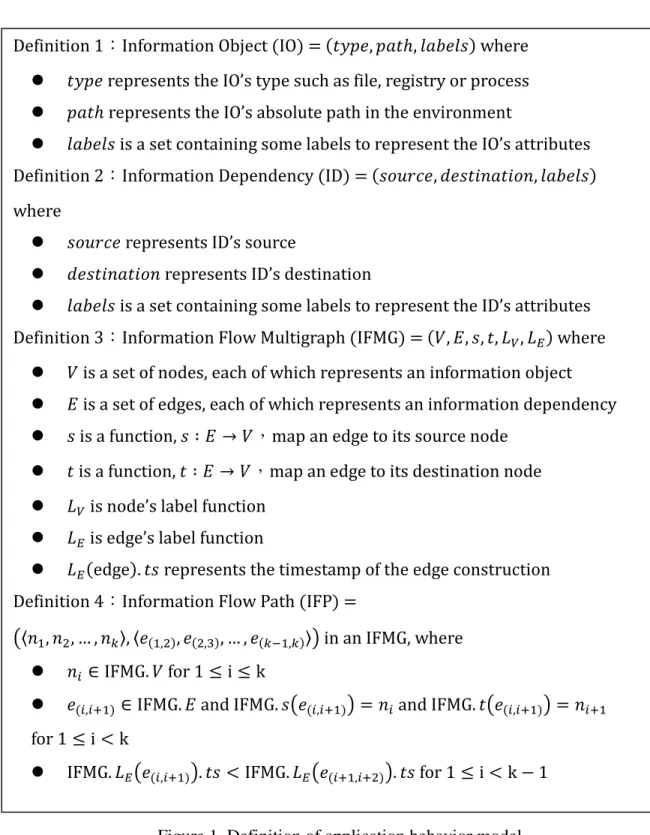
An information object (IO) has not many limit and can be from a variable to a disk or anything that can record or store the information. IO’s type shows the node represent what type of resource and IO’s path is used as an identifier in the environment. An information dependency (ID) shows a dependency from an IO to another IO as long as there is an information flowing in them. Considering information dependency does usually happen in the same source and destination, we use a multigraph to describe the situation in the environment like a computer or a datacenter. An information flow path (IFP) is like a path in graph theory but have one more condition of time. It represent an information flow through many information object. Therefore, it does not make sense if some object send an information before the object receive that information. The definition in detail is in Figure 1.
Figure 1. Definition of application behavior model 4.1.2 Information Flow Mutigraph and Its Constrcuction
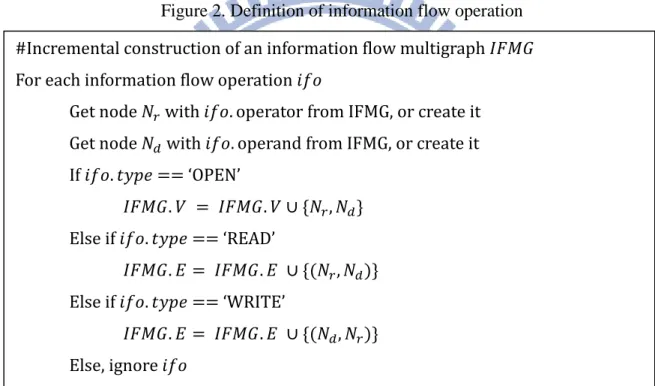
We first define information flow operation (IFO) which is used to update IFMG in Figure 2. The type of IFO and its meaning are as following. ‘OPEN’ represents operator can access
operand but does not have any information flow between them yet. ‘READ’ represents operator
Definition 1:Information Object (IO) = (𝑡𝑡𝑡𝑡𝑡𝑡𝑡𝑡, 𝑡𝑡𝑝𝑝𝑡𝑡ℎ, 𝑙𝑙𝑝𝑝𝑙𝑙𝑡𝑡𝑙𝑙𝑙𝑙) where 𝑡𝑡𝑡𝑡𝑡𝑡𝑡𝑡 represents the IO’s type such as file, registry or process 𝑡𝑡𝑝𝑝𝑡𝑡ℎ represents the IO’s absolute path in the environment
𝑙𝑙𝑝𝑝𝑙𝑙𝑡𝑡𝑙𝑙𝑙𝑙 is a set containing some labels to represent the IO’s attributes Definition 2:Information Dependency (ID) = (𝑙𝑙𝑠𝑠𝑠𝑠𝑠𝑠𝑠𝑠𝑡𝑡, 𝑑𝑑𝑡𝑡𝑙𝑙𝑡𝑡𝑑𝑑𝑑𝑑𝑝𝑝𝑡𝑡𝑑𝑑𝑠𝑠𝑑𝑑, 𝑙𝑙𝑝𝑝𝑙𝑙𝑡𝑡𝑙𝑙𝑙𝑙) where
𝑙𝑙𝑠𝑠𝑠𝑠𝑠𝑠𝑠𝑠𝑡𝑡 represents ID’s source
𝑑𝑑𝑡𝑡𝑙𝑙𝑡𝑡𝑑𝑑𝑑𝑑𝑝𝑝𝑡𝑡𝑑𝑑𝑠𝑠𝑑𝑑 represents ID’s destination
𝑙𝑙𝑝𝑝𝑙𝑙𝑡𝑡𝑙𝑙𝑙𝑙 is a set containing some labels to represent the ID’s attributes Definition 3:Information Flow Multigraph (IFMG) = (𝑉𝑉, 𝐸𝐸, 𝑙𝑙, 𝑡𝑡, 𝐿𝐿𝑉𝑉, 𝐿𝐿𝐸𝐸) where
𝑉𝑉 is a set of nodes, each of which represents an information object 𝐸𝐸 is a set of edges, each of which represents an information dependency 𝑙𝑙 is a function, 𝑙𝑙 ∶ 𝐸𝐸 → 𝑉𝑉,map an edge to its source node
𝑡𝑡 is a function, 𝑡𝑡 ∶ 𝐸𝐸 → 𝑉𝑉,map an edge to its destination node 𝐿𝐿𝑉𝑉 is node’s label function
𝐿𝐿𝐸𝐸 is edge’s label function
𝐿𝐿𝐸𝐸(edge). 𝑡𝑡𝑙𝑙 represents the timestamp of the edge construction Definition 4:Information Flow Path (IFP) =
�〈𝑑𝑑1, 𝑑𝑑2, … , 𝑑𝑑𝑘𝑘〉, 〈𝑡𝑡(1,2), 𝑡𝑡(2,3), … , 𝑡𝑡(𝑘𝑘−1,𝑘𝑘)〉� in an IFMG, where
𝑑𝑑𝑖𝑖 ∈ IFMG. 𝑉𝑉 for 1 ≤ i ≤ k
𝑡𝑡(𝑖𝑖,𝑖𝑖+1) ∈ IFMG. 𝐸𝐸 and IFMG. 𝑙𝑙�𝑡𝑡(𝑖𝑖,𝑖𝑖+1)� = 𝑑𝑑𝑖𝑖 and IFMG. 𝑡𝑡�𝑡𝑡(𝑖𝑖,𝑖𝑖+1)� = 𝑑𝑑𝑖𝑖+1 for 1 ≤ i < k
IFMG. 𝐿𝐿𝐸𝐸�𝑡𝑡(𝑖𝑖,𝑖𝑖+1)�. 𝑡𝑡𝑙𝑙 < IFMG. 𝐿𝐿𝐸𝐸�𝑡𝑡(𝑖𝑖+1,𝑖𝑖+2)�. 𝑡𝑡𝑙𝑙 for 1 ≤ i < k − 1
get or receive information from operand. ‘WRITE’ represents operator give or send information to operand. Next, we can use a set of IFOs with time order to construct an IFMG. Figure 3 shows the algorithm of information flow multigraph construction.
Figure 2. Definition of information flow operation
Figure 3. Algorithm of information flow multigraph construction Definition 5:Information Flow Operation (IFO) = (𝑡𝑡𝑡𝑡𝑡𝑡𝑡𝑡, 𝑠𝑠𝑡𝑡𝑡𝑡𝑠𝑠𝑝𝑝𝑡𝑡𝑠𝑠𝑠𝑠, 𝑠𝑠𝑡𝑡𝑡𝑡𝑠𝑠𝑝𝑝𝑑𝑑𝑑𝑑)
𝑡𝑡𝑡𝑡𝑡𝑡𝑡𝑡 represents the object’ type such as OPEN, READ, WRITE
𝑠𝑠𝑡𝑡𝑡𝑡𝑠𝑠𝑝𝑝𝑡𝑡𝑠𝑠𝑠𝑠 is an IO which type usually is a process and represents the operator of the operation
𝑠𝑠𝑡𝑡𝑡𝑡𝑠𝑠𝑝𝑝𝑑𝑑𝑑𝑑 is an IO which type usually is a file or registry and represents the operand of the operation
#Incremental construction of an information flow multigraph 𝐼𝐼𝐼𝐼𝐼𝐼𝐼𝐼 For each information flow operation 𝑑𝑑𝑖𝑖𝑠𝑠
Get node 𝑁𝑁𝑟𝑟 with 𝑑𝑑𝑖𝑖𝑠𝑠. operator from IFMG, or create it
Get node 𝑁𝑁𝑑𝑑 with 𝑑𝑑𝑖𝑖𝑠𝑠. operand from IFMG, or create it
If 𝑑𝑑𝑖𝑖𝑠𝑠. 𝑡𝑡𝑡𝑡𝑡𝑡𝑡𝑡 == ‘OPEN’ 𝐼𝐼𝐼𝐼𝐼𝐼𝐼𝐼. 𝑉𝑉 = 𝐼𝐼𝐼𝐼𝐼𝐼𝐼𝐼. 𝑉𝑉 ∪ {𝑁𝑁𝑟𝑟, 𝑁𝑁𝑑𝑑} Else if 𝑑𝑑𝑖𝑖𝑠𝑠. 𝑡𝑡𝑡𝑡𝑡𝑡𝑡𝑡 == ‘READ’ 𝐼𝐼𝐼𝐼𝐼𝐼𝐼𝐼. 𝐸𝐸 = 𝐼𝐼𝐼𝐼𝐼𝐼𝐼𝐼. 𝐸𝐸 ∪ {(𝑁𝑁𝑟𝑟, 𝑁𝑁𝑑𝑑)} Else if 𝑑𝑑𝑖𝑖𝑠𝑠. 𝑡𝑡𝑡𝑡𝑡𝑡𝑡𝑡 == ‘WRITE’ 𝐼𝐼𝐼𝐼𝐼𝐼𝐼𝐼. 𝐸𝐸 = 𝐼𝐼𝐼𝐼𝐼𝐼𝐼𝐼. 𝐸𝐸 ∪ {(𝑁𝑁𝑑𝑑, 𝑁𝑁𝑟𝑟)} Else, ignore 𝑑𝑑𝑖𝑖𝑠𝑠 8
Malicious Behavior Identification
In modern operation system, most of important operations such as operating files or creating sockets and so on are achieved through system calls. System call sequences in somehow reflect caller’s (process’s) behavior. In addition, some system calls are related to data access, which can be regarded as an information flow. Therefore, we use application behavior model to describe process behaviors in a system, and differentiate between benign processes and malwares. In this part, we focus on windows.
5.1 Interception of System Calls
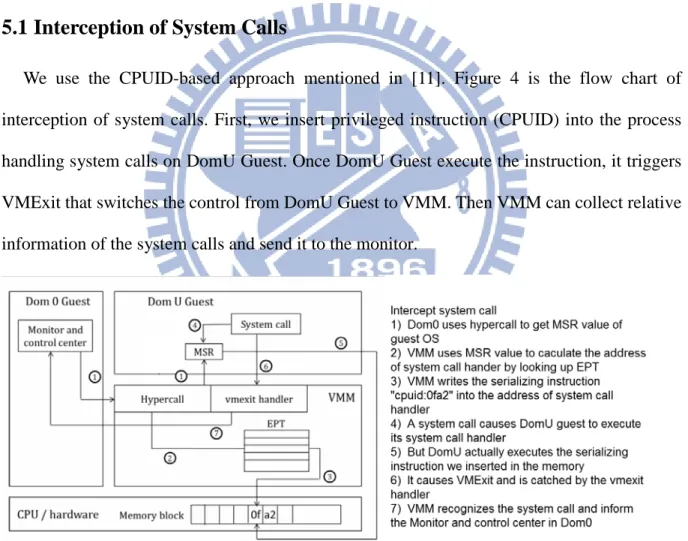
We use the CPUID-based approach mentioned in [11]. Figure 4 is the flow chart of interception of system calls. First, we insert privileged instruction (CPUID) into the process handling system calls on DomU Guest. Once DomU Guest execute the instruction, it triggers VMExit that switches the control from DomU Guest to VMM. Then VMM can collect relative information of the system calls and send it to the monitor.
Figure 4. Flow chart of interception of system calls
5.2 Extraction of Information Flow from System Call Trace
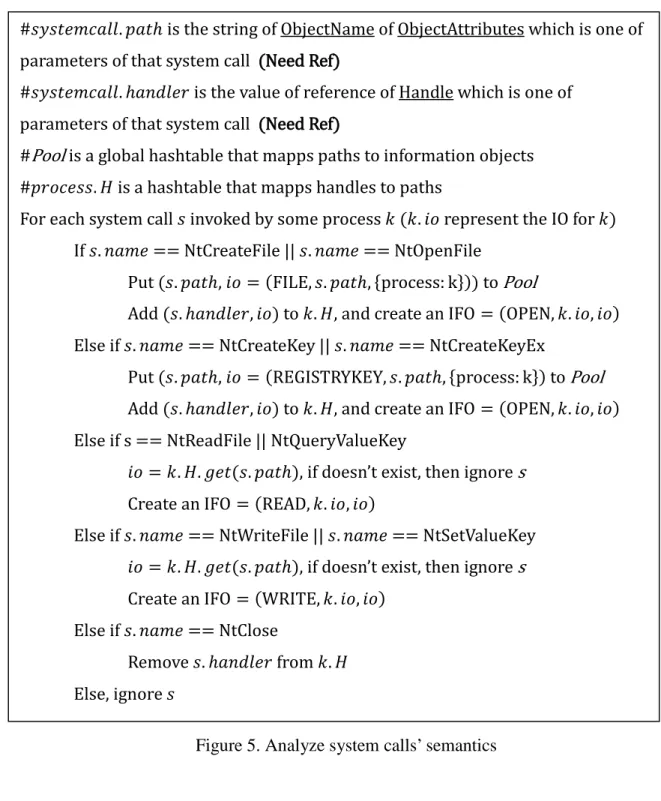
Many of system calls about operating objects can be classified into four classes, ‘OPEN’, ‘READ’, ‘WRITE’ and ‘CLOSE’ respectively. ‘OPEN’ contains some system calls like ‘NtOpenFile’, ‘NtCreateKey’ and so on that help a process request authority for an object like file or registry from OS. The process normally get a handle from OS in return if the request is accepted. The handle is used for following operation and represented the object. Some system calls that help a process operate an object like ‘NtReadFile’, ‘NtWriteValueKey’ and so on belonging to ‘READ’ or ‘WRITE’. These system calls usually need a handle in input parameters, and we can regard them as information dependencies because they commonly come with an information flow from one object to another. When a process does not need an object any longer, it will call a system call belonging to the last class, ‘CLOSE’ containing system calls like ‘NtClose’, to make OS release resource occupied by that.
We record the handle once an ‘OPEN’ system call triggered, and trace it in following ‘READ’ and ‘WRITE’ until relative ‘CLOSE’ system calls triggered. Each time ‘READ’ system call triggered, there is an information dependency from the callee (object) to the caller (process). Similarly, for ‘WRITE’, there is an information dependency from the caller (process) to the callee (object). Figure 5 is the procedure in detail.
Figure 5. Analyze system calls’ semantics
5.3 Behavior Matching
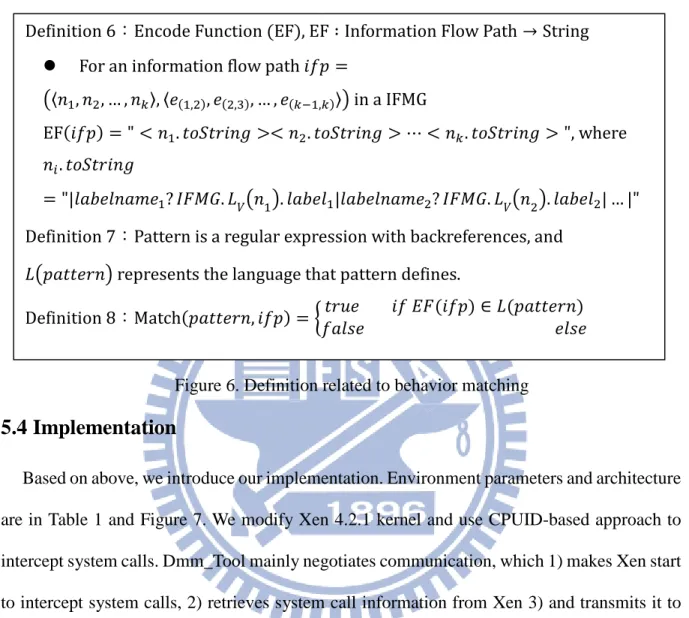
We define an encode function to map information flow path into string. It is well known that processes in handing regular expression are very efficient. As a result, we use a regular expression to describe a pattern of information flow path. Note that we only translate nodes without edges. This will be discussed in chapter (6.3). A pattern match an information flow path
#𝑙𝑙𝑡𝑡𝑙𝑙𝑡𝑡𝑡𝑡𝑠𝑠𝑠𝑠𝑝𝑝𝑙𝑙𝑙𝑙. 𝑡𝑡𝑝𝑝𝑡𝑡ℎ is the string of ObjectName of ObjectAttributes which is one of parameters of that system call (Need Ref)
#𝑙𝑙𝑡𝑡𝑙𝑙𝑡𝑡𝑡𝑡𝑠𝑠𝑠𝑠𝑝𝑝𝑙𝑙𝑙𝑙. ℎ𝑝𝑝𝑑𝑑𝑑𝑑𝑙𝑙𝑡𝑡𝑠𝑠 is the value of reference of Handle which is one of parameters of that system call (Need Ref)
#Pool is a global hashtable that mapps paths to information objects #𝑡𝑡𝑠𝑠𝑠𝑠𝑠𝑠𝑡𝑡𝑙𝑙𝑙𝑙. 𝐻𝐻 is a hashtable that mapps handles to paths
For each system call 𝑙𝑙 invoked by some process 𝑘𝑘 (𝑘𝑘. 𝑑𝑑𝑠𝑠 represent the IO for 𝑘𝑘) If 𝑙𝑙. 𝑑𝑑𝑝𝑝𝑠𝑠𝑡𝑡 == NtCreateFile || 𝑙𝑙. 𝑑𝑑𝑝𝑝𝑠𝑠𝑡𝑡 == NtOpenFile
Put (𝑙𝑙. 𝑡𝑡𝑝𝑝𝑡𝑡ℎ, 𝑑𝑑𝑠𝑠 = (FILE, 𝑙𝑙. 𝑡𝑡𝑝𝑝𝑡𝑡ℎ, {process: k})) to Pool
Add (𝑙𝑙. ℎ𝑝𝑝𝑑𝑑𝑑𝑑𝑙𝑙𝑡𝑡𝑠𝑠, 𝑑𝑑𝑠𝑠) to 𝑘𝑘. 𝐻𝐻, and create an IFO = (OPEN, 𝑘𝑘. 𝑑𝑑𝑠𝑠, 𝑑𝑑𝑠𝑠) Else if 𝑙𝑙. 𝑑𝑑𝑝𝑝𝑠𝑠𝑡𝑡 == NtCreateKey || 𝑙𝑙. 𝑑𝑑𝑝𝑝𝑠𝑠𝑡𝑡 == NtCreateKeyEx
Put (𝑙𝑙. 𝑡𝑡𝑝𝑝𝑡𝑡ℎ, 𝑑𝑑𝑠𝑠 = (REGISTRYKEY, 𝑙𝑙. 𝑡𝑡𝑝𝑝𝑡𝑡ℎ, {process: k}) to Pool Add (𝑙𝑙. ℎ𝑝𝑝𝑑𝑑𝑑𝑑𝑙𝑙𝑡𝑡𝑠𝑠, 𝑑𝑑𝑠𝑠) to 𝑘𝑘. 𝐻𝐻, and create an IFO = (OPEN, 𝑘𝑘. 𝑑𝑑𝑠𝑠, 𝑑𝑑𝑠𝑠) Else if s == NtReadFile || NtQueryValueKey
𝑑𝑑𝑠𝑠 = 𝑘𝑘. 𝐻𝐻. 𝑔𝑔𝑡𝑡𝑡𝑡(𝑙𝑙. 𝑡𝑡𝑝𝑝𝑡𝑡ℎ), if doesn’t exist, then ignore s Create an IFO = (READ, 𝑘𝑘. 𝑑𝑑𝑠𝑠, 𝑑𝑑𝑠𝑠)
Else if 𝑙𝑙. 𝑑𝑑𝑝𝑝𝑠𝑠𝑡𝑡 == NtWriteFile || 𝑙𝑙. 𝑑𝑑𝑝𝑝𝑠𝑠𝑡𝑡 == NtSetValueKey 𝑑𝑑𝑠𝑠 = 𝑘𝑘. 𝐻𝐻. 𝑔𝑔𝑡𝑡𝑡𝑡(𝑙𝑙. 𝑡𝑡𝑝𝑝𝑡𝑡ℎ), if doesn’t exist, then ignore s Create an IFO = (WRITE, 𝑘𝑘. 𝑑𝑑𝑠𝑠, 𝑑𝑑𝑠𝑠)
Else if 𝑙𝑙. 𝑑𝑑𝑝𝑝𝑠𝑠𝑡𝑡 == NtClose
Remove 𝑙𝑙. ℎ𝑝𝑝𝑑𝑑𝑑𝑑𝑙𝑙𝑡𝑡𝑠𝑠 from 𝑘𝑘. 𝐻𝐻 Else, ignore 𝑙𝑙
iff the string encoded by that path belong to the language defined by that pattern. The definition in detail is in Figure 6.
Figure 6. Definition related to behavior matching
5.4 Implementation
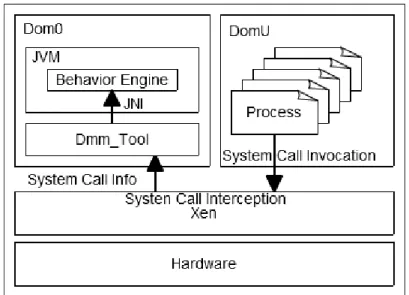
Based on above, we introduce our implementation. Environment parameters and architecture are in Table 1 and Figure 7. We modify Xen 4.2.1 kernel and use CPUID-based approach to intercept system calls. Dmm_Tool mainly negotiates communication, which 1) makes Xen start to intercept system calls, 2) retrieves system call information from Xen 3) and transmits it to the behavior engine through JNI[12]. The behavior engine is deployed on Dom0 for malicious behavior identification.
Host OS Fedora Linux Core 3.9.10 (x86_64)
Guest OS Windows 7 (x86_64)
Virtual Layer Xen hypervisor 4.2.1 Language Java SE 1.7
Table 1. Environment parameters
Definition 6:Encode Function (EF), EF ∶ Information Flow Path → String For an information flow path 𝑑𝑑𝑖𝑖𝑡𝑡 =
�〈𝑑𝑑1, 𝑑𝑑2, … , 𝑑𝑑𝑘𝑘〉, 〈𝑡𝑡(1,2), 𝑡𝑡(2,3), … , 𝑡𝑡(𝑘𝑘−1,𝑘𝑘)〉� in a IFMG
EF(𝑑𝑑𝑖𝑖𝑡𝑡) = " < 𝑑𝑑1. 𝑡𝑡𝑠𝑠𝑡𝑡𝑡𝑡𝑠𝑠𝑑𝑑𝑑𝑑𝑔𝑔 >< 𝑑𝑑2. 𝑡𝑡𝑠𝑠𝑡𝑡𝑡𝑡𝑠𝑠𝑑𝑑𝑑𝑑𝑔𝑔 > ⋯ < 𝑑𝑑𝑘𝑘. 𝑡𝑡𝑠𝑠𝑡𝑡𝑡𝑡𝑠𝑠𝑑𝑑𝑑𝑑𝑔𝑔 > ", where
𝑑𝑑𝑖𝑖. 𝑡𝑡𝑠𝑠𝑡𝑡𝑡𝑡𝑠𝑠𝑑𝑑𝑑𝑑𝑔𝑔
= "|𝑙𝑙𝑝𝑝𝑙𝑙𝑡𝑡𝑙𝑙𝑑𝑑𝑝𝑝𝑠𝑠𝑡𝑡1? 𝐼𝐼𝐼𝐼𝐼𝐼𝐼𝐼. 𝐿𝐿𝑉𝑉�𝑑𝑑1�. 𝑙𝑙𝑝𝑝𝑙𝑙𝑡𝑡𝑙𝑙1|𝑙𝑙𝑝𝑝𝑙𝑙𝑡𝑡𝑙𝑙𝑑𝑑𝑝𝑝𝑠𝑠𝑡𝑡2? 𝐼𝐼𝐼𝐼𝐼𝐼𝐼𝐼. 𝐿𝐿𝑉𝑉�𝑑𝑑2�. 𝑙𝑙𝑝𝑝𝑙𝑙𝑡𝑡𝑙𝑙2| … |"
Definition 7:Pattern is a regular expression with backreferences, and 𝐿𝐿�𝑡𝑡𝑝𝑝𝑡𝑡𝑡𝑡𝑡𝑡𝑠𝑠𝑑𝑑� represents the language that pattern defines.
Definition 8:Match(𝑡𝑡𝑝𝑝𝑡𝑡𝑡𝑡𝑡𝑡𝑠𝑠𝑑𝑑, 𝑑𝑑𝑖𝑖𝑡𝑡) = � 𝑡𝑡𝑠𝑠𝑠𝑠𝑡𝑡 𝑑𝑑𝑖𝑖 𝐸𝐸𝐼𝐼(𝑑𝑑𝑖𝑖𝑡𝑡) ∈ 𝐿𝐿(𝑡𝑡𝑝𝑝𝑡𝑡𝑡𝑡𝑡𝑡𝑠𝑠𝑑𝑑)𝑖𝑖𝑝𝑝𝑙𝑙𝑙𝑙𝑡𝑡 𝑡𝑡𝑙𝑙𝑙𝑙𝑡𝑡
Figure 7. Architecture of environment
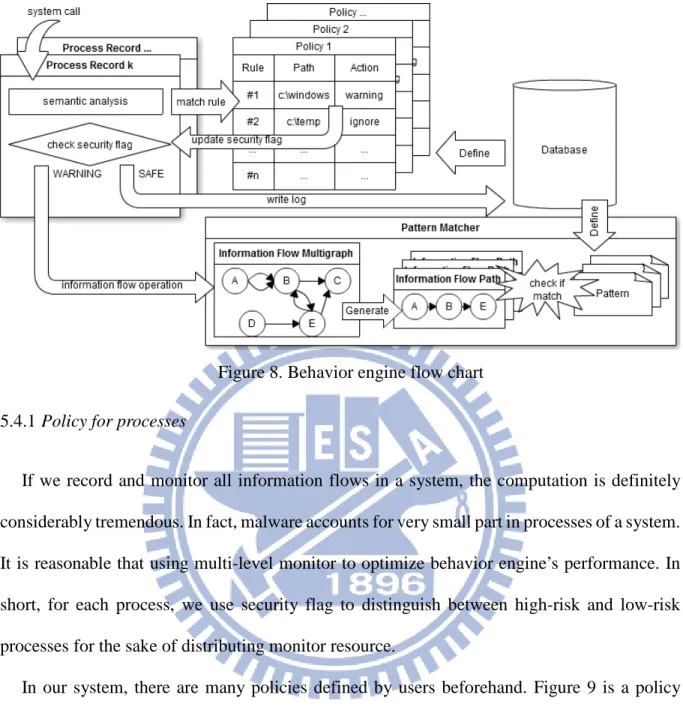
Figure 8 is the flow chart of our behavior engine. After the hypervisor intercepts a system call, it decodes some parameters and sends the system call to the behavior engine. The behavior engine first analyzes system calls semantic and ignores unimportant system calls. Next, it finds corresponding rule from the policy applying the caller (process) for updating security flag. Finally, it generates corresponding information flow operation to update the information flow multigraph. The pattern matcher periodically check if there is a user-defined pattern matches some information flow path for malicious behaviors. The following part introduces some features in behavior engine in detail.
Figure 8. Behavior engine flow chart 5.4.1 Policy for processes
If we record and monitor all information flows in a system, the computation is definitely considerably tremendous. In fact, malware accounts for very small part in processes of a system. It is reasonable that using multi-level monitor to optimize behavior engine’s performance. In short, for each process, we use security flag to distinguish between high-risk and low-risk processes for the sake of distributing monitor resource.
In our system, there are many policies defined by users beforehand. Figure 9 is a policy example. Policy path and policy match method are used to determine what policy apply to the process. Policy contains many rules, each of which defines if the process access a file in some directory or a registry key in some path, then behavior engine will do what action like raising the process’s security flag. There are presently two security flag in our system, SAFE and WARNING respectively. If a process in WARNING, behavior engine not only records system calls but also construct corresponding IFOs to update the IFMG. If a process in SAFE, behavior
engine only log its system call record for the situation that needs the process’s information flows in future.
Figure 9. Policy example 5.4.2 Pattern for user-defined behavior
Users can define pattern in database beforehand to forbid some information flows in the system. Practically, pattern matcher first translate patterns into the strings fitting with Encoding Function, and then it can use these strings to match information flow paths.
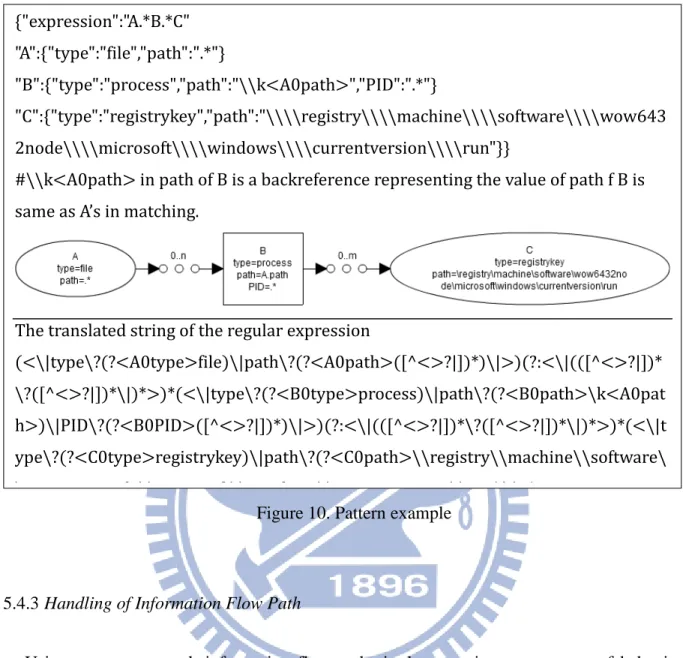
Figure 10 is a pattern example. The pattern describe an information flow from a file to a windows startup registrykey through some process that the path is same as the file’s. Simply speaking, the process copy itself and modify windows startup registrykey. Furthermore, the behavior mentioned above is common in viruses or malwares.
Policy name: Default Policy path: c:\
Policy match_method: prefix match Rules:
//Rule format Rule #: type | path | match_method | action
Rule 1: file | C:\windows | prefix match | raise secrity_flag to WARNING
Rule 2: registrykey | \registry\machine\software\microsoft\windows\windows error reporting | fully match | ignore
……
Figure 10. Pattern example
5.4.3 Handling of Information Flow Path
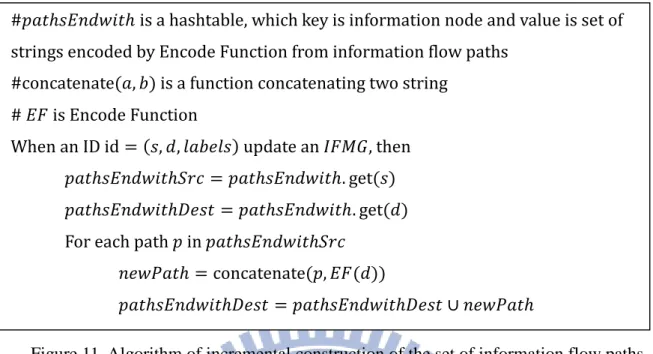
Using pattern to match information flow paths is the most importance part of behavior matching. Due to incremental construction of IFMG and periodically need of behavior matching, we implement a set of information flow paths which construction is also incremental. Assuming that collected system calls have increasing time order, information flow operations as well as information dependencies generated by them with only one handle also have increasing time order. Therefore, new IFPs resulting from new information dependency must add destination node of the ID to the end of the paths that are end with the source node of the ID. The algorithm is in Figure 11.
{"expression":"A.*B.*C" "A":{"type":"file","path":".*"}
"B":{"type":"process","path":"\\k<A0path>","PID":".*"}
"C":{"type":"registrykey","path":"\\\\registry\\\\machine\\\\software\\\\wow643 2node\\\\microsoft\\\\windows\\\\currentversion\\\\run"}}
#\\k<A0path> in path of B is a backreference representing the value of path f B is same as A’s in matching.
The translated string of the regular expression
(<\|type\?(?<A0type>file)\|path\?(?<A0path>([^<>?|])*)\|>)(?:<\|(([^<>?|])* \?([^<>?|])*\|)*>)*(<\|type\?(?<B0type>process)\|path\?(?<B0path>\k<A0pat h>)\|PID\?(?<B0PID>([^<>?|])*)\|>)(?:<\|(([^<>?|])*\?([^<>?|])*\|)*>)*(<\|t ype\?(?<C0type>registrykey)\|path\?(?<C0path>\\registry\\machine\\software\ \ 6 32 d \\ f \\ d \\ \\ )\| ) 16
Figure 11. Algorithm of incremental construction of the set of information flow paths #𝑡𝑡𝑝𝑝𝑡𝑡ℎ𝑙𝑙𝐸𝐸𝑑𝑑𝑑𝑑𝑠𝑠𝑑𝑑𝑡𝑡ℎ is a hashtable, which key is information node and value is set of strings encoded by Encode Function from information flow paths
#concatenate(𝑝𝑝, 𝑙𝑙) is a function concatenating two string # 𝐸𝐸𝐼𝐼 is Encode Function
When an ID id = (𝑙𝑙, 𝑑𝑑, 𝑙𝑙𝑝𝑝𝑙𝑙𝑡𝑡𝑙𝑙𝑙𝑙) update an 𝐼𝐼𝐼𝐼𝐼𝐼𝐼𝐼, then 𝑡𝑡𝑝𝑝𝑡𝑡ℎ𝑙𝑙𝐸𝐸𝑑𝑑𝑑𝑑𝑠𝑠𝑑𝑑𝑡𝑡ℎ𝑡𝑡𝑠𝑠𝑠𝑠 = 𝑡𝑡𝑝𝑝𝑡𝑡ℎ𝑙𝑙𝐸𝐸𝑑𝑑𝑑𝑑𝑠𝑠𝑑𝑑𝑡𝑡ℎ. get(𝑙𝑙) 𝑡𝑡𝑝𝑝𝑡𝑡ℎ𝑙𝑙𝐸𝐸𝑑𝑑𝑑𝑑𝑠𝑠𝑑𝑑𝑡𝑡ℎ𝐷𝐷𝑡𝑡𝑙𝑙𝑡𝑡 = 𝑡𝑡𝑝𝑝𝑡𝑡ℎ𝑙𝑙𝐸𝐸𝑑𝑑𝑑𝑑𝑠𝑠𝑑𝑑𝑡𝑡ℎ. get(𝑑𝑑) For each path 𝑡𝑡 in 𝑡𝑡𝑝𝑝𝑡𝑡ℎ𝑙𝑙𝐸𝐸𝑑𝑑𝑑𝑑𝑠𝑠𝑑𝑑𝑡𝑡ℎ𝑡𝑡𝑠𝑠𝑠𝑠
𝑑𝑑𝑡𝑡𝑠𝑠𝑛𝑛𝑝𝑝𝑡𝑡ℎ = concatenate(𝑡𝑡, 𝐸𝐸𝐼𝐼(𝑑𝑑))
𝑡𝑡𝑝𝑝𝑡𝑡ℎ𝑙𝑙𝐸𝐸𝑑𝑑𝑑𝑑𝑠𝑠𝑑𝑑𝑡𝑡ℎ𝐷𝐷𝑡𝑡𝑙𝑙𝑡𝑡 = 𝑡𝑡𝑝𝑝𝑡𝑡ℎ𝑙𝑙𝐸𝐸𝑑𝑑𝑑𝑑𝑠𝑠𝑑𝑑𝑡𝑡ℎ𝐷𝐷𝑡𝑡𝑙𝑙𝑡𝑡 ∪ 𝑑𝑑𝑡𝑡𝑠𝑠𝑛𝑛𝑝𝑝𝑡𝑡ℎ
Evaluation
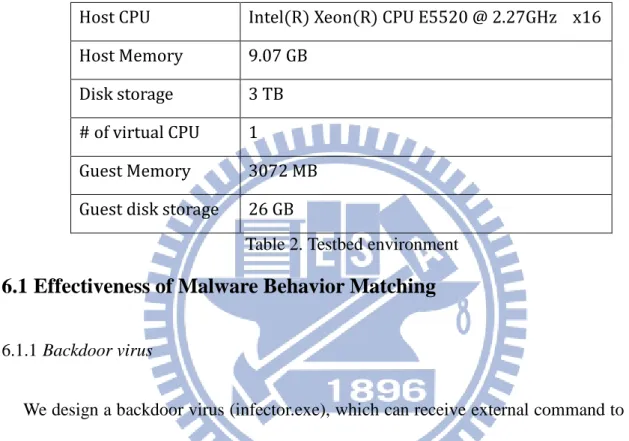
In the chapter, we first evaluate effectiveness of our behavior engine with two viruses. Next, evaluate performance and overhand under high pressure. Finally, we discuss issues of subpath check and partial information. Table 2 is our testbed environment.
Host CPU Intel(R) Xeon(R) CPU E5520 @ 2.27GHz x16
Host Memory 9.07 GB
Disk storage 3 TB
# of virtual CPU 1
Guest Memory 3072 MB
Guest disk storage 26 GB
Table 2. Testbed environment
6.1 Effectiveness of Malware Behavior Matching
6.1.1 Backdoor virus
We design a backdoor virus (infector.exe), which can receive external command to modify or infect specific files. It also copy itself and add its path to windows startup registry key when it is executed. We use the pattern mentioned in Figure 10 to match the information flow generated from this virus.
When infector.exe is executed, it first copy itself to ‘c:\warning\virus.exe’ and add that path to windows startup registry key. Then, it connect to external server for receiving command. In this test, server send a command which makes the virus modify ‘c:\test.txt’.
Figure 12 and Figure 13 is the test result. Figure 14 shows the result in diagram. Our behavior engine use the pattern to correctly match the path generated from infector.exe.
Figure 12. Information flow multigraph generated from infector.exe Multgraph: num_nodes=6 num_edges=6
nodes: #1 {"SN":3,"object":"id=3427934978828028696 path=<|type?file|path?c:\\warning\\virus.exe|>"} #2 {"SN":6,"object":"id=7666627252376717717 path=<|type?file|path?c:\\test.txt|>"} #3 {"SN":4,"object":"id=8564971190246524015 path=<|type?file|path?:zone.identifier:$data|>"} #4 {"SN":2,"object":"id=-8024328038771964644 path=<|type?file|path?c:\\users\\vm_win7\\desktop\\infector.exe|>"} #5 {"SN":1,"object":"id=4858098434634041749 path=<|type?process|path?c:\\users\\vm_win7\\desktop\\infector.exe|PID?1004| >"} #6 {"SN":5,"object":"id=-7188960800393575958 path=<|type?registrykey|path?\\registry\\machine\\software\\wow6432node\\m icrosoft\\windows\\currentversion\\run|>"} edges: #1 {"timestamp":5321,"to":1,"repeat_times":0,"from":2,"operator":"?"} #2 {"timestamp":5322,"to":3,"repeat_times":0,"from":1,"operator":"?"} #3 {"timestamp":5336,"to":1,"repeat_times":0,"from":4,"operator":"?"} #4 {"timestamp":5337,"to":4,"repeat_times":0,"from":1,"operator":"?"} #5 {"timestamp":5350,"to":5,"repeat_times":0,"from":1,"operator":"?"} #6 {"timestamp":11408,"to":6,"repeat_times":0,"from":1,"operator":"?"} 19
Figure 13. Matching result
Figure 14. Diagram based on Figure 12 and Figure 13(the red block represent the matched path)
Table 3. Policy effect show the effect of policy feature. If we do not use policy to filter unimportant node such as the registry key which record OS whether enable WER (windows error report) or not, the multigraph would be very large. Besides, a large number of information flow paths has big impact on the time of matching. Using policy feature can increase performance of behavior engine.
(2014/06/05 03:19:17)Recongnizer Read_Self with
reg=(<\|type\?(?<A0type>file)\|path\?(?<A0path>([^<>?|])*)\|>)(?:<\|(([^<> ?|])*\?([^<>?|])*\|)*>)*(<\|type\?(?<B0type>process)\|path\?(?<B0path>\k<A 0path>)\|PID\?(?<B0PID>([^<>?|])*)\|>)(?:<\|(([^<>?|])*\?([^<>?|])*\|)*>)*( <\|type\?(?<C0type>registrykey)\|path\?(?<C0path>\\registry\\machine\\softw are\\wow6432node\\microsoft\\windows\\currentversion\\run)\|>) Match <|type?file|path?c:\users\vm_win7\desktop\infector.exe|><|type?process|path?c:\ users\vm_win7\desktop\infector.exe|PID?2204|><|type?registrykey|path?\registry \machine\software\wow6432node\microsoft\windows\currentversion\run|> 20
Policy feature On Off
# of nodes of multigraph 6 47
# of edges of multigraph 6 48
# of paths 13 82
Time of matching (ms) 4 10
Table 3. Policy effect comparison 6.1.2 Netsky virus
Netsky is a prolific family of computer worms which affect Microsoft Windows operating systems. The worm mainly sends itself to e-mail addresses that it finds on the infected computer. Like most of virus, it also copies itself to another path and add that path to windows startup registry key. Therefore, we also use the pattern mentioned in Figure 10 to match the information flow generated from this worm.
Because the worm scans all directories to find e-mail addresses, the information flow multigraph is very complicated (many nodes and edges). Considering limitations of space, we only shows the simplified information flow multigraph in Figure 15. Our behavior engine can correctly detect Netsky with the pattern.
Figure 15. The simplified information flow multigraph (the red block represent the matched path)
6.2 Perfomance Overhead
6.2.1 Matching And Complexity Of Multigraph
We design a generator (workload_generator.exe), which can generate file or registry access operations. By changing the number of generators for varying level of workload, we can observe the performance of the behavior engine. Table 4 lists other parameters of generators.
Total number of files 10000 Total number of registries 10000 The number of accesses
for each generator 500
access delay time (ms) 10 Table 4. Generator parameters
Figure 16 and Figure 17 are the complexity of IFMG and performance in different number of generators. With the increasing of the number of generators, the number of IFMG’s nodes and edges increase in linear growth. However, the number of paths increases in very fast speed. The cause is that the IMFG can generator more and longer information flow paths whenever a file or registry is accessed by at least two generators. In addition, because behavior engine does not compress information flow paths, the preceding part of each information flow path is stored in many times. The above-mentioned causes also explain if we did not use multi-level design to filter some unimportant nodes or ignore the reliable processes, behavior engine would have higher load and worse performance.
Figure 16. Complexity of IFMG
Figure 17. Runtime performance of the prototype with respect to different number of generators
6.2.2 Guest VM Performance Degradation
We measure the time of compressing and decompressing a 1 gigabyte sized file with random context on a Guest VM with and without intercepting system calls. The result is presented in Table 5. We can see that the behavior engine incurs less than 20% of performance degradation on the compression / decompression applications on the guest VM.
Without behavior engine With behavior engine Performance degradation Compress 1G file 73.67 s 86.67 s 15% Decompress 1G file 26 s 32 s 18.75%
Table 5. The running times of compression and decompression applications
6.3 Discussion
6.3.1 Subpath check
Table 6 shows the performance evaluation of the subpath check feature. The number of generators is fixed to four. Subpath check is that whenever behavior engine generates a new path, it does check if that is a subpath of another stored path. Original intention of this design is to reduce the number of repeated paths. However, the result shows that, the paths reduced by subpath check does not account for great proportion (about 3%). Moreover, subpath check takes about six times of CPU time of non-check.
Subpath Check Not check Check Performance degradation (Check – Not check) / Not check
CPU time (sec) 44.333 322 626.3%
The number of paths 168376 162138 -3.7% Average of path length 4.61 4.567 -0.9%
Table 6. Performance comparison of sub-path check 6.3.2 Partial Information
Although application behavior model can contains partial information in 𝑙𝑙𝑝𝑝𝑙𝑙𝑡𝑡𝑙𝑙𝑙𝑙 , present design does not accept partial information. In other word, if a process read a small part of a file, behavior engine will consider the process either obtaining all information of the file or nothing (due to system call loss). Because of this, pattern design does only consider information objects without the information dependency. In addition, it reflect another problem of low tolerance of dependency loss. Once an important system call loss happens (like NtOpenFile), we may lose many following information dependencies relative to the system call. Behavior engine requires a recovering feature to handle this.
Future Work
As discussed in Sec. 6.3, we will extend our design for partial information and increase tolerance of dependency loss. In addition, to improve the expression power of patterns, we will create encoding functions that are able to translate edges.
We plan to extend the dependencies to cover network communication. This will allow the behavior engine to model the behavior of distributed applications that span across multiple machines. On the other hand, the current representation of the information flow may include redundant paths or subpaths due to repeated system calls. We also plan to design new mechanism to attain a more compact and efficient representation of information flow for this scenario.
Conclusion
This paper proposes an information flow based model to describe application behaviors. We apply it on malicious behavior identification and design a behavior engine that can detect user-defined behaviors. In addition, we use regular expression with back references to represent paths and use policy feature to ignore unimportant nodes (objects) for better performance. The evaluation indicates our behavior engine can indeed support behavior matching of unknown malware and incurs only a mild 20% performance overhead on the monitored guest system.
References
[1] Max Eddy, "Symantec Says Antivirus Is Dead, World Rolls Eyes",
http://securitywatch.pcmag.com/security/323419-symantec-says-antivirus-is-dead-world-rolls-eyes.
[2] Obfuscation (software). Available:
http://en.wikipedia.org/wiki/Obfuscation_%28software%29.
[3] Executable compression. Available: http://en.wikipedia.org/wiki/Executable_compression. [4] C. Kolbitsch, P. M. Comparetti, C. Kruegel, E. Kirda, X.-y. Zhou, and X. Wang, "Effective and Efficient Malware Detection at the End Host," in USENIX Security Symposium, 2009, pp. 351-366.
[5] J. Kwon and H. Lee, "Bingraph: Discovering mutant malware using hierarchical semantic signatures," in Malicious and Unwanted Software (MALWARE), the 7th International Conference on, 2012, pp. 104-111.
[6] M. Fredrikson, S. Jha, M. Christodorescu, R. Sailer, and X. Yan, "Synthesizing near-optimal malware specifications from suspicious behaviors," in Security and Privacy, IEEE
Symposium on, 2010, pp. 45-60.
[7] Sandhu, Ravi S., et al. "Role-based access control models." Computer 29.2 (1996): 38-47. [8] Denning, Dorothy E., "A lattice model of secure information flow", Communications of the
ACM 19.5 (1976): 236-243.
[9] Newsome, James, and Dawn Song. "Dynamic taint analysis for automatic detection, analysis, and signature generation of exploits on commodity software.", 2005.
[10] H. Yin, D. Song, M. Egele, C. Kruegel, and E. Kirda, "Panorama: capturing system-wide information flow for malware detection and analysis," in Proceedings of the 14th ACM conference on Computer and communications security, 2007, pp. 116-127.
[11] Y.-S. Wu, P.-K. Sun, C.-C. Huang, S.-J. Lu, S.-F. Lai, and Y.-Y. Chen, "EagleEye: Towards mandatory security monitoring in virtualized datacenter environment," in Dependable
Systems and Networks (DSN), the 43rd Annual IEEE/IFIP International Conference on, 2013, pp. 1-12.
[12] Java Native Interface Specification. Available:
http://docs.oracle.com/javase/6/docs/technotes/guides/jni/spec/jniTOC.html. [13] Netsky. Available:
http://www.symantec.com/zh/tw/security_response/writeup.jsp?docid=2004-022417-4628-99.