JavaScript: The Definitive Guide
SIXTH EDITION
JavaScript: The Definitive Guide
David Flanagan
Beijing • Cambridge • Farnham • Köln • Sebastopol • Tokyo
JavaScript: The Definitive Guide, Sixth Edition by David Flanagan
Copyright © 2011 David Flanagan. All rights reserved.
Printed in the United States of America.
Published by O’Reilly Media, Inc., 1005 Gravenstein Highway North, Sebastopol, CA 95472.
O’Reilly books may be purchased for educational, business, or sales promotional use. Online editions are also available for most titles (http://my.safaribooksonline.com). For more information, contact our corporate/institutional sales department: (800) 998-9938 or [email protected].
Editor: Mike Loukides
Production Editor: Teresa Elsey
Proofreader: Teresa Elsey
Indexer: Ellen Troutman Zaig
Cover Designer: Karen Montgomery
Interior Designer: David Futato
Illustrator: Robert Romano
Printing History:
August 1996: Beta Edition.
January 1997: Second Edition.
June 1998: Third Edition.
January 2002: Fourth Edition.
August 2006: Fifth Edition.
March 2011: Sixth Edition.
Nutshell Handbook, the Nutshell Handbook logo, and the O’Reilly logo are registered trademarks of O’Reilly Media, Inc. JavaScript: The Definitive Guide, the image of a Javan rhinoceros, and related trade dress are trademarks of O’Reilly Media, Inc.
Many of the designations used by manufacturers and sellers to distinguish their products are claimed as trademarks. Where those designations appear in this book, and O’Reilly Media, Inc., was aware of a trademark claim, the designations have been printed in caps or initial caps.
While every precaution has been taken in the preparation of this book, the publisher and authors assume no responsibility for errors or omissions, or for damages resulting from the use of the information con- tained herein.
ISBN: 978-0-596-80552-4 [LSI]
This book is dedicated to all who teach peace and resist violence.
Table of Contents
Preface . . . xiii 1. Introduction to JavaScript . . . 1
1.1 Core JavaScript 4
1.2 Client-Side JavaScript 8
Part I. Core JavaScript
2. Lexical Structure . . . 21
2.1 Character Set 21
2.2 Comments 23
2.3 Literals 23
2.4 Identifiers and Reserved Words 23
2.5 Optional Semicolons 25
3. Types, Values, and Variables . . . 29
3.1 Numbers 31
3.2 Text 36
3.3 Boolean Values 40
3.4 null and undefined 41
3.5 The Global Object 42
3.6 Wrapper Objects 43
3.7 Immutable Primitive Values and Mutable Object References 44
3.8 Type Conversions 45
3.9 Variable Declaration 52
3.10 Variable Scope 53
4. Expressions and Operators . . . 57
4.1 Primary Expressions 57
4.2 Object and Array Initializers 58
4.3 Function Definition Expressions 59
vii
4.4 Property Access Expressions 60
4.5 Invocation Expressions 61
4.6 Object Creation Expressions 61
4.7 Operator Overview 62
4.8 Arithmetic Expressions 66
4.9 Relational Expressions 71
4.10 Logical Expressions 75
4.11 Assignment Expressions 77
4.12 Evaluation Expressions 79
4.13 Miscellaneous Operators 82
5. Statements . . . 87
5.1 Expression Statements 88
5.2 Compound and Empty Statements 88
5.3 Declaration Statements 89
5.4 Conditionals 92
5.5 Loops 97
5.6 Jumps 102
5.7 Miscellaneous Statements 108
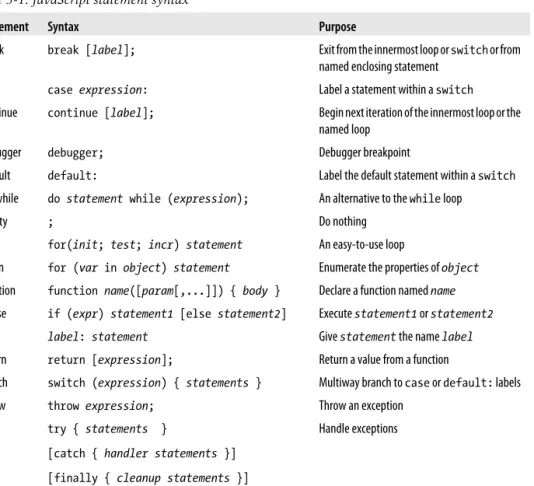
5.8 Summary of JavaScript Statements 112
6. Objects . . . 115
6.1 Creating Objects 116
6.2 Querying and Setting Properties 120
6.3 Deleting Properties 124
6.4 Testing Properties 125
6.5 Enumerating Properties 126
6.6 Property Getters and Setters 128
6.7 Property Attributes 131
6.8 Object Attributes 135
6.9 Serializing Objects 138
6.10 Object Methods 138
7. Arrays . . . 141
7.1 Creating Arrays 141
7.2 Reading and Writing Array Elements 142
7.3 Sparse Arrays 144
7.4 Array Length 144
7.5 Adding and Deleting Array Elements 145
7.6 Iterating Arrays 146
7.7 Multidimensional Arrays 148
7.8 Array Methods 148
7.9 ECMAScript 5 Array Methods 153
7.10 Array Type 157
7.11 Array-Like Objects 158
7.12 Strings As Arrays 160
8. Functions . . . 163
8.1 Defining Functions 164
8.2 Invoking Functions 166
8.3 Function Arguments and Parameters 171
8.4 Functions As Values 176
8.5 Functions As Namespaces 178
8.6 Closures 180
8.7 Function Properties, Methods, and Constructor 186
8.8 Functional Programming 191
9. Classes and Modules . . . 199
9.1 Classes and Prototypes 200
9.2 Classes and Constructors 201
9.3 Java-Style Classes in JavaScript 205
9.4 Augmenting Classes 208
9.5 Classes and Types 209
9.6 Object-Oriented Techniques in JavaScript 215
9.7 Subclasses 228
9.8 Classes in ECMAScript 5 238
9.9 Modules 246
10. Pattern Matching with Regular Expressions . . . 251
10.1 Defining Regular Expressions 251
10.2 String Methods for Pattern Matching 259
10.3 The RegExp Object 261
11. JavaScript Subsets and Extensions . . . 265
11.1 JavaScript Subsets 266
11.2 Constants and Scoped Variables 269
11.3 Destructuring Assignment 271
11.4 Iteration 274
11.5 Shorthand Functions 282
11.6 Multiple Catch Clauses 283
11.7 E4X: ECMAScript for XML 283
12. Server-Side JavaScript . . . 289
12.1 Scripting Java with Rhino 289
12.2 Asynchronous I/O with Node 296
Table of Contents | ix
Part II. Client-Side JavaScript
13. JavaScript in Web Browsers . . . 307
13.1 Client-Side JavaScript 307
13.2 Embedding JavaScript in HTML 311
13.3 Execution of JavaScript Programs 317
13.4 Compatibility and Interoperability 325
13.5 Accessibility 332
13.6 Security 332
13.7 Client-Side Frameworks 338
14. The Window Object . . . 341
14.1 Timers 341
14.2 Browser Location and Navigation 343
14.3 Browsing History 345
14.4 Browser and Screen Information 346
14.5 Dialog Boxes 348
14.6 Error Handling 351
14.7 Document Elements As Window Properties 351
14.8 Multiple Windows and Frames 353
15. Scripting Documents . . . 361
15.1 Overview of the DOM 361
15.2 Selecting Document Elements 364
15.3 Document Structure and Traversal 371
15.4 Attributes 375
15.5 Element Content 378
15.6 Creating, Inserting, and Deleting Nodes 382
15.7 Example: Generating a Table of Contents 387
15.8 Document and Element Geometry and Scrolling 389
15.9 HTML Forms 396
15.10 Other Document Features 405
16. Scripting CSS . . . 413
16.1 Overview of CSS 414
16.2 Important CSS Properties 419
16.3 Scripting Inline Styles 431
16.4 Querying Computed Styles 435
16.5 Scripting CSS Classes 437
16.6 Scripting Stylesheets 440
17. Handling Events . . . 445
17.1 Types of Events 447
17.2 Registering Event Handlers 456
17.3 Event Handler Invocation 460
17.4 Document Load Events 465
17.5 Mouse Events 467
17.6 Mousewheel Events 471
17.7 Drag and Drop Events 474
17.8 Text Events 481
17.9 Keyboard Events 484
18. Scripted HTTP . . . 491
18.1 Using XMLHttpRequest 494
18.2 HTTP by <script>: JSONP 513
18.3 Comet with Server-Sent Events 515
19. The jQuery Library . . . 523
19.1 jQuery Basics 524
19.2 jQuery Getters and Setters 531
19.3 Altering Document Structure 537
19.4 Handling Events with jQuery 540
19.5 Animated Effects 551
19.6 Ajax with jQuery 558
19.7 Utility Functions 571
19.8 jQuery Selectors and Selection Methods 574
19.9 Extending jQuery with Plug-ins 582
19.10 The jQuery UI Library 585
20. Client-Side Storage . . . 587
20.1 localStorage and sessionStorage 589
20.2 Cookies 593
20.3 IE userData Persistence 599
20.4 Application Storage and Offline Webapps 601
21. Scripted Media and Graphics . . . 613
21.1 Scripting Images 613
21.2 Scripting Audio and Video 615
21.3 SVG: Scalable Vector Graphics 622
21.4 Graphics in a <canvas> 630
22. HTML5 APIs . . . 667
22.1 Geolocation 668
22.2 History Management 671
22.3 Cross-Origin Messaging 676
22.4 Web Workers 680
Table of Contents | xi
22.5 Typed Arrays and ArrayBuffers 687
22.6 Blobs 691
22.7 The Filesystem API 700
22.8 Client-Side Databases 705
22.9 Web Sockets 712
Part III. Core JavaScript Reference
Core JavaScript Reference . . . 719
Part IV. Client-Side JavaScript Reference
Client-Side JavaScript Reference . . . 859
Index . . . 1019
Preface
This book covers the JavaScript language and the JavaScript APIs implemented by web browsers. I wrote it for readers with at least some prior programming experience who want to learn JavaScript and also for programmers who already use JavaScript but want to take their understanding to a new level and really master the language and the web platform. My goal with this book is to document the JavaScript language and platform comprehensively and definitively. As a result, this is a large and detailed book. My hope, however, is that it will reward careful study, and that the time you spend reading it will be easily recouped in the form of higher programming productivity.
This book is divided into four parts. Part I covers the JavaScript language itself.
Part II covers client-side JavaScript: the JavaScript APIs defined by HTML5 and related standards and implemented by web browsers. Part III is the reference section for the core language, and Part IV is the reference for client-side JavaScript. Chapter 1 includes an outline of the chapters in Parts I and II (see §1.1).
This sixth edition of the book covers both ECMAScript 5 (the latest version of the core language) and HTML5 (the latest version of the web platform). You’ll find ECMAScript 5 material throughout Part I. The new material on HTML5 is mostly in the chapters at the end of Part II, but there is also some in other chapters as well.
Completely new chapters in this edition include Chapter 11, JavaScript Subsets and Extensions; Chapter 12, Server-Side JavaScript; Chapter 19, The jQuery Library; and Chapter 22, HTML5 APIs.
Readers of previous editions may notice that I have completely rewritten many of the chapters in this book for the sixth edition. The core of Part I—the chapters covering objects, arrays, functions, and classes—is all new and brings the book in line with current programming styles and best practices. Similarly, key chapters of Part II, such as those covering documents and events, have been completely rewritten to bring them up-to-date.
xiii
A Note About Piracy
If you are reading a digital version of this book that you (or your employer) did not pay for (or borrow from someone who did) then you probably have an illegally pirated copy.
Writing the sixth edition of this book was a full-time job, and it took more than a year.
The only way I get paid for that time is when readers actually buy the book. And the only way I can afford to work on a seventh edition is if I get paid for the sixth.
I do not condone piracy, but if you have a pirated copy, go ahead and read a couple of chapters. I think that you’ll find that this is a valuable source of information about JavaScript, better organized and of higher quality than what you can find freely (and legally) available on the Web. If you agree that this is a valuable source of information, then please pay for that value by purchasing a legal copy (either digital or print) of the book. On the other hand, if you find that this book is no more valuable than the free information on the web, then please discard your pirated copy and use those free information sources.
Conventions Used in This Book
I use the following typographical conventions in this book:
Italic
Is used for emphasis and to indicate the first use of a term. Italic is also used for email addresses, URLs and file names.
Constant width
Is used in all JavaScript code and CSS and HTML listings, and generally for any- thing that you would type literally when programming.
Constant width italic
Is used for the names of function parameters, and generally as a placeholder to indicate an item that should be replaced with an actual value in your program.
Example Code
The examples in this book are available online. You can find them linked from the book’s catalog page at the publisher’s website:
http://oreilly.com/catalog/9780596805531/
This book is here to help you get your job done. In general, you may use the code in this book in your programs and documentation. You do not need to contact O’Reilly for permission unless you’re reproducing a significant portion of the code. For example, writing a program that uses several chunks of code from this book does not require permission. Selling or distributing a CD-ROM of examples from O’Reilly books does require permission. Answering a question by citing this book and quoting example
code does not require permission. Incorporating a significant amount of example code from this book into your product’s documentation does require permission.
If you use the code from this book, I appreciate, but do not require, attribution. An attribution usually includes the title, author, publisher, and ISBN. For example: “Java- Script: The Definitive Guide, by David Flanagan (O’Reilly). Copyright 2011 David Fla- nagan, 978-0-596-80552-4.”
For more details on the O’Reilly code reuse policy, see http://oreilly.com/pub/a/oreilly/
ask_tim/2001/codepolicy.html. If you feel your use of the examples falls outside of the permission given above, feel free to contact O’Reilly at [email protected].
Errata and How to Contact Us
The publisher maintains a public list of errors found in this book. You can view the list, and submit the errors you find, by visiting the book’s web page:
http://oreilly.com/catalog/9780596805531
To comment or ask technical questions about this book, send email to:
For more information about our books, conferences, Resource Centers, and the O’Reilly Network, see our website at:
http://www.oreilly.com
Find us on Facebook: http://facebook.com/oreilly Follow us on Twitter: http://twitter.com/oreillymedia
Watch us on YouTube: http://www.youtube.com/oreillymedia
Acknowledgments
Many people have helped me with the creation of this book. I’d like to thank my editor, Mike Loukides, for trying to keep me on schedule and for his insightful comments.
Thanks also to my technical reviewers: Zachary Kessin, who reviewed many of the chapters in Part I, and Raffaele Cecco, who reviewed Chapter 19 and the <canvas>
material in Chapter 21. The production team at O’Reilly has done their usual fine job:
Dan Fauxsmith managed the production process, Teresa Elsey was the production editor, Rob Romano drew the figures, and Ellen Troutman Zaig created the index.
In this era of effortless electronic communication, it is impossible to keep track of all those who influence and inform us. I’d like to thank everyone who has answered my questions on the es5, w3c, and whatwg mailing lists, and everyone who has shared their insightful ideas about JavaScript programming online. I’m sorry I can’t list you all by
Preface | xv
name, but it is a pleasure to work within such a vibrant community of JavaScript programmers.
Editors, reviewers, and contributors to previous editions of this book have included:
Andrew Schulman, Angelo Sirigos, Aristotle Pagaltzis, Brendan Eich, Christian Heilmann, Dan Shafer, Dave C. Mitchell, Deb Cameron, Douglas Crockford, Dr.
Tankred Hirschmann, Dylan Schiemann, Frank Willison, Geoff Stearns, Herman Ven- ter, Jay Hodges, Jeff Yates, Joseph Kesselman, Ken Cooper, Larry Sullivan, Lynn Roll- ins, Neil Berkman, Nick Thompson, Norris Boyd, Paula Ferguson, Peter-Paul Koch, Philippe Le Hegaret, Richard Yaker, Sanders Kleinfeld, Scott Furman, Scott Issacs, Shon Katzenberger, Terry Allen, Todd Ditchendorf, Vidur Apparao, and Waldemar Horwat.
This edition of the book is substantially rewritten and kept me away from my family for many late nights. My love to them and my thanks for putting up with my absences.
— David Flanagan (davidflanagan.com), March 2011
CHAPTER 1
Introduction to JavaScript
JavaScript is the programming language of the Web. The overwhelming majority of modern websites use JavaScript, and all modern web browsers—on desktops, game consoles, tablets, and smart phones—include JavaScript interpreters, making Java- Script the most ubiquitous programming language in history. JavaScript is part of the triad of technologies that all Web developers must learn: HTML to specify the content of web pages, CSS to specify the presentation of web pages, and JavaScript to specify the behavior of web pages. This book will help you master the language.
If you are already familiar with other programming languages, it may help you to know that JavaScript is a high-level, dynamic, untyped interpreted programming language that is well-suited to object-oriented and functional programming styles. JavaScript derives its syntax from Java, its first-class functions from Scheme, and its prototype- based inheritance from Self. But you do not need to know any of those languages, or be familiar with those terms, to use this book and learn JavaScript.
The name “JavaScript” is actually somewhat misleading. Except for a superficial syn- tactic resemblance, JavaScript is completely different from the Java programming lan- guage. And JavaScript has long since outgrown its scripting-language roots to become a robust and efficient general-purpose language. The latest version of the language (see the sidebar) defines new features for serious large-scale software development.
1
JavaScript: Names and Versions
JavaScript was created at Netscape in the early days of the Web, and technically, “Java- Script” is a trademark licensed from Sun Microsystems (now Oracle) used to describe Netscape’s (now Mozilla’s) implementation of the language. Netscape submitted the language for standardization to ECMA—the European Computer Manufacturer’s As- sociation—and because of trademark issues, the standardized version of the language was stuck with the awkward name “ECMAScript.” For the same trademark reasons, Microsoft’s version of the language is formally known as “JScript.” In practice, just about everyone calls the language JavaScript. This book uses the name “ECMAScript”
only to refer to the language standard.
For the last decade, all web browsers have implemented version 3 of the ECMAScript standard and there has really been no need to think about version numbers: the lan- guage standard was stable and browser implementations of the language were, for the most part, interoperable. Recently, an important new version of the language has been defined as ECMAScript version 5 and, at the time of this writing, browsers are beginning to implement it. This book covers all the new features of ECMAScript 5 as well as all the long-standing features of ECMAScript 3. You’ll sometimes see these language ver- sions abbreviated as ES3 and ES5, just as you’ll sometimes see the name JavaScript abbreviated as JS.
When we’re speaking of the language itself, the only version numbers that are relevant are ECMAScript versions 3 or 5. (Version 4 of ECMAScript was under development for years, but proved to be too ambitious and was never released.) Sometimes, however, you’ll also see a JavaScript version number, such as JavaScript 1.5 or JavaScript 1.8.
These are Mozilla’s version numbers: version 1.5 is basically ECMAScript 3, and later versions include nonstandard language extensions (see Chapter 11). Finally, there are also version numbers attached to particular JavaScript interpreters or “engines.” Goo- gle calls its JavaScript interpreter V8, for example, and at the time of this writing the current version of the V8 engine is 3.0.
To be useful, every language must have a platform or standard library or API of func- tions for performing things like basic input and output. The core JavaScript language defines a minimal API for working with text, arrays, dates, and regular expressions but does not include any input or output functionality. Input and output (as well as more sophisticated features, such as networking, storage, and graphics) are the responsibility of the “host environment” within which JavaScript is embedded. Usually that host environment is a web browser (though we’ll see two uses of JavaScript without a web browser in Chapter 12). Part I of this book covers the language itself and its minimal built-in API. Part II explains how JavaScript is used in web browsers and covers the sprawling browser-based APIs loosely known as “client-side JavaScript.”
Part III is the reference section for the core API. You can read about the JavaScript array manipulation API by looking up “Array” in this part of the book, for example.
Part IV is the reference section for client-side JavaScript. You might look up “Canvas”
in this part of the book to read about the graphics API defined by the HTML5
<canvas> element, for example.
This book covers low-level fundamentals first, and then builds on those to more advanced and higher-level abstractions. The chapters are intended to be read more or less in order. But learning a new programming language is never a linear process, and describing a language is not linear either: each language feature is related to other fea- tures and this book is full of cross-references—sometimes backward and sometimes forward to material you have not yet read. This chapter makes a quick first pass through the core language and the client-side API, introducing key features that will make it easier to understand the in-depth treatment in the chapters that follow.
Exploring JavaScript
When learning a new programming language, it’s important to try the examples in the book, and then modify them and try them again to test your understanding of the language. To do that, you need a JavaScript interpreter. Fortunately, every web browser includes a JavaScript interpreter, and if you’re reading this book, you probably already have more than one web browser installed on your computer.
We’ll see later on in this chapter that you can embed JavaScript code within <script>
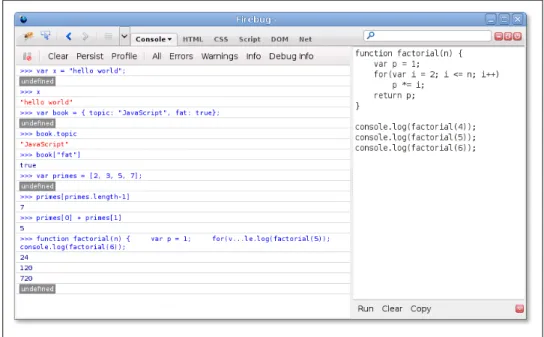
tags in HTML files, and when the browser loads the file, it will execute the code. For- tunately, however, you don’t have to do that every time you want to try out simple snippets of JavaScript code. Spurred on by the powerful and innovative Firebug exten- sion for Firefox (pictured in Figure 1-1 and available for download from http://getfirebug .com/), today’s web browsers all include web developer tools that are indispensable for debugging, experimenting, and learning. You can usually find these tools in the Tools menu of the browser under names like “Developer Tools” or “Web Console.”
(Firefox 4 includes a built-in “Web Console,” but at the time of this writing, the Firebug extension is better.) Often, you can call up a console with a keystroke like F12 or Ctrl- Shift-J. These console tools often appear as panes at the top or bottom of the browser window, but some allow you to open them as separate windows (as pictured in Fig- ure 1-1), which is often quite convenient.
A typical “developer tools” pane or window includes multiple tabs that allow you to inspect things like HTML document structure, CSS styles, network requests, and so on. One of the tabs is a “JavaScript console” that allows you to type in lines of JavaScript code and try them out. This is a particularly easy way to play around with JavaScript, and I recommend that you use it as you read this book.
There is a simple console API that is portably implemented by modern browsers. You can use the function console.log() to display text on the console. This is often sur- prisingly helpful while debugging, and some of the examples in this book (even in the core language section) use console.log() to perform simple output. A similar but more intrusive way to display output or debugging messages is by passing a string of text to the alert() function, which displays it in a modal dialog box.
Introduction to JavaScript | 3
Figure 1-1. The Firebug debugging console for Firefox
1.1 Core JavaScript
This section is a tour of the JavaScript language, and also a tour of Part I of this book.
After this introductory chapter, we dive into JavaScript at the lowest level: Chapter 2, Lexical Structure, explains things like JavaScript comments, semicolons, and the Uni- code character set. Chapter 3, Types, Values, and Variables, starts to get more inter- esting: it explains JavaScript variables and the values you can assign to those variables.
Here’s some sample code to illustrate the highlights of those two chapters:
// Anything following double slashes is an English-language comment.
// Read the comments carefully: they explain the JavaScript code.
// variable is a symbolic name for a value.
// Variables are declared with the var keyword:
var x; // Declare a variable named x.
// Values can be assigned to variables with an = sign
x = 0; // Now the variable x has the value 0 x // => 0: A variable evaluates to its value.
// JavaScript supports several types of values x = 1; // Numbers.
x = 0.01; // Just one Number type for integers and reals.
x = "hello world"; // Strings of text in quotation marks.
x = 'JavaScript'; // Single quote marks also delimit strings.
x = true; // Boolean values.
x = false; // The other Boolean value.
x = null; // Null is a special value that means "no value".
x = undefined; // Undefined is like null.
Two other very important types that JavaScript programs can manipulate are objects and arrays. These are the subject of Chapter 6, Objects, and Chapter 7, Arrays, but they are so important that you’ll see them many times before you reach those chapters.
// JavaScript's most important data type is the object.
// An object is a collection of name/value pairs, or a string to value map.
var book = { // Objects are enclosed in curly braces.
topic: "JavaScript", // The property "topic" has value "JavaScript".
fat: true // The property "fat" has value true.
}; // The curly brace marks the end of the object.
// Access the properties of an object with . or []:
book.topic // => "JavaScript"
book["fat"] // => true: another way to access property values.
book.author = "Flanagan"; // Create new properties by assignment.
book.contents = {}; // {} is an empty object with no properties.
// JavaScript also supports arrays (numerically indexed lists) of values:
var primes = [2, 3, 5, 7]; // An array of 4 values, delimited with [ and ].
primes[0] // => 2: the first element (index 0) of the array.
primes.length // => 4: how many elements in the array.
primes[primes.length-1] // => 7: the last element of the array.
primes[4] = 9; // Add a new element by assignment.
primes[4] = 11; // Or alter an existing element by assignment.
var empty = []; // [] is an empty array with no elements.
empty.length // => 0
// Arrays and objects can hold other arrays and objects:
var points = [ // An array with 2 elements.
{x:0, y:0}, // Each element is an object.
{x:1, y:1}
];
var data = { // An object with 2 properties
trial1: [[1,2], [3,4]], // The value of each property is an array.
trial2: [[2,3], [4,5]] // The elements of the arrays are arrays.
};
The syntax illustrated above for listing array elements within square braces or mapping object property names to property values inside curly braces is known as an initializer expression, and it is just one of the topics of Chapter 4, Expressions and Operators. An expression is a phrase of JavaScript that can be evaluated to produce a value. The use of . and [] to refer to the value of an object property or array element is an expression, for example. You may have noticed in the code above that when an expression stands alone on a line, the comment that follows it begins with an arrow (=>) and the value of the expression. This is a convention that you’ll see throughout this book.
One of the most common ways to form expressions in JavaScript is to use operators like these:
// Operators act on values (the operands) to produce a new value.
// Arithmetic operators are the most common:
3 + 2 // => 5: addition
1.1 Core JavaScript | 5
3 - 2 // => 1: subtraction 3 * 2 // => 6: multiplication 3 / 2 // => 1.5: division
points[1].x - points[0].x // => 1: more complicated operands work, too
"3" + "2" // => "32": + adds numbers, concatenates strings // JavaScript defines some shorthand arithmetic operators
var count = 0; // Define a variable count++; // Increment the variable count--; // Decrement the variable
count += 2; // Add 2: same as count = count + 2;
count *= 3; // Multiply by 3: same as count = count * 3;
count // => 6: variable names are expressions, too.
// Equality and relational operators test whether two values are equal, // unequal, less than, greater than, and so on. They evaluate to true or false.
var x = 2, y = 3; // These = signs are assignment, not equality tests x == y // => false: equality
x != y // => true: inequality x < y // => true: less-than
x <= y // => true: less-than or equal x > y // => false: greater-than
x >= y // => false: greater-than or equal
"two" == "three" // => false: the two strings are different
"two" > "three" // => true: "tw" is alphabetically greater than "th"
false == (x > y) // => true: false is equal to false // Logical operators combine or invert boolean values
(x == 2) && (y == 3) // => true: both comparisons are true. && is AND (x > 3) || (y < 3) // => false: neither comparison is true. || is OR
!(x == y) // => true: ! inverts a boolean value
If the phrases of JavaScript are expressions, then the full sentences are statements, which are the topic of Chapter 5, Statements. In the code above, the lines that end with semicolons are statements. (In the code below, you’ll see multiline statements that do not end with semicolons.) There is actually a lot of overlap between statements and expressions. Roughly, an expression is something that computes a value but doesn’t do anything: it doesn’t alter the program state in any way. Statements, on the other hand, don’t have a value (or don’t have a value that we care about), but they do alter the state. You’ve seen variable declarations and assignment statements above. The other broad category of statement is control structures, such as conditionals and loops.
Examples are below, after we cover functions.
A function is a named and parametrized block of JavaScript code that you define once, and can then invoke over and over again. Functions aren’t covered formally until Chapter 8, Functions, but like objects and arrays, you’ll see them many times before you get to that chapter. Here are some simple examples:
// Functions are parameterized blocks of JavaScript code that we can invoke.
function plus1(x) { // Define a function named "plus1" with parameter "x"
return x+1; // Return a value one larger than the value passed in } // Functions are enclosed in curly braces
plus1(y) // => 4: y is 3, so this invocation returns 3+1 var square = function(x) { // Functions are values and can be assigned to vars return x*x; // Compute the function's value
}; // Semicolon marks the end of the assignment.
square(plus1(y)) // => 16: invoke two functions in one expression
When we combine functions with objects, we get methods:
// When functions are assigned to the properties of an object, we call // them "methods". All JavaScript objects have methods:
var a = []; // Create an empty array
a.push(1,2,3); // The push() method adds elements to an array a.reverse(); // Another method: reverse the order of elements // We can define our own methods, too. The "this" keyword refers to the object // on which the method is defined: in this case, the points array from above.
points.dist = function() { // Define a method to compute distance between points var p1 = this[0]; // First element of array we're invoked on
var p2 = this[1]; // Second element of the "this" object var a = p2.x-p1.x; // Difference in X coordinates var b = p2.y-p1.y; // Difference in Y coordinates return Math.sqrt(a*a + // The Pythagorean theorem
b*b); // Math.sqrt() computes the square root };
points.dist() // => 1.414: distance between our 2 points
Now, as promised, here are some functions whose bodies demonstrate common Java- Script control structure statements:
// JavaScript statements include conditionals and loops using the syntax // of C, C++, Java, and other languages.
function abs(x) { // A function to compute the absolute value if (x >= 0) { // The if statement...
return x; // executes this code if the comparison is true.
} // This is the end of the if clause.
else { // The optional else clause executes its code if return -x; // the comparison is false.
} // Curly braces optional when 1 statement per clause.
} // Note return statements nested inside if/else.
function factorial(n) { // A function to compute factorials var product = 1; // Start with a product of 1
while(n > 1) { // Repeat statements in {} while expr in () is true product *= n; // Shortcut for product = product * n;
n--; // Shortcut for n = n - 1 } // End of loop
return product; // Return the product }
factorial(4) // => 24: 1*4*3*2
function factorial2(n) { // Another version using a different loop var i, product = 1; // Start with 1
for(i=2; i <= n; i++) // Automatically increment i from 2 up to n
product *= i; // Do this each time. {} not needed for 1-line loops return product; // Return the factorial
1.1 Core JavaScript | 7
}
factorial2(5) // => 120: 1*2*3*4*5
JavaScript is an object-oriented language, but it is quite different than most. Chapter 9, Classes and Modules, covers object-oriented programming in JavaScript in detail, with lots of examples, and is one of the longest chapters in the book. Here is a very simple example that demonstrates how to define a JavaScript class to represent 2D geometric points. Objects that are instances of this class have a single method named r() that computes the distance of the point from the origin:
// Define a constructor function to initialize a new Point object
function Point(x,y) { // By convention, constructors start with capitals this.x = x; // this keyword is the new object being initialized this.y = y; // Store function arguments as object properties } // No return is necessary
// Use a constructor function with the keyword "new" to create instances var p = new Point(1, 1); // The geometric point (1,1)
// Define methods for Point objects by assigning them to the prototype // object associated with the constructor function.
Point.prototype.r = function() {
return Math.sqrt( // Return the square root of x² + y²
this.x * this.x + // This is the Point object on which the method...
this.y * this.y // ...is invoked.
);
};
// Now the Point object p (and all future Point objects) inherits the method r() p.r() // => 1.414...
Chapter 9 is really the climax of Part I, and the chapters that follow wrap up some loose ends and bring our exploration of the core language to a close. Chapter 10, Pattern Matching with Regular Expressions, explains the regular expression grammar and dem- onstrates how to use these “regexps” for textual pattern matching. Chapter 11, Java- Script Subsets and Extensions, covers subsets and extensions of core JavaScript. Finally, before we plunge into client-side JavaScript in web browsers, Chapter 12, Server-Side JavaScript, introduces two ways to use JavaScript outside of web browsers.
1.2 Client-Side JavaScript
Client-side JavaScript does not exhibit the nonlinear cross-reference problem nearly to the extent that the core language does, and it is possible to learn how to use JavaScript in web browsers in a fairly linear sequence. But you’re probably reading this book to learn client-side JavaScript, and Part II is a long way off, so this section is a quick sketch of basic client-side programming techniques, followed by an in-depth example.
Chapter 13, JavaScript in Web Browsers, is the first chapter of Part II and it explains in detail how to put JavaScript to work in web browsers. The most important thing you’ll
learn in that chapter is that JavaScript code can be embedded within HTML files using the <script> tag:
<html>
<head>
<script src="library.js"></script> <!-- include a library of JavaScript code -->
</head>
<body>
<p>This is a paragraph of HTML</p>
<script>
// And this is some client-side JavaScript code // literally embedded within the HTML file
</script>
<p>Here is more HTML.</p>
</body>
</html>
Chapter 14, The Window Object, explains techniques for scripting the web browser and covers some important global functions of client-side JavaScript. For example:
<script>
function moveon() {
// Display a modal dialog to ask the user a question var answer = confirm("Ready to move on?");
// If they clicked the "OK" button, make the browser load a new page if (answer) window.location = "http://google.com";
}
// Run the function defined above 1 minute (60,000 milliseconds) from now.
setTimeout(moveon, 60000);
</script>
Note that the client-side example code shown in this section comes in longer snippets than the core language examples earlier in the chapter. These examples are not designed to be typed into a Firebug (or similar) console window. Instead you can embed them in an HTML file and try them out by loading them in your web browser. The code above, for instance, works as a stand-alone HTML file.
Chapter 15, Scripting Documents, gets down to the real business of client-side Java- Script, scripting HTML document content. It shows you how to select particular HTML elements from within a document, how to set HTML attributes of those elements, how to alter the content of those elements, and how to add new elements to the document.
This function demonstrates a number of these basic document searching and modifi- cation techniques:
// Display a message in a special debugging output section of the document.
// If the document does not contain such a section, create one.
function debug(msg) {
// Find the debugging section of the document, looking at HTML id attributes var log = document.getElementById("debuglog");
// If no element with the id "debuglog" exists, create one.
if (!log) {
log = document.createElement("div"); // Create a new <div> element log.id = "debuglog"; // Set the HTML id attribute on it
1.2 Client-Side JavaScript | 9
log.innerHTML = "<h1>Debug Log</h1>"; // Define initial content document.body.appendChild(log); // Add it at end of document }
// Now wrap the message in its own <pre> and append it to the log var pre = document.createElement("pre"); // Create a <pre> tag var text = document.createTextNode(msg); // Wrap msg in a text node pre.appendChild(text); // Add text to the <pre>
log.appendChild(pre); // Add <pre> to the log }
Chapter 15 shows how JavaScript can script the HTML elements that define web con- tent. Chapter 16, Scripting CSS, shows how you can use JavaScript with the CSS styles that define the presentation of that content. This is often done with the style or class attribute of HTML elements:
function hide(e, reflow) { // Hide the element e by scripting its style if (reflow) { // If 2nd argument is true e.style.display = "none" // hide element and use its space }
else { // Otherwise
e.style.visibility = "hidden"; // make e invisible, but leave its space }
}
function highlight(e) { // Highlight e by setting a CSS class // Simply define or append to the HTML class attribute.
// This assumes that a CSS stylesheet already defines the "hilite" class if (!e.className) e.className = "hilite";
else e.className += " hilite";
}
JavaScript allows us to script the HTML content and CSS presentation of documents in web browsers, but it also allows us to define behavior for those documents with event handlers. An event handler is a JavaScript function that we register with the browser and the browser invokes when some specified type of event occurs. The event of interest might be a mouse click or a key press (or on a smart phone, it might be a two-finger gesture of some sort). Or an event handler might be triggered when the browser finishes loading a document, when the user resizes the browser window, or when the user enters data into an HTML form element. Chapter 17, Handling Events, explains how you can define and register event handlers and how the browser invokes them when events occur.
The simplest way to define event handlers is with HTML attributes that begin with
“on”. The “onclick” handler is a particularly useful one when you’re writing simple test programs. Suppose that you had typed in the debug() and hide() functions from above and saved them in files named debug.js and hide.js. You could write a simple HTML test file using <button> elements with onclick event handler attributes:
<script src="debug.js"></script>
<script src="hide.js"></script>
Hello
<button onclick="hide(this,true); debug('hide button 1');">Hide1</button>
<button onclick="hide(this); debug('hide button 2');">Hide2</button>
World
Here is some more client-side JavaScript code that uses events. It registers an event handler for the very important “load” event, and it also demonstrates a more sophis- ticated way of registering event handler functions for “click” events:
// The "load" event occurs when a document is fully loaded. Usually we // need to wait for this event before we start running our JavaScript code.
window.onload = function() { // Run this function when the document loads // Find all <img> tags in the document
var images = document.getElementsByTagName("img");
// Loop through them, adding an event handler for "click" events to each // so that clicking on the image hides it.
for(var i = 0; i < images.length; i++) { var image = images[i];
if (image.addEventListener) // Another way to register a handler image.addEventListener("click", hide, false);
else // For compatibility with IE8 and before image.attachEvent("onclick", hide);
}
// This is the event handler function registered above
function hide(event) { event.target.style.visibility = "hidden"; } };
Chapters 15, 16, and 17 explain how you can use JavaScript to script the content (HTML), presentation (CSS), and behavior (event handling) of web pages. The APIs described in those chapters are somewhat complex and, until recently, riddled with browser incompatibilities. For these reasons, many or most client-side JavaScript pro- grammers choose to use a client-side library or framework to simplify their basic pro- gramming tasks. The most popular such library is jQuery, the subject of Chapter 19, The jQuery Library. jQuery defines a clever and easy-to-use API for scripting document content, presentation, and behavior. It has been thoroughly tested and works in all major browsers, including old ones like IE6.
jQuery code is easy to identify because it makes frequent use of a function named
$(). Here is what the debug() function used previously looks like when rewritten to use jQuery:
function debug(msg) {
var log = $("#debuglog"); // Find the element to display msg in.
if (log.length == 0) { // If it doesn't exist yet, create it...
log = $("<div id='debuglog'><h1>Debug Log</h1></div>");
log.appendTo(document.body); // and insert it at the end of the body.
}
log.append($("<pre/>").text(msg)); // Wrap msg in <pre> and append to log.
}
The four chapters of Part II described so far have all really been about web pages. Four more chapters shift gears to focus on web applications. These chapters are not about using web browsers to display documents with scriptable content, presentation, and
1.2 Client-Side JavaScript | 11
behavior. Instead, they’re about using web browsers as application platforms, and they describe the APIs that modern browsers provide to support sophisticated client-side web apps. Chapter 18, Scripted HTTP, explains how to make scripted HTTP requests with JavaScript—a kind of networking API. Chapter 20, Client-Side Storage, describes mechanisms for storing data—and even entire applications—on the client side for use in future browsing sessions. Chapter 21, Scripted Media and Graphics, covers a client- side API for drawing arbitrary graphics in an HTML <canvas> tag. And, finally, Chap- ter 22, HTML5 APIs, covers an assortment of new web app APIs specified by or affiliated with HTML5. Networking, storage, graphics: these are OS-type services being provided by the web browser, defining a new cross-platform application environment. If you are targeting browsers that support these new APIs, it is an exciting time to be a client-side JavaScript programmer. There are no code samples from these final four chapters here, but the extended example below uses some of these new APIs.
1.2.1 Example: A JavaScript Loan Calculator
This chapter ends with an extended example that puts many of these techniques to- gether and shows what real-world client-side JavaScript (plus HTML and CSS) pro- grams look like. Example 1-1 lists the code for the simple loan payment calculator application pictured in Figure 1-2.
Figure 1-2. A loan calculator web application
It is worth reading through Example 1-1 carefully. You shouldn’t expect to understand everything, but the code is heavily commented and you should be able to at least get
the big-picture view of how it works. The example demonstrates a number of core JavaScript language features, and also demonstrates important client-side JavaScript techniques:
• How to find elements in a document.
• How to get user input from form input elements.
• How to set the HTML content of document elements.
• How to store data in the browser.
• How to make scripted HTTP requests.
• How to draw graphics with the <canvas> element.
Example 1-1. A loan calculator in JavaScript
<!DOCTYPE html>
<html>
<head>
<title>JavaScript Loan Calculator</title>
<style> /* This is a CSS style sheet: it adds style to the program output */
.output { font-weight: bold; } /* Calculated values in bold */
#payment { text-decoration: underline; } /* For element with id="payment" */
#graph { border: solid black 1px; } /* Chart has a simple border */
th, td { vertical-align: top; } /* Don't center table cells */
</style>
</head>
<body>
<!--
This is an HTML table with <input> elements that allow the user to enter data and <span> elements in which the program can display its results.
These elements have ids like "interest" and "years". These ids are used in the JavaScript code that follows the table. Note that some of the input elements define "onchange" or "onclick" event handlers. These specify strings of JavaScript code to be executed when the user enters data or clicks.
-->
<table>
<tr><th>Enter Loan Data:</th>
<td></td>
<th>Loan Balance, Cumulative Equity, and Interest Payments</th></tr>
<tr><td>Amount of the loan ($):</td>
<td><input id="amount" onchange="calculate();"></td>
<td rowspan=8>
<canvas id="graph" width="400" height="250"></canvas></td></tr>
<tr><td>Annual interest (%):</td>
<td><input id="apr" onchange="calculate();"></td></tr>
<tr><td>Repayment period (years):</td>
<td><input id="years" onchange="calculate();"></td>
<tr><td>Zipcode (to find lenders):</td>
<td><input id="zipcode" onchange="calculate();"></td>
<tr><th>Approximate Payments:</th>
<td><button onclick="calculate();">Calculate</button></td></tr>
<tr><td>Monthly payment:</td>
<td>$<span class="output" id="payment"></span></td></tr>
<tr><td>Total payment:</td>
<td>$<span class="output" id="total"></span></td></tr>
1.2 Client-Side JavaScript | 13
<tr><td>Total interest:</td>
<td>$<span class="output" id="totalinterest"></span></td></tr>
<tr><th>Sponsors:</th><td colspan=2>
Apply for your loan with one of these fine lenders:
<div id="lenders"></div></td></tr>
</table>
<!-- The rest of this example is JavaScript code in the <script> tag below -->
<!-- Normally, this script would go in the document <head> above but it -->
<!-- is easier to understand here, after you've seen its HTML context. -->
<script>
"use strict"; // Use ECMAScript 5 strict mode in browsers that support it /*
* This script defines the calculate() function called by the event handlers * in HTML above. The function reads values from <input> elements, calculates * loan payment information, displays the results in <span> elements. It also * saves the user's data, displays links to lenders, and draws a chart.
*/
function calculate() {
// Look up the input and output elements in the document var amount = document.getElementById("amount");
var apr = document.getElementById("apr");
var years = document.getElementById("years");
var zipcode = document.getElementById("zipcode");
var payment = document.getElementById("payment");
var total = document.getElementById("total");
var totalinterest = document.getElementById("totalinterest");
// Get the user's input from the input elements. Assume it is all valid.
// Convert interest from a percentage to a decimal, and convert from // an annual rate to a monthly rate. Convert payment period in years // to the number of monthly payments.
var principal = parseFloat(amount.value);
var interest = parseFloat(apr.value) / 100 / 12;
var payments = parseFloat(years.value) * 12;
// Now compute the monthly payment figure.
var x = Math.pow(1 + interest, payments); // Math.pow() computes powers var monthly = (principal*x*interest)/(x-1);
// If the result is a finite number, the user's input was good and // we have meaningful results to display
if (isFinite(monthly)) {
// Fill in the output fields, rounding to 2 decimal places payment.innerHTML = monthly.toFixed(2);
total.innerHTML = (monthly * payments).toFixed(2);
totalinterest.innerHTML = ((monthly*payments)-principal).toFixed(2);
// Save the user's input so we can restore it the next time they visit save(amount.value, apr.value, years.value, zipcode.value);
// Advertise: find and display local lenders, but ignore network errors try { // Catch any errors that occur within these curly braces getLenders(amount.value, apr.value, years.value, zipcode.value);
}
catch(e) { /* And ignore those errors */ }
// Finally, chart loan balance, and interest and equity payments chart(principal, interest, monthly, payments);
} else {
// Result was Not-a-Number or infinite, which means the input was // incomplete or invalid. Clear any previously displayed output.
payment.innerHTML = ""; // Erase the content of these elements total.innerHTML = ""
totalinterest.innerHTML = "";
chart(); // With no arguments, clears the chart }
}
// Save the user's input as properties of the localStorage object. Those // properties will still be there when the user visits in the future
// This storage feature will not work in some browsers (Firefox, e.g.) if you // run the example from a local file:// URL. It does work over HTTP, however.
function save(amount, apr, years, zipcode) {
if (window.localStorage) { // Only do this if the browser supports it localStorage.loan_amount = amount;
localStorage.loan_apr = apr;
localStorage.loan_years = years;
localStorage.loan_zipcode = zipcode;
} }
// Automatically attempt to restore input fields when the document first loads.
window.onload = function() {
// If the browser supports localStorage and we have some stored data if (window.localStorage && localStorage.loan_amount) {
document.getElementById("amount").value = localStorage.loan_amount;
document.getElementById("apr").value = localStorage.loan_apr;
document.getElementById("years").value = localStorage.loan_years;
document.getElementById("zipcode").value = localStorage.loan_zipcode;
} };
// Pass the user's input to a server-side script which can (in theory) return // a list of links to local lenders interested in making loans. This example // does not actually include a working implementation of such a lender-finding // service. But if the service existed, this function would work with it.
function getLenders(amount, apr, years, zipcode) {
// If the browser does not support the XMLHttpRequest object, do nothing if (!window.XMLHttpRequest) return;
// Find the element to display the list of lenders in var ad = document.getElementById("lenders");
if (!ad) return; // Quit if no spot for output
1.2 Client-Side JavaScript | 15
// Encode the user's input as query parameters in a URL var url = "getLenders.php" + // Service url plus
"?amt=" + encodeURIComponent(amount) + // user data in query string "&apr=" + encodeURIComponent(apr) +
"&yrs=" + encodeURIComponent(years) + "&zip=" + encodeURIComponent(zipcode);
// Fetch the contents of that URL using the XMLHttpRequest object var req = new XMLHttpRequest(); // Begin a new request
req.open("GET", url); // An HTTP GET request for the url req.send(null); // Send the request with no body // Before returning, register an event handler function that will be called // at some later time when the HTTP server's response arrives. This kind of // asynchronous programming is very common in client-side JavaScript.
req.onreadystatechange = function() {
if (req.readyState == 4 && req.status == 200) {
// If we get here, we got a complete valid HTTP response
var response = req.responseText; // HTTP response as a string var lenders = JSON.parse(response); // Parse it to a JS array // Convert the array of lender objects to a string of HTML var list = "";
for(var i = 0; i < lenders.length; i++) {
list += "<li><a href='" + lenders[i].url + "'>" + lenders[i].name + "</a>";
}
// Display the HTML in the element from above.
ad.innerHTML = "<ul>" + list + "</ul>";
} } }
// Chart monthly loan balance, interest and equity in an HTML <canvas> element.
// If called with no arguments then just erase any previously drawn chart.
function chart(principal, interest, monthly, payments) {
var graph = document.getElementById("graph"); // Get the <canvas> tag graph.width = graph.width; // Magic to clear and reset the canvas element // If we're called with no arguments, or if this browser does not support // graphics in a <canvas> element, then just return now.
if (arguments.length == 0 || !graph.getContext) return;
// Get the "context" object for the <canvas> that defines the drawing API var g = graph.getContext("2d"); // All drawing is done with this object var width = graph.width, height = graph.height; // Get canvas size // These functions convert payment numbers and dollar amounts to pixels function paymentToX(n) { return n * width/payments; }
function amountToY(a) { return height-(a * height/(monthly*payments*1.05));}
// Payments are a straight line from (0,0) to (payments, monthly*payments) g.moveTo(paymentToX(0), amountToY(0)); // Start at lower left g.lineTo(paymentToX(payments), // Draw to upper right amountToY(monthly*payments));
g.lineTo(paymentToX(payments), amountToY(0)); // Down to lower right g.closePath(); // And back to start g.fillStyle = "#f88"; // Light red g.fill(); // Fill the triangle g.font = "bold 12px sans-serif"; // Define a font g.fillText("Total Interest Payments", 20,20); // Draw text in legend // Cumulative equity is non-linear and trickier to chart
var equity = 0;
g.beginPath(); // Begin a new shape g.moveTo(paymentToX(0), amountToY(0)); // starting at lower-left for(var p = 1; p <= payments; p++) {
// For each payment, figure out how much is interest var thisMonthsInterest = (principal-equity)*interest;
equity += (monthly - thisMonthsInterest); // The rest goes to equity g.lineTo(paymentToX(p),amountToY(equity)); // Line to this point }
g.lineTo(paymentToX(payments), amountToY(0)); // Line back to X axis g.closePath(); // And back to start point g.fillStyle = "green"; // Now use green paint g.fill(); // And fill area under curve g.fillText("Total Equity", 20,35); // Label it in green // Loop again, as above, but chart loan balance as a thick black line var bal = principal;
g.beginPath();
g.moveTo(paymentToX(0),amountToY(bal));
for(var p = 1; p <= payments; p++) { var thisMonthsInterest = bal*interest;
bal -= (monthly - thisMonthsInterest); // The rest goes to equity g.lineTo(paymentToX(p),amountToY(bal)); // Draw line to this point }
g.lineWidth = 3; // Use a thick line g.stroke(); // Draw the balance curve g.fillStyle = "black"; // Switch to black text g.fillText("Loan Balance", 20,50); // Legend entry // Now make yearly tick marks and year numbers on X axis
g.textAlign="center"; // Center text over ticks var y = amountToY(0); // Y coordinate of X axis for(var year=1; year*12 <= payments; year++) { // For each year
var x = paymentToX(year*12); // Compute tick position g.fillRect(x-0.5,y-3,1,3); // Draw the tick if (year == 1) g.fillText("Year", x, y-5); // Label the axis if (year % 5 == 0 && year*12 !== payments) // Number every 5 years g.fillText(String(year), x, y-5);
}
// Mark payment amounts along the right edge
g.textAlign = "right"; // Right-justify text g.textBaseline = "middle"; // Center it vertically var ticks = [monthly*payments, principal]; // The two points we'll mark var rightEdge = paymentToX(payments); // X coordinate of Y axis for(var i = 0; i < ticks.length; i++) { // For each of the 2 points var y = amountToY(ticks[i]); // Compute Y position of tick
1.2 Client-Side JavaScript | 17