PROGRAMMING/JAVASCRIPT
JavaScript with Promises
ISBN: 978-1-449-37321-4
US $19.99 CAN $22.99
“ Daniel Parker begins with an insightful introduction to asynchronous
programming that any JavaScript developer will find useful. JavaScript with Promises covers both the How and Why, focusing on current practical tools. ”
—Kris Kowal Senior Software Engineer, Uber; creator of the Q library and CommonJS modules“ A comprehensive look at one of the most important tools of a modern JavaScript programmer.
—Domenic Denicola”
Software Engineer, Google; Editor, ES2015 Promises specification
Twitter: @oreillymedia facebook.com/oreilly Asynchronous JavaScript is everywhere, whether you’re using Ajax,
AngularJS, Node.js, or WebRTC. This practical guide shows intermediate to advanced JavaScript developers how Promises can help you manage asynchronous code effectively—including the inevitable flood of callbacks as your codebase grows. You’ll learn the inner workings of Promises and ways to avoid difficulties and missteps when using them.
The ability to asynchronously fetch data and load scripts in the browser broadens the capabilities of JavaScript applications. But if you don’t understand how the async part works, you’ll wind up with unpredictable code that’s difficult to maintain. This book is ideal whether you’re new to Promises or want to expand your knowledge of this technology.
■ Understand how async JavaScript works by delving into callbacks, the event loop, and threading
■ Learn how Promises organize callbacks into discrete steps that are easier to read and maintain
■ Examine scenarios you’ll encounter and techniques you can use when writing real-world applications
■ Use features in the Bluebird library and jQuery to work with Promises
■ Learn how the Promise API handles asynchronous errors
■ Explore ECMAScript 6 language features that simplify Promise-related code
Daniel Parker is a software developer focused on web and mobile applications.
He writes JavaScript for Evernote in Austin, Texas, and is the organizer of the Austin Google Developer Group.
Daniel Parker
JavaScript with
Promises
MANAGING ASYNCHRONOUS CODE
JAVASCRIPTWITHPROMISESParker
PROGRAMMING/JAVASCRIPT
JavaScript with Promises
ISBN: 978-1-449-37321-4
US $19.99 CAN $22.99
“ Daniel Parker begins with an insightful introduction to asynchronous
programming that any JavaScript developer will find useful. JavaScript with Promises covers both the How and Why, focusing on current practical tools. ”
—Kris Kowal Senior Software Engineer, Uber; creator of the Q library and CommonJS modules“ A comprehensive look at one of the most important tools of a modern JavaScript programmer.
—Domenic Denicola”
Software Engineer, Google; Editor, ES2015 Promises specification
Twitter: @oreillymedia facebook.com/oreilly Asynchronous JavaScript is everywhere, whether you’re using Ajax,
AngularJS, Node.js, or WebRTC. This practical guide shows intermediate to advanced JavaScript developers how Promises can help you manage asynchronous code effectively—including the inevitable flood of callbacks as your codebase grows. You’ll learn the inner workings of Promises and ways to avoid difficulties and missteps when using them.
The ability to asynchronously fetch data and load scripts in the browser broadens the capabilities of JavaScript applications. But if you don’t understand how the async part works, you’ll wind up with unpredictable code that’s difficult to maintain. This book is ideal whether you’re new to Promises or want to expand your knowledge of this technology.
■ Understand how async JavaScript works by delving into callbacks, the event loop, and threading
■ Learn how Promises organize callbacks into discrete steps that are easier to read and maintain
■ Examine scenarios you’ll encounter and techniques you can use when writing real-world applications
■ Use features in the Bluebird library and jQuery to work with Promises
■ Learn how the Promise API handles asynchronous errors
■ Explore ECMAScript 6 language features that simplify Promise-related code
Daniel Parker is a software developer focused on web and mobile applications.
He writes JavaScript for Evernote in Austin, Texas, and is the organizer of the Austin Google Developer Group.
JavaScript with
Promises
MANAGING ASYNCHRONOUS CODE
JAVASCRIPTWITHPROMISESParker
Daniel Parker
Boston
JavaScript with Promises
978-1-449-37321-4 [LSI]
JavaScript with Promises
by Daniel Parker
Copyright © 2015 Daniel Parker. All rights reserved.
Printed in the United States of America.
Published by O’Reilly Media, Inc., 1005 Gravenstein Highway North, Sebastopol, CA 95472.
O’Reilly books may be purchased for educational, business, or sales promotional use. Online editions are also available for most titles (http://safaribooksonline.com). For more information, contact our corporate/
institutional sales department: 800-998-9938 or [email protected].
Editors: Simon St.Laurent and Brian MacDonald Production Editor: Colleen Lobner
Copyeditor: Lindsy Gamble Proofreader: Elise Morrison
Indexer: Wendy Catalano Interior Designer: David Futato Cover Designer: Ellie Volckhausen Illustrator: Rebecca Demarest June 2015: First Edition
Revision History for the First Edition
2015-05-28: First Release 2015-07-17: Second Release
See http://oreilly.com/catalog/errata.csp?isbn=9781449373214 for release details.
The O’Reilly logo is a registered trademark of O’Reilly Media, Inc. JavaScript with Promises, the cover image of a white-crested helmetshrike, and related trade dress are trademarks of O’Reilly Media, Inc.
While the publisher and the author have used good faith efforts to ensure that the information and instructions contained in this work are accurate, the publisher and the author disclaim all responsibility for errors or omissions, including without limitation responsibility for damages resulting from the use of or reliance on this work. Use of the information and instructions contained in this work is at your own risk. If any code samples or other technology this work contains or describes is subject to open source licenses or the intellectual property rights of others, it is your responsibility to ensure that your use thereof complies with such licenses and/or rights.
Table of Contents
Preface. . . v
1. Asynchronous JavaScript. . . 1
Callbacks 2
Asynchronous JavaScript 3
Run to Completion and the Event Loop 6
Summary 10
2. Introducing Promises. . . 11
Basic Usage 11
Multiple Consumers 14
Promise States 15
Chaining Promises 18
Callback Execution Order 19
Basic Error Propagation 20
The Promise API 22
Summary 24
3. Working with Standard Promises. . . 25
The Async Ripple Effect 25
Conditional Logic 26
Parallel Execution 28
Sequential Execution Using Loops or Recursion 30
Managing Latency 35
Functional Composition 36
Summary 38
iii
4. Using Libraries and Frameworks. . . 39
Promise Interoperability and Thenables 40
The Bluebird Promise Library 40
Loading Bluebird 41
Managing Execution Context 42
Wrapping Node.js Functions 43
Working with Collections of Promises 46
Manipulating Fulfillment Values 48
Promises in jQuery 51
Summary 54
5. Error Handling. . . 55
Rejecting Promises 55
Passing Errors 57
Unhandled Rejections 58
Implementing try/catch/finally 59
Using the Call Stack 61
Summary 63
6. Combining ECMAScript 6 Features with Promises. . . 65
Destructuring 65
Arrow Functions 67
Iterables and Iterators 68
Generators 69
Synchronous Style 69
Generators and Iterators 70
Sending Values to a Generator 72
Sending Errors to a Generator 76
Practical Application 77
Summary 79
Index. . . 81
Preface
Asynchronous JavaScript is everywhere. AJAX, WebRTC, and Node.js are a few examples of where asynchronous APIs are found. Although it is easy to write a quick function to handle the result of one HTTP request, it is also easy to get lost in an unpredictable sea of callbacks as a codebase grows and more people contribute. That’s where a good approach for handling asynchronous code comes in and many develop‐
ers are choosing to use Promises in their approach.
This is the book I needed when originally choosing an asynchronous strategy, and it is the result of my experience using promises in JavaScript applications. It explains their use and inner workings while exposing difficulties and missteps. Promises are made up of only a few concepts with a small API. But in the same way that JavaScript’s small number of simple constructs are used to create elegant and power‐
ful solutions, I am surprised and pleased at the number of ways Promises can be used to effectively manage asynchronous code.
Intended Audience
This book is for intermediate and advanced JavaScript developers who want to write asynchronous code. These developers may be comfortable with JavaScript for tradi‐
tional web APIs but are moving to environments such as Node.js, Google Chrome packaged apps, or building desktop applications with JavaScript. Developers who write browser-based code and want to use frameworks such as Angular or newer browser technologies such as Service Workers or WebRTC will also benefit. Even people who are already experienced with Promises may still enjoy reading the code and discovering additional ideas for their own work.
A Word on Style
This is not a book about JavaScript syntax dos and don’ts. All the examples are intended to be clear and casual; however, this style may conflict with some recom‐
v
mended practices. Those choices are independent of the ideas presented here and you are free to choose as you see fit when approaching these concepts in your code.
Conventions Used in This Book
The following typographical conventions are used in this book:
Italic
Indicates new terms, URLs, email addresses, filenames, and file extensions.
Constant width
Used for program listings, as well as within paragraphs to refer to program ele‐
ments such as variable or function names, databases, data types, environment variables, statements, and keywords.
Constant width bold
Shows commands or other text that should be typed literally by the user.
Constant width italic
Shows text that should be replaced with user-supplied values or by values deter‐
mined by context.
This element signifies a tip or suggestion.
This element signifies a general note.
This element indicates a warning or caution.
Using Code Examples
Supplemental material (code examples, exercises, etc.) is available for download at https://github.com/dxparker/promises-book-examples.
This book is here to help you get your job done. In general, if example code is offered with this book, you may use it in your programs and documentation. You do not
need to contact us for permission unless you’re reproducing a significant portion of the code. For example, writing a program that uses several chunks of code from this book does not require permission. Selling or distributing a CD-ROM of examples from O’Reilly books does require permission. Answering a question by citing this book and quoting example code does not require permission. Incorporating a signifi‐
cant amount of example code from this book into your product’s documentation does require permission.
We appreciate, but do not require, attribution. An attribution usually includes the title, author, publisher, and ISBN. For example: “JavaScript with Promises by Daniel Parker (O’Reilly). Copyright 2015 Daniel Parker, 978-1-449-37321-4.”
If you feel your use of code examples falls outside fair use or the permission given above, feel free to contact us at [email protected].
Safari® Books Online
Safari Books Online is an on-demand digital library that deliv‐
ers expert content in both book and video form from the world’s leading authors in technology and business.
Technology professionals, software developers, web designers, and business and crea‐
tive professionals use Safari Books Online as their primary resource for research, problem solving, learning, and certification training.
Safari Books Online offers a range of plans and pricing for enterprise, government, education, and individuals.
Members have access to thousands of books, training videos, and prepublication manuscripts in one fully searchable database from publishers like O’Reilly Media, Prentice Hall Professional, Addison-Wesley Professional, Microsoft Press, Sams, Que, Peachpit Press, Focal Press, Cisco Press, John Wiley & Sons, Syngress, Morgan Kauf‐
mann, IBM Redbooks, Packt, Adobe Press, FT Press, Apress, Manning, New Riders, McGraw-Hill, Jones & Bartlett, Course Technology, and hundreds more. For more information about Safari Books Online, please visit us online.
How to Contact Us
Please address comments and questions concerning this book to the publisher:
O’Reilly Media, Inc.
1005 Gravenstein Highway North Sebastopol, CA 95472
800-998-9938 (in the United States or Canada)
Preface | vii
707-829-0515 (international or local) 707-829-0104 (fax)
We have a web page for this book, where we list errata, examples, and any additional information. You can access this page at http://bit.ly/js-with-promises.
To comment or ask technical questions about this book, send email to bookques‐
For more information about our books, courses, conferences, and news, see our web‐
site at http://www.oreilly.com.
Find us on Facebook: http://facebook.com/oreilly Follow us on Twitter: http://twitter.com/oreillymedia Watch us on YouTube: http://www.youtube.com/oreillymedia
Acknowledgments
Thank you to Kris Kowal, Domenic Denicola, and Petka Antonov for their ongoing contributions to JavaScript Promises and for their feedback during the writing of this book. Thanks also to Cody Lindley for his valuable feedback.
Thank you to the wonderful people at O’Reilly whose expertise, support, and patience made the publication of this book possible, especially Simon St.Laurent for his role in getting the book started, Brian MacDonald and Amy Jollymore for their guidance, and Colleen Lobner and Lindsy Gamble for sweating the details.
One of the best things about the programming culture is constantly learning from other people or alongside them in a collaborative effort. I am grateful for having some exceptional colleagues over the years, including Jerry Raschke, Nathan Price, Hank Beasley, Gregory Long, and Johnathan Hebert.
This book is dedicated to my loving wife Sarah. You are amazing!
CHAPTER 1
Asynchronous JavaScript
The number of asynchronous JavaScript APIs is rapidly growing. Web applications asynchronously fetch data and load scripts in the browser. Node.js and its derivatives provide a host of APIs for asynchronous I/O. And new web specifications for Streams, Service Workers, and Font Loading all include asynchronous calls. These advancements broaden the capabilities of JavaScript applications, but using them without understanding how the async part works can result in unpredictable code that is difficult to maintain. Things may work as expected in development or test environments but fail when deployed to end users because of variables such as net‐
work speed or hardware performance.
This chapter explains how async JavaScript works. We’ll cover callbacks, the event loop, and threading. Most of the information is not specific to Promises but provides the foundation you need to get the most out of Promises and out of the rest of this book.
Let’s start with a code snippet that frequently surprises people. The code makes an HTTP request using the XMLHttpRequest (XHR) object and uses a while loop that runs for three seconds. Although it is generally bad practice to implement a delay with the while loop, it’s a good way to illustrate how JavaScript runs. Read the code in Example 1-1 and decide whether the listener callback for the XHR object will ever be triggered.
Example 1-1. Async XHR
// Make an async HTTP request var async = true;
var xhr = new XMLHttpRequest();
xhr.open('get', 'data.json', async);
xhr.send();
1
// Create a three second delay (don't do this in real life) var timestamp = Date.now() + 3000;
while (Date.now() < timestamp);
// Now that three seconds have passed,
// add a listener to the xhr.load and xhr.error events function listener() {
console.log('greetings from listener');
}
xhr.addEventListener('load', listener);
xhr.addEventListener('error', listener);
Here are some common opinions on whether listener is called:
1. Yes, listener is always called
2. Not a chance, the addEventListener calls must run before xhr.send() 3. Sometimes, depending on whether the request takes more than three seconds The correct assessment is that listener is always called. Although the second and third answers are common, they are incorrect because of the event loop model and run-to-completion semantics in JavaScript. If you thought otherwise or would like a refresher on these concepts, this chapter is for you.
Callbacks
Callbacks are the cornerstone of asynchronous JavaScript programming. As a Java‐
Script developer you are probably familiar with callbacks, but just to be sure, Example 1-2 presents a quick case of a callback that prints each of the elements in an array.
Example 1-2. Example callback
var cities = ['Tokyo', 'London', 'Boston', 'Berlin', 'Chicago', 'New York'];
cities.forEach(function callback(city) { console.log(city);
});
// Console output:
// Tokyo // London // Boston // Berlin // Chicago // New York
In short, a callback is a function provided to other code for invocation. Example 1-2 uses an inline function to define the callback. That is a commonly used style in Java‐
Script applications, but callbacks do not have to be declared inline. Example 1-3 shows the equivalent code with the function declared in advance.
Example 1-3. Passing a callback as a predefined function
function callback(city) { console.log(city);
}
cities.forEach(callback);
Whether your callbacks are inline functions or predefined is a matter of choice. As long as you have a reference to a function, you can use it as a callback.
Asynchronous JavaScript
Callbacks can be invoked synchronously or asynchronously (i.e., before or after the function they are passed to returns.) The array.forEach() method used in the previ‐
ous section invokes the callback it receives synchronously. An example of a function that invokes its callback asynchronously is window.requestAnimationFrame(). Its callback is invoked between browser repaint intervals, as shown in Example 1-4.
Example 1-4. A callback being invoked asynchronously
function repositionElement() { console.log('repositioning!');
// ...
}
window.requestAnimationFrame(repositionElement);
console.log('I am the last line of the script');
// Console output:
// I am the last line of the script // repositioning!
In this example, “I am the last line of the script” is written to the console before
“repositioning!” because requestAnimationFrame returns immediately and invokes the repositionElement callback at a later time.
Synchronous code can be easier to understand because it executes in the order it is written. A good comparison can be made using the synchronous and asynchronous file APIs in Node.js. Example 1-5 is a script that writes to a file and reads back the
Asynchronous JavaScript | 3
contents synchronously. The numbered comments indicate the relative order in which some of the lines of code are executed.
Example 1-5. Using synchronous code to write and read a file in Node.js
var fs = require('fs');
var timestamp = new Date().toString();
var contents;
fs.writeFileSync('date.txt', timestamp);
contents = fs.readFileSync('date.txt');
console.log('Checking the contents'); // 1 console.assert(contents == timestamp); // 2 console.log('I am the last line of the script'); // 3
// Console output:
// Checking the contents
// I am the last line of the script
The script uses the writeFileSync and readFileSync functions of the fs module to write a timestamp to a file and read it back. After the contents of the file are read back, they are compared to the timestamp that was originally written to see if the two values match. The console.assert() displays an error if the values differ. In this example they always match so the only output is from the console.log() statements before and after the assertion.
The script shown in Example 1-6 does the same job using the async functions fs.writeFile() and fs.readFile(). Both functions take a callback as their last parameter. The numbered comments are used again to show the relative execution order, which differs from the previous script.
Example 1-6. Using asynchronous code to write and read a file in Node.js
var fs = require('fs');
var timestamp = new Date().toString();
fs.writeFile('date.txt', timestamp, function (err) { if (err) throw err;
fs.readFile('date.txt', function (err, contents) { if (err) throw err;
console.log('Checking the contents'); // 2 console.assert(contents == timestamp); // 3 });
});
console.log('I am the last line of the script'); // 1
// Console output:
// I am the last line of the script // Checking the contents
Comparing this code to the previous example, you’ll see that the console output appears in reverse order. Similar to the requestAnimationFrame example, the call to fs.writeFile() returns immediately so the last line of the script runs before the file contents are read and compared to what was written.
Although synchronous code can be easier to follow, it is also limiting. Programmers need the ability to write async code so long-running tasks such as network requests do not block other parts of the program while incomplete. Without that ability, you couldn’t type in an editor at the same time your document was being autosaved or scroll through a web page while the browser was still downloading images. This is where callbacks come in. In JavaScript, callbacks are used to manage the execution order of any code that depends on an async task.
When programmers are new to asynchronous programming, it’s easy for them to incorrectly expect an async script to run as if it were synchronous. Putting code that relies on the completion of an async task outside the appropriate callback creates problems. Example 1-7 shows some code that expects the callback given to readFile to be invoked before readFile returns, but when that doesn’t happen the content comparison fails.
Example 1-7. Naive asynchronous code. This doesn’t work!
var fs = require('fs');
var timestamp = new Date().toString();
var contents;
fs.writeFile('date.txt', timestamp);
fs.readFile('date.txt', function (err, data) { if (err) throw err;
contents = data; // 3 });
console.log('Comparing the contents'); // 1
console.assert(timestamp == contents); // 2 - FAIL!
Suppose the file only took a fraction of a millisecond to read. Does the example con‐
tain a race condition where the contents of the file are always ready for comparison when you test the code on your machine but fail every time you demo the applica‐
tion? The answer is that there isn’t a race condition because the callback to readFile is always invoked asynchronously, so readFile is guaranteed to return before invok‐
ing the callback. Once that happens, the callback never runs before the log or assert statements on the next two lines because of the run-to-completion semantics
Asynchronous JavaScript | 5
explained in the next section. But before we get to that, a word of caution about writ‐
ing functions that accept callbacks.
When you pass a callback to a function it’s important to know whether the callback will be invoked synchronously or asynchronously. You don’t want a series of steps that build on one another to run out of order. This is generally straightforward to determine because the function’s implementation, documentation, and purpose indi‐
cate how your callback is handled. However, a function can have mixed behavior where it invokes a callback synchronously or asynchronously depending on some condition. Example 1-8 shows the jQuery ready function used to run code after the Document Object Model (DOM) is ready. If the DOM has finished loading before ready is invoked, the callback is invoked synchronously. Otherwise the callback is invoked once the DOM has loaded.
Example 1-8. The jQuery ready function can be synchronous or asynchronous
jQuery(document).ready(function () {
// jQuery calls this function after the DOM is loaded and ready to use console.log('DOM is ready');
});
console.log('I am the last line of the script');
// Console output may appear in either order depending on when the DOM is ready
Functions that are not consistently synchronous or asynchronous create a fork in the execution path. The jQuery ready function creates a fork with two paths. If a func‐
tion containing the same style of mixed behavior invoked ready, there would be four possible paths. The explosion in execution branches makes explaining and testing this approach difficult, and reliable behavior in a production environment more chal‐
lenging. Isaac Schlueter has written a popular blog post about this titled “Designing APIs for Asynchrony,” in which he refers to the inconsistent behavior as “releasing Zalgo.”
Functions that invoke a callback synchronously in some cases and asynchronously in others create forks in the execution path that make your code less predictable.
Run to Completion and the Event Loop
The JavaScript you write runs on a single thread, which avoids complications found in other languages that share memory between threads. But if JavaScript is single-
threaded, where are the async tasks and callbacks run? To explain, let’s start in Example 1-9 with a simple HTTP request in Node.
Example 1-9. HTTP request in Node.js
var http = require('http');
http.get('http://www.google.com', function (res) { console.log('got a response');
});
The call to http.get() triggers a network request that a separate thread handles. But wait—you were just told that JavaScript is single-threaded. Here’s the distinction: the JavaScript code you write all runs on a single thread, but the code that implements the async tasks (the http.get() implementation in Example 1-9) is not part of that Java‐
Script and is free to run in a separate thread.
Once the task completes the result needs to be provided to the JavaScript thread. At this point the callback is placed in a queue. A multithreaded language might interrupt whatever code was currently executing to provide the results, but in JavaScript these interruptions are forbidden. Instead there is a run-to-completion rule, which means that your code runs without interruption until it passes control back to the host envi‐
ronment by returning from the function that the host initially called. At that point the callback can be removed from the queue and invoked.
All other threads communicate with your code by placing items on the queue. They are not permitted to manipulate any other memory accessible to JavaScript. In the previous example the callback accesses the response from the async HTTP request.
After the callback is added to the queue, there is no guarantee how long it will have to wait. How long it takes the current code to run to completion and what else is in the queue controls the time. The queue can contain things such as mouse clicks, key‐
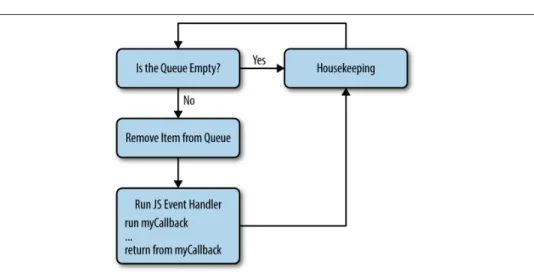
strokes, and callbacks for other async tasks. The JavaScript runtime simply continues in an endless cycle of pulling an item off the queue if one is available, running the code that the item triggers, and then checking the queue again. This cycle is known as the event loop.
Figure 1-1 shows how the queue is populated and Figure 1-2 shows how the event loop processes items from the queue. All the JavaScript you write executes in the box labeled Run JS Event Handler in Figure 1-2. The JavaScript engine performs the rest of the activity in both diagrams behind the scenes.
Run to Completion and the Event Loop | 7
Figure 1-1. Filling the queue
Figure 1-2. The JavaScript event loop
Using setTimeout to trigger another function after a given amount of time is a simple way to watch the event loop in action, as shown in Example 1-10. The setTimeout function accepts two arguments: a function to call and the minimum number of mil‐
liseconds to wait before calling the function.
Example 1-10. Using setTimeout to demonstrate the event loop
function marco() { console.log('polo');
}
setTimeout(marco, 0); // zero delay
console.log('Ready when you are');
// Console output:
// Ready when you are // polo
The marco function is immediately placed in the queue. After the console displays
“Ready when you are,” the event loop turns and marco can be pulled off the queue.
Notice the second parameter for setTimeout specifies the minimum amount of time that will lapse before the callback is run as opposed to the exact amount of time. It is impossible to know exactly when the callback will run because other JavaScript could be executing at that time and the machine has to let that finish before returning to the queue to invoke your callback.
Keeping in mind the run-to-completion and event loop concepts, let’s revisit the XHR example given at the beginning of the chapter, which is repeated in Example 1-11 for convenience.
Example 1-11. Async XHR (repeated from earlier)
// Make an async HTTP request var async = true;
var xhr = new XMLHttpRequest();
xhr.open('get', 'data.json', async);
xhr.send();
// Create a three second delay (don't do this in real life) var timestamp = Date.now() + 3000;
while (Date.now() < timestamp);
// Now that three seconds have passed,
// add a listener to the xhr.load and xhr.error events function listener() {
console.log('greetings from listener');
}
xhr.addEventListener('load', listener);
xhr.addEventListener('error', listener);
The question was whether the listener function will ever be triggered. The code plays out similarly to the previous example with setTimeout. The listeners are regis‐
tered after invoking the send function, but this is safe to do until the event loop turns because the runtime cannot trigger the load or error events before then.
Allowing the event loop to turn before registering the event listeners would create a race condition. Example 1-12 demonstrates that by using setTimeout.
Run to Completion and the Event Loop | 9
Example 1-12. Race condition
var async = true;
var xhr = new XMLHttpRequest();
xhr.open('get', 'data.json', async);
xhr.send();
setTimeout(function delayed() { // Creates race condition!
function listener() {
console.log('greetings from listener');
}
xhr.addEventListener('load', listener);
xhr.addEventListener('error', listener);
}, 3000);
Performing the event listener registration inside a callback given to setTimeout causes a delay. Now the only way the listener function will be called is if the delayed function is pulled off the queue and run before the HTTP request completes and the load or error event is triggered. Experimenting with different values for the delay parameter of setTimeout shows listener being invoked sometimes but not always.
Summary
This chapter covered the underlying concepts of asynchronous JavaScript program‐
ming. Knowing how JavaScript handles callbacks allows you to control the order in which your code runs instead of writing things that work by coincidence. If the order in which your code is executed surprises you or you find yourself unsure of what will happen next, refer back to this chapter. Not only does it prepare you for using Prom‐
ises, but it will make you a better JavaScript developer overall.
CHAPTER 2
Introducing Promises
The biggest challenge with nontrivial amounts of async JavaScript is managing execu‐
tion order through a series of steps and handling any errors that arise. Promises address this problem by giving you a way to organize callbacks into discrete steps that are easier to read and maintain. And when errors occur they can be handled outside the primary application logic without the need for boilerplate checks in each step.
A promise is an object that serves as a placeholder for a value. That value is usually the result of an async operation such as an HTTP request or reading a file from disk.
When an async function is called it can immediately return a promise object. Using that object, you can register callbacks that will run when the operation succeeds or an error occurs.
This chapter covers the basic ways to use promises. By the end of the chapter you should be comfortable working with functions that return promises and using prom‐
ises to manage a sequence of asynchronous steps.
This book uses the Promise API for the version of JavaScript known as ECMAScript 6 (ES6.) However, there were a number of popular JavaScript Promise libraries that the development community created before ES6 that may not match the spec. These differences are mostly trivial so it is generally easy to work with different implemen‐
tations once you are comfortable using standard promises. We discuss API variations and compatibility issues with other libraries in Chapter 4.
Basic Usage
Let’s walk through the basics of Promises using a series of examples beginning with a traditional callback approach and moving to an implementation using promises.
Example 2-1 loads an image in a web browser and invokes a success or error callback based on the outcome.
11
Example 2-1. Using callbacks
loadImage('shadowfacts.png', function onsuccess(img) {
// Add the image to the current web page document.body.appendChild(img);
},
function onerror(e) {
console.log('Error occurred while loading image');
console.log(e);
} );
function loadImage(url, success, error) { var img = new Image();
img.src = url;
img.onload = function () { success(img);
};
img.onerror = function (e) { error(e);
};
}
The loadImage function uses an HTML Image object to load an image by setting the src property. The browser asynchronously loads the image based on the src and queues the onload or onerror callback after it’s done.
Since loadImage is asynchronous, it accepts callbacks instead of immediately return‐
ing the image from the function. However, if loadImage was changed to return a promise you would attach the callbacks to the promise instead of passing them as arguments to the function. Example 2-2 shows how loadImage is used when it returns a promise.
Example 2-2. Promise then and catch
// Assume loadImage returns a promise
var promise = loadImage('the_general_problem.png');
promise.then(function (img) { document.body.appendChild(img);
});
promise.catch(function (e) {
console.log('Error occurred while loading image');
console.log(e);
});
1Chaining then and catch together also allows the catch callback to handle any errors thrown in the callback passed to then. This distinction is explained in Chapter 5.
The code indicates the following: “Load an image, then add it to the document or show an error if it can’t be loaded.” The promise that loadImage returns has a then method for registering a callback to use when the operation succeeds and a catch method for handling errors. However, both then and catch return promise objects so callback registration is usually done by chaining these method calls together, as shown in Example 2-3.1
Example 2-3. Chaining calls using then and catch
loadImage('security_holes.png').then(function (img) { document.body.appendChild(img);
}).catch(function (e) {
console.log('Error occurred while loading image');
console.log(e);
});
And Example 2-4 is an implementation for loadImage that returns a promise.
Example 2-4. Creating and resolving a promise
function loadImage(url) { var promise = new Promise(
function resolver(resolve, reject) { var img = new Image();
img.src = url;
img.onload = function () { resolve(img);
};
img.onerror = function (e) { reject(e);
};
} );
return promise;
}
A global constructor function called Promise exposes all the functionality for prom‐
ises. In this example, loadImage creates a new promise and returns it. When Promise is used as a constructor it requires a callback known as a resolver function. The resolver serves two purposes: it receives the resolve and reject arguments, which are functions used to update the promise once the outcome is known, and any error
Basic Usage | 13
thrown from the resolver is implicitly used to reject the promise. All the logic that was originally done in loadImage is now done inside the resolver. The resolve func‐
tion is called when the image loads and reject is called if the image cannot be loaded.
When an operation represented by a promise completes, the result is stored and pro‐
vided to any callbacks the promise invokes. The result is passed to the promise as a parameter of the resolve or reject functions. In the case of loadImage, the image is passed to resolve, so any callbacks registered with promise.then() will receive the image.
Multiple Consumers
When multiple pieces of code are interested in the outcome of the same async opera‐
tion, they can use the same promise. For example, you can retrieve a user’s profile from the server and use it to display her name in a navigation bar. That data can also be used on an account page that displays her full profile. The code in Example 2-5 demonstrates this by using a promise to track whether a user’s profile has been received. Two independent functions use the same promise to display data once it is available.
Example 2-5. One promise with multiple consumers
var user = {
profilePromise: null,
getProfile: function () { if (!this.profilePromise) {
// Assume ajax() returns a promise that is eventually // fulfilled with {name: 'Samantha', subscribedToSpam: true}
this.profilePromise = ajax(/*someurl*/);
}
return this.profilePromise;
} };
var navbar = {
show: function (user) {
user.getProfile().then(function (profile) { console.log('*** Navbar ***');
console.log('Name: ' + profile.name);
});
} };
var account = {
show: function (user) {
user.getProfile().then(function (profile) {
console.log('*** Account Info ***');
console.log('Name: ' + profile.name);
console.log('Send lots of email? ' + profile.subscribedToSpam);
});
} };
navbar.show(user);
account.show(user);
// Console output:
// *** Navbar ***
// Name: Samantha // *** Account Info ***
// Name: Samantha
// Send lots of email? true
Here a user object with a profilePromise property and a getProfile method is cre‐
ated. The getProfile method returns a promise that is resolved with an object con‐
taining the user profile information. Then the script passes the user to the navbar and account objects, which display information from the profile.
Remember that a promise serves as a placeholder for the result of an operation. In this case, the user.profilePromise is a placeholder used by the navbar.show() and account.show() functions. These functions can be safely called anytime before or after the profile data is available. The callbacks they use to print the data to the con‐
sole will only be invoked once the profile is loaded. This removes the need for an if statement in either function to check whether the data is ready.
In addition to that simplification, using the promise placeholder has another benefit.
It removes the need for signaling inside the getProfile function to display the user‐
name and profile once the data is ready. The promise implicitly provides that logic, happily decoupled from the details of how or when the data is displayed.
Promise States
The state of an operation represented by a promise is stored within the promise. At any given moment an operation has either not begun, is in progress, has run to com‐
pletion, or has stopped and cannot be completed. These conditions are represented by three mutually exclusive states:
Pending
The operation has not begun or is in progress.
Fulfilled
The operation has completed.
Promise States | 15
Rejected
The operation could not be completed.
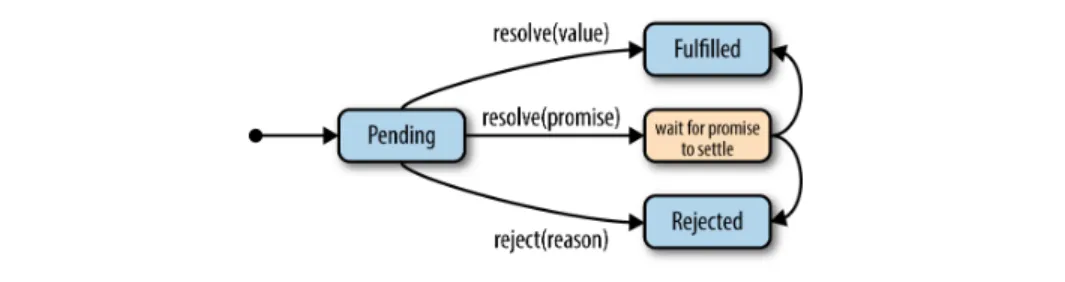
Figure 2-1 shows the relationship between the three states.
Figure 2-1. Promise states
In the examples so far, we refer to the fulfilled and rejected states as success and error, respectively. There is a difference between these terms. An operation could complete with an error (although that may be bad form) and an operation may not complete because it was cancelled even though no error occurred. Hence, the terms fulfilled and rejected are better descriptions for these states than success and error.
When a promise is no longer pending it is said to be settled. This is a general term indicating the promise has reached its final state. Once a pending promise is settled the transition is permanent. Both the state and any value given as the result cannot be changed from that point on. This behavior is consistent with how operations work in real life. A completed operation cannot become incomplete and its result does not change. Of course a program may repeat the steps of an operation multiple times. For instance, a failed operation may be retried and multiple tries may return different val‐
ues. In that case, a new promise represents each try, so a more descriptive way to think of a promise is a placeholder for the result of one attempt of an operation.
The code in Example 2-6 demonstrates how the state of a promise can only be changed once. The code calls resolve and reject in the same promise constructor.
The call to resolve changes the state of the promise from pending to fulfilled. Any further calls to resolve or reject are ignored because the promise is already fulfilled.
Example 2-6. The state of a promise never changes after it is fulfilled or rejected
var promise = new Promise(function (resolve, reject) { resolve(Math.PI);
reject(0); // Does nothing resolve(Math.sqrt(-1)); // Does nothing });
promise.then(function (number) {
console.log('The number is ' + number);
});
// Console output:
// The number is 3.141592653589793
Running the code in this example demonstrates that the calls to reject(0) and resolve(Math.sqrt(-1)) have no effect because the promise has already been fulfil‐
led with a value for Pi.
The immutability of a settled promise makes code easier to reason about. Allowing the state or value to change after a promise is fulfilled or rejected would introduce race conditions. Fortunately, the state transition rules for promises prevent that problem.
Since the reject function transitions a promise to the rejected state, why does the resolve function transition a promise to a state called fulfilled instead of resolved?
Resolving a promise is not the same as fulfilling it. When the argument passed to resolve is a value, the promise is immediately fulfilled. However, when another promise is passed to resolve, such as promise.resolve(otherPromise), the prom‐
ises are bound together. If the promise passed to resolve is fulfilled, then both prom‐
ises will be fulfilled. And if the promise passed to resolve is rejected, then both promises will be rejected. In short, the argument passed to resolve dictates the fate of the promise. Figure 2-2 shows this process.
Figure 2-2. Resolving or rejecting a promise
The resolve and reject functions can be called without an argument, in which case the fulfillment value or rejection reason will be the JavaScript type undefined.
The Promise API also provides two convenience methods (see Example 2-7) for cre‐
ating a promise that is immediately resolved or rejected: Promise.resolve() and Promise.reject().
Example 2-7. Convenience functions for resolve and reject
// Equivalent ways to create a resolved promise new Promise(function (resolve, reject) { resolve('the long way')
});
Promise.resolve('the short way');
Promise States | 17
// Equivalent ways to create a rejected promise new Promise(function (resolve, reject) { reject('long rejection')
});
Promise.reject('short rejection');
These convenience functions are useful when you already have the item that should be used to resolve or reject the promise. Some of the code samples that follow use these functions instead of the traditional Promise constructor to concisely create a promise with the desired state.
Chaining Promises
We’ve seen how then and catch return promises for easy method chaining, however they do not return a reference to the same promise. Every time either of these meth‐
ods is called a new promise is created and returned. Example 2-8 is an explicit exam‐
ple of then returning a new promise.
Example 2-8. Calls to then always return a new promise
var p1, p2;
p1 = Promise.resolve();
p2 = p1.then(function () { // ...
});
console.log('p1 and p2 are different objects: ' + (p1 !== p2));
// Console output:
// p1 and p2 are different objects: true
Example 2-9 shows how new promises returned by then can be chained together to execute a sequence of steps.
Example 2-9. Using then to sequence multiple steps
step1().then(
function step2(resultFromStep1) { // ...
} ).then(
function step3(resultFromStep2) { // ...
} ).then(
function step4(resultFromStep3) {
// ...
} );
Each call to then returns a new promise you can use to attach another callback.
Whatever value is returned from that callback resolves the new promise. This pattern allows each step to send its return value to the next step. If a step returns a promise instead of a value, the following step receives whatever value is used to fulfill that promise. Example 2-10 shows all the ways to fulfill a promise created by then.
Example 2-10. Passing values in a sequence of steps
Promise.resolve('ta-da!').then(
function step2(result) {
console.log('Step 2 received ' + result);
return 'Greetings from step 2'; // Explicit return value }
).then(
function step3(result) {
console.log('Step 3 received ' + result); // No explicit return value }
).then(
function step4(result) {
console.log('Step 4 received ' + result);
return Promise.resolve('fulfilled value'); // Return a promise }
).then(
function step5(result) {
console.log('Step 5 received ' + result);
} );
// Console output:
// Step 2 received ta-da!
// Step 3 received Greetings from step 2 // Step 4 received undefined
// Step 5 received fulfilled value
An explicitly returned value resolves the promise that wraps step2. Since step3 does not explicitly return a value, undefined fulfills that promise. And the value from the promise explicitly returned in step4 fulfills the promise that wraps step4.
Callback Execution Order
Promises are primarily used to manage the order in which code is run relative to other tasks. The previous chapter demonstrated how problems occur when async callbacks are expected to run synchronously. You can avoid these problems by under‐
standing which callbacks in the Promise API are synchronous and which are asyn‐
Callback Execution Order | 19
chronous. Fortunately there are only two cases. The resolver function passed to the Promise constructor executes synchronously. And all callbacks passed to then and catch are invoked asynchronously. Example 2-11 shows a Promise constructor and an onFulfilled callback with some logging statements to demonstrate the order. The numbered comments show the relative execution order.
Example 2-11. Execution order of callbacks used by promises
var promise = new Promise(function (resolve, reject) { console.log('Inside the resolver function'); // 1 resolve();
});
promise.then(function () {
console.log('Inside the onFulfilled handler'); // 3 });
console.log('This is the last line of the script'); // 2
// Console output:
// Inside the resolver function // This is the last line of the script // Inside the onFulfilled handler
This example is similar to the synchronous and asynchronous callback code in the previous chapter. You can see that the resolver function passed to the Promise con‐
structor executes immediately followed by the log statement at the end of the script.
Then the event loop turns and the promise that is already resolved invokes the onFulfilled handler. Although the example code is trivial, understanding the execu‐
tion order is a key part of using promises effectively. If you do not feel confident pre‐
dicting the execution order of any of the examples so far, consider reviewing the material in Chapter 1 and this section.
Basic Error Propagation
Error propagation and handling is a significant aspect of working with promises. This section introduces the basic concepts while all of Chapter 5 is dedicated to this topic.
Rejections and errors propagate through promise chains. When one promise is rejec‐
ted all subsequent promises in the chain are rejected in a domino effect until an onRejected handler is found. In practice, one catch function is used at the end of a chain (see Example 2-12) to handle all rejections. This approach treats the chain as a single unit that the fulfilled or rejected final promise represents.
Example 2-12. Using a rejection handler at the end of a chain
Promise.reject(Error('bad news')).then(
function step2() {
console.log('This is never run');
} ).then(
function step3() {
console.log('This is also never run');
} ).catch(
function (error) {
console.log('Something failed along the way. Inspect error for more info.');
console.log(error); // Error object with message: 'bad news' }
);
// Console output:
// Something failed along the way. Inspect error for more info.
// [Error object] { message: 'bad news' ... }
This code begins a chain of promises by creating a rejected promise using Promise.reject(). Two more promises follow that are created by adding calls to then and finished with a call to catch to handle rejections.
Notice the code in step2 and step3 never runs. These functions are only called when the promise they are attached to is fulfilled. Since the promise at the top of the chain was rejected, all subsequent callbacks in the chain are ignored until the catch handler is reached.
Promises are also rejected when an error is thrown in a callback passed to then or in the resolver function passed to the Promise constructor. Example 2-13 is similar to the last, except throwing an error instead of using the Promise.reject() function now rejects the promise.
Example 2-13. Rejecting a promise by throwing an error in the constructor callback
rejectWith('bad news').then(
function step2() {
console.log('This is never run');
} ).catch(
function (error) {
console.log('Foiled again!');
console.log(error); // Error object with message: 'bad news' }
);
function rejectWith(val) {
return new Promise(function (resolve, reject) {
Basic Error Propagation | 21
throw Error(val);
resolve('Not used'); // This line is never run });
}
// Console output:
// Foiled again!
// [Error object] { message: 'bad news' ... }
Both examples in this section provided a JavaScript Error object when rejecting the promise. Although any value, including undefined, can reject promises, we recom‐
mend using an error object. Creating an error can capture the call stack for trouble‐
shooting and makes it easier to treat the argument the catch handler receives in a uniform way.
Using JavaScript Error objects to reject promises can capture the call stack for troubleshooting and makes it easier to treat the argu‐
ment the catch handler receives in a uniform way.
The Promise API
The complete Promise API consists of a constructor and six functions, four of which have already been demonstrated. However, it’s worth describing each of them so you can see the API as a whole and be aware of optional arguments.
Promise
new Promise(function (resolve, reject) { … }) returns promise The Promise global is a constructor function that the new keyword invokes.
The Promise global creates promise objects that have the two methods then and catch for registering callbacks that are invoked once the promise is fulfilled or rejected.
promise.then
promise.then([onFulfilled], [onRejected]) returns promise
The promise.then() method accepts an onFulfilled callback and an onRejected callback. People generally register onRejected callbacks using promise.catch() instead of passing a second argument to then (see the explanation provided in Chap‐
ter 5.) The function then returns a promise that is resolved by the return value of the onFulfilled or onRejected callback. Any error thrown inside the callback rejects the new promise with that error.
promise.catch
promise.catch(onRejected) returns promise
The promise.catch() method accepts an onRejected callback and returns a promise that the return value of the callback or any error thrown by the callback resolves or rejects, respectively. That means any rejection the callback given to catch handles is not propagated further unless you explicitly use throw inside the callback.
Promise.resolve
Promise.resolve([value|promise]) returns promise
The Promise.resolve() function is a convenience function for creating a promise that is already resolved with a given value. If you pass a promise as the argument to Promise.resolve(), the new promise is bound to the promise you provided and it will be fulfilled or rejected accordingly.
Promise.reject
Promise.reject([reason]) returns promise
The Promise.reject() function is a convenience function for creating a rejected promise with a given reason.
Promise.all
Promise.all(iterable) returns promise
The Promise.all() function maps a series of promises to their fulfillment values. It accepts an iterable object such as an Array, a Set, or a custom iterable. The function returns a new promise fulfilled by an array containing the values in the iterable. Cor‐
responding fulfillment values in the resulting array replace any promises contained in the iterable. The new promise that the function returns is only fulfilled after all the promises in the iterable are fulfilled, or it is rejected as soon as any of the promises in the iterable are rejected. If the new promise is rejected it contains the rejection reason from the promise in the iterable that triggered the rejection. If you are working with a Promise implementation that does not understand ES6 iterables, it will likely expect standard arrays instead.
What Is an Iterable?
An iterable is an object that provides a series of values by implementing a predefined interface (also known as a protocol.) Iterables are specified in ES6 and explained in
“Iterables and Iterators” on page 68.
The Promise API | 23
Promise.race
Promise.race(iterable) returns promise
The Promise.race() function reduces a series of items to the first available value. It accepts an iterable and returns a new promise. The function examines each item in the iterable until it finds either an item that is not a promise or a promise that has been settled. The returned promise is then fulfilled or rejected based on that item. If the iterable only contains unsettled promises, the returned promise is settled once one of the promises in the iterable is settled.
Summary
This chapter introduced all the basic concepts of Promises. Keep these three points in mind:
• A promise is a placeholder for a value that is usually the result of an asynchro‐
nous operation.
• A promise has three states: pending, fulfilled, and rejected.
• After a promise is fulfilled or rejected, its state and value can never be changed.
At this point you have walked through a number of examples that demonstrate the basic ways a promise is used and you are ready to run sequential asynchronous steps in your own code using promise chains. You should also be comfortable using APIs that return promises for asynchronous work.
One example of promises in the wild is in the CSS Font Load Events spec, which pro‐
vides a FontFaceSet.load() function that returns a promise for loading fonts into the browser. Consider how you could use this function to only display text once a desired font is loaded in the browser.
Promises can be combined to orchestrate async tasks and structure code in various ways. Although a sequential workflow was provided here, you’ll soon want to use promises in more advanced ways. The next chapter walks through a variety of ways you can use promises in your applications.
CHAPTER 3
Working with Standard Promises
We’ve covered the standard Promise API and some basic scenarios, but like any tech‐
nology, that’s only part of the story. Now it’s time for scenarios you’ll encounter and techniques you can use while writing real-world applications.
The Async Ripple Effect
Async functions and promises are contagious. After you start using them they natu‐
rally spread through your code. When you have one async function, any code that calls that function now contains an async step. The process of other functions becom‐
ing async by extension creates a ripple effect that continues all the way through the call stack. This is shown in Example 3-1 using three functions. Look how the async ajax function forces the other functions to also be async.
Example 3-1. The async ripple effect
showPun().then(function () {
console.log('Maybe I should stick to programming');
});
function showPun() {
return getPun().then(function (pun) { console.log(pun);
});
}
function getPun() {
// Assume ajax() returns a promise that is eventually
// fulfilled by json for {content: 'The pet store job was ruff!'}
return ajax(/*someurl*/).then(function (json) { var pun = JSON.parse(json);
25