國 立 交 通 大 學
資訊科學與工程研究所
碩
碩
碩
碩
士
士
士
士
論
論
論
論
文
文
文
文
在 XPS 文件上做資訊隱藏之新研究
A New Study on Information Hiding via XPS Documents
研 究 生:何玫樺
指導教授:蔡文祥 教授
中
中
中
在 XPS 文件上做資訊隱藏之新研究
A New Study on Information Hiding via XPS Documents
研 究 生:何玫樺 Student:Mei-Hua Ho
指導教授:蔡文祥 Advisor:Wen-Hsiang Tsai
國 立 交 通 大 學
資 訊 科 學 與 工 程 研 究 所
碩 士 論 文
A ThesisSubmitted to Institute of Computer Science and Engineering College of Computer Science
National Chiao Tung University in partial Fulfillment of the Requirements
for the Degree of Master
in
Computer Science
June 2010
Hsinchu, Taiwan, Republic of China
在
在
在
在 XPS
XPS
XPS
XPS 文件上做資訊隱藏之新研究
文件上做資訊隱藏之新研究
文件上做資訊隱藏之新研究
文件上做資訊隱藏之新研究
研究生:何玫樺
指導教授:蔡文祥 博士
國立交通大學資訊科學與工程研究所
摘要
摘要
摘要
摘要
隨著電腦與網路技術發展的進步,電子文件比以前越來越普遍。XPS 文件是 一種版面固定的文字檔案格式,能提供良好的列印與瀏覽品質。本論文利用 XPS 格式的特性提出了三個資訊隱藏技術,可應用在秘密傳輸、文字驗證及隱匿學的 應用上。 在秘密傳輸的部分,我們提出了一個利用 XSP 文件中的影像當作嵌入資訊 通道的方法。在此方法中我們以階層方式切割 XPS 文件中的影像,並以數種切 割圖型作編碼,將秘密訊息藏入這些影像切割中。這些圖型可用 XPS 標準來描 述,而這些切割後的局部影像可再重新組合成為原來的影像。如此可使秘密訊息 不會被察覺地隱藏在文件中。 另一方面,因為 XPS 文件在網路上傳遞時,有可能被惡意使用者攔截及竄 改,因此我們也提出了一種驗證 XPS 文件的方法。我們將 XPS 文件中欲保護的 文字編碼成特殊的漸層圖型作為驗證訊號,並將該等訊號藏入文件本身之中。之 後,只要將藏入的驗證訊號抽取出來,與目前文件中的文字做比對,就可判斷 XPS 文件的完整性及真實性。 最後,在資訊安全的領域中,常會想要保存秘密資訊於文件之中,並冀望能 不輕易地被攻擊或發現。針對此種隱匿學的需求,我們提出了一種將特殊不可視 且可變寬度的 ASCII 碼插入 XPS 文件的文字間,當作秘密訊息的編碼方法。用 此方法產生的文件,其外觀與原本的文件相同且不會改變原本文字間的寬度。 本論文也針對所提出的資訊隱藏方法提供了加強其安全性的措施。最後我們 提出了相關的實驗結果證明所提方法之可行性。A New Study on Information Hiding via XPS
Documents
Student: Mei-Hua Ho
Advisor: Wen-Hsiang Tsai
Institute of Computer Science and Engineering
National Chiao Tung University
ABSTRACT
With the progress of development in computer and networking technologies, digital text documents nowadays have become much more popular than in the past. The XPS (XML Paper Specification) document is a new text file format which is portable to any computer to produce identical page layouts with high printing and browsing qualities. In this study, three data hiding methods utilizing certain properties of the XPS are proposed for covert communication, text authentication, and steganography.
For covert communication, the proposed data hiding method uses a single cover image in an XPS document as a data embedding channel. A secret message to hide is encoded as certain rectangular-shaped patterns according to a table designed in this study, and the patterns are described by Path elements in XPS files for use in dividing an image hierarchically in the XPS document. The divided image pieces then are composed together seamlessly to form the original image, thus accomplishing imperceptible data embedding in the document.
Furthermore, since XPS documents are widely used on the Internet, malicious users may try to intercept and tamper with their contents. This requires XPS document
authentication for which a novel method is proposed in this study. Specifically, the digests of the texts in an XPS document to be protected, after being encoded by specific gradient patterns, are used as authentication signals. To verify the integrity and fidelity of the text content of a suspicious XPS document, the authentication signals extracted from it are compared with those computed from its current text segments for decision making.
Finally, keeping secrets in XPS documents without arousing notice from possible attackers is necessary in many information security fields. For this kind of steganographic application, a method inserting specific invisible and width-adjustable ASCII codes between words in the texts of XPS files for encoding secret messages is proposed. The resulting stego-document appears to be identical to the cover document with no width increasing between the text words.
Measures to enhance the security of each proposed method are also suggested. Good experimental results show the feasibility of the proposed methods.
ACKNOWLEDGEMENTS
The author is in hearty appreciation of the continuous guidance, discussions, support, and encouragement received from her advisor, Dr. Wen-Hsiang Tsai, not only in the development of this thesis, but also in every aspect of her personal growth.
Thanks are due to Mr. Tsung-Yuan Liu, Mr. Che-Wei Lee, Mr. Guo-Feng Yang, Mr. Yi-Fu Chen, Miss I-Jen Lai, Mr. Chih-Hsien Yao, Mr. Bo-Jhih You, Mr. Jheng-Kuei Huang, Miss. Pei-Hsuan Yuan for their valuable discussions, suggestions, and encouragement. Appreciation is also given to the colleagues of the Computer Vision Laboratory in the Institute of Computer Science and Engineering at National Chiao Tung University for their suggestions and help during my thesis study.
Finally, the author also extends her profound thanks to her family for their lasting love, care, and encouragement. The author dedicates this dissertation to her beloved parents and friends.
CONTENTS
ABSTRACT (in Chinese)...i
ABSTRACT (in English) ...ii
ACKNOWLEDGEMENTS ...iv
CONTENTS ... v
LIST OF FIGURES...vii
LIST OF TABLES ...ix
Chapter 1 Introduction ...1
1.1 Motivation...1
1.2 General Review of Related Works...2
1.3 Overview of Proposed Methods...2
1.3.1 Terminologies ...2
1.3.2 Brief Descriptions of Proposed Methods...3
1.4 Contributions...5
1.5 Thesis Organization ...6
Chapter 2 Review of Related Works and XPS Document Format ...7
2.1 Previous Studies on Data Hiding Techniques in Text Documents...7
2.1.1 Review of Data Hiding Techniques in HTML Files...7
2.1.2 Review of Data Hiding Techniques in Microsoft Word Documents .8 2.1.3 Review of Data Hiding Techniques in PDF Files...8
2.1.4 Review of Other Techniques and a Summary ...9
2.2 Review of XPS Document Format ...10
2.2.1 Overview ...10
2.2.2 Logical and Physical Hierarchy of an XPS Document... 11
2.2.3 Composition of an XPS Document using XML Markup Language12 Chapter 3 Covert Communication by Hierarchical Division of Images in XPS Documents... 15
3.1 Introduction...15
3.1.1 Problem Definition ...15
3.1.2 Major Idea of Proposed Method by Hierarchical Division of Images 16 3.2 Data Embedding and Extraction Processes...19
3.2.1 Proposed Algorithm for Data Embedding ...21
3.2.2 Proposed Algorithm for Data Extraction ...23
3.3 Security Consideration...24
3.3.2 Proposed Security Enhancement Measures...24
3.4 Experimental Results ...25
3.5 Summary ...25
Chapter 4 Authentication of XPS Document Contents by Superimposition of Variable Gradient Patterns ... 29
4.1 Introduction...29
4.1.1 Problem Definition ...30
4.1.2 Major Idea of Proposed Method using Variable Gradient Patterns .30 4.2 Authentication Signal Generation and Embedding Process ...34
4.2.1 Idea of Signal Generation ...34
4.2.2 Proposed Algorithm...34
4.3 Authentication Signal Extraction and Verification Process ...36
4.3.1 Idea of Verification ...36
4.3.2 Proposed Algorithm...37
4.4 Security Consideration...38
4.4.1 Issues of Security of Proposed Method ...38
4.4.2 Proposed Security Enhancement Measures...39
4.5 Experimental Results ...39
4.6 Summary ...40
Chapter 5 Steganography by Width-Adjustable Invisible ASCII Codes in XPS Documents... 46
5.1 Introduction...46
5.1.1 Problem Definition ...46
5.1.2 Major Idea of Proposed Method by Adjusting Advance-widths of Specific ASCII Codes ...47
5.2 Data Embedding and Extraction Processes...50
5.2.1 Proposed Algorithm for Data Embedding ...51
5.2.2 Proposed Algorithm for Data Extraction ...54
5.3 Security Consideration...55
5.3.1 Issues of Security of Proposed Method ...55
5.3.2 Proposed Security Enhancement Measures...55
5.4 Experimental Results ...56
5.5 Summary ...56
Chapter 6 Conclusions and Suggestions for Future Works...63
6.1 Conclusions...63
6.2 Suggestions for Future Works...63
LIST OF FIGURES
Figure 2.1 Package-based XPS document format...10
Figure 2.2 Logical hierarchy of an XPS document... 11
Figure 2.3 Physical hierarchy of an XPS document viewed in Open XML Editor. ....12
Figure 2.4 A simple page viewed in Open XML Editor...13
Figure 2.5 The layout corresponding to Figure 2.4 viewed in XPS viewer...14
Figure 3.1 An example of an XPS document with an image. (a) The XML markup describing an area filled with an image. (b) The corresponding result of (a). ...16
Figure 3.2 The XML markup describing an image divided into the pattern .. ...17
Figure 3.3 An image in an XPS document with a message embedded in it. (The edges of the blocks are emphasized on purpose in order to show the result.) (a) The entire image with division patterns superimposed (not seen in real appearance). (b) The enlarged partial view of (a) with the red rectangular part corresponds to a partial message of S = 100 001 010 000...19
Figure 3.4 Flowchart of the proposed data embedding process...20
Figure 3.5 Flowchart of the proposed data extraction process. ...21
Figure 3.6 The original XPS document. ...26
Figure 3.7 The proposed user interface to embed data for covert communication...27
Figure 3.8 The stego-XPS document. ...27
Figure 3.9 The proposed user interface for data extraction using the right secret key.28 Figure 3.10 Proposed user interface for data extraction using the wrong secret key...28
Figure 4.1 An example of XPS documents with a gradient pattern. (a) The XML markup describing a gradient pattern. (b) The corresponding result of (a) displayed in an XPS Viewer. ...31
Figure 4.2 A protected XPS document with variable gradient patterns superimposed. ...33
Figure 4.3 Flowchart of proposed authentication signal generation and embedding process. ...35
Figure 4.4 Flowchart of the proposed authentication signal extraction and XPS document verification process. ...37
Figure 4.5 The original XPS document. ...41
Figure 4.6 A user interface used to generate authentication signals and a protected XPS document. All text segments are shown on the window...41
Figure 4.7 A tampered XPS document with some words modified...42
Figure 4.8 User interface showing authentication result of a tampered XPS document. The modified text segments were detected and shown in the window...42
Figure 4.9 The XPS document with authenticated result (with modified text segments
detected and marked as red). ...43
Figure 4.10 The original XPS document printed from a website. ...44
Figure 4.11 A tampered version of XPS document of Figure 4.10 with some words modified...44
Figure 4.12 User interface showing authentication result of the tampered XPS document shown in Figure 4.11. The modified text segments were detected and shown in the window. ...45
Figure 4.13 The XPS document with authenticated results (with the fake text segments being detected and marked as red)...45
Figure 5.1 An example of XPS documents with text segments. (a) The XML markup describing several text segments. (b) The corresponding result of (a) displayed in an XPS Viewer. ...48
Figure 5.2 Some examples of text segments using the Indices and UnicodeString attributes to specify. (a) An example of specifying complete indices and the Unicode string. (b) An example only specifying the Unicode string and the advance width when desired. (c) An example of hiding white spaces by adjusting the advance width. The display is the same as (a). ...49
Figure 5.3 Flowchart of the proposed data embedding process...51
Figure 5.4 Flowchart of the proposed data extraction process. ...52
Figure 5.5 An example using the proposed algorithm to hide the secret. (a) An original description of a text segment. (b) Inserting ASCII codes between words. (c) Inserting parameters into the corresponding positions in the Indices attribute. The display is the same as (a). ...54
Figure 5.6 The original XPS document. ...57
Figure 5.7 User interface to embed data for steganography. ...58
Figure 5.8 The stego-XPS document. ...58
Figure 5.9 User interface for data extraction using the right secret key. ...59
Figure 5.10 User interface for data extraction using the wrong secret key...59
Figure 5.11 The original XPS document...60
Figure 5.12 User interface to embed data for steganography. ...60
Figure 5.13 The stego-XPS document. ...61
Figure 5.14 User interface for data extraction using the right secret key. ...61
LIST OF TABLES
Table 3.1 A division pattern encoding table used for message embedding...18 Table 4.1 Gradient patterns with different directions and spreads...31 Table 4.2 A gradient pattern encoding table for embedding authentication signals. ...33 Table 5.1 ASCII codes encoding table. ...50
Chapter 1
Introduction
1.1
Motivation
Nowadays digital text documents are widely used not only in academia and business but also in people’s daily life because they are easy to create, edit, carry, and print. The XPS (XML Paper Specification) document is a new text file format which is portable to any computer to produce identical page layouts with higher printing and browsing qualities. Therefore, it becomes one of the major document formats used in daily communication between people, including message transmissions, displays, and exchanges. How to exchange information via XPS documents safely has so become an important topic.
The data hiding technique intensively studied in the past decade is a good way for safe exchanges of information. One of the applications of data hiding is covert
communication, which is sometimes called steganography. Unlike cryptography, the imperceptibility of steganography conceals the behavior of secret transmission so that the risk for the secret to be detected by malicious users decreases. Hence, of the first goal in this study is to design new data hiding techniques for covert communication by transmitting secret messages via XPS documents.
Besides, authentication is also an application of data hiding. While XPS documents are delivered on the Internet, it is hard to prevent malicious users from intercepting and tampering with the contents of XPS documents. In order to verify the integrity and fidelity of an XPS document, an authentication process is necessary. For these reasons, it is also desired to design new data hiding techniques for XPS
document authentication in this study.
In previous studies, proposed data hiding techniques via text documents are not as many as those via images or videos. And so far, studies on hiding data in XPS documents are not found yet. It is so desirable as well in this study to design new methods for data hiding via XPS documents by use of new features found in the XPS. Such methods may be used for various applications, such as metadata association, secret transmission, and so on.
1.2
General Review of Related Works
Data hiding is the study embedding data behind cover media, such as images, videos, documents, etc. The data embedding result usually creates small or even no change in the appearance of the cover media, so people in most cases will not notice the existence of the hidden data. Many techniques have been proposed for hiding data in text documents in recent years, some of which will be reviewed in detail in Chapter 2, including data hiding in emails, HTML files, Microsoft Word documents, and PDF files.
In addition, since the XPS is a new document format, we will also give an overview of its specifications in Chapter 2, such as how an XPS document is organized and how to describe pages or create graphics and texts using the XPS document format.
1.3
Overview of Proposed Methods
1.3.1
Terminologies
follows.
1. Text document: a text document is a document model which presents or communicates narrative or tabulated data.
2. XPS: the XPS is an XML-based specification for a page description language and a fixed-document format.
3. XPS document: an XPS document is a text document described by the XML Paper Specification.
4. Cover document: a cover document is a document into which data can be embedded.
5. Stego-document: a stego-document is a document with some data embedded in it.
6. Protected document: a protected document defined in this study is a document in which authentication signals are embedded.
7. Document authentication: document authentication is a process for verification of the integrity and fidelity of a suspicious document.
1.3.2
Brief Descriptions of Proposed Methods
1.3.2.1
Proposed Method for Covert Communication in XPS
Documents
A new method of data hiding using a scheme of hierarchical division of images in XPS documents is proposed for covert communicationin this study. According to the XPS document format, an image can be partially displayed in a page by changing the properties which describe the image in the XPS document. Thus, an image can be hierarchical divided into blocks for display, and reconstructed later block by block.
Based on this idea, data embedding as proposed in the method is accomplished by dividing an image into block patterns of different sizes to represent the data to be hidden. It is hard to tell the difference between the image of its original form and the resulting stego-image according to the image appearance. In this way, the proposed method can be used for covert communication. The detailed embedding and extraction process will be described in Chapter 3.
1.3.2.2
Proposed Method for Authentication of XPS
Document Contents
An authentication method for verifying the integrity and fidelity of XPS documents using data hiding techniquesis proposed in this study. Because text is the most essential part in a common document, it is important to authenticate the text in an XPS document. For this purpose, a data hiding method using superimposition of variable gradient patterns is proposed. In the method, we divide the text strings in an XPS document into variable text fragments and use the digest of them as authentication signals. The signals are then embedded into the XPS document. Therefore, whether the contents of a protected XPS document have been tampered with or not can be verified by comparing the extracted authentication signals from the document with those computed from the current content of the text fragments in the document. The detailed authentication process and data embedding and extraction algorithm will be described in Chapter 4.
1.3.2.3
Proposed Method for Secret Hiding in XPS
Documents
A method of data hiding using width-adjustable invisible ASCII codes in the XPS document is proposed in this study for secret hiding. As mentioned in Section
1.3.2.1, a data hiding method utilizing images in XPS documents as covert communication channels is proposed. However, the text part usually covers a large proportion of the entire XPS document. Hence, an efficient utilization of text for data hiding in the XPS document is proposed. By experiments conducted in this study, it was found that some ASCII codes used in the text string of the XPS document may be made invisible by adjusting their advance width. This property of the XPS document format is good for use toward the aim of data hiding. Specifically, a secret message can so be encoded and hidden between text segments by using these special ASCII codes. Such secret hiding is a form of steganography. More detailed secret data embedding and extraction processes will be described in Chapter 5.
1.4
Contributions
Some contributions made by this study are listed in the following.
1. For the first time XPS documents are used as cover media for data hiding applications.
2. All the proposed data hiding methods use the unique properties of the XPS document format found in this study.
3. All the proposed data hiding methods yield page layouts identical to the original XPS document.
4. A new data hiding technique using a scheme of hierarchical division of images into blocks is proposed for covert communication via XPS documents.
5. An authentication method for verification of the integrity and fidelity of XPS document contents by superimposition of invisible gradient patterns on XPS documentsis proposed.
adjusting the advance widths of specific ASCII codes is proposed for steganography via XPS documents.
1.5
Thesis Organization
In the remainder of this thesis, related works about data hiding in text documents and the specifications of the XPS document format are reviewed in Chapter 2. In Chapter 3, the proposed method for covert communication via XPS documents is described. In Chapter 4, the proposed authentication method for verification of the integrity and fidelity of XPS document contents is described. In Chapter 5, the proposed method for data hiding by adjusting the advance widths of some special ASCII codes for steganography is presented. Finally, conclusions and some suggestions for future works are given in Chapter 6.
Chapter 2
Review of Related Works and XPS
Document Format
2.1
Previous Studies on Data Hiding
Techniques in Text Documents
Existing studies on data hiding techniques via text documents are not as many as those via images or videos because of the lack of redundant information in texts for embedding data. However, lots of text documents are used in daily communication among people. Thus, developing data hiding techniques using text documents as cover media is needed and useful. It is also a greater challenge to a researcher!
In recent years, several data hiding techniques applied on different kinds of text document format have been proposed. A survey of them is conducted in this chapter.
2.1.1
Review of Data Hiding Techniques in HTML
Files
HTML files are used widely on the Internet because it is convenient for people to obtain information directly through web pages. Some techniques for data hiding and its applications in HTML files have been proposed. Wu and Lai [1] hid binary data in HTML files using attributes of tags for bit encoding. Wu, et al. [2] designed a fast fragile watermarking method for copyright protection of web pages based on a hash function to prevent web pages from being tampered with. Chang and Tsai [3] used pseudo-spaces, the specific string “ ,” to encode the copyright data into the text
of an HTML file and duplicated the copyright data to enhance the robustness against HTML manipulations. Lee and Tsai [4] proposed a technique for secret communication by embedding special codes in HTML files to substitute for original white spaces of HTML files.
2.1.2
Review of Data Hiding Techniques in Microsoft
Word Documents
The Microsoft Word document is one of the most popular text document formats so far. Because Microsoft Word documents are so common that people are unlikely suspicious of the existence of the secret data hidden in them, it is appropriate to use them as covert communication channels for secret hiding. Also, it is important to verify the integrity and fidelity of the contents of Microsoft Word documents.
Liu and Tsai [5] utilized a change tracking technique in Microsoft Word documents to disguise a stego-document as a normal collaborative document. The secret data are embedded by degenerating the contents of a cover document. Liu and Tsai [6] also designed a data hiding technique in Microsoft Word documents by using block signatures to authenticate messages quoted from credible sources. Moreover, Microsoft Word 2007 is a new format which is different from previous versions of Microsoft Word. Park, et al. [7] concealed the secret data under Microsoft Word 2007 files by inserting unknown parts and relationships which still satisfy the Microsoft Word 2007 standard but are not shown on the display.
2.1.3
Review of Data Hiding Techniques in PDF Files
PDF is another popular file format used in network communication because of its independency of different computer platforms. In recent years, several data hiding
techniques using PDF files as cover documents have been proposed. Zhong, et al. [8] inserted secret data between indirect objects and modified the cross reference table in PDF files for data hiding. They also proposed another data hiding method in [9] by adjusting the positions of the text characters slightly to embed the secret data. Wang and Tsai [10] achieved authentication of PDF files by embedding authentication signals using the modified values of PDF object parameters, resulting in a slight difference of the PDF appearance that is hard to notice by human eyes. Liu, et al. [11] did not insert extra data or slightly change the appearance of the original PDF file; instead, they presented a data hiding algorithm by rearrangement of the order of the sequence of elements in PDF files, resulting in a better data embedding capacity. Data hiding techniques via PDF files can also be attained by using equivalent white space codes or invisible ASCII codes as proposed by Lai and Tsai [12] and Lee and Tsai [13].
2.1.4
Review of Other Techniques and a Summary
For the email format, Lee and Tsai [14] proposed a special ASCII control codes to embed secret data into email text line ends. These special ASCII control codes are invisible while being displayed on the screen and so will not affect a user’s reading of the resulting email. For XML document format which is described by the XML markup language, five techniques to embed secret data into XML documents have been proposed by Inoue et al. [15], including 1) using different representations of an empty XML element, 2) inserting white spaces in tags, 3) exchanging the order of XML elements, 4) exchanging the order of attributes in XML elements, and 5) exchanging inner-tags and outer-tags.
hiding because they are common files used for information exchanges in daily works and for communication on the Internet. Some data hiding techniques applied on different kinds of text document formats have been proposed over the past decade. However, studies on data hiding via XPS documents are not found yet, so we will propose new data hiding techniques and its applications in this study.
2.2
Review of XPS Document Format
2.2.1
Overview
XML Paper Specification (XPS) is a new document format designed to provide a fixed page layout regardless of where and how the document is viewed or printed. XPS documents are described by an XML-based language [16]. Physically, the XPS document is in fact a compressed ZIP archive called a package, which consists of a XML markup file for each page and other resources including fonts, images, thumbnails, etc. Every component or file stored in the XPS document is called a part of the package and the connection between parts and the document is called
relationships. Figure 2.1 shows the basic concept of the XPS document format [16].
XPS Focument Content Packaging Features Parts & Relationships
ZIP Archive X P S D o c u m e n t F o rm a t
Packaging Model
Physical Model
}
}
}
}
}
}
}
}
Figure 2.1 Package-based XPS document format.
graphics and texts using the XPS document format are introduced in detail as follows.
2.2.2
Logical and Physical Hierarchy of an XPS
Document
XPS documents contain clear logical and physical hierarchies, compared with other similar document formats. The logical hierarchy of an XPS document is illustrated in Figure 2.2. This example shows that the root of the XPS document references two separate fixed documents. Each fixed document also references a set of
fixed pages. Each fixed page is described by the XML markup language and contains resources as references. These resources such as fonts or images can be shared by different pages.
Fixe dDocume ntS e que nce
Fixe dDocume nt 1 Fixe dDocume nt 2
Fixe dP a ge 1 Fixe dP a ge N Fixe dP a ge 1 Fixe dP a ge N
Ima ge Font Font P rintTicke r Thumbna il Font Font Image Ima ge Font Font Ima ge XP S Docume nt Le ge nd P a rt Relationship RelationshipRelationship Relationship
Figure 2.2 Logical hierarchy of an XPS document.
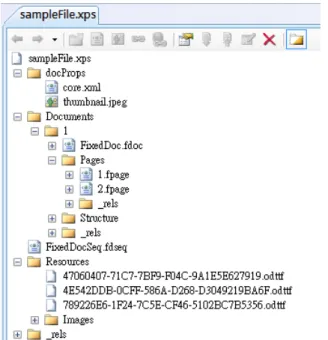
As mentioned previously, an XPS document is a compressed file package. After decompressing the package, we can see the physical organization in an XPS document. An example is shown in Figure 2.3. An XPS document consists of the
hierarchical folders and the document parts such as XML markup files, embedded fonts, images, etc. inside the package. The _rels folders contain files that specify the
relationship between resources and pages.
The most important part of an XPS document is the fixed page part, namely, .fpage file, because it describes how a page is rendered using the XML markup language. More detailed page description used in the XPS documents is discussed in the next section.
Figure 2.3 Physical hierarchy of an XPS document viewed in Open XML Editor.
2.2.3
Composition of an XPS Document using XML
Markup Language
The XML is used to describe every page included in an XPS document and results in a fixed-layout document. All rules and elements used to compose an XPS document are specified in the XPS Specification [16]. The <FixedPage> element is the root element of a page. Other elements are contained within the <FixedPage> element. The size of a page is defined by the Width and Height attributes of the
<FixedPage> element.
In addition, the <Glyphs> and the <Path> are two major elements used to create graphics and texts. Figure 2.4 is an example of using the XML to compose a simple page. The <Glyphs> element is used to create text segments. A set of attributes is available to describe the characteristics of the text segment, such as the position, the font type, the font size, and the font color. Similarly, the <Path> element is used to create vector graphics and the <Path.Fill> property element specifies the object including images, gradients, or drawing patterns to fill the geometric area described by the Data attribute. For example, the <ImageBrush> element is used to describe an image to fill the area. The rendered page layout corresponding toFigure 2.4 is shown in Figure 2.5.
Consequently, each page of an XPS document is composed using the XML markup language. By modifying the attribute of elements or appending elements, the page layout can be changed. In this study, we will utilize the above-mentioned XPS document features to develop new data hiding techniques.
Chapter 3
Covert Communication by
Hierarchical Division of Images in
XPS Documents
3.1
Introduction
Since XPS documents are more and more popularly used in daily communication among people, they become good cover media for covert communication. The proposed data hiding method for covert communication via XPS documents is described in this chapter. In Section 3.1.2, the basic idea of the proposed method is described. Detailed data embedding and extraction algorithms are presented in Section 3.2. In addition, some security enhancement measures for the proposed method are proposed in Section 3.3. Experimental results showing the feasibility of the method are given in Section 3.4. Finally, a brief summary is given in the last section of this chapter.
3.1.1
Problem Definition
Covert communication via XPS documents is the first issue we deal with in this study. The aim is to embed a given message secretly into an XPS document so that the stego-document can pretend to a normal document which can then be transmitted to a receiver. It is hoped that other people will so not be suspicious of the document. The receiver can easily get the secret message by extracting it from the stego-document with a secret key. Thus, the problem of achieving covert communication here is how
to find a good “channel” in the XPS document to embed data so that people cannot detect the secret from the document appearance. In case he/she knows the algorithm to extract the secret, he/she still cannot accomplish the secret extraction work without the secret key.
3.1.2
Major Idea of Proposed Method by
Hierarchical Division of Images
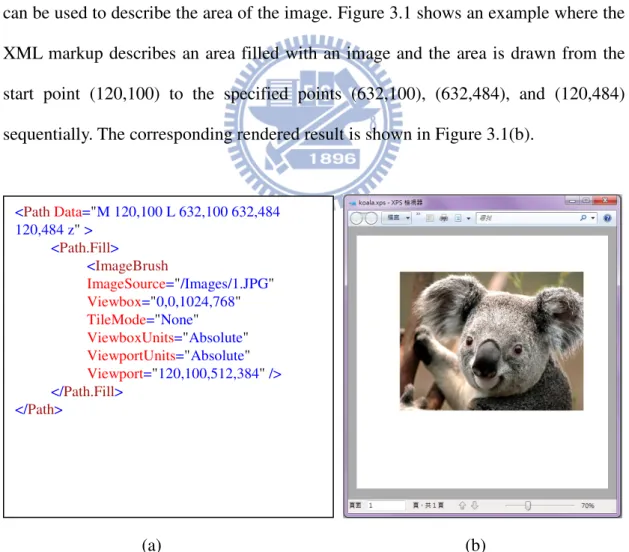
In the XPS specification, as mentioned in Chapter 2, the <Path> element can be used to create an area to display an image on the XPS document and the Data attribute can be used to describe the area of the image. Figure 3.1 shows an example where the XML markup describes an area filled with an image and the area is drawn from the start point (120,100) to the specified points (632,100), (632,484), and (120,484) sequentially. The corresponding rendered result is shown in Figure 3.1(b).
(a) (b)
Figure 3.1 An example of an XPS document with an image. (a) The XML markup describing an area filled with an image. (b) The corresponding result of (a).
<PathData="M 120,100 L 632,100 632,484 120,484 z" > <Path.Fill> <ImageBrush ImageSource="/Images/1.JPG" Viewbox="0,0,1024,768" TileMode="None" ViewboxUnits="Absolute" ViewportUnits="Absolute" Viewport="120,100,512,384" /> </Path.Fill> </Path>
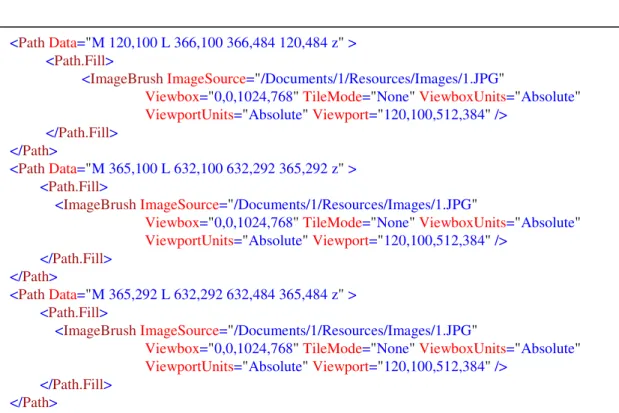
Accordingly, an image can be partially displayed by narrowing the area described by the Data attribute. And by this function, an image can be hierarchically divided into blocks using multiple <Path> elements. For example, if we divide an image into a pattern like , we can use three <Path> elements to describe it, as illustrated in Figure 3.2. But it is noted that we do not really divide the image itself into pieces; we only change the Data attribute to display the image block by block.
Figure 3.2 The XML markup describing an image divided into the pattern .
According to the above finding of the XPS document property, we may generate
block patterns with two levels of divisions to encode message bits (discussed in more detail later). The difference in appearance between the original cover image and the resulting stego-image will be imperceptible. This is just this idea behind the proposed new method for covert communication.
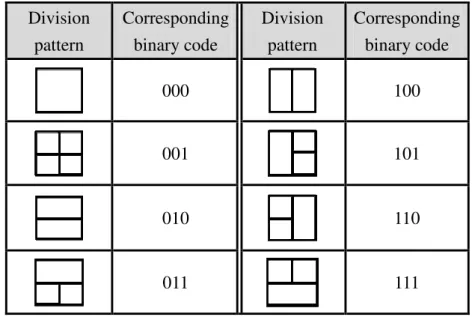
The data hiding process in the proposed method is based on the use of a table designed in this study, which includes a list of block patterns obtained by two-level
<PathData="M 120,100 L 366,100 366,484 120,484 z" >
<Path.Fill>
<ImageBrushImageSource="/Documents/1/Resources/Images/1.JPG"
Viewbox="0,0,1024,768" TileMode="None" ViewboxUnits="Absolute"
ViewportUnits="Absolute" Viewport="120,100,512,384" />
</Path.Fill>
</Path>
<PathData="M 365,100 L 632,100 632,292 365,292 z" >
<Path.Fill>
<ImageBrushImageSource="/Documents/1/Resources/Images/1.JPG"
Viewbox="0,0,1024,768" TileMode="None" ViewboxUnits="Absolute"
ViewportUnits="Absolute" Viewport="120,100,512,384" />
</Path.Fill>
</Path>
<PathData="M 365,292 L 632,292 632,484 365,484 z" >
<Path.Fill>
<ImageBrushImageSource="/Documents/1/Resources/Images/1.JPG"
Viewbox="0,0,1024,768" TileMode="None" ViewboxUnits="Absolute"
ViewportUnits="Absolute" Viewport="120,100,512,384" />
</Path.Fill>
image divisions as mentioned above and a set of corresponding 3-bit codes, as shown in Table 3.1, which we call the division pattern encoding table subsequently. Note that the sizes of all the division patterns are the same, which we call the unit size of
division blocks. And an image block of this size is called a unit block. We let the unit size of the division blocks be dynamic, meaning that it is determined in this study by the message length and the cover image (the detail will be described later in this chapter).
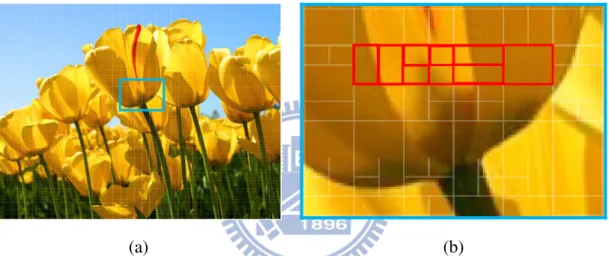
Accordingly, a message can be embedded into an XPS document by dividing an image in it into blocks with their division patterns corresponding to the message bits. Figure 3.3(a) shows an example where an image is divided into a set of block patterns encoding a certain message. In this example, part of the message embedded in the image is S = 100 001 010 000, which corresponds to four division patterns enclosed by the red rectangle shown in Figure 3.3(b). The hidden message can be extracted simply by looking up the division pattern encoding table to find the corresponding codes and concatenate them.
Table 3.1 A division pattern encoding table used for message embedding. Division pattern Corresponding binary code Division pattern Corresponding binary code 000 100 001 101 010 110 011 111
In summary, by using the function of the <Path> element in the XPS document, we can embed a message into an image in an XPS document by skillfully dividing the image into 2-level division patterns which correspond to the message bits according to Table 3.1. The image is not really divided division of it is just conducted in the XML markup of the XPS document; the appearances of the image and the resulting XPS document are totally unaffected and so will arouse no notice from any observer of the image.
(a) (b)
Figure 3.3 An image in an XPS document with a message embedded in it. (The edges of the blocks are emphasized on purpose in order to show the result.) (a) The entire image with division patterns superimposed (not seen in real appearance). (b) The enlarged partial view of (a) with the red rectangular part corresponds to a partial message of S = 100 001 010 000.
3.2
Data Embedding and Extraction
Processes
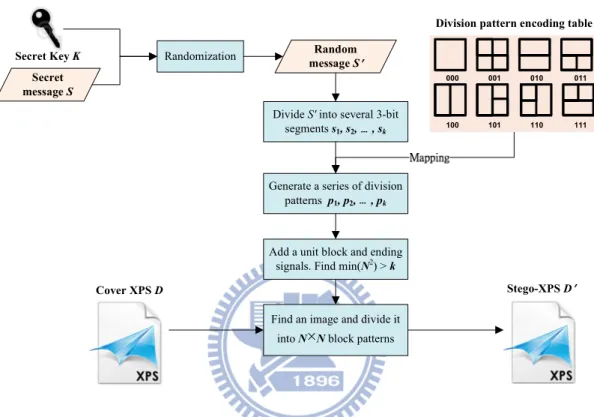
Detailed embedding and extraction algorithms of the proposed data hiding method are described in this section. The embedding process is illustrated by Figure 3.4. First, an input secret message, after its bits being randomized by a secret key, is transformed into a sequence of 3-bit segments. After mapping these segments into a
set of corresponding division patterns, a selected image in the input XPS document is then divided into blocks of these division patterns. Eventually, we get a stego-XPS document with the secret message embedded in it.
Secret message S
Random message S Randomization
Divide S' into several 3-bit segments s1, s2, , sk
000 001 010 011 100 101 110 111
Generate a series of division patterns p1, p2, , pk
Find an image and divide it into N×Nblock patterns Secret Key K
Cover XPS D Stego-XPS D
Division pattern encoding table
Add a unit block and ending signals. Find min(N2) > k
Figure 3.4 Flowchart of the proposed data embedding process.
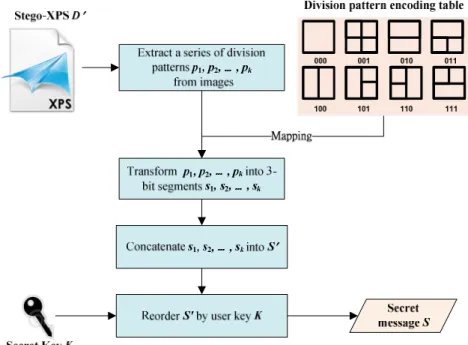
People who want to send a secret message to others can use this message embedding process to produce a stego-XPS document and deliver it as a normal XPS document to other people. The receiver can extract the secret message correctly using the same secret key. The extraction process is similar to the embedding process but conducted essentially in a reverse order, as illustrated in Figure 3.5. A series of division patterns are extracted from the stego-XPS document and transformed into the corresponding binary values. After concatenating these values and reordering them using the same secret key, the receiver gets the original secret message.
Figure 3.5 Flowchart of the proposed data extraction process.
3.2.1
Proposed Algorithm for Data Embedding
The detail of the proposed algorithm for data embedding is described in the following. In this algorithm, we add a secret key as input to prevent someone who knows the algorithm from extracting the embedded secret. We also calculate the number of characters in the secret message so that we can estimate how many division blocks we need to hide the secret message. Because the unit size of division blocks is dynamic as mentioned previously, we need to embeda unit block at the beginning of creating the required division patterns. Also, we add an “ending signal” at the end of the secret message, instead of embedding the length of the secret message, to mark the end of the embedded message bits. Both the unit block and the ending signal are used in the extraction process to recognize the division patterns. The reason of using them will become clear in the algorithm.
Algorithm 3.1. Data embedding for covert communication.
Output: A stego-XPS document D
′
.Steps:
1. Use the secret key K as a seed to generate a sequence of random numbers Q. 2. Randomize the characters of the input secret message S with the random numbers
Q to get a randomized message S
′
and let l be the number of characters in S′
. 3. Separate S′
into a series of 3-bit segments s1, s2, …, sk according to the followingsteps.
3.1 Add a bit 0 at the end of the 8-bit code representing each character ci, resulting in a 9-bit segments ci
′
.3.2 Separate ci
′
into 3-bit segments s3i+1, s3i+2, and s3i+3, where 0 ≤ i ≤ l−
1.3.3 Add a 9-bit ending signal consisting of three 3-bit segments, sk+1 = 000, sk+2
= 000, sk+3 = 001 at the end of sk, where k = 3×l.
4. Map the 3-bit segments s1, s2, …, sk+3 into a series of division patterns p1, p2, …,
pk+3 according to Table 3.1.
5. Add a unit block denoted by p0 at the beginning of the series of division patterns.
6. Perform the following steps on the cover XPS document D. 6.1 Decompress the XPS document D.
6.2 Find a minimum number N such that N2 ≥ k+4.
6.3 Modify the XML markup file in D which describes an image I in the following way.
6.3.1 Divide image I into N×N blocks, n0, n1, …, nN×N−1.
6.3.2 Divide each block ni, 0 ≤ i ≤ N×N−1, into the corresponding division pattern pi until the ending signal is embedded.
6.3.3 Call the final divided image I the stego-image, and denote it by I
′
. 7. Recompress D (with I′
in it) with the modified XML file to get a stego-XPS3.2.2
Proposed Algorithm for Data Extraction
The detail of the proposed algorithm for data extraction is described in the following. First, we extract the unit block embedded at the beginning of the stego-image to get the information of the block size of the division patterns so that we can decode all the following division patterns in the stego-image. The decoding process stops when the ending signal is extracted. Hence, even when we do not know the length of the secret message, we still know where the end of the message is in the stego-image. By using the same secret key, we can recover the correct message.
Algorithm 3.2. Data extraction for covert communication.
Input: A stego-XPS document D
′
and a secret key K.Output: A secret message S.
Steps:
1. Decompress the stego-XPS document D
′
.2. Find the XML markup file in D
′
which describes a stego-image I′
.3. Extract the first block, supposed to be a unit block, and get its height and width. 4. Extract all subsequent division patterns p1, p2, …, pk from I
′
until divisionpatterns corresponding to the 9-bit ending signal are encountered.
5. Decode the division patterns p1, p2, …, pk into corresponding 3-bit segments s1,
s2, …, sk according to Table 3.1.
6. Concatenate every three segments s3i+1, s3i+2, and s3i+3 into one and discard the
last bit of it to get a 8-bit character ci, where 0 ≤ i ≤ l−1. 7. Concatenate c0, c2, …, cl-1 into a string S
′
.3.3
Security Consideration
3.3.1
Issues of Security of Proposed Method
In the proposed method, the secret key and the division pattern encoding table are known by both the sender and the receiver beforehand. Thus, any malicious user cannot extract the secret message successfully without the correct secret key. However, some issues should be discussed in order to strengthen the security of the proposed method. One of the issues is that malicious users may observe the regularity of those patterns to guess the secret message by trial and error. The other issue is that malicious users may disturb or replace some division patterns, resulting in extracting a wrong message. We will prevent these situations in advance.
3.3.2
Proposed Security Enhancement Measures
To ensure the security of the proposed method, in addition to using a secret key to encrypt the secret message, we may also use it to reorder the corresponding binary value of the division pattern encoding table. Also, the encoding table can be redefined using different division patterns or extended to represent codes with lengths larger than 3 bits. The encoding table should only be known by the communicating parities. Moreover, after embedding the secret message into an XPS document, we may generate some extra redundant patterns and embed them into the document to mislead malicious users, making it hard for them to guess the correct secret message.
To prevent malicious users from destruction of the stego-XPS document, we can duplicate the embedded patterns. Then, even parts of the patterns are replaced; the receiver still can extract the secret message correctly.
3.4
Experimental Results
In our experiments, the proposed embedding and extraction algorithms were implemented using Microsoft Visual C++. The XPS documents can be opened and displayed by an XPS Viewer. We created the XPS documents by saving Microsoft Office Documents as XPS documents or using a printer named Microsoft XPS Document Writer.
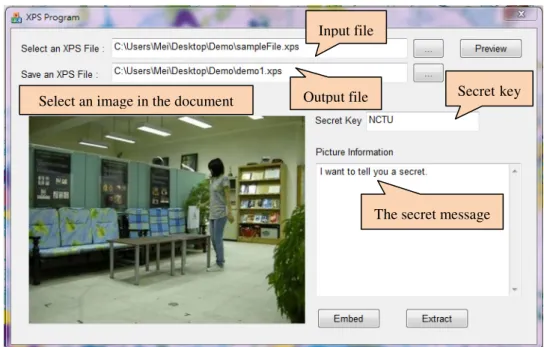
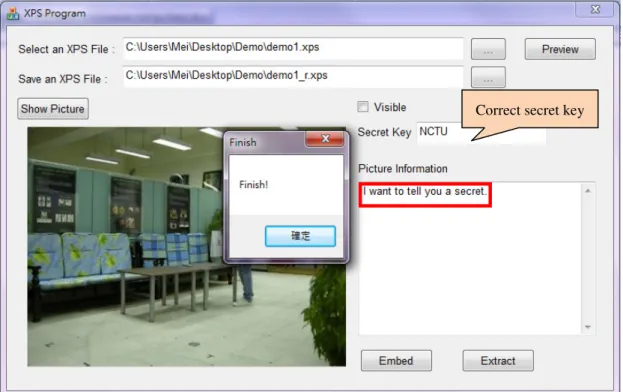
The results of an experiment conducted by us are illustrated as follows. An original XPS document with some images as cover media is shown in Figure 3.6. A secret message was embedded into the XPS document using a secret key through the user interface shown in Figure 3.7, resulting in a stego-XPS document as shown in Figure 3.8. The message has been hidden in an image of the stego-XPS document, and people cannot find out the difference between the original XPS document and the stego-XPS document from the appearance. Figure 3.9 shows that the correct secret message can be extracted using the same secret key. On the other hand as shown in Figure 3.10, if people use the wrong secret key, the result of the extracted message is incorrect.
3.5
Summary
In this chapter, a new method of data hiding using hierarchical division of images in XPS documents has been proposed for covert communication. The proposed method fully utilizes an image description feature in the XPS format. The secret message hidden in an XPS document is not easy to be observed from the appearance.Even though a malicious user knows the proposed algorithm and tries to extract the secret from a stego-XPS document, the secret message can still be protected by using some security enhancement measures proposed in this study and a
Figure 3.7 The proposed user interface to embed data for covert communication.
Figure 3.8 The stego-XPS document.
Input file
Output file
The secret message
Figure 3.9 The proposed user interface for data extraction using the right secret key.
Figure 3.10 Proposed user interface for data extraction using the wrong secret key.
Correct secret key
Chapter 4
Authentication of XPS Document
Contents by Superimposition of
Variable Gradient Patterns
4.1
Introduction
In addition to using XPS documents as cover media for covert communication, it is also important to protect the contents of an XPS document itself. Text is especially the most essential part in XPS documents. While XPS documents are delivered on the Internet, a malicious user might intercept and tamper with the text of the contents such that a receiver would get wrong information. Therefore, in this study we propose an authentication method using the data hiding technique to verify the integrity and fidelity of texts in XPS documents. The method is described in this chapter.
First, in Section 4.1.1, the problem definition is described. The major idea of the proposed data hiding method for authentication is described in Section 4.1.2. In Section 4.2, we present the technique we propose to generate authentication signals and describe a detailed authentication signal embedding process. In Section 4.3, a process for verification of authentication signals is proposed. After that, some security enhancement measures for the proposed method are given in Section 4.4. Experimental results showing the feasibility of the proposed method are shown in Section 4.5. Last, a brief summary is given in Section 4.6.
4.1.1
Problem Definition
The main purpose of a text authentication process for the XPS document is to verify whether the text content of an XPS document has been tampered with or not. A malicious user may, for example, insert extra sentences, replace some words, or alter the position of a piece text in an XPS document. If a receiver does not notice the changes on the XPS document, problems will raise. Therefore, an authentication process is necessary in order to enhance the reliability and credibility of an XPS document for various application usages.
Accordingly, we develop in this study an authentication process by using a data hiding technique, not only to detect whether an XPS document has been tampered with or not, but also to highlight which part of the texts has been changed.
4.1.2
Major Idea of Proposed Method using Variable
Gradient Patterns
To achieve the authentication of the text content of an XPS document, we develop in this study a new method of data hiding to embed certain authentication signals into XPS documents. A major idea of this new method is derived from a feature in the XPS specification described in the following.
In XPS documents, a linear gradient pattern along a vector can be superimposed onto a page using the <LinearGradientBrush> element to create certain a graphic effect for various applications. Such a kind of gradient pattern is described by the XML markup script defined by the XPS specification. For example, the gradient pattern shown in Figure 4.1(b) may be described by the XML markup shown in Figure 4.1(a). Some attributes, such as the starting and ending points of the linear gradient, can be specified further to determine the direction of the gradient vector.
Also, the SpreadMethod attribute may be used to define several types of brushes to fill the gradient area, including Reflect and Repeat. Table 4.1 shows some gradient patterns with different kinds of direction and spread.
(b) (b)
Figure 4.1 An example of XPS documents with a gradient pattern. (a) The XML markup describing a gradient pattern. (b) The corresponding result of (a) displayed in an XPS Viewer.
Table 4.1 Gradient patterns with different directions and spreads.
Gradient pattern
Direction Horizontal Vertical Diagonal
Gradient pattern
Spread Reflect Repeat
Consequently, we can utilize the <LinearGradientBrush> element to create various linear gradient patterns by modifying the spread of the linear gradient brush
<PathData="M 100,100 L 200,100 L 200,200 L 100,200 Z"> <Path.Fill> <LinearGradientBrush MappingMode="Absolute" StartPoint="120,0" EndPoint="140,0" SpreadMethod="Reflect"> <LinearGradientBrush.GradientStops> <GradientStopColor="#FFFFFFFF" Offset="0.0" /> <GradientStopColor="#FF000000" Offset="1.0" /> </LinearGradientBrush.GradientStops> </LinearGradientBrush> </Path.Fill> </Path> Direction Type
and the direction of the linear gradient vector. According to this finding of the XPS document property, the proposed data hiding method for authentication is based on the use of a table which includes a list of gradient patterns and a set of corresponding codes, as shown in Table 4.2.
Based on the above-described idea, an XPS document can be protected by transforming authentication signals into several linear gradient patterns which are superimposed invisibly onto every page of the document. Figure 4.2 is an example of an XPS document protected in this way. The visible patterns were made to be so just for the purpose of illustration and inspection; in real cases they are made invisible. Different kinds of linear gradient pattern may be superimposed onto the XPS document to represent a variety of distinct authentication signals. Invisibility of the gradient patterns can be achieved by changing the value of the transparency parameter for the document.
In conclusion, because of the existence of the XPS feature that linear gradient patterns can be superimposed invisibly onto the page of XPS documents, we utilize such patterns in this study to represent authentication signals and generate a protected XPS document.
Table 4.2 A gradient pattern encoding table for embedding authentication signals. Gradient pattern (Repeat) Binary code 0000 0001 0010 0011 Gradient pattern (Repeat) Binary code 0100 0101 0110 0111 Gradient pattern (Reflect) Binary code 1000 1001 1010 1011 Gradient pattern (Reflect) Binary code 1100 1101 1110 1111
4.2
Authentication Signal Generation
and Embedding Process
4.2.1
Idea of Signal Generation
Text usually appears as the largest portion of a common XPS document, so protection of the text contents in XPS documents is necessary. In the XPS specification, the <Glyphs> element is used to create text segments and specify several characteristics of them, such as position, font type, etc. To generate authentication signals, we use a hash function to create equal-length digests of text segments and other information contained in the <Glyphs> element in the proposed method. Also, we create additionally a digest of a user key and combine it with the authentication signals to prevent the authentication signals from being forged. As a result, the text content and even its position in XPS documents can be protected, as discussed in the following sections.
4.2.2
Proposed Algorithm
After authentication signals are generated, they are embedded into an XPS document using the proposed method. First, each authentication signal is transformed into 4-bit segments. Then, they are mapped to corresponding gradient patterns and superimposed invisibly onto the respective text segments from which the authentication signals are generated. After all the text segments are protected by authentication signal superimposition, we get a protected XPS document. The appearance of the XPS document is totally unaffected for users to read the document. The proposed authentication signal generation and embedding process is illustrated in Figure 4.3.
Figure 4.3 Flowchart of proposed authentication signal generation and embedding process.
In the proposed algorithm, we prevent the authentication signals from being forged by adding a secret key. Also, we use a hash function to generate equal-length digests to limit the length of the information we want to protect. The detail of the algorithm is as follows.
Algorithm 4.1. Authentication signal generation and embedding Process.
Input: A secret key K, a hash function f, and an XPS document D to be protected.
Output: A protected XPS document D
′
.Steps:
1. Use the secret key K as an input to a hash function f, such as MD5, to generate a 64-bit digest K
′
.2. Choose an unprotected text segment T in the original XPS document D (with all text segments in D regarded as unprotected initially).
4. Compute the exclusive-OR value T
′
⊕ K′
to get a 64-bit authentication signal S. 5. Separate the bits of S in to a series of 4-bit segments t1, t2, …, t16.6. Map t1, t2, …, t16 into a series of gradient patterns p1, p2, …, p16 according to Table
4.2.
7. Superimpose p1, p2, …, p16 onto the text segment T in the XPS document D by the
following steps.
7.1 Find the start position of the text segment T.
7.2 Superimpose p1, p2, …, p16 onto T invisibly (by adjusting the transparency
parameter value) from the start position sequentially. 8. Repeat Steps 2 through 7 until all text segments are protected. 9. Recompress the modified D to get a protected XPS document D
′
.4.3
Authentication Signal Extraction
and Verification Process
4.3.1
Idea of Verification
The proposed authentication signal verification method can be used to verify the integrity and fidelity of a protected XPS document. First, we use the same secret key and the same hash function as those used in Algorithm 4.1 to generate digested segments for the current text content in the protected XPS document. By extracting the superimposed authentication signals and compare them with the generated digested segments computed from the current text content of the XPS document, we can decide whether the protected XPS document has been modified or not, and point out the modified part. The process of authentication signal extraction and document verification is illustrated in Figure 4.4.
Figure 4.4 Flowchart of the proposed authentication signal extraction and XPS document verification process.
4.3.2
Proposed Algorithm
The proposed authentication signal extraction and XPS document verification process is described as an algorithm in the following.
Algorithm 4.2. Authentication signal extraction and XPS document verification.
Input: A secret key K and a hash function f both being the same as those used
Algorithm 4.1; and a protected XPS document D
′
.Output: An authenticated XPS document D
″
.Steps:
1. Use the same secret key K as that used in Algorithm 4.1 as an input to the hash function f, such as MD5, to generate a 64-bit digest key K
′
.2. Choose an unauthenticated text segment T in the protected XPS document D
′
(with all text segments in D′ regarded as unauthenticated initially).4. Compute the exclusive-OR value T
′
⊕ K′
to get a 64-bit encrypted text segmentT
″
.5. Extract the gradient patterns p1, p2, …, p16 which were presumably superimposed
onto the text segment T.
6. Map the gradient patterns p1, p2, …, p16 to corresponding 4-bit segments t1, t2, …,
t16 according to Table 4.2.
7. Concatenate t1, t2, …, t16 into a 64-bit authentication signal S.
8. Compare S with T
″
.8.1 If S = T
″
, then decide that the text segment T is not modified. 8.2 If S ≠ T″
, then conduct the following steps.8.2.1 Report that the text segment T has been modified.
8.2.2 Highlight the text segment T in the display of the document D
′
. 9. Repeat Steps 2 through 8 until all text segments in D′
are authenticated.10. Take the resulting D
′
as an authenticated XPS document D″
with highlighted authentication result.4.4
Security Consideration
4.4.1
Issues of Security of Proposed Method
Using the proposed method, the text content of an XPS document can be protected. As long as either the text content or the authentication signals are modified, we can detect the modification and point out which part of the text is suspicious. In addition, because we involve a secret key in the process of generating the authentication signals, it is hard to forge the authentication signals even when a malicious user knows the proposed algorithm.
However, there is still a risk that a malicious user may replace both the text and the corresponding authentication signals with a piece of other text and the corresponding authentication signals computed from the same XPS document. As a result, the XPS document is tampered with but still passes the verification process. Certain improving security enhancement measures thus are needed. Some measures proposed in this study are described next.
4.4.2
Proposed Security Enhancement Measures
To resolve the above-mentioned problem, we may use an additional secret key to randomize the position where the authentication signals are superimposed; only when a user has this secret key can he/she find where the corresponding authentication signals of the text segments are. In this way, we can strongly protect an XPS document using the proposed data hiding method; it is nearly impossible for a malicious user to tamper with the content of the XPS document.
We may also use a third key to randomize the content of the gradient pattern encoding table (Table 4.2), so that without the key a malicious user cannot generate correct gradient patterns to be superimposed on text segments, thus being unable to create fake authentication signals to cheat.
4.5
Experimental Results
In our experiments, we created a XPS document by saving a Microsoft Office documents as an XPS document or by printing one as the same from a website using a printer named Microsoft XPS Document Writer. The content of the XPS document can be edited with an Open XML Editor and viewed by an XPS Viewer.
XPS document. By entering a secret key, we generated authentication signals and embedded them in the XPS document. The user interface is shown in Figure 4.6. If a malicious user tries to tamper with the protected XPS document, yielding a modified document like Figure 4.7, people can verify the integrity and fidelity of it using the same secret key. The authenticated results are given in Figures 4.8 and 4.9. Figures 4.10 through 4.13 show the other result. Both results show that, using the proposed method, we can verify whether an XPS document has been tampered with or not and also detect the positions of the tampered texts.
4.6
Summary
In this chapter, a new method for authentication of the integrity and fidelity of XPS documents by a data hiding technique has been proposed. Authentication signals of the form of variable gradient patterns are generated using the text segments in an XPS document and superimposed onto the XPS document. A secret key was used also to randomize the contents of the authentication signals and the positions they are superimposed so that malicious users cannot easily forge the text content and the corresponding authentication signals. The proposed method is reliable to protect XPS documents from being tampered with, as proved by the experimental results.