http://www.hmwu.idv.tw
吳漢銘 國立政治大學 統計學系
讀取大型資料
in R
D01
大綱
記憶體設置、 物件大小、計算執行(資料讀取)時間
Handling Large Data Sets in R
讀取目錄下符合目標的(多個)檔案資料: list.files
直接讀取壓縮檔(zip)內之檔案
讀取HTML網頁表格,讀取XML表格
讀取影像檔案
從資料庫(MySQL)讀取資料
GREA: read ALL the data into R/Importing Data with RStudio
讀取部份資料進入R計算(readbulk)
fread {data.table}: Fast and friendly file finagler
讀取檔案部份欄位資料
如何讓read.table讀較大的資料速度更快
2/43
http://www.hmwu.idv.tw/index.php/r-software
> report.memory <- function(size = 4095){
+ cat("current memory in use: ", memory.size(max = FALSE), "Mb \n")
+ cat("maximum memory obtained from the OS: ", memory.size(max = TRUE), "Mb \n") + cat("current memory limit: ", memory.size(max = NA), "Mb \n")
+ cat("current memory limit: ", memory.limit(size = NA), "Mb \n") + cat("increase memory limit: ", memory.limit(size = size), "Mb \n") + }
>
> report.memory()
current memory in use: 686.74 Mb
maximum memory obtained from the OS: 1558.81 Mb current memory limit: 65408.91 Mb
current memory limit: 65408 Mb increase memory limit: 65408 Mb Warning message:
In memory.limit(size = size) : 無法減少記憶體限制:已忽略
Memory Allocation in R
3/43R與Windows作業系統
最大可穫得的記憶體
32-bit R + 32-bit Windows: 2GB.
32-bit R + 64-bit Windows: 4GB.
64-bit R + 64-bit Windows: 8TB.
當R啟動時,設定最大可穫得的記憶體:
"C:\Program Files\R\R-3.2.2\bin\x64\Rgui.exe" --max-mem-size=2040M
最小需求是32MB.
R啟動後僅可設定更高值,不能再用
memory.limit設定較低的值。
Report the Space Allocated for an Object:
object.size{utils}
儲存R物件所佔用的記憶體估計。
object.size(x)
print(object.size(x), units = "Mb")
4/43
> n <- 10000
> p <- 200
> myData <- as.data.frame(matrix(rnorm(n*p), ncol = p, nrow=n))
> print(object.size(myData), units = "Mb") 15.3 Mb
> write.table(myData, "myData.txt") ## 約 34.7 MB
> InData <- read.table("myData.txt")
> print(object.size(InData), units = "Mb") 15.6 Mb
NOTE: Under any circumstances, you cannot have more than
2
31-1=2,147,483,647 rows or columns.
object.size{utils}
5/431 Bit = Binary Digit; 8 Bits = 1 Byte; 1024 Bytes = 1 Kilobyte; 1024 Kilobytes = 1 Megabyte 1024 Megabytes = 1 Gigabyte; 1024 Gigabytes = 1 Terabyte; 1024 Terabytes = 1 Petabyte
千萬 佰萬
(n*p*8)/(1024*1024) MB
Measuring execution time: system.time{base}
6/43> start.time <- Sys.time()
> ans <- myFun(10000)
> end.time <- Sys.time()
> end.time -start.time
Time difference of 0.0940001 secs
> system.time({
+ ans <- myFun(10000) + })
user system elapsed 0.04 0.00 0.05 myFun <- function(n){
for(i in 1:n){
x <- x + i }
x }
See also : microbenchmark, rbenchmark packages
myPlus <- function(n){
x <- 0
for(i in 1:n){
x <- x + sum(rnorm(i)) }
x }
myProduct <- function(n){
x <- 1
for(i in 1:n){
x <- x * sum(rt(i, 2)) }
x }
> system.time({
+ a <- myPlus(5000) + })
user system elapsed 3.87 0.00 3.91
> system.time({
+ b <- myProduct(5000) + })
user system elapsed 10.36 0.00 10.42
Handling Large Data Sets in R
The Problem with large data sets in R:
R reads entire data set into RAM all at once.
R Objects live in memory entirely.
Does not have int64 datatype.
Not possible to index objects with huge numbers of rows &
columns even in 64 bit systems (2 Billion vector index limit) .
How big is a large data set:
Medium sized files that can be loaded in R ( within memory limit but processing is cumbersome (typically in the 1~2 GB range ).
Large files that cannot be loaded in R due to R/OS limitations.
Large files (typically 2 ~ 10 GB) that can still be processed locally using some work around solutions.
Very Large files ( > 10 GB) that needs distributed large scale computing.
7/43
Handling large data sets in R, Sundar Pradeep & Philip Moy, April 10, 2015
https://rstudio-pubs-static.s3.amazonaws.com/72295_692737b667614d369bd87cb0f51c9a4b.html
https://msdn.microsoft.com/zh-tw/library/s3f49ktz.aspx
Strategy for Medium sized datasets (< 2 GB)
Reduce the size of the file before loading it into R (select some columns).
Pre-allocate number of rows (
nrows) and pre-define column classes (
colClasses), define
comment.charparameter
Use
fread {data.table}.
Use pipe operators to overwrite files with intermediate results and minimize data set duplication through process steps.
Parallel Processing
Explicit Parallelism (user controlled):
rmpi(Message Processing Interface),
snow(Simple Network of Workstations)
Implicit parallelism (system abstraction):
doMC(Foreach Parallel Adaptor for 'parallel'),
foreach(Provides Foreach Looping
Construct for R).
8/43
Handling large data sets in R, Sundar Pradeep & Philip Moy, April 10, 2015
https://rstudio-pubs-static.s3.amazonaws.com/72295_692737b667614d369bd87cb0f51c9a4b.html
Strategy for Medium sized datasets (2 ~10 GB) and Very Large datasets (> 10GB)
Medium sized datasets (2 ~ 10 GB)
For medium sized data sets which are too-big for in-memory processing but too- small-for-distributed-computing files, following R Packages come in handy.
bigmemory: Manage Massive Matrices with Shared Memory and Memory- Mapped Files (http://www.bigmemory.org/)
ff: memory-efficient storage of large data on disk and fast access functions (http://ff.r-forge.r-project.org/)
Very Large datasets (> 10GB)
Use integrated environment packages like RHipe to leverage Hadoop MapReduce framework.
Use RHadoop directly on hadoop distributed system.
(https://github.com/RevolutionAnalytics/RHadoop/wiki)
Storing large files in databases and connecting through DBI/ODBCcalls from R is also an option worth considering.
9/43
Handling large data sets in R, Sundar Pradeep & Philip Moy, April 10, 2015
https://rstudio-pubs-static.s3.amazonaws.com/72295_692737b667614d369bd87cb0f51c9a4b.html
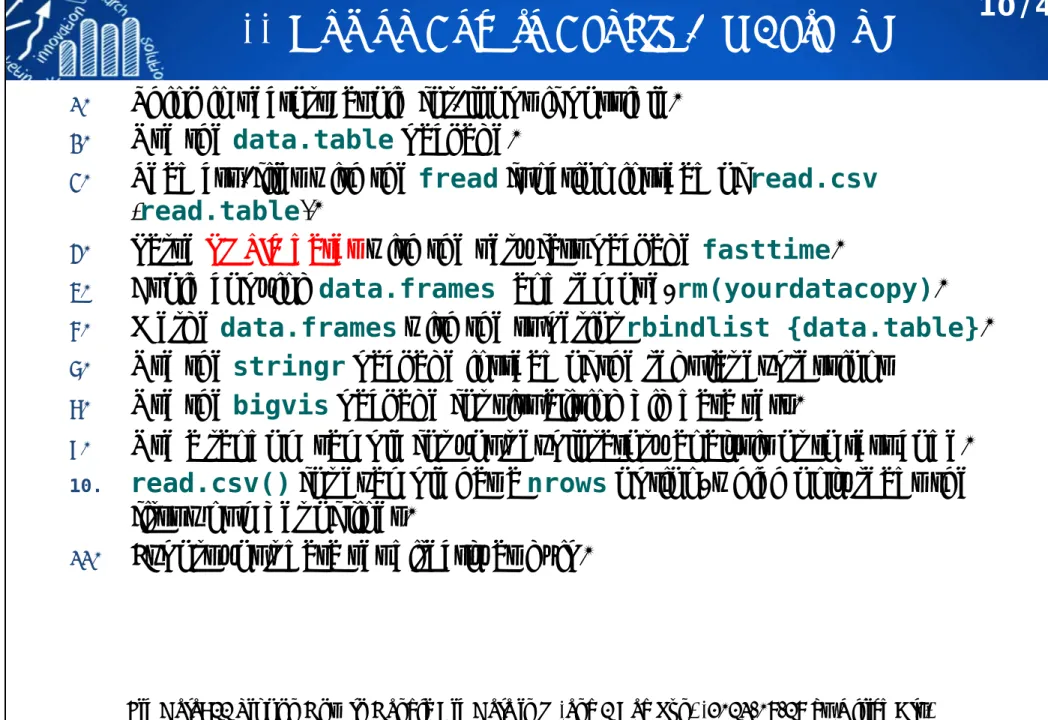
11 Tips on How to Handle Big Data in R
1.
Think in vectors: avoid for-loops if possible.
2.
Use the
data.tablepackage.
3.
Read csv-files with the
freadfunction instead of
read.csv(
read.table).
4.
Parse POSIX dates with the very fast package
fasttime.
5.
Avoid copying
data.framesand remove,
rm(yourdatacopy).
6.
Merge
data.frameswith the superior
rbindlist {data.table}.
7.
Use the
stringrpackage instead of the regular expressions
8.
Use the
bigvispackage for visualising big data sets.
9.
Use a random sample for your exploratory analysis or to test code.
10. read.csv()
for example has a
nrowsoption, which only reads the first x number of lines.
11.
Export your data set directly as gzip.
10/43
Fig Data: 11 Tips on How to Handle Big Data in R (and 1 Bad Pun) (2013-07-18 by Ulrich Atz) https://theodi.org/blog/fig-data-11-tips-how-handle-big-data-r-and-1-bad-pun
讀取目錄下符合目標的資料檔案: list.files
11/43> getwd() # setwd("F:/my_R") [1] "D:/R/data/quiz"
> list.files() # dir()
[1] "score_quiz1.txt" "score_quiz2.txt" "score_quiz3.txt" "score_quiz4.txt"
[5] "score_quiz5.txt"
> list.dirs() [1] "."
> (filenames <- list.files(".", pattern="*.txt"))
[1] "score_quiz1.txt" "score_quiz2.txt" "score_quiz3.txt" "score_quiz4.txt"
"score_quiz5.txt"
list.files(path = ".", pattern = NULL, all.files = FALSE, full.names = FALSE, recursive = FALSE,
ignore.case = FALSE, include.dirs = FALSE, no.. = FALSE)
10位學生(student.1~student.10)自由參加5次小考,各 次小考之5科成績("Calculus" "LinearAlgebra"
"BasicMath" "Rprogramming" "English")分別紀錄於5 個檔案中。
讀取多個資料檔案並計算摘要
12/43> (quiz.data <- lapply(filenames, read.table)) [[1]]
gender Calculus LinearAlgebra BasicMath Rprogramming English student.5 M 69 93 83 79 95 student.4 M 70 78 31 26 69 ...
[[5]]
gender Calculus LinearAlgebra BasicMath Rprogramming English student.3 M 53 100 100 33 1 student.8 M 81 69 75 86 27 ...
> (quiz.data.summary <- lapply(quiz.data, summary)) [[1]]
gender Calculus LinearAlgebra BasicMath Rprogramming English F:5 Min. :56.00 Min. : 4.00 Min. : 8 Min. :15.00 Min. : 4.00 M:4 1st Qu.:62.00 1st Qu.: 6.00 1st Qu.:23 1st Qu.:26.00 1st Qu.:37.00 Median :69.00 Median :32.00 Median :43 Median :76.00 Median :62.00 Mean :67.11 Mean :44.89 Mean :45 Mean :63.33 Mean :57.11 3rd Qu.:73.00 3rd Qu.:78.00 3rd Qu.:73 3rd Qu.:95.00 3rd Qu.:69.00 Max. :76.00 Max. :97.00 Max. :83 Max. :99.00 Max. :97.00 ...
[[5]]
gender Calculus LinearAlgebra BasicMath Rprogramming English F:3 Min. :53.0 Min. : 14 Min. : 2.0 Min. : 9.0 Min. : 1 M:2 1st Qu.:53.0 1st Qu.: 15 1st Qu.: 39.0 1st Qu.:12.0 1st Qu.: 6 Median :70.0 Median : 32 Median : 55.0 Median :33.0 Median :27 Mean :66.2 Mean : 46 Mean : 54.2 Mean :43.8 Mean :31 3rd Qu.:74.0 3rd Qu.: 69 3rd Qu.: 75.0 3rd Qu.:79.0 3rd Qu.:41 Max. :81.0 Max. :100 Max. :100.0 Max. :86.0 Max. :80
> names(quiz.data.summary) <- filenames
> quiz.data.summary$score_quiz2.txt
課堂練習
合併此5組資料使成一資料表格,並新增一 變數「小 考次別(quiz.id)」
10位學生各參加哪幾次的小考?
各次小考,每科平均及變異數為多少? (未參加的同學 不列入計算)
若此學期5次小考配分比重為(0.1, 0.1, 0.2, 0.2, 0.3),
試計算每位同學各科小考平均及變異數?
每位同學每科皆刪除最差的一次成績,試計算每位同 學各科小考平均及變異數?
男女生各科小考平均及變異數為多少?
試讀取單數次小考成績檔案進入R。
13/43
範例: 房屋實價登錄資料
14/432014年臺灣資料分析競賽資料 (使用R軟體):
大約 682724筆紀錄,28個變數
範例: 房屋實價登錄資料
15/43Air Pollution Dataset from EPA
Dataset: an air pollution (hourly
ozone levels) dataset from the U.S.
Environmental Protection Agency (EPA) for the year 2014.
http://aqsdr1.epa.gov/aqsweb/aqstmp/airdata/download_files.ht ml
U.S. EPA on hourly ozone
measurements in the entire U.S. for the year 2014. The data are available from the EPA’s Air Quality System web page.
The dataset is a comma-separated value (CSV) file, where each row of the file contains one hourly
measurement of ozone at some location in the country.
16/43
Hourly Data
17/43# dataset:
hourly_44201_2014.zip (64.7M) hourly_44201_2014.csv (1.89G)
(limited to 1,048,576 rows)
Hourly Data
18/43There are 34 variables with 8967571 observations:
"State Code","County Code","Site Num","Parameter Code", "POC",
"Latitude","Longitude","Datum","Parameter Name","Date Local",
"Time Local","Date GMT","Time GMT","Sample Measurement","Units of Measure",
"MDL","Uncertainty","Qualifier","Method Type","Method Code",
"Method Name","State Name","County Name","Date of Last Change"
註: 如何呈現這些變數的內容及資訊?
直接讀取壓縮檔(zip)內之檔案
19/43> library(readr)
> ozone <- read_csv("hourly_44201_2014.csv") # unzip and read
=================================================== | 96% 1900 MB
>
> # read without unzip
> # unz reads (only) single files within zip files, in binary mode.
> # The description is the full path to the zip file.
> # a zip file contains several files, create a connection to read one of the files
> # AirPollution-test.zip: hourly_44201_2014-test.csv, hourly_44201_2015-test.csv, hourly_44201_2016-test.csv
>
> zz <- unz(description="AirPollution-test.zip", filename="hourly_44201_2014-test.csv")
> ozone.zip <- read.csv(zz, header=T)
> ozone.zip
State.Code County.Code Site.Num Parameter.Code POC Latitude Longitude Datum Parameter.Name 1 1 3 10 44201 1 30.49748 -87.88026 NAD83 Ozone 2 1 3 10 44201 1 30.49748 -87.88026 NAD83 Ozone ...
> close(zz)
>
> # read from the web url
> location <- "http://aqsdr1.epa.gov/aqsweb/aqstmp/airdata/hourly_44201_2014.zip"
> zz <- unz(location, filename="hourly_44201_2014.csv")
> ozone.url <- read.csv(zz, header=T)
> close(zz)
See also: connections {base}: file(), url(), gzfile(), bzfile(), xzfile(), unz(), pipe() zz <- gzfile('file.csv.gz', 'rt')
mydata <- read.csv(zz, header=F)
讀取HTML網頁表格 (1)
20/43https://rstudio-pubs-static.s3.amazonaws.com/1776_dbaebbdbde8d46e693e5cb60c768ba92.html
https://www.drugs.com/top200_2003.html
> install.packages("XML", dep = T, repos="http://cran.csie.ntu.edu.tw")
> library(XML)
> library(RCurl)
readHTMLTable(doc, header = NA, colClasses = NULL, skip.rows = integer(), trim = TRUE, elFun = xmlValue, as.data.frame = TRUE,
which = integer(), ...)
讀取HTML網頁表格 (1)
21/43> URL1 <- getURL("https://www.drugs.com/top200_2003.html")
> htmlTable1 <- readHTMLTable(URL1, header=T)
> str(htmlTable1)
> head(htmlTable1[[1]])
讀取HTML網頁表格 (2)
22/43https://en.wikipedia.org/wiki/List_of_countries_and_dependencies_by_population
讀取HTML網頁表格 (2)
23/43> URL1 <- getURL("https://en.wikipedia.org/wiki/List_of_countries_and_
dependencies_by_population")
> htmlTable1 <- readHTMLTable(URL1, header = TRUE)
> str(htmlTable1)
> head(htmlTable1[[2]])
課堂練習
24/43http://www.boxofficemojo.com/alltime/world/
下載全球最高電影票房前500大 電影紀錄:
• 票房分佈為何?
• 各發行商(Studio)之發行之電 影數量為何?
• 各發行商(Studio)之平均每部 電影之票房如何?
• 各年代之電影發行數量為何?
讀取 XML 檔案
25/43https://zh.wikipedia.org/wiki/XML
讀取 XML 檔案
26/43> library(XML)
> book.data <- xmlToDataFrame("books.xml")
> str(book.data)
> head(book.data)
https://msdn.microsoft.com/en-us/library/ms762271(v=vs.85).aspx
讀取影像檔案
27/43https://en.wikipedia.org/wiki/Transformers_(film)
> install.packages(c("tiff", "jpeg", "png", "fftwtools"), repos="http://cran.csie.ntu.edu.tw")
> library(EBImage) # (Repositories: BioC Software)
> Transformers <- readImage("Transformers07.jpg")
> (dims <- dim(Transformers)) [1] 300 421 3
> Transformers Image
colorMode : Color storage.mode : double dim : 300 421 3 frames.total : 3
frames.render: 1
imageData(object)[1:5,1:6,1]
[,1] [,2] [,3] [,4] [,5] [,6]
[1,] 0 0 0 0 0 0 [2,] 0 0 0 0 0 0 [3,] 0 0 0 0 0 0 [4,] 0 0 0 0 0 0 [5,] 0 0 0 0 0 0
> plot(c(0, dims[1]), c(0, dims[2]), type='n', + xlab="", ylab="")
> rasterImage(Transformers, 0, 0, dims[1], dims[2])
彩色影像轉成灰階
28/43> Transformers.f <- Image(flip(Transformers))
> # convert RGB to grayscale
> rgb.weight <- c(0.2989, 0.587, 0.114)
> Transformers.gray <- rgb.weight[1] * imageData(Transformers.f)[,,1] + + rgb.weight[2] * imageData(Transformers.f)[,,2] + + rgb.weight[3] * imageData(Transformers.f)[,,3]
> dim(Transformers.gray) [1] 300 421
> Transformers.gray[1:5, 1:5]
[,1] [,2] [,3] [,4] [,5]
[1,] 0 0 0 0 0 [2,] 0 0 0 0 0 [3,] 0 0 0 0 0 [4,] 0 0 0 0 0 [5,] 0 0 0 0 0
> par(mfrow=c(1,2), mai=c(0.1, 0.1, 0.1, 0.1))
> image(Transformers.gray, col = grey(
+ seq(0, 1, length = 256)), xaxt="n", yaxt="n")
> image(Transformers.gray, col = rainbow(256), + xaxt="n", yaxt="n")
Converting RGB to grayscale/intensity
http://stackoverflow.com/questions/687261/converting-rgb-to-grayscale-intensity
影像資料分析範例: Image Segmentation
Segmentation: partition an image into homogeneous regions.
Images: texture images, medical images, color images,...
Medical Image Segmentation:
anatomicalregions or pathologicalregions.
extract tumors.
29/43
80 120 100
sd=20
FCM+FSIR
MRI images FCM+FSIR
Simulated images
Image Feature Extraction: Local Blocks
30/43grey level: f(x,y)=0,...,255
Image Features
31/43X
64×9Space Domain
Transformation
FFT Gabor Wavelet,..
. PCA SIR,...
Z
64×p Segmentation Clustering AlgorithmsValidation Indices
y64
Cluster Label
讀取MySQL資料
32/43• 讀取Excel資料檔案
• 使用ODBC讀取 Excel 檔案 (Windows為例)
• 利用RMySQL
讀取MySQL資料庫的資料 (localhost)
• 利用RMySQL
讀取MySQL資料庫的資料 (remote host)
做適當設定
指定連線IP
MySQL
dbname = "bigdata105", username="student",
password="xxxxxx", host="163.13.113.xxx",
port=3306
課堂練習
33/43利用RMySQL (SQL語法) ,在表格
student.info填入個人資料(中英文皆可)。
SQL語法教學
http://www.1keydata.com/tw/sql/sql.html
GREA : read ALL the data into R
GREA: The RStudio Add-In to read ALL the data into R!
https://www.r-bloggers.com/grea-the-rstudio-add-in-to-read-all-the-data-into-r/
在RStudio安裝
> devtools::install_github("Stan125/GREA", force = TRUE)
> install.packages(c("csvy", "miniUI", "openxlsx", "readODS", "urltools"))
34/43
Importing Data with RStudio
Importing data into R is a necessary step that, at times, can become time intensive. To ease this task, RStudio includes new features to import data from: csv, xls, xlsx, sav, dta, por, sas and stata files.
35/43
https://support.rstudio.com/hc/en-us/articles/218611977-Importing-Data-with-RStudio
https://rstudio-pubs-static.s3.amazonaws.com/1776_dbaebbdbde8d46e693e5cb60c768ba92.html
readbulk : Read and Combine Multiple Data Files
36/43read_bulk(directory = ".", subdirectories = FALSE, extension = NULL, data = NULL, verbose = TRUE, fun = utils::read.csv, ...)
> raw.data <- read_bulk(directory = ".", extension = ".txt", sep=" ") Reading score_quiz1.txt
Reading score_quiz2.txt Reading score_quiz3.txt Reading score_quiz4.txt Reading score_quiz5.txt
> str(raw.data)
'data.frame': 39 obs. of 7 variables:
$ gender : Factor w/ 2 levels "F","M": 2 2 1 1 1 2 1 1 2 1 ...
$ Calculus : int 69 70 57 73 56 62 76 68 73 74 ...
$ LinearAlgebra: int 93 78 26 32 6 4 5 63 97 25 ...
$ BasicMath : int 83 31 21 73 50 73 8 43 23 0 ...
$ Rprogramming : int 79 26 99 76 98 22 95 15 60 28 ...
$ English : int 95 69 51 37 33 4 62 97 66 9 ...
$ File : chr "score_quiz1.txt" "score_quiz1.txt" "score_quiz1.txt"
"score_quiz1.txt" ...
> raw.data
gender Calculus LinearAlgebra BasicMath Rprogramming English File 1 M 69 93 83 79 95 score_quiz1.txt 2 M 70 78 31 26 69 score_quiz1.txt ...
38 F 70 32 55 79 6 score_quiz5.txt 39 F 53 15 2 9 80 score_quiz5.txt
fread {data.table} : Fast and friendly file finagler
37/43
library(data.table)
mydata <- fread("mylargefile.txt")
http://brooksandrew.github.io/simpleblog/articles/advanced-data-table/
https://cran.r-project.org/web/packages/data.table/index.html https://github.com/Rdatatable/data.table/wiki
https://www.datacamp.com/courses/data-table-data-manipulation-r-tutorial
Amazon EC2 r3.8large (Ubuntu, CPU(s): 32, Mem: 240G) fread(input, sep="auto", sep2="auto", nrows=-1L, header="auto", na.strings="NA", file,
stringsAsFactors=FALSE, verbose=getOption("datatable.verbose"), autostart=1L, skip=0L, select=NULL, drop=NULL, colClasses=NULL,
integer64=getOption("datatable.integer64"), # default: "integer64"
dec=if (sep!=".") "." else ",", col.names,
check.names=FALSE, encoding="unknown", quote="\"",
strip.white=TRUE, fill=FALSE, blank.lines.skip=FALSE, key=NULL, showProgress=getOption("datatable.showProgress"), # default: TRUE data.table=getOption("datatable.fread.datatable") # default: TRUE )
Demo Speedup
38/43https://www.rdocumentation.org/packages/data.table/versions/1.10.4/topics/fread
> n <- 1e6
> dt <- data.table(x1 = sample(1:1000, n, replace = TRUE), + x2 = sample(1:1000, n, replace = TRUE), + x3 = rnorm(n),
+ x4 = sample(c("foo", "bar", "baz", "qux", "quux"), n, replace = TRUE), + x5 = rnorm(n),
+ x6 = sample(1:1000, n, replace = TRUE) + )
> write.table(dt, "Speedup-test.csv", sep = ",", row.names = FALSE, quote = FALSE)
> cat("File size (MB):", round(file.info("Speedup-test.csv")$size / 1024 ^ 2), "\n") File size (MB): 51
>
> # read by read.csv
> system.time(data.rc <- read.csv("Speedup-test.csv", stringsAsFactors = FALSE)) user system elapsed
6.86 0.13 7.00
>
> # read by read.table, (all known tricks and known nrows)
> system.time(data.rt <- read.table("Speedup-test.csv", header = TRUE, + sep = ",", quote = "",
+ stringsAsFactors = FALSE, + comment.char = "",
+ nrows = n, colClasses = c("integer", "integer", "numeric", + "character", "numeric", "integer") + )
+ )
user system elapsed 3.55 0.09 3.65
> # read by fread{data.table}
> system.time(data.fr <- fread("Speedup-test.csv")) user system elapsed
1.65 0.00 1.66
讀取部份資料進入R計算
39/43> cat(round(file.info('HIGGS.csv')$size /2^30, 2), "GB\n") 7.48 GB
>
> transactFile <- 'HIGGS.csv'
> readLines(transactFile, n=2)
[1] "1.000000000000000000e+00,8.692932128906250000e-01,-6.350818276405334473e- 01,2.256902605295181274e-01,3.274700641632080078e-01,-6.899932026863098145e-...
>
> variables <- c("label", "lepton_pT", "lepton_eta", "lepton_phi", "missing_energy_magnitude",
"missing_energy_phi", "jet_1_pt", "jet_1_eta", "jet_1_phi", "jet_1_b_tag", "jet_2_pt",
"jet_2_eta", "jet_2_phi", "jet_2_b_tag", "jet_3_pt", "jet_3_eta", "jet_3_phi", "jet_3_b-tag",
"jet_4_pt", "jet_4_eta", "jet_4_phi", "jet_4_b_tag", "m_jj", "m_jjj", "m_lv", "m_jlv",
"m_bb", "m_wbb", "m_wwbb")
http://archive.ics.uci.edu/ml/datasets/HIGGS
讀取部份資料進入R計算
40/43> chunkSize <- 100000
> con <- file(description=transactFile, open="r")
> dataChunk <- read.table(con, nrows=chunkSize, header=T, fill=TRUE, sep=",", + col.names=variables)
> index <- 0
> counter <- 0
> s <- 0
> repeat {
+ index <- index + 1
+ cat("Processing rows:", index * chunkSize, "\n") + s <- s + sum(dataChunk$lepton_pT)
+ counter <- counter + nrow(dataChunk) + if (nrow(dataChunk) != chunkSize){
+ print('Done!') + break
+ }
+ dataChunk <- read.table(con, nrows=chunkSize, skip=0, header=F, + fill = TRUE, sep=",", col.names=variables) +
+ if(index > 3) break # test this process in 3 times + }
Processing rows: 1e+05 Processing rows: 2e+05 Processing rows: 3e+05 Processing rows: 4e+05
> close(con)
> cat("number of observations: ", counter, "\n") number of observations: 4e+05
> cat("mean of lepton_pT: ", s/counter, "\n") mean of lepton_pT: 0.9923863
See also:
• LaF: Fast Access to Large ASCII Files
• chunked: Chunkwise Text-File Processing for 'dplyr'
• ff: memory-efficient storage of large data on disk and fast access functions.
• readf {data.table}
• readbulk: Read and Combine Multiple Data Files
讀取檔案部份欄位資料
41/43> first.line <- readLines("HIGGS.csv", n=1)
> # Split the first line on the separator
> items <- strsplit(first.line, split=",", fixed=TRUE)[[1]]
> items
[1] "1.000000000000000000e+00" "8.692932128906250000e-01" "-6.350818276405334473e-01" "2.256902605295181274e-01"
[5] "3.274700641632080078e-01" "-6.899932026863098145e-01" "7.542022466659545898e-01" "-2.485731393098831177e-01"
[9] "-1.092063903808593750e+00" "0.000000000000000000e+00" "1.374992132186889648e+00" "-6.536741852760314941e-01"
[13] "9.303491115570068359e-01" "1.107436060905456543e+00" "1.138904333114624023e+00" "-1.578198313713073730e+00"
[17] "-1.046985387802124023e+00" "0.000000000000000000e+00" "6.579295396804809570e-01" "-1.045456994324922562e-02"
[21] "-4.576716944575309753e-02" "3.101961374282836914e+00" "1.353760004043579102e+00" "9.795631170272827148e-01"
[25] "9.780761599540710449e-01" "9.200048446655273438e-01" "7.216574549674987793e-01" "9.887509346008300781e-01"
[29] "8.766783475875854492e-01"
> length(items) [1] 29
> HIGGS.first2cols <- read.table("HIGGS.csv", header=F, fill=TRUE, sep=",",
+ colClasses = c(rep("numeric", 2), rep("NULL", 27)))
> str(HIGGS.first2cols)
'data.frame': 11000000 obs. of 3 variables:
$ V1 : num 1 1 1 0 1 0 1 1 1 1 ...
$ V2 : num 0.869 0.908 0.799 1.344 1.105 ...
> head(HIGGS.first2cols) V1 V2
1 1 0.8692932 2 1 0.9075421 3 1 0.7988347 4 0 1.3443848 5 1 1.1050090 6 0 1.5958393
colClasses: "character", "complex", "factor",
"integer", "numeric", "Date", "logical"
如何讓 read.table 讀較大的資料速度更快:
設定 colClasses
Specifying
colClassesinstead of using the default can make 'read.table' run MUCH faster, often twice as fast.
If all of the columns are "numeric", just set '
colClasses ="numeric"
'.
If the columns are all different classes, or perhaps you just don't know, then you can read in just a few rows of the table and then create a vector of classes from just the few rows.
42/43
http://www.biostat.jhsph.edu/~rpeng/docs/R-large-tables.html
> system.time(data.rt1 <- read.table("Speedup-test.csv", header = TRUE, sep = ",")) user system elapsed
6.48 0.03 6.54
> system.time(tab5rows <- read.table("Speedup-test.csv", header = TRUE, sep = ",", nrows = 5)) user system elapsed
0 0 0
> classes <- sapply(tab5rows, class)
> classes
x1 x2 x3 x4 x5 x6
"integer" "integer" "numeric" "factor" "numeric" "integer"
> system.time(data.rt2 <- read.table("Speedup-test.csv", header = TRUE, sep = ",", + colClasses = classes))
user system elapsed 3.59 0.04 3.64
如何讓 read.table 讀較大的資料速度更快:
設定 nrows, comment.char
Specifying the '
nrows' argument doesn't necessary make things go faster but it can help a lot with memory usage.
If you know that the data rows are definitely less than, say, N rows, then you can specify '
nrows = N' and things will still be okay. A mild
overestimate for '
nrows' is better than none at all.
43/43
> # install.packages("R.utils")
> library(R.utils)
> system.time(n1 <- countLines("HIGGS.csv")) user system elapsed
32.44 22.50 55.00
> system.time(n2 <- length(readLines("HIGGS.csv"))) user system elapsed
308.24 7.36 315.78
> n1
[1] 11000000
attr(,"lastLineHasNewline") [1] TRUE
> n2
[1] 11000000