Preface, Contents
AS-Interface (AS-i) 1
The AS-i Master 2
Further AS-i System Components 3
The Master Mode – Commands, Se-
quence, Programming 4
Appendix
References A
Glossary B
SIMATIC NET – Support and Trai-
ning C
12/99
C79000-G8976-C089 Release 03
AS-Interface – Introduction and Basic Information
Manual
SIMATIC NET
Industrial Ethernet
PROFIBUS
AS-Interface
AS-Interface
如果想去掉该提示,请访问并下载:
http://www.jisupdfeditor.com/
长沙工控帮教育科技有限公司整理
Safety Guidelines
This manual contains notices which you should observe to ensure your own personal safety, as well as to protect the product and connected equipment. These notices are highlighted in the manual by a warning triangle and are marked as follows according to the level of danger:
!
Dangerindicates that death, severe personal injury or substantial property damage will result if proper precautions are not taken.!
Warningindicates that death, severe personal injury or substantial property damage can result if proper precau- tions are not taken.!
Cautionindicates that minor personal injury or property damage can result if proper precautions are not taken.Note
draws your attention to particularly important information on the product, handling the product, or to a particular part of the documentation.
Qualified Personnel
Only qualified personnel should be allowed to install and work on this equipment. Qualified persons are defined as persons who are authorized to commission, to ground, and to tag circuits, equipment, and sy- stems in accordance with established safety practices and standards.
Correct Usage
Note the following
!
WarningThis device and its components may only be used for the applications described in the catalog or the technical description, and only in connection with devices or components from other manufacturers which have been approved or recommended by Siemens.This product can only function correctly and safely if it is transported, stored, set up, and installed correctly, and operated and maintained as recommended.
Trademarks
SIMATICR, SIMATIC HMIR and SIMATIC NETR are registered trademarks of the SIEMENS AG.
Third parties using for their own purpose any other names in this document which refer to trademarks might infringe upon the rights of the trademark owners.
We have checked the contents of this manual for agreement with the hardware and software described. Since deviations cannot be precluded entirely, we cannot guarantee full agreement. However, the data in this manual are reviewed regularly and any necessary corrections included in subsequent editions. Suggestions for improvement are welcomed.
Technical data subject to change.
E Siemens AG 1999 Disclaimer of Liability Copyright E Siemens AG 19989All rights reserved
The reproduction, transmission or use of this document or its contents is not permitted without express written authority.
Offenders will be liable for damages. All rights, including rights created by patent grant or registration of a utility model or design, are reserved.
Siemens AG A&D
Geschaeftsgebiet Industrie–Automatisierung Postfach 4848, D-90327 Nuernberg
Siemens Aktiengesellschaft C79000-G8976-C089
如果想去掉该提示,请访问并下载:
http://www.jisupdfeditor.com/
长沙工控帮教育科技有限公司整理
i
SIMATIC NET AS-Interface – Introduction and Basic Information C79000-G8976-C089/03
Preface
Purpose of the Manual
This manual contains basic information and an introduction to the AS-Interface system concept and the corresponding system components.
You require this manual to understand the manuals that are shipped with the AS-i system components, particularly with the AS-i master.
This release of the manual contains supplementary information relating to the expansion of the AS-i master specification and the extended SIMATIC NET product range.
This involves the following aspects:
S The extended addressing mode allows the addressing of up to 62 AS-i slaves.
S Integrated, simple analog value transfer.
The AS-Interface is an open international standard
The AS-Interface is the open international standard EN 50 295. Leading
manufacturers of actuators and sensors support the AS-Interface world-wide. The electrical and mechanical specifications are available for interested companies.
Further Support – Who to Contact
If you have technical questions about using the product described here, please contact your local Siemens representative.
You will find further information in the appendix in “Support and Training”.
如果想去掉该提示,请访问并下载:
http://www.jisupdfeditor.com/
长沙工控帮教育科技有限公司整理
Preface
ii SIMATIC NET AS-Interface – Introduction and Basic Information
C79000-G8976-C089/03
Other Documentation
You should also read the product information bulletins supplied with the AS-i components from SIMATIC NET and the manuals that can be ordered additionally.
Refer also to the references in the appendix of this manual.
-
如果想去掉该提示,请访问并下载:
http://www.jisupdfeditor.com/
长沙工控帮教育科技有限公司整理
iii
SIMATIC NET AS-Interface – Introduction and Basic Information C79000-G8976-C089/03
Contents
1 AS-Interface (AS-i) . . . 1-1 1.1 Area of Application . . . 1-2 1.2 Overview of the AS-i System Components. . . 1-4 1.2.1 AS-i Masters. . . 1-5 1.2.2 AS-i Slaves. . . 1-6 1.2.3 Further AS-i System Components . . . 1-8 1.3 System Characteristics and Important Data . . . 1-9 2 The AS-i Masters . . . 2-1 2.1 AS-i Masters for the SIMATIC S7-200 . . . 2-2 2.2 AS-i Masters for the SIMATIC S7-300 . . . 2-4 2.3 AS-i Master for SIMATIC S5 PLCs in the Higher Performance Range . . 2-6 2.4 AS-i Master for SIMATIC S5 PLCs in the Lower Performance Range . . . 2-7 2.5 AS-i Gateways. . . 2-8 2.6 AS-i Master for ET 200X . . . 2-10 2.7 AS-i Master for PC-AT . . . 2-11 3 Further AS-i System Components . . . 3-1 3.1 The AS-i Cable . . . 3-2 3.2 AS-i Modules: Blocks of the AS-i Slaves . . . 3-3 3.3 Installing an AS-i Module . . . 3-5 3.4 AS-Interface Repeater / Extender . . . 3-6 3.5 Addressing Unit . . . 3-9 3.6 SCOPE Diagnostic Software for AS-Interface . . . 3-10 4 The Master Mode – Commands, Sequence, Programming . . . 4-1 4.1 Master-Slave Principle . . . 4-2 4.1.1 Tasks and Functions of the AS-i Master . . . 4-3 4.1.2 How an AS-i Slave Functions . . . 4-4 4.2 Data Transfer . . . 4-5 4.2.1 The Operating Phases . . . 4-7 4.2.2 Interface Functions . . . 4-10 4.2.3 Operating Extended AS-i Slaves with Standard AS-i Masters . . . 4-11
如果想去掉该提示,请访问并下载:
http://www.jisupdfeditor.com/
长沙工控帮教育科技有限公司整理
Contents
iv SIMATIC NET AS-Interface – Introduction and Basic Information
C79000-G8976-C089/03
A References. . . A-1 B Glossary . . . B-1 C SIMATIC NET – Support and Training . . . C-1
Index
-
如果想去掉该提示,请访问并下载:
http://www.jisupdfeditor.com/
长沙工控帮教育科技有限公司整理
1-1
SIMATIC NET AS-Interface – Introduction and Basic Information C79000-G8976-C089/03
AS-Interface (AS-i)
This chapter deals with the following topics:
S The range of applications that can be covered by the AS-Interface S Which system components are available on the AS-Interface S The system properties of the AS-Interface
1
如果想去掉该提示,请访问并下载:
http://www.jisupdfeditor.com/
长沙工控帮教育科技有限公司整理
AS-Interface (AS-i)
1-2 SIMATIC NET AS-Interface – Introduction and Basic Information
C79000-G8976-C089/03
1.1 Area of Application
AS-i Cable Replaces “Cable Harnesses”
The Actuator/Sensor Interface or AS-Interface, normally abbreviated to AS-i, is a connection system for the lowest process level in automation systems. The cable harnesses previously found at this level are replaced by a single electrical cable, the AS-i cable. Using the AS-i cable and the AS-i master, the simplest binary sensors and actuators can be connected to the control devices at the field level via AS-i modules.
AS-Interface in SIMATIC
AS-Interface is the SIMATIC product name for the AS-i technology.
Under the name AS-interface, Siemens produces master interface modules for industrial PCs and programmable controllers. The range of available master interface modules is being permanently extended. Up-to-date information can be obtained from your local Siemens office.
The following diagram illustrates the position of AS-i within the automation system.
Cell level
Field level
Industrial Ethernet
PROFIBUS
Process level
AS-Interface
AS-Interface
Management level
Figure 1-1
The AS-interface is distinguished by several main characteristics:
S AS-interface is optimized for connecting binary sensors and actuators. The AS-i cable is used both for data exchange between the sensors/actuators (AS-i slaves) and the AS-i master as well as for power supply to the sensors / actuators.
如果想去掉该提示,请访问并下载:
http://www.jisupdfeditor.com/
长沙工控帮教育科技有限公司整理
AS-Interface (AS-i)
1-3
SIMATIC NET AS-Interface – Introduction and Basic Information C79000-G8976-C089/03
S Simple and cost-effective wiring: simple installation with the “penetration”
technique, high flexibility with tree-like wiring.
S Fast reaction times: the AS-i master requires a maximum of 5 ms for cyclic data exchange with up to 31 nodes.
S Nodes (AS-i slaves) on the AS-i cable can be either sensors/actuators with an integrated AS-i connector or AS-i modules to which up to four conventional binary sensors/actuators can be connected.
S With standard AS-i modules, up to 124 actuators/sensors can be operated on the AS-i cable.
S If you use AS-i modules with the extended addressing mode, up to 186 actuators and 248 sensors can be operated with one extended master.
S Extended AS-i masters from SIMATIC NET support extremely simple access to analog sensors/actuators or modules operating in compliance with the
AS-Interface slave profile 7.3/7.4.
AS-i - Open Standard for Network Systems at the Process Level
The electrical and mechanical specifications for AS-i were compiled by eleven companies active in the field of binary sensors and actuators. The specifications are available for companies with interests in this field. This makes AS-i an open, heterogeneous standard. With AS-interface, Siemens provides a system complying with the AS-i standard.
The “Association for Promoting Interfaces with Bus Capability for Binary Actuators and Sensors” (AS-i Association) is responsible for promoting the application and dissemination of the AS-i system; in particular the specification, standardization, certification and general user information.
如果想去掉该提示,请访问并下载:
http://www.jisupdfeditor.com/
长沙工控帮教育科技有限公司整理
AS-Interface (AS-i)
1-4 SIMATIC NET AS-Interface – Introduction and Basic Information
C79000-G8976-C089/03
1.2 Overview of the AS-i System Components
System Components in the AS-i Network S AS-i master
S AS-i slaves, distinguished according to their design as follows:
– AS-i modules
– Sensors/actuators with an integrated AS-i connection S AS-i cable
S AS-i power supply unit S Addressing unit
S SCOPE for AS-Interface
The following diagram illustrates how the described components can be interconnected. The tree structure is particularly clear.
SIMATIC, e.g. CP 343-2
Branch
Branch M12
4O module with relay contacts for connecting standard actuators
4I module for connecting standard sensors
Standard 24V DC power supply unit for external supply to standard actuators Inductive BERO
with an integrated AS-i connection
24 V DC contactor
ÑÑÑ
e.g. ind. BERO
Standard transmitter e.g. position switch
Indicator lamp
Solenoid valve
AS-i master AS-i power
supply unit
Sonar BERO with an integrated AS-i connection (slave 2)
(slave 1)
Button
(slave 3) Standard sensor
(slave 4)
Shaped AS-i cable Round AS-i cable
AS-i modules with extended addressing mode
A slave
B slave
Figure 1-2
如果想去掉该提示,请访问并下载:
http://www.jisupdfeditor.com/
长沙工控帮教育科技有限公司整理
AS-Interface (AS-i)
1-5
SIMATIC NET AS-Interface – Introduction and Basic Information C79000-G8976-C089/03
1.2.1 AS-i Masters
Siemens currently produces the following AS-i masters:
S Standard AS-i Master
Up to 31 standard slaves or slaves with the extended addressing mode (A slaves only) can be attached to standard AS-i masters.
for System Standard AS-i master
SIMATIC S5 PLC: CP 2433 for S5-90U, S5-95U, S5-100U, CP 2430 for S5-115U, S5-135U, S5-155U SIMATIC S7 PLC: CP 242-2 for S7-200
CP 242-8 for S7-200 CP 342-2 for S7-300
SIMATIC C7: C7-621 ASi
Distributed I/Os: DP/AS-Interface Link 20 (type of protection IP 20) CP 242-8 for S7-200
CP 2433 for ET 200U CP 342-2 for ET 200M CP 142-2 for ET 200X
DP/AS-Interface Link (type of protection IP 65) IBM-compatible PCs: CP 2413 for PC-AT
S Extended AS-i Masters – Addressing mode
The extended AS-i masters support 31 addresses that can be used for standard AS-i slaves or AS-i slaves with the extended addressing mode.
AS-i slaves with the extended addressing mode can be connected in pairs (programmed as A or B slaves) to an extended AS-i master and can use the same address. This increases the number of addressable AS-i slaves to a maximum of 62.
Due to the address expansion, the number of binary outputs is reduced to three per AS-i slave on slaves using the extended addressing mode.
– Integrated analog value transfer for AS-i slaves complying with profile 7.3/7.4
The extended AS-i masters of SIMATIC NET support the integrated transfer of AS-Interface analog slaves that operate in compliance with profile 7.3/7.4 of the AS-Interface specification. Analog slaves operating with this profile can be addressed extremely simply by the user program.
如果想去掉该提示,请访问并下载:
http://www.jisupdfeditor.com/
长沙工控帮教育科技有限公司整理
AS-Interface (AS-i)
1-6 SIMATIC NET AS-Interface – Introduction and Basic Information
C79000-G8976-C089/03
for System Extended AS-i masters
SIMATIC S7 PLC: CP 243-2 for S7-200 CP 343-2 for S7-300
Distributed I/Os: DP/AS-Interface Link 20E (type of protection IP 20) CP 343-2 for ET200M
Note
Since the range of available AS-i masters is constantly being extended, consult your Siemens representative about further AS-i masters.
1.2.2 AS-i Slaves
All the nodes that can be addressed by an AS-i master are known as AS-i slaves.
AS-i Slave Assembly System
AS-i slaves with the following assembly systems are available:
S AS-i modules
AS-i modules are AS-i slaves to which up to 4 conventional sensors and up to 4 conventional actuators can be connected.
S Sensors/actuators with an integrated AS-i connection
Sensors/actuators with an integrated AS-i connection can be connected directly to the AS-Interface.
如果想去掉该提示,请访问并下载:
http://www.jisupdfeditor.com/
长沙工控帮教育科技有限公司整理
AS-Interface (AS-i)
1-7
SIMATIC NET AS-Interface – Introduction and Basic Information C79000-G8976-C089/03
Addressing Mode
AS-i slaves are available with the following addressing modes:
S Standard slaves
Standard slaves each occupy one address on the AS-Interface. Up to 31 standard slaves can be connected to the AS-Interface.
S Slaves with the extended addressing mode (A/B slaves)
Slaves with the extended addressing mode can be operated in pairs at the same address with an extended AS-i master. This doubles the number of addressable AS-i slaves to 62.
One of these AS-i slaves must be programmed as an A slave using the addressing unit and the other as a B slave. Due to the address expansion, the number of binary outputs is reduced to three per AS-i slave.
A slaves can also be operated with a standard AS-i master (see also Section 4.2.3)
For more detailed information about these functions, refer to the AS-i master in the previous section.
Analog Slaves
Analog slaves are special AS-i standard slaves that exchange analog values with the AS-i master. Analog slaves are available with the following profiles:
S Analog slaves complying with profile 7.1/7.2
Analog slaves complying with profile 7.1/7.2 require special program sections in the user program (drivers, function blocks) that execute the sequential transfer of analog data.
S Analog slaves complying with profile 7.3/7.4
Analog slaves complying with profile 7.3/7.4 are intended for operation with extended AS-i masters. The extended AS-i masters handle the exchange of analog data with these slaves automatically. No special drivers or function blocks are required in the user program.
如果想去掉该提示,请访问并下载:
http://www.jisupdfeditor.com/
长沙工控帮教育科技有限公司整理
AS-Interface (AS-i)
1-8 SIMATIC NET AS-Interface – Introduction and Basic Information
C79000-G8976-C089/03
1.2.3 Further AS-i System Components
AS-i Cable
The AS-i cable, designed as an unshielded 2-wire cable, transfers signals and provides the power supply for the sensors and actuators connected using AS-i modules.
Networking is not restricted to one type of cable. If necessary, appropriate modules or “T pieces” can be used to change to a simple 2-wire cable.
Note
If you change to a simple 2-wire cable, keep in mind the technical restrictions such as cable cross section, voltage drop, and cable length as described in the AS-i specification (see /1/ and /2/).
AS-i Power Supply Unit
The AS-i power supply unit supplies power for the AS-i nodes connected to the AS-i cable. For actuators with particularly high power requirements, the connection of an additional load power supply may be necessary (for example using special application modules).
Addressing Unit
The addressing unit allows simple programming of AS-i slave addresses.
SCOPE for AS-Interface
SCOPE AS-interface (previously SCOPE S1) is a monitoring program for WINDOWS which can record and evaluate the data exchange in AS-i networks during the commissioning phase and during operation. SCOPE AS-interface can be operated on a PC under WINDOWS in conjunction with the AS-i master communications processor CP 2413.
如果想去掉该提示,请访问并下载:
http://www.jisupdfeditor.com/
长沙工控帮教育科技有限公司整理
AS-Interface (AS-i)
1-9
SIMATIC NET AS-Interface – Introduction and Basic Information C79000-G8976-C089/03
1.3 System Characteristics and Important Data
How the AS-Interface Functions
The AS-Interface/AS-i system operates as outlined below:
S Master-slave access techniques
The AS-i interface is a “single master system”. This means that there is only one master per AS-i network which controls the data exchange. This polls all AS-i slaves one after the other and waits for a response.
S Electronic address setting
The address of an AS-i slave is its identifier. This only occurs once within an AS-Interface system. The setting can either be made using a special addressing unit or by an AS-i master. The address is always stored
permanently on the AS-i slave. When they are supplied, the AS-i slaves always have the address “0”.
S Operating reliability and flexibility
The transmission technique used (current modulation) guarantees high operating reliability. The master monitors the voltage on the cable and the transferred data. It detects transmission errors and the failure of slaves and sends a message to the PLC. The user can then react to this message.
Replacing or adding AS-i slaves during normal operation does not affect communication with other AS-i slaves.
Physical Characteristics
The most important physical characteristics of the AS-Interface and its components are as follows:
S 2-wire cable for data and power supply
A simple 2-wire cable with a cross section of 2 x 1.5 mm2 can be used.
Shielding or twisting is not necessary. Both the data and the power are transferred on this cable. The power available depends on the AS-i power supply unit used.
For optimum wiring, the mechanically coded AS-i cable is available preventing the connections being reversed and making simple contact with the AS-i application modules using the penetration technique.
S Tree structure network with a cable length up to 100 m
The “tree structure” of the AS-Interface allows any point on a cable section to be used as the start of a new branch. The total length of all subsections can be up to 100 m.
S Direct integration
Practically all the electronics required for a slave have been integrated on a special IC. This allows the AS-i connector to be integrated directly in binary actuators or sensors. All the required components can be installed within a
如果想去掉该提示,请访问并下载:
http://www.jisupdfeditor.com/
长沙工控帮教育科技有限公司整理
AS-Interface (AS-i)
1-10 SIMATIC NET AS-Interface – Introduction and Basic Information
C79000-G8976-C089/03
space of approximately 2 cm3.
S Increased functionality, more uses for the customer
Direct integration allows devices to be equipped with a wide range of functions.
Four data and four parameter lines are available. The resulting “intelligent”
actuators/sensors increase the possibilities, for example, monitoring, parameter assignment, wear or pollution checks etc.
S Additional power supply for higher power requirements
An external source of power can be provided for slaves with a higher power requirement (see /1/).
System Limits
S Cycle time
– max. 5 ms with standard AS-i slaves
– max. 10 ms with AS-i slaves using the extended addressing mode AS-i uses constant message lengths. Complicated procedures for controlling transmission and identifying message lengths or data formats are not required. This makes it possible for a master to poll all connected standard slaves within a maximum of 5 ms and to update the data both on the master and slave.
If only one AS-i slave using the extended addressing mode is located at an address, this slave is polled at least every 5 ms. If two extended slaves (A and B slave) share an address, the maximum polling cycle is 10 ms. (B slaves can only be connected to extended masters.)
S Number of connectable AS-i slaves – Maximum of 31 standard slaves
– Maximum of 62 slaves with the extended addressing mode
AS-i slaves are the input and output channels of AS-i system. They are only active when called by the AS-i master. They trigger actions or transmit reactions to the master when commanded.
Each AS-i slave is identified by its own address (1 to 31). A maximum of 62 slaves using the extended addressing mode can be connected to an extended master. Pairs of slaves using the extended addressing mode occupy one address; in other words, the addresses 1 to 31 can be assigned to two extended slaves.
If standard slaves are connected to an extended master, these occupy a complete address; in other words, a maximum of up to 31 standard slaves can be connected to an extended master.
S Number of inputs/outputs
– A maximum of 248 binary inputs and outputs with standard modules – A maximum of 248 inputs/186 outputs with modules using the
extended addressing mode
Each standard AS-i slave can receive 4 bits of data and send 4 bits of data.
如果想去掉该提示,请访问并下载:
http://www.jisupdfeditor.com/
长沙工控帮教育科技有限公司整理
AS-Interface (AS-i)
1-11
SIMATIC NET AS-Interface – Introduction and Basic Information C79000-G8976-C089/03
Special modules allow each of these bits to be used for a binary actuator or a binary sensor. This means that an AS-i cable with standard AS-i slaves can have a maximum of 248 binary attachments (124 inputs and 124 outputs). All typical actuators or sensors can be connected to the
AS-interface in this way. The modules are used as distributed inputs/outputs.
If modules with the extended addressing mode are used, a maximum of 3 inputs and 3 outputs is available per module; in other words a maximum of 248 inputs and 186 outputs can be operated with modules using the extended addressing mode.
Range of Functions of the Master Modules
The functions of the AS-i master modules are stipulated in the AS-i master specification (see /1/ and /2/). An overview of these functions can be found in the PICS in the appendix of the master module manual.
-
如果想去掉该提示,请访问并下载:
http://www.jisupdfeditor.com/
长沙工控帮教育科技有限公司整理
AS-Interface (AS-i)
1-12 SIMATIC NET AS-Interface – Introduction and Basic Information
C79000-G8976-C089/03
如果想去掉该提示,请访问并下载:
http://www.jisupdfeditor.com/
长沙工控帮教育科技有限公司整理
2-1
SIMATIC NET AS-Interface – Introduction and Basic Information C79000-G8976-C089/03
The AS-i Masters
AS-Interface is a single-master system. For SIMATIC systems, there are
communications processors (CPs) that control the process or field communication as the AS-i masters.
These also include gateways that operate like an AS-i master and allow access to the actuators and sensors, for example, of PROFIBUS DP.
This chapter introduces you to these AS-i system components. For more detailed information on handling, configuring, and programming, refer to the manual of the relevant device.
2
如果想去掉该提示,请访问并下载:
http://www.jisupdfeditor.com/
长沙工控帮教育科技有限公司整理
The AS-i Masters
2-2 SIMATIC NET AS-Interface – Introduction and Basic Information
C79000-G8976-C089/03
2.1 AS-i Masters for the SIMATIC S7-200
CP 242-2 (Standard AS-i Master)
The CP 242-2 module allows the connection of an AS-i chain to the S7-200 programmable logic controller. The CP 242-2 provides the complete functionality of the AS-i master specification for standard AS-i masters (profile M1).
Branch (with integrated AS-i connection)
AS-i cable S7-200 CPU
SIMATIC S7–200
CPU 212
SIEMENS
CP 242-2 AS-i master
Passive module
Active module
AS-i power supply
Actuator/sensor (with integrated AS-i connection)
(without integrated AS-i connection)
Figure 2-1
CP 243-2 (Extended AS-i Master)
The CP 243-2 module allows connection of an AS-i chain to the new S7-200 series (CPU 222, CPU 224, etc.). The CP 243-2 is an extended master complying with profile M1e; in other words, it covers the complete functionality of the AS-i master specification for extended AS-i masters.
如果想去掉该提示,请访问并下载:
http://www.jisupdfeditor.com/
长沙工控帮教育科技有限公司整理
The AS-i Masters
2-3
SIMATIC NET AS-Interface – Introduction and Basic Information C79000-G8976-C089/03
CP 242-8 (Standard AS-i Master)
The CP 242-8 has not only the functions of the CP 242-2 but also a connection to PROFIBUS DP (DP slave). This allows the cost-effective connection of an S7-200 to PROFIBUS DP and the AS-Interface at the same time.
Branch Active module Passive module
AS-i cable Actuator/sensor
S7-200 CPU
AS-i master/DP slave
Q0.0 Q0.1 Q0.2 Q0.3 Q0.4 Q0.5 I 0.0 I 0.1 I 0.2 I 0.3 I 0.4 I 0.5 I 0.6 I 0.7 SF RUN STOP
SIMATIC S7–200 SIEMENS
CP 242–8 Wider ranging network via PROFIBUS DP
SF APF CER AUP CM
AS-Interface Master CP 242-2
6GK7 242-2AX00-0XA0 1 2 3 4
5 6 7 8
0 9
10 11 12 13 14
15 16 17 18 19
20 21 22 23 24
25 26 27 28 29
30
31 X 2
3 4
AS-i power supply
(with integrated AS-i connection) (without integrated
AS-i connection)
(with integrated AS-i connection)
Figure 2-2
如果想去掉该提示,请访问并下载:
http://www.jisupdfeditor.com/
长沙工控帮教育科技有限公司整理
The AS-i Masters
2-4 SIMATIC NET AS-Interface – Introduction and Basic Information
C79000-G8976-C089/03
2.2 AS-i Masters for the SIMATIC S7-300
CP 342-2 (Standard AS-i Master)
The CP 342-2 is available as the standard AS-i master module for controllers of the S7-300 range and for the ET 200M distributed I/O system.
The CP 342-2 occupies 16 input and 16 output bytes in the analog area of the controller via which the input data of the slaves can be read and the output data of the slaves can be set.
When using an FC, in addition to the I/O data exchange, it is also possible to execute master calls from within the control program. The FC is supplied on a diskette along with the manual for the CP 342-2.
(4 x slave)
= Slave ASIC
Actuator or sensor with direct connection S7-300
CP 342-2 / 343-2
AS-i power supply unit
AS-i cable Passive AS-i application module
Binary sensors and actuators
Binary sensors and actuators
AS-i application module
Branch of the AS-i cable
Active AS-i application module (with slave ASIC)
Active or passive (with integrated
AS-i connection) (without integrated
AS-i connection)
(without integrated AS-i connection)
Figure 2-3
如果想去掉该提示,请访问并下载:
http://www.jisupdfeditor.com/
长沙工控帮教育科技有限公司整理
The AS-i Masters
2-5
SIMATIC NET AS-Interface – Introduction and Basic Information C79000-G8976-C089/03
CP 343-2 (Extended AS-i Master)
The CP 343-2 is an extended AS-i master for S7-300 series controllers and the ET 200 M distributed I/O system.
The CP 343-2 occupies 16 input and 16 output bytes in the analog area of the controller via which the AS-i standard slaves and AS-i A slaves can be addressed.
AS-i B slaves have an additional I/O area that is accessible using SFCs.
When using an FC, in addition to the I/O data exchange, it is also possible to execute master calls from within the control program. The FC is supplied on a diskette along with the manual for the CP 343-2.
如果想去掉该提示,请访问并下载:
http://www.jisupdfeditor.com/
长沙工控帮教育科技有限公司整理
The AS-i Masters
2-6 SIMATIC NET AS-Interface – Introduction and Basic Information
C79000-G8976-C089/03
2.3 AS-i Master for SIMATIC S5 PLCs in the Higher Performance Range
CP 2430 (Standard AS-i Master)
The CP 2430 is available as a master module (AS-i standard master) for programmable controllers of the S5-115U, S5-135U, S5-155U series.
The CP 2430 is a double master that can operate two independent AS-i networks each with a maximum of 31 slaves.
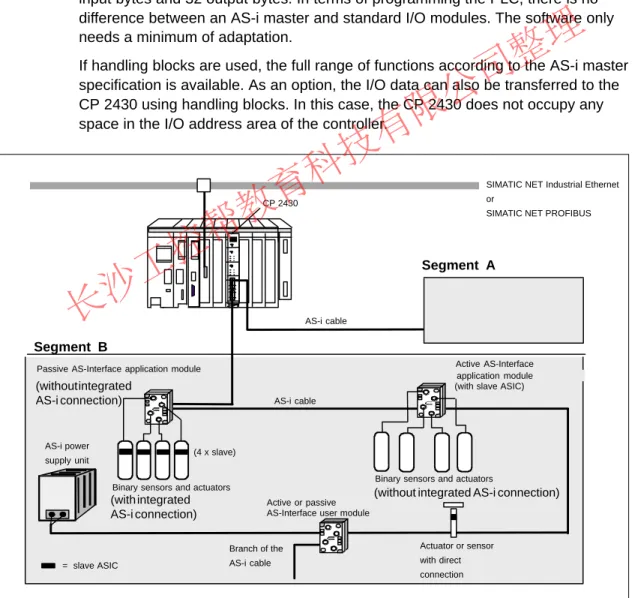
If required, the AS-i master can be used like an I/O module in the PLC to address the input and output data of the AS-i slaves. In the address area of the PLC, it occupies 16 input and 16 output bytes per AS-i chain, in other words a total of 32 input bytes and 32 output bytes. In terms of programming the PLC, there is no difference between an AS-i master and standard I/O modules. The software only needs a minimum of adaptation.
If handling blocks are used, the full range of functions according to the AS-i master specification is available. As an option, the I/O data can also be transferred to the CP 2430 using handling blocks. In this case, the CP 2430 does not occupy any space in the I/O address area of the controller.
(4 x slave)
= slave ASIC AS-i power supply unit
Segment B
Segment A
CP 2430
AS-i cable
Active AS-Interface application module (with slave ASIC) Passive AS-Interface application module
Binary sensors and actuators
Binary sensors and actuators
Active or passive AS-Interface user module
Actuator or sensor with direct connection Branch of the
AS-i cable
SIMATIC NET Industrial Ethernet or
SIMATIC NET PROFIBUS
AS-i cable
(with integrated AS-i connection)
(without integrated AS-i connection) (without integrated
AS-i connection)
Figure 2-4 Example of a SIMATIC S5 System Configuration with the CP 2430
如果想去掉该提示,请访问并下载:
http://www.jisupdfeditor.com/
长沙工控帮教育科技有限公司整理
The AS-i Masters
2-7
SIMATIC NET AS-Interface – Introduction and Basic Information C79000-G8976-C089/03
2.4 AS-i Master for SIMATIC S5 PLCs in the Lower Performance Range
CP 2433 (Standard AS-i Master)
The CP 2433 is available as a master module (AS-i standard master) for programmable controllers of the S5-90U, S5-95U, S5-100U series and the ET 200U distributed I/O system.
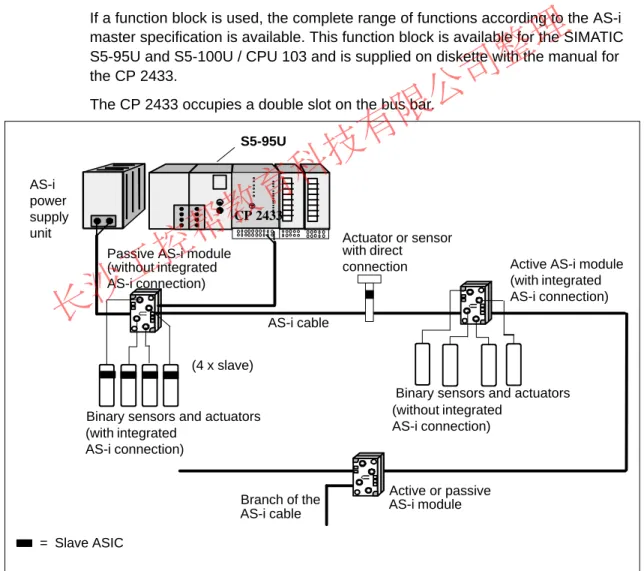
The AS-i master is used like an I/O module in the PLC to address the input and output data of the AS-i slaves. In the address area of the PLC, it occupies 16 input bytes and 16 output bytes. When programming the PLC, the user does not see any difference between an AS-i master and standard I/O modules. The software only needs a minimum of adaptation.
If a function block is used, the complete range of functions according to the AS-i master specification is available. This function block is available for the SIMATIC S5-95U and S5-100U / CPU 103 and is supplied on diskette with the manual for the CP 2433.
The CP 2433 occupies a double slot on the bus bar.
CP 2433
Binary sensors and actuators Binary sensors and actuators
Branch of the Active or passive (4 x slave)
= Slave ASIC
Actuator or sensor with direct connection AS-i
power supply unit
S5-95U
Passive AS-i module
Active AS-i module
AS-i cable
AS-i module AS-i cable
(with integrated AS-i connection)
(without integrated AS-i connection)
(with integrated AS-i connection) (without integrated
AS-i connection)
Figure 2-5 Example of a SIMATIC S5 PLC with the CP 2433
如果想去掉该提示,请访问并下载:
http://www.jisupdfeditor.com/
长沙工控帮教育科技有限公司整理
The AS-i Masters
2-8 SIMATIC NET AS-Interface – Introduction and Basic Information
C79000-G8976-C089/03
2.5 AS-i Gateways
DP / AS-i Gateway
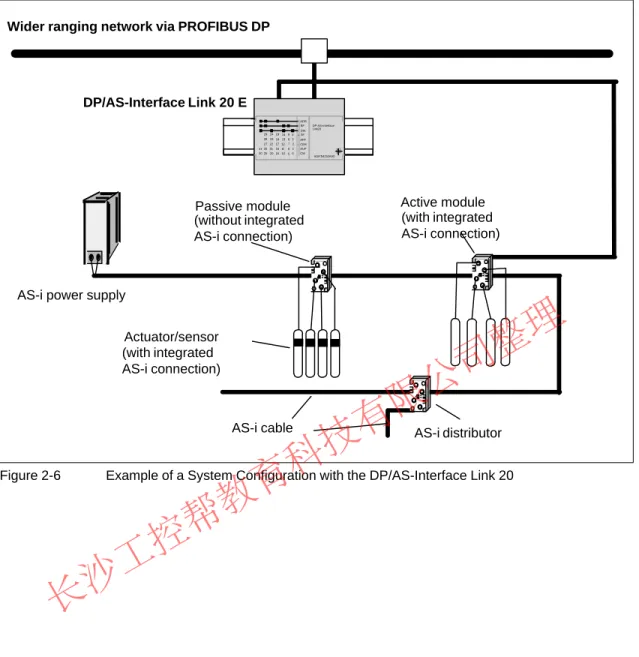
Even when using the PROFIBUS DP distributed I/Os, the use of AS-Interface can have advantages. The networking of the process peripherals can be extended beyond PROFIBUS to include the actuators/sensors.
The following devices can be used as gateways to PROFIBUS:
S DP/AS-Interface Link 20 (a link designed in compliance with IP 20 for interfacing AS-Interface to PROFIBUS DP)
S DP/AS-Interface Link 20E (link designed in compliance with IP 20 with extended AS-i master functionality for interfacing AS-Interface to PROFIBUS-DP)
S CP 242-8 (simultaneous connection of an S7-200 to PROFIBUS DP and AS-Interface)
S CP 142-2 in the ET 200X S CP 342-2 in the ET 200M
S CP 343-2 in the ET 200M (extended master) S CP 2433 in the ET 200U
S S5-95U PLC with PROFIBUS interface and CP 2433 S S7-300 / CPU 315-2 DP with CP 342-2 or DP343-2
S DP/AS-Interface Link (link designed in compliance with IP 65 for connecting the AS-Interface to PROFIBUS DP)
如果想去掉该提示,请访问并下载:
http://www.jisupdfeditor.com/
长沙工控帮教育科技有限公司整理
The AS-i Masters
2-9
SIMATIC NET AS-Interface – Introduction and Basic Information C79000-G8976-C089/03
AS-i distributor AS-i power supply
Active module Passive module
AS-i cable Actuator/sensor
Wider ranging network via PROFIBUS DP
SF APF CER AUP CM
6GK7 1415 2AA0 1 2 3 4
5 6 7 8
0 9
10 11 12 13 14
15 16 17 18 19
20 21 22 23 24
25 26 27 28 29
30
31 X 2
3 4 DIA ADR BF DP-AS-Interface
Link 20
DP/AS-Interface Link 20 E
(with integrated AS-i connection)
(without integrated AS-i connection)
(with integrated AS-i connection)
Figure 2-6 Example of a System Configuration with the DP/AS-Interface Link 20
如果想去掉该提示,请访问并下载:
http://www.jisupdfeditor.com/
长沙工控帮教育科技有限公司整理
The AS-i Masters
2-10 SIMATIC NET AS-Interface – Introduction and Basic Information
C79000-G8976-C089/03
2.6 AS-i Master for ET 200X
CP 142-2 (Standard AS-i Master)
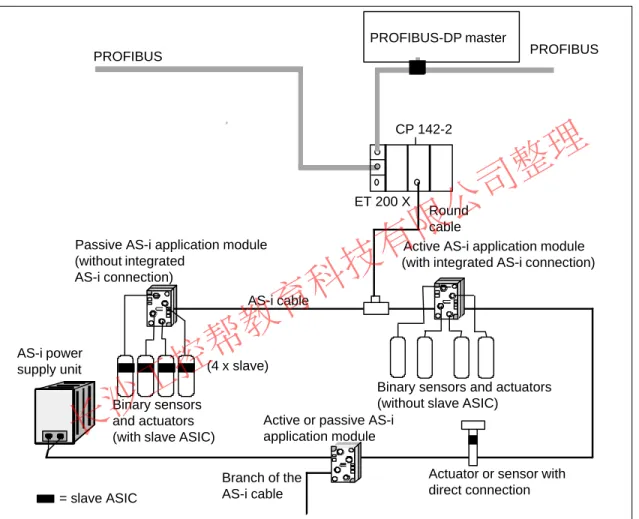
The CP 142-2 module (AS-i standard master) can be operated in the ET 200X distributed I/O system. It allows the connection of an AS-i chain to the I/O device.
The special feature of the ET 200X distributed I/O system is its rugged construction complying with IP 65, IP 66 and IP 67.
(4 x slave) PROFIBUS
PROFIBUS-DP master
Round cable
AS-i cable
Passive AS-i application module Active AS-i application module
Binary sensors and actuators (without slave ASIC)
Active or passive AS-i application module Binary sensors
and actuators (with slave ASIC)
Actuator or sensor with direct connection Branch of the
AS-i cable
= slave ASIC AS-i power
supply unit
CP 142-2
ET 200 X
PROFIBUS
(without integrated AS-i connection)
(with integrated AS-i connection)
Figure 2-7 Example of an ET 200X with CP 142-2
如果想去掉该提示,请访问并下载:
http://www.jisupdfeditor.com/
长沙工控帮教育科技有限公司整理
The AS-i Masters
2-11
SIMATIC NET AS-Interface – Introduction and Basic Information C79000-G8976-C089/03
2.7 AS-i Master for PC-AT
CP 2413 (Standard AS-i Master)
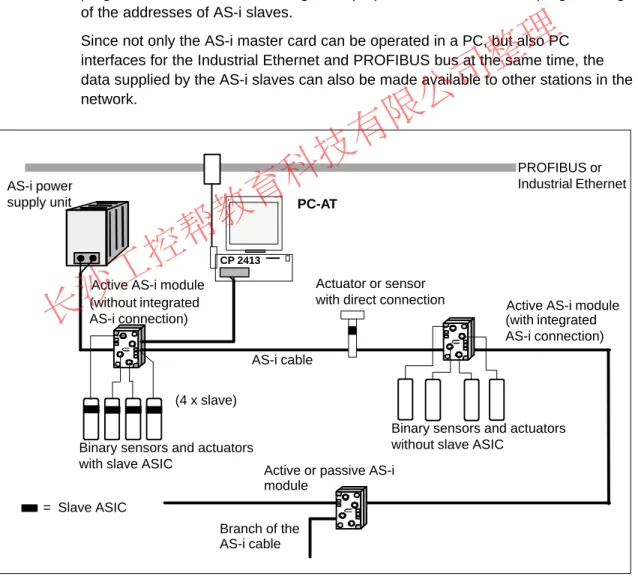
The CP 2413 (AS-i standard master) allows the attachment of AS-Interface to PCs.
The hardware of the AS-i master is implemented as a short PC-AT card. Up to four AS-i master CPs can be operated at the same time in one PC. This means that the Siemens AS-i PC master is also suitable for complex control tasks. The firmware running on the PC master is loaded when the host is started up.
An operating and demonstration program is available which provides the current status of the slaves on the cable and permits simple operation of the slaves. This program can also be used for diagnostic purposes; it also allows the programming of the addresses of AS-i slaves.
Since not only the AS-i master card can be operated in a PC, but also PC interfaces for the Industrial Ethernet and PROFIBUS bus at the same time, the data supplied by the AS-i slaves can also be made available to other stations in the network.
AS-i cable
(4 x slave)
= Slave ASIC
CP 2413
PROFIBUS or Industrial Ethernet PC-AT
AS-i power supply unit
Actuator or sensor
with direct connection Active AS-i module Active AS-i module
Binary sensors and actuators without slave ASIC
Binary sensors and actuators
with slave ASIC Active or passive AS-i module
Branch of the AS-i cable (without integrated
AS-i connection) (with integrated
AS-i connection)
Figure 2-8 Example of a System Configuration with PC-AT and CP 2413
如果想去掉该提示,请访问并下载:
http://www.jisupdfeditor.com/
长沙工控帮教育科技有限公司整理
The AS-i Masters
2-12 SIMATIC NET AS-Interface – Introduction and Basic Information
C79000-G8976-C089/03
Library for Integrating the AS-i Functions
There are masters and libraries for C and Visual Basic applications for the master under MS-DOS and Windows. These functions are described in the “CP 2413 AS-i Master Module” manual.
-
如果想去掉该提示,请访问并下载:
http://www.jisupdfeditor.com/
长沙工控帮教育科技有限公司整理
3-1
SIMATIC NET AS-Interface – Introduction and Basic Information C79000-G8976-C089/03
Further AS-i System Components
As well as the AS-i masters described in this manual, the components of the AS-i transmission system and the AS-i slaves are also required on the AS-Interface.
The following sections provide an overview of the basic characteristics and interaction of these components.
Due to the continuing development of new AS-i system components, a complete presentation of all the currently available components is not possible. Refer to the available system catalogs and ask your Siemens office for more information.
3
如果想去掉该提示,请访问并下载:
http://www.jisupdfeditor.com/
长沙工控帮教育科技有限公司整理
Further AS-i System Components
3-2 SIMATIC NET AS-Interface – Introduction and Basic Information
C79000-G8976-C089/03
3.1 The AS-i Cable
Design and Advantages
The AS-i cable (shaped cable) allows simple and fast installation of an AS-i system. The AS-i cable is a rubberized 2-wire cable (2 x 1.5 mm2). The profile section prevents stations being connected with incorrect polarity.
The AS-i cable is contacted using the penetration technique. Contact blades penetrate the rubber jacket and make contact with the two wires. This guarantees a low contact resistance and
ensures a reliable data connection. The cable does not need to be cut, have its insulation removed or be screwed down. For this type of connection, there are coupling modules designed for the penetration technique.
The jacket of the AS-i cable is rubber. If modules need to be moved after they have been connected to the AS-i cable this is possible without causing any problems. The AS-i cable is “self-healing”. This means that the holes made by the contact blades in the rubber jacket of the cable close themselves and revert to the type of protection IP67. When the cable is installed in an AS-i module, the cable seals the openings. The type of protection IP67 is therefore achieved.
Use of Other 2-Wire Cables
Apart from the special AS-i cable, any 2-wire cable with a cross-section of 2 x 1.5 mm2 can be used. Shielding or twisting is not necessary. For the transition from the special AS-i cable to a different cable (e.g. a standard round cable) there is a special module available without integrated electronics (transition from the AS-i cable to four M12 connectors and transition from the AS-i cable to one M12 connector).
10 mm
6,5 mm
4 mm
如果想去掉该提示,请访问并下载:
http://www.jisupdfeditor.com/
长沙工控帮教育科技有限公司整理
Further AS-i System Components
3-3
SIMATIC NET AS-Interface – Introduction and Basic Information C79000-G8976-C089/03
3.2 AS-i Modules: Blocks of the AS-i Slaves
Concept
Within the AS-i system, the AS-i modules can be compared with input and output modules. Along with the actuators and sensors they make up the AS-i slaves and connect the slaves to the AS-i master. The actuators/sensors are connected via M12 connectors. The pinout corresponds to DIN IEC 947 5-2. The modules with dimensions of approximately 45 x 45 x 80 mm are used locally on the machine itself. They are connected via the AS-i cable and have the degree of protection IP67.
Active and Passive Modules
The following modules must be distinguished:
S The active AS-i module with integrated AS-i chip
Using this, conventional sensors and actuators can be connected. Every normal actuator or sensor can therefore be networked via AS-i.
S The passive AS-i module
This does not contain its own electronics and allows the connection of AS-i sensors and actuators with integrated AS-i chips.
In keeping with the concept of the standard AS-i master and the extended AS-i master (see Section 1.2), either AS-i chips with standard functions or with extended functions are used.
The modules are designed so that a uniform electromechanical interface to the AS-i cable can be created. This is achieved with the uniform lower section of the module, which is therefore also known as a coupling module.
Specially constructed upper module sections, also known as application modules are also available. The variations in the module components range from the simple cover for branching the AS-i cable to application modules with integrated AS-i chips for connecting up to four conventional sensors or actuators.
如果想去掉该提示,请访问并下载:
http://www.jisupdfeditor.com/
长沙工控帮教育科技有限公司整理
Further AS-i System Components
3-4 SIMATIC NET AS-Interface – Introduction and Basic Information
C79000-G8976-C089/03
Example:
The following diagram illustrates an active AS-i module for four connections.
Standard rail 35 mm
lower section (coupling module)
Upper section
M12 connector for
actuator/sensor Application module operating indicator
Operating indicator of the actuator/sensor
switching signal
AS-i cable
(application module)
Figure 3-1
Note
Please ask your local sales office or distributor about other AS-i modules (for example 4I/4O module).
如果想去掉该提示,请访问并下载:
http://www.jisupdfeditor.com/
长沙工控帮教育科技有限公司整理
Further AS-i System Components
3-5
SIMATIC NET AS-Interface – Introduction and Basic Information C79000-G8976-C089/03
3.3 Installing an AS-i Module
The installation of an AS-i module on the AS-i cable is particularly simple using the connection technique described. This is made clear by the following illustration:
Figure 3-2
1. The coupling module is screwed or clipped onto a 35 mm standard rail. The coupling module includes four stoppers. These are used to close unused cable openings.
Figure 3-3
2. The AS-i cable is inserted. It locks into a guide above the contact blades and is secured mechanically. No electrical contact is established. Two stoppers are inserted in the unused cable opening.
Figure 3-4
3. By screwing down the application module, the AS-i cable is pressed onto the contact blades. They penetrate the conductors at two points and guarantee a reliable connection. After correct installation, the module has the type of protection IP67.
如果想去掉该提示,请访问并下载:
http://www.jisupdfeditor.com/
长沙工控帮教育科技有限公司整理
Further AS-i System Components
3-6 SIMATIC NET AS-Interface – Introduction and Basic Information
C79000-G8976-C089/03
3.4 AS-Interface Repeater / Extender
Area of Application
The AS interface repeater and extender is intended for use in an actuator-sensor interface environment.
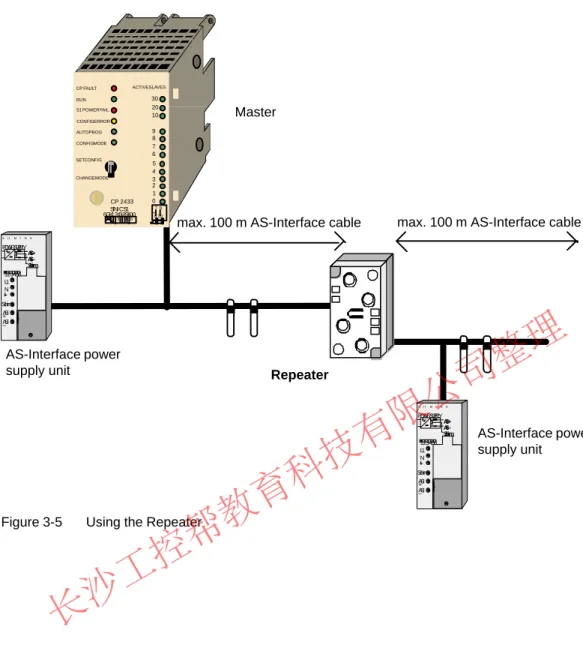
The device is used to extend the maximum possible length of the AS-interface of 100 m. An existing 100 m segment can be extended by a maximum of two further 100 m segments.
Using the Repeater
The AS-interface repeater is used when slaves must be operated on all cable segments. A separate AS-interface power supply unit is then required for each AS-interface segment (before and after the repeater). The repeater has the following features:
S Extends the cable length to a maximum of 300m.
S Slaves can be used on both sides of the repeater.
S A power supply unit is required on both sides of the AS interface.
S Electrical isolation of the two cables.
S Separate indication of the correct voltage for each side.
S Installation in standard application module casing.
如果想去掉该提示,请访问并下载:
http://www.jisupdfeditor.com/
长沙工控帮教育科技有限公司整理
Further AS-i System Components
3-7
SIMATIC NET AS-Interface – Introduction and Basic Information C79000-G8976-C089/03
Master
max. 100 m AS-Interface cable max. 100 m AS-Interface cable
AS-Interface power supply unit
AS-Interface power supply unit
Repeater
30 20 10 9 8 7 6 5 4 3 2 1 0 SINIC S1
6GK1 243–3SA00 1 2 34 5 6
7 8 9 +10 ACTIVE SLAVES CP FAULT
RUN S1 POWER FAIL CONFIG ERROR AUTOPROG CONFIG MODE
SET CONFIG
CHANGE MODE
CP 2433
2 1 3456 L1 N
ASI+ ASI–
SI IMINS
POWIRSUPPLY ASI + ASI – Schirm
Schirm
2 1 3456 L1 N
ASI+ ASI–
SI IMINS
POWIRSUPPLY ASI + ASI – Schirm
Schirm
Figure 3-5 Using the Repeater
如果想去掉该提示,请访问并下载:
http://www.jisupdfeditor.com/
长沙工控帮教育科技有限公司整理
Further AS-i System Components
3-8 SIMATIC NET AS-Interface – Introduction and Basic Information
C79000-G8976-C089/03
Using the Extender
The AS-Interface extender is used in applications in which the master is installed at a greater distance from the actual AS-Interface installation:
S Masters can be located up to 100 m from the AS-interface segment.
S Slaves can only be used on the side of the extender away from the master.
S Power supply is only required on the side away from the master.
S No electrical isolation of the two cables.
S Indication of the correct voltage.
S Installed in standard application module casing. The extender is mounted on the FK-E coupling module.
Master
max. 100m AS-Interface cable max. 100 m AS-Interface cable
AS-Interface power supply unit
Extender
30 20 10 9 8 7 6 5 4 3 2 1 0 SINIC S1
6GK1 243–3SA00 1 2 34 5 6
7 8 9 +10 ACTIVE SLAVES CP FAULT
RUN S1 POWER FAIL CONFIG ERROR AUTOPROG CONFIG MODE
SET CONFIG
CHANGE MODE
CP 2433
2 1 3456 L1 N
ASI+ ASI–
SI IMINS
POWIRSUPPLY ASI + ASI – Schirm
Schirm
Figure 3-6 Using the Extender
如果想去掉该提示,请访问并下载:
http://www.jisupdfeditor.com/
长沙工控帮教育科技有限公司整理
Further AS-i System Components
3-9
SIMATIC NET AS-Interface – Introduction and Basic Information C79000-G8976-C089/03
3.5 Addressing Unit
Area of Application
Each slave on the AS-i requires an address. This address is saved on the slave.
You can program the address of a slave using the addressing unit.
Handling
To program a module (application module), it is plugged in to the special adapter on the addressing unit. The stored address is displayed on the unit when you press the ADR button. The new address is set using the arrow buttons. After pressing the PRG button, the new address is saved on the application module (slave).
Addressing intelligent sensors/actuators is the same as with application modules.
The sensor/actuators are connected to the addressing unit via an M12 connector.
The addressing unit has an integrated M12 socket for this purpose.
The addressing unit is supplied by integrated batteries that can be charged using an external power unit. When not in use, the unit switches off automatically after a period of time.
3RX9400–0A A00
ADR PRG
Adresse+
Adresse–
Programmi eren
Lesen/I in
M12 socket Adapter
Address setter
extremely simple operation
Integrated adapter suitable for application modules
Attachment also possible via M 12 (Sonar Bero)
Figure 3-7
如果想去掉该提示,请访问并下载:
http://www.jisupdfeditor.com/
长沙工控帮教育科技有限公司整理
Further AS-i System Components
3-10 SIMATIC NET AS-Interface – Introduction and Basic Information
C79000-G8976-C089/03
3.6 SCOPE Diagnostic Software for AS-Interface
Area of Application
The SCOPE diagnostic software for the AS-Interface is a monitoring program capable of recording and evaluating the data exchange in AS-i networks during installation and operation. SCOPE for AS-interface can be operated on a PC under WINDOWS in conjunction with the AS-i master communications processor CP 2413.
The software is operated using the known WINDOWS conventions. The complete range of functions can be found in the SIMATIC NET catalog /3/ and the product manual.
Functions
SCOPE for AS-interface provides the following functions:
S Online display of all master and slave user data in overview (data monitor);
S Monitoring of slave activities
S Online display of essential statistical values of data exchange on the bus;
S Trigger and filter functions for recording;
S Recording of the entire data exchange in a ring buffer;
S Documentation functions. -
如果想去掉该提示,请访问并下载:
http://www.jisupdfeditor.com/
长沙工控帮教育科技有限公司整理
4-1
SIMATIC NET AS-Interface – Introduction and Basic Information C79000-G8976-C089/03
The Master Mode – Commands, Sequence, Programming
The tasks and functions of an AS-i master are described below.
This section is important for understanding the functions, modes and interfaces available with the AS-i master modules. These functions and interfaces are described in detail in the manuals of the individual CPs.
For further information refer to /1/
4
如果想去掉该提示,请访问并下载:
http://www.jisupdfeditor.com/
长沙工控帮教育科技有限公司整理
The Master Mode – Commands, Sequence, Programming
4-2 SIMATIC NET AS-Interface – Introduction and Basic Information
C79000-G8976-C089/03
4.1 Master-Slave Principle
How the AS-Interface Operates
The AS-Interface operates on the master-slave principle. This means that the AS-i master connected to the AS-i cable controls the data exchange with the slaves via the interface to the AS-i cable.
The following diagram illustrates the two interfaces of the AS-i master CP.
S The process data and parameter assignment commands are transferred via the interface between the master CPU and the master CP.
The user programs have suitable function calls and mechanisms available for reading and writing via this interface.
S Information is exchanged with the AS-i slaves via the interface between the master CP and AS-i cable.
PLC / PC
CPU
I/O
Configuration Address
AS-i cable
AS-i slave
User program
AS-i master CP
Interface to the user program
Para- meters
Figure 4-1
如果想去掉该提示,请访问并下载:
http://www.jisupdfeditor.com/