A - 1
SAFETY PRECAUTIONS
(Read these precautions before using.)
When using Mitsubishi equipment, thoroughly read this manual and the associated manuals introduced in this manual. Also pay careful attention to safety and handle the module properly.
The precautions given in this manual are concerned with this product only. Refer to the user's manual of the network system to use for a description of the network system safety precautions.
These SAFETY PRECAUTIONS classify the safety precautions into two categories: "DANGER" and
"CAUTION".
Depending on circumstances, procedures indicated by CAUTION may also be linked to serious results.
In any case, it is important to follow the directions for usage.
Store this manual in a safe place so that you can take it out and read it whenever necessary. Always forward it to the end user.
[DESIGN PRECAUTIONS]
DANGER
Create an interlock circuit on the program so that the system will operate safely based on the communication status information. Failure to do so may cause an accident due to an erroneous output or malfunction.
When an error occurs, all outputs are turned off in the MELSEC-ST system. (At default)
However, I/O operations of the head module and respective slice modules can be selected for the following errors:
(1) Communication error ( MELSEC-ST CC-Link Head Module User's Manual "4.3.1 Output status setting for module error")
(2) Slice module error
The output status for the case of an error can be set to Clear, Hold, or Preset with a command parameter of each slice module. (For the setting availability, refer to each slice module manual.) Since the parameter is defaulted to Clear, outputs will be turned off when an error occurs.
This parameter setting can be changed to Hold or Preset when the system safety is more ensured by holding or presetting the output.
DANGER
CAUTION
Indicates that incorrect handling may cause hazardous conditions, resulting in death or severe injury.
Indicates that incorrect handling may cause hazardous conditions, resulting in medium or slight personal injury or physical damage.
A - 2
[DESIGN PRECAUTIONS]
[DESIGN PRECAUTIONS]
[INSTALLATION PRECAUTIONS]
DANGER
Create an external failsafe circuit so that the MELSEC-ST system will operate safely, even when the external power supply or the system fails.
Failure to do so may cause an accident due to an erroneous output or malfunction.
(1) The status of output changes depending on the setting of various functions that control the output. Take sufficient caution when setting those functions.
(2) Outputs may be kept ON or OFF due to malfunctions of output elements or the internal circuits.
For signals that may cause a serious accident, configure an external monitoring circuit.
CAUTION
Make sure to initialize the network system after changing parameters of the MELSEC-ST system or the network system. If unchanged data remain in the network system, this may cause malfunctions.
Do not install the control wires or communication cables together with the main circuit or power wires. Keep a distance of 100 mm (3.94 inch) or more between them. Not doing so could result in malfunctions due to noise.
CAUTION
Use the MELSEC-ST system in the general environment specified in the MELSEC-ST system users manual. Using this MELSEC-ST system in an environment outside the range of the general specifications could result in electric shock, fire, erroneous operation, and damage to or deterioration of the product.
Mount the head module and base module on the DIN rail securely (one rail for one module) referring to the MELSEC-ST System User's Manual and then fix them with stoppers. Incorrect mounting may result in a fall of the module, short circuits or malfunctions.
Secure the module with several stoppers when using it in an environment of frequent vibration.
Tighten the screws of the stoppers within the specified torque range. Undertightening can cause a drop, short circuit or malfunction. Overtightening can cause a drop, short circuit or malfunction due to damage to the screw or module.
Make sure to externally shut off all phases of the power supply for the whole system before mounting or removing a module. Failure to do so may damage the module.
(1) Online replacement of the power distribution module and/or the base module is not available.
When replacing either of the modules, shut off all phases of the external power supply.
Failure to do so may result in damage to all devices of the MELSEC-ST system.
(2) I/O modules and intelligent function modules can be replaced online.
Since online replacement procedures differ depending on the module type, be sure to make replacement as instructed.
For details, refer to the chapter of online module change in this manual.
A - 3 [INSTALLATION PRECAUTIONS]
[WIRING PRECAUTIONS]
CAUTION
Do not directly touch the module's conductive parts or electronic components. Doing so may cause malfunctions or failure of the module.
Make sure to securely connect each cable connector. Failure to do so may cause malfunctions due to poor contact.
DIN rail must be conductive; make sure to ground it prior to use. Failure to do so may cause electric shocks or malfunctions. Undertightening can cause a drop, short circuit or malfunction.
Overtightening can cause a drop, short circuit or malfunction due to damage to the screw or module.
DANGER
Completely turn off the external power supply when installing or placing wiring. Not completely turning off all power could result in electric shock or damage to the product.
Place the platinum RTD signal cables at least 100mm away from the main circuit lines or AC control lines.
Especially, ensure a sufficient distance from high-voltage cables or any harmonic circuit such as an inverter load circuit. Failure to do so will make the module more susceptible to noise, surge and induction.
CAUTION
Make sure to ground the control panel where the MELSEC-ST system is installed in the manner specified for the MELSEC-ST system. Failure to do so may cause electric shocks or malfunctions.
Use applicable solderless terminals and tighten them with the specified torque.
A solderless spade terminal may be dropped off if the terminal screw is loosened, causing a failure.
Check the rated voltage and the terminal layout and wire the system correctly. Connecting an inappropriate power supply or incorrect wiring could result in fire or damage.
Tighten the terminal screws within the specified torque. If the terminal screws are loose, it could result in short circuits, fire, or erroneous operation. Overtightening may cause damages to the screws and/or the module, resulting in short circuits or malfunction.
Prevent foreign matter such as chips or wiring debris from entering the module. Failure to do so may cause fires, damage, or erroneous operation.
When connecting the communication and power supply cables to the module, always run them in conduits or clamp them. Not doing so can damage the module and cables by pulling a dangling cable accidentally or can cause a malfunction due to a cable connection fault.
When disconnecting the communication and power supply cables from the module, do not hold and pull the cable part. Pulling the cables connected to the module can damage the module and cables or can cause a malfunction due to a cable connection fault.
A - 4
[STARTUP AND MAINTENANCE PRECAUTIONS]
[STARTUP AND MAINTENANCE PRECAUTIONS]
[DISPOSAL PRECAUTIONS]
DANGER
Do not touch the terminals while power is on.
Doing so could cause shock or erroneous operation.
Make sure to shut off all phases of the external power supply for the system before cleaning the module or tightening screws.
Not doing so can cause the module to fail or malfunction.
CAUTION
Do not disassemble or modify the modules.
Doing so could cause failure, erroneous operation, injury, or fire.
Do not drop or give a strong impact to the module since its case is made of resin. Doing so can damage the module.
Make sure to shut off all phases of the external power supply for the system before mounting/
removing the module onto/from the control panel. Not doing so can cause the module to fail or malfunction.
Before handling the module, touch a grounded metal object to discharge the static electricity from the human body.
Failure to do so may cause a failure or malfunctions of the module.
When using any radio communication device such as a cellular phone, keep a distance of at least 25cm (9.85 inch) away from the MELSEC-ST system in all directions.
Not doing so can cause a malfunction.
CAUTION
When disposing of this product, treat it as industrial waste.
A - 5
REVISIONS
* The manual number is given on the bottom left of the back cover.
Japanese Manual Version SH-080752-A
2008 MITSUBISHI ELECTRIC CORPORATION
Print Date *Manual Number Revision
Sep., 2008 SH(NA)-080758ENG-A First edition
This manual confers no industrial property rights or any rights of any other kind, nor does it confer any patent licenses.
Mitsubishi Electric Corporation cannot be held responsible for any problems involving industrial property rights which may occur as a result of using the contents noted in this manual.
A - 6
INTRODUCTION
Thank you for choosing the ST1RD2 MELSEC-ST platinum RTD input module.
Before using the module, please read this manual carefully to fully understand the functions and performance of the ST1RD2 MELSEC-ST platinum RTD input module and use it correctly.
CONTENTS
SAFETY PRECAUTIONS•••••••••••••••••••••••••••••••••••••••••••••••••••••••••••••••••••••••••••••••••••••••••••••••••••••• A - 1 REVISIONS••••••••••••••••••••••••••••••••••••••••••••••••••••••••••••••••••••••••••••••••••••••••••••••••••••••••••••••••••••••• A - 5 INTRODUCTION •••••••••••••••••••••••••••••••••••••••••••••••••••••••••••••••••••••••••••••••••••••••••••••••••••••••••••••••• A - 6 CONTENTS••••••••••••••••••••••••••••••••••••••••••••••••••••••••••••••••••••••••••••••••••••••••••••••••••••••••••••••••••••••• A - 6 About Manuals •••••••••••••••••••••••••••••••••••••••••••••••••••••••••••••••••••••••••••••••••••••••••••••••••••••••••••••••••• A - 10 Compliance with the EMC and Low Voltage Directives ••••••••••••••••••••••••••••••••••••••••••••••••••••••••••••••••• A - 10 How to Read Manual••••••••••••••••••••••••••••••••••••••••••••••••••••••••••••••••••••••••••••••••••••••••••••••••••••••••••• A - 11 Generic Terms and Abbreviations••••••••••••••••••••••••••••••••••••••••••••••••••••••••••••••••••••••••••••••••••••••••••• A - 13 Term definition •••••••••••••••••••••••••••••••••••••••••••••••••••••••••••••••••••••••••••••••••••••••••••••••••••••••••••••••••• A - 14 Packing list ••••••••••••••••••••••••••••••••••••••••••••••••••••••••••••••••••••••••••••••••••••••••••••••••••••••••••••••••••••••• A - 15
CHAPTER1 OVERVIEW 1 - 1 to 1 - 3
1.1 Features ••••••••••••••••••••••••••••••••••••••••••••••••••••••••••••••••••••••••••••••••••••••••••••••••••••••••••••••1 - 2
CHAPTER2 SYSTEM CONFIGURATION 2 - 1 to 2 - 3
2.1 Overall Configuration•••••••••••••••••••••••••••••••••••••••••••••••••••••••••••••••••••••••••••••••••••••••••••••••2 - 1 2.2 Applicable System ••••••••••••••••••••••••••••••••••••••••••••••••••••••••••••••••••••••••••••••••••••••••••••••••••2 - 2 2.2.1 Applicable head module •••••••••••••••••••••••••••••••••••••••••••••••••••••••••••••••••••••••••••••••••••••2 - 2 2.2.2 Applicable base module••••••••••••••••••••••••••••••••••••••••••••••••••••••••••••••••••••••••••••••••••••••2 - 2 2.2.3 Applicable coding element•••••••••••••••••••••••••••••••••••••••••••••••••••••••••••••••••••••••••••••••••••2 - 2 2.2.4 Applicable software package••••••••••••••••••••••••••••••••••••••••••••••••••••••••••••••••••••••••••••••••2 - 2 2.3 Precautions for System Configuration ••••••••••••••••••••••••••••••••••••••••••••••••••••••••••••••••••••••••••2 - 3
CHAPTER3 SPECIFICATIONS 3 - 1 to 3 - 29
3.1 Performance Specifications•••••••••••••••••••••••••••••••••••••••••••••••••••••••••••••••••••••••••••••••••••••••3 - 1 3.1.1 Specifications for platinum RTD connection •••••••••••••••••••••••••••••••••••••••••••••••••••••••••••••3 - 3 3.1.2 Conversion speed •••••••••••••••••••••••••••••••••••••••••••••••••••••••••••••••••••••••••••••••••••••••••••••3 - 4 3.1.3 Intelligent function module processing time ••••••••••••••••••••••••••••••••••••••••••••••••••••••••••••••3 - 4 3.2 Functions •••••••••••••••••••••••••••••••••••••••••••••••••••••••••••••••••••••••••••••••••••••••••••••••••••••••••••••3 - 5 3.2.1 Function list•••••••••••••••••••••••••••••••••••••••••••••••••••••••••••••••••••••••••••••••••••••••••••••••••••••3 - 5 3.2.2 Temperature conversion function ••••••••••••••••••••••••••••••••••••••••••••••••••••••••••••••••••••••••••3 - 9 3.2.3 Temperature conversion system ••••••••••••••••••••••••••••••••••••••••••••••••••••••••••••••••••••••••• 3 - 11 3.2.4 Disconnection detection function••••••••••••••••••••••••••••••••••••••••••••••••••••••••••••••••••••••••• 3 - 16 3.2.5 Conversion setting for disconnection detection ••••••••••••••••••••••••••••••••••••••••••••••••••••••• 3 - 18 3.2.6 Alarm output function ••••••••••••••••••••••••••••••••••••••••••••••••••••••••••••••••••••••••••••••••••••••• 3 - 20 3.2.7 Sensor compensation function ••••••••••••••••••••••••••••••••••••••••••••••••••••••••••••••••••••••••••• 3 - 22
A - 7
3.3 I/O Data ••••••••••••••••••••••••••••••••••••••••••••••••••••••••••••••••••••••••••••••••••••••••••••••••••••••••••••• 3 - 23 3.3.1 Bit input area ••••••••••••••••••••••••••••••••••••••••••••••••••••••••••••••••••••••••••••••••••••••••••••••••• 3 - 24 3.3.2 Word input area•••••••••••••••••••••••••••••••••••••••••••••••••••••••••••••••••••••••••••••••••••••••••••••• 3 - 27 3.3.3 Bit output area ••••••••••••••••••••••••••••••••••••••••••••••••••••••••••••••••••••••••••••••••••••••••••••••• 3 - 27 3.4 Memory and Parameters •••••••••••••••••••••••••••••••••••••••••••••••••••••••••••••••••••••••••••••••••••••••• 3 - 28 3.4.1 Memory•••••••••••••••••••••••••••••••••••••••••••••••••••••••••••••••••••••••••••••••••••••••••••••••••••••••• 3 - 28 3.4.2 Parameters ••••••••••••••••••••••••••••••••••••••••••••••••••••••••••••••••••••••••••••••••••••••••••••••••••• 3 - 29
CHAPTER4 SETUP AND PROCEDURES BEFORE OPERATION 4 - 1 to 4 - 16
4.1 Handling Precautions ••••••••••••••••••••••••••••••••••••••••••••••••••••••••••••••••••••••••••••••••••••••••••••••4 - 1 4.2 Setup and Procedure before Operation ••••••••••••••••••••••••••••••••••••••••••••••••••••••••••••••••••••••••4 - 2 4.3 Part Names ••••••••••••••••••••••••••••••••••••••••••••••••••••••••••••••••••••••••••••••••••••••••••••••••••••••••••4 - 3 4.3.1 Status confirmation by LEDs ••••••••••••••••••••••••••••••••••••••••••••••••••••••••••••••••••••••••••••••••4 - 4 4.4 Wiring •••••••••••••••••••••••••••••••••••••••••••••••••••••••••••••••••••••••••••••••••••••••••••••••••••••••••••••••••4 - 5 4.4.1 Wiring precautions ••••••••••••••••••••••••••••••••••••••••••••••••••••••••••••••••••••••••••••••••••••••••••••4 - 5 4.4.2 External wiring •••••••••••••••••••••••••••••••••••••••••••••••••••••••••••••••••••••••••••••••••••••••••••••••••4 - 6 4.5 Offset/Gain Settings ••••••••••••••••••••••••••••••••••••••••••••••••••••••••••••••••••••••••••••••••••••••••••••••••4 - 8 4.5.1 Offset/gain setting procedure ••••••••••••••••••••••••••••••••••••••••••••••••••••••••••••••••••••••••••••• 4 - 10
CHAPTER5 GX Configurator-ST 5 - 1 to 5 - 12
5.1 GX Configurator-ST Functions •••••••••••••••••••••••••••••••••••••••••••••••••••••••••••••••••••••••••••••••••••5 - 1 5.2 Creating a Project•••••••••••••••••••••••••••••••••••••••••••••••••••••••••••••••••••••••••••••••••••••••••••••••••••5 - 2 5.3 Parameter Setting ••••••••••••••••••••••••••••••••••••••••••••••••••••••••••••••••••••••••••••••••••••••••••••••••••5 - 3 5.4 Input/Output Monitor •••••••••••••••••••••••••••••••••••••••••••••••••••••••••••••••••••••••••••••••••••••••••••••••5 - 6 5.5 Forced Output Test •••••••••••••••••••••••••••••••••••••••••••••••••••••••••••••••••••••••••••••••••••••••••••••••••5 - 8 5.6 Offset/Gain Setting ••••••••••••••••••••••••••••••••••••••••••••••••••••••••••••••••••••••••••••••••••••••••••••••• 5 - 10
CHAPTER6 PROGRAMMING 6 - 1 to 6 - 28
6.1 Programming Procedure ••••••••••••••••••••••••••••••••••••••••••••••••••••••••••••••••••••••••••••••••••••••••••6 - 1 6.2 System Configuration Example ••••••••••••••••••••••••••••••••••••••••••••••••••••••••••••••••••••••••••••••••••6 - 4 6.3 Settings and Communication Data ••••••••••••••••••••••••••••••••••••••••••••••••••••••••••••••••••••••••••••••6 - 5 6.4 Program Examples •••••••••••••••••••••••••••••••••••••••••••••••••••••••••••••••••••••••••••••••••••••••••••••••••6 - 9
CHAPTER7 ONLINE MODULE CHANGE 7 - 1 to 7 - 11
7.1 Precautions for Online Module Change ••••••••••••••••••••••••••••••••••••••••••••••••••••••••••••••••••••••••7 - 1 7.2 Preparations for Online Module Change •••••••••••••••••••••••••••••••••••••••••••••••••••••••••••••••••••••••7 - 3 7.3 Disconnecting/Connecting the External Device for Online Module Change•••••••••••••••••••••••••••••7 - 4 7.4 Online Module Change Procedure ••••••••••••••••••••••••••••••••••••••••••••••••••••••••••••••••••••••••••••••7 - 4 7.4.1 When setting is performed using GX Configurator-ST during online module change •••••••••••7 - 4
A - 8
CHAPTER8 COMMANDS 8 - 1 to 8 - 72
8.1 Command List •••••••••••••••••••••••••••••••••••••••••••••••••••••••••••••••••••••••••••••••••••••••••••••••••••••••8 - 1 8.2 Common Commands•••••••••••••••••••••••••••••••••••••••••••••••••••••••••••••••••••••••••••••••••••••••••••••••8 - 5 8.2.1 Operating status read request (Command No.: 8100H/0100H)•••••••••••••••••••••••••••••••••••••••8 - 5 8.2.2 Error code read request (Command No.: 8101H/0101H) ••••••••••••••••••••••••••••••••••••••••••••••8 - 7 8.3 Initial Data Write Command•••••••••••••••••••••••••••••••••••••••••••••••••••••••••••••••••••••••••••••••••••••••8 - 9 8.3.1 Initial data batch write request (Command No.: 8106H) •••••••••••••••••••••••••••••••••••••••••••••••8 - 9 8.3.2 Initial data individual write request (Command No.: 8107H/0107H)•••••••••••••••••••••••••••••••• 8 - 12 8.4 ST1RD2 Parameter Setting Read Commands•••••••••••••••••••••••••••••••••••••••••••••••••••••••••••••• 8 - 16 8.4.1 Conversion enable/disable setting read (Command No.: 9400H/1400H) ••••••••••••••••••••••••• 8 - 16 8.4.2 Conversion channel read (Command No.: 9401H/1401H)••••••••••••••••••••••••••••••••••••••••••• 8 - 18 8.4.3 Operation condition setting read (Command No.: 9402H/1402H) •••••••••••••••••••••••••••••••••• 8 - 20 8.4.4 CH[] time/count/moving average/time constant setting read
(Command No.: 9404H/1404H) ••••••••••••••••••••••••••••••••••••••••••••••••••••••••••••••••••••••••••• 8 - 23 8.4.5 CH[] upper upper limit/upper lower limit setting read
(Command No.: 9408H, 940AH/1408H, 140AH) ••••••••••••••••••••••••••••••••••••••••••••••••••••••• 8 - 25 8.4.6 CH[] lower upper limit/lower lower limit setting read
(Command No.: 9409H, 940BH/1409H, 140BH) ••••••••••••••••••••••••••••••••••••••••••••••••••••••• 8 - 27 8.4.7 Initial data setting read (Command No.: 9418H/1418H)•••••••••••••••••••••••••••••••••••••••••••••• 8 - 29 8.4.8 Sensor compensation value read (Command No.: 941AH/141AH) •••••••••••••••••••••••••••••••• 8 - 32 8.4.9 Conversion setting value (for disconnection detection) read
(Command No.: 941EH/141EH)••••••••••••••••••••••••••••••••••••••••••••••••••••••••••••••••••••••••••• 8 - 34 8.5 ST1RD2 Parameter Setting Write Commands •••••••••••••••••••••••••••••••••••••••••••••••••••••••••••••• 8 - 36 8.5.1 Conversion enable/disable setting write (Command No.: A400H/2400H) •••••••••••••••••••••••• 8 - 36 8.5.2 Operating condition setting write (Command No.: A402H/2402H) ••••••••••••••••••••••••••••••••• 8 - 39 8.5.3 CH[] time/count/moving average/time constant setting write
(Command No.: A404H/2404H) ••••••••••••••••••••••••••••••••••••••••••••••••••••••••••••••••••••••••••• 8 - 42 8.5.4 CH[] upper upper limit/upper lower limit setting write
(Command No.: A408H, A40AH/2408H, 240AH)••••••••••••••••••••••••••••••••••••••••••••••••••••••• 8 - 45 8.5.5 CH[] lower upper limit/lower lower limit setting write
(Command No.: A409H, A40BH/2409H, 240BH)••••••••••••••••••••••••••••••••••••••••••••••••••••••• 8 - 48 8.5.6 Sensor compensation value write (Command No.: A41AH/241AH) ••••••••••••••••••••••••••••••• 8 - 51 8.5.7 Conversion setting value (for disconnection detection) write
(Command No.: A41EH/241EH) •••••••••••••••••••••••••••••••••••••••••••••••••••••••••••••••••••••••••• 8 - 54 8.6 ST1RD2 Control Commands ••••••••••••••••••••••••••••••••••••••••••••••••••••••••••••••••••••••••••••••••••• 8 - 57 8.6.1 Parameter setting read from ROM (Command No.: B400H/3400H) ••••••••••••••••••••••••••••••• 8 - 57 8.6.2 Parameter setting write to ROM (Command No.: B401H/3401H) •••••••••••••••••••••••••••••••••• 8 - 59 8.6.3 Operation mode setting (Command No.: B402H/3402H) •••••••••••••••••••••••••••••••••••••••••••• 8 - 61 8.6.4 Offset channel specification (Command No.: B403H/3403H) ••••••••••••••••••••••••••••••••••••••• 8 - 63 8.6.5 Gain channel specification (Command No.: B404H/3404H)••••••••••••••••••••••••••••••••••••••••• 8 - 66 8.6.6 User range write (Command No.: B405H/3405H) ••••••••••••••••••••••••••••••••••••••••••••••••••••• 8 - 69 8.7 Values Stored into Command Execution Result •••••••••••••••••••••••••••••••••••••••••••••••••••••••••••• 8 - 71
CHAPTER9 TROUBLESHOOTING 9 - 1 to 9 - 8
9.1 Error Code List ••••••••••••••••••••••••••••••••••••••••••••••••••••••••••••••••••••••••••••••••••••••••••••••••••••••9 - 1 9.2 Troubleshooting •••••••••••••••••••••••••••••••••••••••••••••••••••••••••••••••••••••••••••••••••••••••••••••••••••••9 - 4 9.2.1 When the RUN LED is flashing or turned off•••••••••••••••••••••••••••••••••••••••••••••••••••••••••••••9 - 4
A - 9
9.2.2 When the RUN and ERR. LEDs is turned on ••••••••••••••••••••••••••••••••••••••••••••••••••••••••••••9 - 5 9.2.3 When disconnection is detected••••••••••••••••••••••••••••••••••••••••••••••••••••••••••••••••••••••••••••9 - 6 9.2.4 When measured temperature values cannot be read••••••••••••••••••••••••••••••••••••••••••••••••••9 - 6 9.2.5 When a measured temperature value is abnormal •••••••••••••••••••••••••••••••••••••••••••••••••••••9 - 8
APPENDIXES App - 1 to App - 2
Appendix 1 Accessories ••••••••••••••••••••••••••••••••••••••••••••••••••••••••••••••••••••••••••••••••••••••••••••• App - 1 Appendix 2 External Dimensions •••••••••••••••••••••••••••••••••••••••••••••••••••••••••••••••••••••••••••••••••• App - 2
INDEX Index - 1 to Index - 2
A - 10
About Manuals
The following manuals are related to this product.
Referring to this list, please request the necessary manuals.
Compliance with the EMC and Low Voltage Directives (1) For MELSEC-ST system
To configure a system meeting the requirements of the EMC and Low Voltage
Directives when incorporating the Mitsubishi MELSEC system (EMC and Low Voltage Directives compliant) into other machinery or equipment, refer to Chapter 11 "EMC AND LOW VOLTAGE DIRECTIVES" of the MELSEC-ST System User's Manual.
The CE mark, indicating compliance with the EMC and Low Voltage Directives, is printed on the rating plate of the MELSEC-ST system.
(2) For this product
No additional measures are necessary for the compliance of this product with the EMC and Low Voltage Directives.
Relevant Manuals
Manual Name Manual Number
(Model Code) MELSEC-ST System User's Manual
Explains the system configurations of the MELSEC-ST system and the performance specifications, functions, handling, wiring and troubleshooting of the power distribution modules, base modules and I/O modules.
(Sold separately)
SH-080456ENG (13JR72)
MELSEC-ST CC-Link Head Module User's Manual
Explains the system configurations, specifications, functions, handling, wiring and troubleshooting of the ST1H-BT head module.
(Sold separately)
SH-080754ENG (13JR68)
GX Configurator-ST Version 1 Operating Manual
Explains how to operate GX Configurator-ST, how to set the intelligent function module parameters, and how to monitor the MELSEC-ST system.
(Sold separately)
SH-080439ENG (13JU47)
CC-Link System Master/Local Module User's Manual
Describes the system configurations, performance specifications, functions, handling, wiring and troubleshooting of the QJ61BT11N master/local Module.
(Sold separately)
SH080394E (13JR64)
A - 11
How to Read Manual
This manual explains each area for the CC-Link remote I/O. remote registers, and message transmission using , , , , , and .
(1) Data symbol
Br Wr Cr Bw Ww Cw
Terminating resistor
CC-Link
Output status
Input status Terminating resistor
G.RDMSG
Master station
Head module
Remote device station (MELSEC-ST system)
Programmable
controller CPU Master module Head module Slice
module Slice module
Message transmission Device
Command execution area
Device Command result area
Remote input (RX) Br
Wr
Bw
Ww
Bit input area
Remote register (RWr) Word input area
Remote output (RY) Bit output area
Remote register (RWw) Word output area
Command execution
Command result Remote input
(RX)
Remote register (RWr)
Remote register (RWw) Remote output
(RY)
Cw
Cr
Abbreviated data symbol Range
When the unit of data is one word (16 bits), the corresponding bits are indicated.
(0) : Bit 0
(7-0): Range of bit 0 to bit 7
<Example of Cr Command result area>
Cr. 0 (7-0)
Detail data No.
( (2) Head module Master station, (3) Master station Head module)
A - 12
(2) Head module Master station
(a) Remote input (RX)(b) Remote register (RWr)
(c) Message transmission
(3) Master station Head module
(a) Remote output (RY)(b) Remote register (RWw)
(c) Message transmission
Data symbol Area Unit Detail data No. notation
to Bit Input Area 1 bit/symbol Hexadecimal
Data symbol Area Unit Detail data No. notation
to Word Input Area 1 word/symbol Hexadecimal
Data symbol Area Unit Detail data No. notation
to Command Result Area 1 word/symbol Decimal
Data symbol Area Unit Detail data No. notation
to Bit Output Area 1 bit/symbol Hexadecimal
Data symbol Area Unit Detail data No. notation
to Word Output Area 1 word/symbol Hexadecimal
Data symbol Area Unit Detail data No. notation
to Command Execution
Area 1 word/symbol Decimal
Br Br.00 Br.n
Wr Wr.00 Wr.n
Cr Cr.0 Cr.n
Bw Bw.00 Bw.n
Ww Ww.00 Ww.n
Cw Cw.0 Cw.n
A - 13
Generic Terms and Abbreviations
This manual uses the following generic terms and abbreviations to describe the ST1AD, unless otherwise specified.
Generic Term/
Abbreviation Description
ST1RD2 Abbreviation for the ST1RD2 MELSEC-ST platinum RTD input module.
Head module ST1H-BT, MELSEC-ST CC-Link head module.
Bus refreshing module Module that distributes external system power and auxiliary power to the head module and slice modules.
Power feeding module Module that distributes external auxiliary power to slice modules.
Power distribution module Generic term for bus refreshing module and power feeding module.
Base module Module that transfers data/connects between the head module and slice modules, and between slice modules and external devices.
Input module Module that handles input data in bit units.
Output module Module that handles output data in bit units.
Intelligent function module Module that handles input/output data in word units.
I/O module Input module and output module.
Slice module Module that can be mounted to the base module: power distribution module, I/O module and intelligent function module.
MELSEC-ST system System that consists of head module, slice modules, end plates and end brackets.
GX Configurator-ST Configuration software dedicated to the MELSEC-ST system.
The general name of SWnD5C-STPB-E type products. (n=1 or later) CC-Link Abbreviation for Control and Communication Link system.
Master module Abbreviation for the QJ61BT11N when it is used as a master station.
RDMSG Abbreviation for dedicated instruction of master station.
A - 14
Term definition
The following explains the meanings and definitions of the terms used in this manual.
Term Definition
Cyclic transmission A communication method by which remote I/O data and remote register data are transferred periodically.
Message transmission A transmission method for writing parameters from the master station to a remote device station and reading the remote device station status.
Master station This station controls the entire data link system.
One master station is required for one system.
Remote I/O station A remote station that can only use bit data. (Input from or output to external devices) (AJ65BTB1-16D, AJ65SBTB1-16D, etc.)
Remote device station
A remote station that can use both bit and word data. (Input from or output to external devices, or analog data conversion)
(ST1H-BT, AJ65BT-64AD, AJ65BT-64DAV, AJ65BT-64DAI, etc.) SB Link special relay (for CC-Link).
Bit data that indicate the module operating status and data link status of the master/local station.
SW
Link special register (for CC-Link)
Data in units of 16 bits, which indicate the module operating status and data link status of the master/local station.
RX Remote input (for CC-Link).
Bit data that are input from remote stations to the master station.
RY Remote output (for CC-Link)
Bit data that are output from the master station to remote stations.
RWr Remote register. (CC-Link data read area)
16-bit word data that are input from remote device stations to the master station.
RWw Remote register. (CC-Link data write area)
16-bit word data that are output from the master station to remote device stations.
Remote net Ver.1 mode
Select this mode when extended cyclic setting is not needed or when the QJ65BT11 is replaced with the QJ65BT11N.
Remote net Ver.2
mode Select this mode when creating a new system with extended cyclic setting.
I/O data Data that are sent/received between the head module and the master station.
Generic term for RX, RY, RWr, and RWw.
bit input area Bit input data of each module.
Input data are sent from the head module to the master station through the remote input (RX).
bit output area
Bit output data of each module.
Output data are sent from the master station and received to the head module through the remote output (RY).
word input area
Word (16-bit) input data of an intelligent function module.
Input data are sent from the head module to the master station through the remote register (RWr).
word output area
Word (16-bit) output data of an intelligent function module.
Output data are sent from the master station and received to the head module through the remote register (RWw).
command result area
An area for the information that indicates a command result.
This information is stored in Setting data ((D1)+1 and after) of the RDMSG instruction of the master station.
command execution area
An area for the information for executing a command.
This information is stored in Setting data ((S2)+1 and after) of the RDMSG instruction of the master station.
Br.n
Bw.n
Wr.n
Ww.n
Cr.n
Cw.n
A - 15
Packing list
The following is included.
Number of occupied I/O points
The area, that is equivalent to the occupied I/O points, is occupied in bit input area/ bit output area.
Slice No.
The number assigned to every 2 occupied I/O points of each module. The numbers are assigned in ascending order, starting from "0" of the head module. (The maximum value is 127).
This is used for specifying a command execution target.
Slice position No.
The number that shows where the slice module is physically installed.
The numbers are assigned in ascending order, starting from "0" of the head module. (The maximum value is 63.)
This is used for specifying a command execution target.
Start slice No. The start slice No. assigned to the head module and slice modules.
Command Generic term for requests that are executed by the master station for reading each module's operation status, setting intelligent function module command parameters or various controls.
Command parameter Generic term for parameters set in commands or GX Configurator-ST.
All of the parameters set for the head module and slice modules are command parameters.
Model name Product name Quantity
ST1RD2 ST1RD2 MELSEC-ST platinum RTD input module 1
Term Definition
Br Bw
A - 16
Memo
1 OVERVIEW
1 - 1 1
OVERVIEW
2
SYSTEM CONFIGURATION
3
SPECIFICATIONS
4
SETUP AND PROCEDURES BEFORE OPERATION
5
GX Configurator-ST
6
PROGRAMMING
7
ONLINE MODULE CHANGE
8
COMMANDS
CHAPTER1 OVERVIEW
This User’s Manual explains the specifications, handling instructions and programming for the ST1RD2 platinum RTD input module (hereinafter referred to as the ST1RD2), and describes the ST1RD2 only.
For information on the MELSEC-ST system, refer to the MELSEC-ST System User's Manual.
The ST1RD2 converts platinum RTD values that are input from the outside into 16-bit signed binary temperature values.
Figure 1.1 Overview of the ST1RD2
ST1RD2 Head module
Master module
Channel 2 Channel 1 Programmable
controller CPU
Automatic refresh/
FROM instruction
Word Input Area
Platinum RTD input
Platinum RTD input CH1 Measured
temperature value
Temperature input
CH2 Measured temperature value
1 - 2
1.1 Features1 OVERVIEW
1.1 Features
(1) One ST1RD2 is capable of 2-channel temperature measurement.
A single ST1RD2 can measure temperatures of two channels.
(2) Up to 26 modules can be mounted.
For one head module, up to 26 ST1RD2 modules (52 channels) can be mounted.
(3) Platinum RTDs, Pt100 and Pt1000 are applicable.
Platinum RTDs, Pt100 and Pt100 can be used.
Using GX Configurator-ST or a command, a platinum RTD type can be selected for each channel.
(4) Three-wire type platinum RTDs are connectable.
A 3-wire type platinum RTD can be connected to each channel.
By short-circuiting terminals, 2-wire type platinum RTDs can be also used.
( Section 3.1.1 Specifications for platinum RTD connection)
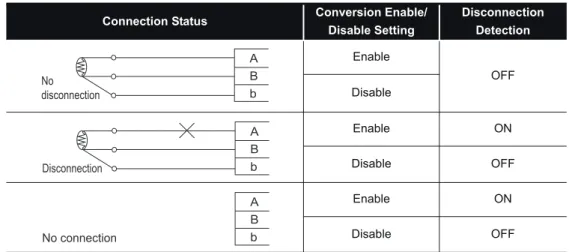
(5) Disconnection is detectable.
Disconnection of a platinum RTD or cable can be detected for each channel and for each wire (wire A, B or b).
(6) Type of the values stored at disconnection detection is selectable.
For values to be stored in the CH measured temperature value area in the case of disconnection detection, you can select "Value immediately before disconnection",
"Up scale (each measurement range’s upper limit value + 5%)", "Down scale (each measurement range’s lower limit value - 5%)" and "Given value".
(7) Optimal conversion processing is selectable.
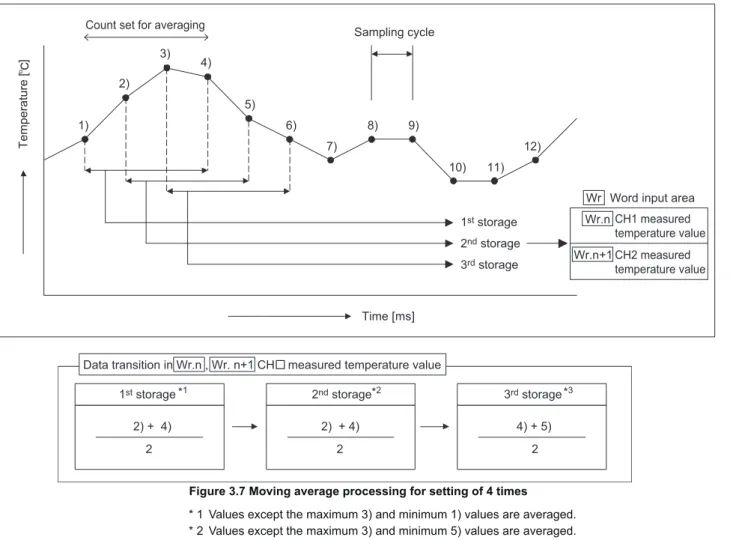
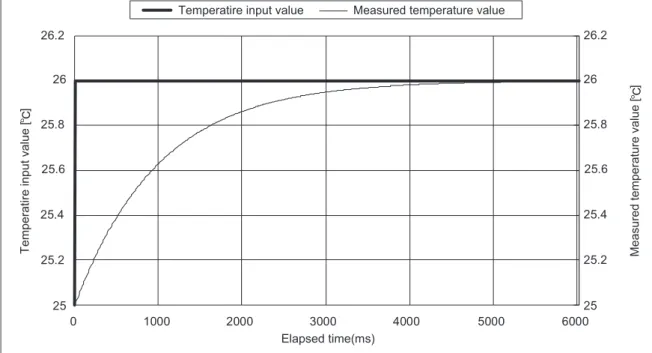
From Sampling processing, Time averaging, Count averaging, Moving average and Primary delay filter options, a desired conversion method can be selected for each channel.
(8) Measurement range is selectable for each channel.
Three different measurement ranges are available for each of Pt100 and Pt1000 RTDs, and any of these can be selected for each channel.
(9) One-point compensation using the sensor compensation function
The sensor compensation function allows 1-point compensation for each channel.When an error is identified between "an actual temperature" and "a measured temperature", it can be compensated easily by setting a sensor compensation value.
(10)Two-point compensation using the offset/gain setting
The offset/gain setting allows 2-point compensation for each channel.User range setting (user-defined setting) or Factory default setting (default setting of the module) can be selected for offset/gain values.
1 OVERVIEW
1.1 Features
1 - 3 1
OVERVIEW
2
SYSTEM CONFIGURATION
3
SPECIFICATIONS
4
SETUP AND PROCEDURES BEFORE OPERATION
5
GX Configurator-ST
6
PROGRAMMING
7
ONLINE MODULE CHANGE
8
COMMANDS
(11)Alarm output
An alarm can be output for each channel when a temperature outside the preset measurement range is detected.
(12)Online module change
A module can be replaced without stopping the system.
(13)Easy setting using GX Configurator-ST
A software package (GX Configurator-ST) is separately available.
GX Configurator-ST is not necessarily required for the system.
However, using GX Configurator-ST enables onscreen parameter setting and offset/
gain setting, which can reduce programming steps of master station and makes the setting/operating status check easier.
2 - 1
2.1 Overall Configuration2 SYSTEM CONFIGURATION
CHAPTER2 SYSTEM CONFIGURATION
This chapter describes the system configuration for use of the ST1RD2.
2.1 Overall Configuration
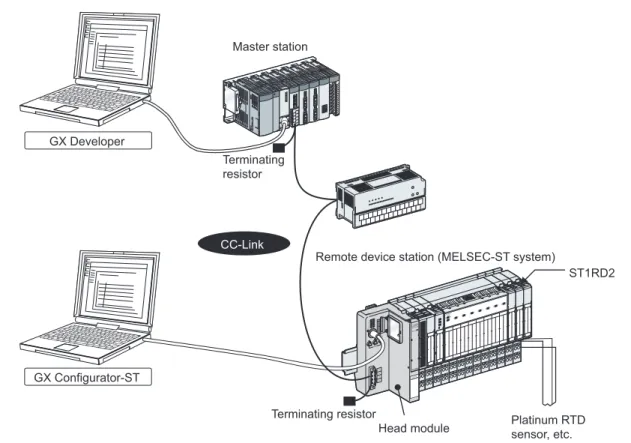
An overall configuration for use of the ST1RD2 is shown below.
Figure 2.1 Overall system configuration GX Developer
GX Configurator-ST
Terminating resistor
CC-Link
Terminating resistor Master station
ST1RD2 Remote device station (MELSEC-ST system)
Head module Platinum RTD sensor, etc.
2 SYSTEM CONFIGURATION
2.2 Applicable System
2.2.1 Applicable head module
2 - 2 1
OVERVIEW
2
SYSTEM CONFIGURATION
3
SPECIFICATIONS
4
SETUP AND PROCEDURES BEFORE OPERATION
5
GX Configurator-ST
6
PROGRAMMING
7
ONLINE MODULE CHANGE
8
COMMANDS
2.2 Applicable System
This section explains the applicable system.
2.2.1 Applicable head module
The head module applicable to the ST1RD2 is indicated below.
2.2.2 Applicable base module
The base modules applicable to the ST1RD2 are indicated below.
2.2.3 Applicable coding element
The coding element applicable for the ST1RD2 is indicated below.
The coding element is fitted before shipment.
It is also available separately in case it is lost.
2.2.4 Applicable software package
The software package applicable to the ST1RD2 is indicated below.
* 1 GX Configurator-ST is optional.
Table 2.1 Applicable head module
Product name Model name
MELSECT-ST CC-Link Head Module ST1H-BT
Table 2.2 Applicable base modules
Type Model name
Spring Clamp Type ST1B-S4IR2
Screw Clamp Type ST1B-E4IR2
Table 2.3 Applicable coding element
Product name Model name
ST1RD2 coding element ST1A-CKY-15
Table 2.4 Applicable software package
Product name Model name Version
GX Configurator-ST *1 SW1D5C-STPB-E 1.06G or later
2 - 3
2.3 Precautions for System Configuration2 SYSTEM CONFIGURATION
2.3 Precautions for System Configuration
For precautions for ST1RD2 system configuration, refer to the following.
MELSEC-ST System User's Manual, "3.4 Precautions for System Configuration"
3 SPECIFICATIONS
3.1 Performance Specifications
3 - 1 1
OVERVIEW
2
SYSTEM CONFIGURATION
3
SPECIFICATIONS
4
SETUP AND PROCEDURES BEFORE OPERATION
5
GX Configurator-ST
6
PROGRAMMING
7
ONLINE MODULE CHANGE
8
COMMANDS
CHAPTER3 SPECIFICATIONS
This chapter provides the specifications of the ST1RD2.
For the general specifications of the ST1RD2, refer to the following.
MELSEC-ST System User's Manual
3.1 Performance Specifications
The following indicates the performance specifications of the ST1RD2
(1) Performance specifications list
Table 3.1 Performance specifications list
Item Specifications
Number of analog input points 2 channels/1 module
Output *1 16-bit signed binary
(-2000 to 8500: Value to the first decimal place 10 times) Applicable platinum RTD Pt100 (JIS C1604-1997, IEC751 1983), Pt1000*2
Output current for temperature
detection 0.25mA or less
Measured temperature range -200 to 850
Resolution 0.1
Accuracy Based on calculation expression marked *3
Conversion accuracy
-200 to 850
Pt100
0.7 (25 5 ), 2.4 (0 to 55 ) Pt1000
-20 to 120
Pt100
0.3 (25 5 ), 1.1 (0 to 55 ) Pt1000
0 to 200
Pt100
0.4 (25 5 ), 1.2 (0 to 55 ) Pt1000
Conversion speed 80ms/1 channel
Conversion method method
Disconnection detection Detectable *4(Each channel independent *5)
ROM write count ROM write count by user range write or parameter setting: Up to 10,000 times Number of occupied I/O points 4 points for each of input and output
Number of occupied slices 2 Information
amount
Input data : Number of occupancy 4, : Number of occupancy 2 Output data : Number of occupancy 4, : Number of occupancy 0
Isolation
Br.n Wr.n
Bw.n Ww.n
Specific isolated area Isolation method Dielectric withstand Insulation resistance Between platinum RTD
input channels and internal bus
Photo coupler insulation
560V AC rms/3 cycles (elevation 2000m)
500V DC 10M or more Between platinum RTD
input channels No insulation - -
3 - 2
3.1 Performance Specifications3 SPECIFICATIONS
* 1 If a measured temperature value outside each range is input, it will be treated as a maximum or minimum value of the range.
* 2 The reference resistance of Pt1000 can be obtained by multiplying that of Pt100 by 10.
* 3 The accuracy can be calculated by the following.
(Accuracy) = (Conversion accuracy) + (Platinum RTD tolerance)
(|t| denotes an absolute measured temperature value.)
Example) Under the condition: Platinum RTD: Class A, Operating ambient temperature: 40 , Measured temperature: 800 , the accuracy is
( 2.4 ) + { (0.15 + 0.002 800 )}= 4.15 .
* 4 For output in the case of disconnection detection, select any of "Value immediately before disconnection", "Up scale (each measurement range's upper limit value + 5%)", "Down scale (each measurement range’s lower limit value - 5%)" or "Given value".( Section 3.2.5 Conversion setting for disconnection detection)
* 5 Disconnection is detectable for each wire (Wire A, B and b).
Applicable base module Spring clamp type: ST1B-S4IR2 Screw clamp type: ST1B-E4IR2 Applicable coding element ST1A-CKY-15(dusty gray)
External AUX. power supply 24V DC (+20/-15%, ripple ratio within 5%) 24V DC current: 0.030A
5V DC internal current
consumption 0.080A
External dimensions 77.6mm(H) 12.6mm(W) 55.4mm(D)
77.6 (3.06in.) (H) 12.6 (0.50in.) (W) 55.4 (2.18in.) (D) [mm]
Weight 0.04kg
Table 3.2 Platinum RTD tolerance Class Platinum RTD tolerance A (0.15 + 0.002|t|)
B (0.3 + 0.005|t|)
Table 3.1 Performance specifications list (Continued)
Item Specifications
![Figure 4.7 Relation between measured temperature values and offset and gain values for input temperature-49.7-50[ ]080[ ]80[ ]79.7-50[ ]Input temperature](https://thumb-ap.123doks.com/thumbv2/9libinfo/9659723.683057/61.892.174.788.449.793/figure-relation-measured-temperature-values-offset-temperature-temperature.webp)