國立交通大學建築研究所 碩士論文
環室觸發—可重設的環室個人設計環境架構
Ambient Trigger: An Interface Framework for Evoking AmbientReconfiguration in Personal Design Environment
研 究 生 陳鼎翰
指 導 教 授 張登文
環室觸發—可重設的環室個人設計環境架構
Ambient Trigger: An Interface Framework for Evoking Ambient
Reconfiguration in Personal Design Environment
研 究 生:陳鼎翰
Student:Ting-Han Chen指導教授:張登文
Advisor:Teng-Wen Chang國 立 交 通 大 學
建 築 研 究 所
碩 士 論 文
A Thesis
Submitted to Graduate Institute of Architecture
College of Humanities and Social Science
National Chiao Tung University
in partial Fulfillment of the Requirements
for the Degree of
Master
in
Architecture
February 2006
Hsinchu, Taiwan, Republic of China
Ambient Trigger: An Interface Framework for Evoking
Ambient Reconfiguration in Personal Design Environment
Student:Ting-Han Chen
Advisors:Teng-Wen Chang
Graduate Institute of Architecture
National Chiao Tung University
ABSTRACT
The process of designing in a personal design environment (PDE) often encounters interruption. Due to the lack of an automatic reconfigurable framework, such interruption often shifts the designer’s focus from designing to dealing with new situations. In this paper, we propose a novel interface framework called Ambient Trigger (AT), for the instant and easy switching of PDE into an appropriate state to support encountered situations without much user intervention. With the AT Interface framework, designer could realize a multifunctional and reconfigurable personal design environment. Such environment enables its user to easily reconfigure his/her ambient environment with simply an embodied action toward mediated objects. To verify the framework, a test-bed environment is designed and implemented during the research. Four scenario examples were presented for demonstrating usage of AT. In conclusion, AT has shown its differences as well as possibilities in advancing ambient environment for further investigation.
Keywords: Ambient, Trigger, Reconfiguration, Responsive Environment, Personal Design Environment, Embodied Interaction, Ambient Intelligence.
環室觸發—可重設的環室個人設計環境架構
學生:陳鼎翰
指導教授:張登文
國立交通大學建築研究所碩士班
摘
要
對設計者而言,在實體的個人設計環境中做設計,經常需要和周遭的人、事、物、環 境互動而中斷設計過程。這些中斷經常造成設計者注意力轉移,或甚至得放下手邊進 行中的工作以便處理新的狀況。本研究提出一個介面架構-環室觸發 (Ambient Trigger) 以回應此問題。 透過環室觸發架構,設計者可以建構一個較不易分散注意力、可立即重塑的個人設計 環境。這樣的環境可讓使用者輕易地透過體現的動作 (embodied action),來達到觸發 環室元件重新設定以支援某項特定的設計活動。本研究透過設計與實作一個實體個人 設計環境,來測試和檢驗這個環室觸發架構,並以四個劇本描述環室觸發環境的使用 情境。本研究總結並討論了環室觸發架構的差異性,及其對於進一步發展環室媒介環 境的幾項可能性。
關鍵字:環室、觸發、互動式空間、個人設計環境、人機互動、環境智能
誌 謝
這本論文的完成,首先要感謝我的指導教授張登文,在我碩士研究生涯予我專業的訓練 和提攜,教導我何謂願景,何謂一個好研究。謝謝口試委員:成大資訊建築研究室鄭泰 昇教授、銘傳空間媒體研究室梁容輝教授,以及 Ofram 的執行長 Tristan dʹEstrée Sterk 等,在口試中所提出的批判及建議,讓我瞭解到跨領域研究上,仍有許多需要我深入思 量與探究之課題。 雲科大設計運算研究所 93 級的專題修課同學(依網頁順序)澍鋒、羽書、俊丞、彥鈞、 宜佳、明憲、薏潔、政瑋、驥葳、陽明、展瑞、康礽、冠廷、維倉、家民,謝謝你們先 導研究中的協助,從你們的實作中我也學到了很多。 謝謝劉育東教授、侯均昊教授在研究方法以及相關課堂上的教導,使我獲益良多;謝謝 研究所同窗(依名冊順序)瑞文、政祐、紀發、慧谷、必元、琇貞、粧亭、凱鳴、文禮、 基辰、志文、士賢、心豪、思遠、蔭霖、陳良、識源、姿樺,不論是專業知識、學習態 度、生活態度,你們都是我一路上的參照。謝謝博士班學長冠燁、元榮、楚卿、彥良、 千惠的照顧。你們也給了我很多學術上的啟發。 研究所期間辭世的奶奶和外公,謝謝您們從小給我的疼愛與栽培,讓我二十五年來得以 一帆風順。謝謝爸爸、媽媽一路上給我的支持和肯定,謝謝您們在料理我溫飽的同時, 日夜陪伴臥病在床的爺爺和外婆,讓我能夠安心專注於學業。 謝謝家琳前前後後給予研究上的幫忙,也謝謝妳一路上的陪伴,時時刻刻給我鼓勵及鞭 策,讓我的論文寫作過程更加難忘。 誠摯感謝《轉法輪》作者李洪志先生,研一下的時候讀過一遍《轉法輪》,從此讓我從 此透徹人生的目的和意義,擁有更多的智慧和胸襟去完成我的碩士論文研究與包容我身 邊的一切事情,不致於在高壓下失控造業,心性比以前提高了不少。能夠從眾多邪說歪 理中求得正法,真的是『朝聞道,夕可死』矣。 2006/7/19 鼎翰 于家中
Table of Contents
Table of Contents ... I List of Figures ... V List of Tables ... VII
1 INTRODUCTION ... 1
1.1 BACKGROUND ...1
1.1.1 Personal Design Environment...1
1.1.2 Ambient Environment...3
1.1.3 Ambient Personal Design Environment ...5
1.2 THE PROBLEM...7
1.3 AIMS AND SCOPE...8
1.4 METHODS AND STEPS ...8
1.5 STRUCTURE OF THE THESIS ...9
2 RELATED WORK ...11
2.1 CRITERIA FOR SEARCHING... 11
2.2 RECONFIGURATIVE FRAMEWORKS ...13
2.2.1 Hybridized Control Model...13
2.2.2 Frameworks of Context Awareness...13
2.2.3 Implicit HCI Framework...14
2.2.4 Workflow Cycle of Ambient Intelligence ...15
2.2.5 Framework for Project Aura ...16
2.2.6 SODAPOP ...16
2.2.7 Framework for VICOM and PER2 ...16
2.2.8 Summary...17
2.2 AMBIENT ENVIRONMENTS ...19
2.2.1 Nebula...19
2.2.2 Visual Interaction Platform ...19
2.2.3 Ambient Agoras ...20
2.2.4 Interactive Public Ambient Display ...21
2.2.5 Muscle Reconfigured ...22
2.2.6 Impromptu ...23
2.2.7 U-Texture...23
2.2.8 Animated Work Environment ...24
2.2.9 Turntroller ...24
2.2.11 Summary...26
2.3 SUMMARY OF REVIEW...27
2.3.1 Research Positioning...27
2.3.2 Lessons Learned ...27
2.4 TOWARD A FRAMEWORK FOR AMBIENT RECONFIGURATION...28
3 PILOT STUDIES ... 31
3.1 EXPERIMENTAL DESIGN...31 3.2 AMBIENT WINDOW ...32 3.2.1 Conception...32 3.2.2 Interaction Design...33 3.2.3 Implementation ...33 3.2.4 Findings ...34 3.3 INFORIVER ...35 3.3.1 Conception...35 3.3.2 Interaction Design...36 3.3.3 Implementation ...37 3.3.4 Findings ...383.4 WALLS FROM WORLD ...39
3.4.1 Conception...39
3.4.2 Interaction Design...39
3.4.3 Implementation ...41
3.4.4 Findings ...42
3.5 FRAMEWORK DESIGN PRINCIPLES...42
3.6 SUMMARY...43
4 AMBIENT TRIGGER... 45
4.1 CONCEPTION ...45
4.2 INTERACTION SPACE TYPES...46
4.2.1 Task Space ...47
4.2.2 Communication Space ...47
4.2.3 Awareness Space ...47
4.3 AMBIENT TRIGGER FRAMEWORK...48
4.4 COMPONENTS ...49
4.4.1 Interaction Spaces ...49
4.4.2 AT Object ...50
4.4.3 AT System ...50
4.6 SUMMARY...51
5 DESIGN & IMPLEMENTATION ... 53
5.1 DESIGN MANIFESTO ...53
5.2 OVERVIEW OF THE TEST-BED ENVIRONMENT ...54
5.3 AMBIENT TRIGGER INTERFACE DESIGN ...55
5.3.1 Ambient Trigger Objects Design...55
5.3.2 Ambient Trigger Embodiments...58
5.4 AMBIENT SETTING DESIGN FOR APPLICATIONS ...60
5.4.1 Non-interactive ...60
5.4.2 Personal Design Ambience ...61
5.4.3 Ambient Sketch Space ...62
5.4.4 Distantly Bonded Spaces ...62
5.4.5 Pen-based Media Space Environment...63
5.5 SYSTEM ARCHITECTURE...64
5.5.1 System Components ...65
5.5.2 System Workflow...66
5.6 PHYSICAL CONSTRUCTION ...67
5.7 SUMMARY...70
6 SCENARIOS AND REIFICATION... 71
6.1 SCENARIO EXAMPLES ...71
6.1.1 Scenario 1: Personal Design Ambience ...71
6.1.2 Scenario 2: Ambient Sketch Space ...73
6.1.3 Scenario 3: Distantly Bonded Space ...75
6.1.4 Scenario 4: Pen-based Media Space Environment...78
6.2 A COMPARISON ...80
6.3 SUMMARY...81
7 DISCUSSION & CONCLUSION ... 83
7.1 GENERAL DISCUSSION ...83
7.1.1 Reconfigurability of AT ...83
7.1.2. The Selection of AT Embodiment ...84
7.1.3 Recursiveness of AT...84
7.1.4 Sequences of AT...85
7.1.5 The Nature of the Actuation...85
7.1.6 Physical Space Constraints ...85
7.1.8 Summary...86
7.2 POSSIBILITIES ...86
7.2.1 Beyond Ambient State Switch ...87
7.2.2 Design Element...87
7.2.3 Personal Design Space Carrier...87
7.2.4 Continuous Interaction Experience ...87
7.2.5 Form Follows Design Activity...88
7.2.6 Evolving Ambient Environment ...88
7.2.7 Summary...89 7.3 CONCLUSION...89 7.3.1 Research Limitations ...89 7.3.2 Future Directions ...90
References ... 93
Terminology ... 97
Appendix ... 99
1. FormA (PCFormA.frm) ...99 2. FrmServer (frmServer_Lynne.frm) ...102 3. IO9624 (IO9624.frm)...103 4. modDec (modDec.bas) ...108 5. modFunc (modFunc.bas) ...108List of Figures
Fig 1-1: Traditional studio with PDEs... 2
Fig 1-2: Dilbert’s Ultimate Cubicle... 3
Fig 1-3: A PDE with a customized ambient display aside... 4
Fig 1-4: Roomware components ... 5
Fig 1-5: An example of an Ambient PDE... 6
Fig 1-6: How can one reconfigure an ambient PDE from A to B instantly and easily?... 7
Fig 1-7: Methodology of the research. ... 9
Fig 2-1: Derived two major issues for strategic review... 12
Fig 2-2: A hybridized control model for responsive architecture ... 13
Fig 2-3: Implicit human-computer interaction model ... 15
Fig 2-4: Principle of goal-based interaction ... 15
Fig 2-5: Framework for VICOM and PER2... 17
Fig 2-6: Nebula with reconfigurable ceiling projection ... 19
Fig 2-7: Spatial arrangement of VIP (left), and different mediated objects for interacting with VIP (right). ... 20
Fig 2-8: Informal communication around Hello.Wall (left). Interacting with Hello.Wall with ViewPort (middle). ViewPort in detail (right) ... 21
Fig 2-9: Ambient Agoras with three interaction states ... 21
Fig 2-10: An Interactive Public Ambient Display with four interaction states (left), and a user interacting with Interactive Public Ambient Display (right). ... 22
Fig 2-11: Muscle Reconfigured... 22
Fig 2-12: A modular building panel for U-Texture... 23
Fig 2-13: Smart Table, Smart Shelf, Smart Wall, and Smart Stand ... 23
Fig 2-14: AWE in Composing mode (left); AWE in Presenting mode (right) ... 24
Fig 2-15: The system architecture of the Turntroller... 24
Fig 2-16: A diagram describing the usage of Turntroller... 25
Fig 2-17: Remote collaboration with “Clearboard”-like interface in an ICE. ... 25
Fig 2-18: A user initiates a “Media Space”-like collaboration in an ICE. ... 25
Fig 3-1: A user approaches the Ambient Window with dark ambient light (left). Three people seated behind the Ambient Window with bright ambient light (middle). The interaction between the people implicitly changes the projection content of the Ambient Window (right)... 33
Fig 3-2: The implementation framework of the Ambient Window... 34
Fig 3-3: The presence of the bluebird on the Ambient Window projection makes the user feel like to touching it (left). The coffee was made after a user sat, and evoked the user to intervene with it (right). ... 35
Fig 3-4: Physical installation of the InfoRiver. ... 35
Fig 3-5: The user grasping information over the InfoRiver Table with the top piece of the InfoCapsule. ... 37
Fig 3-7: The composition of an InfoCapsule... 38
Fig 3-8: The Wall in Ambient state (left). The Wall in Notification state (middle). The Wall in Intervention state (right). ... 40
Fig 3-9: The Wall in Ambient state (left). The Wall in Notification state (right)... 41
Fig 3-10: A user listening to messages (left) and speaking to the Wall to leave messages (right). ... 41
Fig 3-11: The implementation framework for Walls from World... 42
Fig 4-1: The conceptual diagram for the Ambient Trigger process. ... 46
Fig 4-2: Intersection of the three interaction space types ... 48
Fig 4-3: Framework for Ambient Trigger in a PDE ... 49
Fig 5-1: An overview of the test-bed environment prototype... 54
Fig 5-2: Triggering a non-interactive personal workspace into different preset interactive states... 55
Fig 5-3: The design of Designer’s Suitcase constraining AT Objects... 56
Fig 5-4: The appearance of Designer’s Suitcase. ... 57
Fig 5-5: The appearance of Colleague Surrogate. ... 57
Fig 5-6: The appearance of Ambient Pen... 58
Fig 5-7: Triggering environment with different AT Action. ... 59
Fig 5-8: The test-bed environment in non-interactive state... 61
Fig 5-9: An overview of Personal Design Ambience Setting. ... 61
Fig 5-10: An overview of Ambient Sketch Space Setting ... 62
Fig 5-11: An overview of Distantly Bonded Space Setting... 63
Fig 5-12: An overview of Pen-based Media Space Environment... 64
Fig 5-13: The implemented architecture of the test-bed environment... 65
Fig 5-14: The overall view of spatial arrangement of pre-embedded components... 67
Fig 5-15: Components embedded beneath the table surface (left: a tablet, and right: a RFID reader). ... 67
Fig 5-16: Pins to the holes on the Suitcase envelop. ... 68
Fig 5-17: The RFID Tag embedded in the front case surface, and the RFID Reader under the concave (left). The Tag can be detected by the Reader when the Suitcase is opened to extend (right)... 69
Fig 6-1: The environment is personalized when the user opens the Designer’s Suitcase... 72
Fig 6-2: The diagram of evoking Personal Design Ambience... 73
Fig 6-3: User sketches in the PDE in Ambient Sketch Space state. ... 74
Fig 6-4: The diagram of evoking Ambient Sketch Space... 75
Fig 6-5: User evokes Distantly Bonded Spaces state with Colleague Surrogate... 76
Fig 6-6: User remote collaboration via Media Space. ... 76
Fig 6-7: The diagram of evoking Distantly Bonded Space. ... 77
Fig 6-8: An overview of the Environment in a Pen-based Media Space Environment. ... 78
Fig 6-9: Partial view of the Environment in a Pen-based Media Space Environment state... 78
List of Tables
Table 2-1: Lists of related projects... 26
Table 3-1: Interaction techniques with Ambient Window ... 33
Table 3-2: Interaction Techniques of InfoCapsule with InfoRiver ... 36
Table 3-3: Interaction Techniques for Walls from World ... 40
Table 3-4: Framework design principles ... 43
Table 3-5: A Comparison of the three projects in terms of ambient characteristics... 43
Table 5-1: Elaboration of Fundamental AT interaction ... 58
Table 5-2: List of AT Actions in our implemented framework... 59
Table 5-3: Pin status diagram... 69
Table 6-1: Ambient Trigger in Personal Design Ambience scenario... 73
Table 6-2: Ambient Trigger in Ambient Sketch Space scenario... 75
Table 6-3: Ambient Trigger in Distantly Bonded Spaces scenario... 77
Table 6-4: Ambient Trigger in Pen-based Media Space Environment scenario ... 79
Table 6-5: Comparison of feedback between an AT and a non-mediated Environment ... 80
1
INTRODUCTION
The process of designing in a personal design environment (PDE) often encounters interruption. Due to the lack of an automatic reconfigurable framework, such interruption often shifts the designer’s focus from designing to dealing with new situations. In this paper, we propose a novel interface framework for the instant and easy switching of PDE into an appropriate state to support encountered situations without much user intervention. The research background, problem, goals, methods and scope, and the thesis structures are presented in this chapter.
1.1 BACKGROUND
The background of this research originates from the joint aspects of PDE and ambient technology. Ambient function has played a crucial part in aiding personal design practice. Due to the advances of ambient technology, ambient has become a way for designing creative environments that help work and foster communication. In this section we have a glimpse of how PDE has evolved to Ambient PDE.
1.1.1 Personal Design Environment
Traditional design setting is often comprised of different purposeful spaces/rooms for different activities. It is common to carry out a design activity in a specific environment. For example, designer would do design work in a private PDE, and
have a group discussion in a conference room. PDE, also called personal
workspace (Firlik, 2005) has been for decades an essential type of space which is
commonly seen in a typical design studio.
Personal is a general term. When referring to PDE, we often indicate a static
physical space comprised of elements such as partitions, desks, or chairs, for an individual design practice for working. It is not unusual for designers to do their designing in their PDE, for designing is a highly attentive task and needs to be dealt with full concentration. Even after group collaborations, the designer returns to his office cubicle (i.e. PDE). Though there is no one uniform pattern of work practice in a PDE, it is evident that there is a dialectical relation between the designer and his PDE (Dave, 2003).
Fig 1-1: Traditional studio with PDEs (after Dave, 2003).
In their PDE, designers tend to customize their ambient setting and strategically arrange spatial elements in different proximities or in easily accessible ways to better help their designs. For example, the designer would put a material book aside in case he might need to choose materials, so when needed, he can reach for them quickly. Separated designers would also seat themselves closer to form a social awareness and foster collaboration, and, when needed, it is would be easier for them to initiate a discussion without looking for each other or setting up any facilities. It is also common to see designers augment their partitions with notes, documents, or sketches for easier managing information. It is a fact that ambient settings, when appropriately arranged, could provide designers with significant design support or benefits. A great amount of different types of PDEs were
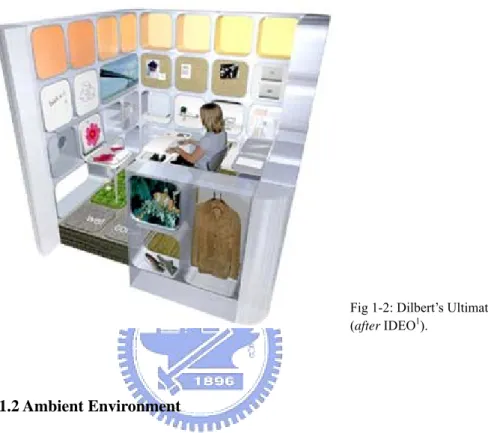
developed under such an urge to increase variations of design fashion, such as Steelcase’s Personal Harbor (Hamilton et al., 1996), Dilbert’s Ultimate Cubicle (Adams, 2001), and IBM’s BlueSpace (Chou et al., 2001). All these new PDEs exploit spatial elements to better support work and emphasize on personalization as well as flexible customizability.
1.1.2 Ambient Environment
One of the above trends regarding designing spaces to be more user-centric and flexible is the urge to have an ambient environment. Ambient environment is a kind of architectural space that exploits ambient functionality and human spatial perception to help human activity. As information technologies were introduced into the architectural environment, ambient functionality was enhanced and extended. It is believed that the future spaces are likely to be filled with interactive surfaces and interact with human via foreground/background awareness and other natural, multiple modalities (Norman, 1999; Weiser, 1991).
Various works were developed with similar ambient approaches by integrating digital mechanisms into spatial physical elements. Examples of such are Media Spaces (Bly et al., 1993), a system that integrates multiple media and connects distant places and groups of people together, Ambient Displays (Wisneski et al., 1998), an artifact that displays information for background awareness (Fig 1-3),
1 IDEO, http://www.ideo.com
Fig 1-2: Dilbert’s Ultimate Cubicle (after IDEO1).
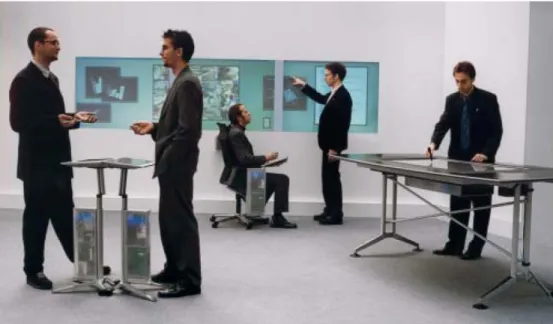
Tangible Interfaces (Ishii and Ullmer, 1997), which projects digital information on the physical environment for intuitive interaction with users, and Roomware, which sees room as modular spaces for docking digital components (Fig 1-4) (Streitz et al., 1999). These technologies transform spatial elements into interactive spaces, and aids designers in different aspects, such as providing social awareness (Gross, 2003; Prante et al., 2003) or providing instant design media (Chen and Chang, 2005). Furthermore, they can be customized or arranged freely to fit personal usage or preferences.
Fig 1-3: A PDE with a customized ambient display aside (after Ambient Device2).
These environmentally-integrated ambient elements, though designed for different purposes, embrace a shared characteristic, which Weiser and Brown noted as Calm Technology (Weiser and Brown, 1996), “What is in the periphery at one moment
may in the next moment come to be at the center of our attention and so be crucial.” The aim of Calm Technology is to provide information in the periphery
which can be easily perceived by moving one’s attention from the center to the periphery, and back, without overburdening.
Fig 1-4: Roomware components (after fraunhofer IPSI3).
1.1.3 Ambient Personal Design Environment
Properly arranging and integrating ambient media into a space creates a newly ambient PDE which helps design activity to be carried out more fluently and seamlessly with the aid of ambient functions (Chen and Chang, 2005; Chou et al., 2001). Each spatial element, such as a building block, contributes to the whole construct of ambient support, and designer uses his multiple sensors and modalities freely to interact with the digital information that surrounds the environment as a way to advance a design activity (Fig 1-5).
Based on the study of precedents, we can summarize key ideas that form the basis of the ambient personal design environment, which can also be viewed in general design guidelines as:
Foreground and Background: Ambient mediated environments attune the
designer’s perception, and can be divided into foreground and background (Wisneski et al., 1998), or, say, periphery and center (Weiser and Brown, 1996). Foreground channel is where designer’s focus is on, and the background is where the designer’s awareness is, without disturbing the foreground tasks.
Calm: Interactive media are embedded or integrated into the environment, which is
blended into user’s background unobtrusively.
Cooperative: Each ambient element provides partial functional support for an
activity. They work cooperatively to form an ambient support as a whole, and do not interfere with each other.
Context Specific: The ambient elements are targeted at a particular design context
or activity.
Customization: Ambient elements can be tailored towards the user’s need, in terms
of what functions or forms they provide, and how they can be easily managed and used as environmental resources.
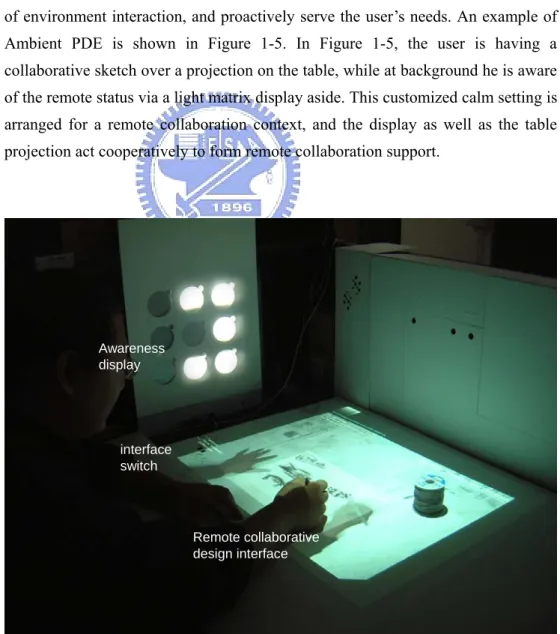
These characteristics make the ambient environment more personalized in the way of environment interaction, and proactively serve the user’s needs. An example of Ambient PDE is shown in Figure 1-5. In Figure 1-5, the user is having a collaborative sketch over a projection on the table, while at background he is aware of the remote status via a light matrix display aside. This customized calm setting is arranged for a remote collaboration context, and the display as well as the table projection act cooperatively to form remote collaboration support.
Fig 1-5: An example of an Ambient PDE Awareness display interface switch Remote collaborative design interface
1.2 THE PROBLEM
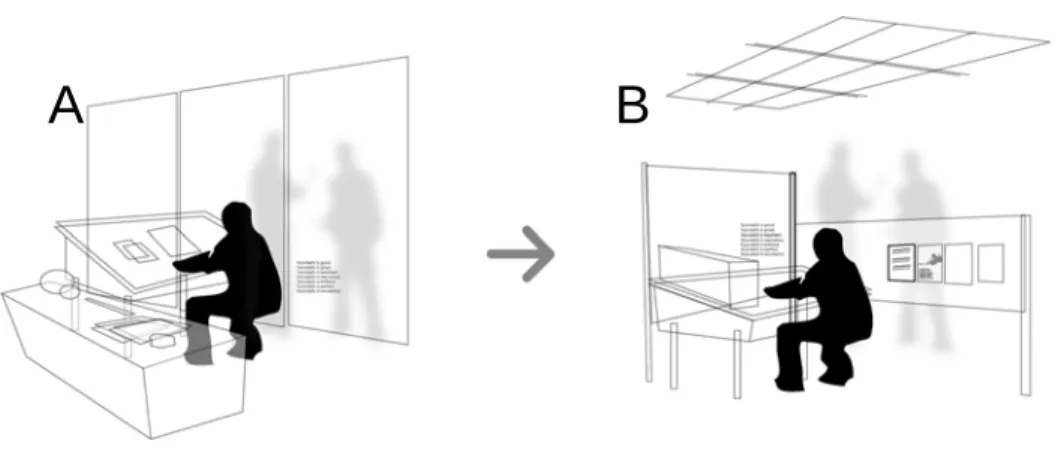
The process of designing in a PDE often encounters interruption. Such interruption could be the designer’s sudden thoughts, encountering other colleagues, or receiving a phone call during the designing. This often shifts the designer’s focus from designing to dealing with the new situation (Jett and George, 2003; Miyata and Norman, 1986). However, due to the lack of an automatic reconfigurable framework, such a context shift sometimes distracts the designers by requiring them to stop their foreground tasks to prepare the essential devices needed to set up for the appropriate environment. How can an ambient PDE be reconfigured from A to B easily and instantly as shown in Figure 1-6? What is the framework and process needed to evoke the ambient setting reconfiguration?
Fig 1-6: How can one reconfigure an ambient PDE from A to B instantly and easily?
Whilst PDE has become more and more ambient-functioning, it is evident that we need more flexibility on ambient settings to fit different needs while designing in a PDE. If we take the dynamic nature of design into account, the design of ambient PDE should also be dynamic and reconfigurable immediately, which means it should be capable of supporting the user’s evolving needs during a design process.
1.3 AIMS AND SCOPE
According to the problem stated above, the goal of this research is thus to propose a framework for automatic ambient reconfiguration in an ambient PDE.
One of the major goals for the framework is to minimize distractions caused by reconfiguring ambient functionality in ambient PDEs. We decided to eliminate extraordinary user intervention, to mediate the configuration process by preset customized computation and automation strategy, and to represent the changed environment in an ambient way. Configuration in this sense is seen by triggering a series of specified actions with parameters, which results in different ambient mediated environmental settings. We call these approaches “Ambient Triggers (ATs)”. In this paper, we define the AT framework and its design principles, as well as explore the possibility of ATs. Overall, major objectives in the list below can be achieved.
1) A conceptual definition of ATs
2) A framework for ATs that reconfigures the ambient mediated PDE. 3) A set of design principles for AT interface
4) An environmental prototype system for the reification of the AT framework and the design principles.
The scope of the research focuses on ambient environment, ambient technology which multiplexes ambient intelligence and ubiquitous computing technology, and
personal design activity. The research is primarily built in the lines of the ambient environment, arguing for a feasible framework for ambient reconfiguration. It is
important to note that the purpose of this research is not to create a new PDE, but to provide a new perspective to the design and integration of ambient mediated PDEs.
1.4 METHODS AND STEPS
The problem of the research is built in the lines of the ambient environment. After reviewing relevant work in ambient environment, we oriented our research and further investigated the interface design issue and analyzed characteristics for an ambient trigger user interface. We conduct design experiments to gain insights as to frame a hypothetical framework as well as framework design principles for the research. Furthermore, by implementing the framework, the design principles and computability of the framework is refined and tested.
Fig 1-7: Methodology of the research.
The research step is depicted in Figure 1-7. First, we reviewed relevant frameworks and projects in domains related to ambient environment. Second, with lessons learned from reviews, we conducted design experiments as pilot studies to explore the interface design principles and framework feasibility for evoking ambient reconfiguration. Third, together with lessons learned from reviews and the pilot studies, we proposed the Ambient Trigger, a computational model specific for reconfiguring ambient settings in an ambient environment. Fourth, we constructed a test-bed environmental setting with applications to be tested on a planned scenario. And last, we reifed the AT framework and the proposed design principles by going through scenario examples, and made a conceptual comparison with a case that evokes ambient reconfiguration via various media.
1.5 STRUCTURE OF THE THESIS
The thesis is organized as follows:
Chapter 1: INTRODUCTION introduces the research background, problem, goals, methods and steps, scope, and the structure of the thesis.
Chapter 2: RELATED WORK reviews related frameworks and projects in terms of the ambient environment, with a focus on reconfigurability.
Chapter 1: Introduction
Chapter 2: Related Work Chapter 3: Pilot studies
Chapter 4: Ambient Trigger
Chapter 5: Design & Implementation
Chapter 3: PILOT STUDIES presents three ambient environment design cases: Ambient Window, InfoRiver Table, and Walls from World, for experimenting on interfaces to evoke ambient reconfiguration.
Chapter 4: AMBIENT TRIGGER gives an introduction to the idea of AT, with its characteristics, framework, components, mechanisms, and workflow elaborated. Chapter 5: DESIGN AND IMPLEMENTATION reports the design and implementation process of a test-bed environment for verifying AT.
Chapter 6: SCENARIOS AND REIFICATION shows scenario examples of AT, and makes a comparison of the triggering steps between using AT interface and using various interactive ambient elements.
Chapter 7: DISCUSSION AND CONCLUSION discusses the research results, its drawbacks, benefits, and possible implications in the advancing ambient environment. The chapter concludes with research significance and suggestion for future directions.
2
RELATED WORK
In this chapter we review related work regarding the notion of ambient reconfiguration. The criteria for searching the relevant work are described in 2.1. We review related frameworks in 2.2, related projects in 2.3, and summarize lessons learned in 2.4. In 2.5, we suggest pilot studies to consolidate the assumption for an ambient reconfiguration triggering interface.
2.1 CRITERIA FOR SEARCHING
The purpose for reviewing related work is to situate our research into a broader research context, to gain insights from previous researches and to find a way for further investigation. To focus on the notion of ambient reconfiguration, we strategically derived two major issues regarding ambient reconfiguration. The first issue is on how a designer evokes ambient reconfiguration and how ambient elements react to the designer’s request (i.e. ambient interface). The second issue is on how a system engine computes for the user’s request and how it controls the reactions of the environment (i.e. reconfiguration process) (Fig 2-1).
Fig 2-1: Derived two major issues for strategic review.
Based on the above two main issues, the review aims to grasp the ideas on what the interface and the framework could be like. We decided to review related projects from an ambient interface view and to review frameworks from a reconfiguration process view. The criteria for the selection of frameworks are described below: 1) The notion of automatic reconfiguration refers to the capability of space to
perform different functions when the user requests it. As a result, the work should have at least a three-step triggering process (i.e. user input, process, and
output).
2) The output of the framework should be spatial and should make environmental changes.
3) Since ambient characteristics are crucial components in our research, the work should be able to collocate with ambient or ubiquitous computing technology. And for projects, the work to be reviewed should reflect upon:
1) characteristics of the ambient environment, 2) the (partial) change of an environment,
3) the easiness on the user evoking ambient interaction, and
2.2 RECONFIGURATIVE FRAMEWORKS
In this section, we select frameworks showing spatial reconfigurability and having more relevance to ambient environments among different domains such as ambient intelligence (Aarts, 2004), ubiquitous computing (Weiser, 1991), and responsive architecture (Bullivant, 2005; Sterk, 2003). Conceptual, representational, and computational frameworks are reviewed. We describe each as follows.
2.2.1 Hybridized Control Model
(Sterk, 2003) proposed an extensible model for controlling responsive architecture, which can be used as a fundamental concept to describe reconfigurable ambient environments. It is a simple model which consists of three parts (Fig 2-2):
1) User input: which offers users the means to control and interact with the building;
2) A building structure: which has a responsive capability that enables it to directly respond to environmental loads, and
3) Spatial responses: which is used to control the partitioning or services for activity inside spaces.
Fig 2-2: A hybridized control model for responsive architecture (after Sterk, 2003).
2.2.2 Frameworks of Context Awareness
In general, the context is the circumstance of “who is in where, doing what, how, and for what”. In an ambient intelligence (Marzano and Aarts, 2003) viewpoint, objects and services need to be aware of the state of their surroundings at any given moment. It is a fundamental technology used to achieve a user-centric intelligent
environment. There are many ways to describe or structure contexts. For example, (Oh and Woo, 2004) proposed a unified model to format and integrate contexts into the structure of 5W1H (Why, Who, When, Where, Which, and How).
There are three phases in the workflow cycle of context awareness (Aarts and Roovers, 2003):
1) Perceiving the environment: the first step is to collect information about the environment and turn it into a useful form with sensor technology or smart sensors. 2) Classifying and analyzing the data: the second step is to use the information provided by sensors to determine the state of the environment as a whole based on the model of context.
3) Interpreting the context and taking action: The last step is, based on the environmental context the system has perceived, to use high-level knowledge to decide what the system should do.
2.2.3 Implicit HCI Framework
iHCI (Implicit Human-Computer Interaction) is a conceptual model which takes
context into account as implicit input and has influence on the environment by implicit output (Fig 2-3) (Schmidt, 2000). It is most suitable for systems where the the user should not be distracted from the main task in the physical spatial context. This model is widely applicable for specific domains, such as proactive applications, adaptive UIs, user interruptions, communication applications, resource management, and the generation of metadata.
(Schmidt, 2004) gave a formal definition of implicit input and implicit output:
Implicit Input: Implicit input pertains to the actions and behaviors of humans,
which are done to achieve a goal and are not primarily regarded as interaction with a computer, but captured, recognized, and interpreted by a computer system as input.
Implicit Output: Output of a computer that is not directly related to an explicit
input and which is seamlessly integrated with the environment and the task of the user.
Fig 2-3: Implicit human-computer interaction model (after Schmidt, 2004).
2.2.4 Workflow Cycle of Ambient Intelligence
(Hellenschmidt and Wichert, 2005) proposed three major steps for the workflow cycle of an ambient intelligence system:
Awareness: The environment and the objects within the environment should be
aware of the user’s current situation, his interaction condition with the environment, his personal condition, and the possible condition he should be adapted to.
Intention Analysis: The environment must infer the user’s intention based on the
situation it is aware of, and respond with possible cooperative or proactive support to the user.
Strategy Planning and Execution: The environment should transform the user
intention it inferred into an adaptation strategy which the environment and environmental objects can provide.
Such an interaction cycle can be generalized and termed as ‘Goal-based Interaction’ (Heider and Kirste, 2002), as shown in Fig 2-4. Goal-based interaction requires two functionalities: Intention Analysis, interpreting user interactions and environmental contexts into concrete goals, and Strategy Planning, which maps goals to device operations (Hellenschmidt and Wichert, 2005).
2.2.5 Framework for Project Aura
The pervasiveness of computers frees users from being bound to specific desktop computers. Based on such a concept, project Aura (Sousa and Garlan, 2002) tries to create a distraction-free computing environment with ubiquitously available computational resources. Users in a ubiquitous computing environment can bind and compose their own task context and release them at any physical service hot-spot. The computer-supported task thus becomes a personal aura which surrounds people, provides personalized settings, and requires no configuration efforts for switching among different computational platforms or environments.
2.2.6 SODAPOP
SODAPOP (Self-Organizing Data-flow Architectures supPorting Ontology-based problem decomPosition), is a middleware for simplifying the framework integration process among smart objects (Hellenschmidt and Kirste, 2004). Its objective is to make the environment observe and analyze the user’s goal, and combines appropriate components with environmental resources into a unifying system automatically in real-time according to the analyzed data. The integration has two aspects: 1) Components integration: the pattern matching in the system level. For example, attaching an input device to the ensemble’s interaction event bus; 2) Operational Integration: The mapping of interface operations with metaphorical relation. For example, connecting a CD player into a CD recorder could be embodied as “Copy” (Hellenschmidt and Kirste, 2004).
2.2.7 Framework for VICOM and PER2
Inspired by Antonio Damasio’s Human Conscience Model (Damasio, 2000), (Marchesotti et al., 2005) designed a flexible architecture the for user to interact with ambient intelligence environments (Fig 2-5). This model is comprised of a few mapped parts: a) Eso-Sensors for sensing external contextual data, b) Endo-Sensors for sensing internal status, and c) Self Kernel, which connect to Autobiographical
Memory (i.e. short-term memory) and Autobiographical Self (i.e. long-term
memory). This neurobiologically-inspired model is the basis of the artificial analysis and decision core, allowing the system to acquire and manage a deeper understanding of context information. The flexibility of the architecture is issued in
three aspects: context-awareness, multimodal communication, and user-centered adaptive interaction. The proposed design employs a rule-based adaptation module where acquired contextual knowledge about the environment and the user is represented in terms of concepts and facts and are exploited to personalize the multimodal feedback for the user (Stefano et al., 2005).
Fig 2-5: Framework for VICOM and PER2 (after Stefano et al., 2005)
2.2.8 Summary
In this section we have reviewed representational as well as computational frameworks which could be generally applied to describe a triggering mechanism with sufficient reconfigurability.
Though not developed specifically for ambient reconfiguration purpose, each framework has provided us with insights for developing an ambient reconfigurable framework. Mainly, the Hybridized Control Model (Sterk, 2003) has framed a general and fundamental framework for approaching ambient reconfiguration. Frameworks of Context Awareness (Aarts and Roovers, 2003; Marzano and Aarts, 2003; Oh and Woo, 2004) have illustrated the computational workflow mapping to spatial contexts. Implicit HCI frameworks (Schmidt, 2000) have suggested implicit interaction as a less distractive way for the user to interact with a physical system.
The workflow cycle of ambient intelligence (Heider and Kirste, 2002; Hellenschmidt and Wichert, 2005) have suggested a goal-based type of interaction, which point out that the need for ambient interactive services is based on the user’s intention. Aura (Sousa and Garlan, 2002), a work that approaches distraction-free interaction by providing users with ubiquitously accessible platforms, has suggested automatic configuration of spaces without the user’s explicit configuring process. SODAPOP (Hellenschmidt and Kirste, 2004; Hellenschmidt and Kirste, 2004) suggested that different combinations of operations or objects refer to different interactive contexts, and the framework of VICOM and PER2 (Marchesotti et al., 2005) (Stefano et al., 2005) have provided us with a flexible and intelligent model that is suitable for achieving ambient reconfiguration technologically. Some processing techniques in terms of contextual data acquisition and categorizations were also learned.
To gain a whole view on the research problem and to understand the practicability as well as feasibility in terms of ambient reconfiguration, the next section reviews related projects that evoke ambient reconfiguration from an interface perspective.
2.2 AMBIENT ENVIRONMENTS
In the previous section, we reviewed related frameworks that imply the feasibility for achieving automatic ambient reconfiguration. The goal for reviewing related ambient environments is to understand the role of interface in evoking ambient reconfiguration, and how the user’s intention for ambient reconfiguration is being interfaced. In this section, we review related projects from research labs worldwide that show or imply the practicability and possibilities of ambient reconfiguration with user control.
2.2.1 Nebula
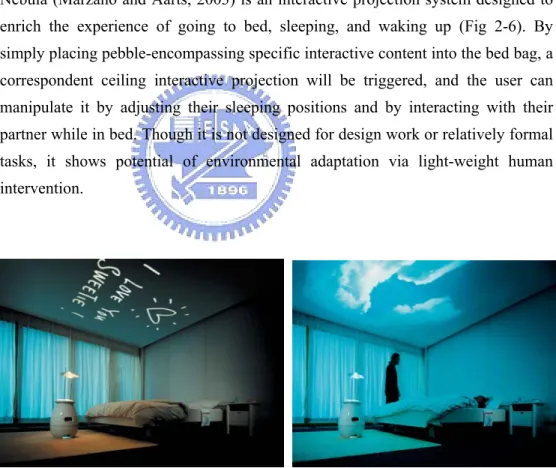
Nebula (Marzano and Aarts, 2003) is an interactive projection system designed to enrich the experience of going to bed, sleeping, and waking up (Fig 2-6). By simply placing pebble-encompassing specific interactive content into the bed bag, a correspondent ceiling interactive projection will be triggered, and the user can manipulate it by adjusting their sleeping positions and by interacting with their partner while in bed. Though it is not designed for design work or relatively formal tasks, it shows potential of environmental adaptation via light-weight human intervention.
Fig 2-6: Nebula with reconfigurable ceiling projection (after Royal Philips Electronics website4).
2.2.2 Visual Interaction Platform
Visual Interaction Platform (VIP) (Aliakseyeu et al., 2001) is an augmented reality design application combined with the WIMP interface. The physical setting of VIP
mainly constitutes of two spaces: an action-perception space for design work, and a communication space as a supplement (Fig 2-7 left). VIP has a range of 2D/3D navigation and manipulation support via mediated objects, such as hand writing, sketching, and the tracking of physical objects (Fig 2-7 right). VIP is a working prototype that integrates the function needed for the early stage of design, and combines both benefits of the WIMP interface and natural artifact-mediated interaction. With VIP, the designer can freely choose the interaction style that best fits his needs when performing specific operations. However, though VIP has shown its reconfigurability in various tasks such as switching mediated objects for different operations, it is mainly designed as a fixated supporting tool only in the early stages of design, and does not adapt to other design activities.
Fig 2-7: Spatial arrangement of VIP (left), and different mediated objects for interacting with VIP (right) (after VIP website5).
2.2.3 Ambient Agoras
The major goal for project Ambient Agoras (Prante et al., 2004) is to transform the physical envelop of a work environment into a social architectural space which supports informal communication, collaboration, and social awareness within the organization. The result of the project—Hello.Wall (Prante et al., 2003), is an example artifact as a social catalyst that fosters both local and remote collaboration within a larger organization (Fig 2-8).
It contains three different interaction states: Ambient, Notification, and Interaction, and is activated by user proximity to it (Fig 2-9). When a user keeps his distance from the Hello.Wall, it appears to be an atmospheric decorative ambient display.
But when the user steps closer, the ambient display starts to serve an informative role and notifies the user if there are any private messages for him. One more step closer, the user can explicitly interact with it, such as view or leave a message to others via a borrowed display—ViewPort. In some views, by measuring the user’s proximity, the Hello.Wall can be seen as adaptive to the three kinds of different social activities. Measuring the proximity to reconfigure the function of Hello.Wall is comprehensible and acceptable by users in this case. However, they may not be suitable for manifestation for design activity adaptation.
Fig 2-8: Informal communication around Hello.Wall (left). Interacting with Hello.Wall with ViewPort (middle). ViewPort in detail (right) (after Ambient Agoras6).
Fig 2-9: Ambient Agoras with three interaction states (after Ambient Agoras).
2.2.4 Interactive Public Ambient Display
Similar to Hello.Wall mentioned above, Interactive Public Ambient Display (Vogel and Balakrishnan, 2004) is another interactive ambient display consisting of four levels of interaction states: ambient display, implicit interaction, subtle interaction,
and personal interaction (Fig 2-10 left). Also determined and triggered by user proximity to the display, it offers different user interaction modalities and different contents, judging by the user’s distance to the display. The right of Figure 2-10 shows the user interacting with Interactive Public Ambient Display.
Fig 2-10: An Interactive Public Ambient Display with four interaction states (left), and a user interacting with Interactive Public Ambient Display (right).
2.2.5 Muscle Reconfigured
Muscle Reconfigured (Biloria and Oosterhuis, 2005), as real-time responsive spatial envelop installation, envisions space as a network of nodes which constantly exchange information and behaves as a collective whole to attain spatial reconfigurations (Fig 2-11). It reconfigures its shape to adapt to human ergonomics or behaviors. The prototype has successfully made space reconfigurable, but it is reconfigured to be more adapted to human ergonomics or behaviors instead of design activity.
Fig 2-11: Muscle Reconfigured (after HRG, TUDelft7).
2.2.6 Impromptu
Impromptu (Beigl et al., 2004) is a concept and system for instant creation of ad-hoc pervasive computing environments. By introducing different everyday objects tagged as Smart-Its Particles into the environment, they are aware of each other, configure themselves to correspondent functions, and cooperatively forms a spatial support, without users having to set-up, configure, maintain, or administer such environments by themselves. Impromptu could be adaptive to different situations when different tagged object are present in the environment. However, this means the adaptation is constrained with the objects, and every time the adaptation is needed, extraordinary user intervention is required, which may annoy the user.
2.2.7 U-Texture
U-Texture (Kohtake et al., 2005) is a topology-aware building panel which allows the user to composite it into different 3D shapes to form specific functional smart objects (Fig 2-12) such as ambient walls, collaborative tables, smart stands, or smart shelves. U-Texture is able to recognize the entire structure and functioning automatically (Fig 2-13). Such topology-aware adaptation is an intuitive way to trigger specific adaptation strategies; however, the composition itself needs user foreground intervention and lacks immediacy, which may distract the user, whose goal and focus of interest should be on another thing.
Fig 2-12: A modular building panel for U-Texture (after UbiLab8).
Fig 2-13: Smart Table, Smart Shelf, Smart Wall, and Smart Stand (after Kohtake et al, 2005).
2.2.8 Animated Work Environment
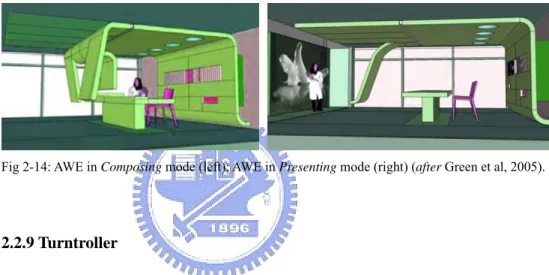
Animated Work Environment (AWE) (Green et al., 2005) is a concept of the future work environment interior embedded with intelligent components that adapt to a range of work needs and situations over time. The configuration and functionality of the environment is user-controllable over a WIMP interface on the work surface with preset programs (Fig 2-14). A user can reconfigure the whole space into different purposeful spaces simply via buttons or toggles. However, AWE appears to be a conceptual idea only and the practicability and feasibility is still under evaluation.
Fig 2-14: AWE in Composing mode (left); AWE in Presenting mode (right) (after Green et al, 2005).
2.2.9 Turntroller
Turntroller (Suzuki et al., 2005) is a device for controlling appliances around the environment simply via a “Turn” operation (Fig 2-16). It is composed of two columnar knobs. The back side knob is used for selecting the appliance to control and the front side knob is used for actually controlling it (Fig 2-15). Turntroller provides users with an easily way to reconfigure the ambiance in any place.
9 http://www.turntroller.com
Fig 2-15: The system architecture of the Turntroller (after Turntroller9).
Fig 2-16: A diagram describing the usage of Turntroller (after Turntroller).
2.2.10 Instant Collaboration Environment
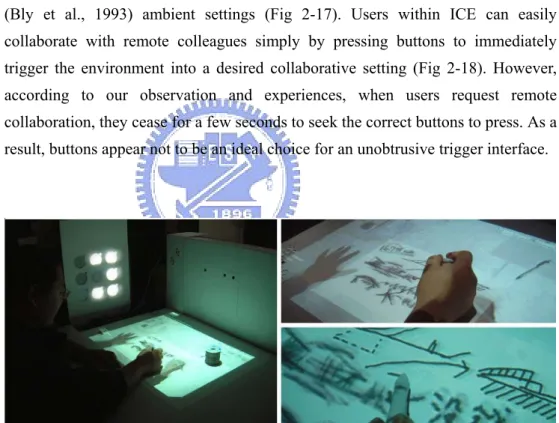
Instant Collaboration Environment (ICE) (Chen and Chang, 2005) is a project investigating how a designer can reconfigure his PDE into a remote collaborative environment to have “Clearboard”-like (Ishii et al., 1994) or “Media Space”-like (Bly et al., 1993) ambient settings (Fig 2-17). Users within ICE can easily collaborate with remote colleagues simply by pressing buttons to immediately trigger the environment into a desired collaborative setting (Fig 2-18). However, according to our observation and experiences, when users request remote collaboration, they cease for a few seconds to seek the correct buttons to press. As a result, buttons appear not to be an ideal choice for an unobtrusive trigger interface.
Fig 2-17: Remote collaboration with “Clearboard”-like interface in an ICE.
2.2.11 Summary
The works mentioned above show a variety of feedback elements, from spatial envelop, artifacts, appliances to interactive surfaces. It also shows a variety of ways to evoke ambient interactions by evoking them via controllers, implicit inputs, the composing of different elements or embodied actions toward an artifact.
Interaction techniques such as controller devices, gesture controls, or tangible inputs have been investigated as approaches for users requesting ambient settings to tailor to different needs. One can use a universal remote controller to switch the state of an appliance and connect each of them to form cooperative services. Because design is dynamic in nature and requires different design support for different purposes at times via controllers or techniques, the environment should be triggered to reconfigure into different kinds of ambient mediated support immediately.
Interaction techniques for triggering ambient reconfiguration and reconfigured ambient elements are summarized into a chart in Table 2-1. The related projects have shown possible techniques for achieving ambient reconfiguration, which we discuss in the following section.
Table 2-1: Lists of related projects.
No Project Name Techniques for Evoking AR Feedback Elements
1 VIP (2001) Placing new artifact into the work space A table with a front surface
2 Nebula (2001) Putting Pebbles into baggage Ceiling and a bed
3 Ambient Agoras (2003) Body approaching the wall A Wall
4 Impromptu (2004) Attaching Smart-It particles to everyday artifacts
Everyday artifacts
5 Interactive Public
Ambient Display (2004)
Body approaching the display Ambient display
6 Works from HRG (2004) Movements or sounds Spatial envelop
7 U-Texture (2005) Composing into artifacts Everyday artifacts
8 AWE (2005) Pressing buttons and toggles Spatial envelop and everyday
artifacts
9 Turntroller (2005) Rotating the knob Environmental appliances
10 ICE (2005) Pressing buttons A table with a front surface and
2.3 SUMMARY OF REVIEW
In this chapter we reviewed relevant frameworks that feed back users with environmental changes, and projects investigating into the ways user evoking ambient environment changes. The differences of our proposed framework in related work are elaborated in 2.3.1, and the lessons learned from related work are summarized in 2.3.2.
2.3.1 Research Positioning
Our proposed framework for the thesis differs from related frameworks and projects in some aspects. Our proposed framework is designed specifically for the user to evoke ambient reconfiguration, while other frameworks are either too general, or focus on different specific use cases. And most of related projects reviewed are also for some specific context of use or focus on the controller itself, and few of them investigate into the idea of ambient reconfiguration. In a word, our proposed framework is specifically designed for ambient reconfiguration.
2.3.2 Lessons Learned
With the review of the related work, we were inspired, and gained some insights on an ambient reconfiguration framework. Lessons learned are summarized below.
Input, Analysis, Decide, and Output
From relevant frameworks, it is found that a framework for an ambient reconfiguration should at least have a user input, contextual analysis,
decision-making, and multiple outputs in the workflow. The framework derives
user input by inferring about the user’s intention of reconfiguring the ambient setting, analyzing it with other relevant factors, deciding for output strategy, and then triggering multiple correspondent outputs to form a new ambient setting.
User Intention, Object, and Environment
From related projects, it is found that an object plays a crucial role in interfacing with the user’s intention and the ambient settings. It is also found that the ambient environment is the composition of different objects. Since the object can be an artifact, spatial enclosure, or ambient element, the relation among user, object, and the ambient environment closely interplays with each other.
Techniques in Deriving User Intention
Before proceeding to ambient reconfiguration, finding out how to derive the user’s intention as a user input is crucial to the framework. Context awareness and
inference is a technique for evoking system reconfiguration to adapt to a situational
context. Different from the user’s explicit control of the trigger method, context
awareness achieves system reconfiguration by proactively observing and inferring
the spatial context without the user’s explicit intervention. It can be incorporated with implicit input, which is a distraction-free way of interfacing with the user’s intention. By adopting context-aware technology, spatially integrated media in PDE can be further made to be context sensitive and to automatically capture the user’s intents, observe user behaviors or overall spatial context, and eventually proactively offer just-in-time ambient support to the users.
2.4 TOWARD A FRAMEWORK FOR AMBIENT RECONFIGURATION
Though there are controlling or interaction techniques for users to reconfigure ambient settings in a unified fashion, most of them distract users by shifting their attention from tasks to the control interface. Context awareness appeared to be potential technologies that could solve this problem. However, context-aware techniques rely too much on the accurate inference of contextual data which make them unreliable for highly attentive work like personal design activities. Therefore, user input as well as contextual data to analyze and determine the consequences should be both considered within an ambient reconfiguration process.
We have found that some trigger interfacing approaches are obviously obtrusive, such as interfaces that require users to explicitly command or give inputs. Nevertheless, some have shown their potential as an unobtrusive method to trigger
ambient settings such as embodying the user to take natural actions and the like. There are already some technologies available that could be used for such kinds of less distractive triggers. However, it is not clear what the unobtrusive trigger interface should be designed in the context of the ambient environment. To further investigate on interface requirements for triggering ambient reconfiguration, we conducted a pilot experiment on a few design cases in the next chapter in the hopes of summarizing conceptual frameworks and design principles.
3
PILOT STUDIES
In this chapter we explore interface methods for triggering ambient reconfiguration. By going through three iterative design experiments, we analyze and apply the user’s natural interaction to conduct design experiments with the guidance of ambient environment requirements. During the process, design principles for ambient trigger interfaces, possible computational trigger mechanisms, and technologies for prototyping ambient environments were experimented on and learned from. In 3.1, we briefly introduce the purpose and methods for the pilot studies. From 3.2 to 3.4, we go through each of the design cases in detail, and summarize the design principles in 3.5.
3.1 EXPERIMENTAL DESIGN
In pilot studies, we aimed at exploring the trigger mechanism for ambient reconfiguration and interface characteristics in an ambient environment. By observing everyday experiences, we found that users interact with environments with bodily actions or behaviors, like, for example, stepping on the floor, sitting on the chair, or looking out of the window. We believe such implicit actions are naturally distraction-free (Schmidt, 2004), and could be rich resources as actuators to evoke changes in an ambient environment in an intuitive way.
Based on the above assumption, we tried to conduct three iterative design experiments with a focus on the trigger mechanisms and techniques in the hopes of
empirically summarizing conceptual frameworks as well as design principles. During a subject called Special Topics in Computational Design, at the Graduate School of Computational Design, NYUST10, three design experiments on ambient environment prototype were conducted as part of an experiment for Ambient Triggers. Different purposes or design premises were set to explore different aspects of interface and interaction techniques. They are Ambient Window,
InfoRiver Table and InfoCapsule, and Walls from World. Students were asked to
conduct experiments with references to the reconfiguration workflow learned from related works, and were taught the concepts of implicit input and context-aware computing. And because the object is critical, students were encouraged to investigate the characteristics of everyday objects and human behavior and the ways of manipulating it.
The works described below were done in the lines of ambient environment, which has characteristics summarized as foreground and background, cooperative, calm,
context specific, and customization (Aarts, 2004; Gross, 2003; Weiser and Brown,
1996; Wisneski et al., 1998). To realize the environment, interface technologies as well as design principles which aimed at improving interaction between human and physical space to become more natural and intuitive were studied and tried out (Maglio et al., 2000; Oviatt, 2002; Podlaseck et al., 2003; Ullmer and Ishii, 2001; Vertegaal, 2003), and were implemented with the physical computing approach (Igoe and O'Sullivan, 2004). The physical computing approach is a quick and dirty approach for the rapid prototyping and examining of the feasibility of interactive concepts using low costs and easily available sensors and actuator technologies.
3.2 AMBIENT WINDOW 3.2.1 Conception
The first design work is Ambient Window. It is an experiment on how inhabitants’ behaviors, especially implicit actions, can have an influence on their living environment to create a more relaxing atmosphere.
In this project, we treat the window as an atmosphere catalyst. It provides ambient feelings that have an influence on a user’s behavior and, in reverse, the users’
implicit action would also have influences on the environment which eventually would change the atmosphere calmly. Ambient Window is a virtual projection window that tries to re-create influential ambient feelings and enlarge this characteristic in a basement context, which has no window to the outside.
3.2.2 Interaction Design
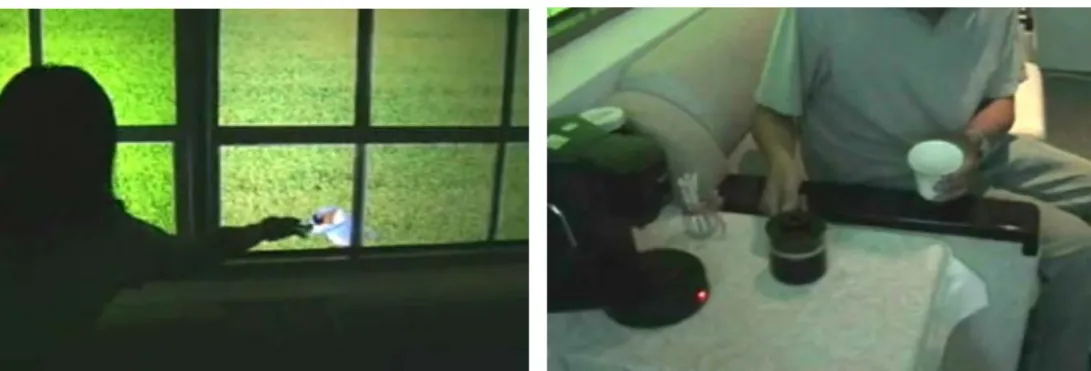
According to the concept described above, the interaction design of this project primarily focuses on the creation of an atmospherical feeling via implicit interaction with the Ambient Window. We have designed three implicit interactive triggers, as shown in Table 3-1 and Fig 3-1. When a user appears around the Ambient Window, the projection on the Window will be activated with darkened light. When the user is seated on the sofa, the light will be brightened. Then, when a seated user acts largely, the blue bird in the projection will fly away in response to the user’s actions.
Table 3-1: Interaction techniques with Ambient Window
Implicit Input Implicit Output
A user approaches the Ambient Window Ambient Window projects darker ambient light A user sit on the sofa behind the Ambient
Window
1. Ambient Window projects brighter ambient light 2. The coffee machine starts to make coffee User’s interaction behind the Ambient Window
become more drastic
Blue birds on the projection of Ambient Window flies away
Fig 3-1: A user approaches the Ambient Window with dark ambient light (left). Three people seated behind the Ambient Window with bright ambient light (middle). The interaction between the people implicitly changes the projection content of the Ambient Window (right).
3.2.3 Implementation
The three interactive trigger scenarios were achieved by embedding sensor technologies into the environment, including switches under the sofa for detecting
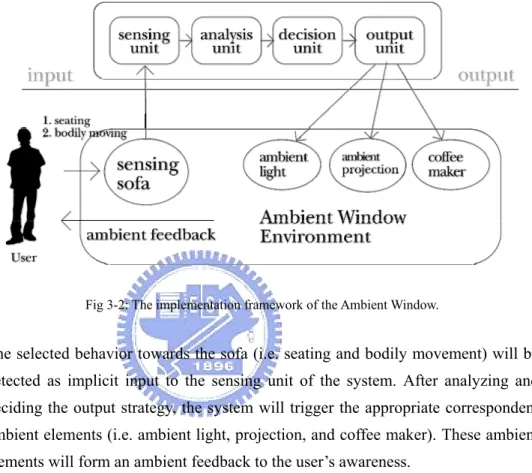
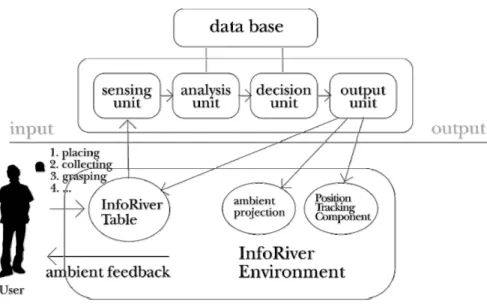
people sitting, and a webcam for detecting the user’s level of bodily movement. Actuations include ambient light, a coffee machine, and the Ambient Window projection. The transformation of sensor signals from analogue into digital format for computation and vice versa is achieved via a K28 chip connected to a PC. The implementation framework of the Ambient Window is illustrated as Fig 3-2.
Fig 3-2: The implementation framework of the Ambient Window.
The selected behavior towards the sofa (i.e. seating and bodily movement) will be detected as implicit input to the sensing unit of the system. After analyzing and deciding the output strategy, the system will trigger the appropriate correspondent ambient elements (i.e. ambient light, projection, and coffee maker). These ambient elements will form an ambient feedback to the user’s awareness.
3.2.4 Findings
From this experiment we found that implicit behavior could potentially have an influence on the whole spatial context, and result in enticing different user behaviors or interactions between the user and the environment. When the user’s awareness changes in his surrounding, he recognizes and then attends to it for intervention. Whether the user will ignore it depends on his own will. For example, the coffee smell as an incentive to users for to have a cup of coffee when coffee has been made, or the bird on the Ambient Window projection would raise the user’s attention and curiosity, but their existence won’t disrupt what user is focusing on doing at hand, and user is free to decide whether to attend to them or not (Fig 3-3). During our trial, we also found that ambient changes could form new triggers that
could induce users to interact with them, and this may in turn trigger other ambient changes. For example, when the user sees a sofa, it might induce him to be seated. And after being seated, the projected blue bird would induce the user to touch it, and this will evoke the next trigger. This supports the assumption that the ‘trigger’ is the fundamental construct which fosters user interacting with the environment. With this ‘trigger’, the environmental could be changed iteratively.
Fig 3-3: The presence of the bluebird on the Ambient Window projection makes the user feel like to touching it (left). The coffee was made after a user sat, and evoked the user to intervene with it (right).
3.3 INFORIVER 3.3.1 Conception
In this project, we aimed at experimenting on how users can manipulate digital information in a natural way with the aid of metaphor and metaphorical mediated objects. A conceptual sketch of the physical installation of the work investigating on this issue is shown in Figure 3-4. This work contains two interactive artifacts: the InfoRiver Table and the InfoCapsule. We envisioned the world layered with a fluid interface in a river-like form with floating digital information (including text, images, and sound data), and users living in such a world can grasp any digital information encountered, or can share information onto it. The InfoRiver Table is the proof-of-concept idea, as an
Fig 3-4: Physical installation of the InfoRiver.
example of an everyday artifact with a fluid interface. And the InfoCapsule, in such a context, is a personal container that users carry around the environment to grasp, store, share, and manipulate digital information over the InfoRiver. By combining the InfoRiver Table and the InfoCapsule, this project tries to argue that some simple tasks can be naturally accomplished with the appropriate involvement and metaphorical design of mediated objects.
3.3.2 Interaction Design
We augmented digital projections of information and dynamic river flow images over a conventional table as an experimental prototype to test the InfoRiver concept (Fig 3-4). A capsule-like artifact was selected and designed to be a manipulative object which could be separated into two pieces, top and bottom, to interact with the InfoRiver Table (Fig 3-5). Metaphorically, the capsule has been envisioned as a magical container which contains various magical stuffs, as we can see from many comic books such as in “Dragon Ball”11.
To make mapping comprehensible to the user, we illuminated metaphorical visual elements such as “harbor” and “riverside” areas along the edges of a table surface. The “harbor” is the area for exporting and importing digital information, and the “riverside” is envisioned as the area for viewing the full content of the grasped digital information. Dragging digital information onto the geographical elements will cause the corresponding trigger. Modes for user interacting with InfoRiver Table via InfoCapsule are summarized in Table 3-2.
Table 3-2: Interaction Techniques of InfoCapsule with InfoRiver
Action with InfoCapsule Outcome
Put the top piece of InfoCapsule on the “harbor” The digital information previously contained in the InfoCapsule floats out into the InfoRiver Put the bottom piece of InfoCapsule with concave
face downward over the InfoRiver to grasp and move digital information
The digital information was dragged and moves with the InfoCapsule
Drag any digital information to the “riverside”, with concave face downward Bottom piece
The digital information is enlarged and the full content is shown
Use the concave face downward bottom piece to drag any digital information to the “harbor”
The digital information was saved into the InfoCapsule