International Journal of Recent Development in Engineering and Technology
Website: www.ijrdet.com (ISSN 2347-6435(Online) Volume 3, Issue 4, October 2014)90
Android App Design of Static and Dynamic Visual-Aids for
House Selling Service Using App Inventor 2
Huang Li-Jeng
1, Liao Wan-Ling
2, Ha Thi Thuy-Van
21Associate Professor, 2Undergraduate Students, Department of Civil Engineering, National Kaohsiung University of Applied
Science, 80778, Taiwan, Republic of China Abstract— House selling service is an important task for
architectural company or personal house sellers. App Inventor is a no-code open platform for Android mobile app development using drag-and-drop approach and visual programming environment. This paper is aimed at Android programming using App Inventor for professional application, i.e., static and dynamic visual aids for house selling service (HSS). System development procedures, layout design and program coding will be explained. A typical real house selling in Ping-tung, Taiwan will be employed to show the results of pictures and movies visual-aids for house selling service. The results are satisfactory and convenient for the use of house sellers.
Keywords—Android Apps, App Inventor, House Selling
Service, Smart Phones, Static and Dynamic Expression. I. INTRODUCTION
In general selling a personal own or many new houses of a construction project of company requires a lot of skills. The basic procedure includes (1) getting ready to sell; (2) choosing sale price and method; (3) marketing the property of house; (4) getting legal help; (5) negotiating the sale; (6) using an agent [1]. However, in the third step we should make sure the house and gardens are their best looking as well as put together a summary and quick guide with details of the house for selling [2].
The 28th principle of the 40 inventive principles in marketing, sales and advertising [3] is the mechanics substitution which includes to replace a mechanical means with a sensory means as well as to use electric fields to interact with the object or system (electronic communication, trade, and computerized interview, etc.) It is well known that good relationship between sellers and buyers in the first interview help to build up long-term buyer-seller relationship and increase the potential buyers for the products [4-7].
In Taiwan if people sell their own house, by themselves or by vendors, there are little visual aids employed. However if a group of new built houses sold by a company, some visual aids will be designed and employed for the help of people who take the responsibility of selling service. For the sale project of a group of new house the housing company may assign a professional teams for this purpose and prepare many kinds of sale-aided materials, i.e. three-dimensional expression models, visual aids of movies, pictures, photos and some decorated rooms with internal design.
The basic features of Android mobile applications which are adequate for the aids of house selling are summarized in the following: (1) data storage and retrieving; (2) multimedia support (sounds, pictures and movies); (3) multiple languages support; (4) web pages browsing; (5) bluetooth, wi-fi and WiMAX communications; (6) GPS and Map information; (7) multi-point touch; (8) multi-task processing; etc. [8].
Basically there are three kinds of development tools for mobile applications executable on Android or iOS systems: (1) Native Apps: e.g. Objective-C for iOS, JAVA or Badic4Android for Android, and C# or VB.NET for Windows Phone; (2) Web Apps: e.g. HTML5 and CSS3, ASP.NET, Visual Studio and JQuery Mobile; (3) Hybrid Apps: e.g. Web View, UIWeb View, PhoneGap, Titanium, AppMobi, etc.
App Inventor and its new version, App Inventor 2, are tools to design Apps for the Android platform. They are developed originally by Google and then maintained by MIT. Due to its ease of learning and usage the users increased dramatically and became a popular tool for app development. These two tools provide programmers very easy and friendly environment to develop Android apps. [1]
International Journal of Recent Development in Engineering and Technology
Website: www.ijrdet.com (ISSN 2347-6435(Online) Volume 3, Issue 4, October 2014)91 Some special features include: (1) object oriented programming (OOP) tool; (2) graphical user interface (GUI) environment; (3) drag-and-drop approach in layout design phase and code design phase instead of traditional line-by-line in text JAVA programming; (4) providing testing simulator on PC to check the results on Android platforms; (5) providing many ways in the deployment phase for constructing the executable APK files, e.g. QRcode, mailing APK to platform or transferred by USB port, etc. to be installed and set up on the Android based smart phones and pads; (6) the projects developed are stored and managed on web, programmer can retrieved from different platforms for his convenience. (7) free web development environment with tiles [9-12].
The major tools provided in App Inventor 2 are: (1) Component Designer, where interface and integration of components (both visible and non-visible components); (2) Block Editor, where program logic is created; and (3) Emulator for the situation program test can be conducted without connecting to a mobile phone. The design and implementation process allow people without programming skills and prior programming experience to rapidly develop mobile apps. Especially the drag-and-drop visual programming approach let users easily design and arrange interface components (Command button, Text button, Checkbox, etc.) and connect logic blocks to create their mobile applications.
Since pilot in late 2009 and the release of App Inventor in December 2010 developed by Google, led by Professor HaroldAbelson, and later moved to MIT (Wikipedia, 2014) [13], a variety of studies have been conducted on many fields: game design (Wolber, 2011; Wolber et al., 2011), educator training (Hsu et al., 2012), information security (Arachchilage et al., 2012), teaching and assessing programming (William, 2013), healthcare (Zhang, 2014), emergency management (HuiRu Shih, 2014) etc.[14-19]. Huang et al. (2014) has attempted to employ App Inventor 2 to design Android app for static structural analysis based on direct stiffness method [20].
This paper is aimed at application of App Inventor to design an Android app for static and dynamic visual aids for house selling service. The design concepts, from conceptual, preliminary to detailed, design viewers, programming blocks as well as results are depicted to show a complete process.
II. DEVELOPMENT OF THE SYSTEM
The development of the system of Android app for static and dynamic visual expression for house selling is explained as follows:
A. Design Procedure of Android App for Visual Expression for House Selling
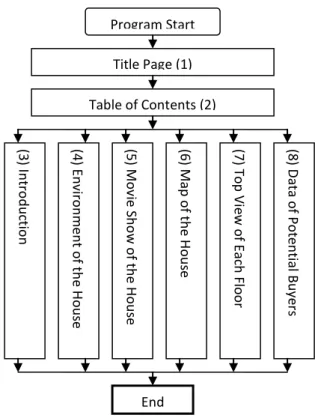
The design procedure of development of Android App for house selling service can be observed as shown in Fig.1. B. Information Prepared for Visual Expression
Basic concept of the design of this app is to help the vendor to provide information for the customers who are potential buyers of the houses. The required important information includes:
Figure 1 Flow chart of Android App system development using App Inventor
1) Information of building (area of land, area of building, number of floor, material of construction, location, designer, constructor, date of release, etc.) ; 2) Information of house (number of rooms, toilets,
kitchen, garden, etc.); 3) Information of environment;
4) Information of space design of each floor; 5) Information of structural system;
6) etc.
and finally it is convenient for the seller if there exists at least one screen to input and save some data of potential buyers, e.g., name, telephone, date of interview, and if possible the personal photo.
Furthermore, we can make decision that some information (text and/or picture) are presented in static style while some (movies) are played in dynamic mode.
Set up Project
Design the Layout (Design Viewer) Program Coding (Block Editor)
System Test (Emulator & Android Platforms)
Is App O.K.?
Improve the Visual Components
International Journal of Recent Development in Engineering and Technology
Website: www.ijrdet.com (ISSN 2347-6435(Online) Volume 3, Issue 4, October 2014)92 The framework for designing an App for general house selling can be referred in Fig. 2. This will be employed in the use of block editor when App Inventor is conducted in programming the app.
Figure 2 Flow chart of Android app design of house selling service
C. App Design
C1. Conceptual Design Phase
We design the Android app for house selling service to be one with multi-screens framework and assign it a name HSS. The conceptual design of the system can be shown in Figure A in Appendix. Some detailed arrangements might be changed and modified during the Preliminary Design Phase (Layout Design Phase) and rhe Detailed Design Phase (Programming Coding Phase).
C2. Layout Design Phase
We employ the multi-screen concept to design this system with 8 layouts (Screens) via design viewer of App Inventor. These 4 layouts (Screens) design can be observed from Fig. 3 to Fig. 10. In each screen the common used objects are command buttons, textboxes, labels etc.:
(a) Screen 1 (Homepage/Title Page):
Figure 3 Screen 1(title page) of the Android app HSS
(b) Screen 2 (Table of Contents):
Figure 4 Screen 2 (table of contents) of the Android app HSS
(c) Screen 3 (Introduction):
Figure 5 Screen 3 (Introduction) of the Android app HSS
Program Start End (3 ) In tro d u ctio n Title Page (1) (4 ) E n viron m en t o f t h e H o u se (5 ) Mo vie Sh o w o f t h e H o u se (6 ) Ma p o f t h e H o u se (8 ) Dat a o f P o ten tia l Bu ye rs (7 ) T o p Vi ew o f E ach Flo o r Table of Contents (2)
International Journal of Recent Development in Engineering and Technology
Website: www.ijrdet.com (ISSN 2347-6435(Online) Volume 3, Issue 4, October 2014)98
TABLEI
SPECIFICATION OF THE SMART PHONE TESTING HSS
Item Specification
Smart Phone hTC ONE X+
Operating System Android OS 4.1 Jelly Bean with hTC Sense 4+
CPU 1.7 GHz
Screen Display 4.7” Super LCD2 720x1280 HD (Gorrila Glass 2)
Storage 1GB RAM, 64 GB ROM
External Storage Micro SIM
Micro USB 2.0
Audio Support Mp3, mid, wav, wma, aac, amr, ogg, m4a
Video Support 3gp, 3g2, mp4, wmv, avi
Batery 2100 mAh
Dimension 134.36 × 69.9 × 8.9mm
Weight 135 g
The results are accepted as expected. Although it is only a small one, it provides a hybrid way combined with static and dynamic expression for a new house for selling. It is easy to learn, to use and to teach. The most important feedback from the users is its easy portability as compared with PC or Notebooks, especially house sellers usually need move from one floor to another floor, from one house to another.
B. Advantages
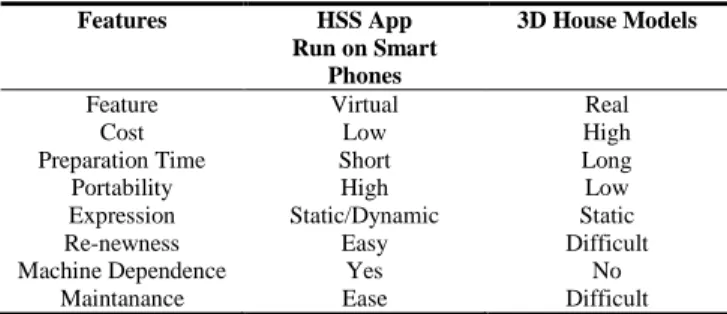
The comparison of different expressions between using App of HSS on smart phones and three-dimensional house models can be referred to Table II.
TABLEII
COMPARISON OF HSSAPP AND 3DHOUSE MODELS
Features HSS App
Run on Smart Phones
3D House Models
Feature Virtual Real
Cost Low High
Preparation Time Short Long
Portability High Low
Expression Static/Dynamic Static
Re-newness Easy Difficult
Machine Dependence Yes No
Maintanance Ease Difficult
IV. CONCLUDING REMARKS
Application of MIT App Inventor to design Android App for static and dynamic expression for visual aids in house selling service executable on Android platforms such as smart phones and handheld pads has been conducted successfully. System development procedures, layout design and program coding will be discussed. A typical new built selling project in Ping-Tung of Taiwan was employed to show the results of design app.
The success of this attempt shows that App Inventor can help engineers and designers develop their own specific apps run on conveniently portable platforms. The development procedure for HSS in this paper can be extended for many projects of house selling of different buildings, such as commercial, business and apartments.
REFERENCES
[1] Windermere Services Company. 2008. Windermere Real Estate: Guide to Selling a House
[2] Mann, D., O Cathain,, C. 2001. 40 Inventive (Architecture) Principles with Examples. The TRIZ J.
[3] Gennady, R. 2005. 40 Inventive Principles in Marketing, Sales and Advertising.
[4] Dwyer, F. R., Schurr, P. H. and Oh, S. 1987. Developing Buyer-Seller Relationships. J. Marketing, 51, 11-27.
[5] Atul, P. and Jagdish, N. S. 2001. Customer Relationship Management: Emerging Practice, Process, and Discipline. J. Eco .and Soc. Res., 3(2), 1-34.
[6] Jean-Michel, M. and Ganael B. 2009. Efects of Sales Force Automation Use on Sale Force Activities and Customer Relationship Management Process. J. Person. Sell. & Sales Mana., 28(2), 167-184. [7] Consumer Affairs Victoria. 2008. Real estate: A Guide for Buyers
and Sellers.
[8] Tyler, J. 2011. App Inventor for Android. Baker & Tayl, 2011. [9] Wolber, D., Abelson, H., Spertus, E., andLooney, L. 2011. App
Inventor. O’Reilly Media.
[10] Kloss-Jorg, H. 2013. Android Apps with App Inventor:The Fast and Easy Way to Build Android Apps. Addison-Wesley, 2013.
[11] Lakshmi, P., Jeffery H., and Alex W. 2014. Android App Inventor for the Absolute Beginner. Cengage Learning PTR, Boston, USA. [12] Huang, L. J. 2014. Object-Oriented Programming for Android Using
App Inventor. Note for Lecture, National Kaohsiung University of Applied Science, Taiwan, R. O. C. (in Chinese)
[13] Wikipedia. 2014. App Inventor for Android.
http://en.wikipedia.org/wiki/Google_App_Inventor.
[14] Wolber, D. 2011. App Inventor and Real-World Motivation. Proc. 42th ACM Tech. Symp. Comp. Sci. Edu. (SIGCSE ’11), ACM, NY, 601-606.
[15] Hsu, Y. C., Rice, K., and Dawley, L. 2012. Empowering Educators with Google’s Android App Inventor: An Online Workshop in Mobile App Design. British J. Educa. Tech. 43(1), E1-E5.
[16] Arachchilage, N. A. G., Love, S.and Scott, M. 2012. Designing a Mobile Game to Teach Conceptual Knowledge of Avoiding “Phishing Attacks”, Int. J. e-Learning Secur., 2(2), 127-132. [17] William, L. H. 2013. Teaching and Assessing Programming
Fundamentals for Non Majors with Visual Programming. Proc. 18th ACM Conf. Inno. Tech. Compu. Sci. Edu. (ITiCSE ’13), ACM, NY, USA.
[18] Zhang, C. 2014. Healthcare Mobile App Development with App Inventor in a Health IT Course. Proc. South. Asso. Inform. Sys. Conf., Macon, GA, USA, March 21-22, 2014.
International Journal of Recent Development in Engineering and Technology
Website: www.ijrdet.com (ISSN 2347-6435(Online) Volume 3, Issue 4, October 2014)99
[19] HuiRu Shih, P. E., Jackson, J. M., Wilson, C. L. H. and Yuan, P. C. 2014. Using MIT App Inventor in an Emergency Management Course to Promote Computational Thinking. 121st ASEE Annual Conference & Exposition, June 15-18, Paper ID: #8719.
[20] Huang, L. J., Chiu, Y. C., Hung, Y. T. and Jian, Y. S. 2014. Android Programming Design for Matrix Method of Static Structural Analysis on Smart Phones Using App Inventor 2. International Journal of Recent Development in Engineering and Technology (IJRDET), 3(3), 85-96.
Appendix: Conceptual design of the App of Home Selling Service (HSS)
Figure A Conceptual design of the App of Home Selling Service (HSS) P: Previous Page
H: Home Page E: Exit
Title Authors
Enter the system Exit Screen 1
Screen 8
H E
(6) Data of Potential Buyers
Name
Telephone
Date
etc.
Screen 3 (1) IntroductionInformation
of the
House
H E (1) Introduction (2) Environment of House Screen 2(3) Movie Show of House
(6) Data of Potential Buyers
(5)Top View of Each Floor (4) Map of House P E Screen 4
Photos
H E (2) Environment of House Screen 5Movies:
Garden Room Kitchen Toilet H E(3) Movie Show of House
Screen 6