國 立 交 通 大 學
應 用 藝 術 研 究 所
碩 士 論 文
探討手持裝置上的雙手合作模式
Building Bimanual Interaction in Mobile Device
研 究 生:翁晨豪
指導教授:鄧怡莘 教授
探討手持裝置上的雙手合作模式
Building Bimanual Interaction in Mobile Device
研 究 生:翁晨豪 Student:Chen-Hao Wuang
指導教授:鄧怡莘 博士 Advisor:Yi-Shin Deng
國 立 交 通 大 學
應 用 藝 術 研 究 所
碩 士 論 文
A Thesis
Submitted to Institute of Applied Arts
College of Humanities and Social Science
National Chiao Tung University
in Partial Fulfillment of the Requirements
For the Degree of Master of Arts in Design
October 2010
Hsinchu, Taiwan, Republic of China
i
摘要
隨著科技的進步,人們能以更自然的方式與系統互動,像是能夠揮動控制器來打棒球, 或是直接用手拖曳旋轉螢幕上的物件。這些新的互動方式打破了過去只能用手指操作滑鼠 鍵盤的使用經驗,讓使用者身體的其他部份也能夠參與互動,操作的行為也因此更貼近日 常生活的習慣與動作。 在人機互動的領域,有許多相關雙手互動的研究,企圖藉由雙手的合作,讓使用更為 方便、直覺、有效率。智慧型的手持裝置通常都具有許多感應器可供雙手操作,像是多點 觸控螢幕、加速器感應…。人們也常常利用雙手來使用這些裝置,但目前的介面設計仍然十 分缺乏雙手互動的考量。仍然以單手操作為主要的互動方式。在相關的研究中,關於手持 裝置的雙手操作研究也十分少見。本研究的主要目的是針對這個議題,探討如何讓使用者 能夠利用雙手與手持裝置互動。 本研究首先透過實際觀察同樣是雙手在空中進行任務的捏麵人。瞭解活動中雙手的分 工,雙手各扮演的角色,雙手的手勢和治具(棍子)的使用方式。治具在操作和檢視人偶上, 提供了捏麵人師父很大的幫助。藉由這些發現,在手持裝置上,本研究提出了五項設計準 則與三個設計模式,並製作三個設計原型以進行後續的使用者評估。 基於使用者的評估,最後本研究提出了四項設計模式:(1) 透過治具操作立體物件。(2) 雙手移位物件。(3)雙手放置物件。(4)傾斜裝置以翻頁。 本研究所提出的設計模式包涵了雙手互動介面中合適的雙手合作模式、介面隱喻與注 意事項。並詳細描述了其可解決的問題、相對應的解決方法與範例。提供了手持裝置介面 設計師具體且有彈性的設計建議。 關鍵字:雙手互動、手持裝置、介面設計ii
ABSTRACT
With the development of technology, the interaction with interface has become natural just like the interaction with real objects in daily life. The involvement of body in the interaction is also increased. In contrast with past interface that only consist of mouse, keyboard, or joystick, these natural interface give better experience to users.
In Human-Computer Interaction, many researchers and designers have presented manifold bimanual interactions in different platforms. But in mobile device interface, there is a lack of bimanual interaction in general functions although people usually use the mobile device with two hands, and the related research is also seldom. The aim of this thesis is to explore which kinds of interaction design are suited to the bimanual interaction in mobile device.
Through an exploratory study of a traditional Chinese handicraft – pinching dough dolls, the various perspectives of bimanual interactions, including cooperation, roles of each hand, and the usage of the jig, were investigated. Based on the findings, design guidelines for building natural bimanual interactions in mobile devices are developed, and related design patterns are presented to demonstrate the practical applications of guidelines. To evaluate the usability and acceptance, three different prototypes were built and tested in real context.
Finally, this thesis developed three design guidelines: (1) Pattern 1 3D Manipulation with Jig. (2) Pattern 2 Bimanual Relocation of Object. (3) Pattern 3 Bimanual Object-Placing. (4) Pattern 4 Tilting to flip the page with touching to use tools.
The design patterns include the appropriate bimanual cooperation, usage of metaphors, and the concerns for building bimanual interaction in mobile devices. They describe the application of design guidelines, including what kinds of problem that designers face, how to solve, and the examples of solutions. This study provides designer concrete and elastic suggestions and improves current mobile device interaction design.
iii
ACKNOWLEDGEMENTS
三年多一點的碩士生涯終於要結束了,在論文寫完的這一刻,首先要感謝的就是我的 父母,有他們的支持,我才能夠進入應藝所,按照自己的有點慢的腳步把論文完成。再來 當然要感謝鄧怡莘老師,能夠容忍我如此拖延的進度,在無數次的 meeting 中,耐心的指 導論文的每一個部份。三年來,除了課業上的知識之外,也不斷的找各種事情給我作,給 我有磨練的機會。再過來要特別感謝幫我撰寫程式的 Kenny,如果沒有他,這篇論文不知 道什麼時候才能夠完成,而且寫出來的效果十分的好。 在應藝所是我求學過程中最愉快的時光,能夠認識這麼多好同學,有三年來總是一起 修同樣的課,作同樣 project 的完美夥伴周神(希望還有在做夥伴的機會)。無償提供口試 前住宿,幫我排解一切煩惱的廚友溫神。在論文上給我許多建議,多才多藝又貼心的可薰 學姐。一起口試,在畢業前幫我補上臨門一腳的菁妏。帶領我進入應藝所,在論文中有感 謝我的屁股。還有同是鄧老子弟兵,相互砥礪的佳志、陳姵、佳欣。 最後,我要感謝接受訪談的三位捏麵人師父和所有熱心的受試者。iv
CONTENT
摘要 ... i ABSTRACT ... ii ACKNOWLEDGEMENTS ...iii CONTENT ... ivTABLE CONTENT ... vii
FIGURE CONTENT ... viii
1. INTRODUCTION ... 1 1.1 Background ... 1 1.2 Motivation ... 2 1.3 Objectives ... 3 1.4 Thesis Structure ... 4 2. LETERATURE REVIEW ... 5 2.1 Bimanual Action ... 5
2.1.1 Related Works in HCI ... 5
2.1.2 Theoretical Foundation - Kinematic Chain Theory... 7
2.2 Study of Human’s Activity ... 8
2.2.1 Research method ... 8
2.2.2 Analysis Method ... 8
2.3 Gesture ... 9
2.3.1 Gesture Taxonomy in HCI ... 10
2.3.2 Gesture Interface Design ... 11
2.4 Metaphor ... 11
2.4.1 Metaphor Classifications... 12
2.4.2 Methodology of Developing Metaphors ... 12
2.5 Design Pattern ... 13 2.6 Summary ... 14 3. METHODOLOGY ... 16 3.1 Exploratory Study ... 16 3.1.1 Selection of Subject ... 16 3.1.2 Procedure ... 17
3.1.3 Qualitative Video Analysis ... 18
3.2 Guideline Development ... 18
v
3.2.2 Guideline Development ... 18
3.2.3 User Evaluation ... 18
4. EXPLORATORY RESULTS ... 19
4.1 Overview of Pinching Dough Dolls ... 19
4.2 Subjects ... 19
4.3 Sequence Model ... 20
4.3.1 Parts Preparation ... 22
4.3.2 Parts Assembly ... 23
4.3.3 Posture Adjustment and Detail Sculpture ... 25
4.4 Spatial-Temporal Patterns ... 28
4.5 Each Hand’s Role ... 29
4.6 The Stick is a Jig ... 30
4.7 Correlation between Feedbacks, Operation, and Goal ... 31
4.8 Summary ... 31
5. DESIGN PATTERNS FOR BIMANUAL INTERACTION IN MOBILE DEVICE ... 33
5.1 Mapping between Physical and Virtual ... 33
5.2 Design Patterns for Bimanual Interaction in Mobile Devices ... 36
5.2.1 Pattern 1 3D Manipulation with Jig ... 36
5.2.2 Pattern 2 Bimanual Relocation of Object ... 38
5.2.3 Pattern 3 Bimanual Object-Placing ... 39
5.3 Summary ... 40 6. USER EVALUATION ... 41 6.1 Experiment ... 41 6.1.1 Design of prototype ... 41 6.1.2 Procedure ... 43 6.2 Result ... 45 6.2.1 Participants ... 46 6.2.2 Bimanual Relocation ... 46 6.2.3 Obejct-Placing ... 53
6.2.4 Tilting Device vs. Graphic Jig ... 55
6.2.5 Summary of Finding ... 57
6.3 Discussion ... 57
6.3.1 Concerns of Designing Mobile Bimanual Interaction ... 57
6.3.2 Modification of Design Patterns ... 58
vi
6.4 Extended Implication ... 60
7. CONCLUSION ... 62
7.1 Finding ... 62
REFERENCE ... 64
APPENDIX A: The Interview Script of Observation of Pinching Dough Dolls ... 69
APPENDIX B: Instruction Slides of User Evaluation ... 70
APPENDIX C: Satisfaction Questionnaire... 72
vii
TABLE CONTENT
Table 2.1 Past asymmetric bimanual interaction study ... 6
Table 2.2 The scenario for evaluating metaphors... 13
Table 3.1 Comparison among different handicrafts. ... 17
Table 4.1 Subjects. ... 20
Table 4.2 Key steps in parts preparation stage. ... 23
Table 4.3 Key steps in parts assembly stage. ... 25
Table 4.4 Key steps in posture adjustment and detail sculpture stage. ... 27
Table 5.1 Steps of relocation task in iPod/iPhone. ... 35
Table 5.2 Steps of placing the icon to the appropriate panel in Android... 36
Table 5.3 Pattern 1 3D Manipulation with Jig ... 37
Table 5.4 Pattern 2 Bimanual Relocation of Object ... 38
Table 5.5 Pattern 3 Bimanual Object-Placing ... 39
Table 6.1 Participants... 46
Table 6.2 Affinity diagram of the relocation ... 47
Table 6.3 Result of satisfaction questionnaire of the concurrent relocation ... 49
Table 6.4 Affinity diagram of the concurrent relocation ... 50
Table 6.5 Result of satisfaction questionnaire of the sequent relocation ... 51
Table 6.6 Affinity diagram of the sequent relocation ... 52
Table 6.7 Result of satisfaction questionnaire of the placing ... 53
Table 6.8 Affinity diagram of the placing ... 54
Table 6.9 Affinity diagram of the graphic jig ... 56
viii
FIGURE CONTENT
Figure 2.1 Three kinds of assembly. ... 7
Figure 2.2 Relationship among four aspects of activity theory. ... 9
Figure 2.3 Framework of the interaction among designers, user and interface. ... 12
Figure 3.1 The research structure of this thesis. ... 16
Figure 4.1 Tools in pinching dough dolls. ... 19
Figure 4.2 Procedure of making a leg. ... 20
Figure 4.3 Consolidated sequence model. ... 21
Figure 4.4 Making ears of the cat (Left hand held the stick and right hand pinched). ... 23
Figure 4.5 Making ears of the monkey (Right hand held the stick and left hand pinched). ... 23
Figure 4.6 Three axis of the doll. ... 24
Figure 4.7 Using left hand to place the left armor. ... 24
Figure 4.8 Winding the circle around the head. ... 25
Figure 4.9 Two hands adjust the head alternatively. ... 26
Figure 4.10 Making a pair of spiral sheep’s horns. ... 26
Figure 4.11 Making the monkey look like viewing something. ... 27
Figure 4.12 Left hand’s middle finger supports right hand. ... 27
Figure 4.13 Sequent placing/adjustment ... 28
Figure 4.14 Concurrent placing/adjustment ... 29
Figure 4.15 Correlation diagram. ... 31
Figure 5.1 Analysis of gesture designs in mobile devices. ... 33
Figure 5.2 Mapping between tasks in pinching dough dolls and mobile device interface. ... 34
Figure 6.1 Design of the sequent relocation. ... 42
Figure 6.2 Design of the concurrent relocation. ... 42
Figure 6.3 Design of the placing objects ... 43
Figure 6.4 Instruction of the relocation task... 44
Figure 6.5 Instruction of the placing task. ... 44
Figure 6.6 One of the slides used to demo the manipulation of the graphic jig. ... 45
1
1. INTRODUCTION
In human daily activities, two hands nimbly cooperate with each other when people interact with objects. The hand’s movements and gestures are manifold. In Human-Computer Interaction (HCI), the benefit of bimanual interaction has been studied in past research. Although the interaction in mobile device typically involves both hands and people have ability to use both hands to operate the mobile device, the interface restricts the collaboration of two hands. This thesis is concerned with investigating design guidelines of bimanual interaction in mobile device through exploratory study of human’s daily activities.
1.1 Background
With the development of technology such as multi-touch screen and motion sensing technology, people could interact with interface naturally just like the interaction with real objects in daily life. People swing the controller to hit the baseball on the screen like swinging real baseball bat while playing games with Wii. KinectTM of Microsoft allows player’s whole body to be the controller.
SixthSense (Mistry & Maes, 2009) lets user use natural hand gestures to interact with the information. In iPhone, people could scroll the contact list directly by finger instead of a scrollbar and the acceleration of the list would depend on how fast the finger moves. In these designs, the manipulation is natural, and the feedback is predictable.
These interaction styles are built on users’ pre-existing knowledge of the physical world. They make people achieve their goals more easily (Jacob et al., 2008). Over the last few decades, researchers have developed many different methods to apply pre-existing knowledge to interface design. The desktop metaphor that consists of folder, file, trash can and etc are derived from the office environment (Agarawala & Balakrishnan, 2006). The gesture interfaces apply the hand’s motion of communication to be the input modalities (Alpern & Minardo, 2003). Hinckley et al. (2010) have applied the bimanual interaction while people painting in physical world to develop a painting system.
When people interact with these natural interfaces, their body involves more than the “window, icon, menu, and pointing device” (WIMP) interface. The physical actions of body could facilitate the cognitive development through repetitive actions as known as motor memory (Klemmer, Hartmann, & Takayama, 2006). This kind of memory could help people distinguish different functions by differentiations in actions and appearance (Djajadiningrat, Wensveen, Frens, & Overbeeke, 2004).
2
Through the meaningful actions, users have stronger expression of each function. In addition, Klemmer et al. (2006) also showed the errors that can be reduced since physical behaviors are highly related to commitment and risks.
Hands are the nimblest parts of human body. They could cooperate to do complicated tasks such as writing, painting, and sculpting. In Human-Computer Interaction (HCI), many researchers have studied the bimanual interaction in virtual environment. Bier, Stone, Pier, and Buxton (1993) developed Toolglass widget that allows user to use both hands to control the tools in drawing task. It could reduce steps, cursor motions, and errors. Russell et al. (2005) demonstrated that performing a compound task, painting, with two hands is faster than one hand. These researches showed people not only nimbly use two hands in physical world but also collaborate well in virtual environment. 1.2 Motivation
The interaction of mobile devices typically involves two hands. Current smart phones are equipped with many sensors for bimanual interaction such as multi-touch screen and accelerometer. People have the ability to interact with them with two hands, for example, they use both hands to drive a car, shoot an arrow, or play labyrinth while playing games. But especially in general functions, the interfaces are still only designed for single hand. We believe that the bimanual interaction has potential in mobile device interface design. This thesis could support the designer to built bimanual interaction in mobile device.
The studies of bimanual interaction in mobile devices are seldom. Edge and Blackwell (2009) have investigated bimanual painting system with augmented reality in mobile phone. They allow user painting in 2D and 3D environment. Taylor and Bove (2009) have developed “The Graspables”; it is a box that could sense how user grasp it and provide corresponding function such as phone and camera. The aspects of bimanual interaction in mobile device need to be understood deeply and widely such as the cooperation of two hands, the input modality, and the usage of metaphors. In order to develop natural interfaces, researchers would study the aspects of physical activity and physical interaction. Kruger, Carpendale, Scott, & Greenberg (2003) observed how people orient puzzle on table and brought up some implications on tabletop. Fitzmaurice, Balakrishnan, Kurtenbach, and Buxton (1999) conducted an exploratory study about supporting artwork orientation. They studied how people draw in physical world to develop a rotating UI in painting software. But in recent mobile device interaction study, this kind of study is seldom. The majority of researchers provided a concept design directly, and then demonstrated evaluation from user testing. (Bartlett,
3
2000; Wigdor, & Balakrishnan, 2003; Crossan, & Murray-Smith, 2004) The aspects of physical world are also an important issue while building mobile device interface.
To sum up, people deal with many tasks with both hands no matter in physical or virtual world. Although the sensor techniques in mobile devices have developed maturely, present mobile device interfaces seldom allow users use it with two hands. The results of this thesis would help designers develop bimanual interaction in mobile devices. In order to design a suitable and user-center interface, the exploratory study of human’s daily activity could be also contributory in mobile device interaction design. We focus on this method and make this area more complete.
1.3 Objectives
The main purpose of this thesis is to develop guideline for mobile device interface that allow bimanual collaboration. We explored what should be concerned when people use both hands to interact with mobile devices from daily human’s actions first. From the observation of bimanual actions in daily life, we could define the collaboration patterns and roles of each hand. This pre-existing knowledge could help us address some implication of mobile device interaction design in future.
In sum, the goals of this thesis and the related issues are listed as follows 1. Realize how two hands cooperate with each other in human’s daily activity.
To this end, the following issues were posed: (1) Which kind of activity is appropriate? (2) The context of the activity.
(3) Patterns of bimanual collaboration. (4) The roles of each hand in the activity.
2. Develop guideline of bimanual collaboration for mobile device. To this end, we should concern:
(1) How to apply the knowledge of bimanual collaboration into mobile device interface? (2) Which kind of task in mobile device is appropriate?
4
1.4 Thesis Structure
We have organized the rest of this paper in the following way: Chapter 2, literature review, describe the theoretical foundation of bimanual action, the frame of activity analysis we adopt, the strategy of designing an intuitive interaction and the introduction of design pattern. Chapter 3, methodology, presents the research structure and the methods of each research activities. Chapter 4, the observation data of activity is analyzed and interpreted. Chapter 5, this study develope the design patterns for mobile device and presents the method of development. Chapter 6, the method of user evaluation is described. Results of user evaluation are analyzed and used to modify the guidelines. We wrap up this thesis in Chapter 7 with conclusions based on our findings and with a discussion and future vision that are based on the implications of our findings.
5
2. LETERATURE REVIEW
This part on literature review started with related works in HCI and a theoretical foundation of bimanual collaboration in Section 2.1. Section 2.2 described methods and theory that used to study human’s activity. In Section 2.3, we confirm the scope of our implication for gesture design, and introduce methods of developing gesture interface. In Section 2.4, the study of metaphor help us know how to build a familiar system to user. Section 2.5 introduced the usage of design pattern in HCI and how design patterns help designers to solve problems.
2.1 Bimanual Action
2.1.1 Related Works in HCI
Bimanual interfaces allow user to use both hands to complete tasks in computer. The bimanual actions could be asymmetric and symmetric. Asymmetric bimanual interaction means two hand play different roles in activities. Many researchers developed different ways of interaction in different platform (Table 2.1). In mouse-based environment, Buxton and Myers (1986) distributed positioning/scaling and navigation/selection tasks to two hands and two devices. They found that users perform positioning and scaling sub-tasks simultaneously. In navigation/selection task, two-handed manipulation significantly outperformed one-handed no mater novices or experts.
Yee (2004) implemented a painting application supporting pen and touch input in tablet. Users use left hand to move canvas and right hand to draw. Through informal study, users feel comfortable with the bimanual interaction when the non-dominant hand play the simple action. Chen, Koike, Nakanishi, Oka, and Sato (2002) assigned different roles to each hand. Users used right hand to draw and to manipulate objects and used left hand to select functions on the menu.
Edge and Blackwell (2009) developed a framework to investigate the relationship between control and representation. They used painting metaphor and presented four kinds of bimanual interaction with augmented reality techniques. Users hold different devices with each hand. Dominant hand drew in the space. Non-dominant hand controlled the virtual canvas on the screen.
6
Table 2.1 Past asymmetric bimanual interaction study Reference Tasks (Dominant hand /
Non-dominant hand) Controllers Device Buxton and Myers (1986) Scaling/positioning Selection/ navigation 2 physical controllers PC Chen et al. (2002)
Draw & object manipulation/ selection of functions
2 virtual tools Surface Computer Yee (2004) Draw/Moving Canvas &
Selecting tools
Positioning object / Moving and scrolling windows
Pen & touch Tablet
Edge and Blackwell d (2009)
Draw / Moving Canvas 2 mobile devices 1 mobile device
with camera
Mobile phone
In contrast, symmetric bimanual interaction is that each hand is assigned same role. For example, zoom function in iPhone allows users stretching the display with two fingers of each hand. Casalta, Guiard, and Beaudouin-Lafon (1999) provided a symmetric rectangle editing task. They let two hands position two opposite corner of rectangle. They found symmetric way resulted in better performance than asymmetric way.
In above studies, there are two main kinds of bimanual interaction. The first kind is that two hands control different physical or virtual objects and functions separately, for example, one hand draws and the other hand move canvas. The second kind is to distribute subtasks of a task or a function to two hands, for example, one hand selects the function and the other hand executes. In the rest of this study, we will focus on these two kinds of collaboration in the exploratory study and investigate more kinds of division of labor.
Besides, the metaphors used in aforementioned studies are mostly desktop or painting desk. The environment and objects that user interacts with is 2D. There should be more kinds of metaphor could be applied in mobile device.
7
2.1.2 Theoretical Foundation - Kinematic Chain Theory
In the above studies about bimanual actions, Kinematic Chain theory (Guiard, 1987) is the theoretical foundation. They have studied bimanual actions like handwriting, violin playing, sewing and others. There are three main characteristics of the KC model as follow.
1. Spatial Reference: The non-dominant hand provides a spatial frame of reference for the dominant hand’s action. Non-dominant hand often plays a postural role in keeping objects which dominant hand performs actions on steady.
2. Spatial Scale: The dominant hand could do finer movements than the non-dominant.
3. Temporal: The dominant hand would do the manipulative action after non-dominant. Non-dominant would fix the objects which dominant hand performs actions in place first. Guiard considered hand as an abstract motor. Motors change the position of object from reference position (RP) to variable position (VP). The collaboration of hands could be described as the assembly of tow motors. There are three kinds of assembly (Figure 2.1):
1. Orthogonal assembly: Two motors (hands) act on the same objects and separately control two dimensions of its motion that are orthogonal to one another. The output of each motor is independent. This kind of bimanual action is asymmetric.
2. Parallel assembly: Two motors act the same dimension of motion. For example, when people lift weight, they raise both hands in the same direction. The reference position and variable position are the same in this assembly. This kind of bimanual action is symmetric.
3. Serial assembly: Two motors act on the same dimension(s) of motion, and the output from one motor serves as the input of the other.
Figure 2.1 Three kinds of assembly. From “Asymmetric division of labor in human skilled bimanual action: The kinematic chain as a model,” by Y. Guiard, 1987, Journal of motor behavior, 19(4)
8
The kinematic chain theory provided a clear definition of bimanual collaboration. In this study, the descriptions of the bimanual interaction in the exploratory study are based on this structure. 2.2 Study of Human’s Activity
People take many actions in daily activities, such as to complete a task, or to finish a job (Nardi,1996). Actions have different meaning in different activities. It’s important to realize why people take particular action through study of the activity they did. This section focused on the research method of human’s activity and the theoretical foundation.
2.2.1 Research method
Observation is one of methods used to study human’s activities. It is widely used in human-centered design. Researchers observe people in-field or in laboratory by shadowing, contextual inquiry, recording, and etc. For example, IDEO used observation in the early stage of design. Their designers observe real people in a real-life situation to explore the need and problem of users and the context where users are. (Kelley, Littman, and Peters, 2001) They also ask users to record their self by probe, diary, and etc. In past study, researchers have demonstrated implications of interface design based on observations of human’s activities, in order to make the interface more natural to users (Fitzmaurice et al, 1999; Kruger et al., 2003; Terrenghi, Kirk, Sellen, & Izadi, 2007).
2.2.2 Analysis Method
Beyer & Hohzblatt (1998) developed contextual inquiry to understand human’s activities. Researchers not only observe human’s work in their work space but also conversation to them to get the past experience. Then they used affinity diagram to analysis the data. All the statements would be wrote down and categorized. And Beyer & Hohzblatt (1998) also developed work models to analysis human’s work or activity. Work models consist of five models:
Flow model – This model describe the communication between the members in an activities. It is used to understand the coordination, strategy, roles, and information structure.
Sequence model – This model describe the steps used to complete a work. It is used to understand the triggers, intents, hesitations and errors during these steps.
Artifact model – This model present all artifacts used for working. It focuses on the structure, information content, annotations, and presentation of artifacts.
9
Cultural model – This model shows the influence that affect people. It focuses on the policies and organizational influence.
Physical model – This model depicts the environment where people work. It focuses on the organization, division, and movement in the environment.
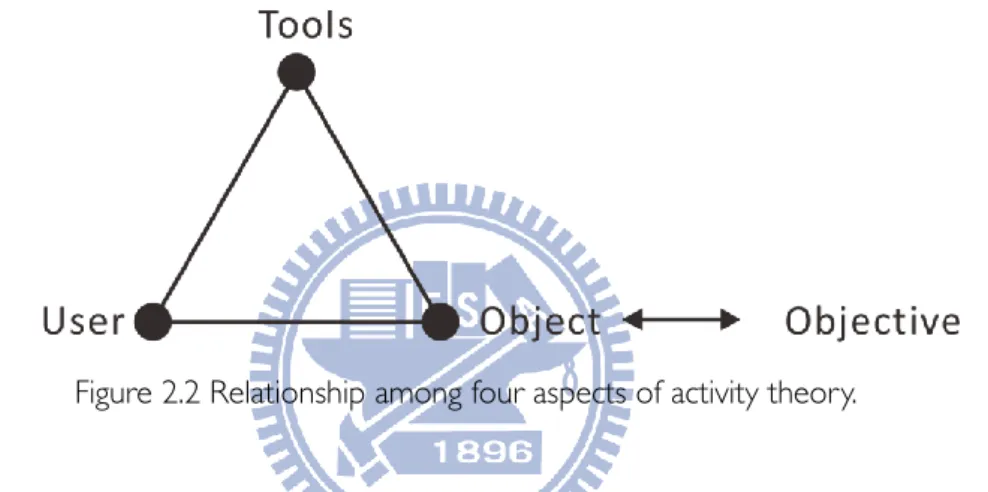
The activity theory is used to be the theoretical framework for describing the context of human activity in HCI field (Nardi,1996). According to this theory, user wants to achieve an objective in activity. And they could use the tools to achieve it. Objects and tools could be concrete or abstract. Tools, as mediations, are used to aid the object transiting into an objective. User could use to tools to manipulate and understand the object.
Figure 2.2 Relationship among four aspects of activity theory.
An activity consists of actions or chains of actions that related to each other by the same object and motivation. It can be defined in different levels: activity, action and operation which correlate to motivation, goal, and condition. Actions are planned consciously and have an immediate and defined goal. Actions can be broken in chains of operation. Operations are well-defined routine that address particular condition during the execution of action.
2.3 Gesture
In WIMP interface, the mental model of interaction with interface is only the fingers and eyes. But in daily life, people perform manifold gestures when they discourse with other people or interaction with objects. Gestures are defined as the “body movements” that use in communication with people (McNeill, 1992) and manipulation of objects (Fikkert, 2010). Users could interact with computer by using gesture because of the improvement of sensing technology. In HCI, the body movements consist of a motion of the hands, facial expressions, head movements, hand postures and whole body postures (Saffer, 2009).
10
2.3.1 Gesture Taxonomy in HCI
Generally, there are two main kinds of gesture; one is used to communicate with other people; the other is used to manipulate objects (Mulder, 1996). Kipp (2005) identified two classifications in daily communication gesture: non-communicative and communicative. According to the functions of gesture, Cadoz (1994) provided three classifications. Semiotic gestures are used to communicate meaningful information. Erogotic gestures are associated the human manipulation with artifacts. Epistemic gestures are exploratory motions that help human learn from physical world.
In HCI, Karam and Schraefel (2005) focused on the process of interacting instead of communication. He defined five classifications: deictic, manipulative, semaphoric, gesticulation and language.
Deictic gesture: deictic gestures involve pointing to confirm the spatial or identity position of an object.
Manipulative gesture: Quek et al. (2002) provided a definition of manipulative gesture as mapping the actual movements of the gesture hand/arm to the movements of the object in the interface. This type of gesture often requires the visual, force-feedback, or haptic feedback from the object being manipulated. User could interaction with physical objects to manipulate digital objects, such as rotate the doll’s head to manipulate head in MRI interface. (Hinckley, Pausch, Proffitt, & Kassell, 1998)
Semaphoric gesture: Quek et al. defined semaphoric gesture as “any gesturing system that employs a stylized dictionary of static or dynamic hand or arm gestures.” For example, user used numeric gestures (one through five) for navigating the interface (Alpern & Minardo, 2003), and there are many mouse gesture plug-in in browser e.g., All-in-One Gestures.
Gesticulation gesture: This is directly related to content of the speech. It is the most nature gesture.
Language gestures: language gestures are used for sign languages. They consist of a series of individual signs or gestures that combine to form grammatical structures.
This study would focus on the manipulative gesture. The feedback and the relation between manipulation and virtual object are the important issues.
11
2.3.2 Gesture Interface Design
Same gesture has different interpretation in different context. When researchers build a gesture interface, they often used user-defined method to define the relationship between gestures and functions in past study (Bhandari & Lim, 2008). Researchers showed how each function works to participants; participants need to select or create gestures to achieve the function. In the procedure of user defined experiment, Nielsen, Storring, Moeslund, and Granum (2004) used scenario that the application implements in.
The general usability principles are important for the gesture interface design, such as learnablity, effectiveness, efficiency. In addition, Saffer (2009) provided the characteristics of good gestural interface in his book:
Discoverable: Easy to know where could interact with. Trustworthy: Safe and respect users’ privacy.
Responsive: Clear feedback after manipulation.
Appropriate: Considerations of the culture, situation and context where the design is used. Meaningful: Fulfill users’ need.
Playful: Relax and less error. Pleasurable: Good look and feel.
2.4 Metaphor
Metaphor provides a framework that allows the user applying the knowledge from a familiar area to an unfamiliar area and enable users use their pre-existing to deal with a new situation such as an interface. (Carroll & Thomas, 1982) It provides the scaffolding for user learning how the interface works. (Bruner, 1960) From active learning theory (Carroll & Thomas, 1982), users retrieve some known knowledge based on the surface similarity. Through the interaction with the system, they understand more about the mapping between the source and target domain by context of use and their goal. And they form a representation of system finally.
Norman (1988) built a framework of the interaction among the designer, user, and interface. The designer’s conceptual model is comprehension of how the system works and used to build the system. The user’s mental model is the representations of how the system works. The user’s model is constructed by interacting with objects, people, environment, etc. Designers want the user’s model
12
could consist with the designer’s model. And designers only communicate with user through the system image. In model of the user interface (Figure 2.3), metaphor could be the bridge between the designer’s model and user’s model.
Figure 2.3 Framework of the interaction among designers, user and interface. From The psychology of
everyday things, by D. A. Norman, Basic Book.
2.4.1 Metaphor Classifications
Many researchers have provided various classification of metaphor. Marcus (1994) identifies two distinctions in user interface metaphors: organization and operation. Organization metaphors consist of structure, classes, objects, attributes of system. Operation metaphors are the action that users could do.
Hutchins (1989) has provided a classification of metaphor based on different level of interaction:
1. Activity metaphor refers to the users’ highest level goals. It is about the intention related to the outcome of interaction. For example, what the user does could be creating an artifact, cooperating with people, or doing an exercise.
2. Mode of interaction metaphors concerns the relationship between the user and the computer. These metaphors are task independent and determine what kind of things the user views the computer is, such as a band, a toolbox, a car, and etc.
3. Task domain metaphors enable users realize how tasks are structured.
2.4.2 Methodology of Developing Metaphors
When designer develop metaphors for a system, system functionality must be identified first. (Erickson, 1995) User’s need and the capabilities of the system should be concerned.
Then designer generate possible metaphors. They could be tools and artifact in physical world (Carroll, Mack, & Kellogg, 1988), such as the most famous “desktop” metaphor in computer. From the
13
existing metaphors that user is already familiar with, designer could apply some appropriate aspects to new metaphors such as the buttons and menus metaphor are used in many windows application. (Smyth, Anderson, & Altyc, 1995) Because user have already used before, they would learn the new metaphor easily. In addition, Idea sketching is a method to generate metaphors. The metaphorical words inspire designer to sketch metaphors for new systems. (Neale & Carroll, 1997) To realize the user’s work context is another way to generate metaphors. (Marcus, 1994) Contextual inquiry or interviewed could be applied.
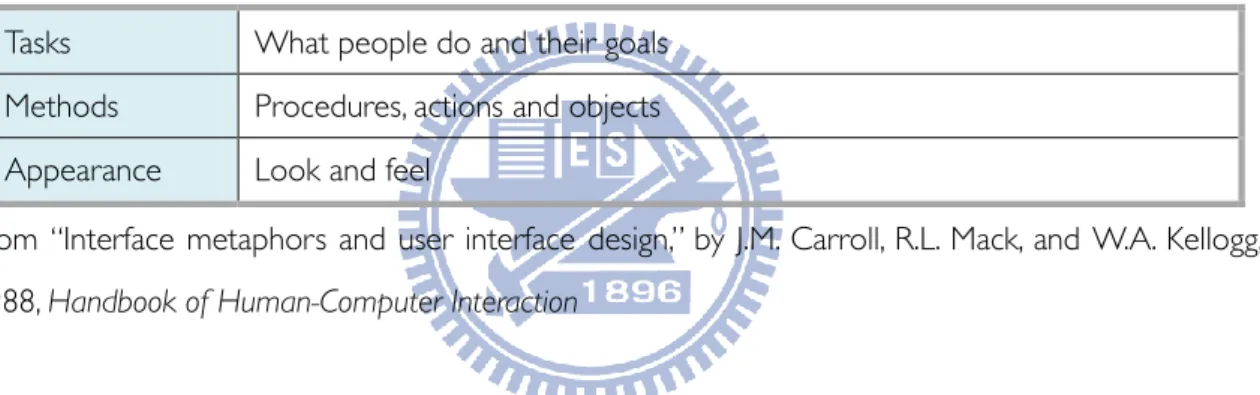
Next is evaluating metaphors to choose the most appropriate one. Carroll et al. (1998) presented a scenario-based method. The scenario concerns about the goals, procedures, and appearance (Table 2.2). By scenario-by-scenario comparison, designer could indentify matches and mismatches between source and target domains.
Table 2.2 The scenario for evaluating metaphors. Tasks What people do and their goals Methods Procedures, actions and objects Appearance Look and feel
From “Interface metaphors and user interface design,” by J.M. Carroll, R.L. Mack, and W.A. Kellogg, 1988, Handbook of Human-Computer Interaction
Metaphor could help user deal with unfamiliar situation by applying their pre-existing knowledge. This study would investigate the usage of metaphor in different level of interaction. The past study has demonstrated that the goals, procedures, and the appearance need to be concerned while applying metaphors.
2.5 Design Pattern
Alexander (1977), an architect, defines “Pattern” as a description of good practices to a design problem within appropriate context. In architecture, patterns were originally created by inhabitants but not by architects. They are used to address the “forces” (design tensions) or interests (Borchers, 2001). Patterns are influenced by culture, time and environment. (Alexander, 1979)
In Human-Computer Interaction, patterns also could be used to description the good practice. The initial definition of interaction patterns are presented in the workshop of ChiliPLoP’99.
14
“An Interaction Pattern Language generates space/time interaction designs that create a system image close to the user’s mental model of the task at hand, to make the human-computer interface as transparent as possible.” (Borchers, 2000)
Patterns define a context the user involve, a problem of designer, the solution, examples and some suggestions. The items of suggestions are based on different type of design and their needs. (Tidwell, 2005) In the workshop of ChiliPLoP’99, they also define three main dimensions of problems that pattern address:
1. Levels of abstraction: complete task, style of the interaction, and physical or virtual objects. 2. Function: perception, manipulation, and navigation.
3. Physical Dimension: spatial layout, sequence of tasks, and reaction time.
The patterns are good form to express design guidelines and are more concrete than design guidelines. In contrast with toolkit, patterns are more elasticity, they let designer could think more outside the toolkit. (Borchers, 2001)
In practice, patterns could improve habitability of user interface, website, and etc. Patterns provide a quick way to designer; let them realize the different solutions of a design problem in varied context. By using patterns, the design could be more understandable, pretty, usable, and etc (Tidwell, 2005). Every design group could use pattern to describe the best practice they found and share with group members or other people. In this study, design patterns were used to demonstrate the application of design guidelines. The format of design pattern is based on past studies.
2.6 Summary
We have shown how symmetric and asymmetric bimanual interactions are applied in interface design. Each hand plays different roles to complete tasks. They manipulate different physical controllers or virtual tools on the screen. This thesis focuses on asymmetric bimanual interaction with the sensing technology in mobile device. The analysis of bimanual interactions is based on Kinetic Chain model. In this model, each hand is a motor. There are three kinds of assembly of them: orthogonal, parallel and serial. This concept defines the possible coordination of two hands.
Besides the actions of two hands, this thesis is also concerned with activities related to movements. Observation is a common method to study human’s activity. In contextual design, work models are a well-structured way to analysis the observation data. The three level of an activity in
15
activity theory would also support the analysis.
Gesture interface allow people use their whole body to interact with computer. In HCI, gestures are categorized as deictic, manipulative, semaphoric, gesticulation and language. In the remainder of this work we will look at manipulative gesture. This kind of gestures manipulates objects and need feedback. When users use gestures to interact with a system, the meaning of gestures is depend on the context. Designer must design appropriate gestures for appropriate context.
Metaphors enable users to use pre-existing knowledge to address unfamiliar interface. Metaphor design could apply to activity, interaction, and task domain. Users have different levels of interpretations depends on the domain that metaphor apply to. Metaphors are used in visual, organization, operation, and etc. This thesis will look at visual and operation metaphors. In procedure of developing metaphors, designers define the users’ need and the function of system; then they generate possible metaphors. Last, the most important thing is to indentify matches between source and target domain.
In this thesis, design patterns are important ways to explain the design guidelines. In HCI, patterns define a context the user involve, a problem of designer, the solution, examples and some suggestions. Patterns have been used to address problems in different levels and parts of interface design. This thesis would choose an appropriate form of pattern to explain the design guidelines for bimanual interaction in mobile devices.
16
3. METHODOLOGY
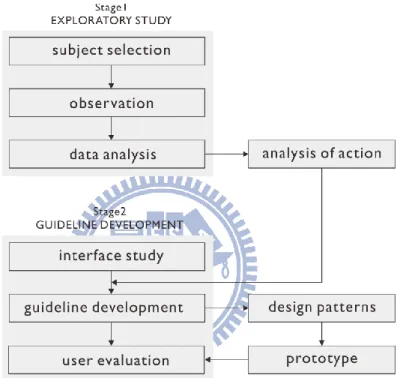
In order to discover what aspects of physical world and physical interaction could be applied in mobile device interaction design. The process consists of two stages. First, an exploratory study was conducted to identify the role of each hand and patterns of collaboration through observation of the manual actions in physical world. Second, we presented guidelines in mobile device interaction design. Then, we employed a user evaluation to modify guidelines (Figure 3.1).
Figure 3.1 The research structure of this thesis. 3.1 Exploratory Study
In order to gain insight into how two hands cooperate with each other, we conducted an exploratory study of a Chinese traditional handicraft - pinching dough dolls. We recorded whole process of each subject and performed an in-depth video analysis. The inspiration for this method was based partially on some similar research that applies the aspects of physical world and physical interaction to design. (Fitzmaurice, Balakrishnan, Kurtenbach, & Buxton, 1999; Guiard, 1987; Kruger et al., 2003)
3.1.1 Selection of Subject
17
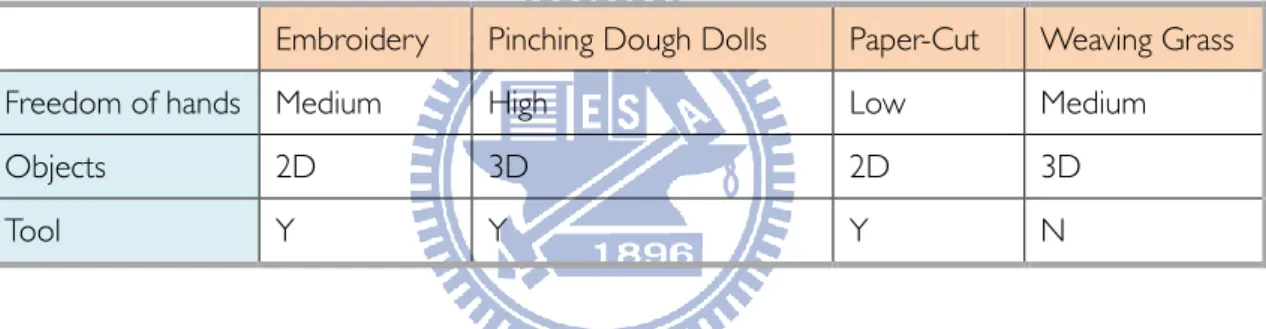
researchers observed activities that are similar to virtual activities in the real world. For example, the study of orientation and collaboration on the table could be applied to tabletop interface design (Kruger et al., 2003). People always use the mobile device without support for arms. So it is appropriate that the activity we observed consists of manifold bimanual interactions without support for arms. The hand’s movements are more similar. In traditional Chinese handicrafts, the handicraftsman performs manifold skilled hands’ actions. Handicraftsmen use their hands or tools to interact with the object they held. This kind of bimanual interaction is similar to the interaction with mobile devices. After wide reviews of Chinese handicrafts, there are four kinds of handicrafts that handicraftsman works without support for arms: embroidery, pinching dough dolls, paper-cut, and weaving grass. Then we classified three main attributes for comparison: (1) freedom of hands, the amount of kinds of manual actions and the range of hand movement, (2) the dimension of objects they made, and (3) whether they use tools or not (Table 3.1).
Table 3.1 Comparison among different handicrafts.
Embroidery Pinching Dough Dolls Paper-Cut Weaving Grass Freedom of hands Medium High Low Medium Objects 2D 3D 2D 3D Tool Y Y Y N
As table 3.1 showed, in pinching dough dolls, the hands’ actions are freer and more manifold. Handicraftsmen rotate and move the object both in 3-axis like interaction with mobile devices. The object they made is 3D and the most complicate. People use many kinds of tools to help them pinch. This activity contains more kinds of manual actions than other handicraft. So we choose pinching dough dolls to be our subject.
3.1.2 Procedure
We did observation in the real environment where subjects used to pinch dough dolls. First, each subject placed all tools and dough on the table. Then they made several dolls and showed their skills as much as possible. The whole process would be recorded by video camera; we focused on two hands’ actions and interactions with tools and dough. After they completed, we reviewed the video tape and asked them some questions if the role of each hand changed. Final, we asked them the benefit of the stick, how they use each hand, and how they arrange the tools on the table.
18
3.1.3 Qualitative Video Analysis
We marked the actions of each hand in the video. Then we built sequence models to analysis this activity. Beyer and Hohzblatt (1998) produced five working model – culture model, flow model, sequence model, physical model, and artifact model – to completely describe the context of works as a contextual design method. Sequence model reveals the strategy, intent, step, and breakdown of a work. Our research focuses on the bimanual collaboration. In order to clearly analysis the motivation, goal, and breakdown of every action and the temporal issue of collaboration, we combine sequence model and the activity’s three levels in activity theory. Steps in sequence model consist of actions of each hand. We would reveal goals and operations of these actions.
3.2 Guideline Development
3.2.1 Study of Appropriate Tasks on Mobile Device
In order to realize what kinds of tasks in mobile device are appropriate for our study. We collected different gesture designs in present mobile devices. Then according to the goals of the task, the tasks that are similar to the tasks in pinching dough doll would be selected. The gesture and visual feedback of them would be analyzed.
3.2.2 Guideline Development
Depending on the finding of exploratory, we developed design guidelines for the appropriate tasks. To explain the practical application of design guidelines, several design patterns are built. The patterns consist of the problem designer faced, the context of usage, and the interaction.
3.2.3 User Evaluation
In order to modify the design pattern and realized the concerns of bimanual interaction in mobile devices, we conducted user evaluation. The design of prototype and whole procedure will be described in Chapter 5.
19
4. EXPLORATORY RESULTS
This chapter described the process and bimanual actions of pinching dough dolls from exploratory study. Through critical analysis of these actions, we have identified roles of each hand and benefits of the stick that is a very distinctive jig in this activity
4.1 Overview of Pinching Dough Dolls
Like many kinds of sculptures, pinching dough dolls is that handicraftsmen make a doll by hands and tools. But the most distinguishing feature of pinching dough dolls is that handicraftsmen need to hold a stick to help them made the doll. Traditionally, the dough is made by rice and flour. And recently, it is made by resin. This kind of dough has very good malleability and viscosity and poor elasticity, so handicraftsmen could shape it very easily.
The main tools in pinch dough dolls are (1) the hairpin made by bull horn is used to carve, raise, and pierce the dough; (2) the scissor is used to made fur or clothes; (3) the comb is used to make parallel line, such as hair or beard; (4) the brush is used to paint some decorative patterns. (Figure 4.1)
Figure 4.1 Tools in pinching dough dolls. From “民俗技藝~捏麵人”, 月英, 2004, http://163.20.14.1/~offic-fu/other/3344cake/title.htm.
4.2 Subjects
We observed three participants and one series of films on YouTube (Table 4.1). Three participants are right-handed. U1 is a professional handicraftsmen. He pinches dough dolls for wholesale. The speed is the main issue which he concerns for. He is used to hold the stick by left hand and pinch by right hand. He made three dolls – parrot, cat, and zombie – with the stick and a panda without the stick. U2 is a novice which had learned pinching dough for one year. He is used to hold the stick by left hand and pinch dough by right hand. Because he wasn’t very familiar with stick, he often needed to put the stick way and pinched dough with two hands. U3 is a professional busker.
20
She has a very special habit. Her left hand is responsible for pinching dough; right hand is responsible for use tools e.g., hairpin, pen. U4 is a series of tutorial film on YouTube. He held the stick by left hand and pinch by right hand.
Table 4.1 Subjects.
Gender Skill Habit Object
U1 Male Expert Right hand-Pinch
Left hand-Stick holding
Parrot, Cat, and Zombie
U2 Male Novice Right hand-Pinch
Left hand-Stick holding
Spiderman, Robot
U3 Female Expert
Right hand-Stick holding & Tool Using
Left hand-Pinch
Monkey
U4
(from YouTube) Expert
Right hand-Pinch
Left hand-Stick holding Tiger, Sheep
4.3 Sequence Model
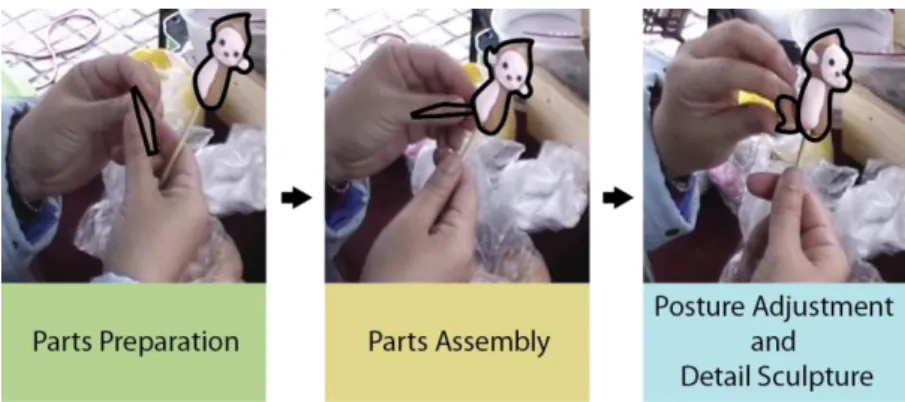
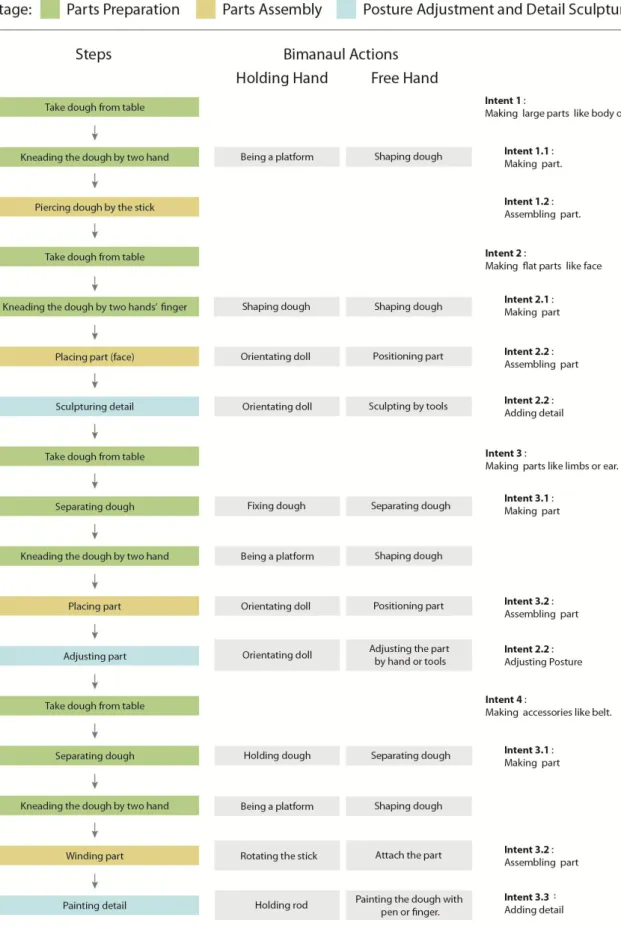
From consolidated sequence model (Figure 4.3) of all subjects, the process of pinching dough dolls consists of three main stages: Parts Preparation, Parts Assembly, and Posture Adjustment and Detail Sculpture. For example, the participant kneaded the dough to make a leg and then put it to the doll. Then he/she bended the leg to make particular posture (Figure 4.2). We present separate analysis of the bimanual action in these stages as follows. In analysis, the hand that holds the stick is named “holding hand” (HH) and the other hand is named “free hand” (FH). Due to the differences of each subject, we presented views of the data for individual subjects rather than summarizing across all subjects.
21
22
4.3.1 Parts Preparation
In this stage, subjects took little piece of dough from table first; they adjusted the size of the dough appropriate by taking some piece off. Then they shaped the dough by kneading it. There were many different types of parts e.g., big, small, ball, rod, single, pair. The bimanual actions were different when they made different types of parts. There are two main kinds of bimanual actions as following. (Table 4.2)
Kneading with two hands
To make flat parts e.g., face, clothes, two hands need to collaborate with each other. The experts could use holding hand (U1 used left hand, U3 used right hand) to hold the stick and collaborate with the free hand in meanwhile. (Quote 1) This action could increase the efficiency because participants could put the part on the doll immediately after they finished it. In contrast, the novice need to put the stick away and kneaded the dough with two hands. After the part is finished, he needed to take the stick and then put the part on the doll. This kind of bimanual action is similar to parallel assembly. Two hands’ actions are symmetric.
[U3] When she made face of the monkey, she kneaded the dough with two hand’s fingers. Left hand held
the stick in meanwhile. (Quote 1)
Kneading with one hand
When size and shape (ex., ball, rod, or drop) of the object were appropriate, subjects would use free hand to knead dough on the holding hand’s palm. After subjects finished the part, they could quickly put the part on the doll. (Quote 2)
[U1] When he made limbs of the cat, he took a piece of dough from the dough on table, and then used
right hand to knead dough on left hand’s palm. (Quote 2)
When the part was very small and more than two such as ears and eyes, some subjects would hold stick and dough simultaneously. So after free hands finish and place a part, it could quickly take some dough from the hand holding stick to make second one. (Figure 4.4) Most of subjects used left hand to hold the stick and dough. Only U3 used right hand because her habit. (Figure 4.5)
23
Figure 4.4 Making ears of the cat (Left hand held the stick and right hand pinched).
Figure 4.5 Making ears of the monkey (Right hand held the stick and left hand pinched). Table 4.2 Key steps in parts preparation stage.
Key Steps Hands Action Goal of Action Operation Role of the Stick
Kneading with two hands
HH Shape dough Shape dough Knead by fingers or palm
The stick could be set aside and recover easily FH Shape dough Shape dough Knead by
fingers or palm
Kneading with one hand
HH Be a platform Set the stick aside
Be a platform for FH
Hold stick
FH Shape dough Made dough flat
Knead by palm
4.3.2 Parts Assembly
After the part had been made, subjects would put the part on the doll. Some parts need to be placed to an appropriate position and some parts need to be wound around the doll. (Table 4.3) Placing Parts
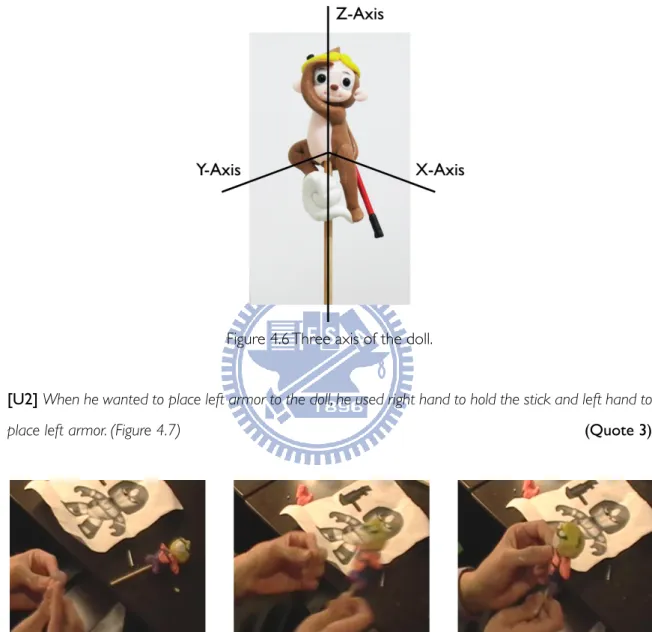
In order to place the part to an appropriate position, holding hand would rotate the stick and let the appropriate position face to the free hand first, and then free hand puts the part to the position. If they need to rotate a lot on z-axis, they would use both wrist and finger to rotate the stick (Figure 4.6). If the angle is small, they just need using wrist. If they need to rotate on other axis,
24
they also would use wrist. They usually use left hand to rotate the stick and right hand to place the object. Sometimes they would use left hand to place object because the orientation (Quote 3) and habit. This kind of bimanual is serial assembly. First, holding hand rotates the doll to appropriate position. Then free hand place part to the doll.
Figure 4.6 Three axis of the doll.
[U2] When he wanted to place left armor to the doll, he used right hand to hold the stick and left hand to
place left armor. (Figure 4.7) (Quote 3)
Figure 4.7 Using left hand to place the left armor. Winding Parts
Some parts, like circle or belt, need to be wound around the doll. They used free hand to pinch the parts and control the vertical position; holding hand rotated the stick to control the orientation on z-axis. In this task, two hands work simultaneously; we considered this bimanual action as a kind of orthogonal assembly. Although two hands manipulate different objects, their goal is to control the position of the parts in orthogonal dimension. (Figure 4.8)
25
Figure 4.8 Winding the circle around the head.
Table 4.3 Key steps in parts assembly stage.
Key Steps Hands Action Goal of Action Operation Role of the Stick
Placing parts
HH
Orientate the doll
Let the position face to FH Rotate the stick by finger or wrist Prevent HH from obstructing the manipulation of FH
FH Place the part Let the part fix in the appropriate position Move Press Winding part HH Orientate the doll
Control the orientation of doll on z-axis Rotate the stick by finger or wrist Prevent HH from obstructing the manipulation of FH FH Position the part
Control the position of the part on x and y-axis
Move
4.3.3 Posture Adjustment and Detail Sculpture
After the parts are placed on the doll, subjects would adjust the posture of parts by bending, winding, and etc. They also would sculpture the dough to make some detail e.g., cheek, ear canal by hands or tools. (Table 4.4)
Adjusting Posture
After the part was placed on the doll, subjects adjusted the posture and detail by moving and rotating the part. They rotated the stick and let the part face to the other hand. During the adjustment, they would rotate the stick in different directions to check the balance of the doll. They usually used left hand to hold the stick and right hand pinch but sometimes exchange because the orientation such as making a pair of symmetric parts. (Quote 4) In addition, when participants want
26
to make the part symmetric, two hands also adjust the part alternately. (Figure 4.9)
Figure 4.9 Two hands adjust the head alternatively. From “捏麵人教學影片綿綿小羊”, 蘇逸民, 2007, http://www.youtube.com/watch?v=oDbBWdl7g7Y.
[U4] When he wanted to make horns of sheep spiral, he use right hand to twist the right horn and left
hand to twist the left one. (Figure 4.10) (Quote 4)
Figure 4.10 Making a pair of spiral sheep’s horns. From “捏麵人教學影片綿綿小羊”, 蘇逸民, 2007, http://www.youtube.com/watch?v=oDbBWdl7g7Y.
Beside, in order to make some symmetric detail or adjust symmetry of doll, subjects sometimes use both hand to pinch dough. (Quote 5)
[U4] When he made cheeks of the doll, he used both hand to press the face of the doll in meanwhile.
(Quote 5)
Adjusting 3D Position
There was a more complicated adjustment that involves 3D rotation and movement. Two hands cooperate simultaneously in this step. Holding hand rotated the stick to control the orientation of objects on z-axis. Free hand moved the part on both three axes and adjusts the posture. This kind of bimanual interaction is similar to orthogonal assembly in KC model. Each hand controlled movements in orthogonal dimensions simultaneously. And they have the same goal. (Quote 6)
27
[U3] When she wanted to make the monkey looks like it is viewing something, she need to put its hand
upon its eyebrows. She pinched its hand to adjust the position on z-axis and hand’s posture by left hand. Right hand rotated the stick in meanwhile (Figure 4.11). (Quote 6)
Figure 4.11 Making the monkey look like viewing something. Sculpturing By Tools
Subjects used hairpin to sculpt lines, pierce holes, and make planes because these details were too precise to use finger. If the position didn’t face to the free hand that holds tool, they will rotate the stick and let the position face to free hand.
Subjects also used brush to paint some decoration. When they painted, holding hand will rotate the stick and let the position face to the free hand. In addition, holding hand’s finger would support free hand (Figure 4.12).
Figure 4.12 Left hand’s middle finger supports right hand. Table 4.4 Key steps in posture adjustment and detail sculpture stage.
Key Steps Hands Action Goal of Action Operation Role of the Stick
Adjusting Posture
HH Orientate the doll Fix the doll
Let the part face to FH
Rotate the stick
by finger or wrist Support the manipulation FH Adjust parts by hand
or tools
Make particular posture
28
Table 4.4 (continued)
Key Steps Hands Action Goal of Action Operation Role of the Stick
Adjusting 3D position
HH
Orientate doll Make particular posture (Orientation on z-axis)
Rotate the stick by finger or wrist Prevent HH from obstructing the manipulation of FH FH
Position parts Make particular posture (Control the position of part on x and y-axis) Rotate or move Sculpturing by tools HH
Orientate doll Let the position that need to be sculpted face to FH
Hold the stick
Support the manipulation FH Sculpted by tools Make tiny or geometric
details
Press or pierce by tools
4.4 Spatial-Temporal Patterns
From the analysis of bimanual actions, we saw two main kinds of spatial-temporal pattern of bimanual actions in assembly and adjustment stages. First kind is sequent placing/adjustment. It is similar to serial assembly in Guiad’s Kinematic Chain model. This kind of pattern emerges in placing part, adjusting posture and sculpturing by tools tasks. Two hands collaborate with each other step by step (Figure 4.13). Holding hand turned the doll and let the appropriate position to face to free hand. Then free hand puts the part on the doll or adjusts the part. The participants focus on the particular position. So the process proceeds very fast.
29
Second kind is concurrent placing/adjustment. It is similar to the orthogonal assembly in Guiard’s Kinematic Chain model. This kind of pattern emerges in winding part and adjusting 3D posture tasks. Two hands move objects simultaneously. Holding hand control the orientation on z-axis and free hand control the position on x- and y-axis. The participants focus on every position of the part in whole process. So the process proceeds more precisely and slowly (Figure 4.14).
Figure 4.14 Concurrent placing/adjustment 4.5 Each Hand’s Role
Holding hand and free hand play different roles in different tasks. Holding hand is usually non-dominant hand and free hand is usually dominant hand. But they would interchange because orientation (Quote 3), symmetric (Quote 4) or personal habit. The roles of each hand are presented as follows.
Holding hand’s roles
(1) Assistance: Holding hand assists free hand to complete task. It fixes the object, so free hand could place object and add details on the doll. And it rotates the stick to let the appropriate position or parts to face to free hand, then free hand could place parts, adjust posture, and sculpt the doll conveniently.
(2) Coordination: When participants need to wind the part around the doll, two hands collaborate with each other simultaneously. Holding hand controls the orientation of the part on z-axis.
(3) Perception: Users could efficiently view the doll from different points of view by rotating and moving the stick. (Quote 7)
30
[U1] He said the stick could help him view the doll more conveniently and completely than without the
stick. (Quote 7)
Free hand’s roles
(1) Manipulation: Free hand directly manipulates the parts. It precisely places the part to the appropriate position. It move and rotate the part to adjust the posture.
(2) Coordination: As we noted above, free hand needs to collaborate with holding hand in more complicated task such as winding.
4.6 The Stick is a Jig
From video analysis, the stick is used to hold and orient the doll. Holding hand could rotate and move the doll with it. It could be considered a jig. By definition of Wikipedia, “jip is a type of tool used
to control the location and/or motion of another tool. A jig's primary purpose is to provide repeatability, accuracy, and interchangeability in the manufacturing of products.” It helps participants view and
manipulate when they pinch dough dolls. In addition, the roles of each hand are distributed clearly through the jig.
(1) View: People view the doll more conveniently and completely with jigs compared to only by hands. Because jip is a long and thin stick, they could use both finger and wrist to rotate it. The range of rotation could be huge in small hand movement. (Quote 7) The jig could be a physical center line. It is a good reference for people checking the symmetry of doll. (Quote 8)
[U2] He says he could confirm where the center line of doll is by watching the stick. (Quote 8) (2) Manipulation: In the 3D assembly, when people places parts or adjust parts, holding hand could
keep distance from the doll. Holding hand could avoid interfering with the manipulation of free hand and rotate the doll in meanwhile. In addition, the jig makes the manipulation more facile. People could let the jig between fingers and knead the dough. After the part is finished, they could place it on the doll efficiently.
31
4.7 Correlation between Feedbacks, Operation, and Goal
Figure 4.15 Correlation diagram.
To apply the pre-existing knowledge to mobile device interface design, the goal, interaction method, and feedback are the important issues. Since the jig is an important tool in pinching dough dolls like the mobile device held by hand. We focused these issues of the bimanual collaborations with the jig. There were four main goals of these bimanual interactions. We connected the operations and the related goals. Then the visual feedbacks that occur during these operations would be connected to related operations. (Figure 4.15) Four main goals and their correlate issues are described as follow.
(1) Let objects in appropriate position: In placing parts, holding hand would rotate the jig to assist free hand moving the parts. In winding parts, holding hand rotates the jig and the free hand moves the part simultaneously. The people could see the 3D rotation of doll and the movement of the part with hand.
(2) Let objects fixed: In placing parts and winding parts, free hand would press the part to fix it, and holding hand would fix the doll.
(3) Make particular posture: In adjusting posture, holding hand would rotate the jig to assist free hand adjusting the posture of part.
(4) Show appropriate parts of whole: In placing parts and adjusting posture, holding hand rotates the doll to let the appropriate position to face to free hand. For viewing, it also rotates the doll to display the appropriate face for people checking shape of the dolls.
4.8 Summary
In the process of pinching dough dolls, handcrafters need to prepare parts, to assemble parts, to adjust the posture, and to sculpt detail. In these stages, there are many different kinds of bimanual interaction which are similar to parallel, orthogonal, and serial assembly in KC model. Based on the analysis of bimanual interaction, we have investigated the spatial-temporal patterns, roles of each hand, and the usage of the stick.
32
When handicraftsman focus on a particular position, holding hand rotates the stick and let the doll face to free hand. Then free hand could place or adjust part conveniently. When they need to focus on every position during a more complicated manipulation, two hands would cooperate with each other seamlessly and simultaneously.
In these bimanual interactions, each hand’s roles are separated due to the stick. Holding hand play three key roles: assistance, coordination, and perception. Free hand play two key roles: manipulation and coordination. Non-dominant hand’s and dominant hand’s role would interchange because the orientation and habit.
The long and thin stick is like a jig in pinching dough doll. This jig could help distribute roles to each hand. It could let the manipulation and view task more convenient and efficient.
33
5. DESIGN PATTERNS FOR BIMANUAL INTERACTION IN MOBILE DEVICE
Our intention is to allow two hands interacting naturally with mobile devices. The exploratory results showed smooth bimanual collaborations of moving, fabricating, winding, viewing, and adding detail in pinching dough dolls. Furthermore, before applying the pre-existing knowledge to interface design, the context of task should be considered (Carroll et al,. 1998). First, we explored the similar contexts between mobile device interaction and pinching dough dolls. The goal of tasks in each area would be considered. Second, through critical analysis of pinching dough dolls, roles of each hand, and benefits of the jig, we presented three design patterns for bimanual interaction in mobile devices.
5.1 Mapping between Physical and Virtual
Figure 5.1 Analysis of gesture designs in mobile devices.
In chapter 4, we have found out the main goals of bimanual interactions and the related manipulations and feedbacks in pinching dough dolls. In order to find appropriate context in mobile devices, we surveyed gesture designs that have similar goals in mobile phone first (Saffer, 2008; http://www.youtube.com). According to the four main goals found in chapter 4, the gestures were connected to related goals. Each gesture also connected to the GUI (graphical user interface) effect caused by the gesture. Figure 5.1 showed the correlation between goals, gestures and GUI effect. But in mobile devices, users seldom adjust an object’s particular posture. For example, when users want to let objects in appropriate position, to let objects fixed and to show appropriate parts of whole, there are correlate designs.
Then, we made a mapping between the physical (pinching dough dolls) and virtual (mobile devices) (Figure 5.2).
34