TIBCO LogLogic® Log Management Intelligence (LMI)
Web Services API Implementation Guide
Software Release 6.1 March 2017
Two-Second Advantage®
OR BUNDLED TIBCO SOFTWARE IS SOLELY TO ENABLE THE FUNCTIONALITY (OR PROVIDE LIMITED ADD-ON FUNCTIONALITY) OF THE LICENSED TIBCO SOFTWARE. THE EMBEDDED OR BUNDLED SOFTWARE IS NOT LICENSED TO BE USED OR ACCESSED BY ANY OTHER TIBCO SOFTWARE OR FOR ANY OTHER PURPOSE.
USE OF TIBCO SOFTWARE AND THIS DOCUMENT IS SUBJECT TO THE TERMS AND CONDITIONS OF A LICENSE AGREEMENT FOUND IN EITHER A SEPARATELY EXECUTED SOFTWARE LICENSE
AGREEMENT, OR, IF THERE IS NO SUCH SEPARATE AGREEMENT, THE CLICKWRAP END USER LICENSE AGREEMENT WHICH IS DISPLAYED DURING DOWNLOAD OR INSTALLATION OF THE SOFTWARE (AND WHICH IS DUPLICATED IN THE LICENSE FILE) OR IF THERE IS NO SUCH SOFTWARE LICENSE AGREEMENT OR CLICKWRAP END USER LICENSE AGREEMENT, THE LICENSE(S) LOCATED IN THE “LICENSE” FILE(S) OF THE SOFTWARE. USE OF THIS DOCUMENT IS SUBJECT TO THOSE TERMS AND CONDITIONS, AND YOUR USE HEREOF SHALL CONSTITUTE ACCEPTANCE OF AND AN AGREEMENT TO BE BOUND BY THE SAME.
This document contains confidential information that is subject to U.S. and international copyright laws and treaties. No part of this document may be reproduced in any form without the written authorization of TIBCO Software Inc.
TIBCO, Two-Second Advantage, and LogLogic are either registered trademarks or trademarks of TIBCO Software Inc. in the United States and/or other countries.
All other product and company names and marks mentioned in this document are the property of their respective owners and are mentioned for identification purposes only.
THIS SOFTWARE MAY BE AVAILABLE ON MULTIPLE OPERATING SYSTEMS. HOWEVER, NOT ALL OPERATING SYSTEM PLATFORMS FOR A SPECIFIC SOFTWARE VERSION ARE RELEASED AT THE SAME TIME. SEE THE README FILE FOR THE AVAILABILITY OF THIS SOFTWARE VERSION ON A SPECIFIC OPERATING SYSTEM PLATFORM.
THIS DOCUMENT IS PROVIDED “AS IS” WITHOUT WARRANTY OF ANY KIND, EITHER EXPRESS OR IMPLIED, INCLUDING, BUT NOT LIMITED TO, THE IMPLIED WARRANTIES OF MERCHANTABILITY, FITNESS FOR A PARTICULAR PURPOSE, OR NON-INFRINGEMENT.
THIS DOCUMENT COULD INCLUDE TECHNICAL INACCURACIES OR TYPOGRAPHICAL ERRORS.
CHANGES ARE PERIODICALLY ADDED TO THE INFORMATION HEREIN; THESE CHANGES WILL BE INCORPORATED IN NEW EDITIONS OF THIS DOCUMENT. TIBCO SOFTWARE INC. MAY MAKE IMPROVEMENTS AND/OR CHANGES IN THE PRODUCT(S) AND/OR THE PROGRAM(S) DESCRIBED IN THIS DOCUMENT AT ANY TIME.
THE CONTENTS OF THIS DOCUMENT MAY BE MODIFIED AND/OR QUALIFIED, DIRECTLY OR INDIRECTLY, BY OTHER DOCUMENTATION WHICH ACCOMPANIES THIS SOFTWARE, INCLUDING BUT NOT LIMITED TO ANY RELEASE NOTES AND "READ ME" FILES.
Copyright © 2002-2017 TIBCO Software Inc. All rights reserved.
TIBCO Software Inc. Confidential Information
|
iiiContents
Preface . . . .vii
Related Documentation . . . viii
Typographical Conventions . . . x
Connecting with TIBCO Resources . . . xii
How to Join TIBCOmmunity . . . xii
How to Access TIBCO Documentation. . . xii
How to Contact TIBCO Support . . . xii
Chapter 1 Getting Started . . . .1
Overview of the Web Services API . . . 2
Administration Service . . . 2
Report and Search Service . . . 2
Requirements . . . 3
Chapter 2 Alert Service Operations . . . .5
Overview . . . 6
Implementation Guidelines . . . 7
Alert Service Operation Definitions . . . 8
Status Codes . . . 26
Common Request Parameters . . . 27
Alert-Specific Request Parameters . . . 31
Chapter 3 Device Service Operations . . . .55
Overview . . . 56
Implementation Guidelines . . . 56
Device Service Operation Descriptions . . . 57
Status Codes . . . 69
Common Request Parameters . . . 70
Chapter 4 Device Group Service Operations . . . .73
Overview . . . 74
Implementation Guidelines . . . 74
Chapter 5 Message Routing Service Operations . . . 95
Overview . . . 96
Implementation Guidelines . . . 96
Message Routing Service Operation Descriptions . . . 97
Status Codes . . . 109
Common Request Parameters . . . 110
Chapter 6 Search Filter Service Operations . . . 113
Overview . . . 114
Implementation Guidelines . . . 114
Search Filter Service Operation Descriptions . . . 115
searchFilterResponse Type. . . 126
Status Codes . . . 127
Common Request Parameters . . . 128
Chapter 7 User Administration Service Operations. . . 131
Overview . . . 132
Implementation Guidelines . . . 132
User Administration Service Operation Descriptions . . . 133
Status Codes . . . 145
Common Request Parameters . . . 146
Chapter 8 System Service . . . 149
Overview . . . 150
Status Codes . . . 151
Get Appliance System Info Operation . . . 152
Get Appliance System Info Request Parameters. . . 152
Get Appliance System Info Response Attributes . . . 152
Chapter 9 Report and Search Service . . . 155
Overview . . . 156
Status Codes . . . 157
Get Report Operation . . . 158
Get Report Request Parameters . . . 158
Specifying Filters for Index Searches. . . 161
Specifying Filters for Detail Report . . . 162
Date/Time Formats for getReport . . . 162
Get Report Response Attributes . . . 163
Contents
|
vGet Template Report List Operation . . . 165
Get Template Report List Request Parameter . . . 165
Get Template Report List Response Attributes . . . 165
Get Custom Report List Operation . . . 166
Get Custom Report List Request Parameter . . . 166
Get Custom Report List Response Attributes. . . 166
Get Report Meta Info Operation. . . 167
Get Report Meta Info Request Parameter . . . 168
Get Report Meta Info Response Attributes. . . 169
Get Detail Report Meta Info Operation . . . 170
Get Detail Report Meta Info Request Parameter . . . 170
Get Detail Report Meta Info Response Attributes . . . 170
Chapter 10 Authentication Service API. . . .173
GetAuthenticationToken Operation . . . 174
Request Parameters . . . 174
Response . . . 174
Status Codes . . . 174
Chapter 11 Reference Lists. . . .175
Alert Types . . . 176
Message Areas . . . 178
User Administration Privileges . . . 179
|
viiPreface
The TIBCO LogLogic® Appliance-based solution lets you capture and manage log data from all types of sources in your enterprise. TIBCO LogLogic Appliances install within 10 minutes and begin collecting and aggregating data from
connected log sources immediately.
This document describes the TIBCO LogLogic Web Services APIs that enable you to interface with the TIBCO LogLogic Appliances to manage reports and alerts as well as to perform searches.
Topics
• Related Documentation, page viii
• Typographical Conventions, page x
• Connecting with TIBCO Resources, page xii
Related Documentation
The LogLogic documentation is available on the TIBCO LogLogic documentation page.
The following documents contain information about the LogLogic Appliances:
• TIBCO LogLogic® LMI Release Notes — Provides information specific to the release including product information, new features and functionality, resolved issues, known issues and any late-breaking information. Check the LogLogic Customer Support Website periodically for further updates.
• TIBCO LogLogic® LMI Hardware Installation Guide — Describes how to get started with your LogLogic Appliance. In addition, the guide includes details about the Appliance hardware for all models.
• TIBCO LogLogic® LMI Configuration and Upgrade Guide — Describes how to install and upgrade the LogLogic Appliance software.
• TIBCO LogLogic® LMI User Guide — Describes how to use the LogLogic solution, viewing dashboard, managing reports, managing alerts, and performing searches.
• TIBCO LogLogic® LMI Administration Guide — Describes how to administer the LogLogic solution including all Management and Administration menu options.
• TIBCO LogLogic® Log Source Packages Configuration Guides — Describe how to support log data from various log sources. There is a separate manual for each supported log source. These documents include documentation on LogLogic Collectors as well as documentation on how to configure log sources to work with the LogLogic solution.
• TIBCO LogLogic® Log Source Packages Collector Guides — Describe how to implement support for using a LogLogic Collector for specific log sources such as IBM i5/OS and ISS Site Protector.
• TIBCO LogLogic® LMI Web Services API Implementation Guide — Describes how to implement the LogLogic Web Services APIs to manage reports, manage alerts, perform searches, and administrate the system.
• TIBCO LogLogic® LMI Syslog Alert Message Format Quick Reference Guide — Describes the LogLogic Syslog alert message format.
• TIBCO LogLogic® LMI Enterprise Virtual Appliance Quick Start Guide— Provides instructions on how to quickly set up the TIBCO Enterprise Virtual Appliance.
• TIBCO LogLogic® LMI Log Source Report Mapping Guide — Provides provides a set of tables listing Log Source Reports by Device Type, sorted by UI Category.
Preface
|
ix• TIBCO LogLogic® LMI XML Import/Export Entities Reference Guide—Describes how to manually import, export, and edit XML files into and from the appliance when not using the appliance UI.
• TIBCO LogLogic® LMI Memory Module Installation Guide—Describes how to install and remove memory modules in LogLogic appliances.
Typographical Conventions
The following typographical conventions are used in this manual.
Table 1 General Typographical Conventions Convention Use
code font Code font identifies commands, code examples, filenames, pathnames, and output displayed in a command window. For example:
Use MyCommand to start the foo process.
bold code font
Bold code font is used in the following ways:
• In procedures, to indicate what a user types. For example: Type admin.
• In large code samples, to indicate the parts of the sample that are of particular interest.
• In command syntax, to indicate the default parameter for a command. For example, if no parameter is specified, MyCommand is enabled:
MyCommand [enable | disable]
italic font Italic font is used in the following ways:
• To indicate a document title. For example: See TIBCO ActiveMatrix BusinessWorks Concepts.
• To introduce new terms For example: A portal page may contain several portlets. Portlets are mini-applications that run in a portal.
• To indicate a variable in a command or code syntax that you must replace.
For example: MyCommandPathName Key
combinations
Key name separated by a plus sign indicate keys pressed simultaneously. For example: Ctrl+C.
Key names separated by a comma and space indicate keys pressed one after the other. For example: Esc, Ctrl+Q.
The note icon indicates information that is of special interest or importance, for example, an additional action required only in certain circumstances.
The tip icon indicates an idea that could be useful, for example, a way to apply the information provided in the current section to achieve a specific result.
Preface
|
xiTable 2 Syntax Typographical Conventions
The warning icon indicates the potential for a damaging situation, for example, data loss or corruption if certain steps are taken or not taken.
Table 1 General Typographical Conventions (Cont’d) Convention Use
Convention Use
[ ] An optional item in a command or code syntax.
For example:
MyCommand [optional_parameter] required_parameter
| A logical OR that separates multiple items of which only one may be chosen.
For example, you can select only one of the following parameters:
MyCommand para1 | param2 | param3
{ } A logical group of items in a command. Other syntax notations may appear within each logical group.
For example, the following command requires two parameters, which can be either the pair param1 and param2, or the pair param3 and param4.
MyCommand {param1 param2} | {param3 param4}
In the next example, the command requires two parameters. The first parameter can be either param1 or param2 and the second can be either param3 or param4:
MyCommand {param1 | param2} {param3 | param4}
In the next example, the command can accept either two or three parameters.
The first parameter must be param1. You can optionally include param2 as the second parameter. And the last parameter is either param3 or param4.
MyCommand param1 [param2] {param3 | param4}
Connecting with TIBCO Resources
How to Join TIBCOmmunity
TIBCOmmunity is an online destination for TIBCO customers, partners, and resident experts. It is a place to share and access the collective experience of the TIBCO community. TIBCOmmunity offers forums, blogs, and access to a variety of resources. To register, go to http://www.tibcommunity.com.
How to Access TIBCO Documentation
The latest documentation for all TIBCO products is available on the TIBCO Documentation site (https://docs.tibco.com), which is updated more frequently than any documentation that might be included with the product.
Documentation for TIBCO LogLogic products is available on the TIBCO LogLogic documentation page.
How to Contact TIBCO Support
For comments or problems with this manual or the software it addresses, contact TIBCO Support as follows:
• For an overview of TIBCO Support, and information about getting started with TIBCO Support, visit this site:
http://www.tibco.com/services/support
• If you already have a valid maintenance or support contract, visit this site:
https://support.tibco.com
Entry to this site requires a user name and password. If you do not have a user name, you can request one.
|
1Chapter 1 Getting Started
The TIBCO LogLogic Web Services API lets you develop programs, or use Web Services tools, to interface with the TIBCO LogLogic Appliances. You can use the Web Services API to run reports and searches, manage alert rules, manage user accounts, manage forwarding rules, and manage search filters.
Topics
• Overview of the Web Services API, page 2
• Requirements, page 3
Overview of the Web Services API
The API is XML Web Services-based to provide a standardize API transport.
TIBCO LogLogic provides two main Services:
• Administration Service - for managing administrative tasks
• Report and Search Service - for accessing report and search capabilities
Administration Service
The TIBCO LogLogic Administration Service API lets you manage TIBCO LogLogic Appliances via the following operations:
• Alert Service Operations 5
• Device Service Operations 55
• Device Group Service Operations 73
• Message Routing Service Operations 95
• Search Filter Service Operations 113
• User Administration Service Operations 131
• System Service 149
Report and Search Service
The TIBCO LogLogic Search Service API lets you manage reports and search queries on TIBCO LogLogic Appliances. Managing report and search queues includes running reports, viewing reports, and searching reports to return specific data.
• Report and Search Service 155
Requirements
|
3Requirements
To use the TIBCO LogLogic Web Services API, you need:
• a software tool to integrate your applications with the TIBCO LogLogic Web Services API (such as Apache Axis (for Java and C++ clients) or SOAP::Lite (for Perl clients).
• a software tool to create the client side API code (such as wsdl2java or wsdl2perl).
• LogLogic WSDL
• a software tool to generate client stubs
• TIBCO LogLogic Appliance UserID with “access web services” enabled Port 443 is the required port on the LogLogic Appliance for accessing the Web Services API calls.
|
5Chapter 2 Alert Service Operations
The Alert Service operations let you manage alerts in the TIBCO LogLogic Appliance.
Topics
• Overview, page 6
• Implementation Guidelines, page 7
• Alert Service Operation Definitions, page 8
• Status Codes, page 26
• Common Request Parameters, page 27
• Alert-Specific Request Parameters, page 31
Overview
The Alert Service operations let you create, read, update, and delete alerts as well as view all alerts in the TIBCO LogLogic Appliance.
Using the CreateAlert and UpdateAlert operations, you can define and update rules to detect unusual traffic on your network or detect Appliance system anomalies.
Alerts can be configured to generate SNMP events and/or send an email notification when the alert rule is triggered for a specific type of alert.
The alert types are Adaptive Baseline, Cisco PIX/ASA Messages, Message Volume, Network Policy, Pre-defined Search Filter, Ratio Based, System, VPN Connections, VPN Messages, and VPN Statistics. For more information on supported alerts, see Alert Types on page 176 or the online help for each specific alert. In the LogLogic Appliance, to view the user interface implementation navigate to Alerts.
When creating (CreateAlert) or updating (UpdateAlert) an alert, you must specify a value for the alertRules Common Request Parameter. The alertRules value is used to define alert rules for a specific alert.
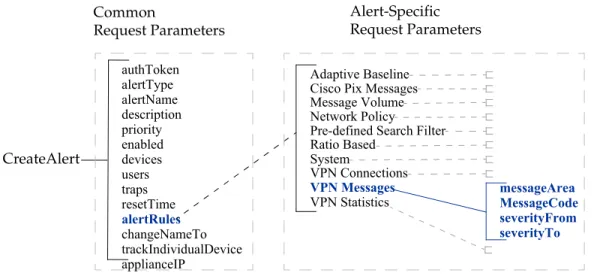
on page 6 provides a graphical view of the Common and Alert-Specific
Parameters. The example displays an implementation of the createAlert operation specifying the VPN Messages alert type for the alertRules.
Figure 1 Common and Alert-Specific Request Parameters, with VPN Messages for alertRules
authToken alertType alertName description priority enabled devices users traps resetTime alertRules changeNameTo trackIndividualDevice
Adaptive Baseline Cisco Pix Messages Message Volume Network Policy
Pre-defined Search Filter Ratio Based
System
VPN Connections VPN Messages VPN Statistics Common
Request Parameters
messageArea MessageCode severityFrom severityTo Alert-Specific
Request Parameters
CreateAlert
applianceIP
Implementation Guidelines
|
7Implementation Guidelines
The following are general implementation guidelines for the Alert Service operations:
• A set of Common Request Parameters are required for each Alert Service operation.
The createAlert Operation, createAlertRemote Operation, updateAlert Operation, and updateAlertRemote Operation require that you specify Common and Alert-Specific Request Parameters. Alert-Specific Request Parameters are specified using the alertRules Common Request Parameter.
• Alert Rules, defined in the alertRules Common Request Parameter, are specified as a string in the format:
“/pararmeter1/valueA//parameter2/valueD/valueE/”
For example, a rule for the Network Policy alert is:
“FewerThan/100//MoreThan/10//alertFilter/False//policyAction/Ac cept//srcIPMin/10.1.2.3//srcIPMax/255.255.255.255//srcPortMin/0 //srcPortMax/100//destIPMin/10.1.1.123//destIPMax/255.255.255.2 55//destPortMin/0//destPortMax/100//protocol/all”
For specific usage rules, see Common Request Parameters on page 27 and Alert-Specific Request Parameters on page 31.
Alert Service Operation Definitions
There are two kinds of operations:
• local - operation is performed on the local Appliance itself
• remote - operations (names ending with Remote) performed on a specified remote Appliance
The Alert Service Operations are as follows:
• createAlert Operation, page 9
• createAlertRemote Operation on page 10
• readAlert Operation, page 11
• readAlertRemote Operation, page 12
• updateAlert Operation, page 13
• updateAlertRemote Operation, page 14
• deleteAlert Operation, page 15
• deleteAlertRemote Operation, page 16
• getList Operation, page 17
• getListRemote Operation, page 18
• alertResponse Type, page 19
• getAlertHistory Operation, page 20
• acknowledgeAlertHistoryByKey Operation, page 21
• removeAlertHistoryByKey Operation, page 22
• removeAlertHistory Operation, page 23
• alertHistoryResponse Type, page 24
createAlert Operation
|
9createAlert Operation
The createAlert operation lets you create new alert rules in the TIBCO LogLogic Appliance.
When using createAlert, you must specify:
• Common Request Parameters on page 27
• Alert-Specific Request Parameters on page 31 (includes alertRules format description)
Request Parameters
authToken, alertType, name, desc, priorityName, enabled, deviceNames, usernames,
trapIds, resetTime, trackIndividualDevice, alertRules, snmpOId
For more information on each Common Request Parameter, see Common Request Parameters on page 27.
Response alertResponse (see alertResponse Type on page 19)
Example
To create a VPN Connection Alert named MyAlertName:
createAlert authstr "VPN Connection Alert" "MyAlertName" "VPN Connection Alert Description" "low" "10.1.2.3_04" "admin" " " "400"
"yes"
"VPNUser/LogLogicUser//VPNGroup/LogLogicGroup//disconnectReason/is denied access” “”
The Alert-Specific Request parameters specified in the alertRules parameter are also returned. The response depends on the alert type used.
createAlertRemote Operation
The createAlertRemote operation lets you create new alert rules on a managed TIBCO LogLogic Appliance from a Management Station.
When using createAlertRemote, you must specify:
• Common Request Parameters on page 27
• Alert-Specific Request Parameters on page 31 Request
Parameters
authToken, applianceIP, alertType, name, desc, priorityName, enabled,
deviceNames, usernames, trapIds, resetTime, trackIndividualDevice, alertRules,
snmpOId
For more information on each Common Request Parameter, see Common Request Parameters on page 27.
Response alertResponse (see alertResponse Type on page 19)
Example
To create a VPN Connection Alert named MyAlertName on remote Appliance 1.2.20.100:
createAlertRemote authstr 1.2.20.100 "VPN Connection Alert"
"MyAlertName" "VPN Connection Alert Description" "low"
"10.1.2.3_04" "admin" " " "400" "yes"
"VPNUser/LogLogicUser//VPNGroup/LogLogicGroup//disconnectReason/is denied access” “”
The Alert-Specific Request parameters specified in the alertRules parameter are also returned. The response depends on the alert type used.
readAlert Operation
|
11readAlert Operation
The readAlert operation lets you view the details of existing alerts in the TIBCO LogLogic Appliance.
Request Parameters
authToken, alertName
Response alertResponse (see alertResponse Type on page 19) Example
To view the details of the MyAlertName alert:
readAlert authstr "MyAlertName"
readAlertRemote Operation
The readAlertRemote operation lets you view the details of existing alerts on a managed TIBCO LogLogic Appliance from a Management Station.
Request Parameters
authToken, applianceIP, alertName
Response alertResponse (see alertResponse Type on page 19) Example
To view the details of the MyAlertName alert on remote Appliance 1.2.20.100:
readAlertRemote authstr 1.2.20.100 "MyAlertName"
updateAlert Operation
|
13updateAlert Operation
The updateAlert operation lets you update existing alerts in the TIBCO LogLogic Appliance.
When using updateAlert, you must specify:
• Common Request Parameters on page 27
• Alert-Specific Request Parameters on page 31 Request
Parameters
authToken, alertType, name, desc, priorityName, enabled, deviceNames,
usernames, trapIds, resetTime, trackIndividualDevice, alertRules, snmpOId,
changeNameTo
Response alertResponse (see alertResponse Type on page 19)
Example
To update a VPN Connection Alert named MyAlertName to be named NewAlertName with the priority set at high:
updateAlert authstr "VPN Connection Alert" "MyAlertName" "VPN Connection Alert Description" "low" "10.1.2.3_04" "admin" " " "400"
"yes"
"VPNUser/LogLogicUser//VPNGroup/LogLogicGroup//disconnectReason/is denied access” “NewAlertName”
The Alert-Specific Request parameters specified in the alertRules parameter are also returned. The response depends on the alert type used.
updateAlertRemote Operation
The updateAlertRemote operation lets you update existing alerts on a managed TIBCO LogLogic Appliance from a Management Station.
When using updateAlertRemote, you must specify:
• Common Request Parameters on page 27
• Alert-Specific Request Parameters on page 31 Request
Parameters
authToken, applianceIP, alertType, name, desc, priorityName, enabled,
deviceNames, usernames, trapIds, resetTime, trackIndividualDevice, alertRules,
snmpOId, changeNameTo
Response alertResponse (see alertResponse Type on page 19)
Example
To update a VPN Connection Alert named MyAlertName to be named NewAlertName with the priority set at high, on remote Appliance 1.2.20.100:
updateAlert authstr 1.2.20.100 "VPN Connection Alert" "MyAlertName"
"VPN Connection Alert Description" "low" "10.1.2.3_04" "admin" " "
"400" "yes"
"VPNUser/LogLogicUser//VPNGroup/LogLogicGroup//disconnectReason/is denied access” “NewAlertName”
The Alert-Specific Request parameters specified in the alertRules parameter are also returned. The response depends on the alert type used.
deleteAlert Operation
|
15deleteAlert Operation
The deleteAlert operation lets you delete existing alerts in the TIBCO LogLogic Appliance.
Request Parameters
authToken, alertName
Response alertResponse (see alertResponse Type on page 19)
Example
To delete the alert named MyAlertName:
deleteAlert authstr “MyAlertName”
deleteAlertRemote Operation
The deleteAlertRemote operation lets you delete existing alerts on a managed TIBCO LogLogic Appliance from a Management Station.
Request Parameters
authToken, applianceIP, alertName
Response alertResponse (see alertResponse Type on page 19)
Example
To delete the alert named MyAlertName on remote Appliance 1.2.20.100:
deleteAlertRemote authstr 1.2.20.100 “MyAlertName”
getList Operation
|
17getList Operation
The getList operation lets you retrieve the complete list of all alerts currently defined in the TIBCO LogLogic Appliance.
Request Parameter
authToken
Response If resultCount is greater than 0 and statusCode is 2000 (successful), the response returns a list of all alerts (total number indicated by resultCount) currently configured in the remote TIBCO LogLogic Appliance.
If resultCount is 0 and statusCode is not 2000 (successful), an error is returned in statusMessage.
Example
To retrieve a list of all alerts defined in the Appliance:
getList authstr
getListRemote Operation
The getListRemote operation lets you retrieve the complete list of all alerts currently defined on a managed TIBCO LogLogic Appliance from a Management Station.
Request Parameter
authToken , applianceIP
Response If resultCount is greater than 0 and statusCode is 2000 (successful), the response returns a list of all alerts (total number indicated by resultCount) currently configured in the remote TIBCO LogLogic Appliance.
If resultCount is 0 and statusCode is not 2000 (successful), an error is returned in statusMessage.
Example
To retrieve a list of all alerts defined in remote Appliance 1.2.20.100:
getListRemote authstr 1.2.20.100
alertResponse Type
|
19alertResponse Type
alertResponse is returned for all alert operations except getList and getListRemote.
alertResponse always contains the following common elements:
authToken resultCount statusCode statusMessage summaryOnly
If resultCount is 1 and statusCode is 2000 (successful), the resultSet element is included after resultCount listing the following Alert details:
alertType
name desc
priorityName enabled deviceNames usernames trapIds resetTime
trackIndividualDevice alertRules
snmpOId (createAlert and createAlertRemote only)
changeNameTo (updateAlert and updateAlertRemote only)
If resultCount is 0 and statusCode is not 2000 (successful), an error is returned in statusMessage.
The Alert-Specific Request parameters specified in the alertRules parameter are also returned. The response depends on the alert type used.
getAlertHistory Operation
The getAlertHistory operation lets you retrieve all alert logs currently on the TIBCO LogLogic Appliance. You may also use the filters to narrow down the result list.
Request Parameter
authToken,applianceIP, filters
Response alertHistoryResponse (see alertHistoryResponse Type on page 24)
If resultCount is greater than 0 and statusCode is 2000 (successful), the response returns a list of alert logs (total number indicated by resultCount) currently on the remote TIBCO LogLogic Appliance.
If resultCount is 0 and statusCode is not 2000 (successful), an error is returned in statusMessage.
If the appliance is a management station, you may get the aggregated alert logs by specifying “All” in applianceIP.
Example
To retrieve the list of all high priority alert logs on Appliance 1.2.20.100:
getAlertHistory authstr 1.2.20.100 /Priority/=/High/
To retrieve all alert logs on Appliance 1.2.20.100 with empty filters:
getAlertHistory authstr 1.2.20.100 “”
To retrieve all new alert logs on Appliance 1.2.20.100:
getAlertHistory authstr 1.2.20.100 /Type/=/Unacknowledged/
acknowledgeAlertHistoryByKey Operation
|
21acknowledgeAlertHistoryByKey Operation
The acknowledgeAlertHistoryByKey operation lets you acknowledge a list of alert logs currently on the TIBCO LogLogic Appliance. You have to obtain the key list from getAlertHistory operation.
If you have obtained a list from the aggregated alert logs, you must specify “All”
in applianceIP. Otherwise, it will be processed in single appliance mode and only alert logs on current appliance will be affected.
If resultCount is not 0, it means there are invalid keys in your key list. You can browse the returned resultSet for these keys.
Request Parameter
authToken,applianceIP, keyList
Response alertHistoryResponse (see alertHistoryResponse Type, page 24)
Example
To acknowledge one or more alert logs on the Appliance 1.2.20.100:
acknowledgeAlertHistoryByKey authstr 1.2.20.100 keyList
removeAlertHistoryByKey Operation
The removeAlertHistoryByKey operation lets you remove a list of alert logs currently on the LogLogic Appliance. You have to obtain the key list from
getAlertHistory operation.
If you have obtained a list from the aggregated alert logs, you must specify “All”
in applianceIP. Otherwise, it will be processed in single Appliance mode and only alert logs on the current Appliance will be affected.
If resultCount is not 0, it means there are invalid keys in your key list. You can browse the returned resultSet for these keys.
Request Parameter
authToken,applianceIP, keyList
Response alertHistoryResponse (see alertHistoryResponse Type on page 24)
Example
To remove one or more alert logs on the Appliance 1.2.20.100:
removeAlertHistoryByKey authstr 1.2.20.100 keyList
removeAlertHistory Operation
|
23removeAlertHistory Operation
The removeAlertHistory operation lets you remove all alert logs currently on the TIBCO LogLogic Appliance. You may also use the filters to narrow down the list.
Request Parameter
authToken,applianceIP, filters
Response alertHistoryResponse (see alertHistoryResponse Type on page 24)
Example
To remove all medium priority alert logs on Appliance 1.2.20.100:
removeAlertHistory authstr 1.2.20.100 /Priority/=/Medium/
To remove all alert logs on Appliance 1.2.20.100 with empty filters:
removeAlertHistory authstr 1.2.20.100 “”
To remove all acknowledged alert logs on Appliance 1.2.20.100:
removeAlertHistoryRemote authstr 1.2.20.100 /Type/=/Acknowledged/
alertHistoryResponse Type
alertHistoryResponse is returned for all alert history operations.
alertHistoryResponse always contains the following common elements:
authToken resultCount statusCode statusMessage summaryOnly
In getAlertHistory operation, if resultCount is greater then 0 and
statusCode is 2000 (successful), the resultSet element that holds alert logs is included after resultCount.
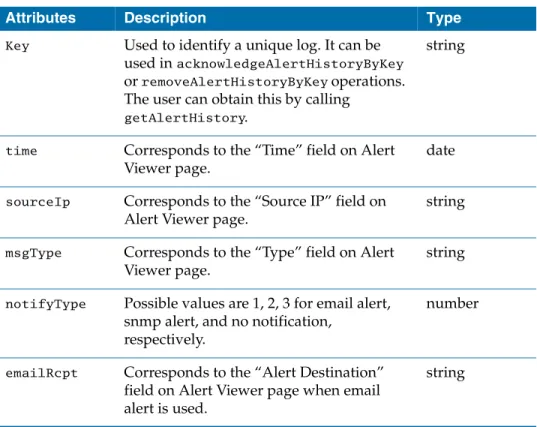
The attributes of an alert log are:
Table 3 Alert log attributes
Attributes Description Type
Key Used to identify a unique log. It can be used in acknowledgeAlertHistoryByKey
or removeAlertHistoryByKey operations.
The user can obtain this by calling
getAlertHistory.
string
time Corresponds to the “Time” field on Alert Viewer page.
date
sourceIp Corresponds to the “Source IP” field on Alert Viewer page.
string
msgType Corresponds to the “Type” field on Alert Viewer page.
string
notifyType Possible values are 1, 2, 3 for email alert, snmp alert, and no notification,
respectively.
number
emailRcpt Corresponds to the “Alert Destination”
field on Alert Viewer page when email alert is used.
string
alertHistoryResponse Type
|
25If resultCount is 0 and statusCode is not 2000 (successful), an error is returned in statusMessage.
trapReceiver Corresponds to the “Alert Destination”
field on Alert Viewer page when snmp alert is used.
string
message The alert message body. string
priority Possible values are 0, 1, 2 for priority low, medium, and high, respectively.
number
ArchiveFlag Possible values are 0, 1 for unacknowledged alert logs and acknowledged alert logs, respectively.
number
ApplianceIp Corresponds to the “Appliance” field on Alert Viewer page. This will be visible on Alert Viewer page when you view alert logs from a Management Station.
string Table 3 Alert log attributes
Attributes Description Type
Status Codes
The Status codes are:
2000 Server success 4000 Unauthorized request
5000 Invalid parameter, getStatusMessage() contains detail information about the error
Common Request Parameters
|
27Common Request Parameters
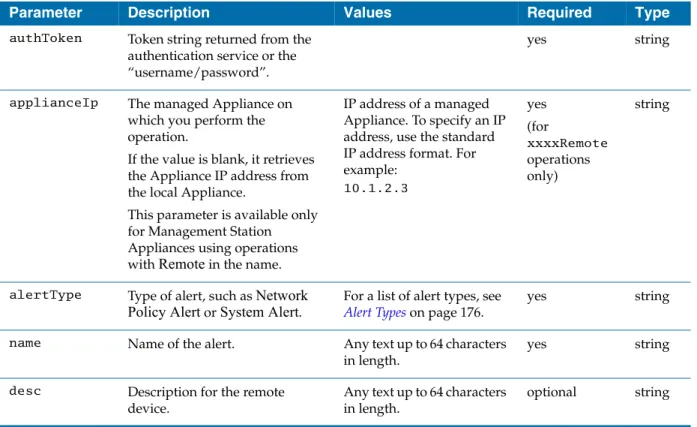
A set of Common Request Parameters are required for each of the Alert Service operations. When using the CreateAlert or UpdateAlert operations, you must specify the alertRules parameter.
Common Request Parameters usage must follow several rules:
• You must specify a value for all Required Common Request Parameters.
• All Common Request parameters must be implemented in the order in which they appear in the Request Parameters section for each of the Alert Service operations.
• For Common Request Parameters, you must specify the value of the
parameter only. Note that LogLogic expects the values in the order defined in this document.
• All values for Common Request Parameters must be enclosed by double quotation marks (“value”).
Table 4 Alert Service Common Request Parameters
Parameter Description Values Required Type
authToken Token string returned from the authentication service or the
“username/password”.
yes string
applianceIp The managed Appliance on which you perform the operation.
If the value is blank, it retrieves the Appliance IP address from the local Appliance.
This parameter is available only for Management Station Appliances using operations with Remote in the name.
IP address of a managed Appliance. To specify an IP address, use the standard IP address format. For example:
10.1.2.3
yes (for
xxxxRemote operations only)
string
alertType Type of alert, such as Network Policy Alert or System Alert.
For a list of alert types, see Alert Types on page 176.
yes string
name Name of the alert. Any text up to 64 characters in length.
yes string
desc Description for the remote device.
Any text up to 64 characters in length.
optional string
priorityName Priority level of the alert. Possible values:
low, medium, and, high
yes string
enabled Determines if the alert is enabled or disabled.
(Appears as enabled or disabled in returned value.)
Possible values:
yes — enabled no— disabled The default is no.
yes string
deviceNames List of devices. Valid entries contain one or more devices and/or device groups.
To see a list of all available devices and device groups, use the Devices tab in the LogLogic Appliance user interface. To access the Devices tab, click Alerts > Manage Alerts Rules, click the Add New button, select an alert type, and then click the Devices tab.
List of valid devices and/or groups. Use a forward slash (/) as a delimiter for multiple entries. For example:
10.1.1.1/10.1.1.7 If a device has a forward slash (/) in the name, such as HP/UX or IBM i5/OS, you must replace the forward slash with %2F. (The F is case-sensitive.) For example: HP%2FUX
yes string
usernames User names for the alerts. Specify a single user or a user group.
Use a forward slash (/) as a delimiter for multiple entries. For example:
user1/usergroup7
yes string
trapIds Trap name or IP Address to send the SNMP messages when the alert is triggered.
Use a forward slash (/) as a delimiter for multiple entries. For example:
trap1/trap2/trap3
yes string
resetTime Time to wait between alerts that are generated.
The Appliance does not issue an additional alert of the same type until the resetTime elapses.
Any positive integer.
The value is in seconds. For example, the value 120 represents two minutes.
yes numbe r
trackIndivid ual
Device
Enables or disables individual device tracking.
Possible values:
yes— enabled no — disabled The default is no.
yes string Table 4 Alert Service Common Request Parameters
Parameter Description Values Required Type
Common Request Parameters
|
29alertRules Alert rule specific to the alert type.
See Alert-Specific Request Parameters on page 31 for a list of specific alert rules for each alert type.
yes string
snmpOId Specifies an SNMP OID to identify the originator of this alert.
Any valid SNMP OID no string
changeNameTo New name of the alert.
If empty, the object name is unchanged.
Any text up to 64 characters in length.
yes (for updateAlert and updateAlert Remote only)
string Table 4 Alert Service Common Request Parameters
Parameter Description Values Required Type
filters List of expressions applied to narrow down affected alert logs.
Filters are used only in getAlertHistory and removeAlertHistory operations.
The priority and type filters work the same way as the drop-down boxes in alert viewer.
For example,
/Priority/=/All_System/
returns all system alerts.
The New_Entry, Offset and Count filters are used only in getAlertHistory operation.
When New_Entry is set to true. It will return only new logs since the last call to getAlertHistory with New_Entry turned on. If this is the first time, then all alert logs will be returned.
Count allows you to specify how many alert logs will be returned.
The maximum count is 10,000.
Offset allows you to specify the start offset. It is zero-based.
Because you cannot return all alert logs at once if the total amount exceeds the maximum value. You have to use offset to get remaining alert logs.
Values must use the format:
/filtername/=/Value/
The valid filter names are
"Type", "Priority", "Offset",
"Count" and "New_Entry".
"Type" supports
"Unacknowledged",
"Acknowledged" and "All".
"Priority" supports "High",
"Medium", "Low",
“All_System” and "All".
“Count” and “Offset” can not be negative.
"New_Entry" supports
"True" or "False".
If the filters are not present, the default is all types, all priorities, 0, 1000 and New_Entry set to false.
no Array
of string
keyList A list consists of keys returned from getAlertHistory operation.
With getAlertHistory operation, you will retrieve a list of alert logs. The key value can be obtained from the key attribute of an alert log.
yes Array
of string Table 4 Alert Service Common Request Parameters
Parameter Description Values Required Type
Alert-Specific Request Parameters
|
31Alert-Specific Request Parameters
You must specify the alert rules for each specific alert type you are managing.
Alert Rules are defined using the alertRules Common Request Parameter.
The following section contains alert-specific parameters for each of the alert types.
The alert types are Adaptive Baseline, Cisco PIX/ASA Messages, Message Volume, Network Policy, Pre-defined Search Filter, Ratio Based, System, VPN Connections, VPN Messages, and VPN Statistics.
Alert-Specific Request Parameters usage must follow several rules:
• All Alert-Specific Parameters can be implemented in any order. LogLogic recommends that you implement the alert rules in a consistent order and format to make managing the alert rules easier.
• Alert-Specific parameter values must include double quotation marks around the entire alert rule. For example:
“param1/valueA//param2/valueC”
• If the name of a device or the parameter value includes a forward slash (/), such as HP/UX, IBM i5/OS, or Accept/Total, you must replace the forward slash with %2F. (The F is case-sensitive.)
• Examples: HP%2FUX, IBM i5%2FOS, or Accept%2FTotal
• Use forward slash marks as delimiters when specifying alert rules. Use a single forward slash mark (/) as a delimiter to define multiple values for a parameter. Use double forward slash marks (//) as delimiters for parameters.
For example:
param1/valueA//param2/valueC/valueD//param3/valueE
where param1, param2, and param3 are parameters and valueA, valueC, valueD, and valueE are values for param1, param2, and param3, respectively.
The example assigns the following name/value pairs:
param1 = valueA param2 = valueC, valueD param3 = valueE
Adaptive Baseline Alert
The Adaptive Baseline Alert lets you be notified if message rates fall above or below your average baseline range for a specified day and time of the week.
Request Parameters
FewerThan, MoreThan Example
“FewerThan/10//MoreThan/100”
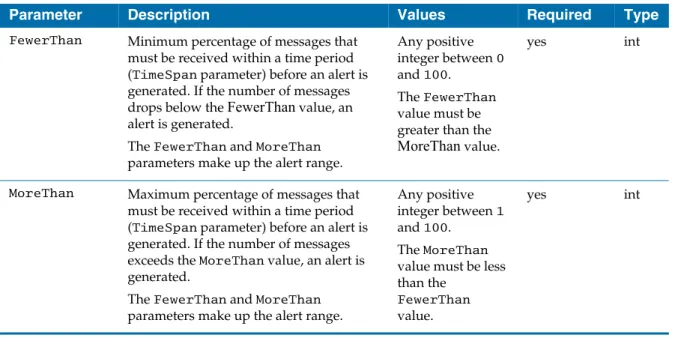
Table 5 lists the Adaptive Baseline Alert-specific parameters. You must include the parameters as inputs for the alertRules parameter.
Table 5 Adaptive Baseline Alert-specific parameters
Parameter Description Values Required Type
FewerThan Minimum percentage of messages that must be received within a time period (TimeSpan parameter) before an alert is generated. If the number of messages drops below the FewerThan value, an alert is generated.
The FewerThan and MoreThan parameters make up the alert range.
Any positive integer between 0 and 100. The FewerThan value must be greater than the MoreThan value.
yes int
MoreThan Maximum percentage of messages that must be received within a time period (TimeSpan parameter) before an alert is generated. If the number of messages exceeds the MoreThan value, an alert is generated.
The FewerThan and MoreThan parameters make up the alert range.
Any positive integer between 1 and 100. The MoreThan value must be less than the
FewerThan value.
yes int
Cisco PIX/ASA Message Alert
|
33Cisco PIX/ASA Message Alert
The Cisco PIX/ASA Messages alert allows for triggering on PIX message criticality, code, and message rate. Since this alert is specific to Cisco PIX messages, the alert device selection is limited to Cisco PIX devices.
Request Parameters
criticality, FewerThan, MoreThan, MessageCode, TimeSpan Example
“criticality/1//MoreThan/10//MessageCode/1-709006//TimeSpan/40”
Table 6 lists the Cisco PIX Message Alert-specific parameters. You must include the parameters as inputs for the alertRules parameter.
Table 6 Cisco PIX/ASA message Alert-specific parameter
Parameter Description Values Required Type
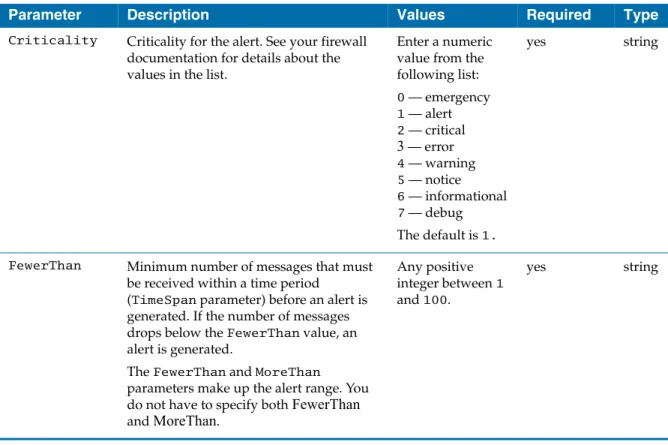
Criticality Criticality for the alert. See your firewall documentation for details about the values in the list.
Enter a numeric value from the following list:
0 — emergency 1 — alert 2 — critical 3 — error 4 — warning 5 — notice 6 — informational 7 — debug The default is 1.
yes string
FewerThan Minimum number of messages that must be received within a time period
(TimeSpan parameter) before an alert is generated. If the number of messages drops below the FewerThan value, an alert is generated.
The FewerThan and MoreThan
parameters make up the alert range. You do not have to specify both FewerThan and MoreThan.
Any positive integer between 1 and 100.
yes string
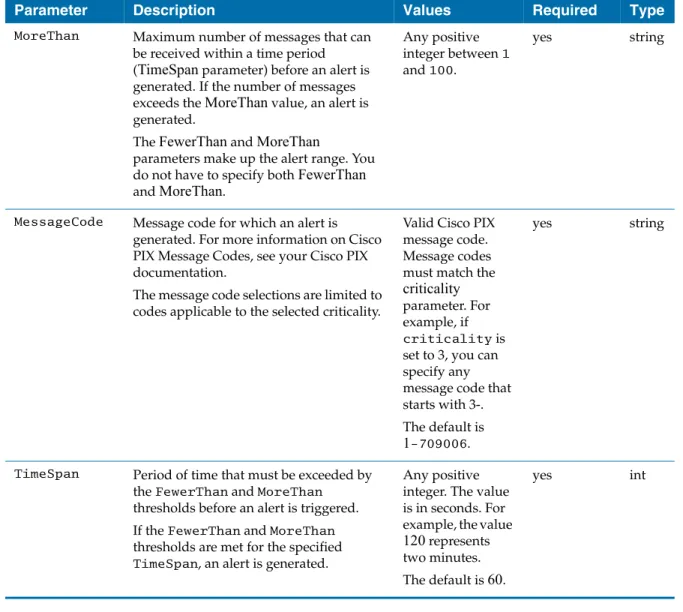
MoreThan Maximum number of messages that can be received within a time period (TimeSpan parameter) before an alert is generated. If the number of messages exceeds the MoreThan value, an alert is generated.
The FewerThan and MoreThan
parameters make up the alert range. You do not have to specify both FewerThan and MoreThan.
Any positive integer between 1 and 100.
yes string
MessageCode Message code for which an alert is generated. For more information on Cisco PIX Message Codes, see your Cisco PIX documentation.
The message code selections are limited to codes applicable to the selected criticality.
Valid Cisco PIX message code.
Message codes must match the criticality parameter. For example, if criticality is set to 3, you can specify any message code that starts with 3-.
The default is 1-709006.
yes string
TimeSpan Period of time that must be exceeded by the FewerThan and MoreThan
thresholds before an alert is triggered.
If the FewerThan and MoreThan thresholds are met for the specified TimeSpan, an alert is generated.
Any positive integer. The value is in seconds. For example, the value 120 represents two minutes.
The default is 60.
yes int
Table 6 Cisco PIX/ASA message Alert-specific parameter
Parameter Description Values Required Type
Message Volume Alert
|
35Message Volume Alert
The Message Volume-based alert allows alerting when message volume falls below, or is above, preset messages-per-second thresholds. The alert applies to all devices.
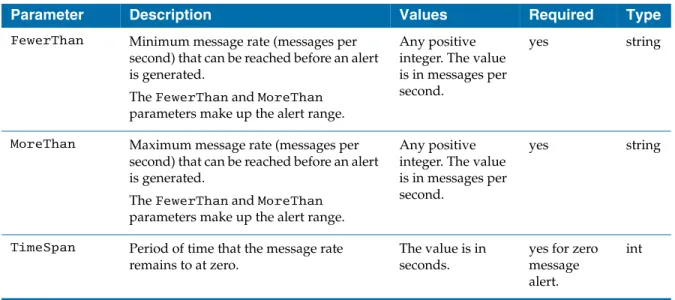
The Message Volume-based alert also supports Zero Message Alert by using the TimeSpan parameter. The time granularity of Zero Message Alert is in minutes, so the TimeSpan has to be 60 seconds or greater. When TimeSpan is present, you do not have to provide FewerThan and MoreThan parameters as they will be ignored.
Table 7 lists the Message Volume Alert-specific parameters. You must include the parameters as inputs for the alertRules parameter.
Request Parameters
FewerThan, MoreThan Example
“FewerThan/10//MoreThan/100”
Table 7 Message Volume Alert-specific parameter
Parameter Description Values Required Type
FewerThan Minimum message rate (messages per second) that can be reached before an alert is generated.
The FewerThan and MoreThan parameters make up the alert range.
Any positive integer. The value is in messages per second.
yes string
MoreThan Maximum message rate (messages per second) that can be reached before an alert is generated.
The FewerThan and MoreThan parameters make up the alert range.
Any positive integer. The value is in messages per second.
yes string
TimeSpan Period of time that the message rate remains to at zero.
The value is in seconds.
yes for zero message alert.
int
Network Policy Alert
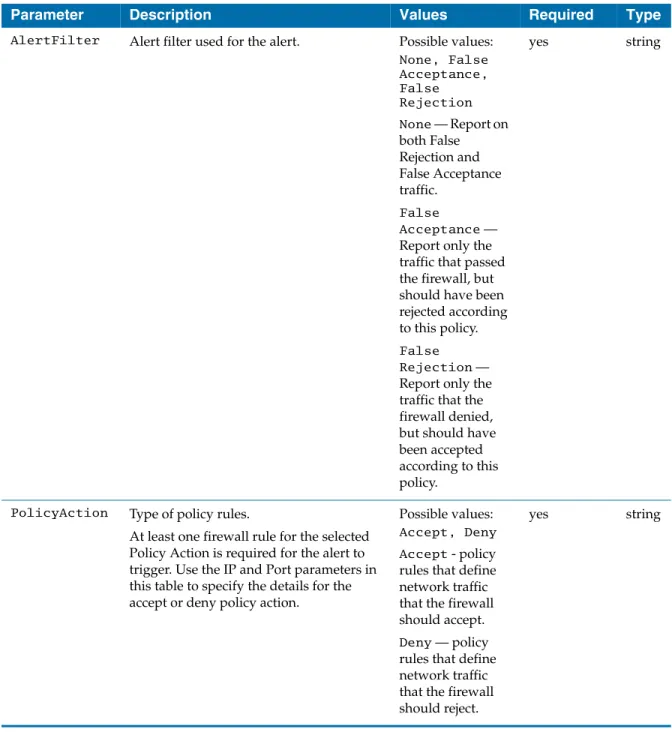
The Network Policy Alert allows for auditing your firewall policies. The Network Policy Alert Rules should mirror your firewall policy rules. Any firewall
messages matching the Deny Policy Action Rules will trigger the alert. Any firewall messages outside of the Accept Policy Action Rules also trigger the alert.
Table 8 lists the Network Policy Alert-specific parameters. You must include the parameters as inputs for the alertRules parameter.
Request Parameters
FewerThan, MoreThan, alertFilter, policyAction, srcIPMin, srcIPMax,
srcPortMin, srcPortMax, destIPMin, destIPMax, destPortMin, destPortMax,
protocol Example
“FewerThan/100//MoreThan/10//alertFilter/False//policyAction/Accep t//srcIPMin/10.1.2.3//srcIPMax/255.255.255.255//srcPortMin/0”
//srcPortMax/100//destIPMin/10.1.1.123//destIPMax/255.255.255.255 //destPortMin/0//destPortMax/100//protocol/all”
Deprecated – This API may not be available for future releases.
Network Policy Alert
|
37Table 8 Network Policy Alert-specific parameters
Parameter Description Values Required Type
AlertFilter Alert filter used for the alert. Possible values:
None, False Acceptance, False Rejection None — Report on both False Rejection and False Acceptance traffic.
False
Acceptance — Report only the traffic that passed the firewall, but should have been rejected according to this policy.
False Rejection — Report only the traffic that the firewall denied, but should have been accepted according to this policy.
yes string
PolicyAction Type of policy rules.
At least one firewall rule for the selected Policy Action is required for the alert to trigger. Use the IP and Port parameters in this table to specify the details for the accept or deny policy action.
Possible values:
Accept, Deny Accept - policy rules that define network traffic that the firewall should accept.
Deny — policy rules that define network traffic that the firewall should reject.
yes string
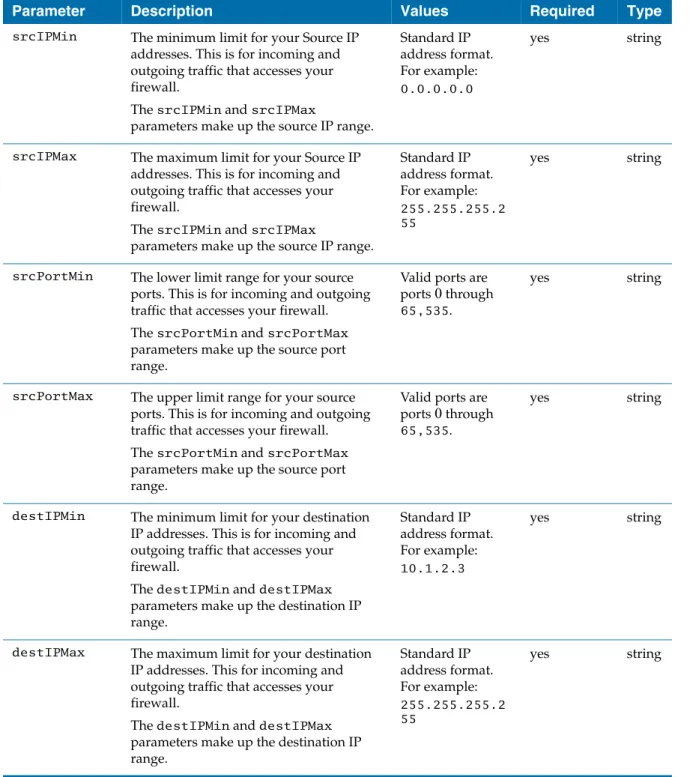
srcIPMin The minimum limit for your Source IP addresses. This is for incoming and outgoing traffic that accesses your firewall.
The srcIPMin and srcIPMax
parameters make up the source IP range.
Standard IP address format.
For example:
0.0.0.0.0
yes string
srcIPMax The maximum limit for your Source IP addresses. This is for incoming and outgoing traffic that accesses your firewall.
The srcIPMin and srcIPMax
parameters make up the source IP range.
Standard IP address format.
For example:
255.255.255.2 55
yes string
srcPortMin The lower limit range for your source ports. This is for incoming and outgoing traffic that accesses your firewall.
The srcPortMin and srcPortMax parameters make up the source port range.
Valid ports are ports 0 through 65,535.
yes string
srcPortMax The upper limit range for your source ports. This is for incoming and outgoing traffic that accesses your firewall.
The srcPortMin and srcPortMax parameters make up the source port range.
Valid ports are ports 0 through 65,535.
yes string
destIPMin The minimum limit for your destination IP addresses. This is for incoming and outgoing traffic that accesses your firewall.
The destIPMin and destIPMax parameters make up the destination IP range.
Standard IP address format.
For example:
10.1.2.3
yes string
destIPMax The maximum limit for your destination IP addresses. This for incoming and outgoing traffic that accesses your firewall.
The destIPMin and destIPMax parameters make up the destination IP range.
Standard IP address format.
For example:
255.255.255.2 55
yes string
Table 8 Network Policy Alert-specific parameters
Parameter Description Values Required Type
Network Policy Alert
|
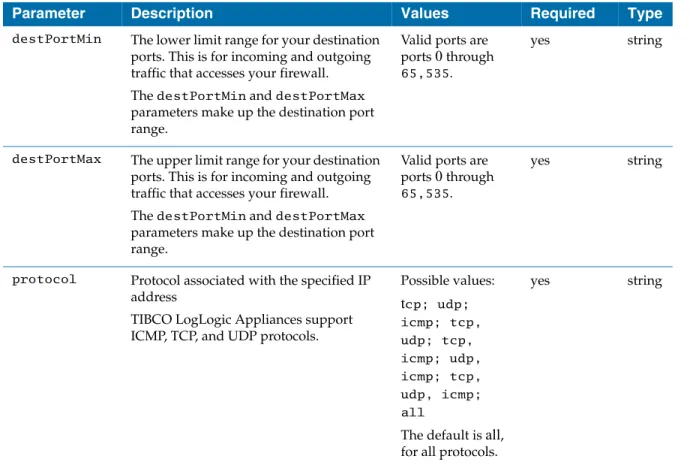
39destPortMin The lower limit range for your destination ports. This is for incoming and outgoing traffic that accesses your firewall.
The destPortMin and destPortMax parameters make up the destination port range.
Valid ports are ports 0 through 65,535.
yes string
destPortMax The upper limit range for your destination ports. This is for incoming and outgoing traffic that accesses your firewall.
The destPortMin and destPortMax parameters make up the destination port range.
Valid ports are ports 0 through 65,535.
yes string
protocol Protocol associated with the specified IP address
TIBCO LogLogic Appliances support ICMP, TCP, and UDP protocols.
Possible values:
tcp; udp;
icmp; tcp, udp; tcp, icmp; udp, icmp; tcp, udp, icmp;
all
The default is all, for all protocols.
yes string
Table 8 Network Policy Alert-specific parameters
Parameter Description Values Required Type
Pre-Defined Search Filter Alert
The Pre-Defined Search Filter Alert allows for alert notification when a text search match occurs within the received log message. This alert leverages the Log Appliance search filters for the text search match definitions.
Table 9 lists the Pre-Defined Search Filter Alert-specific parameters. You must include the parameters as inputs for the alertRules parameter.
Request Parameters
searchFilterName, FewerThan, MoreThan, TimeSpan Example
“searchFilterName/MySearchFilter//FewerThan/100//TimeSpan/60”
Table 9 Pre-Defined Search filter Alert-specific parameters
Parameter Description Values Required Type
searchFilter
Name Name of the search filter. Any text up to 64
characters in length.
yes string
FewerThan Minimum number of messages that must be received within a time period
(TimeSpan parameter) before an alert is generated. If the number of messages drops below FewerThan, an alert is generated.
The FewerThan and MoreThan
parameters make up the alert range. You do not have to specify both FewerThan and MoreThan.
Any positive integer between 1 and 100.
yes string
MoreThan Maximum number of messages that can be received within a time period (TimeSpan parameter) before an alert is generated. If the number of messages exceeds MoreThan, an alert is generated.
The FewerThan and MoreThan
parameters make up the alert range. You do not have to specify both FewerThan and MoreThan.
Any positive integer between 1 and 100.
yes string
Pre-Defined Search Filter Alert
|
41TimeSpan Period of time that must be exceeded by the FewerThan and MoreThan
thresholds before an alert is triggered.
If the FewerThan and MoreThan thresholds are met for the specified TimeSpan, an alert is generated.
Any positive integer. The value is in seconds. For example, the value 120 represents two minutes.
The default is 60.
yes int
Table 9 Pre-Defined Search filter Alert-specific parameters
Parameter Description Values Required Type
Ratio Based Alert
The Ratio Based Alert triggers when the percentage of a specified message type exceeds or falls below specified percentages. For example, the
Denied/(Accept+Denied) Alert Ratio can be used to trigger an alert when the number of Denied messages exceeds 90% of the Accept and Denied message count.
Table 10 lists the Ratio Based Alert-specific parameters. You must include the parameters as inputs for the alertRules parameter.
Request Parameters
FewerThan, MoreThan, ratio Example
“FewerThan/100//MoreThan/10//ratio/Accept/Total”
Table 10 Ratio Based Alert-specific rules
Parameter Description Values Required Type
FewerThan Minimum percentage of messages (by ratio specified by ratio parameter) that must be received before an alert is generated. If the number of messages drops below the FewerThan value, then an alert is generated.
The FewerThan and MoreThan parameters make up the alert range for the value specified by the ratio parameter.
Any positive integer between 1 and 100.
yes string
MoreThan Maximum percentage of messages (by ratio specified by ratio parameter)) that must be received before an alert is generated. If the number of messages drops below the FewerThan value, then an alert is generated.
The FewerThan and MoreThan parameters make up the alert range for the value specified by the ratio parameter.
Any positive integer between 1 and 100.
yes string