國立臺灣大學電機資訊學院資訊工程學系 碩士論文
Department of Computer Science and Information Engineering College of Electrical Engineering and Computer Science
National Taiwan University Master Thesis
基於Android平台實作高等計算架構
Design and Implementation of High-Level Compute on Android Systems
陳泓瞬 Chen Hung-Shun
指導教授:廖世偉 博士 Advisor: Liao Shih-Wei, Ph.D.
中華民國 102 年 7 月
July, 2013
國立臺灣大學碩士學位論文 口試委員會審定書
基於Android平台實作高等計算架構
Design and Implementation of High-Level Compute on Android Systems
本論文係陳泓瞬君 (R00922108) 在國立臺灣大學資訊工程學研 究所完成之碩士學位論文,於民國 102 年 7 月 13 日承下列考試委 員審查通過及口試及格,特此證明
口試委員:
所 主 任
ii
Acknowledgments
This work was supported by the Industrial Technology Research Insti- tute, Hsinchu, Taiwan. We sincerely appreciate Logan Chien and Deryu Tsai for helping us implement low level memory access on Android systems. We acknowledge Jian-Min Liou and Kuan-Yu Lin who contributed certain bench- marks on Android-Aparapi.
iv
致 致 致謝 謝 謝
首先要感謝指導教授廖世偉老師的耐心教導,更不辭辛勞的修改文
章,才能讓本碩論能夠獲得評審的青睞。更感謝碩士生涯的好夥伴致
遠,細心的你常常替我解決不少問題,並且常常在我有困難的時候挺
身而出,沒有你我的碩士生涯絕對不會如此順利,真心希望你在之後 的求職也能夠一樣順利。
另一方面感謝工研院Herbage、及證彥學長的技術指導以及機器上 的支援。而實驗室的台柱TDYa127跟Logan更是常常拯救我們,在論文
進度困難的時候,在自己還有許多事要處理的同時,二話不說幫助我
們解決問題。Merck學長以及建旻跟冠宇學弟對於實驗數據的幫助也相 當感謝。
而實驗室的夥伴們更是我碩士生涯中最重要的一環,沒有你們碩士
兩年絕對是空虛到爆炸,感謝善於解決人與人之間問題的浩呆,風趣
的老二,煞氣的倫倫,勝利的G哥,讓人安心的子杰,以及兩個認識
相當久但怪怪的學弟柏宇以及曜誠,還有沒有辦法去日本的哲民。
最後感謝家人對我經濟上的付出,讓我沒有後顧之憂能夠專注於課
業,各個領域上的朋友的關心,在我需要幫助的時候適時的拉我一
把,謝謝你們。
vi
中
中 中文 文 文摘 摘 摘要 要 要
隨著Andriod裝置搭載多核CPU以及GPU,平行計算的需求也大大
增加,而Google官方雖然已經釋出Renderscript做為解決平行計算的方
案,但進展依然緩慢,最明顯的就是我們在Google Play裡頭幾乎找不
到任何使用到Renderscript技術的應用程式。同時增加異質核心在平
行語言中,對於應用程式開發者有著高階以及更友善的語言是相當
重要的,幾乎所有的Android應用程式開發者都是以Java為開發語言,
而 我 們發展一個在Android中以Java為基礎的計算平台叫做Android-
Aparapi。Android-Aparapi提供程式工程師運用平行計算的功能,而不
需要學習新的語言像是Renderscript,因此軟體方面上的進展就可以跟
得上硬體在每一時期加倍增加核心數目的成長。
此外Android-Aparapi相對於原本的Aparapi是更多元及有效率的,
我 們在Android-Aparapi提供原本Java object在Aparapi無法支援的資料 型 別 , 除 此 之 外 , 我 們 藉 由 改 善Android-Aparapi有 效 地 減 少JNI對 於系 統 的 額 外 消 耗 , 最 後 我 們 實 作 了Android-Aparapi的 比 較 基 準 藉由Rodinia基準轉成Android版本。而實驗結果Java Thread Pool版本
慢了Android-Aparapi版本有三倍之多,這突顯出我們的系統在高等
計 算中是相當有效的。此外,我們比較了Android-Aparapi版本和現
存OpenCL版本,而我們的效能為OpenCL的88%,在不需要熟悉較低 階的語言,一點損失是可以接受的。簡單來說,我們成功的達成高階
的運算但並沒有太多的效能損失。
viii
Abstract
As Android devices come with various CPU and GPU cores, the demand for effective parallel computing across-the-board increases. In response, Google has released Renderscript to leverage parallel computing while maintaining portability. However, the adoption has been slow – We hardly see any Ren- derscript apps on Google Play. In the meantime, the proliferation of hetero- geneous cores inside a single device calls for a higher-level, more developer- friendly parallel language. Since most Android developers already use Java, we develop the first Java-based compute system on Android called Android- Aparapi. Android-Aparapi facilitates programmers’ adoption of compute by obviating the need of learning a new language like Renderscript, thus the soft- ware can start catching up with the hardware trend of doubling the number of cores periodically.
Furthermore, Android-Aparapi is a better defined API than the original Aparapi. We support comprehensive set of data types and their array forms in terms of Java objects. In addition, we propose innovative optimizations that effectively reduce the Java-Native Interface overheads. Finally, we de- velop an Android-Aparapi benchmark suite by extending Rodinia benchmark to Android. The Java’s Thread Pool version of the suite runs 3 times slower than the Android-Aparapi version. This demonstrate the effectiveness of our high-level compute system. Furthermore, we compare our Android-Aparapi version with the existing lower-level OpenCL version and show that the per- formance is comparable (Our performance is at 88% of OpenCL’s). In short, we achieve higher-level abstraction without sizable losing performance.
x
Contents
口 口
口試試試委委委員員員會會會審審審定定定書書書 i
Acknowledgments iii
致
致致謝謝謝 v
中 中
中文文文摘摘摘要要要 vii
Abstract ix
1 Introduction 1
1.1 Android-Aparapi: Higher-level than Renderscript . . . 1 1.2 Android-Aparapi’s Backend: Targeting OpenCL today . . . 2
2 Parallel APIs: Aparapi and OpenCL 3
2.1 OpenCL . . . 3 2.2 Aparapi . . . 4
3 Architecture of Android-Aparapi 7
3.1 Android-Aparapi Frontend on a PC or Workstation . . . 7 3.2 Android-Aparapi Backend on an Android Device . . . 8
4 Boosting the API of Android-Aparapi 9
4.1 Optimizations in Android-Aparapi System . . . 10
5 Experimental Results 11
5.1 Android-Aparapi performance vs. original Aparapi performance . . . 12 5.2 JTP vs. GPU mode in Android-Aparapi . . . 13 5.3 Android-Aparapi performance vs. original OpenCL performance on GPU 16
6 Related Work 19
7 Conclusion and Future Work 21
References 23
xii
List of Figures
2.1 The structure of OpenCL work-items and work-groups . . . 4
2.2 The flow of Aparapi: Convert Java bytecode to OpenCL host and kernel codes or to codes that uses Java thread pool . . . 5
3.1 Architecture of Android-Aparapi on Android systems. On the PC or workstation, we package all the class format files which contains kernel class of Android-Aparapi. These files are passed to Android-Aparapi on Mobile devices. Android-Aparapi parse these files to generate OpenCL kernels, which are executed on the mobile GPU at run time. . . 7
5.1 BFS benchmark run in JTP and GPU modes . . . 14
5.2 SC benchmark running in JTP and GPU modes . . . 15
5.3 Small problem size of each benchmark . . . 15
5.4 Large problem size of each benchmark . . . 16
5.5 Benchmark performance between our Android-Aparapi version with the existing lower-level OpenCL version running on GPU . . . 16
xiv
List of Tables
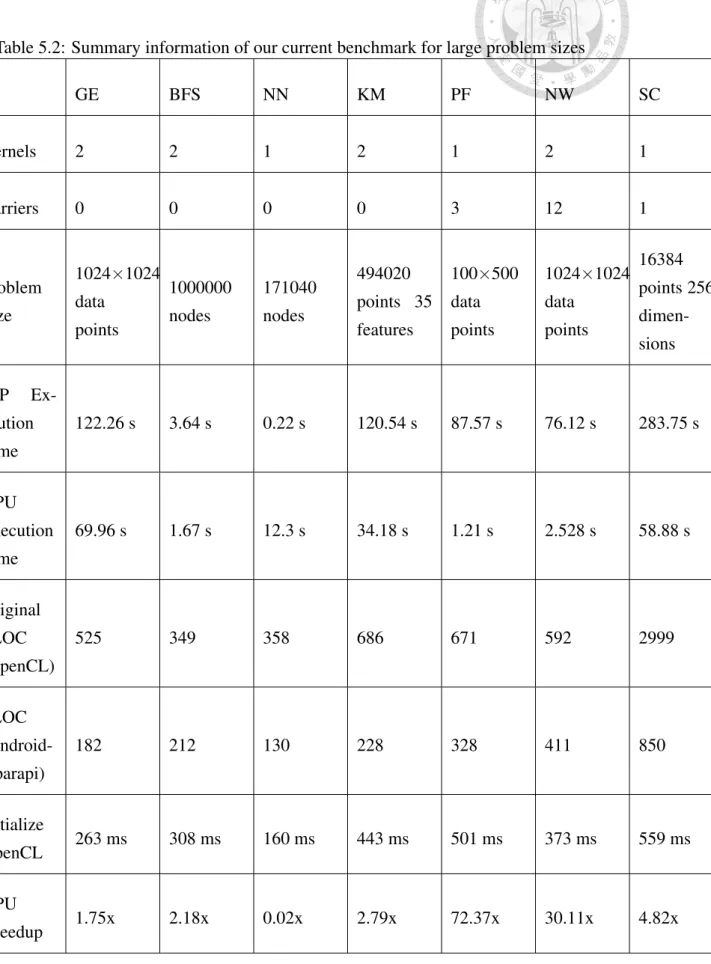
5.1 GPU versus OptGPU on NN and SC . . . 13 5.2 Summary information of our current benchmark for large problem sizes . 17
xvi
Chapter 1 Introduction
Today’s Android devices are heterogeneous computing systems. According to Wikipedia, such systems are “electronic systems that use a variety of different types of computational units.” Compute in this context refers to computation-intensive processing. Examples are photo editing and computational photography. GPGPU (General-Purpose Graphics Processing Unit) is a popular form of compute: It uses heterogeneous systems such as mobile GPUs to perform compute instead of graphics rendering. Note that compute is more general than GPGPU compute: Android may use DSP (Digital Signal Processor) or CPU (Central Processing Unit) for compte too.
Sadly an undeniable fact is that compute has not taken off in the mobile world. We hardly see any compute apps on Google Play. We believe existing compute languages such as OpenCL[?] and Renderscript[?] are too low-level for mobile app developers.
There are few HPC (High-Performance Computing) programmers in the world of App Store or Google Play. To address the problem above, we develop the first Java-based compute system on Android called Android-Aparapi.
1.1 Android-Aparapi: Higher-level than Renderscript
The proliferation of heterogeneous cores inside a single device calls for a more developer- friendly parallel language. Google Renderscript is Android’s official heterogeneous com- puting framework. Renderscript claims to be the high-performance API (Application Programming Interface) for compute on Android. Although Renderscript aims for broad support from GPU or DSP vendors, few GPUs support Renderscript thus far. By contrast,
because we will translate Aparapi to the lower-level APIs available on GPUs of the day, be it OpenCL or Renderscript APIs.
Furthermore, in Android systems, Java is already the primary development language.
App developers would not be required to learn a new language such as Renderscript in order to implement GPGPU on Android, thanking to our high-level Java-based compute system.
1.2 Android-Aparapi’s Backend: Targeting OpenCL to- day
Today we translate Android-Aparapi into OpenCL, since more GPUs today support it.
While Android developers are mostly Java programmers, OpenCL is based on the C99 programming language. We do not recommend developers to use OpenCL directly. Be- cause if they do, in Android systems today they may be required to use the Android Native Development Kit (NDK). The NDK[?] allows developers from the world of native codes such as non-portable C and C++ languages to write applications. Adding OpenCL complicates the programming story further.
Android-Aparapi is based on Aparapi[?], which stands for “A PARallel API.” Aparapi allows programmers to write code using only Java and execute it on GPUs via the gen- erated OpenCL code from the Java source. We successfully adapt Aparapi to Android’s Dalvik that uses Dex instead of Java Bytecode. In addition we develop the Android- Aparapi version of the Rodinia[?] benchmark and conduct experiments.
The contributions of this paper are as follows:
• To satisfy the booming demand for heterogeneous computing programs, we develop Android-Aparapi on Android devices;
• We implement the Rodinia benchmark in Android-Aparapi;
• We use enhanced Rodinia benchmark to evaluate Android-Aparapi’s performance on devices in both GPU and JTP modes.
The rest of the paper is organized as follows. Section ?? provides an overview of existing parallel APIs, OpenCL and Aparapi, that we build upon. Section ?? describes the architecture of our Android-Aparapi, and Section ?? presents the better-defined APIs of Android-Aparapi, as compared to Aparapi. We present our important performance optimizations in Android-Aparapi in Section ??. Section ?? shows the performance of Android-Aparapi on Android devices. Finally, Section ?? details related work, and Sec- tion ?? concludes the paper and presents some future work.
2
Chapter 2
Parallel APIs: Aparapi and OpenCL
Our system, Android-Aparapi, build upon the Aparapi and OpenCL of today. Before presenting the architecture of Android-Aparapi, we shall give an overview of OpenCL and Aparapi in this section.
Section ?? provides an overview of OpenCL before we describe Aparapi in Section
??. The former paves the way for the Aparapi discussion later.
2.1 OpenCL
OpenCL is an open, royalty-free standard for the cross-platform parallel programming of modern processors such as GPUs and multicore CPUs. Apple Inc. initially developed the standard, and it is currently managed by the Khronos Group. Users can substantially im- prove the speed for a wide range of applications through OpenCL, without any proprietary hardware function call.
OpenCL consists of two distinct parts. First, the C99-based kernel (parallel portion of the programming language) can execute and synchronize the processing cores. Kernel is a special function that executes parallel portions in the same manner that a Renderscript root function does. Second, OpenCL consists of a host program and runtime library. A host code submits work to devices; it contains instructions for setting up the environment and the argument, reading back results, and managing the kernel command queue. Moreover, the primary advantage in using OpenCL is that developers are able to dynamically allocate memory by extracting low-level hardware information, such as work-group size. This benefit allows a program to achieve consistent performance across various devices.
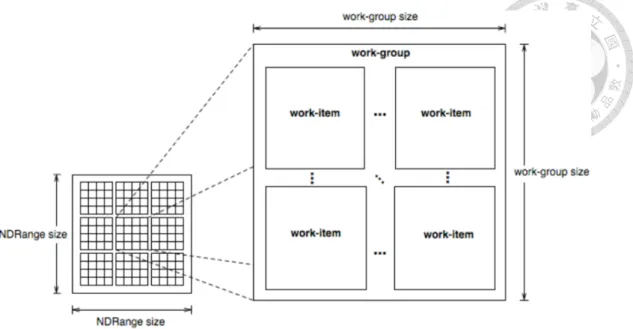
Figure 2.1: The structure of OpenCL work-items and work-groups
mal value CL DEVICE MAX WORK GROUP SIZE that can be queried by systems like Android-Aparapi. Thus, Android-Aparapi can achieve performance-portability across de- vices.
The NDRange size is the sum of each work-group size. We decrease the value of work-group’s size, starting with CL DEVICE MAX WORK GROUP SIZE until it meets the divisor of NDRange size. The structure of the OpenCL work-item and work-group is shown in Figure ??. An essential consideration is that hardware memory accessing speeds between global memory and local memory are substantially distinct. OpenCL lo- cal memory is much faster than global memory. Local memory size (also referred to as work-group size) is not large, and therefore users have to manage the memory alloca- tion carefully when executing each of the work-group in parallel. Local memory thread in a work-group can share data between work-items, using barriers for synchronization primitives. In contrast, communication across work groups is based on global memory.
2.2 Aparapi
Aparapi (A PARallel API) is an open-source API for expressing data parallel workloads in Java. Aparapi translator will convert the Java bytecode of a given workload into OpenCL hosts and kernel codes for running on a GPU. Only kernel class bytecodes are required to convert. Aparapi API is at Java level. Programmers do not need to have exhaustive knowledge of heterogeneous computing. In addition, Aparapi helps developers save time in setting up the program. In contrast, OpenCL programmer need to write the host pro- gram. Aparapi translates Java bytecode to the OpenCL code at run-time and creates a Java
4
Figure 2.2: The flow of Aparapi: Convert Java bytecode to OpenCL host and kernel codes or to codes that uses Java thread pool
thread pool for the Aparapi kernel class. Because Java’s virtual machine is safe, it does not allow programmers to name hardware-level mechanism, but Aparapi bridges Java to the OpenCL program through a Java Native Interface(JNI). JNI defines a way for managed code to interact with native code. The primary characteristic of Aparapi is that it automat- ically detects the capability of an OpenCL platform, determines at run-time whether to execute the arranged code with the traditional Java thread pool (JTP mode), or whether it is capable of running on the GPU via the OpenCL interface (GPU mode). Figure ?? shows the flow of Java bytecode converting to OpenCL host and kernel codes, using Aparapi.
When Aparapi receives parallel Java bytecodes, it first converts the OpenCL program (unless users select the JTP mode), in which case it sets up the OpenCL host program and binds it with kernel codes before running it on devices. Aparapi falls back to JTP mode at execution time in two situations; first, the Aparapi cannot convert to OpenCL kernel codes successfully because of language limitations, which are detailed in the next paragraph; second, when executing OpenCL results in exception errors at compile- or run-time. For instance, when clGetDeviceinfo() returns errors, we fall back to JTP mdoe.
To use Aparapi efficiently, it is necessary to be aware of its restrictions, according to the distinct language features between Java and the C99 standard. Here we list the four important limitations, which require attention to prevent Aparapi ceasing conversion of Java bytecode to OpenCL kernel codes and reverting to JTP mode. First, certain data types in Aparapi are not supported by Java, which only supports boolean, byte, short,int,long,
methods with varargs argument lists, are not supported, because OpenCL does not allow them. Recursive calls are not supported either. Certain other restrictions are that Aparapi does not support exception, throw, or catch. Finally, because of the language lim- itations of Java and C99-based OpenCL, only simple loops and conditions are supported.
Conditions such as break, switch, and continue are not supported. Additionally, newis not supported for either objects or arrays.
6
Figure 3.1: Architecture of Android-Aparapi on Android systems. On the PC or worksta- tion, we package all the class format files which contains kernel class of Android-Aparapi.
These files are passed to Android-Aparapi on Mobile devices. Android-Aparapi parse these files to generate OpenCL kernels, which are executed on the mobile GPU at run time.
Chapter 3
Architecture of Android-Aparapi
Enabling GPGPU on Android presents certain challenges. Our challenging goal is to apply the benefits of a GPU to the Android device, using the Aparapi GPU mode.
3.1 Android-Aparapi Frontend on a PC or Workstation
The virtual machine (VM) of the Android operating system is Dalvik. Unlike Java VMs, which are stack machines, the Dalvik VM uses a register-based architecture. A tool called dx is used to convert Java class format files into the Dalvik-compatible dex (Dalvik Ex-
Two solutions can resolve this problem. The first is that we move the class format file into an Android raw folder, and instruct ClassModel to read and translate the Java-format files. Another solution is implementing a DexModel, which parses dex-format files and generates corresponding OpenCL codes. The first solution requires the repacking of all the class format files that must be translated to corresponding OpenCL codes. The second solution does not require repacking the of dex format files into a raw folder; it can directly read dex format files and generate the corresponding OpenCL. We use the first solution in Android-Aparapi since Java, given its long history, is relatively more stable today.
3.2 Android-Aparapi Backend on an Android Device
The next challenge is on how to run OpenCL on Android devices such as Nexus 10, which is not supported by the original Aparapi. We start with the given library “lib- GLES mali.so” that contains entry points for the OpenCL functions in Nexus 10. Note that the word “mali” stands for GPU of Nexus 10, “Mali-T604.” Because Mali-T604 has been certified Khronos conformant for OpenCL 1.1 Full Profile on Linux and Android systems, we use Nexus 10 as the development vehicle of Android-Aparapi.
The key is to build our device library (we name it “libAparapi nexus10”) leveraging both Aparapi and “libGLES mali.so.” To do so, we pull the given library from Nexus 10 to our desktop, and used NDK to link this library to all the Aparapi native side codes. The end result is our own “libAparapi nexus10,” which is the native side of Android-Aparapi.
In addition to creating Android-Aparapi’s device library, we need to extend the architecture- checking mechanism in Aparapi. In its Java side, Aparapi detects which architecture of the JRE is used and decides which type of Aparapi-native shared library to load in run time. The original Aparapi only loads the “libAparapi x86 64” shared library if the JRE was x86 64 (amd64), and loads “libAparapi x86” if the JRE was x86 (i386). In Nexus 10, the OS architecture of Dalvik was ARMv7l. The suffix “l” stands for little- endian. We extend the architecture-checking mechanism in Android-Aparapi, and load
“libAparapi nexus10” correspondingly. Note that Android-Aparapi will first load lib- GLES mali.so because “libAparapi nexus10” contains OpenCL calls.
After these two substantial changes, Android-Aparapi could use the GPU mode to run on Nexus 10. The workflow of Android-Aparapi, run on Nexus 10, is shown in Figure
??.
8
Chapter 4
Boosting the API of Android-Aparapi
Android-Aparapi is a better defined API than Aparapi. For instance, Dalvik only supports two data types, int and long in terms of Java objects when using sun.misc.Unsafe methods.
Android-Aparapi supports short, byte, float, double, and boolean data types and their corresponding arrays.
By design a Java application is prevented from accessing underlying memory layout.
However, Dalvik VM needs to determine the layout in order to make JNI calls or exchange data with native code such as OpenCL driver. Thus, when using Java objects, Dalvik VM uses the sun.misc.Unsafe methods to obtain the object field addresses whenever needed.
We refer to those methods such as sun.misc.Unsafe.getFloat as layout-getters.
The layout-getters result in certain restrictions when adapting Aparapi to Android, because not all layout-getters are available on Dalvik. For instance, layout-getters for short, byte, float, double, and boolean data types and their corresponding arrays are not implemented in Dalvik VM. In our Android-Aparapi system, we implement all layout- getters and layout-setters.
Android-Aparapi uses out-of-heap memory, called ByteBuffer, to communicate data with native, OpenCL driver. ByteBuffer cannot be accessed by garbage collector, owing to its out-of-heap memory. Thus it will not increase the overhead of garbage collection.
Before saving values to ByteBuffer, Android-Aparapi establishes the parameters of how many bytes a data type has, using the JValue. For example, an integer of four bytes is
4.1 Optimizations in Android-Aparapi System
The primary aim of Android-Aparapi in using native codes is interfacing the low-level hardware from within Dalvik VM. It is ironic that some developers who resort to such native code for higher performance get bitten by the JNI overhead and hence the perfor- mance actually become lower. Specifically, those developers find that the speedup from using GPGPU via Android-Aparapi can disappear if we do not reduce the overhead of each call from Java to native through JNI.
Our insight is that because of the nature of compute, Android-Aparapi typically op- erates on many data elements, one by one. That is, the Java object is typically used as an array. If each Java object has n variables, the number of operations is n times the size of the array. This results in a large time penalty from numerous JNI calls to interface native-side. The repeated operations present opportunity for amortizing the JNI over- head. We can group many operations into the same JNI call. Thus, users can obtain high performances by decreasing the number of JNI calls
In Android-Aparapi we implement a set of new APIs such as getFloatArray and put- FloatArray in the native side, which can operate on the memory of an entire array of a Java object, rather than a single variable. Now regardless of the size of the array, the penalty for going to or from native would be taken only once. To achieve the above, we extend Android Dalvik VM’s native code (specifically, vm/native/sun.misc.Unsafe.cpp) and enhance Aparapi’s Dalvik side, specifically, UnsafeWrapper.java. In Section ?? we will measure the performance benefit due to our optimization in this section.
10
Chapter 5
Experimental Results
The experiments focus on three topics:demonstrating the performance benefit from the optimizations in Section ??, comparing the performance of the CPU and GPU, and com- paring the performance of the Android-Aparapi and OpenCL on GPU.
The experiments are run on Nexus 10, the specifications of which are as follows:
Dual-core A15 CPU, Quad-core Mali T604 GPU, and 2 GB RAM. Because we added certain codes to Dalvik, we re-build from the Android Open Source Project (AOSP). The operating system of the Android version is 4.2.2.2.2.2.2.2.2.2, as Google decided to have nine “2”s in the version number. The model number is Full AOSP on Manta, and the Kernel version is 3.4.5-gaf9c307.
Our experiments begin with Rodinia, which is a benchmark suite for heterogeneous computing. Rodinia contains OpenMP[?], OpenCL, and CUDA[?] implementations. Ro- dinia is currently in version 2.3[?] and contains 18 benchmarks written in OpenCL. Our goal is to use Android-Aparapi to rewrite Rodinia OpenCL benchmark. Rodinia con- tains more than two thirds of benchmarks that are written with the work-group feature.
OpenCL that runs on a GPU will be sped-up if the OpenCL programmer appropriately uses OpenCL local memory. Android-Aparapi benchmarks that use local memory will also be sped-up.
In the interest of space in the paper we shall show the results on the representative seven benchmarks. The seven are: Gaussian Elimination (GE), Breadth-First Search (BFS), Kmeans (KM), k-Nearest Neighbors (NN), PathFinder (PF), Needleman-Wunsch (NW), and Streamcluster (SC). In these benchmarks, NW, SC, and PF are written contain- ing local memory, using Android-Aparapi. More details for each benchmark are available
is that we are required to change every multidimensional array to a one-dimensional ar- ray. It is necessary to write benchmarks by recalculating the index of the array. Next, in OpenCL, the programmer must write numerous host programs, such as querying for the platform and devices, creating context and managing the command queue, and creating buffers. However, using Android-Aparapi, a programmer can focus on the areas where codes are supposed to be run in parallel. Finally, certain codes used for calculating the length of time for debugging are replaced. Java contains numerous convenient libraries for programmers, and we used these libraries directly.
Our benchmarks written in Android-Aparapi contain significantly fewer source lines of code (SLOC) than those written in OpenCL in Rodinia. The SLOC of each benchmark is in Table II. If the Rodinia benchmark contains input files, we use these files as the input to our benchmark. If the input data is random, we use Java Math random API to generate data. Finally, we validate our output results against those of the Rodinia OpenCL benchmark’s.
5.1 Android-Aparapi performance vs. original Aparapi performance
In this experiment we measure the benefit of the optimization from Section ??. Two benchmarks, NN and SC, in Rodinia contain Java object in their kernel code. As a re- sult, our optimization in Section ?? can make a difference. Because Aparapi running in JTP mode is not related to native sides, we only compare two Android native versions:
Android-Aparapi version and the original Aparapi version. The summary of performance averages of two applications are shown in Table ??. Each runs three data sizes, which all follow Rodinia specifications. Each time we run on the GPU on Android devices, we generate the OpenCL host and kernel program when executing the Android-Aparapi ker- nel for the first time. The conversion time would not affect this experiment, because our focus is running the OpenCL on device time, and therefore we subtract conversion time from the total application-executing time. Our optimization results in a speedup of at least 1.35 in all configurations in Table ??. In addition, when the data sizes increase, the im- provement increased substantially, particularly in the SC program. For the NN program, the speedup is less substantial because its data size increase four-fold. (vs. the 16 fold in the case of SC.)
12
Table 5.1: GPU versus OptGPU on NN and SC
NN Nodes GPU(ms) OptGPU(ms) Speedup
10690 320 130 2.46×
42760 1036 358 2.89×
171040 3895 1318 2.96×
SC Points×Dims GPU(ms) OptGPU(ms) Speedup
64×256 3059 2236 1.35×
1024×256 9589 5810 1.65×
16384×256 152434 58319 2.65×
5.2 JTP vs. GPU mode in Android-Aparapi
We test our benchmarks, written in Android-Aparapi, using the JTP and GPU modes.
The experiments require two considerations. First, each benchmark contains a variety of data sizes. The performance of each benchmark varies with the data size. Second, because Android-Aparapi translates Java bytecode to OpenCL in run-time, it may lose performance.
Because of the number of benchmarks, for simplicity, we use BFS and SC bench- marks to show the performance of JTP and GPU. The BFS represents a benchmark in the execution model that only contains one work-group, where the benchmark does not utilize local memory. However, SC represents a benchmark that contains a number of work-groups greater than one, where the benchmark used local memory.
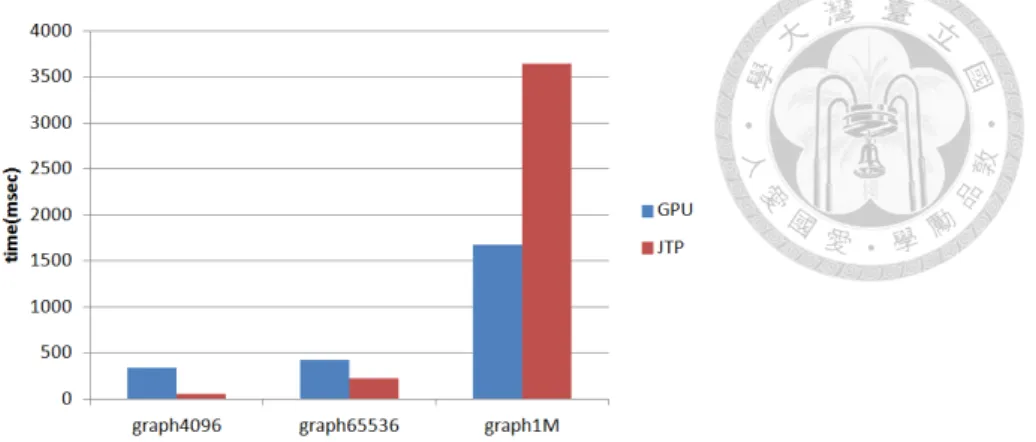
Figure ?? shows the BFS benchmark run on JTP and GPU, in a variety of problem sizes. In the small problem size, the BFS benchmark running in JTP mode is faster than that running in GPU mode. The reason is that Android-Aparapi generates OpenCL in run time. Android-Aparapi takes time to initialize operations in OpenCL, such as parsing Java bytecode, and generating the OpenCL host program and kernel program in run-time. The time required to initialize OpenCL is not affected by the problem size. Android-Aparapi contains codes to calculate times for initializing OpenCL. For example, the graph contains 4,096 nodes; the BFS benchmark run in GPU mode requires 308 milliseconds to initialize OpenCL, but the kernel codes run in GPU mode only require 29 milliseconds. The total
Figure 5.1: BFS benchmark run in JTP and GPU modes
the total time required by kernel codes run in GPU mode is only 1,670 milliseconds, but it required 3,645 milliseconds when run in JTP mode. In larger problem sizes, the GPU mode is faster than the JTP one. In smaller cases, initializing OpenCL substantially affects the performance of the GPU. When the problem size becomes large, the time of initialization for OpenCL becomes negligible.
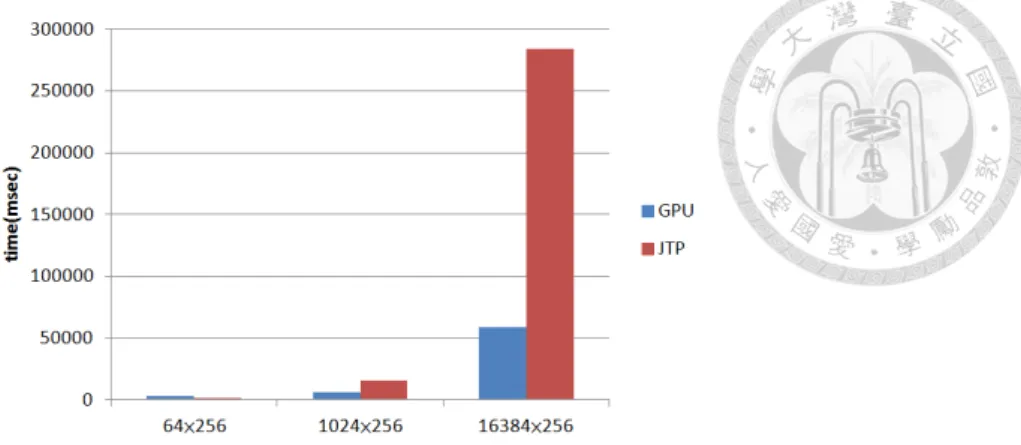
Figure ?? shows the SC samples run in JTP and GPU modes for a variety of prob- lem sizes. Compared with BFS, the speed of the GPU mode is more accelerated in SC.
Initializing OpenCL affects the performance of the SC running on the GPU. Additional problems arise when codes that contain local memory (a number of work-groups larger than one) run on the JTP and GPU. Using local memory efficiently speeds up the per- formance of benchmarks using OpenCL. However, Java does not support local memory, therefore, any codes containing local memory only speed up in Android-Aparapi GPU modes. Another consideration is that, when using local memory, the programmer must use the local barrier appropriately. In JTP mode, Aparapi uses Java’s barrier to simulate the local barrier in OpenCL. These barriers incur an additional cost, therefore Android- Aparapi officially recommends using local memory when the programmer is certain that the benchmark can run on a GPU at more than 90 percent of time. Another consideration regarding Aparapi performance on Android systems is the garbage collection of Dalvik.
When starting to run the benchmarks, the heap adjusts its size automatically, based upon the needs of the application. However, when the problem size is too large, the benchmarks running in JTP mode may trigger the garbage collection. This situation typically occurs in benchmarks containing local memory, and affects the performance.
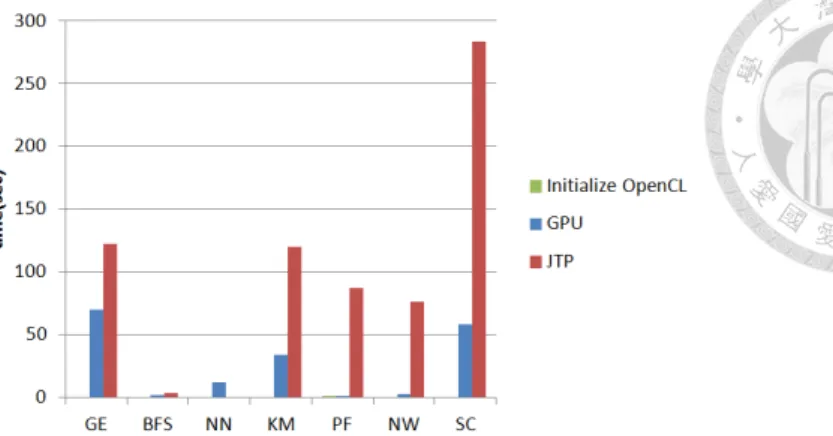
Figure ?? shows the performance of each benchmark when the problem size is small.
In Figure 6, GPU execution time contains the time to initialize OpenCL. OpenCL initial- ization affects the execution time of the GPU and renders the total execution time slower than the JTP.
Figure ?? shows the performance of each benchmark when the problem size is large.
14
Figure 5.2: SC benchmark running in JTP and GPU modes
Figure 5.3: Small problem size of each benchmark
The OpenCL initialization cost is negligible. Nearly every benchmark in the GPU mode is faster than in the JTP mode, excluding NN. Because the kernel codes of NN only calculate an array of the square root, the computation complexity remains low. The power of the GPU cannot be leveraged well. Additionally, the PF and NW are substantially sped-up in the GPU mode because a large portion of local memory is used, which implies significant performance boost on GPU and performance handicap on CPU due to the barrier problem.
The benchmarks running in the JTP mode are faster than those running in the GPU mode, when problem size is small, because benchmarks running in the GPU mode re- quire time to initialize OpenCL and communicate between Java and OpenCL. When the problem size is large, the GPU is more powerful and runs faster than the JTP.
Figure 5.4: Large problem size of each benchmark
Figure 5.5: Benchmark performance between our Android-Aparapi version with the ex- isting lower-level OpenCL version running on GPU
5.3 Android-Aparapi performance vs. original OpenCL performance on GPU
We compare the performance between our Android-Aparapi version with the existing lower-level OpenCL version running on GPU. The performance of each sample is shown in Figure ??. Android-Aparapi needs time to initialize OpenCL, the performance is slower than OpenCL version. In all of these benchmarks, almost all benchmarks execution time between Android-Aparapi and OpenCL are quite close. Only PF using Android-Aparapi is much slower than OpenCL. Our performance is 58% of OpenCL’s. Overall the geo- metric mean of our performance vs. OpenCL’s is 88%.
16
Table 5.2: Summary information of our current benchmark for large problem sizes
GE BFS NN KM PF NW SC
Kernels 2 2 1 2 1 2 1
Barriers 0 0 0 0 3 12 1
Problem Size
1024×1024 data
points
1000000 nodes
171040 nodes
494020 points 35 features
100×500 data points
1024×1024 data
points
16384 points 256 dimen- sions JTP Ex-
ecution Time
122.26 s 3.64 s 0.22 s 120.54 s 87.57 s 76.12 s 283.75 s
GPU Execution Time
69.96 s 1.67 s 12.3 s 34.18 s 1.21 s 2.528 s 58.88 s
Original SLOC (OpenCL)
525 349 358 686 671 592 2999
SLOC (Android- Aparapi)
182 212 130 228 328 411 850
initialize
OpenCL 263 ms 308 ms 160 ms 443 ms 501 ms 373 ms 559 ms
GPU
18
Chapter 6
Related Work
Our work focuses on computing frameworks in Java on Android devices and is based on AMD’s Aparapi project. Although several computing framework projects leverage the Java language, none have been adapted to Android Dalvik Virtual Machine, or have conducted detailed performance evaluation on a mobile GPU. Below we discuss several related works in the field of Java-based GPGPU APIs.
There are several Java language bindings for computing framework (JCUDA[?], JCudaMP[?], jocl[?] and JavaCL[?]), but these projects still require developers to write primitive arrays
manually and kernel codes in another language. Peter Calvert’s Java-GPU[?] is a project of a compute framework in Java that offloads parallel “for” loops to NVIDIA CUDA au- tomatically. Unlike Java-GPU targeting only loops, Rootbeer[?] is GPU compiler that let programmers use NVIDIA CUDA from within Java. Rootbeer binds complex graphs of objects into arrays of primitive types automatically and aims at better performance via a Java optimization framework called soot[?]. Hence, both of them eliminate many manual steps. The primary difference between Aparapi and them is that Java-GPU and Rootbeer do not provide fall back mechanism at run time, but Aparapi does.
“OpenCL in Action”, by Matt Scarpino[?], runs OpenCL image filtering. It is a pure JDK project. It does not use Java-based GPGPU APIs and runs only on Nexus 10. Rahul Garg[?] demonstrates how to load .so files for the base code, using the dlsym approach on various OpenCL driver libraries.
Aopencl project[?] designed by Mahadevan GSS is similar to our work. For simplic- ity, aopencl ports the older version of Aparapi to Nexus 4 and focuses on handling Qual- comm SDK[?] challenges. The aopencl project also encounters sun.misc.Unsafe method problems. However, aopencl does not enhance the APIs like we do. Furthermore, aopencl
20
Chapter 7
Conclusion and Future Work
Compute is in higher demand in more domains these days. The use of GPU devices has become a priority. As demonstrated in this paper, developers can use Android-Aparapi to write heterogeneous computing programs in Java and launch OpenCL kernels on Android devices with ease. App developers no longer need to struggle with writing native codes to bind with the OpenCL library. Furthermore, Android-Aparapi is a better defined API than the original Aparapi. In addition, our system reduces the large overheads of JNI calls: We modify both the Aparapi and Dalvik VM to group many operations into a single JNI call.
Finally, we adapt the popular Rodinia benchmark to Android-Aparapi, and the evaluation results demonstrate the effect of our optimizations for Android-Aparapi. We also present detailed comparisons between Android-Aparapi’s JTP and GPU modes.
In the future, we will rewrite the Rodinia benchmark further to use Java without re- sorting to JTP mode. Today we experiment with Mali T604 on Nexus 10, but more OpenCL libraries can be done next. Finally, we will compare the performance of the Android’s official computing framework, Renderscript, and NDK. The translated results from O2render[?] will be thrown into the comparison too.
22
References
[1] Aparapi. https://code.google.com/p/aparapi/.
[2] JavaCL. https://code.google.com/p/javacl/.
[3] Jocl-java bindings for opencl. http://www.jocl.org/.
[4] MattScarpino. https://http://www.openclblog.com/2013/03/
opencl-image-filtering-on-nexus-10.html/.
[5] QualComm SDK. https://developer.qualcomm.com/discover/
mobile-platforms/android/.
[6] Rahul Garg. https://bitbucket.org/codedivine/testcln10/src.
[7] Android NDK Document, 2012.
[8] P. Calvert. Parallelisation of java for graphics processors. Final-year dissertation at University of Cambridge Computer Laboratory. Available from http://www. cl. cam.
ac. uk/ prc33, 2010.
[9] S. Che, M. Boyer, J. Meng, D. Tarjan, J. W. Sheaffer, S.-H. Lee, and K. Skadron.
Rodinia: A benchmark suite for heterogeneous computing. In Workload Character- ization, 2009. IISWC 2009. IEEE International Symposium on, pages 44–54. IEEE, 2009.
[10] G. Dotzler, R. Veldema, and M. Klemm. Jcudamp: Openmp/java on cuda. In Proceedings of the 3rd International Workshop on Multicore Software Engineering, pages 10–17. ACM, 2010.
[11] Google. Renderscript. http://developer.android.com/guide/
[14] S. Lee, S.-J. Min, and R. Eigenmann. OpenMP to GPGPU: a compiler framework for automatic translation and optimization. In Proceedings of the 14th ACM SIG- PLAN symposium on Principles and practice of parallel programming, PPoPP ’09, pages 101–110, New York, NY, USA, 2009. ACM.
[15] NVIDIA. CUDA Toolkit. http://developer.nvidia.com/
cuda-toolkit.
[16] P. C. Pratt-Szeliga, J. W. Fawcett, and R. D. Welch. Rootbeer: Seamlessly using gpus from java. In High Performance Computing and Communication & 2012 IEEE 9th International Conference on Embedded Software and Systems (HPCC-ICESS), 2012 IEEE 14th International Conference on, pages 375–380. IEEE, 2012.
[17] K. Skadron. Rodinia:Accelerating Compute-Intensive Applications with Accelera- tors. http://lava.cs.virginia.edu/Rodinia/.
[18] R. Vallee-Rai, P. Co, E. Gagnon, L. Hendren, P. Lam, and V. Sundaresan. Soot:
A java bytecode optimization framework. In CASCON First Decade High Impact Papers, pages 214–224. IBM Corp., 2010.
[19] Y. Yan, M. Grossman, and V. Sarkar. Jcuda: A programmer-friendly interface for accelerating java programs with cuda. In Euro-Par 2009 Parallel Processing, pages 887–899. Springer, 2009.
[20] C.-y. Yang, Y.-j. Wu, and S. Liao. O2render: An opencl-to-renderscript translator for porting across various gpus or cpus. In Embedded Systems for Real-time Multimedia (ESTIMedia), 2012 IEEE 10th Symposium on, pages 67–74. IEEE, 2012.
24