CHAPTER THREE RESEARCH METHODOLOGY
The goals of this study were to investigate EFL learners’ online reading strategies and to study the relationship between strategy use and comprehension. To accomplish the two aforementioned goals, a web-based reading program was designed and developed. This study were therefore divided into two phases: (1) the design of a technology-enhanced reading program supported by reading theories and reading strategy research; (2) the actual implementation of this reading program through which EFL learners’ online reading strategies were collected and further categorized;
and the relationship between participants’ strategy use and their comprehension was investigated.
In this chapter, I will first present the design of the online reading program, including reading texts, reading strategy support buttons, and the computer tracking system. I will then describe the design of this study, including the selection of the participants, instrumentation, data collection procedures, and data analysis procedures.
Design of the Online Reading Program
The construction of this technology-enhanced reading program—English Reading Online (http://cai2.iem.sju.edu.tw/josephine/)
1—was based on research findings from (1) component reading skills (Grabe, 1991), (2) language learning strategies (O’Malley & Chamot, 1990; Oxford, 1990) and reading strategies (Mokhtari & Reichard, 2002, 2004; Sheorey & Mokhtari, 2001), and (3) current web-based reading programs in Taiwan (Chang et al., 2003; Chen 2003, 2004; Sun, 2003). This system had both student and teacher interfaces. Within the student interface, students could access texts based on their level of proficiency and utilize
1 Visitors may use “guest” as username and password to log in.
reading support functions while reading online. The teacher interface allowed teachers to track students’ reading strategy use as a group as well as on an individual basis. The reading program itself served as a data collection tool to gather students’ strategy use in addition to providing a supportive reading environment for EFL readers. The design of this program will be discussed from (1) reading texts, (2) reading strategy support functions, and (3) the tracking system.
Reading Texts
Text selection was the first step in program construction. The criteria for selecting texts can be approached by topics, rhetorical structures, and difficulty level.
Initially five topics, including food, movie, history, travel, and holiday, were selected.
This was primarily due to the fact that all were about leisure reading and did not require background knowledge from students. Second, with regard to rhetorical structures, among these five topics, four of them (movie, history, travel, and holiday) were descriptive texts. Only one topic, food, was about process writing. The process writing text was therefore used for piloting studies to ensure students’ familiarity with program functions. Third, to investigate whether text difficulty influenced strategy use, four texts were divided into two sets—one set was approximately at students’ right level and the other was slightly above their level. Articles were read in the order of difficulty. The difficult level of texts was determined by a computer software program and actual piloting of the texts.
In determining the difficulty level of texts, every article was analyzed through Readability, a software program which contains various formulas to evaluate the text,
including Dale-Chall Formula, the Flesch Reading Ease Formula, the Flesch Grade
Level Formula, the FOG formula, the Powers-Sumner-Kearl Formula, the SMOG
Formula, the Forcast Formula, and the Spache Formula. Readability formulas predict
These formulas are much the same in that they are primarily based on factors such as the number of words in the sentences and the number of letters or syllables per word.
Among these formulas, Flesch Reading Ease formula and the Flesch-Kincaid are mostly widely used (Lai, 2005; Memphis, 2003). Above all, the Flesch Grade Level Formula is most reliable when used to assess upper elementary and secondary materials. This is why Flesch Grade Level Formula was used in this study. The decision regarding the range of text difficulty was made by examining textbooks that participants studied in the previous semester. The textbook used by participants in the previous semester (ACTIVE Skills for Reading—Book Two) was rated as Flesch Grade Level 6-8, which was a level that was familiar to participating students. Ratings were not as finite as formula results; they were at best reliable to within plus or minus one-half grade level.
In addition to using software to analyze readability level, it was still important to
pilot test the passages. This was accomplished by asking students with a similar
proficiency level to that of the potential target groups to read and assess if those texts
were readable to them. This would ensure that the texts were manageable to the
participants in this study. The text selected for this reading forum was therefore based
on the criterion mentioned above. After checking readability and pilot testing passages,
it was therefore decided that the two online texts aiming at students’ level was
between Level 6-7 under the topics of movie and history, and the other two
challenging texts were between Level 9-10 under the topic of travel and holiday. The
researcher obtained permission from the author of each article for use in this study. A
sample of permission form is shown in Appendix G. A summary of the online text
selection is shown in Table 2.
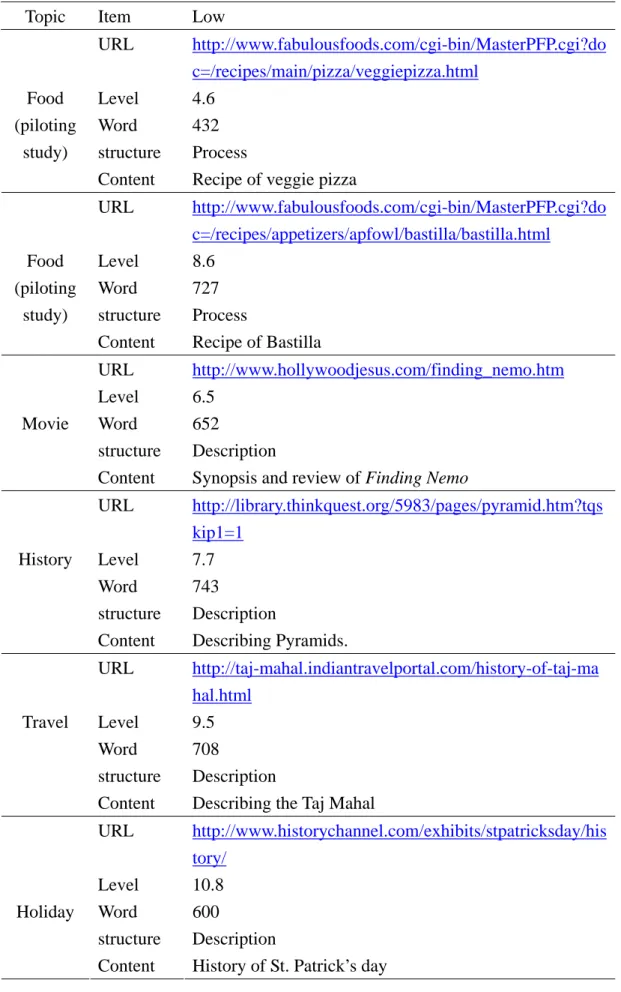
Table 2. Online Text Selection
Topic Item Low
URL http://www.fabulousfoods.com/cgi-bin/MasterPFP.cgi?do c=/recipes/main/pizza/veggiepizza.html
Level 4.6 Word 432 structure Process Food
(piloting study)
Content Recipe of veggie pizza
URL http://www.fabulousfoods.com/cgi-bin/MasterPFP.cgi?do c=/recipes/appetizers/apfowl/bastilla/bastilla.html
Level 8.6 Word 727 structure Process Food
(piloting study)
Content Recipe of Bastilla
URL http://www.hollywoodjesus.com/finding_nemo.htm Level 6.5
Word 652 structure Description Movie
Content Synopsis and review of Finding Nemo
URL http://library.thinkquest.org/5983/pages/pyramid.htm?tqs kip1=1
Level 7.7 Word 743 structure Description History
Content Describing Pyramids.
URL http://taj-mahal.indiantravelportal.com/history-of-taj-ma hal.html
Level 9.5 Word 708 structure Description Travel
Content Describing the Taj Mahal
URL http://www.historychannel.com/exhibits/stpatricksday/his tory/
Level 10.8 Word 600 structure Description Holiday
Content History of St. Patrick’s day
Piloting texts were under the topic of food. Texts were from FabulousFood.com (http://www.fabulousfoods.com) with the easier text (see Appendix H) of 432 words graded as 4.6, and the more difficult text (see Appendix I) of 727 words graded as 8.2.
The former was a vegetable pizza, while the latter was that of Moroccan appetizer.
Hyperlinks were also rich in these two texts. These two texts were used in piloting the current online reading program and in familiarizing students with all of the functions within the program.
The first text adopted for use in the study was about the movie of Finding Nemo (http://www.hollywoodjesus.com/finding_nemo.htm) rated of 652 words as Level 6.5 (see Appendix J). It provided synopsis of the text, critical review of the movie, and rich links to reference websites, such as photos of actors and trailers.
The second text was about pyramids, which was chosen based on an anonymous survey conducted in the process of piloting texts (see Appendix K, available at http://library.thinkquest.org/5983/pages/pyramid.htm?tqskip1=1). It was rated of 743 words as Level 7.7, which was slightly higher than the Nemo text. With regard to its content, it presented a short history of Giza and details about how the pyramids were built and why. It also provided links to illustrate the Great Sphinx of Giza (http://www.guardians.net/egypt/sphinx/) and a link to interactive quiz (http://www.pbs.org/wgbh/nova/sunken/wonders/ ).
The third article was about the Taj Mahal. It was rated of 708 words as Level 9.5 (see Appendix L, available at http://taj-mahal.indiantravelportal.com/
history-of-taj-mahal.html). It described a touching story behind this magnificent
monument and its construction process. Rich hyperlinks led students to numerous
India travel sites and virtual tours to the Taj Mahal. As the grade level of this article
was beyond students’ current proficiency, this article was categorized as more
challenging texts for students.
The last article was about St. Patrick’s Day. This topic was chosen as it is the holiday that most students in Taiwan are not familiar with, yet are curious to learn about (see Appendix M, available at http://www.historychannel.com/exhibits/
stpatricksday/history/). It described how St. Patrick’s Day was celebrated and the importance of its recognition. It also went into some details about the festivities that took place on this day around the globe. Hyperlinks took students to a further understanding of celebration traditions, such as the meaning of shamrocks, the pagan symbol of snakes, and the traditional Irish dishes of bacon and cabbages. As its difficulty level was rated the highest at Level 10.8, this St. Patrick’s Day article was read last.
Reading Strategy Support Functions
The design of strategy support functions was based on component reading skills (Grabe, 1991); reading strategy research (Mokhtari & Reichard, 2002, 2004; Sheorey
& Mokhtari, 2001); learning strategies useful for reading (O’Malley & Chamot, 1990;
Oxford, 1990); and current web-based reading programs (Chang et al., 2003; Chen, 2003, 2004; Sun, 2003). The sixteen strategy support functions were Keyword, Preview, Prediction, Outline, Summary, Semantic mapping, Pronunciation, Speed Reading, Dictionary, Translation, Grammar, Highlight, Notebook, Music box, Question, and Reading task. The first fifteen strategy functions were clickable buttons to facilitate reading, while the last strategy button (Reading Task) could be clicked when students completed the whole reading process. To serve the purpose of coding students’ strategy use, the strategy help buttons will be described mostly in terms of Mokhatari and Reichard’s (2002, 2004) reading strategies supplemented by O’Malley and Chamot’s (1990) and Oxford’s (1990) learning strategies useful for reading.
These strategy buttons were further grouped into (1) Global strategies, (2)
The first strategy group, Global strategies, is intentional techniques that readers use to monitor or manage their reading, including setting a purpose for reading, previewing text content, predicting what a specific text is about, etc. (Mokhtari &
Reichard, 2004). The four strategy buttons designed under the category of the Global strategies were Keyword, Preview, Prediction, and Outline.
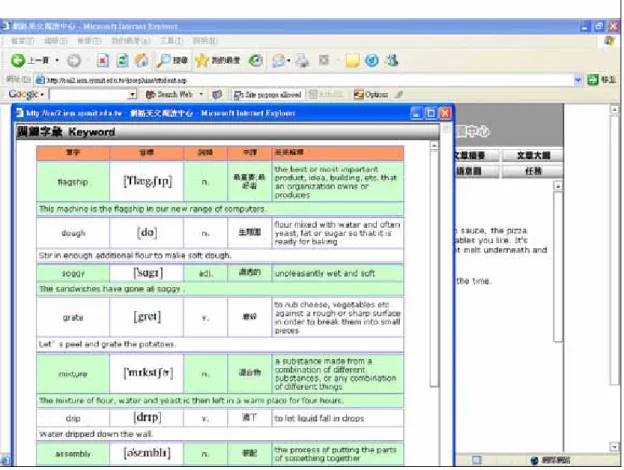
The Keyword strategy function listed important words of the reading text with
pronunciation, definitions in English and Chinese, as well as examples and
illustrations. An example is shown in shown in Figure 2. The list of keywords
provided students the chance to guess the main idea of the topic and prepare them for
further reading. The design of presenting keywords reflected the concept that
vocabulary knowledge is a critical feature of reading (Grabe, 1991), and knowledge of
a new word needs to include pronunciation, spelling, word structure, and meaning
(Laufer, 1997). Studies on second language reading strategies also suggest that
readers need to overview a key concept or materials in a new text and associate it with
what is already known (Oxford, 1990). Previewing keywords will help learners build
the needed vocabulary and make associations. This is one of the metacognitive
strategies—over-viewing and linking with already known knowledge—termed by
Oxford. Recent studies on reading strategies find that using prior knowledge, such as
knowledge of vocabulary or concept, is one of the global strategies employed by
readers (Mokhtari & Reichard, 2004).
Figure 2. A Sample Page of Keyword
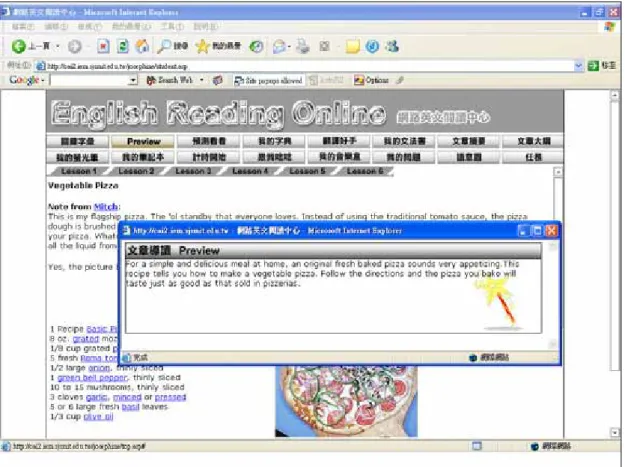
The next strategy under Global strategies was Preview strategy button, which provided a general guide of the text to arouse students’ interest in reading (see Figure 3). Previewing texts to find specific information prior to actual reading has been recognized as one of the important monitoring skills for fluent reading (Grabe, 1991;
Grabe and Stroller, 2002; Mokhtari & Reichard, 2002, 2004). The act of previewing
the text to see how it is organized and how it relates to what readers already know is
one of the cognitive reading strategies (Oxford, 1990), and is regarded as a kind of
global reading strategy (Mokhtari & Reichard, 2002, 2004).
Figure 3. A Sample Page of Preview
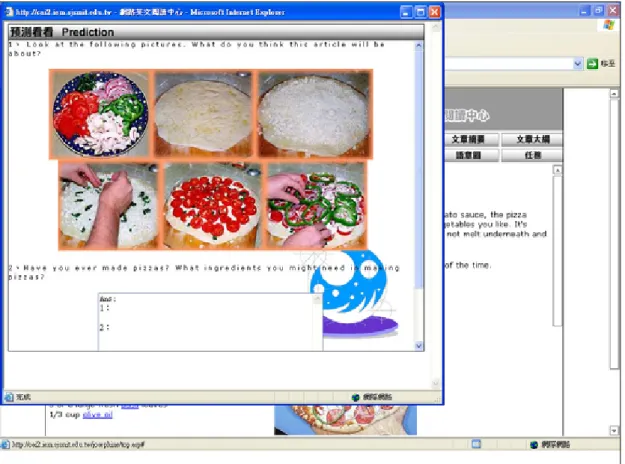
The Prediction strategy button, which also belonged to Global strategies, provided students with a collection of all of the pictures or video clips of the text in the hope of stimulating students to predict what would come out for the text. Students were given a pop-out window that asked previewing questions, such as Look at the following pictures. What do you think this story will be about? A sample page can be
found in Figure 4. The Prediction mechanism was consistent with Mokhtari and
Reichard’s (2002, 2004) global strategies of predicting or guessing text meaning,
O’Malley and Chamot’s (1990) cognitive strategies of predicting text outcomes, and
Oxford’s (1990) cognitive strategy of anticipating the text. The act of making
predictions can help readers create and develop ideas quickly.
Figure 4. A Sample Page of Prediction
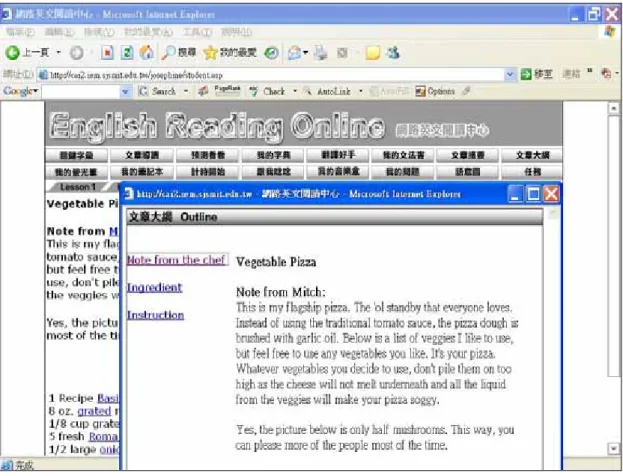
The Outline strategy button, one of the Global strategies, presented each reading
text in an outlined format based on its specific text structure (see Figure 5). For
example, the article about a vegetable pizza recipe was broken down into three
sections—Notes from the Chef, Ingredients, and Instruction. It was only when
students click on the outline that they could see the content of the text. The advantage
of the hyperlinked outline was that its navigational aid allowed readers to easily see
the main content points and the organization of the text. Using this hyperlinked
outline has a clear advantage over scrolling as it offers a global view of the text, saves
memory load, and lessens eye strain (Kol & Schcolnik, 2000). In L2 reading literature,
knowledge about the text’s basic organization can facilitate comprehension (Grabe,
1991). This design was also congruent with Mokhtari and Reichard’s (2002, 2004)
categorization of the global strategy—readers review the text first by noting its
Figure 5. A Sample Page of Outline
characteristics, such as text length and organization. Likewise, knowing how a text is organized (Grabe, 1991) and planning for organization of the text (O’Malley &
Chamot, 1990) influence the comprehension of the text.
The second strategy group was Problem-solving strategies, which were localized actions that readers use to work directly with the text (Sheorey & Mokhtari, 2001). These were focused techniques when readers encountered problems with textual information, including re-reading when text became hard, adjusting reading rate, reading aloud when text became difficult, visualizing the information read, and resolving conflicting information. Problem-solving strategy buttons were Summary, Pronunciation, Speed Reading, and Semantic Mapping.
The Summary mechanism belonged to the Problem-solving strategy because
reading a shortened version of the text when text becomes difficult is one of the
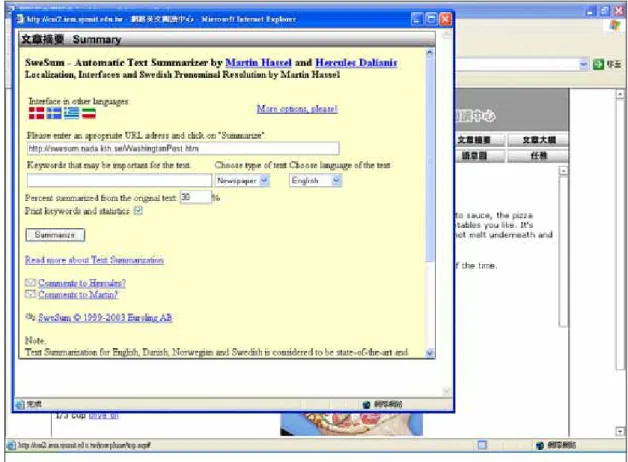
techniques that readers employ to tackle reading problems (Mokhtari & Reichard, 2002). Metacognitive knowledge such as recognizing and prioritizing the more important information found in the text is utilized by reading summaries and is an essential component of fluent reading (Grabe, 1991). In addition, summarizing is a very important strategy that helps learners structure new input and show how much they have achieved by making a condensed version of the text (O’Malley and Chamot, 1990). The current summary mechanism linked students to an automatic text summarizer (http://swesum.nada.kth.se/index-eng.html) (Chen, 2003, 2004). Students could paste the text of their own, enter an appropriate URL address, or upload a text file from their desktops to get a free text summary. This mechanism makes it easier for learners to understand the main idea of the text; especially when they were encountering lengthy authentic reading materials (see Figure 6).
Figure 6. A Sample Page of Summary
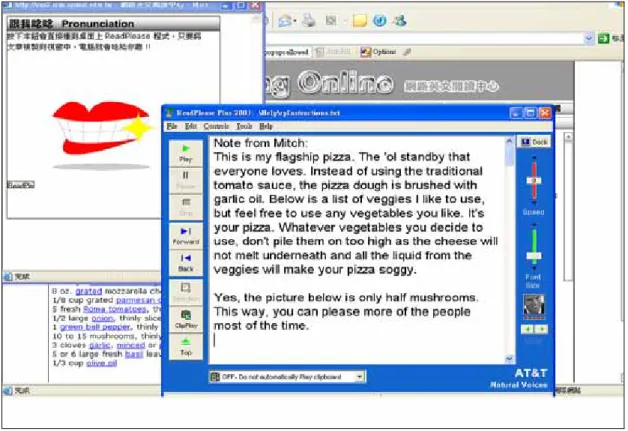
The design of Pronunciation strategy buttons reflected the research findings that reading aloud when text became difficult was one of the Problem-solving strategies in assisting textual comprehension (Sheorey & Mokhtari, 2001). Although this strategy was later defined as support strategies in Mokhtari and Sheorey’s (2002, 2004) studies, the current study regarded the act of reading the text out loud as one of the specific techniques that readers use to directly tackle the text itself. It is because phonological knowledge is essential for fluent alphabetic reading with comprehension. In addition, new information can be best remembered by sound (Oxford, 1990). To become a fluent reader, automatic access to lexical items needs to be activated (Grabe, 1991) and modern text-to-speech software (ReadPlease 2003) is one of the solutions (Chen, 2003, 2004). The current program incorporated ReadPlease software to provide aural presentation of the text
2. The student then could copy the text into a dialogue window and ReadPlease would read aloud the sentences (see Figure 7).
Figure 7. A Sample Page of Pronunciation
2 This software needed to be installed into every student’s computer before the actual reading task.
The next strategy button related to Problem-solving strategies was Speed Reading. Skillful readers monitor their reading speed constantly (Mokhtari &
Reichard, 2002). When the text is comprehensible, strategic readers read fast and
purposefully (Oxford, 1990). When the text becomes difficult, they will adjust reading
speed and even re-read for better comprehension. Rate-building lessons have long
been used to promote fluency and automaticity among L2 readers (Grabe, 1991; Sun,
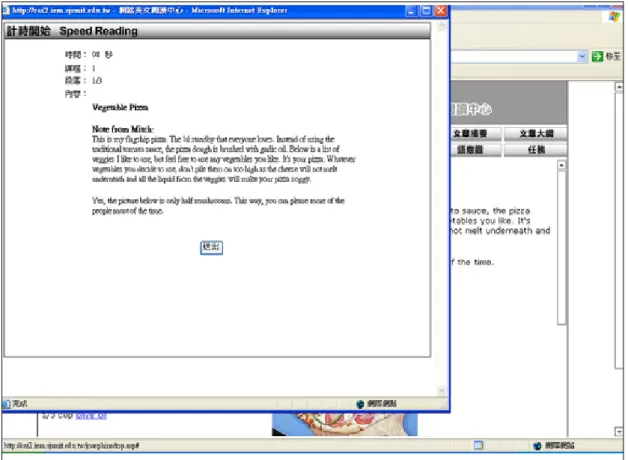
2003). The current speed reading function was realized by setting the reading rate to
three levels, ranging from low speed, (i.e., 60 words per minute (WPM)), medium
speed (i.e., 180 WPM), and high speed (i.e., 300 WPM). Once a student chose the
desired level of speed, he/she was presented visual prompts to write down the main
ideas of each paragraph in a given period of time. A clock was set so that readers were
reminded of the time left for reading (see Figure 8). Once time was up, the paragraph
disappeared from the screen and the reader was encouraged to read the next paragraph
and write down the main ideas. The time needed for finishing each paragraph was
automatically calculated by the system. For example, if the speed was set at 60 WPM
(low speed), and the first paragraph is 120 words, then the maximum time that readers
could read for this paragraph was two minutes. However, the reader could still click
on “finish” once he/she finished reading. The system calculated the total time the
reader used to finish reading the whole passage. Additionally, the system gave
feedback about his/her reading performance, such as “Congratulations! You have
finished this speed reading session with a reading rating of whatever WPM!” It was
hoped that under such time constraints, readers were forced to read faster and to grab
ideas more efficiently.
Figure 8. A Sample Page of Speed Reading
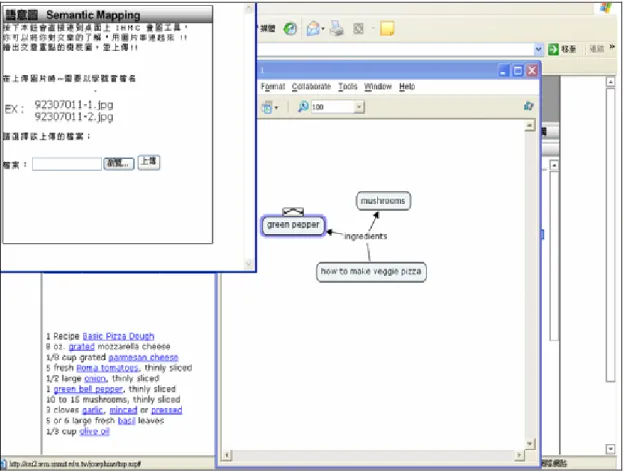
The last strategy button in the Problem-solving strategy groups was Semantic Mapping. Picturing or visualizing information to remember what is being read is one
of the problem-solving strategies used by skillful readers (Mokhtari & Reichard, 2002). Visual images help readers understand and remember new information (O’Malley & Chamot, 1990). When readers are provided chances to organize their thoughts and take notes about what they have read through semantic maps, they can better grasp the rhetorical patterns of the text and thus enhance their reading comprehension (Chang et al., 2003; Grabe, 1991; Oxford, 1990). This program integrated Semantic Mapping Tool by IHMC (http://cmap.ihmc.us/)
3. By clicking this function button, students could use IHMC program to sketch out a picture of the text with interconnected ideas (see Figure 9).
3 Similar to ReadPlease, IHMC needed to be installed into every student’s desktop prior to reading tasks.
Figure 9. A Sample Page of Semantic Mapping
The third strategy group was Support strategies. Support strategies are basic support mechanisms or tools that sustain readers’ responsiveness to reading, such as using reference materials like dictionaries or grammar resources, translating, taking notes, underlining, or highlighting textual information (Mohktari & Reichard, 2002).
The strategy buttons found in the Support strategy categorization include: Dictionary, Grammar, Translation, Highlighting, and Notebook.
Dictionary was the first strategy button designed in Support strategies.
Vocabulary knowledge, on a basic level, is crucial to reading. Reading ability is
severely constrained by vocabulary knowledge (Grabe, 1991) and dictionary usage is
one of the support mechanisms intended to aid readers in comprehending the text
(Mohktari & Reichard, 2002). In this program, students were provided online
dictionaries and concordances to help them look up unknown words. Online
dictionaries included Yahoo! Kimo Dictionary (http://tw.dictionary.yahoo.com/) (see Figure 10), Ling, Yu-Tang Dictionary (http://www.arts.cuhk.edu.hk/Lexis/Lindict/), The FreeDictionary.com (http://www.thefreedictionary.com/), Marriam-Webster
(http://www.m-w.com/), Dictionary.com (http://dictionary.reference.com /translate/text.html), and Cambridge Online Dictionary (http://dictionary.reference.com/translate/text.html ). Online concordancers included TOTALrecall (http://candle.cs.nthu.edu.tw/totalRecall/totalRecall/totalRecall.aspx ), Hong Kong Virtual Language Center (http://www.edict.com.hk/), and Collocation Explorer (http://research.iwillnow.org/project/bncrce/).
Figure 10. A Sample Page of Dictionary
Grammar was another strategy button related to Support strategies. Just as
dictionaries are reference materials when used to look up new words to support
reading, grammar resources pertaining to language structure facilitates reading
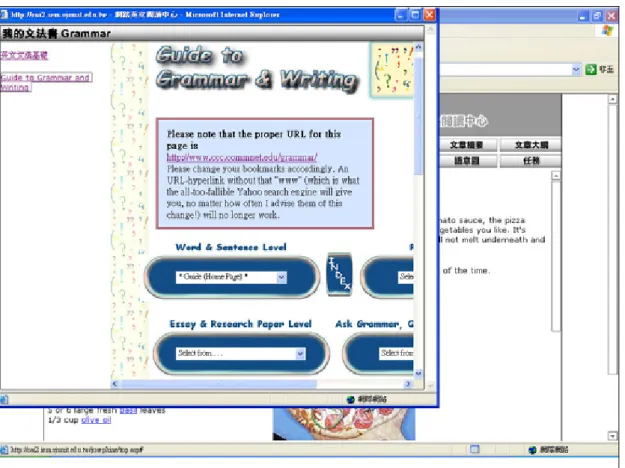
(Mokhtari & Reichard, 2002). In this program, two websites were provided to help students understand problematic sentence structures, including Basic English Grammar (http://www.npc.edu.hk/staff/~ngtungying/ english_grammar/), and Guide to Grammar and Writing (http://www.ccc.commnet.edu/grammar/). A screenshot of Grammar Resources can be found in Figure 11.
Figure 11. A Sample Page of Grammar
The next strategy button related to Support strategies was Translation.
Translating from the target language to the mother tongue is one of the support
strategies used by skilled readers (Mokhtari & Reichard, 2002). Translating is a useful
strategy for beginners (Oxford, 1990), and using the first language as a base for
understanding the second language is widely adopted among second language learners
(O’Malley & Chamot, 1990). Readers can use what they have known in their L1 to
produce language. In the current program, students were able to access an automatic
translation at Altavista (http://babelfish.altavista.com/) (Chen, 2003, 2004). Although machine translation were not very coherent, they helped students get the gist of the article. This website translated texts or a webpage into a chosen language (Figure 12).
Figure 12. A Sample Page of Translation
Highlighting was also one of the Support strategies. Underlining or circling
information in the text is a support mechanism that helps readers remember what was read (Mokhtari & Reichard, 2002). Highlighting is also considered one of the cognitive strategies used for creating structure for input and output (Oxford, 1990).
This can be used jointly with strategies such as summarizing and note-taking. In
addition, highlighting in computers is regarded as a way to increase interaction
between the computer and learners (Chapelle, 2001; Sun, 2003). In this program,
three categories appeared in the highlighting section, including vocabulary, grammar,
and comprehension. Students could first block a certain section of the text (words,
phrases, or sentences) that they wanted to annotate, then click the right key of the mouse, choose among the three options (annotation of vocabulary, grammar, or problematic sections), and finally write down their notes in a pop-up window (see Figure 13).
Figure 13. A Sample Page of Highlighting
By using Highlighting, Words that had been annotated were highlighted in the
text screen. These comments that students had made for vocabulary, grammar, or
problematic sections was shown once the cursor moved to the annotated part and was
further stored in the computer database. The data could be transferred into the
Notebook mechanism, which will be discussed later. To be more specific, in the
vocabulary section, students could write down their search of a particular word in
online dictionaries. In the grammar section, they could write down their comments of
a particular sentence structure into the dialogue box “Grammar comments” after
searching for online grammar resources. In the comprehension section, students could highlight problematic parts to raise questions.
The last strategy button related to Support strategies was Notebook (see Figure 14). Taking notes while reading is one of the support strategies that help readers understand what they read (Mokhtari & Reichard, 2004), and is considered as a specific action to remember information in the metacognitive knowledge domain (Grabe, 1991). It is believed that note-taking is a very important strategy for reading in terms of creating structure of input and output (Oxford, 1990). Note-taking can take the form of a tree diagram, semantic map, T-formation note form, and/or outline structure (Hamp-Lyons, 1983).
Figure 14. A Sample Page of Notebook
The function of notebook was congruent with the highlighting mechanism. When
students annotated a word, added grammatical notes, or showed their difficulty in
understanding a given phrase of text section in Highlight, all of the information input by the students would be shown in the notebook section. When students opened their notebook, they could trace back to the very first lesson they had read and check their notes in the areas of vocabulary, grammar, and questions they had raised. Since this interface was individualized, students could see their personal annotation in the notebook section once the text was activated for reading.
The fourth strategy group was Socio-affective strategies. In addition to Global strategy, Problem-solving strategy, and Support strategy in Mokhtari and Reichard’s (2002) reading strategy classification, the affective factors in reading are also important in understanding reading process (Guthrie & Wigfield, 2000; Guthrie, Wigfield, Metsala, & Cox, 1999; Guthrie, Wigfield, & Von Secker, 2000). Good language learners constantly monitor their own emotional temperature, and seek opportunities to interact with others in the learning process (O’Malley & Chamot, 1990). These social/affective strategies include cooperation (e.g. working with peers to solve a problem); questioning for clarification (e.g. seeking additional explanation from peers or a teacher); and self-talk (e.g. using mental control to reduce anxiety about the task). This program designed two strategy function buttons to facilitate social-affective strategies—the functions of listening to music (Music Box), and chatting with other learners of speakers (Question).
The design of Music Box reflected research findings that ideational control over affect is considered an effective strategy in dealing with language tasks (O’Malley &
Chamot, 1990). Good language learners know how to control their own emotions, such as lowering anxiety, encouraging oneself, and taking emotional temperature.
Teachers can help to lower students’ anxiety, such as using progressive relaxation,
deep breathing, or mediation; using music and using laughter (Oxford, 1990). In the
choices of songs. They could listen to music while doing reading tasks (see Figure 15).
Figure 15. A Sample Page of Music Box
Question was another Socio-affective strategy button. Language is
communication and it involves social interaction with people. How to apply social
strategies is an important step towards learning. Oxford (1990) outlines three sets of
specific strategies: asking questions, cooperating with others, and empathizing with
others. Asking questions help learners to clarify their doubts or verify their
assumptions by interacting with peers. The act of asking pushes learners one step
further toward the intended meaning and thus aids understanding. In this reading
program, three mechanisms were built to facilitate the use of social strategies in the
aspects of asking questions and cooperating with others (see Figure 16). First,
students could write emails to their teachers to voice their doubts. Second, they could
Figure 16. A Sample Page of Question
go to the discussion board to post questions to teachers and peers. Third, they could even go to a local chat room to have synchronous discussions. In addition to asking questions, students could work with other classmates to complete the reading tasks. A list of the current fifteen strategy support buttons and their corresponding strategy category is shown in Table 3.
In addition to the 15 strategy buttons that facilitated reading, the last strategy
button, Reading Task, was clicked only when students finished reading and felt ready
to answer questions. There were two sections in the reading task: a written recall and
a post-task survey (see Appendix N, which will be further elaborated in the
Instruments section). Students needed to write down what they remembered from the
article without referring to the text. Then they needed to fill out a survey about their
reflections on the whole reading process and comments on English Reading Online.
Table 3. A Summary of Reading Strategy Support Function Design and Its Strategy Categorization
Strategy Description Button Description of Design Using prior
knowledge
Keyword Students could preview all of the keyword words in the text.
Previewing text before reading
Preview Preview of the text was given.
Predicting or guessing text meaning
Prediction Students were given chances to predict the content of the text by showing pictures or keywords in the text.
Global
Noting text characteristics
Outline Texts were presented in an outline format.
Reading shortened versions of the text
Summary Online summary Mechanism was provided.
Reading aloud when text becomes hard
Pronunciation Readplease software was installed to provide aural input of the text.
Adjusting reading rate
Speed Reading
Students could set a desired rate to train themselves to speed read.
Problem -solving
Visualizing information read
Semantic mapping
Semantic mapping tool made visual presentation of ideas possible.
Dictionary Students could access online dictionaries and concordances.
Using reference materials
Grammar Students could access online grammar resources to analyze sentence structures.
Translating from English into Chinese
Translation Online translation service was provided.
Underlining information in text
Highlight Students could highlight any sections of the text to annotate vocabulary, grammar, and problematic areas.
Support
Taking notes while reading
Notebook The system archived what students had annotated in the Highlighting section and displayed the content in the Notebook section.
Using music Music Box Students could play music while doing reading tasks.
Socio- affective
Asking peers questions
Question Students could link to email, discussion
board, and chat room to clarify doubts.
Computer Tracking System
This reading program, English Reading Online, served as an instrument in collecting students’ strategy use in addition to providing a facilitative online reading environment. The computer is advantageous in recording learners’ strategy use due to its “accuracy, real-time immediacy, reliability, and compact storage space” (Liou, 2000: 67). For example, computers can accurately capture every movement that learners make in the program; therefore, the data is real and is not based on imagination. In addition, the computer can record learner behaviors across sessions systematically so that learners’ performance can be documented. Finally, the real-time immediacy nature of the computer tracking system allows the gathering of learners’
behaviors without country and cultural boundaries as long as learners have access to CALL materials.
The tracking mechanism in this program tracked down students’ use of fifteen strategy buttons (Keyword, Preview, Prediction, Outline, Summary, Semantic mapping, Pronunciation, Speed Reading, Dictionary, Translation, Grammar, Highlight, Notebook, Music box, and Question) while completing each reading task. First, within this reading process, the system tracked an individual user’s access of each strategy support function in each lesson in terms of the total number of clicks and the total time used. To ensure that students used one strategy at a time, the current system had a mechanism that could detect the activation of strategy windows. That is, when the student clicked on a second strategy button, the first strategy window would be closed. The total time of the use of the first strategy button was calculated from the time when the student clicked on it until he/she clicked on the second strategy button.
Also, to avoid the possibility of counting time of idle strategy buttons, once a strategy
window was activated but unused for ten minutes, the system reminded the user to
Next, when an individual’s record was stored into the database, the computer could easily calculate the average number of strategy support function buttons accessed by all subjects or by some designated groups (more proficient or less proficient students) in each lesson or in all of the four lessons. The calculation formula was also applied to show the average time of accessing each function key as well as the starting and ending time of how each strategy button was used. This mechanism helped calculate the frequency of the strategy use and the time spent on each strategy button.
Finally, the content that each individual wrote into this system was tracked, including answers to prediction questions, notes in the notebook section, summary in the speed reading section, chat room /discussion board transcripts, semantic mapping pictures, and reading task results. These devices helped teachers monitor the students’
reading progress, such as whether their comprehension or reading speed was acceptable and whether their overall reading skills improved.
In summary, in order to facilitate the collection of students’ online reading strategy use while, simultaneously, providing a supportive reading environment for EFL learners, a technology-enhanced reading program was constructed. The reason this reading program itself was facilitative in collecting students’ online reading behaviors is that: (1) the online authentic texts selected in this program contained hyperlinks, photos, and video clips, which are essential characteristics of hypertext reading; and (2) the program converted all of the possible paper reading strategies in L2 literature into a digital format in the hope of collecting and categorizing students’
strategy use. In other words, the fifteen strategy support functions were designed in a
way to echo reading strategies classification found in Sheorey and Mokhtari (2001),
Mokhtari and Reichard’s (2002, 2004), Oxford’s (1990), and O’Malley and Chamot’s
(1990) frameworks so that the action of clicking on a certain strategy function button
online was an indicator of that particular strategy use. The design of the web-based reading program paved the way for the investigation of learners’ online reading strategy use.
Design of the Study
After describing the design of the web-based program, this section focuses on the implementation of the program to investigate online reading strategy use. Thirty participants were drawn from sophomore English majors at an Institute of Technology in northern Taiwan, and were divided into two groups (one High proficiency group and one Low proficiency group) based on their performance of a sample TOEFL test.
During the two-month experiment, the participants’ navigation path while reading four articles within the current web-based reading program and their reading performance in written protocols were tracked by the computer system. Both quantitative and qualitative analyses were conducted to collect students’ online reading strategy data. Quantitative methods were indispensable to have a general picture of students’ reading strategy usage. After the types of strategies were identified and sorted, qualitative analyses, such as videotaping techniques, semi-structured interviews, and written recalls, were used to provide detailed descriptions of each strategy use and to uncover relationships between strategy use and reading comprehension.
Discussions will first start from participants, followed by instruments used in this study. Data collection procedures and data analysis procedures will be the next focus.
Participants
Thirty Applied English majors were drawn from an Internet English class of
thirty-seven students at an institute of technology in the fall semester of 2004. To
differentiate proficiency levels among students, a TOEFL sample test was
to 315, with two scoring above 500, eighteen students scoring between 400 and 499, and seventeen students scoring between 300 and 399. The top two students who scored 633 and 513 were excluded from this current analysis as their scores were extremely high. Likewise, two students who failed to complete all of the four lessons were also eliminated from data analysis. Under the principle of widening the gap between the High and Low proficiency groups, the researchers selected 15 students with the top highest TOEFL scores and 15 students with the lowest TOEFL scores.
The remaining three students whose TOEFL scores were in the middle were not included
4. Therefore, based on TOEFL scores, participants in this study were divided into a more proficient group and a less proficient group, whose scores ranged from 481 to 409, and 384 to 315 respectively. Each group had fifteen students with matched age and major, but with differing proficiency levels. Demographic information about participants is listed in Appendix O.
Instruments
The instruments included (1) a background questionnaire, (2) videotaping of screens, (3) semi-structured interviews, (4) recall protocols, and (5) a post-task survey.
The Background Questionnaire
The background questionnaire (see Appendix P) was administered prior to the study in order to obtain additional information on students’ characteristics and to understand the results of the study in proper context. There were four major parts included in this background questionnaire. Part A provided participants’ demographic data and their self-evaluation of reading proficiency. Part B was related to the informants’ computer skills and reasons for using computers. Part C was concerned about reading on the Internet in terms of time on task. Part D was a comparison
4 The scores for the mid group were 388, 395, and 407.