國
立
交
通
大
學
資訊學院資訊科技(IT)產業研發碩士班
碩
士
論
文
一個可支援行動裝置之離線瀏覽機制
An Offline Browsing Mechanism for Mobile Devices
研 究 生:周東興
指導教授:袁賢銘 教授
一 個 可 支 援 行 動 裝 置 之 離 線 瀏 覽 機 制
學生:周東興 指導教授:袁賢銘 國立交通大學資訊學院產業研發碩士班 摘 要 隨著行動裝置性能的提升,以及無線通訊技術的進步,手持行動裝置上的網路應 用程式不但可行,也開始受到重視。然而,在無線網路的基礎之上開發網路應用 程式除了可行性之外,有非常多的議題需要考量:首先行動裝置上的應用程式軟 體必須在數百種不同的裝置上運作,使得不同平台上的應用軟體在佈署與散佈上 更加困難;此外,行動裝置的網路應用程式容易受到周遭環境,像是電信服務或 是網路連線問題的干擾。若以改善使用者在無線網路環境下,使用行動裝置應用 程式的體驗而言,上述的問題都使得開發行動裝置上的網路連線應用服務倍受挑 戰。 在上述的問題之下,一般認為其瓶頸在於行動裝置上的資料通訊再不穩定的無線 網路連線狀態下難以管理與同步的問題。因此,在本研究計畫中,我們將提出一 個考量行動裝置離線或是不穩定網路環境議題的客戶端資料儲存與訊息處理框 架以提供上述問題的資料導向解決方案。我們嘗試提供一個具有彈性且容易佈署 的平台,以達到以下目標:一、提供使用者在沒有網路的環境中依舊可以存取預 先指定的網頁資訊;二、儲存於行動裝置上的資訊為長久保存,沒有使用者的刪 除動作不會被覆蓋;三、連線與離線模式交互運作的機制;四、使傳統網際網路 使用體驗與行動裝置網際網路應用程式的結合成為可能。關鍵詞:行動裝置、離線模式、Google Gears
An Offline Browsing Mechanism for Mobile Devices
Student: Tung-Hing Chow Advisor: Shyan-Ming Yuan
Industrial Technology R & D Master Program of
Computer Science College
National Chiao Tung University
ABSTRACT
With the growing capability of mobile devices, platforms, and wireless communication technologies, networking software on mobile devices is made possible and receives more and more attention. However, many issues may be encountered when developing a networking mobile application. As the mobile application intended to be run on hundreds of devices, development and deployment are harder. Furthermore, frequent interruption by surrounding environment, such as telecom service or network connectivity, makes the mobile application development more challenging.
In this thesis, we will propose a client framework for mobile devices that considers the disconnection issue. We try to provide a flexible and easy-to-deploy platform such that, (1) it provides users to access the predefined Web information without network connection, (2) it provides adequate development and deployment flows, (3) offline data stored on the mobile device should be long-term storage, and (4) it makes the combination of traditional and mobile networking applications possible.
Acknowledgements
首先,衷心感謝 袁賢銘老師的指導、照顧、期間所給予的許多建議,以及 充裕自由發展的研究空間,讓我在這兩年來獲益匪淺。感激口試委員們,百忙中 遠從南北,能予以寶貴建議。更要感謝 交大及企業對我的共同栽培,使得本篇 論文得以順利完成。 另外,感謝實驗室的邱繼弘、葉秉哲、高永威、林家鋒、宋牧奇、周鴻仁、 林辰璞、謝明志、林宜豊、簡士強學長們,給予我的意見和幫助。謝謝讓熱情與 歡樂注滿實驗室裡的所有碩班同窗與學弟妹們,是你們每天和我一起共同努力, 在躊躇的時候給我勉勵,在困難的時刻為我解惑。謝謝永威學長所帶領的研究計 劃全員、對面實驗室的文馨、產專的益嘉與冠翬,所給我的支持與打氣。特別向 常給我微笑指教的紅猴兒道謝,還有 QQ、allan,陪我渡過漫長的夜…… 最後,感謝總是對我伸出溫暖的手,在背後給我激勵與扶持的,我的女友, 我的兄長與姊妹,我的父母親。讓我在求學路上無後顧之憂,一路的陪伴我完成 畢生學業的最後旅程,謹以此文獻給我摯愛的你們。Table of Contents
Acknowledgements ... III
Table of Contents ... IV
List of Figures ... V
List of Tables ... VI
1
Introduction ... 1
1.1 Preface... 11.2 Problem Statement and Motivation... 2
1.3 Outline of the Thesis ... 5
2
Background and Related Works ... 6
2.1 Background ... 6 2.2 Related Works ... 10
3
System Architecture ... 17
3.1 Overview ... 17 3.2 Overall Architecture ... 204
Implementation Detail ... 26
4.1 Webpage Prefetch Server design... 26
4.2 HTTrack Manipulation ... 29
4.3 Mobile IE plug-in design ... 30
4.4 Sequence Diagram ... 31
5
System Demonstration & Evaluation ... 37
5.1 Overview ... 37
5.2 Scenario... 37
5.3 System evaluation ... 41
6
Conclusion and Future Works ... 42
6.1 Conclusion ... 42
6.2 Future Works ... 43
References ... 44
List of Figures
Figure 2-1 Example of JavaScript code within HTML ... 6
Figure 2-2 Data object in JSON format ... 7
Figure 2-3 Example of PHP code ... 7
Figure 2-4 Architecture of Google Gears... 9
Figure 2-5 Screenshot of Teleport Pro ... 10
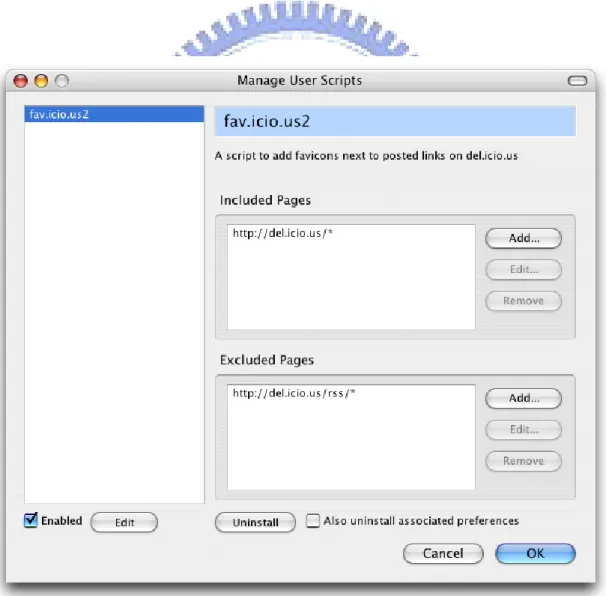
Figure 2-6 Screenshot of Greasemonkey ... 11
Figure 3-1 Critical components of system architecture ... 18
Figure 3-2 Overall system architecture ... 20
Figure 4-1 Supporting Google Gears on WPS ... 26
Figure 4-2 PHP code on User Interface ... 27
Figure 4-4 Sequence Diagram of Online State ... 32
Figure 4-6 Sequence Diagram of Prefetch & Publish State ... 35
Figure 4-7 Sequence Diagram of Offline State ... 36
Figure 5-1 Choosing the Interest List Manager ... 34
Figure 5-2 Login id and password ... 38
Figure 5-3 Offline webpages update ... 35
Figure 5-4 Update completion alert ... 39
Figure 5-5 Capture webpages by Google Gears ... 35
Figure 5-6 Browsing without network ... 39
List of Tables
Table 2-1 Major components of Google Gears ... 8 Table 5-1 URLs for demonstration ... 38 Table 5-2 Comparison among offline browsing services ... 41
1 Introduction
1.1 Preface
According to the 2008 Q4 statistics for mobile internet population announced from FIND [1], a section of Institute for Information Industry, the wireless 3G user in Taiwan keeps growing rapidly, a breakthrough of amount 11 million users amount. There will be four 3G user out of 10 mobile internet users. Compare with Q3, the 3G users in Q4 increased 11.4%, amount of 1.15 million users, from 25.41 million of total mobile phone population in Q2. It rose from 40.5% to 44.4% within a quarter, covered nearly half of total mobile phone population. The 3G users dominate the raise of mobile phone population in Taiwan.
Within the wireless 3G environment, multimedia information spread through, such as voice, video, documents… etc. 3G users become capable to communicate each others in voice style as traditional telephone style, sent text as Short Messaging Service, or to share their daily life on exchanging information on Internet, kinds of services implemented over the Internet can be accessed via laptops, mobile devices by 3G users.
With the growing capability of mobile devices, platforms, and wireless communication technologies, web-based application services for mobile devices is made possible and become popular as trend. We can feel that in the coming future, more and more traditional console software will be transform into internet service through web browsing, for satisfying fast information exchanges on those commercial, recreational or daily necessaries.
1.2 Problem Statement and Motivation
For wireless environment, there are many issues may be encountered when developing a networking mobile application. As the mobile application intended to be run on hundreds of devices, development and deployment for those applications become harder. In the present, the platforms available on mobile market are:
Java ME [2], Windows Mobile [3], Symbian [4], BREW [5], Linux [6] and Android [7], the open source platform which is published by Google in 2007. All the platforms have their own implementation models, brings much difficulties for software developers.
Furthermore, frequent interruptions by surrounding environment, buildings, fast-moving velocity, affecting the quality of telecom service and network connectivity, makes the mobile application development more challenging.
In these years, the population of mobile device utilizations is growing fast; not even people have their personal mobile device, some of them may have more than 2 different devices. It has become part of our daily life on nowadays.
However, there are lots of environmental constraints for mobile devices:
1. Limitation on computing power: It is not capable for mobile devices to handle complex computation; a prolonged processing time makes devices out of any response to users.
2. Limitation on storage space: Compare with general PC, mobile devices do not have much memory for storage, it is difficult to have enough room for bulk packs of files or a huge file.
3. Poor Connectivity when changing location: As we known, Mobile devices can be used without fix location, it is hard to guarantee a stable network connection, there will be no network signal received in basements, tunnels,
elevators, etc closed locations.
4. The telephony feature interrupted application services: When users received their phone calls on mobile devices, no operations can go on for all applications, so an exception must be consider to handle in case of sudden phone calls.
5. Limitation of interfaces: Mobile devices cannot have rather fast and comfortable input interface for operations like keyboard and mouse as PC have, also, the output screen of mobile devices are rather smaller that those PCs, it is no way to show much of information altogether at the same time, it will become too tiny to read clearly. Mobile applications must adjust their way on input/output style for the ease of mobile use.
For those limitations above, many researchers have already found out different solutions on solving designated problems. Moreover, the cost on network connection for mobile devices is needed to be charged, packet transmission throughput on mobile connection is one of important factors that users always care about. Less transmission time for achieving the same throughput would be appreciated.
The objectives in this thesis are on purpose to solve the third kind of mobile device problem above. Web browsing dependents on internet connection, without internet connection, web browsing no longer work. Such a problem can be solved by the way of Offline Webpage Storage. Although present web browsers have cached partial viewed webpages, it cannot keep specific webpages under users demand. Latest information will be cached and those past records which you needed maybe replaced.
Google Gears [8] is one of solutions on Offline Webpage Storage that supports web applications to run offline, on PCs and mobiles. Webpages can be stored while there is still a fairly good connection environment; offline webpages will be available
in case of bad connection quality. Besides, if needed information has been stored, no more excessive connection leads the cost drop down by less network transmission.
However, the basic requirement of using Google Gears is to install a browser plug-in, and only those web sites support Google Gears can make Google Gears works as well. Currently, the web sites which support Google Gears are mainly Google Services, i.e. Gmail, Google Reader…etc. In general, most of web sites do not support this function.
Gearsmonkey [9] is a solution of Offline Webpage Storage based on Google Gears. It has an implementation on PCs already. Gearsmonkey is a Firefox [10]] plug-in that executes scripts on it. Users can make their own scripts, which let Google Gears to work for particular web sites without supporting Google Gears. However, there are some disadvantages:
1.) Gearsmonkey does not work for mobile devices in present.
2.) A high level of scripting technique is required for users to achieve their goals. 3.) No batch process supported, users must visit all web sites to prepare complete offline data.
In order to solve the data transmission problem created by unstable wireless internet connection, we make a consideration on offline operation for mobile devices, and information redirect management in the unstable network environment. In this thesis, we provide a flexible, easy-to-deploy platform. There are 3 objectives of this paper:
1. Provide the offline web browsing capability, even for those websites which doesn’t support Google Gears
2. Provide Mobile IE plug-ins for users to specify offline web data and browse offline webpages
1.3 Outline of the Thesis
The thesis contains seven chapters. In Chapter 2, we introduce the backgrounds and related works. In Chapter 3, we propose the architecture of our system, and discuss the role and functions of each component. For deep understanding, we describe the implementation details and the design method in Chapter 4. We demonstrate our system to present its results in Chapter 5. Finally, we end up with a conclusion and discuss the future works about our system in Chapter 6.
2 Background and Related Works
2.1 Background
2.1.1 Client-side / Server-side scripting languages
Scripting language [11] is a programming language that allows some control of a single or many software application(s). Client-side scripting language refers to the programs on the web that are executed client-side, Server-side scripting language is a web server technology in which a user's request is fulfilled by running a script directly on the web server to generate “dynamic web pages” [12].
On Client-side scripting, we use JavaScript and JSON [13].
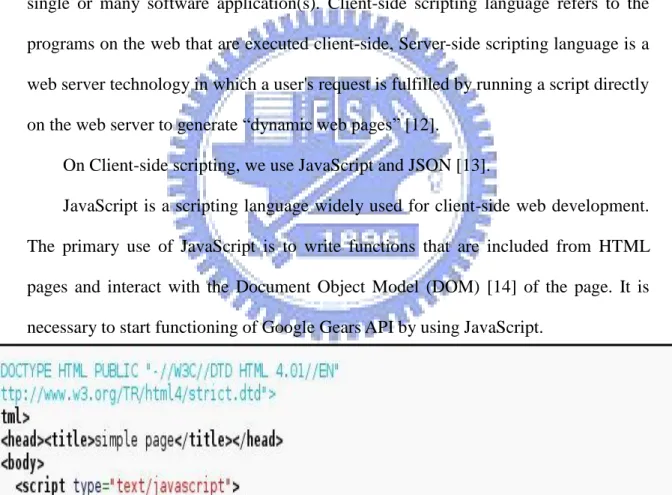
JavaScript is a scripting language widely used for client-side web development. The primary use of JavaScript is to write functions that are included from HTML pages and interact with the Document Object Model (DOM) [14] of the page. It is necessary to start functioning of Google Gears API by using JavaScript.
JSON, short for “JavaScript Object Notation”, is a lightweight computer data interchange format. It is a text-based, human-readable format for representing simple
data structures. Also, it is a convenient way to send batch process as an object form, which communicates structurally between server side and client side.
Figure 2-2 Data object in JSON format
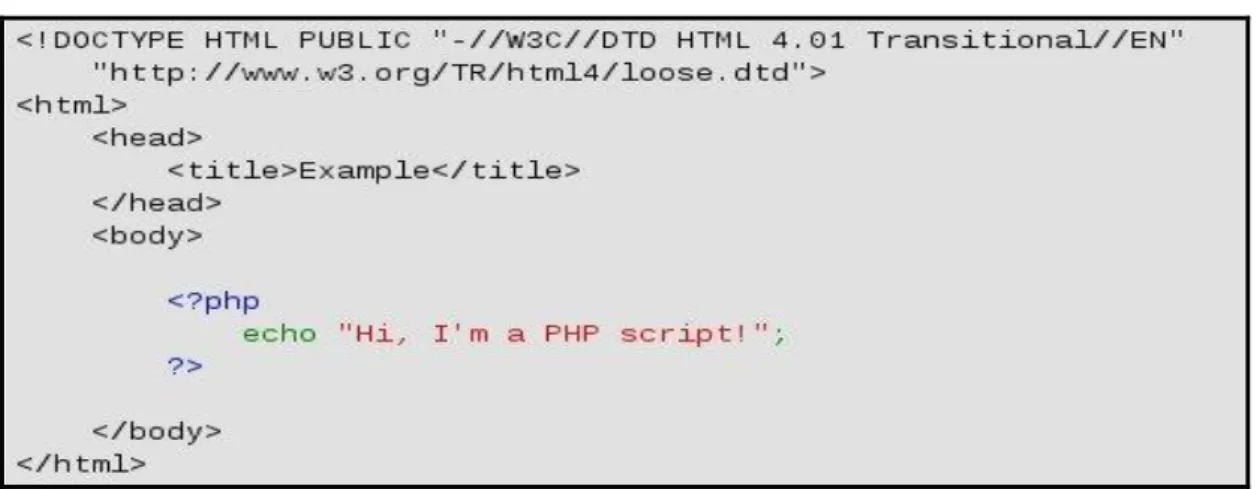
On Server-side scripting, we make use of PHP [15]. It is a scripting language originally designed for producing dynamic web pages. It generally runs on a web server, taking PHP code as its input and creating web pages as output. It can also be used for command-line scripting and client-side GUI applications. PHP can be deployed on most web servers and on almost every operating system and platform free of charge, and can be used with many relational database management systems.
2.1.2 Google Gears components
Google Gears is an open source browser extension that supports web applications to run offline. It is applicable on personal desktops, laptops and handheld devices. It can store and serve application resources locally, store data locally in a fully-searchable relational database, and run asynchronous JavaScript to improve application responsiveness.
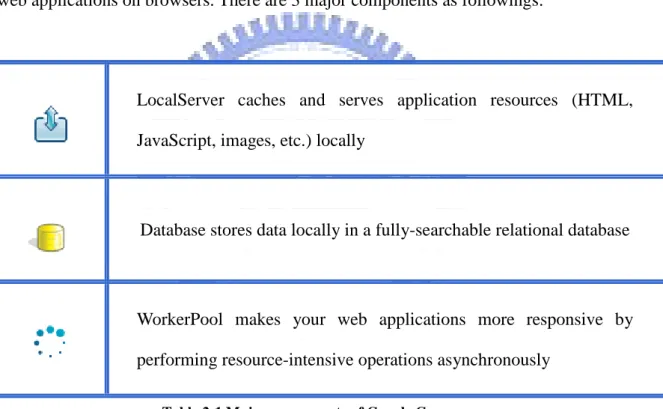
Google Gears consist of many different components that enable more powerful web applications on browsers. There are 3 major components as followings:
LocalServer caches and serves application resources (HTML, JavaScript, images, etc.) locally
Database stores data locally in a fully-searchable relational database
WorkerPool makes your web applications more responsive by performing resource-intensive operations asynchronously
Table 2-1 Major components of Google Gears
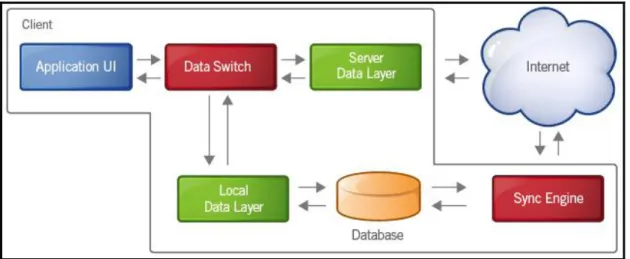
Google Gears establishes architecture for offline-enabled web applications, by means of "background sync", the application continuously synchronizes the data between the local data store and the server. This can be implemented by pinging the server every time in a while or better yet, letting the server push or stream data to the client. The following figure shows how the flows of data exchange.
Figure 2-4 Architecture of Google Gears
Background sync is one of the way Google Gears to enabling web application that work offline.
2.1.3 Web Crawler
Web crawler [16] is a program that browses the World Wide Web in an automated manner. Other terms for Web crawlers are ants, automatic indexers, bots, and worms or Web spider, Web robot. The process that Web crawler works is called Web crawling or spidering. Many server sites, in particular search engines, use spidering as a means of providing up-to-date data. Web crawlers are mainly used to create a copy of all the visited pages for later processing. Crawlers can also be used for automating maintenance tasks on a web site, such as checking links or validating HTML code. Also, crawlers can be used to gather specific types of information from Web pages, such as harvesting e-mail addresses for spam.
In general, it starts with a list of URLs to visit, called the seeds. As the crawler visits these URLs, it identifies all the hyperlinks in the page and adds them to the list of URLs to visit. We will mention a crawler, called HTTrack further in later chapter.
2.2 Related Works
2.2.1 Teleport Pro
Teleport Pro [17] is an all-purpose tool for getting data from the Internet. Launch up to ten simultaneous retrieval threads, access password-protected sites, filter files by size and type, search for keywords, and much more. The robust webspider available, Teleport Pro is capable of reading HTML 4.0, CSS 2.0, and DHTML, it searches all of the files on server sites, such as sites with Java applet. Teleport Pro can:
Download all or part of a website to your computer. Search a website for files of a certain type and size. Download a list of files at known URLs.
2.2.2 Gearsmonkey
Gearsmonkey is a technique for browsing offline, it compose of Google Gears and Greasemonkey [18]. Greasemonkey is a user script manager. It is an extension for the Mozilla Firefox web browser, which allows users to customize the way a webpage displays using JavaScript.
By using Google Gears with Greasemonkey, it can insert Google Gears code into any downloaded web page, makes those users’ favorite websites to enable offline support.
2.2.3 Researches on offline web execution
Offline execution is not a new concept. More than one decade ago, there are multiple solutions [19] [20] were proposed to enable offline web browsing. However, their approaches mainly focus on semantic information retrieval, in which the browser prefetched web data upon the searching made by the user. The web data, therefore, are available on local computer, though it is disconnected from network. In [21], J.Pitkow .et al showed that the user experience will be enhanced when the Web data he needs are pre-fetched automatically (i.e., without user action) based on automatically detected usage pattern of user. This fetching was carried out by a background agent, and helps the user to keep searching normally.
Ganesh, Sean and Kentaro described a readily deployable system designed for web browsing over slow intermittent networks called OWeB. It subscribes to RSS from web server and pre-fetches all new content to partially update the old pages. Besides, the interrupted downloads are always resumed and no re-started. HTTP’s byte-range request format [22] is utilized for this purpose.
In this thesis, the offline web execution will be implemented; the web pages can be viewed even when there is no network connection. It is very important that the web documents to be available before the loss of network connection. The above approaches provide helpful hints for the implementation of Offline Browsing System. The documents user needs should be pre-fetched. However, to avoid redundant pre-fetch tasks for the same user, the pre-fetch component in the system should be designed to perform the processing of downloading the elements of web pages as a
batch. The items that are newly available after the batch is formed will be processed in the next working cycle As mentioned above, the fetch process will be carried out by an agent working in background and this agent makes sure that before the mobile devices gone offline, all the essential materials would have been prepared.
2.2.4 The methods used in offline desktop application
J. Kistler .et al [23] have made a research in this topic. They proposed CODA, a distributed file system that allows transparent disconnected file operations, continued operation during partial network failures and a conflict resolution system via file merging. High performance is achieved via persistent caching in client side. Its merge system is similar to what an offline web application will need, but it is built only for files and directories, with well known semantics. This wouldn’t fit in a data intensive application, where several domain-specific conflicts must be handled.
Apollo [24] is another solution for handling offline desktop application. Apollo can be used to transfer a whole, full web application to the desktop, being able to operate without the need for a remote server. It also breaks the browsing experience, since the user gains a new application desktop.
As we know, mobile devices are not capable of storing a whole desktop application as Apollo does. The approach of CODA is rather preferable, since there is only the interface of CODA will be chosen transplant into the mobile devices. It sounds more possible and feasible.
Edgar Gonzales .et al [25] suggested a new methodology for the development of workflow-enabled web applications containing certain functionalities that may be usable while offline. A Web application specification shall include a workflow description of all its functionalities; each task may have a personalized user interface, as well as an associated behavior. A development framework will automatically produce both offline and online programs for these tasks descriptions. The programmer will also be able to specify both task and domain model restrictions (e.g., forcing given information to be accessed in the server, only). Finally, the programmer may have to define strategies to allow a user to recover from a conflict in the synchronization stage. These strategies will be associated with the domain model contents and/or with specific workflow tasks. This step may not be fully automated by the framework, since each conflict type is generally application specific. The remaining steps of the development process using the proposed methodology shall not differ from the development of current Web applications. To successfully implement such methodology, three important research topics must be addressed:
1. Offline module identification 2. Offline application creation 3. Changes synchronization
This sounds an innovative proposal. However, there is too much work to bring up the solutions for the two big open issues. Those are “How can both online and offline versions of a functionality be generated from a single source?” and “How will the offline application save its alterations to be synchronized later?” Once these issues have not yet been solved, it is hard realize any practical works by this new methodology. For current system architecture here, the first point of idea would be considered.
2.2.5 Researches on intermittent network handling
Ganesh Ananthanarayanan .et .al [26] considered that intermittent network handling is an important research for their offline web browsing systems. Typically, problems would be overcome by using techniques like queuing and periodic re-trials into system. Some systems provide mechanism to recover and resume downloads in case of interrupted data transfers. Client-pull based techniques [27] try to intelligently predict the time of change of data at the server and pull the data. Also, intelligence is needed to pull only the “relevant and useful” data.
Notification systems were part of solution but push-based techniques faced an important issue of not being scalable. Both push and pull based techniques faced the important problem determining the importance of the content.
Intermittent network can also be solved by distribution of data from the content server to geographically distributed caches. These caches reduced the access time from the server to the clients resulting in lower latency and better experiences. Caches needed to maintain coherency and also and relevant data. Replication in web content also needed to conserve bandwidth by “intelligently” pulling only the “useful has problems and issues associated with it [28].
2.2.6 Researches on data extraction and template
The problem of segregating the dynamic parts of a web page is heavily significant in the context of intermittent networks as it reduces the amount of data
needed to be downloaded. This work draws significantly from the existing work done in extracting information from web pages. The work of extracting information from web pages can broadly be classified into two categories: semantic based techniques [29] [30] and structure based techniques [31] [32]. The semantic techniques are not quite mature enough and also not generically applicable. The structural techniques try to exploit the tree arrangement of the data blocks and are, in general, more deterministic. structure based techniques are more preferred because (a) the accuracy requirement is very stringent (b) the problem can be modeled in a deterministic fashion such that structure based techniques can be applied with a good level of assurance.
Most methods of data extraction, also, do not quite lead to reducing network latency. It is more about manipulating the data extracted and presenting it in a more regulated and concise information [33] [34]. They are trying to use the data extraction algorithm in a novel fashion which results in better user experience in terms of network latency and visualization of pages.
3 System Architecture
3.1 Overview
Traditionally, the webpages will be completely not available without network connection. It is very inconvenient for users. In order to solve this problem, it is an important issue to give careful consideration for different communication protocols for all mobile applications. Generally, there are two solutions to achieve this goal: defining a specific API and following general protocol. In the first solution, we have to define a specific offline service API, and expect that all of mobile applications follow this API. On another aspect, there is a trend that most of the mobile applications nowadays are implemented as web applications gradually. Using standardized HTTP to be the communication protocol in mobile applications has become more popular. Although the second solution can only be used in a subset of mobile applications, web applications, it is more feasible than the first one. Also, web application is the tendency of application development in future.
After the evaluation for these proposals mentioned above, we decide to adopt the second solution, which follows the HTTP standard for mobile web applications. In this thesis, we propose an architecture handling offline information service, let web browsing possible on mobile devices without any available network. With our solution, the webpages can be prefetched when there is still network connection exists, and be browsed even if there is no network connection anymore.
In order to support offline service for web-based applications, the key factor is to make webpage data available during offline operation. Moreover, even parts of
webpage data. Hence, Offline Webpage Storage is the critical technique to offer offline operation. Since that the local storage size on mobile devices is usually small, it is important to decide that which content should be kept. Under this limitation, we have to prefetch those mostly used webpages to maximize the storage utilization.
The simple composition of system architecture is shown as below:
internet
Web Browsers Web-page Prefetch Server Original
Web Sites
Figure 3-1 Critical components of system architecture
3.1.1 Original Web Sites
Original Web Sites (“OWSs” in short) is the term for describing the web sites which act as original content providers; they are the sources for offline webpages browsing, by means of Google Gears.
However, the basic requirement of using Google Gears is to install a browser plug-in, and only those OWSs which support Google Gears can make Google Gears
works as well. Currently, the web sites which support Google Gears are mainly Google Services, i.e. Gmail, Google Reader…etc. In general, most of OWSs do not support this function.
One of our challenges is to store the contents of OWSs using Google Gears, no matter OWSs support Google Gears or not.
3.1.2 Web browsers on mobile devices
In this thesis, we aim to enable those web browsers which are designed for mobile devices to support offline service. Based on the previously analysis, we will make use of the Google Gears mechanism to implement our system. By using Google Gears on web browsers, a browser plug-in should be installed first. The web browsers and operating systems which support Google Gears are listed as followings:
Firefox 1.5+ and Internet Explorer 6.0+ (on Windows XP/Vista), Internet Explorer Mobile 4.01+ (on Windows Mobile 5+),
Firefox, Safari (on Macintosh), Firefox(on Linux),
Chrome Lite(on Android).
When there is a network connection available, the web browser which supports Google Gears are capable of storing and updating web information to local database. After that, if there is no network connection available, it can retrieve local data from database for web browsing. Therefore, the offline service can be satisfied, even the OWSs do not support Google Gears.
3.1.3 Webpage Prefetch Server
The Webpage Prefetch Server (“WPS” in short) is composed of a web server and a web crawler on the same platform. Within the platform, the web server provides an
environment for web browsers to access the prefetched webpages. The web crawler, called HTTrack [35], is responsible for grabbing information from OWSs. HTTrack can create a mirror of a web site; it is written in C and released under the GPL. WPS is in charge of providing offline information and GUIs which interact with users. Moreover, it can update the offline data based on users’ demands to ensure which information is the latest. WPS is designed to support Google Gears, so that the functionalities of Google Gears can be used through the interface provided by WPS.
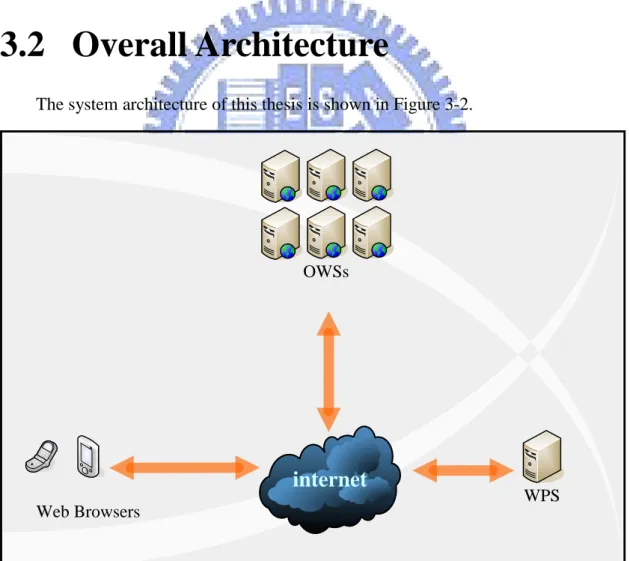
3.2 Overall Architecture
The system architecture of this thesis is shown in Figure 3-2.
internet
Web Browsers WPS
OWSs
There are three critical components of our system: Web Browsers: the client-side web browsers
Original Web Sites (OWSs): the web sites act as original content providers Webpage Prefetch Server (WPS): WPS is used as an agent in this system,
which manages users’ demands.
All the information needed by users will be prefetched individually, and republished within the same domain. By this agent, all information will be located under the same domain of WPS. Hence, the inconvenience of multiple pop-up windows will be reduced greatly. Through the storage mechanism of Google Gears, the offline information can be retrieved by web browsers easily.
Within this Offline Browsing System architecture, there are four kinds of state defined: Online State, Subscription State, Prefetch & Publish State and Offline State. They will be explained in sections afterwards.
internet
Web Browsers Web-page Prefetch Server Original
Web Sites
Mode ONLINE PRE-FETCH
3.2.1 Online State
The online operation of our system is shown in figure 3-4. Under this state, the users have normal network connection, so the way of web browsing in the system will not be different with the web browsing in general.
Due to the mobility, it is difficult to ensure that a normal connection keeps stable. For instance, going down to the basement, walking through the tunnel, or staying inside an elevator, etc. These circumstances lead intermittent connection unstable to obtain network resources. In the majority of web browsers, when there isn’t any network connection available, web browsers mostly would not be able to go on browsing webpages. Therefore, a stable online state is not guaranteed.
internet
Web Browsers
OWSs
Mode ONLINE
3.2.2 Subscription State
The subscribe operation of the system is shown in Figure 3-5. Before the Prefetch operation is executed, users can specify which webpages they are interest in. After that, WPS will access these webpages, download the webpage data, and store the data based on the specified Interest List.
internet
Web-page Prefetch Server OWSs Mode SUBSCRIPTION Web Browsers3.2.3 Prefetch & Publish State
On the other hand, WPS performs a service as a web server for web browsers to retrieve information. Once all the data needed from OWSs has already been downloaded and ready, mobile devices can obtain these webpages, through the existing mechanism of Google Gears.
internet
Web-page Prefetch Server OWSs Mode PRE-FETCH Web Browsers3.2.4 Offline State
Finally, when mobile devices lose network connections, the web browsers can still browse these offline webpages through the existing mechanism of Google Gears. Due to the limitation of mobile devices, we allow users to define their “Interest List” for offline web browsing. The Interest List is mainly maintained by WPS. Users can edit their Interest Lists through their PCs or mobile devices. In addition, in this thesis, we also provide a plug-in for browsers on mobile devices. By utilizing this plug-in, users can add the current webpage into their Interest Lists conveniently.
Since that the Interest List should also be accessed under offline, there will be one copy downloaded to the mobile device through the Google Gears mechanism. However, the URL of this list is difficult to be remembered for users. Hence, we provide another plug-in for browsers on mobile devices for users to access offline webpages easily.
Mode OFF-LINE
4 Implementation Detail
4.1 Webpage Prefetch Server design
Nowadays, there are still few web sites which support the Google Gears mechanism. It is difficult to guarantee that the selected webpage can be offline browsed through the Google Gears. Without the aid of WPS, users can not browse the offline pages of OWSs on their mobile devices. Therefore, WPS is needed to be designed between mobile devices and OWSs.
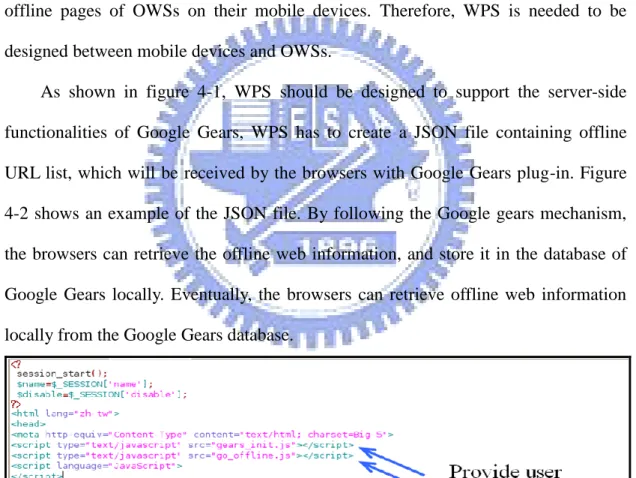
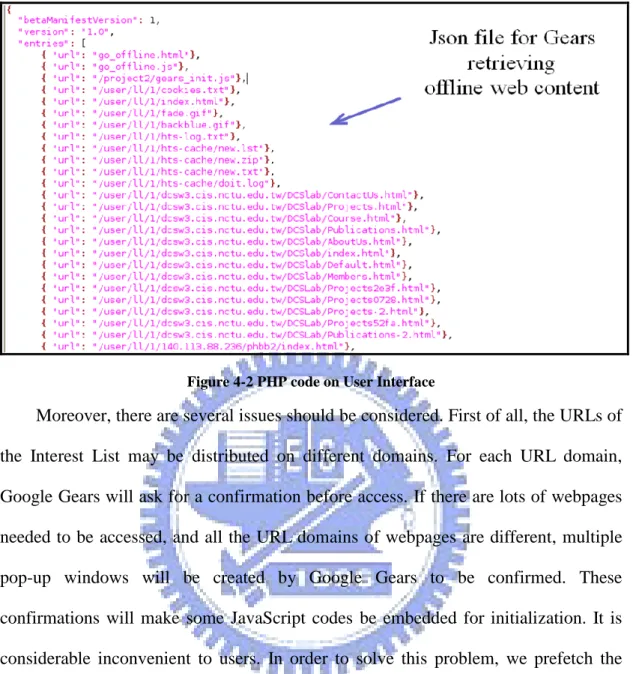
As shown in figure 4-1, WPS should be designed to support the server-side functionalities of Google Gears, WPS has to create a JSON file containing offline URL list, which will be received by the browsers with Google Gears plug-in. Figure 4-2 shows an example of the JSON file. By following the Google gears mechanism, the browsers can retrieve the offline web information, and store it in the database of Google Gears locally. Eventually, the browsers can retrieve offline web information locally from the Google Gears database.
Figure 4-2 PHP code on User Interface
Moreover, there are several issues should be considered. First of all, the URLs of the Interest List may be distributed on different domains. For each URL domain, Google Gears will ask for a confirmation before access. If there are lots of webpages needed to be accessed, and all the URL domains of webpages are different, multiple pop-up windows will be created by Google Gears to be confirmed. These confirmations will make some JavaScript codes be embedded for initialization. It is considerable inconvenient to users. In order to solve this problem, we prefetch the required webpages, and republish them under the same domain: WPS’s domain. Therefore, there will be a static URL provided for republication.
Also, each user account can have his own “Interest List” (or called “Favorites”), which contains the URLs he is interested in on WPS. Based on the Interest List, WPS will download the specified webpages and republish them. So that, the users can retrieve these webpages which they want to read offline from WPS. Since the Interest List is maintained on the Internet, users can edit their favorite webpages anytime, anywhere, on different platforms, such as PCs at home or office, mobile devices outdoors, even a public-used computer!
Finally, by designing WPS as a Web Server providing Offline Browsing Service, Our system can serve multiple users to subscribe multiple webpages. Therefore, there should be a webpage interface for users to login and subscribe the URLs of their favorite web sites.
4.2 HTTrack Manipulation
According to the users’ demands specified in the Interest List, there should be a webpage crawler designed to fetch the offline webpages from the OWSs in WPS. HTTrack is a Linux base webpage crawler engine, is free under GPL license [36]. In this thesis, we use this component in our system. According to the parameters, it grabs HTML documents, images, and other files recursively from OWSs based on each URL in the Interest list described in the JSON object which is mentioned in the previous section.
HTTrack can be manipulated through the HTTrack command, which composes: a series of URLs, inclusive URL filters, exclusive URL filters, inclusive MIME type filters, and exclusive MIME type filters. The regular format and an example are shown as below:
Format: httrack <URLs> [-option] [+<URL_FILTER>] [-<URL_FILTER>] [+<mime: MIME_FILTER>] [-<mime: MIME_FILTER>]
Example: httrack +www.someweb.com/gallery/trees/* +www.someweb.com/photos/*
-www.someweb.com/gallery/trees/hugetrees/* -*.zip
The above command means to accept all links beginning with www.someweb. com/gallery/trees/ and www.someweb.com/photos/ , exclude all links in www.someweb.com/gallery/trees/hugetrees/ and all zip files. Also, the “+” means “accept” and the final “*” means “any character will match after the previous ones”.
One of the characteristic of HTTrack is that it can modify all the intra-site links to be the relative links. So that users can browse the webpages from link to link, as if they were viewing it online.
4.3 Mobile IE plug-in design
When users enjoy their online web browsing activities, they may want to add the URL of the current webpage to his Interest List for offline web browsing. If they have to go to another webpage to do this edition, it will be very inconvenient. Another problem is that, since the prefetched data is republished by WPS, the URLs of offline webpages will not be the same as the ones of those pages provided by the OWSs. Therefore, it is impossible for users to access the webpages through their original URLs or remember the new URLs. In order to solve these problems, we propose two kinds of IE plug-in for more convenient usage.
The first plug-in is called “Interest List Manager”, which can be used when users want to add the current webpage URL to the Interest List immediately. After installing this plug-in, user can executes it through the “Add page to off-line list” option in “Menu” function of the Mobile IE browser. During the process of Interest List Manager, users have to input their accounts and passwords information, so that the Interest List Manager can append the current URL to the users’ Interest Lists. Finally, users will be redirected to the webpages where they are before executing Interest List Manager. In this way, users can continue to enjoy their original web browsing activities.
Another plug-in is called “Offline Interest List Viewer”, which is responsible for providing offline copy of Interest List for users. After installing this plug-in, user can executes it through the “View off-line pages” option in “Menu” function of the Mobile IE browser. During the process of Offline Interest List Viewer, users only have to input their accounts information, so that the Offline Interest List Viewer can generate the offline URL based on their accounts. Finally, the offline Interest List can be displayed for users, which is similar to the “Favorites” function in the Mobile IE
browser. Therefore, users can access the offline webpages through this list.
4.4 Sequence Diagram
We have defined four states in the Offline Browsing System: Online State, Subscription State, Prefetch & Publish State and Offline State. We will describe them respectively with sequence diagrams in the following sections.
4.4.1 Online State
Normally, the system is under the Online State, there is only information exchanged between user and web site. By using mobile devices, users browse webpages directly through browsers.
Once the user input the URL of OWS in the address bar of browser, the browser will send request HTTP message for acquiring the webpage. After the OWS received the message, it returns the webpage of specific URL to the browser for the user. Hence, the content of that specific URL will be displayed on the browser. The sequence diagram of Online State is shown below, with information exchanged between the user and web site.
user web site
request web page
web page content
4.4.2 Subscription State
When the user proceeds to subscribe his offline webpage URLs, the Subscription State begins. The information will be exchanged between the browser and WPS.
The user sends the id/password to WPS through the web browser, and then, sends the subscription message with URL of the webpage which the user wants to browse it offline. Anytime the user visits WPS, he can review which webpages have already been subscribed in his account before. He can also append more records of URLs whenever he wants.
browser web page crawler
id / password
URLs for subscription
4.4.3 Prefetch & Publish State
When the user begins to acquire the offline webpage contents, the system state will change to the Prefetch & Publish one. The information will be exchanged among the browser, Google Gears on mobile device, and WPS and OWSs.
First of all, the user sends the id/password to WPS through the web browser. After the user executed the “Update” option, the server will send webpage requests to the OWS which maintains the webpages specified in the user’s Interest List. After that, the OWS will return the webpage content to WPS.
WPS will collect all the offline webpages which the user asks for. Then, the PHP code arranges all the URLs of these webpages into a file in JSON format. This file will be sent to the browser with Google Gears installed during the execution after the “Capture” option is selected.
When Google Gears receives the JSON file, it receives all the URLs of offline webpages. These URLs will be stored in one of its main component, called “LocalServer”. According to these URLs, Google Gears requests WPS for offline webpage contents.
Finally, LocalServer receives the web content from WPS. The “Database”, another main component of Google Gears, will keep all the offline webpage contents. The Four-way information exchange is shown in the following sequence diagram:
browser web page crawler
id / password
web page content web site
request
json file for URL request
web page content Gears (localserver)
Gears (Database)
save offline URLs
save offline contents
result capture
update
Figure 4-6 Sequence Diagram of Prefetch & Publish State
4.4.4 Offline State
During the Offline State of the system, there is no exterior connection for mobile devices. In this state, all the information is exchanged only between the web browser and Google Gears which stores the offline webpage contents.
In the circumstance of unavailable network connection, the Google Gears installed browsers still can process the URLs of offline webpages. The LocalServer in Google Gears will parse the inputted URLs and decide whether the URLs have already recorded in the LocalServer. Once there is no network connection, and the
incoming URLs have been recorded in the LocalServer, the LocalServer will send request messages to its Database for receiving offline webpage contents. Similar to Online state, the LocalServer will response the offline webpage to the browser. After that, the browser will display the offline webpage content of the offline URL.
The information flow between the browser and Google Gears is shown below. This figure shows how the information is exchanged:
offline browser
request offline webpage
get offline content
return offline content
Gears (localserver) Gears (Database)
response as online URL
5 System Demonstration & Evaluation
5.1 Overview
In this chapter, we will present a demonstration for our system. In this demonstration, we will describe a general scenario with a handheld device of ASUS P535, which is installed “Windows Mobile 5.0” in it. Moreover, there will be an evaluation of the comparison between our system and related works at the end of this chapter. In the Offline Browsing System provided in this thesis, there is a WPS and several client side utilities provided. The client side utilities include Google Gears plug-in, “Interest List Manager”, and “Offline Interest List Viewer”. WPS is implemented by JavaScript, PHP, Google Gears, and HTTrack. On the other hand, the client side utilities are mainly implemented by C.
5.2 Scenario
Assume the browser for the user in this scenario has already been installed Google Gears, Interest List Manager, and Offline Interest List Viewer. Also, the user has already subscribed for two URLs of webpages A and B into his Interest List. Now, the user wants to append the third URL of webpages C to Interest List, and retrieves all data of these three webpages into his mobile device for offline browsing. The URLs A, B, C are listed in table 5-1.
URLs of offline webpages
A: www.cwb.gov.tw/week/Taipei.htm
B: www.npm.gov.tw/new_02.htm?docno=477
C: foxnews.proteus.com/content.html?contentId=25705
Table 5-1 URLs for demonstration
The operation sequence of the scenario is listed below:
(1) The user logins to the webpage of WPS by his account and his password. He can find that there will be two URL records of A and B in his Interest List. (2) The user begins to browse the webpage C. For instance, he can select the
options follow the sequence : [Start → IE → Menu → Favorite → “Fox news” ].
Figure 5-1 Choosing the Interest List Manager Figure 5-2 Login id and password
(3) The user inserts the URL of webpage C into the Interest List by using the Interest List Manager. For instance, he can select the options follow the sequence: [Menu → Tool → “Add page to off-line list” → enter account/password], as shown in Figure 5-1 and 5-2.
(4) The user logins to WPS again to check whether the webpage C has already been inserted into the List. For instance, he can select the options follow the sequence: [Menu → Favorite → WPS → enter account/password].
(5) The user downloads the offline data from WPS to Google Gears in the mobile device. For instance, he can select the options follow the sequence: [Erase → Update → Capture ] , as shown in Figure 5-3, 5-4 and 5-5.
Figure 5-3 Offline webpages update Figure 5-4 Update completion alert
Figure 5-5 Capture webpages by Google Gears Figure 5-6 Browsing without network
(6) The user sets the mobile device into Offline status. For instance, he can select the options follow the sequence: [File → Settings → Network → confirm network shutdown ] , as shown in Figure 5-6.
(7) By using the Offline Interest List Viewer, the user enters an offline webpage list for browsing the webpages A, B and C offline. For instance, he can select the options follow the sequence: [Menu → “View off-line pages” → enter
his account → “offline pages” → choose any URL link], as shown in Figure 5-7, 5-8 and 5-9.
Figure 5-7 Choosing the Offline Interest List Viewer
Figure 5-8 Login id
5.3 System evaluation
The comparison among our Offline Browsing System and related works is shown in Table 5-2. In order to provide Offline Browsing Service, it is important to have a friendly way for users to browse these pages. Due to the lack of OWSs’ support, Google Gears cannot provide Offline Browsing Service for most of OWSs. Gearsmonkey does not need any support from OWSs, however, it requires users to have specific script file prepared for each particular OWS. Teleport Pro can overcome these two problems above. It can also execute batch process for multiple OWSs, but it cannot work for mobile platform.
The Offline Browsing System proposed in this thesis has most of the advantages which are not supported by other related works. The only problem is that the URL of original webpage will be modified. It is not user friendly, since that the users have to remember what the URLs of WPS and the offline webpages are. However, the Mobile IE plug-in, Offline Interest List Viewer, is designed to overcome this problem. Therefore, the users can browse offline webpages more easily.
OWSs Should Support Script File required Applicable on Mobile Devices Batch Processing for Multiple Web Sites URLs of Original Webpages
Gears
Yes
No
Yes
No
Remain
the same
Gears
monkey
No
Yes
No
No
Remain
the same
Teleport
Pro
No
No
No
Yes
Changed
Our
6 Conclusion and Future Works
6.1 Conclusion
Due to the limited resources supported on mobile devices, more and more applications tend to provide information to mobile users through Internet. However, the network connection is not stable and easily interrupted by surrounding environment. Google Gears provides an Offline Webpage Storage mechanism for web applications to run offline. However, it should be supported on the Web servers, which is not supported on most of the Web servers nowadays. By using Gearsmonkey, users can browse the offline webpages even if the original web servers do not support Google Gears. However, users have to write a script for each site by themselves.
In this thesis, we propose an offline browsing service, which enables mobile users to define their Interest List and browse webpages offline. Especially, our service is designed for those OWSs which do not support Google Gears. So that, the offline webpages can be provided without the modification of web servers.
In this section, we discuss and analyze our system by the objectives we mention in section 1.2. In our Offline Browsing System, we propose a service by client-server architecture for users to offline web browsing, which:
provides the offline web browsing capability, even for those web sites which doesn’t support Google Gears
It is difficult for every web site to support Google Gears. Instead, we support the Google Gears mechanism on the WPS. By prefetching the webpages from OWSs and republishing them, the WPS provides a single entry for users to prepare offline data.
provides Mobile IE plug-ins for users to specify offline web data and browse offline webpages
We let the users to enjoy browsing their own offline webpages with no effort; they do not need remembering any URLs of WPS or their favorite offline webpages, the Mobile IE plug-ins, Offline Interest List Viewer, will guide the users to enjoy offline webpages.
supports batch processing for multiple specified webpages
By the offline browsing service of our system, users can define their own Interest List. Every time the users want to renew their offline webpages, it is no longer for them to deal with repeating tasks. This can save much of time for the users to keep all the offline webpages.
6.2 Future Works
In this thesis, we implemented a system to achieve the goal on providing offline browsing service. However, there are still plenty of aspects should be taken into consideration.
Most webpages are designed for PC browsing. If the user selects these kinds of webpages, it will consume a lot of time in waiting for download completion.
Sometimes the service can only offer an offline webpage which is similar to the webpage from OWS. The text, photos and the format of the webpage can be preserved, however, some kinds of multimedia, such as flash objects, audio and video streams (like music, movies), or interactive instant messages still unable to keep offline.
References
[1] YANG, JAN-YUE in FIND (March 6, 2009). An observation of Mobile Internet Population in Taiwan 2008 Q4. Retrieved March 9, 2009, from
http://www.find.org.tw/find/home.aspx?page=many&id=216 [2] 基於 J2ME 的 Web 服務客戶端及其在移動設備中的實現 尹星,肖鐵軍 - 計算機輔助工程, 2004 - cqvip.com [3] Windows Mobile 5.0 無線移動辦公系統的設計與研發——以北京城市學院無 線移動辦公系統的開發為例 駱社週,劉威,趙新,趙明 - 北京城市學院學報, 2008 - 萬方數據資源系統 [4] F Siegemund, R Sugar, A Gefflaut, F van Megen. Porting the .NET Compact
Framework to Symbian Phones. Technology, 2006 - jot.fm, 2006. [5] BREW,
http://brew.qualcomm.com/brew/en/
[6] Beginning Ubuntu Server Administration: From Novice to Professional. Sander Van Vugt. Apress, 2007.
[7] Android
http://code.google.com/android/
[8] Google Apps: The Missing Manual.Nancy Conner,Dawn Frausto, Peter Meyers. O'Reilly, 2008.
[9] Dion Almaer, (November 21, 2007). Wikipedia Offline with GearsMonkey. Retrieved April 29, 2009, from
http://ajaxian.com/archives/wikipedia-offline-with-gearsmonkey
[10] Firefox
http://www.mozilla.com/firefox/
[11] Marwan Sabbouh, Jeff Higginson, Danny Gagne, and Salim Semy. Web mashup scripting language. 16th International World Wide Web Conference, 2007. [12] PHP and MySQL for dynamic Web sites. Larry Edward Ullman. Peachpit Press,
[13] D. Crockford. The application/json media type for javascript object notation (JSON). Request for Comments 4627, The Internet Society, July 2006.
[14] Document Object Model (DOM)
http://www.w3.org/DOM/
[15] Web database applications with PHP & MySQL
HE Williams, D Lane - 2004 - O'Reilly & Associates, Inc. Sebastopol, CA, USA [16] Web crawler http://en.wikipedia.org/wiki/Web_crawler [17] Teleport Pro http://www.tenmax.com/teleport/pro/home.htm [18] Greasemonkey http://www.greasespot.net/
[19] A. Joshi, S. Weerawarana, and E. Houstis. On disconnected browsing of
distributed information. Proc. Seventh IEEE Intl. Workshop on Research Issues in Data Engineering (RIDE), 1997.
[20] R. Kavasseri, T. Keating, M. Wittman, A. Joshi, and S. Weerawarana. Web Intelligent Query-Disconnected Web Browsing using Cooperative Techniques. Proc. 1st. IFCIS Intl. Conf. on Cooperative Information Systems, 1996.
[21] J. Pitkow, M. Recker, G. I. of Technology, Visualization, and U. C. Graphics. Integrating Bottom-up and Top-down Analysis for Intelligent Hypertext. Graphics, Visualization & Usability Center, Georgia Institute of Technology, 1994.
[22] Hypertext Transfer Protocol -- HTTP/1.1: RFC 2616. http://www.w3.org/Protocols/rfc2616/rfc2616.html
[23] J. KISTLER and M. SATYANARAYANAN. Disconnected Operation in the Coda File System. ACM Transactions on Computer Systems, 10(1), 1992. [24] A. Labs. Apollo.
http://labs.adobe.com/wiki/index.php/Apollo
[25] Edgar Gonçalves. Offline execution in workflow-enabled Web applications. Sixth International Conference on the Quality of Information and
Communications Technology.
[26] Ganesh Ananthanarayanan. OWeB: A Framework for Offline Web Browsing. Microsoft Research India.
[27] Q. Yang and H. H. Zhang. Integrating web prefetching and caching using prediction models, World Wide Web, 4(4: 299-321), 2001.
[28] S. Sivasubramanian et al. Replication for Web hosting systems, ACM Computing Surveys (CSUR), 36(3: 291-334), 2004.
[29] V. Crescenzi et al. RoadRunner: Towards automatic data extraction from large Web sites, Proceedings of the 2001 International Conference on Very Large Data Bases, 2001.
[30] S. L. Chuang. Automatic generation of tree structured templates for information extraction from html documents. Master’s thesis, National Taiwan University, 1999.
[31] B. Liu et al. Mining data records in Web pages, Proceedings of the ACM SIGKDD International Conference on Knowledge Discovery and Data Mining, 2003.
[32] K.Lerman et al. Automatic data extraction from lists and tables in Web sources, IJCAI-01, Workshop on Adaptive Text Extraction and Mining, 2001.
[33] Shiren Ye and Tat-Seng Chua. Detecting and Partitioning Data Objects in Complex Web Pages, Proceedings of the IEEE/WIC/ACM International Conference on Web Intelligence (WI’04), 2004.
[34] A. Arasu and H. Garcia-Molina. Extracting structured data from Web pages. Proceedings of the 2003 ACM SIGMOD International Conference on Management of Data, pages, 2003.
[35] Jennifer L. Marill, Andrew Boyko, Michael Ashenfelder, and Laura Graham. Tools and Techniques for Harvesting the World Wide Web. Proceedings of the 2004 Joint ACM/IEEE Conference on Digital Libraries (JCDL’04), 2004.
[36] GPL lisence