
用來提升學生互動性與理解性的混搭式教學輔助系統
76
0
0
全文
(2) 用來提升學生互動性與理解性的混搭式教學輔助系統 Hybrid Teaching Assistant for Developing Students Interactivity and Comprehension. 研 究 生:尤喜夫. Student: Yousef Awwad. 指導教授:袁賢銘. Advisor: Shyan-Ming Yuan. 教授. 國立交通大學 資訊科學與工程研究所 碩士論文. A Thesis Submitted to Institute of Computer Science and Engineering College of Computer Science National Chiao Tung University In partial Fulfillment of thee Requirements For the Degree of Master In Computer Science June 2007. Hsinchu, Taiwan, Republic of China. 中華民國九十六年六月 ii.
(3) 用來提升學生互動性與理解性的混搭式教學輔助系統 Hybrid Teaching Assistant for Developing Students Interactivity and Comprehension. 研 究 生:尤喜夫. 指導教授:袁賢銘. 教授. 國立交通大學資訊科學與工程研究所. 摘要 本系統使用手機通訊以及網際網路技術架構一個教學輔助系統,用以提升學生在學 習過程中的互動性和對學習內容的理解程度。系統中包含教學範例、測驗問題與學 生反應回饋和討論。透過實驗顯示,經由本系統的輔助,能夠提升學生學習的熱誠, 使學生在教學過程中能積極的參與課堂活動,並且反映在教學結果上能具體提升學 生的成績。. iii.
(4) 用來提升學生互動性與理解性的混搭式教學輔助系統 Hybrid Teaching Assistant for Developing Students Interactivity and Comprehension. Student: Yousef Awwad. Advisor: Shyan-Ming Yuan. Department of Computer Science National Chiao Tung University. Abstract The Hybrid Teaching Assistant for Developing Students Interactivity and Comprehension is a system to enhance students’ learning by involving them in different testing types and discussions, providing them with advices and allowing them to send their feedbacks. The system makes use of the Internet and Communication Technologies (ICT) to provide a reliable and secure environment. The system consists of exams, discussions, query, charts and feedbacks. Web and mobile phone SMS are used as a communication base among the system’s users. The system is hybrid because students can answer the questions using the web form or the SMS form. In addition, students can receive the advice and send their comments in both ways. Experiments results showed that students were more enthusiastic during the lesson, they were totally involved in the class room and they achieved better grades.. iv.
(5) Acknowledgement I would like to thank my Supervisor Dr. Shyan-Ming Yuan for his advices, Mr. Hsien-Tang Lin my team leader for sharing his experience, effort and time with me, Dr. Ping-Jer yeh, Mr. Ruey-Shyang Wu, Mr. Chi-Huang Chiu, Mr. Ming-Chun Cheng, all Ph.D. Students, All Master students and Distributed Computing System Lab members, my teachers and my friends who accompanied me and helped me lot. And a special thanks to National Chiao Tung University for the great support.. And. Thank you my dearest Mother, Sisters, Brothers and my Family for every moment, you made me feel that I am not alone, for your encouragement and your love.. Yousef. v.
(6) Table of Contents Acknowledgement ......................................................................................... v Table of Contents ......................................................................................... vi List of Figures............................................................................................... ix List of Tables.................................................................................................. x Chapter 1 Introduction................................................................................. 1 1.1. Preface............................................................................................................ 1. 1.2 Motivations .......................................................................................................... 5 1.3 Problems .............................................................................................................. 5 1.4 Solution ................................................................................................................ 6 1.5 Methodology ........................................................................................................ 8 1.5.1 Why mobile phone? ..................................................................................8 1.5.2 Why SMS? .................................................................................................9 1.6 Related researches............................................................................................. 10 1.6.1 SMS-based Discussions – Technology Enhanced Collaboration for a Literature Course: ...........................................................................................10 1.6.2 Adaptive Teaching for Large Classes:...................................................10 1.6.3 Using short message service to encourage interactivity in the classroom ..........................................................................................................12 1.6.4 Ubiquitous learning website: Scaffold learners by mobile devices with information-aware techniques ........................................................................12. Chapter 2 System Analyses ........................................................................ 15 2.1 Requirements..................................................................................................... 15 2.1.1 User requirements...................................................................................15 vi.
(7) 2.1.2 System Requirements .............................................................................16 2.2 Use Cases............................................................................................................ 19 2.3 System’s Architecture ....................................................................................... 20 2.3.1 Main Components...................................................................................20 2.3.2 Communication Architecture.................................................................21 2.3.3 HTTP and SMS .......................................................................................22. Chapter 3 System Design ........................................................................... 26 3.1 Web Based System ............................................................................................ 26 3.1.1 Teacher’s side ..........................................................................................26 3.1.2 Student’s side ...........................................................................................30 3.2 SMS based system ............................................................................................. 30 3.2.1 Teacher’s side ..........................................................................................31 3.2.2 Student’s side ...........................................................................................32 3.3 Architecture Design........................................................................................... 32. Chapter 4 System Implementation............................................................ 34 4.1 System Implementation (Evolution Prototyping) .......................................... 34 4.2 System Components and libraries................................................................... 36 4.2.1 Internal Components ..............................................................................36 4.2.2 External Components:............................................................................40 4.3 System Testing ................................................................................................... 43. Chapter 5 Experiments and Results ......................................................... 45 5.1 Method ............................................................................................................... 45 5.1.1 Participants..............................................................................................45 5.1.2 Design and Procedures ...........................................................................45 5.2 Results ................................................................................................................ 47 5.2.1 SMS based discussion .............................................................................47 vii.
(8) 5.2.2 Web based exam and discussion ............................................................48 5.2.3 Students feed back function ...................................................................50 5.2.4 Tutor’s advice ..........................................................................................51. Chapter 6 Conclusion ................................................................................. 52 6.1 System’s Value ................................................................................................... 52 6.2 Comparison ....................................................................................................... 53 6.3 Future Work ...................................................................................................... 54 6.4 Conclusion ......................................................................................................... 54. Bibliography ................................................................................................ 56 Appendix A Questionnaire ...................................................................... 62. viii.
(9) List of Figures Figure 1: System outlines.................................................................................... 7 Figure 2: teacher use cases................................................................................ 19 Figure 3: student use cases................................................................................ 20 Figure 4: components and functions architecture ............................................. 21 Figure 5: communication architecture .............................................................. 22 Figure 6: SMS architecture ............................................................................... 24 Figure 7: NCTU-SMS architecture................................................................... 24 Figure 8: iSMS architecture ........................................................................... 25 Figure 9: teacher side context model ................................................................ 27 Figure 10: Exam object model.......................................................................... 28 Figure 11: SMS data flow ................................................................................. 31 Figure 12: System Layer Architecture .............................................................. 33 Figure 13: New-Exam visual items................................................................... 37 Figure 14: Answering Window Form ............................................................... 38 Figure 15: Query form ...................................................................................... 39 Figure 16: Pop up window new comments....................................................... 39 Figure 17: .netCHARTING............................................................................... 42 Figure 18: Real time graph ............................................................................... 43 Figure 19: Web Based Exam............................................................................. 50. ix.
(10) List of Tables Table 1: Functional Requirements. ................................................................... 18 Table 2: T-test of average scores – before the experiments .............................. 49 Table 3: T-test of average scores - after the experiments.................................. 49. x.
(11) Chapter 1 Introduction 1.1. Preface The development from traditional learning to electronic and mobile learning is to. achieve better understanding, comprehension and acquisition. Tutors use different conventional methods in the traditional learning as boards, maps and graphs and also different developed methods in the electronic learning such as multimedia and internet to make student gets better knowledge and experience. But do these methods guarantee the achievement of the learning goal? In order to check students learning and performance tutors always test them by different ways; quizzes midterm exams or questions during the class. Tutors like to discuss students’ results after the exam or the quiz. They may need to solve students’ problems or give them advices. The bad results in the exam may reveal the use of wrong methods by the tutor. So tutors need a way to test students and to analyze the result to find the main cause of student’s weakness and to adapt the learning material to fit student’s needs. Many researches and projects proposed electronic solutions such as web-based environments to support the learning systems in many disciplines and at all levels of education system [2], [4]. Others suggested mobile-based solutions which use different technologies such as SMS or WAP [6]. The following 1.
(12) paragraphs discuss the development of the electronic learning and mobile learning systems. E-learning is an electronic delivery method. Early forms included CD-ROMs and knowledge pools on the Internet, where users could access information and work through it at their own pace. The term E-learning refers nowadays to online courses and Learning Management Systems (LMS). Many systems have proved a success in this field to manage and deliver information. Learning Management System helps tutors to manage course material and distribute assignments [30]. But these systems are still a single user and support little interactivity and stimulation for the student [10]. New E-learning researches have focused on developing the interaction among students. Another style of Web based learning was designed to support brain storming and generate creative thinking [29]. A new term has been emerged which is called Mobile learning (M-learning). M-learning is to enhance the E-learning by providing new ways for information delivery, supporting mobility and developing students’ interaction and collaboration. The development of mobile devices such as mobile phones and Personal Digital Assistants (PDAs) has emerged a variety of services are now available for PDAs, tablet PCs and mobile phones including mobile tourist guides and navigation systems [1] . Mobile devices can use different communication technologies to deliver the information. Internet,. 2.
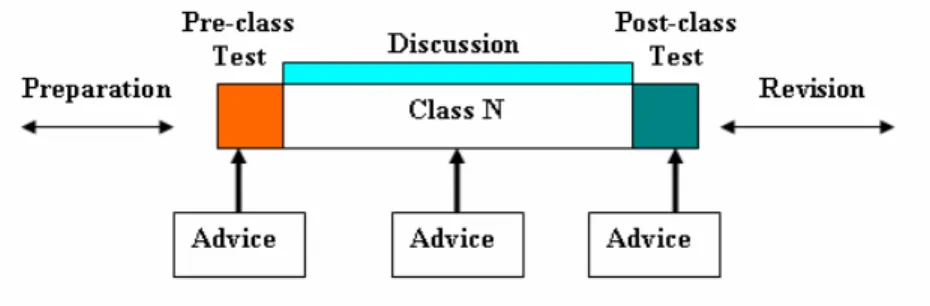
(13) WAP, MMS and SMS can be used to carry different types of information and offer several services. Brendan Riordan showed that students prefer to use SMS functions to help them in their education as library recalls, revision tips and assessments marks [24] [28]. Many researches showed different uses of mobile phones especially SMS in Education [26] [27]. Some business companies have already started to produce M-Learning kits as SMS-Quiz author and Pocket PC author [25]. Mobile phones can be used also for class management and LMS [32] [33] and it is preferred over other mobile devices [34]. New researches have highlighted the importance of collaboration and interaction within e-learning. Researchers as Preece (2000); Hamburg, Lindecke, and ten Thij (2003); Salmon (2002) and Thurmond and Wambach (2004) amongst others have done researches on LMSs, and as a result online forums and discussion boards have become an invaluable resource in LMSs [10]. The collaborative systems allow students to communicate with their peers and tutors thus empowering them to socialize and learn together online. Mobile phones are also used to support student’s collaboration and interaction [35] [36]. Teresa Monahan (2006) [10] showed another approach to enhance students’ interaction. Through the use of technologies such as Virtual Reality (VR) and instant communication, students can be more visually aware of their classmates and can. 3.
(14) converse in real-time with them. They can also receive immediate feedback from their tutors and gain a sense of being present in the same place as their peers despite their remote physical locations. These shared virtual environments also facilitate simultaneous viewing of learning materials by the whole class and allow them to actively partake in group discussions about the learning content at the same time. VR has been very popular and successful in other areas including entertainment and urban planning. It has also been extensively used within manufacturing industries and military bodies [11]. In addition, the benefits of 3D graphics for education have been explored. Many 3D resources have already been developed in this area. 3D models are very useful to familiarize students with features of different shapes and objects, and can be particularly useful in teaching younger students. Many games have been developed using 3D images that the user must interact with in order to learn a certain lesson. Interactive models increase a user’s interest and make learning more fun. 3D animations can be used to teach students different procedures and mechanisms for carrying out specific tasks. Our research discusses an integrated web based learning system with mobile phone based system using SMS. The system was designed to provide an administrative tool, develop students’ interaction, comprehension and understanding. The following sections will show our motivations and the methodologies used to solve some learning problems. The next chapters will discuss the system’s analysis, requirements, architecture, design,. 4.
(15) Evolution and experimental results.. 1.2 Motivations The system idea came from the use of information and communication technology ICT in education fields. The suggested system shall satisfy the requirements of teachers and students in the class room to achieve better learning, understanding and interaction which can be summarized as the following: 1- Tutor wants his student to prepare for the coming lesson very well. 2- Tutor wants to test students understanding level during the class immediately. 3- Tutor wants his students to interact together in and after the class. 4- Tutor needs to advise his students when they make a mistake. 5- Tutor wants to receive a feedback or comments from his students.. 1.3 Problems Teachers have used several methods to test their students and discuss with them. Exams, quizzes or home works are classified to be traditional if they use paper-pencil method. Discussion also is considered a traditional way by asking questions and waiting the answer. Several problems are related to this kind of education as the following:. 5.
(16) 1- The traditional method for testing and assessment is insufficient since it requires long time for emendation, long time for answering and collecting the papers, wastes papers and needs much effort. 2- Discussions in classrooms do not cover all students especially in large classrooms, so tutor’s idea about students’ comprehensions is limited to small number of active students who are answering tutor questions. 3- Students’ feedback or comments is not easy due to students’ number or embarrassment. Student’s comments may cause interruption. 4- Meeting all students after the exam or class to discuss the result with them or advise them to solve their weakness is very difficult because it needs long time and much effort.. 1.4 Solution In order to solve the previous problems we need an electronic system that allows tutors and instructors to check the understanding level for their students. The system can test student’s preparation before the class starts, test student’s comprehension during the class through discussion sessions and test overall learning after the class. In addition to testing, the system allows tutors to give an advice to students using fast service depending on the previous exam or quiz results. This advice helps student to revise what. 6.
(17) he has learnt and makes him focuses more on the important points of the curriculum. The system shall provide automatic functions as correction and advice. The following graph shows the basic features of the system inside classrooms.. Figure 1: System outlines. Figure 1 shows the key points of the suggested solution. And it contains the following: Class N: it is the class or lecture period at time N. Pre-Class test: It is a short test to examine student’s preparation for the new lesson. Post-Class test: it is a short test to examine student’s understanding during the class. Preparation and revision: it is the time between two classes in which student revises what he has learnt in the last lesson and prepares for the next lesson. Discussion: questions session during the class including tutor’s questions or students’ feedback. Advice: it is brief words to tell the student about his result in the post quiz of the previous lesson and his weakness points, it also may tell the student about the key points of the next class. 7.
(18) 1.5 Methodology Since mobile devices as laptops, PDA’s and mobile phones have wide spread use in the education and the wireless networks covers most of the class rooms in the campus, the system testing and advice can be performed easily using different alternatives as the following: 1) The tests and discussions can be designed as an html web page which can be accessed by the tutor and the students. Or can be performed by SMS messaging. The tutor can choose the ways of testing depending on what students can use in the class room. The questions format can be multiple choices, true false questions or filling in the blank. 2) The advice can be sent to the student by email or SMS. The use of SMS is preferred because SMS is a ubiquitous, fast and immediate service that means students will receive it directly and check its contents while he may not check his email frequently [31].. 1.5.1 Why mobile phone? Mobile phones users’ number is greater than personal computer users’ number. In some countries mobile phone technology is very popular with an estimated usage penetration at over 85% of the young population [4] [8]. In addition, many mobile phone. 8.
(19) users can not use the personal computer and they prefer to use the phone handsets for different reasons such as the need for making phone calls, mobile phones are cheaper than personal computers and they are easy to carry, use and move and considered one of the new cultural communication styles [37] [38]. The portability and immediate communication properties of mobile devices influence the learning processes in interacting with peers, accessing resources and transferring data. For example, the short message and browsing functions in a cell phone provide users with timely and adaptive information access. Although many studies of mobile learning indicate the pedagogical potential of mobile devices, the screen size, computational power, battery capacity, input interfaces, and network bandwidth are too restricted to develop acceptable functionality for the entire learning processes in a handheld device. Therefore, mobile devices can be adopted to fill the gap between Web-based learning and ubiquitous mobile learning [9] [40].. 1.5.2 Why SMS? Short Message Service is a fast way to communicate using text format. SMS is a reliable service which guarantees a high delivery [1] [39] with low maintenance. Telecommunication and mobile phone companies always provide this service in a cheap price with the ability to use it over the web by using personal computers. So SMS is. 9.
(20) considered a killer application and 80% of students send SMS messages everyday [8]. Most of the adults prefer to use SMS because of the cheap price and the ease of use. Alexei Tretiakov and Kinshuk explained the reasons for using SMS in the education system [7] and G.D. Chen showed that SMS function in a cell phone was adopted to transfer, at the right time, helpful information about aware learning status, reminding tasks and facilitative peer support. The final analysis proved that using SMS to support the ubiquitous learning benefits pedagogical learning [9] [41] [42].. 1.6 Related researches 1.6.1 SMS-based Discussions – Technology Enhanced Collaboration for a Literature Course: This research presents a communication and discussion toolkit based on sending short messages designed for use in schools. The approach uses PDAs in a wireless network to build an environment that emulates sending of short messages with mobile phones. The system uses PDAs due to the restrictions of using mobile phones in the classrooms. The messages created by the students are collected in a database and establish a base for a discussion and analysis later [3]. 1.6.2 Adaptive Teaching for Large Classes: This research uses adaptive technique to trace learners’ performance during and after. 10.
(21) a lecture so that the educator is able to quickly adjust course contents to suit the needs of learners. It is based on two feedback loops established between learners and educator. The in-class feedback is created by a SMS message based quiz system and the after-class feedback is realized by an Educator-to-Learner Portal, e-Learning Hub [1], which provides information on learners’ progress after a lecture. The adaptive teaching pedagogy exploits interactions between learners and educator. Under proposed adaptive teaching method, an educator prepares two sets of carefully constructed assignments, one for in-class test and another for after-class activities. The in-class quizzes aim to test students’ understanding during a lecture and the after-class activities are to engage the students with other learning activities. During a lecture, an educator will give students a quiz whenever there is a need to check students’ understand on a given topic. Students will answer the quiz questions by sending a SMS message to an instant feedback system that will be detailed in the next section. The instant feedback system will automatically grade students’ answers and display a statistic bar chart for viewing by the educator. From the instant feedback, the educator can address student’s difficulties immediately and adjust the course contents accordingly to suit students’ needs. After the lecture, students will log on to an adaptive teaching web site to complete the assignments at their own pace that are due a few hours before next lecture. The educator reads the student online submissions to adjust the content and activities for next lecture to. 11.
(22) maximize the gain for students. With two feedback loops in place, the educator is able to deliver well-balanced course contents that match the students’ knowledge level. By doing so, it makes learning more effective, efficient and meaningful [5]. 1.6.3 Using short message service to encourage interactivity in the classroom The research presented involved students sending their comments, questions, and feedback as SMS messages in real-time, in class, via their personal mobile phones. Using a modem interfacing with customized software to produce SMS files, the lecturer can view the messages and verbally develop the interactive loop with students during class. The SMS are available online after class, allowing interactive loops to further develop via threaded comments. The research aims to develop the interactivity in the classroom to promote a more active learning environment, facilitate the building of learning communities, provide greater feedback for lecturers, and help student motivation [8]. 1.6.4 Ubiquitous learning website: Scaffold learners by mobile devices with information-aware techniques The research shows that students can learn using Desktop PCs, laptops, PDAs and cell phones in the ubiquitous learning environment. Students’ learning behaviors through any learning device are recorded to tune the ‘‘default’’ student model in the learning website. Notifications and adaptive learning support messages are sent to learners by. 12.
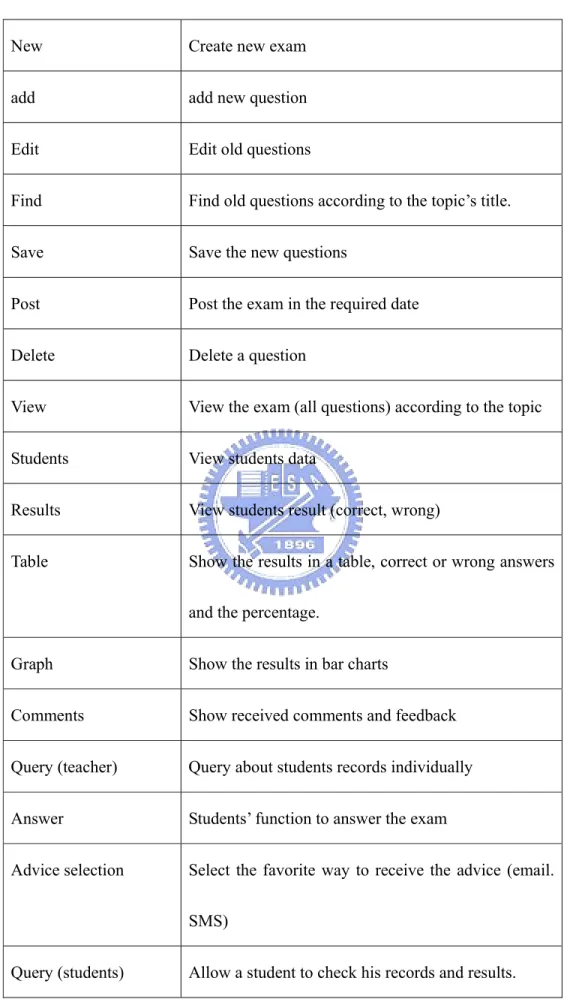
(23) SMS. Students can then use the mobile learning devices or available computers to perform learning tasks immediately. Moreover, the learning system can recommend mentors that questioners can consult using a cell phone according to the constructed student model. Because students may use different devices when they are in different places, the learning system should support the presentation of learning materials and interaction with learners through all devices. This system fulfills the ‘‘ubiquitous’’ learning environment since students can receive instructions, notifications and recommendations on their cell phones. Students can connect to the learning system later to browse or interact using portable devices or desktop computers [9].. Our suggested system is a hybrid and integrated from the previous researches with new features as the following: 1) It is an environment for creating the quiz by the tutor and answering the question by the students immediately on a web page or SMS without the need of use papers or pens. And the tutor can choose the technology depending on the available devices in the class room. 2) It provides an online and live discussion session using the available technology which involves all students and improves their interactivity and understanding.. 13.
(24) 3) It provides the tutor with the ability to send next lecture outlines or key points to let students focus on while they are preparing before the class. 4) It provides the tutor with ability to send an advice to students to show the weakness point. 5) It provides an administrative tool that lets tutor organize student’s data and trace his performance. 6) It provides a graphical way to display the overall students’ results which will increase the cooperation between students to know the correct answer. 7) It enables students to send feed back, question or comments which are stored in a database to be viewed directly or later. 8) The system keeps Anonymity to avoid embarrassing.. 14.
(25) Chapter 2 System Analyses This chapter discusses the requirements, use cases and the basic architecture of the system according to the problems and solutions shown in the previous chapter. The system shall be designed and tested in Ta-Hua institute of technology in Taiwan with the cooperation of the teachers there.. 2.1 Requirements This part shows the need of the system and what user expects from the system to do. Basically the requirements are divided to user (teacher and student) and system requirements. Both were described after several meetings with the teacher who will carry out the experiments. 2.1.1 User requirements The users of the system are teachers and students. The user requirements were put as the following: •. Teacher:. 1- Teachers shall be able to log in the system, create new exam, add questions, edit old question, delete questions and view the exam. 2- Teachers shall be able to view students’ data.. 15.
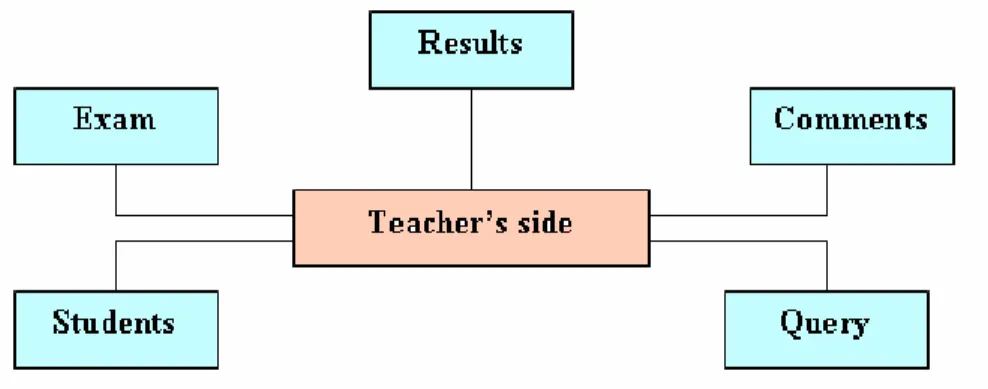
(26) 3- Teachers shall be able to view students’ results and answers using tables or charts. 4- Teachers shall be able to view students’ comments and feedback. •. Students:. 1- Students shall be able to log in the system. 2- Students shall be able to answer exam questions by web or SMS. 3- Students shall be able to query their results. 4- Students shall be able to send feedback. 5- Students shall be able to receive an advice about their answers by email or SMS. 2.1.2 System Requirements This part describes the functional and non functional requirements of the system depending on the user specification for each function in the system. The following table shows the functional requirements: Function. Description. Log in. Provide access to the system according to user privileges. Choose course. To select a course from the course list registered to a teacher or a student. Test. To select the exam or discussion editing profile 16.
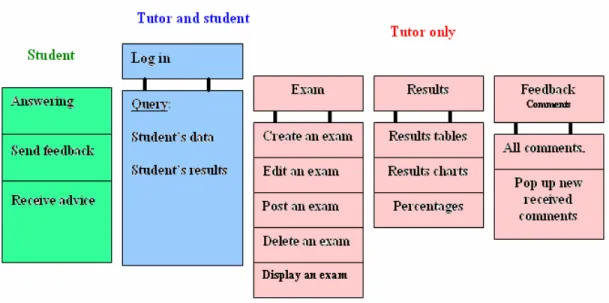
(27) New. Create new exam. add. add new question. Edit. Edit old questions. Find. Find old questions according to the topic’s title.. Save. Save the new questions. Post. Post the exam in the required date. Delete. Delete a question. View. View the exam (all questions) according to the topic. Students. View students data. Results. View students result (correct, wrong). Table. Show the results in a table, correct or wrong answers and the percentage.. Graph. Show the results in bar charts. Comments. Show received comments and feedback. Query (teacher). Query about students records individually. Answer. Students’ function to answer the exam. Advice selection. Select the favorite way to receive the advice (email. SMS). Query (students). Allow a student to check his records and results. 17.
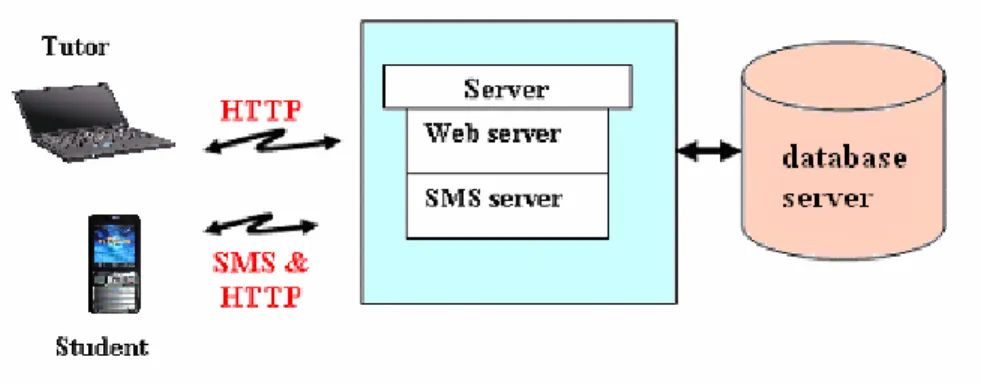
(28) Feedback. Send a feedback or comments (web or SMS). Log off. Leave the system Table 1: Functional Requirements.. The second part of the system requirements is the nonfunctional requirements summarized as the following: •. Repeated answers: each student should answer the questions only one time to quarantine better statistical analysis for the final results of student’s performance. To achieve that a key value is used for each exam. The key value is a function of the exam’s date and the initial alphabets on mobile phone keys (1, a, d, g, j, m, p, t, w). These alphabets were chosen because they are easy and fast to type by phone keypad in SMS format.. •. Timer: the timing property is used to refresh the comments web page in order to check the database for new received comments.. •. Security: MD5 function is used to encrypt exam’s data and users’ data to provide authentication and privacy.. •. User friendly: the system shall have a suitable user interface for users of different levels and ages. The system was implemented by .net framework which contains attractive objects and tools.. 18.
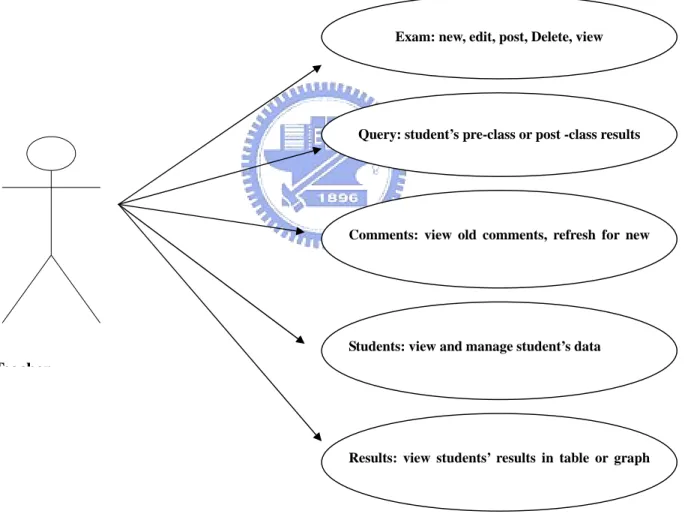
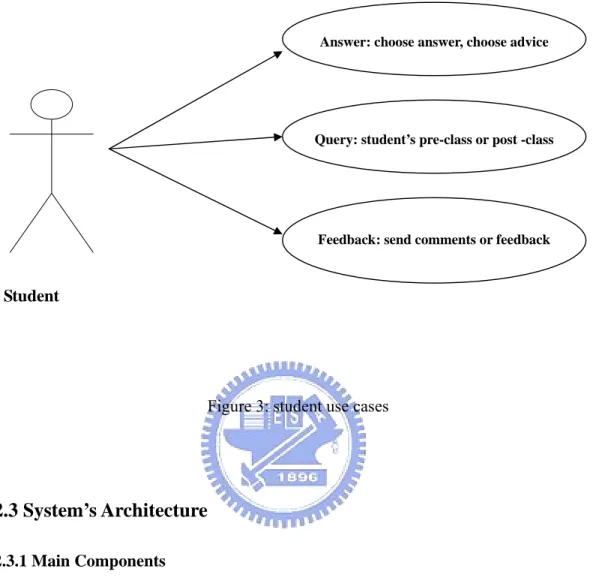
(29) •. Reliability: several tests and intensive debugging were run to discover system errors and avoid future problems.. 2.2 Use Cases This part shows the use cases for both teacher and student depending on user and system specifications. The following figure describes teacher use cases.. Exam: new, edit, post, Delete, view. Query: student’s pre-class or post -class results. Comments: view old comments, refresh for new. Students: view and manage student’s data. Teacher. Results: view students’ results in table or graph. Figure 2: teacher use cases. 19.
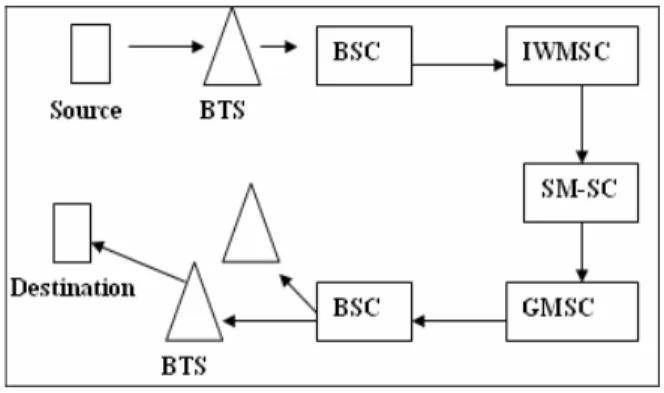
(30) The following figure describes student use cases:. Answer: choose answer, choose advice. Query: student’s pre-class or post -class. Feedback: send comments or feedback. Student. Figure 3: student use cases. 2.3 System’s Architecture 2.3.1 Main Components The architecture of the system consists of components architecture and communication architecture. The components architecture shows the main items and functions in the system. This type of architecture is basically driven from the database architecture forms. There are some shared functions between the teacher and the student, for example both of them need to use log in function in order to access the system and also they need to use the query service to check the results of the exam. The following figures show the system functions and how these functions are integrated together. 20.
(31) Figure 4: components and functions architecture 2.3.2 Communication Architecture The previous architecture involves three types of servers in which all components are communicating together. The first one is the database server which represents the core of the system where all data are stored. The second server is the web server which provides data exchange between the client and the database through internet protocol and http. The third server is SMS server which is responsible for sending and receiving SMS messages. The messages contents may contain questions answers, advice or feedback. This server is using a GSM modem to communicate with the mobile telecommunication company SMS service. These servers are shown in the following figure:. 21.
(32) Figure 5: communication architecture Figure 5 shows the tutor (teacher) uses the system via the web. He enters the data and access the database through the web pages. On the other hand the student uses the system via the web pages or SMS. 2.3.3 HTTP and SMS HTTP web part represents the information exchange method. In our system tutors use the web site for creating exam or discussion sessions, analyzing students’ data and result. Students use it for answering, querying and passing their comments to teachers.. HTTP (Hypertext Transfer Protocol) is the foundation protocol of the World Wide Web. It sets the rules for exchanges between browser and server. It provides the transfer of hypertext and hypermedia, recognition of file types, and other functions.. HTTP concepts include (as the Hypertext part of the name implies) the idea that files can contain references to other files whose selection will elicit additional transfer requests. Any Web server machine contains, in addition to the Web page files it can serve, an. 22.
(33) HTTP daemon, a program that is designed to wait for HTTP requests and handle them when they arrive. Your Web browser is an HTTP client, sending requests to server machines. When the browser user enters file requests by either "opening" a Web file (typing in a Uniform Resource Locator or URL) or clicking on a hypertext link, the browser builds an HTTP request and sends it to the Internet Protocol address (IP address) indicated by the URL. The HTTP daemon in the destination server machine receives the request and sends back the requested file or files associated with the request. (A Web page often consists of more than one file).. The other communication way is SMS which is used to transfer students’ answers, comments or any notification. Our research uses the SMS architecture in addition to some equipment (system hardware). Figure 6 describes SMS architecture in GSM network. The SMS is send from the mobile phone to the radio system, that is, a Base Transceiver Station (BTS) and then a Base Station Controller (BSC). After that the SMS travels to the Mobile switching Centre (MSC) called SMS inter-working MSC (IWMSC). Then the SMS reaches the Short Message service centre (SM-SC). which sends an. acknowledgment back to the sender mobile phone then it send the SMS message to a gateway called Gateway Mobile Switching Centre (GMSC) which locates the serving MSC depending on roaming protocols. This MSC broadcasts the message to BTS’s, and the BTS’s page the destination mobile (receiver). 23.
(34) Figure 6: SMS architecture Another two extended architecture were developed based on the previous general architecture [8]. The first one is NCTU-SMS (National Chiao Tung University SMS) which is web based message system involves the SM-SC in its architecture as shown in figure 7. NCTU-SMS is used in our system to send the SMS message since it has short End-to-End transmission time compared to the second architecture described later. SMS sender is represented by the sending function, application server by the matching and database software, while application client is represented by communication and other software functions. The NCTU-SMS uses TCP/IP protocols to send the message on the internet to the mobile operator.. Figure 7: NCTU-SMS architecture 24.
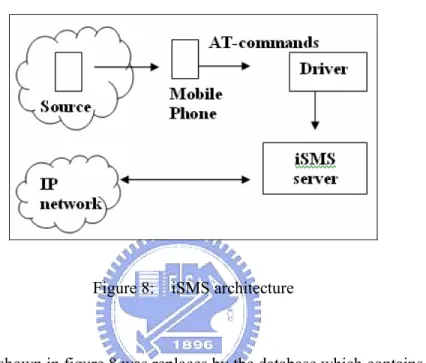
(35) The second architecture is iSMS which contains commercial mobile phone to be used to receive the SMS message and forward it to the server. The mobile phone needs to communicate with the server via AT-commands and a software driver.. Figure 8: iSMS architecture. The IP network shown in figure 8 was replaces by the database which contains all testing, discussions, students’ data and results. The iSMS was used to receive the SMS message and it provides easier way to develop application [1].. 25.
(36) Chapter 3 System Design In this chapter the details of each function and component in the system are discussed. The relations among these components are shown using the context design model. The design is divided into two types that are web based system and SMS based system.. 3.1 Web Based System The web based system contains all functions performed using the web pages in the teacher side and the student side. The web pages were designed by ASP.NET which provides many visual tools that enhance the user interface such as text box, list box and buttons. The web pages are saved in the ASPX format.. IIS web server is used to. connect the web site with the internet network. 3.1.1 Teacher’s side Figure 6 shows the context model for the main parts in the teacher’s side. After the teacher logs in to the system and chooses his course he will be able to perform the main tasks in the system.. 26.
(37) Figure 9: teacher side context model 1- Exam This part contains the following functions: •. New: this function allows the teacher to create new exam. The exam must contain several items as exam title, date, questions, answers, multiple choices, grade, and advice.. •. Edit: this function allows the teachers to edit previous exam. He shall be able to search by exams name for an old exam to be edited. Then he can preview the questions, answers, grades, advice and choices and edit them.. •. Delete: this function allows the teachers to delete previous exam. He shall be able to search by exams name for an old exam to be deleted.. •. Post: the teacher has to post the exam by specifying the exam name, the date and the exam’s method. The exam’s method specifies the type of the exam; a pre-class exam, post-class exam or discussion. Students are not able to see the exam before it is posted. A key value is generated with each posted exam to avoid repeated 27.
(38) answers by a student. When student answer the exam he will not be able to answer it again. •. View: this function allow the teacher to preview the exam in the exam page to make sure before he announces about it.. The following figure shows the object model of the exam part in the system which includes all parameters, data types and events.. Figure 10: Exam object model. 2-Results In this part, the teacher is able to view the students’ result after answering the exam. He can choose the following methods to view the answers:. 28.
(39) 1. Questions table: this table shows question’s number, number of correct answers, number of wrong answers and the percentage. 2. Students table: this table shows students names and their correct and wrong answers. 3. Graph: the graph illustrates the relation between each question and the number of answers. It also shows the percentage of answers for each choice in the multiple choice questions. 3- Students The teacher can view and manage his students in this part. The page will show all students registered in the teacher’s course in the table form. 4- Query In this part, the teacher can enquiry about students information, records and marks in the previous exams. He can view student’s total average or per exam average. 5- Comments In this part, the teacher can view the comments and feedbacks received from students. He can view all comments at the same time a pop up window is used to show a new received message. The web page checks the database periodically for new messages according to a timer value in the Meta tag.. 29.
(40) 3.1.2 Student’s side Student’s privileges are less than teacher’s. Students are supposed to log in to the system and choose the course name for the class they want to attend. The main tasks for students are answering and query. In the answering function, students shall choose the topic’s name so that they can view the questions related to that topic. They can also choose the method to receive the advice. E-mail and SMS are the methods to receive the advice. If a student forgets to answer a question, the system will notify him. If a student tries to answer the same question twice, the system will also inform him that this question was answered before. Students can also query about their total marks or per exam mark. Bearing in mind a student can view his own records only.. 3.2 SMS based system The SMS server was designed by .NET framework. The server is responsible for receiving and sending the messages from and to the database. The server communicates with a GSM modem by a GSM library embedded in the SMS server code. SMS based system includes some teacher’s functions and student’s function to achieve the mobility. Figure 11 shows SMS structure and describes data flow via SMS messages.. 30.
(41) Figure 11: SMS data flow The previous figure illustrates the message flow when it is received in the COMM (USB) port to the data processing unit and data base. Then the sent message is shown in the figure. The data processing unit is to check the message contents whether it is an answer or a comment. Then it checks whether the answer is correct or not. Before that students phone number will be checked to make sure that the student is registered in the class. This is to prevent anonymous answers. The data processing unit is also responsible for sending notification or confirmation to the phone. For example it sends that the answer was received successfully, or student is unregistered, or the question has been answered before. 3.2.1 Teacher’s side The teacher can send notes to his students using the SMS service. Also in the teacher’s side an advice can be sent to student’s mobile phone as a short message if the 31.
(42) student chooses that. In this side also the received comments are collected to be shown in the comments page. 3.2.2 Student’s side Students are able to answer the exam by using the SMS format from their mobile phones. The answer format should contain the key value of the exam and the answers. For example if the exam contains 4 questions and the key value is agt the answer should be agtbcab while bcab is the choices letters for the multiple choice questions. Then the student should write the server phone number which is the number of the GSM modem connected to the server. Students also can send their comments or ask question by the SMS format and in this case the key value used is 1ad as a default value for the comments. The other use for the SMS in the student’s side is receiving the advice about questions they answered, receiving announcements and receiving notification about answered before questions or unregistered user.. 3.3 Architecture Design The system architecture was designed based on the system specifications and system design. Figure 12 shows the layer architecture of the system which is subdivided into several subsystems described in the layers. The layer architecture is used because it is. 32.
(43) easier to design and apply new changes in future without affecting the other subsystems in other layers.. Figure 12: System Layer Architecture The previous figure shows also the main functions related to every subsystem. Every function consists of data structures and algorithm. The main data format used in the system is the text (string), date (time), integers and doubles. Different functions have different algorithms depending on what the function must do.. 33.
(44) Chapter 4 System Implementation This chapter describes system implementation. The implementation starts after analyzing the requirements and the specifications, putting the design structure and the architecture layout. Testing processes were put in parallel with the design process to achieve the reliability.. 4.1 System Implementation (Evolution Prototyping) The system is implemented using the evolution prototyping method to meet all requirements. Evolution prototyping involves the user in system development stages and focuses on user needs. It also guarantees a fast delivery of the system. The objective of Prototyping is to adapt the prototype to customer requirements as quickly and flexibly as possible [12]. The implementation started as Step-by-step evolution progresses from one planned prototype to another. Each prototype was reviewed until the final system was achieved. Step-by-step prototyping generates a list of requested enhancements for each prototype. The system was implemented using .NET framework and visual basic under .NET environment. .NET supports good user interface and object oriented programming. The web pages were designed by ASP.NET which contains powerful tools that facilitates web browsing. ASP.NET has the following Advantages [13]: 34.
(45) 1- Powerful database-driven functionality Like ASP (Microsoft's language preceding ASP.Net), ASP.Net allows programmers to develop web applications that interface with a database. The advantage of ASP.Net is that it is object-oriented and has many programming tools that allow for faster development and more functionality.. 2- Faster web applications Two aspects of ASP.Net make it fast -- compiled code and caching. In the past, the code was interpreted into "machine language" when your website visitor viewed your page. Now, with ASP.Net the code is compiled into "machine language" before your visitor ever comes to your site. Caching is the storage of information that will be reused in a memory location for faster access in the future. ASP.Net allows programmers to set up pages or areas of pages that are commonly reused to be cached for a set period of time to improve the performance of web applications. In addition, ASP.Net allows the caching of data from a database so your website isn't slowed down by frequent visits to a database when the data doesn't change very often.. 35.
(46) 3- Memory leak and crash protection ASP.Net automatically recovers from memory leaks and errors to make sure that your website is always available to your visitors.. 4- Multiple language support. Programmers can actually write their code in more than 25 .Net languages (including VB.Net, C#, and JScript.Net). This allows programmers to develop your site in the language they know best and it means that you can more easily find programmers to support the work on your site.. 4.2 System Components and libraries The system contains two types of libraries and components. The first type is the internal components which are the tools and classes inside the .NET framework such as text boxes, buttons, list boxes and labels.. 4.2.1 Internal Components. In this part some implemented functions will be shown together with the internal components or tools of the system. These tools can be dragged into the design page easily. Tools settings and properties also can be changed easily from the property window or by 36.
(47) coding according to users specifications and needs. Figure 13 shows New-Exam page. ASP.net frameworks have well organized and developed tools that can facilitate web browsing via personal computers or mobile devices [17].. Figure 13: New-Exam visual items. The figure describes the main visual items used in the system. It shows also the radio option list (a, b, c, d, e) which is used for multiple choices question. Another important tool is the data grid tool which can be used in different templates as shown in the following figure.. 37.
(48) Figure 14: Answering Window Form The Data grid is used to organize the questions, question’s number answers and grades. The figure also shows the key-value (gtp) and the server phone number. At the bottom of the form two check boxes are used to let the student choose the advice receiving way.. Figure 15 shows another function of the system. The query form is used together with the compo box tool which is connected directly to the students’ data table to ease the student’s name selection.. 38.
(49) Figure 15: Query form A pop up window method was used to display the comments received from students. The window use a Meta data and timing function to check the database periodically for new received messages. When a new message is received, the SQL function pulls the contents of the message from the database table and displays these contents in new window as shown in figure 16.. Figure 16: Pop up window new comments. 39.
(50) 4.2.2 External Components:. This is the second type of system components which are imported from other software to perform some tasks such as SMS and graphing. The external libraries are as the following:. 1- mCore SMS library [14]: mCore ™ .NET SMS Library is a powerful and easy to use class library that can be used to build powerful .NET applications for mobile messaging using GSM mobile phones or GSM modems connected to serial port or infrared port. Using mCore™ .NET SMS Library allows to:. •. Send text messages. •. Read incoming text messages. •. Send WAP Push over SMS. •. Send vCard over SMS. •. Send vCalendar over SMS. •. Set various messaging and network parameters (PIN, SMSC, Message Memory etc). •. Read modem and network information (Manufacturer, IMEI, Model, Signal Strength etc). 40.
(51) Rich set of properties, methods and its compatibility with wide range of GSM mobile phones and GSM modems makes mCore™ .NET SMS Library the best choice for any type of mobile messaging application.. mCore™ .NET SMS Library requires computer hardware with minimum specifications of 233 MHz CPU and 128 MB RAM. It is designed to work with any GSM Modem that complies with ETSI specification GSM 07.05 and supports sending of text messages in PDU mode using AT Commands. There are a large number of good GSM Modems available in the market (e.g. Wavecom, Siemens, Ericsson, Falcom, Nokia etc) which can be used with mCore™ .NET SMS Library without any problems.. GSM Phone handsets, that have a built in modem and supports AT Commands, can also be used with mCore™, however, if the SMS application has to run for longer durations or the application has to send large number of messages then using GSM Modems is recommended because:. •. GSM Phones normally run on battery power and no phone manufacturer recommends that the phone should be connected to battery charger continuously.. •. GSM Phone handsets get heated up when they are used for sending large number of messages in sequence. 41.
(52) •. GSM Modems normally run directly from power source and have a more robust design in terms of heat dissipation and heavy duty usage.. •. Some GSM Phone handsets like Nokia do not support AT Commands directly and require the appropriate modem driver for Infrared or Cable, which creates a virtual serial port.. 2- .net ChARTING [15]: .netCHARTING combines visually stunning graphics and a comprehensive interface. It is simple to use and a unique web control that combines a high performance charting engine with a powerful database and data manipulation system.. Figure 17: .netCHARTING netCHARTING can be connected to several database servers as in figure 17. It provides data manipulation to make these data suitable for the charting type. It supports many charting shapes as bar charts and pie charts with different colors, fonts, lines and labels. 42.
(53) The following figure shows a real time graph for one question and number of answers per each choice.. Figure 18: Real time graph 3- HiNet Socket to Air [16]: this is an API offered from the Chunghua telecommunication company in Taiwan. It enables sending SMS messages from the PC computer connected to the internet to a mobile phone. This API can be used in parallel with mCore™ library to send SMS messages to students. This way guarantees more reliability by avoiding GSM modem failure. This API is used in National Chiao Tung University NCTU to send SMS messages to students via the internet network. It is Called NCTU-SMS. This method proved faster SMS delivery with low failure.. 4.3 System Testing Software Testing is the process used to help identify the correctness, completeness, 43.
(54) security, and quality of developed computer software. Testing is a process of technical investigation, performed on behalf of stakeholders, that is intended to reveal quality-related information about the product with respect to the context in which it is intended to operate [12].. Software testing is just one kind of verification. Verification is the checking of or testing of items, including software, for conformance and consistency with an associated specification. At the same time the system must be validated to check what has been specified is what the user actually wanted.. The following three levels were performed in the testing phase:. •. Unit Testing: in which each unit (basic component) of the software is tested to verify that the detailed design for the unit has been correctly implemented. •. Integration testing: in which progressively larger groups of tested software components corresponding to elements of the architectural design are integrated and tested until the software works as a whole.. •. System testing: in which the software is integrated to the overall product and tested to show that all requirements are met.. 44.
(55) Chapter 5 Experiments and Results This chapter discusses the experiment methods and the final results. An experiment of many steps was performed to test the usability of the system. During the testing some problems occurred. Immediate solutions were put for these problems which made the system reliable and available for users.. 5.1 Method 5.1.1 Participants 50 students participated in the experiments. Students are studying computer science in Ta-Hwa Institute of Technology, Department of Computer Science and Information Engineering.. Students’ ages are around 21 years old. All students were attending the. lecture “Introduction to Computer Science” and “Programming Design and Practices” regularly. The courses were held in Chinese language. 5.1.2 Design and Procedures The experiments were performed during two semesters in the academic year 2006/2007. The first part was carried on in the first semester. The course is “introduction to computer Science”.. In this part the SMS based testing and discussion was run. 97%. of students had mobile phones. Students had to answer questions posted in the web site using their mobile phones and typing SMS. Students had to write the SMS answers in 45.
(56) specific format. A key value followed answer letters had to be written. The key value is randomly generated and posted when the tutor establishes the session. The key value is necessary to trace students answer and to prevent multiple answers for each question. To make the process easy, a group of letters is used to generate the key value. Each letter is the first letter on the phone key. This will reduce the number of key presses. An example, if the session contains 4 questions with four possible answers and the key value is TAD. The student should write TADBCCD. BCCD are the letters of the corresponding answer. If a student makes any mistake in the format, he will receive a message telling him about the error. Students also can send any feedback or comment to the system using their phones SMS. The system will display these comments in a pop up window to inform the teacher that some comments or questions have been received. The second part was run in “Programming Design and Practices” course in the second semester of 2006/2007. Two groups of students were taken the same course. In this part we wanted to investigate the online testing and discussion to compare it with the result of the first semester experiment which was run by SMS. The first group took the course using the conventional learning where paper exam and oral discussions were used. The second group took the course in the computer lab which allowed all students to access the internet and take the online exam and participate in the online discussions. Bearing in mind students can answer each question only one time.. 46.
(57) In SMS based and web based students answers can be viewed anonymously in the form of tables or charts. The site provides the teacher with a tool to view answers for each question (number of correct and wrong answers), view number of answers for every choice and view each student’s answers. Students also can send and receive comments by email and SMS.. 5.2 Results Questionnaires and Statistical analyses are the tools for getting students and tutors responses about the system. Questionnaires targeted to test system’s usability and benefits. Another tool was used that is the daily tutor’s comments about his students’ behaviour, interaction, collaboration and understanding. 5.2.1 SMS based discussion In “Introduction to Computer Science” course during the first semester, 97% of the students in the class had mobile phones. The experiment’s data shows that at the beginning 53% answered the quiz via there phones SMS regardless correct or wrong answer, while the other 47% did not answer due to error in the format or students were not enthusiastic to participate in the discussion. The high failure percentage forced us to add new function in the server to know the reason by tracing the message flow. At the end of the semester, students became more enthusiastic and involved in the discussion.. 47.
(58) Records in the database shows that 86% participated in the sessions, 70% answered successfully, 30% failed to answer due to the format restrictions. 14% did not participate because some of them were absent and the others did not bring their phones to the class room. Obviously, the message format had restricted students since they had to write the answer in a very specific format which reduced the number of the successfully received answers. Other reasons such as text input function in phone SMS and screen size made the answering process not easy. 5.2.2 Web based exam and discussion 45 students participated in this experiment. These students that 3 of them are female were randomly assigned into control group and experiment group. There are 22 students in control group, while 23 of them in experiment group take the course in one of the computer labs in the university. At the experiment period, the instructor taught programming knowledge of C program to both of groups. The teacher used conventional methods with the control group while the experiment group was asked to use the online system. A t-test was conducted prior to experiment begin to verify the difference between these two groups before and after the experiment. The t-test result is shown at table 2. The mean value where calculated for several average scores before the experiment. There. 48.
(59) is no difference between these two groups statistically according to P(T<=t) two-tail =0.71 before the experiment. Control group Experiment group Mean. 36.1. 37.3. Variance. 133.2. 139.6. 22. 23. No. observed t value. -0.38. P(T<=t) two-tail. 0.71. Table 2: T-test of average scores – before the experiments A t-test was applied after the experiment for these two groups. The result indicated that it achieved significant difference statistically between these two groups with P(T<=t) two-tail = 0.05 . Control group. Experiment group. Mean. 48.1. 59.6. Variance. 416.2. 313.4. 22. 23. No. observed T value P(T<=t) two-tail. -1.996 0.05. Table 3: T-test of average scores - after the experiments. The web based system includes the exam sessions and the discussion sessions. The teacher showed a satisfaction of his students’ results after using the system. He mentioned that students have become more interactive. The pre-class test and post-class test have developed students’ revision and preparation for the class. Discussions. 49.
(60) questions and answers always unknown, so when the teacher displays the answers chart, students will start to think and discuss together to find the correct answer which achieve better cooperation among students. The figure bellow shows an image captured from the online exam after answering the question. The figure contains a question, choices, answers and number of answers for each choice which also encourages student to think and discuss the correct answer.. Figure 19: Web Based Exam 5.2.3 Students feed back function Students always afraid of others criticism, shy and would not want to ask if they think it is obvious and they should know. The system provides a tool for students to come over their shyness. In the first stage of the experiment, students used to send their comments or feedback by SMS. While in the second stage, they used the online system or their emails since they are connected to the internet. Students preferred to use the online system to send their comments on the SMS system. The reason for that is that they used 50.
(61) to type using the PC keyboard. Mobile phones have limited screen size, limited input characters. The majority of students see that the online and the SMS feedback system are better than the oral discussion. 5.2.4 Tutor’s advice Students need hints related to their assignments or exams. At the same time they need an advice to show them their mistakes in the exams and tell them where o find the correct answer. The SMS and email advice functions were accepted by all students. Some students preferred the email on SMS because of the message length. Students would like to receive a more detail advice in their email inbox from their tutors. On the other hand, most of the students try to avoid the oral advice.. 51.
(62) Chapter 6 Conclusion This chapter discusses the system’s value. It shows how the system contributes in developing students’ activity and cooperation. It shows also a comparison between the system and other systems. Finally, a conclusion is shown to summarize system’s ideas and future work.. 6.1 System’s Value The final results of the experiment during two semesters proved the system capability to solve the teaching problems discussed in chapter 1 which can be summarized as wasting time and efforts for papers collecting and emendating, discussion is limited on active students, students are afraid of asking questions and the difficulty of advising all students. The system achieves greater understanding and deeper knowledge. In addition, it stimulates students thinking, enhances their interaction and cooperation. The online exams develop students’ preparation and revision. Students’ comprehension is developed by discussion sessions, immediate response and direct feedback. The system is also a tool for a teacher to trace his students’ performance and adapt his teaching material to fit their levels and needs.. 52.
(63) 6.2 Comparison In this section we try to find out differences and similarities between our system and other systems. There are many related researches which makes the comparison not an easy task. So we will focus one the major outlines of the system. •. SMS: the SMS is used in two directions for transferring students’ answers and comments to the server and for transferring teacher’s advices and notes to students’ mobile phones. Most of the researches use SMS in one direction for sending announcements to students.. •. Advice: it is a note or a hint regards each question in the exam or the discussion. It helps a student to know about his mistakes when he answers wrongly.. •. Charting: this tool is to preview students’ answers as a percentage or as a number in the form of bar chart. Students can view the overall answers before they know the correct answer. They discuss the multiple answers together and cooperate to find the correct answer.. •. Feedback: students can send their comments at any time and the teacher will view the comments anonymously in the lecture.. 53.
(64) •. Others: enabling students to answer a question only one time to make sure all students answer seriously, capability to support not only multiple choices question but also “fill in the blank” questions, using available technology in the classroom without any need for new hardware installation and teachers ability to trace his students’ performance.. 6.3 Future Work Although the experiments in Ta-Hua Institute of Technology have shown advantages and a great acceptance from students and teachers, further experiments shall be performed in other universities and high schools to involve more students from different ages and backgrounds. The system shall be technically modified so that it can be used completely by mobile phones. New functions can be added to enhance the system’s usability such as different questions format and voice messaging.. 6.4 Conclusion Teaching systems has been improved by using technology and communication. ICT and mobile development has helped to increase students understanding, comprehension, cooperation, interactivity and learning. Tutors and teachers consume large efforts and. 54.
(65) time in traditional teaching systems especially testing and discussions on paper collecting, correcting and oral question. But with technical methods their effort will be redirected to develop their skills, prepare better learning resources and references and focus on students needs. The use of the hybrid teaching assistant system major courses saves teachers time and effort and improves students’ interactivity and understanding. The system contains new features in the learning research fields which can be summarized in ubiquity and students advice; it represents a ubiquitous, two-direction tool which helps students test their learning levels in classrooms, campus or homes, receive advices or hints about their mistakes and weakness points and send their feedbacks.. 55.
(66) Bibliography [1] Yousef Awwad., Lin C. F., Lin H. T., & Yuan S. M., “The Construction of Information Gathering with SMS messages,” WSEAS Transaction on communication, 5(6), (2006), 1208-1214. [2] E. Sakkopoulos and A. Tsakalidis, “Utilizing complementary know-how: Advanced fine arts meeting information technology to provide a virtual university for artists—Students and alumni,” in Proc. 30th SIGUCCS Conf. User Services, Providence, RI, Nov. 20–23, 2002, pp. 122–129. [3] Lars Bollen, Sabrina Eimler, H. Ulrich Hoppe, “SMS-based Discussions – Technology Enhanced Collaboration for a Literature Course,” in Proc of the 2nd IEEE Int. Workshop on Wireless and Mobile Technologies in Education (WMTE’04), IEEE computer society 2004. [4] J. Garofalakis, E. Sakkopoulos, S. Sirmakessis, and A. Tsakalidis, “Integrating adaptive techniques into virtual university learning environment,” in Proc. IEEE Int. Conf. Advanced Learning Technologies, 2002, pp. 28–33. [5] Yong Lian, “Adaptive Teaching for Large Classes,” International Conference on Engineering Education July 21–25, 2003, Valencia, Spain. [6] E. Sakkopoulos, M. Lytras and A. Tsakalidis, “Adaptive Mobile Web Services 56.
(67) Facilitate Communication and Learning Internet Technology,” IEEE Transaction on Education, Vol. 49, NO. 2, May 2006.. [7] Alexei Tretiakov, Kinshuk, “Creating a Pervasive Testing Environment by Using SMS Messaging,” in Proc of the 2nd IEEE Int. Workshop on Wireless and Mobile Technologies in Education (WMTE’05), IEEE computer society 2005.. [8] C. Markett, “Using short message service to encourage interactivity in the classroom”, Computers & Education 46 (2006) 280–293. [9] G.D. Chen, C.K. Chang and C.Y. Wang, “Ubiquitous learning website: Scaffold learners by mobile devices with information-aware techniques,” Computers & Education, May 2006. [10] Teresa Monahan, Gavin McArdle, Michela Bertolotto, “Virtual reality for collaborative e-learning,” Computers & Education, 2007. [11] Burdea, G. C., & Coiffet, P, “Virtual reality technology”, (2nd Ed), John Wiley & Sons, 2003. [12] Sommerville, Software Engineering, 6th edition, Addison Wesley, 2001. [13] http://www.brillianceweb.com/betterwebdesign/tips_52.aspx [14] http://www.logixmobile.com/products/mcorelib/index.asp [15] http://www.dotnetcharting.com/home.aspx [16] http://sockettoair.hinet.net 57.
(68) [17] Wigley, Andy./Roxburgh, Peter, “Building .NET applications for mobile devices”, Redmond, Wash. :Microsoft Press,c2002. [18] Mitchell, Scott, “ASP.NET : tips, tutorials, and code”, Indianapolis, Ind. :Sams ;c2002.Hemel Hempstead :Prentice Hall. [19] MacDonald, Matthew, “Beginning ASP.NET in VB.NET :from novice to professional", Berkeley, CA :Apress,c2004. [20] Liberty, Jesse./Hurwitz, Dan, “Programming ASP.NET", Sebastopol, CA :O'Reilly,c2002. [21] MacDonald, Matthew, “Microsoft Visual Basic .NET programmer's cookbook”, Redmond, Wash. :Microsoft Press,c2003. [22] G. Andrew Duthie, “Microsoft ASP.NET with Microsoft Visual Basic .NET step by step”, Redmond, Wash. :Microsoft Press,c2003. [23] Sean Campbell, Scott Swigart, Bob Carver, Patrick Barnes, Jim Pragit, Oz Rugless, and Kris Horrocks, “101 Microsoft Visual Basic.NET applications”, Redmond, Washington :Microsoft Press,c2003. [24] Brendan Riordan, John Traxler, ” The Use of Targeted Bulk SMS Texting to Enhance Student Support, Inclusion and Retention”, Proceedings of the 2005 IEEE International Workshop on Wireless and Mobile Technologies in Education, IEEE computer and society 2005.. 58.
(69) [25] http://www.m-learning.org/ [26] Levy, M., & Kennedy, C. (2005). Learning Italian via Mobile SMS. In A. Kukulska-Hulme & J. Traxler (Eds.), Mobile Learning: A Handbook for Educators and Trainers. London: Routledge. [27] Hoppe, H. U. (2004). SMS-based Discussions - Technology Enhanced Collaboration for A Literature Course. Proceedings of WMTE, National Central University, Taiwan. [28] Salmon, G. (2000). e-moderating - the key to teaching and learning online (F. Lockwood, Ed.). London: Kogan Page. [29] Hsien-Tang Lin, Shyan-Ming Yuan , The Construction of Web-Based Multifunctional Brainstorming System , WSEAS Transactions on Computers, Vol 5, Issue 7 , pp. 1589-1595 , July 2006 [30] Hsien-Tang Lin, Zhi-Feng Liu, Shyan-Ming Yuan , An Implementation of Web-based mastery learning system , International Journal of Instruction Media , 2006 [31] Seppa¨la¨, P., & Alama¨ki, H. (2003). Mobile learning in teacher training. Journal of Computer Assisted Learning, 19(3), 330–335. [32] Ketamo, H. (2003). An adaptive geometry game for handheld devices. Educational Technology & Society, 6(1). [33] Vavoula, G., Sharples, M. (2002). KleOS: A personal, mobile, knowledge and learning organisation system. In IEEE international workshop on wireless and mobile. 59.
數據

+7
Outline
相關文件
• You can make good use of this opportunity and become more aware of the importance of teaching information texts with an explicit emphasis on understanding the features of academic
Problem Solving Skills through Creating the Makerspace in the Secondary English Language Classroom3. Collaborative Research and Development (“Seed”)
Using Information Texts in the Primary English Classroom: Developing KS2 Students’ Reading and Writing Skills (New). Jan-Feb 2016
In 2006, most School Heads perceived that the NET’s role as primarily to collaborate with the local English teachers, act as an English language resource for students,
A genre is more dynamic than a text type and is always changing and evolving; however, for our practical purposes here, we can take genre to mean text type. Materials developed
Now, nearly all of the current flows through wire S since it has a much lower resistance than the light bulb. The light bulb does not glow because the current flowing through it
• Is the school able to make reference to different sources of assessment data and provide timely and effective feedback to students according to their performance in order
• 4.1 學校尚需提升學與教 效能。學校仍需持續探討 不同的教學策略, 以助 教師促進課堂互動,及 提升學生的共通能力...
