國
立
交
通
大
學
資訊科學與工程研究所
博
士
論
文
語意式、無所不在、且可自訂流程的智慧型家庭自動化系統
Semantic, Ubiquitous, and User Configurable
Smart Home Automation
研 究 生:高永威
指導教授:袁賢銘 教授
I
語意式、無所不在、且可自訂流程的智慧型家庭自動化系統
Semantic, Ubiquitous, and User Configurable Smart Home Automation
研 究 生:高永威 Student:Yung-Wei Kao
指導教授:袁賢銘 Advisor:Shyan-Ming Yuan
國 立 交 通 大 學
資 訊 科 學 與 工 程 研 究 所
博 士 論 文
A DissertationSubmitted to Department of Computer Science and Engineering College of Computer Science
National Chiao Tung University in partial Fulfillment of the Requirements
for the Degree of Doctor of Philosophy in
Computer Science
March 2012
Hsinchu, Taiwan, Republic of China
I
語意式、無所不在、且可自訂流程的智慧型家庭自動化系統
學生:高永威 指導教授:袁賢銘 國立交通大學資訊科學與工程研究所 摘要 智慧型家電與智慧型家庭自動化的觀念已經被提出了很久。然而,當人們提到未來的智 慧家庭系統,許多相關研究皆著重於將不同的智慧家電與設備配置在家庭的環境中,並 且依照預先定義好的流程來進行自動化的家電控制。使用者可自訂流程的智慧型家庭自 動化議題至今還沒有被人們普遍重視。提供使用者可自訂流程的困難之處源自於異質、 複雜、且不斷變化的家庭環境。此外,使用者通常會以語意的方式來思考如何控制家中 的電器,例如 “我想要將所有位於二樓的電燈全部關掉”。如果一個智慧型家庭自動化 系統無法接受語意式的命令,及提供語意式的回應,使用者則必須為了一件工作制訂多 個流程,並且時常修改與維護它們。本論文提出了一個可接受語意式命令及提供語意式 回 應 , 並 且 允 許 使 用 者 自 行 制 訂 流 程 的 智 慧 型 家 庭 自 動 化 系 統 , 稱 為 USHAS (User-configurable Semantic Home Automation System)。USHAS 採用 Web Service 及 WSBPEL 的技術來執行自動化流程、OWL 與 OWL-S 的技術來定義家庭環境及服務 以及一個我們定義的語言:SHPL (Semantic Home Process Language),來描述語意化的流 程。 為了提供方便且親切的使用者介面,USHAS 讓使用者可以透過網頁介面來定義家中的 環境以及所有的自動化流程。如此一來,使用者不但可以藉由個人電腦上的網頁瀏覽器 存取 USHAS,也可以藉由手持式裝置上的瀏覽器隨時隨地觀察家中的環境現況並且控 制家電。除此之外,USHAS 也可扮演家庭資訊中心的角色。USHAS 可對使用者有興 趣的網頁及所安裝的網頁應用程式提供在 PC 與手持式裝置上皆可離線瀏覽與執行的 功能。關鍵詞:Smart Home; Semantic Home; Home Automation; Web Service; WSBPEL; OWL; Offline Mobile Web Application; Mobile Content Adaptation
II
Semantic, Ubiquitous, and User Configurable Smart Home
Automation
Student: Yung-Wei Kao Advisor: Shyan-Ming Yuan
Department of Computer Science and Information Engineering National Chiao Tung University
Abstract
The ideas of smart home and home automation have been proposed for many years. However, when discussing homes of the future, related studies have usually focused on deploying various smart appliances (or devices) within a home environment and employing those appliances automatically by pre-defined procedures. The issue of user-configurable home automation has largely been neglected recently. The difficulties of supporting user-configurable automation are due to the complexity of various dynamic home environments. Within their home domains, users usually think semantically; for example, “I want to turn off all the lights on the second floor”. If a home automation system cannot accept semantic commands or provide semantic feedback, users may have to create multiple processes for one task and modify them frequently. This thesis proposes a semantic home automation system, USHAS (User-configurable Semantic Home Automation System), which adopts Web Service and WSBPEL for executing automated process; OWL and OWL-S for defining home environments and service ontology; and a self-defined markup language, SHPL (Semantic Home Process Language), for describing semantic processes.
To provide convenient and friendly user interface, USHAS allows users to define their home environments and automation processes via Web pages. In this manner, users can access USHAS and control appliances not only on their PCs but also on their mobile devices. Moreover, USHAS is also able to play the role of home information broker. USHAS can provide the capability of offline browsing and executing the user-selected Web pages and Web applications on PCs and mobile devices.
Keywords:Smart Home; Semantic Home; Home Automation; Web Service; WSBPEL; OWL; Offline Mobile Web Application; Mobile Content Adaptation
III
誌謝
Acknowledgement
感謝我的指導老師袁賢銘教授在我的研究過程中提供了相當豐富且寶
貴的指導,才能讓我有今天的研究成果。另外要感謝我的家人與親戚的關
懷,讓我可以安心無慮的進行研究。最後要感謝我最深愛的老婆蕙媜。蕙
媜的支持與陪伴,是我一路走來最大的動力。因為有蕙媜,我才能有足夠
的勇氣與毅力在六年內完成我的博士學位。謹將此博士論文獻給我最深愛
的蕙媜。
IV
Table of Contents
摘要 ……….………..……… I
Abstract ……….……….……… II
誌謝 ……….……….………. III
Table of Contents ... ………… IV
List of Figures ... VI
List of Tables ... VIII
1. Introduction ... 1
2. Background and Related Work ... 7
2.1 Smart Home and Home Automation ... 7
2.2 SOA and OSGi-Based Smart Home ... 7
2.3 Web Service, WSBPEL, and Web Service Based Home Automation ... 9
2.4 Semantic Web, Context-Aware Home, OWL-S, and Semantic Home Automation ... 10
2.5 User-Configurable Smart Home ... 11
2.6 Mobile Web content adaptation ... 13
3. Design Issues ... 15
3.1 System Assumptions ... 16 3.2 System Overview ... 164. USHAS Ontology ... 20
4.1 Person class ... 21 4.2 Device clas ... 22 4.3 Event ... 245. Semantic Home Process Language (SHPL) ... 26
5.1 Variables ... 27 5.2 Time_set ... 28 5.3 Preconditions ... 29 5.4 Flow ... 31 5.5 SHPL example ... 32
6. System Architecture ... 34
6.1 The USHAS Content Adaptation Sub-System ... 37
6.2 The Information Broker Sub-System ... 45
6.3 The Offline Mobile Web Browsing Sub-System ... 50
6.4 The Physical Access Control Sub-System ... 52
V
7. Detailed Design ... 59
7.1 System Model and Detailed Design of USHAS ... 59
7.2 Detailed Design of CAS ... 60
7.3 Detailed Design of IBS ... 71
7.4 Detailed Design of PACS ... 77
7.5 Limitation Analysis ... 83
8. System Prototype and Evaluation ... 86
8.1 System Prototype ... 86
8.2 System Scenarios ... 97
8.3 User Satisfaction Evaluation ... 98
8.4 Usability Evaluation ... 99
8.5 Face Recognition Accuracy Evaluation ... 104
8.6 System Comparison ... 108
9. Conclusion and Future Work ... 111
9.1 Conclusion ... 111
9.2 Future Work ... 112
VI
List of Figures
Figure 3-1. Conceptual stack of USHAS ... 17
Figure 4-1. The high level structure of USHAS ontology ... 20
Figure 4-2. The low level structure of the Person class ... 22
Figure 4-3. The low level structure of the Device class ... 23
Figure 4-4. The low level structure of the Event class ... 25
Figure 5-1. The high level XSD of SHPL ... 26
Figure 5-2. Formal expression of the variables element ... 27
Figure 5-3. Formal expression of the time_set element ... 28
Figure 5-4. Formal expression of the preconditions element ... 29
Figure 5-5. Formal expression of the flow element ... 31
Figure 5-6. An example of using SHPL ... 34
Figure 6-2. Overview of USHAS Content Adaptation Sub-System ... 37
Figure 6-3. Personalize web pages using PC or laptop ... 38
Figure 6-4. Browse web pages via mobile devices ... 39
Figure 6-5. Page Tailor in Firefox Web browser ... 40
Figure 6-6. Select blocks at different granularity ... 42
Figure 6-7. Rearrange the selected blocks ... 42
Figure 6-8. Internal expression of user preferences about a Web page ... 43
Figure 6-9. The communication between these three components ... 45
Figure 6-10. High level system architecture of the Information Broker Sub-System ... 46
Figure 6-11. The detailed architecture of Application Market ... 46
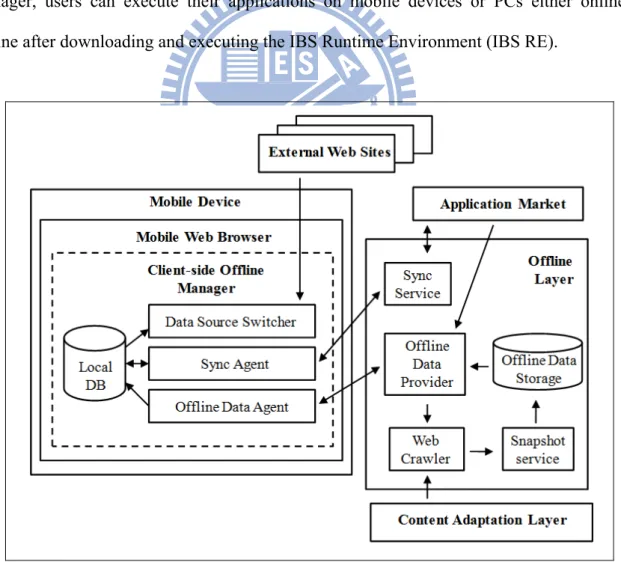
Figure 6-12. The detailed architecture of Offline Layer ... 47
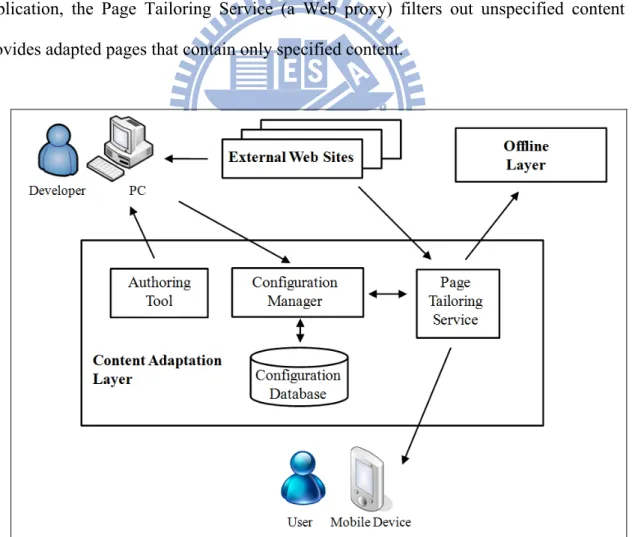
Figure 6-13. The detailed architecture of Content Adaptation Layer ... 49
Figure 6-14. Overview of the Offline Mobile Web Browsing Sub-System ... 50
Figure 6-15. The Overview of Physical Access Control Sub-System (PACS) ... 52
Figure 6-16. Integration process of face and password ... 54
Figure 6-17. Integration process of face and hand gesture ... 57
Figure 6-18. Integration process with error ... 58
Figure 7-1. System model ... 59
Figure 7-2. System components and their interfaces of CAS ... 61
Figure 7-3. This is the bookmarklet used to launch Page Tailor ... 62
Figure 7-4. The containment hierarchy of elements ... 64
Figure 7-5. The selected block (a) and its corresponding sub-tree (b) ... 65
Figure 7-6. How to load the user preferences (pseudo-code) ... 67
VII
Figure 7-8. How to update the user preferences (pseudo-code) ... 69
Figure 7-9. Produce a corresponding DOM tree ... 70
Figure 7-10. A new DOM tree (right) would be created to hold the replicas of selected elements in original DOM tree (left) ... 71
Figure 7-11. The sequence diagram of application publication ... 72
Figure 7-12. The sequence diagram of application installation ... 73
Figure 7-13. The sequence diagram of using the to-do list application ... 75
Figure 7-14. The sequence diagram of using the RSS reader application ... 76
Figure 7-15. Protocol of user registration phase ... 79
Figure 7-16. Protocol of authentication phase ... 82
Figure 8-1. The living room of UAHAS prototype ... 87
Figure 8-2. The bed room of UAHAS prototype ... 88
Figure 8-3. Semantic Environment Editor ... 89
Figure 8-4. A semantic process of the USHAS prototype in Semantic Process Designer 90 Figure 8-5. An example of using SHPL in the prototype ... 91
Figure 8-6. A practical example of using the USHAS content adaptation sub-system . 92 Figure 8-7. The result page of Google Mobile Proxy ... 93
Figure 8-8. (a) The mobile version homepage (b) The PC version homepage ... 94
Figure 8-9. (a) The to-do list application (b) The to-do list application with one new item added ... 95
Figure 8-10. (a) The RSS reader application (b) The online external Web page without content adaptation (c) The offline external Web page with content adaptation ... 95
Figure 8-11. The system demonstration of PACS prototype ... 96
Figure 8-12. Two ways to specify the precondition of the “Bath Time” scenario ... 101
Figure 8-13. The analysis result of usability evaluation (average degree of agreement) 102 Figure 8-14. The analysis result of usability evaluation (Cronbach α) ... 103
Figure 8-15: Usability test (a) Page Tailor in Internet Explorer (b) Page Tailor in Firefox Web browser ... 103
Figure 8-16. Recognition rate of P and Pi (1) ... 104
Figure 8-17. Recognition rate of P and Pi (2) ... 105
Figure 8-18. Recognition rate of Pf, Pf’, and Ph ... 106
VIII
List of Tables
Table 6-1. Face and password mapping example ... 53
Table 6-2. Nine hand gesture patterns ... 55
Table 6-3. Face and hand gestures mapping example ... 56
Table 7-1. Examples of origin comparisons ... 66
Table 7-2. The database schema of the table AppSync ... 74
Table 8-1. Examples of different scenarios and corresponding semantic automation processes ... 97
Table 8-2. Analysis of user satisfaction ... 98
Table 8-3. Analysis of usability of Semantic Environment Editor ... 99
Table 8-4. Analysis of usability of Semantic Process Designer ... 100
Table 8-5. Questions included in questionnaire ... 101
Table 8-6. Recognition rate of P and Pi (1) ... 104
Table 8-7. Recognition rate of P and Pi (2) ... 105
Table 8-8. Recognition rate of Pf, Pf’, and Ph ... 106
Table 8-9. Recognition rate of Po, and Po’ ... 107
Table 8-10. System Comparison ... 108
1
Chapter 1 Introduction
Previous studies have focused on providing solutions for smart homes, home automation, and ubiquitous homes. Numerous of these studies concentrating not only on controlling devices, but also on combining additional factors before doing so. For example, facial recognition can be performed for opening a door, and hand gesture recognition can be utilized to change the channel of a TV. However, regardless of whether these home appliances are controlled manually by users or indirectly and automatically by computers, most systems provide only pre-defined control of appliances. For example, hand gestures indicating numbers for changing channels on a TV cannot be used as an input for changing the temperature of air conditioner, unless users modify the programs by themselves. Such modification requirement limits the flexibility and scalability of numerous home control and automation systems.
Controlling appliances without pre-defined procedures is difficult, as several requirements must be fulfilled. First, all devices, including home appliances, sensors, and remote controls, should be designed separately with standard interfaces provided. This criterion is reasonable, because users usually purchase devices manufactured by different companies. Second, how automation processes receive information from sensors and control devices should be standardized. Finally, these processes should be designed by users in an easy and understandable manner.
To provide interconnectivity between different parties, various Service-Oriented Architecture (SOA) technologies have been designed. In general, numerous home systems adopted the Open Services Gateway Initiative (OSGi) architecture for smart home implementation. However, the OSGi platform does not provide a complete process management and execution
2
solution; therefore, pre-defined procedures for executing processes are usually designed for the OSGi. By contrast, Web Service focuses on providing interconnectivity between parties. Moreover, the OASIS Web Services Business Process Execution Language (WSBPEL or BPEL4WS) has been defined for process management and execution of Web Services. Therefore, this thesis adopted the Web Service standard for defining operations of devices and the WSBPEL standard for defining automation processes.
Although WSBPEL provides an effective process definition standard, a gap remains between what users actually want and what they must define in processes. This is because users usually think semantically; for example, “I want to turn off all the lights on the second floor”. In this instance, the WSBPEL process cannot be defined, because the home system does not know about the lights located on the second floor. To solve this problem, this thesis adopted the Web Ontology Language (OWL) to create a knowledge base in a semantic home, and the OWL-S technology to describe the Web Services of the devices.
Although the OWL-S standard provides the functionality of process definition, the difference between the OWL-S process and the WSBPEL process is quite small. Only the input and output variables are mapped to the OWL ontology, and users must specify many binding details. To achieve the goal of semantic home automation, this thesis adopts OWL-S only for semantic service description and discovery, but not for semantic process definition and execution. Because no appropriate candidate is available for defining semantic home processes, this thesis designed a markup language, SHPL (Semantic Home Process Language), to describe semantic processes. In addition, the SHPL execution runtime is developed, which dynamically generates a WSBPEL process for each semantic process based on the current home environment defined in the knowledge base.
3
This thesis proposes a semantic home automation system, USHAS (User-configurable Semantic Home Automation System), which adopts Web Service and WSDL to execute automation processes; OWL and OWL-S to describe home environments and service ontology; and SHPL to define semantic processes. To prove that the proposed system can satisfy user needs adequately, this thesis designed nine demonstration scenarios: the living room, long vacation, home gym, morning rush, dinner time, good student, sweet dreams, bath time, and party night. Furthermore, this thesis designed and analyzed a questionnaire to determine which scenarios were more appealing to users. Finally, the usability of USHAS was evaluated.
To provide convenient and friendly user interface, USHAS allows users to define their home environments and automation processes via Web pages. In this manner, users can access USHAS and control appliances not only on their PCs but also on their mobile devices. However, numerous environment settings and processes could be defined in USHAS, and only a small part of them are interesting to mobile users; Displaying all the contents of USHAS makes users difficult to read and use.
Not only the USHAS Web pages but also general Web pages have the content adaptation problem when they are displayed on mobile Web browsers. Widespread of mobile devices makes it common to browse Web pages via mobile browsers. However, most Web pages are mainly designed for desktop computers that are equipped with large screens. When browsing on mobile devices, a user might have to scroll up and down, left and right all the time to find the information they want. Because of the limited screen size, this kind of operation is really not user-friendly at all.
4
Fortunately, some famous websites have another simplified version of Web content specially provided for mobile devices, such as Google Mobile [61]. On the other hand, it is a heavy burden on Web developers to craft and maintain multiple versions of the same website [62-66]. Even with the help of the fascinating toolkits.
If we resize the original web page to fit the width of mobile device, the vertical scroll bar will be too long to view, and the information is crowded. On the other hand, if we provide another version of the original Web page, there may be some important information lost in the mobile version, and the transformation of each page costs a lot for Web page developers. Hence, USHAS is also designed to help users personalize their mobile Web pages for handheld device browsing. Four major objectives are listed and introduced briefly as follows.
Easy-to-use
It does not make sense to launch another program other than the browser to personalize a Web page. When a user surfs on the Internet and finds a Web page that interests him/her, the configuration tool of this system should be able to pop up in the browser window somehow right away. Moreover, all the codes needed to accomplish this job (i.e. personalize web pages) should be downloaded on the fly when accessed, thus allowing a user to work on different computers at different places.
Personalizing Web Pages Visually
Web pages are usually composed of header, footer, sidebar, and content areas [67]. Parts of them are used to maintain a consistent style for the website, and other parts of them are used for navigation. Some renowned Web sites may even contain a lot of advertisements on them.
5
In many Web pages, only a few of information is really needed to be shown on the mobile phone screen [68][69]. This thesis also aims at allowing users to determine which parts of Web pages should be retained while browsing these pages with their mobile devices.
A friendly user interface should thus be available for users to perform this task [70][71]. For example, with appropriate visual aids (such as highlight), a user can choose blocks in a Web page one by one with different granularity. Through the operation of drag-and-drop, users can determine the relative position of the chosen blocks according to their personal preferences. In short, users can re-construct mobile Web pages simply with visual manipulations, and do not have to write any line of code.
Reducing Wireless Bandwidth Consumption
More than screen size constraints, the limited memory and wireless network bandwidth also make it unsuitable for delivering the entire Web page untailored to mobile devices. Before returning a Web page to mobile devices, some adaptation must be taken to pre-process a Web page according to a user’s preferences. So that the volume of data transmission to a mobile phone could be reduced, and thus reduce the consumption of wireless bandwidth as well.
Automatic mobile webpage content extraction
The proposed content adapting algorithm should automatically adapt Web pages to mobile devices. Users always only care about a part of the Web contents. Content adapting applications should provide a function to extract these parts form Web pages.
6
To solve this problem, USHAS also includes a Web proxy so that only the user-selected parts of Web pages are displayed on the mobile devices. The major contributions of this solution are listed below.
a. A cross-browser configuration tool is designed.
b. The Web-based nature of our configuration tool allows a user to configure the settings from different computers, and requires no pre-installation of any software.
c. Blocks in a Web page can be chosen correctly under the premise that the layout of a Web page does not change frequently.
d. A Web-based management interface is provided.
e. An automatic algorithm for mobile web page generation is proposed.
Moreover, USHAS provides the capability of home information broker. Web contents such as Blog articles, News, or RSS seeds shared or subscribed by home members can be pre-tailored and pre-fetched by USHAS according to the user-defined schedules. In this manner, home members can download the adapted and pre-fetched contents so that these contents can be browsed on mobile phones even under offline mode.
The thesis contains seven sections. In Section 2, the background and related work of the proposed system are introduced. Section 3 discusses the design issues of USHAS. The USHAS ontology and SHPL are described in Section 4 and 5 respectively. We present the system architecture and detailed system design of USHAS in Section 6 and 7 respectively. System demonstrations and evaluations of scenarios are presented in Section 8. Finally, we end up with a conclusion and discuss the future work of USHAS in Section 9.
7
Chapter 2 Background and Related Work
2.1 Smart Home and Home Automation
Smart homes and home automation are popular topics, referring to devices and appliances in the home environment that can be controlled automatically in an intelligent manner. Thus far, numerous studies have proposed system designs and even smart home products [1-4]. In smart home systems, devices and appliances are usually controlled to facilitate the duties of daily life. Home automation systems generally contain an internal network, as well as intelligent rules and devices in the home network for convenient or special purposes. Devices and appliances can be controlled automatically by, or provide environmental information to, these home automation systems. In addition, changing the state of a device may also change the state of another device, or trigger actions in other devices within the smart home environment [6].
2.2 SOA and OSGi-Based Smart Home
Before defining a high level of logic for automation processes, the most crucial challenge is to facilitate the interconnectivity between different devices. Due to highly varied standards for home devices, such as X10 [20], INSTEON [21], UPnP [22], and Jini [23], communication between different devices is difficult to establish using dissimilar interfaces under various standards. For such heterogeneous network integration, the Service-Oriented Architecture (SOA) [14] design principle provides interoperability between various loosely coupled services. Open Services Gateway initiative (OSGi) [15] is one of the technologies that implement the SOA paradigm, and numerous researchers have implemented smart home
8
systems based on OSGi. Li et al. [24] designed a home network system, providing a Web interface for users to control appliances directly on the OSGi platform. Ishikawa et al. [25] proposed SENCHA, a smart appliance integration middleware framework based on OSGi. They indicated several limitations of OSGi in implementing smart home automation, such as the lack of multiple views of abstraction levels. In other words, the capability of multilevel abstraction of OSGi is not enough. Wu et al. [1] combined the OSGi platform with mobile agents [26] in their design, which involves multiple mobile agents responsible for different tasks, distributed among multiple OSGi platforms. Liao et al. [8] adopted the Message-Oriented Middleware (MOM) [27] paradigm for event handling in their context-aware smart home system. Rui et al. [9] presented a physical structure model and a multi-agent [28] based software architecture based on OSGi; this architecture encapsulated the device sensing as well as control operations into the AmI-Adaptor, and encapsulated the computation logic into the AmI-Box.
The primary problem of OSGi is that only bundles installed on the same OSGi container can inter-communicate. Therefore, technologies such as mobile agents in [1] must be designed to establish communication between different containers. Another problem of OSGi is that no standard process definition is provided. Hence, in the OSGi based systems, high level device control decisions are usually made by multi-agents and pre-defined by programmers. As a result, automation processes are fixed and not allowed to be configured by users. Although the system designed in [9] provides the capability of user configuration to AmI systems, the configuration level is at the AmI-Adaptor and AmI-Box levels, not at the process level; users must select and configure which AmI-Adaptor or AmI-Box to communicate.
9
2.3 Web Service, WSBPEL, and Web Service Based Home
Automation
Web Service [16] is another technology that implements the concept of SOA, consisting of three main standards: Web Services Description Language (WSDL) [29], Simple Object Access Protocol (SOAP) [30], and Universal Description, Discovery and Integration (UDDI) [31]. Similar to OSGi, Web Service provides interoperability between different services; therefore, it is also a candidate for smart home platforms. Uribarren et al. [32] proposed a middleware system based on Web Service for controlling devices with different protocols. Unlike OSGi, a process execution standard, Web Services Business Process Execution Language (WSBPEL) [17], is designed to support process definition for executing Web Services. Because devices are usually provided by different manufacturers, the concept of device functionalities can be mapped to services provided by enterprises; and the concept of process execution using different devices can be mapped to cross-business process execution, including different enterprises. Anke et al. [33] revealed the drawback of OSGi: OSGi bundles are not directly accessible from clients outside of the OSGi container. To solve this problem, Anke et al. designed a system that exposes OSGi bundles using Web Service interfaces, and then executes these bundles using processes defined in WSBPEL. However, using both OSGi and Web Service involves a duplicate design, because both of them follow the SOA paradigm. Systems supporting WSBPEL process definition and execution can adopt device drivers directly implemented by Web Service, instead of by OSGi bundles, to reduce system overhead.
10
2.4 Semantic Web, Context-Aware Home, OWL-S, and
Semantic Home Automation
Although WSBPEL is already a higher layer of both Web Service and OSGi, it is still difficult for users to write a WSBPEL document directly by themselves; many details of static binding, such as portTypes or URLs of services, must still be provided. To enable communication based on semantic ontology between different programs across the boundaries of different organizations, Semantic Web [34] technology is designed on the basis of Resource Description Framework (RDF) [35] and Web Ontology Language (OWL) [18]. In general, Semantic Web technology is usually used for context-aware home automation systems. Wang et al. [36] designed the CONON ontology for context reasoning in pervasive computing environments, including home environments. Moreover, several reasoning engines, such as OWL-QL [37], have been developed for understanding semantic meanings of OWL, and can be highly useful in semantic home systems. For example, if Light L is located in the living room, and the living room is located on the first floor, then the query “all the lights on the first floor” can identify Light L. Furthermore, OWL-S [19] extends the capability of OWL to describe the operations of Web Service and semantic process execution of these operations. Mokhtar et al. [38] developed a QoS-aware dynamic service composition mechanism in ambient intelligence environments, using OWL-S for service description and process definition.
Although OWL-S is based on Semantic Web, it is still not abstract enough for users to express high-level concepts of processes, such as “I want to turn off all the lights on the second floor”. Necessary semantic processes should still be defined explicitly by OWL-S. Given a dynamic home environment, for example, after installing a new light on the second floor, the OWL-S
11
process should be modified to meet the requirements of using that light. Ha et al. [10] proposed an infrastructure for a ubiquitous home network service, adopting numerous technologies such as Web Service, WSBPEL, and OWL-S. Moreover, they designed a high level semantic process definition. Processes based on this definition are interpreted to WSBPEL processes dynamically according to the current home environment. However, the proposed semantic process definition language is too simplified, and not user-configurable.
Based on Semantic Web, situation-driven approaches [39-41] provide a higher level of semantic process automation abstraction. The concepts of situation, user goals, and broker goals are proposed so that Web Services can be controlled to fulfill brokers’ goals, which further fulfill user goals based on particular situations. Users or experts can control process actions by providing various situational parameters. In the smart home domain, the concept of situations can be mapped to the home environment, such as the lighting, current time, and status of appliances. Although users can control the processes by adjusting the situations, the process definitions, or the user goals, should also be pre-defined. In other words, users cannot create their own customized automation processes.
2.5 User-Configurable Smart Home
Rodden et al. [42] used the idea of Jigsaw to compose abstract processes for smart home automation. For example, a doorbell piece fitting a webcam piece, which then fits a mobile phone piece, implies that when the doorbell rings, the webcam takes a picture and sends this image to the user’s mobile phone. This is a compelling idea because it seems highly simple and user friendly. However, this simple representation causes many ambiguity problems. First, the item definitions are ambiguous; if ten lamps are in a house, there must be a manner to
12
distinguish them. Identifying each piece merely using the Jigsaw interface is difficult. Determining how users can define and reconfigure their home automation systems in an understandable manner is crucial. In addition, several abstract concepts, such as “no one is home”, are not easily represented; all possible abstract concepts must be defined as pieces before using them. Second, the process definition is ambiguous; the manner in which operations should be executed is not defined. If every item is treated as the same type of piece, three pieces of webcams concatenated one-by-one is possible; however, the meaning of this process is not understandable. Finally, arguments of operations cannot be defined. For example, “turn on the air conditioner if the temperature is higher than 30 oC” cannot be defined because the number 30 cannot be assigned. Moreover, only one precondition piece is allowed to be defined in a process in this system. A trade-off exists between usability and unambiguity; a user interface design that is too simplified is not always understandable to users.
Drey et al. [43] proposed a taxonomy-driven approach to visually prototyping pervasive computing applications, including those of smart homes. This system allows users to create their own semantic automation processes, or rules, based on the sensor-controller-actuator development paradigm. Furthermore, they support the concept of “all” when defining rules using the symbol “*” after entity class names. However, the meaning of “*” differs between the sensor and actuator sides; using “*” on the sensor side implies “any one instance of this category”, but implies “all of the instances of this category” on the actuator side. The ambiguous design of “*” may confuse users when designing processes. Moreover, this system supports the concept of clock time only, and concepts of repeated time, such as every day or every weekend, are not supported.
13
2.6 Mobile Web content adaptation
Mobile content adaptation is a significant issue when browsing Web sites on mobile devices. In general, Web pages are designed for PC users with large screens. Therefore, when users browse these Web pages on small-screen mobile devices, the display results are usually unsatisfactory. Many mobile content adaptation technologies were designed to solve this problem. The challenges of mobile content adaptation include different device profiles and user preferences. Moreover, since mobile devices do not usually have computation capabilities as powerful as those of PCs, only certain multimedia formats are supported for multimedia content.
In general, there are three categories of mobile content adaptation architecture: client-based application adaptation, client-server application adaptation, and proxy-based application adaptation. In client-based adaptation, client-side application performs content transcoding according to the profile of the mobile device. However, user preferences must be stored locally on devices, and the weak computing power of the mobile device may decrease efficiency. In server-side adaptation, the server generates or prepares different versions of content and decides what type of content should be delivered to clients according to their profiles. The problem is that server-side programs must be modified to support different types of clients; adapted content for mobile users is not available if the server does not support them. In proxy-based adaptation, content is transcoded on the fly during delivery from server to client; this can solve the problems of client-side and server-side adaptation architectures. However, in certain cases, such as SSL-encrypted communications, Web content can neither be modified nor adapted during transmission between clients and servers.
14
One client-based application adaptation technology is Opera’s Small-Screen RenderingTM in Opera’s mobile Web browser. This technology intelligently reformats Web pages to fit the width of screen on mobile devices, thereby eliminating the need for horizontal scrolling. Only the layout of page is changed; all the Web content remains. Another example of client-based application adaption is the Smart-Fit Rendering technology in ACCESS NetFront. Similar to Opera’s Small-Screen Rendering, Smart-Fit Rendering also renders Web pages to fit the narrow screen width of mobile devices.
The main difference between client-server application adaptation and proxy-based application adaptation is whether the content provider or third-party service provider is responsible for conducting the adaptation. Therefore, many adaptation systems can either be deployed server-side or proxy-side. Chen et al. proposed a mobile content adaptation system, which can be either a server-side or a proxy-side architecture. Their system separates a large page into several regions, and creates a minified image as an index page; if any region on the index page is selected, the user is redirected to another page that only displays the content of the selected region.
15
Chapter 3 Design Issues
From our observation, numerous home appliances are easy to be operated, even by old people, but others are not. The difference between these operations is that several operations are quite common even over different appliances. For example, almost all appliances have power buttons to switch them on or off. It is quite easy to turn an appliance on by pressing the power button even it is a new kind of appliance that you never see it before. Another example is that it is easy to change the volume of TV by pressing the volume up and volume down buttons on the remote control. If you know how to change volume of TV, it is quite easy to learn how to change volume of an amplifier or any voice-related appliance providing volume up and volume down buttons. Many people, especially old people, feel frustrated if the operations of new devices are totally different with the old ones which they already familiar with. Computer is an example of device providing uncommon operations. Except the power on operation, nothing is similar to traditional controls of appliances; therefore many old people are afraid of using computers.
On the basis of our observation, we attempt to identify certain common operations between different appliances, or within the same category of appliance. We believe that common operations not only provide an understandable interface to users, but also provide a high level of abstraction of control. For example, a command “turn off all devices at the second floor” can be created for power saving if all devices support the operation of “turn off”. However, not all devices are the same; several devices, such as multi-purpose washing machines, are valuable because they provide multiple, usually uncommon operations. Another issue is that operations which are not common may become common in the future; therefore, the definition of common operations must be extendable.
16
Furthermore, this thesis used the idea of common operations to design the definition of automation process. Since no common process definition exists for home automation until now, we attempt to identify the pattern of common requirements in smart home environment. A trade-off also exists between simplicity and capability of process definition; if too many factors are included, the system may frustrate users, but if too little factors are included, some scenarios may not able to be expressed. Finally, the issues of semantic, unambiguous, and user-controllable process definition which are already discussed in Section 2 are also crucial to be addressed.
3.1 System Assumptions
On the basis of the scope of this thesis and the analysis of design issues, several assumptions for USHAS are defined as follows:
a. All the devices to be controlled have been deployed to users’ home environments. For example, lights have been connected to X.10 modules for USHAS to control.
b. Manufactures or third-party driver providers can provide device drivers which are implemented as Web Services and follow the driver standard of USHAS.
c. Operations are more understandable if they are common operations.
d. Automation processes are more understandable if semantic concepts are included.
e. Automation processes are more understandable if they are defined under a common process pattern.
17
As discussed in Section 1 and 2, USHAS adopts the Web Service technology for exposing services provided by drivers, WSBPEL technology for execution level process definition, Semantic Web technology for knowledge base construction, and a semantic process definition language, SHPL, for semantic process definition. The conceptual stack of USHAS is shown in Fig. 3-1.
Figure 3-1. Conceptual stack of USHAS
Traditionally, devices can be controlled by two kinds of execution paradigms of smart home: user-controlled execution and event-driven execution. In the proposed system, user-controlled device execution is easily achieved simply by invoking the services provided by device drivers; therefore, this thesis focused on event-driven execution. Layers of conceptual stack are introduced as follows:
18 a. Device Layer
Two categories of device are designed: sensor and actuator. Sensors collect environment information, and actuators enforce executions based on commands coming from users or automation systems. In USHAS, both sensor and actuator style devices are encapsulated by device drivers following the Web Service standard.
b. Notification Layer
Traditionally, some kinds of agent are designed for receiving sensing data generated by sensors. For example, images captured by cameras are analyzed, and then a face-detected event is generated if someone appears in front of the camera. USHAS adopts the Publish/Subscribe [44] paradigm for publishing events and notifying subscribers based on pre-defined topics, since that Pub/Sub systems are usually employed for event management [45-46].
c. Service Query Layer and Process Layer
Since USHAS follows the Web Service standard for service description, it adopts UDDI for service query. Also, USHAS uses the WSBPEL as the execution level process definition language, and a WSBPEL runtime for process execution.
d. Semantic Notification Layer
Some semantic events such as NoOneAtHomeEvent are defined in this layer. Except explicitly defined events, we found that the concept of semantic event handling is quite
19
similar to the concept of semantic process execution; semantic events can be mapped to pre-conditions of semantic process, and semantic event handling can be mapped to what must be executed in the body of semantic process. Therefore, the semantic notification layer not only handles explicitly defined events, but also includes pre-condition checking before semantic process execution.
e. Semantic Service Query and Semantic Process Layer
Although OWL-S is not abstract enough for semantic process definition, it is mature for describing and querying services of Web Services. Since USHAS uses OWL as the ontology for knowledge base construction, the OWL-S is adopted for semantic service query. Moreover, semantic process is defined in SHPL, which is described in the next section.
f. Management Layer
One of the main goals of USHAS is user-configurable semantic process design; therefore, a management layer for users to create semantic processes must be provided. Also, since home environment differs from user to user, there must be an interface provided for users to define the ontology of their home environments.
20
Chapter 4 USHAS Ontology
Figure 4-1. The high level structure of USHAS ontology
To describe the status of home, ontology is needed to be defined for home domain; thus, high level information can be maintained, queried, and reasoned. Since a lot of controls and automation processes are usually executed based on the descriptions of user’s home, home ontology is usually defined as the skeleton of knowledge base in smart environment systems. The OWL technology is usually used for illustrating home ontology, since it provides a well-defined concept representation model for describing semantic concepts. Wang et al. [36] proposed the CONON ontology, which includes four main classes: CompEntity, Location, Person, and Activity. However, the concept of time is not included. Also, Chen et al. [47]
21
proposed the SOUPA ontology, which includes nine classes in the SOUPA core: Person, Agent, Policy, BDI, Event, Action, Space, Time, and Geo-M. However, since they only focus on meeting rooms, some environment concepts such as Humidity are not included. On the basis of the requirements of USHAS, the USHAS ontology is defined, which is shown in Fig. 4-1.
Six first-level classes are defined in the USHAS ontology: Person, Device, Time, Environment, Event, and Location. In the Person class, different in-home roles are defined, such as adult member, child member, or even a thief. In the Device class, all the sensor or actuator devices are classified based on the well-known appliance names, such as TV, or their purposes. The Time class includes the definitions of specific time, a range of time, or periodically repeated time (e.g. “Everyday”). Some invisible environmental information, such as brightness or humidity, is classified into the Environment class. Also, some semantic event classes are defined under the Event class. Finally, the Location class maintains the names of spaces, such as living room or first floor in the home domain. Details of some first-level classes are described further as follows.
4.1 Person class
Figure-4-2 shows the low level structure of the Person class. The Person class has two data type properties, FirstName and LastName, to record everyone’s name. In addition, this class has an object type property for maintaining the location of this person. The FamilyMember class has five sub-classes: ElderlyMember, AdultMember, ChildMember, BabyMember, and PetMember. Many applications are developed based on the age of residents. For example, fall detection usually involves elderly members, and adult members are usually used to ensure that particularly dangerous activities, such as cooking, are safely executed.
22
Figure 4-2. The low level structure of the Person class
4.2 Device class
Figure 4-3 shows the low level structure of the Device class. Similar to the Person class, the Device class has an object type property “IsLocatedAt” for indicating the location of this device. The Device class also has a “Generates” property, which maintains an event log for all events generated by this device. Although events are usually generated by sensor devices, generating events is not limited to sensor-style devices; for example, the TV is not a sensor device, but it is allowed to publish a “DeviceStatusChangeEvent” if someone changes the channel. More details of event are described in the Event class section.
23
Figure 4-3. The low level structure of the Device class
Three basic service pointers, “TurnsOn”, “TurnsOff”, and “GetOnOffStatus”, are maintained by this class. In OWL-S, each operation of a Web Service is encapsulated as an OWL-S service (service: Service) for invocation. In other words, each Web Service of device must support at least three operations for turning it on, turning it off, and querying its current on-off status. The reason for this requirement is that the on-off status is the most basic and fundamental information of a device. For some simple devices, such as a lamp, provide only the on-off functionality for users to control; for other complex appliances, such as a TV or air conditioner, users also have to turn them on before using them. Controlling the on-off status is the most common and vital functionality shared by all devices at home. With these three
24
definitions, USHAS can turn on devices, turn off devices, or query the on-off status of devices to maintain the “OnOffStatus” property in a batch process.
Two sub-classes, FunctionalCategory and ApplianceCategory, are defined under the Device class. The FunctionalCategory is further sub-divided into the ControlStyleDevice and SensorStyleDevice. The SensorStyleDevice is designed for sensor devices. Other appliances and devices can be classified by the common product name or the category of their functionalities. By defining the category or product name, similar products can be controlled in a batch process; for example, we can turn on all air conditioners in the home, even the brand names are different. Conversely, by defining the category of functionality, various types of products with shared functionalities can be controlled in a batch process; for example, we can set the audio volume of all appliances at zero after midnight. Although two different manners of classification are available, one device can belong to both of them simultaneously. For example, a TV belongs to the Television class under ApplianceCategory, and also the NumberControlStyleDevice under FunctionalCategory.
4.3
Event
In general, events are generated by agents after analyzing the measurements of sensors. For example, BrightnessSensingDevice generates BrightnessChangeEvent. Moreover, semantic events are also defined under the event class. For instance, the NoAdultAtHome event is generated, based on the presence of each person and the definition of the Person class at home.
25
26
Chapter 5 Semantic Home Process Language
(SHPL)
Since the semantic process definition of OWL-S is not abstract enough, and no higher level process description based on it exists until now, we decide to define a new process description language, Semantic Home Process Language (SHPL), to support semantic process definition without static service binding.
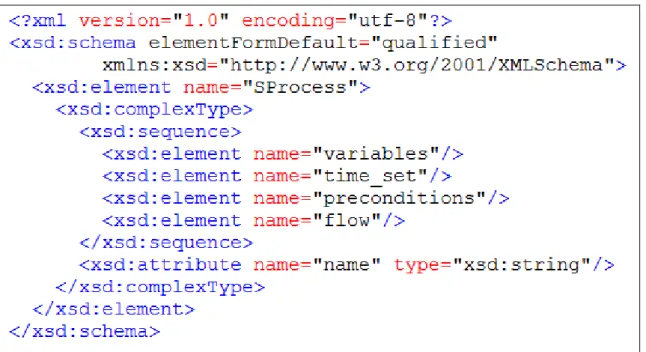
Figure 5-1. The high level XSD of SHPL
From our observation, four vital factors are usually included in home automation processes: pre-conditions, variables, execution time, and flow of invocations. For example, given a command “if the temperature is higher than 30 oC at 6:00 PM, turn on the air conditioner”, the value 30 is a variable; “if the temperature is higher than 30 oC” is a pre-condition, 6:00 PM is an execution time, and “turn on the air conditioner” is an invocation. Although post-condition is usually defined by the generic process description, in home automation
27
situations, users usually know what the post condition is after executing each invocation; therefore, we can eliminate this definition to decrease the complexity of SHPL. The high level XSD of SHPL is shown in Figure-5-1.
5.1 Variables
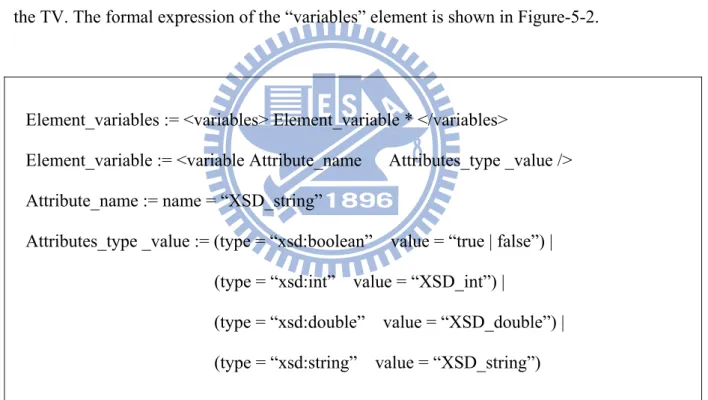
The design of variables provides users a manner to express information that can be input by users when defining pre-conditions and invocations. For example, we can define a variable with type integer and value 10, and then let it be the input of the “set_channel” invocation of the TV. The formal expression of the “variables” element is shown in Figure-5-2.
Element_variables := <variables> Element_variable * </variables>
Element_variable := <variable Attribute_name Attributes_type _value /> Attribute_name := name = “XSD_string”
Attributes_type _value := (type = “xsd:boolean” value = “true | false”) | (type = “xsd:int” value = “XSD_int”) |
(type = “xsd:double” value = “XSD_double”) | (type = “xsd:string” value = “XSD_string”)
Figure 5-2. Formal expression of the variables element
Only one “variables” element is in each process, which can contain several “variable” elements. Each variable element has three attributes: name, type, and value. In SHPL, only four basic variable types are supported: boolean, integer, double, and character string. The reason why only these types are supported is because they are the most understandable types
28
for people to input. In general, home appliances do not require complex input, because inputting information is difficult if it is complex. Many operations, such as switching TV channels, receive numbers as inputs; most operations, such as turning on lamps, require no input from users. Although string-type input is rarely supported by home appliances, it is understandable for users to input string-type with particular devices in the future home environment. For example, users may be able to key-in the name of a movie on a mobile phone, and the DVD player would then start displaying the movie in the living room. Therefore, the type string is also supported for a higher flexibility under the concern of usability.
5.2 Time_set
Element_ time_set := <time_set> Element_time * </time_set> Element_time := <time> time_name </time>
Figure 5-3. Formal expression of the time_set element
The “time_set” element maintains all time instances, which are defined under the Time class of the USHAS ontology, and are execution time of processes. The relationship between time instances is conjunction; in other words, only when all time elements are satisfied will the process be triggered. Although the conjunction relationship limits the capability of expression, it simplifies the logic of time_set; when both conjunction and disjunction relationships are permitted, it is too complex for users to define and comprehend. If users wish to define a process using the disjunction relationship of time instances, they can define multiple
29
processes using different execution time instances instead. The formal expression of the time_set element is shown in Figure-5-3.
5.3 Preconditions
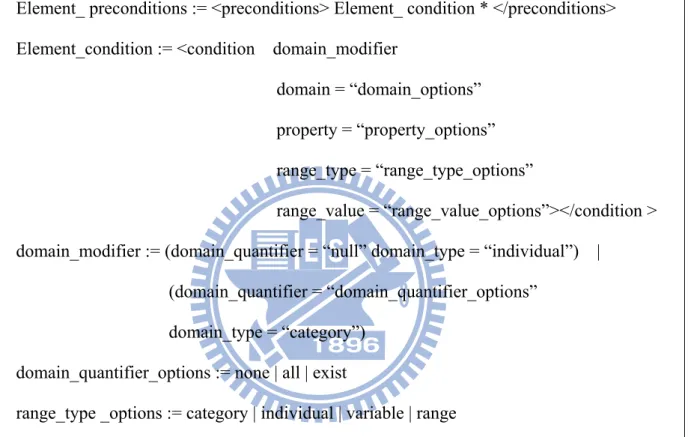
Element_ preconditions := <preconditions> Element_ condition * </preconditions> Element_condition := <condition domain_modifier
domain = “domain_options” property = “property_options” range_type = “range_type_options”
range_value = “range_value_options”></condition > domain_modifier := (domain_quantifier = “null” domain_type = “individual”) |
(domain_quantifier = “domain_quantifier_options” domain_type = “category”)
domain_quantifier_options := none | all | exist
range_type _options := category | individual | variable | range
Figure 5-4. Formal expression of the preconditions element
Each “preconditions” element is allowed to contain several “condition” elements. Similar to “time_set”, the relationship between different “condition” elements is also conjunction; thus, only when all conditions are satisfied will the process be triggered. Similar to the reason for using only conjunction in time_set, users may be confused if both the conjunction and disjunction are supported in preconditions. For example, given the process “if the room temperature is lower than 20 degrees and Mary is in the living room or the baby is at home, then, switch on the heating”, the conditions can be explained in two different ways: “if the
30
room temperature is lower than 20 degrees and Mary is in the living room” or “the baby is at home” and “if the room temperature is lower than 20 degrees” and “Mary is in the living room or the baby is at home”. As a result, users may create unfavorable processes due to the complex logic combination. When only conjunction is allowed, users can still create multiple processes such as “if the room temperature is lower than 20 degrees and Mary is in the living room, then, switch on the heating” and “if the baby is at home, then, switch on the heating” for achieving the same goal. The formal expression of the “preconditions” element is shown in Figure-5-4.
The description of each condition contains three main parts: domain, property, and range. In other words, if particular subjects have properties with values, the condition is satisfied. Moreover, the domain can be further described by the “domain_quantifier” and “domain_type”. The “domain_type” can be a category or an individual. For example, we can specify a person or the Person class as a domain. The “domain_quantifier” is the quantifier of a domain; it is specified only when the “domain_type” is a category. For example, we can specify “all people in the FamilyMember class” or “at least one instance of the OnFireEvent exists” as the subject. The property attribute can be any supported property of a specified domain; if the “domain_type” is a category, only the shared property of this category is allowed to be defined. Moreover, four kinds of range_type: category, individual, variable, and range, are defined. The “individual” and “variable” are the two most basic types; the “individual” type is used for values of object properties, and the “variable” type is used for values of data properties. The range type is used when specifying a range of value. For example, we can specify a range of temperature value in the range_type. Finally, if the category type is specified as range_type, all instances belonging to this category are examined. For example, the pre-condition “all family members are in the bedrooms” is satisfied even when family members are located in different bedrooms.
31
5.4 Flow
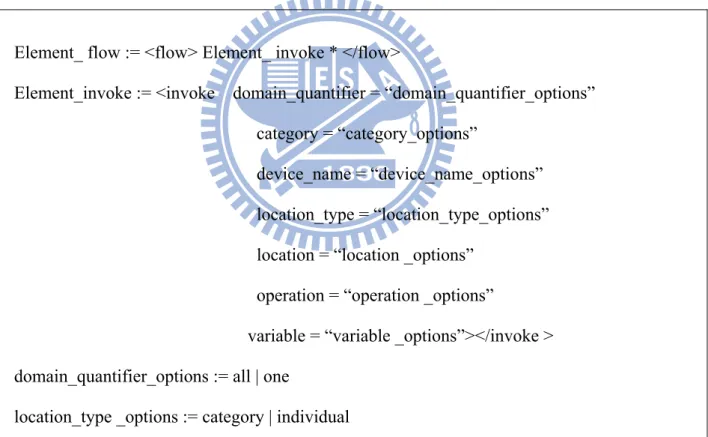
Each flow element is allowed to contain several invoke elements, which enable users to specify which operations of which devices are controlled. In most home automation scenarios, only actuators are controlled; therefore, we mainly focus on invoking devices. If the home automation system providers intend to provide some special agents to be invoked, such as MMS sender, they can implement these agents as special devices following the general device interface.
Element_ flow := <flow> Element_ invoke * </flow>
Element_invoke := <invoke domain_quantifier = “domain_quantifier_options” category = “category_options”
device_name = “device_name_options” location_type = “location_type_options” location = “location _options”
operation = “operation _options”
variable = “variable _options”></invoke > domain_quantifier_options := all | one
location_type _options := category | individual
Figure 5-5. Formal expression of the flow element
Similar to pre-conditions, users can also specify whether all devices are, or only one device of the device category is controlled. We observe that devices are usually specified associated
32
with their locations with their categories, such as “the lights in the living room”. Therefore, the location and category of controlled device are also included. Finally, the operation supported by the specified device is also included into the invoke element with input variable defined in the variables element.
5.5 SHPL example
Figure 5-6. An example of using SHPL
Figure-5-6 shows an SHPL example of the scenario “if anyone is in the dining room, and there is no one on the second floor at dinner time, then turns off all lights on the second floor, and turns on the TV in the living room”. The variable “input1” is a simple variable with a true value for confirming the operation execution. The time “DinnerTime” must be defined as a
33
part of the home environment before creating this process. Two preconditions are specified in this process: the first has the Person category domain and the SecondFloor category range, and the second has the Person domain and the MyDiningRoom individual range. Two operations are executed when these two preconditions are satisfied; the first is the TurnsOff for all Light categories on the SecondFloor, and the second is the TurnsOn for MyTV in the LivingRoom.
34
Chapter 6. System Architecture
Figure 6-1. System architecture
The system architecture of USHAS is shown in Figure 6-1. For each device to be controlled, a Web Service driver must be implemented based on the protocol and functionalities of this device by device manufacture or third-party developers, such as TV-WS, Light-WS, and so on. Also, detail binding configurations such as house code and key code, must be able to be configured by users via these drivers. For WSBPEL automation, a BPEL runtime is included, which is able to control device drivers based on the BPEL process descriptions. Similarly, for semantic process automation, a semantic process runtime is included, which is able to generate BPEL process dynamically based on current home environment.
35
To maintain all the home knowledge and status of home environment, a knowledge base following the OWL-S standard is included together with the manager of it. Within the knowledge base, semantic Web Service information, location definition, people definition, time definition, and device definition are maintained. Although semantic Web Service information and device definition are both related to devices, the device definition is a higher level of representation, such as device category, which is user understandable, while the semantic Web Service information is a lower level of representation, such as binding information, which is not user understandable, and is not managed by user directly.
The execution of semantic automation process depends on the decision of the Semantic Process Manager. The Semantic Process Manager constantly checks whether the current time is satisfied with any time instance defined in the semantic processes. Moreover, the Semantic Process Manager checks whether all the pre-conditions are satisfied in each semantic process once the Home Ontology has been updated. Also, for each semantic process, an execution flag is set to indicate whether this process has been executed. Only when all the pre-conditions and time instances are satisfied when the process has not been executed, the process will be executed. The design of this execution flag is important, since users may want to change the result of execution when the pre-conditions and time instances are still satisfied. For example, if no execution flag is set when executing the process “If there is anyone in the living room from 7:00 PM to 9:00 PM, turn on the TV and set the channel to 20”, the TV channel will always be 20 during 7:00 PM to 9:00 PM even users intend to change it. In this manner, this is an annoying process. Therefore, only when the execution flag is set as “not has been executed”, the process can be executed. After the process is executed, this flag will be set as “has been executed”, and, it will be set as “not has been executed” again if any of the time instance or pre-condition is not satisfied. After the Semantic Process Manager decides to execute a semantic process, it translates the flow of this process into a WSBPEL process
36
based on the current home environment, and then invokes the BPEL process service for WSBPEL process execution.
For event handling, firstly, both kind of explicitly defined basic events and explicitly defined semantic events must be published to the Pub/Sub Event Broker. Developers can create their own services to handle events by subscribing to the Pub/Sub Event Broker, otherwise, all the pre-defined events are sent to the Event Handler which invokes the BPEL runtime directly for basic events, and invokes the semantic process runtime for explicitly defined semantic events. Also, a user agent is designed to send location information and update users’ real-time locations.
Finally, three user interfaces are provided via HTTP. The Semantic Environment Editor facilitates users to define information of home environment, such as room definition, family member definition, and time definition. Also, users can deploy bundles of devices drivers via this editor. For defining semantic processes, the Semantic Process Designer is included, which contains variable definition, pre-condition definition, invocation definition, and so on. Options provided in the Semantic Process Designer are basically provided depend on the definition of current home environment, which is based on the input coming from the Semantic Environment Editor and real-time events.
As to user interface, several home automation systems also include the maps of the homes. However, the problem of providing a map is that the structures of users’ houses are usually different; users must construct their own maps before using them; it is not an easy task for users. Actually, from our observation, users do not need maps of their house for specifying and understanding the locations within their houses; people usually use semantic properties of
37
locations for doing so, such as “the living room” or “the bath room on the second floor”. Therefore, we decide not to include the map interface into the proposed system.
6.1 The USHAS Content Adaptation Sub-System
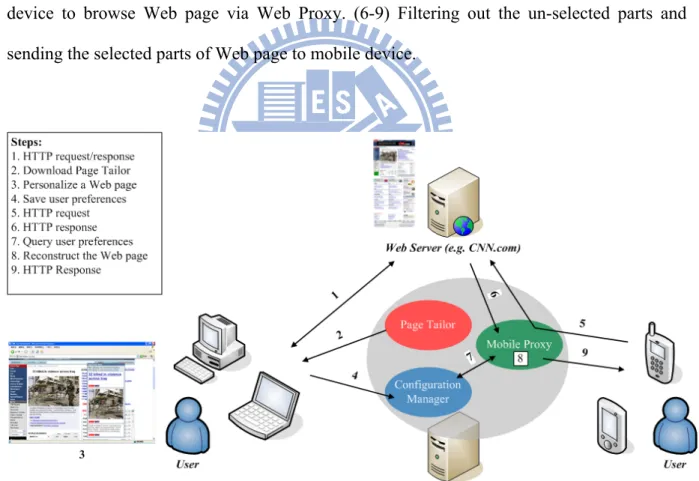
The overview of the USHAS Content Adaptation Sub-System (CAS) is shown in Figure 6-2. The steps of using it are described as follows: (1) User opens a Web page which is going to be customized. (2) User clicks a bookmark to download and execute the Page Tailor. (3-4) Using the Page Tailor to select and store the interesting parts of Web page. (5) Using the mobile device to browse Web page via Web Proxy. (6-9) Filtering out the un-selected parts and sending the selected parts of Web page to mobile device.
38
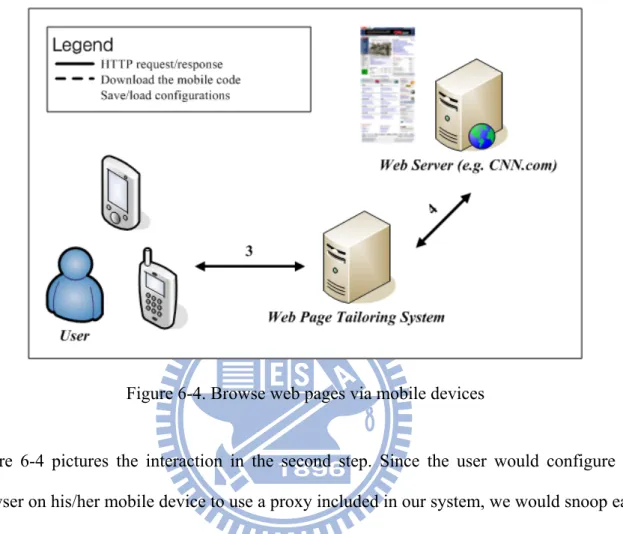
The personalizing process in the USHAS content adaptation sub-system comprises two steps. First, user must specify his/her preferences of a web page using a PC or laptop. Second, he/she has to configure the browser on his/her mobile device to go through a specially made proxy, which is responsible for adjusting the content of web pages according to the preferences set in the first step. Two pictures are given below to illustrate separately the relationship between a user, our web page tailoring system, and a remote Web server (such as CNN.com) in each step.
Figure 6-3. Personalize web pages using PC or laptop
Figure 6-3 describes the interaction in the first step. When a user enters a URL in his/her Web browser, a HTTP request is sent to (Line 1) the corresponding Web server specified in the URL. After processing the request by the server, a HTTP response is sent back (Line 1). If the user wants to personalize that page, a program hosted on a tiny Web server included in our system would be downloaded (Line 2) and executed in his/her browser. With the help of that program, the user can specify his/her preferences simply by visual manipulations. After
39
finishing the job, preferences about this page are sent back and stored in a database for later use (Line 2).
Figure 6-4. Browse web pages via mobile devices
Figure 6-4 pictures the interaction in the second step. Since the user would configure the browser on his/her mobile device to use a proxy included in our system, we would snoop each HTTP request and modify its corresponding response (Line 3 and 4) in between. For example, if the user visits a web page that has been personalized before, some actions would be taken to tailor the web page to meet the user preferences.
In order to achieve the above tasks, three components are designed in our system: Page Tailor, Configuration Manager, and Mobile Proxy. The purpose and functions of each component will be introduced separately.
40 a. Page Tailor
Figure 6-5. Page Tailor in Firefox Web browser
Page Tailor in the form of mobile code can be downloaded and executed in a user’s browser when he/she is about to personalize a Web page. It provides some visual manipulations for users to help them specify their preferences about a Web page. The preferences here include: blocks of a Web page that should be retained and their final arrangement. All the preferences about this page would be saved in a remote database that is managed by Configuration Manager. Figure 6-5 is a snapshot when executing Page Tailor in a Firefox Web browser.
41
When browsing Web pages, a user can click on the installed bookmarklet to download and execute Page Tailor. From the other perspective of users, it seems that the Web page itself provides the personalizing functions.
After the Page Tailor window is launched in the user’s browser, some actions are performed in the background automatically. First, Page Tailor will connect with Configuration Manager to retrieve the user preferences about this current visited page. If the user has personalized this page before, Page Tailor would retrieve the old preferences, and then use the data retrieved to reconstruct the past, such as blocks that had been selected and their order.
On the contrary, if there are no preferences about this page, nothing will happen, of course. The purpose of this action is to help users accelerate the setting time; particularly when he/she only wants to perform a slight modification.
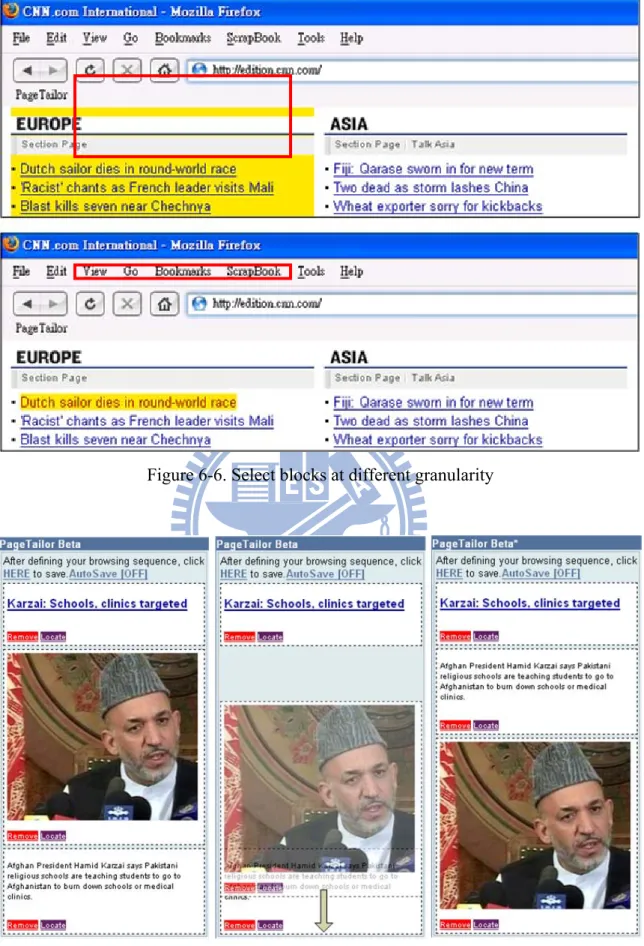
In order to help a user specify his/her preferences about a Web page, Page Tailor provides some visual manipulations. Figure 6-6 demonstrates the feature that a user can select a block in a Web page at different granularity. For example, in the top half of this picture, a block containing more information than that in the bottom is selected. A selected block is highlighted in yellow.
Figure 6-7 illustrates another feature – drag and drop. In this picture, three views are shown from left to right. In the beginning, three blocks has already been selected (left). Next, we switch the last two blocks (middle), and then the final result comes out (right). The sequence of blocks in the Page Tailor window would be the same as that in the browsers on mobile devices.
42
Figure 6-6. Select blocks at different granularity