Improving the
Accuracy of
Automated
GUI Testing
for Embedded
Systems
Ying-Dar Lin, National Chiao Tung University
Edward T.-H. Chu, National Yunlin University of Science and Technology
Shang-Che Yu, National Chiao Tung University
Yuan-Cheng Lai, National Taiwan University of Science and Technology
//
The Smart Phone Automated GUI (SPAG) batches
and reproduces event sequences on the device under
test to ensure that they are performed on time.
//
AutomAted GuI testInG for
smartphones faces two major chal-lenges: nondeterministic events and execution interference. Owing to
uncertainty in the runtime execu-tion environment, such as timing delay variations in communication, the device under test (DUT) might
not reproduce interpreted events on time. As a result, actual intervals between events can differ from the predefined intervals given in the test script. Nondeterministic event se-quences can easily lead to incorrect GUI operations. For example, the Android fling action occurs when a user scrolls a touch panel and then quickly lifts his or her finger. The de-vice uses a sequence of motion events to represent the operation. When an automated GUI tool replays these event sequences, each motion event should be triggered on time to repro-duce the fling with the same scrolling speed. If not, the scrolling speed of the reproduced fling action will lead to an incorrect result. To address the issue of nondeterministic events, a commonly used method is to use a trackball instead of the fling action. However, not all smartphones are equipped with trackballs.
An uncertain runtime execution environment can interfere with or delay an application’s execution, es-pecially when the DUT is under a heavy load. A delayed application can fail to process an event cor-rectly if the response to the previous event hasn’t been completed. For ex-ample, an event might be dropped if the application under test (AUT) receives the event ahead of time and isn’t ready to process it. To solve this problem, an intuitive method is to delay the execution of the opera-tions. However, this requires experi-enced engineers to set the delay for each operation properly so that the application can receive the repro-duced events.
We aimed to design an automated GUI testing system to maximize ac-curacy within the uncertainty of runtime execution environments. The accuracy of an automated
FOCUS:
New PersPectives oN software quality
GUI-testing tool is defined as the suc-cess rate of examining a bug-free ap-plication. The higher the success rate, the higher the accuracy. Thus, we de-signed the Smart Phone Automated GUI (SPAG) testing tool, based on Sikuli, a popular open source auto-mated GUI tool.2,3 Using the Sikuli integrated development environment, we can write GUI test cases, execute the script, automate GUI operations on a desktop, and verify GUI ele-ments presented on a screenshot. To avoid nondeterministic events, we batched the event sequence and re-produced the events on the DUT.
In addition, SPAG can monitor the target application’s CPU usage during runtime and dynamically change the timing of following op-erations so that all event sequences and verifications can be performed on time, even when the DUT is heav-ily loaded. We conducted several ex-periments on an Acer Liquid smart-phone to investigate the applicability and performance of SPAG and com-pared our method with Monkey-Runner (http://developer.android. com /tools / help/monkeyrunner_ concepts.html). For related work on GUI testing, please see the sidebar.
overview
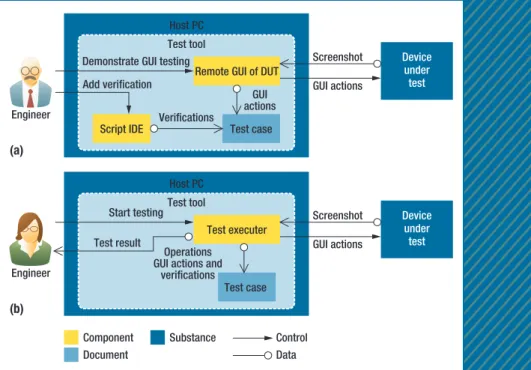
We adopted a commonly used softwa testing technique called re-cord/replay for embedded systems. Figure 1a shows the recording stage, where the screen of the DUT is first redirected to the host PC, which runs the test tool. An engineer inter-acts with the DUT remotely: when-ever the engineer performs a GUI operation on the host PC, such as a key press or a finger touch, the test tool sends events associated with the GUI operation to the DUT and records them in a test case. The test case also includes verification
RelAted WoRk In GuI testInG
Researchers have dedicated much work to automated GUI testing. The most common approach is model-based testing (MBT), which models target applications’ behaviors and uses the test cases the models generate to validate the device un-der test. Tommi Takala and his colleagues adopted Monkey-Runner and Windows services to generate GUI events,1 and
Zhifang Lin and his colleagues utilized the concept of virtual devices to test applications.2 These methods rely on
image-based pattern matching, which is sensitive to images’ quality. The Smart Phone Automated GUI (SPAG) testing tool uses GUI components for pattern matching to improve the stability and the speed of validation.
Several techniques and architectures were developed to cope with complex application tests. MoGuT, a variant of the finite-state machine (FSM)-based test framework, uses image flow to describe event changes and screen response.3
How-ever, it lacks flexibility. Gray-box testing adopted APIs to con-struct calling contexts and parameters from input files.4 Based
on a logging mechanism, gray-box testing verifies testing results. However, for complex software, it becomes difficult to describe the testing logic and calling context. Recently, Cuix-iong Hu and his colleagues developed an approach to automate the testing process of Android applications using JUnit and the MonkeyRunner tools.5 Wei Yang and his colleagues proposed
a method to automatically extract a model of an application.6
However, both of the methods used a fixed delay between
consecutive GUI operations, whereas SPAG determines the delay dynamically by using the Smart Wait function. Domenico Amalfitano and his colleagues designed a method to automati-cally generate a model of application by using dynamic crawl-ing.7 However, their method required the source codes of the
applications under test. SPAG doesn’t require the source code.
References
1. T. Takala, M. Katara, and J. Harty, “Experiences of System-Level Model-Based GUI Testing of an Android Application,” Proc. Int’l Conf.
Software Testing, Verification and Validation (ICST 11), IEEE CS, 2011,
pp. 377–386.
2. L. Zhifang, L. Bin, and G. Xiaopeng, “Test Automation on Mobile Device,” Proc. 5th Workshop Automation of Software Test (AST 10), ACM, 2010, pp. 1–7.
3. O.-H. Kwon and S.-M. Hwang, “Mobile GUI Testing Tool Based on Image Flow,” Proc. 7th IEEE/ACIS Int’l Conf. Computer and Information
Science (ICIS 08), IEEE CS, 2008, pp. 508–512.
4. V.R. Vemuri, “Testing Predictive Software in Mobile Devices,” Proc.
Int’l Conf. Software Testing, Verification and Validation (ICST 08), IEEE
CS, 2008, pp. 440–447.
5. C. Hu and I. Neamtiu, “Automating GUI Testing for Android Applica-tions,” Proc. 6th Int’l Workshop on Automation of Software Test (AST 11), ACM, 2011, pp. 77–83.
6. W. Yang, M.R. Prasad, and T. Xie, “A Grey-Box Approach for Auto-mated GUI-Model Generation of Mobile Applications,” Proc. 16th Int’l
Conf. Fundamental Approaches to Software Engineering (FASE 13),
Springer, 2013, pp. 250–265.
7. D. Amalfitano et. al., “Using GUI Ripping for Automated Testing of Android Applications,” Proc. 27th IEEE/ACM Int’l Conf. Automated
according to the DUT’s response.
C denotes a test case that
in-cludes n operations {O1, O2, …,
On}. An operation can be a GUI op-eration or a verification opop-eration: a GUI operation can be a key press or a finger touch, and a verification operation is used to verify the test result. The interval between Oi–1 and Oi is given by Ti. A GUI opera-tion consists of a sequence of events {ei,1, ei,2, …, ei,m}. For example, when a user performs a fling operation, the Android system generates the associated move events.
Owing to the uncertainty of run-time execution environments and variations in the communication delay between the host PC and the DUT, the DUT might not reproduce each event ei,j on time. Such nondeter-ministic event sequences can lead to an incorrect GUI operation and inval-idate verification operations. Further-more, the runtime execution environ-ment of the DUT might also affect the interval Ti between Oi–1 and Oi. The GUI application might drop the new arrival events of Oi because the previous events of Oi–1 haven’t been processed yet. Such dropped events will also lead to test failures.
sPAG design
We designed SPAG to accurately re-produce GUI operations and verify test results. In the record stage, SPAG monitors GUI operations and stores these GUI operations and associ-ated CPU times of the DUT in a test script. An engineer also adds verifi-cation operations to the test script to
verify the results. In the replay stage, GUI and verification operations are batched and sent to the DUT so that the events can be triggered on time. Based on the CPU utilization of the DUT, SPAG dynamically modifies the duration of two operations. The testing results are sent back to the host PC for verification.
Event Batch
In the replay stage, the applica-tion running on the DUT continues monitoring GUI events and takes corresponding operations. For ex-ample, a gesture, such as a swipe op-eration, includes several multitouch events. After receiving the multi-touch events, the application scrolls the screen up. However, some GUI operations are sensitive to the timing of associated events. For example, the onFling GUI operation consists of many move events. The speed of
onFling is sensitive to both displace-ment and time difference between two continuous move events. If the actual interval between two move events is longer than the interval de-scribed in the test script, the speed of the reproduced onFling GUI will be slower than expected, and the incorrect GUI operation could lead to test failure. Therefore, in the re-play stage, it’s crucial to trigger each event at the DUT on time to avoid possible test failures.
In our implementation, SPAG stored the associated events of each GUI operation and event intervals in the test script. In addition, a tag, such as ACTION_DOWN, ACTION_MOVE, or ACTION_UP, was attached at the end of each GUI operation to differenti-ate continuous GUI operations. In the replay stage, SPAG first batched all events and sent them to the DUT. Next, a module at the DUT rather
(a) Engineer (b) Host PC Test tool Test executer Test case Component Control Data Document Substance Start testing Test result Screenshot GUI actions Operations
GUI actions and verifications
Device under test
Figure 1. The system architecture of the record/replay method and the device under test: (a) the recording stage and (b) the replay stage.
FOCUS:
New PersPectives oN software quality
than a module at the host PC trig-gered the events to remove the ef-fect of commutation uncertainty be-tween the DUT and host PC.
Smart Wait
In the replay stage, the recorded GUI operations are sent to the associated application accordingly. However, the execution time of the applica-tion can be longer than expected if the execution environment is heavily loaded, and the prolonged applica-tion might have failed to process a GUI operation correctly if the op-eration came earlier than expected. For example, if the DUT received the push-bottom operation ahead of time and the AUT wasn’t ready to process the GUI operation, it would be dropped and lead to test failure. A practical method to avoid execu-tion interference was to ask experi-enced engineers to set the duration of each pair of GUI operations so that the application could process GUI operations on time while main-taining a reasonable testing time.
But the cost of manually adjusting durations is high.
To improve the efficiency of the test process, SPAG can automati-cally adjust delay time between two GUI operations based on CPU time used to perform GUI operations. The function is called Smart Wait. In this function, p denotes the pro-cess that performs the GUI opera-tions. In the record stage, when op-eration Oi–1 occurs, SPAG monitors
the CPU time cpui of process p at du-ration Ti between Oi–1 and Oi. This is achieved by parsing data from the Linux OS virtual directory /proc. From /proc/<PID>/stat, we obtain the time the process spends in both the user space and kernel space. In ad-dition, we obtain from /proc/stat the time the CPU spends in both the user and kernel space. Based on this in-formation, SPAG calculates the CPU usage cpui of the process p at dura-tion Ti. Both cpui and Ti are stored in the test script as CMD(Ti, cpui). Note that p' denotes the process that performs the GUI operations in the replay stage. When Oi–1 is executed, SPAG monitors the CPU time cpui' of p'. If cpui' is smaller than cpui, SPAG assumes that Oi–1 is incom-plete and calculates a proportional delay time for remaining GUI opera-tions. For example, in the recording stage, if Oi–1 uses 5 milliseconds of CPU time out of 4 seconds for ex-ecution, then cpui is 5 milliseconds and Ti is 4 seconds. SPAG inserts a command CMD(4000 ms, 5 ms) in
the test script right after Oi–1. In the replay stage, when Oi–1 is replayed, SPAG first waits 4 seconds and reads the associated cpui' from the DUT. If cpui' is 2 ms, SPAG assumes that
Oi–1 is unfinished and estimates its completion time as 4 s × 5 ms/2 ms = 10 s. In this case, the next operation
Oi is postponed by 6 seconds.
Implementation
SPAG integrates two popular open
source tools: Android screencast and Sikuli. Android screencast is a desk-top application that redirects the screen of the DUT to the host PC and allows an engineer to interact remotely with the DUT by using a mouse or keyboard. Sikuli is a desk-top application that automatically tests GUIs via screenshot images. In the recording stage on the host PC, SPAG records all GUI operations per-formed inside the redirected screen of the DUT. An engineer uses Sikuli’s IDE to insert a verification operation at the end of one or several contin-ued GUI operations by selecting a region of the redirected screen. The class name and activity name of the redirected screen are also logged at that time. In the replay stage, SPAG reproduces GUI operations by send-ing associated events to the DUT.
We adopted both Smart Wait and Event Batch to reduce the un-certainty of the runtime execution environment. Event Batch aims to remove the communication uncer-tainty between the DUT and PC, whereas Smart Wait aims to remove the uncertainty of the DUT runtime execution environment. They can be applied together or separately depending on the communication uncertainty and runtime execution environment. When performing a verification operation, SPAG first checks the class name and activity name of the redirected screen. If the check fails, SPAG instantly makes an image comparison between the re-directed screen and the predefined image. Note that the methodologies of Smart Wait and Event Batch are portable. To take advantage of these two techniques to perform GUI test-ing on other platforms, you would need to use an equivalent of Android screencast to remotely control the DUT and integrate that tool with
The execution time of the application can
be longer than expected if the execution
environment is heavily loaded.
Experiment Setup
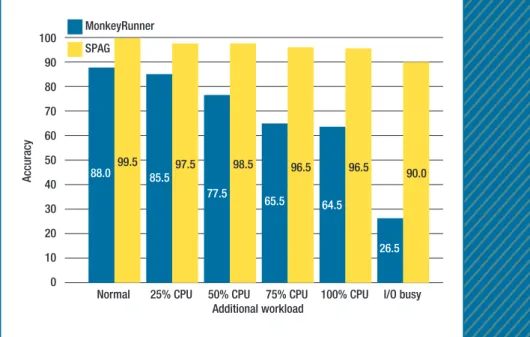
To investigate the accuracy of SPAG, we adopted the Acer Liquid smart phone for evaluation. We compared SPAG with MonkeyRunner, an au-tomated testing tool included in the Android software developer’s kit. MonkeyRunner reproduces predefined operations, such as key presses, by generating associated events and sending the events from the host PC to the DUT.1 Our test script included five commonly used scenarios: browsing a contact entry, installing an application over Wi-Fi, taking a picture, making a video, and browsing Google Maps over Wi-Fi. Figures 2 and 3 show how we used a busy-loop program to adjust the CPU utilization from 25 to 100 percent and adopted an intensive flash read/write program to simulate input/output burst condition. For each configuration, CPU utilization is 25, 50, 75, or 100 percent. We repeated the same experiment 40 times and took the average value of accuracy for comparison.
Test Accuracy
We checked the accuracy of Mon-keyRunner manually because it didn’t support a sufficient image comparison function to verify test-ing results. MonkeyRunner’s ac-curacy dropped significantly when the CPU utilization increased or the I/O subsystem was busy. Specifically, MonkeyRunner’s accuracy dropped to 64.5 percent when CPU utiliza-tion was 100 percent and to 26.5
Normal 25% CPU 50% CPU 75% CPU 100% CPU I/O busy
60 50 40 30 20 10 0 Additional workload Accuracy 99.5 97.5 98.5 96.5 96.5 90.0 88.0 85.5 77.5 65.5 64.5 26.5
Figure 2. Testing with the Smart Phone Automated GUI (SPAG) and MonkeyRunner. The accuracy of MonkeyRunner dropped significantly when the CPU utilization
increased or the I/O subsystem was busy. The accuracy of SPAG was over 90 percent in all configurations we tested.
Normal 25% CPU 50% CPU 75% CPU 100% CPU I/O busy
100 90 80 70 60 50 40 30 20 10 0 Additional workload Accuracy (%)
SPAG (Smart Wait) SPAG (Batch Event) MonkeyRunner SPAG
Figure 3. Testing with Event Batch and Smart Wait. They can be applied together or separately depending on the communication uncertainty and runtime execution environment. The Smart Wait function contributed more than the Event Batch function in improving accuracy if the system is busy.
FOCUS:
New PersPectives oN software quality
percent when an I/O burst occurred. This was because the tested appli-cation was deferred for execution when the system was heavily loaded. MonkeyRunner doesn’t dynamically modify the duration of two continu-ous operations. As a result, the new communing events were dropped or ignored, which made Monkey-Runner tests fail. On the contrary, with the Smart Wait function, the accuracy of SPAG decreased only slightly when CPU utilization in-creased or I/O bursts occurred; its accuracy was over 90 percent in all the configurations we tested. Under normal conditions in which CPU uti-lization was less than 25 percent, the accuracy stayed at 99.5 percent.
With the same experimental setup, we also adopted three popu-lar mobile apps—Skype, Twitter, and Facebook—to evaluate the ac-curacy of SPAG and MonkeyRunner. The major gesture activity of Skype was tapping, whereas that of Twit-ter and Facebook was flinging. Table 1 shows that the SPAG maintained a very high level of accuracy in all configurations, whereas Monkey-Runner performed poorly when the system was busy, especially for Twit-ter and Facebook. This is because
tab
l
e 1
Accuracy of SPAG and MonkeyRunner by percentage.
Workload
Skype Twitter Facebook
SPAG MonkeyRunner SPAG MonkeyRunner SPAG MonkeyRunner
Normal 97.5 92.5 99.5 92.5 97.5 72.5 25% CPU 97.5 99.5 99.5 92.5 97.5 65.0 50% CPU 99.5 99.5 99.5 72.5 97.5 60.0 75% CPU 99.5 99.5 99.5 40.0 92.5 60.0 100% CPU 99.5 99.5 99.5 37.5 92.5 40.0 I/O busy 99.5 72.5 95.0 20.0 92.5 40.0
YInG-dAR lIn is a professor in the Department of Computer Science at National Chiao Tung University (NCTU). His research interests include embedded systems, network protocols, and algorithms. Yin received a PhD in computer science from the University of California, Los Angeles. He’s an IEEE Fellow and di-rects the Embedded Benchmarking Lab and Networking Bench-marking Lab at NCTU. Contact him at [email protected].
edWARd t.-H. CHu is an assistant professor in the Depart-ment of Computer Science and Information Engineering at Na-tional Yunlin University of Science and Technology. His research interests include embedded system software. Chu received a PhD in computer science from National Tsing Hua University. Contact him at [email protected].
sHAnG-CHe Yu is a software engineer with Hope Bay Technologies, Taiwan. He received an MS in computer science from National Chiao Tung University. Contact him at comet.jc@ gmail.com.
YuAn-CHenG lAI is a professor in the Department of Infor-mation Management at National Taiwan University of Science and Technology. His research interests include performance analysis and wireless networks. Lai received a PhD in computer science from National Chiao Tung University. Contact him at [email protected].
a
b
o
u
t t
h
e
a
u
t
hor
s
Figure 3 shows how in the case of a 100 percent CPU workload, the ac-curacy of SPAG was 77.5 percent with the Event Batch function and 92 percent with the Smart Wait func-tion. Smart Wait contributed more than Event Batch in improving accu-racy when the system was busy. This is because Smart Wait can be applied to all GUI operations, whereas Event Batch can only improve the accuracy of moving GUI operations, such as scrolling and flicking.
usage at runtime and dynamically changes the timing of the next opera-tion so that all event sequences and verifications can be performed on time, even though the DUT is heav-ily loaded. Our experiments showed that SPAG can maintain a high ac-curacy of up to 99.5 percent. Accord-ing to our current design, as long as a smartphone is supported by Android screencast, we can test it with SPAG without needing to modify anything. In the future, we plan to design a
References
1. T. Yeh, T.-H. Chang, and R.C. Miller, “Si-kuli: Using GUI Screenshots for Search and Automation,” Proc. 22nd Ann. ACM Symp. User Interface Software and Technology (UIST 09), ACM, 2009, pp. 183–192. 2. T.-H. Chang, T. Yeh, and R.C. Miller,
“GUI Testing Using Computer Vision,” Proc. 28th Int’l Conf. Human Factors in Computing Systems (CHI 10), ACM, 2010, pp. 1535–1544.
IEEE SoftwarE CALL FOR PAPERS
Special Issue on Virtual Teams
Submission deadline: 1 April 2014 • Publication: November/December 2014Projects with team members located around the globe have become increasingly common in software, R&D, and business processes across all industry sectors. Improving the effectiveness and efficiency of virtual teams is therefore an increasingly business-critical issue.
Although much research has focused on globally distributed teams, little is known about systematic, efficient, and empirically proven methods to establish a performing virtual team with regard to its management and tool support, as well as impacts on a team’s performance that can arise from human factors and cultural differences.
This special issue aims at collecting empirically validated solutions that help to increase the efficiency and effectiveness of virtual teams or that increase the quality of their outcomes. We invite contributions relating but not limited to
• solutions for establishing and managing virtual teams, • measurement of virtual teams’ efficiency,
• social and human aspects in the context of distributed projects,
• processes and methods for distributed projects, • tools to support distributed projects and virtual teams
with empirical demonstration or validation of their impacts,
• evaluation of the feasibility (for example, by experimentation) of teaming approaches in global software development,
• hands-on examples that demonstrate the applicability of different solutions in practice, and
• industry experience, case studies, and field studies. Each article should clearly outline the problem to be addressed, the solution or the findings, (at least) a proof of concept, and the options for transferring the solution/ findings into practice.
Questions?
For more information about the focus, contact the guest editors:
• Marco Kuhrmann, [email protected] • Patrick Keil, [email protected] • Darja Smite, [email protected]
Full author guidelines:
www.computer.org/software/author.htm
Submission details:
Submit an article:
https://mc.manuscriptcentral.com/sw-cs
Selected CS articles and columns are also available for free at http://ComputingNow.computer.org.