行政院國家科學委員會專題研究計畫 期末報告
結合多點觸控與 3D 手勢之手機創新介面研究
計 畫 類 別 : 個別型
計 畫 編 號 : NSC 101-2221-E-004-013-
執 行 期 間 : 101 年 08 月 01 日至 102 年 07 月 31 日
執 行 單 位 : 國立政治大學資訊科學系
計 畫 主 持 人 : 余能豪
計畫參與人員: 碩士班研究生-兼任助理人員:林廷達
碩士班研究生-兼任助理人員:林逸清
碩士班研究生-兼任助理人員:黃奕誠
碩士班研究生-兼任助理人員:杜映磊
碩士班研究生-兼任助理人員:邱鈴媛
碩士班研究生-兼任助理人員:陳彥妤
碩士班研究生-兼任助理人員:徐嘉駿
碩士班研究生-兼任助理人員:蔡宜璇
碩士班研究生-兼任助理人員:林建邦
報 告 附 件 : 出席國際會議研究心得報告及發表論文
公 開 資 訊 : 本計畫涉及專利或其他智慧財產權,1 年後可公開查詢
中 華 民 國 102 年 10 月 31 日
中 文 摘 要 : 現今智慧型手機多採用直覺操控的多指觸控操作方式
(Multi-touch)為使用者介面,並採用電容式感測技術偵測手
指在 2D 平面上的動作做為輸入指令,因此介面設計人員不斷
探詢各種自然對應的手勢語彙 (natural gesture
vocabulary),以期增加使用者操作的便利性,然而以 2D 平
面為主的手勢卻也限制了許多自然手勢操作的可能性,例如
抓取物件在空間中移動等。隨著科技快速發展,智慧型手機
的處理速度將有能力運行手機前、後置鏡頭之 3D 手勢辨識,
目前國內外已有多項針對手指影像追蹤及手勢動作辨識之研
究,但大多為簡單的空中揮動手勢(in-air gesture),對於
手持裝置上與多指觸控螢幕結合之 3D 手勢語彙研究卻付之闕
如。
本計劃研究智慧型手機及平板之使用者運用手勢的方式,探
討在手持置裝置上 2D 結合 3D 手勢語彙之可能應用,包含
一、將 GUI 常見之 Contextual-menu 延伸,設計用以輔助平
面觸控操作之 3D 手勢動態選單 (Lift-menu),並提出視覺介
面之設計準則。二、以抓取物件移動之隱喻(Grasp-and-
drop metaphor)設計新的拖拉放(drag-and-drop)操作模式,
並結合 2D+3D 手勢設計雙手同步操作模式。本計劃研究成果
將可運用在智慧型手機或平板上,提供使用者更自然且便捷
的行動平台使用者介面(Mobile User Interface)。
中文關鍵詞: 人機互動、自然使用者介面、多指觸控、行動平台、影像辨
識、手勢辨識、手勢語彙、雙手互動模式
英 文 摘 要 : Multi-touch technology has been adopted widely in
mobile devices providing simple and intuitive user
interface with capacitive touch sensing technology to
sense finger motions for input commands. For
increasing the conveniences of users, interface
designers need to continuously look for more natural
gesture vocabulary. However, there are some
limitations in 2-D gestures instead of 3-D gesture,
like grab an object and move it in air. With the
technologies developed, mobile phone is capable
calculating 3-D gesture recognition using equipped
front and back cameras and there are researches
focusing on finger tracking and simple gesture
recognition. But most of the researches focus on
simple in-air gestures. None of them combine 2D and
3D motion in gesture design. In this project, we
explored possible applications which combine 2-D, and
3-D gesture vocabulary when we study the gesture
using method by mobile devices` users. The results
we obtained in the project includes: (1) Lift Menu:
Above-Screen Interaction for Rapidly Navigating
Conventional Menu Items on Small-Screen Touch
Devices. (2) Combining 3D Gestures 'Grasp-and-Drop
metaphor' with Touch Interface on Mobile Devices.
With the combination of 2-D and 3-D gesture, the
result obtained in this project can be widely used in
natural user interface design to provide a more
simple and convenient mobile user interface.
英文關鍵詞: HCI, NUI, multi-touch, mobile, computer vision,
13 1
Multi-touch technology has been adopted widely in mobile devices providing simple and intuitive user
interface with capacitive touch sensing technology to sense finger motions for input commands. For
increasing the conveniences of users, interface designers need to continuously look for more natural gesture
vocabulary. However, there are some limitations in 2-D gestures instead of 3-D gesture, like grab an object
and move it in air. With the technologies developed, mobile phone is capable calculating 3-D gesture
recognition using equipped front and back cameras and there are researches focusing on finger tracking and
simple gesture recognition. But most of the researches focus on simple in-air gestures. None of them combine
2D and 3D motion in gesture design. In this project, we explored possible applications which combine 2-D,
and 3-D gesture vocabulary when we study the gesture using method by mobile devices' users. The results
we obtained in the project includes: (1) Lift Menu: Above-Screen Interaction for Rapidly Navigating
Conventional Menu Items on Small-Screen Touch Devices. (2) Combining 3D Gestures "Grasp-and-Drop
metaphor" with Touch Interface on Mobile Devices. With the combination of 2-D and 3-D gesture, the result
obtained in this project can be widely used in natural user interface design to provide a more simple and
convenient mobile user interface.
Keywords: HCI, NUI, multi-touch, mobile, computer vision, gesture recognition, gesture vocabulary,
bimanual.
13 2
13 3
13 4
13 5
13 6
13 7
13 8
13 9
13 11 Butler, A., Izadi, S., and Hodges, S., “SideSight: Multi-“touch” interaction around small devices,” In Proc. UIST 2008, ACM
Press (2008), 201-204.
C. Harrison, J. Schwarz, and S. E. Hudson, "TapSense: enhancing finger interaction on touch surfaces," presented at the Proceedings of the 24th annual ACM symposium on User interface software and technology, Santa Barbara, California, USA, 2011.
C. Harrison, H. Benko, and A. D. Wilson, "OmniTouch: wearable multitouch interaction everywhere," presented at the Proceedings of the 24th annual ACM symposium on User interface software and technology, Santa Barbara, California, USA, 2011.
D. Wigdor, C. Forlines, P. Baudisch, J. Barnwell, and C. Shen, "Lucid touch: a see-through mobile device," presented at the Proceedings of the 20th annual ACM symposium on User interface software and technology, Newport, Rhode Island, USA, 2007.
D. Vogel and R. Balakrishnan, "Distant freehand pointing and clicking on very large, high resolution displays," presented at the Proceedings of the 18th annual ACM symposium on User interface software and technology, Seattle, WA, USA, 2005.
13 12 eyeSight’s Advanced Gesture Recognition and Machine Vision Software Based Technology. Available:
http://www.eyesight-tech.com/
Jones, B., Sodhi, R., Forsyth, D., Bailey, B., and Maciocci, G., “Around device interaction for multiscale navigation,” In Proc. MobileHCI 2012, ACM Press (2012), 83-92.
J. Z. Zheng, S. De La Rosa, and A. M. Dollar, "An investigation of grasp type and frequency in daily household and machine shop tasks," in Robotics and Automation (ICRA), 2011, pp. 4169-4175.
Kratz, S. and Rohs, M. “Hoverflow: exploring around-device interaction with IR distance sensors,” In Proc. MobileHCI 2009, ACM Press (2009), 1-4.
Kratz, S., Rohs, M., Guse, D., Müller, J., Bailly, G., and Nischt, M., “PalmSpace: Continuous around-device gestures vs. multitouch for 3D rotation tasks on mobile devices,” In Proc. AVI 2012, ACM Press (2012), 181-188.
Kurtenbach, G., Sellen, A. and Buxton, W., “An empirical evaluation of some articulator and cognitive aspects of marking menus,” Journal of Human Computer Interaction (1993), vol. 8, 1-23
Li, F.C.Y., Dearman, D., and Truong, K.N., “Virtual Shelves: Interactions with orientation aware devices,” In Proc. UIST 2009, ACM Press (2009), 125-128.
Lin, S.-Y., Su, C.-H., Cheng, K.-Y., Liang, R.-H., Kuo, T.-H., and Chen, B.-Y., “PUB - point upon body: Exploring eyes-free interaction and methods on an arm,” In Proc. UIST 2011, ACM Press (2011), 481–487.
M. Hassenzahl, "The interplay of beauty, goodness, and usability in interactive products," Hum.-Comput. Interact., vol. 19, pp. 319-349, 2008.
Mine, M., Brooks, F. and Sequin, C., “Moving objects in space: Exploiting proprioception in virtual-environment interaction,” In Proc. SIGGRAPH 1997, ACM Press (1997), 19-26.
M. Jenabi and H. Reiterer, "Finteraction Finger Interaction with Mobile Phone," 2008.
M. Nancel, J. Wagner, E. Pietriga, O. Chapuis, and W. Mackay, "Mid-air pan-and-zoom on wall-sized displays," presented at the Proceedings of the 2011 annual conference on Human factors in computing systems, Vancouver, BC, Canada, 2011. M. Ortega and L. Nigay, "AirMouse: Finger Gesture for 2D and 3D Interaction," presented at the INTERACT (2), 2009. N. Marquardt, R. Jota, S. Greenberg, and J. A. Jorge, "The continuous interaction space: interaction techniques unifying
touch and gesture on and above a digital surface," presented at the Proceedings of the 13th IFIP TC 13 international conference on Human-computer interaction - Volume Part III, Lisbon, Portugal, 2011.
O. Hilliges, S. Izadi, A. D. Wilson, S. Hodges, A. Garcia-Mendoza, and A. Butz, "Interactions in the air: adding further depth to interactive tabletops," presented at the Proceedings of the 22nd annual ACM symposium on User interface software and technology, Victoria, BC, Canada, 2009.
13 13 R. L. Graham and F. Yao, "Finding the convexhull of a simple polygon " Journal of Algorithms, vol. 4, pp. 324-331, 1982. R. Y. Wang, J. Popovi, and #263, "Real-time hand-tracking with a color glove," presented at the ACM SIGGRAPH 2009
papers, New Orleans, Louisiana, 2009.
R. Wang, S. Paris, J. Popovi, and #263, "6D hands: markerless hand-tracking for computer aided design," presented at the Proceedings of the 24th annual ACM symposium on User interface software and technology, Santa Barbara, California, USA, 2011.
Song, H., Grossman, T., Fitzmaurice, G., Guimbretiere, F., Khan, A., Attar, R. and Kurtenbach, G., “PenLight: combining a mobile projector and a digital pen for dynamic visual overlay,” In Proc. CHI 2009, ACM Press (2009), 143-152.
Spindler, M., Martsch, M., and Dachselt, R., “Going beyond the surface: Studying multi-layer interaction above the tabletop,” In Proc. CHI 2012. ACM Press (2012), 1277-1286.
XTR3D. Available: http://xtr3d.com/
Y. Hirobe, T. Niikura, Y. Watanabe, T. Komuro, and M. Ishikawa, "Vision-based Input Interface for Mobile Devices with High-speed Fingertip Tracking," presented at the Proceedings of the 22nd annual ACM symposium on User interface software and technology, 2009.
- 1 -
Rapid Selection of Hard-to-Access Targets by Thumb
on Mobile Touch-Screens
Neng-Hao Yu
1Da-Yuan Huang
2Jia-Jyun Hsu
1Yi-Ping Hung
21
Department of Computer Science,
Master Program of Digital Contents Technologies
National Chengchi University, Taipei, Taiwan
2
Department of Computer Science and Information
Engineering
National Taiwan University, Taipei, Taiwan
[email protected]
ABSTRACT
Current touch-based UIs commonly employ regions near the corners and/or edges of the display to accommodate essential functions. As the screen size of mobile phones is ever increasing, such regions become relatively distant from the thumb and hard to reach for single-handed use. In this paper, we present two techniques: CornerSpace and BezelSpace, designed to accommodate quick access to screen targets outside the thumb’s normal interactive range. Our techniques automatically determine the thumb’s physical comfort zone and only require minimal thumb movement to reach distant targets on the edge of the screen. A controlled experiment shows that BezelSpace is significantly faster and more accurate. Moreover, both techniques are application-independent, and instantly accommodate either hand, left or right.
Author Keywords
Mobile devices; one-handed interaction; thumb-based interaction; touch-screens; interaction techniques.
ACM Classification Keywords
H.5.2. User Interfaces: Input devices and strategies, Interaction styles, Screen design.
General Terms
Human Factors; Design; Measurement.
INTRODUCTION
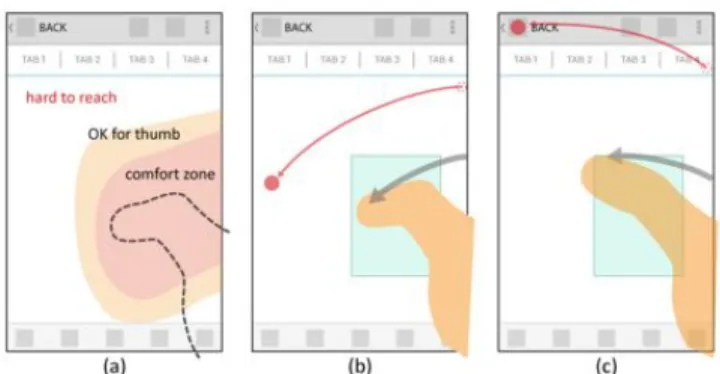
Mobile phones are commonly utilized with a single hand only. Karlson et al.[3] shows that users prefer to use smart phones with only one hand in the majority of the time. As more mobile devices with larger screens enter the market and are employed by users, users may encounter difficulties in reaching distant target when using only their thumbs during single-handed use. We address this issue as the “thumb’s reach problem”. According to current mobile UI patterns, regions of screens' corners and edges are usually used to accommodate essential functions (Figure 1a). For
example, Apple’s human interface guidelines suggest that “Back” and “Action” buttons should be placed at the top-left and top-right corners; while the “Tab” bar should be placed at the bottom of the screen. Such configurations make solving the thumb reach problem more urgent. Alternative target acquisition techniques on mobile devices have been proposed. ThumbSpace[4] requires one-time setup for a proxy view that uses a sub-region of the display to map all available screen targets. MagStick[6] provides a telescopic stick to control a “magnetized” cursor to indicate an on-screen target by dragging one's finger in the direction opposite from the target vis-a-vis the initial point of display screen surface contact. These techniques only have been tested on smaller devices (from 2.8” ~ 3.5” screen). Would they perform well on larger devices and for modern UIs? These questions are examined in the following pilot study.
Figure 1: (a) essential functions are usually located in the thumb’s hard-to-reach area, (b)(c) the design of BezelSpace:
Bezel-Swipe casting a cursor (like an extended fingertip) on the screen while the proxy region adaptively moves under the
thumb's location. Lift up the thumb to select the target. Pilot study
We replicate aforementioned techniques on current mobile devices with a larger screen size -- Google Galaxy Nexus (13.55 x 6.79 x 0.89 cm, 4.65" display) and Samsung Galaxy Note (14.685 x 8.295 x 0.965 cm, 5.3" display). 12 participants were recruited to try freely each technique on a simulated web app. First, we discovered that participants overwhelmingly prefer direct-touch interactions for accessing on-screen targets. Participants only consider enabling the tested techniques when the targets are really hard to reach (e.g., screen corners and edges opposite of the
Permission to make digital or hard copies of all or part of this work for personal or classroom use is granted without fee provided that copies are not made or distributed for profit or commercial advantage and that copies bear this notice and the full citation on the first page. Copyrights for components of this work owned by others than ACM must be honored. Abstracting with credit is permitted. To copy otherwise, or republish, to post on servers or to redistribute to lists, requires prior specific permission and/or a fee. Request permissions from [email protected].
MobileHCI 2013, Aug 27–30, 2013, Munich, Germany.
- 2 - thumb when gripping single-handedly a device). Second, accessing more distant on-screen targets requires that participants alter how they grip their devices. Participants may not be aware that their grip has slightly changed and reported that the proxy view of ThumbSpace was not perfect match the thumb’s normal interactive range. Third, the participants with small hands felt more fatigue when using MagStick. Since MagStick uses an initial contact point as a fulcrum from which the user extends a telescopic pointer from that fulcrum to the distant target by dragging one's finger in the direction opposite from the target vis-a-vis the fulcrum, the further away the target is the farther thumb must move. Some participants even reported they were not able to reach far targets at the corners of the screen. Beyond the main question of inquiry, our study results indicate that participants like using the “magnetized” cursor (semantic pointing [2]) in MagStick more than the highlighted items (object pointing) in ThumbSpace because they can easily predict the accuracy of their thumb movements via the cursor. Finally, participants felt ThumbSpace is more intuitive because it was like an absolute trackpad. These factors motivated us to design alternative techniques to solve the thumb reach problem.
DESIGN
From our findings in this pilot study, we offer several considerations of design as follows: (1) Users encounter the thumb’s reach problem regarding out-of-reach screen areas, especially at corners and edges, at which are located frequent-use targets, (2) Users need a quick mode switch between direct touch and assistive technique so that does not hinder task performance, (3) thumb’s interactive region should be adaptively moved to the thumb’s location in case of the grip has changed.
Adaptive comfort zone and moding technique
In order to adaptively find individual users comfortable range of motion for the thumb as the interaction region, we use the bezel-swipe gesture. Bezel-Swipe[5] takes advantage of the edge of a touch display, enabling users’ thumbs to easily access functionality by activating a thin button. As Bezel Swipe is triggered, we can predict that the comfort zone of the thumb is near the start position and the lift-up position. Li et al.[1] also conclude that bezel gestures have the advantages of being a lesser attentional load over soft buttons, eyes-free, and distinguishable from scrolling or other on-screen gestures. Thus it can be used as a seamless mode switch between direct-touch interaction and target acquisition technique.
CornerSpace
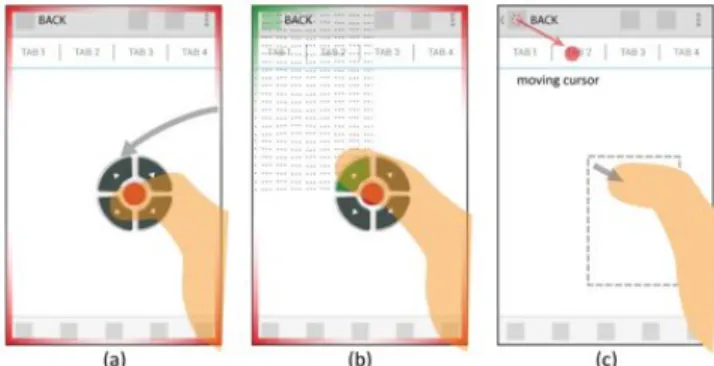
Considering Mobile UI patterns, many essential functions are near the corners and the edges of a screen. We assume that corners are the most frequently used area. We propose that CornerSpace works as follows: (1) after the bezel swipe, the UI buttons are shown at the lift-up position (Figure 2a). Each button represents its own corresponding
corner except the red button is for canceling the mode. To minimize the aiming effort, the screen is split into 4 parts (Figure 2b). Tapping the button or anywhere on those quarters will trigger the corresponding corner target. (2) As for edges and other on-screen targets, users can tap the nearest corner and drag out a “magnetized” cursor to indicate the target (Figure 2c). The CD-gain was set to a fix ratio about 2:1. (3) The target is selected when a user’s thumb lifts from the screen. We use MagStick’s "magnetized" mechanism to improve stability while dragging and lifting. Based on these design strategies, users only require minimal movement and can quickly access corner targets.
Figure 2: The design of CornerSpace, (a) CornerSpace UI appears at the thumb’s final contact location of a Bezel-Swipe (b) Quick access of the corner target (top-left): tapping on the arrow button or anywhere inside the dotted region will trigger
the corner target. (c) Accessing a target near the corner: trigger the nearest corner in previous action for a reference point and drag out a “magnetized” cursor to access the target. BezelSpace
Compared to CornerSpace’s two-step operation, BezelSpace (Figure 1bc) combines moding + targeting in single step for continuous operation: (1) cursor appears when the bezel swipe occurs without lifting the thumb. (2) A user must continue to drag ones finger across the screen to control the mapped "magnetized" cursor and aim it towards the target. (3) The target is selected when a user’s thumb lifts from the screen. By this design users can directly stretch the thumb toward the target. The mapping of BezelSpace is the same as ThumbSpace but the proxy region adaptively shifts according to any bezel swipe's initial location on the screen. In our preliminary study, we found users use different way to do bezel swipe for different location of target. As for the targets above the thumb, users tend to bend the thumb triggering the first contact point on the bezel and then push the thumb toward the upper direction. Meanwhile, for the targets below the thumb, users tend to stretch out the thumb triggering the first contact point and swipe to the lower direction. We utilize this characteristic to set the position of proxy region a bit higher than bezel swipe’s initial location.
BezelSpace works like an extended fingertip. Users use a bezel swipe to produce a pseudo-fingertip (cursor), which
- 3 - can be stretched to any distant target. The fingertip motion continues to the target, without requiring the user to lift and reposition the thumb. In addition, because the thumb is continuously in contact with the display, it can provide tactile feedback to the user, enabling them to fine tune their selections before committing to them. Moreover, the physical limitation of the thumb could be used as an advantage. According to Fitt’s law, any corner and border has infinite width. For corner and edge on-screen targets, users just stretch the thumb all the way to the corresponding direction of the target. Then the target will be selected. If users want to cancel the mode, they can drag the cursor inside the proxy region. Because the region is actually the ease-of-reach area, which is not required assistive technique.
EVALUATION
We conduct a user study to validate CornerSpace and BezelSpace in terms of interaction effectiveness, usability, and user satisfaction. To offer a performance baseline, we utilize ThumbSpace as a comparative model. However we did not utilize MagStick because it cannot be used on relatively larger screens. The original ThumbSpace uses hard buttons to activate the technique; we change this to a bezel-swipe gesture for consistency with CornerSpace and BezelSpace. Based on our design strategies, we previously hypothesized that CornerSpace and BezelSpace would outperform ThumbSpace in terms of selection time and error rate for the corner- or edge-located targets while maintaining prior levels of performance for other targets.
Task
Participants were presented with a series of individual tar- get selection trials. Based on our pilot study, users prefer to select targets with direct touch until finding that a target is out of range. The technique is then activated when users encountered the thumb reach problem, so that only the out-of-reach targets were included in the trial. In the beginning of the test, participants must perform a one-time calibration for setting a proxy view of ThumbSpace. The area outside of that proxy view is regard as the out-of-reach area. We divided the screen into a 5x9 grid and distribute the targets from the out-of-reach area onto the grid. We further defined three types of on-screen targets: (1) Corner targets, which are located at the four corners. (2) Edge targets, which are located on the edges. (3) Other targets, which are found in the remaining out-of-reach area. Each type of target was randomly assigned and evenly distributed within each block. That is 4 targets of each type and a total of 12 targets for each block. Only one target was painted red for each trial; others were painted blue as a distraction in order to improve realism of the target selection task. When the target was focused or selected, the color changed to green. The participants were instructed to select the red targets as quickly and accurately as possible. We use 7mm2 as the
target size and 2 mm as the gap since this value is reported to be the actual minimal size/gap in current mobile UI design[2].
Apparatus and participants
These techniques are implemented in Java on the Android Platform, and the experiments are performed on the Samsung Galaxy Note2 (80.5 x 151.1 x 9.4 mm, 5.5" display). Fifteen volunteers, ranging in age from 18 to 33 years of age (M=26, SD=3.9, 6 female, all right-handed and owners of touch-screen phones), were recruited on campus, and each participant received NT$100 (approx. US$3.50) for a half hour-long test. Participants’ ease-of-reach region covers 35%~55% area of the 5.5” screen.
Experimental design
We use a two-way repeated measures within-subjects design. The independent variables are Method
(ThumbSpace, CornerSpace, and BezelSpace) and Type (Corner, Edge, and Other). Presentation of Method is counter-balanced across participants. For each Method, we allow one practice and five timed blocks for the experiment. After completing one Method, participants are then asked to fill out an assessment questionnaire. After the study, they are asked to rank the three Methods.
In summary, the experimental design is: 15 participants
x 3 Methods (ThumbSpace, CornerSpace, and BezelSpace) x (1+5) Blocks ( training + measured)
x 12 trials (with 3 types of target: Corner, Edge, and Other) = 3,240 trials completed
RESULTS AND DISCUSSION
We compare selection time and error rate with a separate
repeated measures within-subjects analyses of variance
(ANOVA). For pair-wise post hoc tests, we use Bonferroni-corrected confidence intervals to compare against α=0.05. In cases where the assumption of sphericity is violated, we correct the degrees of freedom using Greenhouse-Geisser. For ease of reference, we use “TS, CS, and BS” to represent ThumbSpace, CornerSpace, and BezelSpace respectively in the following paragraphs.
Selection time
We measured task time from the moment a bezel swipe gesture occurs until a participant’s thumb is lifted up from the screen. Trials with selection errors were excluded from analysis. We perform a 3x3 (Method x Type) RM-ANOVA and find significant main effects for Method (F2,28 = 26.16,
p < .001), Type (F2,28 = 33.52 , p < .001), and a Method x
Type interaction (F2.32,32.50 = 14.90 p < .001). Post hoc
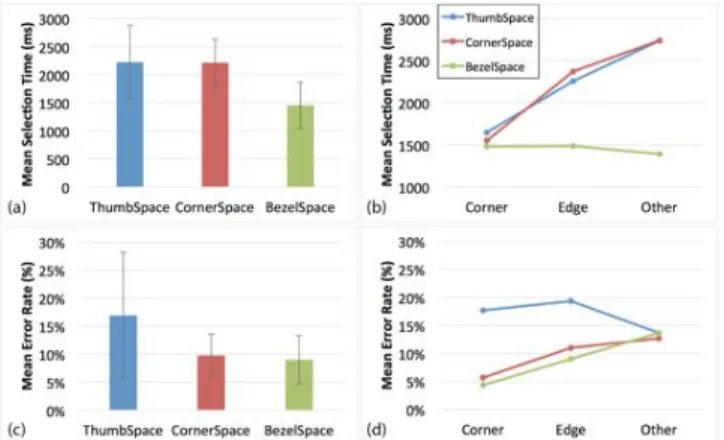
multiple means comparison tests show that BS differs significantly from CS and TS for Edge and Other targets (all p < .001). Figure 3b shows that BS requires slightly less time for Other than Corner/Edge targets while CS and TS requires less time for Corner/Edge than Other targets. This is consistent with our hypotheses: (1) BS relies on continuous operation from bezel to target, since Other is closer to thumb than Corner/Edge targets thus participants
- 4 - utilize minimal thumb movement for Other targets. (2) When using CS and TS, the participants tried to use a corner as a reference to aim towards nearby targets. To our surprise, CS did not perform best for Corner targets and did not render better results than TS. We will explain more in regard to these findings in later discussion. Overall, BS is significantly faster (M= 1456.6ms, SD = 412.7 ms) than CS (M = 2213.7 ms, SD = 415.16 ms) and TS (M = 2222.44 ms, SD = 657.69 ms). (Figure 3a)
Figure 3: (a) overall selection time, (b) selection time per target type, (c) overall error rate, (d) error rate per target type Error rate
The error rate measurement aggregates both empty and wrong target selections. We perform a 3x3 (Method x Type) RM-ANOVA and find significant main effects for Method (F1.26, 17.65 = 7.00, p = 0.012), and a Method x Type
interaction (F4,56 = 3.28, p = 0.017). Figure 3c shows mean
error rate among Method and Type. Post hoc multiple means comparison tests show that BS and CS differ significantly from TS for Corner targets. As for Edge target, BS also shows significant difference from TS (all p < 0.05). This may be explained by the difference between Object pointing and Semantic pointing. Because the participant may also involuntarily move the stretched thumb when releasing it to the corner or edge, Semantic Pointing prevents the cursor from leaving the target when the thumb is slightly, and involuntarily, moved.
Figure 4: Questionnaire result (means) Subjective preferences
After each Method, participants complete a questionnaire to assess each particular input technique. Both BS and CS scored consistently well across all categories on a 7-point
Likert scale (Figure 4). We believe the Semantic pointing with cursor feedback does contribute to learnability and simplicity. Participants also report that they felt less thumb movement when using BS through the continuous operation. As for ranking results, BS and CS rank mostly as 1st and 2nd, though we did not find significant difference via ranking.
Discussion
The results of our experimentation show that BezelSpace is the most efficient and accurate method (Figure 3). We believe that the single-step continuous operation utilized shortens the task time. We did observe that many participants tend to stretch thumb directly toward the target when they hit the corner and edge targets. Surprisingly, CornerSpace only competes with ThumbSpace in its lower error rate. In the testing of CornerSpace, we observed that several participants tend to start from the top-left corner for every target because they did not bother to judge where the nearest corner was. This produced a penalty for longer movement if he starts from the opposite corner. In addition, the participants tend to aim for the UI button of CornerSpace even when the whole area of the screen is active. We will investigate other visual designs to address this issue.
CONCLUSION AND FUTURE WORK
In this paper, we address the thumb reach problem and propose design considerations that could be used in the development of interaction. We present two techniques to assist users in gaining easy access by thumb to distant on-screen targets within the thumb’s normal interactive range while gripping a device in single hand. Our user study of target selection reveals that BezelSpace is fastest and most accurate when compared with previously created techniques. Moreover, these two methods are suitable for use by either hand without extra setup. They conform to arbitrary UI elements while also serving as an application-independent technique. We plan to extend these techniques to even larger touch-screens on tablets.
ACKNOWLEDGEMENTS
This study was partially supported by the National Science Council, Taiwan, under grant NSC101-2211-E-004-013, NSC101-2219-E-002-026 and NSC102-2221-E-004-004.
REFERENCES
1. Bragdon, A., Nelson, E., Li, Y., and Hinckley, K. Experimental analysis of touch-screen gesture designs in mobile environments. CHI’11, (2011). 2. Blanch, R., Guiard, Y., and Beaudouin-Lafon, M., Semantic Pointing:
Improving Target Acquisition with Control-Display Ratio Adaptation. CHI'04, (2004)
3. Karlson, A.K., Bederson, B.B., and Contreras-vidal, J.L. Studies in One-Handed Mobile Design!: Habit, Desire and Agility. Tech report
HCIL-2006-02, (2006).
4. Karlson, A.K. and Bederson, B.B. ThumbSpace!: Generalized One-Handed Input for Touchscreen-Based Mobile Devices. INTERACT 2007 5. Roth, V. Bezel Swipe!: Conflict-Free Scrolling and Multiple Selection
on Mobile Touch Screen Devices. (2009).
6. Roudaut, A., Huot, S., and Lecolinet, E. TapTap and MagStick!: Improving One-Handed Target Acquisition on Small Touch-screens. AVI’08, (2008).
Lift Menu: Above-Screen Interaction for Rapidly Navigating
Conventional Menu Items on Small-Screen Touch Devices
ABSTRACT
Smartphones’ growing versatility has greatly expanded its range of functions. Yet smartphones’ smaller touchscreens compared to larger computing devices typically require users to frequently click more before they can access the devices’ capabilities. We propose Lift Menu as an intuitive new interaction for improving the issues of lengthy clicking by first treating menu items as spatial layers located above smartphone screens, and then allowing users to lift their finger at different above-screen positions to trigger different functions. We explored the design parameters of Lift Menu through user studies, and evaluated it by comparing its feasibility against conventional touch.
Author Keywords
around device interaction, multi-layer interaction, mobile user interface, proprioception
ACM Classification Keywords
H.5.2. Information Interfaces and Presentation (e.g. HCI): User Interfaces
INTRODUCTION
Smartphones’ growing versatility have enabled users to access a wider range of functions on these mobile devices. Yet the restricted touchscreen sizes of these devices have consequently led to solutions to rearrange their mobile user interfaces, such as menu bars displaying a limited number of functions and hiding others that require additional clicking. In other words, accessing different functions on smartphones may require clicking relatively much more frequently. To address problems from lengthier clicking, Virtual Shelves [4] enabled users to trigger applications or actions by recalling a specific location around the users body. This interaction required a large space; participants commented that the interaction might be awkward in some social situations. Around device interaction and multi-layer
Paste the appropriate copyright statement here. ACM now supports three different copyright statements:
• ACM copyright: ACM holds the copyright on the work. This is the historical approach.
• License: The author(s) retain copyright, but ACM receives an exclusive publication license.
• Open Access: The author(s) wish to pay for the work to be open access. The additional fee must be paid to ACM.
This text field is large enough to hold the appropriate release statement assuming it is single spaced.
interaction both pose serve as references for compacting the interaction space from around body to around the mobile device.
We propose Lift Menu for combining both concepts of around device interaction and multi-layer interaction on a mobile device. It provides a fast way to access menu items virtually placed in the space above the touch screen. When a user wishes to trigger a specific function, they lift their finger from the screen to the height corresponding to that function. Our contribution bring up a new interaction for allowing faster access to the functions on smaller touchscreens. Through our evaluations, we explored the design parameters of Lift Menu and proved its feasibility by comparing it with touch.
RELATED WORK
To address issues from the limited touchscreen sizes on mobile devices, various approaches have extended the interaction spaces to around the devices themselves. Some approaches employ IR sensors to detect finger motions on different sides of the device (e.g., Hoverflow [1]), while others employ touch gestures instead of buttons on the sides and back of the device to more intuitively manipulate 3D objects on the screen (e.g., PalmSpace [2]). Such works demonstrate the feasibility of around device interaction to compensate for small touchscreen sizes.
Other works have explored interactions that take place at different spatial layers. PenLight [6] tracks the position of a held pen which could be lifted to different heights to trigger corresponding menus, while Subramanian et al. [7] proposed space above a tabletop that could be segmented into layers containing various functions of an application. These works focus on pen- and tabletop-based devices, so the parameters for multi-layer interaction on mobile devices are still not fully explored.
Since interactions often incorporate body motions, we frequently apply our ability to sense the position, location, orientation, and movements of our body parts called proprioception. Therefore, when designing new interactions, we can often explore the limits of proprioception as reference to design their parameters. Examples include Virtual Shelves [4], where researchers conducted a user study to learn how well blindfolded users can distinguish the orientation of their arms; and PUB [5], where researchers explored human 1
Figure 1. Lift Menu is composed of layers and pie menus. A sector in the pie menu marks a direction rather than an area.
proprioception on the forearms for both with and without visual feedback.
DESIGN CONSIDERATIONS
We propose the Lift Menu interaction technique for rapid access to functions on small-screen mobile devices. The aim of Lift Menu is to provide shortcuts to functions by hiding menus spatially above the screen, where users can access a function by lifting their touch finger to a specific position above the screen. The core concept behind Lift Menu is that menus are stored above in a 3D space instead of within a 2D screen. The physical space above the screen is segmented into layers parallel to the screen’s plane, where each layer would store various items.
While navigating through Lift Menu, a user can perform two forms of search: vertical and horizontal. During vertical search, users can scan vertically through different layers. As users are familiarized with the positions of those layers, they can directly lift their fingers to a layer without needing to scan. We are interested in knowing the appropriate number and density of layers in the space above the screen for users to still easily recall. During horizontal search, users can stay in the same layer and move along horizontally to explore the items on it. We facilitated this process using pie menus, since they conventionally outperform linear menus in both target seek time and error rate. For enhancing ease of use, sectors of the pie menus are selected directionally instead of areally (Figure 1). Each sector marks a different direction, and users only need to consider the direction in which to move their finger. In summary, we conducted a series of user studies to explore the following questions: 1) what is the appropriate number of layers, and 2) how thick should each layer be?
PROTOTYPING
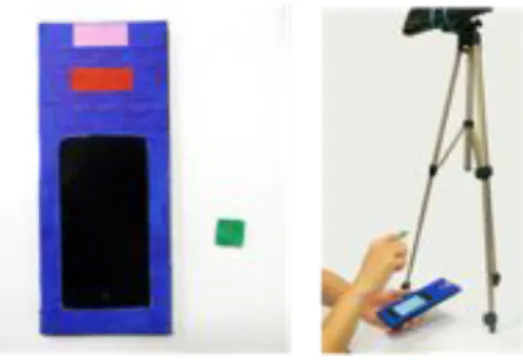
In our user studies, we used an iPod Touch with 3.5 inch (8.9 mm) screen size and 960 x 640 pixel screen resolution. To track the iPod and finger, we used the Kinect’s depth camera, with its default spatial x-y and depth resolution of 3 mm and 1 cm, respectively, at a distance of 2 m from the sensor. We also marked the iPod and fingertip with different colors for tracking: blue for the iPod’s screen plane, pink and red the iPod’s orientation, and green for the fingertip (Figure 2).
USER STUDY #1: THE LIMIT OF FINGER’S PROPRIOCEP-TION
Figure 2. The prototype of Lift Menu.
In this user study, we explored the design parameter issues of both the appropriate number and thickness of the layers for achieving easier and quicker access to functions. We predict that these issues may be answered by examining how users can recall heights for the former, with deviations of these heights serving as reference for the latter. Our user study examined variations of heights, which we defined as the perpendicular distance from the finger to screen plane. For each height value, participants went through two stages: learning, where participants could learn heights through visual feedback; and testing, where participants recalled heights from the learning stage without visual feedback. We then examined influences of the device’s position – held in hand and put on the surface as factors of a pilot study. We had four participants learn and test on heights of 6, 12, and 18 cm for each factor, and our results suggested that position had little influence. Therefore, we allowed the participants to hold the device at their own comfort level for the subsequent studies.
Participants and Tasks
We recruited twelve participants, six whom were female, one whom was left-handed, and all whom had prior experience using touch-driven devices. In the aforementioned pilot study, participants reported fatigue at 18 cm, so we lowered the upper bound to 16 cm and examined the following six heights for this formal study: 6, 8, 10, 12, 14, and 16 cm. For each value of height, participants progressed through a learning stage of 90 seconds and a testing stage of 15 repetitions in the trial, where the six heights were randomized among the participants.
Result and Discussion
Figure 3(a) shows the distribution of all the heights recalled by each participant. The x-axis indicates the 1st to the 15th trials each participant performed in the testing stage, and the y-axis marks the height in centimeters. Each line was formed by the 15 repetitions of the trial at the same height, and the six lines are the recalled heights of 6, 8, 10, 12, 14, and 16 cm. We observed that the ability to memorize specific heights varied from person to person. While some recalled a height with a deviation of less than 1 cm, others had deviation exceed 2 cm. For most of the participants, increases in target height negatively affected recall ability. Meanwhile, each box in Figure 3(b) spanned 95% of the recalled heights of all participants, where the thicker part represents one 2
Figure 3. (a) Point distribution of each participant (b) Error distribution of all participants.
standard deviation and the thinner part spanned two standard deviations. The standard deviation for each target height was 1.32, 1.00, 0.94, 1.61, 1.32, and 1.60 cm, respectively, where higher target heights tended to have higher deviation. From the two figures, we inferred that 2 cm may not be an adequate thickness if we would like to enable fast access with the aid of memory. During the testing stage, participants also remarked that it was not easy to distinguish heights with only a difference of 2 cm, and we observed from the coverage of the two deviations that 4 cm would be suitable as the minimal thickness. For determining the number of layers, we chose the combination of boxes in Figure 3(b) with minimal overlapping in the coverage of deviations, and the result shows that the number of layers should not exceed three.
USER STUDY #2: LIFT MENU VS. TOUCH
With the parameters obtained from the previous user study, we compared the performance of 1-, 2- and 3-layer Lift Menu against touch. We first conducted a pilot study to examine the adequate number of sectors that can provide efficient access, where results from Kurtenbach et al. [3] suggested that even-numbered sectors 4, 8, and 12 better facilitated performance. Our experiment adopted a 2 ⇥ 3 within-subject factorial design, where the independent variables were visual feedback (i.e., with and without) and number of sectors (i.e., 4, 8, and 12). We asked four participants to perform the tasks on a 1-layer Lift Menu, and we discovered that the 12-sector pie menu required more response time with visual feedback and had a higher error rate of 38.33% without. These results suggested that 12-sector pie menu may not be adequate, since it required longer response time with visual feedback and higher error rate without. We eventually adopted the 8-sector pie menu following these experiments.
We conducted an additional pilot study to compare more compatible in-air gesture for clicking in Lift Menu, and considered the two candidate gestures proposed by Vogel et al. [8]: AirTap and Thumb Trigger. Four participants performed clicking on a 1-layer, 8-sector Lift Menu with these two gestures, and Thumb Trigger outperformed AirTap for both response time and error rate. All the participants also preferred Thumb Trigger due to less fatigue, better precision,
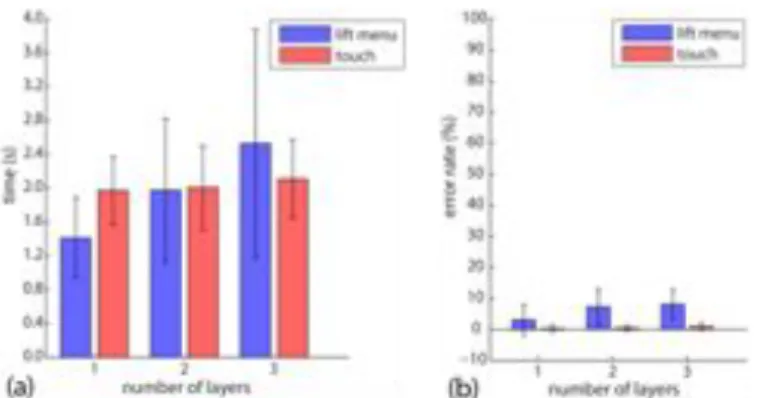
Figure 4. (a) Average response time of all participants (b) Average error rate of all participants.
and tactile feedback. Therefore, we adopted Thumb Trigger as our chosen click gesture.
Participants and Tasks
We recruited twelve participants, six whom were female, one whom was left-handed, and all whom had prior experience using touch-driven devices. The participants were required to select a specified item stored in a 3-layer Lift Menu, where the layers labeled A to C from the bottom-up and locations of those layers designed according to the results from the first user study. Each layer contained an 8-sector pie menu, where the sectors were labeled clockwise from 1 to 8. The three layers were replaced with three buttons for the touch interaction, which were designed to simulate the menus in iOS in both size and location as recommended by the iOS Human Interface Guidelines.
The study involved two independent variables of method (i.e., Lift Menu and touch) and number of layers (i.e., 1 through 3) using a 2 ⇥ 3 within-subject factorial design, where the factors were counterbalanced among the participants. Before a new combination of the two factors, participants were given a sufficient amount of time to familiarize themselves with the setup. Each layer contained an 8-sector pie menu, and each sector was selected with three repetitions of the trial.
Result and Discussion
Figure 4(a) shows the average response time of all participants, where the x-axis indicates the number of layers and the y-axis indicates the time in second. We examined the data with two-sample t-tests. Lift Menu and touch have significant difference when the number of layers is 1 (p-value<0.001) and 3 (p-(p-value<0.001). When the number of layer is 2, p-value>0.1, was not sufficient to pass the t-test. Figure 4(b) illustrates the average error rate of all participants, where the x-axis also marks the number of layers and the y-axis marks the error rate in percentage. The error rates of touch did not exceed 2% regardless of the number of layers, where 1-, 2-, and 3-layer Lift Menus had error rates of 3.13%, 7.30%, and 8.12%, respectively. The results show that in terms of response time compared to touch, 1-layer Lift Menu outperformed, 2-layer Lift Menu achieved similar performance, but 3-layer Lift Menu required more response time.
The results indicate that 3-layer Lift Menu may be infeasible, but the data only shows the average performance of all participants. We also observed that ability varied from person to person as the number of layers increase. With 1-layer Lift Menu, all participants were faster; with 2-layer, half of them are faster; with 3-layer, a quarter of them were faster. Three participants commented that they are already very versed with touch and that Lift Menu was still comparatively unfamiliar even after practice. Moreover, resolving some issues (e.g., drift problem, jittery visual feedback) can improve Lift Menu’s performance. Drift problems occurred during horizontal search, where participants may accidentally enter the adjacent layer and force them to spend more time correcting their position. Subramanian et al. [7] similarly observed this problem and proposed drift correction. Jittery visual feedback appeared when the finger is at the layer or sector boundary, where participants may observe jitter between two layers or sectors caused by aberration in the Kinect depth image. This problem may be solved by frame buffering, which queues a particular number of frames in the buffer and filters the frames which do not appear consecutively. We speculate that these two methods can help stabilize visual feedback and alleviate errors caused by sudden changes in the layers or sectors.
APPLICATION
Our previous user studies evaluated Lift Menu’s performance, and we subsequently designed an application to demonstrate its practicability.
Painter
Graphics painting programs are ubiquitous on various platforms, and we observed that such apps on mobile devices shared similar behaviors of numerous clicking for drawing tasks (e.g., iteratively clicking the menu item, the target item, then the menu item again). We therefore demonstrate the capabilities of List Menu by implementing a paint application called Painter that supports both Lift Menu and touch for the following functions: canvas, pen, and eraser. In Lift Menu, we placed pen in the lower layer and eraser in the upper layer, and also incorporated drift correction and frame buffering. For touch, we simulated similar applications found in the mobile app market.
Subjective Evaluation
We recruited six participants, all of whom were right-handed males and one with little experience with touch-based interfaces, and conducted a subjective evaluation on Painter for comparing between the Lift Menu and touch versions. The task involved sketching a greeting message using both Lift Menu and touch, where we required the participants to switch between brush types and colors for drawing and make corrections with the eraser.
After completing the task for both versions, participants were asked to list the pros and cons of each and their preference. All participants unanimously listed tedious process of menu selection as the cons of touch and ”rapidness and less steps” as the pros of Lift Menu. Two participants preferred Lift menu, two preferred touch, and two had no preference. The
participant who had little experience with touch remarked that since he had similar familiarity with both methods, he preferred Lift Menu since it did not require many clicks. Participants preferring Lift Menu liked its rapidness and were annoyed with the touch version’s frequent need to click on the menu to turn it on and off. Those preferring touch liked being more versed with touch and its corresponding tactile feedback.
Our results indicated that while Lift Menu can address problems with lengthy clicking in touch and perform more effectively, it also possessed other problems such as lack of tactile feedback. Instead of serving as a substitute for touch, we argue that Lift Menu and touch cater to different needs. In other words, Lift Menu provides efficiency and fluency, while touch offers familiarity and tactile feedback. Our results also reflected differing user behaviors of novice and expert mode for touch and Lift Menu, respectively, where the latter can achieve faster access lacking in touch.
CONCLUSION
In this research work, we proposed Lift Menu as an alternative interaction for providing faster access to functions on small-screen devices, and proved its feasibility through user studies. We plan to further explore the enabling technologies such as depth sensor or ultrasound to implement a real application on the small touch devices.
REFERENCES
1. Kratz, S., and Rohs, M. Hoverflow: exploring around-device interaction with ir distance sensors. MobileHCI ’09 (2009), 42:1–42:4.
2. Kratz, S., Rohs, M., Guse, D., M¨uller, J., Bailly, G., and Nischt, M. Palmspace: continuous around-device gestures vs. multitouch for 3d rotation tasks on mobile devices. AVI ’12 (2012), 181–188.
3. Kurtenbach, G. P., Sellen, A. J., and Buxton, W. A. S. An empirical evaluation of some articulatory and cognitive aspects of marking menus. Hum.-Comput. Interact. 8, 1 (Mar. 1993), 1–23.
4. Li, F. C. Y., Dearman, D., and Truong, K. N. Virtual shelves: interactions with orientation aware devices. UIST ’09 (2009), 125–128.
5. Lin, S.-Y., Su, C.-H., Cheng, K.-Y., Liang, R.-H., Kuo, T.-H., and Chen, B.-Y. Pub - point upon body: exploring eyes-free interaction and methods on an arm. UIST ’11 (2011), 481–488.
6. Song, H., Grossman, T., Fitzmaurice, G., Guimbretiere, F., Khan, A., Attar, R., and Kurtenbach, G. Penlight: combining a mobile projector and a digital pen for dynamic visual overlay. CHI ’09 (2009), 143–152. 7. Subramanian, S., Aliakseyeu, D., and Lucero, A.
Multi-layer interaction for digital tables. UIST ’06 (2006), 269–272.
8. Vogel, D., and Balakrishnan, R. Distant freehand pointing and clicking on very large, high resolution displays. UIST ’05 (2005), 33–42.
[ ]# #
Paris,'France
#
#
#
[ ]# #
[ ]# #