科技部補助專題研究計畫成果報告
期末報告
單手操作手持裝置之創新介面研究
計 畫 類 別 : 個別型計畫
計 畫 編 號 : NSC 102-2221-E-004-004-
執 行 期 間 : 102 年 08 月 01 日至 103 年 07 月 31 日
執 行 單 位 : 國立政治大學資訊科學系
計 畫 主 持 人 : 余能豪
計畫參與人員: 碩士班研究生-兼任助理人員:徐嘉駿
碩士班研究生-兼任助理人員:陳彥妤
碩士班研究生-兼任助理人員:蔡宜璇
碩士班研究生-兼任助理人員:陳建方
碩士班研究生-兼任助理人員:陳星佐
碩士班研究生-兼任助理人員:林禕瑩
大專生-兼任助理人員:李孟蓁
大專生-兼任助理人員:詹伊婷
大專生-兼任助理人員:唐維佋
博士班研究生-兼任助理人員:蔡文傑
報 告 附 件 : 出席國際會議研究心得報告及發表論文
處 理 方 式 :
1.公開資訊:本計畫涉及專利或其他智慧財產權,1 年後可公開查詢
2.「本研究」是否已有嚴重損及公共利益之發現:否
3.「本報告」是否建議提供政府單位施政參考:否
中 文 摘 要 : 近年來,智慧型手機設計商為了提昇使用者的視覺體驗,手
機螢幕有越來越大的趨勢,但觸控操作範圍變大後,原本單
手可順暢操作的手持裝置,因為大螢幕及手指長度的限制,
產生許多無法觸及的區域,我們將此問題定義為 Reach
Problem。尤其現行手機介面多半將導覽列及主要功能按鈕置
於手機螢幕的角落或邊緣區域,使得 Reach Problem 更加嚴
重。
針對以上問題,我們設計了 CornerSpace 和 BezelSpace 兩
種方法,目的是讓使用者利用慣用手拇指在原有的操作範圍
內,快速點擊到目標之操作模式。此解法可自動判定出拇指
活動的最舒適區域(Comfort Zone),使用者只需在舒適區內
移動極小幅度即可完成位於螢幕中相對遙遠端的點擊。研究
結果發現, BezelSpace 能讓使用者較「快」且「準確」點
擊螢幕上各個位置,較先前研究有顯著差異。本研究成果已
提出專利申請,適用於各式智慧型手機、在各類應用程式中
啟用、左右手皆可使用。
中文關鍵詞: 行動裝置、 單手互動模式、 拇指操作模式、觸控螢幕、互
動技術
英 文 摘 要 : Current touch-based UIs commonly employ regions near
the corners and/or edges of the display to
accommodate essential functions. As the screen size
of mobile phones is ever increasing, such regions
become relatively distant from the thumb and hard to
reach for single-handed use. In this paper, we
present two techniques: CornerSpace and BezelSpace,
designed to accommodate quick access to screen
targets outside the thumb's normal interactive
range. Our techniques automatically determine the
thumb's physical comfort zone and only require
minimal thumb movement to reach distant targets on
the edge of the screen. A controlled experiment shows
that BezelSpace is significantly faster and more
accurate. Moreover, both techniques are
application-independent, and instantly accommodate either hand,
left or right.
英文關鍵詞: Human-Computer Interaction, Mobile devices,
one-handed interaction, thumb-based interaction,
touch-screens, interaction techniques
!
-()
N
N
8
3
0
0
2
2
S
2
-E
1
81
E
7
8
N- N C7
4
N
9D B
8PNAKDL
9D B 8PNAKDL
CornerSpace
BezelSpace
Comfort Zone)
BezelSpace
Current touch-based UIs commonly employ regions near the corners and/or edges of the display to
accommodate essential functions. As the screen size of mobile phones is ever increasing, such regions
become relatively distant from the thumb and hard to reach for single-handed use. In this paper, we present
two techniques: CornerSpace and BezelSpace, designed to accommodate quick access to screen targets
outside the thumb’s normal interactive range. Our techniques automatically determine the thumb’s physical
comfort zone and only require minimal thumb movement to reach distant targets on the edge of the screen. A
controlled experiment shows that BezelSpace is significantly faster and more accurate. Moreover, both
techniques are application-independent, and instantly accommodate either hand, left or right.
Keywords: Human-Computer Interaction, Mobile devices, one-handed interaction, thumb-based interaction,
touch-screens, interaction techniques
8 BND
80-
80-5HMHL K RRDMRHNM S DP HMRDP BD 5<2
80-
80-3 PK NM
PHO D RSPD
3 PK NM
HM KD
MCDC R SLA A DC HMOSR
3 PK NM
80- LNTD CHPDBRHNM
R SLA PD B AHKHR
[
[
Thumb’s Reach Problem
Apple
Human Interface
Guidelines
Back
Action
9D B 8PNAKDL
ThumbSpace
proxy view
A
MagStick
B
magnetized
(
A
ThumbSpace
B
MagStick
Google Galaxy Nexus
V
) V () BL
Samsung Galaxy Note
( V ( ) V )
BL
ThumbSpace
proxy
view
MagStick
B
ThumbSpace
magnetized
ThumbSpace
bezel-swipe
Li et al.
bezel-swipe
eyes-free
.D DK :UHOD
.D DK :UHOD
CornerSpace
BezelSpace
(1) CornerSpace
NPMDP:O BD
A
A
B
B
5 :RHB
5 :RHB
H8 NMD
1NLD
H8 NMD
NPMDP:O BD
H8 NMD
(2) BezelSpace
NPMDP:O BD
.D DK:UHOD
NPMDP:O BD
BezelSpace
AD DK UHOD
(
A
A
B
B
A B
.D DK:O BD
.D DK:O BD
SLA:O BD
.D DK:O BD
.D DK:UHOD
.D DK:O BD
Fitt’s law
)
CornerSpace
BezelSpace
MagStick
ThumbSpace
ThumbSpace
CornerSpace
.D DK:O BD
CornerSpace
.D DK:O BD
ThumbSpace
Samsung Galaxy Note2 (
V
V )
LL
V )
LL
LL
ThumbSpace
CornerSpace
BezelSpace
TS CS
BS
95 -67=-
.:
:
:
O
A
.:
:
:
.:
:
:
:
:
.:
5
L
:0
L
: 5
L
:0
L
: 5
L
:0
) L
A
B
C
B
.:
:
:
O
7AIDBR ONHMRHM
:DL MRHB ONHMRHM
:DL MRHB ONHMRHM
4H DPR
B KD
.:
:
:
:DL MRHB ONHMRHM
.:
BezelSpace
CornerSpace
ThumbSpace
CornerSpace
UI
-OO
9D B 8PNAKDL
.D DK:O BD
1NMNP AKD LDMRHNM U PC
8N RDP
<2:
(
9DC 0NR 0D H M -U PC .D R N .D R
5NAHKD1DPN
(
1
[1] J. Pascoe, N. Ryan, and D. Morse, “Using While Moving!: HCI Issues in Fieldwork Environments,” ACM Trans. Comput.
Interact., vol. 7, no. 3, pp. 417–437, 2000.
[2] A. K. Karlson, B. B. Bederson, and J. L. Contreras-vidal, “Studies in One-Handed Mobile Design!: Habit , Desire and Agility,”
Human-Computer Interact., 2009.
[3] A. Karlson, “Studies in One-Handed Mobile Design: Habit, Desire and Agility,” … All (UI4ALL &# 039; 98, 2006.
[4] A. K. Karlson and B. B. Bederson, “ThumbSpace!: Generalized One-Handed Input for Touchscreen-Based Mobile Devices,”
INTERACT’07, pp. 324–338, 2007.
[5] A. Roudaut, S. Huot, and E. Lecolinet, “TapTap and MagStick: improving one-handed target acquisition on small touch-screens,” AVI’08, pp. 146–153, 2008.
[6] V. Roth and T. Turner, “Bezel swipe: conflict-free scrolling and multiple selection on mobile touch screen devices,” Proc. 27th
Int. Conf. CHI, 2009.
[7] A. Bragdon, E. Nelson, Y. Li, and K. Hinckley, “Experimental analysis of touch-screen gesture designs in mobile environments,” Proc. 2011 Annu. Conf. Hum. factors Comput. Syst. - CHI ’11, p. 403, 2011.
[8] P.-A. Albinsson and S. Zhai, “High precision touch screen interaction,” Proc. Conf. Hum. factors Comput. Syst. - CHI ’03, p. 105, 2003.
[9] R. Balakrishnan, “‘Beating’ Fitts’ law: virtual enhancements for pointing facilitation,” Int. J. Hum. Comput. Stud., vol. 61, no. 6, pp. 857–874, Dec. 2004.
[10] H. Benko, A. D. Wilson, and P. Baudisch, “Precise Selection Techniques for Multi-Touch Screens,” Interfaces (Providence)., 2006.
[11] J. Bergstrom-lehtovirta, A. Oulasvirta, and S. Brewster, “The Effects of Walking Speed on Target Acquisition on a Touchscreen Interface,” pp. 143–146, 2011.
[12] S. Boring, D. Ledo, X. A. Chen, N. Marquardt, A. Tang, and S. Greenberg, “The Fat Thumb!: Using the Thumb ’ s Contact Size for Single-Handed Mobile Interaction,” MobileHCI’12, 2012.
[13] A. Cockburn, D. Ahlstr, and C. Gutwin, “Understanding performance in touch selections!: Tap , drag and radial pointing drag with finger , stylus and mouse,” vol. 70, pp. 218–233, 2012.
[14] C. Forlines, D. Vogel, and R. Balakrishnan, “HybridPointing!: Fluid Switching Between Absolute and Relative Pointing with a Direct Input Device,” 2006.
[15] M. Goel, J. O. Wobbrock, and S. N. Patel, “GripSense!: Using Built-In Sensors to Detect Hand Posture and Pressure on Commodity Mobile Phones,” pp. 545–554, 2012.
[16] J. Gong, P. Tarasewich, and I. Science, “GUIDELINES FOR HANDHELD MOBILE DEVICE,” pp. 3751–3756.
[17] Y. Guiard, R. Blanch, M. Beaudouin-lafon, and I. Futurs, “Object Pointing!: A Complement to Bitmap Pointing in GUIs,” Proc.
Graph. Interface, pp. 1–9, 2004.
[18] T. J. Gunn, H. Zhang, E. Mak, and P. Irani, “An evaluation of one-handed techniques for multiple-target selection,” Proc. 27th
Int. Conf. Ext. Abstr. Hum. factors Comput. Syst. - CHI EA ’09, p. 4189, 2009.
[19] K. Hasan, X. Yang, H. Liang, and P. Irani, “How to Position the Cursor!? An Exploration of Absolute and Relative Cursor Positioning for Back-of-Device Input,” no. 1, pp. 103–112.
[20] S. Heo and G. Lee, “ForceTap!: Extending the Input Vocabulary of Mobile Touch Screens by adding Tap Gestures,”
MobileHCI’11, pp. 113–122, 2011.
[21] S. Heo and G. Lee, “Force gestures: augmenting touch screen gestures with normal and tangential forces,” in Proceedings of
the 24th annual ACM symposium on User interface software and technology UIST 11, 2011, pp. 621–626.
[22] N. Hirotaka, “Reassessing Current Cell Phone Designs!: Using Thumb Input Effectively,” pp. 938–939, 2003.
[23] M. Jain and R. Balakrishnan, “User learning and performance with bezel menus,” Proc. 2012 ACM Annu. Conf. Hum. Factors
Comput. Syst. - CHI ’12, p. 2221, 2012.
[24] A. Karlson, “Understanding single-handed mobile device interaction,” … Eval. Mob. …, 2006.
[25] A. K. Karlson, B. B. Bederson, and J. Sangiovanni, “AppLens and LaunchTile!: Two Designs for One-Handed Thumb Use on Small Devices,” pp. 201–210, 2005.
[26] A. K. Karlson, G. Robertson, D. C. Robbins, M. Czerwinski, and G. Smith, “FaThumb!: A Facet-based Interface for Mobile Search,” pp. 711–720, 2006.
[27] A. K. Karlson and B. B. Bederson, “One-handed touchscreen input for legacy applications,” CHI ’08, p. 1399, 2008.
[28] D. Katre, “One-handed thumb use on smart phones by semi-literate and illiterate users in India!: A usability report with design improvements for precision and ease,” 2008.
[29] K. Kim, W. Chang, S. Cho, J. Shim, H. Lee, J. Park, Y. Lee, and S. Kim, “Hand Grip Pattern Recognition for Mobile User Interfaces,” AAAI’06, pp. 1789–1794, 2001.
[30] M. Lin, R. Goldman, K. J. Price, A. Sears, and J. Jacko, “How do people tap when walking? An empirical investigation of nomadic data entry,” Int. J. Hum. Comput. Stud., vol. 65, no. 9, pp. 759–769, Sep. 2007.
[31] B. Mackay, D. Dearman, K. Inkpen, and C. Watters, “Walk ‘ n Scroll!: A Comparison of Software-based Navigation Techniques for Different Levels of Mobility,” 2005.
[32] H. Nicolau and J. Jorge, “Touch Typing using Thumbs!: Understanding the Effect of Mobility and Hand Posture,” pp. 2683– 2686, 2012.
[33] E. G. Nilsson, “Design patterns for user interface for mobile applications,” Adv. Eng. Softw., vol. 40, no. 12, pp. 1318–1328, Dec. 2009.
[34] P. Parhi, A. K. Karlson, and B. B. Bederson, “Target size study for one-handed thumb use on small touchscreen devices,” Proc.
8th Conf. Human-computer Interact. with Mob. devices Serv. - MobileHCI ’06, p. 203, 2006.
[35] Y. S. Park and S. H. Han, “One-handed thumb interaction of mobile devices from the input accuracy perspective,” Int. J. Ind.
Ergon., vol. 40, no. 6, pp. 746–756, Nov. 2010.
[36] K. B. Perry and J. P. Hourcade, “Evaluating One Handed Thumb Tapping on Mobile Touchscreen Devices,” pp. 57–64, 2008. [37] J. Rekimoto, “PreSense!: Interaction Techniques for Finger Sensing Input,” no. Figure 1.
[38] A. Roudaut, “MicroRolls!: Expanding Touch-Screen Input Vocabulary by Distinguishing Rolls vs . Slides of the Thumb,”
CHI’09, 2009.
[39] B. Schildbach and E. Rukzio, “Investigating selection and reading performance on a mobile phone while walking,” Proc. 12th
Int. Conf. Hum. Comput. Interact. with Mob. devices Serv. - MobileHCI ’10, p. 93, 2010.
[40] A. Sears, “High Precision Touchscreens!: Design Strategies and Comparisons with a Mouse,” 1989.
[41] M. Sun and X. Ren, “An Evaluation of Thumb Interface for Menu Selection on Mobile Equipment,” 2009 Fourth Int. Conf.
Innov. Comput. Inf. Control, pp. 805–809, Dec. 2009.
[42] D. Vogel and R. Balakrishnan, “Distant freehand pointing and clicking on very large, high resolution displays,” Proc. 18th
Annu. ACM Symp. User interface Softw. Technol. - UIST ’05, p. 33, 2005.
[43] J. Wagner, “BiTouch and BiPad!: Designing Bimanual Interaction for Hand-held Tablets,” vol. 2012, no. May, 2012. [44] J. O. Wobbrock, B. A. Myers, and H. Htet, “The performance of hand postures in front- and back-of-device interaction for
mobile computing,” vol. 66, pp. 857–875, 2008.
[45] X.-D. Yang, P. Irani, P. Boulanger, and W. Bischof, “One-handed behind-the-display cursor input on mobile devices,” Proc.
27th Int. Conf. Ext. Abstr. Hum. factors Comput. Syst. - CHI EA ’09, p. 4501, 2009.
[46] X. Yang, E. Mak, P. Irani, and W. F. Bischof, “Dual-Surface Input!: Augmenting One-Handed Interaction with Coordinated Front and Behind-the-Screen Input,” 2009.
[47] NH. Yu, DY Huang, Toby Hsu, and YP Hung, “Rapid Selection of Hard-to-Access Targets by Thumb on Mobile Touch-Screens,” MOBILEHCI2103, Munich, Germany, 2013.
[48] YC Tung,TY Cheng,NH Yu, and Mike Y. Chen, “FlickBoard: enabling trackpad interaction with automatic mode switching on a capacitive-sensing keyboard,” UIST2014, Hawaii, USA, 2014.
- 1 -
Rapid Selection of Hard-to-Access Targets by Thumb
on Mobile Touch-Screens
Neng-Hao Yu
1Da-Yuan Huang
2Jia-Jyun Hsu
1Yi-Ping Hung
21
Department of Computer Science,
Master Program of Digital Contents Technologies
National Chengchi University, Taipei, Taiwan
2
Department of Computer Science and Information
Engineering
National Taiwan University, Taipei, Taiwan
[email protected]
ABSTRACT
Current touch-based UIs commonly employ regions near the corners and/or edges of the display to accommodate essential functions. As the screen size of mobile phones is ever increasing, such regions become relatively distant from the thumb and hard to reach for single-handed use. In this paper, we present two techniques: CornerSpace and BezelSpace, designed to accommodate quick access to screen targets outside the thumb’s normal interactive range. Our techniques automatically determine the thumb’s physical comfort zone and only require minimal thumb movement to reach distant targets on the edge of the screen. A controlled experiment shows that BezelSpace is significantly faster and more accurate. Moreover, both techniques are application-independent, and instantly accommodate either hand, left or right.
Author Keywords
Mobile devices; one-handed interaction; thumb-based interaction; touch-screens; interaction techniques.
ACM Classification Keywords
H.5.2. User Interfaces: Input devices and strategies, Interaction styles, Screen design.
General Terms
Human Factors; Design; Measurement.
INTRODUCTION
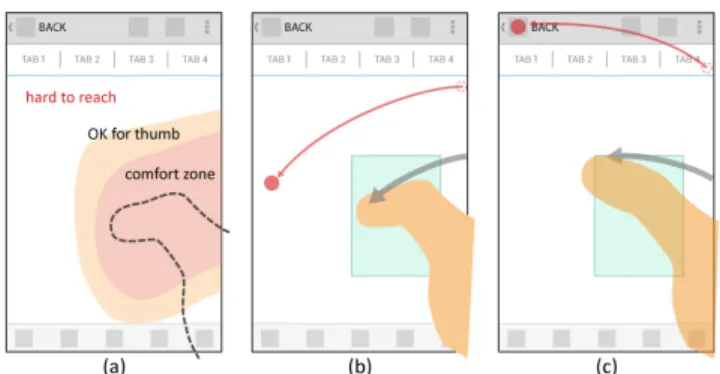
Mobile phones are commonly utilized with a single hand only. Karlson et al.[3] shows that users prefer to use smart phones with only one hand in the majority of the time. As more mobile devices with larger screens enter the market and are employed by users, users may encounter difficulties in reaching distant target when using only their thumbs during single-handed use. We address this issue as the “thumb’s reach problem”. According to current mobile UI patterns, regions of screens' corners and edges are usually used to accommodate essential functions (Figure 1a). For
example, Apple’s human interface guidelines suggest that “Back” and “Action” buttons should be placed at the top-left and top-right corners; while the “Tab” bar should be placed at the bottom of the screen. Such configurations make solving the thumb reach problem more urgent. Alternative target acquisition techniques on mobile devices have been proposed. ThumbSpace[4] requires one-time setup for a proxy view that uses a sub-region of the display to map all available screen targets. MagStick[6] provides a telescopic stick to control a “magnetized” cursor to indicate an on-screen target by dragging one's finger in the direction opposite from the target vis-a-vis the initial point of display screen surface contact. These techniques only have been tested on smaller devices (from 2.8” ~ 3.5” screen). Would they perform well on larger devices and for modern UIs? These questions are examined in the following pilot study.
Figure 1: (a) essential functions are usually located in the thumb’s hard-to-reach area, (b)(c) the design of BezelSpace:
Bezel-Swipe casting a cursor (like an extended fingertip) on the screen while the proxy region adaptively moves under the
thumb's location. Lift up the thumb to select the target. Pilot study
We replicate aforementioned techniques on current mobile devices with a larger screen size -- Google Galaxy Nexus (13.55 x 6.79 x 0.89 cm, 4.65" display) and Samsung Galaxy Note (14.685 x 8.295 x 0.965 cm, 5.3" display). 12 participants were recruited to try freely each technique on a simulated web app. First, we discovered that participants overwhelmingly prefer direct-touch interactions for accessing on-screen targets. Participants only consider enabling the tested techniques when the targets are really hard to reach (e.g., screen corners and edges opposite of the
Permission to make digital or hard copies of all or part of this work for personal or classroom use is granted without fee provided that copies are not made or distributed for profit or commercial advantage and that copies bear this notice and the full citation on the first page. To copy otherwise, or republish, to post on servers or to redistribute to lists, requires prior specific permission and/or a fee.
MobileHCI 2013, Aug 27–30, 2013, Munich, Germany.
- 2 - thumb when gripping single-handedly a device). Second, accessing more distant on-screen targets requires that participants alter how they grip their devices. Participants may not be aware that their grip has slightly changed and reported that the proxy view of ThumbSpace was not perfect match the thumb’s normal interactive range. Third, the participants with small hands felt more fatigue when using MagStick. Since MagStick uses an initial contact point as a fulcrum from which the user extends a telescopic pointer from that fulcrum to the distant target by dragging one's finger in the direction opposite from the target vis-a-vis the fulcrum, the further away the target is the farther thumb must move. Some participants even reported they were not able to reach far targets at the corners of the screen. Beyond the main question of inquiry, our study results indicate that participants like using the “magnetized” cursor (semantic pointing [2]) in MagStick more than the highlighted items (object pointing) in ThumbSpace because they can easily predict the accuracy of their thumb movements via the cursor. Finally, participants felt ThumbSpace is more intuitive because it was like an absolute trackpad. These factors motivated us to design alternative techniques to solve the thumb reach problem.
DESIGN
From our findings in this pilot study, we offer several considerations of design as follows: (1) Users encounter the thumb’s reach problem regarding out-of-reach screen areas, especially at corners and edges, at which are located frequent-use targets, (2) Users need a quick mode switch between direct touch and assistive technique so that does not hinder task performance, (3) thumb’s interactive region should be adaptively moved to the thumb’s location in case of the grip has changed.
Adaptive comfort zone and moding technique
In order to adaptively find individual users comfortable range of motion for the thumb as the interaction region, we use the bezel-swipe gesture. Bezel-Swipe[5] takes advantage of the edge of a touch display, enabling users’ thumbs to easily access functionality by activating a thin button. As Bezel Swipe is triggered, we can predict that the comfort zone of the thumb is near the start position and the lift-up position. Li et al.[1] also conclude that bezel gestures have the advantages of being a lesser attentional load over soft buttons, eyes-free, and distinguishable from scrolling or other on-screen gestures. Thus it can be used as a seamless mode switch between direct-touch interaction and target acquisition technique.
CornerSpace
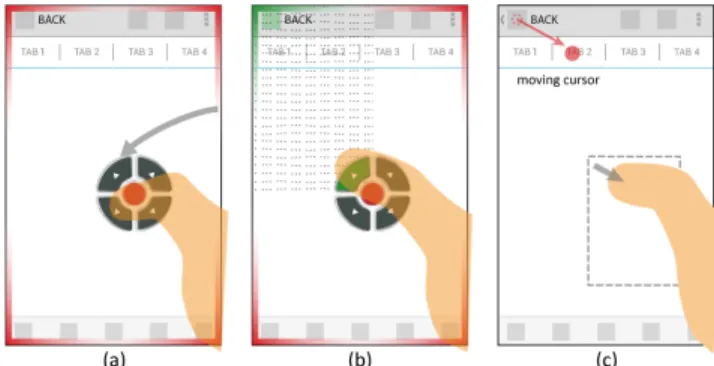
Considering Mobile UI patterns, many essential functions are near the corners and the edges of a screen. We assume that corners are the most frequently used area. We propose that CornerSpace works as follows: (1) after the bezel swipe, the UI buttons are shown at the lift-up position (Figure 2a). Each button represents its own corresponding
corner except the red button is for canceling the mode. To minimize the aiming effort, the screen is split into 4 parts (Figure 2b). Tapping the button or anywhere on those quarters will trigger the corresponding corner target. (2) As for edges and other on-screen targets, users can tap the nearest corner and drag out a “magnetized” cursor to indicate the target (Figure 2c). The CD-gain was set to a fix ratio about 2:1. (3) The target is selected when a user’s thumb lifts from the screen. We use MagStick’s "magnetized" mechanism to improve stability while dragging and lifting. Based on these design strategies, users only require minimal movement and can quickly access corner targets.
Figure 2: The design of CornerSpace, (a) CornerSpace UI appears at the thumb’s final contact location of a Bezel-Swipe (b) Quick access of the corner target (top-left): tapping on the arrow button or anywhere inside the dotted region will trigger
the corner target. (c) Accessing a target near the corner: trigger the nearest corner in previous action for a reference point and drag out a “magnetized” cursor to access the target. BezelSpace
Compared to CornerSpace’s two-step operation, BezelSpace (Figure 1bc) combines moding + targeting in single step for continuous operation: (1) cursor appears when the bezel swipe occurs without lifting the thumb. (2) A user must continue to drag ones finger across the screen to control the mapped "magnetized" cursor and aim it towards the target. (3) The target is selected when a user’s thumb lifts from the screen. By this design users can directly stretch the thumb toward the target. The mapping of BezelSpace is the same as ThumbSpace but the proxy region adaptively shifts according to any bezel swipe's initial location on the screen. In our preliminary study, we found users use different way to do bezel swipe for different location of target. As for the targets above the thumb, users tend to bend the thumb triggering the first contact point on the bezel and then push the thumb toward the upper direction. Meanwhile, for the targets below the thumb, users tend to stretch out the thumb triggering the first contact point and swipe to the lower direction. We utilize this characteristic to set the position of proxy region a bit higher than bezel swipe’s initial location.
BezelSpace works like an extended fingertip. Users use a bezel swipe to produce a pseudo-fingertip (cursor), which
- 3 - can be stretched to any distant target. The fingertip motion continues to the target, without requiring the user to lift and reposition the thumb. In addition, because the thumb is continuously in contact with the display, it can provide tactile feedback to the user, enabling them to fine tune their selections before committing to them. Moreover, the physical limitation of the thumb could be used as an advantage. According to Fitt’s law, any corner and border has infinite width. For corner and edge on-screen targets, users just stretch the thumb all the way to the corresponding direction of the target. Then the target will be selected. If users want to cancel the mode, they can drag the cursor inside the proxy region. Because the region is actually the ease-of-reach area, which is not required assistive technique.
EVALUATION
We conduct a user study to validate CornerSpace and BezelSpace in terms of interaction effectiveness, usability, and user satisfaction. To offer a performance baseline, we utilize ThumbSpace as a comparative model. However we did not utilize MagStick because it cannot be used on relatively larger screens. The original ThumbSpace uses hard buttons to activate the technique; we change this to a bezel-swipe gesture for consistency with CornerSpace and BezelSpace. Based on our design strategies, we previously hypothesized that CornerSpace and BezelSpace would outperform ThumbSpace in terms of selection time and error rate for the corner- or edge-located targets while maintaining prior levels of performance for other targets.
Task
Participants were presented with a series of individual tar- get selection trials. Based on our pilot study, users prefer to select targets with direct touch until finding that a target is out of range. The technique is then activated when users encountered the thumb reach problem, so that only the out-of-reach targets were included in the trial. In the beginning of the test, participants must perform a one-time calibration for setting a proxy view of ThumbSpace. The area outside of that proxy view is regard as the out-of-reach area. We divided the screen into a 5x9 grid and distribute the targets from the out-of-reach area onto the grid. We further defined three types of on-screen targets: (1) Corner targets, which are located at the four corners. (2) Edge targets, which are located on the edges. (3) Other targets, which are found in the remaining out-of-reach area. Each type of target was randomly assigned and evenly distributed within each block. That is 4 targets of each type and a total of 12 targets for each block. Only one target was painted red for each trial; others were painted blue as a distraction in order to improve realism of the target selection task. When the target was focused or selected, the color changed to green. The participants were instructed to select the red targets as quickly and accurately as possible. We use 7mm2 as the target size and 2 mm as the gap since this value is reported to be the actual minimal size/gap in current mobile UI design[2].
Apparatus and participants
These techniques are implemented in Java on the Android Platform, and the experiments are performed on the Samsung Galaxy Note2 (80.5 x 151.1 x 9.4 mm, 5.5" display). Fifteen volunteers, ranging in age from 18 to 33 years of age (M=26, SD=3.9, 6 female, all right-handed and owners of touch-screen phones), were recruited on campus, and each participant received NT$100 (approx. US$3.50) for a half hour-long test. Participants’ ease-of-reach region covers 35%~55% area of the 5.5” screen.
Experimental design
We use a two-way repeated measures within-subjects design. The independent variables are Method
(ThumbSpace, CornerSpace, and BezelSpace) and Type (Corner, Edge, and Other). Presentation of Method is counter-balanced across participants. For each Method, we allow one practice and five timed blocks for the experiment. After completing one Method, participants are then asked to fill out an assessment questionnaire. After the study, they are asked to rank the three Methods.
In summary, the experimental design is: 15 participants
x 3 Methods (ThumbSpace, CornerSpace, and BezelSpace) x (1+5) Blocks ( training + measured)
x 12 trials (with 3 types of target: Corner, Edge, and Other) = 3,240 trials completed
RESULTS AND DISCUSSION
We compare selection time and error rate with a separate
repeated measures within-subjects analyses of variance
(ANOVA). For pair-wise post hoc tests, we use Bonferroni-corrected confidence intervals to compare against α=0.05. In cases where the assumption of sphericity is violated, we correct the degrees of freedom using Greenhouse-Geisser. For ease of reference, we use “TS, CS, and BS” to represent ThumbSpace, CornerSpace, and BezelSpace respectively in the following paragraphs.
Selection time
We measured task time from the moment a bezel swipe gesture occurs until a participant’s thumb is lifted up from the screen. Trials with selection errors were excluded from analysis. We perform a 3x3 (Method x Type) RM-ANOVA and find significant main effects for Method (F2,28 = 26.16, p < .001), Type (F2,28 = 33.52 , p < .001), and a Method x
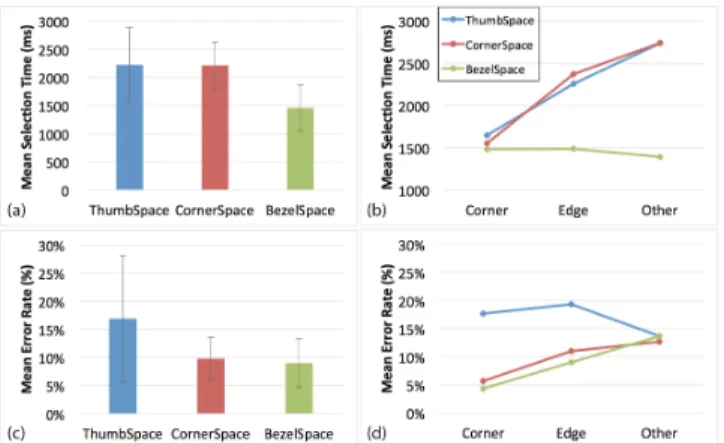
Type interaction (F2.32,32.50 = 14.90 p < .001). Post hoc multiple means comparison tests show that BS differs significantly from CS and TS for Edge and Other targets (all p < .001). Figure 3b shows that BS requires slightly less time for Other than Corner/Edge targets while CS and TS requires less time for Corner/Edge than Other targets. This is consistent with our hypotheses: (1) BS relies on continuous operation from bezel to target, since Other is closer to thumb than Corner/Edge targets thus participants
- 4 - utilize minimal thumb movement for Other targets. (2) When using CS and TS, the participants tried to use a corner as a reference to aim towards nearby targets. To our surprise, CS did not perform best for Corner targets and did not render better results than TS. We will explain more in regard to these findings in later discussion. Overall, BS is significantly faster (M= 1456.6ms, SD = 412.7 ms) than CS (M = 2213.7 ms, SD = 415.16 ms) and TS (M = 2222.44 ms, SD = 657.69 ms). (Figure 3a)
Figure 3: (a) overall selection time, (b) selection time per target type, (c) overall error rate, (d) error rate per target type Error rate
The error rate measurement aggregates both empty and wrong target selections. We perform a 3x3 (Method x Type) RM-ANOVA and find significant main effects for Method (F1.26, 17.65 = 7.00, p = 0.012), and a Method x Type interaction (F4,56 = 3.28, p = 0.017). Figure 3c shows mean error rate among Method and Type. Post hoc multiple means comparison tests show that BS and CS differ significantly from TS for Corner targets. As for Edge target, BS also shows significant difference from TS (all p < 0.05). This may be explained by the difference between Object pointing and Semantic pointing. Because the participant may also involuntarily move the stretched thumb when releasing it to the corner or edge, Semantic Pointing prevents the cursor from leaving the target when the thumb is slightly, and involuntarily, moved.
Figure 4: Questionnaire result (means) Subjective preferences
After each Method, participants complete a questionnaire to assess each particular input technique. Both BS and CS scored consistently well across all categories on a 7-point
Likert scale (Figure 4). We believe the Semantic pointing with cursor feedback does contribute to learnability and simplicity. Participants also report that they felt less thumb movement when using BS through the continuous operation. As for ranking results, BS and CS rank mostly as 1st and 2nd, though we did not find significant difference via ranking.
Discussion
The results of our experimentation show that BezelSpace is the most efficient and accurate method (Figure 3). We believe that the single-step continuous operation utilized shortens the task time. We did observe that many participants tend to stretch thumb directly toward the target when they hit the corner and edge targets. Surprisingly, CornerSpace only competes with ThumbSpace in its lower error rate. In the testing of CornerSpace, we observed that several participants tend to start from the top-left corner for every target because they did not bother to judge where the nearest corner was. This produced a penalty for longer movement if he starts from the opposite corner. In addition, the participants tend to aim for the UI button of CornerSpace even when the whole area of the screen is active. We will investigate other visual designs to address this issue.
CONCLUSION AND FUTURE WORK
In this paper, we address the thumb reach problem and propose design considerations that could be used in the development of interaction. We present two techniques to assist users in gaining easy access by thumb to distant on-screen targets within the thumb’s normal interactive range while gripping a device in single hand. Our user study of target selection reveals that BezelSpace is fastest and most accurate when compared with previously created techniques. Moreover, these two methods are suitable for use by either hand without extra setup. They conform to arbitrary UI elements while also serving as an application-independent technique. We plan to extend these techniques to even larger touch-screens on tablets.
ACKNOWLEDGEMENTS
This study was supported by the National Science Council, Taiwan, under grant NSC101-2211-E-004-013.
REFERENCES
1. Bragdon, A., Nelson, E., Li, Y., and Hinckley, K. Experimental analysis of touch-screen gesture designs in mobile environments. CHI’11, (2011). 2. Blanch, R., Guiard, Y., and Beaudouin-Lafon, M., Semantic Pointing:
Improving Target Acquisition with Control-Display Ratio Adaptation. CHI'04, (2004)
3. Karlson, A.K., Bederson, B.B., and Contreras-vidal, J.L. Studies in One-Handed Mobile Design!: Habit, Desire and Agility. Tech report
HCIL-2006-02, (2006).
4. Karlson, A.K. and Bederson, B.B. ThumbSpace!: Generalized One-Handed Input for Touchscreen-Based Mobile Devices. INTERACT 2007 5. Roth, V. Bezel Swipe!: Conflict-Free Scrolling and Multiple Selection
on Mobile Touch Screen Devices. (2009).
6. Roudaut, A., Huot, S., and Lecolinet, E. TapTap and MagStick!: Improving One-Handed Target Acquisition on Small Touch-screens. AVI’08, (2008).
FlickBoard: Enabling Trackpad Interaction with Automatic
Mode Switching on a Capacitive-sensing Keyboard
Ying-Chao Tung
1, Ta-Yang Cheng
1, Neng-Hao Yu
2, Mike Y. Chen
1,31
National Taiwan University,
2National Chengchi University,
3Research Center for Information
Technology Innovation, Academia Sinica
[email protected], [email protected], [email protected], [email protected]
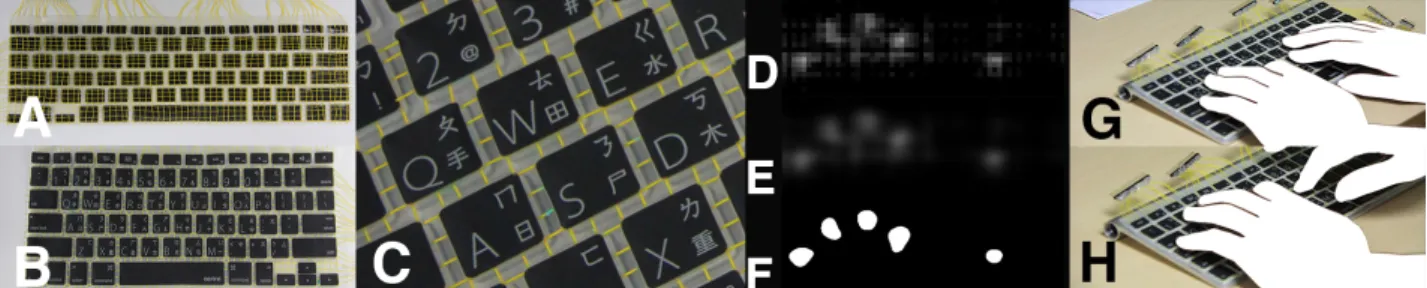
Figure 1. We present a keyboard cover with capacitive touch sensing capability which automatically disables itself while typing. Sensing wires are embedded into a typical keyboard cover (A), the modified cover is then put on an off-the-shelf keyboard (B). The sensing grid is all over the keyboard with 0.5cm grid size (C). This results in a low-resolution raw intensity image when hands are near the surface of the keyboard (D). The image is then processed to obtain touched areas (E+F). The raw image can also be used to robustly recognize whether user wants to type on the keyboard (G) or to control cursor with touchpad (H) using a machine learning-based classifier.
ABSTRACT
We present FlickBoard, which combines a trackpad and a keyboard into the same interaction area to reduce hand movement between separate keyboards and trackpads. It supports automatic input mode detection and switching (ie. trackpad vs keyboard mode) without explicit user input. We developed a prototype by embedding a 58x20 capacitive sensing grid into a soft keyboard cover, and uses machine learning to distinguish between moving a cursor (trackpad mode) and entering text (keyboard mode). Our prototype has a thin profile and can be placed over existing keyboards.
Author Keywords
Keyboard; Touchpad; Co-located input devices;
ACM Classification Keywords
H.5.2. Information Interfaces and Presentation (e.g. HCI): User Interfaces
INTRODUCTION
Operating GUI system requires both pointing devices and text input devices. However, most of the commercially available computers put these two devices at two adjacent
Permission to make digital or hard copies of part or all of this work for personal or classroom use is granted without fee provided that copies are not made or distributed for profit or commercial advantage and that copies bear this notice and the full citation on the first page. Copyrights for third-party components of this work must be honored. For all other uses, contact the owner/author(s). Copyright is held by the author/owner(s).
UIST’14 Adjunct, October 5–8, 2014, Honolulu, HI, USA. ACM 978-1-4503-3068-8/14/10.
http://dx.doi.org/10.1145/2658779.2658799
positions, which requires hand repositioning while switching between two devices. Past works[1, 3, 5] tried to solve this problem by enabling touch sensing capability on the keyboard. In this work we take a step further to make the sensing layer that is easy to be added on the off-the-shelf keyboards. Furthermore, the key issue of the dual functional keyboard is how to automatically switch the pointing mode to the typing mode and vice versa. To our knowledge, this issue has not been solved yet. We present FlickBoard, a keyboard cover with capacitive touch sensing capability. We use this keyboard film to collect user’s data and design an automatically mode switching algorithm between co-located touchpads and keyboards based on users’ intention.
RELATED WORK
Previous research has shown that co-locating two devices together will improve user performance[1]. However, the integrated device still requires manual mode switching to avoid false triggering of pointing device. ThumbSense[4] tried to implement an automatic input mode switching for keyboard by maintaining a state machine controlled by touchpad and keyboard event. Althouth it helps users keep their fingers on the home row, it still requires users to move their thumb onto the touchpad. Longpad[2] has shown that a larger touchpad can enable more possibilities for interactions. TypeHoverSwipe[5] implemented a modified keyboard recognizes in-air hand gestures and obtains coarse finger position. Some new interaction techniques for in-air and on-surface gesture on keyboard are explored. The depth map generated by infrared range finder is fast and stable, but the finger position obtained by the system is too rough to control mouse cursor because the sensors were interspersed
Posters UIST’14, October 5–8, 2014, Honolulu, HI, USA
between the keycaps. Capacitive sensing, in contrast, can obtain higher resolution image under this condition.[3]
SYSTEM OVERVIEW
Our system consists of three parts: 1) capacitance-to-digital converters, 2) sensing film, 3) graphical recognition system and 4) automatic mode switching predictor
Sensing Cover
We built a capacitive sensing grid on a keyboard cover. The modified cover was placed over Apple keyboard. We connect ground end to the body of Apple keyboard to stabilize the readings. The grid consists of 58 vertical and 20 horizontal 30#AWG cooper wires. With mutual capacitance sensing technique, each cross point of vertical and horizontal wires can be a single sensing point, so the system can capture a 58x20 frame. The sensing resolution could be higher if the conductive pattern is directly printed on the cover. With this modified cover, we can add touch sensing capability to a standard mechanical keyboard without modifying it.
Capacitance To Digital Converters(CDC)
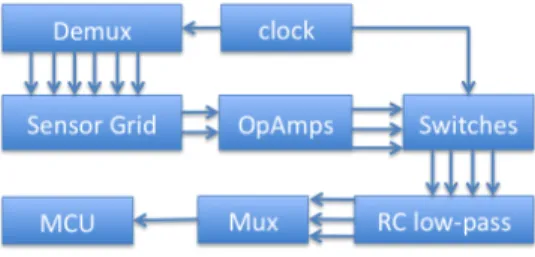
To measure the change of capacitance value of the sensor grid, we referenced WireTouch’s design1 and designed a
customized CDC. The main idea of this design is to measure the delay of the signal passed through sensor. First we generate square wave with a programmable clock generator. Connect the square wave signal to the vertical wires of the sensor grid through demultiplexers. We can raster scan through all the 58 vertical wires by selecting through the channels. 20 OP-Amps are connected to the horizontal wires of the sensor grid, amplifying the weakened and delayed signal. We measure the phase shift of the amplified signal compared to the original square wave by sending it into an analog switch as control signal. The switch is connected to an RC low-pass filter. Finally, we measure the output voltage of RC low-pass filter, which has positive correlation to the mutual capacitance of the selected cross point. The whole system can be designed to be smaller and portable. Currently the CDC can scan a 58x20 frame at 20 Hz.
Figure 2. CDC circuit diagram. Graphical Recognition System
Sensor values are organized as a 58x20 pixel image, each pixel has 10 bit resolution. Collected image is subtracted with background signal level collected when system is started. The image will be linearly scaled to 464x160 pixels, and apply Gaussian filter on the image. Finally, the system detects blobs in the processed image as touched points. (Figure 1.F)
1WireTouchhttp://www.wiretouch.net/
Automatic Mode Switching Prediction
We also implemented Motion Signature[5] to recognize whether user is trying to use pointing device or not. Since the sample rate is relatively lower (20Hz) compared to the original condition(325Hz), we reduced the referenced frames to only 10 frames in the process of building motion history image(MHI). Finally, we classify the MHIs with Random Decision Forests(RDF), the same classifier used in TypeHoverSwipe[5]. We designed a user study to collect training data and validate our system. The aim of task design is to simulate the circumstance of text processing: ,1) Type some text in the editing area, 2) Select a part of text and Change the font face. 3) Type another words, 4) Insert a picture with button in the tool bar and drag the picture to the appropriate position. 5) Continue typing. The ground truth of training data for RDF model is obtained by a foot pedal act as mode switch operated by participant. Collecting ground truth with foot pedal can avoid interfering with participants’ hand posture while operating.
PRELIMINARY RESULTS
We have tested our prototype with a small training dataset(7 minutes of single user’s training data at 15 Hz frame rate.) and the result looks promising. In a 5 fold cross validation, the overall accuracy of RDF is 99.56%, rounded to two decimal places. We will recruit more users to validate our system in the future.
CONCLUSION
In this work, we designed a keyboard add-on that is easy to install to enable touch capability on the regular keyboard. Base on the preliminary test, we can automatically detect user’s intention of switching between pointing and typing. We plan to perform a formal user study and system evaluation in the following months. The proposed touch sensing technique has higher resolution over the previous works, it can also be used for bimanual multitouch gestures.
ACKNOWLEDGEMENTS
This study was partially supported by the National Science Council, Taiwan, under grant NSC102-2221-E-004-004.
REFERENCES
1. Fallot-Burghardt, W., Fjeld, M., Speirs, C., Ziegenspeck, S., Krueger, H., and L¨aubli, T. Touch&type: A novel pointing device for notebook computers. NordiCHI ’06, ACM (New York, NY, USA, 2006), 465–468. 2. Gu, J., Heo, S., Han, J., Kim, S., and Lee, G. Longpad: A touchpad
using the entire area below the keyboard of a laptop computer. CHI ’13, ACM (New York, NY, USA, 2013), 1421–1430.
3. Habib, I., Berggren, N., Rehn, E., Josefsson, G., Kunz, A., and Fjeld, M. Dgts: Integrated typing and pointing. In INTERACT 2009, T. Gross, J. Gulliksen, P. Kotz, L. Oestreicher, P. Palanque, R. Prates, and M. Winckler, Eds., vol. 5727 of Lecture Notes in Computer Science. Springer Berlin Heidelberg, 2009, 232–235.
4. Rekimoto, J. Thumbsense: Automatic input mode sensing for touchpad-based interactions. In CHI ’03 Extended Abstracts on Human Factors in Computing Systems, CHI EA ’03, ACM (New York, NY, USA, 2003), 852–853.
5. Taylor, S., Keskin, C., Hilliges, O., Izadi, S., and Helmes, J.
Type-hover-swipe in 96 bytes: A motion sensing mechanical keyboard. CHI ’14, ACM (New York, NY, USA, 2014), 1695–1704.
Posters UIST’14, October 5–8, 2014, Honolulu, HI, USA
國科會補助專題研究計畫出席國際學術會議心得報告
日期: 1 0 2 年 9 月 3 0 日
計畫編號
NSC 102-2221-E-004-004
計畫名稱
單手操作手持裝置之創新介面研究
出國人員
姓名
余能豪
服務機構
及職稱
國立政治大學資訊科學系助理教授
會議時間
102
8 月 27 日
至 8 月 30 日
月 日
會議地點
Munich, Germany
會議名稱
(中文)
2013 行動平台人機互動國際年會
(英文)
MOBILEHCI 2013
發表題目
(中文) 輔助拇指快速並準確操作大螢幕手持裝置之研究
(英文)
Rapid Selection of Hard-to-Access Targets by Thumb on Mobile
Touch-Screens
一、 參加會議經過
本次至德國參加之行動平台人機互動國際年會,共有來自 20 個國家的與會人員
參加,總投稿篇數有 238 篇,其中 53 篇被接受,台灣今年僅一篇,同時我們很
榮幸獲得 Honorable mention award,表示我們的研究主題及成果受到領域專
家們的肯定。
二、 與會心得
今年 MOBILEHCI 的主題包含 Tactile UI, Navigation and Selection, Touch
and Text Input, Security and Privacy, Developing World, User Behavior,
Unconventional Mobile UI and Hardware, Collaboration and
Communication 等。會議期間共有 4 天,會議主席是 University of Hannover
的 Michael Rohs 及 University of Stuttgart 的 Albrecht Schmidt,兩位在行
動人機互動領域及觸控介面設計領域都是極具經驗的研究者,並有世界各地 20
多個國家的研究者們參與,是行動人機互動的年度盛會。會議場地
Ludwig-Maximilians-Universität München (LMU)在今年承接了好幾個大型國際會議,
包括 Tangible and Embodiment Interaction (TEI)等,對於學校宣傳很有幫
助,未來本校若能多辦幾個國際研討會,會是很好的行銷機會。