國
立
交
通
大
學
多媒體工程研究所
碩
士
論
文
基於可攜式文件格式之資訊隱藏技術研究與其
應用
A Study on Data Hiding Techniques for PDF Files and Their
Applications
研 究 生:王竣聰
指導教授:蔡文祥 教授
基於可攜式文件格式之資訊隱藏技術研究與應用
A Study on Data Hiding Techniques for PDF Files and Their Applications
研 究 生:王竣聰 Student:Jiun-Tsung Wang
指導教授:蔡文祥 Advisor:Wen-Hsiang Tsai
國 立 交 通 大 學
多 媒 體 工 程 研 究 所
碩 士 論 文
A ThesisSubmitted to Institute of MultimediaEngineering College of Computer Science
National Chiao Tung University in partial Fulfillment of the Requirements
for the Degree of Master
in
Computer Science
June 2008
Hsinchu, Taiwan, Republic of China
基於可攜式文件格式之資訊隱藏技術研究與其應用
Student:Jiun-Tsung Wang Advisor:Dr. Wen-Hsiang Tsai Institute of Multimedia Engineering, College of Computer Science
National Chiao Tung University
摘要
由於可攜式文件格式(PDF)的各種特性,如開放標準、跨平台及提供高品 質的閱覽與列印,讓 PDF 變得非常普及,也因此 PDF 變成了一種很好的掩護檔案, 可提供秘密通訊之用。在本論文中我們提出一個將秘密資訊編成十進位數字藏入 PDF 檔案中的方法,可以在很小的誤差範圍下調整文件中的參數,將整數變換為 實數,或將實數轉換為另一實數,而讓人無從察覺,是一有相當高欺敵效果的方 法。 另一方面,許多公司也將機密文件存成 PDF 檔案,但在 PDF 標準中的保密機 制並不足以避免惡意使用者散佈這些文件。我們因此提出了一個藏入新型態浮水 印及使用者資訊,藉以達到版權保護與檔案散佈控管的方法。我們利用透明圖片 作為新浮水印,使其嵌入後不致產生不透明的底色。另外亦將使用者資訊嵌入隨 機選出的圖片當中,提高秘密資訊的強靭度,使混淆惡意使用者難於破壞。 PDF 檔案非常容易被複製以及修改,因此我們亦提出一透過嵌入驗證訊號來 做 PDF 檔案內容驗證的方法。其驗證訊號由使用者選定的金鑰與以及文字內容所 產生,而文件內容即可透過比對驗證訊號,來檢驗文件內容的正確性。 透過好的實驗結果,我們證明了所提出各方法的可行性。A Study on Data Hiding Techniques for PDF Files and
Their Applications
Student:Jiun-Tsung Wang Advisor:Dr. Wen-Hsiang Tsai Institute of Multimedia Engineering, College of Computer Science
National Chiao Tung University
ABSTRACT
Due to its outstanding capabilities like open-standard, cross-platform, high-quality viewing and printing, the PDF file becomes very popular nowadays. Therefore, the PDF file is a good choice as cover media for covert communication. We propose a method to encode secret messages by converting integers to real numbers with small changes in values, yielding a difference of appearance very difficult to notice by human vision.
On the other hand, many companies store their classified documents by the PDF. The methods proposed in the PDF standard are not enough to prevent users from redistributing the classified documents. We propose a method to create a new type of watermark and embed it together with some user information in PDF files for copyright protection. The created watermark has no background color, which comes from mixing a watermark image and an alpha mask. The user information is hidden by a data hide technique in a randomly-selected image so as to confuse illicit users.
PDF files are easy to duplicate and modify, so we propose a method for authentication of a PDF file by embedding authentication signals in the text matrices of the file based on the data hiding method we propose for covert communication.
The authentication signals are generated from a randomization result of exclusive-ORing the data of the text strings in the PDF file and some random numbers generated with a secret key. The content of the PDF file can be authenticated by matching the extracted authentication signals with the embedded ones.
ACKLEDGEMENTS
I am in hearty appreciation of the continuous guidance, discussions, support, and encouragement received from my advisor, Dr. Wen-Hsiang Tsai, not only in the development of this thesis, but also in every aspect of my personal growth.
Thanks are due to Mr. Chih-Jen Wu, Mr. Che-Wei Lee, Mr. Guan-Lin Huang, Miss Shung-Yung Tsai, and Miss Hsing-Chia Chen for their valuable discussions, suggestions, and encouragements.
Appreciation is also given to the colleagues of the Computer Vision Laboratory in the Department of Computer and Information Science at National Chiao Tung University for their suggestions and help during my thesis study.
Finally, I also extend my profound thanks to my family for their lasting love, care, and encouragement. I dedicate this thesis to my parents.
CONTENTS
ABSTRACT(in Chinese) ... I ABSTRACT(in English) ... II ACKLEDGEMENTS ... IV CONTENTS...V List of Tables...VII List of Figures... VIIIChapter 1 Introduction...1
1.1 Motivation of Study ...1
1.2 Overview of Related Works...2
1.3 Overview of Proposed Methods...2
1.3.1 Definitions of Terms ...2
1.3.2 Brief Descriptions of Proposed Methods...3
1.3.2.1 Covert Communication by Data Hiding in PDF Files...3
1.3.2.2 Copyright Protection by Watermarking and File Distribution Control of PDF Files ...3
1.3.2.3 Authentication of PDF Files for Fidelity and Integrity Verification by Data Hiding Techniques...4
1.4 Contributions...4
1.5 Thesis Organization ...5
Chapter 2 Review of Relative Works and Standards...6
2.1 Introduction...6
2.2 Review of PDF Standard ...6
2.3 Previous Studies on Information Hiding Techniques via Digital Images..8
2.4 Previous Studies on Information Hiding Techniques in Rich-Text Documents ...11
Chapter 3 Covert Communication by Data Hiding in PDF Files ...12
3.1 Introduction...12
3.2 Data Hiding by Modification of Numbers in PDF Files...12
3.3 Proposed Data Hiding Process...15
3.4 Proposed Data Extraction Process ...16
3.5 Experimental Results ...20
3.6 Concluding Remarks...21
Chapter 4 Copyright Protection of PDF Files by Watermarking and File Distribution Control ...30
4.1 Introduction...30
4.2 Idea of Proposed Watermarking Method by Embedding of Transparent watermarks...31
4.3 Idea of Proposed Distribution Control Technique by Embedding of User Information ...33
4.4 Proposed Watermarking Process...34
4.5 Proposed User Information Embedding and Extraction Processes...39
4.5.1 Embedding of user information ...40
4.5.2 Extraction of embedded user information...42
4.6 Experimental Results and Discussions ...44
Chapter 5 Authentication of PDF Files for Fidelity and Integrity Verification by Data Hiding Techniques ...53
5.1 Introduction...53
5.2 Idea of PDF Authentication by Embedding Authentication Signals into Text Matrices ...53
5.3 Proposed Authentication Signal Embedding and Extraction Processes ..54
5.4 Experimental Results ...58
5.5 Discussions ...59
Chapter 6 Conclusions and Suggestions for Future Works ...66
6.1 Conclusions...66
6.2 Suggestions for Future Works...67
List of Tables
Table 2.1 Properties of basic types and examples...7 Table 3.1 Mapping digits into 3-bit data...16 Table 3.2 Mapping digits into bit streams...18
List of Figures
Figure 2.1 An instance of composite object...8
Figure 2.2 The physical layout of a PDF file...9
Figure 2.3 The logical hierarchy of a PDF file. ...10
Figure 3.1 An example of a content object of a PDF page. ...14
Figure 3.2 The structure of a text matrix. ...15
Figure 3.3 An example of proposed procedure for hiding a secret message. ...17
Figure 3.4 The flowchart of the procedure for embedding a secret message. ...18
Figure 3.5 The procedure of extraction of secret message. ...19
Figure 3.6 The flowchart of the procedure of extracting the secret message. ...21
Figure 3.7 Illustration of an experiment (experiment 1) of proposed method...22
Figure 3.8 Illustration of another experiment (experiment 2) of proposed method...26
Figure 4.1 The results of watermarking a PDF file with Adobe Acrobat 8.1 ...32
Figure 4.2 The proposed PDF watermark style. ...34
Figure 4.3 An example of commands to show an image. ...36
Figure 4.4 The flowchart of embedding a solid watermark image. ...38
Figure 4.5 The flowchart of embedding a semi-transparent watermark...39
Figure 4.6 The flowchart of embedding user information process...41
Figure 4.7 The flowchart of user information extracting process...45
Figure 4.8 The relation between a manager, the server and a user. ...46
Figure 4.9 The window of visiting the document management server by Mozilla Firefox 2.0...46
Figure 4.10 Illustration of experiment (experiment 1) of proposed method...47
Figure 4.11 Illustration of another experiment (experiment 2) of proposed method...50
Figure 5.1 Process of embedding authentication signals in a PDF file. ...56
Figure 5.2 The process of checking the fidelity and integrity of a PDF file...58
Figure 5.3 Illustration of experiment (experiment 1) of proposed method...60
Chapter 1 Introduction
1.1 Motivation of Study
Because of the rapid development of broadband networks and personal computers, transmissions of digital documents and images through the Internet become easier and easier. Users on the Internet can obtain, duplicate, or modify the contents of these multimedia files easily.
PDF files can be transmitted on the Internet quickly, so they become good examples of covert media to carry secret information. Because their file sizes usually are large and they are rich-text documents, we can design methods to embed data into PDF files. For this application, we also need a special decoding scheme to extract the secret information embedded in the PDF files. In this study, it is desired to design a covert communication method via PDF files.
Due to some properties of PDF files, such as high-quality printing and cross-platform applicability, PDF files become very popular. More and more companies and government offices distribute information via PDF files. When they release their documents, they may set passwords to protect the contents from illicit accesses by unauthorized users. Unfortunately, such a way of protection is not sufficient. For example, if a classified PDF file and the password of it are leaked out together by somebody, the protection of this way becomes useless. On the contrary, if we hide the identity information of a user as invisible data in the PDF file, we can trace who distributes the PDF file easily. In this study, we thus wish to design techniques of watermarking and user information embedding for copyright protection
and file distribution control.
On the other hand, due to the popularity of the Internet and the abundance of information on it, the fidelity of PDF files has become another important issue. Illegal users might obtain a PDF document and tamper with it for misrepresentation. It is desired to design a technique for fidelity and integrity verification of PDF documents.
1.2 Overview of Related Works
In this study, some new techniques for information hiding applications are proposed. These applications are about embedding information within texts and images. A review of researches on data hiding will be described in Chapter 2. In addition, we will also make a review of the PDF standard in Chapter 2.
1.3 Overview of Proposed Methods
1.3.1 Definitions of Terms
The definitions of some related terminologies used in this study are described as follows.
1. Cover media: cover media, such as images, text-type documents, or videos, are files in which messages are embedded.
2. Watermarked document: a watermarked document is a document in which a visible watermark has been embedded.
3. Protected document: a protected document is a document in which authentication signals have been embedded.
4. Document authentication: document authentication is a process for verifying the integrity and fidelity of a suspicious document.
5. Stego-PDF: a stego-PDF is a PDF document with some secret messages or signals embedded in.
6. Text matrix: a text matrix is an object in a PDF document, which is used to describe transformations of the texts in the document.
1.3.2 Brief Descriptions of Proposed Methods
1.3.2.1 Covert Communication by Data Hiding in PDF Files
In this study, a covert communication method by data hiding in PDF files is proposed. The basic idea is to randomize a given secret message with a user key and embed the randomized secret message into the text matrices in a PDF file. Small changes of text positions in PDF files are not easy to observe. We encode a secret message as digits, and then append a separator digit and the encoded messages after the fractional part of numbers in text matrices.In the proposed communication process, a sender sends a secret message to a receiver via a stego-PDF instead of sending the secret message directly. When a receiver receives the stego-PDF file, he/she then decodes the secret message by using a correct key to extract the secret message in the file. Even if an illicit user gets the stego-PDF, without the key he/she cannot decode the original secret message.
1.3.2.2 Copyright Protection by Watermarking and File
Distribution Control of PDF Files
In this study, we propose two methods for copyright protection, one for claiming the ownership by embedding visible/invisible arbitrary-shaped watermark into a PDF file and the other for distribution control by embedding invisible user information in the file. When a user downloads a PDF document from a document server, the server
will embed a visible/invisible arbitrary-shaped watermark in the document to claim the copyright of this document. In the mean time, the user information (including the account name, IP address, and download time) will be embedded in a randomly-selected image in the document to control the distribution of the document.
The watermark in the document can help to prevent other users from using the document illegally. When the document is leaked out, the owner of the document can trace the distributor by the invisible user information signal.
1.3.2.3 Authentication of PDF Files for Fidelity and Integrity
Verification by Data Hiding Techniques
In this study, we propose a method to verify the fidelity and integrity of PDF files by adding authentication signals into PDF files. We sum up the ASCII code values of the characters in every text object in a PDF file and then embed the sum into its text matrix as the authentication signal. If the characters in a text object are tampered with by other users, the authentication signal value extracted from the text matrix will not match the authentication signal value which is the sum of the ASCII code values of the characters in the text object. The client program can mark the modified contents in the PDF file by the above method.
When a receiver gets a protected PDF file, a client program can help the user to determine the fidelity and integrity of the contents of the PDF file by matching the authentication signal hidden in the text matrix with the authentication signal generated from the text object. If not all the authentication signals in the protected PDF file are matched, the protected PDF file would be decided to have been tampered with.
1.4 Contributions
1. A covert communication technique by data hiding techniques for PDF documents is proposed.
2. A copyright protection technique by embedding a new type of watermark for PDF documents is proposed.
3. A distribution control technique by embedding user information in PDF documents is proposed.
4. An authentication method for verification of the integrity and fidelity of PDF documents by data hiding techniques is proposed.
5. A PDF file editing tool is developed for the experiments conducted in this study. 6. A document management server is set up for implementing the proposed methods
for copyright protection, distribution control, and authentication of PDF documents.
1.5 Thesis Organization
In the remainder of this thesis, a review of related works about data hiding in rich-text documents and digital images, and the PDF standard is given in Chapter 2. In Chapter 3, the proposed technique for covert communication is described. In Chapter 4, the proposed document management server for copyright protection and distribution control by visible or invisible watermarking and invisible user-information embedding is described. In Chapter 5, the proposed document authentication technique by hiding authentication signals into the text matrices in PDF documents is described. Finally, conclusions and some suggestions for future works are given in Chapter 6.
Chapter 2 Review of Relative Works
and Standards
2.1 Introduction
More and more data hiding techniques for various media have been proposed [2-10]. The techniques are used to achieve the goal of copyright protection, authentication, covert communication, secret sharing, etc. In this chapter, some related works of data hiding for digital documents and images will be described. And some related standards mentioned in this study will also be briefly introduced.
2.2 Review of PDF Standard
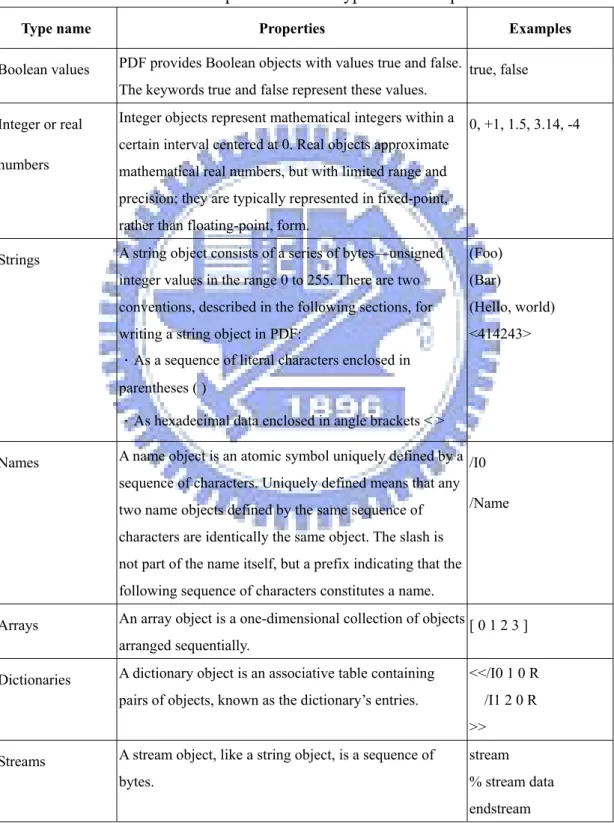
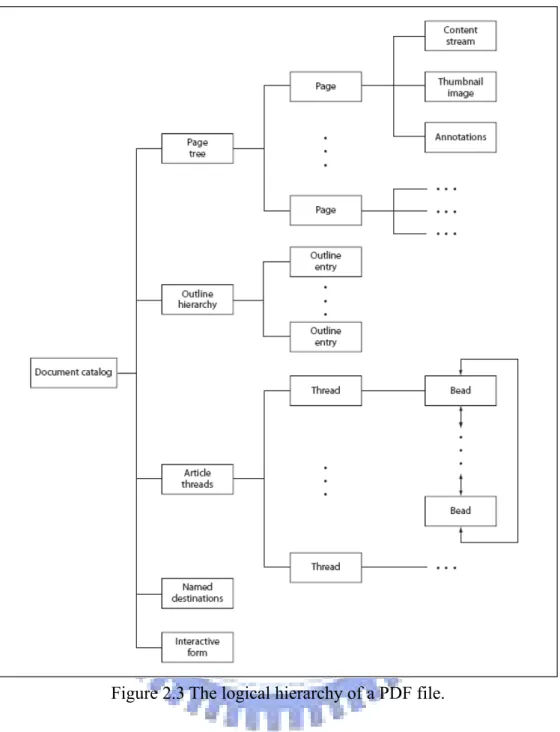
The PDF was proposed by Adobe Company in 1993 for document exchange [1]. The PDF is a mix of text and binary formats, and the contents in PDF files are described by a context-free grammar which is modified from PostScript®. The language describes all the data in PDF files, like pictures, texts, curves and other visual objects. The contents of a PDF file are constructed by some high-level objects, which are used to describe the graphical size of a page, the dimension of an image, and the font and other properties of PDF files. Every high-level object is constructed by eight basic types of objects: Boolean value, integer and real number, string, name, array, dictionary, stream and null object. Table 2.1 shows the properties of the basic types, and Figure 2.1 shows an instance of high-level objects. The high-level objects compose PDF files, and the relations between the objects are described in terms of the properties of the objects. The physical structure of a PDF file is illustrated in Figure 2.2. The objects’ hierarchical tree can be built according to the properties of objects, and the objects can be document catalog, page tree, page, content stream, thumbnail
image and other objects, as illustrated in Figure 2.3. Every PDF file has a root object to indicate where the root of the document is. Page objects in PDF files can be found by tracing the page tree. The page objects refer to their own resources, for examples, fonts, images, page contents.
Table 2.1 Properties of basic types and examples.
Type name Properties Examples
Boolean values PDF provides Boolean objects with values true and false. The keywords true and false represent these values.
true, false
Integer or real
numbers
Integer objects represent mathematical integers within a certain interval centered at 0. Real objects approximate mathematical real numbers, but with limited range and precision; they are typically represented in fixed-point, rather than floating-point, form.
0, +1, 1.5, 3.14, -4
Strings A string object consists of a series of bytes—unsigned integer values in the range 0 to 255. There are two conventions, described in the following sections, for writing a string object in PDF:
.As a sequence of literal characters enclosed in parentheses ( )
.As hexadecimal data enclosed in angle brackets < >
(Foo) (Bar)
(Hello, world) <414243>
Names A name object is an atomic symbol uniquely defined by a sequence of characters. Uniquely defined means that any two name objects defined by the same sequence of characters are identically the same object. The slash is not part of the name itself, but a prefix indicating that the following sequence of characters constitutes a name.
/I0
/Name
Arrays An array object is a one-dimensional collection of objects arranged sequentially.
[ 0 1 2 3 ]
Dictionaries A dictionary object is an associative table containing pairs of objects, known as the dictionary’s entries.
<</I0 1 0 R /I1 2 0 R >>
Streams A stream object, like a string object, is a sequence of bytes.
stream % stream data endstream
null The null object is used to fill empty field in an array or dictionary. There is only one object of type null, denoted by the keyword null.
null
Figure 2.1 An instance of composite object.
Because we are just concerned about the page contents in this study, so we focus on page objects and page resource objects only. Each page object has a property named “MediaBox” to describe the graphical size of the page. All page objects must have a resource “content” which is an object used to describe the page content like any combination of texts, graphics, and images. A page content object is a composite object which is mainly constructed by a dictionary and a stream object. The dictionary object is used to describe the properties of the stream, and the stream object to describe the page content in the page description language.
2.3 Previous Studies on Information
Hiding Techniques via Digital
Images
Many data hiding techniques for digital images have been proposed in recent years [2-4]. The techniques are useful for covert communication, and copyright and fidelity protections.
Figure 2.2 The physical layout of a PDF file.
Chang and Tsai [2] proposed a copyright and integrity protection method by removable visible or invisible watermarks. Huang and Tsai [3] proposed a method for copyright protection, covert communication and detection of tampering for various digital image formats, including BMP, JPEG, GIF, and binary.
Figure 2.3 The logical hierarchy of a PDF file.
Weng and Tsai [4] proposed a method for integrity authentication and copyright protection for binary document images. Swanson, Zhu and Tewfik [5] proposed a robust data hiding technique for images by applying spatial and frequency masking. Liu, et al. [6] proposed a variable-depth LSB data hiding technique for images by hiding variable bits in different luminance level pixels.
2.4 Previous Studies on Information
Hiding Techniques in Rich-Text
Documents
Nowadays, many data hiding techniques for rich-text documents had been proposed [7-10]. The purpose is to achieve the functions of copyright protection, covert communication, and authentication. Liu and Tsai [7] proposed a method to authorize the modification of the quotation of Microsoft Word Documents actively by adding context-sensitive block signatures. Zhong and Chen [8] proposed a technique for covert communication based on the use of PDF documents, and they hid secret messages by inserting encrypted data between two objects in PDF files. Zhong, Cheng and Chen [9] proposed a data hiding technique via PDF texts for secret communication by tuning between-character spacing. Chang and Tsai [10] proposed an authentication method for HTML files by embedding a watermark as an authentication signal in HTML codes.
Chapter 3 Covert Communication
by Data Hiding in PDF Files
3.1 Introduction
Due to the rapid development of personal computers and computer networks, more and more files are transmitted on the Internet. On the other hand, downloading PDF files on the Internet is common, and PDF files are almost available on every website. Due to such popularity of PDF files, it is useful to build a covert communication channel via such a type of file.
A method for covert communication via PDF files is proposed in this study. In Section 3.2, the proposed method is described. In Section 3.3, the detailed process of embedding secret messages is described. In Section 3.4, the detailed process of extracting secret messages is described. Finally, some experimental results and concluding remarks are given in Sections 3.5 and 3.6, respectively.
3.2 Data Hiding by Modification of
Numbers in PDF Files
The idea of the proposed method of covert communication is achieved by transmission of a PDF file, in which a secret message is embedded. According to the PDF standard, there are eight basic types of objects in PDF files. One of the basic types is number, including integer and real number. Integers and real numbers are exchangeable in PDF files under some conditions, and there is no difference between 0 and 0.0. For instance, the visible area of a page is described by four numbers, with the first two numbers specifying the position of the left upper corner, and the last two
numbers specifying the position of the right lower corner, both in terms of coordinates. Some position coordinates are described by integers and others by real numbers. The default coordinate unit is 1/72 inch which is quite small in value, so the number can be modified in certain ranges without obvious visual effects. The changes in the numbers can be used to embed data, as done in this study. Many number objects in a PDF file, as found in this study, are useful for hiding data, for example, the coordinates of an object, the text matrix, and the page size. Modification of them may be categorized into two forms:
1. Type 1: the original number is an integer and the result is a real number.
2. Type 2: the original number is a real number and the result is still a real number.
The former can be subdivided into two types:
1.1 Type 1.1: small change of magnitude, for example, modification of 20 to be 20.00457;
1.2 Type 1.2: no change of magnitude, for example, modification of 20 to be 20.00000.
The later can also be subdivided into two types:
2.1 Type 2.1: small change of magnitude, for example, modification of 854.7 to be 854.700457;
2.2 Type 2.2: no change of magnitude, for example, modification of 854.7 to be 854.700000.
We can design data hiding schemes with the above four types of modifications. With Types 1.1 and 2.1, small changes can be used to embed multiple digits into a digit, and there is no limitation on the number of embedded digits. In the above example for Type 1.1, we embed three digits 4, 5, and 7 into the integer 20 after appending a separator of a pre-selected digit sequence 00 to the integer. The use of a
separator is necessary in the later message digit extraction process to distinguish digits of the original data from the embedded message digits. Of course, such a separator must be selected to be unique to cause no ambiguity in digit decoding in the extraction process. Similarly, in the example for Type 2.1 above, we embed 457 into 854.7 as its tail digits after the separator 00.
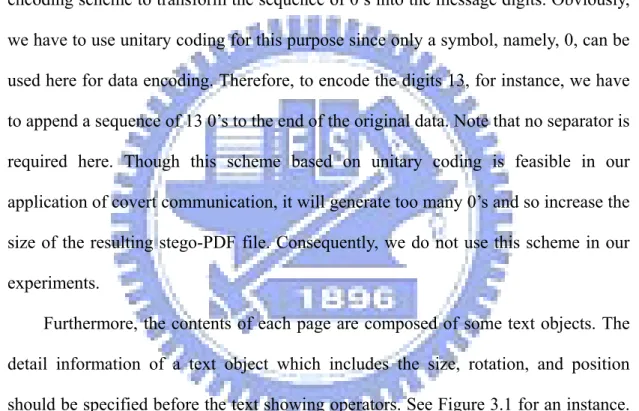
By Types 1.2 and 2.2, we can embed multiple 0’s into an integer or a real number. However, to use these 0’s as message digits, we need further an additional message encoding scheme to transform the sequence of 0’s into the message digits. Obviously, we have to use unitary coding for this purpose since only a symbol, namely, 0, can be used here for data encoding. Therefore, to encode the digits 13, for instance, we have to append a sequence of 13 0’s to the end of the original data. Note that no separator is required here. Though this scheme based on unitary coding is feasible in our application of covert communication, it will generate too many 0’s and so increase the size of the resulting stego-PDF file. Consequently, we do not use this scheme in our experiments.
Furthermore, the contents of each page are composed of some text objects. The detail information of a text object which includes the size, rotation, and position should be specified before the text showing operators. See Figure 3.1 for an instance. Such text object information is described by a text matrix which is composed by two parts: the text-orientation and the text position.
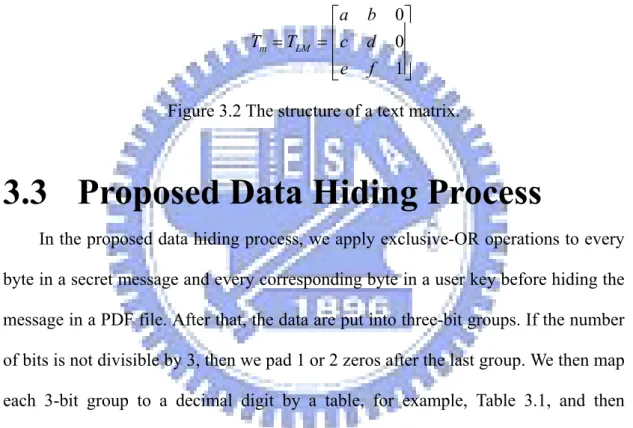
In this chapter, the secret data are hidden in the text matrices, which are composed by six distinct numbers a, b, c, d, e, and f. The structure of a text matrix is described in Figure 3.2. Numbers a, b, c, and d affect the text size and orientation of a text object; and numbers e and f affect the translation of it. Because the modification of the size or orientation of a text object is easier to observe than that of the translation, the proposed method mainly hides the data in the translation part of the text matrix. ⎥ ⎥ ⎥ ⎦ ⎤ ⎢ ⎢ ⎢ ⎣ ⎡ = = 1 0 0 f e d c b a T Tm LM
Figure 3.2 The structure of a text matrix.
3.3 Proposed Data Hiding Process
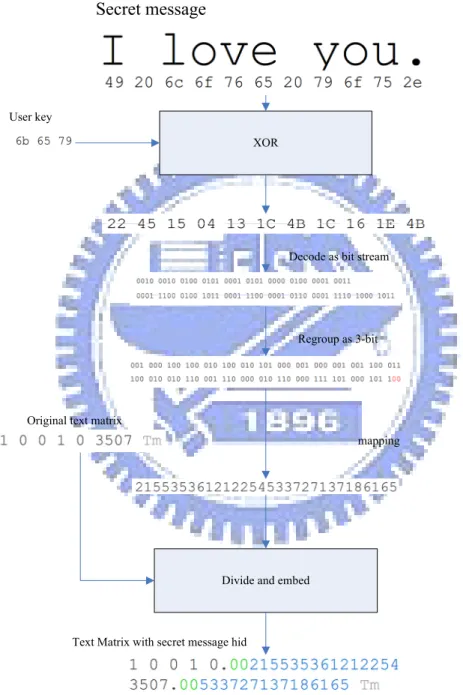
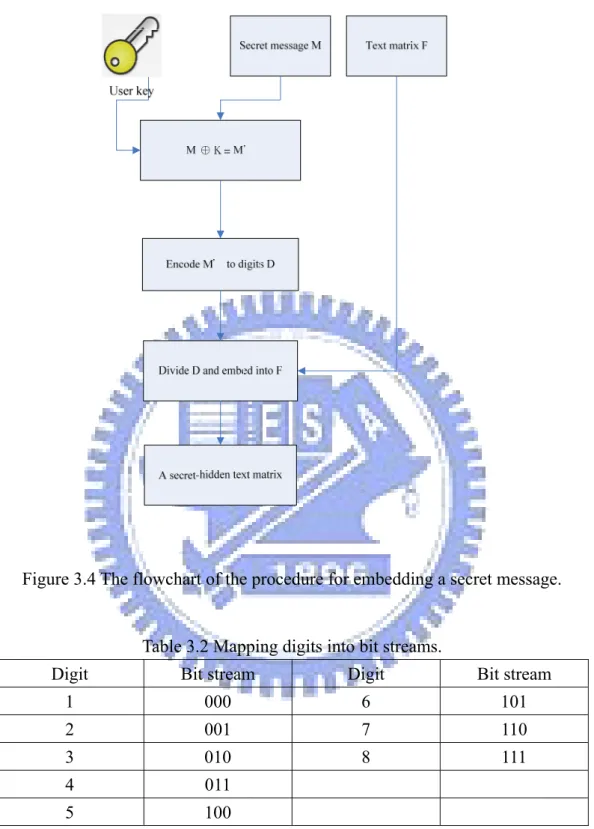
In the proposed data hiding process, we apply exclusive-OR operations to every byte in a secret message and every corresponding byte in a user key before hiding the message in a PDF file. After that, the data are put into three-bit groups. If the number of bits is not divisible by 3, then we pad 1 or 2 zeros after the last group. We then map each 3-bit group to a decimal digit by a table, for example, Table 3.1, and then concatenate it with the original number in the text matrix being processed. The procedure of the proposed method for hiding a secret message is illustrated in Figure 3.3. The flowchart is shown in Figure 3.4 and a corresponding detailed algorithm is described in the following.
Algorithm 3-1. Encoding a message and hiding it in a text matrix Input: a user key K, a secret message S, and a text matrix F. Output: a text matrix with data embedded F’.
1. For every byte in S, apply exclusive-OR operations to the i-th byte of K and the
i-th byte of S to generate the i-th byte of a new sequence of bytes S’ with the same
length as that of S.
2. Divide each 3 bits of S’ into groups of bitstream f1, f2…, fK.
3. Transform f1 through fK into decimal numbers (digits) n1, n2…, nK by Table 3.1.
4. Concatenate n1, n2…, nK as a digit string and divide it into two parts N1 and N2.
5. Embed the data into text matrix in the following way:
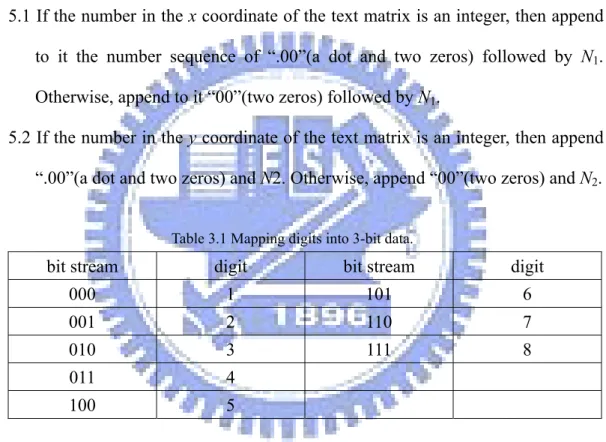
5.1 If the number in the x coordinate of the text matrix is an integer, then append to it the number sequence of “.00”(a dot and two zeros) followed by N1.
Otherwise, append to it “00”(two zeros) followed by N1.
5.2 If the number in the y coordinate of the text matrix is an integer, then append “.00”(a dot and two zeros) and N2. Otherwise, append “00”(two zeros) and N2.
Table 3.1 Mapping digits into 3-bit data.
bit stream digit bit stream digit
000 1 101 6 001 2 110 7 010 3 111 8 011 4 100 5
3.4 Proposed Data Extraction Process
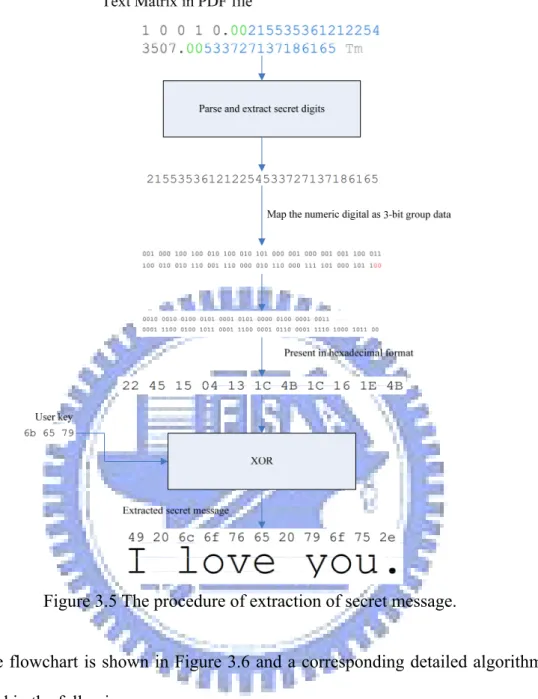
The extraction of a secret message from a text matrix in a PDF file is conducted in the following way. First, we scan each number of the translation part of the text matrix from the last digit of it to the dot, if existent. If two consecutive 0’s are obtained, then we cut off the digits after the consecutive two 0’s. We then concatenate all the cut digits to get a string of digits, map them into 3-bits groups by Table 3.2, and concatenate the resulting groups into a bit stream. After that, we apply exclusive-ORoperations to the bit stream and the user key, and regard the resulting bits as ASCII codes to get the secret message finally.
The procedure of the proposed extraction method is shown in Figure 3.5.
Secret message
XOR User key
Divide and embed
Decode as bit stream
Regroup as 3-bit
mapping
Text Matrix with secret message hid Original text matrix
Figure 3.4 The flowchart of the procedure for embedding a secret message.
Table 3.2 Mapping digits into bit streams.
Digit Bit stream Digit Bit stream
1 000 6 101 2 001 7 110 3 010 8 111 4 011 5 100
Figure 3.5 The procedure of extraction of secret message.
The flowchart is shown in Figure 3.6 and a corresponding detailed algorithm is described in the following.
Algorithm 3-2.Decoding a message from a text matrix Input: a user key K, and a text matrix F.
Output: a secret message S. Steps:
1. Extract the x and y coordinates from the text matrix F. 2. Extract the numbers after “00” in x, and store them in N1.
4. Concatenate N1 and N2 into a digit string N, and transform N into a bitstream by
Table 3.2.
5. Treat the bitstream as a binary stream of ASCII codes, and transform them to a string A of ASCII codes by Table 3.2.
6. Truncate the user key K or pad numbers to it in the following way:
6.1 if K is longer than the string A, truncate K to be a string whose length is equal to that of A;
6.2 if K is shorter than A, pad to K the required number of bytes copied from the beginning ones of K.
7. For every byte in A, apply exclusive-OR operations to the i-th byte of A and the corresponding byte of K to generate the i-th byte of S, where S is a sequence of bytes with the same length as A.
3.5 Experimental Results
In our experiments, we designed a user interface for the program we have written in the language of Java to implement the proposed message embedding and extracting algorithms. The results of two experiments are shown here in Figures 3.7 and 3.8, respectively. The first was conducted on a Chinese PDF document. Figure 7(a) shows the cover PDF document, and Figure 7(b) shows the stego-PDF document after embedding a message into the cover document through the interface as shown in Figure 7(c). Figure 7(d) shows correct extraction of the hidden message using a correct key, and Figure 7(e) shows erroneous extraction of the message with an incorrect key. Figure 8 shows the result of the second experiment conducted on an English PDF document. The figures are similarly interpreted.
Figure 3.6 The flowchart of the procedure of extracting the secret message.
3.6 Concluding Remarks
In this chapter, a covert communication technique via PDF files as cover media has been proposed. Because we can hide a covert message in PDF files without any side effects on the visual appearance of the files, the secrets in these PDF files are not easy to observe and access illicitly. Even if an illicit user knows that there is a secret message in a PDF file, the covert message can be protected by a user key, and the illicit user still cannot extract the original secret message. The secret communication via PDF files is reliable and its feasibility has been proved by our experiments.
Figure 3.7Illustration of an experiment (experiment 1) of proposed method.
(a) The view of the original PDF file in Adobe Acrobat Reader window.
(b) The view of the stego-PDF file in Adobe Acrobat Reader window.
Figure 3.7 Illustration of an experiment (experiment 1) of proposed method (continued).
(c) Window of user interface with a secret message and a user key as input.
(d) Window of user interface with embedded message extracted.
Figure 3.7 Illustration of an experiment (experiment 1) of proposed method (continued).
(e) Window of user interface with a wrong key as input, resulting in erroneous extraction of embedded message.
Figure 3.7 Illustration of an experiment (experiment 1) of proposed method (continued).
Figure 3.8Illustration of another experiment (experiment 2) of proposed method.
(a) The view of the original PDF file in Adobe Acrobat Reader window.
(b) The view of the original PDF file in Adobe Acrobat Reader window.
Figure 3.8 Illustration of another experiment (experiment 2) of proposed method. (continued)
(c) Window of user interface with a secret message and a user key as input.
(d) Window of user interface with embedded message extracted.
Figure 3.8 Illustration of another experiment (experiment 2) of proposed method. (continued)
(e) Window of user interface with a wrong key as input, resulting in erroneous extraction of embedded message.
Figure 3.8 Illustration of another experiment (experiment 2) of proposed method. (continued)
Chapter 4 Copyright Protection of
PDF Files by Watermarking and
File Distribution Control
4.1 Introduction
More and more organizations begin to store their information as electronic files to reduce paper waste and increase work efficiency. There are many advantages and disadvantages of storing data on electronic media. For instance, electronic files are easy to duplicate and modify, and so classified data in a commercial company might be illicitly accessed and distributed by malicious users. A mechanism of digital rights management for documents should be employed to prevent such users from duplicating the data illegally.
In this study, we propose a method to prevent malicious users from distributing classified PDF documents or duplicating them, by embedding visible watermarks as well as invisible user information. In Section 4.2, the idea of the proposed watermarking method is described and in Section 4.3, the idea of the proposed user-information embedding method is described. In Section 4.4, the proposed watermarking process is presented and in Section 4.5 the proposed user-information embedding and extraction processes are presented. Some experiments and discussions are shown in Section 4.6.
4.2 Idea of Proposed Watermarking
Method by Embedding of
Transparent watermarks
Many methods have been used to claim their copyright of files. One of the most popular methods is to embed a watermark in a file. Because a watermark will appear in the file, the content in the watermarked file will be polluted, but in most cases the document is still readable. We can control the readability of the document by tuning the opacity of the watermark on it.
Resources in PDF files, including images, fonts, music, are objects and stored as external objects in PDF files. Images in PDF files can also be compressed by lossy or lossless algorithms, such as JPEG and zlib, respectively. When an image is used in a PDF file, the image should be packed or compressed as a PDF object. Also, it is required to insert an image-showing operator to the page content object to show the image as a watermark on the page.
Adding a watermark into a PDF file is a function which is used frequently, but using the software provided by Adobe, namely, Adobe Acrobat Professional 8.1, image types for use as watermarks can only be BMP, JPEG, and PDF, and the watermark may be of the background style or the foreground style. There is no predefined transparent color or user-defined transparent color in their standards, except PDF. When a normal BMP or JPEG image file was added to a PDF file as a watermark, the appearance of the watermark on the PDF file will look like Figure 4.1(a) and Figure 4.1(b). Because the features of semi-transparent and transparent are not supported in the file format, the watermark which is converted from these file formats will have a background color. Even though the opacity of the watermark is
80%, like that in Figure 4.1(b), the words behind the watermark are still affected. Adobe Acrobat 8.1 Professional can also support the option of embedding a watermark as a background to reduce such effects caused by the watermark background color. But some PDF files are generated by some generators with white background at the lowest level of them. The background-style watermarks will cover part of the content so that the part becomes invisible. It is desired in this study to develop a technique to embed a watermark without any background color for copyright protection.
Figure 4.1The results of watermarking a PDF file with Adobe Acrobat 8.1
(a) The appearance of a solid watermark without tuning the opacity on the PDF file.
(b) The appearance of a solid watermark with the opacity set to be 80%.
Figure 4.1 The results of watermarking a PDF file with Adobe Acrobat 8.1 (continued)
In this study, a method for embedding the “clear outline” watermarks without the background color is proposed, which is illustrated in Figure 4.2.
4.3 Idea of Proposed Distribution
Control Technique by Embedding of
User Information
Due to the ease of duplicating digital files, the mechanism of file distribution control is becoming more and more important. Embedding user information in documents could be a practical method for this aim: if a classified document were leaked out, its owner, with the stego-PDF, can trace who downloaded the document
from the document management system by extracting the user information from the stego-document. Such extracted user information can be used as the evidence of the illegal behavior of downloading.
Figure 4.2 The proposed PDF watermark style.
In this study, a method of embedding and extracting user information is proposed, and our document management server will apply the user information embedding method and the above watermark embedding method to achieve the aims of copyright protection and distribution control.
4.4 Proposed Watermarking Process
According to the PDF standard, all images in PDF files are PDF objects, and they are described as external objects. It can be encoded as various types of data streams, for example, JPEG, zlib stream, etc. A JPEG encoded image object is just a PDF object which contains the original JPEG file, and a zlib stream image object is a losslessly compressed PDF object which contains the width, height, color depth, and
pixel data in the image. Before embedding a watermark in a PDF file, the image file should be converted into the corresponding type of PDF object. Then, we can insert the PDF image object into the PDF file, and refer to the PDF image object in the corresponding page as an image resource, like Figure 4.3(a). Next, we may specify the alpha mask of the watermark image by adding a property ‘SMask’(soft-mask
watermark) and filling the object ID and object generation number in it. We then save
the current graphic state by the operator ‘q’ and conduct a coordinate transformation with the operator “cm” to specify the position of the image. Finally, we insert the image resource name and the operator “Do” into the end of the content and restore the previous graphic state by the operator “Q,” as shown in Figure 4.3(b). The appearance of a PDF file including the above commands is shown in Figure 4.3(c).
The “cm” operator can be used to specify the coordinates of image objects in PDF files. The six parameters for the operator “cm” are listed as elements in a transformation matrix like Figure 3.2. To render an image whose width and height are
W and H, respectively, at position (x, y) in the PDF file, an example of commands
may be of the following style.
W 0 0 H x y cm
/ImageName Do
The watermark can also be a semi-transparent image. In order to embed a semi-transparent watermark, the watermark image should carry another image to describe the opacity of every pixel of the watermark. To generate the alpha mask we assume that the pixels painted as white are the transparent part of a watermark and the pixels painted as other colors are the solid part of a watermark. There may be multiple colors in the watermark, but the colors will just be treated as solid part of the
watermark in this study. The detailed algorithm which is used to generate the alpha mask is described in Algorithm 4-1.
(a) (b)
(0, 0)
(X, Y)
(x, y)
(c) (d) Figure 4.3 An example of commands to show an image.
(a) An example of page resource object. (b) An example of page content object. (c) The appearance of (b) in Adobe Acrobat Reader. (d) The position coordinates of an image object.
Algorithm 4-1. Generating an alpha blending mask image for watermarking. Input: an image W, and a threshold T.
Output: a mask image M of the input image. Steps:
1. Compute the sum of the R, G, B components of each pixel in W and save the sum in a matrix S.
2. Create a grayscale image whose width and height are the same as the image W. 3. for every pixel Wij:
If the sum of each component R, G, B is greater than the threshold T, set Mij = 0;
otherwise, set Mij = 255.
To embed a semi-transparent watermark in a PDF file, the image file should be convert to the corresponding type of PDF object, and generate a alpha mask to describe transparency of the image Then we can insert the PDF watermark and PDF alpha mask object into the PDF file, and reference the two PDF images objects in the corresponding page object as image resources. Finally, we append the image resource name and an image the image-showing operator “Do” in the end of content.
The detailed algorithm is described in Algorithm 4-1, flowchart of embedding a solid watermark is shown in Figure 4.4 and flowchart of embedding a semi-transparent watermark is shown in Figure 4.5.
Algorithm 4-2.Embed watermark to a PDF file
Input: a PDF file P, page number N, and a watermark image W Output: a watermarked PDF file P'.
Steps:
1. Find the page objects Oi in the PDF file P.
2. Search for an available indirect object number S and a generation number T 3. Pack the watermark image W as a PDF object R whose object number is S and
generation number is T, and insert R into P.
object ON and look for its content object C.
5. Add the image-showing command to C to get a watermarked PDF file P’.
Figure 4.5 The flowchart of embedding a semi-transparent watermark.
4.5 Proposed User Information
Embedding and Extraction
Processes
to control the distribution of it. Therefore, we propose in addition a method in this chapter for embedding the information of the user conducting the illegal download to trace the distribution of the file. The PDF is a rich-text format document, which contains formatted texts and images. The proposed method aims to hide user information in selected images in a PDF file. In order to prevent an illicit user from embedding fake information in the document, the user information is randomized by a user key; and to prevent an illicit user from removing the embedded user information in the document, we select the information-carrying image randomly from available ones in the given PDF document for hiding the user information.
4.5.1 Embedding of user information
In the proposed user information embedding process, we take the system time as a random number, and pick an image object randomly from the PDF file as a cover media. We conduct next the operation of exclusive-ORing all bytes of the user key to get a user key digest. We then disturb the user information by applying exclusive-ORing the user information with the user key digest, and embed the user key digest and the disturbed user information in a randomly-selected image in the PDF file with a data hiding technique, for instance, LSB replacement. Finally, we select an eligible encoding scheme to encode the image, pack the encoded image as an image object, and replace the original image object with it to complete the embedding of the user information.
The detailed algorithm for embedding user information is described as Algorithm 4-3 below, and the flowchart is illustrated in Figure 4.6.
User information embedded PDF file Original PDF file
Compute key digest Select an image Randomly
Concatenate Ranodmize user information
Hide secret data
Replace the original image
User information
Figure 4.6 The flowchart of embedding user information process.
Algorithm 4-3. Embedding user information in a PDF file.
Input: a user key K = (k1, k2, …, kN) with each ki being a byte, a user-information F,
and a PDF file P.
Output: a stego-PDF file P with the user information embedded. Steps:
1.1 Generate a user key digest D by performing the exclusive-OR operations on all bytes of D asD=k1 ⊕k2 ⊕k3...⊕kN.
1.2 Apply exclusive operations on every byte of K and the corresponding one of F to generate a sequence of bytes F' with the same length as that of F. 1.3 Concatenate F' and D to generate S.
2. Take the system time as a random number R, list all images IMi in P and the count
of images is C, and select randomly the image IM(R mod C) as W.
3. Hide S in W with a data hiding technique T, for example, LSB replacement.
4. Based on the properties of T, select an appropriate compression algorithm to compress the stego-image W. For instance, for the LSB replacement technique, apply the zlib algorithm (note: the JPEG compression algorithm is inappropriate because it will damage the LSB where data are embedded).
5. Convert W into a PDF image object.
6. Replace the original PDF image object in P with W.
4.5.2 Extraction of embedded user information
To extract the user information hidden in the randomly-selected image, the user key digest should be calculated first. For given a user key, we compare the current key digest and with the key digest hidden in each image in the stego-PDF file. If the comparison succeeds, the currently-processed image is regarded to be the one with the hidden data. Then we proceed to extract the hidden data which include the user key digest followed by the disturbed user information. We then apply exclusive-OR operations on the disturbed user information and user key to recover the original user information.
4-4 below, and the flowchart is illustrated in Figure 4.7.
Algorithm 4-4. Extracting user information in a stego-PDF file. Input: a user key K, and a suspected stego-PDF file P.
Output: the user-information S of P or none. Steps:
1. Enumerate all the images M1, M2, ..., MN in the PDF file P where N is the number
of all images.
2. Generate a key digest D from K by exclusive-ORing all bytes of K as D =
k1⊕k2⊕...⊕kN.
3. Use the data extracting technique T corresponding to the data hiding technique used in Algorithm 4.3 to extract data Si from each Mi i = 1, 2, …, N, and divide Si
into two parts, the first Pi being just the first byte of Si, and the second Qi the rest
of Si.
4. For i = 1, 2, …, N, if Pi and D matches, then apply exclusive-OR operations on Qi
and K to generate a byte sequence S whose length is equal to that of Qi.
The proposed document management server will integrate the above two techniques (described as Algorithms 4-3 and 4-4) to implement copyright protection and file distribution control. The relation between a manager, a user, and the document management server is illustrated in Figure 4.5. The experimental results are shown in the next section.
4.6 Experimental Results and
Discussions
In our experiments, we designed a user interface for the program we have written in the language of Java to implement the proposed watermarking, embedding and extracting of user information. The results of two experiments are shown here in Figures 4.10 and 4.11, respectively. The first was conducted on a Chinese PDF document. Figure 10(a) shows the original PDF document and Figure 10(b) shows the watermarked and information embedded after watermarking and embedding user information into the cover document through the server side program as shown in Figure 3.9. Figure 10(d) shows correct extraction of the hidden message using a correct key, and Figure 10(e) shows an error message with an incorrect key. Figure 11 shows the result of the second experiment conducted on an English PDF document. The figures are similarly interpreted.
In this chapter, a watermark technique for copyright protection and user information embedding technique for distribution control has been proposed. The user information is disturbed with a user key to protect the user information and make it hard to detect and break, so the user information embedding technique is useful for distribution control
Original PDF file
compute key digest List all images
User information User key
Extract user information
Compare a and b
Key digest a
Key digest b
a = b
The hidden data XOR user key a ≠ b
Any matched ?
No embedded info. Found.
Try the matched one. yes no
Figure 4.8 The relation between a manager, the server and a user. .
Figure 4.9 The window of visiting the document management server by Mozilla Firefox 2.0.
Figure 4.10 Illustration of experiment (experiment 1) of proposed method
(a) The appearance of the original PDF with Adobe Acrobat Reader window.
(b) The appearance of the watermarked PDF with Adobe Acrobat Reader window
Figure 4.10 Illustration of experiment (experiment 1) of proposed method (continued).
(c) Window of user interface with embedded information extracted.
(d) Window of user interface with wrong key input, resulting in not found of embedded information..
Figure 4.10 Illustration of experiment (experiment 1) of proposed method (continued).
Figure 4.11 Illustration of another experiment (experiment 2) of proposed method.
(a) The appearance of the original PDF with Adobe Acrobat Reader window.
(b) The appearance of the original PDF with Adobe Acrobat Reader window.
Figure 4.11 Illustration of experiment (experiment 1) of proposed method (continued).
(c) Window of user interface with embedded information extracted.
(d) Window of user interface with wrong key input, resulting in not found of embedded information..
Figure 4.11 Illustration of another experiment (experiment 2) of proposed method (continued).
Chapter 5 Authentication of PDF
Files for Fidelity and Integrity
Verification by Data Hiding
Techniques
5.1 Introduction
More and more information is carried by digital document files. One advantage of using digital documents is the convenience to replicate and modify them, but this also causes a disadvantage, that is, tampering with digit documents becomes so easy that their contents become unreliable and need be authenticated. The PDF is one of the most popular rich text documents, so it is desired to develop a method for authentication of PDF files for fidelity and integrity verification by data hiding techniques.
In this chapter, a method for PDF file authentication is proposed. In Section 5.2, the idea of PDF authentication is described. In Section 5.3, the proposed method for PDF authentication and a detailed algorithm implementing the method are presented. In Section 5.4, some experimental results and discussions are presented.
5.2 Idea of PDF Authentication by
Embedding Authentication Signals
into Text Matrices
files. In this chapter, the proposed authentication method which is implemented by applying the previously-proposed techniques will be described.
In order to achieve our goal, we propose to embed authentication signals in the text matrices of each text object. The authentication signal is generated from the string in each text block and a user key. Verifying the fidelity and integrity of a PDF file then is just to extract the authentication signals from the text matrices and matching them with the signals which are generated from the strings in the currently-processed text blocks. The advantages of hiding authentication signals in text matrices are multifold. First, if any text object is moved, the authentication signal in the text matrix will be destroyed. So our method can detect illegal movements of text objects. Second, if the strings in the text objects are modified, the embedded authentication signals and the signals generated from the modified strings will not match. So, our method can also detect text modification. Third, if a PDF file is regenerated by another PDF generator, the authentication signals in the PDF file will be destroyed as well, and so our method can also detect regeneration of PDF files. Furthermore, we protect the security of the authentication signal by exclusive-ORing the signal with a user key in our method. This ensures that an illicit user who does not know the user key cannot create fake authentication signals to cheat other users.
5.3 Proposed Authentication Signal
Embedding and Extraction
Processes
Before embedding authentication signals, we need to scan all the text blocks and their corresponding text matrices. For each text block, we extract the string in it, sum up the values of the ASCII codes of the characters in the string, and take the
modulo-256 value of the sum to get a digest of the string. Then, we apply exclusive-OR operations on the sum and the user key to generate an authentication signal, which is then embedded into the PDF file using the method proposed previously.
The details are described as Algorithm 5-1 and the flowchart is illustrated in Figure 5.1.
Algorithm 5-1 Embedding Authentication Signals in a PDF file.
Input: a user key K = (k1, k2, …, kN) where each ki is a byte, and a PDF file P.
Output: an authentication signal-embedded PDF file. Steps:
1. Find all the strings Ti in the PDF file P and their corresponding text matrices Xi.
Let the number of text objects be M.
2. For i = 1, 2, 3, …, M, perform the following steps.
2.1 Sum up all the bytes k1 through kN of K and take the modulo-256 value D of
the sum. That is, compute
256 mod ) ... (k1 k2 k3 kN D= + + + .
2.2 Apply exclusive-ORing operations on all the bytes of Ti, where i = 1, 2, …,
M, and take the exclusive-OR value of the result E and D as F. That is, for Ti
= (t1, t2, t3…, tL), compute L t t t t E = 1⊕ 2⊕ 3...⊕ ; E D F = ⊕ .
Figure 5.1 Process of embedding authentication signals in a PDF file.
After the above procedures, if the PDF is tampered with, our program can find out where the tampering occurs by verification of the authentication signals which are hidden in the text matrices. The verification, simply speaking, is a reverse version of the above process.
and their corresponding text matrices. For each text block, we extract the string in it and sum up the values of all the ASCII codes of the characters in the string. We then take the modulo-256 value of the sum to get a digest of the string. Then we apply exclusive-OR operations on the sum and the user key to generate the authentication verification signal.
Next, we match the authentication signal so computed with the authentication signal extracted from the stego-PDF file. If they are the same, it is decided that the document is an unmodified one; otherwise, the document must be tampered with. The details are described as Algorithm 5-2 and the flowchart is shown in Figure 5.2.
Algorithm 5-2 Extracting Authentication Signals from a PDF file.
Input: a user key K = (k1, k2, …, kN) where each ki is a byte, and a PDF file P.
Output: a verification report of P. Steps:
1. Find all the strings Ti in the PDF file and their corresponding text matrices Xi. Let
the number of text objects be M.
2. For i = 1, 2, …, M, perform the following steps.
2.1 Sum up all the bytes k1 through kN of K and take the modulo-256 value D
of the sum. That is, compute
256 mod ) ... (k1 k2 k3 kN D= + + + .
2.2 Apply exclusive-ORing on all the bytes of Ti, where i = 1, 2, …, M, and
take the exclusive-OR value of the result E and D as F. That is, for Ti =
(t1, t2,…, tL), compute L t t t t E = 1⊕ 2⊕ 3...⊕ ; E D F = ⊕ .
2.4 If Ai ≠ F, then decide that the contents of Ti have been modified and
mark it so in P.
Search for text blocks and theirs text matrices.
extract all characters in each text block.
Sum and mod-256
Extract text matrix
Change font color as red no
Data XOR key = key' User key Extract the data from text
matrix key Hiding-data b a a = b ?
Keep the original text yes
Original PDF file
Verification report
Figure 5.2 The process of checking the fidelity and integrity of a PDF file.
5.4 Experimental Results
in the language of Java to implement the proposed authentication method. The results of two experiments are shown here in Figures 5.3 and 5.4, respectively. The first was conducted on a Chinese PDF document. Figure 3(a) shows the original PDF document, Figure 3(b) shows the modified PDF document, and Figure 3(c) shows the result of the verified PDF document through our program. Figure 4 shows the result of the second experiment conducted on an English PDF document. The figures are similarly interpreted.
5.5 Discussions
In this chapter, a method for authentication of the fidelity and integrity of PDF files by data hiding techniques has been proposed. The proposed authentication technique can detect various types of PDF file tampering. The authentication signal is randomized by a user key, so it is not easy to create fake authentication signals. The proposed is reliable to protect documents from tampering as proved by our experiments.
Figure 5.3 Illustration of experiment (experiment 1) of proposed method.
(a) The appearance of the original PDF document with Adobe Acrobat Reader window.
(b) The appearance of the tampered PDF document with Adobe Acrobat Reader window
(c) The appearance of the verified PDF document with Adobe Acrobat Reader window
Figure 5.4 Illustration of another experiment (experiment 2) of proposed method.
(a) The appearance of the original PDF document with Adobe Acrobat Reader window.
(b) The appearance of the tampered PDF document with Adobe Acrobat Reader window
(c) The appearance of the verified PDF document with Adobe Acrobat Reader window
Chapter 6 Conclusions and
Suggestions for Future Works
6.1 Conclusions
In this study, we have proposed a data hiding method for PDF files as cover media. This method is useful for the applications of covert communication and authentication. For copyright protection and distribution control, we have proposed another data hiding technique.
For covert communication, in the proposed method a given secret message is disturbed by a user key and embedded into a PDF file. The embedded message is plain text. According to our experiments, plain texts without any special encoding are easy to attack. If an illicit user knows our algorithm and the encoding method, he/she can extract the embedded message easily. We improve this weakness by adding a user key to randomize the original message. Even if an illicit user knows our algorithm and the message encoding scheme, he/she cannot extract our secret message without the key. Randomizing secret messages can enhance the security of the proposed method for covert communication.
For copyright protection and file distribution control, we have proposed a watermarking method and a user information embedding scheme. We have also built a document management server which implements the processes for the two techniques. The user information is hidden in a randomly selected image in a PDF file. An illicit document downloader can hardly steal the embedded user information, because he/she cannot know which image we selected for hiding the data. The user information is protected further by a user key which is not easy to figure out. On the other hand, if a watermark is removed or destroyed, the embedded user information
will also be destroyed. This can enhance the security of the embedded user information.
For integrity and fidelity verification, we have proposed an authentication method based on a data hiding technique. The function of this method is also integrated to the previously-mentioned document management server. Authentication signals are generated and embedded into every document which is downloaded from the server. The proposed authentication signal is sensitive to reveal the changes of PDF file contents. The authenticable changes in a document could be illegal moving and modification of texts. We embed authentication signals into the text matrices for authentication verification.
6.2 Suggestions for Future Works
Several suggestions for future researches are enumerated as follows.1. We may develop additional techniques for some special cases, for example, a text-only PDF document, in which we have no image in the PDF file to embed downloading-user information. We could add a new dummy image for embedding secret, but such a method is too easy to attack. One way out is to replace each character in a set of characters with a text image, and to select one of the images as the carrier of the downloading user information.
2. The proposed covert communication method can be improved by replacing more types of objects in the PDF files and mixing the proposed methods to hide data to confuse illicit users more effectively.
3. The proposed user information embedding method can be improved by hiding the user information in other types of objects to strengthen the security of the documents.