Chapter 3
Number
Convert a number from decimal to binary notation and
Convert a number from decimal to binary notation and
vice versa.
vice versa.
Understand the different representations of an integer inside
Understand the different representations of an integer inside
a computer: unsigned, sign-and-magnitude, one’s complement,
a computer: unsigned, sign-and-magnitude, one’s complement,
and two’s complement.
and two’s complement.
Understand the Excess system that is used to store the
Understand the Excess system that is used to store the
exponential part of a floating-point number.
exponential part of a floating-point number.
After reading this chapter, the reader should
After reading this chapter, the reader should
be able to :
be able to :
O
O
BJECTIVES
BJECTIVES
Understand how floating numbers are stored inside a computer
Understand how floating numbers are stored inside a computer
using the exponent and the mantissa.
DECIMAL
DECIMAL
AND
AND
BINARY
BINARY
DECIMAL
DECIMAL
AND
AND
BINARY
BINARY
3.1
3.1
Figure 3-1
Figure 3-2
CONVERSION
CONVERSION
CONVERSION
CONVERSION
3.2
Figure 3-3
Example 1
Example 1
Convert the binary number 10011 to decimal.
Solution
Solution
Write out the bits and their weights. Multiply the bit by its corresponding weight and record the result. At the end, add the results to get the decimal number.
Binary 1 0 0 1 1
Weights 16 8 4 2 1 16 + 0 + 0 + 2 + 1
Example 2
Example 2
Convert the decimal number 35 to binary.
Solution
Solution
Write out the number at the right corner. Divide the number continuously by 2 and write the quotient and the remainder. The quotients move to the left, and the remainder is recorded under each quotient. Stop when the quotient is zero.
0 1 2 4 8 17 35 Dec.
Figure 3-4
Figure 3-7
Example 17
Example 17
Transform the fraction 0.875 to binary
Solution
Solution
Write the fraction at the left corner. Multiply the
Write the fraction at the left corner. Multiply the
number continuously by 2 and extract the
number continuously by 2 and extract the
integer part as the binary digit. Stop when the
integer part as the binary digit. Stop when the
number is 0.0.
number is 0.0.
0.875 1.750 1.5 1.0 0.0 0
.
1 1 1Example 18
Example 18
Transform the fraction 0.4 to a binary of 6 bits.
Solution
Solution
Write the fraction at the left cornet. Multiply the
Write the fraction at the left cornet. Multiply the
number continuously by 2 and extract the
number continuously by 2 and extract the
integer part as the binary digit. You can never
integer part as the binary digit. You can never
get the exact binary representation. Stop when
get the exact binary representation. Stop when
you have 6 bits.
you have 6 bits.
0.4 0.8 1.6 1.2 0.4 0.8 1.6 0
.
0 1 1 0 0 1INTEGER
INTEGER
REPRESENTATION
REPRESENTATION
INTEGER
INTEGER
REPRESENTATION
REPRESENTATION
3.4
3.4
Figure 3-5
Figure 3-6
Table 3.1 Range of unsigned integers
Table 3.1 Range of unsigned integers
# of Bits # of Bits ---8 16 RangeRange ---0 255 0 65,535
Example 3
Example 3
Store 7 in an 8-bit memory location.
SolutionSolution
First change the number to binary 111. Add five
First change the number to binary 111. Add five
0s to make a total of N (8) bits,
0s to make a total of N (8) bits, 0000011100000111. The . The number is stored in the memory location.
Example 4
Example 4
Store 258 in a 16-bit memory location.
SolutionSolution
First change the number to binary 100000010.
First change the number to binary 100000010.
Add seven 0s to make a total of N (16) bits,
Add seven 0s to make a total of N (16) bits, 0000000100000010
0000000100000010. The number is stored in the . The number is stored in the memory location.
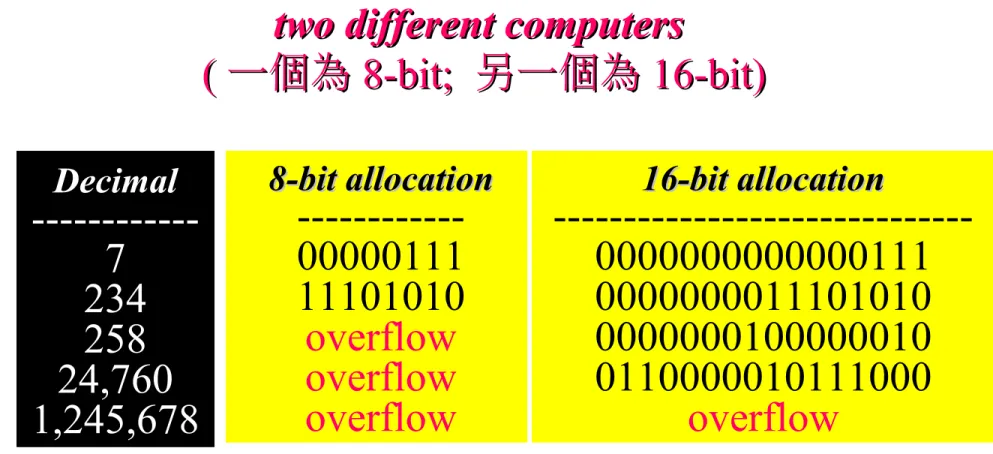
Table 3.2 Example of storing unsigned integers in
Table 3.2 Example of storing unsigned integers in
two different computers
two different computers
(
( 一個為一個為 8-bit; 8-bit; 另一個為另一個為 16-bit)16-bit)
Decimal Decimal ---7 234 258 24,760 1,245,678 8-bit allocation 8-bit allocation ---00000111 11101010 overflow overflow overflow 16-bit allocation 16-bit allocation ---0000000000000111 0000000011101010 0000000100000010 0110000010111000 overflow
Example 5
Example 5
Interpret 00101011 in decimal if the number
was stored as an unsigned integer.
Solution
Solution
Using the procedure shown in Figure
Using the procedure shown in Figure
3.3 , the number in decimal is
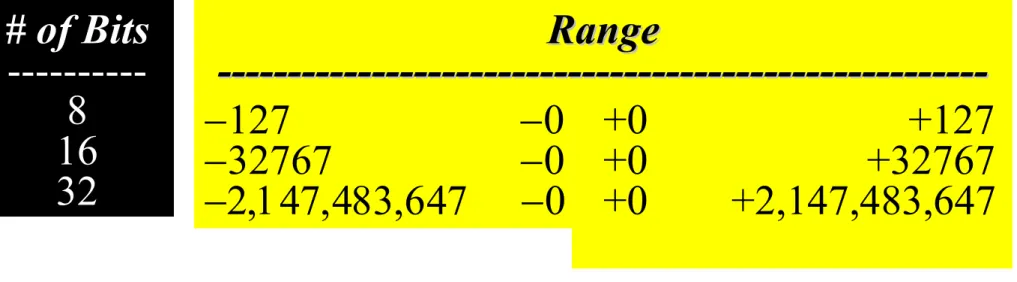
Table 3.3 Range of sign-and-magnitude integers
Table 3.3 Range of sign-and-magnitude integers
# of Bits # of Bits ---8 16 32 127 0 32767 0 0 +0 +127 +0 +32767 +0 +2,147,483,647 Range Range
---In sign-and-magnitude representation,
In sign-and-magnitude representation,
the leftmost bit defines the sign of the
the leftmost bit defines the sign of the
number. If it is 0, the number is
number. If it is 0, the number is
positive.If it is 1, the number is negative.
positive.If it is 1, the number is negative.
Note:
There are two 0s in
There are two 0s in
sign-and-magnitude
magnitude
representation: positive and
representation: positive and
negative.
negative.
In an 8-bit allocation:
In an 8-bit allocation:
+0
+0
00000000
00000000
-0
-0
10000000
10000000
Note:
Note:
Example 6
Example 6
Store +7 in an 8-bit memory location using
sign-and-magnitude representation.
Solution
Solution
First change the number to binary 111. Add
First change the number to binary 111. Add
four 0s to make a total of N-1 (7) bits,
four 0s to make a total of N-1 (7) bits, 00001110000111. . Add an extra zero because the number is
Add an extra zero because the number is
positive. The result is:
positive. The result is:
Example 7
Example 7
Store –258 in a 16-bit memory location
using sign-and-magnitude representation.
SolutionSolution
First change the number to binary 100000010.
First change the number to binary 100000010.
Add six 0s to make a total of N-1 (15) bits,
Add six 0s to make a total of N-1 (15) bits, 000000100000010
000000100000010. Add an extra 1 because the . Add an extra 1 because the number is negative. The result is:
number is negative. The result is:
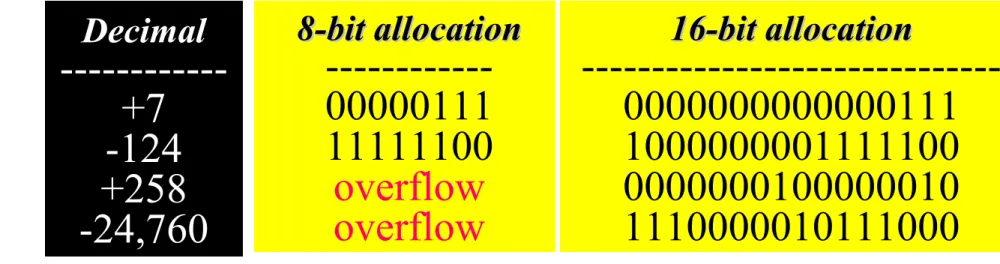
Table 3.4 Example of storing sign-and-magnitude integers
Table 3.4 Example of storing sign-and-magnitude integers
in two computers in two computers Decimal Decimal ---+7 -124 +258 -24,760 8-bit allocation 8-bit allocation ---00000111 11111100 overflow overflow 16-bit allocation 16-bit allocation ---0000000000000111 1000000001111100 0000000100000010 1110000010111000
Example 8
Example 8
Interpret 10111011 in decimal if the number
was stored as a sign-and-magnitude integer.
SolutionSolution
Ignoring the leftmost bit, the remaining bits are
Ignoring the leftmost bit, the remaining bits are
0111011. This number in decimal is 59. The
0111011. This number in decimal is 59. The
leftmost bit is 1, so the number is
There are two 0s in one’s
There are two 0s in one’s
complement
complement
representation: positive and
representation: positive and
negative.
negative.
In an 8-bit allocation:
In an 8-bit allocation:
+0
+0
00000000
00000000
-0
-0
11111111
11111111
Note:
Note:
One’s complement
( 一位補數法 )
• If the sign is positive (0), no more action is needed;
• If the sign is negative, every bit is complemented.
Table 3.5 Range of one’s complement integers
Table 3.5 Range of one’s complement integers
# of Bits # of Bits ---8 16 32 127 0 32767 0 0 +0 +127 +0 +32767 +0 +2,147,483,647 Range Range
---In one’s complement representation,
In one’s complement representation,
the leftmost bit defines the sign of the
the leftmost bit defines the sign of the
number. If it is 0, the number is
number. If it is 0, the number is
positive.If it is 1, the number is negative.
positive.If it is 1, the number is negative.
Note:
Example 9
Example 9
Store +7 in an 8-bit memory location using
one’s complement representation.
Solution
Solution
First change the number to binary 111. Add five
First change the number to binary 111. Add five
0s to make a total of N (8) bits,
0s to make a total of N (8) bits, 0000011100000111. The . The sign is positive, so no more action is needed. The
sign is positive, so no more action is needed. The
result is:
result is:
Example 10
Example 10
Store –258 in a 16-bit memory location
using one’s complement representation.
SolutionSolution
First change the number to binary 100000010.
First change the number to binary 100000010.
Add seven 0s to make a total of N (16) bits,
Add seven 0s to make a total of N (16) bits, 0000000100000010
0000000100000010. The sign is negative, so . The sign is negative, so each bit is complemented. The result is:
each bit is complemented. The result is:
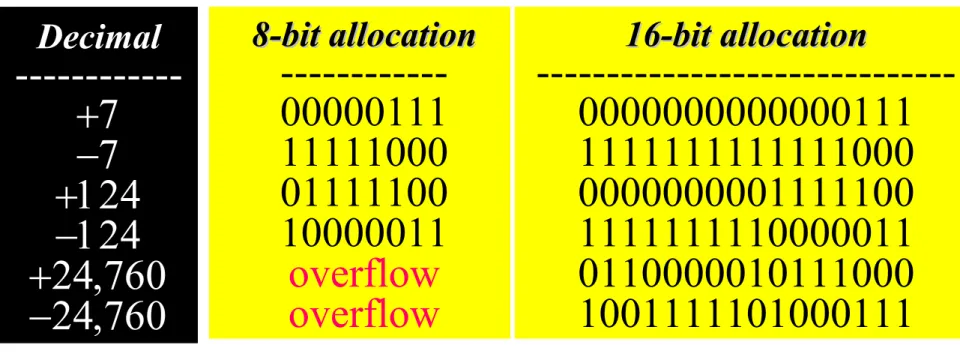
Table 3.6 Example of storing one’s complement integers in
Table 3.6 Example of storing one’s complement integers in
two different computers
two different computers
Decimal Decimal --- 8-bit allocation 8-bit allocation ---00000111 11111000 01111100 10000011 overflow overflow 16-bit allocation 16-bit allocation ---0000000000000111 1111111111111000 0000000001111100 1111111110000011 0110000010111000 1001111101000111
Example 11
Example 11
Interpret 11110110 in decimal if the number
was stored as a one’s complement integer.
SolutionSolution
The leftmost bit is 1, so the number is negative.
The leftmost bit is 1, so the number is negative.
First complement it . The result is 00001001.
First complement it . The result is 00001001.
The complement in decimal is 9. So the original
The complement in decimal is 9. So the original
number was
number was –9–9. Note that complement of a . Note that complement of a
complement is the original number.
One’s complement means reversing all
One’s complement means reversing all
bits. If you one’s complement a positive
bits. If you one’s complement a positive
number, you get the corresponding
number, you get the corresponding
negative number. If you one’s
negative number. If you one’s
complement a negative number, you get
complement a negative number, you get
the corresponding positive number. If
the corresponding positive number. If
you one’s complement a number twice,
you one’s complement a number twice,
you get the original number.
you get the original number.
Note:
Two’s complement is the most common,
Two’s complement is the most common,
the most important, and the most widely
the most important, and the most widely
used representation of integers today.
used representation of integers today.
Note:
Two’s complement
• If the sign is positive, no further action is needed;
• If the sign is negative, leave all the rightmost 0s and the first 1 unchanged. Complement the rest of the bits
e.g. 00000000001010000000000000101000
11111111110110001111111111011000
Two’s complement 的另類看法
00000000001010000000000000101000 111111111101 11111111110110001000 1. 1. 00000000001010000000000000101000 1111111111010111 1111111111010111 11111111110110001111111111011000 One’s complement +1 2. 216-00000000001010000000000000101000 1000000000000000010000000000000000 -) 0000000000101000 -) 0000000000101000 11111111110110001111111111011000Table 3.7 Range of two’s complement integers
Table 3.7 Range of two’s complement integers
# of Bits # of Bits ---8 16 32 128 32,768 0 +127 0 +32,767 0 +2,147,483,647 Range Range
---In two’s complement representation,
In two’s complement representation,
the leftmost bit defines the sign of the
the leftmost bit defines the sign of the
number. If it is 0, the number is positive.
number. If it is 0, the number is positive.
If it is 1, the number is negative.
If it is 1, the number is negative.
Note:
Example 12
Example 12
Store +7 in an 8-bit memory location using
two’s complement representation.
Solution
Solution
First change the number to binary 111. Add five
First change the number to binary 111. Add five
0s to make a total of N (8) bits,
0s to make a total of N (8) bits, 0000011100000111.The .The
sign is positive, so no more action is needed. The
sign is positive, so no more action is needed. The
result is:
result is:
Example 13
Example 13
Store –40 in a 16-bit memory location using two’s complement representation.
Solution
Solution
First change the number to binary 101000. Add
First change the number to binary 101000. Add
ten 0s to make a total of N (16) bits,
ten 0s to make a total of N (16) bits, 0000000000101000
0000000000101000. The sign is negative, so . The sign is negative, so
leave the rightmost 0s up to the first 1 (including
leave the rightmost 0s up to the first 1 (including
the 1) unchanged and complement the rest. The
the 1) unchanged and complement the rest. The
result is:
result is:
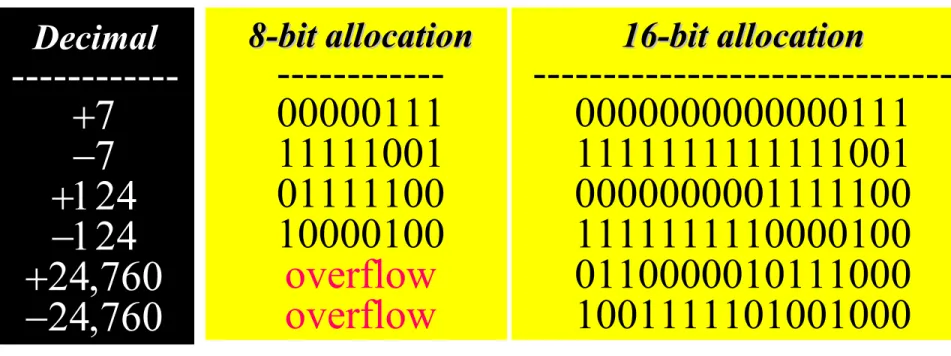
Table 3.8 Example of storing two’s complement integers in
Table 3.8 Example of storing two’s complement integers in
two different computers
two different computers
Decimal Decimal --- 8-bit allocation 8-bit allocation ---00000111 11111001 01111100 10000100 overflow overflow 16-bit allocation 16-bit allocation ---0000000000000111 1111111111111001 0000000001111100 1111111110000100 0110000010111000 1001111101001000
There is only one 0 in two’s
There is only one 0 in two’s
complement:
complement:
In an 8-bit allocation:
In an 8-bit allocation:
0
0
00000000
00000000
Note:
Note:
Example 14
Example 14
Interpret 11110110 in decimal if the number
was stored as a two’s complement integer.
SolutionSolution
The leftmost bit is 1. The number is negative.
The leftmost bit is 1. The number is negative.
Leave 10 at the right alone and complement the
Leave 10 at the right alone and complement the
rest. The result is 00001010. The two’s
rest. The result is 00001010. The two’s
complement number is 10. So the original
complement number is 10. So the original
number was
Two’s complement can be achieved by
Two’s complement can be achieved by
reversing all bits except the rightmost bits up to
reversing all bits except the rightmost bits up to
the first 1 (inclusive). If you two’s complement
the first 1 (inclusive). If you two’s complement
a positive number, you get the corresponding
a positive number, you get the corresponding
negative number. If you two’s complement a
negative number. If you two’s complement a
negative number, you get the corresponding
negative number, you get the corresponding
positive number. If you two’s complement a
positive number. If you two’s complement a
number twice, you get the original number.
number twice, you get the original number.
Note:
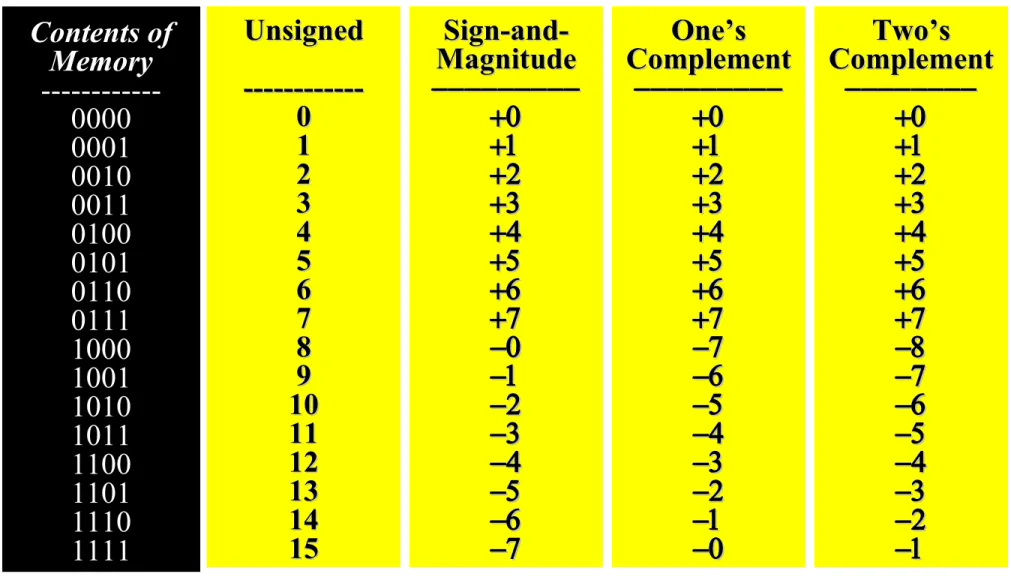
Table 3.9 Summary of integer representation
Table 3.9 Summary of integer representation
Contents of Contents of Memory Memory ---0000 0001 0010 0011 0100 0101 0110 0111 1000 1001 1010 1011 1100 1101 1110 1111 Unsigned Unsigned ---0 0 1 1 2 2 3 3 4 4 5 5 6 6 7 7 8 8 9 9 10 10 11 11 12 12 13 13 14 14 15 15 Sign-and-Magnitude Magnitude One’s One’s Complement Complement Two’s Two’s Complement Complement
EXCESS
EXCESS
SYSTEM
SYSTEM
EXCESS
EXCESS
SYSTEM
SYSTEM
3.5
3.5
Example 15
Example 15
Represent –25 in Excess_127 using an 8-bit
allocation.
Solution
Solution
First add 127 to get 102. This number in
First add 127 to get 102. This number in
binary is 1100110. Add one bit to make it 8
binary is 1100110. Add one bit to make it 8
bits in length. The representation is
bits in length. The representation is
01100110
Example 16
Example 16
Interpret 11111110 if the representation is
Excess_127.
Solution
Solution
First change the number to decimal. It
First change the number to decimal. It
is 254. Then subtract 127 from the
is 254. Then subtract 127 from the
number. The result is decimal
FLOATING-POINT
FLOATING-POINT
REPRESENTATION
REPRESENTATION
FLOATING-POINT
FLOATING-POINT
REPRESENTATION
REPRESENTATION
3.5
3.5
Table 3.10 Example of normalization
Table 3.10 Example of normalization
Original Number Original Number ---+1010001.1101 -111.000011 +0.00000111001 -001110011 Move Move --- 6 2 6 3 Original Number Original Number --- Normalized x x x x
Figure 3-8
Example 19
Example 19
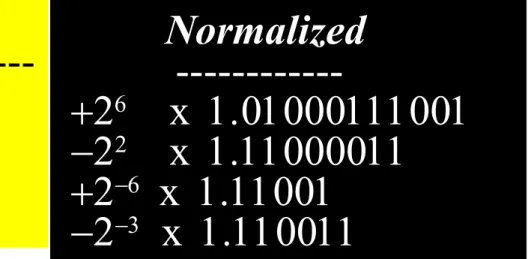
Show the representation of the normalized
number
+ 2
6x 1.01000111001
Solution
Solution
The sign is positive. The Excess_127 representation of
The sign is positive. The Excess_127 representation of
the exponent is 133. You add extra 0s on the right to
the exponent is 133. You add extra 0s on the right to
make it 23 bits. The number in memory is stored as:
make it 23 bits. The number in memory is stored as:
Table 3.11 Example of floating-point representation
Table 3.11 Example of floating-point representation
Sign Sign ----1 0 1 Mantissa ---11000011000000000000000 11001000000000000000000 11001100000000000000000 Number -22 x 1.11000011 +2-6 x 1.11001 -2-3 x 1.110011 Exponent Exponent ---10000001 01111001 01111100
Example 20
Example 20
Interpret the following 32-bit floating-point
number
1
01111100
11001100000000000000000
SolutionSolution
The sign is negative. The exponent is –3 (124 –
The sign is negative. The exponent is –3 (124 –
127). The number after normalization is
127). The number after normalization is