Slide 11.1
CHAPTER 11
REQUIREMENTS
Slide 11.2
Overview
Determining what the client needs
Overview of the requirements workflow
Understanding the domain
The business model
Initial requirements
Initial understanding of the domain: The MSG Foundation case study
Initial business model: The MSG Foundation case study
Slide 11.3
Overview (contd)
Initial requirements: The MSG Foundation case study
Continuing the requirements workflow: The MSG Foundation case study
Revising the requirements: The MSG Foundation case study
The test workflow: The MSG Foundation case study
The classical requirements phase
Rapid prototyping
Slide 11.4
Overview (contd)
Human factors
Reusing the rapid prototype
CASE tools for the requirements workflow
Metrics for the requirements workflow
Challenges of the requirements workflow
Slide 11.5
The Aim of the Requirements Workflow
To answer the question:
What must the product be able to do?
Slide 11.6
11.1 Determining What the Client Needs
Misconception
– We must determine what the client wants
“I know you believe you understood what you think I said, but I am not sure you realize that what you heard is not what I meant!”
We must determine what the client needs
Slide 11.7
Determining What the Client Needs (contd)
It is hard for a systems analyst to visualize a software product and its functionality
– The problem is far worse for the client
A skilled systems analyst is needed to elicit the appropriate information from the client
The client is the only source of this information
Slide 11.8
Determining What the Client Needs (contd)
The solution:
– Obtain initial information from the client
– Use this initial information as input to the Unified Process
– Follow the steps of the Unified Process to determine the client’s real needs
Slide 11.9
11.2 Overview of the Requirements Workflow
First, gain an understanding of the application domain (or domain, for short)
– The specific environment in which the target product is to operate
Second, build a business model
– Model the client’s business processes
Third, use the business model to determine the client’s requirements
Iterate the above steps
Slide 11.10
Definitions
Discovering the client’s requirements
– Requirements elicitation (or requirements capture) – Methods include interviews and surveys
Refining and extending the initial requirements
– Requirements analysis
Slide 11.11
11.3 Understanding the Domain
Every member of the development team must become fully familiar with the application domain
– Correct terminology is essential
Construct a glossary
– A list of technical words used in the domain, and their meanings
Slide 11.12
11.4 Business Model
A business model is a description of the business processes of an organization
The business model gives an understanding of the client’s business as a whole
– This knowledge is essential for advising the client regarding computerization
The systems analyst needs to obtain a detailed understanding of the various business processes
– Different techniques are used, primarily interviewing
Slide 11.13
11.4.1 Interviewing
The requirements team meet with the client and users to extract all relevant information
Slide 11.14
Interviewing (contd)
There are two types of questions
– Close-ended questions require a specific answer – Open-ended questions are posed to encourage the
person being interviewed to speak out
There are two types of interviews
– In a structured interview, specific preplanned questions are asked, frequently close-ended
– In an unstructured interview, questions are posed in response to the answers received, frequently open- ended
Slide 11.15
Interviewing (contd)
Interviewing is not easy
– An interview that is too unstructured will not yield much relevant information
– The interviewer must be fully familiar with the application domain
– The interviewer must remain open-minded at all times
After the interview, the interviewer must prepare a written report
– It is strongly advisable to give a copy of the report to the person who was interviewed
Slide 11.16
11.4.2 Other Techniques
Interviewing is the primary technique
A questionnaire is useful when the opinions of hundreds of individuals need to be determined
Examination of business forms shows how the client currently does business
Slide 11.17
Other Techniques (contd)
Direct observation of the employees while they perform their duties can be useful
– Videotape cameras are a modern version of this technique
– But, it can take a long time to analyze the tapes
– Employees may view the cameras as an unwarranted invasion of privacy
Slide 11.18
11.4.3 Use Cases
A use case models an interaction between the software product itself and the users of that
software product (actors)
Example:
Figure 11.1
Slide 11.19
Use Cases (contd)
An actor is a member of the world outside the software product
It is usually easy to identify an actor
– An actor is frequently a user of the software product
In general, an actor plays a role with regard to the software product. This role is
– As a user; or
– As an initiator; or
– As someone who plays a critical part in the use case
Slide 11.20
Use Cases (contd)
A user of the system can play more than one role
Example: A customer of the bank can be
– A Borrower or – A Lender
Slide 11.21
Use Cases (contd)
Conversely, one actor can be a participant in multiple use cases
Example: A Borrower may be an actor in
– The Borrow Money use case;
– The Pay Interest on Loan use case; and – The Repay Loan Principal use case
Also, the actor Borrower may stand for many thousands of bank customers
Slide 11.22
Use Cases (contd)
An actor need not be a human being
Example: An e-commerce information system has to interact with the credit card company
information system
– The credit card company information system is an actor from the viewpoint of the e-commerce information
system
– The e-commerce information system is an actor from the viewpoint of the credit card company information system
Slide 11.23
Use Cases (contd)
A potential problem when identifying actors
– Overlapping actors
Example: Hospital software product
– One use case has actor Nurse
– A different use case has actor Medical Staff – Better:
» Actors: Physician and Nurse
Slide 11.24
Use Cases (contd)
Alternatively:
– Actor Medical Staff with two specializations: Physician and Nurse
Figure 11.2
Slide 11.25
11.5 Initial Requirements
The initial requirements are based on the initial business model
Then they are refined
The requirements are dynamic — there are frequent changes
– Maintain a list of likely requirements, together with use cases of requirements approved by the client
Slide 11.26
Initial Requirements (contd)
There are two categories of requirements
A functional requirement specifies an action that the software product must be able to perform
– Often expressed in terms of inputs and outputs
A nonfunctional requirement specifies properties of the software product itself, such as
– Platform constraints – Response times
– Reliability
Slide 11.27
Initial Requirements (contd)
Functional requirements are handled as part of the requirements and analysis workflows
Some nonfunctional requirements have to wait until the design workflow
– The detailed information for some nonfunctional
requirements is not available until the requirements and analysis workflows have been completed
Slide 11.28
11.6 Initial Understanding of the Domain: MSG Case Study
The Martha Stockton Greengage Foundation (“MSG”) provides low cost mortgage loans to young couples
The trustees commission a pilot project
– A software product to determine how much money is available each week to purchase homes
Slide 11.29
Initial Understanding of the Domain: MSG Case Study (contd)
A mortgage is a loan in which real estate is used as security
Example: House costs $100,000
Buyer pays a 10% deposit and borrows the balance
– The principal (or capital) borrowed is $90,000
Loan is to be repaid monthly over 30 years
– Interest rate of 7.5% per annum (or 0.625% per month)
Slide 11.30
Initial Understanding of the Domain: MSG Case Study (contd)
Each month, the borrower pays $629.30
– Part of this is the interest on the outstanding balance – The rest is used to reduce the principal
The monthly payment is therefore often referred to as P & I (principal and interest)
Slide 11.31
Mortgage Payments: First Month
In the first month the outstanding balance is
$90,000
– Monthly interest at 0.625% on $90,000 is $562.50
– The remainder of the P & I payment of $629.30, namely
$66.80, is used to reduce the principal
At the end of the first month, after the first
payment has been made, only $89,933.20 is owed to the finance company
Slide 11.32
Mortgage Payments: Second Month
In the second month the outstanding balance is
$89,933.20
– Monthly interest at 0.625% on $89,933.20 is $562.08 – The remainder of the P & I payment of $629.30, namely
$67.22, is used to reduce the principal
At the end of the second month, after the second payment has been made, only $89,865.98 is owed to the finance company
Slide 11.33
Mortgage Payments: After 15 and 30 Years
After 15 years (180 months) the outstanding balance is $67,881.61
– Monthly interest at 0.625% on $67,881.61 is $424.26 – The remainder of the P & I payment of $629.30, namely
$205.04, is used to reduce the principal
After 30 years (360 months), the entire loan will have been repaid
Slide 11.34
Insurance Premiums
The finance company requires the borrower to insure the house
– If the house burns down, the check from the insurance company will then be used to repay the loan
Slide 11.35
Insurance Premiums (contd)
The insurance premium is paid once a year by the finance company
– The finance company requires the borrower to pay monthly insurance installments
– These are deposited in an escrow account (a savings account)
The annual premium is then paid from the escrow account
Slide 11.36
Real Estate Taxes
Real-estate taxes paid on a home are treated the same way as insurance premiums
– Monthly installments are deposited in the escrow account
– The annual real-estate tax payment is made from that account
Slide 11.37
Borrowing Limits
A mortgage will not be granted unless the total monthly payment (P & I plus insurance plus real- estate taxes) is less than 28% of the borrower’s total income
Slide 11.38
Other Costs
The finance company requires a lump sum up front in return for lending the money to the
borrower
– Typically, the finance company will want 2% of the principal (“2 points”)
– For the $90,000 loan, this amounts to $1,800
Slide 11.39
Other Costs (contd)
There are other costs involved in buying a house
– Legal costs – Various taxes
When the deal is “closed,” the closing costs (legal costs, taxes, and so on) plus the points can easily amount to $7,000
Slide 11.40
Initial Glossary
Figure 11.3
Slide 11.41
11.7 Initial Business Model: MSG Case Study
At the start of each week, MSG estimates how much money will be available that week to fund mortgages
Low-income couples can apply at any time
Slide 11.42
Initial Business Model: MSG Case Study (contd)
An MSG Foundation staff member determines
– Whether the couple qualifies for an MSG mortgage, and – Whether MSG has sufficient funds on hand to purchase
the home
If so, the mortgage is granted
– The weekly mortgage repayment is computed according to MSG rules
This repayment amount may vary from week to week, depending on the couple’s current income
Slide 11.43
Initial Business Model: MSG Case Study (contd)
There are three use cases
– Estimate Funds Available for Week – Apply for an MSG Mortgage
– Compute Weekly Repayment Amount
Slide 11.44
Estimate Funds Available for Week
Use Case
Figure 11.4
Figure 11.7
Slide 11.45
Apply for an MSG Mortgage
Use Case
Figure 11.5
Figure 11.8
Slide 11.46
Compute Weekly Repayment Amount
Use Case
Figure 11.6
Figure 11.9
Slide 11.47
Who Is an Actor?
Why is Applicants an actor in use case Apply for an MSG Mortgage?
Applicants do not interact with the software product
– Their answers are entered into the software product by an MSG staff member
Slide 11.48
Who Is an Actor? (contd)
However,
– The applicants initiate the use case
– The applicants provide the data entered by MSG staff
– The real actor is therefore Applicants — the MSG Staff Member is merely an agent of the applicants
Applicants is therefore indeed an actor
Slide 11.49
Who Is an Actor? (contd)
Similarly, Borrowers is an actor in use case
Compute Weekly Repayment Amount
– Again the use case is initiated by actor Borrowers
– Again the information entered by MSG staff is supplied by the borrowers
Thus, Borrowers is indeed an actor in the use case
Slide 11.50
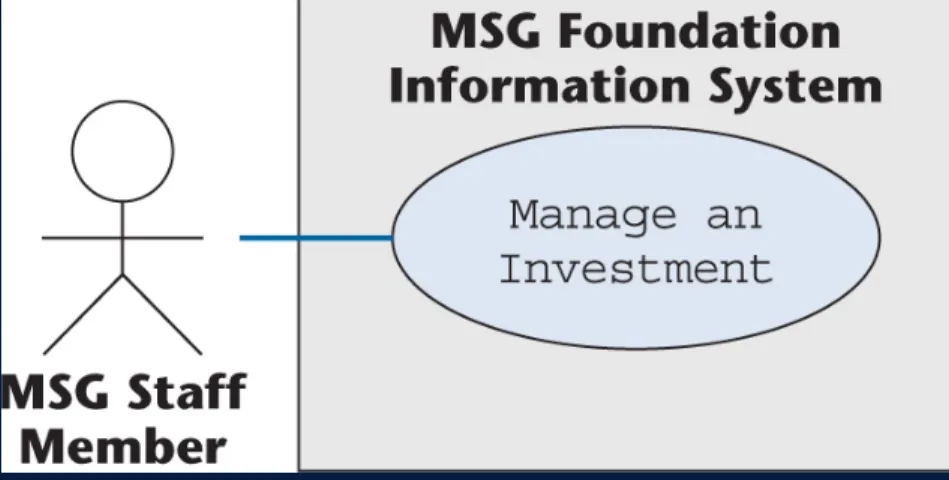
Manage an Investment
Use Case
At this stage, no details are known regarding
– The buying and selling of investments, or
– How investment income becomes available for mortgages
However, use case Manage an Investment is an essential part of the initial business model
Slide 11.51
Manage an Investment
Use Case (contd)
Figure 11.10
Figure 11.11
Slide 11.52
Use-Case Diagram of the Initial Business Model
Figure 11.12
Slide 11.53
11.8 Initial Requirements: MSG Case Study
It is unclear if all four use cases are all
requirements of the product to be developed
– What, exactly, is “a pilot project”?
The best way to proceed is
– Draw up the initial requirements on the basis of what the client wants, and then iterate
Slide 11.54
Initial Requirements: MSG Case Study (contd)
Consider each use case in turn:
Estimate Funds Available for Week is obviously part of the initial requirements
Apply for an MSG Mortgage does not seem to have anything to do with the pilot project, so it is
excluded
Slide 11.55
Initial Requirements: MSG Case Study (contd)
Compute Weekly Repayment Amount, and
Manage an Investment
– Both appear to be irrelevant to the pilot project
However, the pilot project deals with the “money that is available each week to purchase homes”
– Some of that money comes from the weekly repayment of existing mortgages, and from income from
investments
The resulting use-case diagram is shown on the next slide
Slide 11.56
Initial Use-Case Diagram: MSG Case Study
The next step: Iterate the requirements workflow
Figure 11.13
Slide 11.57
11.9 Continuing the Requirements Workflow: MSG
The systems analysts learn that the MSG
Foundation grants a 100% mortgage to buy a home under the following conditions:
– The couple has been legally married for at least 1 year but not more than 10 years
– Both husband and wife are gainfully employed
– The price of the home must be below the published median price for homes in that area for the past 12 months
– Their income and/or savings are insufficient to afford a standard fixed-rate 30-year 90% mortgage
– The foundation has sufficient funds to purchase the home
Slide 11.58
Conditions for an MSG Mortgage (contd)
If the application is approved, then each week for the next 30 years the couple pays MSG
– The total of the principal and interest payment — this never changes over the life of the mortgage; plus
– The escrow payment, which is 1/52nd of the sum of the annual real-estate tax and the annual homeowner’s
insurance premium
If this exceeds 28% of the couple’s gross weekly income, MSG pays the difference as a grant
– The couple must provide proof of their current income
— the weekly payment may vary from week to week
Slide 11.59
Algorithm to Determine If Funds Are Available
(1) At the beginning of the week, the estimated annual income from MSG investments is
computed and divided by 52
(2) The estimated annual MSG operating expenses are divided by 52
(3) The total of the estimated mortgage payments for the week is computed
Slide 11.60
Algorithm to Determine If Funds Are Available
(4) The total of the estimated grants for the week is computed
(5) The amount available at the beginning of the week is then (1) – (2) + (3) – (4)
(6) If the cost of the home is no more than (5), funds are provided to buy the home
(7) At the end of each week, any unspent funds are invested
Slide 11.61
Requirements of the Pilot Project
To keep the cost of the pilot project as low as possible, only those data items needed for the weekly funds computation will be included
Only three types of data are therefore needed:
– Investment data
– Operating expenses data – Mortgage data
Slide 11.62
Investment Data
Item number
Item name
Estimated annual return
Date estimated annual return was last updated
Slide 11.63
Operating Expenses Data
Estimated annual operating expenses
Date estimated annual operating expenses was last updated
Slide 11.64
Mortgage Data
Account number
Last name of mortgagees
Original purchase price of home
Date mortgage was issued
Weekly principal and interest payment
Current combined gross weekly income
Date combined gross weekly income was last updated
Slide 11.65
Mortgage Data (contd)
Annual real-estate tax
Date annual real-estate tax was last updated
Annual homeowner’s insurance premium
Date annual homeowner’s insurance premium was last updated
Slide 11.66
Reports Required for the Pilot Project
Three types of reports are needed:
– The results of the funds computation for the week – A listing of all investments (to be printed on request) – A listing of all mortgages (to be printed on request)
Slide 11.67
11.10 Revising the Requirements: MSG Case Study
The initial requirements include three use cases:
– Estimate Funds Available for Week – Compute Weekly Repayment Amount – Manage an Investment
In the light of the additional information received, the initial requirements can be revised
Slide 11.68
Revising the Requirements: MSG (contd)
Consider each element of the formula to
determine how much money is available each week
(1) Estimated annual income from investments:
– Take all the investments, sum the estimated annual return on each investment, and divide the result by 52
An additional use case, Estimate Investment Income for Week, is needed
– (We still need use case Manage an Investment for adding, deleting, and modifying investments)
Slide 11.69
The dashed line with the open arrowhead labeled
«include» denotes that
Use case Estimate Investment Income for Week is part of use case Estimate Funds Available for Week
Estimate Investment Income for Week
Use Case
Figure 11.14
Slide 11.70
Estimate Investment Income for Week Use Case (contd)
Description of use case
Figure 11.15
Slide 11.71
First Iteration of the Revised Use-Case Diagram
New use case is shaded
Figure 11.16
Slide 11.72
Revising the Requirements: MSG Case Study (contd)
(2) Estimated annual operating expenses:
To determine the estimated annual operating expenses two additional use cases are needed
– Use case Update Estimated Annual Operating Expenses models adjustments to the value of the estimated annual
operating expenses
– Use case Estimate Operating Expenses for Week provides the needed estimate of the operating expenses
Slide 11.73
Update Estimated Annual Operating Expenses Use Case
Figure 11.18 Figure 11.17
Slide 11.74
Estimate Operating Expenses for Week Use Case (contd)
Figure 11.20 Figure 11.19
Slide 11.75
Second Iteration of Revised Use-Case Diagram
The new use cases are shaded
Figure 11.21
Slide 11.76
Revising the Requirements: MSG (contd)
(3) Total estimated mortgage payments for the week and
(4) Total estimated grant payments for the week:
– Use case Compute Weekly Repayment Amount models the computation of both the estimated mortgage payment and the estimated grant payment for each mortgage separately
– Summing these separate quantities gives
» The total estimated mortgage payments for the week, and
» The total estimated grant payments for the week
Slide 11.77
Revising the Requirements: MSG (contd)
Now the use cases need to be reorganized
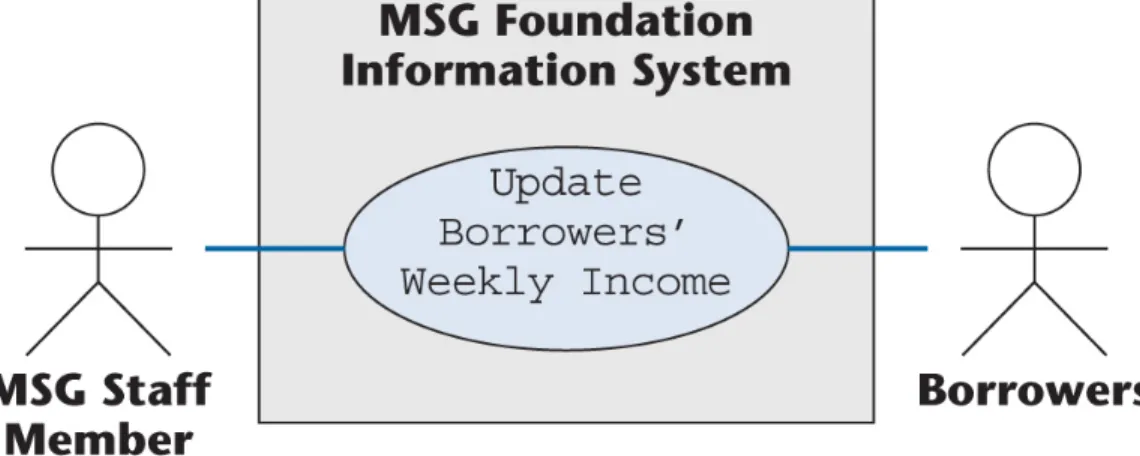
– Use case Compute Weekly Repayment Amount also models borrowers updating their weekly income
Split Compute Weekly Repayment Amount into two separate use cases
– Use case Estimate Payments and Grants for Week, and – Use case Update Borrowers’ Weekly Income
Slide 11.78
Estimate Payments and Grants for Week
Use Case
Figure 11.22
Slide 11.79
Estimate Payments and Grants for Week Use Case (contd)
Figure 11.23
Slide 11.80
Update Borrowers’ Weekly Income
Use Case
Figure 11.25 Figure 11.24
Slide 11.81
Third Iteration of the Revised Use-Case Diagram
The two new use cases are shaded
Figure 11.26
Slide 11.82
Estimate Funds Available for Week
Use Case
Use case Estimate Funds Available for Week models the computation that uses the data obtained from
three other use cases
– Estimate Investment Income for Week – Estimate Operating Expenses for Week – Estimate Payments and Grants for Week
Slide 11.83
Estimate Funds Available for Week Use Case (contd)
Second iteration of use case
Figure 11.27
Slide 11.84
Estimate Funds Available for Week Use Case (contd)
Second iteration of description of use case
Figure 11.28
Slide 11.85
«include»
Relationship
Correct use case (top); incorrect use case (bottom)
Figure 11.29
Slide 11.86
«include»
Relationship (contd)
The bottom diagram models use cases
– Estimate Funds Available for Week, and
– Estimate Payments and Grants for Week
as two independent use cases
– However, a use case models an interaction between the product itself and users of the product (actors)
Slide 11.87
«include»
Relationship (contd)
Use case Estimate Payments and Grants for Week does not interact with an actor and therefore cannot be a use case in its own right
– Instead, it is a portion of use case Estimate Funds Available for Week, as reflected in the top diagram
Slide 11.88
11.11 The Test Workflow: MSG Case Study
A common side-effect of the iterative and incremental life-cycle model
– Details that correctly have been postponed somehow get forgotten
– Two instances of this are described on the next slide
Slide 11.89
The Test Workflow: MSG Case Study (contd)
Details of use case Manage an Investment have been overlooked, and
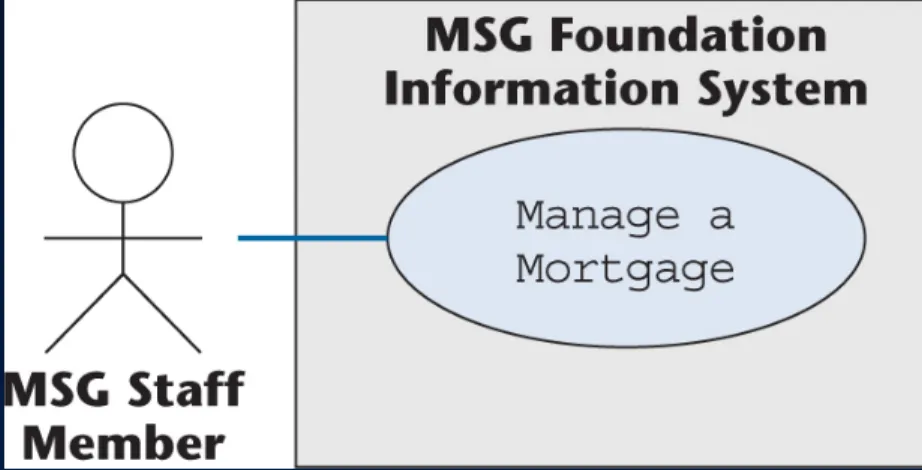
Use case Manage a Mortgage to model
– The addition of a new mortgage
– The modification of an existing mortgage, or – The removal of an existing mortgage
has been totally forgotten
(Analogous to use case Manage an Investment)
Slide 11.90
Manage an Investment
Use Case
Figure 11.31 Figure 11.30
Slide 11.91
Manage a Mortgage
Use Case
Figure 11.33 Figure 11.32
Slide 11.92
Fourth Iteration of the Revised Use-Case Diagram
The new use case is shaded
Figure 11.34
Slide 11.93
The Test Workflow: MSG Case Study (contd)
There is a further omission
– Use case Produce a Report to print the three reports
» Investments report
» Mortgages report
» Results of weekly computation
has also been totally forgotten
Slide 11.94
Produce a Report
Use Case
Figure 11.35
Slide 11.95
Produce a Report
Use Case (contd)
Figure 11.36
Slide 11.96
Fifth Iteration of the Revised Use-Case Diagram
The new use case, Produce a Report, is shaded
Figure 11.37
Slide 11.97
The Test Workflow: MSG Case Study (contd)
Rechecking the revised requirements uncovers two new problems
– A use case has been partially duplicated
– Two of the use cases need to be reorganized
Slide 11.98
Partially Duplicated Use Case
Use case Manage a Mortgage
– One action is to modify a mortgage
Use case Update Borrowers’ Weekly Income
– Only action is to update the borrowers’ weekly income
The borrowers’ weekly income is an attribute of the mortgage
– Use case Manage a Mortgage already includes use case
Update Borrowers’ Weekly Income
Accordingly, use case Update Borrowers’ Weekly Income
is superfluous, and must be deleted
Slide 11.99
Sixth Iteration of the Revised Use-Case Diagram
The modified use case is shaded
Figure 11.38
Slide 11.100
The Test Workflow: MSG Case Study (contd)
This iteration resulted in a decrement, not an increment
In fact, deletion occurs often
– Whenever we make a mistake
Sometimes we can fix an incorrect artifact
– More frequently we have to delete an artifact
Slide 11.101
The Test Workflow: MSG Case Study (contd)
However, when we discover a fault, we do not have to start the whole process from scratch
First we try to fix the current iteration
If the mistake is too serious for this to work, we
backtrack to the previous iteration, and try to find a better way to go forward from there
Slide 11.102
Reorganizing Two Use Cases
Determine the funds available for the current week
– Use case Estimate Funds Available for Week models performing the calculation
– Step 1.3 of use case Produce a Report models printing out the result of the computation
There is no point in estimating the funds available unless the results are printed out
Slide 11.103
Reorganizing Two Use Cases (contd)
The descriptions of the use cases
– Estimate Funds Available for Week, and
– Produce a Report
have to be modified (the use cases do not change)
Slide 11.104
Modified Description —
Produce a ReportFigure 11.39
Slide 11.105
Modified Description — Estimate Funds Available for Week
Figure 11.40
Slide 11.106
The Test Workflow: MSG Case Study (contd)
The usual reason for an «include» relationship is where one use case is part of two or more other use cases
– Example: U.S. tax forms—avoiding triplication
Figure 11.41
Slide 11.107
Estimate Funds Available for Week Use Case (contd)
For the MSG Foundation case study
– All of the included use cases are part of only one use case, Estimate Funds Available for Week
Incorporate those three «include» use cases into use case Estimate Funds Available for Week
– The resulting use-case diagram is on the next slide
Slide 11.108
Seventh Iteration of Revised Use-Case Diagram
Figure 11.42
Slide 11.109
Estimate Funds Available for Week Revised Description of Use Case
Figure 11.43
Slide 11.110
The Test Workflow: MSG Case Study (contd)
Now the requirements appear to be correct
– They correspond to what the client has requested – They appear to satisfy the client’s needs
– There do not seem to be any more faults
For now, everything seems to be fine
Slide 11.111
11.12 The Classical Requirements Phase
There is no such thing as “object-oriented requirements”
– The requirements workflow has nothing to do with how the product is to be built
However, the approach presented in this chapter is
– Model oriented, and therefore – Object oriented
Slide 11.112
The Classical Requirements Phase (contd)
The classical approach to requirements
– Requirements elicitation – Requirements analysis
– Construction of a rapid prototype
– Client and future users experiment with the rapid prototype
Slide 11.113
11.13 Rapid Prototyping
Hastily built (“rapid”)
– Imperfections can be ignored
Exhibits only key functionality
Emphasis on only what the client sees
– Error checking, file updating can be ignored
Aim:
– To provide the client with an understanding of the product
Slide 11.114
Rapid Prototyping (contd)
A rapid prototype is built for change
– Languages for rapid prototyping include 4GLs and interpreted languages
Slide 11.115
11.14 Human Factors
The client and intended users must interact with the user interface
Human-computer interface (HCI)
– Menu, not command line – “Point and click”
– Windows, icons, pull-down menus
Slide 11.116
Human Factors (contd)
Human factors must be taken into account
– Avoid a lengthy sequence of menus
– Allow the expertise level of an interface to be modified – Uniformity of appearance is important
– Advanced psychology vs. common sense?
Rapid prototype of the HCI of every product is obligatory
Slide 11.117
11.15 Reusing the Rapid Prototype
Reusing a rapid prototype is essentially code-and- fix
Changes are made to a working product
– Expensive
Maintenance is hard without specification and design documents
Real-time constraints are hard to meet
Slide 11.118
Reusing the Rapid Prototype (contd)
One way to ensure that the rapid prototype is discarded
– Implement it in a different language from that of the target product
Generated code can be reused
We can safely retain (parts of) a rapid prototype if
– This is prearranged
– Those parts pass SQA inspections
– However, this is not “classical” rapid prototyping
Slide 11.119
11.16 CASE Tools for the Requirements Workflow
We need graphical tools for UML diagrams
– To make it easy to change UML diagrams
– The documentation is stored in the tool and therefore is always available
Such tools are sometimes hard to use
The diagrams may need considerable “tweaking”
Overall, the strengths outweigh the weaknesses
Slide 11.120
CASE Tools for the Requirements Workflow (contd)
Graphical CASE environments extended to support UML include
– System Architect
– Software through Pictures
Object-oriented CASE environments include
– IBM Rational Rose – Together
– ArgoUML (open source)
Slide 11.121
11.17 Metrics for the Requirements Workflow
Volatility and speed of convergence are measures of how rapidly the client’s needs are determined
Slide 11.122
Metrics for the Requirements Workflow (contd)
The number of changes made during subsequent phases
Changes initiated by the developers
– Too many changes can mean the process is flawed
Changes initiated by the client
– Moving target problem
Slide 11.123
11.18 Challenges of the Requirements Phase
Employees of the client organization often feel threatened by computerization
The requirements team members must be able to negotiate
– The client’s needs may have to be scaled down
Key employees of the client organization may not have the time for essential in-depth discussions
Flexibility and objectivity are essential
Slide 11.124
Overview of the MSG Foundation Case Study
Figure 11.44