國立臺灣大學管理學院資訊管理學研究所 碩士論文
Department of Information Management College of Management
National Taiwan University Master Thesis
穿戴型指套手勢感測裝置於日常生活之應用
MidasTouch: A Finger-Worn Device for Sensing Gestural Input on Everyday Objects
楊順堯 Shun-Yao Yang
指導教授:陳炳宇博士; 梁容豪博士
Advisor: Bing-Yu Chen, Ph.D.; Rong-Hao Liang, Ph.D.
中華民國 105 年 5 月
May, 2016
謝
求學的生涯在這次碩士班畢業告一段落,非常感謝這一路上幫助過 我的師長、同學、學長姐、學弟妹。這兩年的碩士班引領我初探了人 機互動的領域,感謝陳炳宇教授與梁容豪教授的共同指導,引領我碩 士論文題目的方向,以及從旁指點研究需要注意的地方。
也要感謝實驗室好夥伴以圻、曉楓、龍飛、立銘、維哲、王凡、湧 達在這兩年來一起成長。第一次投稿與以圻一起做 ThirdHand 對我幫 助很大,也讓我有機會可以參加國際會議。還有大家平時在實驗室一 起激發想法、吃喝玩樂,讓我的碩班生活相當充實。
感謝立銘、善元、若曦在 MidasTouch 投稿的期間不遺餘力的幫忙,
讓我能夠順利投出研究的成果。還有一群被抓來做我的實驗的學弟妹 與同學們,因為有你們努力的攪拌與舀水,灌溉了我的實驗結果!
謝謝爸媽在背後不斷的支持與鼓勵,還有謝謝女朋友能夠體諒我研 究生活的繁忙,讓我能夠順利的完成論文。
中文 要
這篇論文提出一個叫做 MidasTouch 的穿戴式指套裝置,用於對日 常生活物品操作手勢之感測。此裝置包含了無線射頻辨識 (RFID) 讀 取器、無線射頻辨識 (RFID) 天線、慣性測量單元 (IMU)。透過無線射 頻辨識 (RFID) 讀取器以及貼在物品上面的無線射頻辨識 (RFID) 標籤,
能夠取得關於物品的資訊,藉由一對安置在指甲與指根部位的慣性測 量單元 (IMU),可以還原使用者對物品操作的手勢。感測距離約兩公 分的無線射頻辨識 (RFID) 天線安置在食指指甲的部位,可以用作讀取 物品的資訊以及作為手勢的起始終結判斷。手勢判斷的部分利用兩個 分別安置在指甲以及指根的慣性測量單元在三維空間中的旋轉作為判 斷依據,使用支持向量機 (Support Vector Machine) 來辨識不同的手勢。
使用者可以透過穿戴這個裝置在背景記錄下每天日常生活中對於物品 的操作,或是能夠用這些物品建立與物聯網物品的關係。我們進行了 兩個各包含 10 位使用者的實驗,實驗一包含八個手勢的辨識以及六個 日常生活物品,實驗一結果顯示我們的系統在辨識對日常生活用品的 手勢是可行的,在每位使用者自己的模型中可以達到平均 98.85% 的 辨識率,使用不同使用者的模型有 75.2% 的辨識率。實驗二包含兩種 手勢在五種功能相同的物體上操作,結果顯示使用不同物體的模型有 96.6% 的辨識率。
關 : 一件式穿戴裝置, 指套, 手部互動, 手勢辨識, 物聯網
Abstract
This work presents MidasTouch, a finger-worn RFID-inertia-sensor for sensing gestural interactions on everyday objects. The fingerstall-like device comprising an RFID reader and a couple of motion sensors for recognizing the tagged objects and the hand gestures that users are performing on them. The short-range (∼2cm) RFID sensor mounted on the index fingertip functions as a robust feature for object identification and inertia sensor data segmentation, allowing the users wearing the device to directly associate their intentions with tagged objects by touching them or performing natural gestures on them. By wearing the device with the embedded sensing, users can easily log the daily activities related to the everyday things, or control smart things using every- day things. Results of two 10-user studies suggest that the proposed system is feasible of recognizing gestures from everyday objects, and supports reliably uses by each user in a personalized train-and-use basis.
Keywords: Finger-worn device, RFID, gesture sensing, internet of things.
Contents
會 i
謝 ii
中文 要 iii
Abstract iv
Contents v
List of Figures viii
1 Introduction 1
1.1 Motivation . . . 1
1.2 MidasTouch . . . 3
2 Related Works 4 2.1 Sensing From Environment . . . 4
2.2 Sensing From Object . . . 5
2.3 Sensing From Wearable Camera . . . 6
2.4 RFID-motion Sensing . . . 8
3 Design and Implementation 9 3.1 Designing Considerations . . . 9
3.2 Prototyping Hardware . . . 10
3.2.1 Designing RFID Antenna for Short-Range Sensing . . . 11
3.2.2 Designing IMU Array for Index-Finger Posture Sensing . . . 12
3.2.3 Using Short-Range RFID for Gesture Segmentation . . . 13
3.3 Software Implementation . . . 13
3.3.1 Feature Preprocessing . . . 14
3.3.2 Training and Predicting Tool . . . 14
3.4 Application Examples . . . 16
3.4.1 Connecting Everyday Things and Smart Things . . . 16
3.4.2 Logging Daily Activities on Everyday Things . . . 16
4 EVALUATION 18 4.1 Study 1: Gestures Recognition on Everyday objects . . . 18
4.1.1 Data Collection . . . 18
4.1.2 Results and Discussion . . . 20
4.2 Study 2: Gestures Recognition on Objects in Similar Form Factors . . . . 21
4.2.1 Data Collection . . . 21
4.2.2 Results and Discussion . . . 22
5 Discussion 23 5.1 Detect the Repetition within Gesture . . . 23
5.2 Editor . . . 25
5.2.1 Web-based System . . . 26
5.2.2 Editing Interface . . . 27
5.2.3 Connect to Smart Things . . . 28
5.2.4 Display Devices . . . 29
5.3 Predict Daily Activities . . . 30
5.4 Semi-supervised learning . . . 31
5.5 Limitation . . . 32
5.5.1 Same Location in Each Interaction . . . 32
5.5.2 Yaw Drifting Problem . . . 32
5.5.3 RFID on Metal Object . . . 33
6 CONCLUSION AND FUTURE WORK 34
7 Appendix 35
7.1 confusion matrix of study 1 . . . 35
Bibliography 41
List of Figures
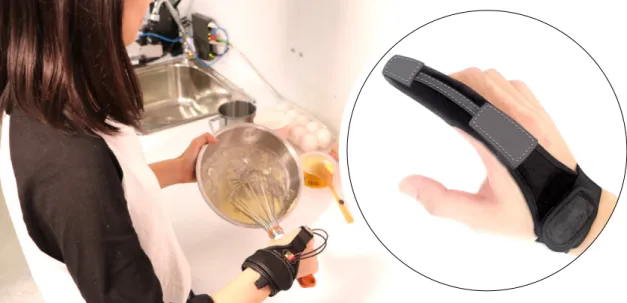
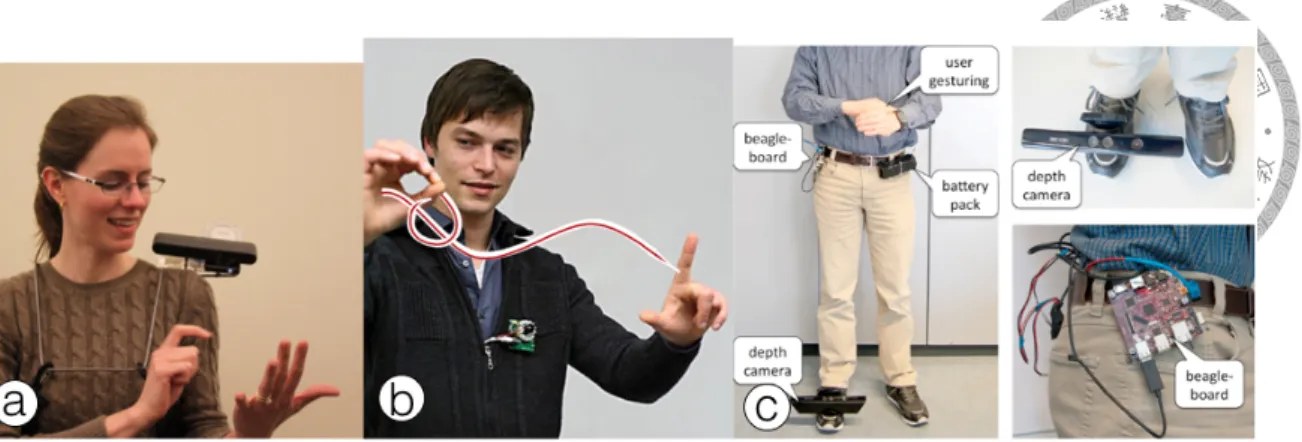
1.1 MidasTouch is a finger-worn device for sensing gestural input on everyday
objects. . . 1
1.2 Related Works (a) iGlove (b) iBracelet (c) ReachMedia (d) Berlin et al. . 2
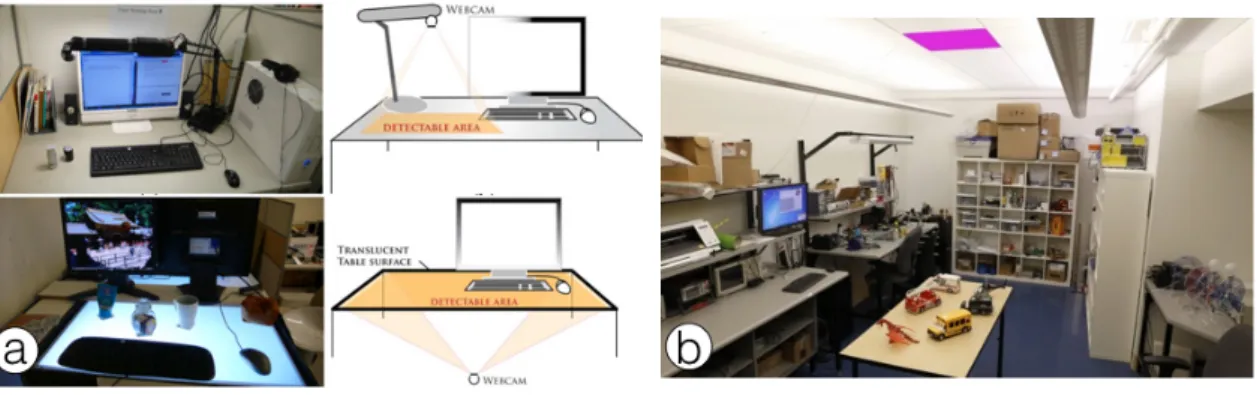
2.1 Related Works (a) iCon (b) IDSense . . . . 4
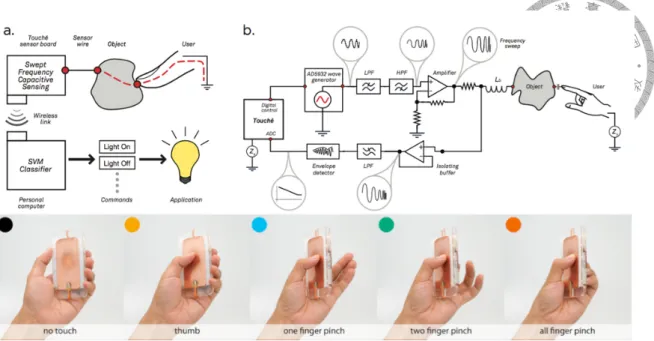
2.2 Related Works Touché . . . . 5
2.3 Related Works Touch&Activate . . . . 5
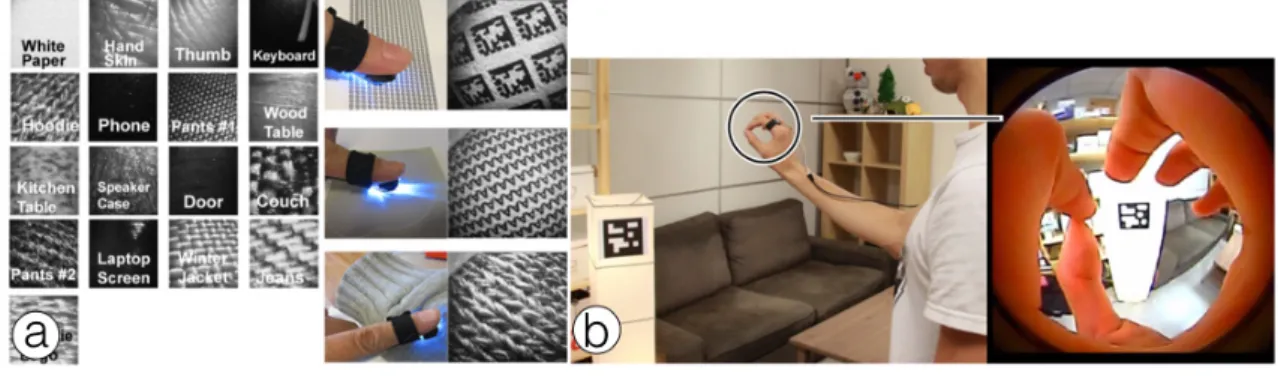
2.4 Related Works (a) MagicFinger (b) CyclopsRing . . . . 6
2.5 Related Works (a) Digits (b) Surround-See . . . . 6
2.6 Related Works (a) OminiTouch (b) Imaginary Interface (c) Shoe-Sense . . 7
2.7 Related Works left: Wireless Identification and Sensing Platform (WISP) right: Tagged WISP on everyday objects to sense indoor activity . . . 7
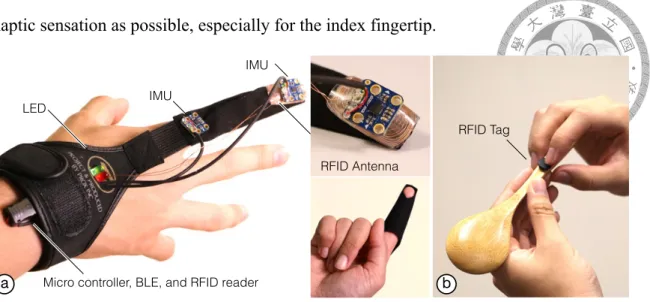
3.1 (a) MidasTouch hardware prototype can identify and sense user’s gesture performing on (b) the spoon attached an RFID tag. . . 10
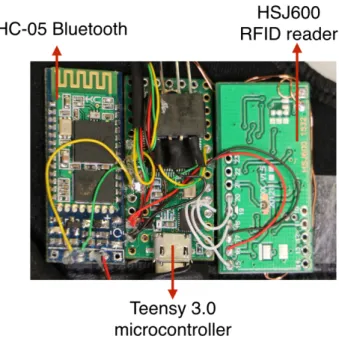
3.2 3 boards lie in the backside of the fingerstall . . . 11
3.3 Experiment on the sensing range of the customized RFID antenna. . . 12
3.4 The mean maximum sensing distance is 19.86mm (STD = 1.71mm), which tolerates 45◦angle of tilt in any direction. . . 12
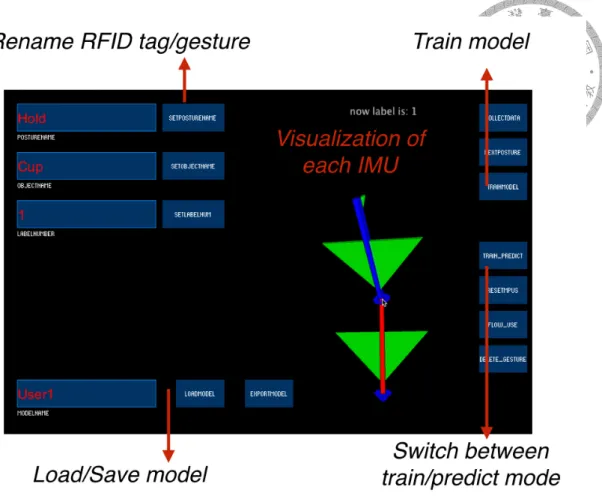
3.5 The pair of motion sensors is able to recover the index finger postures (i.e., orientation and bending angle) in real-time. . . 13 3.6 The graphical user interface for collecting, training and predicting gestures 15
3.7 Connecting everyday things and smart things. (a) When a user opens the book, the lamp (b) turns the light on simultaneously. (c) When the user
wears the headphone, the speaker mutes. . . 16
3.8 Logging daily activities on everyday things. (a) A user logs the procedure of cooking by (b) performing the tasks using the tagged object, and shares the logs with other users. (c) While another user drops the same tagged object, the system prompts the next step through the smartwatch display. . 17
4.1 (a) Tasks in study 1. . . 19
4.2 The result of the average of both leave-one-user-out (blue) and the per- sonalized (red) cross validations of all 10 participants. . . 19
4.3 Confusion matrix of the leave-one-user-out cross validation. . . 20
4.4 Gestures and the experimental apparatus in study 2. . . 21
4.5 The result of the average of leave-one-spoon-out . . . 22
5.1 (a) The autocorrelation can detect period in a series of signal, it compares signal with itself at different lagged time (b) The pouring water data of one of all users has multiple peak in its autocorrelation result, so we can not calculate the right repetition . . . 24
5.2 The mean prediction of repetition of each user’s gesture, x-axis represents P1 to P7, y-axis represents predicted repetition . . . 25
5.3 The web-based system overview . . . 26
5.4 The replay interface connects to our web-based system . . . 27
5.5 The drawing style UI for users making a icon for their gesture on objects . 28 5.6 The drag-and-drop manipulation and workflow as material let users easily merge or split the workflows . . . 28
5.7 The user use the editor to connect playing smart speaker to the picking off the earphone . . . 29
5.8 The user use the editor to connect opening the book to the turning on the light . . . 29
5.9 The predicting flow chart . . . 30 5.10 x-axis represents gesture numbers in the trained model, y-axis represents
the accuracy of the model . . . 31
Chapter 1 Introduction
b
c d
a
Figure 1.1: MidasTouch is a finger-worn device for sensing gestural input on everyday objects.
1.1 Motivation
Ubiquitous network-connected smart devices provide readily available information that leads new internet-of-things (IoT) applications to emerge, but they still fail to con- nect the non-smart everyday things. Since everyday things play the major parts of our everyday activities, sensing and logging user’s activities related to everyday things would be very important challenge for the IoT system to better understand their users, thus can
Figure 1.2: Related Works (a) iGlove (b) iBracelet (c) ReachMedia (d) Berlin et al.
provide advanced services to them. Since users mainly interact with everyday objects by hands, previous work has proposed instrumenting sensing mechanisms on users’ hand to maximize the availability of sensing. Considering the huge amount of everyday things, combining with an RFID reader and inertia motion sensors as a sensing device would be a scalable and reliable solution. Previous proposed devices for wearable RFID or RFID-inertia sensing were mainly gloves and bracelets. Fishkin et al. proposed iGlove and iBracelet [1]. iGlove a glove-like RFID device that can identify an objects and the gestural interactions within in a 2-5cm range; iBracelet provides ease of wearing, and further extends the sensing range to 10.5 cm. To sense gesture interactions on a tagged object, Feldman et al. proposed ReachMedia [2], a wireless wristband consisted of a pair of RFID reader an inertia sensor for detect user interactions on an object within a 10cm range.
Berlin et al. [3] addressed the technical challenges of implementing the wearable RFID- motion sensors, such as antenna design, power consumptions, etc., and also proposed a bracelet-like device that further increase the sensing distance of RFID to 14cm. Although the increased sensing range reduces the possible cases of false negatives (a missed touch of an object), it does increase the threats of and false positives (accidental touches of an object). For example, a user who places his or her hand nearby a tagged object may trig- ger the events. With these false positives, segmenting the motion sensor data becomes relatively difficult.
1.2 MidasTouch
This work presents MidasTouch, a novel finger-worn device for sensing gestural input with everyday objects to respond this challenge. Since our index finger is usually the first body part to reach an object in touch and gestural interactions with everyday object, the device provides high availability of input. To identify the everyday objects with minimal threats of false positives, we reduce the sensing range of the RFID antenna to 2cm, so that the RFID sensors function more like a touch sensor to an RFID tag. To track users’
gestures performed on an object attached RFID tag, a pair of 6-DOF inertia measurement units (IMU) is attached on the MidasTouch device. Based on the simplified anatomical model of human index finger [4], the pair of motion sensors is able to recover the index finger postures (i.e., orientation and bending angle) in real-time, and the recovered index finger posture can be used as a reliable high-level feature for gesture classification. The short-range RFID sensing also provides reliable segmentation.
Two user studies with 10 participants were conducted to un derstand gesture recogni- tion accuracy and the minimal requirements or training. Results of the first study showed that sensor reading patterns dif fer significantly across users, but are consistent for the same user. The 10-fold leave-one-user-out accuracy is low at an average of 75.2%, but reaches 98.8% average accuracy for performing 8 hand gestures on 6 objects which are in different utilities and appearances, when personalized for each participant. Results of the second study showed that sensor reading patterns of 5-fold leave-one-subject-out reaches 96.6% average accuracy for performing 2 hand gestures on 5 objects which are in same utilities but in the different appearances, showing the gestures trained on one object can be transferred to the same class of objects, even when the form factors are different.
Chapter 2
Related Works
Figure 2.1: Related Works (a) iCon (b) IDSense
2.1 Sensing From Environment
Conventional approaches for identifying everyday objects and the gesture events those users performed on them is using the tracking mechanisms deployed in the environment, such as cameras [5] or ultra-high frequency RFID readers set the environment [6] [7].
With sophisticate tracking mechanisms using computer vision and signal processing, the accuracy can be considerably high even in the full complexity of real-world environments.
However, the major constraint of these stationary sensing systems is their sensing range, because the tracking is not available when the users are outside the range.
Figure 2.2: Related Works Touché
Figure 2.3: Related Works Touch&Activate
2.2 Sensing From Object
To resolve the touch and gesture events those users performed on everyday objects without deploying touch sensors on its surface of everyday objects, previous researchers use machine learning techniques with swept frequency sensing techniques. Touché [8]
proposes a novel swept-frequency capacitive sensing technique that can not only detect a touch event, but also recognize complex configurations of the human hands and body to enhance touch interaction in a broad range of applications from conventional touchscreens to unique contexts and materials. However, the technique requires conductivity of objects or needs to coat the objects with conductive ink or tape. Touch&Activate [9] presents
an acoustic swept frequency touch sensing technique, which recognizes a rich context of touches including grasp on existing objects by attaching only a vibration speaker and a piezo-electric microphone paired as a sensor. However, the techniques require installing a pair of active signal transmitter and receiver on the object, thus it is difficult to main- tain when the amount of objects scaled. Though sensing gesture from object can free the users’ hand, the most severe problem is that the power supply of these sensor need to be maintained individually.
Figure 2.4: Related Works (a) MagicFinger (b) CyclopsRing
Figure 2.5: Related Works (a) Digits (b) Surround-See
2.3 Sensing From Wearable Camera
Instrumenting sensors on users can achieve always-available input. Although there is a wide spectrum of hand-worn devices that tracks users hand gestures by wearing a glove with embedded sensors or markers has been proposed (see [10] for an overview), only a small portion of them shed lights on object identification. Camera-based gestural tracking
Figure 2.6: Related Works (a) OminiTouch (b) Imaginary Interface (c) Shoe-Sense
solutions straightforwardly support object recognition, and can identify a large mount of items if applying marker-based techniques [11]. MagicFinger [12] instruments a camera the finger itself to enable identification and swipe gestures on fingertips, but the placement of the camera blocks the haptic feedback of the fingertip. CyclopsRing [13] instruments a camera on the finger as a ring enable contextual whole-hand interactions. Digits [14]
instruments a camera on the wrist as to detect whole-hand interactions. There are also several researches have explored the uses of handheld [15], shoulder-mounted [16], chest- mounted [17], or shoe-worn [18] depth cameras, but these require more line of sight of the user’s hands and objects. These camera-based solutions generally suffer from reliability issues on occlusion and illumination, power consumption issues, and privacy issues [19].
Figure 2.7: Related Works left: Wireless Identification and Sensing Platform (WISP) right:
Tagged WISP on everyday objects to sense indoor activity
2.4 RFID-motion Sensing
RFID is a reliable solution available for identifying a large amount of items, and sev- eral research has been made a RFID reader into a glove or a bracelet [1], but they requires to combined with other sensing mechanism for gesture tracking. Several RFID-motion sensing devices uses inertia sensors [2, 3] for gesture recognition, but the biggest problem of devices are the false-positive events, which is mainly caused by the inaccurate segmen- tation. Therefore, segmentation of these system becomes critical problem to solve in order to bringing the feature into the real-world complexity. Buettner et al. [7] used Wireless Identification and Sensing Platform (WISP), which is a battery-free RFID-motion sensor to detect motion of a tagged object. The false positive rate can be decreased by detecting which object is moving. However, the sensor is still expensive and need a RFID reader placed in the environment. And only one motion sensor on object is hard to distinguish different gesture on object.
Chapter 3
Design and Implementation
In this section, we first elucidate the considerations of designing this device, then ex- plain the details of implementation of our hardware prototype with application examples.
3.1 Designing Considerations
The main considerations of designing this device are ease of wearing, fidelity of sens- ing, and haptic sensation preserving.
Ease of wearing: The device should be easily and comfortable wearable, so users can
wear the device easily, without affecting their daily activities.
Fidelity of sensing: Our index finger plays an important role in our daily interactions
with everyday objects. In addition to touch input, the most prominent way for interact- ing with computers, index finger also involves in the hand gestures, such as pinch and grasp input. During pinching and grasping, the index finger provides a reference point, and bends in different extent to facilitate the gestures to be performed. Therefore, to uti- lize the finger posture can be used as a robust feature for gesture recognition, the sensor should be able to detect the posture (i.e., direction of pointing and bending) in a sufficient performance.
Haptic sensation preserving: Since the haptic sensation of index fingertip is very im- portant, sensor should not directly instrument sensors directly on the skin surface. There- fore, all the sensors should be placed on the back of finger, to keep as much native skin
haptic sensation as possible, especially for the index fingertip.
IMU IMU
RFID Antenna LED
Micro controller, BLE, and RFID reader
RFID Tag
b
c d
a
Figure 3.1: (a) MidasTouch hardware prototype can identify and sense user’s gesture performing on (b) the spoon attached an RFID tag.
3.2 Prototyping Hardware
Based on the design considerations, the prototype MidasTouch device is therefore im- plemented, as shown in Figure 3.1. To meet the criteria Ease of wearing, we modified a conventional Proxinc PX572 fingerstall [20], which allows a user to wear the sensor on the index finger and fix it by the Velcro strap on the wrist with much less effort then wearing a glove. Also, since the fingerstall is fabricated with suede and elastic band, it is comfortably wearable. The device comprises of two parts of major sensor elements:
a RFID antenna mounted on the index fingertip, and two 6-DOF IMU sensors – one is mounted on the index fingertip and the other one is mounted on root side of the index finger. Two LEDs mounted on the root side of the index finger to provide simple visual feedback when a tag is on. To meet the criteria ease of wearing, we place all sensors to the back of finger; moreover, the fingerstall is designed to leave the fingertip part exposing, to preserve users’ native skin haptics and allow them for using capacitive touchscreens.
All the sensing and display components were connected to an ARM Cortex M4 micro- controller for signal processing. Either USB or a BLE chip is used for wired or wireless communication.
Figure 3.2: 3 boards lie in the backside of the fingerstall
3.2.1 Designing RFID Antenna for Short-Range Sensing
The RFID antenna has to be smaller then the size of index fingernail. Therefore, we went through several designs and finally customized it by using 0.29mm enameled wire turned in 10 rounds within 15mm-diameter, which can read the Mifare RFID tags by con- nected with a 13.56MHz RFID reader.
The design is chosen based on a formal measurement. In the measurement, a Mifare 13.56MHz RFID tag is fixed on an autonomous elevating platform of an 3D printer, which is of 0.1mm precision. The customized RFID antenna is fixed above the platform at a certain tilt angle using a physical support. We measured the maximum sensing distance of the tag by the following procedures:
1. Move the tag to 50mm below the antenna by descending the platform.
2. Move the tag closer to the antenna by elevating the platform in a 0.1mm scale and check the RFID reader in each step of elevation, until the tag ID is sensed by the reader.
3. Record the stopping height as the maximum sensing range, and back to step one until all measurements are made.
Fifty measurements were made for each tilt angle. Five tilt angles (0◦, 15◦, 30◦, 45◦,
and 60◦) were tested. Overall, a total of 5(angle)×50(measurements) = 250 maximum height were collected.
d
!
tilt angle of antenna (!)
0 15 30 45 AVG
25 20
15
10 5
maximum sensing distance (d) 0
b a
Figure 3.3: Experiment on the sensing range of the customized RFID antenna.
d
!
tilt angle of antenna (!)
0 15 30 45 AVG
25 20 15 10 5
maximum sensing distance (d) 0
b a
Figure 3.4: The mean maximum sensing distance is 19.86mm (STD = 1.71mm), which tolerates 45◦angle of tilt in any direction.
Figure 3.4 show the mean maximum sensing distance between 0◦ to 45◦ were stably ranged from 18.8mm to 22.4m, and the mean value is 19.86mm (STD = 1.71mm). How- ever, the tag was not sensed at 60◦at any height, showing a limitation of tag sensing is 45◦ angle of tilt. Given the cylindrical symmetric RFID signal, the results suggest the RFID antenna that supports short-range (∼2cm) tag sensing can tolerate 45◦ angle of tilt in any direction, in terms of fidelity of RFID sensing.
3.2.2 Designing IMU Array for Index-Finger Posture Sensing
The methods of sensing index-finger posture should be not only sufficiently lightweight but also effective for reconstructing the finger position. From index fingertip to the root, the bones are interconnected by a 1-DOF revolute joint called the distal interphalangeal
b
c d
a
Figure 3.5: The pair of motion sensors is able to recover the index finger postures (i.e., orientation and bending angle) in real-time.
(DIP) joint, and a 1-DOF revolute metacarpo interphalangeal (MCP) joint [4]. Since the two joints combined has only one degree-of-freedom, the index-finger posture can be straightforwardly resolved by using an array of two IMUs. Considering the form factors, we prototype using two 15mm-width×15mm-height×3mm-thick CJMCU MPU9250 9- Axis sensor. Each unit provides a 3D vector consists of absolute orientation information in roll, pitch and yaw, and the angle between two vectors can be regarded as the bending angle of index finger. As the results shown in Figure 3.5, it also provide good fidelity of finger-posture sensing.
3.2.3 Using Short-Range RFID for Gesture Segmentation
When the user’s index finger touches/removes from the RFID tag, the change of pres- ence/absence of tag ID provides a clear cue for segmenting the IMU data. When an ID is detected by the reader, the device begins to collect the roll, pitch, and yaw values of each of two IMUs in an consistent rate of 20Hz.
3.3 Software Implementation
The collected were classified as different gestures using libSVM (c=1, RBF kernel) [21].
The features are quaternion of two IMU sorted in time series. Using quaternion instead of rotation of each axis can avoid Gimbal lock [22] when the program shows visualization
data on the screen.
3.3.1 Feature Preprocessing
The short range RFID segmented each gesture that is performed on objects. However, the gestures performed durations are all different, this causes that different feature dimen- sions of each gesture. The SVM classifier demands that each class has the same feature dimension, so we need a alignment process. We experimented using the data collected from evaluation and tried two method to align feature dimensions of each gesture before training. First, we try to sample ten set of features from collected features and it reduced feature dimensions of gestures which is performed a longer time on the object than other gestures. The sampling interval equally separated whole gesture duration. This approach shows a great result on per-user model. However, this approach result only 52.7% accu- racy on cross-user model. We think the sampling method may lose some crucial part of the features. We consider that each participant may finish gesture in different time duration.
We tried second approach, align each gesture to the same feature dimensions by extending.
The approach is like to slow some gesture which is finished in short time. We have known that when the angle is very small, the chord can approximate the arc. So we extended the features by linear interpolating between nearest neighbor. We found that this approach performed good in per-user model. And the accuracy is 75.2% in cross-user model. In- stead of reducing the feature dimensions, we adopt extending the feature dimensions by linear interpolating.
3.3.2 Training and Predicting Tool
We designed and implemented a software to collect, train and predict gestures.
The program was implemented by Processing. The users can use our program to train their gesture on everyday object and quickly get their own gesture model. The graphical user interface provide an easy way to rename trained gesture and the RFID tag which was tagged on the everyday object.
We first align the raw collected data to the same length by linear interpolating. and
Figure 3.6: The graphical user interface for collecting, training and predicting gestures
train with the default setting libSVM. The user can also use the trained model and they can save their own model for next time usage.
The prediction stage we also align the raw data of incoming gesture to the size of gesture’s feature dimension in the model. To distinguish error gesture, we used the RFID information. The trained gesture that belonged to different object (i.e., the fork can not be used to do spooning). So when the machine learning result told the system the user was performing spooning on a fork. It can be considered as a non-gesture. Although this method can not perfectly avoid the wrong prediction within the object, it still provide a simple error avoidance.
3.4 Application Examples
3.4.1 Connecting Everyday Things and Smart Things
Wearing the MidasTouch device enables the possibilities to triggered predefined events by performing gestures on RFID-tagged everyday objects, such as changing ambient dis- plays in the context. As shown in Figure 3.7, Tanya first touch the tag attached on the cover and open a book to read it. Simultaneously, MidasTouch senses the gestures performed on the book, and turns the lamp on. Then, she touches the tag attached on the headphone, and wear the headphone on, and MidasTouch mutes the speaker simultaneously. MidasTouch also unmute the speaker when she takes the headphone off.
b c
a
Figure 3.7: Connecting everyday things and smart things. (a) When a user opens the book, the lamp (b) turns the light on simultaneously. (c) When the user wears the headphone, the speaker mutes.
3.4.2 Logging Daily Activities on Everyday Things
Wearing the MidasTouch device also enables the possibilities of logging daily activ- ities performed to the everyday objects. As shown in Figure 3.8, an expert cook, Linda want to log the order of cooking a dish, so she first attaches the RFID tags to where her index finger may touch while using the utensils. Then, she demonstrates each gesture what she will perform to the system corresponding to each ID. After the demonstration, she cooks in ordinary ways following the recipe, and the system automatically record what gesture is performed with the timestamp. After the dish is made, sequence of activities is logged as well. She sends both the activity sequences and the recipe to another novice
cook, Tanya, who is going to replicate the dish this process. Each time after she performed a similar action, her smartwatch prompts the next step to do with the recipe, guiding her though the cooking process.
b c
a
Figure 3.8: Logging daily activities on everyday things. (a) A user logs the procedure of cooking by (b) performing the tasks using the tagged object, and shares the logs with other users. (c) While another user drops the same tagged object, the system prompts the next step through the smartwatch display.
Chapter 4
EVALUATION
We evaluated the feasibility our MidasTouch prototype through two user studies. Each study consists of a 10-person data collection and offline analysis. We used wired version device for collecting data.
4.1 Study 1: Gestures Recognition on Everyday objects
In this study, we examine the feasibility of recognizing gestures from different every- day objects that has different functionalities as well as form factors.
4.1.1 Data Collection
10 Users (7 male, 3 female) range from 22- to 25-years-old (Mean= 23.4; STD= 1.35) were recruited in the study. All users are right-handers. They were asked to wear the MidasTouch device perform eight tasks on six handy kitchen utensils in a simulated dining room. Six different handy kitchen utensils: cup, knife, teapot, knife, plate, and spoon, were used in the study. Eight tasks are touching the lid (of a cup), holding a cup, pouring out the water from the teapot, using the fork, using the knife, holding the plate, spooning up water, stirring water (using the spoon). Both Spoon and cup have two gestures of each, and other four objects has one gestures of each. Before collecting the data, participants were asked to demonstrate the way they performed the task depending on their individual preferences, in other words, show the way they used to do. Then, they attach an RFID
predicted class (%)
actual class (%)
1 2 3 4
5 6 7 8
Leave-one-participant-out Accuracy (%) Leave-on-participant-out
Personalized
b c
a
Figure 4.1: (a) Tasks in study 1.
tag to the position where he will first touch when they performing the task. During data collection, a user moved his or her hand from the homing position toward the objects, touched the RFID tag using their index finger worn the MidasTouch device, performed the task, placed the object back to the table, removed the finger from the object, and placed the hand back to the homing position. For each task, participants followed on- screen prompt, and the system recorded the IMU data automatically based on the RFID tag event. Participants can rest anytime between every two gestures are performed. Overall, we collected 10 (participants) x 8 (gestures) x 50 (repetitions) = 4000 series of IMU data in total.
Figure 4.2: The result of the average of both leave-one-user-out (blue) and the personalized (red) cross validations of all 10 participants.
Figure 4.3: Confusion matrix of the leave-one-user-out cross validation.
4.1.2 Results and Discussion
Figure 4.2 and Figure 4.3 shows accuracy and the confusion matrix for a 10-fold sub- ject independent (leave-one-person-out) cross-validation, in which the SVM is trained on 9 users and tested on the 10th user. This shows how well the approach works when there is no training data from the current user. The accuracy for each subject ranged from 45% to 92% in this leave-one-person-out cross validation, and the overall average is only 75.2%
(SD = 13.5%). By reviewing the video recorded in the study, we found the low accuracy was mainly caused by different user behaviors of using the utensils, such as different ways of using the fork, result in ambiguous gestures.
Figure 4.2b shows the within-subject cross-validation accuracy in which the SVM.
This is shows how well our approach could perform if the user is willing to train the system. The average accuracy is 98.85% (SD = 0.8%) across all users. The results show that the behavior of individual user is quite consistent. The results support the feasibility
of using MidasTouch in a personalized train-and-use basis.
4.2 Study 2: Gestures Recognition on Objects in Similar Form Factors
In the previous study, we have validated that the gesture recognition with personalized training were generally accurate. However, for a more usable system, the training efforts before use should be minimized, especially when the users were performing similar ges- tures on an object that has the same functionality but in the different form factors. In this study, we examine the feasibility of transferring the gestures learned from one object to other objects that have similar form factors.
Figure 4.4: Gestures and the experimental apparatus in study 2.
4.2.1 Data Collection
10 Users (9 male, 1 female) range from 21- to 25-years-old (Mean= 23.5; STD= 1.43) were recruited in the study. All users are right-handers. They were asked to wear the MidasTouch device perform two gestures on five spoons, which has the same functional- ities but in different shapes, sizes, and materials. The two gestures are spooning up water and stirring water. Before collecting the data, participants were asked to demonstrate the way they performed the task depending on their individual preferences, and then attach an
RFID tag to the position where he will first touch when they performing the task. The data collection process is similar to study 1: participants moved his or her hand from the hom- ing position toward the objects, performed the task, removed the finger from the object, and return to the homing position. For each task, participants followed on-screen prompt, and the system recorded the IMU data automatically during the RFID tag is detected in range. Participants can rest anytime between every two gestures are performed. Overall, we collected 10 (participants) x 2 (gestures) x 5 (spoons) x 20 (repetitions) = 2000 series of IMU data in total.
4.2.2 Results and Discussion
Figure 4.4 shows the confusion matrix for a 5-fold subject independent (leave-one- spoon-out) cross-validation, in which the SVM is trained on 4 spoons and tested on the 5th spoons. This shows how well the approach works when there is no training data from the current spoon. The overall average was 96.6% (SD = 1.14%). This shows the feasibility of transfer learning to an object in similar form.
Figure 4.5: The result of the average of leave-one-spoon-out
Chapter 5 Discussion
Our studies show the recognition accuracy and the possible ways to simplify the train- ing process. And the recognition rate seems good for personal usage. However, there are some topics worthy to be discussed when MidasTouch comes to real life.
5.1 Detect the Repetition within Gesture
The activities in daily life are not always only performed once (i.e., stirring the cof- fee would repeat until the coffee powder melted in the hot water). And we can also see some gesture on object in the receipt may repeat (i.e., spooning two cup of butter). The different times that the users performed on everyday object did not affect the accuracy of distinguishing different gestures in our study 2. We did not restrict the participant how many times they need to repeat the stirring gesture, and it can still distinguish this ges- ture from others. However, the detection of repetition is still a must-to-do when introduce MidasTouch in our life.
The amount of change in yaw, pitch, roll of two IMUs depends on which gesture is performed. And sometimes it is hard to observe i.e., stirring gesture only trembles the fingertip. So we need another data for observing the pattern of repetition. Morriset al.used the one-axis accelerometer readings to detect the repetition of exercises [23]. Despite of different mounted position and different type of gesture, We referred the implementation of this work. We conducted a small study for finding the repetition in gesture. 7 participants
Figure 5.1: (a) The autocorrelation can detect period in a series of signal, it compares signal with itself at different lagged time (b) The pouring water data of one of all users has multiple peak in its autocorrelation result, so we can not calculate the right repetition
range from 22- to 24-years-old (Mean= 23; STD= 0.8) were recruited in the study. All users are right-handers. They were asked to wear the Midas Touch device perform four task on three handy kitchen utensils. Three different handy kitchen utensils: knife, fork, plate, and spoon, were used in the study. Four tasks are using the fork, using the knife, spooning up water, stirring water (using the spoon). The requirement of this study has one different from previous studies that the user need to repeat their gestures 10 times before they ended one data collection. Overall, we collected 7 (participants) x 4 (gestures with 10 repetitions) x 10 (repetitions) = 280 series of IMU data in total.
We use the autocorrelation to find the period of repetition. This method was widely used for finding repeat or abnormal signals [24] [25] [26]. And Morriset al.successfully used this method to find a repetition from accelerometer readings [23]. The autocorrelation use the signal compare to its lagged signal. When the signal has period, the output of the autocorrelation would has some peaks in it. The y-axis can be seem as the similarity of two signals. The peak means the lagged time may be the period of the repetition of the signal. We first pick the axis which had the max change of acceleration (sum the absolute value of readings in the same axis), and the function of NumPy to do autocorrelation.
Figure 5.2 shows the prediction of each gesture’s repetition of different participants.
We found that the stirring water gesture can be predicted well. However, the spooning up water gesture is hard to be predict by our method. We further saw the origin autocorrelation
result(Figure 5.1(b)) of the gesture and found that there are not only one local-maximal in one period. The multiple peaks in one period is the main cause of error. And we think the cause of multiple peaks in one period is that the gesture is similar in its one repetition.
Figure 5.2: The mean prediction of repetition of each user’s gesture, x-axis represents P1 to P7, y-axis represents predicted repetition
5.2 Editor
In the connecting everyday things application example that we mentioned, the user can define the relationship between everyday objects by performing the daily activities.
Through the recording process is mainly defined by our device itself, it still need an inter- face to edit and show the relationship between these objects to help the user to memorize the whole daily activities which is a specific workflow(e.g. making dishes).
Figure 5.3: The web-based system overview
5.2.1 Web-based System
We implemented a web service which can provide the user a interface to edit, manage their daily activities. The system architecture can be separated in following parts:
1. Gesture recognition by MidasTouch. Collecting raw data.
2. Web server receive data from MidasTouch and recognize which gesture is perform- ing, sending result to user’s mobile phone.
3. The user’s phone receive the now performing gesture on specific object, and the user can draw a icon for it. Save the result to server.
4. When the user performing the same gesture, the system can infer the next gesture according to previous saved workflow.
With the help of the editing tool, the user can generate a series of gestures on everyday objects as a workflow. And the workflow can be transfer to others. In the connecting everyday things application example, the workflow of how to make a cup of cake was transfer to someone else. The other can learn skills by the prompt on smartwatch.
Figure 5.4: The replay interface connects to our web-based system
5.2.2 Editing Interface
The editing interface has several consideration:
1. The user can minimize text input
2. Everyday objects is numerous, the interface needs to accommodate them 3. Some workflows repeat in our live, it need to be reused
To minimize text input, we defined touch gesture as binding things together. When the user pouring water to a cup, he needs to touch the target cup to make the system understand which cup is filling. And we use the noun event representing a gesture performed on a everyday object. The user can define a icon relate to the event.e.g. pouring water from a bottle. Besides, when the next event came, the system can auto establish the relationship by timestamp or binding gesture. After all editing is done, the user can see a whole picture about the workflow that just performed. Like we have mentioned above, some workflow repeats in our live. The user can use a global view to see what workflow he/she has established, and he/she can merge/split different workflows by dragging and dropping.
The editing way is very like video editing software, it has a pool call material, and it can be merge into one. In the whole editing process, the user does not input text. The users use
Figure 5.5: The drawing style UI for users making a icon for their gesture on objects
Figure 5.6: The drag-and-drop manipulation and workflow as material let users easily merge or split the workflows
their image memory to recall what they have done. And the users do not need to establish relationship by theirselves. We think the drag-and-drop and drawing manipulation can reduce the effort, and the users can focus on what they are doing.
5.2.3 Connect to Smart Things
Reality Editor [27] shows a way to bind different smart things together, but it needs to connect micro controller to these things and it does not connect to non-smart things.
Binding smart thing on everyday object is limited by the diversity of APIs on nowadays smart things. We make a prove-of-concept interface to connect everyday object with smart things, it can control two smart things, Sonos speaker and philips hues. In the editing
interface, it can choose smart device if now coming event is a binding gesture. So the user can bind opening door to lighting color(R,G,B) of philips hues. On the doorknob of the inner side, it can be binded with turning off the light. With the editing tool for smart things, we can auto complete some daily routines.
Figure 5.7: The user use the editor to connect playing smart speaker to the picking off the earphone
Figure 5.8: The user use the editor to connect opening the book to the turning on the light
5.2.4 Display Devices
The editing result need a display device to show the user what is the next work to do.
The glasses sounds good but it is not popular enough, so we prompt the user next work to do by the smart watch interface. In the receipts tutorial scenario, one user performing
a complete workflow of making a cup of cake, and another user follow the workflow that previous user established. He/she can cook the same cake by following the prompt from smart watch.
Figure 5.9: The predicting flow chart
5.3 Predict Daily Activities
MidasTouch can record how we interact with everyday objects in the background.
We can use these data to find some relationship between objects. For an instance, the user always turn on the light after he open the room’s door. Find these relationship can help the user do the daily routine fast. It can auto turn the light on after the user open the bedroom’s door. Unlike the previous mentioned editor system, the logging process is invisible to the user. We use Markov chain to establish these relationships, every daily event is a state, and it can transfer to any state. When the user performing one gesture on a object, the system find previous state and count one for previous state to now performing one. Along with the
more time the user wearing the device, it collecting more relationship between object and it can infer the right relationship between everyday objects. Patterson et al.used RFID gloves to get the usage information of everyday object and presented a sequence of increasingly powerful probabilistic graphical models for activity recognition [28]. However, they only consider one function of the object. If the device can know more information about how the user interact with the object, there will be more activities the probabilistic model can infer.
Figure 5.10: x-axis represents gesture numbers in the trained model, y-axis represents the accuracy of the model
5.4 Semi-supervised learning
In the daily usage scenario, we do not want to train with a gesture 50 times. The less the users do training gesture, the more they want to use this device. We want this learning process embedded in our life. The RFID information helps here, we can use the RFID tag information roughly recognize which gesture set may be performed.i.e., If our classifier recognize the gesture as pouring water but the user is using a knife, the gesture can be
infer as non-gesture, and vice versa. Though it can not provide the information of which gesture was performed in the same seti.e., spooning and stirring, but it is informative when classify gestures on different everyday objects. We use the offline-data collected in study 1 to run a simulation. First, we randomly pick one gesture feature set from each gesture.
Second, we train a classify model with these eight feature set. Then we use this model to predict randomly picked 50 gestures. If this gesture is predicted correct, the gesture would be consider as helpful to our model. So we add this gesture to our model and train again.
The accuracy of the model was calculated by 10-fold cross validation . The result shows that the accuracy would up to 90% when there are average 3 gestures in each class.
5.5 Limitation
5.5.1 Same Location in Each Interaction
The short-range RFID sensor brings the benefits of lower false-positive rate. However, the short-range sensing distance also restrict the user that he/she must touch the same location in each interaction. For an instance, the user can flip the cover of the book on both top and bottom edge, close it to the front or to the back, grab it and put it into a bag, and pivot it out from a shelve. For symmetric objects (e.g. a big round bowl), one can interact with it with the same gesture at different positions.
5.5.2 Yaw Drifting Problem
MidasTouch use the digit motion processo (DMP) inside the IMU [29]. This type of IMU use an accelerometer and a gyro to calculate yaw, pitch, raw and can return a quaternion described these 3-axis rotate. The gyro has a problem that it doesn’t know the absolute direction, and this problem reflects on the yaw rotation. Though the DMP can compensate the yaw drifting after the IMU is activated over 8 10 second. After using awhile, the two IMUs still have different rotation on yaw axis. It may cause some error when using for a long time. To deal with this problem, we get magnetometer reading on each IMU. To mitigate the yaw rotation different in two IMUs, we implemented a
version without gyro readings. We can infer the pitch, roll by accelerometer [30] and yaw by magnetometer readings [31], and it make the two IMUs always knowing its absolute heading. However, while we visualized the rotation of this two IMUs, we saw there are irregular jitters. The main cause of the stability is that the DMP inside the IMU has its own filter rule. We can expect the attitude and heading reference system (AHRS) keep progress and the experts can make the problem less affect. There is also ready-made filter for a MARG (Magnetic, Angular Rate, and Gravity) sensor [32].
5.5.3 RFID on Metal Object
The RFID tag would interfere when it is tagged on metal material object. In our study we tagged our RFID tag on metal with middle clay as Insulator. And there are proven tech- nologies to make the special RFID tags [33]. The RFID tag was getting thicker while we tagged it on metal with clay. In our study two, there are multiple different material spoons contained metal. However, we did not see that the user was affected by the thickness of clay, the cross-spoon model still had high accuracy.
Chapter 6
CONCLUSION AND FUTURE WORK
In this paper we have proposed MidasTouch, a finger-worn device for recognizing ges- tures on the everyday objects. Following the design considerations, we propose a proof- of-concept fingerstall-like device that is easy-to-wear, preserves the native haptics, and provides high fidelities of sensing. By using a customized short-range RFID reader rec- ognize gestures performed on different everyday objects reliably. Results of studies also show the recognition accuracy and the possible ways to simplify the training process.
Although the wearable device enabled new possibilities to enable interactivity of ev- eryday thing, there are still needs for end users to configure the relationships between the tags and the applications. Future research can also consider developing user-friendly end- user editors to help to expedite the application development in the extended network of things. Future research can also consider incorporate with fashion designers and fabric in- dustries to redesign the form of this device to make it fashionably and comfortably worn, so that users would like to wear this device in their daily life.
Chapter 7 Appendix
7.1 confusion matrix of study 1
Bibliography
[1] K. P. Fishkin, M. Philipose, and A. Rea. Hands-on rfid: wireless wearables for detecting use of objects. In Proc. IEEE ISWC ’05, pages 38–41, 2005.
[2] Assaf Feldman, Emmanuel Munguia Tapia, Sajid Sadi, Pattie Maes, and Chris Schmandt. Reachmedia: On-the-move interaction with everyday objects. In Proc.
IEEE ISWC ’05, pages 52–59, 2005.
[3] Eugen Berlin, Jun Liu, Kristof van Laerhoven, and Bernt Schiele. Coming to grips with the objects we grasp: Detecting interactions with efficient wrist-worn sensors.
In Proc. TEI ’10, pages 57–64, 2010.
[4] J. C. Becker and N. V. Thakor. A study of the range of motion of human fingers with application to anthropomorphic designs. IEEE Transactions on Biomedical Engineering, pages 110–117, 1988.
[5] Kai-Yin Cheng, Rong-Hao Liang, Bing-Yu Chen, Rung-Huei Laing, and Sy-Yen Kuo. icon: Utilizing everyday objects as additional, auxiliary and instant tabletop controllers. In Proc. ACM CHI ’10, pages 1155–1164, 2010.
[6] Hanchuan Li, Can Ye, and Alanson P. Sample. Idsense: A human object interaction detection system based on passive uhf rfid. In Proc. ACM CHI ’15, pages 2555–
2564, 2015.
[7] Michael Buettner, Richa Prasad, Matthai Philipose, and David Wetherall. Recogniz- ing daily activities with rfid-based sensors. In Proceedings of the 11th International
Conference on Ubiquitous Computing, UbiComp ’09, pages 51–60, New York, NY, USA, 2009. ACM.
[8] Munehiko Sato, Ivan Poupyrev, and Chris Harrison. Touche: Enhancing touch in- teraction on humans, screens, liquids, and everyday objects. In Proc. ACM CHI ’12, pages 483–492, 2012.
[9] Makoto Ono, Buntarou Shizuki, and Jiro Tanaka. Touch & activate: Adding inter- activity to existing objects using active acoustic sensing. In Proceedings of the 26th Annual ACM Symposium on User Interface Software and Technology, UIST ’13, pages 31–40, New York, NY, USA, 2013. ACM.
[10] L. Dipietro, A. M. Sabatini, and P. Dario. A survey of glove-based systems and their applications. IEEE Transactions on Systems, Man, and Cybernetics, Part C, 38(4):
461–482, 2008.
[11] M. Fiala. Artag, a fiducial marker system using digital techniques. In Proc. IEEE CVPR ’05), volume 2, pages 590–596, 2005.
[12] Xing-Dong Yang, Tovi Grossman, Daniel Wigdor, and George Fitzmaurice. Magic finger: Always-available input through finger instrumentation. In Proc. ACMUIST
’12, pages 147–156, 2012.
[13] Liwei Chan, Yi-Ling Chen, Chi-Hao Hsieh, Rong-Hao Liang, and Bing-Yu Chen.
Cyclopsring: Enabling whole-hand and context-aware interactions through a fisheye ring. In Proc. ACM UIST ’15, pages 549–556, 2015.
[14] David Kim, Otmar Hilliges, Shahram Izadi, Alex D. Butler, Jiawen Chen, Iason Oikonomidis, and Patrick Olivier. Digits: Freehand 3d interactions anywhere using a wrist-worn gloveless sensor. In Proc. ACM UIST ’12, pages 167–176, 2012.
[15] Xing-Dong Yang, Khalad Hasan, Neil Bruce, and Pourang Irani. Surround-see: En- abling peripheral vision on smartphones during active use. In Proc. ACM UIST ’13, pages 291–300, 2013.
[16] Chris Harrison, Hrvoje Benko, and Andrew D. Wilson. Omnitouch: Wearable mul- titouch interaction everywhere. In Proc. ACM UIST ’11, pages 441–450, 2011.
[17] Sean Gustafson, Daniel Bierwirth, and Patrick Baudisch. Imaginary interfaces: Spa- tial interaction with empty hands and without visual feedback. In Proc. ACM UIST
’10, pages 3–12, 2010.
[18] Gilles Bailly, Jörg Müller, Michael Rohs, Daniel Wigdor, and Sven Kratz. Shoe- sense: A new perspective on gestural interaction and wearable applications. In Proc.
ACM CHI ’12, pages 1239–1248, 2012.
[19] Jason Hong. Considering privacy issues in the context of google glass. Commun.
ACM, 56(11):10–11, November 2013.
[20] http://www.proxinc.co.jp/index.jsp.
[21] Chih-Chung Chang and Chih-Jen Lin. Libsvm: A library for support vector ma- chines. ACM Trans. Intell. Syst. Technol., 2(3):27:1–27:27, May 2011.
[22] https://en.wikipedia.org/wiki/gimbal_lock.
[23] Dan Morris, T. Scott Saponas, Andrew Guillory, and Ilya Kelner. Recofit: Using a wearable sensor to find, recognize, and count repetitive exercises. In Proceedings of the SIGCHI Conference on Human Factors in Computing Systems, CHI ’14, pages 3225–3234, New York, NY, USA, 2014. ACM.
[24] B. Atal and L. Rabiner. A pattern recognition approach to voiced-unvoiced-silence classification with applications to speech recognition. IEEE Transactions on Acous- tics, Speech, and Signal Processing, 24(3):201–212, Jun 1976.
[25] N. V. Thakor and Y. S. Zhu. Applications of adaptive filtering to ecg analysis: noise cancellation and arrhythmia detection. IEEE Transactions on Biomedical Engineer- ing, 38(8):785–794, Aug 1991.
[26] Paul Boersma. Accurate short-term analysis of the fundamental frequency and the harmonics-to-noise ratio of a sampled sound. In IFA Proceedings 17, pages 97–110, 1993.
[27] Valentin Heun, James Hobin, and Pattie Maes. Reality editor: Programming smarter objects. In Proceedings of the 2013 ACM Conference on Pervasive and Ubiquitous Computing Adjunct Publication, UbiComp ’13 Adjunct, pages 307–310, New York, NY, USA, 2013. ACM.
[28] D. J. Patterson, D. Fox, H. Kautz, and M. Philipose. Fine-grained activity recognition by aggregating abstract object usage. In Ninth IEEE International Symposium on Wearable Computers (ISWC’05), pages 44–51, Oct 2005.
[29] http://www.invensense.com/products/motion-tracking/9-axis/mpu-9250/.
[30] Mark Pedley. Tilt sensing using a three-axis accelerometer. Freescale Semiconductor Application Note, pages 2012–2013, 2013.
[31] Freescale Semiconductor. Implementing a tilt-compensated ecompass using ac- celerometer and magnetometer sensors. Freescale Semiconductor Application Note, AN, 4248, 2012.
[32] Sebastian OH Madgwick. An efficient orientation filter for inertial and inertial/mag- netic sensor arrays. Report x-io and University of Bristol (UK), 2010.
[33] https://www.atlasrfidstore.com/metal-mount-rfid-tags/.