Administration
Software Release 4.3
December 2019
Important Information
SOME TIBCO SOFTWARE EMBEDS OR BUNDLES OTHER TIBCO SOFTWARE. USE OF SUCH EMBEDDED OR BUNDLED TIBCO SOFTWARE IS SOLELY TO ENABLE THE FUNCTIONALITY (OR PROVIDE LIMITED ADD-ON FUNCTIONALITY) OF THE LICENSED TIBCO SOFTWARE. THE EMBEDDED OR BUNDLED SOFTWARE IS NOT LICENSED TO BE USED OR ACCESSED BY ANY OTHER TIBCO SOFTWARE OR FOR ANY OTHER PURPOSE.
USE OF TIBCO SOFTWARE AND THIS DOCUMENT IS SUBJECT TO THE TERMS AND CONDITIONS OF A LICENSE AGREEMENT FOUND IN EITHER A SEPARATELY EXECUTED SOFTWARE LICENSE AGREEMENT, OR, IF THERE IS NO SUCH SEPARATE AGREEMENT, THE CLICKWRAP END USER LICENSE AGREEMENT WHICH IS DISPLAYED DURING DOWNLOAD OR INSTALLATION OF THE SOFTWARE (AND WHICH IS DUPLICATED IN THE LICENSE FILE) OR IF THERE IS NO SUCH SOFTWARE LICENSE AGREEMENT OR CLICKWRAP END USER LICENSE AGREEMENT, THE LICENSE(S) LOCATED IN THE “LICENSE” FILE(S) OF THE
SOFTWARE. USE OF THIS DOCUMENT IS SUBJECT TO THOSE TERMS AND CONDITIONS, AND YOUR USE HEREOF SHALL CONSTITUTE ACCEPTANCE OF AND AN AGREEMENT TO BE BOUND BY THE SAME.
ANY SOFTWARE ITEM IDENTIFIED AS THIRD PARTY LIBRARY IS AVAILABLE UNDER SEPARATE SOFTWARE LICENSE TERMS AND IS NOT PART OF A TIBCO PRODUCT. AS SUCH, THESE SOFTWARE ITEMS ARE NOT COVERED BY THE TERMS OF YOUR AGREEMENT WITH TIBCO, INCLUDING ANY TERMS CONCERNING SUPPORT, MAINTENANCE, WARRANTIES, AND INDEMNITIES. DOWNLOAD AND USE OF THESE ITEMS IS SOLELY AT YOUR OWN
DISCRETION AND SUBJECT TO THE LICENSE TERMS APPLICABLE TO THEM. BY PROCEEDING TO DOWNLOAD, INSTALL OR USE ANY OF THESE ITEMS, YOU ACKNOWLEDGE THE
FOREGOING DISTINCTIONS BETWEEN THESE ITEMS AND TIBCO PRODUCTS.
This document is subject to U.S. and international copyright laws and treaties. No part of this document may be reproduced in any form without the written authorization of TIBCO Software Inc.
TIBCO, the TIBCO logo, and the TIBCO O logo are either registered trademarks or trademarks of TIBCO Software Inc. in the United States and/or other countries.
TIBCO FTL® is an embedded and bundled component of TIBCO ActiveSpaces® Enterprise Edition.
Java and all Java based trademarks and logos are trademarks or registered trademarks of Oracle and/or its affiliates.
All other product and company names and marks mentioned in this document are the property of their respective owners and are mentioned for identification purposes only.
This software may be available on multiple operating systems. However, not all operating system platforms for a specific software version are released at the same time. Please see the readme.txt file for the availability of this software version on a specific operating system platform.
THIS DOCUMENT IS PROVIDED “AS IS” WITHOUT WARRANTY OF ANY KIND, EITHER EXPRESS OR IMPLIED, INCLUDING, BUT NOT LIMITED TO, THE IMPLIED WARRANTIES OF
MERCHANTABILITY, FITNESS FOR A PARTICULAR PURPOSE, OR NON-INFRINGEMENT.
THIS DOCUMENT COULD INCLUDE TECHNICAL INACCURACIES OR TYPOGRAPHICAL ERRORS. CHANGES ARE PERIODICALLY ADDED TO THE INFORMATION HEREIN; THESE CHANGES WILL BE INCORPORATED IN NEW EDITIONS OF THIS DOCUMENT. TIBCO SOFTWARE INC. MAY MAKE IMPROVEMENTS AND/OR CHANGES IN THE PRODUCT(S) AND/OR THE PROGRAM(S) DESCRIBED IN THIS DOCUMENT AT ANY TIME.
THE CONTENTS OF THIS DOCUMENT MAY BE MODIFIED AND/OR QUALIFIED, DIRECTLY OR INDIRECTLY, BY OTHER DOCUMENTATION WHICH ACCOMPANIES THIS SOFTWARE,
INCLUDING BUT NOT LIMITED TO ANY RELEASE NOTES AND "READ ME" FILES.
This and other products of TIBCO Software Inc. may be covered by registered patents. Please refer to TIBCO's Virtual Patent Marking document (https://www.tibco.com/patents) for details.
Copyright © 2009-2019. TIBCO Software Inc. All Rights Reserved.
Contents
Figures . . . 8
TIBCO Documentation and Support Services. . . .9
About This Product. . . . 10
Who Should Read This Document. . . .11
Administrative Concepts. . . . 12
Copysets. . . .13
State Keeper. . . .14
Realm Service. . . .14
Terminology Used to Address the TIBCO FTL Realm. . . .14
Development Environment. . . .16
Production Environment. . . .17
String Encoding. . . .18
Starting a Realm Service. . . . 19
Administration Tool. . . .20
Administration Tool Reference. . . .21
Environment Variables for the Administration Tool. . . .21
tibdg Status. . . .22
tibdg Table Stats. . . .23
tibdg Grid Generate and tibdg Table Generate. . . .24
The tibdg Commands That Support Interaction. . . .25
Using tibdg grid mode to Put a Data Grid into Maintenance Mode. . . .26
tibdgadmind. . . .27
Stop the tibdg Daemon. . . .27
Designing a Data Grid. . . .28
Defining a Data Grid. . . .29
Grid Create Configuration Options. . . .30
Memory Usage Considerations with the node_read_cache_size Option. . . .34
Configuration Options to Use Specific Ports and Network Interfaces. . . .35
Configure Ports. . . .35
Configuration Options when the Proxy and Client are on Different Subnets. . . .35
Configuring a Proxy That Can Be Accessed from Different Subnets. . . .35
Configure Network Interfaces. . . .36
Configure Internal Subnet Masks. . . .37
Starting the Data Grid Processes. . . .38
Component Command-Line Parameters. . . .38
Starting a State Keeper. . . .40
Keeper Reference. . . .40
Starting a Node. . . .41
Node Reference. . . .41
Starting Multiple Nodes. . . .41
three_copysets.tibdg. . . .42
one_copyset_two_replicas.tibdg. . . .42
Starting a Proxy. . . .43
Proxy Reference. . . .43
Starting a Proxy with an External Host and Port. . . .43
Methods to Select a Proxy for a Client. . . .45
Adding Copysets. . . .47
Data Redistribution. . . .47
Defining a Table. . . .49
Column Names. . . .50
Special Characters in Column Names. . . .50
Secondary Indexes. . . .50
Enabling Statistics. . . .51
Row Expiration. . . .51
Defining a Table with Row Expiration. . . .51
Overriding the Default TTL for a Single Row. . . .52
Deletion of Expired Rows. . . .52
Defining a Table Using SQL DDL Commands. . . .53
Creating a New Table. . . .53
Dropping a Table. . . .54
Creating an Index. . . .54
Dropping an Index. . . .55
SQL Data Type Mapping. . . .55
Security. . . .57
Enabling Transport Encryption on a Data Grid. . . .57
Enabling Transport Encryption for TIBCO FTL 6.0 or Later. . . .57
Trust File. . . .58
Using Trust Files with Primary Realm Service. . . .58
Using Trust Files with the Disaster Recovery Feature. . . .59
Authentication and Authorization. . . .59
Authorization Groups. . . .59
Password File. . . .60
Starting Realm Services with Authentication. . . .60
Starting Data Grid Processes With Authentication. . . .61
ActiveSpaces Monitoring Service. . . . 63
Using ActiveSpaces Monitoring Service. . . .63
Installing or Uninstalling ActiveSpaces Processes as Windows Services. . . .65
Installing ActiveSpaces Processes as Windows Services. . . .65
Uninstalling ActiveSpaces Processes as Windows Services. . . .66
Deployment Scenario for Running ActiveSpaces Processes as Windows Services. . . .66
Preparing for Installation. . . .67
Installing TIBCO FTL Server as a Windows Service. . . .68
Creating the ActiveSpaces Grid. . . .68
Installing the ActiveSpaces Statekeeper as a Windows Service. . . .69
Installing the ActiveSpaces Node as a Windows Service. . . .70
Installing the ActiveSpaces Proxy as a Windows Service. . . .71
Installing the ActiveSpaces tibdgadmind as a Windows Service. . . .72
Running an ActiveSpaces Sample. . . .73
Uninstalling the Sample Windows Services. . . .73
Stopping a Data Grid Gracefully. . . .74
Clearing a Grid Definition. . . .75
Checkpoints. . . .76
Creating a Checkpoint. . . .76
Creating a Manual Checkpoint. . . .76
Creating a Periodic Checkpoint. . . .76
Listing Checkpoints. . . .77
Listing Tables in a Checkpoint. . . 77
Deleting Checkpoints. . . .78
Automatically Deleting Old Checkpoints. . . .78
Validating Checkpoints. . . .78
Checkpoint Properties. . . .78
Checkpoint Best Practices. . . .79
Live Backup and Restore. . . .80
Restoring a Data Grid. . . .82
Realm Service Database Restore. . . .83
Realm Service Checkpoint Restore. . . .83
Restoring State Keepers. . . .84
Restoring a tibdg Node. . . .84
Disaster Recovery. . . .86
Suggested Deployment Model for Disaster Recovery. . . .86
A Quick Look at Setting Up Disaster Recovery. . . .87
Gridset Configuration. . . .88
Getting Help on the gridset Command. . . .88
Creating a Gridset. . . .89
Adding Grids to a Gridset. . . .89
Modifying a Gridset. . . .89
Configuring a Proxy with Static Mirroring Host and Port. . . .90
Activating the Mirror Grid as the Primary Grid. . . .90
Preventing Data Loss by Using the Maintenance Mode. . . .91
Retention Limits. . . .92
Automatic Mirroring. . . .92
Recovery Objectives. . . .92
Recovery Point Objective. . . .92
Recovery Time Objective. . . .93
Capacity and Sizing. . . .93
Disk Space Used by the Checkpoint Metadata. . . .93
Query Capacity. . . .93
Security in a Disaster Recovery Setup. . . .93
Disaster Recovery Playbook. . . .93
Setting Up a Planned Cutover to a Mirror Grid. . . .94
Disaster Recovery at a Mirror Grid. . . 94
Multiple Mirror Sites. . . .95
Read Replicas. . . .95
Figures
ActiveSpaces Processes as Windows Services . . . .66 Grid Status . . . .69 Deployment Model . . . .87
TIBCO Documentation and Support Services
How to Access TIBCO Documentation
Documentation for TIBCO products is available on the TIBCO Product Documentation website, mainly in HTML and PDF formats.
The TIBCO Product Documentation website is updated frequently and is more current than any other documentation included with the product. To access the latest documentation, visit https://
docs.tibco.com.
Product-Specific Documentation
The following documentation for TIBCO ActiveSpaces® is available on the TIBCO ActiveSpaces® Product Documentation page:
● TIBCO ActiveSpaces® Concepts
● TIBCO ActiveSpaces® Administration
● TIBCO ActiveSpaces® Release Notes
● TIBCO ActiveSpaces® Installation
● TIBCO ActiveSpaces® API Reference
How to Contact TIBCO Support
You can contact TIBCO Support in the following ways:
● For an overview of TIBCO Support, visit http://www.tibco.com/services/support.
● For accessing the Support Knowledge Base and getting personalized content about products you are interested in, visit the TIBCO Support portal at https://support.tibco.com.
● For creating a Support case, you must have a valid maintenance or support contract with TIBCO.
You also need a user name and password to log in to https://support.tibco.com. If you do not have a user name, you can request one by clicking Register on the website.
How to Join TIBCO Community
TIBCO Community is the official channel for TIBCO customers, partners, and employee subject matter experts to share and access their collective experience. TIBCO Community offers access to Q&A forums, product wikis, and best practices. It also offers access to extensions, adapters, solution accelerators, and tools that extend and enable customers to gain full value from TIBCO products. In addition, users can submit and vote on feature requests from within the TIBCO Ideas Portal. For a free registration, go to https://community.tibco.com.
About This Product
The TIBCO ActiveSpaces® software is a distributed in-memory data grid product. Some features of ActiveSpaces® include use of familiar database concepts, high I/O capacity, and network scalability.
ActiveSpaces features a complete redesign and reimplementation of the product and is straightforward to understand, use, and administer.
Product Editions
ActiveSpaces is now available in two editions: Community Edition and Enterprise Edition.
TIBCO ActiveSpaces® - Community Edition
ActiveSpaces® - Community Edition is ideal for getting started with ActiveSpaces, for implementing application projects, including proof of concept projects, for testing, and for deploying applications in a production environment. Although the community license limits the number of production instances, you can easily upgrade to the enterprise edition as your use of ActiveSpaces expands.
The community edition is available free of charge. It is a full installation of the ActiveSpaces product.
The limitation of using the community edition is that the users can run up to 25 nodes (a total of the copyset nodes or proxies in your data grid).
ActiveSpaces - Community Edition is compatible with both the enterprise and community editions of TIBCO FTL®.
TIBCO ActiveSpaces® - Enterprise Edition
ActiveSpaces is now available in a community edition and an enterprise edition.
ActiveSpaces® - Enterprise Edition is ideal for all application development projects, and for deploying and managing applications in an enterprise production environment. It includes all features presented in this documentation set, and access to TIBCO Support. Choose the enterprise edition for production deployments with more than 25 nodes (a total of the copyset nodes or proxies in your data grid) and for enterprise monitoring using dashboards.
ActiveSpaces - Enterprise Edition depends on the enterprise edition of TIBCO FTL for monitoring and management of grid components and secure communication.
Who Should Read This Document
The document is primarily focused on administrators. However, some portions of this document cater to the needs of a developer. In such scenarios, the roles are identified at the beginning of a section.
Unless specified otherwise, the procedures in the document are meant for administrators.
Administrative Concepts
These concepts and definitions pave the way to a more detailed understanding of ActiveSpaces administration.
Data Grid
A set of cooperating processes that distribute data across a set of host computers.
Three kinds of cooperating processes implement a data grid: nodes, proxies, and state keepers.
Copyset
A data grid partitions the complete set of data into copysets. Each copyset contains a portion of the full data set.
Each table row resides within only one copyset.
Partitioning
The data grid horizontally partitions the rows of a table across copysets. So a query or a transaction could span many copysets.
Node
Nodes are processes that implement a copyset. Administrators define nodes and assign them to copysets.
Each copyset requires a primary node. Secondary nodes can provide optional backup protection.
Each node of a copyset maintains one copy of the data (that is, one copy of all the rows in that copyset).
Each node is part of only one copyset.
Replica
The number of replicas in a copyset is identical to the number of nodes that implement that copyset.
Replicas provide fault tolerance and protect data against hardware failures. More replicas yield greater protection.
● In a prototyping or testing environment, you can implement a copyset using only one node.
● In most production environments, two nodes provide adequate protection.
● For even stronger fault tolerance, you can use three nodes.
Replication
The replication feature, when used, provides fault tolerance by preventing data loss when a node (or the machine running the node) fails and cannot be accessed.
All nodes in a given copyset are replicas of each other and they all have the exact same set of data.
There is a single primary replica in a copyset and the other nodes in that copyset are secondary replicas.
Every copyset in the data grid is organized to make sure the slice of data owned by that copyset is stored on as many replicas as desired.
Reconciling Nodes of a Copyset
When a node of a copyset is brought back online, the data for the node is reconciled with the primary node. After reconciliation, the node being brought back online resumes as a secondary node of the copyset.
For more information, see Copysets.
Using Multiple Nodes
There are several reasons for using multiple nodes:
● Nodes in different copysets are created with the goal of scaling horizontally.
As a result multiple copysets are created, each with a slice of the data.
● Nodes in the same copyset are created to provide multiple replicas for fault tolerance.
These contain identical copies of the data.
● In a product environment a combination of the previously described use cases can be used.
For example, you might choose to have two replicas per copyset and multiple copysets (say three) to scale horizontally.
In this example, your environment would have a total of six nodes.
Proxy
Proxies are processes that mediate data grid operations on behalf of application programs.
Application programs connect to proxies, which in turn connect to nodes.
Proxy processes are independent of one another and do not require persistent state, so you can share the load of operations among multiple proxies.
State Keeper
Fault-tolerant state keeper processes determine and record the data grid's run time state information by which a data grid operates, and supply this information to the proxies and copyset nodes.
A set of fault-tolerant state keeper processes protect this crucial information and ensure nonstop access to it. One of the state keepers is designated the lead state keeper and supplies this information to the proxies and copyset nodes. If the lead state keeper goes down, one of the secondary state keepers takes over as the lead. In a fault-tolerant set of 3 state keepers, a quorum of 2 state keepers must always be running to ensure data consistency in split brain scenarios. If a state keeper is restarted while a quorum is running, one of the running state keepers updates the state of the restarted state keeper. If the number of running state keepers falls below the quorum and state of a copyset changes (for example, a node goes down), operations on the data grid continue to fail until a quorum of state keepers are running again. Until a copyset state change occurs, live operations may still continue working. However, it is critical that a quorum of state keepers be running to provide the full grid functionality.
For more information, see State Keeper.
Copysets
A data grid partitions the complete set of data into copysets. Each copyset contains a portion of the full data set.
The data grid horizontally partitions each table, assigning each row to one specific copyset. This partitioning is transparent to application programs.
Programs explicitly interact with tables, but do not refer to copysets.
Tables and Copysets
Tables and copysets are independent concepts.
Tables organize data in a way that makes sense to users of the data. Tables consist of rows, structured by columns.
Copysets store table rows, distributing them across a network in a way that facilitates fast access, fault tolerance, data replication, and flexibility.
State Keeper
The state keeper determines and records the data grid's run time state information by which a data grid operates, and supplies this information to the proxies and copyset nodes.
Runtime Information Stored in the State Keeper Primary Nodes
Within each copyset, one node is the primary copy, which both stores data and provides read access.
Other nodes are secondary nodes that store backup copies of the data. The state keeper records which node is the primary.
Data Distribution Mapping
The state keeper determines the mapping that assigns each table row to a copyset.
State Keeper Fault Tolerance
A set of fault-tolerant state keeper processes protect this crucial information and ensure nonstop access to it. One state keeper process supplies this information to the proxies and copyset nodes.
In production environments, use three processes. In a prototyping or testing environment, only one process suffices.
For added protection, each state keeper process also maintains a copy of the governing decisions in a disk file.
Realm Service
A data grid is run inside a TIBCO FTL realm. A TIBCO FTL realm serves as a repository for data grid configuration information and provides communication services that enable all data grid processes to communicate with each other. A client application accesses the data grid by using the realm service URL.
In TIBCO FTL 6.0.0 or later, the realm service URL is the URL of the TIBCO FTL server. The realm service offers the following capabilities:
● Stores data grid definitions
● Communicates with the administrative tools to store and retrieve data grid definitions
● Communicates with all the processes running in the data grid and updates the internal configuration if anything changes
● Collects monitoring data from all processes
For more details, see "Processes in ActiveSpaces" section in the TIBCO ActiveSpaces®Concepts guide.
Terminology Used to Address the TIBCO FTL Realm
With TIBCO FTL 6.1 or later, ActiveSpaces uses the realm service capabilities or processes of the TIBCO FTL server. The following changes are made to the terminology to generically address the components of TIBCO FTL 5.x and TIBCO FTL 6.x:
The term used in the document
The Equivalent Component in TIBCO FTL 5.4.1
The Equivalent Component in TIBCO FTL 6.1 or Later
Realm service Realm server Realm service running on the FTL
server
The term used in the document
The Equivalent Component in TIBCO FTL 5.4.1
The Equivalent Component in TIBCO FTL 6.1 or Later
Realm service URL Realm server URL FTL server URL
Backup realm service Backup realm server FTL server that is a member of a cluster of three or more FTL servers Primary Realm Primary Realm Server and its
Backup Realm Server A cluster of primary FTL servers that provide realm services for the data grid.
Satellite Realm Satellite Realm Server and its
Backup Realm Server A cluster of satellite FTL servers that are connected to a cluster of primary FTL servers.
Development Environment
In many enterprises programmers act as administrators during the development and test phases of a project. To develop and test application programs that use ActiveSpaces software, deploy the following processes.
● Realm service One realm service
With TIBCO FTL 6.x, ActiveSpaces uses the realm service capabilities or processes of the TIBCO FTL Server. In this documentation, the term " realm service " is used to refer to TIBCO FTL 5.x realm server or TIBCO FTL 6.x realm service. For TIBCO FTL 6.0 users, the term "realm service URL" is used to refer to the TIBCO FTL server URL that runs the realm service.
● State keeper One process
● Node One process
● Proxy One process
● Your application programs One or more processes, as appropriate
In a development environment you can run all of these processes on the same host computer.
Sample Scripts
Refer to the TIBCO_HOME/as/<version>/samples/readme.md before using the sample scripts.
The following scripts are available:
● TIBCO_HOME/as/<version>/samples/scripts/as-start defines a simple data grid and starts its component processes.
● TIBCO_HOME/as/<version>/samples/scripts/as-stop stops those component processes.
Sample Docker Environment
A sample docker-compose environment is provided to demonstrate how to deploy an ActiveSpaces data grid in Docker. For more information, see TIBCO_HOME/as/<version>/samples/docker/
README.md.
Sample Kubernetes Environment
A sample Kubernetes manifest file and Helm chart are provided to demonstrate how to deploy an ActiveSpaces data grid in Kubernetes. For more information, see TIBCO_HOME/as/<version>/
samples/kubernetes/README.md and TIBCO_HOME/as/<version>/samples/kubernetes-helm/
README.md.
Production Environment
To use ActiveSpaces software in a production environment, deploy the following processes.
● Realm service: ActiveSpaces 4.2.0 uses TIBCO FTL 6.1 or later. Run either one FTL server, or a group of three or five or seven FTL servers. TIBCO FTL 6.1 and later does not support the concept of a primary and backup realm server. Instead you run a cluster of TIBCO FTL servers that provide realm services. If one realm service goes down, any of the other services can take over for it provided the applications have included them in their pipe separated connection URL. For fault tolerance, they must not all be on the same machine.
● State keeper: The minimum production arrangement consists of three state keeper processes. To ensure high availability during a network partition or hardware failure, each state keeper process must run on a separate host computer. Not doing so might result in grid-wide data loss.
At any given time, you must maintain a quorum of running state keepers. If you want to run more than one state keeper, configure three state keepers and make sure you have at least two running state keepers.
● Node: The minimum production arrangement consists of two node processes per copyset.
Optional. For greater data protection you can run three nodes per copyset.
Additional copies can become expensive in two ways:
● Increasing the node count by one adds one complete copy of all the data.
● Every node process must run on a separate host computer. Usually this requirement determines the number of host computers you must maintain. For example, a data grid with three copysets and two nodes per copyset requires six nodes, all on separate hosts. Increasing to three nodes per copyset would require nine nodes, all on separate hosts.
● Proxy: The minimum production arrangement consists of one proxy process.
Optional. You can run additional proxies to increase the capacity for client programs and to improve response time. For best results, run proxy processes on a separate host computers.
● Your application programs Run processes as appropriate.
Components Sharing a Host Computer
You can reduce the number of host computers in a production environment by running more than one component per host.
For example, you can run a realm service, a state keeper, a node, and a proxy, all on one host. (In contrast, do not run two state keepers on the same host.)
For effective fault tolerance, run the nodes of each copyset on separate host computers.
Combining component processes on a host computer increases the risk that a single point of failure on the host could disrupt all those processes simultaneously. Assess the risk tolerance of your enterprise.
String Encoding
To preserve interoperability throughout your enterprise, all strings must use UTF-8 encoding.
● When the TIBCO FTL Java libraries send messages, all strings are automatically UTF-8 encoded.
● C programs must treat strings in inbound messages as UTF-8 encoded strings.
● C programs must send only UTF-8 encoded strings.
● With the Golang API, strings are automatically UTF-8 encoded.
Strings cannot include embedded null characters.
Starting a Realm Service
Each ActiveSpaces data grid depends on a TIBCO FTL realm service to supply configuration data to its components. To start a realm service process, complete this task.
Dedicate a separate realm for each data grid. If your application programs also use TIBCO FTL communications, arrange a separate realm for them. Run either one FTL server, or a group of three or five or seven FTL servers. TIBCO FTL 6.0 and later does not support the concept of a primary and backup realm server. Instead you run a cluster of FTL servers that provide realm services. If one realm service goes down, any of the other services can take over for it provided the applications have included them in their pipe separated connection URL. For fault tolerance, they must not all be on the same machine.
Prerequisites
TIBCO FTL software must already be installed on all machines hosting a realm service.
Procedure
1. Navigate to the realm configuration data directory.
cd my_data_dir_1
The realm service uses the current directory as the default location to store its working data files.
● The first time you start a realm service for a data grid, navigate to an empty directory. When the realm service detects an empty working directory, it begins with a default realm definition.
As you configure the realm definition, in subsequent tasks, the realm service stores that definition in its data directory.
● If you have already begun to configure the realm definition, then navigate to the same data directory. The realm service reads the realm definition from the working directory.
2. Run the realm service executable.
tibftlserver -n <name>@<host>:<port>
where
<name> is a unique name for the FTL server, for example, ftl1.
The port must not be bound by any other process.
ActiveSpaces® component processes initiate contact with the realm service at this address.
Application programs must supply this realm service URL (host:port) to data grid connect call.
Administration Tool
tibdg is an administrative command-line tool for ActiveSpaces. You can use it to define data grid components, tables, and indexes; to see the status of data grid components; and to save and restore the definitions of a data grid.
Usage Help
To see a summary of commands, run the administration tool with the help command:
tibdg help
To see information about a specific command or command area, run the administration tool with the help command and the command as an argument. For example:
tibdg help copyset tibdg help table tibdg help status
Realm Service Interactions
Administration tool commands interact with the realm service:
● Storing definitions in the realm service
● Retrieving definitions from the realm service
● Retrieving status information from the realm service
Every interaction command requires the location of the realm service, either as an argument or as the value of an environment variable.
Modes of Operation
You can use the administration tool in two ways:
● Immediate command execution When you run tibdg, the tool makes the change in the realm service workspace, and immediately deploys that change to the realm service's clients (namely, data grid component processes).
This mode is convenient for changes to a running data grid (such as adding a new table), for saving the data grid definition to a file, and for requesting status information about a running data grid.
● Command script Alternatively, you can create a command script file containing several commands.
Then tibdg executes that batch of commands, accumulating those changes in the realm service workspace. Finally, the tool deploys all the workspace changes to the realm service's clients before exiting.
This mode is convenient for a series of related changes, such as defining a data grid, or creating a table and its columns.
Consider the following two examples, which accomplish the same goal: defining a data grid. The first example runs five separate command-lines, deploying each change immediately.
tibdg grid create
tibdg copyset create my_copyset tibdg node create my_node tibdg keeper create my_keeper tibdg proxy create my_proxy
In contrast, the second example consists of five commands in a script file, my_script_file.tibdg:
grid create
copyset create my_copyset node create my_node keeper create my_keeper proxy create my_proxy
Then it runs the script with one command-line, deploying all the changes at the end.
tibdg -s my_script_file.tibdg
For more information about the realm service and its workspace, see TIBCO FTL Administration.
Administration Tool Reference
Administrators use tibdg to configure and monitor a data grid.
Syntax
tibdg [-r realm_service_URL] [-g grid_name] [-c path] [-s path] [Command Command_Args]
[ConfigurationOption=value]
● If the -r command-line option is not specified, the default realm service URL of http://
localhost:8080 is used.
● If the -g command-line option is not specified, the default grid name of _default is used.
Command-Line Parameters
See also Environment Variables for the Administration Tool.
Parameter Description
-h --help
Output help text about tibdg and its command- line parameters.
Environment Variables for the Administration Tool
The following environment variables can be used with the tibdg command-line administrative tool.
Values on the command-line override the values of these environment variables.
Environment Variable Description
TIBDG_FTL The administration tool contacts the realm service at this URL (host and port).
TIBDG_PARAM_FILE The administration tool reads parameters from this file path.
Values in this file override the tool's default values.
Individual values on the command-line override values in this file.
If this variable is not set, the tool reads
parameters from the file it finds in either of these two default locations:
● ./.tibdg
● ~/.tibdg
TIBDG_FTL_USER The user name and password used to connect to the secure realm service.
Environment Variable Description
TIBDG_FTL_PASSWD
TIBDG_FTL_TRUSTFILE The value of this property is the location of the trust file.
tibdg Status
Run the administrative tool with the status command to view the status of the data grid components.
The following information is displayed when you execute the tibdg status command:
The PROCESSES section displays the status of the tibdgnode, tibdgkeeper, and tibdgproxy processes.
The value in the EST SIZE column represents how much data that node has written to the disk.
EST SIZE is updated infrequently and must be interpreted as an approximate value.
The REINDEXING section displays information for any table that is currently being reindexed or is pending a reindex. If there is no reindexing in progress or pending, this section is not displayed.
To get a more detailed status from a specific process, include a process type and a process name when executing the status command.
For example:
tibdg node status t1
The following is an example of a tibdg node status:
user@user-mbp:[~/home]:tibdg -r http://users-mbp.na.tibco.com:7715 node status s1 Node Name: s1
Node ID: 6B97B5D0-EA30-4A63-AD64-781378D5848B
Data Dir: /Users/home/ftl_src/firefly/src/auto/store/C_TIBDG_DEL_IDX_LEAK/asnodedb Copyset Name: set1
Copyset ID: 796878AB-5BE8-4905-B4B3-2FDE19A64292 Running: true (1 instances)
Instance 1:
Host: users-mbp.na.tibco.com IP: 10.97.128.112
PID: 31344 Is Primary: true Active Transactions: 0 Active Requests: 0 Epoch: 0 Live Data Size (est): 0.0B Reindexing Operations: 0 Redistribution Operations: 0
The following is an example of tibdg proxy status:
user@users-mbp:[~/home]:tibdg -r http://users-mbp.na.tibco.com:7715 proxy status p1 Proxy Name: p1
Proxy ID: 4E50717C-C942-4AD9-876A-F79F688236E1 Running: true (1 instances)
Instance 1:
Host: users-mbp.na.tibco.com IP: 10.97.128.112
PID: 31335 Clients: 0 Client Ops: 502 Iterators: 0 Statements: 0 Queries: 0 Listeners: 0
The following is an example of tibdg keeper status:
mtiddens@users-mbp:[~/home]:tibdg -r http://users-mbp.na.tibco.com:7715 keeper status k1
State Keeper Name: k1
State Keeper ID: E9BFE22A-4271-4279-9007-5A7603BC449E
State Dir: /Users/home/ftl_src/firefly/src/auto/store/C_TIBDG_DEL_IDX_LEAK/k1_data Running: true (1 instances)
Instance 1:
Host: users-mbp.na.tibco.com IP: 10.97.128.112
PID: 31331 Is Leader: true Grid Status Vote: true Primaries: 1
Copyset ID Primary Node ID 796878AB-5BE8-4905-B4B3-2FDE19A64292 6B97B5D0-EA30-4A63- AD64-781378D5848B
Copysets: 1
Copyset ID Epoch Primary Bins Nodes
796878AB-5BE8-4905-B4B3-2FDE19A64292 0 6B97B5D0- EA30-4A63-AD64-781378D5848B 0-4095 6B97B5D0-EA30-4A63-AD64-781378D5848B (alive)
tibdg Table Stats
Run the tibdg table stats <table-name> command to view statistics such as row counts or overall table size for a table and all of its indexes.
The following is an example that shows statistics for a table named t1:
$ tibdg table stats t1 Table 't1' statistics:
Rows: 10 (exact) Size by Index:
primary: 103.0B (exact)
In this example, t1 contains 10 rows. The (exact) after the row count indicates that this is an exact count. The table has one index named primary that takes up 103 bytes of space which is also exact. The size reported for the primary index is the size of data in all of the rows in the table, which includes all the data for the primary index. The size reported for a secondary index is the additional data size of that index. The total data size for a given table, is the sum of the sizes of all its indexes.
The sizes reported by this command are the sizes of the uncompressed data, so they might not reflect the disk usage for the table due to other factors such as compression of the data when it is written to the disk.
If a table or index does not have statistics enabled, the values for row count and sizes is 0, and (off) is displayed next to the values. See Enabling Statistics to set the row_counts attribute during table or index create to exact.
tibdg Grid Generate and tibdg Table Generate
The tibdg grid generate command can be used to generate a sequence of commands that can later be executed to create a specific grid configuration. The tibdg table generate command is similar to the tibdg grid generate command except it only generates the commands required to create a single table.
When you execute the tibdg grid generate command, you are asked a series of questions regarding the design of the grid. After you have provided the necessary input values, the command generates the sequence of necessary commands to create that data grid. These commands can either be output to the console or written to a file. Then you can make any modifications to the commands and execute them either one at a time or by using the -s option to execute all the commands in a file.
tibdg Grid Generate Example
The following example shows a record using the tibdg grid generate command to generate the necessary commands to create a grid with five copysets, three nodes per copyset, three state keepers, five proxies, and two tables:
ad:install ad$ ./bin/tibdg grid generate my_grid.tibdg Enter the number of copysets[1]: 5
Enter the number of nodes per copyset[1]: 3 Enter the number of statekeepers[1]: 3 Enter the number of proxies[1]: 5 Create a table (y|n) [y]: y Table name: customers
Enter the name and type for column 1 in the primary index (columnName columnType):
cust_id long
Create more columns to be used in the primary index (y|n) [n]: n Create more columns (y|n) [y]: y
Enter the name and type for the column (columnName columnType): name string Create more columns (y|n) [y]:
Enter the name and type for the column (columnName columnType): address string Create more columns (y|n) [y]:
Enter the name and type for the column (columnName columnType): phone long Create more columns (y|n) [y]: n
Create a secondary index (y|n) [n]: y Enter index name: phone_index
Columns defined:
1. cust_id 2. name 3. address 4. phone
Select the ids of the columns in the order that is used in the index (# # #...): 4 Create another secondary index (y|n) [n]:
Create another table (y|n) [n]: y Table name: orders
Enter the name and type for column 1 in the primary index (columnName columnType):
order_id long
Create more columns to be used in the primary index (y|n) [n]: n Create more columns (y|n) [y]: y
Enter the name and type for the column (columnName columnType): cust_id long Create more columns (y|n) [y]:
Enter the name and type for the column (columnName columnType): date datetime Create more columns (y|n) [y]:
Enter the name and type for the column (columnName columnType): value long Create more columns (y|n) [y]:
Enter the name and type for the column (columnName columnType): description string Create more columns (y|n) [y]: n
Create a secondary index (y|n) [n]: y Enter index name: cust_index
Columns defined:
1. order_id 2. cust_id 3. date 4. value 5. description
Select the ids of the columns in the order that is used in the index (# # #...): 2
Create another secondary index (y|n) [n]:
Create another table (y|n) [n]:
35 commands written to my_grid.tibdg
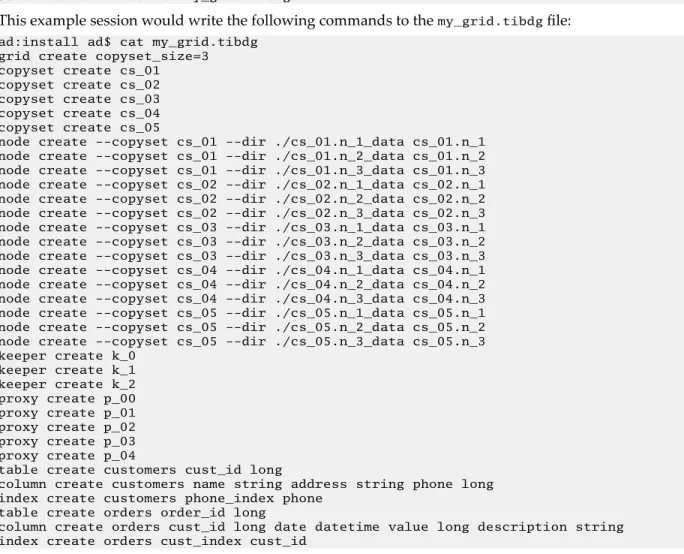
This example session would write the following commands to the my_grid.tibdg file:
ad:install ad$ cat my_grid.tibdg grid create copyset_size=3 copyset create cs_01 copyset create cs_02 copyset create cs_03 copyset create cs_04 copyset create cs_05
node create --copyset cs_01 --dir ./cs_01.n_1_data cs_01.n_1 node create --copyset cs_01 --dir ./cs_01.n_2_data cs_01.n_2 node create --copyset cs_01 --dir ./cs_01.n_3_data cs_01.n_3 node create --copyset cs_02 --dir ./cs_02.n_1_data cs_02.n_1 node create --copyset cs_02 --dir ./cs_02.n_2_data cs_02.n_2 node create --copyset cs_02 --dir ./cs_02.n_3_data cs_02.n_3 node create --copyset cs_03 --dir ./cs_03.n_1_data cs_03.n_1 node create --copyset cs_03 --dir ./cs_03.n_2_data cs_03.n_2 node create --copyset cs_03 --dir ./cs_03.n_3_data cs_03.n_3 node create --copyset cs_04 --dir ./cs_04.n_1_data cs_04.n_1 node create --copyset cs_04 --dir ./cs_04.n_2_data cs_04.n_2 node create --copyset cs_04 --dir ./cs_04.n_3_data cs_04.n_3 node create --copyset cs_05 --dir ./cs_05.n_1_data cs_05.n_1 node create --copyset cs_05 --dir ./cs_05.n_2_data cs_05.n_2 node create --copyset cs_05 --dir ./cs_05.n_3_data cs_05.n_3 keeper create k_0
keeper create k_1 keeper create k_2 proxy create p_00 proxy create p_01 proxy create p_02 proxy create p_03 proxy create p_04
table create customers cust_id long
column create customers name string address string phone long index create customers phone_index phone
table create orders order_id long
column create orders cust_id long date datetime value long description string index create orders cust_index cust_id
The tibdg Commands That Support Interaction
Certain tibdg commands, such as tibdg rollback, tibdg gridset remove can result in the reset of a grid and an inadvertent deletion of all the data within the grid. Therefore, such commands now require interactive confirmation from the user before they are run. To run any of these commands in an
unattended environment, use the [-f|--force] flag to run without confirmation.
If you do not specify the [-f|--force] flag, these commands prompt to confirm their execution. If you specify [-f|--force] flag, these commands are run by force. The following commands support interaction by using the [-f|--force] flag:
1. tibdg rollback create
2. tibdg gridset remove
3. tibdg gridset setPrimary
tibdg rollback create Creates a rollback record.
Usage:
tibdg rollback create [-f|--force] <checkpoint id>
Example of not using the -f flag:
tibdg --grid myGrid -r http://user-mbp:1234 rollback create A38F799B-2FC3-A800- B31B-3EDB0247FE9C
Enter yes to confirm rollback create. yes (the "yes" must be typed in by the user) Rollback record 2CA87BE5-246D-48A1-9A19-9672A0BDF26A created for checkpoint A38F799B-2FC3-A800-B31B-3EDB0247FE9C
Example of using the -f flag:
tibdg --grid grid1 -r http://user-mbp:1234 rollback create -f 145B29B0-73D9- A900-9BDB-177A18B91594
Rollback record F740B3B0-B316-4736-9130-1C7CB049F06B created for checkpoint 145B29B0-73D9-A900-9BDB-177A18B91594
tibdg gridset remove
Removes a member grid from a gridset.
Usage:
tibdg gridset remove [-f|--force] [-p|--makePrimary] <gridset> <grid>
Example of not using the -f flag:
tibdg --grid grid1 -r http://user-mbp:1234 gridset remove -makePrimary gridset1 grid2
Enter yes to confirm gridset remove. yes (the "yes" must be typed in by the user) Grid grid2 removed from gridset gridset1
Example of using the -f flag:
tibdg --grid grid1 -r http://user-mbp:1234 gridset remove -f -makePrimary gridset1 grid2
Grid grid2 removed from gridset gridset1
The gridset remove command has an important change in behavior. In ActiveSpaces 4.0, gridset remove removed a mirror grid from the gridset, without deleting any of its data. From ActiveSpaces 4.1.0, the mirror grid removed from the gridset is cleaned of all the data. Remember that a mirror grid removed from the gridset does not have any data in it after it is removed.
tibdg gridset setPrimary Sets the primary grid in a gridset.
Usage:
tibdg gridset setPrimary [-f|--force] <gridset> <grid>
Example of not using the -f flag:
tibdg --grid grid1 -r http://user-mbp:1234 gridset setPrimary gridset1 grid2 Enter yes to confirm gridset setPrimary. yes (the "yes" must be typed in by the user)
Grid grid2 is now primary for gridset gridset1
Example of using the -f flag:
tibdg --grid grid1 -r http://user-mbp:1234 gridset setPrimary -f gridset1 grid2 Grid grid2 is now primary for gridset gridset1
Using tibdg grid mode to Put a Data Grid into Maintenance Mode
The tibdg grid mode command can be used to put a data grid into maintenance mode which prevents data from being written into your data grid.
Putting your data grid into maintenance mode can be useful when:
● Performing data grid backups.
● Transitioning primary grids to mirror grids for disaster recovery.
● Performing system software upgrades.
Syntax
tibdg grid mode [-r realm_service_URL] [-g grid_name] grid mode maintenance|normal
The following operations are allowed in the maintenance mode:
● read operations
Write operations are not allowed and result in an exception.
In 'normal' mode both read and write operations are allowed.
tibdgadmind
tibdgadmind is an administrative daemon for ActiveSpaces. The SQL ExecuteUpdate command requires tibdgadmind running in the data grid.
Syntax
tibdgadmind [-r realm_service_URL] [-l listen_URL]
By default, tibdgadmind listens on http://localhost:7171.
If more than one tibdgadmind needs to run on the same host or in a production environment where processes on other hosts must be able to communicate with the tibdgadmind, the listen URL must be specified and must be something other than the default value localhost:7171. The value can be changed by specifying -l listen_URL.
More than one realm service URL can be specified by separating the URLs with the pipe (|) character when starting the tibdgadmind process.
After connecting to the realm service, tibdgadmind is able to process requests for table configuration changes such as creating a table, dropping a table, creating an index, and deleting an index.
To make table and index configuration updates to your data grid, you must run a realm service and an active data grid, a tibdgadmind process, and you must use the ExecuteUpdate API of the tibdgSession object. For more information, see Defining a Table Using SQL DDL Commands.
To provide fault tolerance, multiple tibdgadmind processes can be run.
Stop the tibdg Daemon
You can stop the tibdg daemon by using the following command:
tibdg -r <URL> -t <adminURL> admind stop
For example, tibdg -r "http://localhost:8280" -t http://localhost:7171 admind stop.
Designing a Data Grid
This task guides you through the design decisions that characterize the structure of a data grid.
Fundamental Decisions
The decisions you make in the following steps define the fundamental characteristics of the data grid.
After completing this task, you cannot change these parameters except by deleting the data grid definition and starting over again.
As you make these design decisions, record them for later reference.
Procedure
1. Determine the number of copysets in the data grid.
The amount of data that the grid can contain depends on the capacity of the host computers and the number of copysets.
A single copyset could suffice for prototyping and development.
2. Determine the number of nodes per copyset.
● For development, use one node per copyset.
● For fault tolerance, use two nodes per copyset.
● For stronger fault tolerance protection, use three nodes per copyset.
Each copyset consists of the same number of nodes.
3. Determine the number of state keeper processes.
● For development, use one state keeper process.
● For fault tolerance, use three state keeper processes.
4. Determine the number of proxy processes.
5. Determine unique process names.
Assign a unique name to each component process of the data grid. You can use these unique names to address the individual processes as you monitor and manage them.
a) Compose a name for each copyset.
For example, DG.CS-A, DG.CS-B, DG.CS-C.
b) Compose a name for each node, incorporating the copyset name.
For example, DG.CS-A.N1, DG.CS-A.N2. c) Compose a name for each state keeper process.
For example, DG.SK-1, DG.SK-2, DG.SK-3. d) Compose a name for each proxy process.
For example, DG.PX-1, DG.PX-2, DG.PX-3. What to do next
Defining a Data Grid
Defining a Data Grid
To define and configure a data grid, complete the steps in this task.
This task implements decisions about the structure of your data grid, creating a data grid definition within a TIBCO FTL realm service. The realm service delivers the information to the component processes of the data grid and your application processes that use the grid.
The examples in these steps illustrate adding commands to a configuration script. When the script is complete, the administration tool executes the script to define the data grid.
Alternatively, you could execute each step immediately as a separate administration tool command, instead of accumulating them in a script.
You have already completed the task Designing a Data Grid. This task refers to decisions you recorded during that task.
Prerequisites
A realm service must be running and reachable.
Procedure
1. In a text editor, begin editing a script file.
Follow the convention of naming your script with the .tibdg file name extension.
2. Add a script command to create the data grid using the syntax: grid create [option=value]...
[<grid_name>]. For example:
grid create statekeeper_count=1 copyset_size=1 mydevgrid
For more information on grid create option, see Grid Create Configuration Options.
You can run the following command for a list of all the options for the grid create script command:
tibdg help grid create
Define the Component Processes of the Data Grid
3. For each copyset, add a script command to create that copyset. For example:
copyset create copyset_name
4. For each node, add a script command to create that node. For example:
node create --copyset copyset_name node_name
5. For each state keeper, add a script command to create that state keeper. For example:
keeper create keeper_name
6. For each proxy, add a script command to create that proxy. For example:
proxy create proxy_name
7. Optional. Run the script to create the data grid.
Alternatively, you might postpone this step until you have defined the tables of the data base (see the task Defining a Table).
tibdg -s script_file_path -r http://<host>:<port>>
where <host> and <port> refer to the realm service URL.
What to do next
Starting the Data Grid Processes
Grid Create Configuration Options
The following configuration options can be used with the tibdg grid create command.
Option Description
Default
Value Valid Values
checkpoint_interval The interval, in seconds, between periodic checkpoints.
The default value of 0.0 seconds disables periodic checkpoints.
Checkpoints require additional space on disk, so care must be taken to avoid taking checkpoints frequently, as this can lead to a rapid increase in disk usage.
0.0
checkpoint_retention_limit The number of checkpoints (manual and periodic) to keep at a time. When the total number of checkpoints (manual and periodic) on disk exceeds the
checkpoint_retention_limi t, the oldest checkpoint is deleted.
The default value of 0 indicates that all checkpoints should be kept. To determine the proper setting for this option, multiply the
checkpoint_retention_limi t by the
checkpoint_interval. This value indicates the duration in seconds a checkpoint is retained. This option should typically be set to a small number to avoid excessive disk usage.
0 Minimum: 0
client_req_timeout The time (in seconds) the client API synchronously waits for completion of a request (such as GET or PUT operation), before timing out.
5.0 Minimum:
0.0
Option Description
Default
Value Valid Values
compaction A value less than six indicates more emphasis on
performance and less on the compaction of the disk space.
Conversely, a higher value indicates more emphasis on the compaction of the disk space than performance.
7 Minimum: 0
Maximum: 10
consistent_query_limit The maximum number of iterators and statements (queries) that a node can handle concurrently.
64 Minimum: 1
copyset_size The number of nodes in a
copyset. 2 Minimum: 1
encrypted_connections Specifies which connections in
the data grid get encrypted. none all or none
expiration_scanner_max_rows Determines the maximum number of rows that are expired each time a table is scanned for expired rows.
1000000 Minimum: 1
expiration_scanner_wakeup Determines how frequently the leader of each copyset scans a table for rows to expire. The unit of
measurement is in seconds.
5 Minimum: 1
Option Description
Default
Value Valid Values
full_table_scans Defines the behavior when processing a query that requires a full table scan. This option takes ones of the following values:
● warn (default): A warning is logged when a query performs a full table scan.
● enable: Logs a debug message when a query performs a full table scan.
The behavior of this option is similar to that in the previous versions of ActiveSpaces.
● disable: Prevents a query from running a full table scan. An exception is thrown if queries try to perform a full table scan.
warn warn
enable disable
grid_internal_subnet_mask See Configure Internal Subnet
Masks. none See Configure
Internal Subnet Masks.
iter_inactivity_timeout The time, in seconds, taken by the proxy to wait for the next client request on a table iterator or statement query before automatically closing the table iterator or statement query.
600.0 Minimum: 0.0
minimum_replication_factor The minimum number of nodes (including the primary and any secondary nodes) in a copyset that must be in an
Alive state before WRITE operations are allowed.
1 Minimum: 1
mirroring_max_batch_size_row s
The maximum rows in a batch that is mirrored collectively to the mirror grid. This size should be an integer >=1. It can typically be left at the default value unless transport loss is seen during mirroring operations. If transport loss is experienced during mirroring, this value should be reduced.
256
Option Description
Default
Value Valid Values
mirroring_interval The default mirroring interval (in seconds). This option determines how frequently a mirror grid checks for new checkpoints to be mirrored.
Setting this option to 0 disables mirroring.
30.0
node_detailed_stats_collecti on
Retrieves detailed statistics of a node configuration. The option can take one of the following values: enable or
disable.
When this option is enabled, the nodes enable extra statistics collection around all disk operations. The statistics can be retrieved by using the
tibdg node status
command. Additionally, these statistics are logged to the node log at the
status:verbose level once every 60 seconds. Enabling
node_detailed_stats_colle ction results in a 5-10%
performance penalty.
node_detailed_stats_colle ction is disabled by default.
disable
node_read_cache_size Every node, stores a read cache that holds
uncompressed blocks of data in memory. The size of a read cache is specified in bytes.
There are some memory usage considerations to be made when using this option. For details, see Memory Usage Considerations with the node_read_cache_size Option.
107374182 4 (1 gigabyte)
Minimum: 0 Maximum:
922337203685 4775806
(LLONG_MAX - 1)
node_storage_timeout The time (in seconds) a node waits for a successful response from a READ or WRITE operation to complete before timing it out.
60 Minimum: 0