國
立
交
通
大
學
資訊科學與工程研究所
碩
士
論
文
一 個 基 於 社 群 網 站 的 線 上 課 輔 系 統
A Social Network Based Online Tutoring System
研 究 生:彭珮瑜
指導教授:袁賢銘 教授
一個基於社群網站的線上課輔系統
A Social Network Based Online Tutoring System
研 究 生:彭珮瑜 Student:Pei-Yu Peng
指導教授:袁賢銘 Advisor:Shyan-Ming Yuan
國 立 交 通 大 學
資訊科學與工程研究所
碩 士 論 文
A ThesisSubmitted to Institute of Computer Science and Engineering College of Computer Science
National Chiao Tung University in partial Fulfillment of the Requirements
for the Degree of Master
in
Computer Science
June 2012
Hsinchu, Taiwan, Republic of China
52
一個基於社群網站的線上課輔系統
學生:彭珮瑜 指導教授:袁賢銘
國立交通大學資訊科學與工程研究所
摘要
線上課輔是為提升學習效果,當學生在日常課程學習中有諸多不懂或是進度落後時, 透過線上課輔系統,與課輔老師互動討論後,能夠解決在學習上的困難及提升解決問題的 能力。目前大部分課輔系統進行課輔活動時都是使用需要購買授權的同步即時互動教學系 統,因此我們想要利用可免費使用的替代軟體來進行課輔。我們發現到社群網站之所以受 歡迎,是因為社群網站所提供的服務越來越多樣化,所以我們擬將線上課輔系統結合社群 網站的功能,透過此線上課輔系統來觀察是否能夠提升學生的學習興趣和學習效果。 Google+ Hangouts 提供眾多功能,很適合進行線上課輔的活動,它是可以免費使用。 不用考慮需要購買授權的問題。進行課輔的老師與學生,一來可以不侷限在學校裡面做線 上課輔活動,在有電腦與相關設備的地方(例如家裡)作課輔教學,二來課輔教師與學生可以 利用除了上課時段之外的時段進行討論。因此本論文擬將線上課輔系統結合社群網站 Google+ Hangouts 視訊聚會功能,開發出一個基於社群網站的線上課輔系統。II
A Social Network Based Online Tutoring System
S t u d e n t : P e n g - Yu P e n g Ad v i s o r : S h ya n - M i n g Yu a n
Institute of Computer Science and Engineering
National Chiao Tung University
Abstract
The utility of the online tutoring system is to enhance the learning effect. When students do
not understand or behind schedule in the ordinary course, through online tutoring system to
interact with tutors that can solve their problems and enhance student’s problem-solving skills.
Currently, most of online tutoring systems are used authorized real-time interactive teaching
system to online tuition. We want to use free substitute software for the authorized system. We
found that social network sites which provide a variety of functions, so we want to integrate
feature of social network site to our online tutoring system. We would like to know whether it
can enhance students’ interest and learning effect or not.
Google+ hangouts provides vary functions, it is suitable to be used on online tutoring
activities. It is free to use, and do not need to consider the authorized problem. This system could
let tutors and students do online tutoring activities anywhere, not limited at school computer lab.
Tutors and students also could discuss problems or school work anytime. In this thesis, we will
integrate Google+ Hangouts feature to our online tutoring system, and propose a Social Network
III
Acknowledgements
在這兩年的求學期間,個人的成長與獲益實在難以筆墨形容。回想起剛進實驗室的青 澀模樣,懵懵懂懂的我,跟著學長們做計劃,跟著同學們一起修課、討論作業,求學歷程 中的點點滴滴都深深的烙印在我心裡。 首先最要感謝的是袁賢銘老師兩年來的指導,他自由開明的風格,讓我們有許多發揮 的空間,可以接觸各方面不同的領域。老師總能夠在任何研究中提出自己獨特的想法與點 子,這點是我很需要去學習的。還有老師也給予我許多研究方面上的建議,當我有許多疑 問時,老師也都能幫我指點迷津。另外,非常感謝擔任我的口試委員的林珊如教授、劉旨 峰教授、王岱伊教授,於百忙之中抽空蒞臨指導我的論文,給予我許多有用的批評與建議。 感謝實驗室的 國亨學長,在執行論文計畫的這段期間持續的與我開會討論,給予我適當 的建議與想法。感謝 家鋒學長及江川學長,在執行計畫的研究過程中指導過我。感謝 冠穎、 凱哥及紘維在我面對課業上的問題時教會我許多的解決方法,常常一起討論計畫或論文的進 度,督促著彼此,大家開朗的個性也常常為實驗室製造歡樂的氣氛。 感謝 金毛、CK及學 弟們在研究的過程中所給予諸多的建議及鼓勵。 最後,感謝要我父母親、男友和其他好友們,有你們的支持與信任我才能專心致力於 學習。學位的達成令人欣喜,但其過程更是值得回味。謝謝你們。IV
Table of Contents
摘要
……….………...I
Abstract……….………...……….II
Acknowledgements...III
Table of Contents...IV
List of Figures...VI
List of Tables...VII
1 Introduction……...1
1.1 Preface...1 1.2 Motivation...2 1.2 Objectives...41.3 Outline of the Thesis...4
2 Backgrounds...5
2.1 Google+...5
2.1.1 Features of Google+...5
2.2 Google+ Hangouts...6
2.2.1 Getting started with Hangouts……...6
2.2.2 Limit of Hangouts………...8
2.2.3 Features of Hangouts……...8
2.2.4 API of Hangouts………...…...9
2.3 Related Works...10
2.3.1 Online tutoring...10
2.3.2 After-School Internet Tutoring Program...…….…………...12
3 System Design and Implementation...15
3.1 Online Tutoring System...15
3.1.1 Overviews...15
3.1.2 Role………...16
3.1.3 System features...19
3.2 Integrate Hangout experience in Online Tutoring System……...….……….….. 27
3.3 Implementation Tools...28
V
4.1 System Flow Scenarios...29
4.2 Online tutoring in Google+ Hangout...31
4.2.1 Google+ Hangout interface...31
4.2.2 Tutors and students’ interaction...32
5 Experiment and System Evaluations...37
5.1 Experiment………...37
5.2 System Usability Scale...38
5.2.1 Tutors’ SUS Questionnaire Result Analysis...39
5.2.2 Students’ SUS Questionnaire Result Analysis...41
5.3 Qualitative Research...43
6 Future Works and Conclusion ...45
6.1 Conclusion ... 45
6.2 Future Works ... 46
References... 47
Appendix A: System Usability Scale………51
VI
List of Figures
Figure 2-1 JoinNet software……….………..…13
Figure 3-1 the overview of Online Tutoring System with Google+ Hangouts………15
Figure 3-2 the roles of Online Tutoring System ....……….……...17
Figure 3-3 the interface of Online Tutoring System………...……...19
Figure 3-4 the interface of Online Tutoring System………...……...20
Figure 3-5 Latest News feature………...………...……...21
Figure 3-6 Online Tutoring feature……….………...……...22
Figure 3-7 Course syllabus………..………...……...23
Figure 3-8 Course materials………....………...……...23
Figure 3-9 Teaching journal………...……...24
Figure 3-10 Tutor’s forum………...………...……...24
Figure 3-11 Student’s forum……..………..………...……...25
Figure 3-12 Related link………..………...……...25
Figure 3-13 Contact us form………...……...26
Figure 3-14 Sitemap………...……...26
Figure 4-1 Online Tutoring Flow Diagram ………...………...29
Figure 4-2 teaching journal………..….….….30
Figure 4-3 Screenshot of Hangout interface……….…………...………...31
Figure 4-4 search directly and the results were showed in the center of hangout…………..32
Figure 4-5 Sketchpad………...33
Figure 4-6 Add a document…………...………...…………34
Figure 4-7 annotated notes………...………...35
VII
List of Tables
Table 2-1 System requirements for Hangouts………..………7
Table 2-2 Comparison with Google+ Hangouts and Facebook video chat…………..………9
Table 3-1 Online tutoring system features………..20
Table 3-2 Implementation Tools………..………..28
Table 5-1 Personal Information of Participants……….………...39
Table 5-2 Personal Information of Participants………..39
Table 5-3 Descriptive Statistics of Tutors’ SUS Questionnaire….………..………...40
Table 5-4: Tutors’ SUS Questionnaire and Statistics of Each Item……….…..40
Table 5-5: Descriptive Statistics of Students’ SUS Questionnaire……….……41
52
1 Introduction
1.1 Preface
Today Internet has become an indispensable part of our life. Many people use Internet to
communicate to each other. With the Internet and computers, education is no longer limited to the
traditional classroom. Educational model has gradually been transferred to online learning.
Online learning and teaching is becoming a necessity in our future. Some researchers point out
that online education can be at least as effective as conventional instruction [1] [2].
Some students have learning backwardness problems. The teachers at school should play their
effective role in discovering the backwardness and giving remedies [3][4]. Many schools have
tutoring activities for after school learning. Tutoring usually refers to the act of a teacher or
instructor (called a tutor) helping a person learns something about a subject. Most commonly, it
refers to the relationship between a private teacher/instructor helping a student with school work.
Online tutoring is a better way for a student to receive help [5]. It uses a combination of
computer-mediated conferencing. Students could discuss problems with their tutor through the
Internet, do not need to see each other actually [6]. Tutors could use different way to teach
students in online tutoring [7].
Online tutoring is also appropriate for distance education [8][9]. Distance education focus on
student-centered learning and the learning objects able to autonomous learning [10][11]. It can
instruct great numbers of students at the same time. Some schools in remote districts that they
2
districts that most come from disadvantaged families and their economic conditions are not well.
These students have not been able to autonomous learning completely. In the environment, the
education quality and learning ability can not balance with the urban schools [12]. So they need
online tutoring. Construct an online tutoring system and hire volunteers or undergraduate students
or graduate students as tutors. These tutors must have a high standard of academic literacy.
Design the teaching methods and materials, through one-to-one tutoring to improve the learning
backwardness problems [13].
Many schools have joined the online tutoring project for after school’s learning [14]. This project
was originally initiated by the Ministry of Education. College students tutored junior high
students and primary school students in remote districts by Internet teaching. Enhance the
learning effectiveness of students in remote districts and promote the equalization of learning
opportunities [15][16]. These schools almost use the JoinNet [17] software to online tutoring.
JoinNet is the multimedia communication client software developed by HomeMeeting. It has
many features and it is very suitable to use by online tutoring, but it is required to pay for a
license. Only schools will pay for the license when they need to use JoinNet software to online
tutoring. General users or some schools may not afford to pay the fee of license, but they need
and want online tutoring. So we would like to use free software to online tutoring.
1.2 Motivation
We expect to let more people could use online tutoring system, so we want to find some free
software to be used in our system. Nowadays, social networking sites are very popular. The usage
of social networking sites is more and more. Social networking site such as Facebook[18],
3
with their friends on a one-to-one basis, or a user may chat with multiple friends simultaneously
through the groups feature. User’s homepage shows information that includes profile changes, upcoming events, and other updates, and it also shows conversations taking place between the
walls of a user’s friends. In addition, Google+ has a feature different with Facebook, that is the
Hangouts function. Hangouts are places used to facilitate group video chat. Facebook also has
video chat, but it only one-to-one chat and it can not do other operations. Hangouts feature is
different, it has video communication and allows users to share documents, share a scratchpad
and share their screens with other users. It’s free and convenience to use.
We want to integrate the Hangouts to our online tutoring system. There is the first time to use
Hangouts on online tutoring. Tutors could communicate with their students more easily and
conveniently. The past online tutoring way is that tutors and students who gather in their school’s
computer lab in the same time are teaching and learning but if use the Google+ Hangouts, it
could let tutors and students online tutoring anywhere. Google+ Hangouts also support mobile
user. Users only need a computer with Internet or 3G mobile phone then could start tutoring. It is
not limited in the school’s computer lab to online tutoring. Two parties do not need to stay in
school, maybe it is a good way to them. But it also has some problems we face and should to
control. This new tutoring way has many advantages, such as tutors and students could
communicate with each other more effortlessly and frequently. It offers more opportunities that
they could discuss problems in learning or school work. Students could ask their tutor questions
directly or log on Google+ then leave some messages to their tutor instead of stay these questions
4
1.3 Objectives
We want to provide an online tutoring system which integrated social networking site
features that could support collaborative teaching and learning. By integrated social networking
site features which could enhance learner’s interest and help the two parties interacting with each other immediately. Our teaching strategy is one-to-one tutoring; the tutor could concentrate on
teaching his/her students.
We also intend to create a simple, convenient and user-friendly interface of our online
tutoring system, not having complicated steps and difficult to use. In our online tutoring system,
we provide many features to users, like usual e-learning websites. We expect that our online
tutoring system could enhance students’ learning performance and train students’ ability to solve
problems. We also expect that we can provide a practical platform to tutors, they could teaching
more conveniently and know students’ learning situation and interact with student more easily.
1.4 Outline of the thesis
This dissertation is divided into six chapters. The following is a brief description of the
content of each other:
In chapter 2, we discuss the background of online tutoring system and the related work. In
chapter 3, we show a diagram of system overview, introduce features in our online tutoring
system and describe implementation details. Next, in chapter 4 presents the flow of online
tutoring operations. The system evaluation is in chapter 5 containing the questionnaire analysis.
5
2 Backgrounds
2.1 Google+
Google+ (sometimes abbreviated as G+) is a social networking service, operated by Google Inc.
The service launched on June 28, 2011. Google+ integrates across a number of Google social
services such as Google Profiles, Mail and introduces new services identified as Circles,
Hangouts and Sparks. Google+ is available as a website and on mobile devices. Google+ is about
having great conversations. Share photos, videos, links, or anything else that’s on your mind.
2.1.1 Features of Google+
“Circles”This feature enables users to organize people into groups for sharing across various Google
products and services. Circles make it easy to share the right things with the right people,
just like in real life.
“Hangouts”
Hangouts are places used to facilitate group video chat with up to 10 people participating in
a single Hangout. It also supports mobile users.
“Messenger”
This feature let users can bring groups of friends together into a simple group chat, putting
everyone on the same page.
6
This feature is a front-end to Google Search, enabling users to identify topics they might be
interested in sharing with others.
“Search”
This feature allows users to search for content within Google+. Users type what they’re
looking for into the Google+ search box, and Google will return relevant people and posts,
as well as popular content from around the web.
“Pages”
Pages are available to everyone. Users can create public pages for brands, products, local
businesses and more.
2.2 Google+ Hangouts
Hangout is meant a place where someone spends a lot of time or where they live. Google+
Hangouts is the video chatting service available on Google+. You can use this to chat with
friends or everyone is not always around their computers. It’s free to use. To use hangouts, users
need a google account first. Only Google+ users are able to use this hangouts feature. We use
Google Hangouts to do online tutoring activities in our system.
2.2.1 How to getting started with Hangouts
Before we want to start a hangout, something we must be to know. The following are some
requirements.
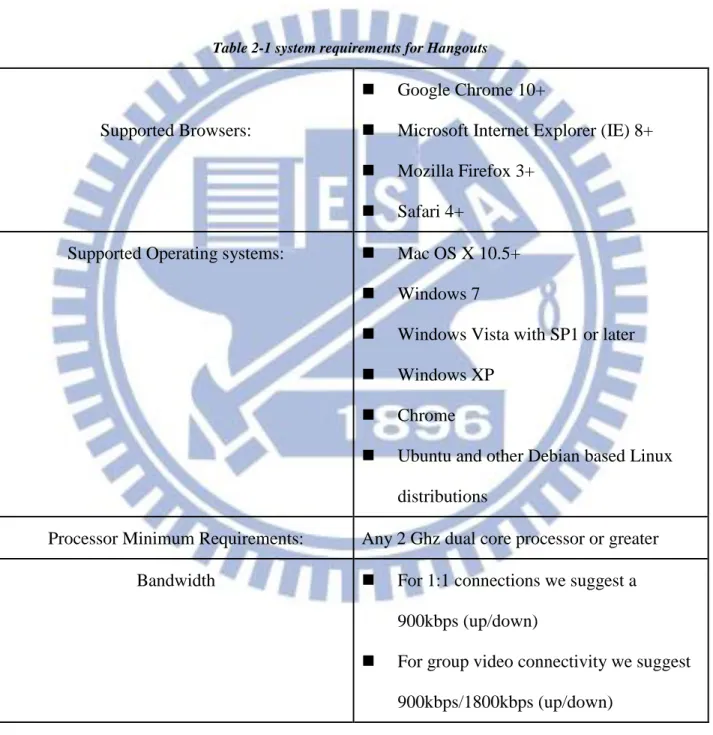
1. Check out the system requirements(Table 2.1) to make sure you’re using a supported browser
and operating system, and that your processor and bandwidth are sufficient.
7 3. Make sure that your webcam is working.
4. Suppose to use a headset. Headphones with a built in microphone will dramatically improve
your Hangout experience. The hangout settings page can help users to confirm that user’s
computer is set up and ready to use.
Table 2-1 system requirements for Hangouts
Supported Browsers:
Google Chrome 10+
Microsoft Internet Explorer (IE) 8+ Mozilla Firefox 3+
Safari 4+
Supported Operating systems: Mac OS X 10.5+ Windows 7
Windows Vista with SP1 or later Windows XP
Chrome
Ubuntu and other Debian based Linux distributions
Processor Minimum Requirements: Any 2 Ghz dual core processor or greater
Bandwidth For 1:1 connections we suggest a 900kbps (up/down)
For group video connectivity we suggest 900kbps/1800kbps (up/down)
8
2.2.2 Limit of Hangouts
There limitation of Hangouts is that maximum ten participants when in the Hangout. In other
words, a tutor teaches nine students at the same time at most.
2.2.3 Features of Hangouts
The following is a list of the google+ hangout features:
“Screen Share”
Users could share their screen to others. This feature could be used in when tutor want to
teach something step by step. And then student could know about the correct operation.
“Text record”
All notes typed in hangout document are recorded in user’s google document. When the
hangout finished, users could keep all notes and review these notes in users’ google
document.
“Draw record”
Users draw something or wrote some equations in sketchpad. These writings are recorded in
users’ google document. When the hangout finished, users could keep all writings and
review these writings in users’ google document.
“Google Doc integration”
The files which were uploaded to users’ google document could be uploaded in hangouts
and shared to others. When these files in hangouts were modified, the files in users’ google
document were updated immediately.
“Group Chat”
9 Invite a phone participant to hangout.
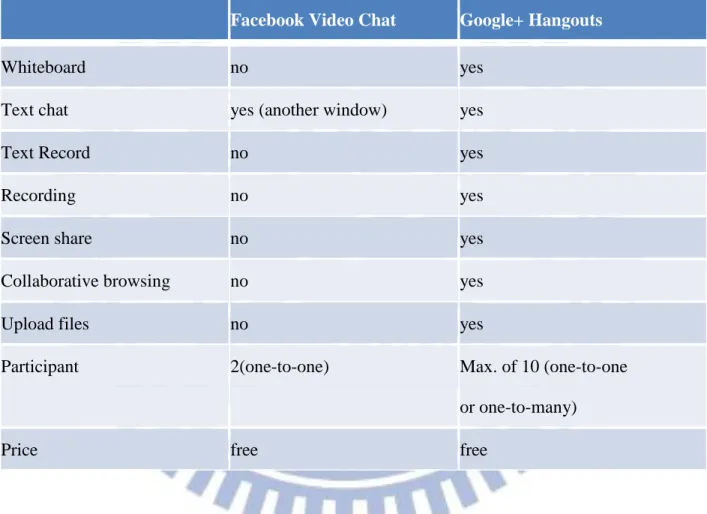
Why did we choose Hangouts and didn’t choose facebook chat? The following table is a
comparison with Google+ Hangouts and Facebook chat.
Table 2-2 Comparison with Google+ Hangouts and Facebook video chat
Facebook Video Chat Google+ Hangouts
Whiteboard no yes
Text chat yes (another window) yes
Text Record no yes
Recording no yes
Screen share no yes
Collaborative browsing no yes
Upload files no yes
Participant 2(one-to-one) Max. of 10 (one-to-one
or one-to-many)
Price free free
From the Table2-2, we could understand that Facebook chat is not suitable to be use in online
tutoring. Because Facebook only provides video communication, it can not upload course
10
2.2.4 API of Google+ Hangouts
The Hangouts API enables users to develop collaborative apps that run inside of a Google+
Hangout. We could write Hangout apps using standard HTML, JavaScript, and CSS. The
Hangout APIs consist of three important aspects: Gadget XML, Application state, and Events.
2.3 Related Works
In the sections, we will introduce some researches about online tutoring. Such as interaction of
tutors and students, web sources are learning materials, students’ learning attitude and learning
performance.
In order to understand the other’s online tutoring system with our differences, the last section we will introduce the after-school Internet tutoring program which promoted by the Ministry of
Education.
2.3.1 Online tutoring
InteractionMoore (1989) [21] discusses three types of interaction essential in distance education. Those are
learner-content, learner-instructor, and learner-learner interactions. In learner-content interaction
the student interacts with the course materials. The learner gains and constructs knowledge by
working with the subject matter. Careful selection of materials and activities for online tutoring
will help learners achieve course objectives. Learner-instructor interaction involves direct
11
comprehension or progress with the content. Carefully select communication technologies to
enable and increase interaction and collaboration among learners. The learner-learner interaction
is the exchange of information, ideas, and dialogue that occur between students about the course.
Hillman, Hills, and Gunawardena (1994) [22] have taken the idea of interaction a step farther and
added a fourth component to the model learner-interface interaction. This means that the learner
must understand not only the procedures of working with the interface, but also the reasons why
these procedures obtain results. Furthermore, Kearsley states that “a high level of interaction is
desirable and positively affects the effectiveness of any distance education course (Kearsley,
1995)[23].
Resources
There are plentiful resources on the internet. These online resources may be able to used in
teaching or be a part of learning through instructional design [24]. Lisa Dawley introduced many
tools for online teaching. These tools are Audio/Video Conferencing and Whiteboard, Chat and
Instant Messaging, Discussion Forums and etc. The strengths and weaknesses of each tool are
discussed in detail. Make the best use of these tools; it will improve the effect of online teaching
[25].
Learning attitude
Utilizing on-line-tutoring system students not only has developed the ability to propose their own
ideas, but also has shown willing to participate activity in the discussion. Even when unable to
use on-line tutoring due to external factors, students also are not willing to give up the learning
12 Learning performance
The study found that if the students had more internet experience, they would have better
performance and learning satisfaction, and were more willing to study in the web-based
environment [28]. If students like Internet learning then their learning performance must be better
than some students are passive learning.
2.3.2 After-School Internet Tutoring Program
This After-School Internet Tutoring Program has been promoted by the Ministry of Education for
six years. The Ministry of Education commissioned the National Chi Nan University in 2006 to
establish the “After-School Internet Tutoring Platform” that provides those students in remote
districts with “one-to-one” or “one-to-many” tutoring service through the Internet. Many college
students participate in this program and serve as tutors. These college students who gathered in
the computer lab were tutoring with students in remote districts. On the other side, students in
remote districts who also gathered in the computer lab were online learning with their tutors.
Why they need to gather in the school computer lab? Because some students in remote districts
who have no computer or no Internet connection. Moreover, this way is good for managing
students and tutors.
Before online tutoring, they need to make sure that webcam and handset are working. Sometimes
it needs to adjust the volume levels in audio files. And then, they need to install JoinNet software.
They used JoinNet software to online tutoring. Tutors enter the classroom ahead; students need to
13
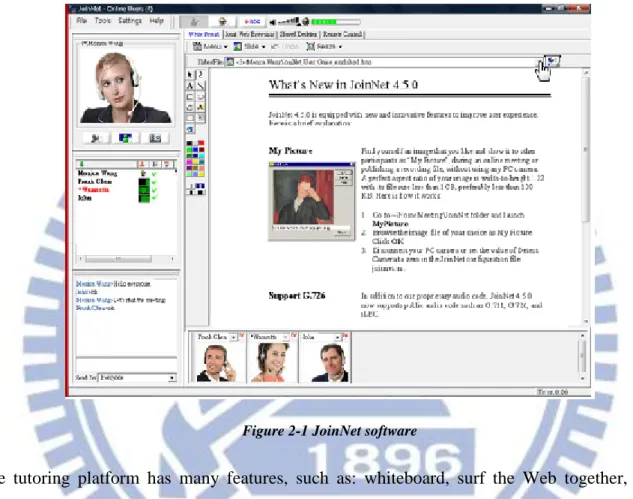
with the features of this tutoring platform (Figure 2-1). Tutors use the tools of the classroom to
teaching their students.
Figure 2-1 JoinNet software
The tutoring platform has many features, such as: whiteboard, surf the Web together, shared
desktop, distance remote, chat box, recording, and audio and video communication, and so on.
JointNet allows the tutor to see and talk to any number of students simultaneously. [29]
When they are beginning to online tutoring, they must have some problems as suddenly more
people use JoinNet that cause system instability, tutors and students spend many time to check
other status. If the system instability, students maybe can not hear tutors’ voice. Tutors reduce the
14
Tutors’ seat can not set closely in school computer lab, because microphones receive others
sound. This may let students confused and reduce the quality of teaching.
The implementation effectiveness of this project is ensures that could enhance students’ interest
and increase learning effectiveness [30] [31]. It can also help tutors foster their professional
15
3 System Design and Implementation
3.1 Online Tutoring System
3.1.1 Overview
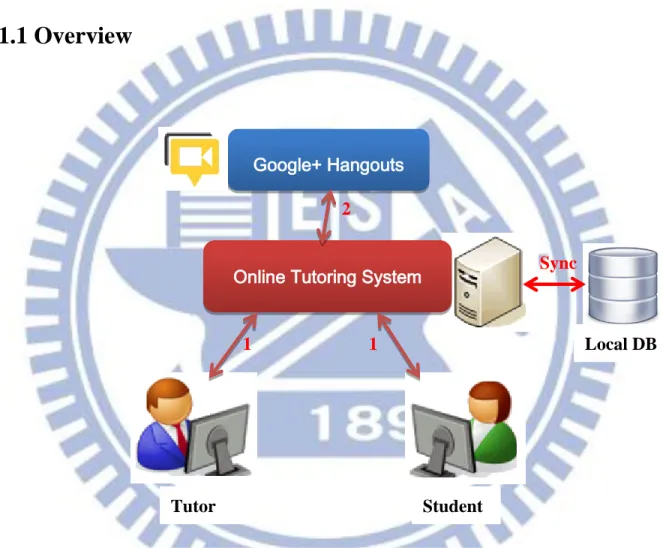
The first part we proposed in this thesis is named “Online Tutoring System”. The Online Tutoring System is mainly designed for collaborative teaching and learning. Figure 3-1 depicts
the overview of Online Tutoring System with Google+ Hangouts.
Tutor Student
Online Tutoring System Google+ Hangouts
Figure 3-1 the overview of Online Tutoring System with Google+ Hangouts
Local DB
Sync
1 1
16 This system process is as follows:
Step1:
When users who would like to use this online tutoring system need to register an account.
Only the first time needed. Tutors and students need to login to this online tutoring system
simply enter their username and password. When they already login, they have rights to use
the online tutoring system.
Step 2:
When tutors and students prepare to online tutoring, they link to online tutoring page, click
the start class button and then system will connect them to google+ hangout page. Our
online tutoring system used Google+ Hangouts to online tutoring.
Sync:
After two parties log in our online tutoring system, their data, course materials, and discuss
content are stored in local database(MySQL). Administrator can manage those data.
3.1.2 Role
In our online tutoring system, we have four roles. One is tutor; others are student, class teacher
17
Figure 3-2 the roles of Online Tutoring System Tutor
We hire undergraduate or postgraduate students to be tutor. Require them to prepare course
materials for student. Our tutors have positive attitude and like to help student to solve
problems. Tutors help students figure out the answer on their own and use the tools of the
classroom to share resources, explain complicated diagrams and review papers together. We
also hope tutors could improve students’ learning attitude. Make them know that learning is
18 Student
Usually choose junior high school or elementary school students who need to tutored.
Teachers in school pick up some students to be online tutoring object. Some of them maybe
have learning backwardness problems, or volunteer to take online tutoring courses.
Class teacher
School teacher as a priority to served. There should have one class teacher in tutor’s portion
or student’s portion. Class teacher most know what the students think and their behavior. Class teachers deal with situations which have suddenly happened. Such as today courses
were suspended, they need to contact students and notify them. Or students always cannot
attention to learning, class teacher should to correct students.
System administrator
Maintain the system data and features. If need that the system administrator will improve or
add system feature. We also construct a feature which will contact to system administrator in
our online tutoring system, if users have troubles, they could fill out the form in contact us
19
3.1.3 System Architecture
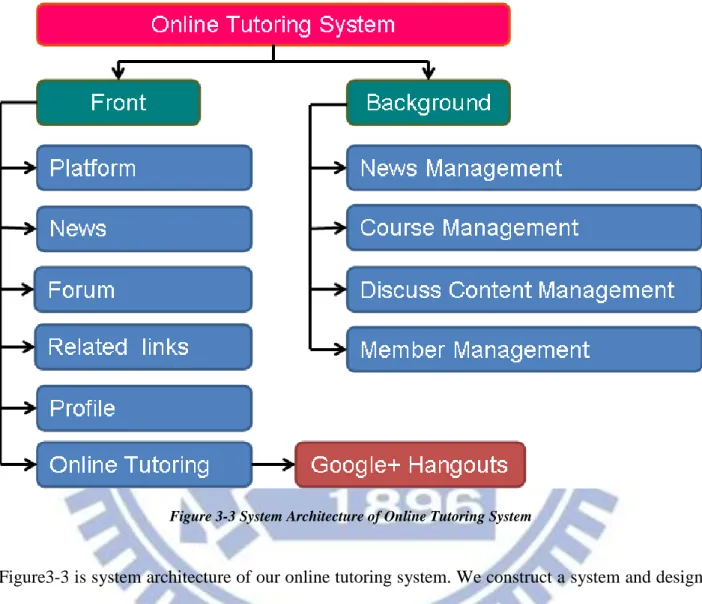
Figure 3-3 System Architecture of Online Tutoring System
Figure3-3 is system architecture of our online tutoring system. We construct a system and design
some features that tutors and students could use. And their course materials, discuss content,
member information will recorded into our database.
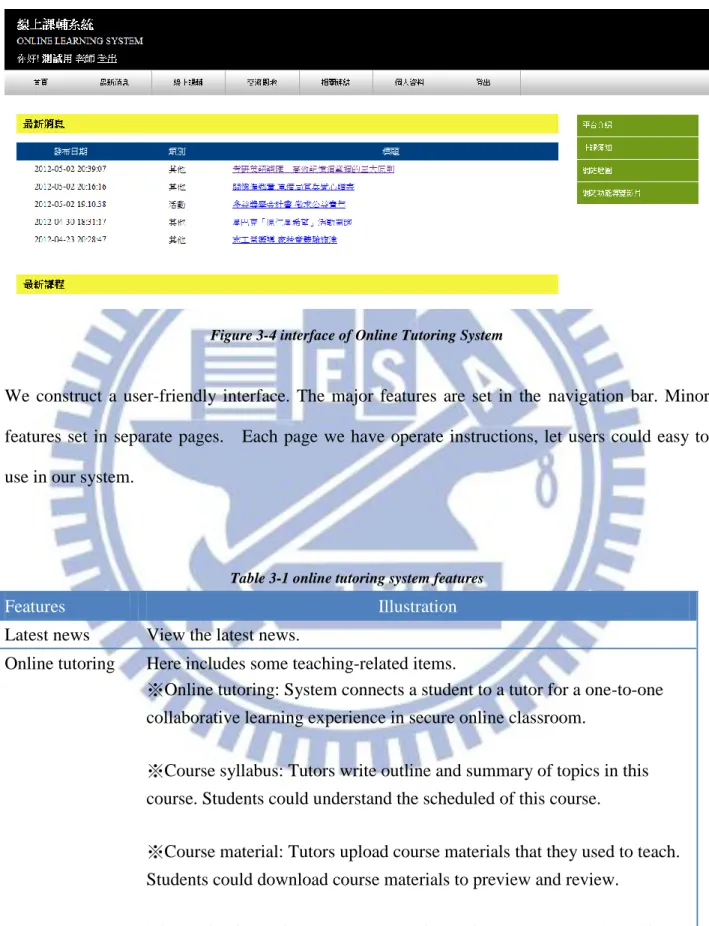
Figure3-4 is our online tutoring system interface. Table 3-1 is a list of system functions in our
20
Figure 3-4 interface of Online Tutoring System
We construct a user-friendly interface. The major features are set in the navigation bar. Minor
features set in separate pages. Each page we have operate instructions, let users could easy to
use in our system.
Table 3-1 online tutoring system features
Features Illustration
Latest news View the latest news.
Online tutoring Here includes some teaching-related items.
※Online tutoring: System connects a student to a tutor for a one-to-one collaborative learning experience in secure online classroom.
※Course syllabus: Tutors write outline and summary of topics in this course. Students could understand the scheduled of this course.
※Course material: Tutors upload course materials that they used to teach. Students could download course materials to preview and review.
21
process and student’s learning situation on the day. Forum Provide two forums to users
※Tutors forum: It is a place for tutors to discuss about teaching and course materials. Only tutors could use.
※Students forum: Students could discuss something which might be homework problems or some learning problems here. Tutors could solve their problems.
Related Links Provide a lot of related links to users. All links are related to learn. Personal profile Users could modify their profiles and change password.
Contact us If users have some technical problems, they could fill out the form to us. System administrator could solve their problems.
Sitemap Users could see a list of pages of online tutoring system accessible to users. This helps users find pages on the site.
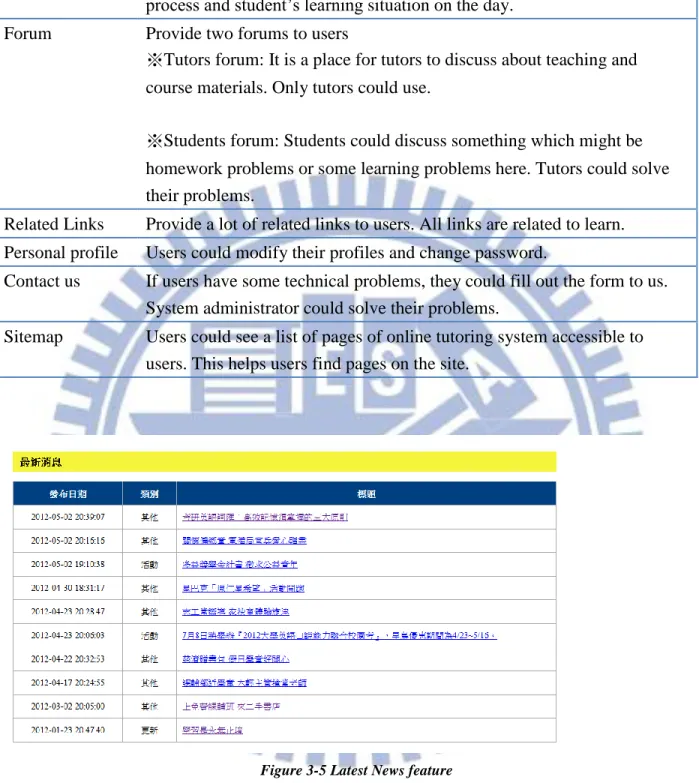
Figure 3-5 Latest News feature
We posted some news which related to learning and teaching. If our tutoring activities have some
22
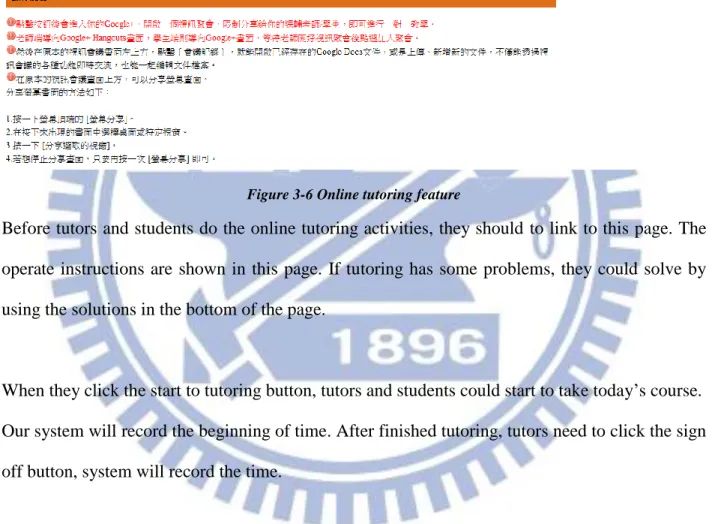
Figure 3-6 Online tutoring feature
Before tutors and students do the online tutoring activities, they should to link to this page. The
operate instructions are shown in this page. If tutoring has some problems, they could solve by
using the solutions in the bottom of the page.
When they click the start to tutoring button, tutors and students could start to take today’s course.
Our system will record the beginning of time. After finished tutoring, tutors need to click the sign
off button, system will record the time.
In the sidebar, we design three features about course. There are course syllabus, course material,
23
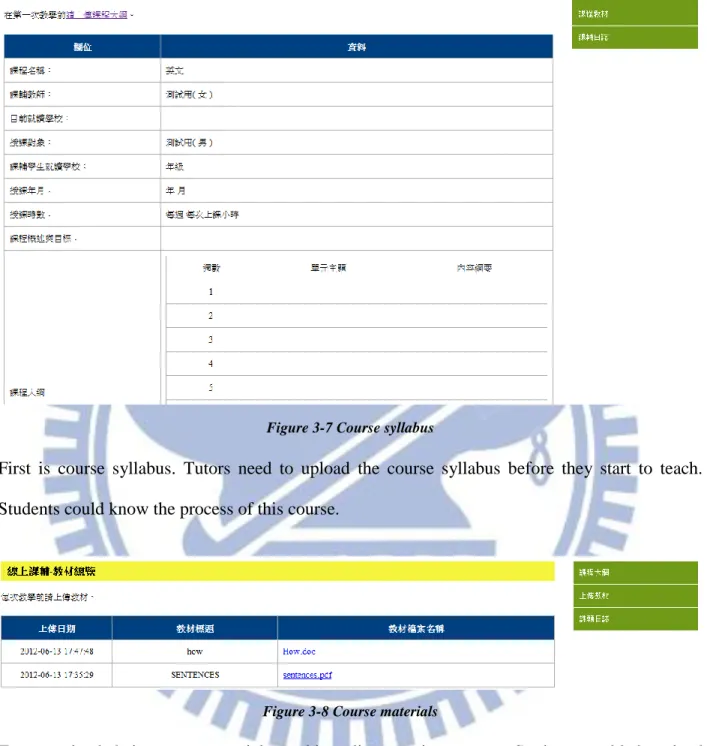
Figure 3-7 Course syllabus
First is course syllabus. Tutors need to upload the course syllabus before they start to teach.
Students could know the process of this course.
Figure 3-8 Course materials
Tutors upload their course materials to this online tutoring system. Students could download
24
Figure 3-9 Teaching journal
This feature only provided to tutors. Each time they finished the online tutoring, tutors should to
fill out the form to record course process and situations. Tutors could adjust their teaching
methods or materials based on students’ learning situations. We could know about the tutors’
teaching attitude and students’ learning situations from these teaching journals.
Figure 3-10 Tutors’ forum
This forum was constructed for tutors. They can discuss about their teaching problems which
25
Figure 3-11 Students’ forum
Students can discuss about their problems of learning here. They can solve other students’
problems and tutors also could come here to solve their problems.
Figure 3-12 Related link
In this page, we provided vary links about leaning to users. They can learn by themselves through
26
Figure 3-13 Contact us form
If users have any problem, they can fill out the form to contact system administrator. When
system administrator has finished solve their problem, system administrator will notify the person
who filled out the form.
Figure 3-14 Sitemap
We provided a sitemap page to users, they can know about what pages have certain features. And
27
3.2 Integrate Hangout experience in Online Tutoring System
Google+ Hangouts API enables users to develop apps and run in Google+ App. We candownload the open source code. Before we can use the Google+ Hangouts API, we need to create
a project in the Google APIs console. We could create a new project or open the sample project.
Then scroll down to the Google+ Hangouts API, click ON and accept the terms of service. After
we've written our Hangout app, we must publish our Gadget XML file to a publicly accessible
URL and register our app in the Google APIs console. We can start a hangout in the developer
sandbox with our app running in it. We still are writing our Hangout applications now.
We use Google+ hangouts to online tutoring. When they are beginning to tutoring, we provided a
button which consists of Hangout link, they click the button, and they will connect to Hangout
28
3.3 Implementation Tools
In this program, we use a number of open source tools and libraries for developing the online
tutoring system as shown Table3-2.
Table 3-2 Implementation Tools
Name Usage Version License
PHP Programming 5.2.6 PHP License
Apache HTTP Server Web server 2.2.8 Apache License 2.0
MySQL Database 5.0.21b GNU GPL
phpMyAdmin Database Manager 2.10.3 GNU GPL
We use PHP programs to construct our online tutoring system, design the web pages and system
features. The majority of web servers on the Internet are using the Apache HTTP Server. Using
MySQL to store data, such as member’s information, course materials and news, discuss content
and so on. PhpMyAdmin is intended to handle the administration of MySQL with the use of a
Web browser, and it supports a wide range of operations with MySQL. Through phpMyAdmin,
29
4 System Demonstration
4.1 Online Tutoring Flow Scenarios
Figure 4-1 Online Tutoring Flow Diagram
The scenario of the online tutoring flow diagram is shown in Figure 4-1. In this diagram, we
illustrate step by step, initially, tutor and student both log in the online tutoring system, turn to the
online tutoring page,(1) click the start tutoring button to start tutoring. (2) Tutor’s page will open
the hangout window automatically. Student’s page directed to the google+ homepage. (3) Tutor need to invite student to join the hangout. So tutor click Invite at the hangout window and type
30
window, the hangout is started. (4)When tutor already invited student to join the hangout, google
will notice student that someone invited you to join the hangout automatically. (5)Student joins
the hangout. (6) When both already join the hangout, then start tutoring. Before tutoring, both of
them need to make sure their microphone and camera are working correctly.
After finished today course and exited the hangout, tutor needs to write teaching journal which
recorded the progress of teaching and tutoring situation. Figure 4-2 showed that the teaching
journal form.
31
4.2 Online tutoring in Google+ Hangout
4.2.1 Google+ Hangout interface
Figure 4-2 shows the screenshot of Hangout interface. Tutor and student can see each other’s
page at (1). Participants can use “Notes”, “Sketch”, “Add a document” and “Group chat”
functions at the sidebar at (2). Also can use (3) “Screen share” function to share screen to other
participant. (4)The settings page helps confirm that participant’s computer, microphone and webcam are set up and ready to use. If today course is finished, click the “exit” button to exit the
hangout at (5).
Figure 4-3 Screenshot of Hangout interface
(1) (2)
32
4.2.2 Tutors and students’ interaction
NotesTo edit a note to the hangout, click the “Notes” at the top of the sidebar. Tutor can share notes with student. Both of them can take notes or edit collaboratively. If some words we want to
search it, click Right-Click to choose “search”, it will appear a small window in the center of
hangout that show the searching results. It do not need to switching windows. It can insert the
link to the word which we searched directly.
33
SketchpadTo sketch something to the hangout, click the “Sketchpad” at the top of the sidebar. This will create a blank Sketchpad document which allows users to collaborate in real-time. Tutor can
collaboratively draw diagrams with student. By using handwriting tablet, tutor could write
questions, equations, concept diagramming or tutoring his/her student in math easily and
conveniently.
34 Add a document
To add a document to the hangout, click the “add a document button” at the top of the sidebar. Figure 4-5 showed that choose the documents you’d like to share and click “Select”. It can
upload different types of documents, such as ppt, pdf, doc and etc. The video file also can be
uploaded to the hangout. The document will show up in the left portion of the video screen. Tutor
can share his/her course materials or a google document with his/her student. Figure 4-6 showed
that the document which was added in the hangout could be annotated. The annotated document
will save in their Google Doc.
35
Figure 4-7 annotated notes
Share screen
Click the “Share Screen” button at the top to share own screen with others. If you have multiple
windows open, you will be asked to choose one to share. Select that window, then click share.
36
Figure 4-8 Screen share
Group Chat
This feature let tutor could chat with student. If student can’t hear what tutor said, student could type something to notify tutor. Tutor could type steps to solve student’s problems.
Invite
In the hangout, still could invite someone to join the hangout. It can invite mobile users who
installed google+ app. But in our online tutoring system, it is not allow tutor or student to invite
37
5 Experiment and System Evaluations
5.1 Experiment
We have an experiment with Jhongli commercial high school. The experimental subjects consist
of 4 students and 4 tutors. The educational level of tutors is college student and master. The
students are grade one students in senior high school. We provided one-to-one tutoring. The
tutoring time is one hour per week. We asked the tutors come to the computer lab and do the
online tutoring activity. Because this is the first experiment, we want to know the real situation
about this experiment. And if something happened, we could help or adjust immediately. Before
the online tutoring, we introduced our system and illustrated how to operate to tutors. In the
students’ side, their class teacher had explained the operations of online tutoring system. Students can stay in their home and do the online tutoring activity.
We observed that they do the online activities very fluently. Sometimes the student faced some
problems and he did not know how to solve, the tutor will give the student some opinions and
solve the problems. The student also asks the homework questions to the tutor actively. Their
subject is math, and they found that they write something in sketchpad, the writings sometimes
38
5.2 System Usability Test
When this system is completed, we invited some tutors and students to use it. Before they use the
system, we illustrated this system how to use it. If they had any questions, we could help them
instantly. After they had enough know about this system, we let them to fill out the questionnaire
of system’s usability.
We adopt the questionnaire System Usability Scale (SUS) developed by John Brooke [33] to
evaluate the users’ view of system’s usability. The SUS has ten items which is composed of five positive statements and five negative statements. Five-point scale ranges from 1 as strongly
disagree to 5 as strongly agree was used for the measurement. The SUS scores have a range of 0
to 100.
To calculate the SUS score, first sum the score contributions from each item. Each item’s score
contribution will range from 0 to 4. For odd items (1,3,5,7,and 9) the score contribution is the
scale position minus 1. For even items (2,4,6,8 and 10) the score contribution is 5 minus the scale
position. To obtain the overall value of SUS, need to multiply the sum of the scores by 2.5. Total
score is 100.
Totally, we had 58 participants, 37 were students and 21 were tutors. Among the participants, the
age of participants ranged from 19 to 30 years old; 25 were female, and 33 were male. Most of
them had e-learning experience. We thought that they were very familiar with Internet, because
they had above four years Internet experience. Their partial personal information was shown in
39
Table 5-1 Personal Information of Participants
Role Participants Gender Age(years old) E-Learning
Experience(y/n)
Male Female 19-22 23-26 26-30 Above 30
yes no
Tutor 21 9 12 2 15 2 2 17 4
Student 37 24 13 6 28 3 0 24 13
Table 5-2 Personal Information of Participants Role Education level Internet experience
(Years)
Spend hours on the Internet per day(Hours)
College Master Professor 4-7 7-10 Above 10
1-4 4-7 7-10 Above 10
Tutor 6 14 1 4 6 11 4 4 5 8
Student 18 18 1 2 11 14 8 9 10 10
All tutors’ questionnaires were valid questionnaires. In these 37 students’ questionnaires, 35 questionnaires were valid, 2 questionnaires was invalid. We divide the questionnaire results into
40
5.2.1 Tutors’ SUS Questionnaire Result Analysis
The following is that we show the SUS score of tutors’ questionnaire results and explain some
findings in the results.
Table 5-3: Descriptive Statistics of Tutors’ SUS Questionnaire
N Mean Median Min Max SD
Statistics 21 78.6 80 52.5 100 14.3
Listed in table 5-3 are the “SUS scores” of Tutors’ SUS Questionnaire. As summarized in table
5-4, the mean SUS score is 78.6, the maximum is 100 and the minimum is 52.5. Since the Mean
and the Median are 78.6 and 80, respectively, these scores indicate that the Social Network based
Online Tutoring system is usable.
Table 5-4: Tutors’ SUS Questionnaire and Statistics of Each Item
System Usability Scale Mean SD
1. I think that I would like to use this system frequently 4.3 0.6
2. I found the system unnecessarily complex 2 0.8
3. I thought the system was easy to use 4.2 0.7
4. I think that I would need the support of a technical person to be able to use
this system
2.3 1.2
5. I found the various functions in this system were well integrated 4 0.7
6. I thought there was too much inconsistency in this system 1.9 0.7
41
8. I found the system very cumbersome to use 1.6 0.6
9. I felt very confident using the system 4.4 0.6
10. I needed to learn a lot of things before I could get going with this system 1.9 0.7
This survey in Table 5-4 revealed the following findings:
The odd items gained the highest mean. It indicated that most tutors felt very confident while using the Social Network based Online Tutoring system. They showed that this
system achieved good characteristics such as attractive to interact with, easy to use, and
quick to learn.
The standard deviation of 4th
item was relatively high. It indicated that some tutors were
familiar with Online Tutoring system, but some were not. Some tutors still needed a
technical person who illustrates how to use this online tutoring system. Therefore, some
needed technical supports, but some could use the system totally by themselves
5.2.2 Students’ SUS Questionnaire Result Analysis
The following is that we show the SUS score of students’ questionnaire results and explain some
findings in the results.
Table 5-5: Descriptive Statistics of Students’ SUS Questionnaire
N Mean Median Min Max SD
Statistics 35 71.8 70 50 92.5 13.1
42
5-6, the mean SUS score is 71.8, the maximum is 92.5 and the minimum is 50. Since the Mean
and the Median are 71.8 and 70, respectively, these scores indicate that the Social Network based
Online Tutoring system is usable.
Table 5-6: Students’ SUS Questionnaire and Statistics of Each Item
System Usability Scale Mean SD
1. I think that I would like to use this system frequently 4.1 0.5
2. I found the system unnecessarily complex 2.3 0.9
3. I thought the system was easy to use 4.2 0.6
4. I think that I would need the support of a technical person to be able to use
this system
2.5 1.1
5. I found the various functions in this system were well integrated 3.9 0.7
6. I thought there was too much inconsistency in this system 2.2 0.9
7. I would imagine that most people would learn to use the system very quickly 4 0.8
8. I found the system very cumbersome to use 1.8 0.7
9. I felt very confident using the system 4.1 0.7
10. I needed to learn a lot of things before I could get going with this system 2.6 1.1
This survey in table 5-6 revealed the following findings:
The 3rd
items gained the highest mean. It indicated that most of students thought that this is
an easy to use system.
The next three with higher ranks were the 1st
, 7th, and 9th items. It indicated that most of students would like to frequent to use this system, and could imagine that other people who
43 The standard deviation of 4th
item and 10th item were relatively high. It indicated that some students thought that they need support from technical person, and they need to learn a lot of
things before they could get going with this system. But some students were not. They could
use this system directly by themselves.
5.3 Qualitative Research
After finishing interaction with the online tutoring system and filling out the SUS questionnaire,
we had interviews with some students and some experts who have plentiful experiences in online
tutoring. We want to know their thoughts or ideas on our online tutoring system.
There are twenty-three people were interviewed. Seven of them were female, and sixteen were
male. The age ranges from 20 years old to 30 years old. The average time for an interview was
approximately 5 to10 minutes. Their responses were record in document forms.
Our first question was asked them how did them feel about this online tutoring system. These
interviewees described their feelings and thoughts. We got some useful information. Their
responses were leading to four main categories.
Satisfaction
Most of interviewees said that they felt the online system interface is beautiful and user-friendly.
They found the various functions in this system were well integrated and will continue to use this
system.
Operation
44 they were using the system.
System conception
They thought that social network based online tutoring system is a creative and innovative idea. It
is a new way to online tutoring.
Learning
Some interviewees said that this online tutoring system could enhance the learning effect for
students in remote districts and increase more interaction with students.
The experts had given some advices.
1. Account Integrated. Because now they need to sign in the online tutoring system and sign in
the google. If we could integrate the account, it must be convenient for tutors and students.
2. Recording. Their online tutoring videos need to be recorded. If the teaching videos had
recorded, they could see or edit the videos. For students, they could review it. For the tutors, they
could know about the teaching situation and improve their teaching skills.
3. When tutors and students do the online tutoring at their home, we could not know the real
situation of tutoring. If something happened suddenly, we can not solve it instantly. Let two
parties do the tutoring activities in school computer lab, most situations we could control, the
45
6 Conclusion and Future works
6.1 Conclusion
In our system, we create a social network based online tutoring system. We use the Google+
hangout to be tutoring software. Google+ hangout is funcional enough for presently tutoring, and
it is free to use Google+ hangout. Start a hangout like enter a privacy classroom. Tutors could use
the tools of the classroom to share resources, explain complicated diagrams and review papers
with students. Students could discuss problems with their tutors, and receive their tutor’s
responses instantly. Our online tutoring system also provides discuss forums for them. Tutors
could share their teaching experiences in tutor’s discuss forum, and could do their best to answer the questions that students posted in student’s discuss forum. The teaching journals which tutor
writed were recorded in our database. We could understand the learning situation from this
teaching journals.
Through the results of the SUS questionnaire, we found that most of users thought that this online
system is usable and could enhance student’s learning effectiveness. It could increases the interaction with tutors and students. We illustrate that online tutoring flow of our online tutoring
system in detail. However, we alse provide a user-friendly, simple interface for users. Because
we want to let users who felt confident when he/she using this online tutoring system. From the
Qualitative Research, we could confirmed that our system is easy to use and they are satisfied
with our online tutoring system.
46
6.2 Future work
There are some improvements for social network based online tutoring system. Through several
experts’ comment, we need to add some features. First, direct log in our system by using google’s account. This could reduce the problem of duplicate login. Because users need to log in our
system and log in google with their google accounts at present. Second, some expert thought that
distance remote is an important feature in online tuition. Because when they are online tutoring,
the student may play games or surf other websites that the tutor do not know. Add distance
remote feature, tutor could catch student’s attention. Third, we want to integrate the annotated
materials to the online tutoring system. The tutor uploaded an original version of material to
online tutoring system. The materials they used in tuition also recorded in our online tutoring
system. Fourth, we want to customize the google+ hangout. We only have one whiteboard could
47
Reference
[1] Allen, E. and Seaman, J. “Entering the Mainstream: The Quality and Extent of Online Education in the United States, 2003 and 2004,” Sloan Center for Online Education at
Olin and Babson Colleges, Needham, MA, 2004.
[2] Olson TM, Wisher RA., “The Effectiveness of Web-Based Instruction: An Initial Inquiry,” International Review of Research in Open and Distance Learning, 3(2), 1-17, 2002.
[3] Hallinger, P. and Heck, R., “Reassessing the principal's role in school effectiveness,”
Educational Administration Quarterly, 32(1), 5–44, 1996.
[4] Mulford, B. and Silins, H., “Leadership for organisational learning and improved student outcomes,” Cambridge Journal of Education, 33(2), 175–195, 2003.
[5] Amruth N. Kumar, “Results from the evaluation of the effectiveness of an online tutor on expression evaluation,” In Proceedings of the 36th SIGCSE technical symposium
on Computer science education, 216-220, 2005.
[6] Kaye, T., “Introducing computer‐mediated communication into a distance education system,” Canadian Journal of Educational Communication, 16(2), 153–166, 1987.
[7] Sellers, R. G., ”Learning to teach in a virtual environment: A case study of the Louisiana Virtual Classroom teachers,” Unpublished doctoral dissertation,
Louisiana State University and Agricultural & Mechanical College, Baton Rouge,
2001.
[8] Gene I. Maeroff ,” A Classroom of One: How Online Learning Is Changing our Schools and Colleges,” 2003.
[9] Moore, M. G., & Kearsley, G. , “Distance education: A systems view,” Boston, MA:
48
[10] Beaudoin, M., “The instructor's changing role in distance education,” The American
Journal of Distance Education, 4(2), 21-48, 1990.
[11] O’Neil, T., “How distance education has changed teaching and the role of the instructor,” Paper presented at the E-Leader Conference, 2006
[12] 甄曉蘭, “偏遠國中課程實踐生態與教育機會現況調查研究分析,” 行政院國家科
學委員會專題研究計畫成果報, 2008.
[13] H. Cen, K. Koedinger and B. Junker, “Learning Factors Analysis - A General Method for Cognitive Model Evaluation and Improvement,” 8th International Conference on
Intelligent Tutoring Systems, 164-175, 2006.
[14] The online tutoring project for after school’s learning (http://www.dsg.fju.edu.tw/dsg/) Retrieved in July 2011
[15] Swan, K., “Building learning communities in online courses: The importance of interaction,” Education Communication and Information, 2 (1) , 23–49, 2002
[16] Maryam Alavi, “Computer-mediated collaborative learning: An empirical evaluation,”
MIS Quarterly, 159-174, 1994.
[17] Official Site of JoinNet (http://blog.joinnet.tw/) Retrieved in July 2011 [18] Official Site of Facebook (http://www.facebook.com/) Retrieved in July 2011 [19] Official Site of Google+ (https://plus.google.com/) Retrieved in July 2011
[20] Google voice and video plugin
( http://www.google.com/tools/dlpage/res/talkvideo/hangouts/) , Retrieved in July 2011
[21] Moore, M. G.,” Three types of interaction,” The American Journal of Distance
49
[22] Hillman, D. C., Willis, D. J. & Gunawardena, C. N.,” Learner-interface interaction in distance education: An extension of contemporary models and strategies for
practitioners,” The American Journal of Distance Education 8(2), 31-42, 1994
[23] Kearsley, G., “ The nature and value of interaction in distance learning,” In
Proceedings of the Invitational Research Conference in Distance Education, 366-374,
1995.
[24] Salmon, G., “E-moderating: The Key to Teaching and Learning Online,” 2nd Ed. Taylor & Francis Books. Ltd, 2003.
[25] Dawley, L., “ The tools for successful online teaching,” Information Science
Press: Hershey, PA,International Society for Technology in Education (ISTE). (2008). National Educational Technology Standards for Teachers. 2nd Ed. ISTE:
Washington, DC, 2007
[26] Chih-Chiang Yang, “Action research on effect of math problem Solving and Learning Attitude for Junior High students through On-Line-Tutoring System,” Master thesis, University of Chiao Tung, 2005.
[27] Min-fu Su, “The Study of e-Learning after School – Take the Elementary Materials the Area of Circle as the Example,” Master thesis, University of Tainan, 2008.
[28] Chiu-Hua Wang, “A study of the Learning Behavior , Satisfaction and Performance on Internet Learning,” Master thesis, University of Da Yeh, 2001.
[29] Chen, N.-S., & Wang, Y., “Testing Principles of Language Learning in a Cyber Face-to-Face Environment,” Educational Technology & Society, 11 (3), 97-113, 2008.
[30] 呂慈涵, 林宏彥, “偏鄉中小學遠距課業輔導執行模式與策略–以輔仁大學遠距課
輔實施經驗為例,” 2008.
[31] Chao-ling Huang,” Action Research about the Teaching on Fraction Calculation Applied by Software-JoinNet,” Master thesis, University of I Shou, 2008.
50
learning support,” European Journal of Open and Distance E-Learning, 35(3), 305-321, 2004.
[33] Brooke, J., “SUS: a “quick and dirty” usability scale”. In P. W. Jordan, B. Thomas, B. A. Weerdmeester, & A. L. McClelland. Usability Evaluation in Industry. London: Taylor and Francis, 1996.
51
Appendix A: System Usability Scale
This questionnaire is based on the System Usability Scale (SUS), which was developed by John Brooke while working at Digital Equipment Corporation. © Digital Equipment Corporation, 1986.
52
Appendix B: Questions of Qualitative Research
Please write your experiences and feelingsabout this online tutoring system
Please write something you thought that needs to improve in the online tutoring system Please write what features you want to add in the online tutoring system