國 立 交 通 大 學
應 用 藝 術 研 究 所
碩 士 論 文
感覺數字:運用實體使用介面於數字輸入之探索與應用
Feel a Number: a Tangible User Interface for Number Entering
研 究 生 王丕旭 指導教授 莊明振 博士
鄧怡莘 博士
感覺數字:運用實體使用介面於數字輸入之探索與應用
Feel a Number: a Tangible User Interface for Number Entering
研 究 生:王丕旭 Student: Pi-Hsu Wang
指導教授:莊明振 Advisor: Ming-Chuen Chuang 鄧怡莘 Yi-Shin Deng
國立交通大學 應用藝術研究所
碩士論文 A Research
Submitted to Institute of Applied Arts College of Humanities and Social Science
National Chiao Tung University in Partial Fulfillment of the Requirements For the Degree of Master of Arts in Design
July 2012
Hsinchu, Taiwan, Republic of China
Abstract
This paper is focus on how to design numeric interface in the user experience perspective. A keyboard is nowadays very common numeric interface which is designed with high usability. Although it could input numbers in a very quick and convenient way, but the user’s feelings of number is not concerned during the operating process. Numbers are not only very closely tied to our everyday life experiences and helpful for us to get into the situation but also affect our perception and behavior unconsciously. For example, it’s obvious to tell the different feelings from paying 1,000 dollars to 10,000, but in the digital world, the difference is just to type one more number on the keyboard. Thus, in order to enhance the user experience of inputting number, the exploration is conduct first with tangible user interface to discover how user experience be influenced by interface elements. Then the results of exploration would be summarized in four categories include emotion, abstract concept, affection and number. In order to apply exploration results to product design, the form of each item contains specific user experience and related design advices. Finally, the ATM, alarm clock and money box was redesigned with tangible user interface to enhance user experience of inputting number.
摘要
本次創作之目的是在探討如何從使用者經驗的角度出發來重新設計數字介面。在現在人們 的生活裡,到處都可以看見像是鍵盤這樣的數字介面,但不論是鍵盤中的機構設計,亦或 是裡頭數字的排版設計,都是一種以使用性為主要考量下的設計結果,目的是讓我們能更 加有效與快速的去輸入數字。而在過程之中,卻似乎忽略了其中人們對於數字的感受。像 是當我們去商店裡買東西,在付款時,一千元與一萬元之間,我們對於那份數字的感受, 態度甚至動作都是截然的不同,那為什麼在電腦上付款時,一千元與一萬元數字上的差別 僅只是輕鬆的多按一下鍵盤而已?因此,本創作以人們輸入數字時的使用經驗為主要考量 去重新發現於設計數字介面,在創作過程之中,先進行了使用者研究去探索可觸式介面的 可能性與在輸入數字時和使用者經驗之間的關係。而為了能將這探索的結果應用於產品設 計之上,將探索過程之中所得到的發現,整理成了一份設計建議表格,主要描述在以可觸 式介面輸入數字時使用者所會得到的感受與該如何去進行介面上的設計。最後,將探索結 果應用在產品設計上,重新再設計了提款機,鬧鐘與存錢筒三項產品的數字介面。 關鍵字:使用者經驗、使用者經驗設計、可觸式人機介面、數字致謝
先謝謝老天爺給我的好運氣,讓我最後一名考進了 IAA,又最後一屆成為鄧老的學生,在想做的事 情還隱隱約約,模模糊糊時,就已經走在那條路上了。能有最後這結果,最感謝的就是鄧老師了, 鄧老真的是一個很強的老師,不只是他的知識,想法,還有,他的腦波。一樣的知識,其實書上 都有,一樣的訊息想法,網路上到處分享,但如果缺少了老師的超強腦波,拉著我們穿梭其中, 便無法參悟到這裡頭的其中道理,看到那些好玩精彩的地方,如果大學時候的老師很像是一本書, 那麼 IAA 裡的老師們就很像旅行團裡的導遊們,特別要感謝鄧老,帶我看到了另外一片天空。 謝謝不管哪裡,每次都一起去 meeting 的鄧家班,螞蟻,如薇,大毛,俊全,置軒,和欣蕙,雖然 說是 meeting,但其實每次都很快樂,結束後的吃飯還可以講 user 講得不停,真得很難得。 謝謝所有 IAA 老師們給我們那麼好的環境,有好多好玩的人與事,在這裡甚至覺得沒有什麼是不 可能的,只要想做都能得到支持。 謝謝冠宇,秋哥和露西一起渡過孤兒般的碩零時期,謝謝秋哥 讓我知道什麼是丘,謝謝露西媽媽對大家的擔心,謝謝冠宇讓我學到了什麼叫做坦蕩蕩,謝謝草 莓們的質感品味,謝謝方的熱血,謝謝大毛為了幫我贏球,打到雙腳都要開刀,謝謝阿布哩卡讓 我體會了人生沒有極限,謝謝丹丹,樓頂的朋友,謝謝鐘彰辛苦的叮嚀,踢踢我們發懶的屁股, 才能繼續前進。謝謝梅竹山莊,噢說錯,梅竹酒莊所帶給我們輕鬆舒服的聚會。太多太多謝謝所 有 98 的好同學們,還有謝謝最後一起畢展的伙伴,辛苦又毫不受控的總召丹丹,還有阿布哩卡, 秋哥,露西,呂咪,宗志和鈺玲,雖然有撞牆期,但不管過程如何痛苦,只要擁有最後完成那一 刻的感動就夠了,第一次和大家一起設計,籌辦展覽,許多美中不足,感謝大家的不計較與晚上 的不睡覺。 另外謝謝阿律狀元陪我熬夜到五點,讓我不修篇幅的英文,給了一個讓人看懂的機會。謝謝家人 的支持,讓我可以沒有壓力的又多念了三年的研究所,做自己想做的事,最後謝謝到開展的前一 個小時,都還陪在我身邊的 Weiwei,那陽光下午一起唸書,無力時陪我在窗戶上聊天,如果記不 住每一個與妳的小細節,那我最不想忘的就是一起在舊式傢俱上,組裝著電子零件的"經典"時光 了。Contents
Abstract ... i
摘要 ... ii
致謝 ... iii
Contents ………..…………iv
List of figures ... v
List of tables ... vi
1. Introduction ... 1
1.1 Background ... 1
1.2 Motivation and Objectives ... 2
1.3 Scope and Outline of Thesis ... 4
2. Literature review ... 6
2.1 Beyond usability to user experience ... 6
2.2 User experience design ... 7
2.2.1 Definition of user experience ... 7
2.2.2 How to design user experience ... 8
2.2.3 Tangible user interface ... 9
2.3 The related works of tangible user interface ... 9
3. Exploration ... 11
3.1 Exploration Structure ... 12
3.2 Pre-‐experiment ... 12
3.2.1 Develop inputting concept ... 12
3.2.2 User interview ... 16
3.3 Analyze pre-‐experiment and create new exploration directions ... 18
3.4 Further exploration ... 20
3.4.1 Develop various concepts ... 20
3.4.2 Conduct user interview ... 21
3.4.3 Exploration results ... 23
4. Apply exploration results to product design ... 27
4.1 Redesign 1: ATM ... 27
4.2 Redesign 2 : Alarm clock ... 30
4.3 Redesign 3 : Money box ... 32
5. Discussion ... 35
5.1 Others factors of user experience ... 35
5.2 The level of user experience ... 37
5.3 Take advantage of negative user experience ... 38
5.4 Applied to daily life context ... 39
6. Future work and Conclusion ... 41
6.1 Future work ... 41
6.2 Conclusion ... 41
7. Reference ... 43
Appendix: 50 concepts of idea development ... 44
List of figures
Figure 1 Related work: Radio ball http://bencollette.com/portfolio/archives/474 ... 10
Figure 2 Related work: Number game ... 10
Figure 3 Prototype of concept A ... 13
Figure 4 Prototype of concept B ... 14
Figure 5 Prototype of concept C ... 15
Figure 6 Prototype of concept D ... 15
Figure 7 affinity diagram of pre-‐experiment results ... 19
Figure 8 all concepts of further exploration ... 21
Figure 9 the redesign of ATM ... 27
Figure 10 the QR code of ATM concept demonstration ... 29
Figure 11 the redesign of alarm clock ... 30
Figure 12 the QR code of alarm clock concept demonstration ... 31
Figure 13 the redesign of money box ... 32
Figure 14 the QR code of money box concept demonstration ... 34
List of tables
Table 1 Exploration structure ... 11
Table 2 The results of user interview in Pre-experiment ... 17
Table 3 The interview structure in further exploration section ... 22
Table 4 The further exploration results of emotion category ... 23
Table 5 The further exploration results of abstract concept category ... 24
Table 6 The further exploration results of affection category ... 25
1. Introduction
The first chapter begins with the introduction of how number associated with our life and user interface design. The motivation, the objective and the outline of this project will be defined in following pages.
1.1 Background
Numbers are indispensable and applied to wide range of our life to help us in thinking and communication. It could be invisible just like the mind, words even concepts. But it also could be visible and found easily in many objects such as calendars, clock, coins, and books…etc. Due to the high dependence of computers in recent decades, the digital world has already become one part of human life. In the same time, the importance of numbers is also shift from reality to digital life.
The user interface is the bridge between these two different worlds and also the medium to input the numbers. A keyboard is the most common numeric interface now and it is not only the accessory of PC but also applied to many electric products such as ATM, factory machines and cell phones. Besides, through the improvement of technology, there are other types of user interface which allow people to input numbers in different ways, such as touch user interface, voice user interface, motion tracking interface and tangible user interface.
experience. The main factors of measuring usability are effectiveness, efficiency, and satisfaction. That means the specific goals could be successful accomplished by the fast and easy ways with the satisfaction of performances. But Andrew Dillon (2001) indicates that there are others factors of satisfaction such as personal experience, preferring and aesthetics of products.
The measure of usability has become insufficient in user interface design. That represent the human’s feelings are emphasized in human computer interactions. The thinking of designing user interface is moved from the engineer’s perspective to user’s perspective.
According to the reasons described above, the user experience design is kind of user-centered design, it starts from user’s perspective and focuses on user’s perceptions and feelings while using the interface, service and products. For example, iPhone is the first cell phone applied touch screens technology and designed by caring about user experience. There are no differences of basic functions with others phones such as calling, text messages and browse the photos. But it creates more Intuitive way to manipulate and accomplish these goals of functions. For instance, instead of browsing the photos by pressing the next button, iPhone provide the manipulation of flipping on screen. Both flipping and pressing are just one simple action and required for the demands of good usability. But contrasted with just pressing the button, iPhone creates the user experience of intuitive feeling to bridge the gap between technology and our life. The great success of iPhone has lead the revolution of cell phone design and supported the trends and importance of user experience.
1.2 Motivation and Objectives
computers. But in recently years, the user experience became the hot topic in human computer interaction field. Besides, due to the improvements of technology, there are more probable ways to interact with the products and interface such as application of gestures on iPhone. Thus, how to interact with computer to create the proper and hedonic user experience became an important issue.
We found that context is the key factor of user experience (Effie L-C.Law, Virpi Roto, Marc Hassenzahl, Arnold P.O.S Vermeeren & Joke Kort, 2009) and Anind K. Dey (2001) define context as "any information that can be used to characterize the situation of an entity." Although the number have the fixed format, but it could represent different meanings at different contexts such as object, degree and concept. For example, the number 5 means the date of deadline, but it also could mean the temperature of whether. The number provides strong context to help realize the situation, just like previous example, it help people to know the loading today and how cold outside.
Therefore, why we design the inputting interface of number from the user experience perspective? There is an obvious difference of feeling between the amount of $1000 and $10000 when we checkout. But why the difference on the keyboard is just to click a button?
In this project, the tangible user interface is the main design approach to create the inputting user experience. The objective is shown as follow.
Develop the exploration process.
Collate and analyze exploration results into design recourse. Apply the design recourse into product design.
1.3 Scope and Outline of Thesis
This project contains the discussion of user experience, tangible user interface, context of number and product design. There are several chapters that will be provided for achieving this project process, including introduction, methodology, result and discussion.
Chapter 1 Introduction
This chapter is going to introduce the background of using number and numeric interface, description of motivation, objectives and scope.
Chapter 2 Literary Reviews
This chapter is to describe the method of designing user experience first, then decide tangible user interface to be our design tool.
Chapter 3 Exploration
This chapter contains the exploration structure, pre-experiment, further exploration and user interview to realize how user experience be created by tangible user interface and transfer the results into design recourse.
Chapter 4 Exploration results
This section will demonstrate the results of exploration and transfer to design recourse for designing products.
Chapter 5 Apply exploration results to product design
Demonstrating the design process of applying exploration results to product design and introduce the final design works..
Chapter 6 Discussion and Expectation
After the exploration with user interview, producing and design process, this chapter is going to discuss the whole process and suggestion afterward.
Chapter 7 References
2. Literature review
Before exploration and design section, many related articles and similar works is collected to figure out the topic and design approaches. In this chapter, literatures are summarized and described in following contents. Firstly, the background of user experience is described. Secondly, the definition of user experience and design approaches is introduced. Finally, the tangible user interface and related works is described and analyzed.
2.1 Beyond usability to user experience
The usability is a very classic human computer interaction approach to evaluate interface design. According to the ISO 9241-derived definition of usability as the effectiveness, efficiency, and satisfaction with which specified users can achieve specified goals in particular environments. In the history of designing numeric keyboard, indicate that the numeric keyboard is tend to
minimize the number or the distance of finger’s reaching movements to have the fastest operation for special purpose task(David G. Alden, Richard W. Daniels and Alden, D. G., Daniels, R. W. and Kanarick, A. F,1972). Thus it could be realized that a numeric keyboard is design for purpose of having high usability including effectiveness and efficiency.
But In recent years, the user experience became a hot issue in HCI field. Andrew Dillon (2001) is also indicated the insufficient of traditional usability testing, because of two main reasons. First, there are many other factors to influence satisfaction such as personal experience and preferring. Those factors are out of classic effectiveness, efficiency, and satisfaction model. Second, the nature of interaction with many discretionary technologies is really more about
enhancement of work and leisure, the software design now is not clearly task-based in the classical performance sense.
To investigate and analyze the numeric interface nowadays, there are two main categories found to input the number in computers, buttons and knobs. To manipulate with buttons is very easy by just a click. On the other hand, the knob is another common way to change the values of numbers by rotating in different directions. The manipulation of those two interface are all very simple and fast, It indicate that most numeric interface designs today focus on good usability, but user experience perspective designs are needed.
2.2 User experience design
2.2.1 Definition of user experience
There are no common definitions of user experience, since it is associated with board aspects and diverse theoretical models. The one of definitions proposed by ISO is a person’s perceptions and responses that result from the use or anticipated use of a product, system or service. In the results of Effie L-C.Law, Virpi Roto et al. (2009) research, it not only supports ISO definition of UX but also proposes the common concept of UX as dynamic, context-dependent and subjective. To compare with product design, Jesse James Garrett (2010) indicates that user experience design is often deal questions with context. Beside, Ian McClelland (2005) also defined the user
experience is in the context of the professional practice of interactive system design. Thus, context is one of the important factors of user experience. In the meanwhile, the numbers consist
of rich information to provide strong context. For instance, the numberof deaths from
earthquake could help people realize the situation of this disaster very quickly. Base on this kind of feature, the numeric interface is possible and proper to develop in the user experience
perspective.
2.2.2 How to design user experience
This section is going to describe how to design the user experience. There are many definitions of user experience design, the broadest sense of term user experience design purpose by Russ Unger and Carolyn Chandler (2009) is that the creation and synchronization of the elements that affect user’s experience with a particular company, with the intent of influencing their
perceptions and behavior. These elements include things which users can touch, hear, even smell. Thus, designer needs to understand how to create a logical and viable structure for experience and needs to understand the elements that are important to create an emotional connection with product’s users (Russ Unger & Carolyn Chandler, 2012).
Although above descriptions is focus on design of digital experience, but the concept of
designing user experience is also available to apply to our project. In the tangible user interface filed, the elements mentioned above becomes physical and tangible. There is the big difference in the way of behavior and interacting, but we still also need to understand how those elements connect with user’s perception and create the proper elements to use to influence their experience. The elements of interface become the tools to help us built the specific user experience.
2.2.3 Tangible user interface
Norman (1999) describes user experience as encompassing all aspects of users’ interaction with a product. In this project, the tangible user interface is the approach selected to develop the user experience of inputting numbers since their rich and varied interactions. A tangible user interface means a person interacts with digital information through the physical form which could
manipulate directly with our hands and percept through our peripheral senses (Hiroshi Ishii, 2008). These manipulations are people’s innate motor abilities and learned through the practices of daily life. Those knowledge is contains all basic interactions with objects and environment such as knock the door, take up the cup and even heap a hill with sand.
2.3 The related works of tangible user interface
This section surveys and introduces the related design works of tangible user interface. But there are not too much projects which discuss the subject of inputting numbers. The purpose of this section is to have the overview concept of this field and realize the relationship oh this project. Following is the introduction of two main related works. The mainly difference in those projects is their way of creating user experience. The first one is created by specific movement and another is created by associating with specific product or object within the life experience.
Radio ball
a set of decimal number. Compared with revote knobs to futzing stations on traditional radio, radio ball provides the spatial interaction to encourage discovery stations by just rolling around. The manipulation is very freely and creates the specific user experience of fun and freedom. Those experiences are helpful in encouraging users to discover more various stations.
Figure 1 Related work: Radio ball
http://bencollette.com/portfolio/archives/474
Number game
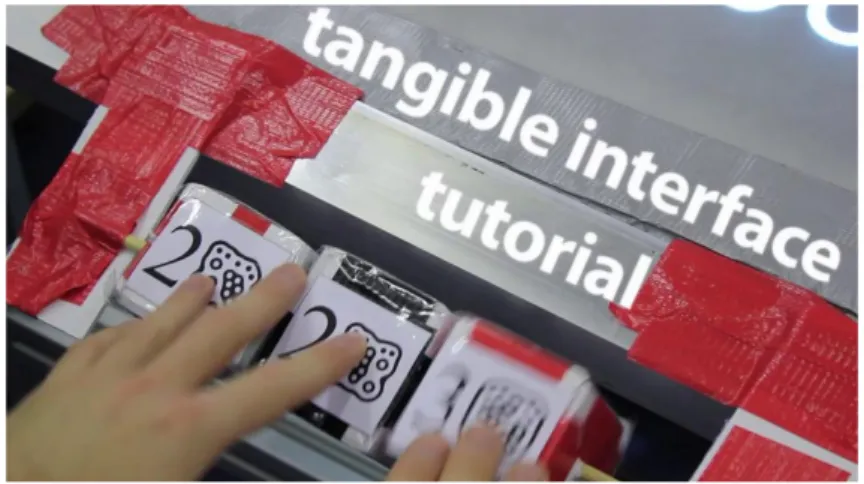
This project is new tangible interface for playing a brain-training game by Christopher Bainbridge. The system uses ReacTIVision fiducial markers to track the cubes, and was
programmed in Processing. Players have to spin the cubes to make the target number as quickly as possible. The interface is look like some kind of child toys and tries to use related
manipulations to create the experience of playing.
Figure 2 Related work: Number game http://vimeo.com/33657450
3. Exploration
In this chapter, mainly demonstrate the whole process of exploration which contains pre-experiment, create new exploration directions and further explorations. To have the whole process, the exploration structure is shown as follow.
Table 1 Exploration structure
Steps Formation
pre-experiment
analyze pre-experiment
create new exploration directions
Further exploration
Summarized exploration results
Apply results to product design
Four experimental inputting concepts
Three factors of user experience design
Fifty inputting concepts and prototypes
Table of design suggestion
3.1 Exploration Structure
First of all, the pre-experiment would be conducted to know whether the tangible user interface is proper approach in this project and have a glance and overall concept of how tangible user interface influence the user experience. Then the pre-experiment results would be analyzed in phase 2 to help and create next exploration directions. In order to make the comprehensive understanding of this topic, the phase 4 is further explorations that contain developing various concepts and user interviews with tangible prototypes. The results of further exploration would be summarized in phase 5 then apply to product design in phase 6.
3.2 Pre-experiment
According to tangible user interface has been chosen as our design approach. The purpose of pre-experiment is to find out whether user experience would really be enhanced by tangible user interface while inputting numbers. To achieve this purpose, this section contains developing inputting concepts and user interviews for testing and collecting related users’ feedbacks.
3.2.1 Develop inputting concept
According to analyzed related works in chapter 2, we suppose that user experience could be created by rich movements such as rolling the object. In this section, more inputting concepts are developed by not only different movements but also any possible ways to verify our assumption and get an overview concept of how tangible interface elements influence the user experience. All inputting concepts would be made in prototypes after generating. Then user interviews are
conducted to figure out user’s context and their user experience after testing prototypes.
Concepts and prototypes
Introducing four inputting concepts, each one includes brief introduction, operating process and photos. In order to make concept easier and clearer to understand in next user interview section, every concept is made into physical prototypes by ready-made objects, plywood and Laser cutting machine.
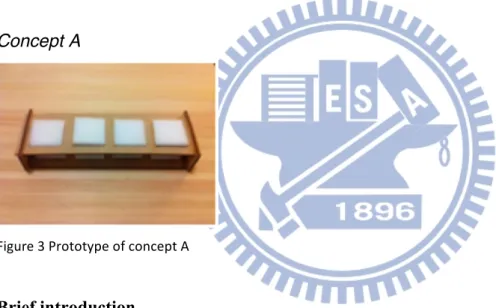
Concept A
Figure 3 Prototype of concept A
Brief introduction
There are four sponges in a line and every sponge could generate numbers by pressing them, each number differ from 0 to 9 representing the strength pressed. Then every single number would combine finally to represent a four digit number from 0 to 9999.
Operating process
pressing strength. Users don’t need to follow the order of four digits, instead they can adjust any number of any digit by will.
Concept B
Figure 4 Prototype of concept B Brief introduction
The form about this object is similar to a wheel with empty center part. The diameter is about 15 cm and the number could be input by changing their rotating degree. There is no specific
operating method. User could change rotating degree of object in any way they like. The basic way is roll the object or put it flat on table and rotate it as door knob.
Operating process
In the beginning, the number start from 0 since the status of object is static. Then while rolling forward the wheel, the number would increase gradually by their total rotating degrees. On the other hand, the number would decrease even become negative numbers by rolling back the wheel object.
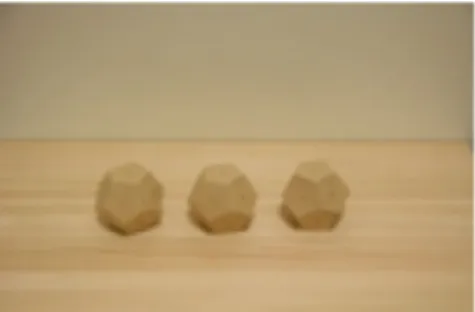
Figure 5 Prototype of concept C
Brief introduction
There are three dodecahedrons in the line for inputting numbers from 1 to 999. There are number 0 to 9 written on surfaces of dodecahedron such as dice. Then the inputting number is decided by the number which showing on the top surface. Although each dodecahedron have same size and appearance but the weight between each other is different.
Operating process
The operation of this concept is similar to roll the dice. Just take up the dodecahedron, and then change the number on the top surface. The outcome would change automatically while any one of dodecahedrons has been moved.
Concept D
Brief introduction
The concept D could input number within an interval with the finger slip movement. It composes of a wood base and a row of papers. Each paper represents a particular number in sequence from 1 to 50. Then the number would be input by flipping the specific paper.
Operating process
Although a paper represents the specific number, but instead of flipping on every papers, we could input numbers by using finger to quickly slip over. The concept is similar to find something within papers or files.
3.2.2 User interview
Since the user experience is a person’s perceptions and feelings which can’t be observed directly, the user interview is conducted for realizing their response and context in two main parts. Part 1 is testing and manipulating the prototypes of numeric interface, and part 2 is semi-structured interviews. The questions contains: A. What do you feel while inputting numbers with this kind of interface? B. according to user’s particular movement, ask them why you interact with the interface in this way? There are two participants, one of them is male, 26 years old and the other is female, 25 years old. During the interview process, all conversations are recorded by smart phone and the results are filled into the table as below.
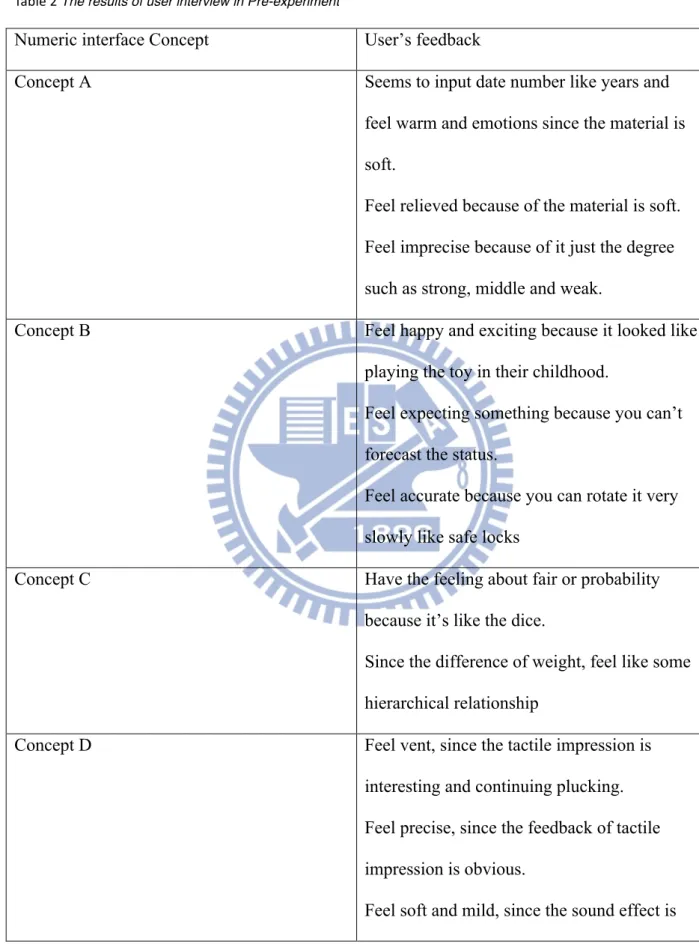
Table 2 The results of user interview in Pre-experiment
Numeric interface Concept User’s feedback
Concept A Seems to input date number like years and
feel warm and emotions since the material is soft.
Feel relieved because of the material is soft. Feel imprecise because of it just the degree such as strong, middle and weak.
Concept B Feel happy and exciting because it looked like
playing the toy in their childhood.
Feel expecting something because you can’t forecast the status.
Feel accurate because you can rotate it very slowly like safe locks
Concept C Have the feeling about fair or probability
because it’s like the dice.
Since the difference of weight, feel like some hierarchical relationship
Concept D Feel vent, since the tactile impression is
interesting and continuing plucking. Feel precise, since the feedback of tactile impression is obvious.
natural and like petting small animals
Want to manipulate quickly, since the action is smooth and fluently
3.3 Analyze pre-experiment and create new exploration directions
After the pre-experiment, various types of user experience are found in interview. Otherwise, the potential factors of user experience are also concluded by affinity diagram. In order to have the comprehensive realization between affection of user experience and elements of tangible user interface, the new exploration direction is created for next section.
First of all, we found the user experience of inputting number could be really enhanced by tangible user interface. It not only includes feelings and emotions but also abstract concepts and types of number. The group of feeling and emotion is similar to person’s perceptions such as warm, happy, imprecise ...etc. Then another group is about person’s associations such as hierarchical relationship or years, amounts of money…some particular types of number. Thus, we could pay more attentions of similar response in the next exploration.
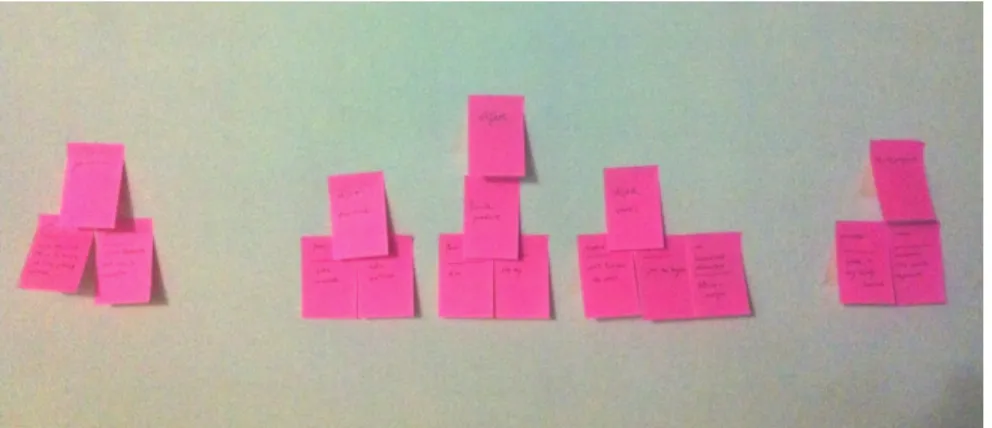
During the interview, we seek the reasons and context behind user’s experience. For instance, users feel warm since the sponge material is soft, feel expecting something since they can’t forecast the object’s status. The affinity diagram is created as follow for finding relationship and context of those disorderly data.
Figure 7 affinity diagram of pre-‐experiment results
There are three groups in the affinity diagram which named object, movement and perceptions. It could be written in following formula for easy to recognize the impact factors of user experience.
User experience = Object + Movement + Perceptions
Object
Object is indicating the physical form which could be manipulated. The subgroups within contain object’s material, status and associate products. Besides, the others attributes include shape, size, amount…etc could also be considered the potential factors of user experience.
Movement
Movement is what we act and interact with the manipulated objects. They are fundamental interaction which we learned from our daily life such as touch, slap, throw, revolve...etc.
Perceptions
Perceptions contain the sense of hearing and tactile. Since the tangible user interface is directly manipulating the physical object, the tactile sense has become one of factors of user experience. In order to get a comprehensive realization between affection of user experience and elements of tangible user interface, the analysis of pre-experiment indicate the potential factors of user experience and what kind of user’s response should we take care about. It would help in next further exploration.
3.4 Further exploration
In this section, in order to develop various inputting concepts as much as possible, there are three key user experience factors which defined to help inspire ideals. Then the user interview is conducted to evaluate user experience by every different inputting concept.
3.4.1 Develop various concepts
In order to realize whole user experience of inputting number, it needs to discover with highly- differentiated concepts. For this purpose, three key user experience factors include object, movement and perception is proposed to help inspire various concept ideals.
Firstly, each factor’s possibility is discussed separately, For example, the object might include different shapes, sizes, colors, materials, amount, weight and relationship to others objects. The movement might include touching, slapping, throwing, revolving, taking up, knocking, rolling,
sliding, moving, insert, pulling, pushing, pressing and twisting. Secondly, the concepts could be generated by combining those different attributes with the inputting logic. In order to avoid other factors to affect evaluate results, the concepts have to as simple as possible.
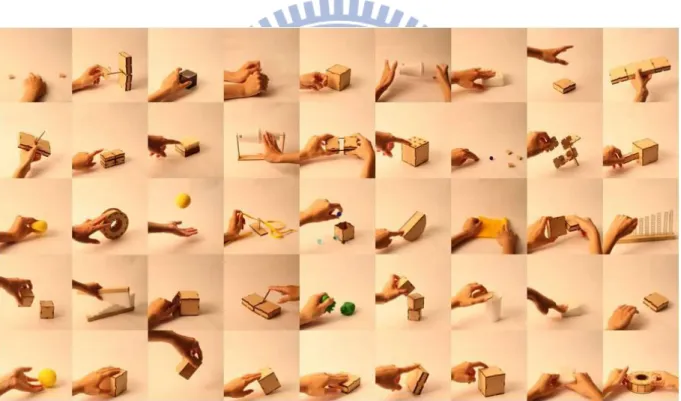
After idea development, there are 50 concepts proposed and made into physical prototypes for next user interview section. Since the amount of concepts is too much to introduce individually. The detail descriptions of each concept are listed in appendix with a photo, concept brief and demo film.
Figure 8 all concepts of further exploration
3.4.2 Conduct user interview
There are four participants invited to attend user interview. They are all students include 2 male and 2 female, age from 24 to 27. It is the semi-structure interview with some prepared basic
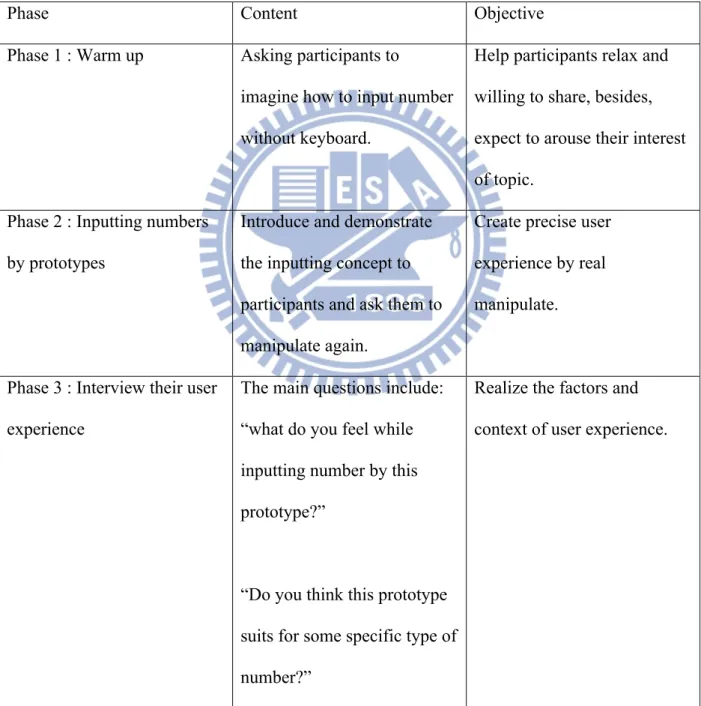
questions, but according to their answers and manipulation such as unusual movements, the more questions might be proposed to understand the reasons and context behind their behavior and thought. In order to get the whole concept of user interview, the interview structure is shown beneath and results are list in appendix.
Table 3 The interview structure in further exploration section
Phase Content Objective
Phase 1 : Warm up Asking participants to
imagine how to input number without keyboard.
Help participants relax and willing to share, besides, expect to arouse their interest of topic.
Phase 2 : Inputting numbers by prototypes
Introduce and demonstrate the inputting concept to participants and ask them to manipulate again.
Create precise user experience by real manipulate.
Phase 3 : Interview their user experience
The main questions include: “what do you feel while inputting number by this prototype?”
“Do you think this prototype suits for some specific type of number?”
Realize the factors and context of user experience.
“Have any abstract concept come out from your mind? “
3.4.3 Exploration results
After the exploration, the results is categorized in three group including emotions, abstract concepts, affections and numbers. During the exploration section, the user experience of TUI is discovered by many inputting concepts and prototypes. In order to create useful resource for next design application section, those exploration results is concluded in some design suggestions which describe the design tips to specific user experience. For example, if we hope users feel exciting while inputting numbers, we could refer to the relative design tips such as manipulate with repeating movement constantly and fast. The design tips are generalized by observing their manipulation and interviewing them to understand their context and feeling.
Emotion
According to the identification of basic emotion which collated by Andrew Ortony and Terence J. Turner (1990), the emotion group shows some user’s emotion while inputting numbers.
Table 4 The further exploration results of emotion category
User’s feeling Design tips
Happy Using soft material or provide manipulation
Expect To make user manipulate slowly
Exciting To make user manipulate with repeating
movement constantly and fast
Abstract concepts
In the user interview, sometimes user associated with physical stuff such as piano, toy and beanbag while manipulating. On the others hand, this group indicates that abstract concepts which users associate with.
Table 5 The further exploration results of abstract concept category
User’s feeling Design tips
Definitude Using single object to represent the number
To make object stay at stable state Manipulating with loud sound feedback.
Sincerity Increasing the weight of object
Random To make object’s state unpredictable
To add up Put the same things together and end up with
a new object, such as to combine cubes together and get one cuboids.
Goal-achieving To input number by Accumulating inputting
logic of constant subconscious movement
Representative Using a object to represent the number
emotional-associated feeling of the memories of specific years
Using form of bar or Making manipulated object move in linear way reminding the concept of time is linear
Affection
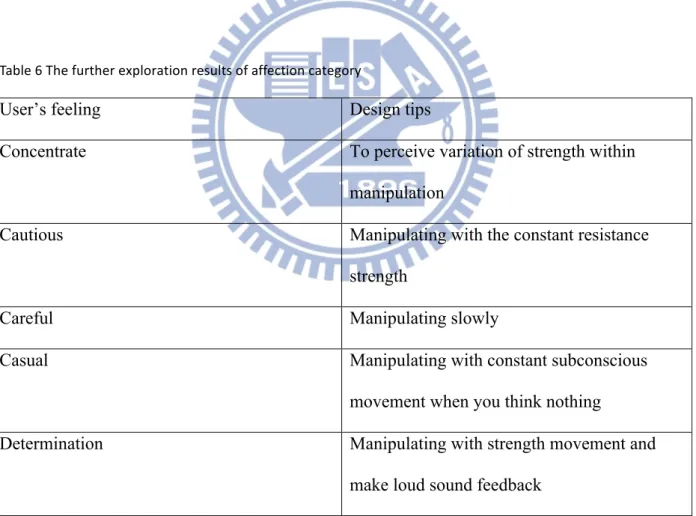
The affection group describes user’s feeling of state of mind or body while manipulating.
Table 6 The further exploration results of affection category
User’s feeling Design tips
Concentrate To perceive variation of strength within
manipulation
Cautious Manipulating with the constant resistance
strength
Careful Manipulating slowly
Casual Manipulating with constant subconscious
movement when you think nothing
Determination Manipulating with strength movement and
Number
In the user interview, users indicate some manipulation make them associated with number which they are right inputting. The number group shows some associated types of number and relate manipulation.
Table 7 The further exploration results of number category
User’s feeling Design tips
Big number Using the larger object or manipulating with
greater strength
Single number manipulating with single movement or Using
single object to represent a number
Recurring number To make object will back to original state in a
4. Apply exploration results to product design
The final design works of this project is alike experimental design, Instead of completion of details, it just focus on the interface design and try to provide another perspective of user experience to design products. During the exploration section, the results are concluded in the form of design suggestions and become the design resource to apply to design process. In the end, there are three daily life products have been redesigned including ATM, alarm clock and money box. The introduction and process of design is as following below.
4.1 Redesign 1: ATM
Figure 9 the redesign of ATM
Background
the meanwhile, the density of convenience stores in Taiwan is the highest of the world. In recent years, the ATM have been used to defraud of money by giving the wrong instructions of ATM and the defrauded amount usually is very large, sometimes is even almost their life saving. Besides, in the common sense, the money is very important for every people. Thus, the interface of inputting number of money is our design emphasis, we hope to make users feel careful and cautious of inputting every number.
Design brief
The new ATM design includes two main parts. The part of base contains the monitor to display the information of ATM and the upper part is two same cuboids connected with elasticity wire and one of them is with the number display. The upper part represent the concept of money since we hope to enhance user experience of definitude while manipulating, the related design tip is using single object to represent the number. Besides, in order to make user feel concentrate and cautious of number, we refer the design tip of perceiving variation of strength within
manipulation and manipulating with the constant resistance strength. Thus, the elasticity wire is used to provide elastic strength while inputting number.
Manufacture
In the process of manufacture, the main hardware is called “Arduino” which has the ability of computing and sense the environment by various sensors. There are two sensors inside to detect the user’s behavior and object state. The first one is ultrasonic sensor inside the wood box to detect the distance of two cuboids and the other one is touch sensor to detect whether the wood box is taken up or not. Besides, there is a seven segment display model to show the inputted
numbers and a monitor to show manipulated information and results.
Operating
The step 1 is to take up the wood box, step 2 is to pull wood boxes apart to input number, the number will change by the distance of two cuboids from 0 to 30000. Keep the movement for 1 second until sound effect launched, that means the number is input successfully. Finally the step 4 is put the wood box back to the base to make system receive the number data and show next information on the monitor. In order to make descriptions easier to understand, there is the short demo video link in the below QR code.
Figure 10 the QR code of ATM concept demonstration
4.2 Redesign 2 : Alarm clock
Figure 11 the redesign of alarm clock
Background
The clock alarm is the necessary stuff for most people. No matter students or office workers, they need to get up of the bed at some particular time. Although the alarm clock was set in the night before, but people sometimes sleep late intentionally or turn off the alarm not on purpose.
Design brief
In order to avoid oversleeping, our concept is to make user feel determination while inputting the number of alarm. It is alike some kind of self encouragement to determine oneself to get up on time. According to exploration results, to input the number to represent time, we could use the design tips of “Time” as shown previously such as making manipulated object move in linear way. Besides, the other design tip of “determination” is manipulating with strength movement
and making loud sound feedback. Thus, the alarm time could be set by lifting up the wood box straight to select number of time and then release the box to fall down with loud sound feedback. In order to absorb the strength of falling, there is the soft sandbag under the wood box.
Manufacture
In the process of manufacture, the main hardware is called “Arduino” which has the ability of computing and sense the environment by various sensors. There is the ultrasonic sensor inside to detect the distance between clock and ground surface. Besides, the seven segment display model is on the box to show number of time. In order to provide sound effect, the buzzer is also place in the wood box.
Operating
The step 1 is to lift up the clock straight to turn on the alarm mode and select alarm time. Then the step 2 is to release the clock and while clock falling down to the ground surface, the alarm is set completely. In order to make descriptions easier to understand, there is the short demo video link in the below QR code.
Figure 12 the QR code of alarm clock concept demonstration
4.3 Redesign 3 : Money box
Figure 13 the redesign of money box
Background
Due to some wallets don’t have the room for coins, most of the time coins will be directly put into pocket. It causes two main problems. First, it is not easy to manage the money, because of lacking of storage place, coins will be placed everywhere. Second, we may probably lose those coins when we are absent-minded.
Design brief
In order to encourage saving coins in the money box, it allows people to set the saving goal by punching the box. The idea of punch action comes from the design tip of making user feel determination. The relate description is manipulating with strength movement and make loud sound feedback. The amount of saving goal is input according to the punch strength, the large
saving goal need to punch with more powerful strength, which means it needs huge
determination to reach the goal. At the same time, the money box will automatically calculate the remaining amount of money to goal shown by display instrument on the top of box. Another reason for fun, the cute sound effect captured from the classic video game “Super Mario Brothers” would appear while coins are inserted.
Manufacture
In the process of manufacture, The main hardware is called “Arduino” which has the ability of computing and sense the environment by various sensors. In order to detect the strength of punch, there is a pressure sensor installed under sponges. Besides, there is a shake sensor near the coin entrance hole to detect when the coins have inserted, and trigger an MP3 shield to make the sound effect through the speaker. There is the seven segment display model on the top of box to show the number of money and state of money box.
Operating
The step 1 is to punch the wood box to set the saving goal. Step 2 is to insert the coins and then the drawer will be locked while the first coin is put in. At the same time, the monitor start to display the remaining amount and the function of setting saving goal is invalid. After reach the saving goal, the drawer is unlocked with the victory sound effect; users could take the money back and set the next new goal. In order to make descriptions easier to understand, there is the short demo video link in the below QR code.
5. Discussion
After the exploration, design process and exhibition, this chapter contains the feedback, discussion of process and potential found during the project. With the discussion, we hope to evoke other different thinking and help those who are doing the similar works.
5.1 Others factors of user experience
Although the exploration process was conducted first to realize the factors of user experience, but sometimes users still fail to get the user experience which was designed. In order to find out others factors of user experience, the design process is examined again from the beginning. Besides, the new exploration structure would be proposed in the end of section.
The final design works of this project are attending the exhibition in National Chiao Tung University for a month. We expect people could get the specific user experience while using those designs. But sometimes they could not feel the user experience which was designed previously. For example, the money box allows people to input the saving goal by punching the box to experience the feeling of determination. Although the exploration process was conducted before design, but there are still few people could not get that feeling successfully. In order to figure out the reasons why people could not get the specific user experience, the design process is examined again from the beginning. According to the pre-experiment, we assume the user experience is affected by following three factors: object, movements and perception. But after reviewing the project, there are more two factors include context and user’s background.
First is the factor of context, the user experience design is not like product design which focus on aesthetic appeal and function terms, it often deals with question of context (Jesse James Garrett, 1996). The context is obviously associated with user experience. We just consider this factor in the application and design section but not in the beginning and exploration section. For instance, in the user interview, we just asked user to input the number, but didn’t give them any context such as input money account or input the time. Therefore, the results of exploration would be influenced by the context of product which is designed finally.
The secondly key Influence factor is user’s background. The one of characteristic of user experience is subjective (Effie L-C.Law, Virpi Roto et al., 2009) that means the user experience would be affected by personal characteristics such as memory and past experience. It indicates that the exploration results might not properly apply to every user. For instance, while user revolves one of prototype in user interview section, we found the related user experience reaction is accurate because of the manipulation evoke images of safe lock. But this result might not properly apply to young people since they maybe not have the relevant experience of security safe.
In order to consider the effect of those new factors, the design process is modified to improve the design of user experience. In this project, the designed products are to be decided after
exploration. But the context of products and related potential users are also important factors of forming user experience. Therefore, the design process becomes different sequence which decides the design products first, considers the related using context and potential users. Then go
explorations next.
5.2 The level of user experience
In the process of exploration, sometimes the different user experience reaction might be caused by the same reasons. For example, user might feel the emotion of expecting something or being careful through the slowly manipulation. We are wondering that why different emotion reactions would be evoked by the same reason? Are there having any levels between different emotions or influence on each other?
According to Mark Pettinelli (2009) perspective, he categorized emotions into three orders. The first order emotions are classified as being bodily such as appetite and satisfaction. Then the second order emotions are evoked by images in mind such as anxiety. Finally, the third order emotions such as depression, hate and love are going to be even more complicated. It take longer period of time and contains many factors even include second order emotions.
Thus, the third order emotions might not the emotion we want to create in this project. Since one of characteristics of third order emotions is long period of time, but the period of manipulating interface is usually very short. But it’s not means the third order emotions have to be abandoned once caught in exploration process. The component of third order emotions is very complex and even include the emotions of others levels. Therefore, while getting the third order emotions, we could discuss first for finding their related component. In the other hands, if we want to create third order emotions like love, we could design series of related emotions to make people feel
this kind of complex emotion.
Back to the question of beginning, there are two different emotion reactions including expecting something and being careful which are caused by the same manipulation. Is one of them the third order emotions which might be affected by another? By the categories of Silvano Arieti, they are belonging to second order emotions and independent of each other. That situation might be caused by others factors such as personal experience.
5.3 Take advantage of negative user experience
In the field of human computer interaction, people almost discuss with positive user experience such as hedonic or satisfaction. It is easy to understand that no one wants to have bad or negative feelings such as scare or anxiety while using the product.
During the user experience design process, there are two ways found to develop the user experience design. First is providing the proper feelings according to their context. Second is providing specific feelings to help achieved final goals.
For instance, the weight machine provides the function of showing user’s weight. In the first thinking, we could make users feel proper user experience such as trustworthy or accurate while using. But in the second thinking, we could make users feel specific user experience such as scare or anxiety. Although they are all negative feelings, but helpful to alert and remind people to care their weight and then achieve the goal of losing weight.
Therefore, we should not ignore the negative feelings during the exploration process. They may not mean the bad user experience. Besides, sometimes it even could help us to achieve the specific design goal.
5.4 Applied to daily life context
In this project, some inputting interfaces are designed from the perspective of user experience. But those designs could really be applied to our life? Or even in place of keyboard?
After collecting the feedbacks from exhibition, we found there are still two main problems to be considered and overcome to realize the vision of applying those user-experience-based inputting interface to daily life.
First is imprecision of inputting numbers. In this project, the numbers is input by manipulating movements such as punching, pulling and lifting up. It just represents the concept of relative amount but not the precise number. However, in our life, some numbers are important to people such as money amount or blood pressure values. It requires precise number to avoid mistakes and serious consequence. Besides, inputting numbers in imprecise ways might cost more time to fix the results. Sometimes people don’t have enough time and patience to use it slowly.
Second is unfamiliar user interface. In order to create different user experience, there are many different interface concepts and related manipulations. That means users might face the
unfamiliar user environment while using the products or interfaces. For instance, one visitor in the exhibition claim that he has no idea about how to manipulate the product because of lacking of similar experience and proper metaphor to guide probable manipulation.
6. Future work and Conclusion
6.1 Future work
Since the wireless communication become common and standardize, CPU had gotten powerful and inexpensive, the computers might not like traditional device anymore, it would become smaller, portable even ubiquitous in our environment. This concept and vision is proposed by Mark Weiser called “ubiquitous computing”(Mike Kuniavsky, 2010). Once the development of technology becomes mutually, the trend has changed focus from computers to human’s life. That means we don’t need to use computers in front of desk, every objects around us or environment might have computing ability to help us finish our task or activities.
The role of number is still important to people’s life even in the concept of ubiquitous computing. Therefore, how to communicate the number with computers in ubiquitous computing
environment becomes the question of the future work.
6.2 Conclusion
Since nowadays numeric interface such as keyboard is designed for high usability, it doesn’t consider about user’s feeling and perception dealing with the number. Thus, this project is aimed to redesign the numeric interface in user experience perspective. It starts from conducting the research to figure out that how interface elements influence users perception and then apply the results to product design. Finally, there are three products redesigned with tangible user interface
to create richer interaction and enhance their user experience of inputting numbers.
During the research section, we found the experience of inputting numbers really could be enhanced through the tangible user interface. The result is summarized into the categories of emotion, abstract concepts, affection and numbers. In order to apply results to design process, the format of each item describes what user’s feel and related design tips.
In the future, since the wireless communication and CPU become common and inexpensive, the computer will gradually involve into our environment such as the digital wardrobe or the vision of ubiquitous computing. Once without the keyboards, the question of how we input the numbers through the elements in the physical world is becoming important. In the user experience
perspective, this project might provide some possible ways to input numbers by directly interacting with physical objects and create the rich experience of inputting numbers.
7. Reference
A.K. Dey (2001) “Understanding and using context,” Personal and ubiquitous computing 5, no. 1 (2001): 4–7.
Alden, D. G., Daniels, R. W. and Kanarick, A. F(1972), Keyboard design and operation: A review of the major issues, Human Factors, 14, 275-293.
Benoit Collette, <http://bencollette.com/portfolio/archives/474>
Christopher Bainbridge, Benjamin Collins, Nursyafiqah Hamidon, Mohamad Haji Mokim, Chee Chan & Kavish Bolaky, < http://vimeo.com/33657450>
Dillon, A. (2001) Beyond usability: process, outcome, and affect in human computer interactions. The Canadian Journal ofInformation and Library Science, 26(4), 67-69.
Ian McClelland(2005) 'User experience' design a new form of design practice takes shape. CHI Extended Abstracts 2005: 1096-1097
Ishii, H. (2008) The tangible user interface and its evolution. Communications of the ACM, 51(6), 32-36. Jesse James Garrett (2000) The Elements of User Experience User-Centered Design for the Web. New Riders Publishing。
Mark Pettinelli, < http://cnx.org/content/m30937/latest/>
Mike Kuniavsky (2010) Smart Things: Ubiquitous Computing User Experience Design
Ortony, A., & Turner, J. T. (1990) What's basic about basic emotions.Psychological Review, 97(3), 315-331. Unger, R. & Chandler, C. (2009) A Project Guide to UX Design: For User Experience Designers in the Field or in the Making
Appendix: 50 concepts of idea development
No Photo Concept brief Demo film
1 第一個與第二個方塊之 間,代表一個單位數 值,第二個與第三個方 塊之間,代表輸入數 值,其公式為,輸入數 值 / 單位數值 http://www.youtube.com/watch?v=l HtrI1diWZ0 2 可以輸入多組的數值像 是 IP 號碼或一天行程表 時間,透過掛上的動 作,一個物件代表一種 數值 http://www.youtube.com/watch?v= vTE_VXur1E8 3 方盒裡有一顆小木珠, 透過小木珠撞擊內壁次 數去增加數值,方盒的 兩面是增加數值,另外 兩面是減少數值 http://www.youtube.com/watch?v= fOr6mzvsHUE 4 透過彎折彈性塑膠片去 調整數值,曲度關係著 數字大小 http://www.youtube.com/watch?v= tZJJSoujROc
5 透過敲擊物件的面,以 次數計算來調整數值 http://www.youtube.com/watch?v= y2NPi6_BJu4 6 旋轉調整數字,透過敲 打方式輸入數字,象徵 進位的位移方向 http://www.youtube.com/watch?v= Ro3FskdotfI 7 一個點代表一,按壓時 依照同時觸發了幾個點 即代表數值 http://www.youtube.com/watch?v= I2ZT4pXIPWU 8 透過物件落下的力量去 調整數值 http://www.youtube.com/watch?v= fqHuMzlAqYs 9 可設定數字範圍,有最 大值與最小值,透過傾 協角度去調整數值,但 不會超過範圍 http://www.youtube.com/watch?v= sw23iDZCq6I
10 先設定一個中間數值, 以傾斜的方式可以微調 數值,右邊增加左邊減 少,傾斜角度越大,數 值改變越快 http://www.youtube.com/watch?v= -l7S_iuSsLE 11 兩個方向代表增加與減 少,物件彎曲的曲度代 表數值增加或減少的速 度 http://www.youtube.com/watch?v= BcLZtvpIQRw 12 後紙片組合而成的物 件,每片具有彈性並代 表一個數值,利用手指 撥片,去調整數值 http://www.youtube.com/watch?v= NC1PsHvzStI 13 透過轉動的次數增加數 值 http://www.youtube.com/watch?v= CNg8LkGO-90 14 利用方塊間的距離調整 數值,方塊兼有彈力裝 置互相拉著 http://www.youtube.com/watch?v= 85RbUUCt7xY
15 透過遮光的點數量去調 整數值 http://www.youtube.com/watch?v= 6oAfxSH0s2I 16 以中心排列製造位數, 距離改變數值,可任意 增加位數和改變其中一 個數值 http://www.youtube.com/watch?v= _rB2bwZkYCg 17 透過組合的方式改變數 值,不同大小代表不同 數值 http://www.youtube.com/watch?v=l LdtTbqAGFE 18 以抽出物體的比例來調 整數值 http://www.youtube.com/watch?v= Ldk8KlUJWIU 19 透過抓球的壓力感測大 小去改變調整數值 http://www.youtube.com/watch?v= _cOgXl7B1xs
20 以滾動的方式距離位置 表達數值 http://www.youtube.com/watch?v= oMdND4V0MNk 21 透過物件被往上丟的次 數去調整數值 http://www.youtube.com/watch?v= EQVNtcQg9F0 22 長度代表數字,透過拉 的動作, 一次會連動兩 個數字, http://www.youtube.com/watch?v= HWgVyygz26E 23 一個方塊代表一,放入 盒子即能調整數值 http://www.youtube.com/watch?v= Otvt5kA1i24 24 透過物件傾斜的角度不 同去改變數值 http://www.youtube.com/watch?v= 4j-6ocmAUTc
25 總長度代表一個數值 (100),依照攤開的比 例來計算調整數值 http://www.youtube.com/watch?v= Qr8hzHt0Ars 26 其兩位數數值,翻轉一 圈就加一,超過九之後 會歸零,可以任意調整 某個位數 http://www.youtube.com/watch?v= EZOqA-xACrs 27 透過穿過代表數字孔洞 的動作去輸入數值 http://www.youtube.com/watch?v= HWgVyygz26E 28 透過不同的重量來表達 數字,重量越重的物件 被拿起,代表數字越大 http://www.youtube.com/watch?v= U4Qo1b14k4M 29 白色海綿由小至大代表 著由一到九,透過互敲 的方式,組合成一個數 值 http://www.youtube.com/watch?v= uNrAr5doZEM
30 透過開門動作,調整角 度的大小去輸入數值 http://www.youtube.com/watch?v= _i-TcXkW-LQ 31 透過改變指針的方向可 以微調一個數值,右邊 增加左邊減少 http://www.youtube.com/watch?v= 147NkaUzdQs 32 一個物件代表一個的數 值,從捏的動作去分下 一部份代表另一個數值 http://www.youtube.com/watch?v= 6rRK8SWb57g 33 透過相疊的個數去調整 數值 http://www.youtube.com/watch?v= MPNo1Y0q-ag 34 蓋子和洞的形狀一樣, 移動蓋子所露出的面積 代表一個數值,比較蓋 子也可以表示百分比 http://www.youtube.com/watch?v= Zpq9XVqpW5o
35 按壓柔軟材質,用其力 道來調整數值 http://www.youtube.com/watch?v= weEAbjC-_eY 36 透過丟出去的行為改變 數值,數值大小會隨著 力道改變,物件位置改 變而不同 http://www.youtube.com/watch?v= 4zun3if15MQ 37 以滾動軌跡的長度來調 整數值 http://www.youtube.com/watch?v= X_oHwin5HKs 38 透過拍擊的力道大小改 變數值 http://www.youtube.com/watch?v= QppnOfU35co 39 以搖晃次數增加數值 http://www.youtube.com/watch?v= bz_M7-aRBCE
40 透過狀態改變去改變數 值 http://www.youtube.com/watch?v= vurj6_Ri54U 41 透過摩擦物件的次數去 調整數值 http://www.youtube.com/watch?v= 9dzPJ-N9fHM 42 透過翻轉圈數來調整數 值 http://www.youtube.com/watch?v= cMtOTklzXh4 43 透過觸摸邊緣增加或減 少數字,一個邊緣代表 一段數字區間,範例裡 是十 http://www.youtube.com/watch?v= T0Brn3w711w 44 透過向內擠壓的程度去 改變數值 http://www.youtube.com/watch?v= weEAbjC-_eY
45 透過旋轉物件調整數值 http://www.youtube.com/watch?v= N6QAzYxDmZA 46 透過 1,3,5 去組合出心 中想要的數值,拍打相 對方塊代表輸入 http://www.youtube.com/watch?v= arDwXYI_6cE 47 像倒水一樣,透過請斜 角度象徵流量一樣增加 數值,角度越大,數值 增加的越快 http://www.youtube.com/watch?v= wVHoX3qd_H8 48 透過蓋的動作,並計算 裡面的個數去調整數值 http://www.youtube.com/watch?v= Ld7iEMUenL4 49 透過物件與環境的距離 來調整數值 http://www.youtube.com/watch?v= daDUXii9uiY
50 以物件的體積代表一個 數值,透過抽拉的動作 去改變物件體積
http://www.youtube.com/watch?v=