• SAFETY PRECAUTIONS •
(Always read these instructions before using this equipment.)
Before using this product, please read this manual and the relevant manuals introduced in this manual carefully and pay full attention to safety to handle the product correctly.
The instructions given in this manual are concerned with this product. For the safety instructions of the programmable controller system, please read the CPU module user's manual.
In this manual, the safety instructions are ranked as "DANGER" and "CAUTION".
! DANGER
CAUTION
!
Indicates that incorrect handling may cause hazardous conditions, resulting in death or severe injury.
Indicates that incorrect handling may cause hazardous conditions, resulting in medium or slight personal injury or physical damage.
Note that the
!CAUTION level may lead to a serious consequence according to the circumstances.
Always follow the instructions of both levels because they are important to personal safety.
Please save this manual to make it accessible when required and always forward it to the end user.
[Design Instructions]
! DANGER
• Install a safety circuit external to the PLC that keeps the entire system safe if there are problems with the external power supply or PLC. Not doing so may cause false output or malfunction, leading to accidents.
(1) Outside the PLC, construct mechanical damage preventing interlock circuits, e.g. emergency stop circuits, protective circuits, forward/reverse or other conflicting operation interlocking circuits, and upper and lower positioning limit switches.
(2) When the PLC detects either of the following problems, it will stop arithmetic operation and turn off all outputs in the case of (a). In the case of (b), it will stop arithmetic operation and hold or turn off all outputs according to the parameter setting.
(a) The overcurrent protection or overvoltage protection of the power supply module is activated.
(b) The self-diagnostic function of the PLC CPU has detected a fault such as the watchdog timer error.
In addition, all outputs may be turned on when there are problems undetectable by the PLC CPU, such as in the I/O controller. Build a fail-safe circuit or provide a mechanism externally of the PLC to operate the machine safely at such times. Refer to the CPU module user's manual for fail-safe circuit examples.
(3) Output could be left on or off when there is trouble in the output module's relays, transistors,
etc. So build an external monitoring circuit that will monitor any output signal that could lead
to a serious accident.
[Design Instructions]
! DANGER
• When overcurrent exceeding the rated load current or caused by a shorted load or the like flows in the output module for a long time, it may cause smoke or fire. To prevent this, configure an external safety circuit, such as fuses.
• Build a circuit that turns on the external power supply after the PLC power supply has been turned on. If the external power supply is turned on first, it could result in false output or malfunction.
• When there are communication problems with the data link, refer to the corresponding data link manual for the operating status of each station. Not doing so could result in false output or malfunction.
• When connecting a peripheral device to the CPU module or connecting a personal computer or the like to the intelligent function module to exercise control (data change) on the running PLC, configure up an interlock circuit in the sequence program to ensure that the whole system will always operate safely.
Also before exercising other control (program change, operating status change (status control)) on the running PLC, read the manual carefully and fully confirm safety.
Especially for the above control on the remote PLC from an external device, an immediate action may not be taken for PLC trouble due to a data communication fault.
In addition to configuring up the interlock circuit in the sequence program, corrective and other actions to be taken as a system for the occurrence of a data communication fault should be predetermined between the external device and PLC CPU.
! CAUTION
• Do not bundle the control wires or communication cables with the main circuit or power wires, or run them close to each other.
They should be run 100mm (3.94in.) or more away from each other.
Not doing so could result in noise that would cause malfunction.
• When the output module is used to control a lamp load, heater, solenoid valve or the like, large
current (approximately 10 times greater than the normal) may flow when the output is turned
from OFF to ON. Choose an output module having a sufficient rated current.
[Installation Instructions]
! CAUTION
• Use the PLC in an environment that meets the general specifications contained in this manual.
Using this PLC in an environment outside the range of the general specifications could result in electric shock, fire, erroneous operation, and damage to or deterioration of the product.
• Hold down the module-loading lever at the module bottom, and securely insert the module-fixing hook into the fixing hole in the base unit. Incorrect loading of the module can cause a
malfunction, failure or drop.
When using the PLC in the environment of much vibration, tighten the module with a screw.
Tighten the screw in the specified torque range. Undertightening can cause a drop, short circuit or malfunction. Overtightening can cause a drop, short circuit or malfunction due to damage to the screw or module.
• When installing extension cables, be sure that the base unit and the extension module connectors are installed correctly.
After installation, check them for looseness.
Poor connections could cause an input or output failure.
• Securely load the memory card into the memory card loading connector.
After installation, check for lifting.
Poor connections could cause an operation fault.
• Completely turn off the external power supply before loading or unloading the module. Not doing so could result in damage to the product.
• Do not directly touch the module's conductive parts or electronic components.
Touching the conductive parts could cause an operation failure or give damage to the module.
[Wiring Instructions]
! DANGER
• Completely turn off the external power supply before starting wiring. Not doing so could result in electric shock or damage to the product.
• When turning on the power supply or starting operation after wiring work, always mount the product with the supplied terminal cover.
Not doing so could result in electric shock.
[Wiring Instructions]
! CAUTION
• Always ground the FG and LG terminals to the protective ground conductor. Not doing so could result in electric shock or malfunction.
• Before wiring the module, confirm the rated voltage and terminal layout of the product.
Connecting a power supply that is different from the rating or incorrectly wiring the product could result in fire or failure.
• External connectors should be crimped or pressure-welded with the specified tools, or correctly soldered. Imperfect connections could result in short circuit, fires or malfunction.
• Tighten the terminal screws in the specified torque range.
Undertightening could result in short circuit, fire or malfunction.
Overtightening could cause damage to the screws and/or the module, resulting in drop, short circuit or malfunction.
• Be careful not to allow foreign matter such as chips and wire off-cuts to enter the module.
Foreign matter could cause fire, failure, or malfunction.
• The module has an ingress prevention label on its top to prevent foreign matter, such as wire offcuts, from entering the module during wiring.
Do not peel this label during wiring.
Before starting system operation, be sure to peel this label because of heat dissipation.
• Install our PLC in a control panel for use.
Wire the main power supply to the power supply module installed in a control panel through a distribution terminal block.
Furthermore, the wiring and replacement of a power supply module have to be performed by a maintenance worker who acquainted with shock protection.
(For the wiring methods, refer to the QCPU User's Manual (Hardware Design, Maintenance and Inspection).)
[Startup/Maintenance Instructions]
! DANGER
• Do not touch the terminals while power is on.
Doing so could cause electric shock.
• Correctly connect the battery. Do not charge, disassemble, heat, place in fire, short circuit, or solder the battery.
Mishandling of the battery can cause heat generation, burst or ignition which could result in injury or fire.
• Switch off all phases of the externally supplied power used in the system when cleaning the module or retightening the terminal or module mounting screws.
Not doing so could result in electric shock.
Undertightening of terminal screws can cause a short circuit or malfunction.
Overtightening of screws can cause damages to the screws and/or the module, resulting in
fallout, short circuits, or malfunction.
[Startup/Maintenance Instructions]
! CAUTION
• The online operations conducted for the running CPU module by connecting a peripheral device (especially program modification, forced output, operating status change) should be performed after you have read the manual carefully read and fully confirmed safety.
Operation mistakes could cause machine damage or accident.
• Do not disassemble or modify the modules.
Doing so could cause failure, malfunction, injury or fire.
• Completely turn off the externally supplied power used in the system before mounting or removing the module. Not doing so could result in damage to the product.
• Do not mount/remove the module to/from the base unit or the terminal block more than 50 times (IEC61131-2-compliant), after the first use of the product.
Failure to do so may cause module malfunctions.
• Before touching the module, always touch grounded metal, etc. to discharge static electricity from human body, etc.
Not doing so can cause the module to fail or malfunction.
[Disposal Instructions]
! CAUTION
• When disposing of this product, treat it as industrial waste.
REVISIONS
The manual number is given on the bottom left of the back cover.
Print Date Manual Number Revision
Dec., 1999 SH (NA)-080042-A First edition Feb., 2000 SH (NA)-080042-B Addition model
QH42P, QX48Y57, QX70, QX71, QX72, QY18A Addition
Chapter 4
Partial correction
Section 1.2, Chapter 5, 8.1,
Chapters 4 to 8 (changed into Chapters 5 to 9) Apr., 2000 SH (NA)-080042-C Deletion
QY18A
Jul., 2000 SH (NA)-080042-D Addition model
QX28,QX40-S1,QY18A,QY22,QI60 Addition
Chapter 5
Partial correction Section 1.2
Chapters 5 to 9 (changed into Chapters 6 to 10) Nov., 2000 SH (NA)-080042-E Addition model
QY70, QY71 Addition Section 1.3 Partial correction
CONTENTS, Section 3.3, 5.1 Jan., 2001 SH (NA)-080042-F Addition model
QY68A Addition Section 10.2 Partial correction
CONTENTS, Section 1.2, 3.3, 5.1, Chapters 7 Mar., 2001 SH (NA)-080042-G Partial correction
Section 2.4, 8.1 Jul., 2001 SH (NA)-080042-H Addition model
Q6TE-18S Addition
Chapter 9, APP 1.3 Partial correction
CONTENTS, Section 2.1, 2.2, 2.4, 5.1
Chapters 9 to 10 (changed into Chapters 10 to 11) Jul., 2002 SH (NA)-080042-I Addition model
QX41-S1, QX42-S1, A6CON4
Japanese Manual Version SH-080024-R This manual confers no industrial property rights or any rights of any other kind, nor does it confer any patent licenses.
Mitsubishi Electric Corporation cannot be held responsible for any problems involving industrial property rights which may occur as a result of using the contents noted in this manual.
© 1999 MITSUBISHI ELECTRIC CORPORATION
Print Date Manual Number Revision Mar., 2003 SH (NA)-080042-J Addition model
QX82
May, 2003 SH (NA)-080042-K Partial correction Section 1.2, 2.2 May, 2003 SH (NA)-080042-L Addition model
QX82-S1
Partial correction Section 1.2, 3.3 Addition Section 2.15 Jul., 2004 SH (NA)-080042-M Partial correction
Section 1.2, 2.1 to 2.15, 3.1 to 3.12, 4.1, 4.2, 5.1, 8.1, 8.2.1, 8.2.2, 10 Jul., 2005 SH (NA)-080042-N Partial correction
SAFETY PRECAUTIONS, Section 3.3 Addition
Appendix 1.3 Apr., 2006 SH (NA)-080042-O Partial correction
SAFETY PRECAUTIONS, Section 4.1, Chapter6 Sep., 2006 SH (NA)-080042-P Partial correction
Section 11.1, 11.2, Appendix 1.2, 1.3 Oct., 2006 SH (NA)-080042-Q Addition model
QX50
Partial correction
SAFETY PRECAUTIONS, Section 2.10 to 2.16, 3.4 to 3.12, 4.1, 4.2 Addition
Section 2.9 Sep., 2007 SH (NA)-080042-R Addition model
QX41Y41P Partial correction
Section 1.2, 1.3.3, 2.1 to 2.16, 3.1 to 3.12, 4.1, 4.3, 5.1, 7.1, 8.1, Chapter 10, Section 11.1, 11.2, Appendix 1.2
Addition Section 4.2 Jun., 2008 SH (NA)-080042-S Addition model
QX10-TS, QX40-TS, QX80-TS, QY10-TS, QY40P-TS, QY80-TS Partial correction
Section 1.2, 2.3 to 2.19, 3.3 to 3.15, 9.2, Chapter 10 Addition
Section 2.2, 2.6, 2.16, 3.2, 3.6, 3.14, 9.1, 9.3
Print Date Manual Number Revision Oct., 2008 SH (NA)-080042-T Addition model
QX40-H, QX70-H, QX80-H, QX90-H Partial correction
Section 1.2.5, 1.3.1, 2.8 to 2.23, 9.2, Chapter 10 Addition
Section 2.7, 2.14, 2.19, 2.23
INTRODUCTION
Thank you for choosing the MITSUBISHI MELSEC-Q Series General-Purpose Programmable Logic Controller.
Before using this product, please read this manual carefully to use the equipment to its optimum.
CONTENTS
SAFETY PRECAUTIONS...A- 1 REVISIONS...A- 6 INTRODUCTION...A- 8 CONTENTS...A- 8 About Manuals ...A- 12 Conformation to the EMC Directive and Low Voltage Instruction ...A- 12 1. GENERAL SPECIFICATIONS MODULE AND PRECAUTIONS FOR USE OF I/O MODULE 1- 1 to 1- 18 1.1 General Specifications ... 1- 1 1.2 Precautions for Use ... 1- 1 1.2.1 Input module... 1- 1 1.2.2 Output module... 1- 2 1.2.3 I/O combined module... 1-11 1.2.4 I/O module with protection function ... 1-12 1.2.5 Interrupt module ... 1-13 1.2.6 Installation and wiring... 1-13 1.3 Various Settings for I/O Module... 1-14 1.3.1 Setting of I/O response time ... 1-14 1.3.2 Setting of error-time output mode... 1-17 1.3.3 Switch setting of interrupt module... 1-18
2. INPUT MODULE SPECIFICATIONS 2- 1 to 2- 34
2.1 QX10 AC Input Module... 2- 1
2.2 QX10-TS AC Input Module... 2- 2
2.3 QX28 AC Input Module... 2- 3
2.4 QX40 DC Input Module (Positive Common Type)... 2- 4
2.5 QX40-S1 DC Input Module (Positive Common Type) ... 2- 5
2.6 QX40-TS DC Input Module (Positive Common Type) ... 2- 6
2.7 QX40H DC High-Speed Input Module (Positive Common Type) ... 2- 7
2.8 QX41 DC Input Module (Positive Common Type)... 2- 9
2.9 QX41-S1 DC Input Module (Positive Common Type) ... 2-10
2.10 QX42 DC Input Module (Positive Common Type)... 2-12
2.11 QX42-S1 DC Input Module (Positive Common Type)... 2-14
2.12 QX50 DC (Positive Common/Negative Common Shared Type)/ AC Input Module... 2-16
2.13 QX70 DC Input Module (Positive Common/Negative Common Shared Type)... 2-17
2.14 QX70H DC High-speed Input Module (Positive Common Type) ... 2-18
2.15 QX71 DC Input Module (Positive Common/Negative Common Shared Type)... 2-20
2.16 QX72 DC Input Module (Positive Common/Negative Common Shared Type)... 2-21
2.17 QX80 DC Input Module (Negative Common Type) ... 2-23
2.18 QX80-TS DC Input Module (Negative Common Type) ... 2-24
2.19 QX80H DC High-speed Input Module (Negative Common Type) ... 2-25
2.20 QX81 DC Input Module (Negative Common Type) ... 2-27
2.21 QX82 DC Input Module (Negative Common Type) ... 2-28 2.22 QX82-S1 DC Input Module (Negative Common Type) ... 2-30 2.23 QX90H DC High-speed Input Module (Negative Common Type) ... 2-32
3. OUTPUT MODULE SPECIFICATIONS 3- 1 to 3- 17
3.1 QY10 Contact Output Module ... 3- 1 3.2 QY10-TS Contact Output Module ... 3- 2 3.3 QY18A Contact Output Module (All Independent)... 3- 3 3.4 QY22 TRIAC Output Module... 3- 4 3.5 QY40P Transistor Output Module (Sink Type) ... 3- 5 3.6 QY40P-TS Transistor Output Module (Sink Type) ... 3- 6 3.7 QY41P Transistor Output Module (Sink Type) ... 3- 7 3.8 QY42P Transistor Output Module (Sink Type) ... 3- 8 3.9 QY50 Transistor Output Module (Sink Type)... 3- 9 3.10 QY68 Transistor Output Module (All Points Independent, Sink/Source Type)... 3-10 3.11 QY70 Transistor Output Module (Sink Type)... 3-11 3.12 QY71 Transistor Output Module (Sink Type)... 3-12 3.13 QY80 Transistor Output Module (Source Type) ... 3-13 3.14 QY80-TS Transistor Output Module (Source Type) ... 3-14 3.15 QY81P Transistor Output Module (Source Type)... 3-16
4. COMBINED I/O MODULE 4- 1 to 4- 9
4.1 QH42P I/O Module... 4- 1 4.2 QX41Y41P I/O Module ... 4- 4 4.3 QX48Y57P I/O Module ... 4- 7
5. INTERRUPT MODULE 5- 1 to 5- 2
5.1 QI60 Interrupt Module ... 5- 1
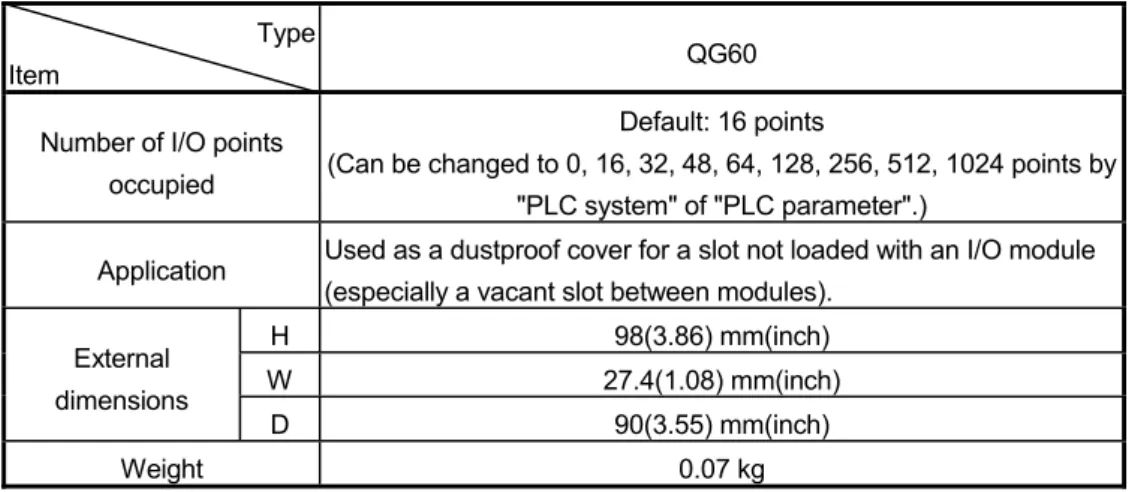
6. BLANK COVER MODULE 6- 1 to 6- 2
7. CONNECTORS 7- 1 to 7- 2
8. SPECIFICATIONS OF CONNECTOR/TERMINAL BLOCK CONVERTOR MODULES 8- 1 to 8- 7
8.1 Specifications of Connector/Terminal Block Convertor Modules ... 8- 1
8.2 Connector/Terminal Block Convertor Module Connection Diagrams ... 8- 3
8.2.1 A6TBXY36... 8- 3
8.2.2 A6TBXY54... 8- 4
8.2.3 A6TBX70 ... 8- 5
8.2.4 A6TBX36-E... 8- 5
8.2.5 A6TBY36-E... 8- 6
8.2.6 A6TBX54-E... 8- 6
8.2.7 A6TBY54-E... 8- 7
8.2.8 A6TBX70-E... 8- 7
9. SPRING CLAMP TERMINAL BLOCK 9- 1 to 9- 8 9.1 Spring Clamp Terminal Block I/O Module ... 9- 1 9.2 Spring clamp terminal block (Q6TE-18S) ... 9- 6
10. NAMES OF MODULE PARTS 10- 1 to 10- 6
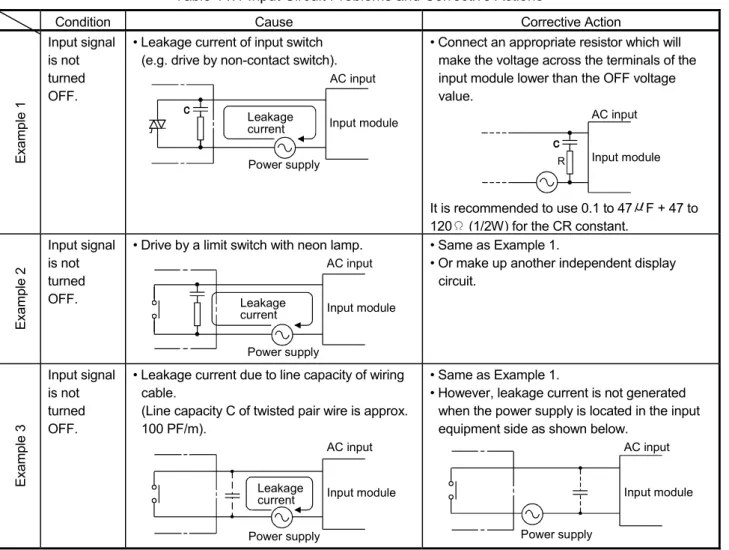
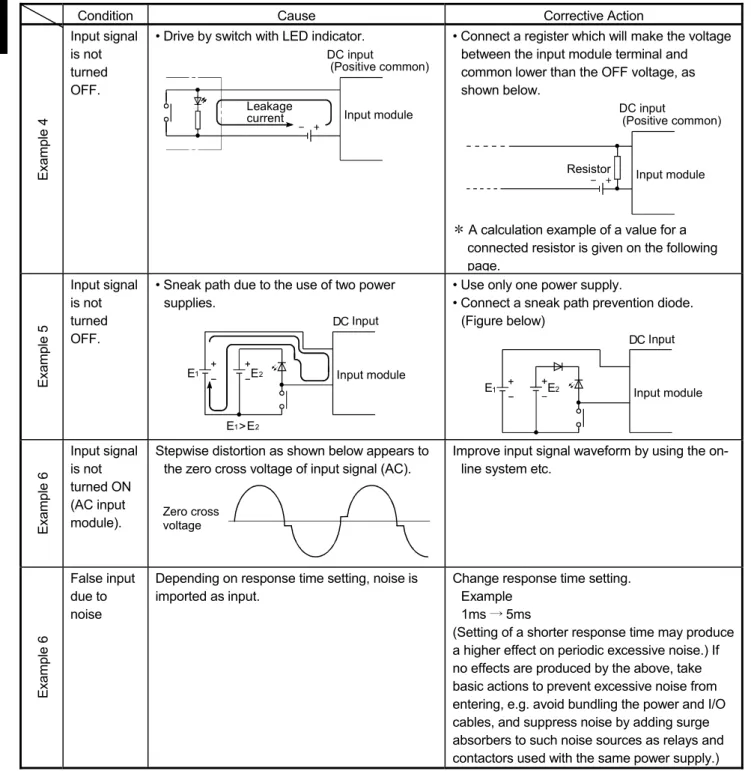
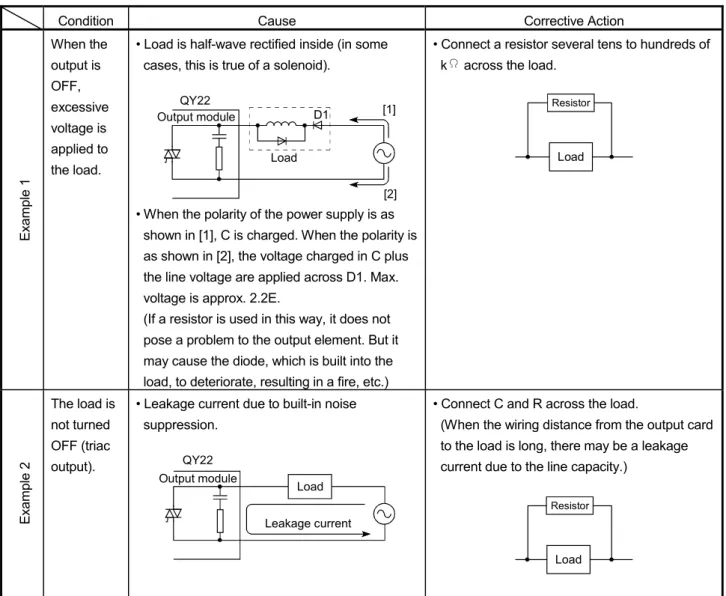
11. I/O MODULE TROUBLESHOOTING 11- 1 to 11- 7
11.1 Input Circuit Troubleshooting... 11- 1 11.2 Output Circuit Troubleshooting... 11- 4
APPENDICES App- 1 to App-12
Appendix 1 External Dimensional Drawings ...App- 1
Appendix 1.1 I/O modules...App- 1
Appendix 1.2 Connectors, connector/terminal block converter modules ...App- 4
Appendix 1.3 Connector/ terminal block converter module cable ...App- 8
Appendix 1.4 Spring Clamp Terminal Block...App- 9
Appendix 2 Compatibility with MELSEC-AnS Series I/O modules...App-10
About Manuals
The following manuals are also related to this product.
In necessary, order them by quoting the details in the tables below.
Related Manuals
Manual Name Manual Number
(Model Code) QCPU User's Manual (Hardware Design/Maintenance and Inspection)
This manual provides the specifications of the CPU modules, power supply modules, base units, extension cables, memory cards and others. (Sold separately)
SH-080483ENG (13JR73)
QCPU User's Manual (Function Explanation/Program Fundamentals)
This manual explains the functions, programming methods, devices on necessary to create programs with
the QCPU. (Sold separately)
SH-080484ENG (13JR74)
Conformation to the EMC Directive and Low Voltage Instruction (1) For programmable controller system
To configure a system meeting the requirements of the EMC and Low Voltage Directives when incorporating the Mitsubishi programmable controller (EMC and Low Voltage Directives compliant) into other machinery or equipment, refer to Chapter 9 "EMC AND LOW VOLTAGE DIRECTIVES" of the QCPU User's Manual (Hardware Design, Maintenance and Inspection).
(2) For the product
No additional measures are necessary for the compliance of this product with the
EMC and Low Voltage Directives.
MEMO
MELSEC-Q
1 GENERAL SPECIFICATIONS AND PRECAUTIONS FOR USE OF I/O MODULE
1. GENERAL SPECIFICATIONS MODULES AND PRECAUTIONS FOR USE OF I/O MODULE
This chapter describes the general specifications and precautions for use of I/O module.
1.1 General Specifications
Refer to the following manual for the general specifications of the I/O modules.
• QCPU User's Manual (Hardware Design/Maintenance and Inspection)
1.2 Precautions for Use 1.2.1 Input module
(1) The number of simultaneous on points of input module depends on its input voltage and ambient temperature.
Refer to the number of simultaneous on points shown on the specifications of each input module.
(2) Input modules may take in noise or the like as an input depending on the pulse width of a signal.
This pulse width has a value as listed below depending on the parameter-set response time. Set input response time while fully consider the operating environment.
Setting value of response time (ms)
Minimum value of pulse width where noise or the like may be
taken in as an input (ms)
1 0.3 5 3 10 6 20 12 70 45
For settings of the input response time, refer to Section 1.3.1.
(3) Read the following precautions carefully for use of the high-speed input modules (QX40H, QX70H, QX80H, and QX90H).
(a) When switching to the high-speed input, the specifications of the high-speed input modules and the input module QX40-S1 are identical. On the other hand, when switching to the interrupt input, the specifications of the high- speed input modules and the interrupt module QI60 are identical too.
Therefore, the specifications of the input module (QX40-S1) are construed as the specifications of the high-speed input module switched to the high-speed input. Similarly, the specifications of the interrupt module (QI60) indicated in the manuals other than this manual are construed as the specifications of the high-speed input module switched to the interrupt input.
1
MELSEC-Q
1 GENERAL SPECIFICATIONS AND PRECAUTIONS FOR USE OF I/O MODULE
(b) The high-speed input modules switch module types (high-speed input or interrupt input) for 16 input points all together and between valid and invalid noise filters as shown below.
GX Developer setting Function
selector switch
Noise filter
selector switch Module type Interrupt operation
Input response time
ON ON
OFF
High-speed input*1
*2
ON OFF
OFF
Interrupt*1
*2
: Settable : Not settable
*1: When selecting an improper module type, an error (error code: 2100) occurs.
*2: Setting the input response time with GX Developer is ignored.
(c) If the small number of value of input response time is set, the modules tend to have impact of noise. Ensure that the modules do not have impact of noise.
For the details of the measure against noise, refer to QCPU User’s manual (Hardware Design, Maintenance and Inspection).
(d) The high-speed input modules connected with electric appliance such as relays may load a chattering as a signal.
(e) Select a cable whose length is three meters or less, when using the high- speed input module as a CE-compatible product.
1.2.2 Output module
(1) If an output module drives load, its maximum switching frequency must be on for one second or longer and off for one second or longer.
(2) If a counter or timer which has a DC-DC converter as a load is used with an output module, choosing an output module by its average current can cause a failure due to periodic inrush current at power-on or during operation.
To reduce the influence of inrush current for use of the above load, connect a resistor or an inductance to the load in series or use a module whose maximum load current is large.
Output module
Resistor Load Inductance
Output module
Load
(3) Fuses installed to an output module cannot be replaced.
(4) Fuses installed to an output module are to prevent external wiring from being burned in case that outputs of the module short.
Therefore, if the fuses became a failure due to other than a short-circuit, the output modules may not be protected.
1
MELSEC-Q
1 GENERAL SPECIFICATIONS AND PRECAUTIONS FOR USE OF I/O MODULE
(5) It is recommended to install fuses to external terminals per point to prevent the external device and module from being burned in case of load short in the QY22 or QY68A.
Operations of the following fuses have been checked and ensured by Mitsubishi.
Module model QY22*1 QY68A*2
Fuse model 216 02.5 216 002 216 3.15 312 003
Rated current 2.5A 2A 3.15A 3A
Manufacturer Littelfuse, Inc
*1: Fuses that conform to Sheet 1 of IEC60127 are recommended.
*2: Fast blow fuses whose rated current is 3A are recommended.
(6) Connecting the transistor output modules in parallel may result in a failure of the output elements.
If connecting the transistor output modules in parallel, use diodes for the circuit as shown below.
OUT1
Load
OUT2
COM
Load
OUT1
OUT2
COM
OUT1
Load
OUT2
COM
Load
OUT1
OUT2
COM
Sink type Source type
MELSEC-Q
1 GENERAL SPECIFICATIONS AND PRECAUTIONS FOR USE OF I/O MODULE
(7) Precautions for the use of contact output module (a) Relay life of contact output module
Applicable module: QY10, QY10-TS, QY18A
AC100V cos =0.35
AC120V cos =0.2
AC240V cos =0.2 AC200V cos =0.7 AC100V cos =0.7 200
100
70
50
30
20
10
7
5
3
2
1
0.1 0.2 0.3 0.5 0.7 1 2 3 5
DC30V =0ms
AC200V cos =0.35 DC24V =7ms DC100
=7ms
S w itc h in g li fe (1 0, 00 0 t im e s)
Switching current (A)
(L/R): Time constant cos : Power factor
MELSEC-Q
1 GENERAL SPECIFICATIONS AND PRECAUTIONS FOR USE OF I/O MODULE
POINT
(1) When using the module for the application in which the relay contact is frequently switched, the relay life span should be considered. Therefore, it is recommended to use a triac output module.
(2) The relay life curve shows the value based on actual use, which is not guaranteed. Therefore, make sure to allow for a margin of error.
The relay life span differs according to the specifications as follows:
• Rated switching voltage, current load 100 thousand times
• 200VAC 1.5A, 240VAC 1A (COS =0.7) 100 thousand times
• 200VAC 0.4A, 240VAC 0.3A (COS =0.7) 300 thousand times
• 200VAC 1A, 240VAC 0.5A (COS =0.35) 100 thousand times
• 200VAC 0.3A, 240VAC 0.15A (COS =0.35) 300 thousand times
• 24VDC 1A, 100VDC 0.1A (L/R=7ms) 100 thousand times
• 24VDC 0.3A, 100VDC 0.03A (L/R=7ms) 300 thousand times
MELSEC-Q
1 GENERAL SPECIFICATIONS AND PRECAUTIONS FOR USE OF I/O MODULE
(b) Measures against inrush current
Relay life significantly varies depending on its load type the characteristics of its inrush current.
Take following measures since the inrush current may cause contact welding.
• In case of an increase in inrush current, select a load so that the inrush current will be within the rated current of the module.
• Connect the relay that can sustain inrush current outside the module.
1) Inductive load
Inrush current of inductive load may flow 20 times as large as the rated current depending on a load.
[Load of a solenoid]
i io 10 to 20 times
i io
0.07 to 0.1 seconds
i: Inrush current io: Rated current
[Load of a magnetic contactor]
i io 3 to 10 times
i io
0.017 to 0.033 seconds (1 to 2 cycles)
i: Inrush current io: Rated current
MELSEC-Q
1 GENERAL SPECIFICATIONS AND PRECAUTIONS FOR USE OF I/O MODULE
2) Load of a lamp
Inrush current 10 times as large as the rated current may flow through the lamp circuit depending on a load.
[Load of an incandescent bulb]
i io 3 to 10 times
i io
Approx. 0.33 seconds
Incandescent bulb
i: Inrush current io: Rated current
[Load of a mercury lamp]
i io 3 times
i io
180 to 300 seconds
i: Inrush current io: Rated current
[Load of a fluorescent]
i io 5 to 10 times
i io
Within 10 seconds
i: Inrush current io: Rated current
MELSEC-Q
1 GENERAL SPECIFICATIONS AND PRECAUTIONS FOR USE OF I/O MODULE
3) Capacitive load
When a load circuit includes such as a capacitor, inrush current 40 times as large as the rated current may flow through the load circuit depending on a load.
Also, pay attention to the wire capacity when the wiring is laid long.
[Capacitive load]
i io 20 to 40 times
i io
0.008 to 0.33 seconds (0.5 to 2 cycles)
i: Inrush current io: Rated current
MELSEC-Q
1 GENERAL SPECIFICATIONS AND PRECAUTIONS FOR USE OF I/O MODULE
(c) Measures against back EMF
When inductive load such as a magnetic contactor and solenoid is shut off, high back EMF is generated between the contacts and arc discharge occurs.
Especially when the power factor is small, the life shortens due to arc discharge.
Therefore, take measures against arc discharge.
The following is four methods to protect a relay contact against back EMF.
• Capacitor + Resistor method (CR method)
• Diode method
• Diode + Zener diode method
• Varistor method
Circuit example Method for selecting elements Remarks
*1
Capacitor Resistor
Inductive load
Capacitor + Resistor method (CR method)
Capacitor Resistor
Inductive load
Refer to the following for constants of the capacitor and resistor. Note that the following values may differ depending on a nature of the load and a variation of characteristics.
• Capacitor 0.5 to 1 ( F) against contact current of 1A
• Resistor 0.5 to 1 ( ) against contact voltage of 1V
Use a capacitor whose withstanding voltage is 200 to 300V.
In AC circuit, use a capacitor having no polarity.
If a load is from a relay or solenoid, the recovery time delays.
A capacitor suppresses electric discharge while a contact is off, and a resistor restricts a flow of current while a contact is on.
*1: When using AC power, impedance of CR must be larger enough than that of the load. (prevention of a malfunction due to leak current from the CR)
Diode method
Diode Inductiveload
Use a diode whose reverse breakdown voltage is 10 times as large as the circuit voltage or more and whose forward current is equal to or more than the load current.
The recovery time is later than the CR method.
Diode + Zener
diode method Diode Inductive
Zener Diode load
Use zener voltage for the zener diode equal to or more than the power supply voltage.
The diode method is effective when the recovery time is too late.
(To the next page)
MELSEC-Q
1 GENERAL SPECIFICATIONS AND PRECAUTIONS FOR USE OF I/O MODULE
Circuit example Method for selecting elements Remarks
Varistor method
Varistor Inductiveload
Select a cut voltage (Vc) for the varistor to meet the following condition. Multiply the value by root two for use of AC power.
Vc Power supply voltage 1.5 (V)
Note that when selecting an element whose Vc is too high, its effect will weaken.
The recovery time delays slightly.
POINT
(1) Avoid providing a protection circuit as shown below.
Capacitor Inductive load
This circuit is greatly effective to an arc at shut-off.
However, since an electric charge has been accumulated in a capacitor while a contact is off, short circuit current of the capacitor flows while the contact is on, which tends to result in contact welding.
Capacitor Inductive load
This circuit is greatly effective to an arc at shut-off.
However, since a charge current of the capacitor flows while the contact is on, which tends to result in contact welding.
(2) A protection circuit must be provided so that it may be close to a load or contact (module). If their distance is far, the protection circuit cannot show its effect.
Provide the circuit so that their distance may be within 50cm (19.69 inch) (rough
standard).
MELSEC-Q
1 GENERAL SPECIFICATIONS AND PRECAUTIONS FOR USE OF I/O MODULE
1.2.3 I/O combined module
(1)I/O numbers of combined I/O modules
There are two types of combined I/O modules:
• Module using same I/O numbers for input and output
Since same number is used for input and output, the I/O numbers to be used can be saved.
• Module using sequential I/O numbers for input and output
Since I/O assignments are the same for A series, it is useful when replacing modules from those of A series.
Vacant 32 points
Input (X) Output (Y) X00
X1F
Y00
Y1F 00
1F
X00
X1F 00
1F
Vacant
Y20
Y3F 20
3F
Input (X) Output (Y)
32 points
32 points
Module using same I/O numbers for input and output (QH42P)
Module using sequential I/O numbers for input and output (QX41Y41P)
(2)When using the QH42P, QX41Y41P or QX48Y57, configure it with the following devices.
Part name Detail
CPU PLC Product of product information [011120000000000-A] or later
GX Developer
SW5D5C-GPPW or laterThe CPU PLCs other than those listed above cannot be used.
When the SW4D5C-GPPW is used, the response time cannot be set (fixed at 10ms).
Set OUTPUT for the I/O allocation.
For how to check product information of the CPU module, refer to QCPU User's
Manual (Hardware Design, Maintenance and Inspection).
MELSEC-Q
1 GENERAL SPECIFICATIONS AND PRECAUTIONS FOR USE OF I/O MODULE
1.2.4 I/O module with protection function
The overload protection function and overheat protection function of the following modules are explained below.
(1) QY40P, QY40P-TS, QY41P, QY42P, QX41Y41P, QH42P
Function Description
Common
(Overload and overheat protection functions)
• If an overcurrent due to overload keeps flowing, heat is generated and the overheat protection function is activated.
• Each protection function is to protect the internal elements of the module, not to protect the external devices.
Overload protection function
• The overload protection function is activated in units of 1 point at 1A to 3A/point.
• The overload protection function returns to normal operation when the load becomes a rated load.
Overheat protection function
• The overheat protection function is activated in units of 1 point.
• The overheat protection function automatically returns to normal operation after heat reduces.
(2) QY81P
Function Description
Common
(Overload and overheat protection functions)
• If an overcurrent due to overload keeps flowing, heat is generated and the overheat protection function is activated.
• Each protection function is to protect the internal elements of the module, not to protect the external devices.
Overload protection function
• The overload protective function is activated in units of 1 point at 1A to 3A/point.
• The overload protective function returns to normal operation when the load becomes a rated load.
Overheat protection function
• The overheat protection function is activated in units of 2 points.
(It is activated in units of 2 points of Y0/Y1, Y2/Y3, ..., and when overheat protection is activated, 2 points of them are activated simultaneously. If an overheat status persists, heat is conducted, and which it may activate another overheat protection function.)
• If an output turns on at the activation of the overheat protection function, the actual output voltage oscillates between 0V and load voltage.
At the load voltage of 24V, the average voltage during oscillation is approx. 7V.
No oscillation occurs when the output is off at the activation of the overheat protection function.
To ensure that the output is turned off at the activation of the overheat protection function, use an external load that turns off at 7V or more.
• The overheat protective function automatically returns to normal operation after heat reduces.
MELSEC-Q
1 GENERAL SPECIFICATIONS AND PRECAUTIONS FOR USE OF I/O MODULE
1.2.5 Interrupt module
(1) If setting the response time during the interrupt input operation of QI60 or QX40H, QX70H, QX80H, and QX90H, use the module whose contents are shown below.
The response time cannot be set with other contents (fixed at 0.2ms.).
Product name Contents
PLC CPU Product information "021120000000000-B" or later
GX Developer SW6D5C-GPPW or later
For how to check product information of the CPU module, refer to QCPU User's Manual (Hardware Design, Maintenance and Inspection).
1.2.6 Installation and wiring
(1) Insulation-sleeved-solderless terminals cannot be used with the terminal block.
It is recommended to cover the wire connections of the solderless terminals with mark or insulation tubes.
(2) Use wires of 0.3 to 0.75mm
2core and 2.8mm (0.11in.) OD max. to connect to the terminal block. When using a wire whose core is 0.75mm or more, it is preferable to use the spring terminal block(Q6TE-18S).
(3) Tighten the module fixing and terminal block screws to the torques in the following ranges.
Screw location Tightening torque range Module fixing screw (M3 12 screw) 36 to 48 N•cm I/O module terminal block screw (M3 screw) 42 to 58 N•cm I/O module terminal block mounting screw (M3 screw) 66 to 89 N•cm
MELSEC-Q
1 GENERAL SPECIFICATIONS AND PRECAUTIONS FOR USE OF I/O MODULE
1.3 Various Settings for I/O Module
Various settings for the I/O module can be made with GX Developer.
This section describes how to make the settings with GX Developer.
1.3.1 Setting of I/O response time
Set the I/O response time on the I/O assignment tab of PLC Parameter.
(1) For Input/I/O mix module
Select "Input" or "I/O mix" in "Type" combo box on the I/O assignment tab of PLC parameter. Then, click the "Detailed setting" button, and then select the input response time in "I/O response time" combo box.
Choose I/O response time (default: 10ms).
Choose Input/I/O mix. Choose Detailed setting.
MELSEC-Q
1 GENERAL SPECIFICATIONS AND PRECAUTIONS FOR USE OF I/O MODULE
(2) For high-speed input module/QI60
Select "Hi. input" or "Interrupt" in "Type" combo box on the I/O assignment tab of PLC parameter. Then, click the "Detailed setting" button, and then select the input response time in "I/O response time"*1 combo box.
Choose I/O response time (default: 0.2ms).
Choose Hi. input/Interrupt. Choose Detailed setting.
*1: When the actual response time differs from the setting value, refer to the specifications of
the relevant I/O modules.
MELSEC-Q
1 GENERAL SPECIFICATIONS AND PRECAUTIONS FOR USE OF I/O MODULE
(3) For high-speed input module/QX40H, QX70H, QX80H, QX90H
Select "Hi.input" or "Interrupt", which is the same module type as the one selected with the high-speed input module switch, in "Type" combo box on the I/O
assignment tab of PLC parameter.*1 Then, click the "Detailed setting" button, and then select the input response time in "I/O response time"*2*3 combo box.
Choose I/O response time (default: 0.2ms).
Choose Hi. input/Interrupt. Choose Detailed setting.
*1: If selected a different module type with the one selected by the function selector switch of high-speed input module, an error occurs.
*2: If disabled the noise filter with the noise filter selector switch of the high-speed input module, the setting value is ignored.
*3: When the actual response time differs from the setting value, refer to the specifications of
the relevant I/O modules.
MELSEC-Q
1 GENERAL SPECIFICATIONS AND PRECAUTIONS FOR USE OF I/O MODULE
1.3.2 Setting of error-time output mode
Set the error-time output mode on the I/O assignment tab of PLC parameter in GX Developer.
Select "Output" or "I/O mix" in the "Type" combo box on the I/O assignment tab of PLC parameter. Then, click the "Detailed setting" button, and then select "Clear" or "Hold" in the "Error time output mode" combo box.
Choose Output/I/O mix. Choose Detailed setting.
Choose Clear/Hold (default: Clear).
MELSEC-Q
1 GENERAL SPECIFICATIONS AND PRECAUTIONS FOR USE OF I/O MODULE
1.3.3 Switch setting of interrupt module
Perform the switch setting on the I/O assignment tab of PLC parameter when operating the interrupt input for QI60, QX40H, QX70H, QX80H, or QX90H.
Select "Interrupt" in the "Type" combo box on the I/O assignment tab of PLC
parameter. Then, click the "Switch setting" button, and then select "HEX" in the "Input format" combo box. Lastly, set 0 (leading edge) or 1 (trailing edge) in the "Switch1" box for the interrupt processing.
Choose Interrupt. Choose Switch setting.
Choose HEX.
Set the interrupt processing conditions (leading edge/trailing edge) of CH1 to CH16.
Setting inhibited.
Set the interrupt processing condition with switch 1. The relationships between bits and inputs are as indicated below.
XF XE XD XC XB XA X9 X8 X7 X6 X5 X4 X3 X2 X1 X0
b0
b15 to
0: Leading edge, 1: Trailing edge
MELSEC-Q
2 INPUT MODULE SPECIFICATIONS
2. INPUT MODULE SPECIFICATIONS
2.1 QX10 AC Input Module
AC Input Module Type
Specifications QX10 Appearance
Number of input points 16 points
Isolation method Photocoupler
Rated input voltage, frequency 100-120VAC (+10/-15%) 50/60Hz (±3Hz) Input voltage distortion Within 5% (Refer to section 1.2)
Rated input current Approx. 8mA (100VAC, 60Hz), approx. 7mA (100VAC, 50Hz) Input derating Refer to the derating chart.
Inrush current Max. 200mA within 1ms (at 132VAC) ON voltage/ON current 80VAC or higher/5mA or higher (50Hz, 60Hz) OFF voltage/OFF current 30VAC or lower/1.7mA or lower (50Hz, 60Hz) Input impedance Approx. 12k (60Hz), approx. 15k (50Hz)
OFF to ON 15ms or less (100VAC 50Hz, 60Hz) Response
time ON to OFF 20ms or less (100VAC 50Hz, 60Hz) Dielectric withstand voltage 1780VAC rms/3 cycles (altitude 2000m (6557.38ft.))
Insulation resistance 10M or more by insulation resistance tester By noise simulator of 1500Vp-p noise voltage, 1 s noise width
and 25 to 60Hz noise frequency Noise immunity
First transient noise IEC61000-4-4: 1kV
Protection of degree IP1X
Common terminal arrangement 16 points/common (common terminal: TB17) Number of I/O points 16 (I/O allocation is set as a 16-points input module)
Operation indicator ON indication (LED) External connections 18-point terminal block (M3 6 screws)
Applicable wire size 0.3 to 0.75mm2 core (2.8mm (0.11in.) OD max.) Applicable crimping terminal R1.25-3 (sleeved crimping terminals cannot be used.)
5VDC internal current
consumption 50mA (TYP. all points ON)
Weight 0.17kg
0 1
2 3
4 5
6 7
8 9
A B
C D
E F COM QX10
NC 100VAC 8mA60Hz 7mA50Hz
0 1 2 3 4 5 6 7 8 9 A B C D E F
0 1 2 3 4 5 6 7 8 9 A B C D E F
Derating Chart Terminal Block Number Signal Name
TB1 X00 TB2 X01 TB3 X02 TB4 X03 TB5 X04 TB6 X05 100
90 80 70 60 50
400 10 20 30 40 50 55 ONratio
Ambient temperature
120VAC 132VAC (%)
( )C
TB7 X06
External Connections TB8 X07
TB9 X08 TB10 X09 TB11 X0A TB12 X0B TB13 X0C TB14 X0D TB15 X0E TB16 X0F TB17 COM
TB1
TB17
100VAC
LED
LED TB16
Internal circuit
TB18 Vacant
2
MELSEC-Q
2 INPUT MODULE SPECIFICATIONS
2.2 QX10-TS AC Input Module
This module is a spring clamp terminal block type and an input module that has indicators for checking the insertion state of wire.
AC Input Module Type
Specifications QX10-TS Appearance
Number of input points 16 points
Isolation method Photocoupler
Rated input voltage, frequency 100-120VAC (+10/-15%) 50/60Hz (±3Hz) Input voltage distortion Within 5% (Refer to section 1.2)
Rated input current Approx. 8mA (100VAC, 60Hz), approx. 7mA (100VAC, 50Hz) Input derating Refer to the derating chart.
Inrush current Max. 200mA within 1ms (at 132VAC) ON voltage/ON current 80VAC or higher/5mA or higher (50Hz, 60Hz) OFF voltage/OFF current 30VAC or lower/1.7mA or lower (50Hz, 60Hz) Input impedance Approx. 12k (60Hz), approx. 15k (50Hz)
OFF to ON 15ms or less (100VAC 50Hz, 60Hz) Response
time ON to OFF 20ms or less (100VAC 50Hz, 60Hz) Dielectric withstand voltage 1780VAC rms/3 cycles (altitude 2000m (6557.38ft.))
Insulation resistance 10M or more by insulation resistance tester By noise simulator of 1500Vp-p noise voltage, 1 s noise width
and 25 to 60Hz noise frequency Noise immunity
First transient noise IEC61000-4-4: 1kV
Protection of degree IP2X
Common terminal arrangement 16 points/common (common terminal: TB17) Number of I/O points 16 (I/O allocation is set as a 16-points input module)
Operation indicator ON indication (LED) External connections Two piece Spring clamp terminal block
Applicable wire size 0.3 to 2.0mm2 core (AWG22 to 15) Applicable crimping terminal Refer to section 9.1
5VDC internal current
consumption 50mA (TYP. all points ON)
Weight 0.17kg 1 2 3 4 5 6 7 8 9 10 11 12 13 14 15 16
18 17 0 81
92 A3
B4 C5
D6 E7
F QX10-TS
Derating Chart Terminal Block Number Signal Name
TB1 X00 TB2 X01 TB3 X02 TB4 X03 TB5 X04 TB6 X05 100
90 80 70 60 50
400 10 20 30 40 50 55 ONratio
Ambient temperature
120VAC 132VAC (%)
( )C
TB7 X06
External Connections TB8 X07
TB9 X08 TB10 X09 TB11 X0A TB12 X0B TB13 X0C TB14 X0D TB15 X0E TB16 X0F TB17 COM
TB1
TB17
100VAC
LED
LED TB16
Internal circuit
TB18 Vacant
2
MELSEC-Q
2 INPUT MODULE SPECIFICATIONS
2.3 QX28 AC Input Module
AC Input Module Type
Specifications QX28 Appearance
Number of input points 8 points
Isolation method Photocoupler
Rated input voltage, frequency 100-240VAC (+10/-15%) 50/60Hz (±3Hz) Input voltage distortion Within 5% (Refer to section 1.2)
Rated input current Approx. 17mA (200VAC, 60Hz), approx. 14mA (200VAC, 50Hz) Approx. 8mA (100VAC, 60Hz), approx. 7mA (100VAC, 50Hz) Input derating Refer to the derating chart.
Inrush current Max. 500mA within 1ms (at 264VAC) ON voltage/ON current 80VAC or higher/5mA or higher (50Hz, 60Hz) OFF voltage/OFF current 30VAC or lower/1.7mA or lower (50Hz, 60Hz) Input impedance Approx. 12k (60Hz), approx. 15k (50Hz)
OFF to ON 10ms or less (100VAC 50Hz, 60Hz) Response
time ON to OFF 20ms or less (100VAC 50Hz, 60Hz) Dielectric withstand voltage 2830VAC rms/3 cycles (altitude 2000m (6557.38ft.))
Insulation resistance 10M or more by insulation resistance tester By noise simulator of 1500Vp-p noise voltage, 1 s noise width
and 25 to 60Hz noise frequency Noise immunity
First transient noise IEC61000-4-4: 1kV
Protection of degree IP1X
Common terminal arrangement 8 points/common (common terminal: TB17) Number of I/O points 16 (I/O allocation is set as a 16-points input module)
Operation indicator ON indication (LED) External connections 18-point terminal block (M3 6 screws)
Applicable wire size 0.3 to 0.75mm2 core (2.8mm (0.11in.) OD max.) Applicable crimping terminal R1.25-3 (sleeved crimping terminals cannot be used.)
5VDC internal current
consumption 50mA (TYP. all points ON)
Weight 0.20kg
NC 1
NC 2
NC 3 NC 4
NC 5
NC 6
NC 7 NC COM QX28
NC 200VAC 17mA60Hz 14mA50Hz
0 1 2 3 4 5 6 7
0 1 2 3 4 5 6 7 8 9 A B C D E F
0
Derating Chart Terminal Block Number Signal Name
TB1 X00 TB2 Vacant TB3 X01 TB4 Vacant TB5 X02 TB6 Vacant 100
90 80 70 60 50
400 10 20 30 40 50 55 ONratio
Ambient temperature (%)
( )C 100% 55 C 87.5% 55 C 100% 45 C
240V 264V
TB7 X03
External Connections TB8 Vacant
TB9 X04 TB10 Vacant TB11 X05 TB12 Vacant TB13 X06 TB14 Vacant TB15 X07 TB16 Vacant TB17 COM
TB1
TB17
100/200VAC
LED
TB15 LED
Internal circuit
TB18 Vacant
MELSEC-Q
2 INPUT MODULE SPECIFICATIONS
2.4 QX40 DC Input Module (Positive Common Type)
DC Input Module (Positive Common Type) Type
Specifications QX40 Appearance
Number of input points 16 points
Isolation method Photocoupler
Rated input voltage 24VDC (+20/-15%, ripple ratio within 5%)
Rated input current Approx. 4mA
Input derating No
ON voltage/ON current 19V or higher/3mA or higher OFF voltage/OFF current 11V or lower/1.7mA or lower
Input impedance Approx. 5.6k
OFF to ON 1ms/5ms/10ms/20ms/70ms or less (CPU parameter setting) 1 Initial setting is 10ms.
Response time
ON to OFF 1ms/5ms/10ms/20ms/70ms or less (CPU parameter setting) 1 Initial setting is 10ms.
Dielectric withstand voltage 560VAC rms/3 cycles (altitude 2000m (6557.38ft.)) Insulation resistance 10M or more by insulation resistance tester
By noise simulator of 500Vp-p noise voltage, 1 s noise width and 25 to 60Hz noise frequency
Noise immunity
First transient noise IEC61000-4-4: 1kV
Protection of degree IP2X
Common terminal arrangement 16 points/common (common terminal: TB17) Number of I/O points 16 (I/O allocation is set as a 16-points input module)
Operation indicator ON indication (LED) External connections 18-point terminal block (M3 6 screws)
Applicable wire size 0.3 to 0.75mm2 core (2.8mm (0.11in.) OD max.) Applicable crimping terminal R1.25-3 (sleeved crimping terminals cannot be used.) 5VDC internal current consumption 50mA (TYP. all points ON)
Weight 0.16kg
0 1
2 3
4 5
6 7
8 9
A B
C D
E F COM QX40
NC
24VDC 4mA
+ -
0 1 2 3 4 5 6 7 8 9 A B C D E F
0 1 2 3 4 5 6 7 8 9 A B C D E F
External Connections Terminal Block Number Signal Name
TB1 X00 TB2 X01 TB3 X02 TB4 X03 TB5 X04 TB6 X05 TB7 X06 TB8 X07 TB9 X08 TB10 X09 TB11 X0A TB12 X0B TB13 X0C TB14 X0D TB15 X0E TB16 X0F TB17 COM
TB1
TB17 24VDC
LED
LED
TB16
Internal circuit
TB18 Vacant 1: For the setting method, refer to the section 1.3.1.
MELSEC-Q
2 INPUT MODULE SPECIFICATIONS
2.5 QX40-S1 DC Input Module (Positive Common Type)
DC Input Module (Positive Common Type) Type
Specifications QX40-S1 Appearance
Number of input points 16 points
Isolation method Photocoupler
Rated input voltage 24VDC (+20/-15%, ripple ratio within 5%)
Rated input current Approx. 6mA
Input derating No
ON voltage/ON current 19V or higher/4.0mA or higher OFF voltage/OFF current 11V or lower/1.7mA or lower
Input impedance Approx. 3.9k
Set value 1 0.1 0.2 0.4 0.6 1
Typ 0.05ms 0.15ms 0.30ms 0.55ms 1.05ms OFF to ON
max 0.10ms 0.20ms 0.40ms 0.60ms 1.20ms Typ 0.15ms 0.20ms 0.35ms 0.60ms 1.10ms Response
time
ON to OFF
max 0.20ms 0.30ms 0.50ms 0.70ms 1.30ms Dielectric withstand voltage 560VAC rms/3 cycles (altitude 2000m (6557.38ft.))
Insulation resistance 10M or more by insulation resistance tester By noise simulator of 500Vp-p noise voltage, 1 s noise width
and 25 to 60Hz noise frequency Noise immunity
First transient noise IEC61000-4-4: 1kV
Protection of degree IP2X
Common terminal arrangement 16 points/common (common terminal: TB17) Number of I/O points 16 (I/O allocation is set as a 16-points Hi. input module)
Operation indicator ON indication (LED) External connections 18-point terminal block (M3 6 screws)
Applicable wire size 0.3 to 0.75mm2 core (2.8mm (0.11in.) OD max.) Applicable crimping terminal R1.25-3 (sleeved crimping terminals cannot be used.)
5VDC internal current
consumption 60mA (TYP. all points ON)
Weight 0.20kg
0 1
2 3
4 5
6 7
8 9
A B
C D
E F COM QX40-S1
NC
24VDC 6mA
+ -
0 1 2 3 4 5 6 7 8 9 A B C D E F
0 1 2 3 4 5 6 7 8 9 A B C D E F
External Connections Terminal Block Number Signal Name
TB1 X00 TB2 X01 TB3 X02 TB4 X03 TB5 X04 TB6 X05 TB7 X06 TB8 X07 TB9 X08 TB10 X09 TB11 X0A TB12 X0B TB13 X0C TB14 X0D TB15 X0E TB16 X0F TB17 COM
24VDC TB 1
TB17 TB16
LED
Internal circuit
TB18 Vacant 1: CPU parameter setting. (Initial setting is 0.2ms)
Response time can be changed on SW5D5C-GPPW or later.
For the setting method, refer to the section 1.3.1.
MELSEC-Q
2 INPUT MODULE SPECIFICATIONS
2.6 QX40-TS DC Input Module (Positive Common Type)
This module is a spring clamp terminal block type and an input module that has indicators for checking the insertion state of wire.
DC Input Module (Positive Common Type) Type
Specifications QX40-TS Appearance
Number of input points 16 points
Isolation method Photocoupler
Rated input voltage 24VDC (+20/-15%, ripple ratio within 5%)
Rated input current Approx. 4mA
Input derating No
ON voltage/ON current 19V or higher/3mA or higher OFF voltage/OFF current 11V or lower/1.7mA or lower
Input impedance Approx. 5.6k
OFF to ON 1ms/5ms/10ms/20ms/70ms or less (CPU parameter setting) 1 Initial setting is 10ms.
Response time
ON to OFF 1ms/5ms/10ms/20ms/70ms or less (CPU parameter setting) 1 Initial setting is 10ms.
Dielectric withstand voltage 560VAC rms/3 cycles (altitude 2000m (6557.38ft.)) Insulation resistance 10M or more by insulation resistance tester
By noise simulator of 500Vp-p noise voltage, 1 s noise width and 25 to 60Hz noise frequency
Noise immunity
First transient noise IEC61000-4-4: 1kV
Protection of degree IP2X
Common terminal arrangement 16 points/common (common terminal: TB17) Number of I/O points 16 (I/O allocation is set as a 16-points input module)
Operation indicator ON indication (LED)
External connections Two piece Spring clamp terminal block Applicable wire size 0.3 to 2.0mm2 core (AWG22 to 15) Applicable crimping terminal Refer to section 9.1 5VDC internal current consumption 50mA (TYP. all points ON)
Weight 0.16kg 1 2 3 4 5 6 7 8 9 10
12 13 14 15 16
18 17 0 8 1 9 2 A 3 B 4 C 5 D 6 E 7 F QX40-TS
11
External Connections Terminal Block Number Signal Name
TB1 X00 TB2 X01 TB3 X02 TB4 X03 TB5 X04 TB6 X05 TB7 X06 TB8 X07 TB9 X08 TB10 X09 TB11 X0A TB12 X0B TB13 X0C TB14 X0D TB15 X0E TB16 X0F TB17 COM
TB1
TB17 24VDC
LED
LED
TB16
Internal circuit
TB18 Vacant
MELSEC-Q
2 INPUT MODULE SPECIFICATIONS
2.7 QX40H DC High-Speed Input Module (Positive Common Type)
DC high-speed input module (Positive Common Type) Type
Specifications QX40H Appearance
Number of input points 16 points
Isolation method Photocoupler
Rated input voltage 24VDC (+20/-15%, ripple ratio within 5%)
Rated input current Approx. 6mA
Input derating Refer to the derating chart.
ON voltage/ON current 13V or higer/3mA or higher OFF voltage/OFF current 8V or lower/1.6mA or lower
Input impedance Approx. 3.9k
SW1 (noise
filter) 1 OFF ON
Set value 2 Invalid 0.1 0.2 0.4 0.6 1
TYP. 0ms 3 0.04ms 0.10ms 0.25ms 0.50ms 0.95ms OFF to ON
MAX. - 3 0.05ms 0.15ms 0.30ms 0.60ms 1.00ms TYP. 0ms 3 0.04ms 0.10ms 0.25ms 0.50ms 0.95ms Response
time
ON to OFF
MAX. - 3 0.05ms 0.15ms 0.30ms 0.60ms 1.00ms Function
setting SW2 4 OFF: Interrupt, ON: High-speed input Dielectric withstand voltage 560VAC rms/3 cycles (altitude 2000m (6557.38ft.))
Insulation resistance 10M or more by insulation resistance tester Noise immunity 5 By noise simulator of 500Vp-p noise voltage, 1 s noise width
and 25 to 60Hz noise frequency
Protection of degree IP2X
Common terminal
arrangement 8 points/common (common terminal: TB9,TB18)
Number of I/O points 16 (I/O allocation is set as a 16-points high-speed input module or interrupt module) 4
Operation indicator Set by Switch setting in GX Developer 4 6 External connections ON indication (LED)
Applicable wire size 18-point terminal block (M3 6 screws) Applicable crimping terminal 0.3 to 0.75mm2 core (2.8mm (0.11in.)OD max.)
Protection of degree R1.25-3(sleeved solderless terminals cannot be used.) 5VDC internal current
consumption 80mA (TYP. all points ON)
Weight 0.16kg 1: If turning on the switch 1, the noise filter takes effect.
The off-status noise filter disables I/O response time setting.
After switching on or off the switch 1, reset the power supply of the CPU module.
2: Set an input response time in "I/O response time" combo box of PLC parameter in GX Developer. (Default: 0.2ms) The response time in SW6D5C-GPPW or later can be changed.
For the setting details, refer to Section 1.3.1.
3: The actual response time is 5 s delay when turning on, 10 s delay when turning off, because the hardware response time is added.
For the details of the CPU overhead time, refer to QCPU User's Manual (Function Explanation, Program Fundamentals)...
4: The module function can be changed according to the switch 2 status.
ON : High-speed input OFF : Interrupt
If changing the switch 2 setting while the CPU module is in RUN, an error (error code:2100) occurs.
5: Indicates the noise immunity when the noise filter takes effect (the switch is turned on).
6: For the setting method, refer to Section 1.3.3.
MELSEC-Q
2 INPUT MODULE SPECIFICATIONS
Derating Chart Terminal Block Number Signal Name
TB1 X00 TB2 X01 TB3 X02 TB4 X03 TB5 X04 TB6 X05 100
90 80 70 60 50
400 10 20 30 40 50 55 ratioON
Ambient temperature
28.8VDC
( ) (%)
26.4VDC
TB7 X06
External Connections TB8 X07
TB9 X08 TB10 COM1 TB11 X09 TB12 X0A TB13 X0B TB14 X0C TB15 X0D TB16 X0E TB17 X0F TB18 COM2
24VDC
24VDC TB1
TB8 TB9
TB10
TB17 TB18
LED
Internal circuit