Amazon Kinesis Data Analytics
SQL Reference
Amazon Kinesis Data Analytics: SQL Reference
Copyright © Amazon Web Services, Inc. and/or its affiliates. All rights reserved.
Amazon's trademarks and trade dress may not be used in connection with any product or service that is not Amazon's, in any manner that is likely to cause confusion among customers, or in any manner that disparages or discredits Amazon. All other trademarks not owned by Amazon are the property of their respective owners, who may or may not be affiliated with, connected to, or sponsored by Amazon.
Table of Contents
SQL Reference ... 1
Streaming SQL Language Elements ... 2
Identifiers ... 2
Data Types ... 3
Numeric Types and Precision ... 6
Streaming SQL Operators ... 7
IN Operator ... 8
EXISTS Operator ... 8
Scalar Operators ... 8
Arithmetic Operators ... 9
String Operators ... 10
Logical Operators ... 15
Expressions and Literals ... 19
Monotonic Expressions and Operators ... 21
Monotonic columns ... 22
Monotonic expressions ... 22
Rules for deducing monotonicity ... 23
Condition Clause ... 24
Temporal Predicates ... 24
Syntax ... 26
Example ... 26
Sample Use Case ... 27
Reserved Words and Keywords ... 27
Standard SQL Operators ... 32
CREATE statements ... 32
CREATE STREAM ... 32
CREATE FUNCTION ... 34
CREATE PUMP ... 35
INSERT ... 36
Syntax ... 36
Pump Stream Insert ... 36
Query ... 37
Syntax ... 37
select ... 38
Streaming set operators ... 38
VALUES operator ... 39
SELECT statement ... 39
Syntax ... 40
The STREAM keyword and the principle of streaming SQL ... 40
Chart ... 41
SELECT ALL and SELECT DISTINCT ... 41
SELECT clause ... 42
FROM clause ... 45
JOIN clause ... 47
HAVING clause ... 61
GROUP BY clause ... 62
WHERE clause ... 63
WINDOW Clause (Sliding Windows) ... 66
ORDER BY clause ... 74
ROWTIME ... 76
Functions ... 78
Aggregate Functions ... 78
Streaming Aggregation and Rowtime Bounds ... 79
Aggregate Function List ... 79
Examples of Aggregate Queries on Streams (Streaming Aggregation) ... 80
Windowed Aggregation on Streams ... 83
AVG ... 89
COUNT ... 92
COUNT_DISTINCT_ITEMS_TUMBLING Function ... 96
EXP_AVG ... 98
FIRST_VALUE ... 98
LAST_VALUE ... 99
MAX ... 99
MIN ... 102
SUM ... 105
TOP_K_ITEMS_TUMBLING Function ... 108
Analytic Functions ... 110
Related Topics ... 111
Boolean Functions ... 111
ANY ... 111
EVERY ... 111
Conversion Functions ... 112
CAST ... 112
Date and Time Functions ... 127
Time Zones ... 127
Datetime Conversion Functions ... 128
Date, Timestamp, and Interval Operators ... 141
Date and Time Patterns ... 146
CURRENT_DATE ... 149
CURRENT_ROW_TIMESTAMP ... 150
CURRENT_TIME ... 150
CURRENT_TIMESTAMP ... 150
EXTRACT ... 151
LOCALTIME ... 152
LOCALTIMESTAMP ... 152
TSDIFF ... 153
Null Functions ... 153
COALESCE ... 153
NULLIF ... 154
Numeric Functions ... 154
ABS ... 154
CEIL / CEILING ... 155
EXP ... 156
FLOOR ... 156
LN ... 157
LOG10 ... 158
MOD ... 158
POWER ... 158
STEP ... 159
Log Parsing Functions ... 162
FAST_REGEX_LOG_PARSER ... 162
FIXED_COLUMN_LOG_PARSE ... 166
REGEX_LOG_PARSE ... 167
SYS_LOG_PARSE ... 169
VARIABLE_COLUMN_LOG_PARSE ... 169
W3C_LOG_PARSE ... 170
Sorting Functions ... 178
Group Rank ... 178
Statistical Variance and Deviation Functions ... 182
HOTSPOTS ... 182
RANDOM_CUT_FOREST ... 186
RANDOM_CUT_FOREST_WITH_EXPLANATION ... 190
STDDEV_POP ... 199
STDDEV_SAMP ... 201
VAR_POP ... 204
VAR_SAMP ... 207
Streaming SQL Functions ... 210
LAG ... 210
Monotonic Function ... 212
NTH_VALUE ... 213
String and Search Functions ... 213
CHAR_LENGTH / CHARACTER_LENGTH ... 214
INITCAP ... 214
LOWER ... 215
OVERLAY ... 215
POSITION ... 216
REGEX_REPLACE ... 217
SUBSTRING ... 218
TRIM ... 220
UPPER ... 221
Kinesis Data Analytics Developer Guide ... 222
Document History ... 223
Amazon Kinesis Data Analytics SQL Reference
The Amazon Kinesis Data Analytics SQL Reference describes the SQL language elements that are supported by Amazon Kinesis Data Analytics. The language is based on the SQL:2008 standard with some extensions to enable operations on streaming data.
For information about developing Kinesis Data Analytics applications, see the Kinesis Data Analytics Developer Guide.
This guide covers the following:
• Streaming SQL Language Elements (p. 2) – Data Types (p. 3), Streaming SQL Operators (p. 7), Functions (p. 78).
• Standard SQL Operators (p. 32) – CREATE statements (p. 32), SELECT statement (p. 39).
• Operators for transforming and filtering incoming data – WHERE clause (p. 63), JOIN clause (p. 47), GROUP BY clause (p. 62), WINDOW Clause (Sliding Windows) (p. 66).
• Logical Operators (p. 15) – AS, AND, OR, etc.
Identifiers
Streaming SQL Language Elements
The following topics discuss the language elements in Amazon Kinesis Data Analytics that underlie its syntax and operations:
Topics
• Identifiers (p. 2)
• Data Types (p. 3)
• Streaming SQL Operators (p. 7)
• Expressions and Literals (p. 19)
• Monotonic Expressions and Operators (p. 21)
• Condition Clause (p. 24)
• Temporal Predicates (p. 24)
• Reserved Words and Keywords (p. 27)
Identifiers
All identifiers may be up to 128 characters. Identifiers may be quoted (with case-sensitivity) by enclosing them in double-quote marks ("), or unquoted (with implicit uppercasing before both storage and lookup).
Unquoted identifiers must start with a letter or underscore, and be followed by letters, digits or underscores; letters are all converted to upper case.
Quoted identifiers can contain other punctuation too (in fact, any Unicode character except control characters: codes 0x0000 through 0x001F). You can include a double-quote in an identifier by escaping it with another double-quote.
In the following example, a stream is created with an unquoted identifier, which is converted to upper case before the stream definition is stored in the catalog. It can be referenced using its upper-case name, or by an unquoted identifier which is implicitly converted to upper case.
–- Create a stream. Stream name specified without quotes, –- which defaults to uppercase.
CREATE OR REPLACE STREAM ExampleStream (col1 VARCHAR(4));
– example 1: OK, stream name interpreted as uppercase.
CREATE OR REPLACE PUMP "STREAM_PUMP" AS INSERT INTO ExampleStream SELECT * FROM SOURCE_SQL_STREAM_001;
– example 2: OK, stream name interpreted as uppercase.
CREATE OR REPLACE PUMP "STREAM_PUMP" AS INSERT INTO examplestream SELECT * FROM customerdata;
– example 3: Ok.
CREATE OR REPLACE PUMP "STREAM_PUMP" AS INSERT INTO EXAMPLESTREAM SELECT * FROM customerdata;
– example 2: Not found. Quoted names are case-sensitive.
CREATE OR REPLACE PUMP "STREAM_PUMP" AS INSERT INTO "examplestream"
SELECT * FROM customerdata;
When objects are created in Amazon Kinesis Data Analytics, their names are implicitly quoted, so it is easy to create identifiers that contain lowercase characters, spaces, dashes, or other punctuation. If you reference those objects in SQL statements, you will need to quote their names.
Data Types
Reserved Words and Keywords
Certain identifiers, called keywords, have special meaning if they occur in a particular place in a streaming SQL statement. A subset of these key words are called reserved words and may not be used as the name of an object, unless they are quoted. For more information, see Reserved Words and Keywords (p. 27).
Data Types
The following table summarizes the data types supported by Amazon Kinesis Data Analytics.
SQL Data Type JSON Data Type Description Notes
BIGINT number 64-bit signed integer
BINARY BASE64-encoded string Binary (non character)
data Substring works on
BINARY. Concatenation does not work on BINARY.
BOOLEAN boolean TRUE, FALSE, or NULL Evaluates to TRUE,
FALSE, and UNKNOWN.
CHAR (n) string A character string
of fixed length n.
Also specifiable as CHARACTER
n must be greater than 0 and less than 65535.
DATE string A date is a calendar day
(year/month/day). Precision is day. Range runs from the largest value, approximately +229 (in years) to the smallest value, -229.
DECIMAL DEC NUMERIC
number A fixed point, with up to
19 significant digits. Can be specified with DECIMAL, DEC, or NUMERIC.
DOUBLE
DOUBLE PRECISION
number A 64-bit floating point
number 64-bit approx value;
-1.79E+308 to 1.79E +308. Follows the ISO DOUBLE PRECISION data type, 53 bits are used for the number's mantissa in scientific notation, representing 15 digits of precision and 8 bytes of storage.
INTEGER INT
number 32-bit signed integer.
Range is -2147483648 to 2147483647 [ 2**(31) to 2**(31)- 1]
Data Types
SQL Data Type JSON Data Type Description Notes
INTERVAL <timeunit>
[TO <timeunit>] string Day-time intervals supported, year-month intervals not supported
Allowed in an expression in date arithmetic, but cannot be used as a datatype for a column in a table or stream.
<timeUnit> string The units of a INTERVAL
value Supported units are
YEAR, MONTH, DAY, HOUR, MINUTE, and SECOND
SMALLINT number 16-bit signed integer Range is -32768 to
32767
[2**(15) to 2**(15)-1]
REAL number A 32-bit floating point
number Following the ISO
REAL data type, 24 bits are used for the number's mantissa in scientific notation, representing 7 digits of precision and 4 bytes of storage. The minimum value is -3.40E+38;
the maximum value is 3.40E+38.
TIME string A TIME is a
time in a day
(hour:minute:second).
Its precision is milliseconds; its range is 00:00:00.000 to 23:59:59.999. Since the system clock runs in UTC, the timezone used for values stored in a TIME or TIMESTAMP column is not considered.
for values stored in a TIME or TIMESTAMP column.
Data Types
SQL Data Type JSON Data Type Description Notes
TIMESTAMP string A TIMESTAMP is a
combined DATE and TIME.
A TIMESTAMP value always has a precision of 1 millisecond. It has no particular timezone.
Since the system clock runs in UTC, the timezone used for values stored in a TIME or TIMESTAMP column is not considered.
Its range runs from the largest value, approximately +229 (in years) to the smallest value, -229. Each timestamp is stored as a signed 64-bit integer, with 0 representing the Unix epoch (Jan 1, 1970 00:00am).
This means that the largest TIMESTAMP value represents approximately 300 million years after 1970, and the smallest value represents approximately 300 million years before 1970. Following the SQL standard, a TIMESTAMP value has an undefined timezone.
TINYINT number 8-bit signed integer Range is -128 to 127,
VARBINARY (n) BASE64-encoded string Also specifiable as
BINARY VARYING n must be greater than 0 and less than 65535.
VARCHAR (n) string Also specifiable as
CHARACTER VARYING n must be greater than 0 and less than 65535.
Notes
Regarding characters:
• Amazon Kinesis Data Analytics supports only Java single-byte CHARACTER SETs.
• Implicit type conversion is not supported. That is, characters are mutually assignable if and only if they are taken from the same character repertoire and are values of the data types CHARACTER or CHARACTER VARYING.
Regarding numbers:
Numeric Types and Precision
• Numbers are mutually comparable and mutually assignable if they are values of the data types NUMERIC, DECIMAL, INTEGER, BIGINT, SMALLINT, TINYINT, REAL, and DOUBLE PRECISION.
The following sets of data types are synonyms:
• DEC and DECIMAL
• DOUBLE PRECISION and DOUBLE
• CHARACTER and CHAR
• CHAR VARYING or CHARACTER VARYING and VARCHAR
• BINARY VARYING and VARBINARY
• INT and INTEGER
• Binary values (data types BINARY and BINARY VARYING) are always mutually comparable and are mutually assignable.
Regarding dates, times, and timestamps:
• Implicit type conversion is not supported (that is, datetime values are mutually assignable only if the source and target of the assignment are both of type DATE, or both of type TIME, or both of type TIMESTAMP).
• The Amazon Kinesis Data Analytics timezone is always UTC. The time functions, including the Amazon Kinesis Data Analytics extension CURRENT_ROW_TIMESTAMP, return time in UTC.
Numeric Types and Precision
For DECIMAL we support a maximum of 18 digits for precision and scale.
Precision specifies the maximum number of decimal digits that can be stored in the column, both to the right and to the left of the decimal point. You can specify precisions ranging from 1 digit to 18 digits or use the default precision of 18 digits.
Scale specifies the maximum number of digits that can be stored to the right of the decimal point. Scale must be less than or equal to the precision. You can specify a scale ranging from 0 digits to 18 digits, or use the default scale of 0 digits.
Rule for Divide
Let p1, s1 be the precision and scale of the first operand, such as DECIMAL (10,1).
Let p2, s2 be the precision and scale of the second operand, such as DECIMAL (10,3).
Let p, s be the precision and scale of the result.
Let d be the number of whole digits in the result. Then, the result type is a decimal as shown following:
d = p1 - s1 + s2 D = 10 - 1 + 3
Number of whole digits in result = 6 s <= MAX (6, s1 + p2 +1) S <= MAX (6, 1 + 10 + 1)
Scale of result = 14
Streaming SQL Operators
p = d + s Precision of result = 18
Precision and scale are capped at their maximum values (18, where scale cannot be larger than precision).
Precedence is first giving at least the scale of the first argument (s >= s1) followed by enough whole digits to represent the result without overflow
Rule for Multiply
Let p1, s1 be the precision and scale of the first operand DECIMAL (10,1).
Let p2, s2 be the precision and scale of the second operand DECIMAL (10,3).
Let p, s be the precision and scale of the result.
Then, the result type is a decimal as shown following:
p = p1 + p2 p = 10 + 10
Precision of result = 18
s = s1 + s2 s = 1 + 3
Scale of result = 4
Rule for Sum or Subtraction
Type-inference strategy whereby the result type of a call is the decimal sum of two exact numeric operands where at least one of the operands is a decimal.
Let p1, s1 be the precision and scale of the first operand DECIMAL (10,1).
Let p2, s2 be the precision and scale of the second operand DECIMAL (10,3).
Let p, s be the precision and scale of the result, as shown following:
s = max(s1, s2) s = max (1,3)
Scale of result = 3
p = max(p1 - s1, p2 - s2) + s + 1 p = max(10-1,10-3) + 3 + 1 Precision of result = 11
s and p are capped at their maximum values
Streaming SQL Operators
Subquery Operators
Operators are used in queries and subqueries to combine or test data for various properties, attributes, or relationships.
The available operators are described in the topics that follow, grouped into the following categories:
IN Operator
• Scalar Operators (p. 8)
• Operator Types (p. 8)
• Precedence (p. 9)
• Arithmetic Operators (p. 9)
• String Operators (p. 10)
• (Concatenation)
• LIKE patterns
• SIMILAR TO patterns
• Date, Timestamp, and Interval Operators (p. 141)
• Logical Operators (p. 15)
• 3-state boolean logic
• Examples
IN Operator
As an operator in a condition test, IN tests a scalar or row value for membership in a list of values, a relational expression, or a subquery.
Examples:
1. --- IF column IN ('A','B','C') 2. --- IF (col1, col2) IN ( select a, b from my_table )
Returns TRUE if the value being tested is found in the list, in the result of evaluating the relational expression, or in the rows returned by the subquery; returns FALSE otherwise.
NoteIN has a different meaning and use in CREATE FUNCTION (p. 34).
EXISTS Operator
Tests whether a relational expression returns any rows; returns TRUE if any row is returned, FALSE otherwise.
Scalar Operators
Operator Types
The two general classes of scalar operators are:
• unary: A unary operator operates on only one operand. A unary operator typically appears with its operand in this format:
operator operand
• binary: A binary operator operates on two operands. A binary operator appears with its operands in this format:
operand1 operator operand2
Arithmetic Operators
A few operators that use a different format are noted specifically in the operand descriptions below.
If an operator is given a null operand, the result is almost always null (see the topic on logical operators for exceptions).
Precedence
Streaming SQL follows the usual precedence of operators:
1. Evaluate bracketed sub-expressions.
2. Evaluate unary operators (e.g., + or -, logical NOT).
3. Evaluate multiplication and divide (* and /).
4. Evaluate addition and subtraction (+ and -) and logical combination (AND and OR).
If one of the operands is NULL, the result is also NULL If the operands are of different but comparable types, the result will be of the type with the greatest precision. If the operands are of the same type, the result will be of the same type as the operands. For instance 5/2 = 2, not 2.5, as 5 and 2 are both integers.
Arithmetic Operators
Operator Unary/Binary Description
+ U Identity
- U Negation
+ B Addition
- B Subtraction
* B Multiplication
/ B Division
Each of these operators works according to normal arithmetic behavior, with the following caveats:
1. If one of the operands is NULL, the result is also NULL
2. If the operands are of different but comparable types, the result will be of the type with the greatest precision.
3. If the operands are of the same type, the result will be of the same type as the operands. For instance 5/2 = 2, not 2.5, as 5 and 2 are both integers.
Examples
Operation Result
1 + 1 2
2.0 + 2.0 4.0
3.0 + 2 5.0
String Operators
Operation Result
5 / 2 2
5.0 / 2 2.500000000000
5*2+2 12
String Operators
You can use string operators for streaming SQL, including concatenation and string pattern comparison, to combine and compare strings.
Operator Unary/Binary Description Notes
|| B Concatenation Also applies to binary
types
LIKE B String pattern
comparison <string> LIKE <like pattern> [ESCAPE
<escape character>]
SIMILAR TO B String pattern
comparison <string> SIMILAR TO
<similar to pattern>
[ESCAPE <escape character>]
Concatenation
This operator is used to concatenate one or more strings as shown in the following table.
Operation Result
'SQL'||'stream' SQLstream
'SQL'||''||'stream' SQLstream
'SQL'||'stream'||' Incorporated' SQLstream Incorporated
<col1>||<col2>||<col3>||<col4> <col1><col2><col3><col4>
LIKE patterns
LIKE compares a string to a string pattern. In the pattern, the characters _ (underscore) and % (percent) have special meaning.
Character in pattern Effect
_ Matches any single character
% Matches any substring, including the empty string
String Operators
Character in pattern Effect
<any other character> Matches only the exact same character
If either operand is NULL, the result of the LIKE operation is UNKNOWN.
To explicitly match a special character in the character string, you must specify an escape character using the ESCAPE clause. The escape character must then precede the special character in the pattern. The following table lists examples.
Operation Result
'a' LIKE 'a' TRUE
'a' LIKE 'A' FALSE
'a' LIKE 'b' FALSE
'ab' LIKE 'a_' TRUE
'ab' LIKE 'a%' TRUE
'ab' LIKE 'a\_' ESCAPE '\' FALSE
'ab' LIKE 'a\%' ESCAPE '\' FALSE
'a_' LIKE 'a\_' ESCAPE '\' TRUE
'a%' LIKE 'a\%' ESCAPE '\' TRUE
'a' LIKE 'a_' FALSE
'a' LIKE 'a%' TRUE
'abcd' LIKE 'a_' FALSE
'abcd' LIKE 'a%' TRUE
'' LIKE '' TRUE
'1a' LIKE '_a' TRUE
'123aXYZ' LIKE '%a%' TRUE
'123aXYZ' LIKE '_%_a%_' TRUE
SIMILAR TO patterns
SIMILAR TO compares a string to a pattern. It is much like the LIKE operator, but more powerful, as the patterns are regular expressions.
In the following SIMILAR TO table, seq means any sequence of characters explicitly specified, such as '13aq'. Non-alphanumeric characters intended for matching must be preceded by an escape character explicitly declared in the SIMILAR TO statement, such as '13aq\!' SIMILAR TO '13aq\!24br\!% ESCAPE '\' (This statement is TRUE).
When a range is indicated, as when a dash is used in a pattern, the current collating sequence is used.
Typical ranges are 0-9 and a-z. PostgreSQL provides a typical discussion of pattern-matching, including ranges.
String Operators
When a line requires multiple comparisons, the innermost pattern that can be matched will be matched first, then the "next-innermost," etc.
Expressions and matching operations that are enclosed within parentheses are evaluated before surrounding operations are applied, again by innermost-first precedence.
Delimiter Character in pattern Effect Rule ID
parentheses ( ) ( seq ) Groups the seq (used for defining precedence of pattern expressions)
1
brackets [ ] [ seq ] Matches any single
character in the seq 2
caret or circumflex [^seq] Matches any single
character not in the seq 3 [ seq ^ seq] Matches any single
character in seq and not in seq
4
dash <character1>-
<character2> Specifies a range of characters between character1 and character2
(using some known sequence like 1-9 or a- z)
5
bar [ seq seq] Matches either seq or
seq 6
asterisk seq* Matches zero or more
repetitions of seq 7
plus seq+ Matches one or more
repetitions of seq 8
braces seq{<number>} Matches exactly
number repetitions of seq
9
seq{<low number>,<high number>}
Matches low number or more repetitions of seq, to a maximum of high number
10
question-mark seq? Matches zero or one
instances of seq 11
underscore _ Matches any single
character 12
percent % Matches any substring,
including the empty string
13
String Operators
Delimiter Character in pattern Effect Rule ID
character <any other character> Matches only the exact
same character 14
NULL NULL If either operand is
NULL, the result of the SIMILAR TO operation is UNKNOWN.
15
Non-alphanumeric Special characters To explicitly match a special character in the character string, that special character must be preceded by an escape character defined using an ESCAPE clause specified at the end of the pattern.
16
The following table lists examples.
Operation Result Rule
'a' SIMILAR TO 'a' TRUE 14
'a' SIMILAR TO 'A' FALSE 14
'a' SIMILAR TO 'b' FALSE 14
'ab' SIMILAR TO 'a_' TRUE 12
'ab' SIMILAR TO 'a%' TRUE 13
'a' SIMILAR TO 'a_' FALSE 12 & 14
'a' SIMILAR TO 'a%' TRUE 13
'abcd' SIMILAR TO 'a_' FALSE 12
'abcd' SIMILAR TO 'a%' TRUE 13
'' SIMILAR TO '' TRUE 14
'1a' SIMILAR TO '_a' TRUE 12
'123aXYZ' SIMILAR TO '' TRUE 14
'123aXYZ' SIMILAR TO '_%_a%_' TRUE 13 & 12
'xy' SIMILAR TO '(xy)' TRUE 1
'abd' SIMILAR TO '[ab][bcde]d' TRUE 2
'bdd' SIMILAR TO '[ab][bcde]d' TRUE 2
'abd' SIMILAR TO '[ab]d' FALSE 2
String Operators
Operation Result Rule
'cd' SIMILAR TO '[a-e]d' TRUE 2
'cd' SIMILAR TO '[a-e^c]d' FALSE 4
'cd' SIMILAR TO '[^(a-e)]d' INVALID 'yd' SIMILAR TO '[^(a-e)]d' INVALID
'amy' SIMILAR TO 'amyfred' TRUE 6
'fred' SIMILAR TO 'amyfred' TRUE 6
'mike' SIMILAR TO 'amyfred' FALSE 6
'acd' SIMILAR TO 'ab*c+d' TRUE 7 & 8
'accccd' SIMILAR TO 'ab*c+d' TRUE 7 & 8
'abd' SIMILAR TO 'ab*c+d' FALSE 7 & 8
'aabc' SIMILAR TO 'ab*c+d' FALSE
'abb' SIMILAR TO 'a(b{3})' FALSE 9
'abbb' SIMILAR TO 'a(b{3})' TRUE 9
'abbbbb' SIMILAR TO 'a(b{3})' FALSE 9
'abbbbb' SIMILAR TO 'ab{3,6}' TRUE 10
'abbbbbbbb' SIMILAR TO
'ab{3,6}' FALSE 10
'' SIMILAR TO 'ab?' FALSE 11
'' SIMILAR TO '(ab)?' TRUE 11
'a' SIMILAR TO 'ab?' TRUE 11
'a' SIMILAR TO '(ab)?' FALSE 11
'a' SIMILAR TO 'a(b?)' TRUE 11
'ab' SIMILAR TO 'ab?' TRUE 11
'ab' SIMILAR TO 'a(b?)' TRUE 11
'abb' SIMILAR TO 'ab?' FALSE 11
'ab' SIMILAR TO 'a\_' ESCAPE '\' FALSE 16
'ab' SIMILAR TO 'a\%' ESCAPE '\' FALSE 16
'a_' SIMILAR TO 'a\_' ESCAPE '\' TRUE 16
'a%' SIMILAR TO 'a\%' ESCAPE
'\' TRUE 16
'a(b{3})' SIMILAR TO 'a(b{3})' FALSE 16
Logical Operators
Operation Result Rule
'a(b{3})' SIMILAR TO 'a\(b\{3\}\)'
ESCAPE '\' TRUE 16
Logical Operators
Logical operators let you establish conditions and test their results.
Operator Unary/Binary Description Operands
NOT U Logical negation Boolean
AND B Conjunction Boolean
OR B Disjunction Boolean
IS B Logical assertion Boolean
IS NOT UNKNOWN U Negated unknown
comparison:
<expr> IS NOT UNKNOWN
Boolean
IS NULL U Null comparison:
<expr> IS NULL
Any
IS NOT NULL U Negated null
comparison:
<expr> IS NOT NULL
Any
= B Equality Any
!= B Inequality Any
<> B Inequality Any
> B Greater than Ordered types
(Numeric, String, Date, Time)
>= B Greater than or equal to
(not less than) Ordered types
< B Less than Ordered types
<= B Less than or equal to
(not more than) Ordered types
BETWEEN Ternary Range comparison:
col1 BETWEEN expr1 AND expr2
Ordered types
IS DISTINCT FROM B Distinction Any
Logical Operators
Operator Unary/Binary Description Operands
IS NOT DISTINCT FROM B Negated distinction Any
Three State Boolean Logic
SQL boolean values have three possible states rather than the usual two: TRUE, FALSE, and UNKNOWN, the last of which is equivalent to a boolean NULL. TRUE and FALSE operands generally function according to normal two-state boolean logic, but additional rules apply when pairing them with UNKNOWN operands, as the tables that follow will show.
Note
UNKOWN represents "maybe TRUE, maybe FALSE" or, to put it another way, "not definitely TRUE and not definitely FALSE." This understanding may help you clarify why some of the expressions in the tables evaluate as they do.
Negation (NOT)
Operation Result
NOT TRUE FALSE
NOT FALSE TRUE
NOT UNKNOWN UNKNOWN
Conjunction (AND)
Operation Result
TRUE AND TRUE TRUE
TRUE AND FALSE FALSE
TRUE AND UNKNOWN UNKNOWN
FALSE AND TRUE FALSE
FALSE AND FALSE FALSE
FALSE AND UNKNOWN FALSE
UNKNOWN AND TRUE UNKNOWN
UNKNOWN AND FALSE FALSE
UNKNOWN AND UNKNOWN UNKNOWN
Disjunction (OR)
Operation Result
TRUE OR TRUE TRUE
TRUE OR FALSE TRUE
TRUE OR UNKNOWN TRUE
Logical Operators
Operation Result
FALSE OR TRUE TRUE
FALSE OR FALSE FALSE
FALSE OR UNKNOWN UNKNOWN
UNKNOWN OR TRUE TRUE
UNKNOWN OR FALSE UNKNOWN
UNKNOWN OR UNKNOWN UNKNOWN
Assertion (IS)
Operation Result
TRUE IS TRUE TRUE
TRUE IS FALSE FALSE
TRUE IS UNKNOWN FALSE
FALSE IS TRUE FALSE
FALSE IS FALSE TRUE
FALSE IS UNKNOWN FALSE
UNKNOWN IS TRUE FALSE
UNKNOWN IS FALSE FALSE
UNKNOWN IS UNKNOWN TRUE
IS NOT UNKNOWN
Operation Result
TRUE IS NOT UNKNOWN TRUE
FALSE IS NOT UNKNOWN TRUE
UNKNOWN IS NOT UNKNOWN FALSE
IS NOT UNKNOWN is a special operator in and of itself. The expression "x IS NOT UNKNOWN" is equivalent to "(x IS TRUE) OR (x IS FALSE)", not "x IS (NOT UNKNOWN)". Thus, substituting in the table above:
x Operation Result Result of
substituting for x in "(x IS TRUE) OR (x IS FALSE)"
TRUE TRUE IS NOT
UNKNOWN TRUE becomes "(TRUE IS TRUE)
OR (TRUE IS
Logical Operators
x Operation Result Result of
substituting for x in "(x IS TRUE) OR (x IS FALSE)"
FALSE)" -- hence TRUE
FALSE FALSE IS NOT
UNKNOWN TRUE becomes "(FALSE IS TRUE)
OR (FALSE IS FALSE)" -- hence TRUE
UNKNOWN UNKNOWN IS NOT
UNKNOWN FALSE becomes "(UNKNOWN
IS TRUE) OR (UNKNOWN IS FALSE)" -- hence FALSE,
since UNKNOWN is neither TRUE not FALSE
Since IS NOT UNKNOWN is a special operator, the operations above are not transitive around the word IS:
Operation Result
NOT UNKNOWN IS TRUE FALSE
NOT UNKNOWN IS FALSE FALSE
NOT UNKNOWN IS UNKNOWN TRUE
IS NULL and IS NOT NULL
Operation Result
UNKNOWN IS NULL TRUE
UNKNOWN IS NOT NULL FALSE
NULL IS NULL TRUE
NULL IS NOT NULL FALSE
IS DISTINCT FROM and IS NOT DISTINCT FROM
Operation Result
UNKNOWN IS DISTINCT FROM TRUE TRUE
UNKNOWN IS DISTINCT FROM FALSE TRUE
UNKNOWN IS DISTINCT FROM UNKNOWN FALSE UNKNOWN IS NOT DISTINCT FROM TRUE FALSE
Expressions and Literals
Operation Result
UNKNOWN IS NOT DISTINCT FROM FALSE FALSE UNKNOWN IS NOT DISTINCT FROM UNKNOWN TRUE
Informally, "x IS DISTINCT FROM y" is similar to "x <> y", except that it is true even when either x or y (but not both) is NULL. DISTINCT FROM is the opposite of identical, whose usual meaning is that a value (true, false, or unknown) is identical to itself, and distinct from every other value. The IS and IS NOT operators treat UNKOWN in a special way, because it represents "maybe TRUE, maybe FALSE".
Other Logical Operators
For all other operators, passing a NULL or UNKNOWN operand will cause the result to be UNKNOWN (which is the same as NULL).
Examples
Operation Result
TRUE AND CAST( NULL AS BOOLEAN) UNKNOWN
FALSE AND CAST( NULL AS BOOLEAN) FALSE
1 > 2 FALSE
1 < 2 TRUE
'foo' = 'bar' FALSE
'foo' <> 'bar' TRUE
'foo' <= 'bar' FALSE
'foo' <= 'bar' TRUE
3 BETWEEN 1 AND 5 TRUE
1 BETWEEN 3 AND 5 FALSE
3 BETWEEN 3 AND 5 TRUE
5 BETWEEN 3 AND 5 TRUE
1 IS DISTINCT FROM 1.0 FALSE
CAST( NULL AS INTEGER ) IS NOT DISTINCT FROM
CAST (NULL AS INTEGER) TRUE
Expressions and Literals
Value expressions
Value expressions are defined by the following syntax:
value-expression := <character-expression > | <number-expression> | <datetime-expression> | <interval-expression> | <boolean-expression>
Expressions and Literals
Character (string) expressions
Character expressions are defined by the following syntax:
character-expression := <character-literal>
| <character-expression> || <character-expression>
| <character-function> ( <parameters> ) character-literal := <quote> { <character> }* <quote>
string-literal := <quote> { <character> }* <quote>
character-function := CAST | COALESCE | CURRENT_PATH | FIRST_VALUE | INITCAP | LAST_VALUE | LOWER | MAX | MIN | NULLIF
| OVERLAY | SUBSTRING| SYSTEM_USER | TRIM | UPPER
| <user-defined-function>
Note that Amazon Kinesis Data Analytics streaming SQL supports unicode character literals, such as u&'foo'. As in the use of regular literals, you can escape single quotes in these, such as u&'can''t'.
Unlike regular literals, you can have unicode escapes: e.g., u&'\0009' is a string consisting only of a tab character. You can escape a \ with another \, such as u&'back\\slash'. Amazon Kinesis Data Analytics also supports alternate escape characters, such as u&'!0009!!' uescape '!' is a tab character.
Numeric expressions
Numeric expressions are defined by the following syntax:
number-expression := <number-literal>
| <number-unary-oper> <number-expression>
| <number-expression> <number-operator> <number-expression>
| <number-function> [ ( <parameters> ) ]
number-literal := <UNSIGNED_INTEGER_LITERAL> | <DECIMAL_NUMERIC_LITERAL>
| <APPROX_NUMERIC_LITERAL>
--Note: An <APPROX_NUMERIC_LITERAL> is a number in scientific notation, such as with an --exponent, such as 1e2 or -1.5E-6.
number-unary-oper := + | -
number-operator := + | - | / | *
number-function := ABS | AVG | CAST | CEIL | CEILING | CHAR_LENGTH | CHARACTER_LENGTH | COALESCE | COUNT | EXP | EXTRACT | FIRST_VALUE
| FLOOR | LAST_VALUE | LN | LOG10
| MAX | MIN | MOD | NULLIF
| POSITION | POWER
| SUM| <user-defined-function>
Date / Time expressions
Date / Time expressions are defined by the following syntax:
datetime-expression := <datetime-literal>
| <datetime-expression> [ + | - ] <number-expression>
| <datetime-function> [ ( <parameters> ) ]
Monotonic Expressions and Operators
datetime-literal := <left_brace> { <character-literal> } * <right_brace>
| <DATE> { <character-literal> } * | <TIME> { <character-literal> } * | <TIMESTAMP> { <character-literal> } * datetime-function := CAST | CEIL | CEILING
| CURRENT_DATE | CURRENT_ROW_TIMESTAMP | CURRENT_ROW_TIMESTAMP
| FIRST_VALUE| FLOOR | LAST_VALUE | LOCALTIME | LOCALTIMESTAMP | MAX | MIN | NULLIF | ROWTIME
| <user-defined-function>
<time unit> := YEAR | MONTH | DAY | HOUR | MINUTE | SECOND
Interval Expression
Interval expressions are defined by the following syntax:
interval-expression := <interval-literal>
| <interval-function>
interval-literal := <INTERVAL> ( <MINUS> | <PLUS> ) <QUOTED_STRING>
<IntervalQualifier>
IntervalQualifier := <YEAR> ( <UNSIGNED_INTEGER_LITERAL> )
| <YEAR> ( <UNSIGNED_INTEGER_LITERAL> ) <TO> <MONTH>
| <MONTH> [ ( <UNSIGNED_INTEGER_LITERAL> ) ] | <DAY> [ ( <UNSIGNED_INTEGER_LITERAL> ) ] | <DAY> [ ( <UNSIGNED_INTEGER_LITERAL> ) ] <TO>
{ <HOUR> | <MINUTE> | <SECOND>
[ ( <UNSIGNED_INTEGER_LITERAL> ) ] }
| <HOUR> [ ( <UNSIGNED_INTEGER_LITERAL> ) ] | <HOUR> [ ( <UNSIGNED_INTEGER_LITERAL> ) ] <TO>
{ <MINUTE> | <SECOND> [ <UNSIGNED_INTEGER_LITERAL> ] } | <MINUTE> [ ( <UNSIGNED_INTEGER_LITERAL> ) ]
| <MINUTE> [ ( <UNSIGNED_INTEGER_LITERAL> ) ] <TO>
<SECOND> [ ( <UNSIGNED_INTEGER_LITERAL> ) ] | <SECOND> [ ( <UNSIGNED_INTEGER_LITERAL> ) ] interval-function := ABS | CAST | FIRST_VALUE
| LAST_VALUE | MAX | MIN
| NULLIF| <user-defined-function>
Boolean expression
Boolean expressions are defined by the following syntax:
boolean-expression := <boolean-literal>
| <boolean-expression> <boolean-operator> <boolean-expression>
| <boolean-unary-oper> <boolean-expression>
| <boolean-function> ( <parameters> ) | ( <boolean-expression> )
boolean-literal := TRUE | FALSE boolean-operator := AND | OR boolean-unary-oper := NOT
boolean-function := CAST | FIRST_VALUE | LAST_VALUE | NULLIF | <user-defined-function>
Monotonic Expressions and Operators
Since Amazon Kinesis Data Analytics queries operate on infinite streams of rows, some operations are only possible if something is known about those streams.
Monotonic columns
For example, given a stream of orders, it makes sense to ask for a stream summarizing orders by day and product (because day is increasing) but not to ask for a stream summarizing orders by product and shipping state. We can never complete the summary of, say Widget X to Oregon, because we never see the 'last' order of a Widget to Oregon.
This property, of a stream being sorted by a particular column or expression, is called monotonicity.
Some time-related definitions:
• Monotonic. An expression is monotonic if it is ascending or descending. An equivalent phrasing is
"non-decreasing or non-increasing."
• Ascending. An expression e is ascending within a stream if the value of e for a given row is always greater than or equal to the value in the previous row.
• Descending. An expression e is descending within a stream if the value of e for a given row is always less than or equal to the value in the previous row.
• Strictly Ascending. An expression e is strictly ascending within a stream if for the value of e for a given row is always greater than the value in the previous row.
• Strictly Descending. An expression e is strictly descending within a stream if the value of e for a given row is always less than the value in the previous row.
• Constant. An expression e is constant within a stream if the value of e for a given row is always equal to the value in the previous row.
Note that by this definition, a constant expression is considered monotonic.
Monotonic columns
The ROWTIME system column is ascending. The ROWTIME column is not strictly ascending: it is acceptable for consecutive rows to have the same timestamp.
Amazon Kinesis Data Analytics prevents a client from inserting a row into a stream whose timestamp is less than the previous row it wrote into the stream. Amazon Kinesis Data Analytics also ensures that if multiple clients are inserting rows into the same stream, the rows are merged so that the ROWTIME column is ascending.
Clearly it would be useful to assert, for instance, that the orderId column is ascending; or that no orderId is ever more than 100 rows from sorted order. However, declared sort keys are not supported in the current release.
Monotonic expressions
Amazon Kinesis Data Analytics can deduce that an expression is monotonic if it knows that its arguments are monotonic. (See also the Monotonic Function (p. 212).)
Another definition:
Functions or operators that are monotonic
A function or operator is monotonic if, when applied to a strictly increasing sequence of values, it yields a monotonic sequence of results.
For example, the FLOOR function, when applied to the ascending inputs {1.5, 3, 5, 5.8, 6.3}, yields {1, 3, 5, 5, 6}. Note that the input is strictly ascending, but the output is merely ascending (includes duplicate values).
Rules for deducing monotonicity
Rules for deducing monotonicity
Amazon Kinesis Data Analytics requires that one or more grouping expressions are valid in order for a streaming GROUP BY statement to be valid. In other cases, Amazon Kinesis Data Analytics may be able to operate more efficiently if it knows about monotonicity; for example it may be able to remove entries from a table of windowed aggregate totals if it knows that a particular key will never be seen on the stream again.
In order to exploit monotonicity in this way, Amazon Kinesis Data Analytics uses a set of rules for deducing the monotonicity of an expression. Here are the rules for deducing monotonicity:
Expression Monotonicity
c Constant
FLOOR (p. 156)(m) Same as m, but not strict
CEIL / CEILING (p. 155)(m) Same as m, but not strict CEIL / CEILING (p. 155)(m TO timeUnit) Same as m, but not strict FLOOR (p. 156)(m TO timeUnit) Same as m, but not strict SUBSTRING (p. 218)(m FROM 0 FOR c) Same as m, but not strict
+ m Same as m
- m Reverse of m
m + c c + m
Same as m
m1 + m2 Same as m1, if m1 and m2 have same direction;
otherwise not monotonic
c - m Reverse of m
m * c c * m
Same as m if c is positive;
reverse of m is c is negative; constant (0) c is 0
c / m Same as m if m is always positive or always
negative, and c and m have same sign;
reverse of m if m is always positive or always negative, and c and m have different sign;
otherwise not monotonic Constant
LOCALTIME (p. 152) LOCALTIMESTAMP (p. 152)
CURRENT_ROW_TIMESTAMP (p. 150) CURRENT_DATE (p. 149)
Ascending
Condition Clause
Throughout the table, c is a constant, and m (also m1 and m2) is a monotonic expression.
Condition Clause
Referenced by:
• SELECT clauses: HAVING clause (p. 61), WHERE clause (p. 63), and JOIN clause (p. 47). (See also the SELECT chart and its SELECT clause (p. 42).)
• DELETE
A condition is any value expression of type BOOLEAN, such as the following examples:
• 2<4
• TRUE
• FALSE
• expr_17 IS NULL
• NOT expr_19 IS NULL AND expr_23 < expr>29
• expr_17 IS NULL OR ( NOT expr_19 IS NULL AND expr_23 < expr>29 )
Temporal Predicates
The following table shows a graphic representation of temporal predicates supported by standard SQL and extensions to the SQL standard supported by Amazon Kinesis Data Analytics. It shows the relationships that each predicate covers. Each relationship is represented as an upper interval and a lower interval with the combined meaning upperInterval predicate lowerInterval evaluates to TRUE. The first 7 predicates are standard SQL. The last 10 predicates, shown in bold text, are Amazon Kinesis Data Analytics extensions to the SQL standard.
PredicateCovered Relationships CONTAINS
OVERLAPS EQUALS PRECEDES SUCCEEDS IMMEDIATELY PRECEDES IMMEDIATELY SUCCEEDS LEADS LAGS STRICTLY CONTAINS
Temporal Predicates
PredicateCovered Relationships STRICTLY
OVERLAPS STRICTLY PRECEDES STRICTLY SUCCEEDS STRICTLY LEADS STRICTLY LAGS
IMMEDIATELY LEADS IMMEDIATELY LAGS
To enable concise expressions, Amazon Kinesis Data Analytics also supports the following extensions:
• Optional PERIOD keyword – The PERIOD keyword can be omitted.
• Compact chaining – If two of these predicates occur back to back, separated by an AND, the AND can be omitted provided that the right interval of the first predicate is identical to the left interval of the second predicate.
• TSDIFF – This function takes two TIMESTAMP arguments and returns their difference in milliseconds.
For example, you can write the following expression:
PERIOD (s1,e1) PRECEDES PERIOD(s2,e2) AND PERIOD(s2, e2) PRECEDES PERIOD(s3,e3)
More concisely as follows:
(s1,e1) PRECEDES (s2,e2) PRECEDES PERIOD(s3,e3)
The following concise expression:
TSDIFF(s,e)
Means the following:
CAST((e - s) SECOND(10, 3) * 1000 AS BIGINT)
Finally, standard SQL allows the CONTAINS predicate to take a single TIMESTAMP as its right-hand argument. For example, the following expression:
PERIOD(s, e) CONTAINS t
Is equivalent to the following:
Syntax
s <= t AND t < e
Syntax
Temporal predicates are integrated into a new BOOLEAN valued expression:
<period-expression> :=
<left-period> <half-period-predicate> <right-period>
<half-period-predicate> :=
<period-predicate> [ <left-period> <half-period-predicate> ]
<period-predicate> :=
EQUALS
| [ STRICTLY ] CONTAINS | [ STRICTLY ] OVERLAPS
| [ STRICTLY | IMMEDIATELY ] PRECEDES | [ STRICTLY | IMMEDIATELY ] SUCCEEDS | [ STRICTLY | IMMEDIATELY ] LEADS | [ STRICTLY | IMMEDIATELY ] LAGS
<left-period> := <bounded-period>
<right-period> := <bounded-period> | <timestamp-expression>
<bounded-period> := [ PERIOD ] ( <start-time>, <end-time> )
<start-time> := <timestamp-expression>
<end-time> := <timestamp-expression>
<timestamp-expression> :=
an expression which evaluates to a TIMESTAMP value
where <right-period> may evaluate to a <timestamp-expression> only if the immediately preceding <period-predicate> is [ STRICTLY ] CONTAINS
This Boolean expression is supported by the following builtin function:
BIGINT tsdiff( startTime TIMESTAMP, endTime TIMESTAMP )
Returns the value of (endTime - startTime) in milliseconds.
Example
The following example code records an alarm if a window is open while the air conditioning is on:
create or replace pump alarmPump stopped as
insert into alarmStream( houseID, roomID, alarmTime, alarmMessage ) select stream w.houseID, w.roomID, current_timestamp,
'Window open while air conditioner is on.' from
windowIsOpenEvents over (range interval '1' minute preceding) w join
acIsOnEvents over (range interval '1' minute preceding) h on w.houseID = h.houseID
where (h.startTime, h.endTime) overlaps (w.startTime, w.endTime);
Sample Use Case
Sample Use Case
The following query uses a temporal predicate to raise a fraud alarm when two people try to use the same credit card simultaneously at two different locations:
create pump creditCardFraudPump stopped as insert into alarmStream
select stream
current_timestamp, creditCardNumber, registerID1, registerID2 from transactionsPerCreditCard
where registerID1 <> registerID2
and (startTime1, endTime1) overlaps (startTime2, endTime2)
;
The preceding code example uses an input stream with the following dataset:
(current_timestamp TIMESTAMP, creditCardNumber VARCHAR(16), registerID1 VARCHAR(16), registerID2 VARCHAR(16), startTime1 TIMESTAMP, endTime1 TIMESTAMP, startTime2 TIMESTAMP, endTime2 TIMESTAMP)
Reserved Words and Keywords
Reserved Words
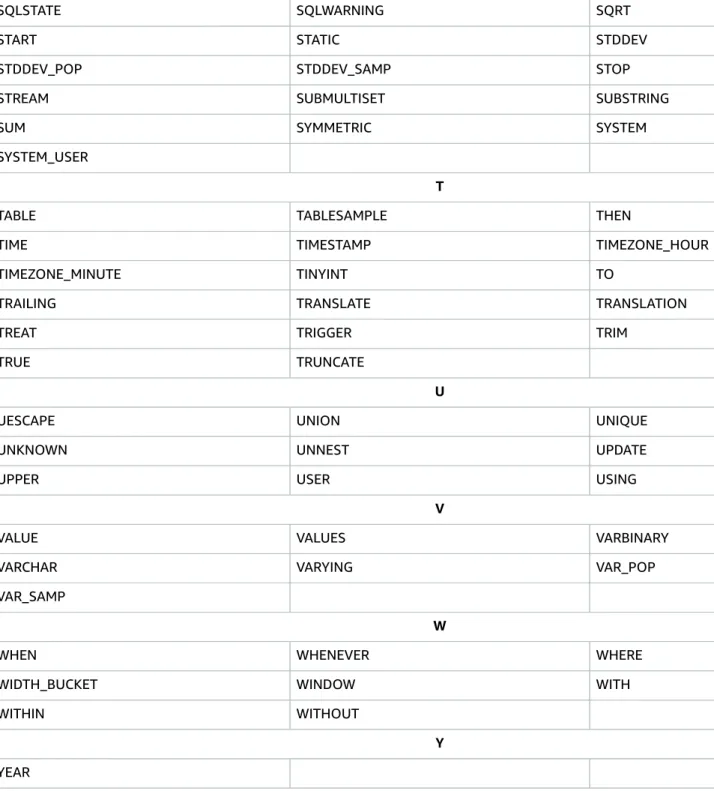
The following is a list of reserved words in Amazon Kinesis Data Analytics applications as of version 5.0.1.
A
ABS ALL ALLOCATE
ALLOW ALTER ANALYZE
AND ANY APPROXIMATE_ARRIVAL_TIME
ARE ARRAY AS
ASENSITIVE ASYMMETRIC AT
ATOMIC AUTHORIZATION AVG
B
BEGIN BETWEEN BIGINT
BINARY BIT BLOB
BOOLEAN BOTH BY
C
CALL CALLED CARDINALITY
Reserved Words and Keywords
CASCADED CASE CAST
CEIL CEILING CHAR
CHARACTER CHARACTER_LENGTH CHAR_LENGTH
CHECK CHECKPOINT CLOB
CLOSE CLUSTERED COALESCE
COLLATE COLLECT COLUMN
COMMIT CONDITION CONNECT
CONSTRAINT CONVERT CORR
CORRESPONDING COUNT COVAR_POP
COVAR_SAMP CREATE CROSS
CUBE CUME_DIST CURRENT
CURRENT_CATALOG CURRENT_DATE CURRENT_DEFAULT_TRANSFORM_GROUP
CURRENT_PATH CURRENT_ROLE CURRENT_SCHEMA
CURRENT_TIME CURRENT_TIMESTAMP CURRENT_TRANSFORM_GROUP_FOR_TYPE
CURRENT_USER CURSOR CYCLE
D
DATE DAY DEALLOCATE
DEC DECIMAL DECLARE
DEFAULT DELETE DENSE_RANK
DEREF DESCRIBE DETERMINISTIC
DISALLOW DISCONNECT DISTINCT
DOUBLE DROP DYNAMIC
E
EACH ELEMENT ELSE
END END-EXEC ESCAPE
EVERY EXCEPT EXEC
EXECUTE EXISTS EXP
EXPLAIN EXP_AVG EXTERNAL
EXTRACT
F
FALSE FETCH FILTER
FIRST_VALUE FLOAT FLOOR
Reserved Words and Keywords
FOR FOREIGN FREE
FROM FULL FUNCTION
FUSION
G
GET GLOBAL GRANT
GROUP GROUPING
H
HAVING HOLD HOUR
I
IDENTITY IGNORE IMPORT
IN INDICATOR INITCAP
INNER INOUT INSENSITIVE
INSERT INT INTEGER
INTERSECT INTERSECTION INTERVAL
INTO IS
J JOIN
L
LANGUAGE LARGE LAST_VALUE
LATERAL LEADING LEFT
LIKE LIMIT LN
LOCAL LOCALTIME LOCALTIMESTAMP
LOWER
M
MATCH MAX MEMBER
MERGE METHOD MIN
MINUTE MOD MODIFIES
MODULE MONTH MULTISET
N
NATIONAL NATURAL NCHAR
NCLOB NEW NO
NODE NONE NORMALIZE
Reserved Words and Keywords
NOT NTH_VALUE NULL
NULLIF NUMERIC
O
OCTET_LENGTH OF OLD
ON ONLY OPEN
OR ORDER OUT
OUTER OVER OVERLAPS
OVERLAY
P
PARAMETER PARTITION PARTITION_ID
PARTITION_KEY PERCENTILE_CONT PERCENTILE_DISC
PERCENT_RANK POSITION POWER
PRECISION PREPARE PRIMARY
PROCEDURE
R
RANGE RANK READS
REAL RECURSIVE REF
REFERENCES REFERENCING REGR_AVGX
REGR_AVGY REGR_COUNT REGR_INTERCEPT
REGR_R2 REGR_SLOPE REGR_SXX
REGR_SXY RELEASE RESPECT
RESULT RETURN RETURNS
REVOKE RIGHT ROLLBACK
ROLLUP ROW ROWS
ROWTIME ROW_NUMBER
S
SAVEPOINT SCOPE SCROLL
SEARCH SECOND SELECT
SENSITIVE SEQUENCE_NUMBER SESSION_USER
SET SHARD_ID SIMILAR
SMALLINT SOME SORT
SPECIFIC SQL SQLEXCEPTION
Reserved Words and Keywords
SQLSTATE SQLWARNING SQRT
START STATIC STDDEV
STDDEV_POP STDDEV_SAMP STOP
STREAM SUBMULTISET SUBSTRING
SUM SYMMETRIC SYSTEM
SYSTEM_USER
T
TABLE TABLESAMPLE THEN
TIME TIMESTAMP TIMEZONE_HOUR
TIMEZONE_MINUTE TINYINT TO
TRAILING TRANSLATE TRANSLATION
TREAT TRIGGER TRIM
TRUE TRUNCATE
U
UESCAPE UNION UNIQUE
UNKNOWN UNNEST UPDATE
UPPER USER USING
V
VALUE VALUES VARBINARY
VARCHAR VARYING VAR_POP
VAR_SAMP
W
WHEN WHENEVER WHERE
WIDTH_BUCKET WINDOW WITH
WITHIN WITHOUT
Y YEAR
CREATE statements
Standard SQL Operators
The following topics discuss standard SQL operators:
Topics
• CREATE statements (p. 32)
• INSERT (p. 36)
• Query (p. 37)
• SELECT statement (p. 39)
CREATE statements
You can use the following CREATE statements with Amazon Kinesis Data Analytics:
• CREATE FUNCTION (p. 34)
• CREATE PUMP (p. 35)
• CREATE STREAM (p. 32)
CREATE STREAM
The CREATE STREAM statement creates a (local) stream. The name of the stream must be distinct from the name of any other stream in the same schema. It is good practice to include a description of the stream.
Like tables, streams have columns, and you specify the data types for these in the CREATE STREAM statement. These should map to the data source for which you are creating the stream. For
column_name, any valid non-reserved SQL name is usable. Column values cannot be null.
• Specifying OR REPLACE re-creates the stream if it already exists, enabling a definition change for an existing object, implicitly dropping it without first needing to use a DRP command. Using CREATE OR REPLACE on a stream that already has data in flight kills the stream and loses all history.
• RENAME can be specified only if OR REPLACE has been specified.
• For the complete list of types and values in type_specification, such as TIMESTAMP, INTEGER, or varchar(2), see the topic Amazon Kinesis Data Analytics Data Types in the Amazon Kinesis Data Analytics SQL Reference Guide.
• For option_value, any string can be used.
CREATE STREAM
Syntax
The following are basic examples of streams defined for simple data sources. Note: All streams need to be defined within a schema.
CREATE FUNCTION
Simple stream for unparsed log data
CREATE OR REPLACE STREAM logStream ( source VARCHAR(20),
message VARCHAR(3072))
DESCRIPTION 'Head of webwatcher stream processing';
Stream capturing sensor data from Intelligent Travel System pipeline
CREATE OR REPLACE STREAM "LaneData" (
-- ROWTIME is time at which sensor data collected LDS_ID INTEGER, -- loop-detector ID LNAME VARCHAR(12),
LNUM VARCHAR(4), OCC SMALLINT, VOL SMALLINT, SPEED DECIMAL(4,2)
) DESCRIPTION 'Conditioned LaneData for analysis queries';
Stream capturing order data from e-commerce pipeline
CREATE OR REPLACE STREAM "OrderData" ( "key_order" BIGINT NOT NULL, "key_user" BIGINT,
"country" SMALLINT, "key_product" INTEGER, "quantity" SMALLINT, "eur" DECIMAL(19,5), "usd" DECIMAL(19,5)
) DESCRIPTION 'conditioned order data, ready for analysis';
CREATE FUNCTION
Amazon Kinesis Data Analytics provides a number of Functions (p. 78), and also allows users to extend its capabilities by means of user-defined functions (UDFs). Amazon Kinesis Data Analytics supports UDFs defined in SQL only.
User-defined functions may be invoked using either the fully-qualified name or by the function name alone.
Values passed to (or returned from) a user-defined function or transformation must be exactly the same data types as the corresponding parameter definitions. In other words, implicit casting is not allowed in passing parameters to (or returning values from) a user-defined function.
User-Defined Function (UDF)
A user-defined function can implement complex calculations, taking zero or more scalar parameters and returning a scalar result. UDFs operate like built-in functions such as FLOOR() or LOWER(). For each occurrence of a user-defined function within a SQL statement, that UDF is called once per row with scalar parameters: constants or column values in that row.
Syntax
CREATE FUNCTION ''<function_name>'' ( ''<parameter_list>'' ) RETURNS ''<data type>''
LANGUAGE SQL
[ SPECIFIC ''<specific_function_name>'' | [NOT] DETERMINISTIC ] CONTAINS SQL
CREATE PUMP
[ READS SQL DATA ] [ MODIFIES SQL DATA ]
[ RETURNS NULL ON NULL INPUT | CALLED ON NULL INPUT ] RETURN ''<SQL-defined function body>''
SPECIFIC assigns a specific function name that is unique within the application. Note that the regular function name does not need to be unique (two or more functions may share the same name, as long as they are distinguishable by their parameter list).
DETERMINISTIC / NOT DETERMINISTIC indicates whether a function will always return the same result for a given set of parameter values. This may be used by your application for query optimization.
READS SQL DATA and MODIFIES SQL DATA indicate whether the function potentially reads or modifies SQL data, respectively. If a function attempts to read data from tables or streams without READS SQL DATA being specified, or insert to a stream or modify a table without MODIFIES SQL DATA being specified, an exception will be raised.
RETURNS NULL ON NULL INPUT and CALLED ON NULL INPUT indicate whether the function is defined as returning null if any of its parameters are null. If left unspecified, the default is CALLED ON NULL INPUT.
A SQL-defined function body consists only of a single RETURN statement.
Examples
CREATE FUNCTION get_fraction( degrees DOUBLE ) RETURNS DOUBLE
CONTAINS SQL
RETURN degrees - FLOOR(degrees)
;
CREATE PUMP
A pump is an Amazon Kinesis Data Analytics Repository Object (an extension of the SQL standard) that provides a continuously running INSERT INTO stream SELECT ... FROM query functionality, thereby enabling the results of a query to be continuously entered into a named stream.
You need to specify a column list for both the query and the named stream (these imply a set of source- target pairs). The column lists need to match in terms of datatype, or the SQL validator will reject them.
(These need not list all columns in the target stream; you can set up a pump for one column.) For more information, see SELECT statement (p. 39).
The following code first creates and sets a schema, then creates two streams in this schema:
• "OrderDataWithCreateTime" which will serve as the origin stream for the pump.
• "OrderData" which will serve as the destination stream for the pump.
CREATE OR REPLACE STREAM "OrderDataWithCreateTime" (
"key_order" VARCHAR(20),
"key_user" VARCHAR(20),
"key_billing_country" VARCHAR(20),
"key_product" VARCHAR(20),
"quantity" VARCHAR(20),
"eur" VARCHAR(20),
"usd" VARCHAR(20))
DESCRIPTION 'Creates origin stream for pump';
CREATE OR REPLACE STREAM "OrderData" (
INSERT
"key_order" VARCHAR(20),
"key_user" VARCHAR(20),
"country" VARCHAR(20),
"key_product" VARCHAR(20),
"quantity" VARCHAR(20),
"eur" INTEGER,
"usd" INTEGER)
DESCRIPTION 'Creates destination stream for pump';
The following code uses these two streams to create a pump. Data is selected from
"OrderDataWithCreateTime" and inserted into "OrderData".
CREATE OR REPLACE PUMP "200-ConditionedOrdersPump" AS INSERT INTO "OrderData" (
"key_order", "key_user", "country",
"key_product", "quantity", "eur", "usd") //note that this list matches that of the query SELECT STREAM
"key_order", "key_user", "key_billing_country",
"key_product", "quantity", "eur", "usd"
//note that this list matches that of the insert statement FROM "OrderDataWithCreateTime";
For more detail, see the topic In-Application Streams and Pumps in the Amazon Kinesis Data Analytics Developer Guide.
Syntax
CREATE [ OR REPLACE ] PUMP <qualified-pump-name>
[ DESCRIPTION '<string-literal>' ] AS <streaming-insert>
where streaming-insert is an insert statement such as:
INSERT INTO ''stream-name'' SELECT "columns" FROM <source stream>
INSERT
INSERT is used to insert rows into a stream. It can also be used in a pump to insert the output of one stream into another.
Syntax
<insert statement> :=
INSERT [ EXPEDITED ]
INTO <table-name > [ ( insert-column-specification ) ] < query >
<insert-column-specification> := < simple-identifier-list >
<simple-identifier-list> :=
<simple-identifier> [ , < simple-identifier-list > ]
For a discussion of VALUES, see SELECT statement (p. 39).
Pump Stream Insert
INSERT may also be specified as part of a CREATE PUMP (p. 35) statement.
Query
CREATE PUMP "HighBidsPump" AS INSERT INTO "highBids" ( "ticker", "shares", "price") SELECT "ticker", "shares", "price"
FROM SALES.bids
WHERE "shares"*"price">100000
Here the results to be inserted into the "highBids" stream should come from a UNION ALL expression that evaluates to a stream. This will create a continuously running stream insert. Rowtimes of the rows inserted will be inherited from the rowtimes of the rows output from the select or UNION ALL. Again rows may be initially dropped if other inserters, ahead of this inserter, have inserted rows with rowtimes later than those initially prepared by this inserter, since the latter would then be out of time order. See the topic CREATE PUMP (p. 35) in this guide.
Query
Syntax
<query> :=
<select>
| <query> <set-operator> [ ALL ] <query>
| VALUES <row-constructor> { , <row-constructor> }...
| '(' <query> ')' <set-operator> :=
EXCEPT | INTERSECT | UNION
<row-constructor> :=
[ ROW ] ( <expression> { , <expression> }... )
select
select
The select box in the chart above represents any SELECT command; that command is described in detail on its own page.
Set operators (EXCEPT, INTERSECT, UNION)
Set operators combine rows produced by queries using set operations:
• EXCEPT returns all rows that are in the first set but not in the second
• INTERSECT returns all rows that are in both first and second sets
• UNION returns all rows that are in either set
In all cases, the two sets must have the same number of columns, and the column types must be
assignment-compatible. The column names of the resulting relation are the names of the columns of the first query.
With the ALL keyword, the operators use the semantics of a mathematical multiset, meaning that duplicate rows are not eliminated. For example, if a particular row occurs 5 times in the first set and 2 times in the second set, then UNION ALL will emit the row 3 + 2 = 5 times.
ALL is not currently supported for EXCEPT or INTERSECT.
All operators are left-associative, and INTERSECT has higher precedence than EXCEPT or UNION, which have the same precedence. To override default precedence, you can use parentheses. For example:
SELECT * FROM a UNION
SELECT * FROM b INTERSECT SELECT * FROM c EXCEPT
SELECT * FROM d EXCEPT
SELECT * FROM E
is equivalent to the fully-parenthesized query
( ( SELECT * FROM a UNION
( SELECT * FROM b INTERSECT
SELECT * FROM c) ) EXCEPT
SELECT * FROM d ) EXCEPT
SELECT * FROM e
Streaming set operators
UNION ALL is the only set operator that can be applied to streams. Both sides of the operator must be streams; it is an error if one side is a stream and the other is a relation.
For example, the following query produces a stream of orders taken over the phone or via the web:
SELECT STREAM * FROM PhoneOrders
VALUES operator
UNION ALL SELECT STREAM * FROM WebOrders
Rowtime generation. The rowtime of a row emitted from streaming UNION ALL is the same as the timestamp of the input row.
Rowtime bounds: A rowtime bound is an assertion about the future contents of a stream. It states that the next row in the stream will have a ROWTIME no earlier than the value of the bound. For example, if a rowtime bound is 2018-12-0223:23:07, this tells the system that the next row will arrive no earlier than 2018-12-0223:23:07. Rowtime bounds are useful in managing gaps in data flow, such as those left overnight on a stock exchange.
Amazon Kinesis Data Analytics ensures that the ROWTIME column is ascending by merging the incoming rows on the basis of the time stamp. If the first set has rows that are timestamped 10:00 and 10:30, and the second set has only reached 10:15, Kinesis Data Analytics pauses the first set and waits for the second set to reach 10:30. In this case, it would be advantageous if the producer of the second set were to send a rowtime bound.
VALUES operator
The VALUES operator expresses a constant relation in a query. (See also the discussion of VALUES in the topic SELECT in this guide.)
VALUES can be used as a top-level query, as follows:
VALUES 1 + 2 > 3;
EXPR$0
======
FALSE VALUES
(42, 'Fred'), (34, 'Wilma');
EXPR$0 EXPR$1
====== ======
42 Fred 34 Wilma
Note that the system has generated arbitrary column names for anonymous expressions. You can assign column names by putting VALUES into a subquery and using an AS clause:
SELECT * FROM ( VALUES
(42, 'Fred'),
(34, 'Wilma')) AS t (age, name);
AGE NAME
=== =====
42 Fred 34 Wilma
SELECT statement
SELECT retrieves rows from streams. You can use SELECT as a top-level statement, or as part of a query involving set operations, or as part of another statement, including (for example) when passed as a query into a UDX. For examples, see the topics INSERT, IN, EXISTS, CREATE PUMP (p. 35) in this guide.
Syntax
The subclauses of the SELECT statement are described in the topics SELECT clause (p. 42), GROUP BY clause (p. 62), Streaming GROUP BY, ORDER BY clause (p. 74), HAVING clause (p. 61), WINDOW Clause (Sliding Windows) (p. 66) and WHERE clause (p. 63) in this guide.
Syntax
<select> :=
SELECT [ STREAM] [ DISTINCT | ALL ] <select-clause>
FROM <from-clause>
[ <where-clause> ] [ <group-by-clause> ] [ <having-clause> ] [ <window-clause> ] [ <order-by-clause> ]
The STREAM keyword and the principle of streaming SQL
The SQL query language was designed for querying stored relations, and producing finite relational results.
The foundation of streaming SQL is the STREAM keyword, which tells the system to compute the time differential of a relation. The time differential of a relation is the change of the relation with respect to time. A streaming query computes the change in a relation with respect to time, or the change in an expression computed from several relations.
To ask for the time-differential of a relation in Amazon Kinesis Data Analytics, we use the STREAM keyword:
SELECT STREAM * FROM Orders
If we start running that query at 10:00, it will produce rows at 10:15 and 10:25. At 10:30 the query is still running, waiting for future orders:
ROWTIME orderId custName product quantity
======== ======= ========== ======= ========
10:15:00 102 Ivy Black Rice 6 10:25:00 103 John Wu Apples 3
Here, the system is saying 'At 10:15:00 I executed the query SELECT * FROM Orders and found one row in the result that was not present at 10:14:59.999'. It generates the row with a value of 10:15:00 in the ROWTIME column because that is when the row appeared. This is the core idea of a stream: a relation that keeps updating over time.
You can apply this definition to more complicated queries. For example, the stream
SELECT STREAM * FROM Orders WHERE quantity > 5
has a row at 10:15 but no row at 10:25, because the relation
SELECT * FROM Orders WHERE quantity > 5