EXAMINATION OF A DIGITAL LEARNING SYSTEM FOR USERS WITH DISABILITIES
Ruey-Shyy Shieh Kuo-Ming Hung Yao-Ming Yeh
Department of Information Management, Kainan University
ABSTRACT
People with disabilities tend to have a higher unemployment rate than those without. Helping them enhance computer skills via online learning venues to increase employment opportunities is an alternate approach. The Accessible Digital Learning (ADL) system sponsored by the government is a web-based learning system designed to fulfill this goal. The purpose of this study is to explore the users’ satisfaction with the system and their learning performance through three facets of investigation: accessibility of the system, usability (effectiveness, efficiency and satisfaction) of the system, and user perceptions (usefulness and ease of use). Data sources consisted of two terms (2012 and 2013) of system logs, four sets of questionnaire surveys, online statements from discussion forums and synchronous online meetings, and individual interviews. Excel was used to analyze the quantitative data, whereas content analysis was adopted to analyze the qualitative data. It was found that the ADL system was not viewed as accessible enough, nor as easy to use. Providing various learning resources, rewards and efficient services to learners does not necessarily reinforce the accessibility and usability of the system. Nonetheless, the learners, overall, were rather satisfied with the system; they indicated that it helped them acquire computer knowledge and skills, and enriched their social lives. The findings further disclosed that webpage inaccessibility problems reported a decade ago still existed in the current system, implying that inaccessibility issues might commonly exist in the domestic websites. Five suggestions for strengthening system accessibility and performance of the present system are provided.
Keywords: Accessibility, Usability, User perceptions, Users with disabilities, Digital learning
Introduction
The information released by the US Bureau of Labor Statistics (2015) disclosed that, in 2014, 17.1% of persons with a disability were employed, compared with 64.6% of those without a disability. Similarly, in Taiwan, as of June 2014, among the 212,000 eligible workers with disabilities, only 19.7% had joined the workforce (The Labour Statistics Bulletin, 2015), compared to approximately 58.45% of the national labor force participation rate (National Statistics, ROC, 2015). It reveals that those with disabilities tend to have a higher unemployment rate than those without. However, according to the Canadian Council on Social Development (2004), people both with and without disabilities earn higher salaries when their job involves computer use. To increase the employment opportunities in computer related jobs for people with disabilities, a government-sponsored Accessible Digital Learning system (ADL) (http://
openstudy.evta.gov.tw) was established. The purpose of this study is to investigate the users’
satisfactions with the system and their learning performance. McAndrew, Farrow, and Cooper (2012) indicated that accessibility needs to be viewed holistically. This investigation is conducted based on three facets of examination: accessibility of the system, usability (effectiveness, efficiency and satisfaction) of the system and user perceptions (usefulness and ease of use). Some have argued that web accessibility can be measured by individuals with one or more disabilities (Usability.gov, http://www.usability.gov/what-and-why/glossary/e/index.html). Similarly, some researchers have contended that a small portion of users is sufficient to disclose most system usability situations (Nielsen, 2000, Ruman & Gillette, 2001). This study not only interviewed 35 learners, the system developer, and an administrative member, but also collected two years of quantitative and qualitative data to support the investigation task. Four research questions guided this study:
1. Has the system design met the learning needs of the users with various disabilities?
2. How usable is the system in terms of its effectiveness, efficiency, and satisfaction to facilitate user learning?
3. How do the learners perceive the system’s usefulness and ease of use?
4. What is the overall system performance in terms of learner achievements?
Literature Review
1. The Concept of Web Accessibility
It is a global trend to endorse the notion of web accessibility, the main idea of which is to allow all users, both with and without disabilities, to access the World Wide Web without obstacles (Waters, 1997). To implement the notion of web accessibility, norms and regulations for web design must be enacted. In 1999, the Web Accessibility Initiative under the World Wide Web Consortium (W3C) formulated international guidelines to help the disabled access the web (http://www.w3.org/wai). The Web Content Accessibility Guidelines (WCAG) 1.0 laid out the principles for designing accessible webpages, the goal of which is to provide a shared, international standard for web content accessibility that meets the demands of individuals, organizations, and governments. In 2008, WCAG 2.0 was released, which provided more broadly advanced technologies and more thorough principal guidelines for web accessibility. A number of researchers (Cooper, 2006; Crow, 2008; Kent, 2015) have noted that an accessible web system not only benefits learners with disabilities, but also equally benefits users without disabilities.
Some (Phipps & Kelly, 2013) have, however, indicated that even though government policies, guidelines and software tools are available to help establish accessible websites, many may not be accessible to all users. Likewise, in Taiwan, some researchers have reported that many of the domestic official websites have accessibility-related issues. For example, Chen, Li, and Yeh (2003) reported that the Office of the President, Republic of China, Taiwan, the five Yuans, and university fairs appeared to have been inaccessible. Chen, Guan, and Lin (2004) disclosed that the sub-programs of the Taiwan e-Learning and Digital Archives Program, National Science Council (now the Ministry of Science and Technology), and the Learning Strengthening Station, Ministry of Education also had accessible problems.
2. Establishment of Web Accessibility Learning Systems in Taiwan
Echoing the worldwide trend, the Taiwanese government has enacted a number of ordinances to assure people with disabilities of their right to access web information. For example, in 2003, the Assistive Technology for Promoting Vocational Rehabilitation Association was conferred to formulate guidelines as criteria for designing accessible public websites (Yeh, Li, & Chou, 2003), based on the international standards, WCAG 1.0. The guidelines cover accessible webpage design criteria applicable to various types of disabilities. Four components are specified: content, structure, technique, and navigation. Content refers to the text and the multimedia information
presented on the web. Structure denotes the layout of the web design and the accessibility of the content structure. Technique refers to the accessibility of web content management, including document language, programming language, multimedia and input/output device techniques.
Navigation denotes the accessible design of the browsing structure among webpages on any given website. In short, an accessible web must satisfy the user in these four aspects.
In 2004, the Council of Labor Agent (now the Department of Labor) was conferred to establish a professional training e-learning web, specifically to encourage people with disabilities to engage in digital learning. In 2005, the Accessible Digital Learning (ADL) system was officially initiated, enabling users with disabilities to enrich their technological knowledge and skills via the online platform. The system was made public in 2006 for those aged 16 and above (note: it was lowered to 15 in 2014) and with a government-issued disability identification card.
One main goal for learners to use the system is to obtain computer skills related certificates, as having such certificates would likely increase employment opportunities. A more detailed description of ADL is provided in the Method section.
3. Usability of the Accessible Web
The ISO 13407 Guidance (1999) defines usability as the ‘extent to which a product can be used by specified users to achieve specified goals with effectiveness, efficiency and satisfaction in a specified context of use” (http://www.usabilitynet.org/tools/r_international.htm). According to the Usability Net (http://www.usabilitynet.org/management/b_what.htm), effectiveness refers to the accuracy and completeness with which users accomplish the anticipated goals, while efficiency denotes resources expended with reference to the accuracy and completeness through which users reach these goals. Satisfaction refers to having positive attitudes and being free from discomfort. It is a subjective perception the user has when interacting with the system.
Notess (2001) proposed that a usable website be assessed according to attribute, process, user- centered design, and user experience. Attribute can be measured by task completion time, user satisfaction with the learning materials, and user enjoyment of the learning experience. Process means knowing users’ characteristics, learning styles, motivations, and context, and continuously evaluating and revising the system. User-centered design focuses on keeping users engaged with the learning materials, getting them oriented and navigating the online learning environment, and engendering online collaboration. User experience denotes how easy and useful users think the system is.
Some researchers have assessed the usability of online learning systems by examining their functionality, such as pedagogic structure, navigation, page format, and screen properties (Brown
et al., 2002; Crow, 2008; Landsberger, 2002; Vanderheiden, 1994). Others, however, have argued that usability does not equate to functionality; rather, whether users are able to use the system is more important, as enhanced functionality does not necessarily mean improved usability (usability net). Likewise, some have contended that accessibility is not about technologies but mainly about people (Phipps & Kelly, 2006) and about learning (Cooper, 2006). Therefore, holistic considerations such as user needs, learning outcomes, and usability, in addition to accessibility issues, are necessary when developing digital e-learning resources for users with disabilities.
4. Perceptions of the Technological System
Mariger (2006) contended, coherent with Notess’ (2001) argument, that user experience should refer to users’ perceptions of the usefulness and usability of the products. According to Davis (1989), users’ perceptions of the usefulness and ease of use of the system, their attitudes toward using it and their intention to use it are associated with their understanding and acceptance of the technology. Mariger (2006) asserted that it might not be sufficient that a product is easy to use; it must also be useful. Davis (1989) disclosed that perceived ease of use is a precedent to the perceived usefulness of a system, as users are more likely to use it if they consider it easy to use. User experience, however, cannot be entirely predicted from a laboratory test (Notess, 2001) since as many as 45% of problems encountered by users do not violate any checkpoint set by W3C and would not have been detected without user testing (Disability Rights Commission, 2004). Stienstra, Watzke, and Birch (2007) argued that, as early adopters, users with disabilities could help ‘debug’ a given product. Some researchers have asserted that end-user testing cannot be substituted by expert reviews (Granić & Ćukušić, 2011), as it reminds the system designer of the issues encountered by certain face-to-face users (Kennedy, Evan, & Thomas, 2011). That is, to enhance their perceptions, users must be included in the design and evaluation process, especially those with special needs.
Method
In this section, the investigated learning system is described first, followed by defining the measurement used to examine the system, and then the participants involved in the study are depicted.
1. The Accessible Digital Learning System
The Accessible Digital Learning (ADL) system consists of five categories of courses, including Basic Computers, Web Design, (Microsoft) Office, Computer Certificate and Job Techniques. In each category, three to 17 lessons are offered. At the end of 2014, a total of 60 lessons had been uploaded. The length of each lesson ranged from one to four hours. Each course (or Class) offered is assigned an instructor and two TAs to facilitate user learning. Each year, only one study term is offered, lasting eight to nine months. This long study period is to accommodate learners with a range of learning abilities. A proof is conferred to those who meet the requirements of study completion at the end of the term, one for each course completed.
A technical manager of a private technological company and some of his staff are responsible for developing and maintaining the system. In addition to providing customer service to users, they are also responsible for promoting the system to eligible users nationwide, particularly by holding workshops for new users. The system is also embedded with interactive communication features, including asynchronous discussion forums and synchronous online meetings. Two-hour meetings are held once a month, in which an instructor or an outside speaker is invited to give a talk related to modern technologies or job-oriented topics to enhance participants’ knowledge and skills.
To motivate learners’ engagement, scholarships and gifts are awarded to those with outstanding study records, who complete the study, earn the most certificates, or help peers resolve problems encountered on the class forum, etc.
2. The Measurement
This study adopted three aspects of measurement addressed by earlier researchers to examine the system, including accessibility (Crow, 2008; Vanderheiden, 1994; Yeh et al., 2003), usability in terms of effectiveness, efficiency, satisfaction (Brown et al., 2002; ISO, 1999; Usability.
gov) and user perceptions of its usefulness and ease of use (Davis, 1989; Mariger, 2006). Each measurement is defined as follows:
(1) Accessibility: whether the functional features facilitate user learning, and whether the system accommodates assistive devices required by users with special needs.
(2) Usability
• Effectiveness: whether the users can accurately complete the intended tasks and goals, particularly completing the registered courses and attaining associated certificates.
• Efficiency: whether the users can locate resources and receive assistance to resolve any problems encountered in a timely manner to complete the attempted tasks.
• Satisfaction: whether the users hold positive attitudes toward the services provided.
(3) User perceptions
• Usefulness: how the users perceive the usefulness and helpfulness of the system.
• Ease of use: how the users perceive the ease of access to the system and their comfort using the system.
3. The Participants
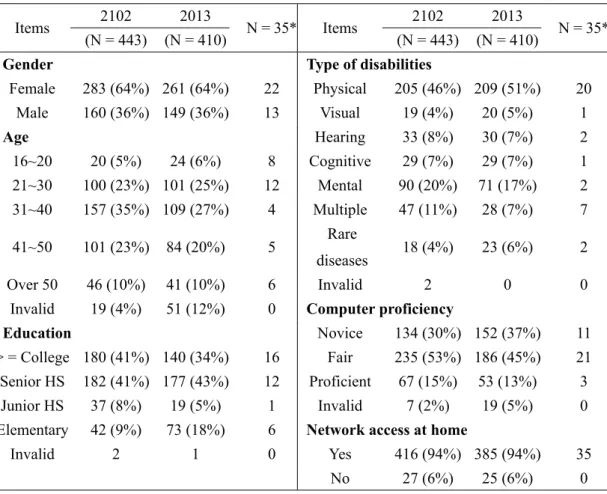
There were 443 users enrolled in 2012 and 410 in 2013. Among them, 35 were interviewed.
The 35 users were selected because they either attended one of the introductory workshops or had participated in the online learning activities. It is noted that all authors in this study were also par- ticipating members of the system. The users’ demographic information is provided in Table 1.
Table 1 Demographic information of the learners
Items 2102 2013
N = 35* Items 2102 2013
N = 35*
(N = 443) (N = 410) (N = 443) (N = 410)
Gender Type of disabilities
Female 283 (64%) 261 (64%) 22 Physical 205 (46%) 209 (51%) 20
Male 160 (36%) 149 (36%) 13 Visual 19 (4%) 20 (5%) 1
Age Hearing 33 (8%) 30 (7%) 2
16~20 20 (5%) 24 (6%) 8 Cognitive 29 (7%) 29 (7%) 1
21~30 100 (23%) 101 (25%) 12 Mental 90 (20%) 71 (17%) 2
31~40 157 (35%) 109 (27%) 4 Multiple 47 (11%) 28 (7%) 7
41~50 101 (23%) 84 (20%) 5 Rare
diseases 18 (4%) 23 (6%) 2
Over 50 46 (10%) 41 (10%) 6 Invalid 2 0 0
Invalid 19 (4%) 51 (12%) 0 Computer proficiency
Education Novice 134 (30%) 152 (37%) 11
> = College 180 (41%) 140 (34%) 16 Fair 235 (53%) 186 (45%) 21 Senior HS 182 (41%) 177 (43%) 12 Proficient 67 (15%) 53 (13%) 3
Junior HS 37 (8%) 19 (5%) 1 Invalid 7 (2%) 19 (5%) 0
Elementary 42 (9%) 73 (18%) 6 Network access at home
Invalid 2 1 0 Yes 416 (94%) 385 (94%) 35
No 27 (6%) 25 (6%) 0
* The 35 users interviewed
4. Data Collection
Both quantitative data (system logs and questionnaires) and qualitative data (interviews, online statements and conversations, and open-ended comments in the questionnaires) during the 2012 and 2013 terms were gathered to assess the system. These data were used to address the first three research questions regarding system accessibility, usability of the system and user perceptions. At the end of each term, the study completion rate and the certificate earning rate were also collected to reflect the fourth research question regarding system performance.
Description of the data is provided below.
4.1 System Logs
All information the learners filled out when registering with the system was kept, including gender, age, level of education, type of disabilities, experience of using computers, and home Internet availability. In addition, the frequency and duration of logging into the system and categories of lessons studied were also tracked.
4.2 Questionnaires
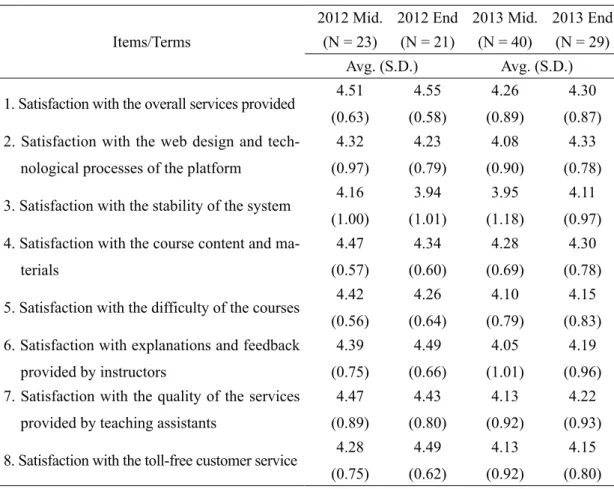
Each term, two sets of self-reported questionnaire surveys were collected, one administered in the middle of the term and the other at the end, which surveyed the learners’ satisfaction with the services provided. The questionnaire consisted of eight 5-point Likert-scale items (see Table 3 in the Results section) and two open-ended questions. The two open-ended questions elicited the learners’ suggestions about (1) the current course planning, the platform operation, and services provided, and (2) courses to be offered in future terms.
4.3 Interviews
Three parties of participants were interviewed: the learners, the coordinator of ADL, and the technical manager. The interview protocol with the learners involved six categories of questions, including their study motivation, perceptions of the system, learning gains, challenges experienced, satisfactions with various services provided, and reflections and suggestions. The interview with each learner took 10 to 40 minutes depending upon their time constraints and willingness. The coordinator was interviewed twice, and was asked about the purpose and process of establishing ADL, the people involved, user characteristics, motivational strategies, and challenges encountered. Informal interviews and contacts with the manager at some meetings were also noted. The manager was mainly asked about the development, implementation, and maintenance of the system.
4.4 Online Statements and Conversations
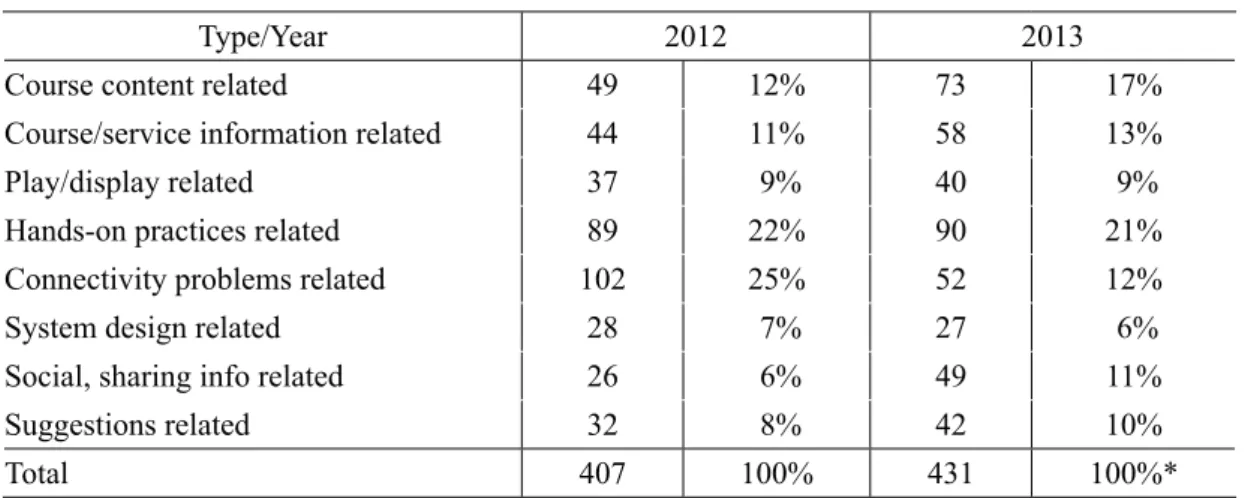
All online statements posted by the learners and teaching assistants in the class discussion forums were collected. A total of 407 questions/statements were gathered in the term of 2012 and 431 in 2013, excluding those responded to by the TAs. The archived conversation content kept during the synchronous monthly online meetings was also collected. Each month 17 to 28 participants attended the meetings during the 2012 and 2013 terms.
4.5 Study and Exam Results
The study completion rate and the certificate earning rate were collected to represent the learners’ learning outcomes and the system performance. Certificates refer to those earned when passing the examinations held by the government, which were associated with the online courses offered by the current system.
5. Data Analysis
The Excel pivot table was used to analyze the learners’ demographic data shown in Table 1 above. Descriptive statistics were adopted to analyze the quantitative portion of the question- naires. Content analysis was adopted to analyze the qualitative data. The online statements were initially coded into eight categories, including (1) course content, (2) hands-on practices, (3) course/service information, (4) lesson play/display, (5) system function, (6) connectivity problems, (7) social and sharing information, and (8) suggestions. Each posted question was used as the analysis unit. Table 2 provides examples of some coded statements. The interview data were firstly transcribed verbatim and then coded into categories, such as study motivation, learning gains, and reflection, in addition to the eight categories shown in Table 2. A complete statement was used as the analysis unit. The categorized statements were then quantified and were linked to the six indicators (accessibility, effectiveness, efficiency, satisfaction, usefulness and ease of use) to reflect the learners’ satisfaction with the services provided and perceptions of the system.
To increase the quality and reliability of the coding, the first author and three research assistants coded four months of statements separately. The coded results were compared and discussed until agreement was reached. Then the three research assistants coded the remaining statements separately; the coded results were then compared and discussed until consensus was reached. Afterward, all of the data analyzed were triangulated to strengthen the reliability and validity of the overall analysis.
Results
The findings of the study are reported based on the four research questions; that is, accessibility of the system design, usability of the system, user perceptions, and the overall system performance. For identification purposes, the 35 interviewees are labeled as Members 1~35.
1. Accessibility of the System Design
Firstly, an issue repeatedly mentioned by some learners in the interviews and online statements was the compatibility of the browser. According to the manager, the ADL system was
Table 2 Examples of the coded statements by category
Types Examples
Course content “Please explain the 7 layers of OSI (Open Systems Interconnection) to me.”
“What is the difference between ROM and RAM?”
Hands-on practices
“Why couldn’t I use Photoshop to cut line available in Illustrator?”
“How do I restore the command when making mistakes connecting data tables in (Microsoft Office) Access?”
Course/service information
“I couldn’t find the video film of the online meeting dated 11-28.”
“Is the (learning) service limited to those with disabilities?”
Lesson play/
display
“The audio and action speed don’t coordinate, which made learning difficult.”
“How do you convert traditional Chinese to simplified Chinese?”
System function “Why couldn’t I open some of the materials using Google browser?”
“I am using IE, but I couldn’t use Windows 7 to read.”
Connectivity problems
“The quality of video and audio was not as good as earlier. It was too noisy during the synchronous meeting.”
“I wanted to attend the online meeting but found out that Homemeeting was out of space.”
Social, sharing information
“You are invited to visit my personal website of Multimedia Work Studio.”
“Hi, my name is Wang Su-Lien (pseudonym) and I have a mild hearing impairment. It’s nice to study the computer software course with you all.”
Suggestions
“Is there a learning sequence which the novice can follow to learn more effectively?”
“I suggest that a subject be added when uploading a file.”
Remark: The words in parenthesis are the authors’ notes.
developed when the JavaScript language was commonly used for designing websites. Therefore, it was more compatible with IE than with other browsers, particularly the Google browser. Next, the subtitle issue appeared to be the most troublesome for those with hearing impairments. Two learners with hearing impairments stated that not all course content came with subtitles, without which they were unable to smoothly engage in their study. Similarly, other learners mentioned that the text font size was inconsistent. One learner with visual impairment suggested that the font size be set to at least 20, including in the course content, practice tests and survey questions.
Another learner with visual impairment stated that text files should be provided to facilitate reading. They emphasized that because they greatly relied on speech reading software to browse the course materials, they hoped that a small area be set aside for adding links to connect the sections within a lesson so that they could more easily listen to the entire content. They also hoped that the unit assessment tests could have an added audio feature and could be played with a click of the mouse. Several learners suggested that an option for adjusting the reading speed of the audio materials and interactive exercises be added to accommodate various comprehension levels of learners, particularly beginners. Other comments included providing a printed version of the course materials along with the audio materials, adding instructions, including steps and illustrations to help novice learners know how to take part in the online meetings, and adding more exercises in the hands-on related course materials. A number of these issues have been addressed in some earlier studies (e.g., Crow, 2008; Vanderheiden, 1994).
According to the coordinator, many of the reported issues were actually recognized by the association; however, resolving some of them, particularly those involving system redesigns, demanded more human and financial resources. Nonetheless, he mentioned that upgrading from WCAG 1.0 to WCAG 2.0 would be the future direction of the system to echo the worldwide trend.
2. Usability of the System
As stated, the usability of the system was examined according to the efficiency and effectiveness of the system and user satisfaction. The extent of user satisfaction is reflected in the survey results, which are displayed in Table 3. According to the results, the learners’ satisfaction with the system was, on average, rather high. All of the item means were above 4.0, except for item #3, which surveyed the learners’ satisfaction with the stability of the service platform, and which scored 3.94 at the end of the 2012 term and 3.95 in the middle of the 2013 term.
One learner commented in the interview that unanticipated system disconnections during the synchronous online meetings spoiled the on-site feeling of participation. However, some seemed to have attributed not being able to access certain resources, or difficulties locating and opening
documents, to system problems, which might have added to their feeling of dissatisfaction.
Nonetheless, several learners stated that they were appreciative of having an opportunity to access a free platform so that they could enrich their technological knowledge and improve their computer skills without budget concerns.
Table 3 The average of the survey results
Items/Terms
2012 Mid. 2012 End 2013 Mid. 2013 End (N = 23) (N = 21) (N = 40) (N = 29)
Avg. (S.D.) Avg. (S.D.) 1. Satisfaction with the overall services provided 4.51
(0.63)
4.55 (0.58)
4.26 (0.89)
4.30 (0.87) 2. Satisfaction with the web design and tech-
nological processes of the platform
4.32 (0.97)
4.23 (0.79)
4.08 (0.90)
4.33 (0.78) 3. Satisfaction with the stability of the system 4.16
(1.00)
3.94 (1.01)
3.95 (1.18)
4.11 (0.97) 4. Satisfaction with the course content and ma-
terials
4.47 (0.57)
4.34 (0.60)
4.28 (0.69)
4.30 (0.78) 5. Satisfaction with the difficulty of the courses 4.42
(0.56)
4.26 (0.64)
4.10 (0.79)
4.15 (0.83) 6. Satisfaction with explanations and feedback
provided by instructors
4.39 (0.75)
4.49 (0.66)
4.05 (1.01)
4.19 (0.96) 7. Satisfaction with the quality of the services
provided by teaching assistants
4.47 (0.89)
4.43 (0.80)
4.13 (0.92)
4.22 (0.93) 8. Satisfaction with the toll-free customer service 4.28
(0.75)
4.49 (0.62)
4.13 (0.92)
4.15 (0.80)
It is noted, however, that the number of learners who completed the four surveys was rather low: 22, 21, 40, and 27, respectively. Unsurprisingly, it was found that the relatively active learners who posted online statements and/or frequently attended the online meetings filled out the majority of the surveys. These active learners were not only more likely to feel satisfied with the system but also tended to perceive it as being useful.
The high extent of satisfaction does not mean that the learners were engaged in their study without encountering troubles. Based on the online statements, in 2012, system connectivity
related problems appear to be posted most frequently (25%), followed by hands-on practice related questions (22%). In 2013, the hands-on operation related questions were the most frequently asked (21%), followed by course content related problems (17%). According to the technical manager, the system connectivity was greatly improved in 2013, resulting in fewer questions posted in 2013, and somewhat higher satisfaction with the stability of the system in the end of 2013 survey, compared to the two earlier surveys. A close analysis disclosed that quite a few statements associated with the course content category were certificate related concept questions, revealing those learners’ intent to obtain a certificate. Hands-on related questions were constantly raised in both terms, many of which were also certificate related technical questions, disclosing certain challenges of the hands-on practice for the learners. A tally of the online statements broken down by category is listed in Table 4.
Table 4 Tally of the online discussion statements by category
Type/Year 2012 2013
Course content related 49 12% 73 17%
Course/service information related 44 11% 58 13%
Play/display related 37 9% 40 9%
Hands-on practices related 89 22% 90 21%
Connectivity problems related 102 25% 52 12%
System design related 28 7% 27 6%
Social, sharing info related 26 6% 49 11%
Suggestions related 32 8% 42 10%
Total 407 100% 431 100%*
* The total percentage does not add up to exactly 100% due to rounding errors.
The online statements also disclosed that both the TAs and the contracted company provided rather efficient service to help the learners resolve the problems they encountered. The TAs normally responded to the questions the learners posted on the class forum within 24 hours.
Similarly, the technical-support company also provided quick service to the learners, which was positively acknowledged by many learners in the interviews. Some mentioned that interaction with TAs and with peers was helpful for sustaining their study. One learner commented in the class forum that seeing peers attain certificates motivated him to earn one, too.
3. User Perceptions
Among the 35 learners interviewed, nine specifically regarded the system as being rather useful as it helped them improve their computer skills and professional knowledge, which they thought would increase their employment opportunities. Of the 35 interviewees, eight had a full/
part-time job; most already had a job prior to registering with ADL, except for Members 2 and 9.
Member 2, aged 31~40, with minor cognitive limitations, said that she got her word processing work after she learned some computer skills from the online courses. Several learners firmly believed that a person with disabilities is not likely to get a job unless s/he has sufficient computer skills. Member 15 with physical disabilities, male, aged 41~50, sadly reported in the interview that he was an administrative assistant but was fired because he did not possess sufficient computer skills. Member 14 with multiple disabilities, male, aged 41~50, stated that he wanted to learn more webpage design so that he could help people construct websites and hopefully make some income with the skills.
However, not all learners who viewed the system as being useful had the aim of attaining a job. Some of them acquired computer skills only to facilitate their daily lives. Member 12, aged over 50, mentioned that she learned to access the Internet simply to communicate with her daughter who lived in the school dormitory. One other, Member 9 (female with physical disabilities, aged 41~50), stated:
I didn’t know much about computers… What motivated me to learn about computers was that I wanted to download lyrics from the Internet to practice so that I could join my singing group at the community to sing at karaoke stores… And then I began to develop my interest in learning computer related stuff and spent more and more time studying the materials available there (interviewed, Jan. 20, 2014).
As a result of Member 9’s endeavors, she acquired three certificates within two years. Later, the association hired her as a part-time assistant to help record certificate related materials, becoming the second person to find a job due to engaging in the learning system.
Contrarily, some learners did not view the system as useful. For example, Member 11, a baker with multiple disabilities, did not think learning computer skills helped his present job. Several considered the course content too simple to be useful. Member 6 with multiple disabilities, male, aged over 51, repeatedly complained in the interview that most of the materials available in the system were not at all practical for him. The system was also too complicated for him to use. He felt that the web overall was for those with middle to upper levels of computer knowledge.
Besides Member 6, a number of other learners, including the active ones, also expressed that the system was not easy to use. In addition to the issues addressed previously, several learners reported that finding materials was not always easy, such as locating classes they had registered for or finding practice tests. Nevertheless, those who were active in using the system did not seem to have been prevented from accessing it, whether they considered it easy to use or not. As one learner commented in the questionnaire, most of the problems encountered could be resolved by continuously trying or sending a message to ask the teaching assistant.
Although the system did not seem very friendly, once the learners recognized their learning purposes, they were more likely to view it as useful and were more likely to cope with the problems they encountered. Davis’ finding (1989) that perceived ease of use is an antecedent to perceived usefulness of system usage is not supported in this case. However, those who did not have an urgent need to attain computer skills or who were less proficient in using computers were more likely to reject the system. For them, ease of use is critical for their continuing use of the system. More clearly, the learners’ perceptions of the usefulness of the system could be anticipated by the frequency of their participation in the learning activities, regardless of their age, gender, educational level, or type of disability.
4. The Overall System Performance
Learner achievement is seen to directly reflect system performance. Based on the collected data, a total of three learners earned four certificates in 2012, while four learners acquired five certificates in 2013. As for the study completion rate, the total number of proofs of study completed was 48 in 2012 and 56 in 2013, which represented 18 individual learners in 2012 and 15 in 2013 earning one or multiple proofs. Clearly, the overall study completion rates, based on individual learners, are low at 4.1% (18/443) in 2012 and 3.7% (15/410) in 2013. Nonetheless, for those who were able to earn a government certified certificate or find a job because of acquiring computer skills from ADL, it was indeed a great achievement. As Member 9 stated when posting a certificate ID in the class forum, ‘Today is the first time in my life that I have ever attained a certificate.’ Fully aware of the situation, the coordinator commented in the interview that, on the one hand, he was disappointed at the number of individuals making use of the free service, while on the other, he was deeply touched by the accomplishment and excitement the learners shared.
Conclusions and Discussion
Helping people with disabilities enhance their computer skills and thus increase their employment opportunities is a task that governments worldwide are endorsing. This study explores whether the ADL system satisfied the learners’ learning needs through three aspects of examinations: accessibility, usability (effectiveness, efficiency, and satisfaction), and user perceptions (usefulness and ease of use), based on the perspectives of the learners, an administrative member, and the system designer. The study findings reveal that although the ADL system was established following international standards, it was not viewed as accessible enough; nor was it regarded as easy to use, consistent with some researchers’ cautions that some system blind spots may not be detected by the developers and experts alone (DRC, 2004;
Granić & Ćukušić, 2011). The findings also disclose that inaccessibility issues reported by some previous researchers (Chen et al., 2003; Chen et al., 2004) a decade ago were also found in the current examined system. It is thus postulated that webpage inaccessibility still commonly exists in the domestic websites.
Although the active learners in the study, on average, perceived the ADL system as being useful, and were satisfied with the overall services provided, the number of active learners was rather small. Subsequently, the performance of the system reflected in the learners’ study completion rate and the certificate earning rate is also low. That is, providing various learning resources, rewards and efficient services to learners does not necessarily enhance the accessibility and usability of the system. Overall, only a small percentage of learners reached the goals anticipated by the ADL administration. To strengthen system accessibility and performance of the ADL system, more effective approaches are needed.
Suggestions
Five suggestions are proposed to enhance the examined system.
1. Modifying and Testing the System by including the Users
Firstly, merely relying on the accessibility guidelines to develop a system is not sufficient (Phipps & Kelly, 2006). To avoid design pitfalls, engaging all involved stakeholders (Cooper, 2006), particularly users (DRC, 2004; Stienstra et al., 2007), in system development in the early stage, and involving them in the testing (Granić & Ćukušić, 2011; Kennedy et al., 2011) are
important strategies. For the present system, it is suggested that various user characteristics be included in the system modification and testing process to ensure that their learning needs are met. It is also suggested that system maintenance and updating tasks be conducted periodically and be included as part of the performance assessment of the contracted company.
2. Establishing an Active Contact and Tracking Center
More than 400 people were registered with the system in both the 2012 and 2013 terms, but less than 5% were active learners. Discovering potential learners and helping them become active users demands more effective approaches. The current customer service allowed members to contact the service staff through either a toll-free number or online stand-by service. These service staff were passively responsive to those who sought help. It is necessary that active contact be made to follow up on those who register for the courses but do not show up in later learning activities. It is also necessary that additional workshops be held with step-by-step demonstrations to help those who need face-to-face tutoring to get acquainted with the use of the system. Early contact and appropriate supporting approaches will prevent students from dropping out (McAndrew & Scanlon, 2013). It is also suggested that the contact with learners be systematically tracked via tracking rubrics, such as tracking problems encountered during the learning process, special learning needs, and reasons for stopping using the system.
3. Providing Adequate Equipment to Facilitate Learners’ Access to the System
The ‘information poor’ tend to be an economically and socially disadvantaged group (The National Telecommunications and Information Administration, 1999). Thus, it is necessary that adequate funding be ensured to enable schemes for assisting individuals with disabilities to obtain the needed assistive tools (DRC, 2004). In the current study, in addition to soliciting more funding from the sponsoring bureau and other enterprises and organizations, it is also suggested that the administrative members of ADL request some of the scrapped but usable computer equipment from the institutes they were associated with and give it to needy learners. Personally owning equipment helps learners engage more stably in their study.
4. Setting Clear Performance Indicators for Internal Assessment
Learner retention has been a great challenge to many open online learning systems. It is reported that approximately 10% of learners who enroll will complete their study (McAndrew
& Scanlon, 2013). Currently there are no specific objectives or indicators for assessing the performance of ADL. Establishing clear performance indicators would not only facilitate internal
assessment, but also provide clear objectives to be achieved. Examples of indicators are having at least 10% of learners registered with the system complete their study, having at least 5% of those completing their study be newly registered users as opposed to existing learners, helping at least five learners earn at least one certificate each term, and helping at least five learners find a job, starting with those having attained a certificate. However, the task of setting up indicators and implementing internal assessment relies on the awareness and determination of the key members of the association.
5. Making the System Available to All Interested Users
To make the best use of the current system, it is suggested that it be open to the public, so that any users interested in enhancing their computer skills can access it. As some researchers have asserted, an accessible web suits all users, including those with and without disabilities (Cooper, 2006; Kennedy, Evans, & Thomas, 2011; Kent, 2015). An active learning community not only reinforces the learning atmosphere among learners, but also helps the government promote the concept of web accessibility and its policies in this regard.
Acknowledgement
The research was sponsored by the National Science Council, NSC 102-2511-S-424 -001.
References
Brown, D. J., Powell, H. M., Battersby, S., Lewis, J., Shopland, N., & Yazdanparast, M. (2002).
Design guidelines for interactive multimedia learning environments to promote social inclusion. Disability and Rehabilitation, 24(11-12), 587-597.
Canadian Council on Social Development (2004). Workers with disabilities and the impact of workplace structures Disability information sheet, 16: 1-8.
Chen, M. C., Li, T. Y., & Yeh, Y. M. (2003). Analysis of the information-accessibility on the WWW. Proceedings of the 11th International Conference on Computer-Assisted Instruction Conference, 24-26, Taipei: National Taiwan Normal University.
Chen, M. C., Guan, Y. J. & Lin Y. F. (2004). Research on information accessibility evaluation of web-based learning resource pages. Bulletin of Special Education, 26, 45-60.
Cooper, M. (2006). Making online learning accessible to disabled students: An institutional case study. Research in Learning Technology, 14(1), 103-115. doi: http://dx.doi.org/10.1080/
09687760500479779
Crow, K. L. (2008). Four types of disabilities: Their impact on online learning. TechTrends, 25(1), 51-55. doi: 10.1007/s11528-008-0112-6
Davis, F. D. (1989). Perceived usefulness, perceived ease of use, and user acceptance of information technology. MIS Quarterly, 13(3), 319-340. doi: 10.2307/249008
Disability Rights Commission (2004). The web: Access and inclusion for disabled people.
London, England: TSO.
Granić, A., & Ćukušić, M. (2011). Usability testing and expert inspections complemented by educational evaluation: A case study of an e-Learning platform. Educational Technology &
Society, 14(2), 107-123.
ISO 13407 Guidance. (1999). Human-Centred design processes for interactive systems. The International Organization for Standardization. Retrieved from: https://www.iso.org/
ui/#iso:std:iso: 13407:ed-1:v1:en
Kennedy, H. Evans, S. & Thomas, S. (2011). Can the web be made accessible for people with intellectual disabilities? The Information Society, 27(1), 29-39.
Kent, M. (2015). Disability and eLearning: Opportunities and barriers. Disability Studies Quarterly, 35(1). doi: 10.18061/dsq.v35i1.3815.
Landsberger, J. (2002). Accessibility: How easy, or even possible. TechTrends, 46(5), 65-67.
McAndrew, P., Farrow, R., & Cooper, M. (2012). Adapting online learning resources for all:
Planning for professionalism in accessibility. Research in Learning Technology, 20, 345-361.
McAndrew, P., & Scanlon, E. (2013). Open Learning at a distance: Lessons for struggling MOOCs. Science, 342(6165), 1450-1451.
Mariger, H. (2006). Cognitive disabilities and the web: Where accessibility and usability meet [Web blog message]. Retrieved from: http://ncdae.org/resources/articles/cognitive/
National Statistics, R.O.C. (2015). The statistics of employment and unemployment. Directorate- General of Budget, Accounting and Statistics, Executive Yuen [Web blog message].
Retrieved from: http://www.stat.gov.tw/lp.asp?CtNode=2294&CtUnit=1818&BaseDSD=29
&nowPage=1&pagesize=25
Notess, M. (2001). Usability, user experience, and learner experience. eLearn Magazine [Web blog message]. Retrieved from: http://elearnmag.acm.org/featured.cfm?aid=566938
Phipps, L., & Kelly, B. (2013). Holistic approaches to e-learning accessibility. Research in Learning Technology, 14(1), 69-78.
Ruman, C., & Gillette, J. (2001). Distance learning software usefulness and usability: User- centered issues in practical deployment. Ed at a Distance Journal, 15(3).
Stienstra, D., Watzke, J., & Birch, G. E. (2007). A three-way dance: The global public good and accessibility in information technologies. The Information Society 23(3), 149-158. doi:
10.1080/01972240701323564
The Labour Statistics Bulletin (2015). The gender statistical analysis of the handicapped labor survey in 2014 [Web blog message]. Retrieved from: http://www.mol.gov.tw/media/268764 5/103%E5%B9%B4%E8%BA%AB%E5%BF%83%E9%9A%9C%E7%A4%99%E8%80%
85%E5%8B%9E%E5%8B%95%E7%8B%80%E6%B3%81%E8%AA%BF%E6%9F%A5
%E6%80%A7%E5%88%A5%E7%B5%B1%E8%A8%88%E5%88%86%E6%9E%90%E9
%80%9A%E5%A0%B1.pdf
The National Telecommunications and Information Administration (1999). Falling through the net: Defining the digital divide. [Web blog message] Retrieved from: http://www.ntia.doc.
gov/report/1999/falling-through-net-defining-digital-divide
The US Bureau of Labor Statistics (2015). Persons with a disability: Labor force characteristics – 2014. News Release [Web blog message]. Retrieved from: http://www.bls.gov/news.release/
pdf/disabl.pdf.
Usability.gov, http://www.usability.gov/what-and-why/glossary/e/index.html
Vanderheiden, G. C. (1994). Application software design guidelines: Increasing the accessibility of application software to people with disabilities and older users [Web blog message].
Retrieved from: http://trace.wisc.edu/docs/software_guidelines/software.htm
Waters, C. (1997). Universal web design: A comprehensive guide to accessible web sites.
Indianapolis, IN: New Riders Publishing.
Yeh, Y. M., Li, T. Y., & Chou, A. M. (2003). Draft of Accessibility Web Development and Design [Web blog message]. Retrieved from: http://xml.csie.ntnu.edu.tw/course/webacc/
WebaccNetworkvsFinalShort.pdf.
作者簡介
謝瑞史,開南大學資訊管理系,教授
Ruey-Shyy Shieh is a Professor of the Department of Information Management, Kainan University, Taoyuan, Taiwan.
洪國銘,開南大學資訊管理系,助理教授
Kuo-Ming Hung is an Assistant Professor of the Department of Information Management, Kainan University, Taoyuan, Taiwan.
葉耀明,開南大學資訊管理系,教授(通訊作者)
Yao-Ming Yeh is a Professor of the Department of Information Management, Kainan University, Taoyuan, Taiwan. (Corresponding Author)
收稿日期:民國105年04月13日 接受日期:民國105年05月22日
檢視一個提供身心障礙者使用的 數位學習系統
謝瑞史 洪國銘 葉耀明
開南大學資訊管理系
摘 要
身心障礙者的未受雇率比非身心障礙者高出許多。協助他們透過線上平 台加強電腦技能,提高就業率,係一項可行的方法。由政府贊助的一個網路 學習平台,無礙 e 網(Accessible Digital Learning, ADL),正是為達此目標而 設立。本研究的目的是藉由檢視該系統的近取性、有用性(效益、效率和滿 意度)以及使用者認知(有用性和易用性)來探討使用者的使用滿意度和學 習成效。資料收集包括 2012 和 2013 兩期的系統日誌、四組問卷、線上論壇 和同步會議對話內容以及個別訪談。量化資料以 Excel 進行分析,而質性資 料則採用內容分析。研究發現,使用者普遍並未感受到系統的無障礙性及其 易用性。提供多元學習資源、獎賞和高效率服務並非等同加強系統的近取性 和可用性。縱使如此,參與學員對此學習系統感到相當滿意,也覺得學到不 少電腦知識與技能,以及增進他們的社交生活。研究也發現,十年前專家學 者指出的網頁不近取性問題,同樣存在現有系統,意涵國內網路不近取性問 題可能普遍存在。為強化此系統的近取性和使用成效,本研究最後提供了五 項實質的建議。
關鍵字:可用性、身心障礙使用者、使用者認知、近取性、數位學習