國
立
交
通
大
學
資訊科學與工程研究所
碩
士
論
文
開 發 一 個 國 際 貿 易 實 務 學 習 系 統
The Development of an International Trade Practice
Learning System
研 究 生:郭紘維
指導教授:袁賢銘 教授
開 發 一 個 國 際 貿 易 實 務 學 習 系 統
The Development of an International Trade Practice Learning System
研 究 生:郭紘維 Student:Hung-Wei Kuo
指導教授:袁賢銘 Advisor:Shyan-Ming Yuan
國 立 交 通 大 學
資 訊 科 學 與 工 程 研 究 所
碩 士 論 文
A ThesisSubmitted to Institute of Computer Science and Engineering College of Computer Science
National Chiao Tung University in partial Fulfillment of the Requirements
for the Degree of Master
in
Computer Science
June 2012
Hsinchu, Taiwan, Republic of China
I
開發一個國際貿易實務學習系統
學生:郭紘維 指導教授:袁賢銘
國立交通大學資訊科學與工程研究所
摘要
傳統國際貿易的教學方式是由教師透過上課時的投影片講解,搭配指派作業或其他教 學方法進行教學。不幸的是,對於教師與學生而言,這些教學方法無法使得教師和學生之 間有著良好且足夠的溝通。學習者在學習過程中,對於國際貿易的整個過程沒有一個完整 的理解。為了解決這些問題,本研究開發一個國際貿易實務學習系統,此系統結合的國際 貿易實務的兩個主要部分,分別為國際貿易流程知識學習和商務英語學習系統。本研究設 計了許多有用的功能以加強本系統的價值。舉例來說,本研究創造了分類英文錯誤顏色註 記系統。在系統開發完畢之後,使用問卷來評估本研究的系統。結果顯示,本研究的系統 可以有效地提高學習者的國際貿易和商務英語知識。並且對於促進教學者與學習者之間的 溝通,做出了一些貢獻。 關鍵詞:商務英語、分類英文錯誤顏色註記系統、國際貿易、國際貿易實務實習系統II
The Development of an International Trade Practice
Learning System
Student: Hung-Wei Kuo Advisor: Dr. Shyan-Ming Yuan
Institute of Computer Science Engineering
National Chiao Tung University
Abstract
A traditional teaching method of international trade is that the teachers provide knowledge
for learners by using the slides, giving an assignment or the other teaching methods.
Unfortunately, those methods are lack of enough communication between teachers and learners
and do not make the learners have a complete understanding of international trade process. To
address these problems, we develop an international trade practice learning system that combines
two major parts, international trade process and business English. We develop many useful
functions to enhance the system. For instance, we develop the colorful annotation system to
classify the common errors in English usage. We use the questionnaires to assess the system. The
result shows that the system contributes to the communication between teachers and learners and
the learners can effectively improve their knowledge that both of international trade and business
English.
Keywords:business English, colorful annotation system, international trade, international trade training system.
III
Acknowledgements
非常感謝袁賢銘老師兩年來的指導,袁賢銘老師是個非常自由開明的老師,在指導我 時,總是不厭其煩地說明。而老師的博學與待人處事之道,都讓我受益良多。在決定研究 的領域時,老師非常尊重學生的選擇,讓學生自由的朝各方面不同領域進行研究,絕對不 會強迫與限制學生的研究方向,因此也讓我有許多發揮的空間,接觸各方面不同的領域。 另外,非常感謝擔任我的口試委員的曾守得教授、林獻堂教授與楊芳盈教授,於百忙之中 抽空蒞臨指導我的論文,給予我許多有用的批評與建議。另外要特別感謝羅國亨學長,在執行 論文計畫的這段期間持續的與我開會討論,給予我最好的意見。 同時,謝謝實驗室的永威學長、家鋒學長、川彥學長、智維學長、文峰學長、瑞廷學長、 俊傑學長,在我研究的過程中,總是給予我最好的幫助。而實驗室的碩班同學: 冠穎、珮瑜、 聖凱,和學弟們在研究的過程中所給予諸多的指教及鼓勵,最重要的是,有你們的存在, 實驗室才能如此充滿歡樂的氣氛,讓研究不再那麼辛苦。 最後,要感謝我的家人與女友,因為有你們的支持與信任,我才能專心致力於學習。 謹以此文獻給我摰愛的家人與女友。IV
Table of Contents
摘要
………...I
Abstract………...……….II
Acknowledgements...III
Table of Contents...IV
List of Figures...VI
List of Tables... ...VII
1 Introduction ... ...1
1.1 Motivation... 1
1.2 Objectives... ...2
1.3 Outline of the Thesis...3
2 Backgrounds...4
2.1 E-learning 2.0...4
2.2 Annotation and Learning...6
2.3 Computer-supported collaborative learning...7
2.4 Common errors in English usage...9
3 System Design and Implementation...11
3.1 System concept and architecture...11
3.2 Communication Mechanism……….………...….. 12
3.3 Colorful Annotation System...17
3.4 Learning Assistant... ...21
3.5 Special Mechanism... ...23
4 System Demonstrations...25
4.1 System Flow Scenarios...25
4.2 Teacher Side………... ...26
4.3 Export Side... ...27
4.4 Import Side... ...29
5 Experiments, Results and Analysis...32
5.1 Experiments...32
5.1.1 Data collection...32
5.1.2 Demographics and descriptive statistics...33
V
5.2.1 System Usability Scale………...33
5.2.2 Short Answer………...36
5.3 Results and Analysis (2nd investigation of learner side)...37
5.3.1 System Usability Scale………...37
5.3.2 Short Answer………...40
5.4 Results and Analysis (Teacher side)...42
5.4.1 System Usability Scale………...42
5.4.2 Short Answer………...44
6 Conclusion and Future Work...47
6.1 Conclusion ... ...47
6.2 Future Work ...48
References...49
Appendix A: System Usability Scale for International Trade Practice
Learning System ……….55
Appendix B: Short Answer Questions for International Trade Practice
Learning System………..56
VI
List of Figures
Figure 3-1 System Architecture……….….….12
Figure 3-2 The Process of the Business Letter………...13
Figure 3-3 Student’s Reply……….……….……….…….…..14
Figure 3-4 Raising a Question...………...……….….……….…….…..15
Figure 3-5 Getting the Answer………….………….……….….……….…..16
Figure 3-6 Communication...………..……….….……….…….…..16
Figure 3-7 Colorful Annotation System……….……..……….…….…..17
Figure 3-8 Add the Comment………...………...…….………..…….………….…..18
Figure 3-9 Teacher Corrects the Letter………...………..….……….…….…..19
Figure 3-10 Learner’s Page………….……...………..….……….…….…..20
Figure 3-11 The Explanation of Step……...……….….……….…….…..21
Figure 3-12 The Explanation of Common Errors……...………..……….…..22
Figure 3-13 File Room……….….………....……….…….……...22
Figure 3-14 Query System………….……...………….……...……….….……….23
Figure 3-15 Picking Up the Learner...…....……...……….….……24
Figure 3-16 Practice Mechanism....…...…...…..……….……..………....24
Figure 4-1 System Flow Diagram...…...…...…...…...…..……….……..………..25
Figure 4-2 Commission Information...…...…...…...…..……….……..………. 26
Figure 4-3 Commission Letter...…...…...…...…..……….……..………...27
Figure 4-4 Advertisement Information...…...…..……….……..………...27
Figure 4-5 Advertisement Letter.………...………28
Figure 4-6 Waiting for the Teacher….……….………29
Figure 4-7 Waiting for the Commission Letter……….………..29
Figure 4-8 Waiting for the Advertisement Letter…….……….……..30
Figure 4-9 Receiving the Advertisement Letter…….……….…………..30
VII
List of Tables
Table 5-1 SUS Questionnaire (First Investigation of the Learner Side)………….……35 Table 5-2 Short Answer (First Investigation of the Learner Side)……….36 Table 5-3 SUS Questionnaire (Second Investigation of the Learner Side)……….…38 Table 5-4 Short Answer (Second Investigation of the Learner Side)………41 Table 5-5 SUS Questionnaire (Teacher)……….………42 Table 5-6 Short Answer (Teacher)……….………45
1
1 Introduction
1.1 Motivation
Because portable Internet devices become lighter and cheaper, Internet connection
bandwidths increase continually. There are more and more resources on Internet. Users can use
the laptop, desktop computer and Tablet PC to learn knowledge from the Internet. According to a
report published by Taiwan Network Information Center on January 2011, there are about 17
million Taiwanese who had gone on the Internet. It means that about 75.69% of Taiwanese had
gone on the Internet.
Because the popularity of the Internet, it becomes more important to use the Internet to teach
and learn. Teachers try to use the Learning Management System (LMS) and Learning Content
Management System (LCMS) to find the better teaching method. Robinson and Schaible [1]
bring up the idea about teaching collaboratively. When they teach a subject or design the
activities of learning, they will discuss and share their experience of teaching. It is very common
that the teachers use the Internet to teach [2]. Because the online class has become more common
on campuses, many researchers try to find innovative ways to meet the needs of the new kind of
learner—one no longer limited by face-to-face conferencing [3], [4], [5], and [6].
A traditional teaching method of international trade is that the teachers provide knowledge
for learners by using the slides, giving an assignment or other teaching methods. The learners
may be divided into different groups. Each group is regarded as the trading company. The
2
let the learners understand the international trade process completely. The learner just can
comprehend part of the international trade process.
Some institutions and colleges build international trade laboratories to help the learners
catch on to the knowledge of international trade. These laboratories consist of customhouse,
forwarder, custom broker, bank and other institutions that are related to international trade. This
teaching method is better than traditional teaching method, but it still has some disadvantages. It
costs too much money to build one laboratory.
Some institutions and colleges also use the advantages of Internet to help them teach the
learners. They build an E-learning system and put some teaching videos and slides on the system.
The learners can watch the teaching videos everywhere and all the time. They also can download
the slides and study them. They even can submit the homework through the system. It looks good,
but this teaching method is similar to the traditional teaching method. It just lets the learners
study the knowledge of international trade conveniently. If the teachers want to help the learners
practice the process of the international trade, they still have to build the international trade
laboratory.
1.2 Objectives
Darcy DiNucci [7] proposed the term “Web 2.0” that has the following features: information
sharing, interoperability, user-centered design, and collaboration. In Web 2.0, the flow of the
information changes from unidirectional to bidirectional. In recent years, Web 2.0 has made use
of e-learning. This application calls e-learning 2.0 [8].
In this international trade practice learning system, we use the advantages of Web 2.0 to
3
learners can practice writing English business letters. The learners can comprehend the rules of
English business letters and get their hands on the process of international trade in this system.
This system must not only help the learners but also help the teachers. In this system, the
teachers should have the learning status of the learners well in hand. The teacher also can correct
the English business letters easily. Moreover, this system must be user-friendly.
The most important thing is that the system needs a good communication platform. A good
communication platform is a useful tool not only for engaging students in active learning during
the lecture hour but also for enhancing the overall communication within the classroom [9].
1.3 Outline of the thesis
In chapter 2, we discuss the background of E-learning 2.0, the relationship between
annotation and learning, computer-supported collaborative learning and related works. In chapter
3, we show a diagram of system overview and describe implementation details of some important
components in international trade practice learning system. Next, chapter 4 presents the results of
the international trade practice learning system and its operations. The evaluation is in chapter 5
containing a comparison and an experiment for international trade practice learning system.
4
2 Backgrounds
The purpose of the study was to develop an e-learning system that integrates with the related
work to practice English business letter-writing for international trade processes.
2.1 E-learning 2.0
Martin Ebner brought up e-Learning 2.0 = f (e-Learning 1.0, Web 2.0, human factor.) [10].
The formula shows that the successful e-Learning 2.0 must consist of the users who shared
“content” over the Web (web 2.0), the learning material is accessible via a learning management system (e-Learning 1.0) and the idea of Web 2.0 must be brought to the teacher as
well as to the learners (human factor).
E-learning 1.0 is different from traditional learning methods. Learners can learn everywhere
and all the time in an e-learning system [11]. Many studies show that e-learning makes more
positive effects than traditional face-to-face learning [12], [13]. E-learning 1.0 makes more
interaction between the learner and the computer. With the help of e-learning 1.0, many different
teaching methods are added to the traditional learning material, such as animations, computer
games and other computer-supported collaborative teaching methods. It leads to a positive effect
on learning, because motivation of students was influenced positively [14], [15].
Web 2.0 was first invented by Tim O´Reilly in 2004 [16]. There are some summary of Web
2.0, such as trusting users as co-developers, harnessing collective intelligence, leveraging the
long tail through customer self-service and so on. “The user is the content” is the slogan of the so
called Read/Write Web. Bryan Alexander and Alan Levine [17] point out that there are two
5
and Web 2.0 from the user ’ s perspective: Web 1.0 consists of static web pages, and then Web 2.0 refers to shared “content ” by users over the Web. The human – computer interaction has changed from Web 1.0 to Web 2.0. In Web 1.0, users just read the web pages, but users write and
contribute the articles in Web 2.0.
With the contribution of users grows up, ‘collective intelligence’, and re-usable dynamic content also increased. Such engagement with content builds up a sense of community,
empowerment and ownership for users. When the right kind of systems and tools are available,
there are several examples of amateur knowledge surpassing professionals. Of these, Wikipedia
(http://wikipedia.org) is certainly the most recognized instance [19], [20].
Web 2.0 encourages the users to make more interaction with other users, a feature that is
considered the fundamental of e-learning in many theorists [21]. Interaction encourages deeper
and more active learning engagement, builds communities of learning and enables feedback from
teachers to learners [22]. In recent years, associations have been reported between
teacher–learner interaction in online learning and raised levels of student motivation [23], [24].
There are many representative applications of Web 2.0, such as Weblogs. On December 17,
1997, Jorn Barger started to post the articles to his Robot Wisdom Weblog [25], [26] and [27].
Weblog refers to a web site that is a “log of the Web”, indicating a record that points to material
available on the World Wide Web [28]. On the other hand, Weblog is also regarded as a personal
journal published on the World Wide Web and presented in reverse chronological order.
Stephen Downes [29], who used the perception e-Learning 2.0 for the first time, mentioned
in his article “For all this technology, what is important to recognize is that the emergence of the Web 2.0 is not a technological revolution; it is a social revolution”. E-Learning 2.0 uses the
power of the social network to help learners learn. The most important thing to a social network
6
[30], a community of practice is characterized by “a shared domain of interest” where “members
interact and learn together” and “develop a shared repertoire of resources”.
We not only use E-learning 2.0 to help the tutors teach but also need to find a good way to
assess the E-learning 2.0 system. To determine the successful factors, an E-learning 2.0 system
was designed for users to share information, collaborate with others, and obtain feedback. The
factors driving a system success are drawn from the areas of interactive learning, cooperative
learning, computer-mediated communication and on-line discussion boards [31].
2.2 Annotation and learning
Annotation means that somebody adds a comment in the origin content to help him
remember or realize something [32]. Ovsiannikov, Arbib & Mcneill [33] stated three ways in
which annotation increases learning efficiency: it promotes memorization, thinking and
clarification. Thus, web-based annotation tools may increase online learning performance.
Ovsiannikov, Arbib & Mcneill also brought up that online annotations involve four major
functions: remembering, thinking, clarifying, and sharing. Since annotations involve those four
major functions, annotation systems can take the advantages of electronic database and
networked technologies to provide EFL (English as a Foreign Language) teachers and learners a
more constructive environment for error correction and feedback.
Mihál and Bieliková think that the students who use the annotation as the learning assistance
can help students learn better [34]. They think that the annotation is just like the context-based
communication between the teacher and the students. Marshall [35] divides the types of
annotation into 2 types, inexplicit and explicit. Explicit annotations (such as text) convey more
meanings than inexplicit ones (such as using highlight, underline, asterisk, arrow, and graphics).
7
reading texts or researchers create when noting references they plan to further investigate. Online
annotations offer more opportunities for learners to learn through conversations than paper-based
annotations shared merely through printed technology [36].
Bargeron, Gupta, Sanocki, and Grudin brought up that annotations can provide in-context
personal notes and can enable asynchronous collaboration among groups of users [37]. With the
help of online annotations, users are free to add and share commentaries and no longer limited to
viewing content passively on the Web.
Before we began to design the colorful annotation system, we referred to every kind of
annotation systems. James R. Davis and Daniel P. Huttenlocher brought up an annotation systems
that called CoNote [38]. CoNote enables a group of people to communicate via shared
annotations on a set of electronic documents. Stephen J. H. Yang [39] proposed a personalized
annotation management system that keeps track of seven types of annotations in that system; they
are question, explanation, commentary, bookmark, sketch, drawing, and link. Annotators can
choose one of them to distinguish their annotation. Petri Nokelainen, Jaakko Kurhila, Miikka
Miettinen, Patrik Floréen and Henry Tirri [40] brought up a shared document-based annotation
tool, EDUCOSM. The usefulness of the system is empirically evaluated in a real-life
collaborative learning context.
2.3 Computer-supported collaborative learning
Computer-supported collaborative learning is the learning method that combines with
cooperative learning and collaborative learning. This method is the long distance teaching by
computer and network [41]. The difference between cooperative learning and collaborative
8
Everyone completes a part of the task. Collaborative learning is an approach that all the members
together complete a task [42].
The concept of collaborative learning looks like Wikinomics [43]. Many companies get
huge success by the technology of mass collaboration (also called peer production) and open
source, such as My Space, YouTube, Linux and Wikipedia. The general ideas about collaborative
learning are Openness, Peering, Sharing and Acting Globally. Those companies get success
quickly by making a part of technology open to public access or use, collaboration and sharing.
Collaborative learning puts a stress on opening, collaboration, sharing and using the technology
of open source code.
The environment of collaborative learning means that there the number of students and their
teachers try to find the solution for some tasks and problems in the case of synchronized and
interact with each other. Chiu, Wen and Sheng had ever tried to divide the learners into many
teams and use the social activity to improve the efficiency of the learning [44]. Benbunan-Fich
and Hiltz [45] spent three years finding the effective learning mediator from traditional
face-to-face learning, totally online via asynchronous learning, and hybrid learning. They
designed some experiments to find the effective learning mediator from seventeen different
college courses. The conclusion is that if the students use the learning methods such as group
learning, collaborative learning and raising a question constantly, then they will get the best
learning efficiency.
There are many examples about using Web 2.0 for cooperative learning, such as Elia,
Margherita, Taurino and Damiani combine CMS (Content Management System) – Drupal
(web2.0 platform) with cooperative learning [46]. Drupal uses the idea of collaborative learning,
tutors (super peers) publish the information of the assignment on the platform and learners (peers)
9
Franceschi, Lee. and Hinds [47] used VW (Virtual world) that was presented by Bartle [48]
to explaine that if the system designer could offer a user-friendly environment for the users, make
the users familiarize themselves with the system and let the users be pleased to use the system,
then group learning could let the learners get the better learning efficiency.
2.4 Common errors in English usage
Because the system is a web-based learning system with an annotation system, we referred
to many studies to design the colorful annotation system to classify the common errors in English
usage. For example, the “Online Annotator for EFL Writing System” had been developed by Yeh,
S. W., Lo, J. J. and Huang, J. J. [49]. This system reformed traditional paper-based error feedback,
error correction in the form of interactive error feedback and error analysis. The learners write an
English composition through the system and the tutors correct the composition through the
system. This study divided errors of English writing into 5 major types and then each type
subdivided into some exact types. The amount of errors types of English writing is 48. This
method presented by this study could classify the English errors effectively.
The system focuses on the learning of business English, especially the writing of English
business letters. There are a little difference between English business letter writing and general
English writing, such as the architecture and rules. For classifying the errors of business English,
we referred to the other study. The study in the “Computer-aided error analysis” also helps us to
classify the common errors in English usage [50]. They used standard text retrieval software tools
to analyze error-tagged corpus, listed of all kind of English errors and error counts can be
obtained in a little while. This study divided errors of English writing into 7 major types and then
10
To Chinese, English is a foreign language. About learning foreign language, we also studied
the research presented by Kubota, Mariko [51]. “Error Correction Strategies Used by Learners of
Japanese When Revising a Writing Task” is the research about Australia students who learns
Japanese language. Although this study is not about learning English, it is still useful. In the
paper, they also tried to classify the errors of Japanese language. The method of classification
helps me find the way to create the rules of classification for my research.
Among the references, one entry did the researcher a huge favor. This book was, Common
Business English Errors of Chinese Students, written by John Potter [52]. It consists of 14
chapters. Basing on the errors of business English often made by Chinese students in Hong Kong,
Potter edited the book with examples, providing the researcher a solid foundation for setting up
11
3 System Design and Implementation
3.1 System concept and architecture
We had developed a system that has been based upon the following ideas. Firstly, the system
needs a good communication platform. A good communication platform is a useful tool not only
makes the students be in active learning during the lecture hour but also enhances the overall
communication of the classroom. Secondly, the learners' major difficulty in error correction lies
in their failure to detect errors rather than the lack of knowledge. Also, the learners have limited
understanding of grammatical terms commonly used in a correction code, and that they correct
surface errors better than meaning errors [53]. So we need an ideal annotation system that not
only helps the learners easily detect and recognize the errors of business letters but also lets the
teachers conveniently use. Thirdly, the system is an international trade practice learning system.
So we need to create an environment as similar as the international trade process of the real world.
Finally, we need to design many useful and user-friendly functions for the teachers and learners.
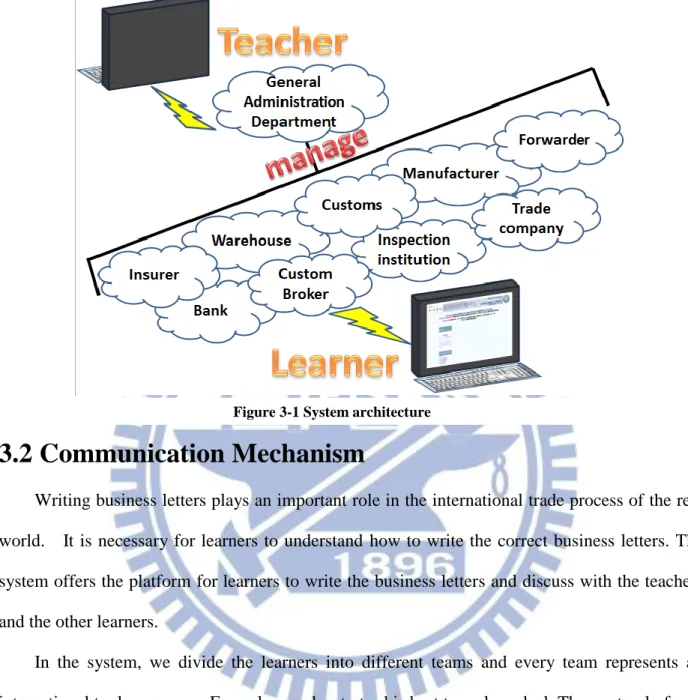
Fig. 3-1 displays the system architecture. The general administration department is the
supremacy role in the system. These roles manage all the things in the system. There are many
different departments in the system, such as the Trade Company, Bank, Customs and so on. we
try our best to create the world that is as real as possible. We hope that learners can effectively
12
3.2 Communication Mechanism
Writing business letters plays an important role in the international trade process of the real
world. It is necessary for learners to understand how to write the correct business letters. The
system offers the platform for learners to write the business letters and discuss with the teachers
and the other learners.
In the system, we divide the learners into different teams and every team represents an
international trade company. Every learner has to try his best to make a deal. They not only focus
on their own business but also have to help their teammates. Besides, we have a special rule
which states that the members in the same team can read their teammate’s business letters. With
this special rule, we believe that the teachers and the learners have effective communication and
the learners can help their teammates.
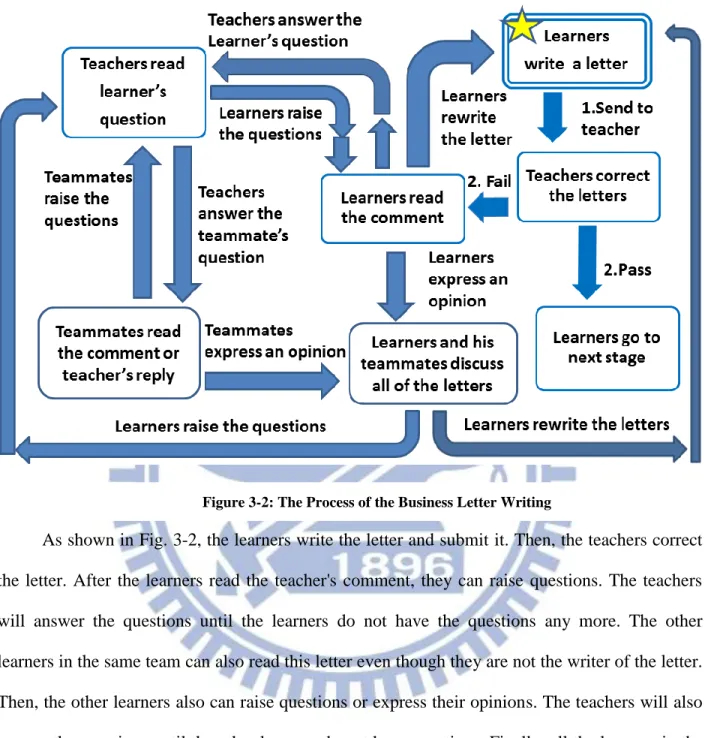
Fig. 3-2 shows the process of the business letter writing.
13
As shown in Fig. 3-2, the learners write the letter and submit it. Then, the teachers correct
the letter. After the learners read the teacher's comment, they can raise questions. The teachers
will answer the questions until the learners do not have the questions any more. The other
learners in the same team can also read this letter even though they are not the writer of the letter.
Then, the other learners also can raise questions or express their opinions. The teachers will also
answer the questions until the other learners do not have questions. Finally, all the learners in the
same team can discuss the comments and content of this letter until they get the answer that they
want to know.
14
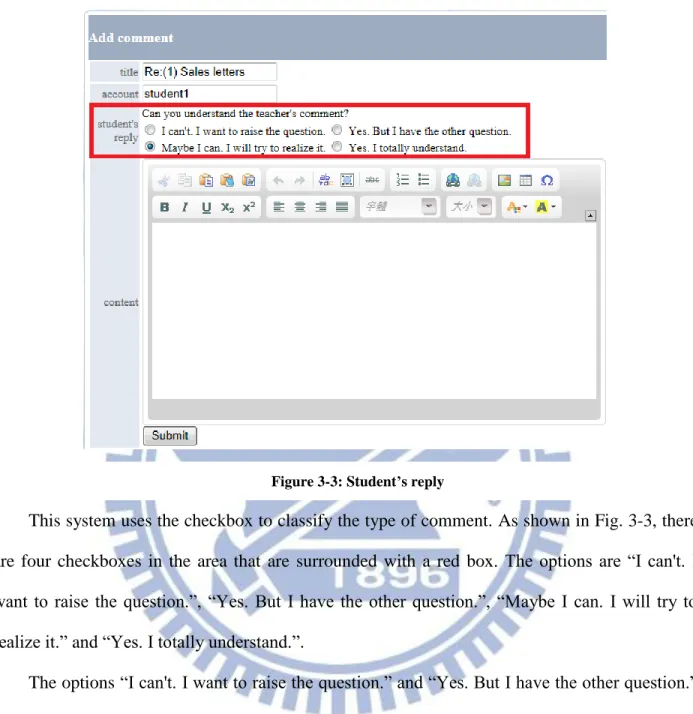
This system uses the checkbox to classify the type of comment. As shown in Fig. 3-3, there
are four checkboxes in the area that are surrounded with a red box. The options are “I can't. I
want to raise the question.”, “Yes. But I have the other question.”, “Maybe I can. I will try to realize it.” and “Yes. I totally understand.”.
The options “I can't. I want to raise the question.” and “Yes. But I have the other question.”
are used to raise the questions to the teachers. The options “Maybe I can. I will try to realize it.”
and “Yes. I totally understand.” are used to express an opinion to the teammates.
If the learners select the first two options to add the comment, the system will notify the
teachers. However, if the learners select the last two options to add the comment, the system will
not notify the teachers.
15
Those options are not only used to classify the type of comment. They also can help us
observe the teachers. After the teachers add the comment, the system will take down the account
of the teacher who takes responsibility to correct the letter. If we detect that many learners select
the option “I can't. I want to raise the question.” and raise a question, the system will try to find
who takes responsibility to correct those letters. Then, the system will notify the teachers who
take responsibility to correct those letters. They should try the other way to add the comment on
the letters. Of course, the system does not let the teacher know who selects the option “I can't. I
want to raise the question.” and raise the question. We believe that this mechanism can improve the quality of communication.
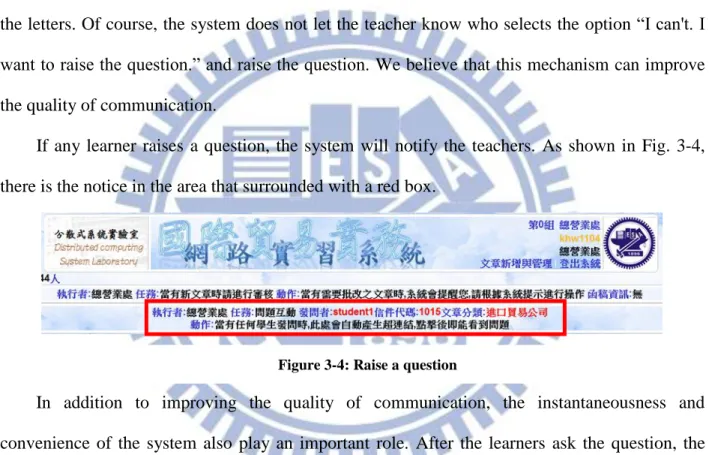
If any learner raises a question, the system will notify the teachers. As shown in Fig. 3-4,
there is the notice in the area that surrounded with a red box.
In addition to improving the quality of communication, the instantaneousness and
convenience of the system also play an important role. After the learners ask the question, the
system will notify the teachers immediately and request the teachers to answer the question. As
shown in Fig. 3-4, there is some learner’s information in the area that surrounded with a red box.
The area is a hyperlink. The teacher can go to the page to answer the learner's question by
clicking this hyperlink.
16
After the teachers answer the question, the system will notify the learners immediately. As
shown in Fig. 3-5, there is some information in the area that surrounded with a red box. The area
is also a hyperlink. The learners can go to the page that contains the teacher’s reply.
As shown in Fig. 3-6, we can see the learner’s question, the teacher’s reply and the
teammate’s comment.
In this system, we not only focus on the communication between the teachers and the
learners. We also make an effort to enhance the communication of the learners among themselves.
Figure 3-6: Communication Figure 3-5: Get the answer
17
Every learner can raise a question to the same letter, even if the learner is not the author of the
letter. The learners can also discuss the question with one another on the same page and bring up
their opinions.
The value of the letter is not only decided by the communication between the teachers and
the learners. The communication among the learners is also very important. The learners not only
learn the knowledge from the teachers but also learn something from the communication among
the learners.
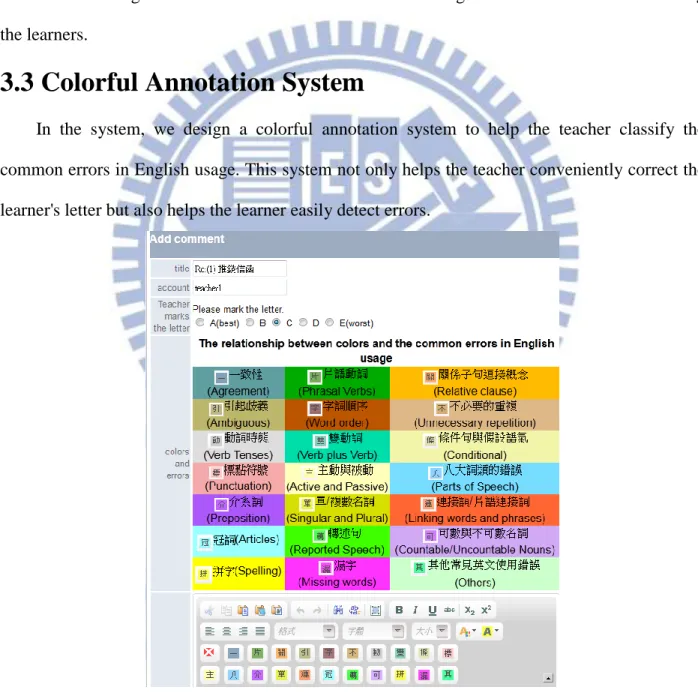
3.3 Colorful Annotation System
In the system, we design a colorful annotation system to help the teacher classify the
common errors in English usage. This system not only helps the teacher conveniently correct the
learner's letter but also helps the learner easily detect errors.
18
As shown in Fig. 3-7, there are 21 kinds of common errors in English usage with different
colors. At the bottom of Fig. 3-7, there are one button with the white cross and another 21 buttons
with a Chinese character each on the keys. These buttons with Chinese characters represent the
common errors in English usage. For example, when we move the mouse on the button with “可”,
we will see the label of the button that means “可數與不可數名詞(Countable/Uncountable
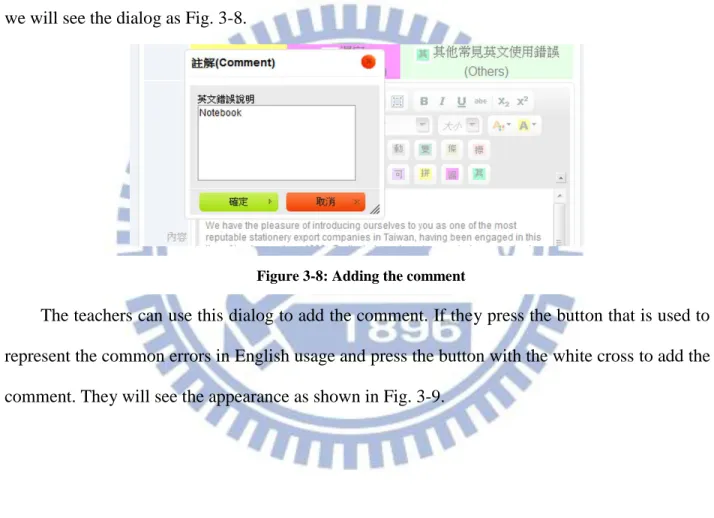
Nouns) ”. The button with the white cross is used to add the comment. As we press the button,
we will see the dialog as Fig. 3-8.
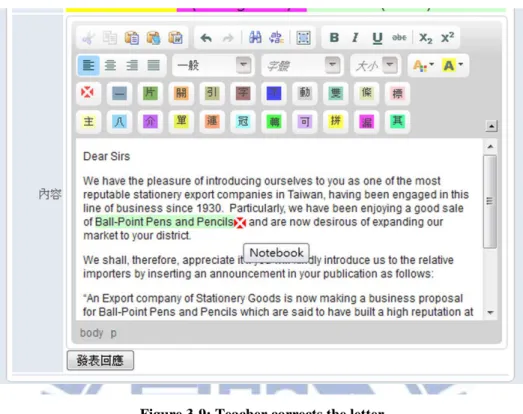
The teachers can use this dialog to add the comment. If they press the button that is used to
represent the common errors in English usage and press the button with the white cross to add the
comment. They will see the appearance as shown in Fig. 3-9.
19
In Fig. 3-9, we can find that the background color of the noun phrase “Ball-Point Pens and
Pencils” turns to light green and there is a red box with a white cross after this sentence. When we move the mouse on the red box, we will see the label of the pattern “Notebook”. The word
“Notebook” is the comment added by the teacher.
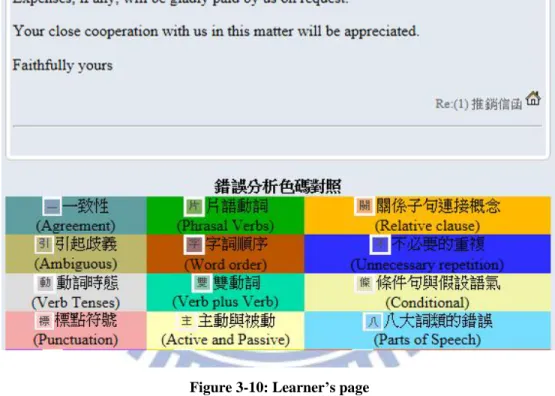
This system also helps the learners learn. As shown in Fig. 3-10, the learners can easily find
where the errors are.
20
For instance, when the learners read the comment, the system offers an explanation about
the relationship between colors and the common errors in English usage on the same page. If the
learners cannot realize the meanings of the common errors in English usage, the system prepares
a hyperlink to explain what the meanings of the errors are. These hyperlinks combine with
explanations about the relationships between colors and the common errors in English usage. If
21
the learners hit the hyperlink, they will see the learning site about the different common errors in
English usage, just as shown in Fig. 3-11.
These explanations help clarify some basic grammatical concepts for the students to ponder.
If they still have any doubt about the explanations, they may ask their teachers about them in
their communication with the teachers.
3.4 Learning Assistant
We know that many learners do not major in international trade, so we design many
assistant tools for the learners. For example, we use the picture to explain the meaning of each
step and the major task of the step. As shown in Fig. 3-12, the picture shows that the major task
and meaning of the twenty-eighth step.
22
This design can help the learners understand the meaning of the step and realize what role
the step plays in the international trade process completely.
Figure 3-12: The explanation of step
23
As shown in Fig. 3-13, the total steps of international trade are classified into different topics.
The learners can find the model letters as the examples that they want to learn by those topics.
These model letters of each step can help the learners write business English letters.
The above assistant tools are helpful for the learners. We also design some assistant tools for
the teachers, such as the query system. As shown in Fig. 3-14, the teachers can find the step,
question and business English letter of each learner.
3.5 Special Mechanism
To improve the quality of the system, we design two special mechanisms. Firstly, we let the
learners correct other classmates’ letters. Secondly, we allow the learners to practice the letters of
all topics freely.
The teachers can decide whether they will allow the learners to correct their classmates’
letters. This mechanism can improve the quality of the system. This mechanism can reduce the
teachers’ working load and allow them to observe some special phenomena. They can observe
the learners' ability of detecting the errors of common English usage and the ability of giving the
other learners correct comments.
24
As shown in Fig. 3-15, the learners can pick up the other learner’s letter to correct. After the
learners pick up the letter, the system will transfer the page to the correction page.
The other special mechanism is the practice mechanism. In this system, the learners should
follow the international trade process to write the English business letter. The learners cannot
skip the step to practice the later task. However, the learners can practice the letters of all topics
freely through the practice mechanism.
As shown in Fig. 3-16, the learners can pick up a different role and pick up the model letters
of different topics to consult with. In the system, different roles have to handle the letters of
different topics.
Figure 3-15: Picking up the Learner
25
4 System Demonstrations
4.1 System Flow Scenarios
Figure 4-1 System Flow Diagram
The system uses the letter of credit to be payment for a transaction. The letter of credit is a
document issued mostly by a financial institution, used primarily in trade finance, which usually
provides an irrevocable payment undertaking. The system process shows in the Fig. 4-1.
The learners can decide whether their team is an importing company or an exporting
company. Every learner should make a deal with the other partners within the same team. The
26
employee of the bank, the forwarder, the customs staff and the customs broker staff, etc. The
learners will go to the next stage by writing the business letter or giving the correct attachment.
4.2 Teacher Side
A good e-learning system must appeal to the learners. For most learners, an online game is the best leisure activity. For developing a good e-learning system, we combine the concepts of
online game with international trade. Every game needs to give the user a first task to initialize.
In this system, the teachers should send a letter to command the learners to import something.
Figure 4-2 Commission Information
As shown in Fig. 4-2, the system will notify the teachers to send the letter to commission the
learners to import something. The information of the commission letter in the area is surrounded
with a red box. This area is a hyperlink. The teachers can go to the page to send the commission
letter to the learners by clicking this hyperlink.
As shown in Fig. 4-3, it is the page with which the teachers send the commission letter to the
learners. On the page, the teachers just need to fill with the content of the commission letter. The
system will fill it up with the other column automatically.
After the teachers send the commission letter to the learners, the learners can make a deal
among their team members. Then, the learners of the export side can send the advertisement letter
to the learners of the import side. Then, the teachers will transfer it to normal model, wait to
27
Figure 4-3 Commission Letter
4.3 Export Side
The first task of the learners of the export side is sending the advertisement letter to the
learners of the import side. The purpose of the advertisement letter is to make the learners of the
import side understand the product's features of the export company.
Figure 4-4 Advertisement information
As shown in Fig. 4-4, the system will notify the learners of the export side to send the
28
export side can click the hyperlink and go to the page that is used to send the advertisement letter
by this hyperlink.
Figure 4-5 Advertisement Letter
As shown in Fig. 4-5, three different areas are surrounded with a red box, respectively.
The first area shows the option of the importers. The second area shows the option of the
products of each importer. The learners can choose the importers to negotiate a business
transaction. After the learners send the letter, they will wait for the teachers to correct their letters
29
Figure 4-6 Wait for the teacher
4.4 Import Side
The first task of the learners of the import side is sending an inquiry letter to the learners of
the export side. However, before the learners of the import side start to write the inquiry letter,
they must wait for two different letters. The first letter is the commission letter that is sent by the
teachers, and the second letter is the advertisement letter that is sent by the learners of the export
side.
Figure 4-7 Waiting for the Commission Letter
As shown in Fig. 4-8, after the learners of the import side receive the commission letter, the
30
Figure 4-8 Waiting for the Advertisement Letter
As shown in Fig. 4-8, after the learners of the import side receive the commission letter, the
information column will change. The information column will show that the task is waiting for
the advertisement letter.
Figure 4-9 Receiving the Advertisement Letter
After receiving the advertisement letter, the system will notify the learners of the import side.
31
Figure 4-10 The Content of Advertisement Letter
As shown in Fig. 4-10, the learners of the import side can read all advertisement letters and
32
5 Experiments, Results and Analyses
5.1 Experiments
To assess the system, we develop a questionnaire using a five-point Likert scale ranging
from “1-strongly disagree” to “5 -strongly agree”.
In the first part of the questionnaire, we use a well-known questionnaire System Usability
Scale (SUS) to evaluate the system usability [54]. According to the research of Aaron Bangor [55]
[56], products which are at least passable have SUS scores above 70. On the other hand, products
with scores of less than 70 should be considered increasing scrutiny and continued improvement
and should be judged marginal at best. Aaron Bangor made a differentiation in the marginal
scores, by dividing them into “low marginal” and “high marginal”. Aaron Bangor also suggested
that “products with scores less than 50 should cause significant concern and are judged to be
unacceptable”.
In the second part of the questionnaire, we use three short answer questions. In this part, we
use the grounded theory method to analyze the data [57].
Finally, we requested for learners’ basic information and Internet usage experience. The data
shows as follows:
5.1.1 Data collection
According to the statistics, there are 102 learners in the system. There are 85 undergraduates
and 17 graduate students. All the learners volunteer to join this system. We post the questionnaire
33
questionnaires. On the other hand, we also ask the teachers who major in language teaching for
opinions. We interviewed nine teachers and asked them to fill in the questionnaire.
5.1.2 Demographics and descriptive statistics
The learners include 83.6% females and 16.4 males. More than ninety percent (91.8%) of
learners are aged between 19 and 22 years old, 6.1% of learners are aged between 23 and 26
years old and 2.1% of learners are aged between 24 and 27 years old. The questionnaires filled in
by the undergraduates are the major data source (91.8%). There are 66% of the learners who use
the internet service more than 10 years, another 27% of the learners use the internet service more
than 7 years but less than 10 years and the other 7% of the learners use the internet service more
than 4 years but less than 7 years. There are 26% of the learners who use the internet more than 7
hours per day, another 21% of the learners use the internet service more than 4 hours but less than
7 hours and the other 53% of the learners use the internet service more than 1 hours but less than
4 hours. All learners use the internet service such as search engine, dictionary, map and another
common internet services. Overall, 87% of learners had used the e-learning systems.
5.2 Results and Analysis (1st investigation of learner side)
5.2.1 System Usability Scale
We can see the SUS questionnaire responses in Table 5-1. At the beginning, we can see the
score of the SUS is just 58.13 According to the research of Aaron Bangor, products with scores
more than 55 lie between “OK” and “GOOD”. It means that the product should increase scrutiny
and continue improvement. It is not a good value. However, we can find some reasons to explain
it.
Firstly, the means of the items “I think that I would need the support of a technical person to
34
system.” are the same, 4.00. It means that most learners think they need somebody to help them learn to use the system or they need to learn a lot of things before they could get going with this
system. The standard deviations of these two items are 0.76 and 0.53 respectively. This result
matches with the result of the mean. It means that most learners express the same opinion. It is a
not good news for us.
We think that this system is the new system that combines the international trade process
and e-learning. According to the statistics, many learners of this system major in English
language, law and computer science. Some learners major in international trade. For the learners
who do not major in international trade, they cannot understand what they should do at the
beginning. For the learners who major in international trade, they can realize the international
trade processes easily. However, for the other learners, it is not so easy. As we know, some
freshmen who major in international trade also has to spend some time to realize the international
trade processes.
The system not just uses the slides or teaching videos to provide the knowledge for the
learners. The learners have to practice the international trade processes. We hope the learner can
make a deal in the system just like in the real world. In the fact, some learners think the system is
a little complex. They hope that the process of the system should be simplified. We think that we
should make an effort to improve the instructions of the system. We must let any learner who
joins the system be familiar with the system easily and quickly.
Beside the difficulty of learning international trade processes, how to use the functions of
the system is also a problem. The functions of the system are just the common internet functions.
However, when those functions combine with the international trade processes, it will be a little
complex. Sometimes the learners cannot understand how to use those functions. It is a good
35
Table 5-1 SUS Questionnaire (First investigation of learner side)
Secondly, the standard deviation of the item “I found the system unnecessarily complex” is
0.83. This is the maximum standard deviation of this SUS questionnaire. It means that some
learners think the system unnecessarily complex or the system very cumbersome to use, but some
learners do not think so. The mean of this item is 2.88. It means that the learners who think the
system unnecessarily complex are a little less than those do not think so. It is a good news.
However, there are still many learners who think that the system should be changed. We must do
something to improve the system.
Finally, the average values of the items “I found the various functions in this system were
well integrated” and “I would imagine that most people would learn to use this system very quickly” are 3.88 and 4.00. It means that most learners think that they can use the system to learn the knowledge of international trade and the design of the system is good for them. Although it is
a good news for us, we know that we still have to make efforts to improve the system.
System Usability Scale Mean SD
I think that I would like to use this system frequently. 3.75 0.46
I found the system unnecessarily complex. 2.88 0.83
I thought the system was easy to use 3.62 0.74
I think that I would need the support of a technical person to be able to use
this system 4.00 0.76
I found the various functions in this system were well integrated. 3.88 0.64
I thought there was too much inconsistency in this system 2.63 0.52
I would imagine that most people would learn to use this system very quickly. 4.00 0.53
I found the system very cumbersome to use. 2.25 0.46
I felt very confident using the system. 3.75 0.46
I needed to learn a lot of things before I could get going with this system. 4.00 0.53
36
5.2.2 Short Answer
Table 5-2 Short Answer (First investigation of learner side)
Table 5-2 shows the categorized feedbacks from the learners. In Table 5-2, we can find
some problems in the system.
Firstly, many learners think that the process of the system is a little complex. They think that
the process should be simplified. We think that we must simplify the process and make the
Keyword A portion of response
complex
It is a little complex. I have no idea how to use it.
Some part of the system is a little complex.
simplify
I think the web page should be simplified.
The process should be simplified.
appealing
The picture in the system should be more appealing.
The interface should be more appealing.
process
The process should be clearer.
If there are more instruction of process will be better.
user-friendly
The interface should be moreuser-friendly.
The function should be moreuser-friendly
practice
The system can let me practice all things that I learn from the textbook.
The system is easy for me to practice the business letter.
easy to use
The system is easy to use. It doesn't take too much time to learn how to use the system.
It is easy to use. It automatically reminds me what I should do.
function
If it adds the function that let me chat online, it will be good.
Maybe it can add some function, such as video conference.
instructions
I need more instructions about the function.
37
process be clearer. We think that we should make an effort to improve the instructions of the
system and sufficient instructions can help the learners understand how to use this system quicker.
If we just try to simplify the process, it is not enough for learners. We should add more
illustrations in the right place. It matches with the result that we got from the SUS Questionnaire.
Secondly, although some learners think the system is easy to use, it is still not appealing to
the learner. The functions and interface are not user-friendly. We should adjust the pictures and
the colors of the system.
Finally, some learners hope we can make an effort to improve the function of
communication. Adding the function of video conference is a good idea.
5.3 Results and Analysis (2nd investigation of learner side)
In the second version of the system, we simplified the flow of the system and offered the
new detailed instruction. We changed the interface of the system, adjusted the function of the
former system and designed new user-friendly tools for the users.
5.3.1 System Usability Scale
We can see the SUS questionnaire in Table 5-3. At the beginning, we can see the score of
the SUS is just 65.94 According to the research of Aaron Bangor, products with scores of more
than 65 lie between “OK” and “GOOD”. It means that the product should increase scrutiny and
continued improvement. It is better than the former version. Although it is a good news for the
researcher, there are still many topics that should be discussed.
Firstly, the mean of the item “I think that I would need the support of a technical person to
be able to use this system” is 2.75 and this mean is 1.25 less than that in the first investigation. The mean of the item “I needed to learn a lot of things before I could get going with this system”
38
former item is 1.16 and this standard deviation is 0.40 more than that in the first investigation.
The standard deviation of later item is 1.41 this standard deviation is 0.88 more than that in the
first investigation.
The means of these two items both decrease and the standard deviation of these two items
both increase. The decreasing of mean shows more and more learners think that they would not
need the support of a technical person to be able to use this system. Although the mean of the
item “I needed to learn a lot of things before I could get going with this system” also decreases,
the range of change is not more than the item “I think that I would need the support of a technical
person to be able to use this system”. We think that the reason for this result is that we offer the detailed instructions. Some learners think that the behavior of reading the instructions matches
with the item “I think that I would need the support of a technical person to be able to use this
system”. We think this is the major reason for the range of change.
Table 5-3 SUS Questionnaire (Second investigation of learner side)
System Usability Scale Mean SD
I think that I would like to use this system frequently. 3.75 0.46
I found the system unnecessarily complex. 2.38 1.06
I thought the system was easy to use 3.88 0.99
I think that I would need the support of a technical person to be able to use
this system 2.75 1.16
I found the various functions in this system were well integrated. 4.00 0.53
I thought there was too much inconsistency in this system 2.63 0.74
I would imagine that most people would learn to use this system very quickly. 4.13 0.35
I found the system very cumbersome to use. 2.38 0.52
I felt very confident using the system. 3.75 0.46
I needed to learn a lot of things before I could get going with this system. 3.00 1.41
39
The standard deviations of those two items both increase. It means that the opinion of
learners becomes more and more different. With the means of these two items increase, we think
more and more learners think that the they do not need anybody to help them learn to use the
system or they do not need to learn a lot of things before they could get going with this system.
The increasing of those items means that some learners select “agree” or “strongly agree” in the
first investigation. In the second investigation, although some learners still think they need
somebody to help them learn to use the system or they need to learn a lot of things before they
could get going with this system, some learners do not think so. They change their choice from
“agree” or “strongly agree” to “disagree” or “strongly disagree”.
In addition to offering the detailed instructions, we also simplify the process of system and
adjust the interface of the system. In the former version of the system, a learner has two different
roles at the same time. It let the learners feel confused. In the new version of the system, the
learners just have a role at the same time. With the evolution of the process, the learners will
change the role automatically. This change simplifies the process and interface. The learners can
focus on one thing at one time.
Secondly, the standard deviation of the item “I found the system unnecessarily complex” is
1.06 and this standard deviation is 0.23 more than the same item in the first investigation. It
means that more and more learners select the opposite options when they face this question.
However, we cannot make sure whether this change is good or bad, we must check the other
statistics. The mean of the item “I found the system unnecessarily complex” is 2.38 and this mean
is 0.50 less than the same item that in the first investigation. It means that more and more learners
who do not think the system unnecessarily complex. It is good news for me. This result also let
40
change their choice from “agree”, “strongly agree” to “disagree, or “strongly disagree” in the second investigation. However, there are still many learners who think that the system
unnecessarily complex. We still have to do something to improve the system.
Finally, the mean of the item “I found the various functions in this system were well
integrated” is 4.00 and this mean is 0.12 more than the same item in the first investigation. The mean of the item “I would imagine that most people would learn to use this system very quickly”
is 4.13 and this mean is 0.13 more than the same item in the first investigation. The standard
deviation of former item is 0.53 and this standard deviation is 0.11 less than the same item in the
first investigation. The standard deviation of later item is 0.35 this standard deviation is 0.18 less
than the same item in the first investigation.
The means of those two items both increase and the standard deviations of those two items
both decrease. The increasing of means shows that more and more learners give positive
feedback and the decreasing of standard deviation shows that most learners have the same
opinion.
5.3.2 Short Answer
Table 5-4 shows the categorized feedbacks from the learners. In the Table 5-4, there are stillmany topics that could be discussed.
Firstly, we offer the detailed instructions, add the functions and change the interface in this
new version. Many learners show that “the interface is more user-friendly than former version”
and “the function is more user-friendly than former version”. It means the learners think that the
new version makes good change.
Secondly, we also simplify the process in the new version. Many learners show that they
41
they believe that if they often use this system, they will be familiar with the system and
international trade process”. It means that it can raise the interest of the learners by offering them a clearer system.
Thirdly, with the process becoming clearer, the learners show that “the system is easy to use.
This version does not take too much time to learn how to use the system”. We think the sufficient
instruction also helps the learners use this system so the learners feel the system become easier to
use.
Table 5-4 Short Answer (Second investigation of learner side)
Keyword A portion of response
familiar
I think that I can be familiar with this system. I think I should often use this system.
I believe that if I often use this system, I will be familiar with the system and international trade process.
user-friendly
The interface is moreuser-friendly than former version.
The function is moreuser-friendly than former version
notification
Maybe it could add the mechanism of emergency notification.
I hope it can use the e-mail as the way of notification.
easy to use
The system is easy to use. This version does not take too much time to learn how to use the system.
It is easy to use. The hint of this version is clearer than former version.
function
If it add the function that let me discuss with my teammate, it will be good.
I hope it can add the function that is “spell check”.
There are enough functions for me to use the system.
instructions
I think the instructions are good.
42
Fourthly, in addition to the positive feedback, many problems should be solved. Many
learners hope that the system should add the mechanism of emergency notification. Some
learners also hope that the system can use the e-mail as another way of notification.
Finally, some learners show that they think that there are enough functions for them to use
the system. They just need some time to be familiar with this system.
5.4 Results and Analysis (Teacher side)
5.4.1 System Usability Scale
In this system, we created a colorful annotation system to help the teachers correct the
articles of the learners. We used the system usability scale questionnaire to assess the system.
Table 5-5 SUS Questionnaire (Teacher)
As shown in the Table 5-3, the score of the SUS is 74.17. According to the research of
Aaron Bangor, products with this score lie between “GOOD” and “EXCELLENT”. It is a good
System Usability Scale Mean SD
I think that I would like to use this system frequently. 4.44 0.73
I found the system unnecessarily complex. 2.11 0.33
I thought the system was easy to use 4.44 0.50
I think that I would need the support of a technical person to be able to use
this system 2.44 1.59
I found the various functions in this system were well integrated. 3.78 0.97
I thought there was too much inconsistency in this system 2.11 0.78
I would imagine that most people would learn to use this system very quickly. 4.00 0.00
I found the system very cumbersome to use. 1.78 0.44
I felt very confident using the system. 4.00 0.00
I needed to learn a lot of things before I could get going with this system. 2.44 1.33
43
value. It means that the colorful annotation system could help the teachers correct the English
letter. Although this score is good, there still have some themes for discussion.
Firstly, the standard deviation of the item “I think that I would need the support of a
technical person to be able to use this system” is 1.59. It means some teachers think they need somebody to help them learn to use the colorful annotation system, but the other teachers do not
think so. Few teachers show “no comment”. The mean of this item is 2.44. It means that the
teachers who need the support of a technical person or the teachers who need to learn a lot of
things before they could get going with this system are a little less than the teachers who do not
need.
Secondly, the standard deviation of the item “I needed to learn a lot of things before I could
get going with this system” is 1.33. It means some teachers think they need to learn something
before they start to use the colorful annotation system, but the other teachers don't think so. Few
teachers show no comment. The mean of this item is 2.44. It means that the teachers who think
that they need to learn a lot of things before they could get going with this system are a little less
than the teachers who do not think so. This result is just like the item that is “I think that I would
need the support of a technical person to be able to use this system”. They both need some help
to use the colorful annotation system.
According to the results of the first two, we think that we need to create more assistant tools
to help the teachers learn how to use the colorful annotation system. We also have to write the
instructions in detail.
Thirdly, there are some interesting results. The standard deviation of the item “I would
imagine that most people would learn to use this system very quickly” and the standard deviation
of the item “I felt very confident using the system” are both 0.00. This result means that although